MC-E7001 - Vacuum Cleaner PANASONIC - Free user manual and instructions
Find the device manual for free MC-E7001 PANASONIC in PDF.


User questions about MC-E7001 PANASONIC
0 question about this device. Answer the ones you know or ask your own.
Ask a new question about this device
Download the instructions for your Vacuum Cleaner in PDF format for free! Find your manual MC-E7001 - PANASONIC and take your electronic device back in hand. On this page are published all the documents necessary for the use of your device. MC-E7001 by PANASONIC.
USER MANUAL MC-E7001 PANASONIC
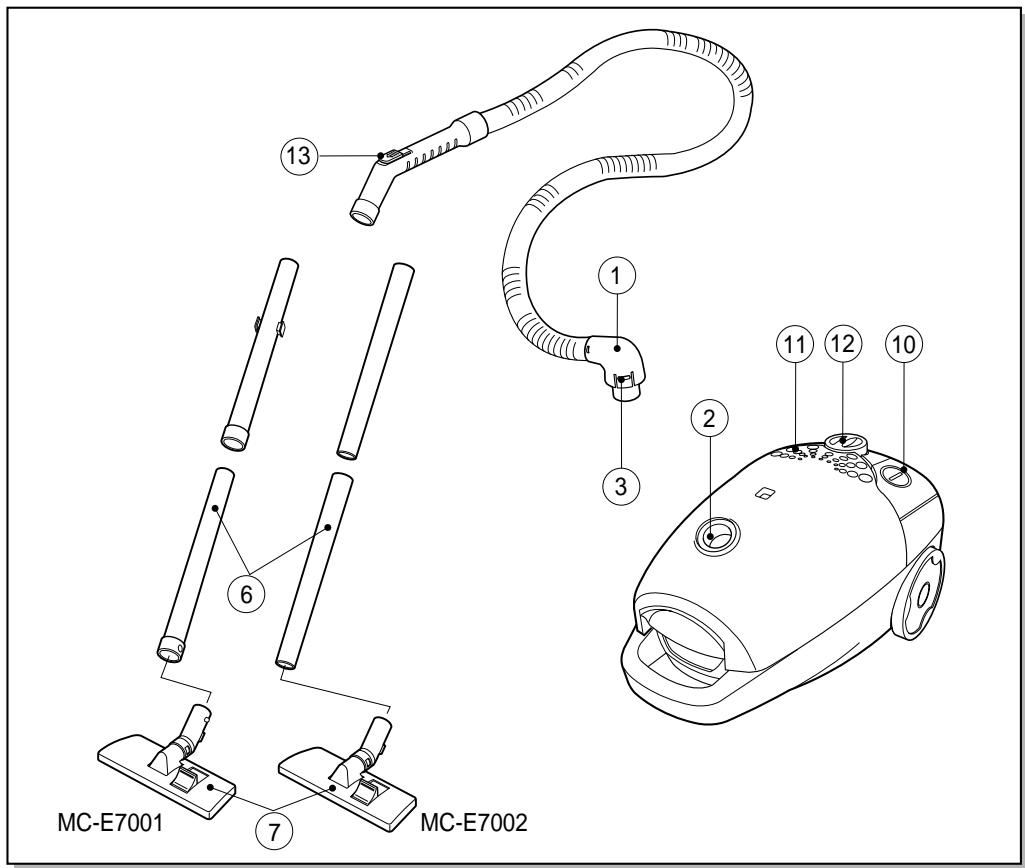
Part location and how to use (diagram)


Information for your safety
Please read all the following information, which contains important instructions for the safety, the use and the maintenance of the appliance.
This appliance complies with the following EC Directives: 73/23/EEC and 89/336EEC.
This appliance is not intended for use by young children or infirm person without supervision.
- Do not use the appliance if the mains lead is damaged or faulty.
This appliance is provided with a mains lead and if this becomes damaged, it must be repaired by an Authorised Service Centre or a qualified person in order to avoid any hazard.
Unplug from the socket when not in use and before cleaning the appliance or undertaking maintenance operations.
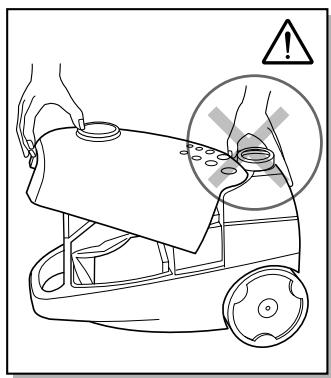
If no dust bag is inserted, the cover cannot be closed. Please do not close it by force!
- Do not vacuum flammable or explosive substances(liquids or gases).
- Do not vacuum hot ash, embers or sharp objects.
Do not vacuum water or other liquids.
This cleaner includes an automatic thermal safety device which automatically turns off the power if the suction inlet, hose or extension wand becomes clogged. If this occurs, disconnect from the mains outlet, remove the material responsible for the clogging and then wait about 10 minutes, before operating your cleaner again.

Important for users in the UK
The wires in the mains lead of this appliance are coloured in accordance with the following code:
BLUE-neutral
BROWN - live
As the colours of the wires in the mains lead of this appliance may not correspond with the coloured markings identifying the terminals in your plug,
PROCEED AS FOLLOWS:
The wire which is coloured BROWN must be connected to the terminal which is marked L or coloured RED.
The wire which is coloured BLUE must be connected to the terminal which is marked N or coloured BLACK
VERY IMPORTANT:
Neither wire is to be connected to the earth terminal of a 3 pin plug.
If a 13 amp plug is fitted, fit a 13 amp BS 1362 fuse.
If any other type of plug is used, protect with a 15 amp fuse at the distribution board.
For appliances which come with mains lead and plug moulded on : the plug moulded on to the cord incorporates a fuse.
For replacement use a 13 amp BS 1362 fuse. Only ASTA approved or certified fuses should be used.
The fuse cover/carrier must be replaced in the event of changing the fuse.
The plug must not be used if the fuse cover/carrier is lost. A replacement cover/ carrier must be obtained from authorised electrical goods retailers.

WARNING!
Should it become necessary to replace the moulded on plug then the detective plug should be destroyed to avoid any possible shock hazard that could occur should such a plug be inserted into a 13 amp socket elsewhere in the house.
How to Use
Connecting the flexible hose
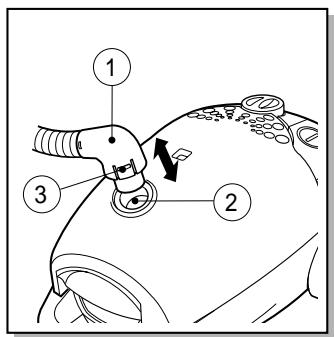
Push the end of the head (1) on the flexible hose into the attachment point (2) on the vacuum cleaner.
To remove the flexible hose from the vacuum cleaner, press on the button (3) situated on the head, then pull upwards.
Assembling the tubes
(dependently on model)
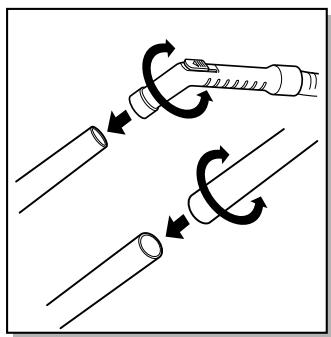
Metal or plastic tube (6)
- Fit together the two tubes by twisting slightly.
Using the cleaning head and Accessory
Nozzles Fit the large cleaning head onto the end of the tube.
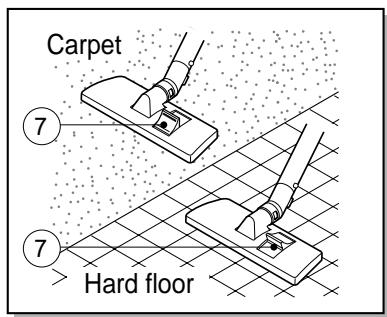
- The 2 position head is equipped with a pedal (7) which allows you to alter its position according to the type of floor to be cleaned. Hard floor position (tiles, parquet floors...) Press on the pedal to lower the brush.
Carpet or rug position. Press on the pedal to lift the brush up.
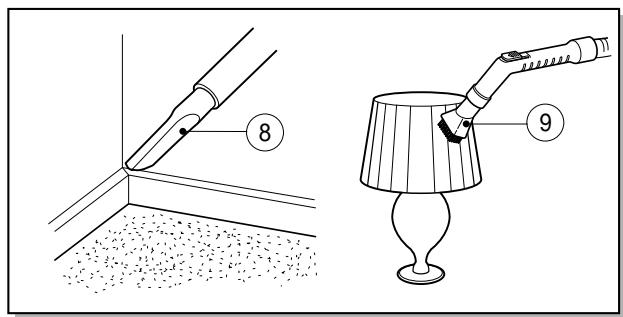
- Crevice Tool (8)
For vacuuming in those normally inaccessible places like a window frame or a crevice in the wall.
Dusting brush (9)
For vacuuming picture frames, furniture outlines, books and other uneven objects.
How to plug in and use
Pull out the mains lead to the desired length and plug into the socket.
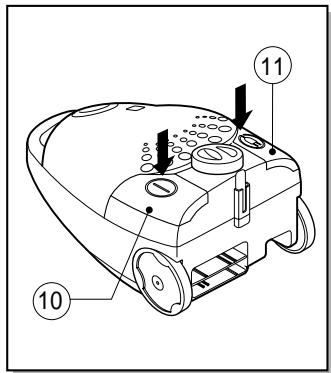
Press the button (10) to start the vacuum cleaner.
To stop it press the button (10) again.
Press the button (11) to rewind the power cord.
Adjusting the power level
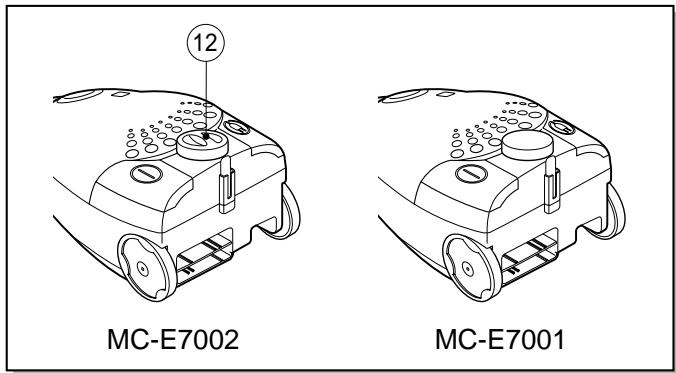
- If your appliance is equipped with an electronic variable rotary button (12), you can choose the power appropriated for the task. The more you rotate the rotary button (12) towards the right, the greater the suction power.
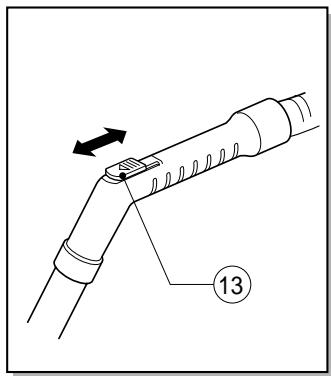
- The flexible hose handle has a manual air flow regulator (13) which allows you to briefly reduce the suction level.
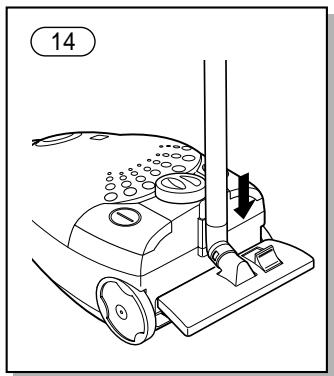
Park-System (14)
For short breaks during vacuuming, for example to move a small piece of furniture or a rug, use the [Park system] to support the flexible hose and cleaning head.
- Slide the hook attached to the large cleaning tool into the slot on the rear of the appliance.
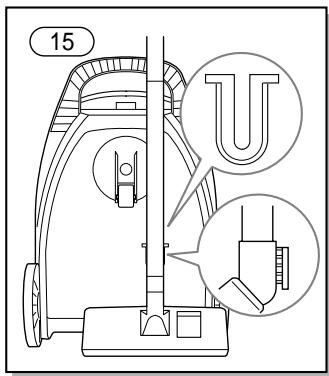
Carrying and storage (15)
When you have switched off and unplugged the appliance, press the button (11) to automatically rewind the cord.
You can move or store your appliance in a vertical position by sliding the hook on the large cleaning head into the clip on the underside of the appliance.
Maintenance
Changing the dust bag
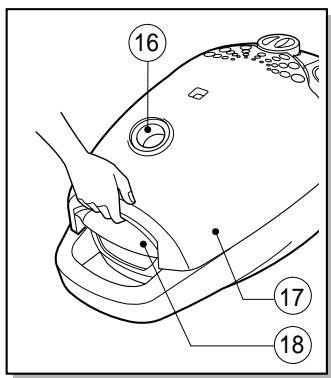
The dust bag needs changing when the cleaner is set to maximum power and the cleaner head is off the floor but the "bag full" indicator window (16) is completely coloured red.
Even if the dust bag does not appear to be full at this stage, it should be changed. It could be that a great deal of fine dust has clogged up the pores of the dust bag.
- Turn off the appliance and unplug it.
- Open the filter cover (17) by pulling the latch (18) and lifting it up.
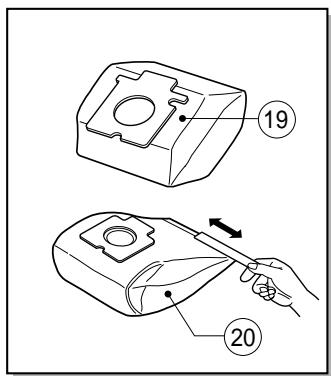
Your appliance is equipped with either a paper dust bag (19) or a fabric dust bag (20) (depending on model)
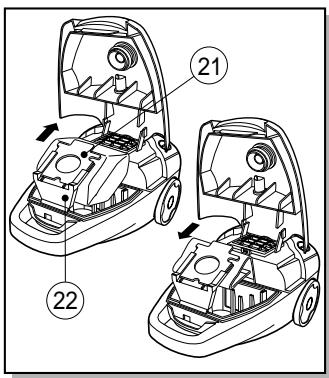
To remove the dust bag, pull the cardboard (21) of the dust bag from the bag mouth (22).
- To refit a new bag, push the cardboard support of a new bag into the bag mount (22) until it will go no further.
Use only original Panasonic dust bags Type C-20E
If your appliance is fitted with a fabric dust bag follow the same instructions as above. Empty it and replace it (20). Do not wash it.
Cleaning the motor safety filter
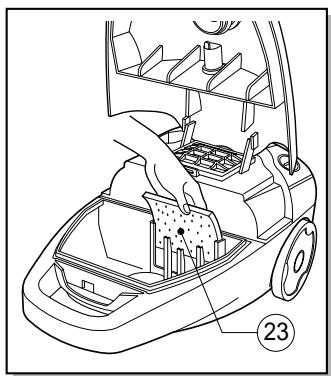
The motor safety filter is situated inside the appliance between the dust bag and the motor. When it becomes dirty, we advise you to remove the motor safety filter (23) and to clean it by tapping to remove the dirt and then replacing it in the vacuum cleaner.
Changing the air outlet filter
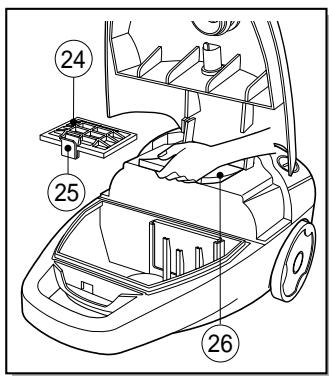
- To change the air outlet filter, open the filter cover (17) by pulling the latch (18), take out the air outlet cover (24) by pushing the lever (25) and then change the filter (26).
- The foam filter, should be cleaned regularly by tapping it to remove the dirt.
What to do if your appliance does not work?
Check that the appliance is correctly plugged in and that the electrical socket is working.
What to do when the suction performance reduces?
- Stop the appliance and unplug it.
- Check that the tubes, flexible hose and cleaning tool are blocked or not. If they are blocked, remove the obstruction.
- Check that the dust bag is full or not. Replace if necessary.
- Check that the air outlet filter is blocked or not. Replace if necessary.
Vacuum Cleaner Consumables / Accessories (for customers in the UK only)
| DESCRIPTION | MC-E7001 | MC-E7002 |
| ① Hose unit | Product code AMC8A92V9034 | Product code AMC8A92V9034 |
| ⑦ Floor nozzle NZ-27 | Product Code AMC8A99V8034 (for plastic tube) | Product Code AMC8A99V9034 (for metallic tube) |
| ⑥ Extension tube (2/pcs. Plastic) | Product code AMC8A85V8034 | Product code AMC8A85V8034 (Alternative type) |
| ⑥ Extension tube (2/pcs. Metallic) | Product code AMC8A12V8000 (Alternative type) | Product code AMC8A12V8000 |
| Telescopic tube (Optional) | ...... | Product Code AMC8A85V9000 |
| ②6 Clean air outlet filter | Product Code AMC8F28V8000 | Product Code AMC8F28V8000 |
| ②3 Central filter | Product Code AMC8F03V8000 | Product Code AMC8F03V8000 |
| ⑧ Crevice nozzle | Product Code AMC8A13V8034 | Product Code AMC8A13V8034 |
| ⑨ Dusting brush | Product code AMC8F97V8034 | Product code AMC8F97V8034 |
| ⑲ Dust bag (pack of 5/ u.) Type C-20E | Product Code AMC8F96T0000 | Product Code AMC8F96T0000 |
Note: Specifications are subject to change without notice.
Shop @ Panasonic
- Order accessory and consumables items for all Vacuum Cleaner with ease and confidence either by telephoning our Customers Care Centre on 0870 900 9043
Mon - Fri 9:00 am 5:30 (except public holidays).
- Or go online through our Internet Accessory ordering application at www. panasonic. co. uk
- Most major credit and debit cards accepted.
- All enquiries, transactions and distribution facilities are provided directly by Panasonic UK Ltd.
- It couldn't be simpler!
| SPECIFICATIONS | MC- E7001 | MC- E7002 |
| Power sourde | 230- 240V ~ 50Hz | 230- 240V ~ 50Hz |
| Max. Output | 1400W | 1500W |
| Nominal Output | 1200W | 1300W |
| Dimensions (LxWxH) | 419x285x247 | 419x285x247 |
| Net weight (kg) | 7.0 | 7.2 |
| Floor nozzle NZ- 27 (for plastic tube) | V | - |
| Floor nozzle NZ- 27 (for metallic tube) | - | V |
| Dusting brush | V | V |
| Crevice nozzle | V | V |
| Extension tube (plastic) | V | - |
| Extension tube (metallic) | - | V |
Design and specifications may be changed without notice.
Weight and dimensions shown are aproximate.
REMARKER FOR CUSTOMER
The model and serial number of this product may be found on the name plate located at the back of your cleaner. You should note the model and serial number in the spaces provided and retain this book as a permanet record of your purchase.
Model Number :
Serial Number :
Date Purchased :
Where Purchased :
Matsushita Electric Espana, S. A.
Vacuum Cleaner Division
Zona Industrial del Poligono de CELRA
17460 CELRA (Girona) SPAIN