
QA9I518 - Food Processor MOULINEX - Free user manual and instructions
Find the device manual for free QA9I518 MOULINEX in PDF.



| Product Type | Connected i-Coach Touch Food Processor |
| Brand | Moulinex |
| Model | QA9I518 |
| Power | 1200 W |
| Number of Speeds | 10 (Pulse, folding speed, speeds 1 to 8) |
| Built-in Timer | Yes, adjustable up to 30 minutes in increments |
| Connectivity | WiFi 2.4 GHz, Moulinex app (iOS and Android) |
| Touch Screen | Yes, interactive and intuitive |
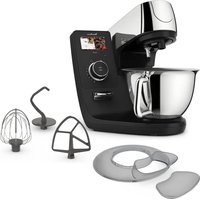
| Included Accessories | Multi-wire whisk, dough hook, beater, pasta cutter, mini chopper* and connected scale* (*depending on model) |
| Main Functions | Whisk, knead, mix, chop, blend, weigh (with scale) |
| Bowl Capacity | Large capacity (up to 2.7 kg of cake batter) |
| Safety | Automatic stop if head raised or lid opened, electronic motor protection |
| Cleaning | Dishwasher-safe accessories, motor unit wipe clean with a damp cloth |
| Sleep Mode | After 15 minutes of inactivity |
| Power Supply | Mains |
Frequently Asked Questions - QA9I518 MOULINEX
User questions about QA9I518 MOULINEX
0 question about this device. Answer the ones you know or ask your own.
Ask a new question about this device
Download the instructions for your Food Processor in PDF format for free! Find your manual QA9I518 - MOULINEX and take your electronic device back in hand. On this page are published all the documents necessary for the use of your device. QA9I518 by MOULINEX.
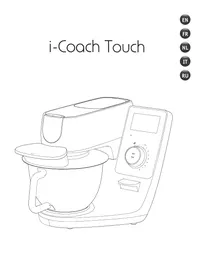
USER MANUAL QA9I518 MOULINEX
EN
APPLIANCE DESCRIPTION ....01
TECHNICAL DATA FOR THE APPLIANCE 01
GETTING STARTED 02
CLEANING THE APPLIANCE 02
TIPS & ADVICE 03
I-COACH TOUCH: MY COACH TO DARE BAKING 05
OFFLINE MODE 09
IMPORTANT: APPLIANCE ENTERING SECURITY....09
WHAT TO DO IF YOUR APPLIANCE DOES NOT WORK? 10
RECYCLING 12
FR
DESCRIPTION DE L'APPAREIL....13
MODE NON CONNECTE....21
IMPORTANT : APPAREIL EN MODE SECURITE....21
WHAT TO DO IF YOUR APPLIANCE DOES NOT WORK? ......22
RECYCLING 24
NL
DESCRIPTION OF THE APPLIANCE 25


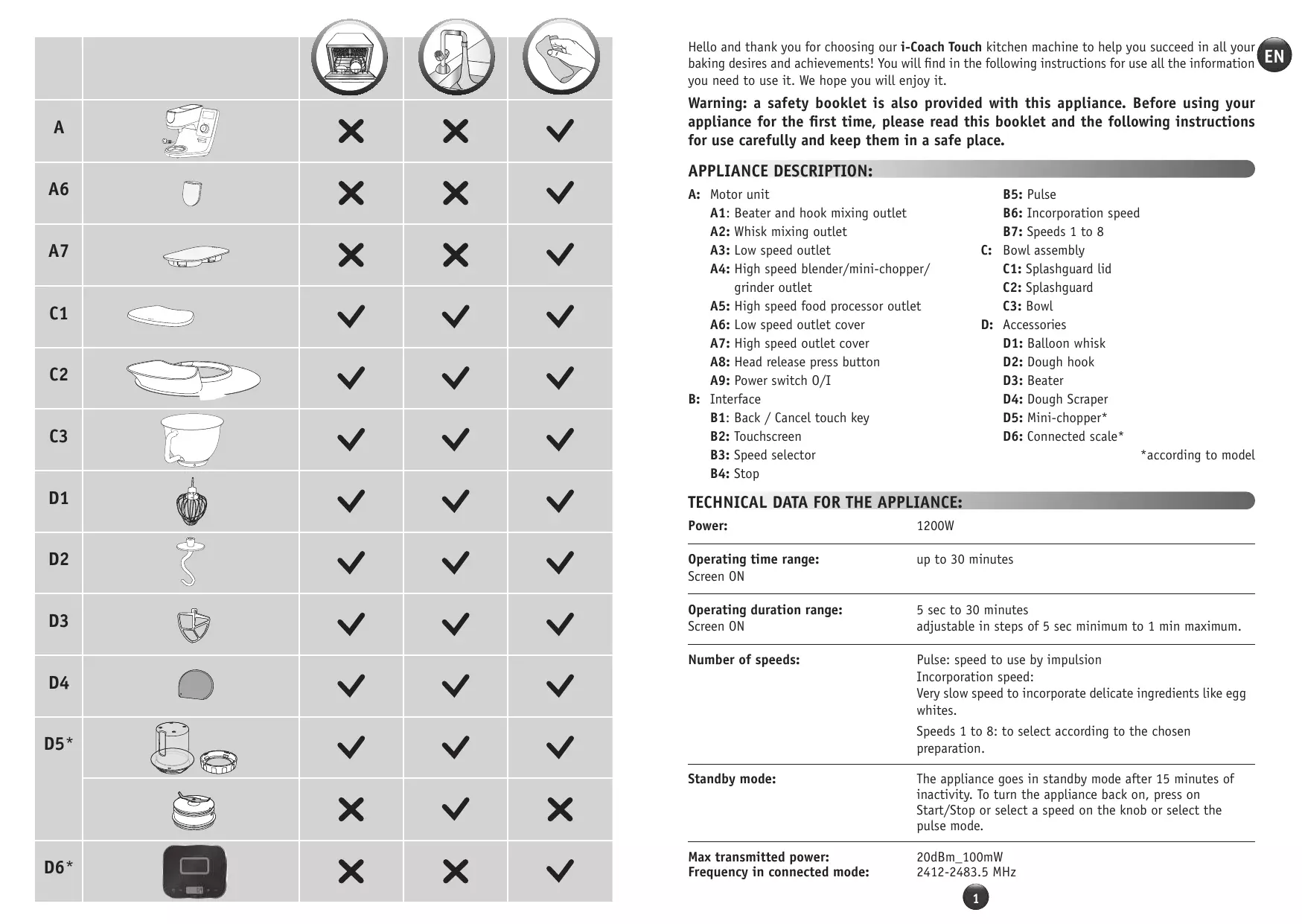
| × | × | √ | |||
| A |  | × | × | √ | |
| A6 | × | × | √ | ||
| A7 |  | × | × | √ | |
| C1 | √ | √ | √ | ||
| C2 |  | √ | √ | √ | |
| C3 |  | √ | √ | √ | |
| D1 |  | √ | √ | √ | |
| D2 |  | √ | √ | √ | |
| D3 |  | √ | √ | √ | |
| D4 |  | √ | √ | √ | |
| D5* |  | √ | √ | √ | |
 | × | √ | × | ||
| D6* |  | × | × | √ | |
Hello and thank you for choosing our i-Coach Touch kitchen machine to help you succeed in all your baking desires and achievements! You will find in the following instructions for use all the information you need to use it. We hope you will enjoy it.
Warning: a safety booklet is also provided with this appliance. Before using your appliance for the first time, please read this booklet and the following instructions for use carefully and keep them in a safe place.
APPLIANCE DESCRIPTION:
A: Motor unit
A1: Beater and hook mixing outlet
A2: Whisk mixing outlet
A3: Low speed outlet
A4: High speed blender/mini-chopper/grinder outlet
A5: High speed food processor outlet
A6: Low speed outlet cover
A7: High speed outlet cover
A8: Head release press button
A9: Power switch 0/I
B: Interface
B1: Back / Cancel touch key
B2: Touchscreen
B3: Speed selector
B4: Stop
B5: Pulse
B6: Incorporation speed
B7: Speeds 1 to 8
C: Bowl assembly
C1: Splashguard lid
C2: Splashguard
C3: Bowl
D: Accessories
D1: Balloon whisk
D2: Dough hook
D3: Beater
D4: Dough Scraper
D5: Mini-chopper*
D6: Connected scale*
*according to model
TECHNICAL DATA FOR THE APPLIANCE:
| Power: | 1200W |
| Operating time range:Screen ON | up to 30 minutes |
| Operating duration range:Screen ON | 5 sec to 30 minutesadjustable in steps of 5 sec minimum to 1 min maximum. |
| Number of speeds: | Pulse: speed to use by impulsionIncorporation speed:Very slow speed to incorporate delicate ingredients like egg whites.Speeds 1 to 8: to select according to the chosen preparation. |
| Standby mode: | The appliance goes in standby mode after 15 minutes of inactivity. To turn the appliance back on, press on Start/Stop or select a speed on the knob or select the pulse mode. |
Max transmitted power:
Frequency in connected mode:
20dBm_100mW
2412-2483.5 MHz
GETTING STARTED
Before using the appliance for the first time, wash all parts of the unit with soapy water except for the motor unit (see «Cleaning» section). We recommend washing all the accessories (D1), (D2) and (D3) in dishwasher at least once. Rinse and dry. Accessories are packed in non-woven bags; you can use them as storage pouches. Place the appliance on a flat, clean and dry surface, make sure that the speed selector (B7) is in position «Stop» (B4) and then plug in your appliance. Select the O/I power switch (A9) to start the unit. Never move the appliance by carrying it by an accessory fixed on the top (for example mini-chopper).
- ASSEMBLY:
Follow diagrams 1.1 to 1.9
- USAGE:
To start the appliance, turn the speed selector (B7) to the chosen speed and press the center of the selector on «Start/Stop» (B3).
Important: The appliance will only start if the high speed outlet cover (A7) and the head are locked. If you unlock the cover (A7) and/or the head during operation, the appliance will stop immediately. Place the cover (A7) and/or lock down the head, press «Start» (B3) or choose the control knob (B7) or «Pulse» (B5) function to restart the machine.
The appliance goes in standby mode after 15 minutes of inactivity. To turn the appliance back on, press on «Start/Stop» (B3) or select a speed on the knob (B7) or select the pulse mode (B5).
Food can be added through the lid funnel (C2) during a preparation.
To stop the appliance, press the center of the speed selector (B3) on «Start/Stop» and return the selector to «Stop» (B4).
• DISASSEMBLY
Wait for the appliance to come to a complete stop, then perform the assembly steps in reverse: diagrams 1.9 to 1.1.
CLEANING THE APPLIANCE
Unplug the appliance.
Do not immerse the appliance (A) in water or put it under running water. Wipe it with a dry or slightly damp cloth.
Disassemble completely and rinse the accessories soon after use.
Wash, rinse and dry the accessories. They are all dishwasher-safe.
Refer to the cleaning table.
Handle all blades with care to prevent injury (diagram 2.4).
TIPS & ADVICE
All models include the whisk, beater and dough hook attachments. Depending on the model the Mini Chopper may also be included. Below you will find recipe ideas, recommended speeds and times of use.
WHISK (D1) | To whisk eggs, whip creams and emulsify preparations.Please find detailed recipes below.Never use the balloon whisk to knead dough or heavy batters. | |||
| Egg whites | Max 10 | V8 | 1 min 45 | |
| Mayonnaise | Max 1l | V7 | 4 min | |
| Crêpe batter | Max 2l | V1-V3 | 5 sec | |
| V5 | 30 sec | |||
| V6 | 1 min | |||
| V4 | 2 min | |||
| Whipped cream | Max 1l | V5 | 2 min 30 | |
| V6 | 75 sec | |||
| V7 | 10 - 40 sec | |||
| Egg whites | 5 egg whites10g sugar | For best results, use room temperature eggs. Add the egg whites to the bowl with the lid. Start the appliance on speed 7. After 40 seconds, add sugar. Switch the appliance to speed 8 for 50 seconds. |
| Whipped cream | 250g Liquid whole cream (minimum 30% fat and cold)20g icing sugar | Place the bowl and whisk attachment in the refrigerator for 5 minutes before preparing the whipped cream. Add the cream and powdered sugar to the bowl with the lid on and start the appliance to speed 5 for 150 secondes, then speed 6 for 75 secondes and speed 7 for 10 to 40 secondes. |
| Mayonnaise | 2 egg yolks20g mustard1 pinch of salt250ml oil | Add the egg yolks, mustard and salt to the bowl with the lid on and start the appliance at speed 7. Add the oil very gradually through the opening in the lid for 3 minutes. After 3 minutes, remove the bowl from the appliance and scrape down the sides with a spatula, smoothing the mayonnaise for 3 to 4 turns. |
| Crêpe batter | 300g T45 flour3 eggs30g sugar30 ml oil600 ml milk | Add the flour, eggs, sugar, oil and 200 ml of milk to the bowl with the lid and run the appliance at speed 1 for 5 seconds, then at speed 3 for 5 seconds, at speed 5 for 30 seconds and finally at speed 6 for 1 minute. Scrape down the sides of the bowl, then start the appliance again at speed 4. Add the remaining 400 ml of milk gradually by the opening in the lid for 2 minutes. Remove the bowl from the appliance and pass the preparation through a fine sieve. Leave to rest for 1 hour before making your pancakes. Brush a pan with a little oil, heat over medium heat and add a ladleful of batter. Cook for 1 minute on one side and 30 seconds on the other. |
DOUGH HOOK (D2) To prepare yeast doughs: bread, pizza and brioche doughs and fresh pasta.

| Recipe |  |  |  |
| White bread dough | Max 1,8kg(1kg flour) | V1V2 | 1 min10 min |
| Brioche dough | Max 2.5kg(750g flour) | V5 | 20 min |
| Pasta dough | Max 1kg(600g flour) | V2 | 5 min |
| White bread dough | 500g flour340g water20g fresh yeast10g salt | In a separate bowl, let the yeast dissolve in the water for 5 minutes. Add the flour and salt to the bowl with the lid on and start the appliance at speed 1. Add the water and yeast gradually for 1 min. Switch to speed 2 for 10 minutes. Let the dough rise for 45 minutes at 30°C . Shape the bread and let it rise again for 90 minutes at 30°C . Preheat your oven to 230°C . Brush the surface of the bread with water and make slashes with a knife. Bake at 230°C for 25 minutes. |
BEATER (D3) For mixing cake and cookie batters, shortcrust and shortbread doughs.

Never use the beater to knead heavy (yeast) doughs.


| Cake batter | |
| Take out the butter 1 hour before preparing your dough or put it in the microwave for 15 seconds to soften it without melting it. Preheat your oven to 180°C . Add the flour, baking powder, eggs, soft butter and sugar in the bowl with the lid. Start the appliance at speed 1 for 30 seconds, then at speed 8 for 2 minutes and 30 seconds, then scrape the wall of the bowl, and finally launch the device in Pulse mode for 15 seconds or until no more pieces of butter are visible. Butter and line a cake pan. Pour in the mixture and bake at 180°C for 1 hour. Let cool for 10 minutes before unmolding. | |
| 180g flour | |
| 3g baking powder | |
| 3 eggs | |
| 150g soft butter | |
| 150g sugar |
MINI-CHOPPER (D5)  | To chop herbs, onions or small preparations. | |||
| Recipe |  |  |  | |
| Figs | 60g | Pulse | 3 sec | |
I-COACH TOUCH: MY COACH TO DARE BAKING
The following control keys will light up when they are available for use:

Cancel/Go back

You should press the center of the speed selector to start or stop mixing at any speed in manual mode or within a program.
1. FIRST TIME USE
i-Coach Touch is a smart appliance that helps you bake and succeed in all your preparations. It offers you basic preparations with result verification, as well as step-by-step recipes, all available in just a few taps.
With its intuitive, interactive touchscreen, you will be able to prepare anything you like: guaranteed results and success!
i-Coach Touch takes care of preparing and mixing your ingredients. It will guide you step-by-step through all the stages of the recipe. Follow the steps—it couldn't be easier!
Turn on your i-Coach Touch using the power switch 0/I (A9) and follow the instructions that appear on screen. Throughout each of the steps, the (?) icon offers helps on how to carry out each step.
• COUNTRY SPECIFIC SETTINGS
The first time you use the appliance, you will access the country-specific settings.
1. Select your country
2. Select your language
Once these two steps have been completed, a welcome screen will be displayed.
• INTERNET CONNECTION
You can now connect your i-Coach Touch to your home Internet on a 2.4GHz WiFi only (5GHz WiFi is not supported). You can complete this step now by selecting «Now» or later on by selecting «Later».
You can perform this step later by accessing the settings for your i-Coach Touch from the home screen. An Internet connection is required to use the following features: access to all Coach recipes, basic preparations, culinary technique videos, «My recipe books», «In my fridge», photos and videos as part of the step-by-step guide for your recipes, and product updates.
To connect your i-Coach Touch to the Internet, you must perform the following steps:
- Select your network (Can't access your network? Go to «Settings» then «WiFi Settings» then «Turn on WiFi»)
- Enter the password for your WiFi connection
- A «Connection in progress» screen will open while the connection is loading. This step may take a few minutes.
- A «Congratulations!» screen will confirm that the connection has been established successfully
- Lastly, you will need to select your time zone

What the WiFi connection indicators mean:
The product is not connected to WiFi. The product is connecting to WiFi. The product is connected to WiFi.
- LINKING THE APP
The Coach app lets you keep an eye on your i-Coach Touch without needing to stay close to it. You can link the appliance to your smartphone or tablet. This also lets you access your recipes, wherever you are.
Please check that your smartphone/tablet WiFi function is connected to the Internet (WiFi/5G/4G/3G, etc.).
The i-Coach Touch must be plugged into a power outlet.
You can perform this step later by accessing the settings for your i-Coach Touch from the home screen.
Linking to your smartphone/tablet is required for use of the following features:
«My recipe books», remote recipe progress tracking using a smartphone, sending recipes from your smartphone/tablet to your i-Coach Touch - Compatible devices:
A list of smartphone and tablet models that are compatible with i-Coach Touch can be found at www.moulinex.com.
- Downloading the app:
Download the Coach app. Downloadable for free from the App Store (iPhone/iPad) and Google Play (Android).


- Linking your account :
From the Coach app on your smartphone/tablet, select the i-Coach Touch product and create an account, or sign in to your account if you already have one. Your appliance will generate a code (the will appear on screen B2) that you will need to enter in your Coach app.
If you want to link multiple smartphones/tablets with your i-Coach Touch, each app must be connected to the same Coach user account.
• MY FIRST RECIPE
When using the appliance for the first time, your i-Coach Touch will offer you the chance to make a first recipe for you to get to grips with the appliance. Selecting «My First recipe» will provide you with step-by-step instructions to guide you through the recipe.
This recipe will disappear from your home screen once it has been used, or after you have used your i-Coach Touch ten times.
2. PRODUCT FEATURES
Your i-Coach Touch appliance has the option of being operated in «online» mode but can also be operated when in «offline» mode. It's also packed with features to help inspire you every day and make every meal a success! 100 recipes are available in «offline» mode, while in «online» mode, you have access to more recipes and more coaching services!
- RECIPE SEARCH
From the home screen, you can search for recipes using the «Search» key Q. You can search by the name of the recipe, or by ingredients. Filters are also available for refining your search.

- RECIPE LIBRARY

From the home screen, you can access the «Recipe library» function. This function lets you access all
recipes available in the Coach community. In «offline» mode, a selection of pre-loaded recipe cards can be found on the home screen for each function on your i-Coach Touch. You can start the step-by-step guidance directly from one of these recipe cards.

Number of portions

Resting time

Preparation time

Cooking time
You can also search for a recipe on the community by tapping the «Search» icon Q. To do this, simply type a dish or ingredient into the search bar and tap OK. You can refine your search by adding filters (type of dish, preparation time and recipe origin).
• BASIC PREPARATIONS

From the home screen, you can access the "Basic Preparations" function. This function allows you to find all the preparations whose results are guaranteed by the automatic programs and the result verifications. You can launch the step-by-step directly from one of these recipe cards.
- BAKING TECHNIQUES (only available with WiFi connection)
From the home screen, you can access the "Baking Techniques" function. This function allows you to find videos explaining specific tricks and tips for your preparations.
- RECIPE BOOKS (only available with WiFi connection)

You can access the "My recipe books" function from the home screen. This feature lets you find all recipes you have previously saved as favourites via the Coach app on your smartphone/tablet.
To use this feature you will need to download the Coach app and create an account. You can create and edit your recipe books on your smartphone/tablet and access them on your i-Coach Touch when it is connected to WiFi. Once your i-Coach Touch is connected via WiFi, your recipe books will automatically sync between your appliance and smartphone/tablet each time you make a recipe.
• IN MY FRIDGE (only available with WiFi connection)
You can access the "In my fridge" function from the home screen. This function lets you search for a recipe using ingredients of your choice.
To find a recipe idea, tap on the "In my fridge" function and then add up to two ingredients. For each ingredient, you can enter the quantities using the connected scales. Then tap "Search" and a list of recipes will be displayed that match the settings you entered.
- MANUAL MODE
You can select the speed of your choice thanks to the speed selector (B3) and click the " Start " button at the center of the selector. A timer will start on the touchscreen (B6).
You can also set a timer before clicking " Start ".
- SETTINGS

You can access the "Settings" function from the home screen. This function allows you to update the data stored during your first use of your i-Coach Touch.
You can also connect your appliance to WiFi or link it to the app if you did not do so when you first used your appliance.
- CONNECTED SCALE

- Linking the connected scales accessory to your i-Coach Touch:
When a scale is provided with your i-Coach Touch, it has already been linked to the appliance; you do not need to do anything further.
For scales that have been purchased separately, go to your product settings and tap "My accessories". Lastly, select that you have a scale accessory. Your scale accessory is now linked.
- Using the connected scales accessory:
When the connected scale icon appears on your i-Coach Touch's screen, you can weigh your ingredients during the recipe preparation process. To do this, press the scale icon and place the ingredients to be weighed on your scale accessory.
!! The scale enters standby mode after 30 seconds of inactivity. To turn it back on, press OK. There are three possible uses for the scale:
- Weighing during preparation: You can weigh all of your ingredients before starting your recipe.
- Weighing throughout a recipe: You can weigh your ingredients while making your recipe, at the beginning of each new step.
- Free weighing: Choose one or more ingredients from your fridge and select them in your Coach app using the search bar. Press the scale icon on your i-Coach Touch, then place your ingredients on the scale accessory: You can then access a list of recipes for your weighed quantities.
- UPDATES
To ensure that the product features function optimally, your product will offer you the option of performing updates. To do this, a window will appear on the screen and will prompt you to accept/not accept the installation of the latest available update. Tap accept and your i-Coach Touch will perform the update.
OFFLINE MODE
You can use your i-Coach Touch when in offline mode. The below functions are available in offline mode:
- RECIPE LIBRARY
Detailed information on the Recipe library can be found on page 6. The Recipe library gives you access to 100 recipes.
• BASIC PREPARATIONS
Detailed information about the basic preparations can be found on page 7.
- MANUAL MODE
Detailed information about the manual mode can be found on page 8.
IMPORTANT: APPLIANCE ENTERING SECURITY

Your appliance is equipped, as standard, with electronic motor protection devices to ensure a long lifespan. This electronic security system safeguards the motor against abnormal use, meaning your motor is completely protected.
Under certain, very extreme operating conditions that do not comply with the recommendations contained in the manual (see “TIPS & ADVICE” table: volumes potentially too big and/or unusually long operating time and/or not enough time allowed between recipes), the electronic protection system will be triggered to protect the motor; in this case, the appliance will stop and a “security message” will appear on the screen to indicate that the appliance has temporarily stopped working.
If a “security message” appears on your screen and your appliance stops operating, proceed as follows:
- Leave your appliance plugged in and the 0/I switch in position 1 “ON” (A9).
- Refer to the on-screen recommendations to modify your program settings (see “TIPS & ADVICE” table for ingredient quantities/speed/max time/accessory type).
Our Customer service department is available in case of any questions (see contact information in the warranty booklet).
| PROBLEM | CAUSE | SOLUTION |
| Difficulties when making certain recipes | Unsuitable recipes | Your recipes—whether personal or found on the Internet—may not be suitable for your appliance and its accessories (quantities, cooking times, cooking time, unsuitable accessories): Before starting your recipe, ensure that you are following the operating instructions in this instruction manual. |
| The appliance does not operate | It is not plugged in | Plug the appliance into a power socket |
| My screen is still black / Your appliance is in «standby» mode | Press one of the touch keys START & STOP | |
| The switch is in position 0 | Move the switch to position 1 | |
| Excessive vibration | The appliance is not placed on a flat surface; the appliance is not stable | Place the appliance on a flat surface. |
| Volume of ingredients is too large | Reduce the amount of ingredients / Be sure you are following carefully instructions for use mentioned on this booklet | |
| Wrong accessory | Check that you are using the recommended accessory | |
| The bowl or lid is not positioned or locked correctly | Check that the bowl or lid is correctly positioned and locked in accordance with the diagrams in the manual | |
| Loud noise during operation | Using the wrong accessory | Ensure that you are using the appropriate attachment (e.g. do not use the whisk A2 to knead or mix dough). For more information, refer to the recommendations in the recipe and to the operating instructions in this instruction manual. |
| Splashguard lid does not fixed during operation | The splashguard lid is not correctly fixed in both lugs of the head | Fix correctly the splashguard lid in both lugs of the heads (turn the lid clockwise) |
| The head could not return on its initial position | The splashguard lid is not correctly fixed in both lugs of the head | Fix correctly the splashguard lid in both lugs of the heads (turn the lid clockwise) and lower the head |
| PROBLEM | CAUSE | SOLUTION |
| SECU error message ERR 24 | The rotor is blocked. Your appliance has detected an anomaly | Empty the bowl. If the problem persists, contact the after-sales service |
| SECU error message ERR 26 | Motor overheating | Allow the machine to cool for 30 min and reduce the amount of food in the bowl. |
| SECU error message ERR 29 | Overtoque caused by big volume of ingredients or speed too high | Reduce the ingredients or reduce the speed |
| Error message head is lifted | The head is lifted | Lower the head |
| SECU error message: lid missing / accessory missing or not correctly assembled | The splashguard lid is not correctly fixed or accessories are not correctly fixed | Install the splashguard lid correctly or fix correctly the accessories (blender, mini-chopper, mini-grinder) |
| Error message ERR35 | Your appliance has a problem with power card | Contact the after-sales service |
| Error message ERR37 | Your appliance has a problem od overspeed | Contact the after-sales service |
| ERR02 / ERR30 | Connection problem | Your i-Coach Touch is not able to communicate over WiFi. Unplug your appliance and plug it back in. If the problem persists, contact your after-sales service centre. |
| Message display ➔ | The product is not connected to WiFi | Check your WiFi network or unplug your appliance, the plug it back in. If the problem persists, contact your after-sales service centre. |
| Message display ➔ | The product is connecting to WiFi | Wait for the logo to be displayed ➔ before access to recipes |
| UI-1, UI-3 | Your product is having trouble loading certain data over WiFi | If the problem is recurring, your WiFi signal may be too weak. Try moving your appliance closer to your router or install a WiFi extender close to your product to improve the quality of the WiFi signal. |
| UI-2, UI-4, UI-5, UI-6 | Your appliance is having trouble retrieving certain local data or WiFi data | If your appliance is not connected, try connecting it and initiating data synchronisation. If your appliance is connected, try to improve the signal quality (see cell above) |
RECYCLING
• DISPOSING OF THE PACKAGING AND THE APPLIANCE
The packaging is made up of environmentally-safe materials and can therefore be disposed of in accordance with the recycling measures in force in your area. To dispose of the appliance, check with the appropriate service in your area.
• ENVIRONMENT PROTECTION FIRST!

- Your appliance contains valuable materials which can be recovered or recycled. Leave it at a local civic waste collection point.
*The Bluetooth® trademark and logos are registered trademarks of Bluetooth SIG, Inc. and their use by the SEB Group has been authorized. Google Play and Android are trademarks of Google Inc. Apple and the Apple logo are trademarks of Apple Inc., registered in the U.S. and in other countries. App Store is a service mark of Apple Inc.
GLOSSARY
Pair: The act of grouping or linking two appliances. This happens the first time that you connect your smartphone or tablet with the i-Coach Touch.
Synchronize: The act of updating information. The app synchronizes with the i-Coach Touch in order to exchange information when they are connected.
Connect: Establishing a link between the app (smartphone/tablet) and the appliance (i-Coach Touch). This is required for synchronization to take place.
Cookies: This is the usage information sent to Moulinex to improve the app.
2. PRODUCT CHARACTERISTICS
• RECIPE LIBRARY

DESCRIPTION OF THE APPLIANCE:
• RECIPE LIBRARY

• DISPOSAL OF PACKAGING AND APPLIANCE
• RECIPE LIBRARY

• RECIPE LIBRARY


- EN
- FR
- NL
- APPLIANCE DESCRIPTION
- GETTING STARTED
- ASSEMBLY
- USAGE
- DISASSEMBLY
- CLEANING THE APPLIANCE
- TIPS & ADVICE
- I-COACH TOUCH: MY COACH TO DARE BAKING
- FIRST TIME USE
- COUNTRY SPECIFIC SETTINGS
- INTERNET CONNECTION
- LINKING THE APP
- MY FIRST RECIPE
- PRODUCT FEATURES
- RECIPE SEARCH
- RECIPE LIBRARY
- BASIC PREPARATIONS
- BAKING TECHNIQUES (ONLY AVAILABLE WITH WIFI CONNECTION)
- RECIPE BOOKS (ONLY AVAILABLE WITH WIFI CONNECTION)
- OFFLINE MODE
- IMPORTANT: APPLIANCE ENTERING SECURITY
- RECYCLING
- DISPOSING OF THE PACKAGING AND THE APPLIANCE
- ENVIRONMENT PROTECTION FIRST
- GLOSSARY
- PRODUCT CHARACTERISTICS
- DISPOSAL OF PACKAGING AND APPLIANCE
Brand : MOULINEX
Model : QA9I518
Category : Food Processor