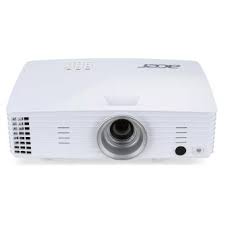
USER MANUAL H6502BD ACER
http://www.acer-group.com/public/Sustainability/index.htm

We,
Acer Incorporated
8F, 88, Sec. 1, Xintai 5th Rd., Xizhi, New Taipei City 221, Taiwan
Contact Person: Mr. RU Jan, e-mail:ru_jan@acer.com.tw
And,
Acer Italy s.r.l
Via Lepetit, 40, 20020 Lainate (MI) Italy
Tel: +39-02-939-921, Fax: +39-02 9399-2913
www.acer.it
Declare under our own responsibility that the product:
Product: DLP Projector
Trade Name: Acer
Model Number: X1185/X1285/S1285/S1285N/P1185/P1285/P1385W/H5381BD/
X1385WH/H6518BD/H6502BD/P1525/P1623 series
To which this declaration refers conforms to the relevant standard or other standardizing documents:
EN55022:2010 Class B; EN 55024:2010
EN61000-3-2:2006+A1:2009+A2:2009, Class A
EN61000-3-3:2008
EN 60950-1:2006/A11:2009/A1:2010+A12:2011
Regulation (EC) No. 1275/ 2008; EN 62301:2005
EN50581:2012
We hereby declare above product is in compliance with the essential requirements and other relevant provisions of EMC Directive 2004/108/EC, Low Voltage Directive 2006/95/EC and RoHS Directive 2011/65/EU and Directive 2009/125/EC with regard to establishing a framework for the setting of ecodesign requirements for energy-related product.
Year to begin affixing CE marking 2015.
RU Jan/Sr. Manager
Regulation Center, Acer Inc.
Jan. 26, 2015 -
Date
We,
Acer Incorporated
8F, 88, Sec. 1, Xintai 5th Rd., Xizhi, New Taipei City 221, Taiwan
Contact Person: Mr. RU Jan, e-mail:ru_jan@acer.com.tw
And,
Acer Italy s.r.l
Via Lepetit, 40, 20020 Lainate (MI) Italy
Tel: +39-02-939-921, Fax: +39-02 9399-2913
www.acer.it
Declare under our own responsibility that the product:
Product: DLP Projector
Trade Name: Acer
Model Number: P1285B/P1385WB/S1385WHBe/H6518BD series
To which this declaration refers conforms to the relevant standard or other standardizing documents:
EN55022:2010 Class B; EN55024:2010
EN301489-1V1.9.2;EN301489-17V2.2.1
EN300 328 V1.8.1
EN61000-3-2:2006+A1:2009+A2:2009, Class A
EN61000-3-3:2008
EN60950-1:2006/A11:2009/A1:2010+A12:2011
Regulation (EC) No. 1275/2008; EN 62301:2005
EN50581:2012
We hereby declare above product is in compliance with the essential requirements and other relevant provisions of EMC Directive 2004/108/EC, Low Voltage Directive 2006/95/EC, R&TTE Directive 1999/5/EC and RoHS Directive 2011/65/EU and Directive 2009/125/EC with regard to establishing a framework for the setting of ecodesign requirements for energy-related product.
Year to begin affixing CE marking 2015.
RU Jan/Sr. Manager
Regulation Center, Acer Inc.
Apr. 29, 2015 -
Date

This device complies with Part 15 of the FCC Rules. Operation is subject to the following two conditions: (1) this device may not cause harmful interference, and (2) this device must accept any interference received, including interference that may cause undesired operation.
The following local Manufacturer /Importer is responsible for this declaration:
Product:
DLP Projector
Model Number:
QSV1407/QSV1502/QNX1408/
QNX1508/QNX1501/QNX1419/
QSV1410/QNX1411/QWX1413/
QWX1409/H1P1418/H1P1512/
Q7P1506/Q1P1507/QWU1511 series
Name of Responsible Party:
Acer America Corporation
Address of Responsible Party:
333 West San Carlos St.
Suite 1500
San Jose, CA 95110
U.S.A.
Contact Person:
Acer Representative
Phone No.:
254-298-4000
Fax No.:
254-298-4147
Congratulations!
This product is TCO Certified – for Sustainable IT
TCO Certified is an international third party sustainability certification for IT products. TCO Certified ensures that the manufacture, use and recycling of IT products reflect environmental, social and economic responsibility. Every TCO Certified product model is verified by an accredited independent test laboratory.
This product has been verified to meet all the criteria in TCO Certified, including:
Corporate Social Responsibility
Socially responsible production - working conditions and labor law in manufacturing country Energy Efficiency
Energy efficiency of product and power supply. Energy Star compliant, where applicable
Environmental Management System
Manufacturer must be certified according to either ISO 14001 or EMAS
Minimization of Hazardous Substances
Limits on cadmium, mercury, lead & hexavalent chromium including requirements for mercury-free products, halogenated substances and hazardous flame retardants
Design for Recycling
Coding of plastics for easy recycling. Limit on the number of different plastics used.
Product Lifetime, Product Take Back
Minimum one-year product warranty. Minimum three-year availability of spare parts. Product takeback
Packaging
Limits on hazardous substances in product packaging. Packaging prepared for recycling
Ergonomic, User-centered design
Visual ergonomics in products with a display. Adjustability for user comfort (displays, headsets)
Acoustic performance - protection against sound spikes (headsets) and fan noise (projectors, computers)
Ergonomically designed keyboard (notebooks)
Electrical Safety, minimal electro-magnetic Emissions
Third Party Testing
All certified product models have been tested in an independent, accredited laboratory.
A detailed criteria set is available for download at www.tcodevelopment.com, where you can also find a searchable database of all TCO Certified IT products.
TCO Development, the organization behind TCO Certified, has been an international driver in the field of Sustainable IT for 20 years. Criteria in TCO Certified are developed in collaboration with scientists, experts, users and manufacturers. Organizations around the world rely on TCO Certified as a tool to help them reach their sustainable IT goals. We are owned by TCO, a non-profit organization representing office workers. TCO Development is headquartered in Stockholm, Sweden, with regional presence in North America and Asia.
For more information, please visit
www.tcodevelopment.com