HIFILIVE460NC - Headphones ERCASQUE - Free user manual and instructions
Find the device manual for free HIFILIVE460NC ERCASQUE in PDF.


| Product Type | Bluetooth Headset |
| Brand | ERCASQUE |
| Model | HIFILIVE460NC |
| Speaker size | 40 mm |
| Frequency response | 20 Hz - 20 kHz |
| Sensitivity | 106 dB SPL @ 1 kHz / 1 mW |
| Impedance | 32 ohms |
| Bluetooth transmitted power | 0 ~ 4 dBm |
| Bluetooth version | v4.2 |
| Bluetooth profiles | A2DP V1.3, AVRCP V1.5, HFP V1.6 |
| Battery type | Li-ion polymer 3.7 V DC, 700 mAh |
| Charging time | About 2 hours |
| Music playback time (BT enabled) | Up to 24 hours |
| Weight | 185.8 g |
| Included accessories | Charging cable, quick start guide |
| Features | Google Assistant, Amazon Alexa, Bluetooth multipoint, touch controls |
| Care and cleaning | Wipe with a soft, dry cloth. Do not use chemicals. |
| Safety | Do not expose to moisture or extreme temperatures. Use only the provided charger. |
Frequently Asked Questions - HIFILIVE460NC ERCASQUE
User questions about HIFILIVE460NC ERCASQUE
0 question about this device. Answer the ones you know or ask your own.
Ask a new question about this device
Download the instructions for your Headphones in PDF format for free! Find your manual HIFILIVE460NC - ERCASQUE and take your electronic device back in hand. On this page are published all the documents necessary for the use of your device. HIFILIVE460NC by ERCASQUE.
USER MANUAL HIFILIVE460NC ERCASQUE
Detachable audio cable with remote

x1
Warranty card, Warning card, Safety sheet, QSR, QSG

x1
Quick Start Guide
1. Turn on the headphone
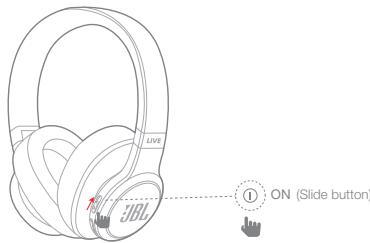
- If connecting for the first time, the headphone will enter the pairing mode automatically after it is powered on
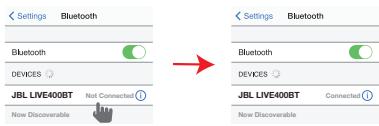
3. Connect to bluetooth device
| Settings | Bluetooth |
| Bluetooth | |
| MY DEVICES | |
| JBL LIVE400BT | |
Choose "JBL LIVE400BT" to connect
| Settings | Bluetooth |
| Bluetooth | |
| MY DEVICES | |
| JBL LIVE08BT | |
Choose "JBL LIVE500BT" to connect
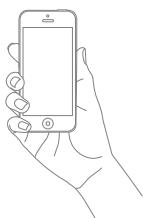
OR
FR
Connexion Bluetooth
Managing phone calls
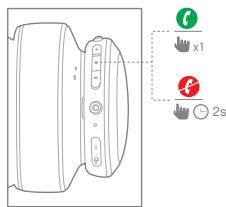
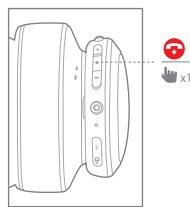

Voice Assistant

Download My JBL Headphones APP



Get even more control and personalization of your listening experience with this free App.
The Google Assistant
a. To set up the Google Assistant
- Connect your headphones to your mobile device
- Set up your Google Assistant using your mobile device:
On your Android device, press and hold the home button to open the Google Assistant and follow the on-screen instructions.
On your iOS devices, open or download the Google Assistant app and follow the app instructions.

Available on the App Store


GETON Google Play
Google Assistant
Note: The Google Assistant is available on eligible Android 6.0 devices* or later.
For iOS devices, the Google Assistant app needs to be downloaded. Works on Lollipop,
Marshmallow and Nougat Android Phones with Google Play Services, >1.5GB of memory and 720p or higher screen resolution.
For more information on what your Google Assistant can do, visit:
assistant assistant assistant assistant assistant assistant assistant
b. To use your Google Assistant
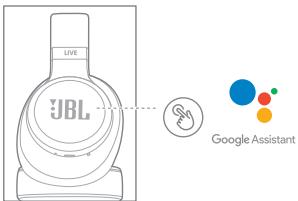
| Function | What to do |
| Talk to your Google Assistant | Press and hold the Action button to begin. Requires pairing with eligible phone and internet connection. For examples of questions and things you can do, visit: https://assistant.google.com/platforms/headphones |
| Get your notifications | Touch the Action button. |
| Stop your Google Assistant | Double tap Action button. |
| Reply to a message (where available) | After receiving a message notification, touch and hold the Action button to respond. When you're done, release the button. |
Note:
- The Google Assistant isn't available in certain languages and countries.
- If you want to turn on or off the Google Assistant, please download our JBL APP (see
Section 7). You can select under Settings > Voice assistant > Google Assistant.
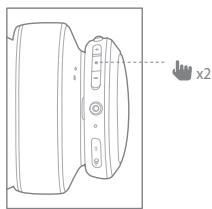
For countries without the Google Assistant, you can double tap the left ear cup to activate voice assistant.
Quick Start Guide
- Connect your headphones to your mobile device.
- Download JBL APP and follow the app instructions, select Settings > Voice assistant > Amazon Alexa
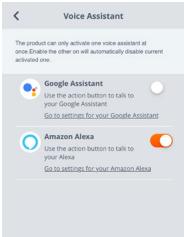
- On your mobile device, open or download the Amazon Alexa app and follow the app instructions.

amazon alexa
Quick Start Guide
- In the Amazon Alexa App, navigate to the Device Page.
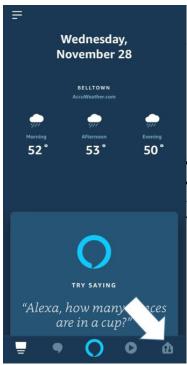
- Click the Plus (+) button on the top right of the screen and select 'Add Device'.
- Select Headphones from the list and then choose your Live Series Headphones in the Available Devices section. Follow the rest of the instructions in the Alexa App to complete set up.
- Alexa is now enabled on your device. Touch the action button and try one of the below utterances:
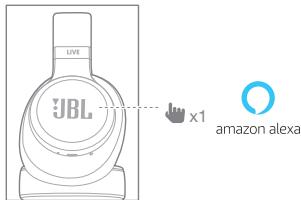
| Things to try | Example of what to say |
| Talk to Alexa | "What's the weather?" |
| Play audio | "Play Niall Horan."Note: Amazon Music is set as the default music service, To change the default music service, use the Alexa app |
| Play audio from a specific music service | "Play NPR on theratRadio." |
| Set a timer | "Set a timer for 5 minutes." |
| Discover more skills | "What new skills do you have?" |
| Stop Alexa | While Alexa is talking, press and release the Action button then say "Stop" |
Note:
- For more information and things to try with Alexa, visit: www.amazon.com/alexadevices and select 'Use Alexa'.
- If you want to turn on or off the Amazon Alexa, please download our JBL APP (see Section 7). You can select under Settings > Voice assistant > Amazon Alexa.
- Alexa is not available in all languages and countries.
Quick Start Guide

Wired listening mode
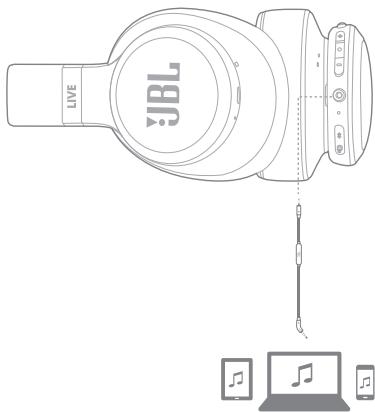

Seamlessly switch between devices
- Pair and connect the headphone with the 1^st bluetooth device (see Section 3 Bluetooth pairing)
- Pair and connect the headphone with the 2^nd bluetooth device
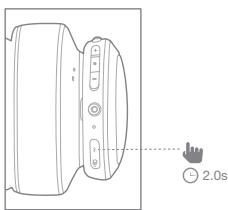
Quick Start Guide
- Connect to bluetooth device
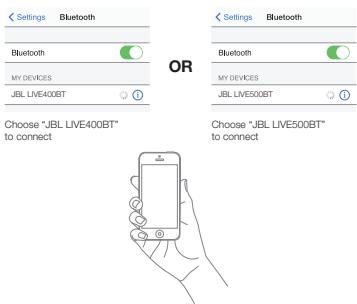
- Go back to the bluetooth device list on the 1^st device and select the headphone* to connect
Note: *JBL LIVE400BT or JBL LIVE500BT
Items to note:
a. Maximum 2 devices can be connected simultaneously
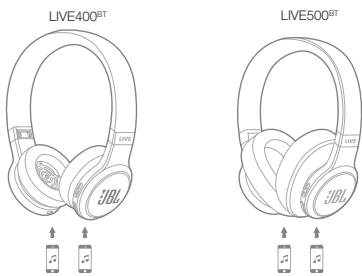
b. To switch music source, pause the music on the current device and select play on the 2nd device.
c. Phone call will always take priority.
d. If one device goes out of bluetooth range or powers off, you may need to manually reconnect the remaining device. See Section 13 Step 3.
Quick Start Guide
| LED Status | Headphone mode |
| On | ① Power on |
| Fast | BT Painging |
| On | BT Connected |
| Slow | Low Battery |
| Off | Charging Complete |
| On | Charging in Progress |
| Slow | Talki/ Ambient Aware on |
FR
- Driver size: 40mm
- Dynamic frequency response range: 20Hz-20Khz
Sensitivity: 106dB SPL@1kHz/1mW
Max input power: 15mW
Transmit sensitivity: -19dBV@1kHz/Pa
Impedance: 32ohm - Bluetooth transmitted power: 0-4dbm
- Bluetooth transmitting modulation: GFSK, /4DQPSK , 8DPSK
- Bluetooth frequency: 2.402GHz-2.48GHz
Profile version: A2DP V1.3, AVRCP V1.5, HFP V1.6 - Bluetooth version: V4.2
- Battery type: Polymer Li-ion Battery (3.7V DC, 700mAh)
- Charging time: 2 hours
Music play time with BT on: Up to 24 hours
Weight: 185.8g
FR
JBL LIVE400BT
- Driver size: 50mm
Dynamic frequency response range: 18Hz-20KHz
Sensitivity: 108dB SPL@1kHz/1mW
Max input power: 15mW
Transmit sensitivity: -19dBV@1kHz/Pa
Impedance: 32ohm - Bluetooth transmitted power: 0-4dbm
- Bluetooth transmitting modulation: GFSK, /4DQPSK , 8DPSK
- Bluetooth frequency: 2.402GHz-2.48GHz
Profile version: A2DP V1.3, AVRCP V1.5, HFP V1.6 - Bluetooth version: V4.2
- Battery type: Polymer Li-ion Battery (3.7V DC, 700mAh)
- Charging time: 2 hours
Music play time with BT on: Up to 30 hours
Weight: 231.6g