MARANTZ NR-1403 - AV amplifier

NR-1403 - AV amplifier MARANTZ - Free user manual and instructions

Find the device manual for free NR-1403 MARANTZ in PDF.

📄 110 pages English EN Download 💬 AI Question 10 questions ⚙️ Specs
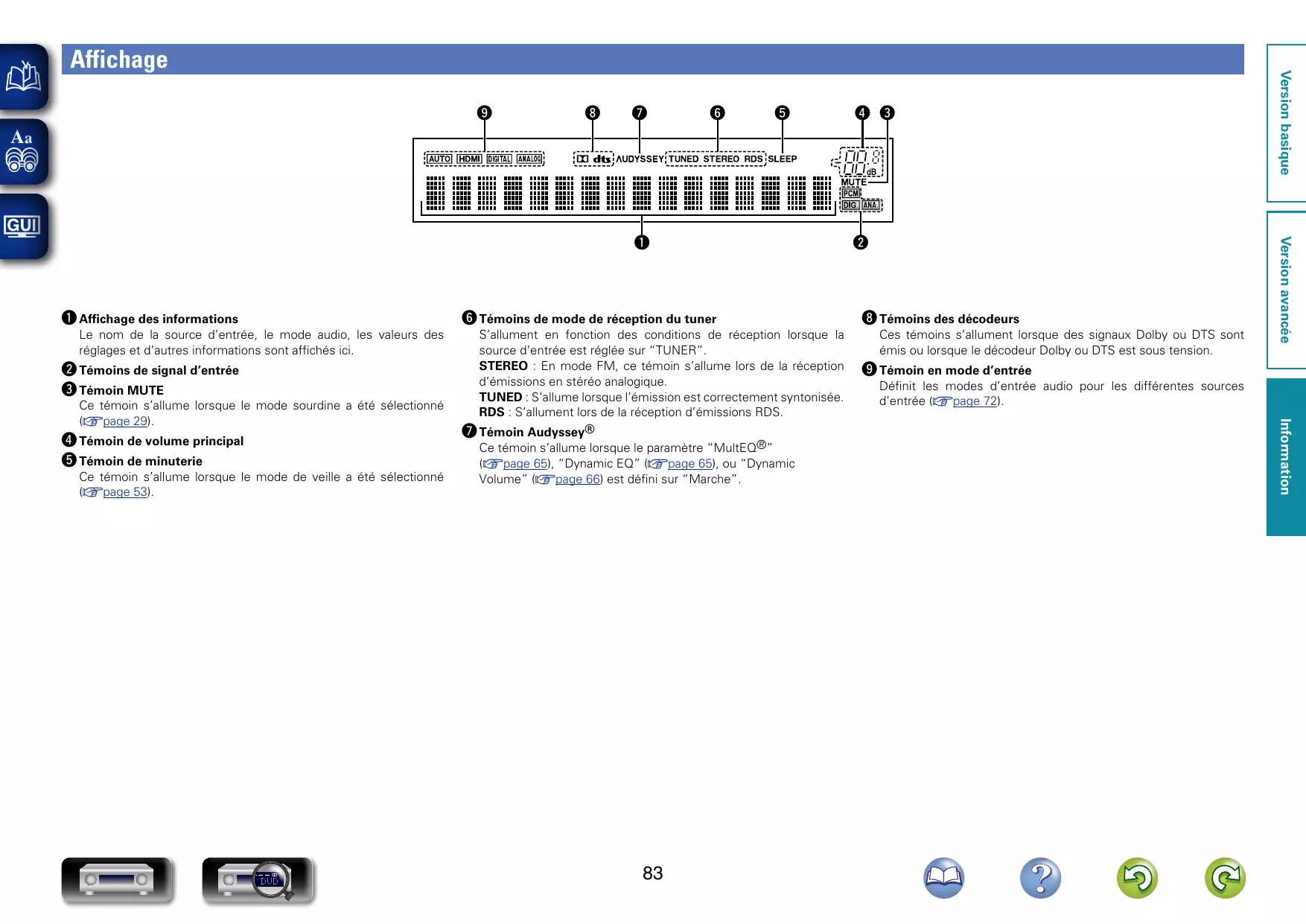
Notice MARANTZ NR-1403 - page 93
View the manual : Français FR English EN
Pick your language and provide your email: we'll send you a specifically translated version.
Product type Audio-video receiver
Brand Marantz
Model NR-1403
Weight 8.3 kg
Power supply AC 230 V, 50/60 Hz, 180 W (consumption), 0.2 W (standby), 0.5 W (CEC standby)
Output power (8 Ω, 20 Hz - 20 kHz, 0.08% THD) Front: 50 W + 50 W, Center: 50 W, Surround: 50 W + 50 W
Output power (6 Ω, 1 kHz, 10% THD) Front: 80 W + 80 W, Center: 80 W, Surround: 80 W + 80 W
Number of channels 5.1 (5 amplified channels + subwoofer)
HDMI inputs 6
HDMI output 1 (with ARC)
Supported HDMI functions 3D, ARC, Deep Color, x.v.Color, automatic lip sync, HDMI control, Content Type
Audio calibration Audyssey MultEQ, Audyssey Dynamic EQ, Audyssey Dynamic Volume (via supplied microphone)
Supported audio formats Dolby TrueHD, Dolby Digital Plus, DTS-HD Master Audio, DTS-HD High Resolution, DTS Express, multi-channel PCM, etc.
Tuner FM/AM with RDS, presetting of 56 stations
Wireless connectivity Bluetooth via optional RX101 receiver (M-XPort)
Maintenance and cleaning Wipe the cabinet and panel with a soft cloth. Do not use benzene, solvents, or insecticides.
Safety Do not block ventilation openings, avoid moisture, unplug during prolonged absence, do not open the unit.
Supplied accessories Remote control, R03/AAA batteries, setup microphone, power cord, indoor FM antenna, AM loop antenna, CD-ROM, safety instructions

Frequently Asked Questions - NR-1403 MARANTZ

What to do if the unit does not turn on?
Check that the power cord is properly plugged in. If the protection circuit is activated, unplug the power cord, wait 5 to 10 seconds, then plug it back in. If the problem persists, contact your dealer.
How to reset the microprocessor?
Turn off the unit with the ON/STANDBY button. Hold down the PRESET CH + and PRESET CH - buttons while pressing ON/STANDBY again. Release the buttons when the display flashes at approximately 1-second intervals. All settings will return to default values.
How to connect a non-HDMI device (e.g., DVD player)?
Use digital audio cables (coaxial or optical) and analog video cables (composite). Connect them to the corresponding terminals on the rear panel. Then change the terminal assignment in the Digital Assign menu to assign the correct input source (e.g., DVD). Refer to the 'Non-HDMI Compatible Equipment' section of the manual.
What to do if no sound is heard from the speakers?
Check the speaker and source connections. Ensure the main volume is not at zero and that mute (MUTE) is disabled. Verify that the selected input source is correct. If using headphones, disconnect them. Refer to the troubleshooting table in the manual.
How to use the ARC (Audio Return Channel) function?
Connect your ARC-compatible TV to the HDMI output of the amplifier using a high-speed HDMI cable with Ethernet. Ensure ARC is enabled on the TV and that the HDMI Audio Output option in the amplifier's menu is set to AVR. The TV sound will then be played through the amplifier's speakers.
How to configure speakers with Audyssey?
Plug the supplied setup microphone into the SETUP MIC jack on the amplifier. Place the microphone at the main listening position. Start the Audyssey Setup procedure via the on-screen assistant. Follow the instructions to perform measurements at up to 6 positions. Once completed, speaker settings (distances, levels, equalization) are automatically optimized.
How to listen to FM/AM radio?
Press FM or AM on the remote to select the source. Use TUNE +/– to search for stations. For automatic presetting, use the Auto Preset option in the OPTION menu. You can also store favorite stations using the FAVORITE STATION buttons.
What to do if the remote control does not work?
Check that the batteries are installed correctly (polarity) and not worn out. Replace them if necessary. Ensure there is no obstacle between the remote and the unit's sensor. Keep the unit away from bright lights (sun, fluorescent lamps) that may interfere with reception. The range is approximately 7 meters at a 30° angle.
How to clean the amplifier?
Use a soft, dry cloth to wipe the cabinet and front panel. Never use benzene, solvents, thinners, or insecticides as they can damage the finish. Avoid allowing water or moisture to enter the unit.
What to do if the display is abnormal or no operation is possible?
Perform a microprocessor reset as described above. If the problem persists, unplug the unit for 5 minutes, then plug it back in. Also check that the unit is not in auto standby mode or that the sleep timer is not activated. Refer to the 'Troubleshooting' section of the manual.

User questions about NR-1403 MARANTZ

0 question about this device. Answer the ones you know or ask your own.

Ask a new question about this device

The email remains private: it is only used to notify you if someone responds to your question.

No questions yet. Be the first to ask one.

Download the instructions for your AV amplifier in PDF format for free! Find your manual NR-1403 - MARANTZ and take your electronic device back in hand. On this page are published all the documents necessary for the use of your device. NR-1403 by MARANTZ.

USER MANUAL NR-1403 MARANTZ

AV Surround Receiver

NR1403

Getting Started

Erste Schritte

Mise en route

Guida introductiva

Antes de empezar

Aandeslag

Att komma igang

Пристусяк paбOTE

Wstep

Avant de commencer

Contenu de la boîte

Accessoires 2
2
Précautions relatives aux manipulations 3

Version basique 4

Connexions 5

Précautions relatives aux manipulations

2 Borne ANALOG AUDIO IN (CBL/SAT)

DTS Digital Surround

87,5 MHz - 108,0 MHz

[AM]
Manual assistant
Powered by Anthropic
Waiting for your message
Product information

Brand : MARANTZ

Model : NR-1403

Category : AV amplifier