
M820Z 10SC - Computer LENOVO - Free user manual and instructions
Find the device manual for free M820Z 10SC LENOVO in PDF.



| Product type | All-in-one desktop computer |
| Brand | Lenovo |
| Model | M820Z 10SC |
| Pre-installed operating system | Windows 7 or Windows 10 |
| Power supply | 100-240 V AC, 50/60 Hz |
| Video connectors | DisplayPort, HDMI (depending on model) |
| Network connectivity | Ethernet, Wi-Fi (optional), Bluetooth (optional) |
| Touch function | Single-point or multi-point (optional) |
| Optical drive | Optical disc drive (depending on model) |
| Physical security | Chassis intrusion switch, BIOS password lock |
| Security software | Built-in Computrace Agent (on some models), Windows firewall |
| Maintenance | Clean with a soft, non-abrasive cloth; do not use flammable detergents |
| Repairability | Some components are customer-replaceable (CRU); for others, contact a certified technician |
| Antistatic protection | Wearing an antistatic wrist strap recommended when handling internal components |
| Operating temperature | 10 °C to 35 °C |
| Operating humidity | 20% to 80% (non-condensing) |
| Safety instructions | Disconnect power before any intervention; beware of hot surfaces and sharp edges |
| Warranty | Standard Lenovo warranty; extension possible |
| Technical support | Lenovo website (http://www.lenovo.com/support), telephone support |
| Recycling and WEEE | Do not dispose of with household waste; take to an approved collection point |
Frequently Asked Questions - M820Z 10SC LENOVO
User questions about M820Z 10SC LENOVO
0 question about this device. Answer the ones you know or ask your own.
Ask a new question about this device
Download the instructions for your Computer in PDF format for free! Find your manual M820Z 10SC - LENOVO and take your electronic device back in hand. On this page are published all the documents necessary for the use of your device. M820Z 10SC by LENOVO.
USER MANUAL M820Z 10SC LENOVO
Copyright Lenovo 2016, 2020.
Incidents intermittents 34
The caution and danger safety notices in this section are provided in the following languages:
- English
Arabic
Brazilian/Portuguese - Chinese (simplified)
- Chinese (traditional)
French
German - Hebrew
Italian
Korean - Spanish
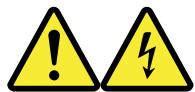
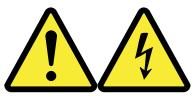
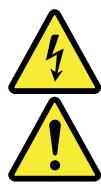
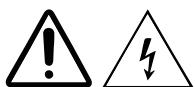
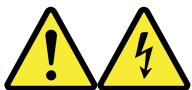
DANGER
Electrical current from power, telephone and communication cables is hazardous.
To avoid a shock hazard:
- Do not connect or disconnect any cables or perform installation, maintenance, or reconfiguration of this product during an electrical storm.
- Connect all power cords to a properly wired and grounded electrical outlet.
- Connect to properly wired outlets any equipment that will be attached to this product.
- When possible, use one hand only to connect or disconnect signal cables.
-
Never turn on any equipment when there is evidence of fire, water, or structural damage.
-
Disconnect the attached power cords, telecommunications systems, networks, and modems before you open the device covers, unless instructed otherwise in the installation and configuration procedures.
- Connect and disconnect cables as described in the following tables when installing, moving, or opening covers on this product or attached devices.
| To Connect | To Disconnect |
| 1. Turn everything OFF. 2. First, attach all cables to devices. 3. Attach signal cables to connectors. 4. Attach power cords to outlet. 5. Turn device ON. | 1. Turn everything OFF. 2. First, remove power cords from outlet. 3. Remove signal cables from connectors. 4. Remove all cables from devices. |

CAUTION
When replacing the lithium battery, use only Part Number 45C1566 or an equivalent type battery recommended by the manufacturer. If your system has a module containing a lithium battery, replace it only with the same module type made by the same manufacturer. The battery contains lithium and can explode if not properly used, handled, or disposed of.
Do not:
- Throw or immerse into water
- Heat to more than 100^ C ( 212^ F )
Repair or disassemble
Dispose of the battery as required by local ordinances or regulations.

CAUTION
When laser products (such as CD-ROMs, DVD-ROM drives, fiber optic devices, or transmitters) are installed, note the following:
- Do not remove the covers. Removing the covers of the laser product could result in exposure to hazardous laser radiation. There are no serviceable parts inside the device.
- Use of controls or adjustments or performance of procedures other than those specified herein might result in hazardous radiation exposure.
DANGER
Some laser products contain an embedded Class 3A or Class 3B laser diode. Note the following:
Laser radiation when open. Do not stare into the beam, do not view directly with optical instruments, and avoid direct exposure to the beam.

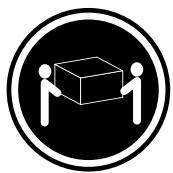
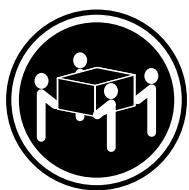
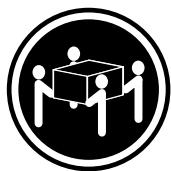
≥ 18kg (37 lb)

≥ 32 kg (70.5 lb)
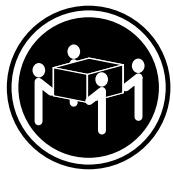
≥ 55 ~kg (121.2 lb)
CAUTION
Use safe practices when lifting.
CAUTION
The power control button on the device and the power switch on the power supply do not turn off the electrical current supplied to the device. The device also might have more than one power cord. To remove all electrical current from the device, ensure that all power cords are disconnected from the power source.

g j g j g a b
.5j
:ai 1s
a 1 a 1 1 1 1 1 1 1 1 1 1 1 1 1 1 1
aaiie 1g g g iil
a
A
aaii i aie
.6
jolol jg jgl jgl jgl jgl jgl jgl
CllgSoll
j 1 j
a 1
.
yss sll lal yai jil g i jil jil jil jil jil jil jil jil jil jil jil jil jil jil jil jil jil jil jil jil jil jil jil jil jil jil jil jil jil jil jil jil jil jil jil jil jil jil jil jil jil jil jil jil jil jil
a aal 5g jai iiaai 10a aai
Jssll
.
. 2
.
.0j 1 j 1 J
:
15
.0j 1
.
J 1
J 1

d = 1
Part Number 45C1566 Jd jg jj g d a
e 15
alaii i aiee eae ee eee e e e e e e e e e e e e
- ibis ayj yj igin jolil ilg jia aayy jayy jya Jaiil g
2
(1)ggyia 1.
()
Lg 1
aall lll 1n glll lla aalll

:
Fiber Optic DVD CD-ROMs
(J)
aegaae aagaae aae aee aee e ee e e
y
.8jgbsdiydsd4a jkl


Class 3B Class 3A
(1)

≥ 32 kg (70.5 lb)
≥ 55 ~kg (121.2 lb)
4n + 1 0( mod D)
jllieaioliluaoi


:
g gall gll gll gll gll gll gll gll gll gll gll gll gll gll gll gll gll gll gll gll gll gll gll gll gll gll gll gll gll gll gll gll gll gll gll gll gll gll gll gll gll gll gll gll gll gll gll gll gll gll gll gell
2 国
1 四→
PERIGO

≥ 32 kg (70.5 lb)
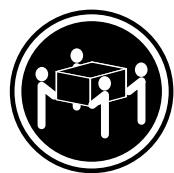
≥ 55kg (121.2 lb)
CUIDADO:
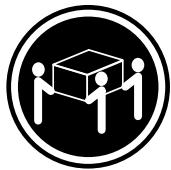
≥ 32 kg (70.5 lb)
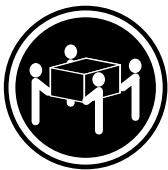
≥ 55 ~kg (121.2 lb)
ATTENTION:
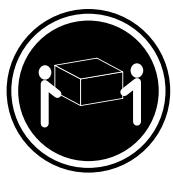
≥ 18 kg (37 lbs)

≥ 32kg (70.5 lbs)
≥ 55kg (121.2 lbs)
孕的:
賊者将
安訃格則如思
孕的:
https://www.hdmi.org/manufacturer/hdmi_1_4/index.aspx
Lenovo Vision Guard Control
Incidents intermittents
Lenovo Solution Center
This equipment has been tested and found to comply with the limits for a Class B digital device, pursuant to Part 15 of the FCC Rules. These limits are designed to provide reasonable protection against harmful interference in a residential installation. This equipment generates, uses, and can radiate radio frequency energy and, if not installed and used in accordance with the instructions, may cause harmful interference to radio communications. However, there is no guarantee that interference will not occur in a particular installation. If this equipment does cause harmful interference to radio or television reception, which can be determined by turning the equipment off and on, the user is encouraged to try to correct the interference by one or more of the following measures:
- Reorient or relocate the receiving antenna.
- Increase the separation between the equipment and receiver.
- Connect the equipment into an outlet on a circuit different from that to which the receiver is connected.
- Consult an authorized dealer or service representative for help.
Lenovo is not responsible for any radio or television interference caused by using other than recommended cables and connectors or by unauthorized changes or modifications to this equipment. Unauthorized changes or modifications could void the user's authority to operate the equipment.
This device complies with Part 15 of the FCC Rules. Operation is subject to the following two conditions: (1) this device may not cause harmful interference, and (2) this device must accept any interference received, including interference that may cause undesired operation.
Responsible Party:
Lenovo (United States) Incorporated
7001 Development Drive
Morrisville, NC 27560
Email: FCC@lenovo.com

The ac power cord shipped with your product can be used only for this specific product. Do not use the ac power cord for other devices.
Collecting and recycling a disused Lenovo computer or monitor
If you are a company employee and need to dispose of a Lenovo computer or monitor that is the property of the company, you must do so in accordance with the Law for Promotion of Effective Utilization of Resources. Computers and monitors are categorized as industrial waste and should be properly disposed of by an industrial waste disposal contractor certified by a local government. In accordance with the Law for Promotion of Effective Utilization of Resources, Lenovo Japan provides, through its PC Collecting and Recycling Services, for the collecting, reuse, and recycling of disused computers and monitors. For details, visit the Lenovo Web site at https://www.lenovo.com/jp/ja/services_warranty/recycle/pcrecycle/. Pursuant to the Law for Promotion of Effective Utilization of Resources, the collecting and recycling of home-used computers and monitors by the manufacturer was begun on October 1, 2003. This service is provided free of charge for home-used computers sold after October 1, 2003. For details, visit the Lenovo Web site at https:// www.lenovo.com/jp/ja/services_warranty/recycle/pcrecycle/.
Disposing of Lenovo computer components
Some Lenovo computer products sold in Japan may have components that contain heavy metals or other environmental sensitive substances. To properly dispose of disused components, such as a printed circuit board or drive, use the methods described above for collecting and recycling a disused computer or monitor.
Disposing of disused lithium batteries from Lenovo computers
A button-shaped lithium battery is installed inside your Lenovo computer to provide power to the computer clock while the computer is off or disconnected from the main power source. If you need to replace it with a new one, contact your place of purchase or contact Lenovo for service. If you need to dispose of a disused lithium battery, insulate it with vinyl tape, contact your place of purchase or an industrial-waste-disposal operator, and follow their instructions. Disposal of a lithium battery must comply with local ordinances and regulations.
The Lenovo product meets the requirements of the Republic of Turkey Directive on the Restriction of the Use of Certain Hazardous Substances in Waste Electrical and Electronic Equipment (WEEE).
RoHS compliant as per E-waste (Management) Rules.
Lenovo (United States), Inc.
1009 Think Place - Building One
Morrisville, NC 27560
U.S.A.
Attention: Lenovo Director of Licensing
LE PRESENT DOCUMENT EST LIVRE « EN L'ETAT ». LENOVO DÉCLINE TOUTE RESPONSABILITÉ, EXPLICITE OU IMPLICITE, RELATIVE AUX INFORMATIONS QUI Y SONT CONTENUES, Y COMPRIS EN CE QUI CONCERNE LES GARANTIES DE NON-CONTREFAÇON ET D'APTITUDE À L'EXÉCUTION D'UN TRAVAIL DONNÉ. Certaines juridictions n'autorisent pas l'exclusion des garanties implicites, auquel cas l'exclusion ci-dessus ne vous sera pas applicable.
Brand : LENOVO
Model : M820Z 10SC
Category : Computer