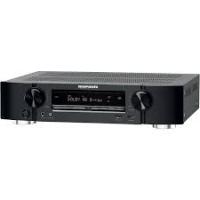
NR1603B - AV receiver MARANTZ - Free user manual and instructions
Find the device manual for free NR1603B MARANTZ in PDF.


| Product type | 7.1-channel audio-video receiver |
| Output power | 50 W per channel (8 Ω, 20 Hz - 20 kHz, 0.08% THD) |
| Number of channels | 7 channels (front, center, surround, surround back) |
| HDMI connectivity | 6 inputs, 1 output (compatible with 3D, ARC, Deep Color) |
| Supported audio formats | Dolby TrueHD, DTS-HD Master Audio, Dolby Digital Plus, DTS Express, etc. |
| Network functions | Internet radio, AirPlay, Spotify, Pandora, SiriusXM, playback from NAS/PC |
| Automatic calibration | Audyssey MultEQ, Dynamic EQ, Dynamic Volume |
| Digital audio inputs | 2 optical, 2 coaxial |
| Analog video inputs | Component and composite inputs |
| USB port | 1 iPod/USB port (compatible with iPod, iPhone, USB flash drive) |
| M-XPort | Marantz expansion port for RX101 wireless receiver |
| Remote control | Main remote control RC017SR with supplied batteries |
| Power consumption | 120 V, 60 Hz; standby: 0.2 W; HDMI standby: 0.5 W |
| Weight | 8.3 kg (18.3 lb) |
| Included accessories | Manual CD-ROM, power cord, indoor FM antenna, setup microphone |
| Maintenance and cleaning | Wipe with a soft cloth; do not use solvents |
| Safety | Unplug during prolonged absence; avoid condensation |
| Repairability | Spare parts available through authorized service; microprocessor reset possible |
Frequently Asked Questions - NR1603B MARANTZ
Make sure to use new batteries.
User questions about NR1603B MARANTZ
0 question about this device. Answer the ones you know or ask your own.
Ask a new question about this device
Download the instructions for your AV receiver in PDF format for free! Find your manual NR1603B - MARANTZ and take your electronic device back in hand. On this page are published all the documents necessary for the use of your device. NR1603B by MARANTZ.
USER MANUAL NR1603B MARANTZ
Accessoires 2
2
Précautions relatives aux manipulations 3
Version basique 4
Connexions 5
Précautions relatives aux manipulations
2 Borne AUDIO IN (CBL/SAT)

iPod nano 4th generation (video) 8GB 16GB

iPod nano 5th generation (video camera) 8GB 16GB

iPod nano 6th generation 8GB 16GB
- iPod touch

iPod touch 1st generation 8GB 16GB 32GB

iPod touch 2nd generation 8GB 16GB 32GB

iPod touch 3rd generation 32GB 64GB

iPod touch 4th generation 8GB 32GB 64GB
iPhone

iPhone 4GB 8GB 16GB

iPhone 3G 8GB 16GB

iPhone 3GS 8GB 16GB 32GB

iPhone 4 8GB 16GB 32GB

iPhone 4S 16GB 32GB 64GB
- Copyright [2012] [D&M Holdings. Inc.]
[Types de stations radio lisibles]
| Types de fichiers pris en charge | Internet Radio |
| WMA (Windows Media Audio) | ✓ |
| MP3 (MPEG-1 Audio Layer-3) | ✓ |
[Spécifications des stations radio lisibles]
| Fréquence d'échantillonnage | Débit | Extension | |
| WMA (Windows Media Audio) | 32/44,1/48 kHz | 48 – 192 kbps | .wma |
| MP3 (MPEG-1 Audio Layer-3) | 32/44,1/48 kHz | 32 – 320 kbps | .mp3 |
Ecoute de radio Internet
1 Préparez la lecture.
- Copyright [2012] [D&M Holdings. Inc.]
Lecture surround auto
[Minuscules/Chiffres/Symboles]
abcdefghijklmnopqrstuvwxyz
0123456789
$$ . @ _ /: \sim ? [ ] ^ {\wedge^ {\prime}} {} | $$
CBL/SAT DVD Blu-ray GAME AUX
MEDIA PLAYER CD NETWORK TV AUDIO
Conf. Audyssey® (198 page 24, 87)
Config.manuelle (k page 120)
Config. manuelle
CLASS A: 10.0.0.1 - 10.255.255.254
CLASS B: 172.16.0.1 - 172.31.255.254
CLASS C: 192.168.0.1 - 192.168.255.254
MULTEQ DYNAMIC VOLUME
"Made for iPod" and "Made for iPhone" mean that an electronic accessory has been designed to connect specifically to iPod, or iPhone, respectively, and has been certified by the developer to meet Apple performance standards.
Apple is not responsible for the operation of this device or its compliance with safety and regulatory standards. Please note that the use of this accessory with iPod, or iPhone, may affect wireless performance.
DTS Digital Surround
Redistribution and use in source and binary forms, with or without modification, are permitted provided that the following conditions are met:
- Redistributions of source code must retain the above copyright notice, this list of conditions and the following disclaimer.
-
Redistributions in binary form must reproduce the above copyright notice, this list of conditions and the following disclaimer in the documentation and/or other materials provided with the distribution.
-
Neither the name of the Xiph.org Foundation nor the names of its contributors may be used to endorse or promote products derived from this software without specific prior written permission. THIS SOFTWARE IS PROVIDED BY THE COPYRIGHT HOLDERS AND Contributors "AS IS" AND ANY EXPRESS OR IMPLIED WARRANTY, INCLUDING, BUT NOT LIMITED TO, THE IMPLIED WARRANTY OF MERCHANTABILITY AND FITNESS FOR A PARTICULAR PURPOSE ARE DISCLAIMED. IN NO EVENT SHALL THE FOUNDATION OR COLNTRIBUTORS BE LIABLE FOR ANY DIRECT, INDIRECT, INCIDENTAL, SPECIAL, EXEMPLARY, OR CONSEQUENTIAL DAMAGES (INCLUDING, BUT NOT LIMITED TO, PROCUREMENT OF SUBSTITUTE GOODS OR SERVICES; LOSS OF USE, DATA, OR PROFITS; OR BUSINESS INTERRUPTION) HOWEVER CAUSED AND ON ANY THEORY OF LIABILITY, WHETHER IN CONTRACT, STRICT LIABILITY, OR TORT (INCLUDING NEGLIGENCE OR OTHERWISE) ARISING IN ANY WAY OUT OF THE USE OF THIS SOFTWARE, EVEN IF ADVISED OF THE POSSIBILITY OF SUCH DAMAGE.
Consummation electrique:
220 W
Compens.niveau ref. 108
Compress.Dyn. 105
Condensation 3
Conf. Audyssey® 24, 87
Config.de ZONE2 128
Config. enceintes 120
Config.HDMI 111
Config. manuelle 120
Connexion
Prises Remote control 89
Brand : MARANTZ
Model : NR1603B
Category : AV receiver