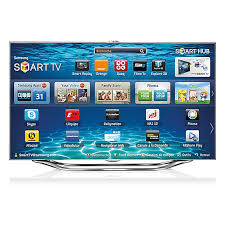
UE46ES8000SXZF - TV SAMSUNG - Free user manual and instructions
Find the device manual for free UE46ES8000SXZF SAMSUNG in PDF.


| Product type | 3D LED TV |
| Brand | Samsung |
| Model | UE46ES8000SXZF |
| Screen size | 46 inches (117 cm) |
| Screen resolution | 1920 x 1080 pixels (Full HD) |
| Display technology | LED |
| 3D features | Yes (with active 3D glasses) |
| Smart TV | Yes (Smart Hub, Samsung Apps, Web Browser) |
| Built-in Wi-Fi | Yes (IEEE 802.11a/b/g/n) |
| Network connectivity | Ethernet (LAN), Wi-Fi, Wi-Fi Direct |
| HDMI inputs | 3 (1 with ARC, 1 with MHL) |
| USB inputs | 3 (for multimedia playback and recording) |
| Component input | 1 (shared with AV) |
| SCART input | 1 |
| Optical audio output | 1 |
| Headphone jack | 1 |
| CI slot (Common Interface) | 1 (for CI or CI+ cards) |
| Antenna | 2 inputs (Terrestrial/Satellite) |
| Remote control | Smart Touch Control (touch remote) |
| Power supply | 220-240 V, 50/60 Hz |
| Power consumption (max) | Approximately 150 W (estimated) |
| Dimensions with stand (W x H x D) | Approximately 105.5 x 69.5 x 27.5 cm (estimated) |
| Weight with stand | Approximately 16.5 kg (estimated) |
| Wall mount | VESA 400 x 400 mm |
| Care | Clean with a soft, dry cloth. Do not use abrasive cleaners. |
Frequently Asked Questions - UE46ES8000SXZF SAMSUNG
User questions about UE46ES8000SXZF SAMSUNG
0 question about this device. Answer the ones you know or ask your own.
Ask a new question about this device
Download the instructions for your TV in PDF format for free! Find your manual UE46ES8000SXZF - SAMSUNG and take your electronic device back in hand. On this page are published all the documents necessary for the use of your device. UE46ES8000SXZF by SAMSUNG.
USER MANUAL UE46ES8000SXZF SAMSUNG
DIGITAL AUDIO OUT (OPTICAL)
International Solutions.
(Universal Satellite Automatic Location
System).
Menu → Image → Mode Image
Conditions contrat de service.
Samsung Apps

→ Samsung Apps
reconnaissance vocale.
– Action : serrez vos poings.
text_image
(→ AllShare Play)stockage Web (SugarSync).
→ AllShare Play → Ma List
DIGITAL AUDIO OUT (OPTICAL)
text_image
Diagram showing finger movement with colored fingers and directional arrows, labeled with symbols like 'P' and '+/-'text_image
User interface panel with a white hand icon and control buttons including red, green, yellow, blue, black, and directional arrows.text_image
Hand gesture icon with color-coded buttons and control buttons below, including a finger symbol and directional indicators.text_image
Diagram showing a hand gesture with colored dots and directional arrows, likely from a UI or interface.natural_image
Illustration of a stylized hand with colored fingers on top, surrounded by control buttons (no text or symbols)text_image
P RETURN NUMBERtext_image
Grid of software icons including TV, DVD, STB, and menu symbols with Chinese labelspour l'Italie
natural_image
Simple 3D illustration of a conical frustum with no text or symbolstext_image
Diagram showing a lock mechanism with labeled components and directional arrows, enclosed in a dotted circle.Manufactured under licence from DTS Licensing Limited. DTS, the Symbol, and DTS and the Symbol together are registered trademarks of DTS, Inc. © 2011 DTS, Inc. All Rights Reserved.
HDMI
The terms HDMI and HDMI High-Definition Multimedia Interface, and the HDMI Logo are trademarks or registered trademarks of HDMI Licensing LLC in the United States and other countries.
MHL™

DivX Certified® to play DivX® video up to HD 1080p, including premium content.
DivX®, DivX Certified® and associated logos are trademarks of DivX, Inc. and are used under licence.
ABOUT DIVX VIDEO: DivX® is a digital video format created by DivX, Inc. This is an official DivX Certified® device that plays DivX video. Visit www.divx.com for more information and software tools to convert your files into DivX video.
ABOUT DIVX VIDEO-ON-DEMAND: This DivX Certified® device must be registered in order to play purchased DivX Video-on-Demand (VOD) movies. To obtain your registration code, locate the DivX VOD section in your device setup menu. Go to vod.divx.com for more information on how to complete your registration.