
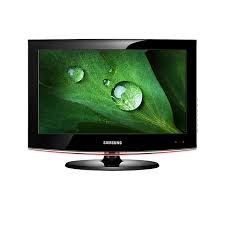
SAMSUNG LE22B450C4W - TV

LE22B450C4W - TV SAMSUNG - Free user manual and instructions

Find the device manual for free LE22B450C4W SAMSUNG in PDF.

📄 318 pages English EN Download 💬 AI Question 11 questions ⚙️ Specs
Notice SAMSUNG LE22B450C4W - page 4
Pick your language and provide your email: we'll send you a specifically translated version.
Product Type LCD TV
Brand Samsung
Model LE22B450C4W
Screen Size 22 inches (55 cm)
Screen Resolution 1366 x 768 pixels (HD Ready)
Dimensions (without stand) 530 x 370 x 80 mm
Weight (without stand) 5 kg
Power Supply 220-240 V, 50/60 Hz
Power Consumption 50 W
Connectivity 1 HDMI, 1 VGA, 1 composite input, 1 antenna, 1 audio output
Tuner Analog and digital DVB-T
Main Features Teletext, timer, child lock, image and sound adjustment
Maintenance and Cleaning Wipe with a soft, dry cloth. Do not use chemical products.
Safety Avoid exposure to moisture and heat sources. Unplug before cleaning.
Spare Parts Available from Samsung after-sales service
General Information Manual available in several languages at notice-facile.com

Frequently Asked Questions - LE22B450C4W SAMSUNG

How to connect a game console to my Samsung LE22B450C4W TV?
Use an HDMI or composite cable. Plug one end into the console and the other into the corresponding input on the TV. Then select the appropriate source using the Source button on the remote control.
What to do if the image is distorted or misaligned?
Check the picture format settings in the menu. You can choose between 16:9, 4:3 or Zoom. Also make sure the source resolution is suitable for the screen (1366x768).
How to set the auto-off timer?
Press the Menu button, go to Functions or Timer, then enable the Auto Off option. You can set a duration from 30 to 180 minutes.
Why is the sound low or missing?
Check that the volume is not muted (press Mute), then increase the volume. Also make sure the audio cables are properly connected. If using an external amplifier, adjust the volume on that device.
How to activate child lock?
Go to the Setup or Security menu, then enable Child Lock. You will need to set a 4-digit PIN code. Once activated, certain channels or inputs will be blocked.
Can I connect a computer to this TV?
Yes, use the VGA (PC) port with a VGA cable. Also connect a 3.5 mm audio cable if necessary. Select the PC source in the menu. The recommended resolution is 1366x768.
How to update the TV software?
This model does not support USB or network updates. Updates are generally not available. Check the Samsung website if a firmware is offered for this specific model.
The TV does not turn on, what should I do?
First check that the power cord is properly plugged in and the outlet works. Try unplugging the TV for 1 minute then plugging it back in. If nothing happens, contact the after-sales service.
How to clean the screen without damaging it?
Use a soft, dry cloth (microfiber) to gently wipe the surface. Do not press too hard. Avoid chemical products or rough cloths. For stubborn stains, slightly dampen the cloth with water.
Where can I find the complete user manual?
The manual is available for free download at notice-facile.com. You can also view it online or request a translation in your language.

User questions about LE22B450C4W SAMSUNG

1 question about this device. Answer the ones you know or ask your own.

Ask a new question about this device

The email remains private: it is only used to notify you if someone responds to your question.

How to check the antenna signal quality on a Samsung LE22B450C4W television?
Frequently Asked Questions - 30/04/2026
Response Notice-Facile

To check the antenna signal quality on your Samsung LE22B450C4W television, follow the steps below:

Steps to check antenna signal quality

  • Press the Menu button on your remote control.
  • In the menu, select Setup or Settings.
  • Go to the Channel Search or Installation section.
  • You should see information related to signal reception, including the quality and strength of the antenna signal.

Tips in case of signal issues

  • Check that the antenna cable is properly connected to the back of the television.
  • Make sure the input source is set to Antenna or Terrestrial, and not to HDMI or another source.
  • If the signal is weak or absent, try repositioning the antenna to improve reception.
  • Restart the television to apply changes if necessary.

By following these steps, you will be able to view and assess the antenna signal quality on your Samsung LE22B450C4W, which will help you optimize channel reception.

Respond (be the first)

Download the instructions for your TV in PDF format for free! Find your manual LE22B450C4W - SAMSUNG and take your electronic device back in hand. On this page are published all the documents necessary for the use of your device. LE22B450C4W by SAMSUNG.

USER MANUAL LE22B450C4W SAMSUNG

Manual assistant
Powered by Anthropic
Waiting for your message
Product information

Brand : SAMSUNG

Model : LE22B450C4W

Category : TV