
ECOSMART SUP UK - Electric scooter RAZOR - Free user manual and instructions
Find the device manual for free ECOSMART SUP UK RAZOR in PDF.


User questions about ECOSMART SUP UK RAZOR
0 question about this device. Answer the ones you know or ask your own.
Ask a new question about this device
Download the instructions for your Electric scooter in PDF format for free! Find your manual ECOSMART SUP UK - RAZOR and take your electronic device back in hand. On this page are published all the documents necessary for the use of your device. ECOSMART SUP UK by RAZOR.
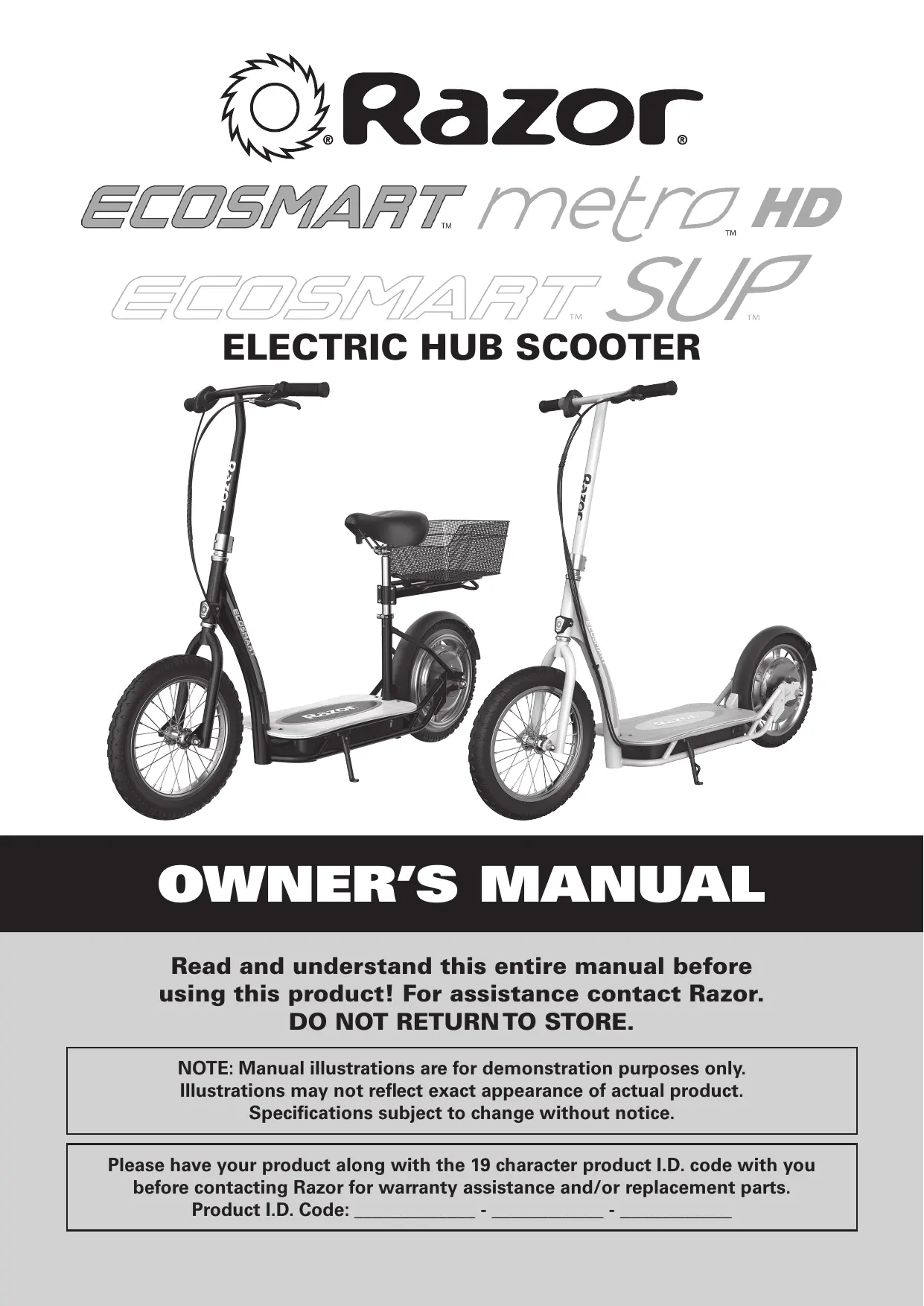
USER MANUAL ECOSMART SUP UK RAZOR
Read and understand this entire manual before using this product! For assistance contact Razor. DO NOT RETURNTO STORE.
NOTE: Manual illustrations are for demonstration purposes only. Illustrations may not reflect exact appearance of actual product. Specifications subject to change without notice.
Please have your product along with the 19 character product I.D. code with you before contacting Razor for warranty assistance and/or replacement parts. Product I.D. Code:
SafetyWarnings. 1-2
Before You Begin 3
Assembly and Set-Up 4-5
Charging the Battery 6
Pre-Ride Checklist 6
Usage 7
Repair and Maintenance. 8
Troubleshooting Guide 9-10
EcoSmart Metro HD/EcoSmart SUP Parts 11-12
Warranty. 14
Contact Information 15
INTRODUCTION: RAZOR ECOSMART METRO HD/ECOSMART SUP ELECTRIC SGOOTER
THE RAZOR ECOSMART METRO HD/ECOSMART SUP IS BASED ON RAZOR'S "SHARED SCOOTER" FOR USERS AGES 16+ AND SHOULD ONLY BE RIDDEN CAREFULLY AND RESPONSIBLY BY APPROPRIATELY MATURE AND RESPONSIBLE RIDERS EXERCISING CAUTION AND RESPECTING APPLICABLE LAWS.
The Razor EcoSmart Metro HD/EcoSmart SUP Scooter is part of a new generation of electric scooter mobility, building upon Razor's fifteen years of experience as a leader in motorized scooter technology, now making access to such technology more useful and appropriately available for mature riders in environments which present desirable opportunities for local travel and commutes - but which also, necessarily and importantly, can present additional levels of risk of accident due to use around cars, pedestrians and public streets.
Razor's EcoSmart Metro HD/EcoSmart SUP is, therefore, necessarily both similar to, and in many respects different from, previous scooters. This product is not a toy for young riders! Razor emphasizes, therefore, the importance of riders to understand the risks associated with using literally any wheeled product around vehicle or pedestrian traffic and the specific risks of riding an electric scooter. Bluntly put, you could get hurt and your actions could cause injury to others. You must be cautious, alert and take reasonable precautions to minimize such risks of falls, impacts or other problems.
Our original EcoSmart Metro electric scooter was not designed for primary use as a commuter scooter. Razor is bringing this to our consumers' attention to note the distinctions between the original and the newly redesigned EcoSmart products in this now changing landscape of electric scooter use in commuter situations.
Generally, the EcoSmart Metro HD/EcoSmart SUP has longer battery life, and a more efficient hub motor propulsion system which makes it more amenable to "commute" uses. The user must be, and is, responsible for determining whether local laws permit use of the EcoSmart Metro HD/EcoSmart SUP in varying circumstances (there is no "uniform Federal law" in existence to establish universal riding conditions). The rider must be, and is, responsible for acting maturely, carefully, and with respect for local rules of the road when riding, and the rider must be, and is, responsible for assessing and minimizing effects of potentially adverse riding conditions including darkness or impaired visibility, fog, rain, snow, hail, ice or electrical storms, which increase dangers inherent in operating any scooter. The rider must be, and is, responsible for adjusting riding behavior and braking distance to suit the weather and traffic conditions, and also to recognize that riding in low visibility conditions decreases your ability to see and be seen, especially on public streets and around vehicles or pedestrians. Riders also are encouraged to seek to enhance their visibility/conspicuity through use of higher visibility garments, lights (not included) or other reflective materials when riding in reduced visibility circumstances. Razor absolutely recommends that any rider wear a proper helmet to minimize potential head injuries.
Use of the EcoSmart Metro HD/EcoSmart SUP scooter is recommended for mature riders - using age 16+ as a guide. Riders of the EcoSmart Metro HD/EcoSmart SUP certainly must respect and adhere to all locally applicable laws and rules applicable to the use of such products.
SAFETYWARNINGS
WARNING: Riding an EcoSmart Metro HD/EcoSmart SUP does present potential risks and caution is required. Like any riding product, an EcoSmart Metro HD/EcoSmart SUP has inherent hazards associated with its use (for example, falling off or riding it into a hazardous situation). Like any riding product, EcoSmart Metro HD/EcoSmart SUP can and is intended to move and it is therefore, of course, possible to lose control or otherwise get into dangerous situations. Riders must recognize that if such things occur, a rider can be seriously injured or die even when using safety equipment and other precautions. RIDE AT YOUR OWN RISK AND USE COMMON SENSE.
WARNING: Always check and obey any local laws or regulations which may affect the locations where the EcoSmart Metro HD/EcoSmart SUP may be used. Keeping away from cars and motor vehicle traffic provides the highest protection against risk of traffic-related injuries, of course. For mature riders seeking to operate this product as legally permitted for commuting applications, the increased risks presented by traffic certainly emphasizes that the need for caution, personal responsibility
and compliance with local laws is imperative and is the rider's responsibility. Only use where allowed and with caution.
WARNING: PARENTAL AND ADULT RESPONSIBILITY AND SUPERVISION IS NECESSARY TO ASSURE USE BY MATURE RIDERS: Because products, like EcoSmart Metro HD/EcoSmart SUP, can and do present potential hazards plainly associated with their use, it is well recognized THE NEED FOR EXERCISE OF PARENTAL RESPONSIBILITY IN SELECTING RIDING PRODUCTS APPROPRIATE TO THE AGE OF A CHILD, OR PARENTAL SUPERVISION IN SITUATIONS IN WHICH CHILDREN OF VARIOUS AGES MAY HAVE ACCESS TO THE SAME RIDING PRODUCTS, IS IMPORTANT. Not every product is appropriate for every age or size of child, and different age recommendations are found within this category of product which are intended to reflect the nature of the hazards and the expected mental or physical ability, or both, of a child to cope with the hazards.
WARNING: NOT FOR RIDERS UNDER AGE 16 OR HEAVIER THAN 220 LB (100 KG). DO NOT EXCEED THE WEIGHT LIMIT OF 220 lb (100 kg) – including backpacks and other items that might be carried.
SAFETYWARNINGS
Exceeding the weight limit could injure the rider and damage the EcoSmart Metro HD/EcoSmart SUP. Rider weight alone also does not necessarily mean a person's size is appropriate to fit or maintain control of the EcoSmart Metro HD/EcoSmart SUP. Keep this product away from small children and remember that this product is not a toy and is intended for use only by persons who are, at a minimum, completely comfortable and competent while operating the product.
Razor recommends that children under the age of 16 not be permitted to use this product. This recommendation is based not just on age or weight or height; it reflects consideration of expected maturity and skills as well as physical size. The recommended rider age of 16 years or older is only an estimate and can be affected by the rider's size, weight, or skills – not every rider 16 years old or older will be suited to the product. Certainly, any rider unable to fit comfortably on the EcoSmart Metro HD/EcoSmart SUP should not attempt to ride it, but a parent's decision to allow his or her teen to ride this product should be based on the teen's maturity, skill, and ability to follow rules. Razor emphasizes that adults are strongly advised not to disregard Razor's recommendations or permit younger children to ride the EcoSmart Metro HD/EcoSmart SUP.
Keep this product away from small children and remember that it is not a toy and is intended for use only by persons who are, at a minimum, completely comfortable and competent while operating.
Persons with any mental or physical conditions that may make them susceptible to injury, impair their physical dexterity or mental capabilities to recognize, understand, and follow safety instructions and to be able to understand the hazards inherent in the use of any ride-on product, should not use or be permitted to use products inappropriate for their abilities. Persons with heart conditions, head, back or neck ailments (or prior surgeries to these areas of the body), or pregnant women, should be cautioned not to operate such products.
DO NOT EXCEED THE WEIGHT LIMIT OF 220 lb (100 kg). Rider weight does not necessarily mean a person's size is appropriate to fit or maintain control of the EcoSmart Metro HD/EcoSmart SUP.
CHECK AND MAINTAIN PRODUCT CONDITIONS
Before use, check to confirm that covers and guards are in place and in serviceable condition. Check that the brake is functioning properly, that the tires are inflated properly and have sufficient tread remaining. The product should be maintained and repaired in accordance with the manufacturer's specifications, using only the manufacturer's authorized replacement parts, and should not be modified from the manufacturer's original design and configuration.
ACCEPTABLE RIDING PRACTICES AND CONDITIONS
Do not activate the throttle unless you are on the EcoSmart Metro HD/EcoSmart SUP and in a safe, outdoor environment suitable for riding. Once the throttle is activated the EcoSmart Metro HD/EcoSmart SUP will move forward.
The normal powered top speed of this product will be approximately 15.5 mph (25 km/h), which can be affected by conditions, such as rider weight, inclines and battery charge level. Avoid excessive speeds that can be associated with downhill rides.
Be careful and know your limitations. Risk of injury increases as the degree of riding difficulty increases. The rider assumes all risk associated with aggressive riding activities.
Maintain a hold on the handlebars at all times. Do not touch the brake or motor on your scooter when in use or immediately after riding, as these parts can become very hot.
Ride defensively. Watch out for potential obstacles that could catch your wheel or force you to swerve suddenly or lose control. Be careful to avoid pedestrians, skaters, skateboards, scooters, bikes, children or animals who may enter your path, and respect the rights and property of others.
The EcoSmart Metro HD/EcoSmart SUP is intended for use on flat, dry surfaces, such as pavement or level ground, without loose debris, such as sand, leaves, rocks or gravel. Wet, slick, bumpy, uneven or rough surfaces may impair traction and contribute to possible accidents. Do not ride your
product in mud, ice, puddles or water. Watch out for potential obstacles that could catch your wheel or force you to swerve suddenly or lose control. Avoid sharp bumps, drainage grates, and sudden surface changes.
Do not attempt or do stunts or tricks. The EcoSmart Metro HD/EcoSmart SUP is not made to withstand abuse from misuse, such as jumping, curb grinding or any other type of stunts. Racing, stunt riding, or other maneuvers also enhance risk of loss of control, or may cause uncontrolled rider actions or reactions.
Never allow more than one person at a time to ride the product.
Riding at night or when visibility is limited increases risks of accident or injury. Should the EcoSmart Metro HD/EcoSmart SUP scooter be ridden in such conditions, use of lights (not included) and additional measures to increase rider visibility and scooter conspicuity are advised.
Never use near steps or swimming pools.
Do not allow hands, feet, hair, body parts, clothing, or similar articles to come in contact with moving parts or wheels while the motor is engaged.
Do not touch electric motor or brake when in use or immediately after riding.
Never use headphones or a cell phone to talk or text when riding.
Never ride your product while under the influence of drugs or alcohol.
Never hitch a ride with a vehicle.
The EcoSmart Metro HD/EcoSmart SUP electric scooter can operate more quietly than other motorized products may operate. Use care when in the vicinity of pedestrians or others who may have difficulty hearing your approach. Use handbell (not included) to sound warnings when appropriate.
Never risk damaging surfaces such as carpet or flooring by use of an EcoSmart Metro HD/EcoSmart SUP electric scooter indoors.
PROPER RIDING ATTIRE
Always wear proper protective equipment, such as an approved safety helmet (with chin strap securely buckled), elbow pads, and kneepads. A helmet may be legally required by local law or regulation in your area. A long-sleeved shirt, and long pants are recommended. Always wear shoes and keep shoelaces tied and out of the way of the wheels and motor. Never ride barefooted or in sandals.
USING THE CHARGER
The charger supplied with the product should be regularly examined for damage to the cord, plug, enclosure and other parts. In the event of such damage, the product must not be charged until the charger has been repaired or replaced.
Use only with the recommended charger.
Use caution when charging.
The charger is not a toy. Charger should be operated by an adult.
Do not operate charger near flammable materials.
Unplug charger and disconnect from product when not in use.
Always disconnect from the charger prior to wiping down and cleaning your product with damp cloth.
FAILURE TO USE COMMON SENSE AND HEED THE ABOVE
WARNINGS FURTHER INCREASES RISK OF SERIOUS INJURY. USE AT YOUR OWN RISK AND WITH APPROPRIATE AND SERIOUS ATTENTION TO SAFE OPERATION. USE CAUTION.
Remove contents from box. Remove the separators that protect the components from damage during shipping. Inspect the contents of the box for scratches in the paint, dents, or kinked cables that may have occurred during shipping. Because the electric scooter was partially assembled and packed at the factory, there should not be any problems, even if the box has a few scars or dents.
MAKE SURE POWER SWITCH IS TURNED "OFF" BEFORE CONDUCTING ANY ASSEMBLY OR MAINTENANCE PROCEDURES.
Estimated Assembly and Set-Up Time
Razor recommends assembly by an adult with experience in bicycle mechanics.
Allow up to 20 minutes for assembly, not including initial charge time.
Allow up to 12 hours for charge (see page 6 for charging information).
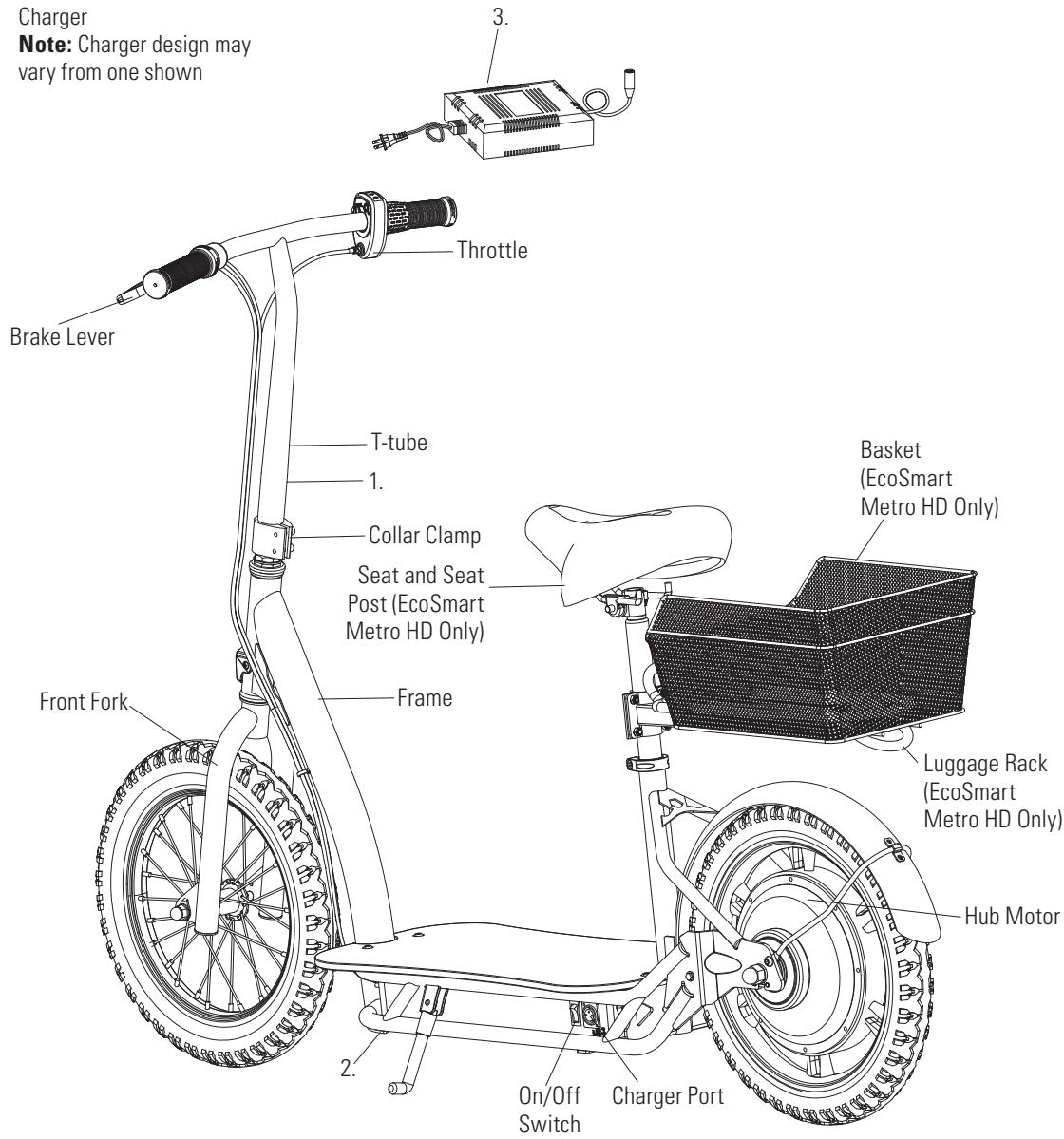
Charger
Note: Charger design may vary from one shown
Required Tools
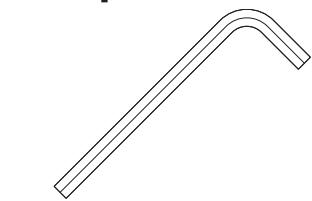
5 mm Allen Wrench (included)
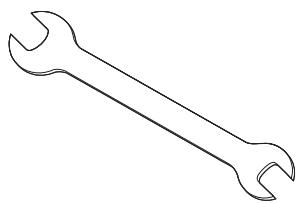
Two (2) 15 mm Wrenches and 10 mm Wrench (included)
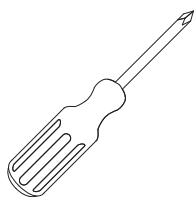
Phillips Screwdriver (not included)

WARNING:DO NOT USE
NON-RAZOR PRODUCTS WITH YOUR ELECTRIC SCOOTER.
Razor scooters have been built to certain Razor design specifications. The original equipment supplied at the time of sale was selected on the basis of its compatibility with the frame, fork and all other parts. Certain aftermarket products may not be compatible and will void the warranty.
Product ID Locations:
(See locations to the left)
- Bottom of T-tube
- Side of Battery Box
- Charger
- UPC Side of Box (Not Shown)
Box Contents:
Electric Scooter
- Charger
- Owner's Manual
- Tools
□ Attaching the Front Wheel
Tools Required: Two (2) 15mm Wrenches
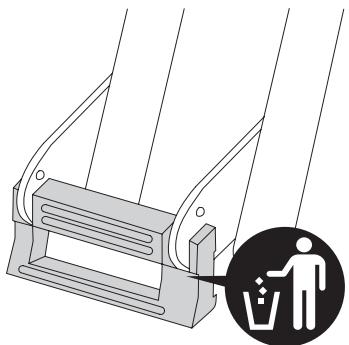
1 Remove the packing material from the front fork.
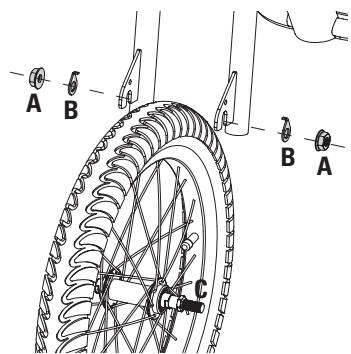
2 Remove axle nuts (A) from the axle bolt (C) and insert the wheel into the front fork.
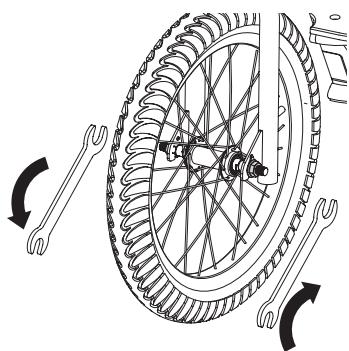
3 Insert the tab on the safety washers into the hole on the front fork and tighten axle nuts using two 15 mm wrenches.
□ Attaching the Handlebars
Tool Required: 5 mm Allen Wrench
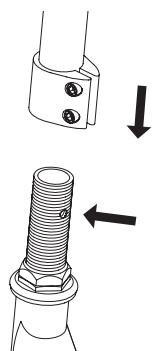
1 Face the handlebars forward with the throttle on the right and brake lever on the left, depress the push button located on the front fork and insert the handlebar stem until the button locks securely into the stem.
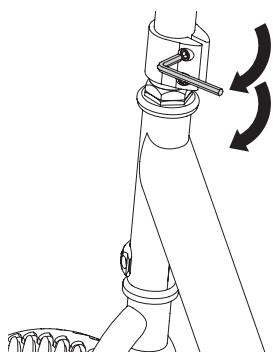
2 Tighten the collar clamp using a 5 mm Allen wrench.
□ Attaching the Seat and Luggage Rack (EcoSmart Metro HD Only)
Tools Required: 5 mm Allen Wrench, 10 mm Wrench
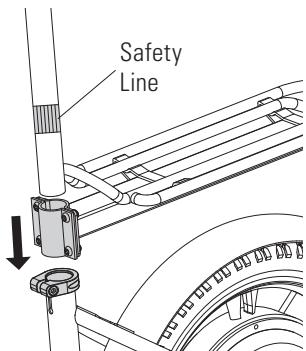
1 Slide the seat tube through the luggage rack and into the frame tube down to the safety line on the seat tube.
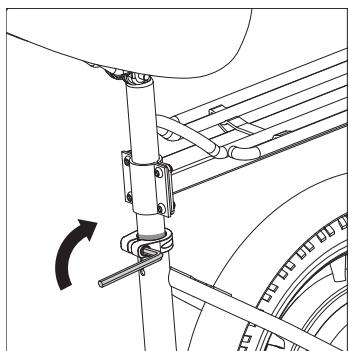
2 The clamp of the luggage rack should be above the seat clamp. Adjust seat to the desired height. Secure the seat by tightening the collar clamp bolt using a 5 mm Allen wrench.
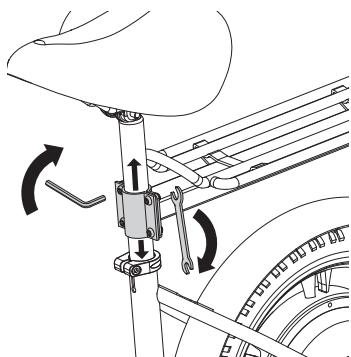
3 Adjust the luggage rack to the desired height and tighten the four (4) bolts on the luggage rack with 5 mm Allen wrench and 10 mm wrench.
WARNING:
Failure to properly install and tighten the collar clamp may allow the handlebars to dislodge while riding and may cause you to lose control and fall. When correctly tightened, the handlebars will not rotate out of alignment with the front wheel under normal circumstances.
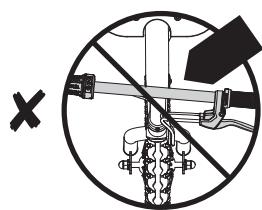
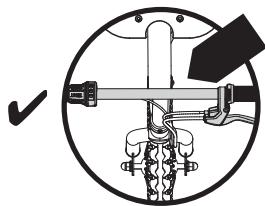
Note: The cable and wire assembly from the handlebar must not be wrapped around the steering tube or handlebar. Sharp bends or twisting of the brake cable can cause the brake to malfunction.
WARNING:
Failure to properly install and tighten the screws, nuts and bolts that affix seat can cause you to lose control and crash.
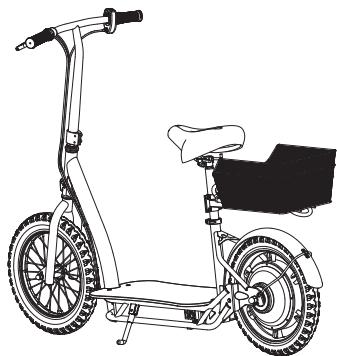
□ Attaching the Basket (EcoSmart Metro HD Only)
Tool Required: 5 mm Allen Wrench
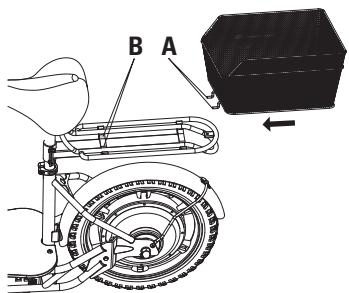
1 Slide the basket hooks (A) under the bar (B) located on the luggage rack.
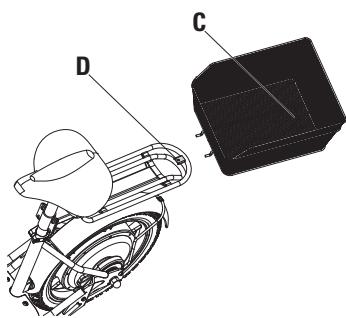
2 Align the hole in the basket (C) with the hole on the luggage rack (D).
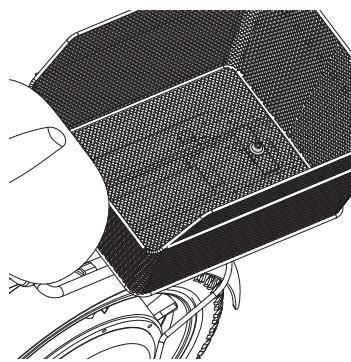
3 Insert the washer and bolt into the hole in the basket and through the bracket on the luggage rack.
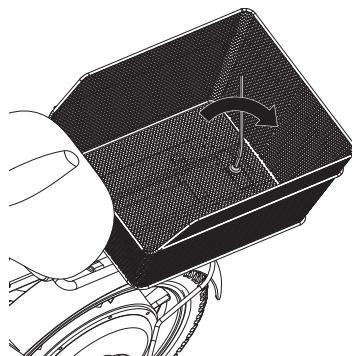
4 Using a 5mm Allen wrench, tighten the bolt until the basket is securely attached to the luggage rack.
Inflating the Tires
The tires are inflated when shipped, but they invariably may lose some pressure between the point of manufacturing and your purchase. Always inflate tires to the correct PSI before first time use.
Lower air pressure can result in a shorter ride time.
Periodically check tires. Reinflate when needed.
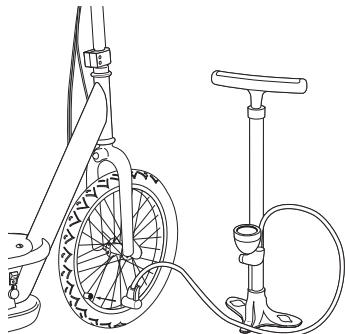
1 Using a bicycle style tire pump equipped for a Schrader-type valve, inflate the tires to the correct PSI indicated on the sidewall of the tires.
WARNING:
Do not exceed weight limit of 11 lb (5 kg) on luggage rack.
WARNING:
The basket should not be used to carry people or pets.
WARNING: Do not use the electric scooter for the first time until you have inflated the tires to the correct PSI. Failure to do so may damage your electric scooter and void your warranty.
WARNING: Do not overinflate, as this could damage the tires or wheels.
Note: The pressure air supplies found at gasoline stations are designed to inflate high-volume automobile tires. If you decide to use such an air supply to inflate your electric scooter tires, first make sure the pressure gauge is working, then use very short bursts to inflate to the correct PSI. If you inadvertently overinflate the tires, release the excess pressure immediately.
CHARGING THE BATTERY
Your electric scooter may not have a fully charged battery; therefore you must charge the battery prior to use.
- Initial charge time: 12 hours.
- Recharge time: up to 12 hours, even if the light turns green. Recommended maximum charging time is 24 hours.
Always charge the battery immediately after riding. - Fully charge battery before storing for extended periods of time.
- Unplug charger from the wall outlet when not in use.
- Failure to recharge battery periodically may result in a battery that will not accept a charge.
- Make sure the power is turned OFF when product
is not in use. If the ON/OFF switch is left on for an extended period of time, the battery may reach a stage at which it will no longer hold a charge.
- To ensure long battery life, never store the product in freezing or below freezing temperatures! Freezing will permanently damage the battery.
- Run time: Up to 60 minutes of continuous ride time.
Run time may vary depending on riding conditions, rider weight, climate, and/or proper maintenance. - Constant starting and stopping may shorten ride time.
- Battery life can vary depending on proper maintenance and usage of the product.
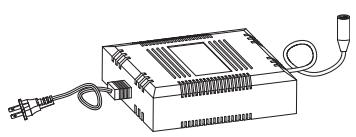
Charger
Note: Charger design may vary from one shown
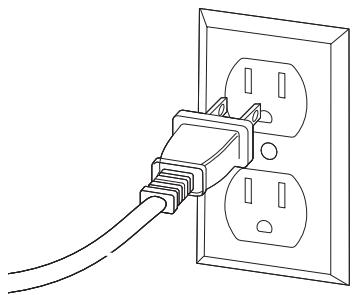
1 Plug the charger plug into wall outlet. The light on the charger should be green.
Note: If green light (LED) does not turn on, try a different outlet.
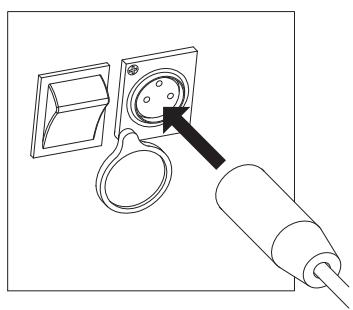
2 Note: Make sure power button is in the OFF position. Plug the charger into the charger port. The light on the charger should turn red during charging. The light will turn green again when charging is complete.
WARNING: Use ONLY with the recommended charger. Batteries are only to be charged under adult supervision. The charger is not a toy. Always disconnect the charger before wiping down and/or cleaning the electric scooter with a damp cloth.
The charger supplied with the electric scooter should be regularly examined for damage to the cord, plug, enclosure and other parts. In the event of such damage, the electric scooter must not be charged until it has been repaired or replaced.
Chargers have built-in overcharge protection to prevent battery from being overcharged.
Note: If the charger gets warm during regular use, this is a normal response and is no cause for concern. If your charger does not get warm during use, it does not mean that it is not working properly.
Wall outlet - Green (stand by)
Wall outlet and unit - Red (charging)
Wall outlet and unit - Green (charged)
Note: Continue charging unit even if light turns green prior to 12 hours.
WARNING: Battery charge can deplete over time. Periodically recharge battery when not in use.
PRE-RIDE CHECKLIST

Brake
Check the brake for proper function. When you squeeze the lever, the brake should provide positive braking action. Make sure brake is not rubbing when the lever is released. When you apply the brake with the throttle on/engaged, the brake cut-off switch should cut power to the motor.

Wheels
Periodically inspect the wheels for excessive wear.

Tires
Periodically inspect the tires for excess wear and replace as needed. Regularly check the tire pressure and inflate as needed.

Frame, Fork and Handlebars
Check for cracks or broken connections. Although broken frames are rare, it is possible for an aggressive rider to run into a curb or object and wreck, bend or break a frame. Get in the habit of inspecting your scooter on a regular basis.

Hardware/Loose Parts
Before every ride, check all parts, such as nuts, bolts, fasteners, etc., to ensure they are secure and assembled correctly. There should not be any unusual rattles or sounds from loose parts or broken components. If the product is damaged, do not ride.
Reference "SafetyWarnings" on pages 1 and 2 of this manual.

Safety Gear
Always wear proper protective equipment, such as an approved safety helmet (with chin strap securely buckled), elbow pads, and kneepads. A helmet may be legally required by local law or regulation in your area. A long-sleeved shirt and long pants are recommended. Always wear shoes and keep shoelaces tied and out of the way of the wheels and motor. NEVER RIDE BAREFOOTED OR IN SANDALS.

Laws and Regulations
Always check and obey any local laws or regulations.

Insurance
Do not assume that your existing insurance policies necessarily provide coverage for product use. Check with your insurance company for information regarding insurance.

Storage
Prolonged exposure to UV rays, rain and the elements may damage the enclosure materials, store indoors when not in use.
How to Operate
Do not activate the twist-grip throttle unless you are on the electric scooter and in a safe, outdoor environment suitable for riding.
How to Ride
Once you have charged the battery (see page 6 for charging information):
- Turn power switch "ON"; put kickstand up and place both hands on the handlebars.
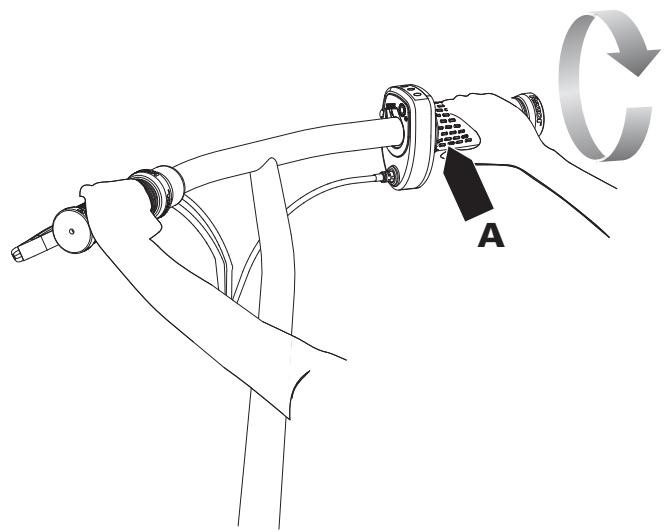
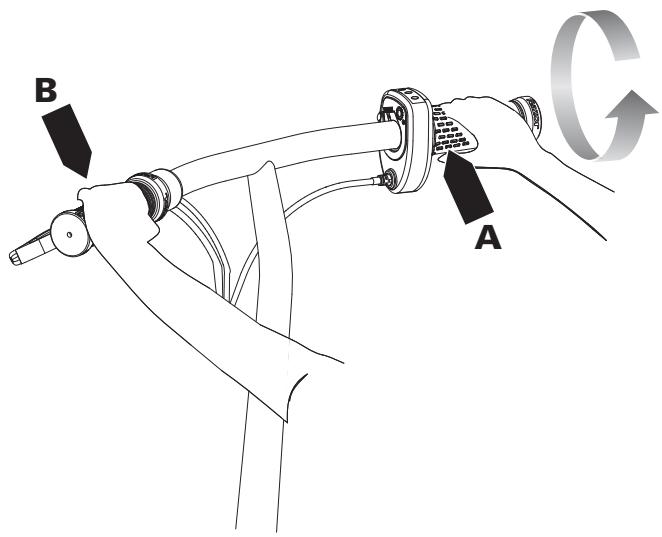
- Place both hands on the handlebars and place one foot on deck plate. Push scooter forward with other foot while applying the throttle with right hand (A). Place other foot on deck plate once scooter is in motion.
How to Stop
- To stop, release the throttle (A) and apply the brake (B) until the product comes to a complete stop.
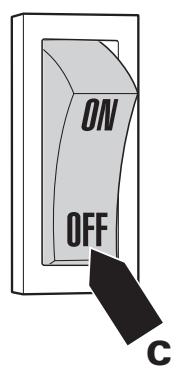
- Make sure to turn the product OFF after your ride is complete. Pressing the power switch (C) will turn the product OFF completely.
WARNING:
The brake is capable of skidding the rear tire and throwing an unsuspecting rider. Practice in an open area free from obstacles until you are familiar with the brake function. Avoid skidding to a stop as this can cause you to lose control and/or damage the rear tire.
Note: As an additional safety feature, the scooter is designed to cut power to the motor when the hand brake is applied.
Note: Practice riding only in wide open areas clear from curbs, parking blocks and other obstacles. Impacting the wheels against any hard surface can damage the wheels. Wheels are not covered under the limited warranty.
Turn power switch "OFF" before conducting any maintenance procedures.
Adjusting the Brake
Tool Required: 10 mm Wrench
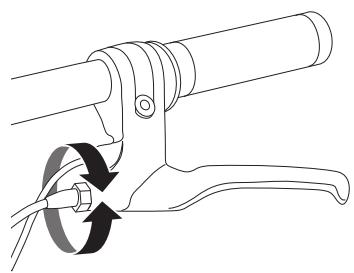
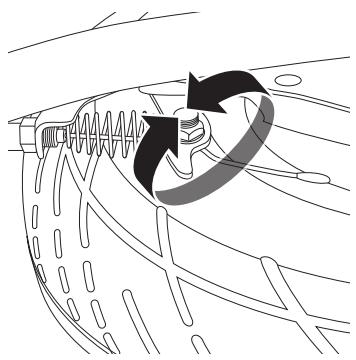
1 To adjust the brake cable tension, thread the brake lever adjuster in or out 1/4 to 1/2 turn until the desired brake adjustment is attained. Most adjustments are complete at this step. If brake still needs further adjustment, proceed to step 2.
2 If the brake is too tight or too loose, use a 10mm wrench to loosen the nut for additional adjustment on the brake cable. Securely tighten the nut when finished.
REPAIR AND MAINTENANCE
□ Cleaning Your Scooter
Wipe with a damp cloth to remove dirt and dust. Do not use industrial cleaners or solvents as they may damage the surfaces. Do not use alcohol, alcohol-based or ammonia-based cleaners as they may damage or dissolve the plastic components or soften the decals or decal adhesive.
□ Battery Care and Disposal
Do not store in freezing or below freezing temperatures. To properly maintain your battery and ensure maximum battery life, carefully read the "Charging the Battery" section on page 6 of this owner's manual.

CONTAINS SEATED LEAD-ACID BATTERIES. BATTERIES MUST BE RECYCLED.
Disposal: Your electric scooter uses sealed lead-acid batteries which must be recycled or disposed of in an environmentally safe manner. Do not dispose of a lead-acid battery in a fire; the battery may explode or leak. Do not dispose of a lead-acid battery in your regular household trash. The incineration, land filling or mixing of sealed lead-acid batteries with household trash is prohibited by law in most areas. Return exhausted batteries to a federal or state approved lead-acid battery recycler or a local seller of automotive batteries. If you live in Florida or Minnesota, it is prohibited by law to throw away lead-acid batteries in the municipal waste stream.
Charger
The charger supplied with the electric scooter should be regularly examined for damage to the cord, plug, enclosure and other parts and in the event of such damage, the product must not be charged until it has been repaired or replaced.
Use ONLY with the recommended charger.
Wheels
Wheels and drive system are subject to normal wear and tear. It is the responsibility of the user to periodically inspect wheels for excess wear and replace hub motor components as required.
Replacement Parts
The most frequently requested replacement parts are available for purchase at some Razor retail partners. For the complete selection of replacement parts visit shop.razor.com.
Repair Centers
For a list of authorized Razor repair centers:
- Check online at www.razor.com.
Additional Customer Service contact information is listed on the back of this manual.

In the US and Canada only:
For more information regarding recycling of rechargeable batteries, call toll free 1-800-822-8837, or visit http://www.call2recycle.org
WARNING: If a battery leak develops, avoid contact with the leaking acid and place the damaged battery in a plastic bag. Refer to the disposal instructions at left. If acid comes into contact with skin or eyes, flush with cool water for at least 15 minutes and contact a physician.
WARNING: Battery posts, terminals and related accessories contain lead and lead compounds. Wash your hands after handling.
WARNING: Wheelies and other stunt-type riding reduces your ability to maneuver and control your scooter. Take the necessary precautions, such as wearing appropriate protective gear and practice in an area safe for stunt riding and free from obstructions.
*Product(s) should be turned OFF and fully charged prior to doing any Troubleshooting.
NOTE: All troubleshooting steps should be performed by an adult only.
| Problem | Possible Cause | Solution |
| Scooter does not run | Undercharged battery | Charge the battery. A new battery should have been charged for at least 12 hours before using the scooter for the first time and up to 12 hours after each subsequent use. Check all connectors. Make sure the charger connector is tightly plugged into the charging port and that the charger is plugged into the wall. Make sure the power flow to the wall outlet is on. You may check to see if your charger is working by using a volt meter or ask your local Razor authorized service center to test your charger for you. Check all wires and connectors to make sure they are tight. |
| Charger is not working | ||
| Loose wires or connectors | ||
| Scooter was running but suddenly stopped | Scooter is overloaded | Power will automatically shut off if the motor is overloaded. An excessive overload, such as too heavy a rider or too steep a hill, could cause the motor to overheat. If the scooter suddenly stops running, check the fuse box. Correct the conditions that caused the breaker to trip and avoid repeatedly tripping the breaker. |
| Short run time (less than 60 minutes per charge) | Undercharged battery | Charge the battery. A new battery should have been charged for at least 12 hours before using the scooter for the first time and up to 12 hours after each subsequent use. Check all wires and connectors. Make sure the battery connector is tightly plugged into the charger connector and that the charger is plugged into the wall. Make sure power flow to the wall outlet is on. Even with proper care, a rechargeable battery does not last forever. Average battery life is 1 to 2 years depending on scooter use and conditions. Replace only with a Razor replacement battery. Refer to adjusting the brake instructions on page 8. |
| Battery is old and will not accept full charge | ||
| Brake is not adjusted properly | ||
| Scooter is overloaded | Power will automatically shut off if the motor is overloaded. An excessive overload, such as too heavy a rider or too steep a hill, could cause the motor to overheat. If the scooter suddenly stops running, check the fuse box. Correct the conditions that caused the fuse to burn and avoid repeatedly burning the fuse. |
TROUBLESHOOTING GUIDE
| Problem | Possible Cause | Solution |
| Scooter runs negligibly | Driving conditions are too stressful | Use only on solid, flat, clean and dry surfaces such as pavement or level ground. |
| Tires are not properly inflated | The tires are inflated when shipped, but they invariably will lose some pressure between the point of manufacturing and your purchase. Refer to instructions on page 5 of this manual to properly inflate tires. | |
| Scooter is overloaded | Make sure you do not overload the scooter by allowing more than one rider at a time, exceeding the 220 lb. maximum weight limit, going up a hill or towing objects behind the scooter. If the scooter is overloaded, the fuse may blow and shut off power to the motor. Correct the riding conditions that caused the overload. | |
| Drum brake is dragging on pads | Refer to adjusting the brake instructions on page 8. | |
| Brake is not adjusted properly | Refer to adjusting the brake instructions on page 8. | |
| Sometimes the scooter doesn't run, but other times it does | Loose wires or connectors | Check all wires around the motor and all connectors to make sure they are tight. |
| Motor or electrical switch damage | Contact your local Razor authorized service center for diagnosis and repair. | |
| Charger gets warm during use | Normal response to charger use | No action required. This is normal for some chargers and is no cause for concern. If your charger does not get warm during use, it does not mean that it is not working properly. |
| Scooter does not stop when applying the brake | Brake is not adjusted properly | Refer to adjusting the brake instructions on page 8. |
| Scooter makes loud noises or grinding sounds | Drum brake is dragging on brake pads | Refer to adjusting the brake instructions on page 8. |
For more troubleshooting tips, a list of available replacement parts or to locate an authorized Service Center in your area, visit our website at www.razer.com or call toll free +1 866-467-2967 to speak to a live Customer Service Representative.
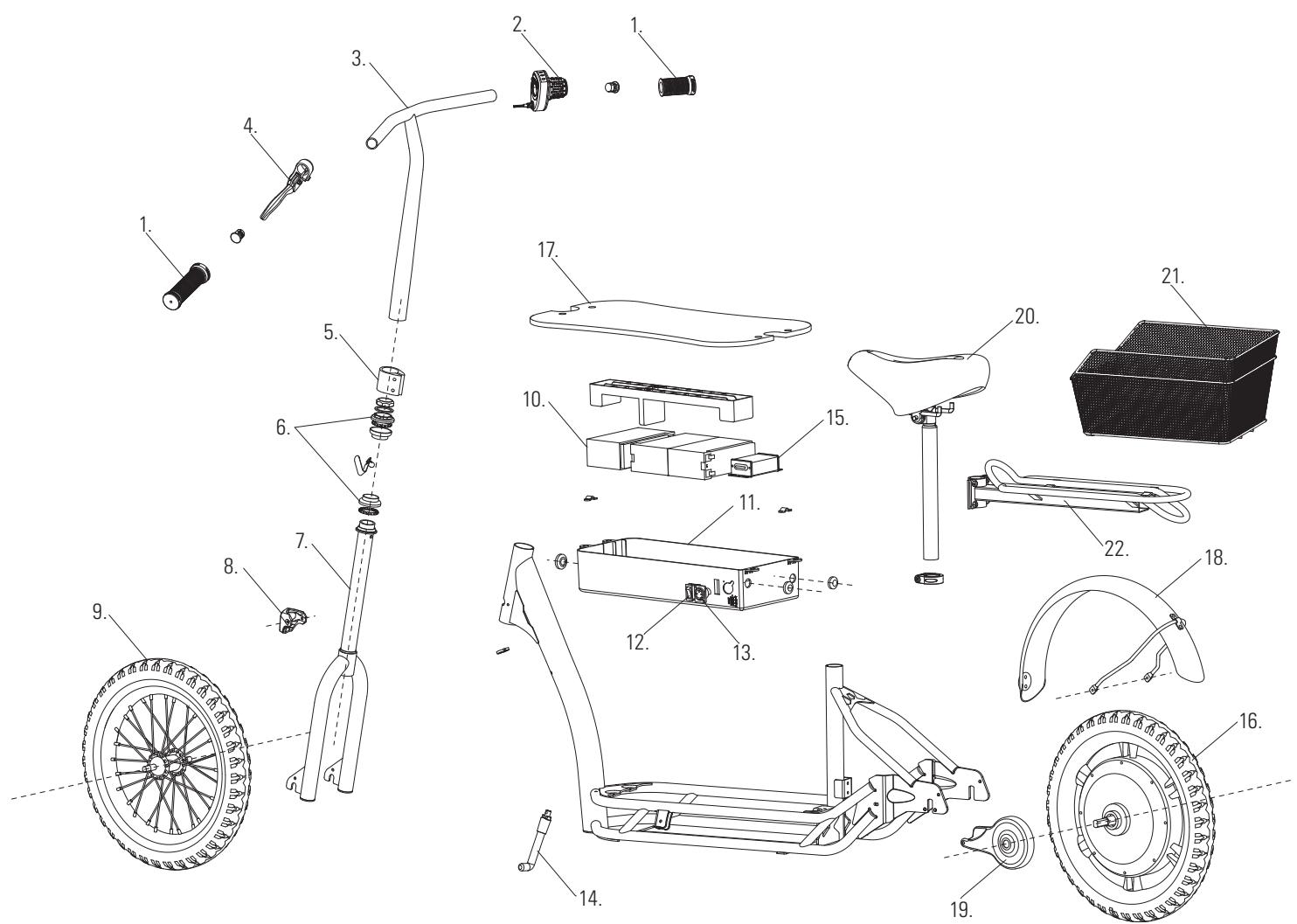
ECOSMART METRO HD PARTS
Keep your electric scooter running for years with genuine Razor parts. Visit our website or e-mail us for more information on spare part availability. (Specifications subject to change without notice.)
- Handlebar Grips (x2)
- Front Fork
- On/Off Switch
- Deck Plate
- Twist-Grip Throttle
- Limiter Cover
- Charger Port
- Rear Fender
- Handlebar Stem
- Front Wheel Complete
- Kickstand
- Brake
- Brake Lever Assembly
- Battery w/ (1) 30 Amp Fuse (3 - 12v/6Ah)
- Control Module
- Seat
- Collar Clamp
- Battery Tray
- Rear Wheel Complete w/ Hub Motor
- Basket
- Luggage Rack
- Headset (Upper/Lower)
ECOSMART SUP PARTS
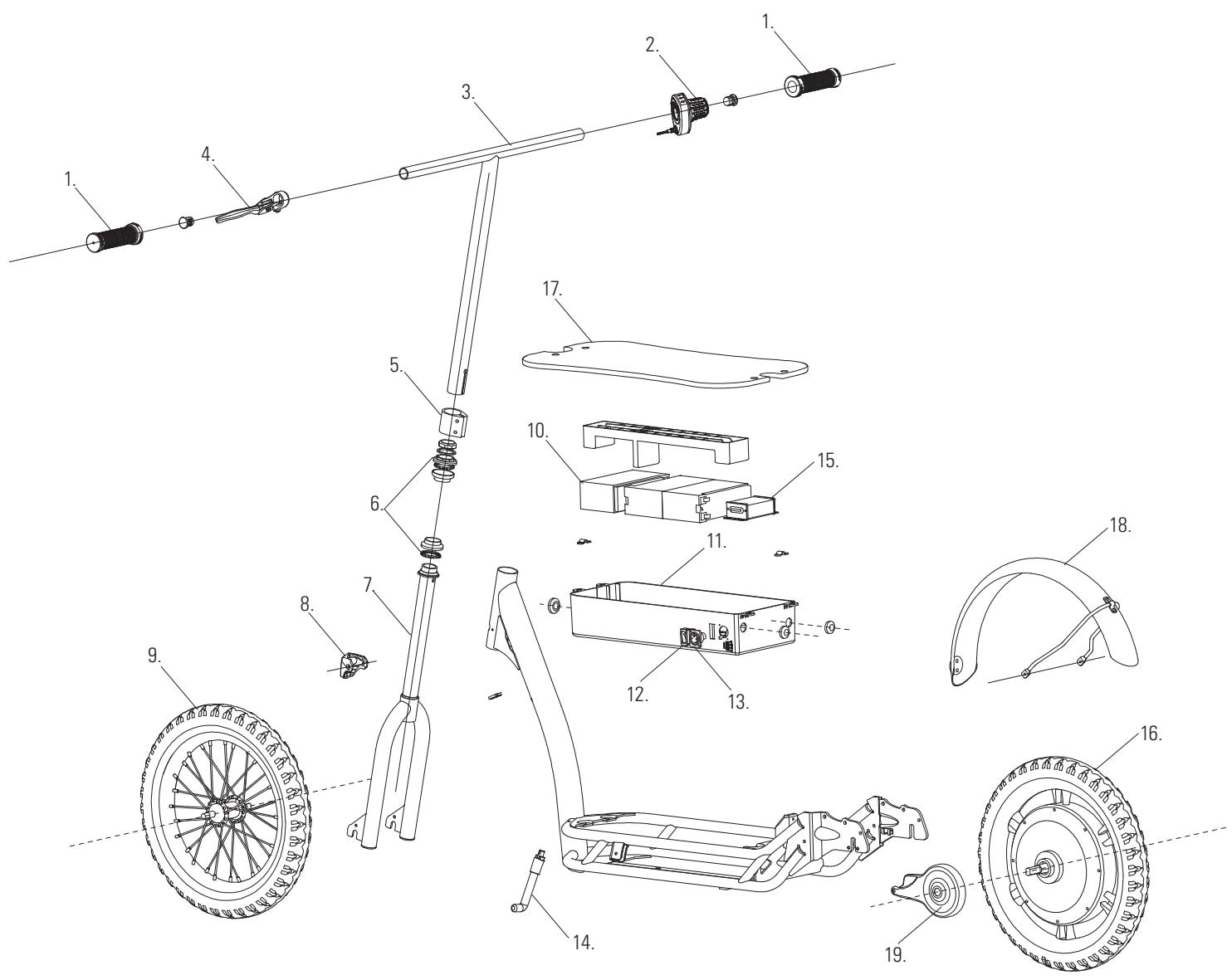
Keep your electric scooter running for years with genuine Razor parts. Visit our website or e-mail us for more information on spare part availability. (Specifications subject to change without notice.)
-
Handlebar Grips (x2)
-
Headset (Upper/Lower)
-
Battery Tray
-
Rear Wheel Complete w/ Hub Motor
-
Twist-Grip Throttle
-
Front Fork
-
On/Off Switch
-
Deck Plate
-
Handlebar Stem
-
Limiter Cover
-
Charger Port
-
Rear Fender
-
Brake Lever Assembly
-
Front Wheel Complete
-
Kickstand
-
Brake
-
Collar Clamp
-
Battery w/ (1) 30 Amp Fuse (3 - 12v/6Ah)
NOTICE: INSURANCE
YOUR INSURANCE POLICIES MAY NOT PROVIDE COVERAGE FOR ACCIDENTS INVOLVING THE USE OF THIS SCOOTER/ELECTRIC RIDE-ON PRODUCT. TO DETERMINE IF COVERAGE IS PROVIDED, YOU SHOULD CONTACT YOUR INSURANCE COMPANY OR AGENT.
FCC COMPLIANCE
This device complies with Part 15 of the FCC Rules. Operation is subject to the following two conditions: (1) This device may not cause harmful interference, and (2) this device must accept any interference received, including interference that may cause undesired operation.
Note: This equipment has been tested and found to comply with the limits for a Class B digital device, pursuant to part 15 of the FCC Rules. These limits are designed to provide reasonable protection against harmful interference in a residential installation. This equipment generates, uses and can radiate radio frequency energy and, if not installed and used in accordance with the instructions, may cause harmful interference to radio communications. However, there is no guarantee that interference will not occur in a particular installation. If this equipment does cause harmful interference to radio or television reception, which can be determined by turning the equipment off and on, the user is encouraged to try to correct the interference by one or more of the following measures:
- Reorient or relocate the receiving antenna.
- Increase the separation between the equipment and receiver.
- Connect the equipment into an outlet on a circuit different from that to which the receiver is connected.
- Consult the dealer or an experienced radio/TV technician for help.

WARNING: Changes or modifications to this product not expressly approved by Razor USA LLC, could void the user's authority to operate equipment.
WARRANTY
Razor Limited Warranty
The manufacturer warranties this product to be free of manufacturing defects for a period of 90 days from date of purchase. This Limited Warranty does not cover normal wear and tear, wheel, or any damage, failure or loss caused by improper assembly, maintenance, storage or use of the electric scooter.
This Limited Warranty will be void if the product is ever:
- used in a manner other than for recreation or transportation;
- modified in any way;
rented.
The manufacturer is not liable for incidental or consequential loss or damage due directly or indirectly to the use of this product.
Razor does not offer an extended warranty. If you have purchased an extended warranty, it must be honored by the store at which it was purchased.
For your records, save your original sales receipt with this manual and write the serial number below.
CUSTOMER SERVICE CONTACT INFORMATION
Need Help? Visit our website for replacement parts, product support, a list of authorized service centers in the US and customer service contact
information at www.razor.com. Please have the product I.D. code (located on the white label of your product) available for better assistance. Additional
Customer Service contact information is listed below:
AMERICAS
Razor USA LLC
P.O.Box 3610
Cerritos, CA 90703
USA
+1 866 467 2967
Monday - Friday
8:00 AM - 5:00 PM Pacific Time
customersupport@razorusa.com
EUROPE, MIDDLE EAST, AFRICA
Razor USA LLC (Europe)
Handelsweg 2
2742 RD Waddinxveen
Netherlands
+44(0)1202672702
info@razoreu.com
ASIA
Razor USA LLC (Asia)
P.O.Box 3610
Cerritos, CA 90703
USA
+815075796622
info@razor-asia.com
UNITED KINGDOM AND IRELAND
Razor USA LLC (UK)
Unit 20
Hartnoll Business Centre
Post Hill, Tiverton
Devon EX16 4NG
UK
+44(0)1202672702
info@razoreu.com
DISTRIBUTED IN AUSTRALIA BY:
Fantastic Limited
Suite 2.01, Level 2
315 Ferntree Gully Road
Mount Waverley Vic 3149,
Australia
+1800244543
info@funtastic.com.au
IMPORTED IN JAPAN BY B-PLUS ASIA CORP.
Razor USA LLC
THE RIPSTIK COMPANY
Kurokawa 3-1, Asaoku,
Kawasaki, Kanagawa
215-0035 JAPAN
+81 (0) 443289057 Tel
+81 (0) 443289067 Fax
info@razor- asia.com