NEXUS S - Cellphone SAMSUNG - Free user manual and instructions
Find the device manual for free NEXUS S SAMSUNG in PDF.


| Brand | SAMSUNG |
| Model | Nexus S |
| Product type | Mobile phone |
| Operating system | Android |
| Screen | Capacitive touch screen |
| Camera | Front and rear camera with LED flash |
| Connectivity | Wi-Fi, Bluetooth, GPS |
| Battery | Removable, rechargeable |
| Power supply | Wall charger and USB cable |
| Included accessories | Headset, USB cable, charger |
| Maintenance and cleaning | Clean lenses with a lint-free cloth |
| Security | PIN code lock, PUK unlock |
| Spare parts and repairability | Removable battery and SIM card |
| General information | Google Nexus S device, GSM compatible |
| Main functions | Calls, SMS, web browsing, messaging, Android apps |
| Headphone jack | 3.5 mm |
| Charging port | Micro USB |
| Power button | On/off, hold to power off |
| Initial setup | Google account connection required |
| Volume | Volume buttons on the side |
Frequently Asked Questions - NEXUS S SAMSUNG
User questions about NEXUS S SAMSUNG
0 question about this device. Answer the ones you know or ask your own.
Ask a new question about this device
Download the instructions for your Cellphone in PDF format for free! Find your manual NEXUS S - SAMSUNG and take your electronic device back in hand. On this page are published all the documents necessary for the use of your device. NEXUS S by SAMSUNG.
USER MANUAL NEXUS S SAMSUNG
Copyright © 2011 Google Inc. All rights reserved.
Google, the stylized Google logo, Android, the stylized Android logo, Nexus, the stylized Nexus logo, Nexus S, and the stylized Nexus S logo, are trademarks of Google Inc. All other company and product names may be trademarks of the companies with which they are associated.
Availability of Google applications, services, and features may vary by country, carrier, and manufacturer.
For more information about your Nexus S phone, visit http://www.nexushelp.com.
Contents
Contents 3
Your phone and accessories 4
What's in the box 5
Getting to know your phone 6
Installing the battery, and SIM card 7
Open the phone's back cover 7
Replace the phone's back cover 8
Remove or insert the battery 8
Remove or insert a SIM card 10
Charging your phone 11
Charge the phone 11
Using the headset 12
Turning the phone on and off 13
Turn on the phone 13
Unblock a SIM 14
Turn off the phone 14
Your phone and accessories
Your Google™ Nexus S™ phone comes with a number of accessories, including a headset, USB cable, and charger. For safety reasons, the battery is not shipped inside the phone, so you need to insert it and charge it fully before using your phone. This guide describes the parts of your phone, how to install and charge the battery, how to turn the phone on and off, and other useful information.
For more information about using the Android™ mobile technology platform that runs on your phone, including the basics of using it to place phone calls and how to use its applications to browse the web, read email, and so on, visit your carrier's support site and refer to the Android User's Guide, available from http://www.nexushelp.com.
In this section
"What's in the box" on page 5
"Getting to know your phone" on page 6
"Installing the battery, and SIM card" on page 7
"Charging your phone" on page 11
"Using the headset" on page 12
"Turning the phone on and off" on page 13
What's in the box
Your Google™ Nexus S™ phone comes with the following accessories.
Health & safety and warranty booklets

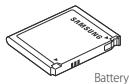
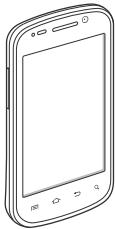
Nexus S phone
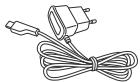
Charger
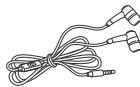
Headset
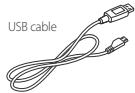
If you purchased the phone with a contract with a GSM mobile carrier, a SIM card for your carrier is included with the phone. See "Installing the battery, and SIM card" on page 7 to learn how to insert or remove the battery, and SIM.
It may take a few minutes to import contacts from the SIM or USIM card to your device depending on the SIM or USIM card.
Getting to know your phone
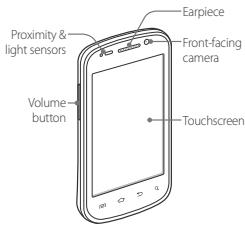
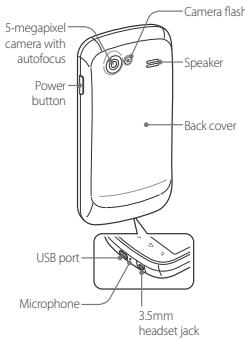
Before you use the phone, insert the battery and charge it fully. (See "Installing the battery, and SIM card" on page 7 and "Charging your phone" on page 11.)
Other sections in this chapter describe the use and function of the headset, status light, turning the phone on and off, and more.
Your carrier's support site and the Android User's Guide (available from http://www.nexushelp.com) describe how to place calls, and other basic features of the phone, including turning it on for the first time.
Be sure to keep the front and back camera lenses clean with lint-free cloth; smudges and fingerprints will distort your pictures. The back camera's LED flash is next to the lens. Taking pictures and shooting videos is described in the Android User's Guide.
Installing the battery, and SIM card
To install or replace the battery or SIM, you must remove the phone's back cover.
You must install the battery and insert a SIM before you can use the phone.
Open the phone's back cover
Hold the device firmly and locate the cover release latch. The release latch has a small indentation, just large enough to insert a fingernail and is located above the camera lens. Place your fingernail in the opening and firmly lift the cover off the device.
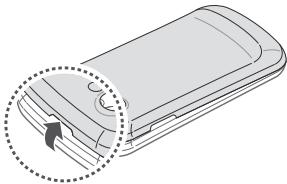
Replace the phone's back cover
Place the cover on the back of the phone and push it down into place.
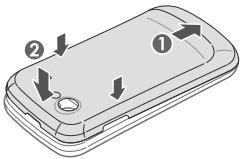
Remove or insert the battery
You must open the phone's back cover to remove or insert the battery.
1 Turn off the phone.
See "Turning the phone on and off" on page 13.
2 Life out the battery by slipping your finger into the small opening next to the battery.
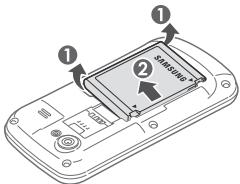

GH68-34265B
Rev.1.0
Insert the battery by aligning the gold contacts on the phone and the battery and then gently pressing the battery into place.
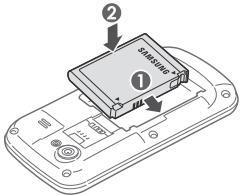
Remove or insert a SIM card
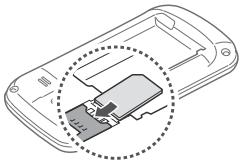
You must open the phone's back cover and remove the battery to remove or insert the SIM card.
Remove the SIM card by sliding it out of its slot with the tip of your finger.
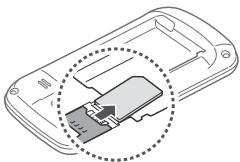
Insert the SIM card by aligning it (notch to the lower right and gold contacts down) and then sliding it into its slot.
Charging your phone
Before you can use your phone, you must charge it fully.
The phone also charges when it is connected to a computer's USB port with the included USB cable. For information about connecting the phone to a computer, see the Android User's Guide.
Charge the phone
1 Plug one end of the charger into an AC outlet.
2 Plug one end of the USB cable into the supplied charger or into the USB port of your computer.
3 Plug the other end into the micro USB port on your phone.
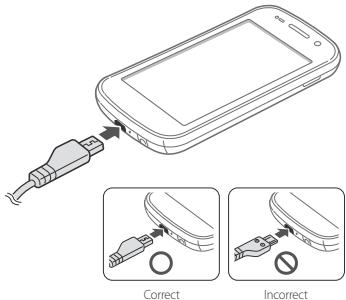
When charging, the screen displays a battery charging status icon.
4 When the phone is fully charged, disconnect it from the charger.
Using the headset
The headset plugs into the phone's 3.5mm headset jack.
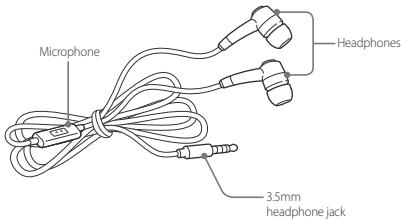
You control the headphones' volume with the phone's Volume Up/Down button, and with the applications on your phone (as described in the Android User's Guide and in the documentation for your applications).
Turning the phone on and off
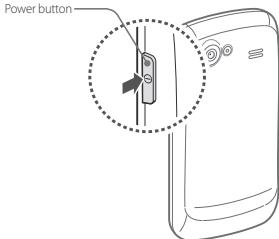
You use the power button to turn the phone on and off.
Turn on the phone
Press the Power button for a few seconds, until the screen illuminates.
The first time you turn on the phone, you're welcomed to Android and prompted to sign into your Google Account. For more information, consult your carrier and the Android User's Guide.
When you turn on the phone, you may be prompted to enter a personal identification number (PIN) for your SIM card.
Unblock a SIM
If you enter the wrong SIM-unlock PIN three times, the SIM card is blocked and you can't use your phone except to dial an emergency number. You must obtain a PIN Unblocking Key (PUK) from your carrier to unlock the SIM and set a new PIN.
Dial the following, replacing "PUK" with the PUK from your carrier and replacing both instances of "PIN" with a 4- to 8-digit PIN of your choosing: ^ 05^PUK^PIN^*PIN#
Turn off the phone
1 Press & hold the Power button until a menu opens.
2 Touch Power off in the menu.
3 Touch OK when asked to confirm that you want to turn off the phone. For more about working with the touchscreen and menus, see the Android User's Guide.