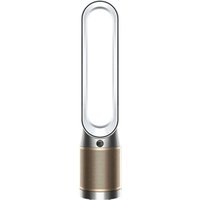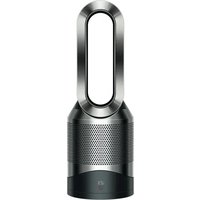
PURE COOL LINK DESK DP01 - Air purifier DYSON - Free user manual and instructions
Find the device manual for free PURE COOL LINK DESK DP01 DYSON in PDF.


| Product type | Air purifier with fan |
| Brand | Dyson |
| Model | PURE COOL LINK DESK DP01 |
| Dimensions (approx.) | Height: 600 mm, Width: 200 mm, Depth: 200 mm |
| Weight (approx.) | 3.5 kg |
| Power supply | 220-240 V, 50 Hz |
| Maximum power | 40 W |
| Recommended area | Up to 30 m² |
| Filter type | Non-washable, replacement every 12 months (based on use 12 h/day) |
| Noise level | Night mode: very quiet, normal mode: up to 60 dB |
| Main features | Air purification, ventilation, oscillation, automatic mode, night mode, timer, Wi-Fi connectivity, Dyson Link app, remote control |
| Automatic mode | Automatic power adjustment based on air quality (sensors) |
| Night mode | Dimmed display, quiet operation, power reduced to 4 or less |
| Timer | Adjustable sleep timer, standby at end of countdown |
| Remote control | With magnet, attaches to unit, CR2032 battery |
| Connectivity | Built-in Wi-Fi, Dyson Link app (iOS/Android) |
| Maintenance | Clean with dry or damp cloth, no detergents; clean sensor with cotton swab when changing filter |
| Safety | Powerful magnets (do not place near pacemakers); non-washable parts; do not use near open flames or heat sources |
| Warranty | 2 years (parts and labor, excluding filter) upon registration |
| Customer service | Dyson Helpline UK: 0800 298 0298, ROI: 01 475 7109; www.dyson.co.uk/support |
Frequently Asked Questions - PURE COOL LINK DESK DP01 DYSON
User questions about PURE COOL LINK DESK DP01 DYSON
0 question about this device. Answer the ones you know or ask your own.
Ask a new question about this device
Download the instructions for your Air purifier in PDF format for free! Find your manual PURE COOL LINK DESK DP01 - DYSON and take your electronic device back in hand. On this page are published all the documents necessary for the use of your device. PURE COOL LINK DESK DP01 by DYSON.
USER MANUAL PURE COOL LINK DESK DP01 DYSON
Setting up Dyson Link app
1. Download the Dyson Link app, available on iOS and Android.
2. Select 'Add a Product' from within the app and follow the on screen instructions.
3. Input the above information when requested to do so.
ASSEMBLY
DYSON CUSTOMER CARE
THANK YOU FOR CHOOSING TO BUY A DYSON APPLIANCE
After registering your free 2 year guarantee, your Dyson appliance will be covered for parts and labour (excluding filters) for 2 years from the date of purchase, subject to the terms of the guarantee. If you have any questions about your Dyson appliance, call the Dyson Helpline with your serial number and details of where/when you bought the appliance. Most questions can be solved over the phone by one of our trained Dyson Helpline staff. Your serial number can be found on your rating plate which is on the base of the appliance.
Visit www.dyson.co.uk/support (UK) or www.dyson.ie/support (ROI) for online help, support videos, general tips and useful information about Dyson.
DYSON CONTACT DETAILS
UK:
Website: www.dyson.co.uk/support
Dyson Helpline:
08002980298
Email:
askdyson@dyson.co.uk
Address:
Dyson Ltd, Tetbury Hill, Malmesbury, Wiltshire, SN16 0RP
ROI:
Website: www.dyson.ie/support
Dyson Helpline:
014757109
Email:
askdyson@dyson.co.uk
Address:
Dyson Ireland Limited, Unit G10, Grants Lane, Greenogue Business Park, Rathcoole, Dublin 24
Note your serial number for future reference.

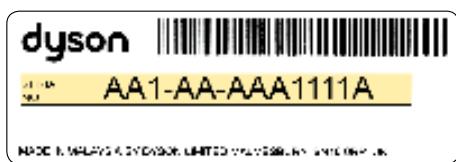
This illustration is for example purposes only.
4 EASY WAYS TO REGISTER YOUR FREE 2 YEAR GUARANTEE

IMPORTANT SAFETY INSTRUCTIONS
BEFORE USING THIS APPLIANCE READ ALL INSTRUCTIONS AND CAUTIONARY MARKINGS
IN THIS MANUAL AND ON THE APPLIANCE
When using an electrical appliance, basic precautions should always be followed, including the following:
WARNING
THE APPLIANCE AND THE REMOTE CONTROL BOTH CONTAIN MAGNETS.
- Pacemakers and defibrillators may be affected by strong magnetic fields. If you or someone in your household has a pacemaker or defibrillator, avoid placing the remote control in a pocket or near to the appliance.
- Credit cards and electronic storage media may also be affected by magnets and should be kept away from the remote control and the top of the appliance.
WARNING
These warnings apply to the appliance, and also where applicable, to all tools, accessories, chargers or mains adaptors.
TO REDUCE THE RISK OF FIRE, ELECTRIC SHOCK, OR INJURY:
- This Dyson appliance can be used by children aged from 8 years and above and persons with reduced physical, sensory or reasoning capabilities, or lack of experience and knowledge, only if they have been given supervision or instruction by a responsible person concerning use of the appliance in a safe way and understand the hazards involved. Cleaning and user maintenance should not be performed by children without supervision.
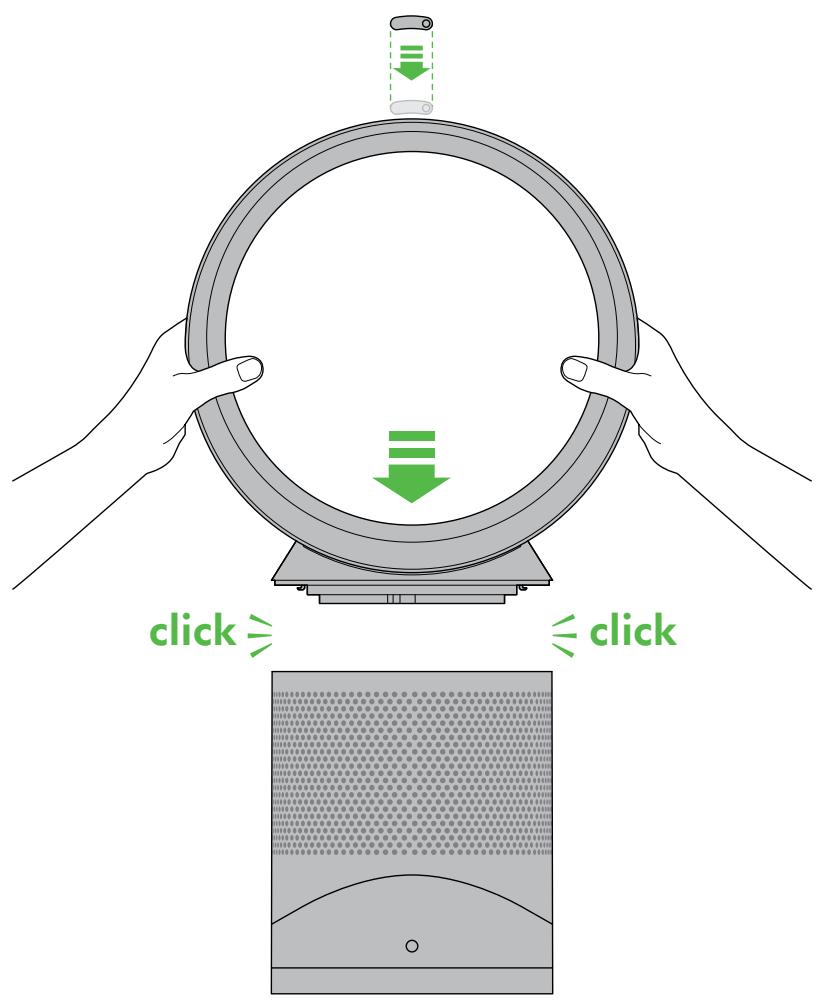
- Ensure appliance is fully assembled in line with the instructions before use. Do not dismantle the appliance or use without the loop amplifier fitted.
- Do not allow to be used as a toy. Close attention is necessary when used by or near children. Children should be supervised to ensure that they do not play with the appliance.
- Use only as described in this Dyson Operating Manual. Do not carry out any maintenance other than that shown in this manual, or advised by the Dyson Helpline.
- Suitable for dry location ONLY. Do not use outdoors or on wet surfaces and do not expose to water or rain.
- Do not handle any part of the plug or appliance with wet hands.
- Do not operate any appliance with a damaged cable or plug. Discard the appliance or return to an authorised service facility for examination and/or repair. If the supply cable is damaged it must be replaced by Dyson, its service agent or similarly qualified person in order to avoid a hazard.
- If the appliance is not working as it should, has received a sharp blow, has been dropped, damaged, left outdoors, or dropped into water, do not use and contact the Dyson Helpline.
- Do not stretch the cable or place the cable under strain. Keep cable away from heated surfaces.
- Do not route the cable under furniture or appliances. Do not cover cable with throw rugs, runners or similar coverings. Arrange cable away from traffic area and where it will not be tripped over.
- Do not unplug by pulling on the cable. To unplug, grasp the plug, not the cable. The use of an extension cable is not recommended.
- Do not put any object into openings or the inlet grille. Do not use with any opening blocked; keep free of dust, lint, hair, and anything that may reduce airflow.
- Do not use any cleaning agents or lubricants on this appliance. Unplug before cleaning or carrying out any maintenance.
- Always carry the appliance by the base, do not carry it by the loop amplifier.
- Turn off all controls before unplugging. Unplug from socket when not in use for extended periods. To avoid a tripping hazard, safely coil the cable.
-
Do not use near furnaces, fireplaces, stoves or other high temperature heat sources.
-
Do not use in conjunction with or directly next to an air freshener or similar products. Keep essential oils and chemicals away from the appliance.
- Choking hazard - This remote control unit contains a small battery. Keep the remote control away from children and do not swallow the battery. If the battery is swallowed seek medical advice at once.
- When removing or replacing the filter, take care to keep your fingers clear.
READ AND SAVE THESE INSTRUCTIONS
THIS DYSON APPLIANCE IS INTENDED FOR HOUSEHOLD USE ONLY
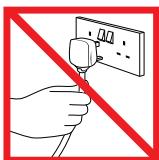
Do not pull on the cable.
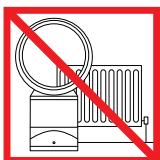
Do not store near heat sources.
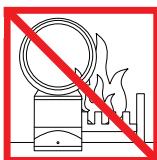
Do not use near naked flames.
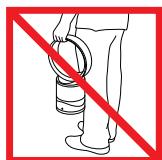
Do not carry by the loop amplifier.
Control

Attach the remote control to the top of the appliance with the buttons facing down.

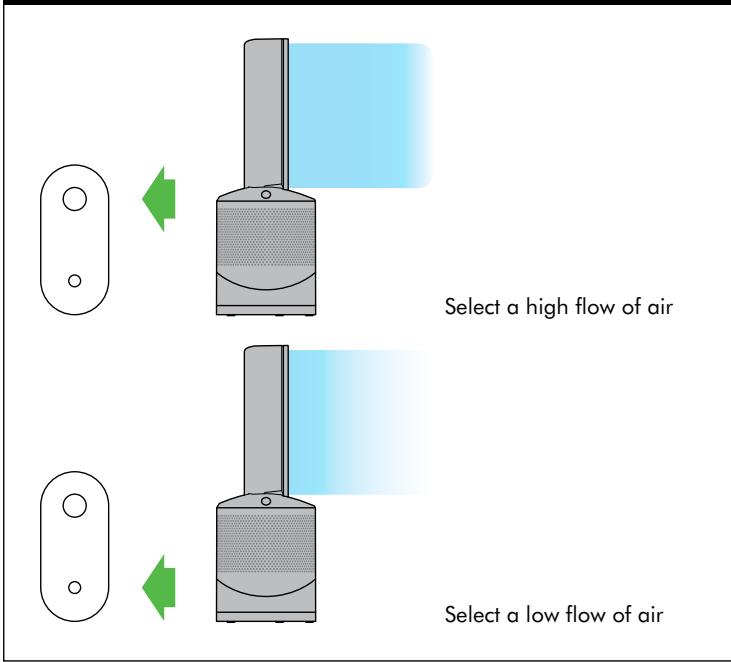
Airflow
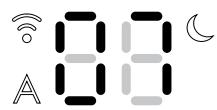
Display icons

Solid white = cleaning/ below air quality target

Flashing green = Wi-Fi is ready to connect to your Dyson Link app

Solid green = clean/air quality target has been met

Flashing white = Wi-Fi connecting
Off = appliance is not in auto cleaning mode

Solid white = Wi-Fi connected

Solid white = appliance is in night mode
Off = Wi-Fi disabled
Off = appliance is not in night mode
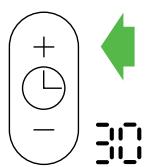
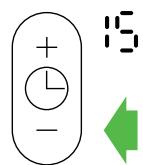
Sleep timer
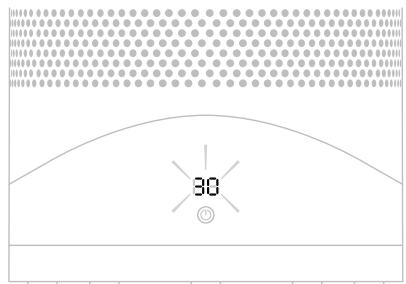
To set the sleep timer, select the desired time. When time reaches zero, the appliance will go into standby mode. To cancel, reduce the time until two dashes appear.

Tilt function
Night mode


The night mode will dim the display and run quietly, making it ideal for use while sleeping.
When night mode is enabled (indicated by an illuminated half moon symbol in the top right corner of the display), the display will dim and after 5 seconds will fade to off. The half moon symbol remains illuminated.
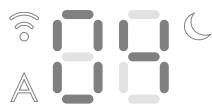

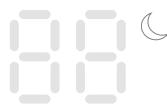
If in manual mode, the power will reduce to level 4. When night mode is activated, if it is already below level 4, it will remain the same. This can be manually changed if desired. The display will illuminate briefly, then fade as before.
If in Auto mode the power will be reduced automatically.
Auto mode


Auto mode adjusts the power according to the air quality in the room.
Poor air quality


Air quality improving

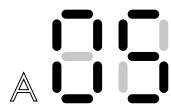
Air quality target has been met
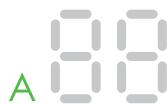
When Auto mode is enabled (indicated by an A symbol in the bottom left corner of the display), the on-board sensors will intelligently adjust the speed of the appliance according to the air quality.
If the air is clean the A symbol will turn green and the numerical display will switch off. If the air quality worsens the A symbol will turn white and the appliance will automatically restart cleaning the room.

For additional control the Dyson Link app can be used to further adjust the sensitivity of the appliance.
A period of 6 days is required after the machine is first used for the sensor to calibrate.
During this period the machine may be more sensitive to VOCs than normal.
Setting up Dyson Link app
The appliance can be enhanced when connected to the Dyson Link app on your smart device.
Download the Dyson Link app, available on iOS and Android.
Select 'Add a Product' from within the app and follow the on screen instructions.
Product SSID
XXXXXX-XXX-XX-XXXXXXXXX-XXXX
Product Wi-Fi Password

Mac address
XX:XX:XX:XX:XX:XX
In order to connect the appliance, you will need the information on the front on this manual.
Clearing blockages
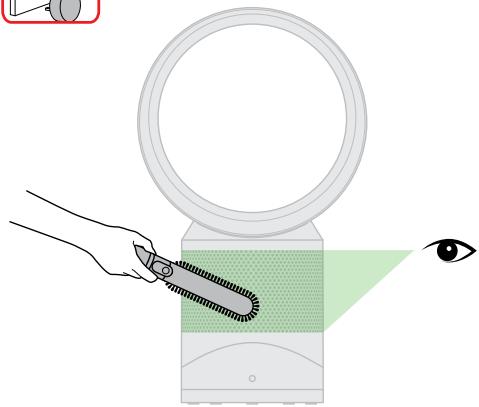
Ensure the appliance is unplugged. Look for blockages in the air inlet holes on the filter. Use a soft brush to remove debris.

Look for blockages in the small aperture inside the loop amplifier. Use a soft brush to remove debris.
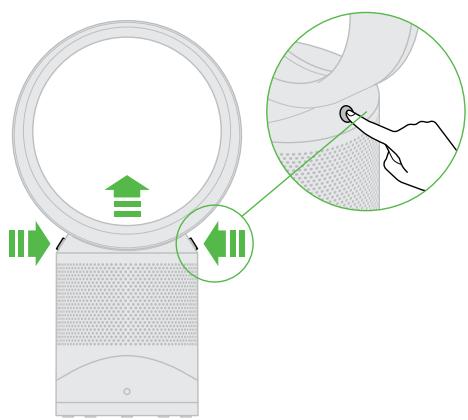
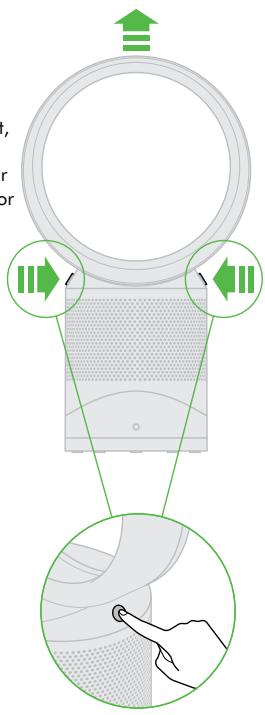
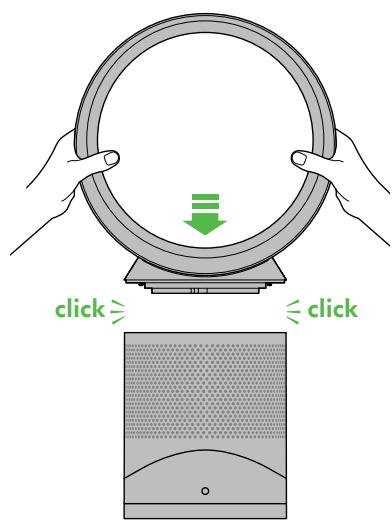
Press buttons to lift off loop amplifier and lift off filter.
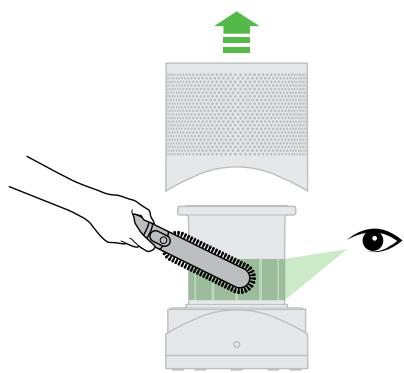
Look for blockages in the air inlet holes under the filter and use a soft brush to remove debris. Replace the filter and then the loop amplifier.
Cleaning
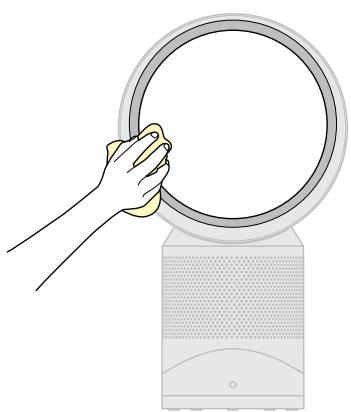
Ensure the appliance is unplugged. Dust may accumulate on the surface of the machine. Wipe dust from the loop amplifier, filter unit and other parts with a dry or damp cloth when dust accumulates.

Do not use detergents or polishes to clean the appliance.

Clean the hatch every time the filter is replaced. Open the small hatch on the side of the appliance. Use a cotton bud to clean inside and remove any debris. This maintains sensor accuracy and ensures the continuing high performance of the appliance.
Replacing the filter unit

1

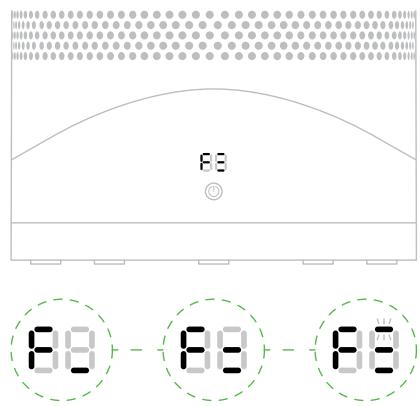
When your non-washable filter unit needs replacing the appliance will display the pattern shown. To replace the non-washable filter unit, follow these steps. Ensure your appliance is unplugged. Your Dyson appliance is programmed to remind you to replace the filter unit after 12 months based on 12 hours usage a day. Please note your indicator will activate sooner with more use. The indicator is only a guide and you may need to replace the filter unit more regularly.
2
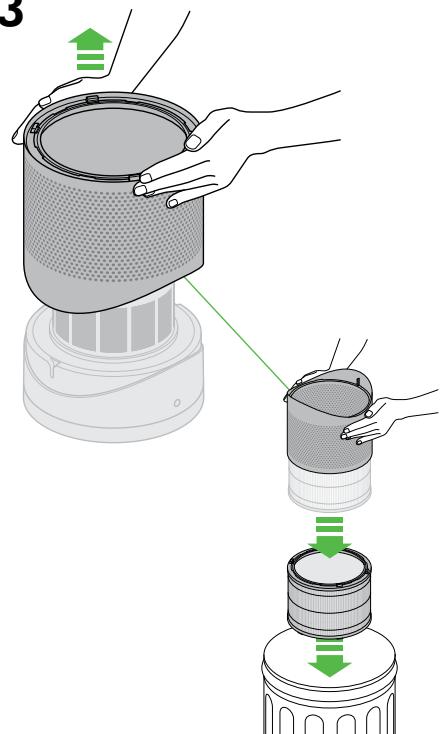
3
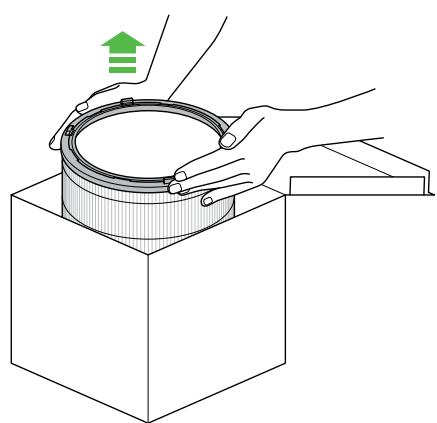
4
5
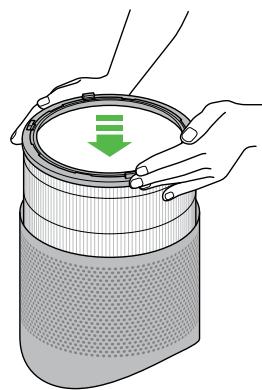
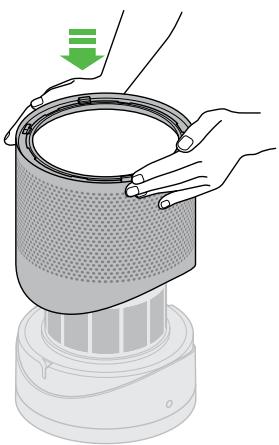
6
7
When you have re-assembled your appliance, press and hold the 'Standby ON/OFF' button for 6 seconds.

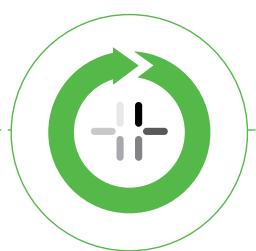
A clockwise-rotating loading pattern will be shown on the LED display.
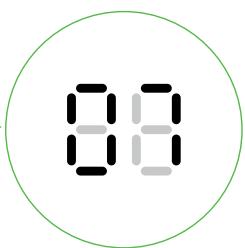
Once the loading pattern is complete, the appliance will return to its normal usage.
Clearing your Wi-Fi settings


It is possible to remove your network details from the appliance.
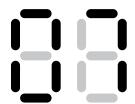
20 sec


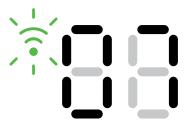


Press and hold the ON/ OFF button on the appliance for longer than 20 seconds.
The Wi-Fi symbol will flash alternately between white and green to indicate that your network details have been removed.

If you clear your network settings the appliance will not connect to the Dyson Link app.
Enabling or Disabling Wi-Fi


Wi-Fi can be enabled or disabled by pressing and holding the ON/ OFF button on the appliance for between 10 and 20 seconds.
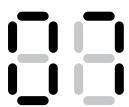
10-20 sec
Wi-Fi disabled

Wi-Fi enabled

Solid white = Wi-Fi connected

Flashing white = Wi-Fi connecting

Flashing green = Wi-Fi is ready to connect to your Dyson Link app
Off = Wi-Fi disabled

If Wi-Fi is disabled, the appliance will not connect to the Dyson Link app.
Troubleshooting
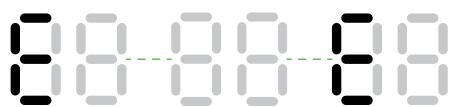
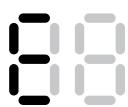
If you see a flashing 'E' when trying to use the appliance, it is unable to do what has been requested.
If you see a solid 'E' when trying to use the appliance, it shows the appliance has stopped functioning correctly.
Make sure you have checked the following:
The room temperature is above 5^ .
There are no blockages in the inlet grille or loop amplifier outlet.
The filter has been correctly assembled and doesn't need to be replaced.
The appliance is correctly plugged in directly to the wall outlet.
If the message still displays, unplug and leave for 10 seconds before turning on again.
If the problem persists, please call the Dyson Helpline.
USING YOUR DYSON APPLIANCE
PLEASE READ THE 'IMPORTANT SAFETY INSTRUCTIONS' IN THIS DYSON OPERATING MANUAL BEFORE PROCEEDING.
LOOKING AFTER YOUR DYSON APPLIANCE
- Do not carry out any maintenance or repair work other than that shown in this Dyson Operating Manual, or advised by the Dyson Helpline.
Always disconnect the plug from the mains before inspecting for problems. If the appliance will not operate, first check the mains socket has electricity supply and that the plug is properly inserted into the socket.
CONTROL WITHOUT THE REMOTE
The appliance can be controlled through your Dyson Link app.
REPLACEABLE PARTS
BATTERY REPLACEMENT
CAUTION
- Unscrew the battery compartment on the remote control. Loosen the base and pull to remove the battery.
- Do not install backwards or short circuit the batteries.
- Do not attempt to dismantle or charge the batteries. Keep away from fire.
- Follow battery manufacturers' instructions when installing new batteries (battery type CR 2032).
NON-WASHABLE FILTER UNIT
- Your filter unit is non-washable and non-recyclable.
To replace your filter unit follow the steps as shown. - To dispose of your old filter unit: remove it from the appliance and place it in your household waste bin.
- A new filter unit can be purchased at www.dyson.com/filter.
AUTO MODE
A period of 6 days is required after the machine is first used for the sensor to calibrate. During this period the machine may be more sensitive to VOCs than normal.
DISPOSAL INFORMATION
- Dyson products are made from high grade recyclable materials. Recycle where possible.
The battery should be removed from the product before disposal. - Dispose of or recycle the battery in accordance with local ordinances or regulations.
This marking indicates that this product should not be disposed with other household wastes throughout the EU. To prevent possible harm to the environment or human health from uncontrolled waste disposal, recycle it responsibly to promote the sustainable reuse of material resources. To return your used device, please use the return and collection systems or contact the retailer where the product was purchased. They can take this product for environmentally safe recycling.
DYSON CUSTOMER CARE
THANK YOU FOR CHOOSING TO BUY A DYSON APPLIANCE
After registering your free 2 year guarantee, your Dyson appliance will be covered for parts and labour for 2 years from the date of purchase, subject to the terms of the guarantee. If you have any questions about your Dyson appliance, call the Dyson Helpline with your serial number and details of where/when you bought the appliance.
Most questions can be solved over the phone by one of our trained Dyson Helpline staff.
Visit www.dyson.co.uk/support (UK) or www.dyson.ie/support (ROI) for online help, support videos, general tips and useful information about Dyson.
Your serial number can be found on your rating plate which is on the base of the appliance.
If your Dyson appliance needs a service, call the Dyson Helpline so we can discuss the available options. If your Dyson appliance is under guarantee, and the repair is covered, it will be repaired at no cost.
PLEASE REGISTER AS A DYSON APPLIANCE OWNER
To help us ensure you receive prompt and efficient service, please register as a Dyson appliance owner. There are four ways to do this:
Online at www.dyson.co.uk/register (UK) or www.dyson.ie/register (ROI).
Telephone the Dyson Helpline on 0800 298 0298 (UK) or 01 475 7109 (ROI)
- Complete the enclosed form and post it to us.
SMARTPHONE. Download the Dyson Link app and you will be taken through registration as part of the set up.
This will confirm ownership of your Dyson appliance in the event of an insurance loss, and enable us to contact you if necessary.
LIMITED 2 YEAR GUARANTEE
TERMS AND CONDITIONS OF THE DYSON 2 YEAR LIMITED GUARANTEE
WHAT IS COVERED
The repair or replacement of your Dyson appliance (at Dyson's discretion) if it is found to be defective due to faulty materials, workmanship or function within 2 years of purchase or delivery (if any part is no longer available or out of manufacture Dyson will replace it with a functional replacement part).
- Where this machine is sold outside of the EU, this warranty will only be valid if the appliance is used in the country in which it was sold.
- Where this machine is sold within the EU, this warranty will only be valid (i) if the appliance is used in the country in which it was sold or (ii) if the appliance is used in Austria, Belgium, France, Germany, Ireland, Italy, Netherlands, Spain or the United Kingdom and the same model as this appliance is sold at the same voltage rating in the relevant country.
WHAT IS NOT COVERED
- Replacement filters. The machine's filter is not covered by the guarantee. Dyson does not guarantee the repair or replacement of a product where a defect is the result of:
- Damage caused by not carrying out the recommended appliance maintenance.
- Accidental damage, faults caused by negligent use or care, misuse, neglect, carelessness or operation or handling of the appliance which is not in accordance with the Dyson Operating Manual.
Use of the appliance for anything other than normal domestic household purposes.
Use of parts not assembled or installed in accordance with the instructions of Dyson.
Use of parts and accessories which are not genuine Dyson components. - Faulty installation (except where installed by Dyson).
- Repairs or alterations carried out by parties other than Dyson or its authorised agents.
- Blockages - please refer to the Dyson Operating Manual for details of how to look for and clear blockages.
Normal wear and tear (e.g. fuse etc.).
Reduction in battery discharge time due to battery age or use (where applicable).
If you are in any doubt as to what is covered by your guarantee, please contact the Dyson Helpline.
SUMMARY OF COVER
The guarantee becomes effective at the date of purchase (or the date of delivery if this is later).
- You must provide proof of (both the original and any subsequent) delivery/purchase before any work can be carried out on your Dyson appliance. Without this proof, any work carried out will be chargeable. Keep your receipt or delivery note.
All work will be carried out by Dyson or its authorised agents.
Any parts which are replaced by Dyson will become the property of Dyson.
- The repair or replacement of your Dyson appliance under guarantee will not extend the period of guarantee.
The guarantee provides benefits which are additional to and do not affect your statutory rights as a consumer.
ABOUT YOUR PRIVACY
- Your information will be held by Dyson and its agents for promotional, marketing and servicing purposes.
If your personal details change, if you change your mind about any of your marketing preferences or if you have any queries about how we use your information, please contact the Dyson Helpline.
For more information on how we protect your privacy, please see our privacy policy on the Dyson website.
Serial number

As a Dyson fan owner, you can hear about Dyson inventions, services and products before anyone else. If it's okay to contact you, please let us know how we may do this.
By mail
Yes
No
By phone
Yes
No
By email
Yes
No
By text message
Yes
No
We sometimes ask other companies (such as market researchers) to contact owners on our behalf. We do this to get feedback on ideas or ask you to try new products and services. Would this be okay?
Yes
No
4 EASY WAYS TO REGISTER YOUR FREE 2 YEAR GUARANTEE

REGISTER
WITH YOUR
SMARTPHONE
FOR YOUR
FREE 2 YEAR
GUARANTEE
Download the Dyson Link app and you will be taken through registration as part of the set up.

REGISTER
ONLINE
Visit our website to register your full parts and labour guarantee online.
www.dyson.co.uk/
register
www.dyson.ie/register

REGISTER
BY PHONE
Call our dedicated Helpline.
Open Monday to Friday 8am-8pm & Saturday and Sunday 8am-6pm.
UK: 0800 298 0298
ROI: 01 475 7109

REGISTER
BY MAIL
Complete and return the form to Dyson in the envelope supplied.