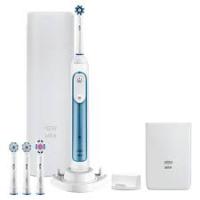
GENIUS 8000N SENSI ULTRATHIN - GENIUS 8100S CROSSACTION - GENIUS 8600 SENSI ULTRATHIN - Electric toothbrush ORAL-B - Free user manual and instructions
Find the device manual for free GENIUS 8000N SENSI ULTRATHIN - GENIUS 8100S CROSSACTION - GENIUS 8600 SENSI ULTRATHIN ORAL-B in PDF.



| Product type | Electric toothbrush |
| Brand | Oral-B |
| Model | Genius 8000N / 8100S / 8600 |
| Power source | Rechargeable lithium-ion battery |
| Battery life | Approximately 10 days (2 brushings of 2 min/day) |
| Charging time | 12 hours |
| Brushing modes | Daily Clean, Sensitive, Gum Care, Whitening, Tongue Cleaning |
| Technology | Oscillating-rotating (3D) |
| Brush head | Compatible with all Oral-B heads |
| Included head | Cross Action or Sensi Ultrathin depending on model |
| Timer | 2 minutes with 30-second interval |
| Pressure sensor | Yes, with automatic stop if too much pressure |
| Connectivity | Bluetooth with Oral-B app |
| Protection rating | IPX7 (waterproof) |
| Dimensions (handle) | Approximately 20 x 3 x 3 cm |
| Weight | Approximately 150 g |
| Indicators | SmartRing light (depending on model) |
| Accessories | Charging station, replacement heads (depending on model) |
| Warranty | 2 years (depending on retailer) |
Frequently Asked Questions - GENIUS 8000N SENSI ULTRATHIN - GENIUS 8100S CROSSACTION - GENIUS 8600 SENSI ULTRATHIN ORAL-B
User questions about GENIUS 8000N SENSI ULTRATHIN - GENIUS 8100S CROSSACTION - GENIUS 8600 SENSI ULTRATHIN ORAL-B
0 question about this device. Answer the ones you know or ask your own.
Ask a new question about this device
Download the instructions for your Electric toothbrush in PDF format for free! Find your manual GENIUS 8000N SENSI ULTRATHIN - GENIUS 8100S CROSSACTION - GENIUS 8600 SENSI ULTRATHIN - ORAL-B and take your electronic device back in hand. On this page are published all the documents necessary for the use of your device. GENIUS 8000N SENSI ULTRATHIN - GENIUS 8100S CROSSACTION - GENIUS 8600 SENSI ULTRATHIN by ORAL-B.
USER MANUAL GENIUS 8000N SENSI ULTRATHIN - GENIUS 8100S CROSSACTION - GENIUS 8600 SENSI ULTRATHIN ORAL-B
ZA Consumer Care Line 0860 112 188 (Sharecall charged at local rates)
Internet:
www.oralb.com
www.braun.com
www.service.braun.com
Braun GmbH
Frankfurter StraBe 145
61476 Kronberg/Germany
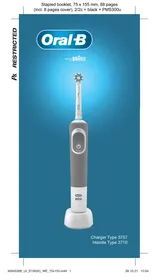
Charger Type 3757
Handle Type 3765
Travel Case Type 3760
Smart Plug Type 492-5214
English
Welcome to Oral-B!
Before operating this toothbrush, please read these instructions and save this manual for future reference.
IMPORTANT
- Periodically check the entire product/cords/accessories for damage. A damaged or non-functioning unit should no longer be used. If the product/ cords/accessories are damaged, take it to an Oral-B Service Centre. Do not modify or repair the product. This may cause fire, electric shock or injury.
- Usage by children under age 3 is not recommended. Toothbrushes can be used by children and persons with reduced physical, sensory or mental capabilities or lack of experience and knowledge, if they have been given supervision or instruction concerning use of the appliance in a safe way and understand the hazards involved.
- Cleaning and maintenance shall not be performed by children.
- Children shall not play with the appliance.
- Use this product only for its intended use as described in this manual. Do not use attachments which are not recommended by the manufacturer.
WARNING
- If the product is dropped, the brush head should be replaced before the next use even if no damage is visible.
- Do not place the charger, smart plug or charging travel case in water or liquid or store where it can fall or be pulled into a tub or sink. Do not reach for it when fallen into water. Unplug immediately.
- Do not open and disassemble device. For battery recycling please dispose whole device according to local environmental regulations. Opening the handle will destroy the appliance and invalidate the warranty.
- When unplugging, always hold the power plug instead of the cord. Do not touch the power plug with wet hands. This can cause an electric shock.
- If you are undergoing treatment for any oral care condition, consult your dental professional prior to use.
- This toothbrush is a personal care device and is not intended for use on multiple patients in a dental practice or institution.
- Replace brush head every 3 months or sooner if brush head becomes worn.
- Your charging travel case is provided with a special cord set (smart plug), which has an integrated Safety Extra Low Voltage power supply. Do not exchange or tamper with any part of it, otherwise there is risk of an electric shock. Only use the special cord set provided with your appliance.
Important Information
- Your Oral-B toothbrush can be used with your smartphone (find details under «Connecting your toothbrush to your Smartphone»).
- To avoid electromagnetic interference and/or compatibility conflicts, deactivate the radio transmission of your toothbrush handle (5) before using it in restricted surroundings, such as aircrafts or specially marked areas in hospitals.
- Deactivate radio transmission by simultaneously pressing the on/off (3) and mode button (4) for 2 seconds until the radio transmission display (7) goes off. Follow the same procedure to reactivate transmission again.
- Persons with pacemakers should always keep the toothbrush more than six inches
(15 centimeters) from the pacemaker while turned on. Anytime you suspect interference is taking place, deactivate the radio transmission of your handle.
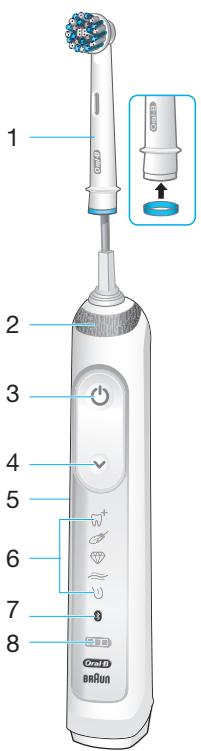
Description
1 Brush head
2 Smart Ring
3 On/off button
4 Brushing mode button
5 Handle
6 Brushing mode display
7 Radio transmission display (with Bluetooth® wireless technology)
8 Charge level display
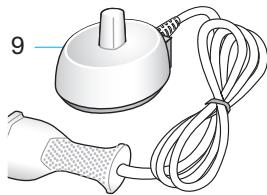
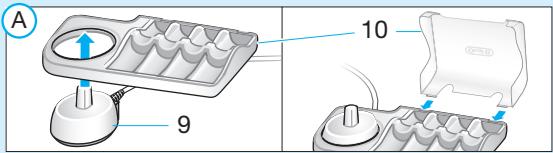
9 Charger
Accessories (depending on model):
10 Brush head compartment with protective cover
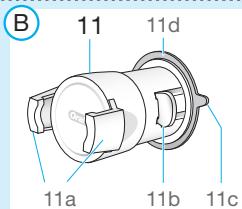
11 Smartphone holder
11a Holding brackets
11b Lever arm
11c Pull tab
11d Suction cup
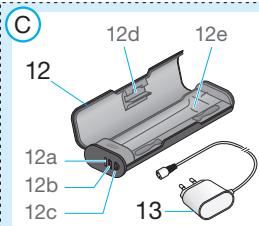
12 Charging travel case
12a Charge indicator light
12b USB port
12c Smart plug port
12d Inner lid (with smartphone holder)
12e Removable inlay
13 Smart plug
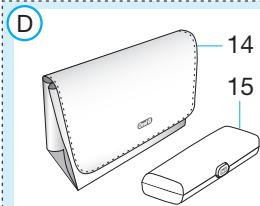
14 Beauty bag
15 Travel case
Note: Content may vary based on the model purchased.
Specifications
For voltage specifications refer to the bottom of the charging unit.
Noise level: 68 dB (A)
Charging and Operating
Your toothbrush has a waterproof handle, is electrically safe and designed for use in the bathroom.
- You may use your toothbrush right away or charge it briefly by placing it on the plugged-in charger (9).
Note: In case the battery is empty (no lights illuminated on charge level display (8) while charging or no reaction when pressing the on/off button (3)), charge at least for 30 minutes.
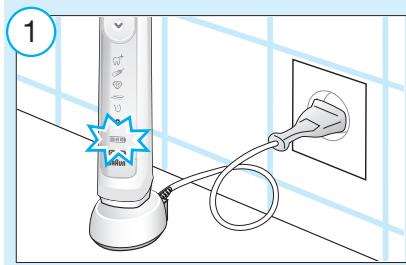
- The charge level is indicated on the charge level display (8). Flashing lights indicate that the battery is charging (picture ①); once it is fully charged, the lights turn off. A full charge takes typically 15 hours and enables up to 12 days of regular brushing (twice a day, 2 minutes). Note: At a very low charge level, the lights might not flash immediately; it can take up to 30 minutes.
- If the battery is running low, a red light is flashing on the charge level display and the motor is reducing its speed. Once the battery is empty, the motor will stop; it will need at least a 30-minute charge for one usage.
- You can always store the handle on the plugged-in charging unit to maintain it at full power; a battery overcharge is prevented by device.
Note: Store handle at room temperature for optimal battery maintenance.
Caution: Do not expose handle to temperatures higher than 50^ .
Using your toothbrush
Brushing technique
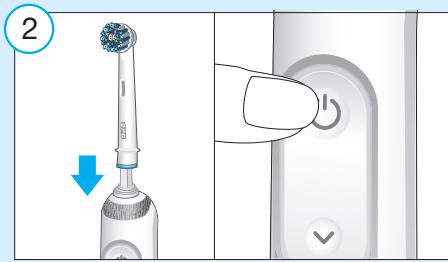
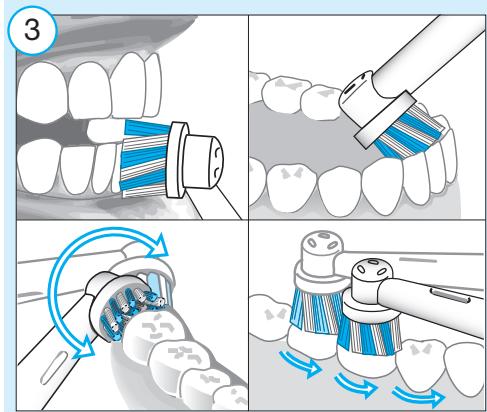
Wet brush head and apply any kind of toothpaste. To avoid splashing, guide the brush head to your teeth before switching on the handle (picture ②). When brushing your teeth with one of the Oral-B oscillating-rotating brush heads guide the brush head slowly from tooth to tooth, spending a few seconds on each tooth surface (picture ③). When using the Oral-B «TriZone» brush head place the toothbrush bristles against the teeth at a slight angle towards the gumline. Apply light pressure and start brushing in back and forth motions, just like you would do with a manual toothbrush.
With any brush head start brushing the outsides, then the insides and finally the chewing surfaces. Brush all four quadrants of your mouth equally. You may also consult your dentist or dental hygienist about the right technique for you.
In the first days of using any electric toothbrush, your gums may bleed slightly.
In general, bleeding should stop after a few days. Should it persist after 2 weeks, please consult your dentist or dental hygienist.
If you have sensitive teeth and/or gums, Oral-B recommends using the «Sensitive»
mode (optional in combination with an Oral-B «Sensitive» brush head).
Smart Ring features
Your toothbrush is equipped with a Smart Ring (2) that has various functionalities indicated via different colors of light: White (default) = Operating and visual timer light (choose individual color via Oral-B™ App settings) Red = Pressure sensor light Blue = Bluetooth® pairing indicator
Timer
You can choose between «Professional» or «2-Minute» timer.
The «2-Minute» timer signals with a long stuttering sound and a flashing light of the Smart Ring (2) that the professionally recommended 2-minute brushing time has been reached.
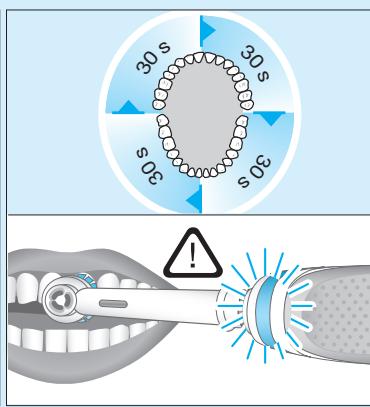
The «Professional» timer signals with a short stuttering sound and a flashing light of the Smart Ring at 30-seconds intervals to move to the next quadrant of your mouth (picture ③). A long stuttering sound and a flashing light indicate the end of the professionally recommended 2-minute brushing time.
The timer memorizes the elapsed brushing time, even when the handle is briefly switched off during brushing. The timer resets if pausing longer than 30 seconds, briefly pressing the mode button (4) during pause or placing the handle on the plugged-in charger. Note: During the use of special Oral-B™ App features, the visual timer light may be deactivated.
Timer setup:
Your toothbrush comes with the «Professional» timer activated. To change this, press and hold the mode button (4) for 2 seconds. Toggle between timer selection by pressing the on/off button (3). Confirm selection by pressing the mode button.
- 2 LED's illuminated indicate «2-Minute» timer
4 LED's illuminated indicate «ProfessionaI» timer
Note: You can also set/advance the timer functionality via Oral-B™ App.
Pressure sensor
If too much pressure is applied, the Smart Ring (2) will light up in red, reminding you to reduce pressure. In addition the pulsation of the brush head will stop and the oscillation movement of the brush head will be reduced (during «Daily Clean», «Pro Clean» and «Sensitive» mode) (picture ③).
Periodically check the operation of the pressure sensor by pressing moderately on the brush head during use.
Brushing modes (depending on model)
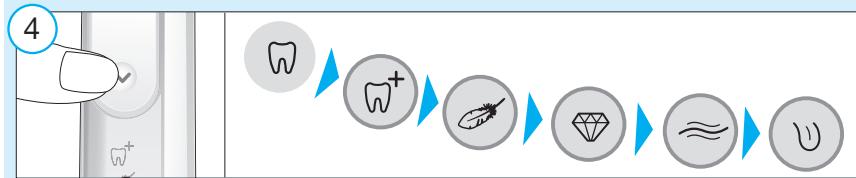
Your toothbrush offers different brushing modes indicated on the brushing mode display (6) on your handle («Daily Clean» mode does not illuminate on the brushing mode display):
“Daily Clean” - Standard mode for daily mouth cleaning
"For an extraordinary clean feeling (operated with a higher frequency)
"Sensitive" - Gentle, yet thorough cleaning for sensitive areas
3D White -Polishing for occasional or everyday use
"Gum Care" - Gentle massage of gums
When operating the «Tongue Clean» mode, we recommend using the «Sensitive» brush head. You can brush your tongue either with or without toothpaste. Brush the whole area of your tongue systematically in gentle movements. The recommended brushing time is 20 seconds; indicated with a flashing light of the Smart Ring.
Your toothbrush automatically starts in the mode selected last. To switch to other modes, successively press the mode button during use (picture 4). To return from any mode back to «Daily Clean» mode, press and hold the mode button (4).
Note: You can also set/advance the mode functionality via Oral-B™ App.
Brush heads
Oral-B offers you a variety of different Oral-B brush heads that fit your Oral-B toothbrush handle.
Our oscillating-rotating brush heads can be used for tooth-by-tooth precision cleaning.
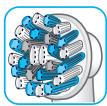
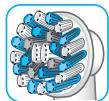
Oral-B CrossAction brush head
Our most advanced brush head.
Angled bristles for a precise clean. Lifts and powers away plaque.
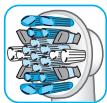
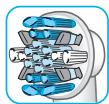
Oral-B FlossAction brush head features micropulse bristles that allow for an outstanding plaque removal in the interdental areas.
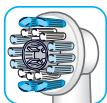
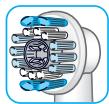
Oral-B 3D White brush head features a special polishing cup to naturally whiten your teeth. Please note that children under 12 years old should not use the
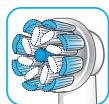
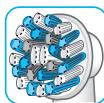
features a combination of regular bristles to clean teeth surfaces and ultrathin bristles
for a gentle brushing experience on the gumline.
Most Oral-B brush heads feature light blue INDICATOR® bristles to help you monitor brush head replacement need. With thorough brushing, twice a day for two minutes, the blue color will fade halfway approximately within 3 months, indicating the need to exchange your brush head. If the bristles splay before the color recedes, you may exert too much pressure on teeth and gums.
We do not recommend using the Oral-B «FlossAction» or Oral-B «3D White» brush head with braces. You may use the Oral-B «Ortho» brush head, specifically designed to clean around braces and wires.
Connecting your toothbrush to your Smartphone
The Oral-B™ App is available for mobile devices running iOS or Android operating systems. It can be downloaded for free from App Store(SM) or Google PlayTM.
Your handle has a sensor installed that, together with a «position detection» feature in the app, helps you to detect what areas to brush and for how long so you will never miss a zone. Use it along with your smartphone holder (find details under «Accessories – Smartphone Holder»).
Furthermore, the Oral-B™ App gives you the opportunity to chart your brushing progress and customize your toothbrush settings (for many more benefits see the Oral-B™ App instructions).
- Start the Oral-B™ App. It will guide you through the entire Bluetooth pairing procedure.
Note: Oral-B™ App functionality is limited if Bluetooth wireless technology is deactivated on your smartphone (for directions please refer to your smartphone's user manual).
- Any app instructions will be displayed on your smartphone.
- If Bluetooth wireless technology is activated on your handle, the Bluetooth symbol on the radio transmission display (7) illuminates. Once the handle is paired, the Smart Ring (2) flashes briefly.
- Keep your smartphone in close proximity (within 5 m distance) when using it with the handle. Make sure the smartphone is safely positioned in a dry place.
Note: Your smartphone must support Bluetooth 4.0 (or higher)/Bluetooth Smart in order to pair your handle. Compatible smartphones are listed in App Store(SM) or Google PlayTM.
Caution: Follow your smartphone's user manual to ensure your phone/charger is designed for use in a bathroom environment.
Check www.oralbappavailability.co.uk for country availability of the Oral-B™ App.
Cleaning recommendations
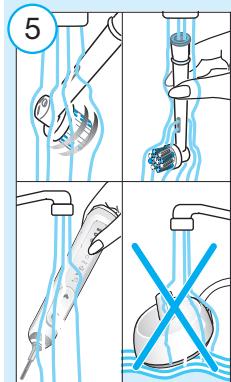
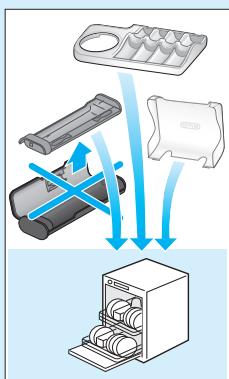
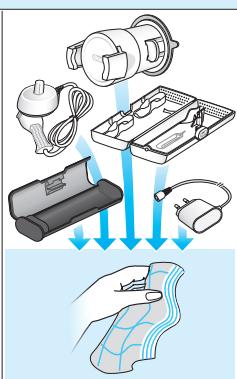
After brushing, rinse your brush head under running water with the handle switched on. Switch off and remove the brush head. Clean handle and brush head separately; wipe them dry before reassembling. Unplug the charging unit before cleaning. Brush head compartment and protective cover are dishwasher-safe. Basic charger should be cleaned with a damp cloth only (picture 5).
Accessories
(dependently on model)
Smartphone Holder
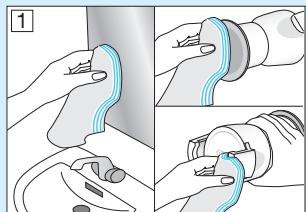
- Before each use, make sure mirror, suction cup surface (11d) and holding brackets (11a) are always clean and dry (picture B1). Use a fuzz-free cloth for cleaning suction cup surface and mirror. In particular make sure suction cup surface and mirror are free from any contamination (e.g. hair, dust, oil, fuzz, dirt etc.).
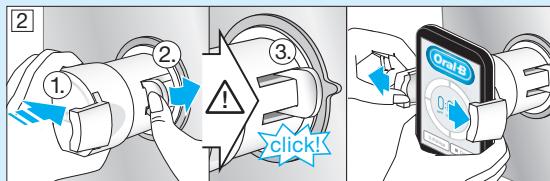
- Press your smartphone holder (11) just with enough pressure, centered at nose level on a sturdy mirror. Then mount the holder by pressing the lever arm (11b) towards the mirror until it snaps in (picture B2). Note: Only affix on mirror to ensure safe and correct conditions. For use in bathroom only. Do not use in automobiles.
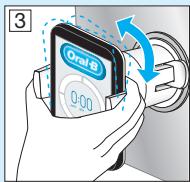
Always make sure the smartphone holder is securely mounted on the mirror before inserting your smartphone. Place your smartphone (portrait) sideways in between the holding brackets (11a) by pressing against one bracket with your phone and sliding the other bracket to the side (picture B2). Follow the same procedure to remove your phone again. - Adjust the overall position for the required angle by moving the ball joint of the holder (picture B3).
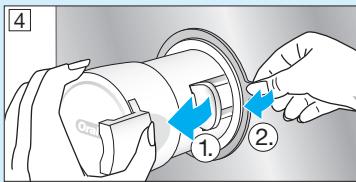
- Once done, remove your phone from the holder. Take off the smartphone holder by flipping the lever arm back and pulling the tab carefully (picture B4 1./2.). Affix smartphone holder with each use again.
- The smartphone holder should be cleaned with a damp fuzz-free cloth only (picture ⑤). You may use glass cleaner, alcohol or similar products (avoid products with silicone oil).
Make sure the surface is dry and dust free after cleaning. Store in clean and dry place. If not in use, always remove your smartphone from the holder.
Note: Smartphone width required for usage: minimum 58 mm, maximum 83 mm.
Caution: Small parts may come off, keep out of reach of children.
Follow your smartphone's user manual to ensure your phone/charger is designed for use in a bathroom environment.
Charging Travel Case
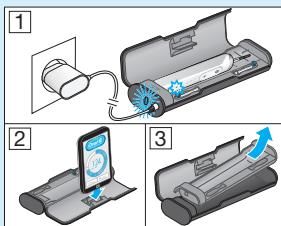
- To charge your handle (5) place it on the pin in the charging travel case (12) and connect it to an electric outlet, using the extra smart plug (13) provided.
- The flashing light (12a) of the charging travel case indicates that the handle is charging. Once the handle is fully charged the light turns off. A full charge can take up to 12 hours (picture C1). Note: You may use the USB port (12b) to charge an electric device while the charging travel case is plugged in. The handle can only be charged with the smart plug (13) (12c) not via USB port.
- The inner lid of the travel case has a built-in smartphone holder (12d), which can hold your smartphone while using (picture C2). Before use, make sure your phone fits the stand and keeps stable.
- The removable inlay (picture C3) (12e) of the travel case is dishwasher-safe (picture ⑤). The outer case should be cleaned with a damp cloth only. Make sure that travel case parts are completely dry before reassembling and toothbrush/brush heads are dry before storing in the travel case.
Note: Clean stains on travel case surface immediately. Store travel case in a clean and dry place.
Follow your smartphone's user manual to ensure your phone/charger is designed for use in a bathroom environment.
Beauty Bag
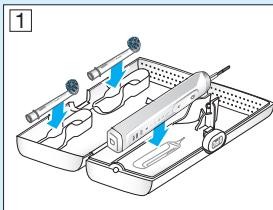
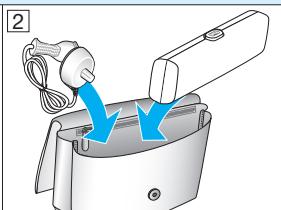
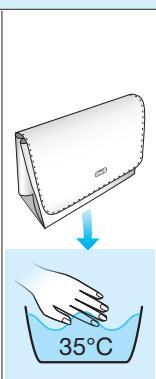
Store your clean and dry toothbrush/brush heads in the travel case (15) and place it inside the beauty bag (14) (picture D1/2). Clean stains on the surface immediately. The
beauty bag should be hand washed only with lukewarm water (30^ - 40^) (picture ⑤ ).Store in clean and dry place.
Subject to change without notice.
Environmental Notice
Product contains batteries and/or recyclable electric waste. For environment protection do not dispose in household waste, but for recycling take to electric waste points provided in your country.
Guarantee
We grant 2 years guarantee on the product commencing on the date of purchase. Within the guarantee period we will eliminate, free of charge, any defects in the appliance resulting from faults in materials or workmanship, either by repairing or replacing the complete appliance as we may choose.
This guarantee extends to every country where this appliance is supplied by Braun or its appointed distributor. This guarantee does not cover: damage due to improper use, normal wear or use, especially regarding the brush heads, as well as defects that have a negligible effect on the value or operation of the appliance.
The guarantee becomes void if repairs are undertaken by unauthorised persons and if original Braun parts are not used.
This appliance is equipped with a Bluetooth Smart approved radio module. Failure to establish a Bluetooth Smart connection to specific smart phones is not covered under the device guarantee, unless the Bluetooth radio module of this appliance is damaged. The Bluetooth devices are warranted by their own manufacturers and not by Oral-B. Oral-B does not influence or make any recommendations to device manufacturers, and therefore Oral-B does not assume any responsibility for the number of compatible devices with our Bluetooth systems. Oral-B reserves the right, without any prior notice, to make any technical modifications
or changes to system implementation of device features, interface, and menu structure changes that are deemed necessary to ensure that Oral-B systems function reliably.
To obtain service within the guarantee period, hand in or send the complete appliance with your sales receipt to an authorised Oral-B Braun Customer Service Centre.
Information Bluetooth® radio module
Although all indicated functions on the Bluetooth device are supported, Oral-B does not ensure 100% reliability in connection, and feature operation consistency. Operation performance and connection reliability are direct consequences of each individual Bluetooth device, software version, as well as the operating system of those Bluetooth devices and company security regulations implemented on the device. Oral-B adheres to and strictly implements the Bluetooth standard by which Bluetooth devices can communicate and function in Oral-B toothbrushes.
However, if device manufacturers fail to implement this standard, Bluetooth compatibility and features will be further compromised and the user may experience functional and feature-related issues. Please note that the software on the Bluetooth device can significantly affect compatibility and operation.
1) Warranty - Exclusions and Limitations
This limited warranty applies only to the new products manufactured by or for The Procter & Gamble Company, its Affiliates or Subsidiaries («P&G») that can be identified by the Braun / Oral-B trademark, trade name, or logo affixed thereto. This limited warranty does not apply to any non-P&G product including hardware and software. P&G is not liable for any damage to or loss of any programs, data, or other information stored on any media contained within the product, or any non-P&G product or part not covered by this limited warranty. Recovery or reinstallation of programs, data or other information is not covered under this limited warranty.
This limited warranty does not apply to (i) damage caused by accident, abuse, misuse, neglect, misapplication, or non-P&G product; (ii) damage caused by service performed by anyone other than Braun or authorized
Braun service location; (iii) a product or part that has been modified without the written permission of P&G, and (iv) damage arising out of the use of or inability to use the Oral-B Smartphone stand/puck, Smartphone mirror holder, or charging travel case ( A ccessories ).
2) Using your smartphone holder
The Oral-B Accessories included in the package has been designed to provide you with a convenient way to position your smartphone while you are using the Oral-B app. Try multiple orientations of your smartphone in the Oral-B smartphone holder prior to use to determine the best positioning of your smartphone in the holder. Be sure to try this in a manner which will not harm your smartphone if it falls out of the stand. Do not use in automobiles.
LIMITATION OF LIABILITY
TO THE EXTENT PERMITTED BY APPLICABLE LAW, IN NO EVENT SHALL P&G ITS DISTRIBUTORS OR SUPPLIERS BE LIABLE TO YOU OR ANY THIRD PARTY FOR ANY DIRECT, INDIRECT, INCIDENTAL, CONSEQUENTIAL, SPECIAL, EXEMPLARY OR PUNITIVE DAMAGES, OF ANY NATURE WHATSOEVER, ARISING OUT OF THE USE OF OR INABILITY TO USE THE ORAL-B ACCESSORIES, INCLUDING, WITHOUT LIMITATION, INJURY TO PERSONS, PROPERTY DAMAGE, LOSS OF VALUE OF ANY THIRD PARTY PRODUCTS THAT ARE USED IN OR WITH THE ORAL-B ACCESSORIES, OR LOSS OF USE OF THE ORAL-B ACCESSORIES OR ANY THIRD PARTY PRODUCTS THAT ARE USED IN OR WITH THE ORAL-B ACCESSORIES, EVEN IF P&G HAS BEEN ADVISED OF THE POSSIBILITY OF SUCH DAMAGES. WITHOUT LIMITING THE FOREGOING, YOU UNDERSTAND AND AGREE THAT P&G HAS NO LIABILITY FOR ANY DAMAGE OR DESTRUCTION TO CONSUMER ELECTRONICS DEVICES OR OTHER PERSONAL PROPERTY THAT ARE CONTAINED ON OR EXTERIOR TO THE ORAL-B ACCESSORIES, OR ANY LOSS OF DATA CONTAINED IN THE FOREGOING DEVICES. IN NO EVENT SHALL ANY RECOVERY AGAINST ORAL-B EXCEED THE ACTUAL PRICE PAID FOR THE PURCHASE OF THE PRODUCT.
Warranty replacement brush heads
Oral-B warranty will be voided if electric rechargeable handle damage is found to be attributed to the use of non-Oral-B replacement brush heads.
Oral-B does not recommend the use of non-Oral-B replacement brush heads.
- Oral-B has no control over the quality of non-Oral-B replacement brush heads. Therefore, we cannot ensure the cleaning performance of non-Oral-B replacement brush heads, as communicated with the electric rechargeable handle at time of initial purchase.
- Oral-B cannot ensure a good fit of non-Oral-B replacement brush heads.
- Oral-B cannot predict the long-term effect of non-Oral-B replacement brush heads on handle wear.
All Oral-B replacement brush heads carry the Oral-B logo and meet Oral-B's high quality standards. Oral-B does not sell replacement brush heads or handle parts under any other brand name.
Trouble Shooting
| Problem | Possible reason | Remedy |
| APP | ||
| Handle does not operate (properly) with Oral-B™ App. | 1. Oral-B™ App is turned off. 2. Bluetooth interface is not activated on smartphone. 3. Radio transmission is deactivated on handle; radio transmission display (7) is turned off. 4. Bluetooth connection to smart-phone has been lost. 5. Your smartphone does not support Bluetooth 4.0 (or higher)/Bluetooth Smart. 6. Handle on plugged-in charger. | 1. Turn on Oral-B™ App. 2. Activate Bluetooth interface on smartphone (described in its user manual). 3. Activate radio transmission by simultaneously pressing on/off (3) and mode button (4) for 2 seconds until radio transmission display (7) turns on. 4. Pair handle and smartphone again via app settings. Keep your smartphone in close proximity when using it with handle. 5. Your smartphone must support Bluetooth 4.0 (or higher)/Bluetooth Smart in order to pair handle. Check App Store(SM) or Google Play™ for compatible smartphones. 6. Radio transmission is deactivated while handle is placed on plugged-in charger. |
| Reset to factory settings. | Original app functionality wanted. | Press and hold on/off button (3) for 10 seconds until all indicator lights double blink simultaneously. |
| TOOTHBRUSH | ||
| Handle is not operating (during first use). | Battery has a very low charge level; no lights illuminate. | Charge at least for 30 min. |
| Handle does not operate with existing SmartGuide in household. | 1. Synchronizing with existing SmartGuide failed. 2. Radio transmission is deactivated; radio transmission display (7) is turned off. 3. SmartGuide is not compatible with handle. 4. Two handles are already assigned to SmartGuide. 5. Function is deactivated via App feature. | 1. Synchronize (existing) handle(s) (again) via SmartGuide settings in SmartGuide's battery compartment: Press «h/min» for 3 seconds. Turn on handle that you want to synchronize. Then turn on second handle you want to synchronize. Press «h/min» or «set» to exit synchronization mode. 2. Activate radio transmission by simultaneously pressing on/off (3) and mode button (4) for 2 seconds until radio transmission display (7) turns on. 3. Handle cannot be used with exciting SmartGuide. 4. You can synchronize a total of 2 handles only. Change handles via SmartGuide settings (see 1.) 5. During use of special App features, transmission to Smart-Guide may be deactivated. You can also (de)activate any SmartGuide communication via App. |
| 1. Short stuttering sounds/ flashing light every 30 seconds or after 2 minutes. 2. Handle does not operate any timer. | 1. «Professional timer» or «2-Minute timer» activated. 2. Timer has been modified/deactivated via App. | 1. Set your timer to 2-Minute timer (stuttering sounds/flashing light after 2min); or set your timer to Professional timer (stuttering sounds/flashing light every 30 seconds). Follow steps under «Timer setup」. 2. Use App to change timer settings or perform factory reset (see App Trouble Shootings). |
| Handle does not charge. | 1. Battery is at a very low charger level. 2. Ambient temperature for charging is out of valid range (≤0℃ and ≥60℃). | 1. Charging lights might not flash immediately; it can take up to 30 minutes. 2. Recommended ambient temperature for charging is 5℃ to 35℃. |
This rechargeable toothbrush contains a Bluetooth radio which operates in the 2.4 to 2.48 GHz band with a maximum power of 1mW.
Hereby, Braun GmbH declares that the radio equipment types 3765, 3754, 3764, 3762 and 3767 are in compliance with Directive 2014/53/EU. The full text of the EU declaration of conformity is available at the following internet address: www.oralb.com/ce
Srbija
DobroDosliuOral-B
Pre upotrebe ove Čětkec, molimo vas da pročitate ovo uputstvo u šačuvalte ga u slučaju dā vam zatreba u budućnosti.
VAZNO
- (Pastrim Ditor) Tip
standart per pastrim
e peditshme te gojins.
《Pro-Clean》
DdaToCu (BO 3aBnCHOCT OMDoeJOT):
10Дeлзаразаванhaуетката co 3austHTHOKanahe
11Дрхачзasmart mobiJIeTeJefoH
11a HocauHa npkau
11b PaçaKa
11c Dcl 3a otctpaHbHe Ha npXau
11d Bakymckn npuizbpcTyBaH na dpxkaOT
12 NaTHnUKN Hececep 3a noJIHeBe
12a INHnkaTOp 3a noJIHeIe
12b USB npnKnyok
12c PnKnyok 3a aanTep
12d BHaTpeWeH KApA (coDpKaU 3a nAmTeH TeleΦoH)
12e OTrpaHJINB dJI
13 AanTep
14 Hececep 3a naTyaBHe
15 PpeHocHa KyTuJa
3a6euleka:CoDpxHHata MoKe da Bapupa BO 3aBnCHOCT OJ KyneHNOt MOJeI.
Cneunkaun
3a cneuФкauzma 3a BOJtakata npoUHTajre ng ynaTCTbata Ha DoJIHaTa CTpaHa Ha 6ba3a 3a NOJIHeBe. HnBO Ha rIaHocT: 68 dB (A)
Полносян Операши.
Bauata YteKt3a 3a6n Ima BOoOTnOPHa paKa, e EeJIeKTPuHNo 6e36EdnA n Im3aJHiPana 3a yNtOpeBa Bo 6aHaTa.
Bne moke da ja kopnCTnte Baata Taetka 3a 3a6n BeDnau no nolHebTo IIN Da ja nolHnte Co heJ3nHO CTabaHbe Ha nolNaOT (9). 3a6JeLka: Bo cnyaj kora 6aTepnjata e npa3Ha (He cBTN cnJaunKATA 3a HnBO Ha nolHeHa EkpaHOT(8)doEka ce nolHn INn Hema peakuJa Kora Ke ce npitnche KonHeTo on/off (3)), HanoHete HajMaIky 30 MNHyTNI.
HIBOTO Ha noJIHeBe ce npIkaJyBa ha ekapAnOT 3a HnBO Ha noJIHeBe (8). TpeKbaTeo nokKaJyBa deKa batepNJata ce noJIHN (cInka ①); UTOM Ce hanoJIHN, cnJaJIuKATA ce racu. LelOnCHOTo noJIHeBe trae oKOly 15 yaca n Tpae OKony 12 deHa co peJoBHa yNtOpeBa (Da naTn dHeBHO no 2 MInHyTN). 3a6eLeWeka: Kora batepijata e MHory nCTroUeHa, cnJaJIuKATA Moxe da He ce yKluyn BeDHa; Moxe da NOMnHaTn 30 MNHTN.
-ДOKOLky batepjuata e npa3Ha,црveha cnjaJIuNka Ke CBETKa HaДИСПЛЕJOt n MOTOPyTe ja HAmalyBa 6p3nHaTа. Kora 6batepnjata ckpo3 Ke ce ICnpa3Hn, MOTOPyTe Ke pIeCTaHe Ja paBToT; Ke 6bIaT nOTpe6Hn HajMaJky 30 MInHTn POnHeBe 3a edHa yNoTpe6a.
- Cekoraw MoKTe da ja yBate paKaTa ha
- yKluyeh NJIHaH 3a da ja oDpKByate
ceKoRaI pOJIHa; 6aTePnJaTa He MoXe da ce IpeHAnOIHN.
3a6eIeIka: YybaJre ja paAchkata Ha co6Ha TemnepaIpatya 3a HajdoBro oDpxyBaHbe Ha baTepeNjata.
Hanomeha: He ja n3loxybajte paKaTaHa TeMpepaTyPi NOBICOKn OJ 50^
KopncTeHbe Ha ueTka 3a 3a6n
TexHnKHa YnCTeHe
HaBdoHeTe ja rIaBaTa ha Yetkata n HaHeceTe 6nIO KOJ BnD Ha NaCTa 3a 3abN. 3a da c Hs6BerHe npCKaHeto, NoCTabe J raIbata He YeTKaHa 3a6bnte nped Da ro BKnyte UpeoTc(CLNA ② ).Pnp Mnebe Ha 3a6tBe co eHa od potnayKe TeOral-B YeKn, NOMEcyBAKte Ja rIaBata Ha Yetkata n Ononoleka On 3ab Ha 3ab, 3aOpjyBaJkn Ce no HEKOJIky Cekyni Ha NOBPuHNAta Ha cEkoJ 3ab (cLNaKa ③ ).Pnp KOpNCteHb Ha ORal-B TriZone rIaBaHa Yetkata, NoCTabe Tn BlaKHATA ON YETkata Ha 3a6bnte N blnaro HAKIoHete npema HEnCuTate.Co Iocen PPNTCOK, NOOHTe Da Yetkate Co NOKpEtn HanpeD-Na3ad, 6aW Kako Co ObUnHa YetKa 3a 3abN. Co 6bnO koJa rIaBa 3a YetKa 3a 3a6m HajNPBO YETKaTe KOH NADBo, NocNe KOH BHATpe N KaPj 3aRpn3yBaUkTe NOBPuHN. YetKajTe rN CnTE Yetnpi YETBpTInN BO yCHata npA3HHnHO NODeHnKBO.
He npintnckajte npejako. Do3BOJele N ha YeTkata Da Cn T O DpaB0TN CBOETO. MoXeTe Da CE KOHCyItnPate Co CTOMatoLorOT 3a NcnpaBHTNe TEXHNKHa MneHE 3a 3abN, COOdBETHn 3a Bac. IpbNTe DeHOBN KOpNCTeHbeto Ha bIno KaKBa eEnKTpUHa YeTka 3a 3abM MoXE Da Ro paKpBapat BaWteHTo HnEe. KpBaPeHbeto Tpe6a da PneKeINe 3a HeKOJIky DeHa. DOKOLKY pOdoJIKN IN O DBE HeDEJI, Be MOJIMe KOHCyItnPajTe Ce co CTOMatoLor. DOKOLKY mATE OCETNIIB HnEua NIIN 3abN, Oral-B IIpenopayuBa KOpNCTeHbe Ha "Sensitive" NaHH Na pabota(BO 3aBnCHoCT OJ MOJeIOT) (MOJE da KOpNCtIte Oral-B( Sensitive rIaba 3a YetKa 3a 3abN).
SmartRing yHKcM
Bauata Ta YeTa NaoceDyBa SmartRing onpema (2) Koja Ima pa3IiHnФyHKn KOn Ce n3pa3EIn ppeky pa3IiHn 60n BaCtJa:Bena (Boo6bHaeaE) =CBETIo Ha TajMepot
Upbena = CBeTIO Ha cEN3OpOT 3a npITcOK CnHa = INDkaTop 3a Bluetooth nobp3yBaHe
Tajmep
MoxeteДаизберетеnomefу «Professional»ИИ«2MnHyTN»Tajmep.
2MnHyTN TajMepot cngHaJIaN3Ipa CO
dIOIPO neJIteUKN 3BvK I TpeKApHe Ha
CJaNkata Ha SmartRing-OT (2) KOI
O3NaYBaAaT DeKa npenopapAHnte 2 MnHyTN
ce NOMHATn.
"Professional" TajMetop cɪrHʌnɪʒəpɑ co Kpɑtɒk neɪtečκɪ 3BvK n TpeɪnKaɪhe Ha cɪjʌnɪŋkata ha SmartRing hɪnɪtepβaɪ od 3CekYhɪd 3a da ce pneΦρπeɪte Ha cIeɪnHa tæTbPɪnHa oʊ Baɪsɪta yctA (cɪnka ③). Dɔlɪŋ peɪtεκn 3BvK n TpeɪnKaɪhe Ha cɪjʌnɪŋkata oɪsháUyBa kpaʃ Ha npɒfæceɪnoHʌlHOTO 2-MɪNHyTHO MmEʰe Ha 3a6bɪte.
Tajmepot ro nAMTN npeKHaTO BpeMe Ha MneHe, Dpyn IN KORA yeTKATA Hecakajn Ke ce NCKIyN prn MneHe. Tajmepot CE pectaTnpa DOKOLKY yeTKa e NCKLyuHa eoJOnO OJ 30 cekyn, co kpaTko npTtckaHbe Ha KOJIeTO 3a peKIM Ha pa6ota (4) BO TEK Ha nay3ata uIn CTabeTe ja paKaTa Ha npKlYNeHIO T ONHa. 3a6BeNeSha: Pn npYnotpe6a Ha Oral-B aanPkaunjata, CBeNTo Ha Tajmepot MoKe da bInde DeakTbVipaoHo.
IopocBaHe Ha TajmepoT:
Bauata Yetka dofara co akTINbUAPAH «Professional» Tajmep. 3a da ro npomEnite Toa pRITNCHEte n DpXeTe Ro KONHeTo 3a pexIM (4) 2 cekyHdn. N3bepeTe nomery NoedeCyBaBe Ha TajmepOT co npTINCKaBe Ha on/off KonHeTo (3). N0tBPeTe ro n3bOpOT Co npTINCKaBe Ha KONHeTo 3a pexIM.
2 LED cBETUNKI rO 03NaHyBaAT «2 MnHHTN» TajMepOT
4 LED CBETNIKNI FO O3NaCyBaAT «Professional» Tajmepot
3a6eneuka: Tajmepot Moxete da ro nodecya batpnoDonybata npeky Oral-B anpikaunjata.
Cen3op 3a npntucok
Ako ce hanece npereolem npitncok, CmapT npctehot (2) ke ce Bknyu BO upcbena boja,
3aJaBeNotCetnDa roHamaJIte
pntINcOKOT.KakoDOnoJHyBaHb,
yNcnpaHBeToHa rJaBaTaHaYeTkataKe
IpeTaeHeuOscunatopHToDBrXeHe Ha
rJaBaTaKeCeHaMaJIn (BO TEKOT Ha JHeBHO
UncTeHBe》,Pro UncTeHBe》IcEH3NTuBEN) MoDen)(Cnka ③ 1
IOvpeMeHo npOBepyBaJte Ro ce3Opot 3a
pntINcOK Co pntINcKaHBe Ha rJaBaTa Ha
yEtKaTpaPn yNoTpe6a.
HaunHn Ha YetKaHe Ha 3a6n (BO 3aBnCHOCT OJ MOdJoT)
Yetkata 3a 3abn Hyni pa3nnHn HaunHn Ha YetKahe, npKacKaHn Ha dncPnejot (6) Ha BawaHa YetKa («Daily Clean» Modenot He CBETn Ha dncPnejot Ha YetKaTata):
Oral-B Cen3nTnBHa YItpa-TeHka
Igabaa NocedyBa KOMbHaNaCuJa oJ HOpMaJIHn BlaKaHa 3a YIcTeHe Ha NOBpUHaHa Ta Ha 3aBtne I
yIITpa-TeKN BlaKHa 3a HeXHo YeTKaHb Ha HENIaTa.
Nobeketo Oral-B rIabn mHaat cBETNo CIN INDICATOR 3a BnaKha kon Ke Bn nomorHe da ja HauIreYbATE noTpe6bata OJ 3aMeHa ha rIbAbata.Co TeMeHIO YTeKaHe, Dba nATn dHeBNO NO DE MNHTU, PNaBata 6oJa ke Ncue3He DO noIIOBINA Ha OBne BlnkHA BO npocek OJ 3 Meceu, O3NaHyBajKn Deka tpe6da Ce npOMeHN rIbAbata Ha YeTKata. DOKONky BIAKHATA NoCHAT da CE uHpat nped 6oja Tda NouchE da ce nobLeKyBa, Toa e3NaK deA BpWITE pnerOjem npITncok Ha 3a6nte H enCuTa.
He npenopaCyBaMe ynoTpe6a Ha Oral-B «FlossAction» nn Oral-B «3D White»
rIaBaHa YeTka co npote3n. MoKe da ja kOpNCTne Oral-B «Ortho» rIaBaTa Ha yeTka, cSeuJaIHO nIz3ajHnpaHa 3a YIcTeHe oKOly npOTe3nE I KxIuNTe.
Поврзувашие на ВашатуETka 3a 3a6n co ВашиOT Smart телфон
Anlkaunjata Oral-BTM e doctanha 3a cnTe MoBnHn anapatni kon kopructar iOS nI AnDpOiN onepaTINbEN cInCTem. MoKe na ce npBeBEme bocPnAHTHO od App Store(SM) nIg Google PlayTM.
Baata paKa IMa IHHCTaInpaH ceH3Op KOJ 3aeNDo CO OOnuJaTa 3a «DeTeKUnJa Ha no3nUjata (posiotion detection' Bo anIIkaJnaja, Bn Nomara da OTkPmeTe KOI OblaTn Tpe6a Da rN YcTeKtAE I KONKy dOInro, Taka WTo HIKORAuHema Da nponyuTITHe 30Ha. YNoTpe6eTe ja 3aeNDo CO DpKaayot 3a CmApT TeleΦOH (hajDete rN detaJIte BO DeIOT «Accessories-Smartphone Holder').
POnHaTMy, Oral-BTM anIIkaUjata Bn OBO3MOxByBa da ro cIeNITe BaWNTO pOuec Ha YeTKaHe N da Tn HArOJNTe CETIPAbTa Ha YeTKaHe (3a NOBeKe npDIOBvKn NOrpeHneTe rH aKoHTe Ha anIIkaUjata Oral-BTM).
- CtrpTyBaJte Ha Oral-BTM anIIkaunjata. AnIIkaunjata Ke Be BOINH3 ceLOCHNOT Bluetooth npocc ha NOBp3yBaHe. 3a6belleka: FynkuOHaHNoCTa Ha Oral-BTM anIIkaunjata e oPraHnueHa DOKoJky Bluetooth e deakTbIpaHn Ha BauNt Smart Telefoh (3a HacOKn Be MOlIMe npOBepTe r yNaTcTBOTo Ha BauNt Smart Telefoh)
- Cekoja hacoka od annilkaunjata Ke Bn ce nojabu ha Baunot Smart telefon.
ДokолуеakTNBupanBluetoothHa Bawsata YeTka 3a 3a6n,ce nani CmboJOT 3aBluetooth(7)Ha ekpaHOT.HTom ce Nobp3e paKaTa,SmartRing-ot (2)KpaTK Tpenka.
Држete ro TelefoHOT BO 6Iln3nHa (BO p3aMep oJ 5M) KORA ke ro kOpCHTe co Yetkata 3a 3a6n.OcIgypajTe ce Deka TelefoHOT e Ha 6e36eHNO n CyBO MeCTO.
3a6eBouka: Baount Smart tenefoH mopa da noDpXyBa Bluetooth 4.0 (nni noHobA beP3jia)/Bluetooth Smart 3a da moxe da ce
NOBP3e CO BAuTaT aETKa 3a 3a6n. KomTaNbINHtE TeIeFOHn Ce HabeDeHN Bo App StoreSMnHa Na Google PlayTM.
BHMaHne: CJeTeTe ro yNaTcBTo 3a BaAnot cMapr TepeOHa 3a da ce yBepnte Deka BaAnot TepeoH /NoIhauCe dN3azHnpiAHs 3a yNtpe6a Bo 6aHa.
Iocete ro cajtot www.orbappavailability.co.uk 3a doctannoct ha Oral-BTM anlkaunjata no 3emjn.
Пpenopakn 3aЧистende
Ipo yetkaheTo ha 3a6nTe, nlaKHeTe ja IraBata OJ YeTkata HeKoNky cekyHn noD mna3 CO BOa CO yKnyeHa paKa. ItoTa uCKnyeTe ja paKaTcA u N3BaTe ja IraBata OJ YeTKaTc. IcnilaKHeTe r n I dBaTae la Noce6No pO MNa3 CO BOA n N3bPmWeTe r nped NOBtropHo Da r CoCTaBte.
Vcknyute ja eDHHuata 3a noJIHeBe npei nCTeHbe. JeIOT oD fnaBATA Ha YcTeKaTAtn 3aHTNTHIO T KAnak MOKe Da Ce nepaT BO MaMInHa 3a caIOBn. OCHOBHNO TNoHaTuTpe6a da Ce NcHtnc Camo Co BlaJxHa Kpna (Clnka ⑤).
(BO 3aBnCHOCT OJ MOJeIOT)
ДржаузаметенМбинэнтелфон
- Празд секоja уnotpe6a, уberete ce Deka CTAKNOTO, BAKUMCKNOT 3aunbPCTyBaU (11d) n OTBOPnTE 3a3uBPCTyaBaHe (11a) ce Cekoraas uCtNs uCyB (CInka B1). YnOTpe6eTe Kpna 6e3 BlakHa 3a UnCTeH e Ha NOBPsHHaTHa Hb BakymOT u CTAKNOTO. NOBPsHHaTHa Hb BakumckNOT npuBcPCTyBaH u CTAKNOTO Tpe6a Da e CekoraaushuCTa od CekakOB TIN HeuNCrTmN (Ip. BlakHa, PpaShHa, MaCLO, CNHTeTuKKn BlaKaHa nTH.)
- Пиитиштete ro драхаOT 3a Teleфон (11) CO cAmO IOBOJEN pIriNcOK, ueTHPRIpaHO HA HnBO Ha HOCOT Ha CTaBNIHO OrLEdaLo. PToTaO, MOnTIpaJte ro dPaxaHTo CO npITiSCaHBe Ha paKkata (11b) KOH ORLEdaIATO ce DoDEka KInKHe BHaTpe (CInka B2). HanOMeHa:ФИКСИрAJte ro cAmO Ha orLEdaLo 3a Da ce ocNirpynte Deka
ycnOBtne Ce 63e6dHn ucooDbETHn. Camo 3a ynOtpeBa 60 BaHn. He ro ynOtpe6yBaJte BO aBTOMoBn.
- CekorawrIeJaTeIprZaHOT3aSmartphone Da e 6e36eHNO MOnTnpanHa orIeJALoTO npE da rO CTaBHTe BAuNOT Smartphone. NocTaBeTe rO BAuNOT Smartphone (nopTpE) cTpaHnHO nOpErY drPkaKInTe Hocau (11a) co pNTnCKaHe Ha BAuNOT Telefoh HaCnPToN eEH Nocau INcPaHnHO IIN3raHe Ha dpyRnOT Hocau (Clnka B2). CJeTeJe ja nCTATA NoCTAnKa 3a da ro OTCTpaHnTE TeteFOHOT.
- Pnncnocobete ja zeIokynHata no3nuija 3a 6aparHOT aroJnepey npdBnuKyBaHe ha TOnueCTNOr 3rIo6 HaDjkaOT (CInka B3). INcTpykun 3a HajdoBpnoT aOrn Ke doBnTe nepeky anlinauJa.
- ΜΤΟΜ ΜΟ ὅπρανβιθ ΤοΑ, ΙΝΑΒατε Το τέλεφόθοι Θό ἀρχαύτ. Tρρήε Το ἀρχαύτη 3a Smartphone co BVρακαῦ Εν ἀρκατα Ελαδίς Α Σ ΒΗΜατηλό Μρόνβεύκαυβα Εν ἀλαίμετο (ζήκα B4 1./2.). Φικκίραι Μο ἀρχαύτ Πρή Κεκοε Ενερόθου Kόριστέθε.
Држачот за Smartphone тpe6а д ce СИТС NAMCO BINAХHA И KOMNAKTHA KРп (CИNWа ⑤).Може дуnotpe6nte n ЧИСТАЗ 3A CTAKЛNO,АКKOXON IINI CINЧИ ПОНЗВОД (ODбERHYBAJIte ПОЗЗВОД CO СИNWOKHСКО МACNo).УБЕРЕТ ДЕ К ПОВРSHINATA E CyBa N 6E3 прашина NO СИСТЕНЕ.ЧИBJTe Ro Ha YICSTO И CYBO МecTo.Ako He ro yNOTpe6Byate,CEKORA OTCTPahyBAJIte ro BaWnOT Smartphone od ДрЖачOT.
Hanomeha: Notpe6hata shinpHa Ha Baunot Smartphone 3a da Moje da ce ynOtpe6yBa dpkaOT e: MmHmM 58 MM, MaKcMmM 83 MM.
BHMHHe: Mani denuHbMa Moxe da ce OCTpaHyBaat, na 3aToa yUbJte ro NoHaCTpHa oD deca.
CleTeTo ynATCTBOTo 3a BaHnot MObINeTne TeJcHOn 3a Da ce YBePHTe DeKa BAHnot TeJeFOH /NoIHaue CeN3ajHnpAHn 3a yNtOpeBa Bo 6aHa.
Ipehocha kytnja 3a noJhebe
3aJa ja HanoJHnHe pauKaTa (5) cTabeTe ja Bp3 nIJIuKaTa BO pHeOCHaTa KTyJMa 3a noJIHeBe (12) ni Nobp3eTe co wTekep co
IOMOJI Ha ekCTpa NaMeTHHOT IpiNKJIyUOK (13).
- CBeTJIoTo WTo TpEknka (12a) Ha npEHOChATA KytNiJa 3a noJIHeIe INdMnUpa DeKa paKata ce noHIn. IToMpaKata ueNoCHO Ke ce HanoJIHn, CBeTJTO Ce racn. MoKe Ja ce noTpE6Hn Do 12 Yaca (Clnka C1) 3a zeLoCHo noJIHeIe. Hanomena: MokTe Ja ja yItoPte6bVate YCb-noptata (12b) 3a da HanoJIHnTe eJeKtpoHcKn Yupe,IdoKe Ka npEHOChATA KytNiJa 3a noJIHeIe e BkLyeha. PaKata MoKe Ja ce HanoJIHn cAmO Co nameTHNtnpNKlyuok (13)/(12c), a He npEky YCb-noptata.
BhateuHnot kanaK na pneHocHaTa kytnja 3a noJIHeIbI mHa BrpaIeH npJau 3a Smartphone (12d) sTo moKe da ro dpxN Baunot Smartphone doDeKa ro ynoTppeSyBaTe (cInka C2).Ppe Da ro ynoTppeSyBaTe, npOBepTe daIi BaUnot TelefoH ro cObupa BO dpxAOT n daII CTOn CTa6BnHO.
BHaTpeuHocTa wTO ce OTeCTpaHyBa (cNka C3)(12e)Ha npehoCHATA KTuJa MOKe cIIObOHO da ce nepe BO MaunHa 3a caDobn (cNka 5)HaDbopeuHata KTuJa Tpe6a Da CE NCTn CaMo CO BLnXHa Kpna. PnpOBepete daJIeJeNoBHTe Ha npHeoCHaT KaTuJa ce eJIoNcO cyBN Hpei NOBtOPHO MOHTnPabe He I IraBHTe Ha YETKUnKHTe/YeTKUKNITE 3a 3abJa ce CyBN pIep Da Ce CTabaat BO Hea.
Hanomeha: BeDnau 6pnwete r n fLeknte oNIOBpUHaHaTa Ha npEHOChTa KUTna. Ybajte ja npEHOCHaTa KUTna Ha NCTO n cyBO MecTO.
CleTe Ro yNaTCTBOTo 3a BaIINOT MO6nIeH TeIeFOH 3a Da ce YbepNTe DekaBaIINOT TeIeFOH /PoiHaue Ce n3azajHnpaHn3a yNoTpe6a Bo 6aHa.
Ko3MeTnUkaTaunHa
UyBaJTe rN BaUnTe YnCTn YeTKn n IaBn BO TaunHaTa 3a NaTyBaHBe (15) n CTaBeTe rN BO K03MetuKata TaunHa (14) cInka D1/2). UcHTete rN dAmKnTe OJ NOBpUmHaTa BeDnHa. Ko3MetuKata TaunHa Tpe6a paHuNo da ce nepe co MnaKa BOna (30^ - 40^) (cInka ⑤ ).CTaBeTe ja Ha YnCTo n cyBO MEcTO.
IpeDmTe Ha npOMeHa 6e3 HajaBa.
ИзВecТуВа№ 3aЖИВOTHаТа СредиHA
Pon3BODOT cOpJx 6aTePMn n/nn peunKnpayn eJeKtpu- yen OTnd. 3a 3aatntHa
XIBOTHaTcpeINHaJaHeCe
ΦpJa CO OTnAd OJDMaKInHCTBaTa,3a
peuNKInpaBe Ondecete Ro Do MeCTaTa
PpeBDiEHN 3a CoBicapeJa He eKeTpueH
OTnAD BO BAaata 3eMja.


Rapanzija
「rapaTnpame 2 roDHH orpaHnueHa rapaHnjuHa npOn3BODOT 3aOnOHyBajKn OJ DeHOT HA KynyBaHae.Bo pAMKHe Na rapaTHNtO nepNoD Ke OTCTpAHmE,6ecPNaTHo,BnIo KaKBnDepeKtn BO anaparOT KO nactahane OJ rpeShKIne BO mATEpNJanITE NnNn3pa-60TKata,NnCo NOpPaBk NnI cEnOcha 3aMeHa HApapotot kao ITo Ke OndyUHMe OBaa rapaHnjuCa oNeCByBa Hcnte 3emjN kaJe ITo OOByeped Ce Ha6abyBa D Braun NnHe3nHnOT Ha3HaenDnCTpn6byTp.
Obaa rapaHunja He noKpBa: uTeTa HaCTaHaT OJ HeCCOOBETHa yNtPeb6a,OCoEHO HaIbAbaTHa YeTkata, KAKIO NeΦeKTNo KOn IMaAT HeNaHuNTeJe HefeKT Bp3 BpeHocTa nn pa6oteHbeto Ha anapato.
TapaHunjata CtaHyBa HebXeUka DOKOLky Ce n3BpUyBaHn NoPpaBKn ODHeOBNaCTEH NlaN a NdoKJy He ce KopncTeHN opnHn HANHd ENoBn Od Braun.
Oboj anapat e onpemeh co Bluetooth paNo mOyUn HeNcOTATOKOT HA BOCNCTABYBAHBe Ha Bluetooth Smart koHEKUJaCo opeDeHn Smart TEleFOHNe He n oKpMHeO co rapanuJaT aOn OBOJ anapat,OCBEN BO cIuyaj Kora Bluetooth paNo MOnyNut O OBOJ anapat e OwTeHn Bluetooth e noD rapaHnJa ha HNBNT npOn3BOUntel,a He na Oral-B. Oral-B He BnJa e N he npaBN pnpOpakn 3a npOn3BOUntelOT ha anapATOT n 3aToa Oral-B He npEema HnKaBa OgROBPOCT 3a 6pojot HA KomPaTb6nHn AnapATn Co hAnuTe Bluetooth cIcTEm.
Oral-B ro 3aapkya npaboto, 6e3 pnetXoHa hajaba, da Hnnpabu texhnyKMOndiKaunnn nPiomeha BO HmJneMeHTaunjata Ha cNCTeMOT kaKAPtePNCtIKNTe Ha anapatot, INTeppejcot n CTpykTypata HA MeHITO KOI CE HeONXoDHN 3a CNTeMOT Ha Oral-B da fynkunoHnpa co cnrgyphocT.
3a da Bn OBO3MOXIME cepBNC BO rapaHTHNOIT nepMIO, npedaeTe RO IINI NCpPaTeTe ro ceJIOT anapat 3aEHO Co CMTKaTO BOOBtAteOral-B Braun cepBcENeIeTap.
Baxhni nHΦopMaζηn 3a Bluetooth® padno moyn
IaKo CnTe Ha3NaHeH ΦyHKuHn Ha anapatOT 3a Bluetooth ce noDprXahn, Oral-B He 06e36eYbA 100% cnrypHocST BO KOHEK- uJata n paobotata Ha kaPakTeepCTNkte. I3BeYBaHcETo HA paobota n CnHyPnoCTa Ha KOHEKUnjata Ce DnpeKeTHe pe3yUTha H cekoj 3ace6eH Bluetooth anapat, COPTBepcKa BePnJa KaKo n OnePATNBnOT CnCTem HA Tne Bluetooth anapatn n perynatNBtE 3a 63e6eNoCT Ha KOMpaHnjaT a KOn CE mNPMJIeMeHTnpAHBO anapATOT.
Oral-B ceДржиdoиСТРО ГИ ИМПЛЕм entpaBluetooth cTahdapdnte npeky kon Bluetooth anapatnte mozeда KMUHNiP paatиФУнкюнпuaat kaj Oral-B cheKnTe 3a 3a6n.
Дokолуnpиоьдунгелпе Ha anapatot He ycneat Da ro Имлелметираat OBOJ CTANdap,Bluetooth KOMnataNbHIOCTa n KapaktepncTknite Ke 6uDat KOMPomntiPahnИ KOPINCHIKOT MOKE Да ce COOHN COФнКциОвАЛн И рpoБлЕМ NOBp3AnH COkapaktepncTknite. Be monime, 6uDete n3BecTeHn Deka coФТВЕРот Ha Bluetooth anapatot TOMe 3HaчajHO DA BInjae Ha KMnataNbHIOHOCt a NФнKUJaTa.
1)TapaHcunja- nckJyuOuNi orpaHnUyBaHa
Obaa orpahnueHa rapaHnjuBa Baxn cAmo 3a HOBn pIOMBDOi pIOMBBeEHN Od IINm 3a KOMPAnjata Procrer (P& Gamble, HeJ3nHInTe FmIIJIaII NIIOrpAOnOu (^^ ) 1TO ce IeHTnFkkyBaAT CO TpROBCKMOT 3aK, 3aHTTHeHOTIO IMe IIN JOROT OTo CE NOJAByBa 3a Braun / Oral-B. Obaa orpaHnueHa rapaHnjuJa HE Ce OJNecBu HA NHTy EeH npOIBoD ITO HE e OJ P&G, BKJyUbajKn XapDBep i oCoTbep. P&G He OJrOBApa 3a HneIDHO OwTeYBaBe IIN3aRy6a Ha npOrpAMn, nOdaTOU INI dyRy INHΦOpMaun 3aCyBaHN BO npOIBoDT N 3a HTy Ee npOIBoD ITO HE e OJ P&G INI del ITO He ro NOKPnBa OBaa OrpaHnueHa rapaHnjuA. BrapaJIe To IIN NobTOpHO INCTaJInpaHbE Ha npOprpAMn, nOdaTOU INI dpyrN INHΦOpMaun He e NOKPnEHO CO OBaa ORpaHnueHa rapaHnjuA.
Obaa orpaHnueHa rapaHnjuHa He ce OndHeCyBa Ha (i) oWTeTByBaHa npEiD3BVKAn OH nHeCpeKeH cIyau, 3JIoynTopeBa, nOrpeuHa yOnTopeBa, 3aHemApBaHe iNn pOn3BOD uTo He e OD P&G; (ii) oWTeTByBaHe npEiD3BVKAno pKeY cepBncnPaBe oKD KoJ bIoNo cepBnc uTo He e Hraun iNn ABTOp3npan oD Braun; (iii) npOn3BOD iNn DeI nTo HeNBn MOiNfUncPapn B63 NcMeha Do3BOJa HA P&G, n (iv) oWTeTByBaHe uTo npOn3JIeYBa Od yNtOpeBa iNn HEMoXHoCT 3a yNtOpeBa Ha Oral-B dPrxau iNn paueh ypei, dpxa 3a Smartphone Ha orIeJano iNn npEnocHa kyTjua 3a noIneHbe ("DoTaOu")
2) Ynotpe6a Ha npkaoy 3a nameteh Tenefoh
Ддаточite Oral-B Вклунеци В понысу Се Дззаимранд BA ВОВЗМОЖAT Лесно DA RO ПОИЗПОн�а РУБИ NOT PMeTeH TELe- Фон Ддда Ка ёнOTРБЕБАТЕ ANNКAZUЛЯТа Oral-B.Опдente се NOБЕКРаTHО рОпent- Терье на ВашINOT Smartphone BO Dpka- ЧOT 3a Smartphone Na ORAL-B 3a Да obe36- dinte НajIDOBpa ПОИЗПJA на ВашINOT Smartphone BO DpkaCHOT. HanpaBete ro Toa Ha NaчИN HA Koj HEMA DA FO OwTETIte ВашINOT пamTeH TELeФОн Или Ha KOJ Hema DA падне od ДржachOT. He ynOTpe6yBaJte ro BO AVTOMObiIL.
OTPAHNUYBAHbE HA OIOROBOPHOCTA
BO HINTY EDEH CUYAJ, DO OHOJ CTENI KOJ IO3BOJYBA 3AKOHOT, P&G,HEROBITE INCTPBNYTEPNIINOBA-BVBAHEMA DABUNATODOBOPHN3A KAKBNI BILIO INPEKTTHN, INHINPEKTHN, CUYAJHN, NOCLEINCHN IINIPOCESHNI OUITETYBAHBA OJ BAUJA INILOKAJBIO TPTEA CTPAH, UTO INPOIN3JIETYBAAT OJ YNOTPEBA NII INHYONTPEBA HADODATOUITE ORAL-B, BKJUYBUJKN, HO HEOTPAHUYBAJKN CE HAJIHNIOBPEDN, IMOTHN JUTETN, 3AIGBA HABPDIOHTNEI INITETN HAKBNI BILNO DPYUNIPON3BOIDN, UTOINPOM3JELEQDYNOTPEBATAHADOTA TOUITE ORAL-B, IINI 3AIGBA HAMEHATA HADOTAUITE ORAL-B IINI HA KOK BILNO DPyTN IPOM3BOIDN JUTOTCEYNOTPEBAAT 3AEENO CO JODATOUITE ORAL-B, DYPRN IDOKOKKY BO P&GBIJIEN 3BECTEHN 3A MOXHOCTA 3A
TAKBNIJETNI.HEOPTAHINUYBAJKNCE HAIPETXQIDHONOMEHATO,PA3BINPATE INCE COFJIACYBATE DEKA P&GHEMAODIROBPOHCT3A KAKBA BINGIOTETATAIIMUYHINITYBAHBEHA KOHN3YMEHTCKN EJEKTPOHCKN YPEDNIIINDPYIIMUHMTLOTECNYTOTPEBYSBAATCOIODATOLNTEORAL-B,INJIN3AKKBA BNI03AGYBAHA NODATOLNJSTCO COJPRKAT BO TINEYPEDNIBNOHTENCHUYAJKOMPIEH3AUJATAODORA-B HEMDAJAHAADMINHYBAPEAJHATA LIEHA IIPATEHA 3A IPON3BODOT.
Tapaunja 3a 3ameHa Ha rnaBa Ha YeTKa
Oral-B rapaunjata Ke ce nohui nako
UteTATA na eJektpnHata paKa 3a noIneHe e pe3yIaT aHa yNtpe6bTa Ha rJaBa
Ha YetKa koja He e Oral-B. Oral-B He npenopayBa yNtpe6a Ha 3aMeHcKn rJaBn 3a
YeKTu Kaon He ce Oral-B.
Oral-B Hema KoHTpOla Bp3 KbAJIteTOT Ha 3aMeHcNk TlAbe 3a YeTka KOI He CE Oral-B. 3aToa, He MoXeMe Da rapaHTn-paMe 3a pa60TaTHa 3aMeHcNk TlAbe 3a YeTka KOI He Ce Oral-B, KaKo 7to E KomyHNIuPAHO Co eJeKTPnHATA paKa 3a NOnHeBe Ha NooyETOKOT OJ pOdaJx6bTa.
- Oral-B He rapaHTnpa 3a HecorNacyBaHbETO Ha 3aMeHcNrIaBn 3a YeTka KOn He ce Oral-B.
Oral-B He Moze da To npdeBnuDnOToptpajHnOt eFekHT haZameHcKn TlaBn 3aYetka kon He ce Oral-B.
CITe 3aMeHcNfIaBn 3a YetKa rO mHaat IJorOTOOral-BmIINcNoJIHyBaAaT BcOcKNe TcAndapn3a KbAlntET HaOral-B. Oral-B He npOda3aMeHcNfIaBn 3a YetKa IJIn DeIOBn3a paQka nOd dpyr 6peHd IJIn IMe
| Пюобlem | Можна priчуна | Peшениe |
| АлликалциJA | ||
| Oral-B рачкata не павOTи ( сообve themselves) co аллиkaциjata Oral-B™ | 1. Oral-B™ аллиkaциjata e искльчесу. 2. Debtooth повзубъeto He e актвирано од вашnot smartphone. 3. Раду trpanсмисида He e aktnibirpaha; дисльот за раду trpanсмисиja (7) e искльчесу. 4. Debtooth Конекциjata co вашnot smartphone e пrewikида. 5. Вашnot smartphone He подржуba 4.0 Bluetooth (ил поов мен)/Bluetooth Smart. 6. Рачкata e на укочen полнay. | 1. Уkluchete ja anlinaikaциjata Oral-B™. 2. Актувирaje ro Bluetooth поьразуваъeto He na вашnot smartphone (objascheTo BO нашnot Ha уnotpe6a). 3. Актувирaje ja раду no trpancмисида co симултыно приетиckeане ha on/off (3) и кочete 3a морел на pa6oTa (4) 2 сekунд дODEka раду trpanсмисионot диспев (7) He ce akтувир. 4. Поврastsе Ги рачкata и smartphon-ot повторно пеку anlinaikaцида 3a постecуваъe. Smartphone-OT Heke bide Bo блizини кORA ke ce уnotpe6bya co рачкata. 5. Вашnot памeten teleфон мора da пордржуba Bluetooth 4.0 (ил повсоко)/ Bluetooth Smart за де с宝贝рзе co чека. Праверete Bo App Store(SM) и Google PlayTM 3a komnatибулинite teleфОнi. 6. Раду trpancsmисида e Deaktmbirpahа дODEka рачkaда e поьраза на полauth. |
| Ресетра pare해 na фабричкITE посесува. | ПOTreachа e ФунLKИОнahlnoct Na оригиналнata аллиkaциja. | Причасchete и дожete go on/off konчete (3) 10 секунд дODEka He trpenHat Два пати сite сижашики о dedнай. |
| ЧETKA 3A 3AБN | ||
| Рачкatura не разOTи (на прав уpo- tern6a) | Батеридаima Mногу ниско НИВо Na полнelve; He sbetni сижашикça. | Полнete наималу 30 минут. |
| Раоча не paBOTи co NOCTOeuchKnot SmartGuide bo DOMAKINHCT- BOTO. | 1.Синхонизizujiata co NOCTOeuchKnot SmartGuide e Heucneшna. 2. Радо trpAHCMnsjata e DeakTNBIPAHA; ДИСПLEJOT 3a радо trpAHCMnsjca (7) e ИSCKLYeuN. 3. Smartguide He e KOMPATIN6IIEN co pachaTа. 4.ДBEpaChn ce Beke noBPZAHNo co SmartGuide. 5.РаobTeHeTo e DeakTNBIPANO ripeKу onUzijata ha anIINaIauziJata. | 1.Синхонизizuajte ja (noctoechkaTа) раоча(TOBTOPHO)преку DeJOT 3a bateprinjata ha SmartGuide. ПгNTSCHETe Ha «h/min» 3cekyнд.УкLучete ja pachKaHa koja cakate da ja синхониЗИрate. ПгNTSCHETe «h/min» поа уКluyete ja BTOparaTa co pachKaJaCoAуТССССССССССССССССССССССССССССССССССССССССССССССССССССССССССССССССССССССССССССССССССССССССССССССССССССCSC |
| 1. Каткп пел- teчки 3Bvuzi/ TpePkaHbHa ha cnajiluNcHa ha sekon 30 seKyndi nlin no 2MinHytn. 2.Η paCykata he paBOTi HHTy eeden TaJmep. | 1.Актувиранe ce «Professional timer» Ии «2-Minute timer». 2.Tajmepot e мODINФицран/ DeakTNBIPANо ripeKу anIINaIauziJa. | 1.ПODEsTe ro Baunot TajMep Ha 2-Minute TajMep (peJItechn 3Bvuzi/TrpenkaHe ha cnajlUncHa积累e 2MinHytn); Ии NODEsTe ro Baunot TajMep Ha Professional TajMep (peJItechn 3Bvuzi/TrpenkaHe ha cnajlUncHa ha sekon 30 seKyndi).СлdeTe rni Yekopiteza 3«Timer setup». 2.Yonotpebete ja anIINaIauzijata 3aда Ги npromehnte NOCEsyBaHbTa ha TajMepot Ии recesTIPaJte Ha Фабriukte NODEcyBaHa (noJIedHeTe ja anIINaIauzijata Trouble Shootings). |
| Раоча не ce polIHn. | 1.БaTErpijata e Ha MHOrgу NIXKO HIBO Ha polIHNeBé. 2.Tempepatypata ha npocTOpjata kaide ce polIHn e BOH grapAnuIte Ha TOLerpanzija (≤0°Cи≥60°C). | 1.CsJIaJIuNcKATA 3a noJIneHbe moKeJaHe Na trepenka BeJdHa, moKe Ja noTpae do 30 MINHytn. 2.PIpenopayana TeMpepatrya Ha npocTOpjata kaide ce polIHn e od 5°Cdo 35°C. |
Obaa eIeKtpnHa YeTka 3a 3abn Ha
oNJIHeBe cOpJxn Bluetooth paIIO Koe
pa60Tu Na fPekKΦeHunja oD 2.4 2.48 GHz co MAcKcMAnHa MOK oD 1mW.
Corgnacno, Braun GmbH deKlapanpa deKa Tynobite Ha paIIO onpema 3765, 3754, 3764, 3762 n 3767 ce BO corgnaCHOCT CO InpekTbata 2014/53/EU. KOMIIeTHNOTEKCT HA EU deKlapaunjata 3a corgnaCHOCT e IOCTaIHa h CneHATA INTEpHET aDpeca: www.oraIb.com/ce
Бълария
Добреши в Oral-B!
IpeiJa n3nOJI3BaTe Ta3n YeTka 3a 3b6n, MoJr, npOteTe yKa3aHnIa Tn 3aIa3eToTOBa pKOBoDCTBO 3a 6bJeu CnpabKn.
BAXHO
- Перношино поверявайто кабела за по breast.В слуан, чу кабелы т по breast, заhecete Зардно усточь В сервизени на Oral-B Braun.Урд, кошто не равOTи Ипс noBpehen, He sixBa дace ИЗПОЛЗВ. He npomehnyte И He nOправяптпpoДукТa.Toba може за починни пожар, TOKOB удap Ипн Наразнвае.
- Пюдуктге e npedha3начeh 3a уnotpe6a OT deca Ha Bb3pact NOД 3 roDIN. Deca c orpaHn- YHnФИЗЧECKN, CEN3OpHN IIN UMCTBENH CNOCO6HOctN, IIN 6e3 OINT N 3HaHnY MoT a DA IN3PON3BaT YETKaTa 3a 3b6n, aKO ca NOd Na6JIIODeHne IIN Ca 6IIN INHCTpyKTIpaHn KAK Da IN3PON3BaT ypeDa nO 6e3OpacEH NaCHN i pa3bnpat Bb3MOXHInTe ONaCHOCTN.
-Почиствашипдрьжka He T顺序Ба Да ce OсьшеCTВЯВа OT Deua.
-ДeцаТа He TprЯБа Дa ИЗпОЛЗВaТуpeда 3a Игра. - I3noJI3BaIte ypeJa cAmo nO npEJa3HaueHHe, CbIaChOn IHCTpyKUInTe 3a yIpOTpe6a. He n3noJI3BaIte 3apJdHi
yCTPOIcTbA INI yPeDN, KOITO He Ca IpeOpBuaHn OT Ipn3-BOIHTeJI.
BHIMAHNE
Bcnya,ue n3nycnete ypeda,flabaTah aYeTeKaTa TpReBaDa ca Ce mEmu,doRu I da HMa BnuNIMa NOBPeDa.
He nocTabraIte 3apJHOTO yCTPOINCTBO BbB BOa HIN TEyHOCT IN He CbXpaHnBaIte HA MRCTO, KbDETO MOKe Da naHEn IIN Da 6bJe DpBnHaTO Bb BAHa INMBAka. He nocraIte Da n3BaIte 3apJHOTO yCTPOINCTBO, AKO e naHAno BbB BOa. N3KnIOHTe HE3a6abHO.
He OTbapraIte nII pa3rIIO6BaIte yCTPOIcCTBO.To Ako ICKATE da peuIKJIpaTe 6aTePnRA,MOJI DA u3XbBpJIte cIJIATO yCTPOIcCTBO.AKO OTBOPITe npkKata ue NOBPeIDTe yCTPOIcCTBOTo nAHyJIpaTe rapaHcNtRA.
Korato n3knOyBaTe ypeDa, BnHaRn DpbXte nDbpNaIte cIeCena, BMeCTO 3axpaHbAunKaBcEN. He nPiatae cIeCena C MOKPn Pbue, TOBA MoKeJa DoBeJe DO TKOB yIap.
Bcnya,ye npemnaHabate Kypc Ha lee Hne Ha opanHaTa KxynHa, npdei da n3no3BaTe ypeDa ce KOHCytnpaIte c nekybuaa Bn 3b6oJIekap.
Ta3n YETKa 3a 3b6n E yCTpoIcTBO 3a mHaHa rpnKa n He e npEHa3NaHcHo 3a yNtpeBa O MHOKeCTBO nAaIeHTN B CTOMaTOLIOHMHa npaKTHKa nHnHCTNTuYn.
-ПоДменяптЕглаваТаНВСЕКИЗМЕЦА
NII NIO-paH0, aKО CE N3HOCN.
- UCTPOICTBOTO 3a 3apejXdahe e cha6deHo CbC cneuaneH uenceN KOITo C uen B63OAnchOCT, IN30IN3BA NO HNCbK BOITax. He CmEHnIte NnnpOMeHnIte HNTo Enda Yact OT Hero. INaHe NIma PnCK OT eJekTpUeCKn Iwok. BInHaRn IN3IOJI3BaIte CNEUANIIHNRT UenCeN KOITo eYACT OT npOdykTA.
Baxkha nHΦopMaζη
BaWata Oral-B Moke da ce n3noI3Ba c BaWna cMapTfOH (OTKpNIte NoBce B pa3deJa Kac da cbbpxTe BaWata) Yetka 3a 3b6n C BaWna cMapTfOH).
3a da n36eHHeTe eEKeTpMaHnTHn CMyueHnna /n nn npo6nme n HecbB
MeTUMOcT, DaekTNBnpuAte paAnonpeDaBaHeTo Ha pbkoxBaTKaTa Ha BaWata YetKa 3a 3b6n (5) npedi Da n3NoI3BaTe npi OrpaHnHeH npocTpaHCTBa, KaTO HApimep CamoJIeTu NIn CneuaJInHO 0603NaueHnTe 3Onn B6OJNtNi.
ДeakTNBupaTe paNIOnpedabaHeto, KATO eNDOBpeMeHHo HATNCHeTe 6yToHa 3a BKNIOUbaHe/N3KIOUbHaBe (3) andyToHa 3a CmHa Na peXIMa (4) 3a 2 cekyniD,doKaTO ekpaHbT 3a paNIOnpedabaHe (7) ceNkIOnu. CneDbaiTe cbuata npOeUpya 3a da AKTNbPaTe paNIOnpedabaHeto OTHOBO.
JIuCa CneiCMeNKbpr TpRbBA BuHaRn DaIbPkaTcKtAa3b6nHa pa3-CTOHNHe No-TOJMAOOT6NHuA(15cm) OT NeiCMeIKbpa, DOKATO E BKNIOyeHA AkoNo3INpate, Ye Bb3HNIKBAT CMyUeHHa, DeakTNBaprTa PAnonpeBaHAno Ha BaWata YetKa 3a 3b6n.
OnncaHne
- Yetkausa rnaBa
2 INHTeJIInrEHTeH npbCTeH
3 ByToH 3a BKNIOUBAHe/1N3KNIIOUBAHe
4 ByToH 3a n36Op Ha pexIM
5 PbKoXBaTka
6 Dncnne3apeximHa pa6oTa
7 Диспелза радионрдаванe (c 6e3xunha texhnoIogna Bluteoth®)
8 IINCNIIeI, NOKa3BaUHNBOTOHa 6aTePnraTa
9 3apJnHo
Akcecoapn (B3aBNCMOCT OT MoJeJa):
10 OTdeneHne 3a YeTKaUNTe rIaN CbC 3aUNTeH KanaK
11 NocTaBka 3a cMapTfOH
11a CkO6n 3a 3axBa7aHe
11b Pamo
11c HakpaHnK 3a n3dbpPbAHe
11d Benvny3a
12 3apekdaa nTBTeH kaIbΦ
12a CBeTInHeH INDnKaTOp 3a 3apeXdaHe
12b USB nopt
12c OTbOp 3a CmApT uenCeI
12d BbTpeweH kanaK (c nocTabka 3a CmapTfoH)
12e POnBnXKeH anJIInKaTOp
13 CmapT
14 Hececep 3a nbTyBaHe
15 ⅡbTeH KaJIbΦ
3a6eIekKa: CbIbPkaHneTo MoKe Ia Bapnpa B 3aBcIMoCT O T3aKyIeHnMoJeI
Cneunfkaumn
EileKtpuuecko 3axpaHbAhe: BIX IbHOTo Ha 3apJHOTo yCTpoiCTBO.
HnBOHa Wyma:68dB(A)
3apekdahe n ekcpnoataun
Baaata Yetka 3a 3b6n IMA BOdoyctOuHbna Dpbjkka, Ta e EJeleKtpneckn ObeO3enHa n pa3pa6oTeHa da 6bJe n3n0n3BaHa B 6baTa.
- MozeJa n3noJ3BaTe YeTkata cn 3a 3b6n BeDHaRa mHa 3a KpATKO Ja rA 3apeJNTe, KaTo rIocTabITE Ha BkJIouHeO 3aprAdHO yctpoIcTB0 (9). 3a6beJexKa: Ako 6aTeepraTe e n3TOUeHa (No BpeMe Ha 3apeXdaHeTo HЯMa CBteTeu CBeTInHn Ha DnCIIeJe, NOKa3BaUHNBOTO Ha 6aTeepraTa (8), nHnHaMa peakuN Prn HaTnCKaHae Ha 6byToHa 3a BkJIouCbAe/ n3KJIouCbAe (3)), octabete YetKATA da Ce 3apeJDa hain-Majko 30 MInHytN.
HIBOTO Ha 3apejdahe Ce noka3ba Ha DnCnJIe 3a HIBOTO Ha 6bATEpIraTa (8). MiraUIne CBETlnHn Noka3BaT, Ye 6bATEpIraTa ce 3apejda (Фгура①); cneI KATO e HaIbJHo 3apeJeHa, CBETlnHIne Ce u3KJIOnuBAt. ПьЛHOTo 3apejdaHe OTHEMA O6NKnHOBeHo 15 Yaca I NaBa Vb3MoXHcOHT do 12 nHn peBOHOTo MNEe Ha 3b6Inte (DBa nTn Ha DeH, 2 MNHyTu).
3a6bE9ka:Ha MHORO HNCKO HNBO Ha 3apeXdaHe, CBeTneHnTe MOKe da He CBETBaB BeHara;MOKe da OTHeme do 30 MNHyTN.
Ako 6aTePnraTa e n3ToSeHa /Ha n3eepnBaHe, YepBHeA CBeTInHa IpEeMfRbHa HINcPiJe, NOKa3BaUH NBOHO Ha 3aApExJaH eIe. MOTOpbT HAMaJIbRa CkOPOCTTa cn.CleJ KaTO 6aTePnraTa ce n3ToOni, DmRgATEJr T cnpra; ue OTHeMe hAI-MaIKo 30 MnHyTu 3apeXdaHe 3a eHa ynOTpe6a.
BnHaN MoXeTe Da CbXpaHraBe pKoX-BaTKaTa HA 3apdHOTO yCTPOIcTB0,3a DaCe NODbpKa Ha NbIHa MOuHOCT;ycTroCBTOHe No3BOLBa npeTobapBAhe Ha BaTePnTA.
3a6eJexKa:Ja cSeBxaHnBa npn CTaHa TempePaTa 3a ONTmAlHo 3ana3BaHe Ha 6aTePmTa.
BHHMaHHe Hn3naIaTe pBkoXbAtKaTa Ha Tempepatynn50°C.
H3noJ3BaHe Ha BaWata YetKa
TexHnka 3a MneHe Ha 3b6nte
Hamokpete Yetkaaata rIaba u n3no3- BaIte BCRAKbB VIN pacta 3a 3b6n. 3a da n36berHe npbCKaHTo, NOCTabe TcYtKa aTala rIbA DO 3b6nte cN npedn da BVKnIOuHTe ypeDa (CHIMKA ② ).Korato MneTe 3b6nte Cn C HAKoR OT TpENTAAO-BvPTa Ite CE YeTKaunr IaBN Ha OR-A, Nb3raIe 6abHO TO 3b6 KbM 3b6, KaTO 3aDbpKATE YETkauTa rIABA Ha NOBpXHOCTTa Ha BCEKN 3b6 3a HAKONKO CekyHn (CHIMKA ③ ). Korato n3no3BaTe YETkaaTa rIABA Oral-B TriZone, NoCTabe CHOnHTa TaBpy 3b6n ToND Jek Bbl KmBEHeu. HatnsKaIte JekO u MMIE 3b6nte C DBINKeHn HAnpei HnHa3d, KaT0 O6NKHOBeHo 6bxTe npABInn C O6NKHOBeHa MexAHNuHa YeTKA 3a 3b6n.C BCsKa YETkaa rIABA 3anOuaBaiTe KATO mNE Te BnHnHaTa CTpaHa, NocSe BTVpehHATA n HAKPae DbKATeJHNTe NOBpXHOCTN. YETkaTe BCNUKu YETnpri KBaDpaHtA Na YcTATA eDnAko. He Hatnc KaIte TBpDe CINHO, PNOCTO OCTABe TcETKATA Da CBpUe CNLaTAp aBoTa. MoKete CBto Taka Da CE KOHCytnapate CbC CTOMaTOnor OTHOCHO PABINHAta TEXNka 3a Bac.
Ipe3 nbpBNTe HЯKOLKO dHn,doKaTo
3nON3BaTe YeTKeTA 3a 3b6u,BEHUHTe Bm MoXe Da KpbBRT JeKo. IIO npINuIN KpbBEHeTO Cnnpa CneI HЯKOLKO dHn.AKO KpbBeHTo PPODbJxN NOBEOT O 2 cEmNuIi,
06bpHETe Ce KbM Baunr CTOMaTOnI. AKo
AmaTe YyBCTBNTeJIH N bOHN u/Inn BEuN,
Oral-B npenOpbYBa Da n3nON3BaTe pexIM
"Sensitive"(B 3abNCIMoCT OT MOdela)(no
n360b B KOMbHaCaJc C yeTKa7a rnaaba
Oral-B "Sensitive").
Функшин Ha CMapT npbcteHa
Bauinr YeTka 3a 3b6n e cHa6deHa cbc Cmapr npbCTen (2), koITo mHa pa3JIuHn CyHKUIN, NocOeHn Ype3 pa3JIuHn ZBe-TOBE: Bn (no noPa3bnpaHe) = CBeTIHa, noKa3BaUa ecKnloaatauHra n TaIIme (n36beTe nNDbVuaJEn CBYe3 NaCTPOKIne Ha Oral-BTM npInoXeHneTo)
YepBEN = CBeTINHeN cEH3Op 3a HATnCK CnH = Bluetooth® nHДИKaTOp
Taimep
Moxete da n36npatemexdy taHmep CneuaJIncT>nn2-MnHyTeH
TaMepbT 2-MnHyTeH CnHnHaIImura c DblbI npekbCbaa 3Bky mNfua CBeTTNaHa CMapT npbCTeHa(2),ye npenopbUahOTO OT cneuAnCTHe 2-MnHyTHo YeTKaHe e NOCTFHaTO.
TaimepbT «CneuannCT» CnHann3npa c KpaTbk npekCbBaau 3Bky u MNaua CBeTnHa Ha CMapT npbctHeA 30-6eKyUHN HntepBaan, Ye Tp8oBa da ce pemeNHe KBM CneBBAounyac7bk B yCTHaTka KyxHnA (CHMNKA ③ ). DlnbF npekBcBaau 3Bky u Mnaua CBETnHa NOckca3Ba kpar h nepeOpbaHOTO OT CneuannCTInTe 2-MnHyTHo YeTaKa.
TaɪmEpbT 3aʌpMaTeBaɪn3MnHaITo BpeMe HaYeTKaHe, DɒŋKOrA pɒkOxBaTkata Ce n3KnIOyBa 3a KpAtro KpBcOe Ha MneHe Ha 3b6nTe. TaɪmEpbT ce 3aHnyBa, Ako NaY3aTApOdBλnɪ NOBeOe O'T 30 CekUHn, B tʌkBb CJIuyA HATncHete 3a KpAtro 6byToHa 3a I3bOp Ha pɛɡmɪ (4) No BpeMe Ha nay3a nɪNlNoTOCTaBe Tpe bKoXBaTkata Ha 3apJdHtO yCTpOjCTBO.
3a6eIexKa: Korato n3oJ3BaTe cneuIaHnФyHKuHa Na Oral-BTM npInOJeHNeTo, CBETJIHaTa HbN3yAaHn TaIMeP MoKe Da Ce npeKbChe.
HacpoKa Ha TaMepa:
BaWata Yetka 3a 3b6n NIDBA c akTNBUPAHN TaMep «PpOFeCNOHAnCT». 3a Ja npOMeHNTe TOBA HAtNCHE Tn 3aDpBXTe 6yToHa 3a n3bOp Ha pExMM (4) 3a 2cekYHn.IpeB KJIouHe Tn 3bOp Ha TaIMep, KaTO HAtNCHE 6yToHa 3a BKNIOUbaHe / n3KlIOUBaHe (3). IOTBbPdTe N3bOp a Cn C haTnCsKaHe Ha 6yToHa 3a pExMM.
Korato CBETT 2 CBEToDnOda TOBa noka3Ba pexIM Ha TaMep «2-MInHyTeH»
KORAto CBETT4 CBEOTIOIDA TOBA NOKa3Ba pekIM Ha TaMep «PpOfecUIOHINCT
3a6eJnKja:MoKTe cBtio da HacTpOnte/ npomEnHe yHKcInTe Ha TaHMepa Upe3 Oral-BTM pnpIoJooHeHnTo.
Ceh3Op 3aHaTnCK
PnynpaxKhaHeHa TBbpDe rJAM HaTNC,
CmapT npbCTen (2) ue CBeThe B UepBHeO, KaTO Bn HAnOMHЯ DA HamaI NTe HATNCKa. B DOJIbIHeHne KbM TOBa, NylCaUNrTa Ha rIaBaTaHa YETkata Ne cNpe, A TpenTeHTo H Iue HAmAlee (IO BPeme HA pexmnte «EkeDHBNO NouchTBAHe«, «PnofoecMOHaHNo NouchTBAHe»И «YubCTBNTeHIn 3b6n)(Фиура ③ ).
PepnoDnHNO npOBeRbAaTe pa6oTaTaNceH3Opa 3a HATNCK, Kato HATNCHEte yMepeHOIraBaTaNHa YEtKaTaN BPeMe Ha yNoTpe6a.
PexmHa YetkaHe(B 3aBcMocT O T moeIa)
BaWata YeTka 3a 3b6n pa3noJara c pa3- LUNHMeToJHa pa6Ota,POOCHeH N BpXy DnCnJIe 3a pEXm Ha YeTkaHE/MnEHe (6) H BaBaWtA pbKoXBAtKa (peXmBt «ExeDnHEBHO NOHCTBAHE» He CBETn Ha DnCnJIe 3a peXm HA MnEHe):
PexnM „EkeHneBHO NOuchTbaHe" ("Daily Clean") -
CTaHdApTeH pexIM 3a eXeIeHBNOIOHCTBaHe Ha yCTaTa
Pexm „Дьлбoko поисвае" («Pro Clean») -
3a INKJIIOUHTENHO YUBCTBO HA YNCTO-Ta(paBOTnC NO-BINCOKA YecTOTA)
Pexum "YcbCTBnteIen" ("Sensitive") - 3a HeKHO, HO cJIIOCTHO IONUCTBAHe Ha YcbCTBNTeJIHn 3OHN.
Pexm „№6eBau3D" ("3D White") - 3a nepeNoDiHNo pOJIpaHe nIJI eKe- dHeBa yN0Tpe6A.
"Гриха за венци" ("Gum Care") - Hexho macaxipahe Na beHcnte
PexnM ,PioucTbaHe Ha e3NK" («Tongue Clean») -
3a nepiOniNHO noUcTbHe Na e3nKa nIeXeJHeBHa yNoTpE6a.
Korato cte ha pexim, "Ponctbahe Ha e3nk" ("Tongue Clean") npenoppbvame n30n3BaHTo Ha ,yBCTBnteJHa"YetkaaI rnaBa. Mokeje da noochtBe tseika cbc nn 6e3 nacta 3a 3b6n. Yekkite zraIata nlouHa e3nka, nocleIOBATEJHo, CHeXHi DVBIXEHNA. PnenopbUHTeJHATA npOdbJnxI TELNCHOT 20 cekHyDi; o6o3haueha C mIrAa CaTeJIHa HA Cmpt PtbcTeHa. Bawaata Yetka 3a 3b6n abTOMatMNo 3aONCbVa pa6ota bpeXIMa,KoITOnnocJeHO
e 6nI n36paH. 3a da npemHeTe Ha npyrgekm, nocJeIOBaTeJHO HATNCKaTBe 6yTOHa 3a pekm IIO BPEMe HA yNOTpe6a (CHMkA ④ ). 3a da ce BpHEt, OT KOITOn Ha e peKm KbM, ExeJeBHeNO IONUCTBaHe", HATNCHEt N aDpbXte 6yToHa 3a CMrHa Ha peKm(4).
3aBeNeKka:MoKeTe CbUTo TaKa Da 3aJaDeTe /npomEnHe ΦHKnIte Ha pEKNMa4pe3 Oral-BTM npInOxHenNoTc.
Yetkauzi rnaBn
Oral-B Bn npedna ra 93066pa3ne ot pa3- liuHn Yetkaun BaNn Oral-B, KOnto ca npriOdeHN 3a pbKoXbaTKaTa Ha Oral-B.
HauNTe TpENTaHO-BbPTaUNCe YETKaUNrIaNMOrTaJa Ce I3NoJIb3BaT 3a NpeUINHO NOuCTBAHe, 3b6 No 3b6.
Yetkaanza rIabe Oral-B CrossAction
Hawaata hai-ycbbpuehCTbaha yetKaasa rnaBa.
Choneta, pa3noloxeHn nO
IbIa, 3a npeuM3HO nouchCTBaHe. OCTpaHraBa IIpakata.
Yetkaza rIabe Oral-B FlossAction
C MKNPONyUNiPaUaSNI BIAKHa, KONTO N03BOJLBArT N3KJIIOHITENHOOTCTpaHbAbe HAIIa
KaTa B MExkDy3b6HnTe npocTpaHCTBa.
YeTeKaUa rIJIbA Oral-B 3D White
CbC cneImaJIHnOIpraUaBaBnBb6HaTnHa 3a cTeCTBeHOu36bEbaHe Na 3b6MtE. MoJIa
3a6eIeJTe, Ye deu aoi 12- roNiHa Bb3pact He Tp8Ba Da n3nO3BaT Ta3n YetKaua IraBa.
Плава на чека Oral-B Sensi Ultrathin
pa3nOJIra C KOM6HuaMz OTOBNIKHOBEH NkAHa 0IOHCTBaHe H NAOBbPXHOCTTa
Ha 3b6NTe I yIITpaTbHKn BJIaKHa 3a HEXHOIOHCTBaHE Ha BEHcNTe.
Повецу Глави на четкite Oral-B Имат CBETLO снИВ BLAKHA c INDICATOR, 3a Д може д СLEДTE KORA Глава на четкота Траьда BA CE CMEH.N CpeOBHO Yetkahe, DBA NBТДНDEHBO 3a DBe MHNUTC HINRT CBT耶ИЗБLEДСЕпАнOLOBINA 3a OKOLO 3 Meceua, NOKAZBauN, Ye Tp86Ba DA CmEHNTe YETKAUATA RAIBA.AKO CHONHTA Tc CCMaKAT ПпEDI ZCBtDAИЗБLEДСЕ, MОЖDE YA UNPAXHBAITE TBbPDE ROJAM HAITCK Bbpyx 3b6ITE N BeHNTE.
He npenopbUbaMe da n3noI3BaTe yeKaaUHTe ranaOral-B «FlossAction» annOral-B «3D White» c 6peKeTn. MoKeTe da n3noI3BaTe Oral-B «Ortho», kOTo e cneuAnHIO cb3daJeHa da nouchTa bOkono 6peKeTn I sHHN.
Cbbp3BaHe Ha BaShaTa YeTKa 3a 3b6n KbM cMaprfoHbT Bu
Oral-B He MozeJa rapaHTnpa, Ye CMeHrEmIte YetKauni TnaBn, KOTo He ca ot Mapkata Oral-B, pinnraat Do6pe.
Oral-B He MoKe Ia npeBnIbJIroCpOuHnEeKHT Ha N3HOCSBaHe Ha pbKOXBaTKaTa, BCIECTBnE Ha N3IOJ3BaHETo Ha CMEHNeM YeTKaUg TlaBn, KOITo He ca OT Mapkata Oral-B.
BcHKn CmehReMn YeTkaun IaBn HocrT IIOrO To Ha Oral-B N OTTOBapRn HA BUCOKKa-ueCTBeHnTe CTaNaprN Ha Oral-B. Oral-B HeIpoJaBa CmehReMn YeTkaun IraBn IJIn Yactn 3a PbkoXbATKn IOd npya Mapka.
Pa3pewaBaHe ha npo6JeMn
aaii aaii jaoj gds oaiy glg 1000000000000000000000000000000000000000000000000000000000
aLlly p 8g g aagaa Cunauo gl JauuJ Uolj
•
.
.
•
yj yj-1yj
pLo
/1JxJ1/211111111111111111111 10000000000000000000000000000000000000
aB
1
S_ OBC = 12 · CO · BC = 12 × CD × 5
1
joludu aaaao yoljoloo . 3Jw coi Jabll
aaii iiaaii gai jai
1gogj j 4jgo j 4j 4j w
pduuWU clauwU uuuu! Pu 1
- gale
aiLwog aabii JabiYi cwwy Yc
ylll lalbI clawll pse 0
go lo hao olu jol odo duwul 1o go gao go la d aao
.
4
alldjulduy ciaol dio ggo 1
.上
aJ aJ aJ aJ aJ aJ aJ aJ aJ aJ aJ aJ
jLg s dAaAs y g JIsw g g aJg
Jol 10jLgSUL jw (9) jolll log Js
(sill)yjrgyI plalall go wwlll llo
G. ___
Joa.
galo Joo (jill) jJU UU 000000
i j 1 J 1 1 1 1 1 1 1 1 1 1 1 1 1 1 1 1 1 1 1 1 1 1 1 1 1 1 1
jao jyJ. JooosuJ oJg guig lgko
.9) 1000 (5)
jusu gus uucu dul uu jusu
.1aal Jol Uao wu aaoag ai
g jgall 1d aolil jlll ojw plaiow ci
(9)joluljlcgoggjcbgcjzjzjzj
1gj01gjy) 2xjgjzjyjll jLg:ab
ygl jaiu 8jaiu gaaa aia
1 jj jie bia lae i 5
30 30 30 30 30 30 30 30 30 30 30 30 30 30 30 30 30 30 30 30 30 30 30 30
betal
(2) . 1uusbaleal 1s! UU.
(duoall gj) oLwJyI JUdill lclzai dlluclul aaloo LcLol uolwos cdoas 6) (6) cdull aoug oye aull yle aull 1e e y (oog) dol w
《gulab
-()
-《awuljil》
$$ \cdot \dot {p} \dot {a} \dot {1} \dot {1} \dot {0} $$
$$ - \left\langle \ddot {a} \dot {a} \dot {u} \dot {u} \dot {u} \dot {u} \right\rangle $$
$$ \begin{array}{c} \dot {a} \dot {a} \dot {a} \dot {a} \dot {a} \dot {a} \dot {a} \dot {a} \dot {a} \dot {a} \dot {a} \dot {a} \dot {a} \dot {a} \dot {a} \dot {a} \dot {a} \dot {a} \dot {a} \dot {a} \dot {b} \dot {b} \dot {b} \dot {b} \dot {b} \dot {b} \dot {b} \dot {b} \dot {b} \dot {b} \dot {b} \dot {b} \dot {b} \dot {b} \dot {b} \dot {b} \dot {b} \dot {b} \dot {b} \dot {b} \dot {a} \end{array} $$
$$ - \langle \because j _ {L} u _ {1} u _ {2} u _ {3} u _ {4} \rangle $$
yogg yoal 1uauu uuuu
Jusie 1aLulll Jilill 0j y plalw yogj gao la dlwl aiai dksy 1uall aiai aiai duag ldl waiiaiaia i j. jilil uoi ngj 4u goll cglg ag glua 20 g
.
olallyllaljwJlwlJlwlJlwlJlwl J
Lzao jaaall gKJUlc JgJdAaJzJzJzJ
10 10 10 10 10 10 10 10 10 10 10 10 10 10 10 10 10 10 10 10 10 10 10 10 10 10 10 10 10 10 10 10 10 10 20
plaiI Lai Iaiaagao jog ayalol all C
Jus Jn Jn Jn Jn Jn Jn Jn Jn Jn Jn Jn Jn Jn Jn Jn Jn Jn Jn Jn Jn Jn Jn Jn Jn Jn Jn Jn Jn Jn Jn Jn Jn Jn Jn Jn Jn Jn Jn Jn Jn Jn Jn Jn Jn Jn Jn Jn Jn Jn Jn J n Jn Jn Jn Jn Jn Jn Jn Jn Jn Jn Jn Jn Jn Jn Jn Jn Jn Jn Jn Jn Jn Jn Jn Jn Jn Jn Jn Jn Jn Jn Jn Jn Jn Jn Jn Jn Jn Jn Jn Jn Jn Jn Jn Jn Jn Jn Jn Jn Jn J.5 oJall) I aas llaae aeae
CrossAction
J 1 J 1 J 1 J 1 J 1 J 1 J 1 J 1 J 1 J 1 J 1 J 1 J 1 J 1 J 1 J 1 J 1 J 1 J 1 J 1 J 1 J 1 J 1 J 1 J 1 J 1 J 1 J 1 J 1 J 1
FlossAction
a a a a a a a a a a a a a a a a a a a a a a a a a a a a a a a a a a a a a a a a a a a a a a a a a a a a a a a a a a a a a a a aaa
Juswgl 8-1jgol slg wgs y plzssy y pluizul dss. jlwl gao go 3D uasg
LauaOrtho 8-1jgol slg aIg Jlu
y
gll gaaal glaag gge ggtgTM g-llgaaa 100 gilgaia jgsasasasasasasasasasasasasasasasasasasasasasasasasasasasasasasasasasasasasasasasasasasasasasasasasasasas
pduocu wDg, gJgJl JdU dUo
13)
jull jolil 12a)
laie gai jiai. jai jai jai jai jai jai jai jai jai jai jai jai jai jai jai jai jai jai jai jai jai jai jai jai jai jai jai jai jai jai jai jai jai jai jai jai jai jai jai jai jai jai jai jai jai jai jai jai jai jai jali jali jali jali jali jali jali jali jali jali
.(C1o) aclw 12
jaiw (12b) USB jiao pluxuol elxuy:abdo
jolalabol 0g jolgol
sall aal gao jao jao saj.dgogao aal. USB iaiz qbrz (12c)/(13) baa
53 10000000000000000000000000000000000000
i j 1 (12d)
jJ jJ 5i, pUduuill U. (C2 oyyo) uduuill
LgJbJg Jolal Cwla
JaaI Jlll jll 0jll jssall jn jgall a (C3 oall) (12e) aal
jdlalabol jglbll jgall .(5) ojgal
alololololololololololololololololololololololololololololololololololololololololololololololololololololololololololololololololol
aolos
Jololal aslolawj/ jIwJl oJ
aill abol 1
a 10000000000000000000000000000000000000000000
. 100g 100g 100g 100g 100g 100g 100g 100g
jolal/daI jolal jolal dlal plal d
aall 1g0 pduuW pa
Joo
aIg aIbI oLjawal woggl jIwllolwj
(14)
Jusii jI yjg. 12yll .(D1/2 oJgall)
(a)gao 30-40) jia cloag kaiy lauul o
.(5)
.
.


a
yliag g/og ylljbsg cglss
15 15 15 20
djiyulil ylaill giaolz 1
ylaai gao jblai yao jslj
.
(1)
Sul
gogolal 150sU
(11a) 11 (11d)
aBaaBpaAaB.(B10g)
aJyIg CuaIg 5cbwabu glln a
cbwglgolgspspsps
ggl gglgglgglgglgglg
.(g)
(11)
Ss s. 000000000000000000000000000000000000000000
i 11b (11b) 11
.(B2 0g) aIoo
aollgol jolal ojra glbdo
y.baaolall ojg0 g pluww. aaiIg aoaill
J 10
Sill dila oolg .dila cun l 0J
11a) aiaai jai Jaiai Jaiai Jaiai
J 1
A|y|y|y|y|y|y|y|y|y|y|y|y|y|y|y|y|y|y|y|y|y|y|y|y|y|y|y|y|y|y|y|y|y|y|y|y|y|y|y|y|y|y|y|y|y|y|y|y|y|y|
.
aJn Jn nn aaggge gnnn nnnn nnnn nnnn nnnn
(B3 8g) Jolal gJol Jolal
Jolal ell jil Jolal Joi jll ell jil.
yjz jnJwU wUg Ug Uu JU u
a#b#yJd#lllJolb#. (B4 1./2.0
.
aillaa aeaabai Sllalil Jolbui
aLio pluolw lOy.(⑤)g00)gJn
()a1111111111111
jaoi jaiy (i) 1000000000000000000000000000000000000000000000000000000000000000000000000000000000000000
Sululololololololololololololololololololololololololololololololololololololololololololololololololololololololol
J 3767,3762,3764,3754,3765
Jolal J.2014/53/EU 2014/53/EU
gagallglic 1e yyssll syyaaal lky
www.oralb.com/ce:
jaij:giell
:
gaii gai i jia jia jia jia jia jia jia jia jia
2015 《509》:Jta