iO Series - Electric toothbrush ORAL-B - Free user manual and instructions
Find the device manual for free iO Series ORAL-B in PDF.


| Product Type | Electric Toothbrush |
| Brand | Oral-B |
| Model | iO Series |
| Power Source | Built-in rechargeable battery, iOSense™ charger (type 3786), mains voltage 100-240 V |
| Battery Life | Full charge in about 3 hours; recommended daily use 2 minutes twice a day |
| Brushing Modes | Daily Clean, Sensitive, Gum Care, Whitening, Intense, Hyper Sensitive, Tongue Cleaning |
| Smart Features | Smart pressure sensor (light ring), timer (signal every 30 seconds, stop at 2 min), interactive display, iOSense™ brushing recognition |
| Connectivity | Bluetooth 4.2+ / Bluetooth Smart, Wi-Fi (on iOSense™ charger), Oral-B app |
| Compatible Brush Heads | Oral-B iO (models f/g) with INDICATOR® bristles; replace every 3 months |
| Care and Cleaning | Rinse brush head and handle after use; clean charger with a damp cloth; brush head holders are dishwasher safe |
| Safety | Do not use if damaged; do not immerse charger; keep out of reach of children under 3 years; contains magnets (consult doctor for implants) |
| Batteries and Recycling | Built-in battery not user replaceable (except at end of life); do not dispose of in household waste |
| Included Accessories (depending on model) | Brush head, iOSense™ charger, brush head holder, travel case (with or without built-in charger) |
| Warranty | 2 years (limited); 60-day satisfaction guarantee in the USA |
Frequently Asked Questions - iO Series ORAL-B
User questions about iO Series ORAL-B
0 question about this device. Answer the ones you know or ask your own.
Ask a new question about this device
Download the instructions for your Electric toothbrush in PDF format for free! Find your manual iO Series - ORAL-B and take your electronic device back in hand. On this page are published all the documents necessary for the use of your device. iO Series by ORAL-B.
USER MANUAL iO Series ORAL-B
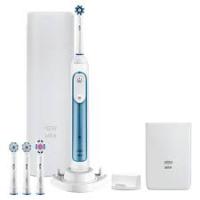
Accessories (depending on model) and features:
a Brushing recognition - Indicator LEDs
b Brushing recognition - Brushing progress indication
c Download and launch Oral-B App to enable all features
d iOSense™ button
e Smart Pressure Sensor
f Brush head «Ultimate Clean»
g Brush head «Gentle Care»
h Brush head holder with cap
i Brush head holder stand
j Travel case
k Charging travel case
k1 Charging light
k2 Power supply / Smart Plug
Note: Content may vary based on the model purchased.
Welcome to Oral-B!
Before operating your Oral-B iO toothbrush and iOSense™ charger, please read these instructions and save this manual for future reference.
IMPORTANT
- Periodically check the entire product/cord/accessories for damage. A damaged or non-functioning unit should no longer be used. If the product/cord is damaged, take it to an Oral-B Service Center. Do not modify or repair the product. This may cause fire, electric shock or injury.
- Never insert any object into any opening of the appliance.
- Usage by children under age 3 is not recommended. Toothbrushes can be used by children and persons with reduced physical, sensory or mental capabilities or lack of experience and knowledge, if they have been given supervision or instruction concerning use of the appliance in a safe way and understand the hazards involved.
- For tooth brushing only. Do not chew or bite on brush. Do not use as a toy or without adult supervision.
- Cleaning and user maintenance shall not be performed by children without supervision.
- Children shall not play with the appliance.
- Use this product only for its intended use as described in this
manual. Do not use attachments (e.g. brush head refills) which are not recommended by the manufacturer.
- Only use the charger and/or special cord set with integrated Safety Extra Low Voltage power supply provided with your appliance. Do not exchange or tamper with any part of it, otherwise there is risk of an electric shock. If charging stand/charging travel case is marked with 492-XXXX, only use Braun/Oral-B special cord set with this identification.
WARNING
- Do not place the charger, Smart Plug /power supply or charging travel case in water or liquid or store where it can fall or be pulled into a tub or sink. Do not reach for it when fallen into water. Unplug immediately.
- Avoid sharp bending, jamming or squeezing of the cord.
- This appliance contains batteries that are non-replaceable. The appliance has no user serviceable parts. Do not open and disassemble device except when disposing of the battery. Follow handling and disposal instructions of the battery/device described in this manual.
- When unplugging, always pull the power plug instead of the cord. Do not touch the power plug with wet hands. This can cause an electric shock.
- This toothbrush is a personal care device and is not intended for
use on multiple patients in a dental practice or institution. For hygienic reasons we recommend the use of individual brush handles and brush heads for each family member.
- Small parts may come off, keep out of reach of children.
-
To avoid brush head breakage which may generate a small parts choking hazard or damage teeth:
-
Prior to each use, ensure the brush head fits well. Discontinue use of the toothbrush, if brush head no longer fits properly. Never use without a brush head.
- If the toothbrush handle is dropped, the brush head should be replaced before the next use even if no damage is visible.
- Replace brush head every 3 months or sooner if brush head becomes worn.
- Clean brush head properly after each use (see «Cleaning recommendations» paragraph). Proper cleaning ensures the safe use and functional life of the toothbrush.
Important Information
- This toothbrush, charger and pouch (accessory) contain NdFeB magnets and generate magnetic fields. If you use a medical device or have an implanted medical device, consult with the medical device manufacturer or a physician, if you have questions about safely using your toothbrush.
• To avoid electromagnetic interference and/or compatibility
conflicts, disable Bluetooth on your toothbrush handle (5) and Bluetooth/ Wi-Fi on your iOSense™ charger before using it in restricted surroundings, such as aircrafts or specially marked areas in hospitals.
- Disable Bluetooth by entering the «Settings» menu on the interactive display (4) -> Bluetooth -> disable. Disable Bluetooth/ Wi-Fi on your iOSense™ charger by entering low power mode by tapping the iOSense™ button twice (d). Tap the botton once again to enable Bluetooth/ Wi-Fi.
- Persons with pacemakers should always keep the toothbrush or iOSense charger more than 15 centimeters (six inches) from the pacemaker while turned on. Anytime you suspect interference is taking place disable Bluetooth on toothbrush and disable Bluetooth and Wifi on iOSense charger.
-
This device contains licence-exempt transmitter(s)/receiver(s) that comply with Innovation, Science and Economic Development Canada's licence-exempt RSS(s). Operation is subject to the following two conditions:
-
This device may not cause interference.
- This device must accept any interference, including interference that may cause undesired operation of the device.
Specifications
For voltage specifications refer to the bottom of the charging unit.
First use
Please wake up your iO toothbrush by pressing the on/off button (7) and follow the instructions on the interactive display (4) to get started for first time setup.
If not further instructed on the display, you may toggle with the mode button (8) and select with the on/off button (7).
You may change the settings via the «Settings» menu (17) at any time.
You may connect your iO toothbrush with your iOSense™ charger by switch on the toothbrush in close proximity to the plugged-in iOSense™ charger.
Charging and Operating
- To charge the toothbrush battery place the toothbrush on the iOSense™ charger (6).
- The charge level is indicated on the interactive display (4). The light ring (3) fades in and out during charging. Once it is fully charged the light ring turns off. A full charge typically takes 3 hours.
- If the battery is running low the light ring (3) blinks quickly in red. Once the battery is empty, the motor stops; it will need at least a 5-minute charge for one usage. Note: In case the battery is empty (display off), charge for at least 30 minutes.
- You can always store the toothbrush on the iOSense™ charger to maintain it at full charge; a battery overcharge is prevented by the device.
Note: Store the toothbrush at room temperature for optimal battery maintenance.
Caution: Do not expose the toothbrush to temperatures higher than 50^ C / 122^ F.
Using your iO toothbrush
Start Brushing
Place the brush head on the toothbrush handle. A small gap should remain between handle and brush head. Activate the display by picking-up the toothbrush, lifting it off the
iOsense™ charger or pressing the on/off button (7) (display turns on). Wet brush head and apply toothpaste. To avoid splashing, guide the brush head to your teeth before switching the toothbrush on by pressing the on/off button.
Note: Display turns off after some time. You may press the on/off button to activate display again.
Guide the brush head from tooth to tooth. Brush the outsides, the insides and the chewing surfaces. Brush all four quadrants of your mouth equally. You may also consult your dentist or dental hygienist about the right technique for you. After brushing, the display gives you feedback based on your brushing time.
In the first days of using any electric toothbrush, your gums may bleed slightly. In general, bleeding should stop after a few days. Should it persist after 2 weeks, please consult your dentist or dental hygienist. If you have sensitive teeth and/or gums, Oral-B recommends using the «Sensitive» or «Super Sensitive» modes (optional in combination with an Oral-B «Gentle Care» brush head (g)). Availability of modes are depending on model purchased.
Toothbrush Timer (Stutter Timer)
The iO toothbrush is equipped with timer features, which help you to achieve the professionally recommended 2-minute brushing time. The timer signals with a short stuttering sound at 30-seconds intervals to move to the next quadrant of your mouth. A long stuttering sound indicates the end of the professionally recommended 2-minute brushing time.
The timer memorizes the reached brushing time, even when the toothbrush is briefly switched off during brushing. The timer resets if pausing longer than 30 seconds or placing the toothbrush on the plugged-in iOSense™ charger.
Note: During the use of the Oral-B App or iOSense™ charger features the stutter timer is deactivated in the toothbrush. You may also customize the stutter timer settings via Oral-B App.
Toothbrush Light Ring (3)
Your iO toothbrush is equipped with a light ring (3) that has various functions indicated via colors:
Smart Pressure Sensor (e)
White (default) = Operating indicator (choose individual color via Oral-B App)/ Low pressure indicator Green = recommended pressure indicator Red = high pressure indicator
If the Smart Pressure Sensor illuminates in white (or your pre-selected color), we recommend applying more pressure. The green light indicates recommended brushing pressure. If too much pressure is applied, it lights up in red reminding you to reduce pressure.
During high pressure the brush head movement will be reduced (in «Daily Clean», «Intense» and «Sensitive» modes).
Periodically check the operation of the Smart Pressure Sensor by pressing moderately on the brush head during use.
Note: During the use of the Oral-B App, the Smart Pressure Sensor indication may be inactive for some features.
Note: Smart Pressure Sensor is deactivated during «Tongue Clean» mode.
Other functions
Red = Low battery indicator Blue = Bluetooth pairing indicator Orange = Error indicator (follow display messages)
Brushing modes (depending on model)
Your iO toothbrush offers different brushing modes indicated on the display:
«Daily Clean» – Standard mode for daily cleaning
«Sensitive» – Gentle, yet thorough cleaning for sensitive areas
«Gum Care» - Gentle massage of gums
«Whiten» - Polishing for occasional or everyday use
«Intense» – For an extraordinary clean feeling (operated with a higher speed)
«Super Sensitive» – Super gentle cleaning for extra sensitive areas
«Tongue Clean» – Tongue cleaning for occasional or everyday use
Note: The sequence and availability of brushing modes may vary depending on model purchased.
When operating the «Tongue Clean» mode, we recommend using a «Gentle Care» brush head (g). You can brush your tongue either with or without toothpaste. Brush the whole area of your tongue systematically in gentle movements. The recommended brushing time is 30 seconds; the motor stops after 30 seconds.
Mode setting:
You may first choose your default mode by pressing the mode button (8) successively once the toothbrush is awake (display turned on). Select a mode by pressing the on/off button (7). Your toothbrush starts in the selected default mode. You may also change modes during brushing.
Note: You may also customize mode settings via Oral-B App.
Interactive Display
Activate the display (4) by picking-up the toothbrush, lifting it off the charger or pressing the on/off button (7).
(10-16) «Mode selection» – toggle by pressing the mode button and select default start mode with on/off button.
(17) «Settings» - toggle through all modes until you reach the option «Settings»; to enter press the on/off button:
• (19) manage Bluetooth settings (enable, disable)
• (20) select/change color of light ring
• (21) select/change language
• (22) perform factory reset
(24) «Timer» - displays brushing time.
(25) «Battery status» – shows battery status after use, when charging or when battery is low.
(26) «Brush Head Replacement Reminder» - reminds you when to replace your brush head.
(27) «Brushing feedback» – brushing feedback is indicated with a smiley face.
When the toothbrush is picked up, lifted off the iOSense™ charger or when you press the on/off button the toothbrush handle indicates its readiness.
«Error messages» - «outside operating
limits»: you are operating or charging outside standard temperature range.
Brush heads
Oral-B offers you a variety of different Oral-B iO brush heads (f/g) that only fit your Oral-B iO toothbrush handle and can be used for tooth-by-tooth precision cleaning.
Most iO Oral-B brush heads feature INDICATOR® bristles to help you monitor brush head replacement need. With thorough brushing, twice a day for two minutes, the bristle color will fade halfway approximately within 3 months, indicating the need to exchange your brush head. If the bristles splay before the color recedes, you may exert too much pressure on teeth and gums. In general, we recommend replacing the brush head every 3 months.
Brush Head Replacement Reminder The toothbrush is equipped with a «Brush Head Replacement Reminder» on the interactive display, indicating the need to exchange the brush head approximately after 3 months when used twice per day. To reset the «Brush Head Replacement Reminder» follow the instructions on the display.
Note: You may also customize the brush replacement settings via the Oral-B App.
Connecting your iO toothbrush to your Smartphone/Oral-B App
The Oral-B App offers various features:
- Personalize your toothbrush settings (e.g. choose your preferred light ring color, adjust stutter timer, brush mode sequence or brush replacement reminder settings)
- Track your brushing behavior (e.g. brushing time and applied pressure)
• Real-time brushing recognition to help you brush every area for the right amount of time.
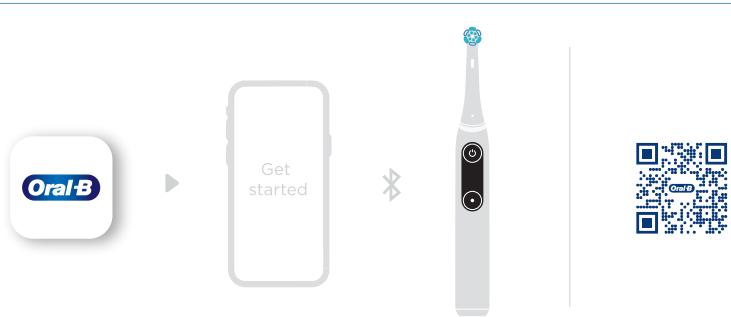
The Oral-B App is available for smartphones running iOS or Android™ operating systems. Check app.oralb.com for compatible smartphones and country availability of the Oral-B App. It can be downloaded for free
from App Store(SM)/ Google Play store™ or you may scan the QR code on the cover page of this manual (c).
- Launch the Oral-B App. It will guide you through the entire Bluetooth pairing procedure. You may also pair new devices at any time in the Oral-B App's settings.
Note: Oral-B App functionality is limited if Bluetooth is deactivated on your smartphone (for directions please refer to your smartphone's user manual). - You may change Bluetooth settings on your toothbrush via the display -> Settings -> Bluetooth enable/disable.
- Keep your smartphone in close proximity (within 5m distance) when using it with the toothbrush. Make sure the smartphone is safely positioned in a dry place.
Note: Your smartphone must support Bluetooth 4.2 (or higher) / Bluetooth Smart in order to pair your toothbrush.
Caution: Follow your smartphone's user manual to ensure your phone/ charger is designed for use in a bathroom environment.
Using your iOSense™ charger
Personalized live-coaching and Smart Pressure Sensor features
The iOSense™ charger has a built-in real-time feedback on brushing coverage, brushing time and pressure. The LED lights on top of your iOSense™ charger illustrate your upper and lower jaw (a). You may start your brushing session at any area of your mouth. While the area is being brushed, the respective light fades from blue to white, indicating the brushing progress. Once one area is cleaned (a), the respective LED turns into white.
If too much pressure is applied, LEDs light up in red reminding you to reduce pressure (e).
Caution: During a brushing session with enabled brushing recognition feature on your iOSense™ charger, please stay within 5m distance to your iOSense™ charger to ensure a stable connection and brushing recognition.
To enable the full feature set of iOSense™ charger, the Oral-B App is required. Please follow the instructions in the Oral-B App for connection setup.
Clock setup
Launch the Oral-B App and connect the iOSense™ charger with your Wi-Fi by following the instructions in the Oral-B App.
Note: The clock doesn't work without the Wi-Fi connection.
Bluetooth & Wi-Fi® functions
The iOSense™ charger supports Bluetooth and Wi-Fi.
- Bluetooth connects the iOSense™ charger with the toothbrush and the Oral-B App.
- Wi-Fi connects the iOSense™ charger with the internet.
iOsense™ button functions
You may find the capacitive touch button (d) on the back of your iOSense™ charger. It has two functions:
- Low Power Mode: Device enters into low power mode. All features beyond charging are disabled. Tap the button (d) twice to enable/disable low power mode and once to disable. The activation of low power mode is indicated by the LEDs on the top of your iOSense charger. Power consumption of networked standby mode: 1,2 W.
- Factory reset: Touch and hold the button (d) until orange light appears on the top of your iOSense™ charger, then release the button. Tap the button once again while orange light is on, to trigger the factory reset. LEDs spin orange clockwise to confirm the factory reset. All credentials and settings are deleted from the iOSense™ charger.
Cleaning recommendations
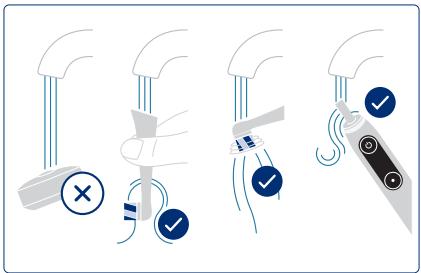
After brushing, rinse your brush head under running water with the toothbrush switched on. Remove the brush head and clean the toothbrush handle and brush head separately. Make sure water runs inside the top of the handle as well as inside the brush head. Wipe all parts dry and let them air-dry before reassembling your iO toothbrush again. Unplug the iOSense™ charger before cleaning. Clean the charger regularly with a damp cloth only. Please check individual cleaning instructions for each accessory in its «Accessories» paragraph.
Accessories (depending on model)
Charging Travel Case (k)
- To charge your toothbrush (5) place it in the charging travel case (k) and connect it to the mains outlet, using the extra power supply (k2) provided. The power supply may be used for all global mains voltage ranges (100 - 240V).
- The flashing light (k1) of the charging travel case indicates that the toothbrush is charging. Once the toothbrush is fully charged the light turns off. A full charge in the charging travel case typically takes 6 hours.
- The outer and inner case should be cleaned with a damp cloth only. Make sure that the toothbrush and brush head are completely dry before storing in the travel case.
Note: Clean stains on travel case surfaces immediately. Store travel case in a clean and dry place.
Travel Case (j)
Store the clean and dry iO toothbrush/brush heads in the travel case (j). The outer and inner case should be cleaned with a damp cloth only.
Note: Clean stains on travel case surfaces immediately. Store travel case in a clean and dry place.
Brush head holder stand (i) / Brush head holder with cap (h)
You may store your cleaned and dry brush heads on the pins of the brush head holders. Make sure your brush heads are dried before placing them in the holder and/or closing the cap. Brush head holders and cap are dishwasher-safe.
Zipper Pouch / Magnetic Pouch
You may store your cleaned brush heads and
toothbrush in the pouches. Make sure your brush heads and toothbrush are dried before placing them in the pouches. The outer and inner surfaces can be cleaned under running water. Store pouches in a clean and dry place.
Note: Clean stains on pouch surfaces immediately.
Subject to change without notice.
Environmental Notice
Product contains batteries and/or recyclable electric waste. For environment protection do not dispose in household water, but for recycling take to collection points provide a regional.

Battery removal at the end of the appliance's useful life
Do not disassemble the appliance except when disposing of the battery. Run down battery before removing. When taking out the battery for disposal, use protective clothing (gloves, safety glasses, etc.) to protect skin from a possible leak. Use caution not to short the positive (+) and negative (-) terminals. Insulate terminals (e.g. with tape) and put the battery in a plastic bag for disposal.
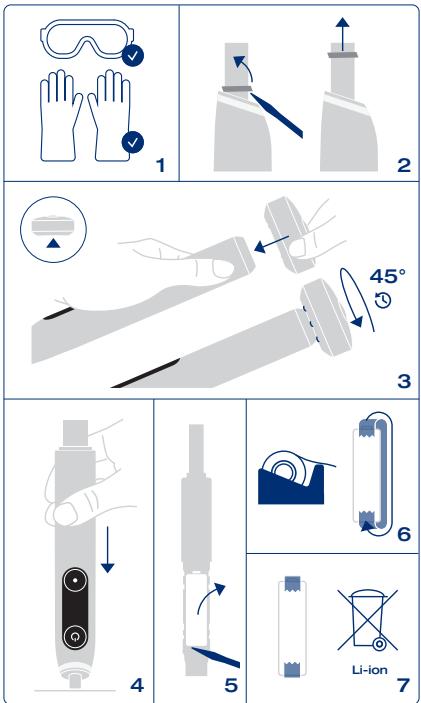
Open the handle as shown, remove the battery and dispose of it according to local environmental regulations.
Caution! Opening the handle will destroy the appliance and invalidate the warranty.
These appliances are equipped with a Bluetooth Smart approved radio/ Wi-Fi interfaces. Failure to establish a Bluetooth Smart/ Wi-Fi connection to specific smartphones is not covered under the device guarantee, unless the malfunction of the Bluetooth/ Wi-Fi interface is referable to Oral-B. The Bluetooth/ Wi-Fi devices are warranted by their own manufacturers and not by Oral-B. Oral-B does not influence or make any recommendations to device manufacturers, and therefore Oral-B does not assume any responsibility for the number of compatible devices with our Bluetooth/ Wi-Fi interface.
Oral-B reserves the right, without any prior notice, to make any technical modifications or changes to system implementation of device features, interface, and menu structure changes that are deemed necessary to ensure that Oral-B systems function reliably.
To obtain service within the guarantee period, hand in or send the complete appliance with your sales receipt to an authorized Oral-B Braun Customer Service Center.
Information
Bluetooth ^® radio module/ Wi-Fi ^® module Although all indicated functions on the Bluetooth/ Wi-Fi device are supported, Oral-B does not ensure 100% reliability in connection, and feature operation consistency. Operation performance and connection reliability are direct consequences of each individual Bluetooth/ Wi-Fi device, software version, as well as the operating system of those Bluetooth/ Wi-Fi devices and company security regulations implemented on the device. Oral-B adheres to and strictly implements the Bluetooth/ Wi-Fi standard by which Bluetooth/ Wi-Fi devices can communicate and function in Oral-B iO toothbrushes. However, if device manufacturers fail to implement this standard, Bluetooth/ Wi-Fi compatibility and features will be further compromised and the user may experience functional and feature-related issues. Please note that the software on the Bluetooth/ Wi-Fi device can significantly affect compatibility and operation.
FOR USA ONLY
Limited 2-Year Warranty
Oral-B warrants this appliance to be free of defects in material and workmanship for a period of two years from the date of original purchase at retail.
If the appliance exhibits such a defect, Oral-B will, at its option, repair or replace it without cost for parts and labor. The product must be carried in or shipped, prepaid and insured (recommended), to an authorized Oral-B Service Center. Proof of date of original purchase is required.
The cost to ship the product to an authorized Service Center is the responsibility of the consumer, the cost to return the product to the consumer is the responsibility of Oral-B. This warranty does not cover finishes or normal wear, nor does it cover damage resulting from accident, misuse, dirt, water, tampering, unreasonable use, service performed or attempted by unauthorized service agencies, failure to provide reasonable and necessary maintenance, including recharging, or units that have been modified or used for commercial purposes.
Please also read our additional warranty statements: Warranty replacement brush heads.
ALL IMPLIED WARRANTIES, INCLUDING ANY IMPLIED WARRANTY OF MERCHANTABILITY OR FITNESS FOR ANY PARTICULAR PURPOSE, ARE LIMITED IN DURATION TO TWO YEARS FROM DATE OF ORIGINAL PURCHASE. IN NO EVENT WILL ORAL-B BE RESPONSIBLE FOR CONSEQUENTIAL DAMAGES RESULTING FROM THE USE OF THIS PRODUCT.
Some states do not allow the exclusion or limitation of incidental or consequential damages, so the above limitation may not apply to you. This warranty gives you specific legal rights, and you may have other legal rights which vary from state to state.
How to obtain service in the USA Should this product require service, please call 1-800-566-7252 to be referred to the authorized Oral-B Service Center closest to you.
To obtain service:
A. Carry the product in to the authorized Oral-B Service Center of your choice or, B. Ship the product to the authorized Oral-B Service Center of your choice. Pack the product well. Ship the product prepaid and insured (recommended). Include a copy of your proof of purchase to verify warranty coverage, if applicable.
To obtain original Oral-B replacement parts and accessories: Contact an authorized Oral-B Service Center.
Please call 1-800-566-7252 to be referred to the authorized Oral-B Service Center closest to you.
To order original Oral-B replacement parts and accessories (including replacement brush heads) by phone:
Please call 1-800-566-7252.
To speak to an Oral-B Consumer Service Representative:
Please call 1-800-566-7252.
FCC Compliance Statement: This device complies with Part 15 of the FCC rules.
Operation is subject to the following two conditions: (1) this device may not cause harmful interference, and (2) this device must accept any interference received, including interference that may cause undesired operation.
Section 15.21 Information to user: Changes or modifications not expressly approved by the party responsible for compliance could void the user's authority to operate the equipment.
Section 15.105 (b) Note: This equipment has been tested and found to comply with the Limits for a Class B digital device, pursuant to Part 15 of the FCC Rules. These limits are designed to provide reasonable protection against harmful interference in a residential installation. This equipment generates, uses and can radiate radio frequency energy and, if not installed and used in accordance with the instructions, may cause harmful interference to radio communications. However, there is no guarantee that interference will not occur in a particular installation.
If this equipment does cause harmful interference to radio or television reception, which can be determined by turning the equipment off and on, the user is encouraged to try to correct the interference by one or more of the following measures:
- Reorient or relocate the receiving antenna.
- Increase the separation between the equipment and receiver.
- Connect the equipment into an outlet on a circuit different from that to which the receiver is connected.
- Consult the dealer or an experienced radio/TV technician for help.
FOR CANADA ONLY
Limited 2-Year Warranty
In the event this appliance fails to function within the specified warranty period because
of defects in material or workmanship, and the consumer returns the unit to an authorized service center, Braun Canada will, at its option either repair or replace the unit without additional charge to the consumer.
This warranty does not cover any product which has been damaged by dropping, tampering, servicing performed or attempted by unauthorized service agencies, misuse or abuse. This warranty excludes units which have been modified or used for commercial purposes.
To the extent allowed by law, Braun Canada shall not be responsible for loss of the product, loss of time, inconvenience, commercial loss, special or consequential damages. The provisions of this warranty are in addition to and not a modification of or subtraction from the statutory warranties and other rights and remedies contained in applicable provincial legislation.
Please also read our additional warranty statements: Warranty replacement brush heads on page X.
How to obtain service in Canada
Should this product require service, please call 1-800-566-7252 to be referred to the authorized Oral-B Service Center closest to you.
To obtain service:
A. Carry the product in to the authorized Oral-B Service Center of your choice or, B. Ship the product to the authorized Oral-B Service Center of your choice. Pack the product well. Ship the product prepaid and insured (recommended). Include a copy of your proof of purchase to verify warranty coverage, if applicable.
The cost to ship the product to an authorized Service Center is the responsibility of the consumer, the cost to return the product to the consumer is the responsibility of Oral-B.
To obtain original Oral-B replacement parts & accessories: Contact an authorized Oral-B Service Center. Please call 1-800-566-7252 to be referred to the authorized Oral-B Service Center closest to you.
To order original Oral-B replacement parts and accessories (including replacement brush heads) by phone:
Please call 1-800-566-7252
To speak to an Oral-B Service Representative: Please call 1-800-566-7252.
IC Compliance Notice: This device complies with Industry Canada license-exempt RSS standard(s). Operation is subject to the following two conditions: (1) this device may not cause interference, and (2) this device must accept any interference, including interference that may cause undesired operation of the device.
Satisfaction Guaranteed or Your Money Back!
Try it with no risk for 60 days!
If you are not 100% satisfied, call 1-877-593-4199 to receive a full refund. Return the product in its original packaging along with the original cash receipt postmarked within 60 days of purchase to receive a prepaid card in the amount of purchase. Terms of prepaid card apply.
Please allow 6-8 weeks for handling. In the US, the shipment cost to return the product is the responsibility of the consumer.
Sorry: No refunds will be made for any Oral-B product damaged by accident, neglect, unreasonable use or lost in the post.
Terms and conditions apply. For further details please contact our customer service.
Warranty - Exclusions and Limitations
This limited warranty applies only to the new products manufactured by or for The Procter & Gamble Company, its Affiliates or Subsidiaries («P&G») that can be identified by the Braun / Oral-B trademark, trade name, or logo affixed thereto. This limited warranty does not apply to any non-P&G product including hardware and software. P&G is not liable for any damage to or loss of any programs, data, or other information stored on any media contained within the product, or any non-P&G product or part not covered by this limited warranty.
Recovery or reinstallation of programs, data or other information is not covered under this limited warranty.
This limited warranty does not apply to (i) damage caused by accident, abuse, misuse, neglect, misapplication, or non-P&G product; (ii) damage caused by service performed by anyone other than Braun or authorized Braun service location; (iii) a product or part that has been modified without the written permission of P&G, and (iv) damage arising out of the use of or inability to use the Oral-B Smartphone stand/puck, Smartphone mirror holder, or charging travel case («Accessories»).
Warranty replacement brush heads
Oral-B warranty will be voided if electric rechargeable toothbrush handle damage is found to be attributed to the use of non-Oral-B replacement brush heads.
Oral-B does not recommend the use of non-Oral-B replacement brush heads.
- Oral-B has no control over the quality of non-Oral-B replacement brush heads.
Therefore, we cannot ensure the cleaning performance of non-Oral-B replacement brush heads, as communicated with the electric rechargeable handle at time of initial purchase. - Oral-B cannot ensure a good fit of non-Oral-B replacement brush heads.
- Oral-B cannot predict the long-term effect of non-Oral-B replacement brush heads on handle wear.
All Oral-B replacement brush heads carry the Oral-B logo and meet Oral-B's high quality standards. Oral-B does not sell replacement brush heads or handle parts under any other brand name.
Troubleshooting
| Problem | Possible reason | Remedy |
| APP | ||
| Toothbrush and iOSenseTM charger do not operate (properly) with Oral-B App. | 1. Oral-B App is closed.2. Bluetooth is not activated on smartphone.3. Bluetooth is disabled on toothbrush4. Bluetooth connection to smartphone has been lost.5. Your smartphone does not support Bluetooth 4.2 (or higher) / Bluetooth Smart.6. Outdated Oral-B App.7. Your smartphone is not compatible with the Oral-B App8. iOSenseTM charger is in Low Power mode. | 1. Launch Oral-B App.2. Activate Bluetooth on smartphone (described in its user manual).3. Enable Bluetooth via display settings on your toothbrush4. Keep your smartphone in close proximity when using it with the toothbrush and iOSenseTM charger.5. Your smartphone must support Bluetooth 4.2 (or higher)/Bluetooth Smart in order to pair toothbrush.6. Download latest Oral-B App.7. Check app.oralb.com for compatible smartphones and country availability of the Oral-B App.8. Quit Low Power mode on iOSenseTM charger by tapping the button (d) once. |
| Toothbrush | ||
| Unwanted toothbrush behavior | Toothbrush was misconfigured | Perform a factory reset to restore initial settings. Navigate on toothbrush display to Settings -> Factory Reset (22). Press on/off button to confirm. |
| Toothbrush is not operating (during first use). | 1. Battery has a very low charge level; handle does not operate.2. Operating outside standard temperature range (message on display and/or alternating lights of light ring) | 1. Charge at least for 30 min.2. Always operate in standard operating temperature range (> 32°F and < 104°F). |
| Short stuttering sounds after 2 minutes or toothbrush does not provide any stutter timer. | 1. Timer has been modified/deactivated via Oral-B App.2. The toothbrush timer is disabled during use of brushing recognition with Oral-B App or iOSenseTM charger. | 1. Use Oral-B App to change timer settings or perform toothbrush factory reset2. Disconnect toothbrush from Oral-B App and iOSenseTM charger or configure iOSenseTM charger with the App to disable brushing recognition. |
| Toothbrush does not charge. | 1. Battery is at a very low charger level (0%); it may take up to 10-15min until display turns on.2. Ambient temperature for charging is out of valid temperature range (>32°F and <104°F).3. Charger may not be (properly) connected. | 1. Charge at least for 30 min.2. Recommended ambient temperature range for charging is 41°F to 95°F.3. Ensure iOSenseTM charger is connected to mains voltage. |
| Rattling/loud noise during brushing or turning on. | 1. Brush head may not be placed correctly onto the brush handle.2. Brush head may be worn out. | 1. Check proper fit of brush head on handle. Small gap remains in between.2. Replace brush head. |
| iOsenseTM charger | ||
| Clock is not displayed on the iOsenseTM charger or an animation is playing ongoingly on clock display | Device is not connected to the internet. | Use the Oral-B App to setup the iOsenseTM charger. Please follow the instruction in the Oral-B App. Make sure your Wi-Fi network is in range of iOSenseTM charger and connected to internet. |
| iOsenseTM charger is not reacting when using my toothbrush or reacts on a different toothbrush | 1. iOSenseTM charger is connected to a wrong toothbrush2. iOSenseTM charger is in Low Power mode. | 1.1 When you are not using the Oral-B App:- Enable Bluetooth via display settings on your toothbrush- Reset iOSenseTM charger.- Hold your toothbrush close to iOSenseTM charger and turn it on to connect both devices.1.2 When you are using the Oral-B App:- Enable Bluetooth via display settings on your toothbrush.- Use the Oral-B App to connect your toothbrush.2. Quit Low Power mode by tapping the iOSenseTM button (d) once. |
| iOsenseTM charger is not showing my current brushing session | 1. iOSenseTM charger may got disconnected from your toothbrush while brushing2. iOSenseTM charger is in Low Power mode.3. Brushing feedback is already provided in the Oral-B App | 1. Please ensure that you stay in close proximity to your charger while brushing2. Quit Low Power mode by tapping the iOSenseTM button (d) once.3. Brushing feedback can only be provided on one device. Make sure you have selected the right device. |
Description
www.service.oralb.com
Braun GmbH
Frankfurter Strasse 145
61476 Kronberg
Customer Service Number:
1-800-56-ORALB (1-800-566-7252)
Charger Type 3786
i