USER MANUAL TUNER II TANGENT
Including in the package:
Remote Control
RCA Cable
Antenna cable
Instruction Manual

(UK)
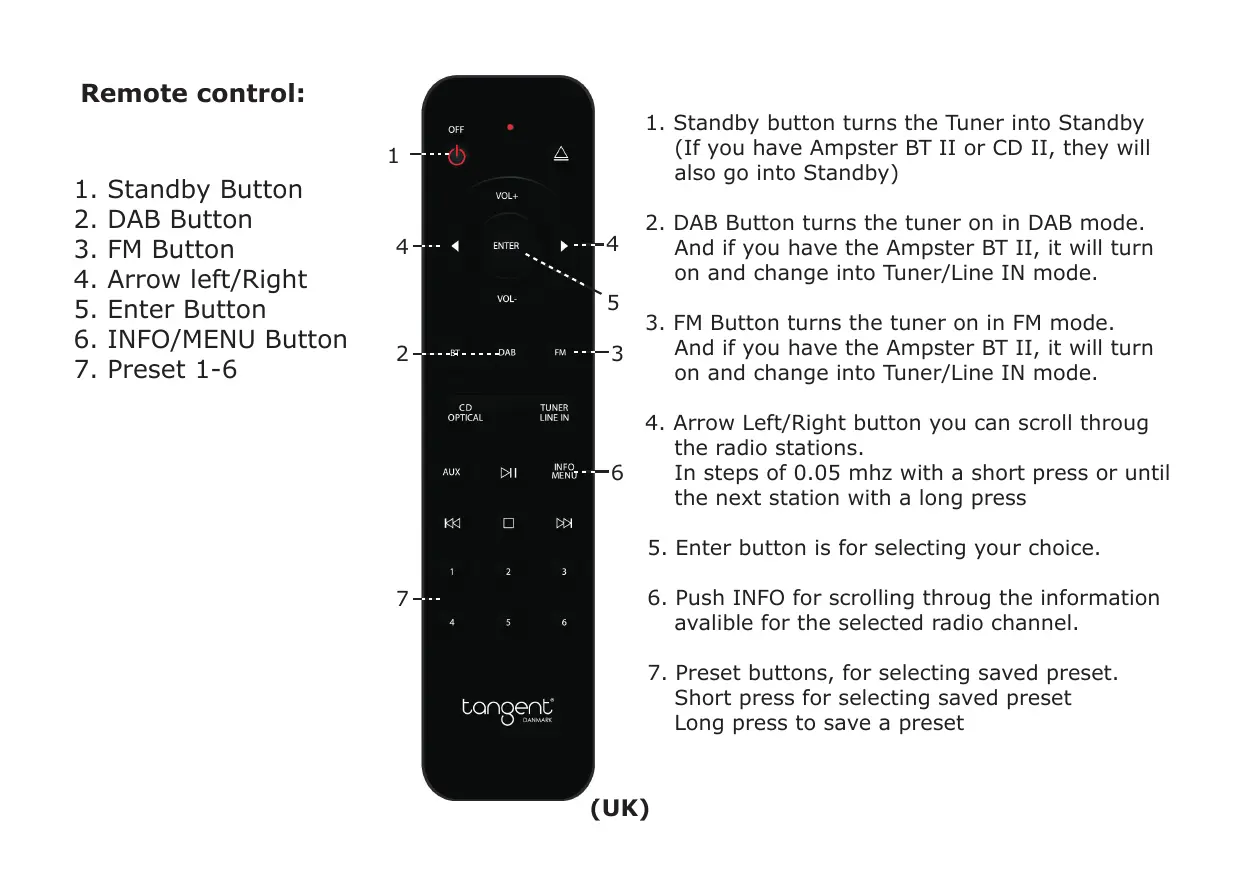
Remote control:
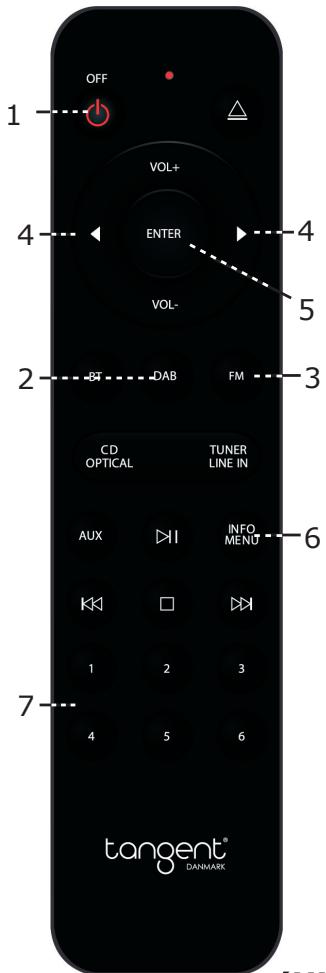
- Standby Button
- DAB Button
- FM Button
- Arrow left/Right
- Enter Button
- INFO/MENU Button
- Preset 1-6
(UK)
- Standby button turns the Tuner into Standby (If you have Ampster BT II or CD II, they will also go into Standby)
- DAB Button turns the tuner on in DAB mode. And if you have the Ampster BT II, it will turn on and change into Tuner/Line IN mode.
- FM Button turns the tuner on in FM mode. And if you have the Ampster BT II, it will turn on and change into Tuner/Line IN mode.
- Arrow Left/Right button you can scroll through the radio stations.
In steps of 0.05 mhz with a short press or until the next station with a long press
- Enter button is for selecting your choice.
- Push INFO for scrolling through the information available for the selected radio channel.
- Preset buttons, for selecting saved preset. Short press for selecting saved preset Long press to save a preset
Indicator Function
Power/Standby indicator
Power: Power on the product in power off status, then push the power ON/OFF button on rear panel at "ON" position and the unit will power on, LED indicator will change into white.
Power off:
Push the power ON/OFF button at "OFF" position, and unit go into power off status.
Standby:
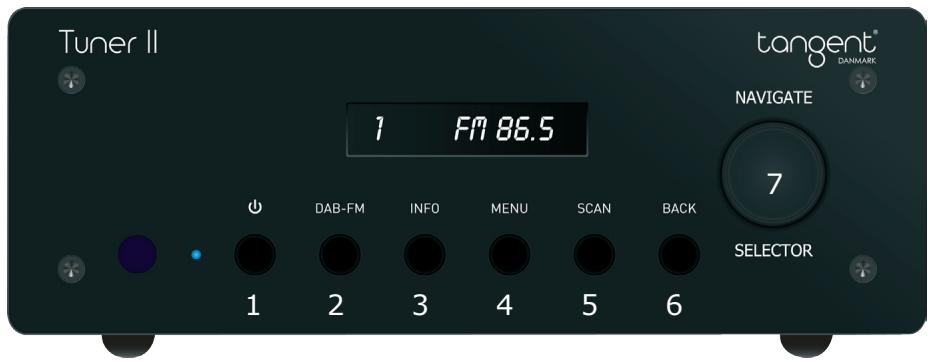
Press the standby button on the unit or remote control then the unit will go into standby, and the standby LED will be red color. The unit is in standby status.
Power on (from standby mode): Press standby on the unit or DAB/FM on the remote control, and the unit will start up in the mode that you have selected.
This selector you can navigate in the MENU or radio channels and select by press.
Setup date and time
Press on menu button (4) then go to "Main Menu", "Time Setup", "Auto Update", "From Radio"
Important Safety Instructions:
To reduce the risk of electrical shock, fire, etc.:
- Do not place unit near any heat source such as radiators, heat registers, stoves, or other apparatus (including amplifiers) that produce heat.
- Do not block any ventilation openings of unit.
- The unit shall not be exposed to dripping or splashing and no objects filled with liquids, such as vases, shall be placed on the unit.
- Do not place any heavy loads onto the unit, and do not step on it, the load may fall and cause serious injury to the unit.
- Never unplug your unit by pulling on the power cord. Always grap the plug firmly and pull straight out from the outlet.
- Repair or replace all electric service cords that have become frayed or otherwise damaged immediately. Do not use a cord that shows cracks or abrasion damage along its length, the plug, or the connector end.
- To prevent fire or shock hazard, do not expose unit to rain or moisture.
- During lightning or raining days, unplug the unit for additional protection during thunderstorms or when the unit is not used for prolonged periods. This will prevent damage to the unit from lightning and power surges.
- Do not attempt to carry out any service work yourself. By opening or removing the cabinet, you may be exposed to dangerous voltage or other hazards. Any service work should be carried out by qualified technicians.
- In the interests of safety and to avoid unnecessary energy consumption, never leave the unit switched on while unattended for long periods of time, e.g. overnight, while on holiday or while out of the house. Switch it off and disconnect the mains plug from the mains socket.
- Clean only with dry cloth
- Please pay attention to the environmental aspects of battery disposal. Battery must be recycled or disposed of properly. This product must not be disposed together with the domestic waste. This product has to be disposed at an authorized place for recycling of electrical and electronic appliances. By collecting and recycling waste, you help save natural resources, and make sure the product is disposed in an environmental friendly and healthy way.


This symbol on the product or in the instructions means that your electrical and electronic equipment should be disposed at the end of its life separately from your household waste. There are separate collection systems for recycling in the EU. For more information, please contact the local authority or your retailer where you purchased the product.
(UK)
Tuner: