
AMBRA - Coffee machine SAECO - Free user manual and instructions
Find the device manual for free AMBRA SAECO in PDF.
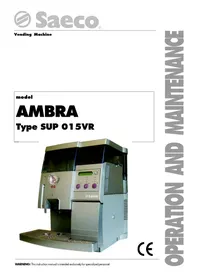


| Product Type | Automatic coffee machine (coffee and hot water dispenser) |
| Brand | SAECO |
| Model | AMBRA |
| Dimensions (W x D x H) | Approximately 380 x 460 x 440 mm |
| Weight | Approximately 17.5 kg |
| Power supply | Single-phase, voltage and frequency according to rating plate |
| Power consumption | See rating plate (e.g., 1000 W for water heater) |
| Water tank capacity | Approximately 6.5 liters |
| Bean container capacity | Approximately 720 g |
| Heating time | Approximately 3 minutes |
| Main functions | Freshly ground coffee, espresso, hot water; dose programming; grind adjustment; automatic shut-off; energy saving mode |
| Grind adjustment | By knob on the grinder (recommended position: 5) |
| Dose programming | From 0 to approximately 250 ml per drink |
| Safety | Safety micro-switches on the door; automatic stop in case of anomaly; overheating protection (thermal cut-out) |
| Maintenance and cleaning | Daily emptying of the grounds container; weekly cleaning of the brewing unit; regular cleaning of the water tank, drip tray and grid; not dishwasher safe |
| Spare parts and repairability | Parts available from authorized service centers; do not repair yourself; intervention reserved for maintenance technician |
| General information | User and maintenance manual included; collective use (office, community); CE compliance |
Frequently Asked Questions - AMBRA SAECO
User questions about AMBRA SAECO
0 question about this device. Answer the ones you know or ask your own.
Ask a new question about this device
Download the instructions for your Coffee machine in PDF format for free! Find your manual AMBRA - SAECO and take your electronic device back in hand. On this page are published all the documents necessary for the use of your device. AMBRA by SAECO.
USER MANUAL AMBRA SAECO
1 - INTRODUCTION TO THE MANUAL 4
1.1 Foreword 4 1.2 Symbols used 4
2 - GENERAL INFORMATION 4
2.1 Foreword 4 2.2 Intended use of the machine 4 2.3 Residual risks 4 2.4 Machine identification 5 2.5 Technical specifications 5
3 - HANDLING AND STORAGE 6
Handling 6 Storage 6
4 - SAFETY 6
4.1 General safety norms 6 4.2 Operators requirements 7
Maintenance technician 7 Supply operator 7 User 7
4.3 Safety devices 7 4.4 Safety microswitch efficiency test 7
5 - CONTROLS DESCRIPTION 8
5.1 Main controls 8
Main switch (Fig. 5) 8 Control panel (Fig. 6) 8 Dispensing mode 8 Setting mode 8
6 - INSTALLATION 9
6.1 List of supplied accessories 9 6.2 Positioning 9 6.3 Electric connection 9
7- SETTINGS. 10
Structure of programming functions 10 Menu selection 10 Changing numeric values 10
8 - USE OF THE VENDING MACHINE 23
8.1 Machine status 23
Off and electrically insulated 23 On 23
Energy saving 23
8.2 Recommendations 23
Prolonged inactivity 23 Temperature control 23 Bean hopper empty 23 Water tank empty 23 Dump box full 23
8.3 First Switching on 24
Filling the bean hopper 24 Fixing the cover lock plate 24 Filling the water tank 24 Water circuit filling 25 Grinding adjustment 25 Coffee blends 26
8.4 Beverage dispensing 26
Adjusting the coffee dispenser 26 Adjusting the cup filling level 27 Coffee dispensing 27 Preheating 27 Hot water dispensing 27
8.5 Messages and special warnings 28
Bean hopper electronic control. 28 Coffee beans protection against impurities ..28 Water level electronic control 28
9 - MAINTENANCE 28
9.1 Foreword 28 9.2 Cleaning and maintenance 29 Brew group 30 Coffee grinder 31
10 - INACTIVITY 32
11 - INSTRUCTIONS FOR END-OF-LIFE DISPOSAL TREATMENT 32
12 - TROUBLESHOOTING 32
13 - ACCESSORIES 32
14 - GENERAL MAINTENANCE 33
14.1 Troubleshooting 33
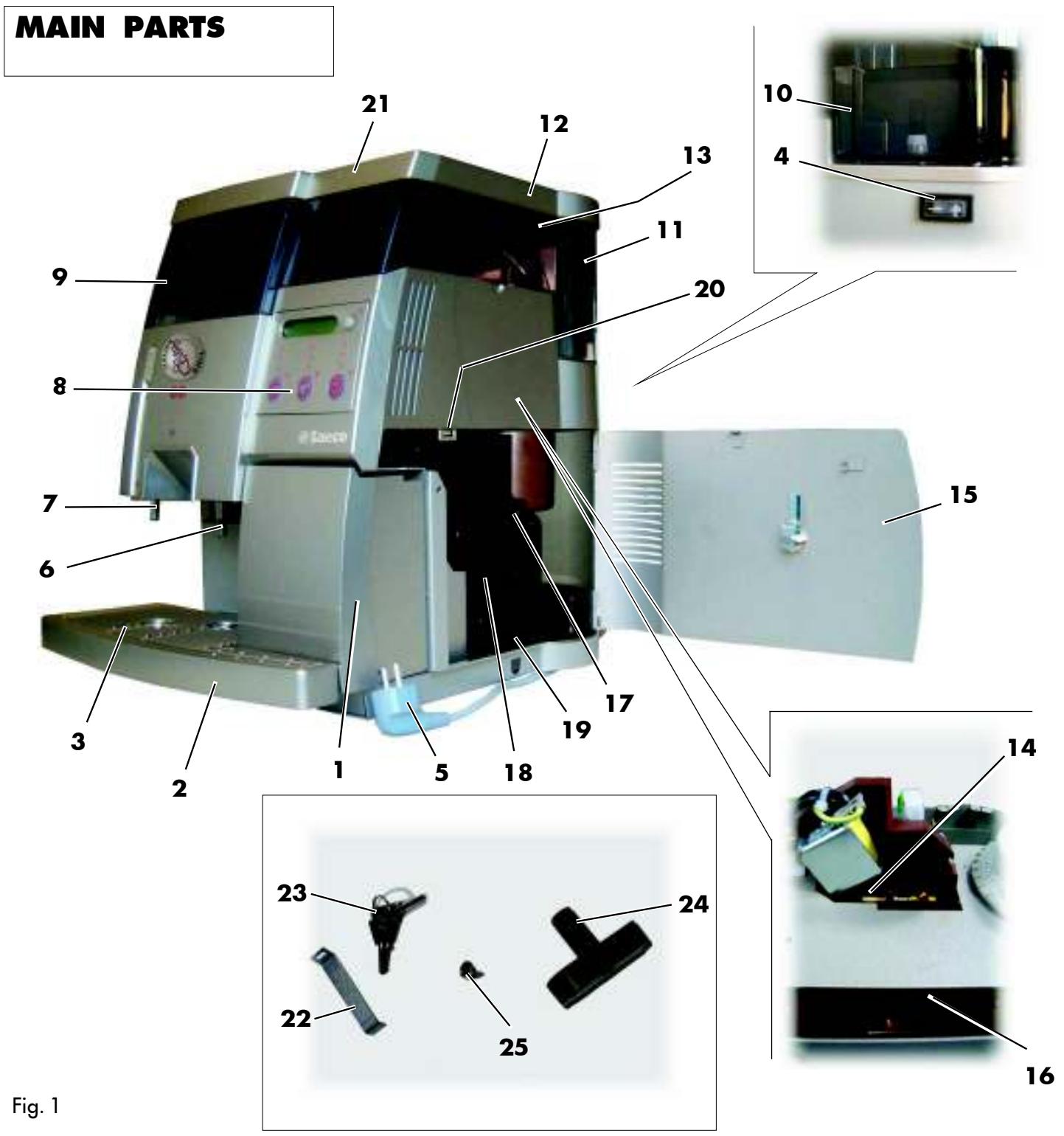
1 Dump box 2 Drip tray 3 Grill drip tray 4 Main switch
(rear side of the machine)
5 Power cord 6 Coffee dispenser 7 Hot water spout 8 Control panel 9 Water tank
10 Water level gauge (inside water tank) 11 Coffee bean hopper 12 Coffee bean hopper cover (under the cover with lock) 13 Grind adjustment knob 14 Coffee doser screw 15 Service door with lock 16 Coffee load hopper 17 Brew group lock lever
18 Brew group 19 Dregs drawer 20 Safety microswitch 21 Cover with lock 22 Cover lock plate 23 Locking keys (2x) 24 Brew group key 25 Cover lock fastening screw
1 - INTRODUCTION TO THE MANUAL
1.1 Foreword

Important
This manual is an integral part of the machine and must be read carefully. It contains all the information about installation, maintenance and correct use of the AMBRA machine.
Always refer to this manual before performing any operation.
Manufacturer: Saeco International Group S.p.A. Via Panigali, 39 - 40041 GAGGIO MONTANO (Bo) Italy
This manual must be preserved with care and must accompany the machine throughout its operational life including changes of ownership.
If this manual is lost or damaged, request a copy from an Approved Assistance Centre.
The manufacturer reserves all copyrights on this manual.

Important
The keys to open the water and bean hoppers, the side door and the optional coiner door are available only to the supply operator and maintenance technician.
1.2 Symbols used
A number of symbols are used in this manual to indicate danger or situations that require various degrees of expertise.
Each symbol is explained by a message.
Where no symbol is used, the information is intended for all users of the machine. The symbols used are the following:

Supply operator
Those in charge of supplying and cleaning the machine. Maintenance operations that require a specialized technician are not to be performed by supply operators.

Maintenance technician
The symbol indicates operations to be performed only by specialized maintenance technicians and servicemen.

Warning
The symbol indicates danger for operators and the machine itself.

Important
The symbol indicates operations that contribute to keep the machine in good working conditions.
2 - GENERAL INFORMATION
2.1 Foreword
This machine is an automatic coffee and hot water dispenser with programmable dosing of all beverages.
If necessary, contact the nearest Distributor or National Importer or the Manufacturer when no importers are available.
APPROVED ASSISTANCE CENTERS are available for information and explanations about the machine, and to provide technical assistance and spare parts supplies.
The Manufacturer reserves the right to modify the machine without any obligation to provide advance notice.
2.2 Intended use of the machine
The AMBRA machine automatically dispenses:
freshly brewed coffee and espresso coffee; hot water for beverage preparation.

Important
Improper use of the machine determines the immediate warranty expiration and the Manufacturer declines responsibility for damages and personal injuries.
Improper use includes:
using the machine for purposes other than that intended and/or following procedures not described in this manual; interventions on the machine that are against instructions included in this manual; using the machine after component parts have been tampered with and/or safety devices have been altered; installing the machine outdoors
2.3 Residual risks
The dispensing outlet has no protections against accidental hand exposure to coffee and hot water.
2.4 Machine identification
Fig. 2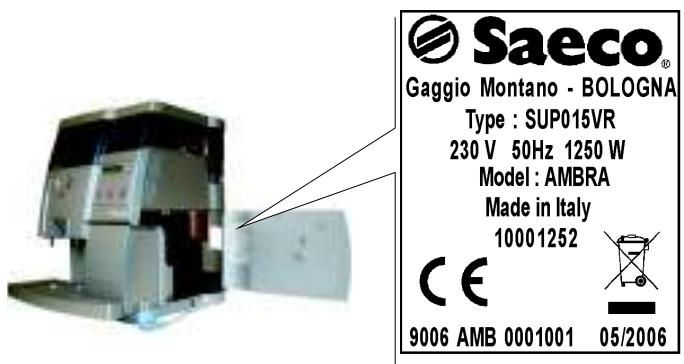
The machine is identified by the model and serial numbers outlined on the specific plate (Fig. 2).
The plate also contains the following specifications:
name of Manufacturer CE marking machine model - serial number manufacturing year - technical specifications
Power supply voltage (V) - Power supply frequency (Hz) Power consumption (W)

Important
When contacting APPROVED ASSISTANCE CENTERS always refer to the plate and the specific data it contains.
2.5 Technical specifications
Power supply: see data plate. Power rating: see data plate. Dimensions (l x w x h): approx. 380 x 460 x 440 mm. Machine case: galvanized steel and thermoplastic material (ABS). Weight: approx. 17.5 kg. Cable length: approx. 1.2 m. Operating system: 1000W immersion boiler. Electromagnetic vibration pump. Temperature control: electronic. Coffee grinder adjusting device: fine-grinding. Coffee grounds ejection: automatic. Coffee powder dosing: adjustment screw. Quantity setting: approx. 0 - 250 ml. Water tank: capacity approx. 6.5 l.
-Coffee bean hopper ca. 720 gr. -Drip tray ca. 1
Heating time ca. 3 minutes Preparation time -espresso ca. 20 seconds per cup
-coffee ca. 35 seconds per cup
- hot water ca. 60 seconds per cup
Thermal cut-out . built-in
Insulation . . . . . . . . . . . . . . . . . . . . . . . . . . . . . . . . . . . . . . . . . . . . . . . . . . . . . . . .
Approval . see data plate
Conformity with existing product class regulations .... (see Declaration of Conformity in the packaging)
3 - HANDLING AND STORAGE
Handling
During handling and transport, the machine must be kept in the upright position according to the instructions on the packaging.
Lift and position with care.
Do not shake the machine.
Storage
The machine must be stored according to the following temperatures:
-- minimum temperature: 4°C maximum temperature: 40° C maximum humidity: 95%
The machine packaging consists of cardboard and expanded polystyrene.

Warning
Given the overall packaging weight, do not pile up more than three machines.
The machine must be stored in its original packaging away from humidity and dust.
4 - SAFETY
In compliance with the Low Tension Directive 2006/95/EC (which replaces the directive 73/23/EEC and following amendments) and CE Marking Directive 93/68/EEC, SAECO Vending has drawn up a technical file of the AMBRA vending machine held at its plants. The following regulations were taken into account during the design phase:
- EN 55014
- EN 61000-3-3
- EN 61000-4-3
- EN 61000-4-5
- EN 60335-2-75
- EN 6100-3-2
- EN 61000-4-2
- EN 61000-4-4
- EN 61000-4-11
- EN 60335-1
4.1 General safety norms

Danger
It is extremely dangerous to put electrical parts in contact with water! Do not direct the hot water jet toward body parts; handle the hot water pipe with care: danger of burns!
Use the machine for its intended use only.
Do not apply technical modifications to the machine: it can be extremely dangerous!
Warning
The machine must be used only by adults and by those familiar with it.
Do not allow children to play with the machine. Children are not aware of the danger of electrical devices.
Power supply
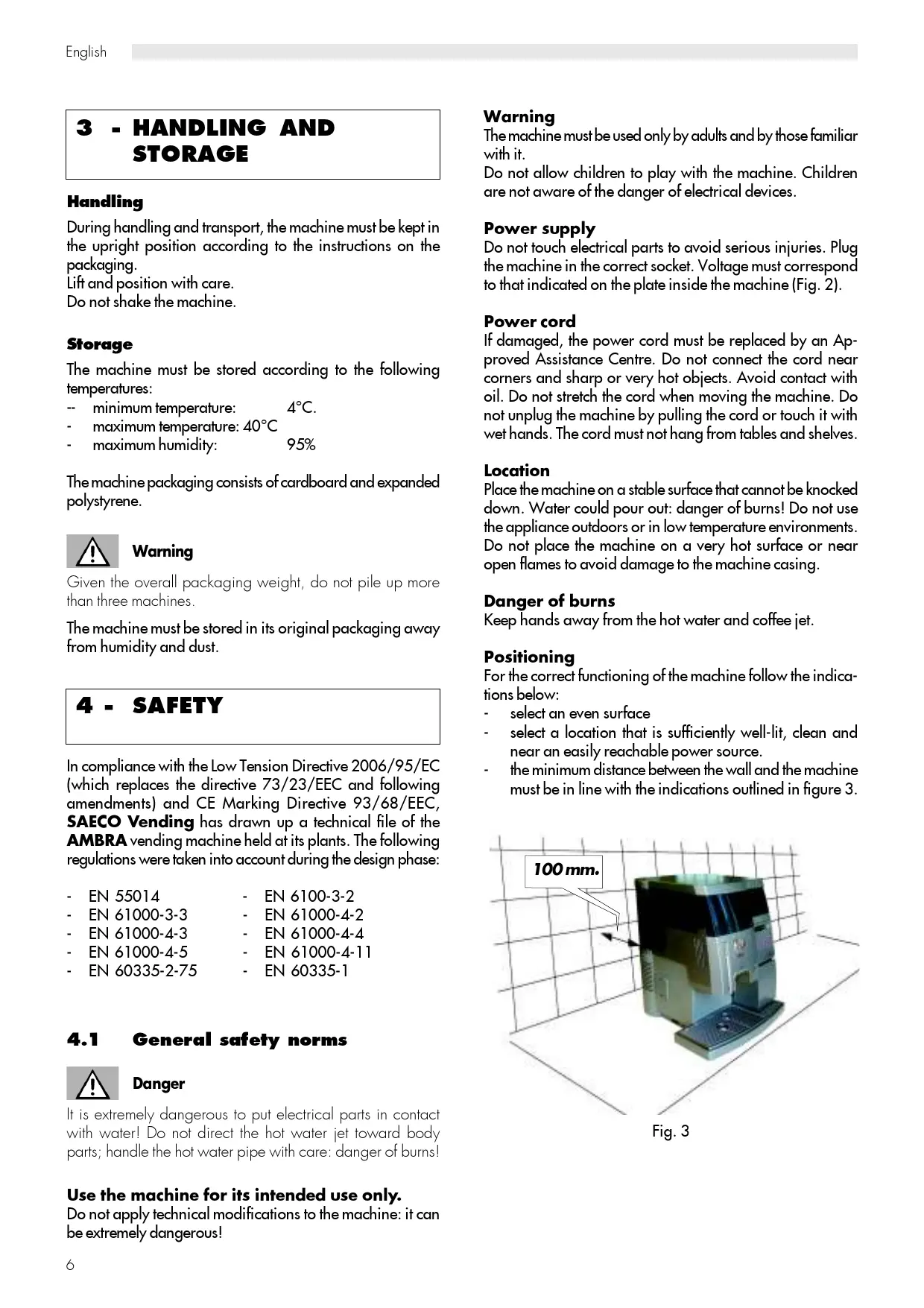
Do not touch electrical parts to avoid serious injuries. Plug the machine in the correct socket. Voltage must correspond to that indicated on the plate inside the machine (Fig. 2).
Power cord
If damaged, the power cord must be replaced by an Approved Assistance Centre. Do not connect the cord near corners and sharp or very hot objects. Avoid contact with oil. Do not stretch the cord when moving the machine. Do not unplug the machine by pulling the cord or touch it with wet hands. The cord must not hang from tables and shelves.
Location
Place the machine on a stable surface that cannot be knocked down. Water could pour out: danger of burns! Do not use the appliance outdoors or in low temperature environments. Do not place the machine on a very hot surface or near open flames to avoid damage to the machine casing.
Danger of burns
Keep hands away from the hot water and coffee jet.
Positioning
For the correct functioning of the machine follow the indications below:
- select an even surface
- select a location that is sufficiently well-lit, clean and near an easily reachable power source. the minimum distance between the wall and the machine must be in line with the indications outlined in figure 3.
Fig. 3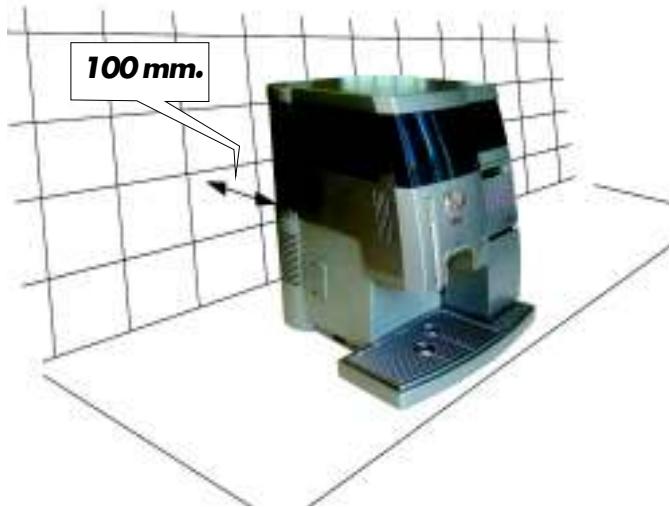
Cleaning
Before cleaning the machine, turn the main switch off and disconnect the power supply. Wait until the machine is cold. Do not soak the machine in water! Do not disassemble the machine or perform any operation on the internal components of the machine.
Repairing and maintenance
In case of failure or faults possibly after a fall, immediately unplug the machine. Do not turn the faulty machine on. The machine can be repaired only by Approved Assistance Centres. The Manufacturer declines responsibility for damage and injuries caused by incorrect repairing of the machine. In case of failure and/or malfunctioning contact exclusively qualified ASSISTANCE SERVICE repairmen.
In case of fire use Carbon Dioxide extinguishers (CO2). Do not use water or dry-powder extinguishers.
4.2 Operators requirements
To guarantee the safety and good functioning of the machine, two operators with different skills are required:

Maintenance technician
A specialized technician in charge of machine installation, set-up, maintenance, and technical assistance.
lation, set-up, maintenance and technical assistance.

An operator in charge of turning the machine on/off, supplying products, removing coins, and performing internal and external cleaning of the machine.
An operator in charge of turning the machine on/off, supplying products, removing coins, and performing internal and external cleaning of the machine.
If the machine is malfunctioning, the supply operator must request the intervention of the maintenance technician.
The person who uses the machine. Users must NOT perform any of the tasks of the supply operator or the maintenance technician.
If the machine is malfunctioning, users should request the intervention of the supply operator or the maintenance technician.
If the machine is malfunctioning, users should request the intervention of the supply operator or the maintenance technician.
All the components that can be potentially dangerous are located inside the machine.
All the components that can be potentially dangerous are located inside the machine.
Two microswitches (ref. 1 - Fig. 4) placed side by side automatically cut the power supply if the side door is opened.
Fig. 4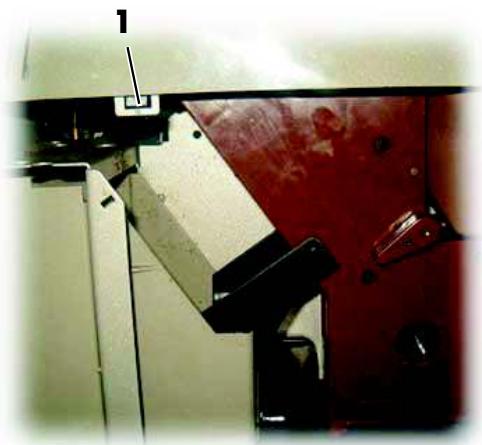
4.4 Safety microswitch efficiency test
When the machine is on, open the side door and check that the display (ref. 8 - Fig. 1) and LEDs on the control panel keypad (ref. 8 - Fig. 1) turn off.
When they turn off, it indicates that the vending machine is not in operation and that the microswitches are working.
5 - CONTROLS DESCRIPTION

Important
The dispensing keys of the machine are programmed with pre-set values.
5.1 Main controls
Main switch (Fig. 5)
Located in the rear side of the machine, centre-left.
When in the "I" position, the machine is on (electrical functions on).
When in the "O" position, the machine is off (electrical functions off).
Fig. 5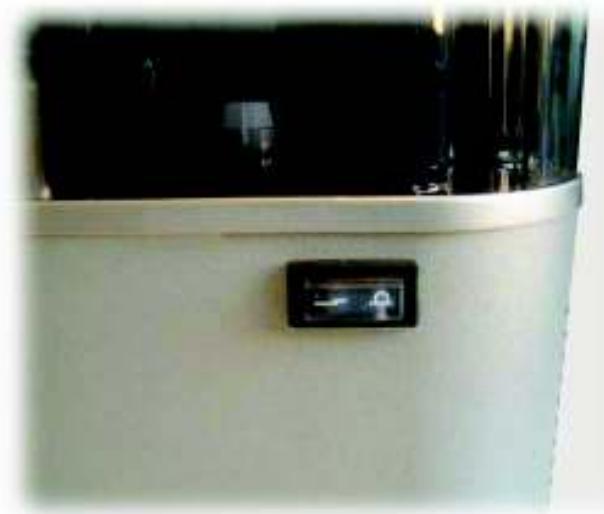
Control panel (Fig. 6)
It consists of 4 keys with different functions according to the machine mode (standard running or setting mode).
Fig. 6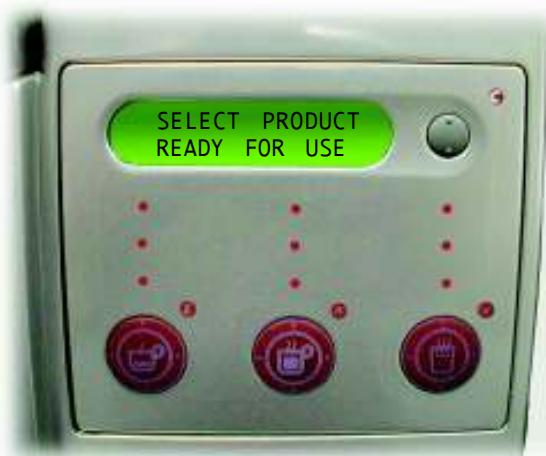
Dispensing mode
In this normal running mode, the following operations can be performed by pressing the keys as indicated in figure 6:
Keys,
Dispensing programmed beverages
=pressocoffe
lightcoffe
hot water
Setting mode
In this service mode, the following operations can be performed by pressing the keys as indicated in figure 6:
E ENT key - "Espresso coffee"
Confirm modified parameters.
Allows you to go to the lower programming level
C ESC key
Return to higher settings level without saving new parameters.
UP key - "Coffee"
Scroll Menu and increase the displayed value for resetting.
DOWN key - "Hot water"
Scroll Menu and decrease the displayed value for resetting.
Dispensing LEDs
Dispensing LEDs are green LEDs located inside the three selection keys. During beverage dispensing, only the LED corresponding to the selected beverage remains on. After beverage dispensing, all three LEDs turn back on.
Display
It consists of 2 15-character lines and it displays messages about operations under way or programmed and about the machine status.
6 - INSTALLATION

Warning
The presence of nearby magnetic fields or electric devices generating interference may cause malfunctioning in the electronic control of the machine.

Important
Do not install the machine outdoors and in environments where water or steam jets are used.

Important
When the temperature is approaching 0°C internal components containing water are subject to freezing.
Do not use the machine in such conditions.
To guarantee the correct functioning and durability of the appliance, follow the indications below:
- room temperature: 10°C ÷ 40°C
- maximum humidity: 90%. Make sure that the machine has not been tampered with during transport by verifying the package sealing;
- verify the machine conditions and model inside the packaging;
- verify the content of the accessories envelope enclosed to the machine (see "6.1 List of supplied accessories"); remove the machine from the original packaging that should be preserved for future use (e.g. change of location);
- remove all the remaining packaging.

Important
Disposal of packaging should be carried out according to existing laws and regulations and in line with environmental considerations.
6.1 List of supplied accessories
N.1 brew group key (ref. 24 - Fig. 1). N.1 Instruction and Maintenance Manual
6.2 Positioning
For correct functioning of the appliance follow the indications below:
- select an even surface
- select a location that is sufficiently well-lit, clean and near an easily reachable power source; the distance from the walls must be as shown in Fig.3;
- The maximum angle of inclination of the supporting surface must not exceed 2°.
6.3 Electric connection


Warning
This operation must be performed by the maintenance technician.
The machine requires single-phase voltage according to the value contained in the identification plate (2.4 Machine identification).

Warning
The socket should be easily accessible to the supply operator, so that the machine can be easily unplugged when necessary.
Before connecting the machine check the following points:
- The line voltage of the socket must correspond to that indicated on the machine plate.
- The electrical system must be in line with existing laws and regulations and must have the load capacity indicated on the plate.
When in doubt, request professional assistance to determine the characteristics of the electrical system.

Warning
The use of extensions and adapters is forbidden.
7 - SETTINGS

This chapter illustrates how to set up or modify the machine programmable parameters.
The chapter should therefore be read carefully, to fully understand the correct sequence of operations to be performed. To access the programming menu, turn off the machine, hold down the V (Hot Water) and C (Esc) keys, pressing the main power switch to turn the machine back on.
The main settings options are the following:
- CREDIT MANAGEMENT AUDIT SINCE RESET AUDIT SINCE INIT
- SETTINGS CODE
- TIMER
- PAYMENT SYSTEM
To exit the settings menu press C (Esc). The machine is in standard running mode.
Menu selection
Select menus using the various AV keys and select options by pressing the E key. The parameters of each menu can be modified by pressing AV keys. To save the desired setting press the E key (e.g., "YES" for "SET DOSE").
If a value has wrongly been modified, the menu can be exited by pressing the C (Esc) key without saving the new value.
Changing numeric values
When you wish to modify a value, press the "E" key. Modify the 1st number with the keys AV and save by pressing the "E" key again. The cursor will move to the next number. Use this method for all the numbers present, in the end the whole value will be saved and you will exit from the modification.
Structure of programming functions
CODE? ...
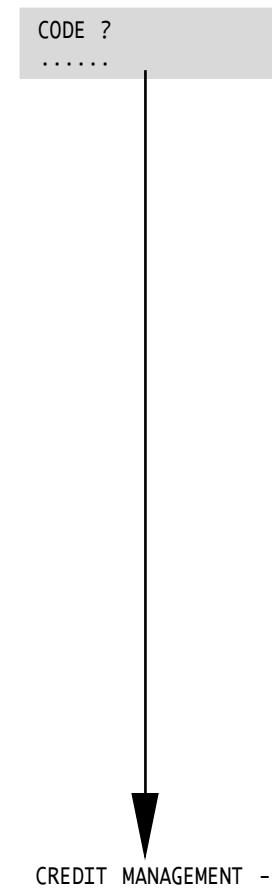
When entering the programming menu, the set code will be requested. This will allow you to continue with the programming. To set it, see "CODE" in the Vending menu. Note the code when it is changed.

Warning
After 5 attempts to enter an incorrect code, the vending machine requires the PUC (Personal User Code) to access the programming menu.
To receive the PUC code, contact the CUSTOMER SERVICE CENTRE.
If the PUC is correctly entered, you will be requested to set a new code.
The keys have the following values while setting the code and the PUC:
Key 1 E (Ent) Espresso Coffee Key 2 Coffee 2 Key 3 Hot Water 3 Key 4 C (Esc)
For example, if the code 312241 must be set, the sequence for entering it is as follows:
1:Key 3 Hot Water 3 2:Key 1 E (Ent) Espresso Coffee 3:Key 2 Coffee 2 4:Key 2 Coffee 2
5:Key 4 C (Esc) 4 6:Key 1 E (Ent) Espresso Coffee

Warning
Note the new password because, if it is lost, it will not be possible to access the programming menu.
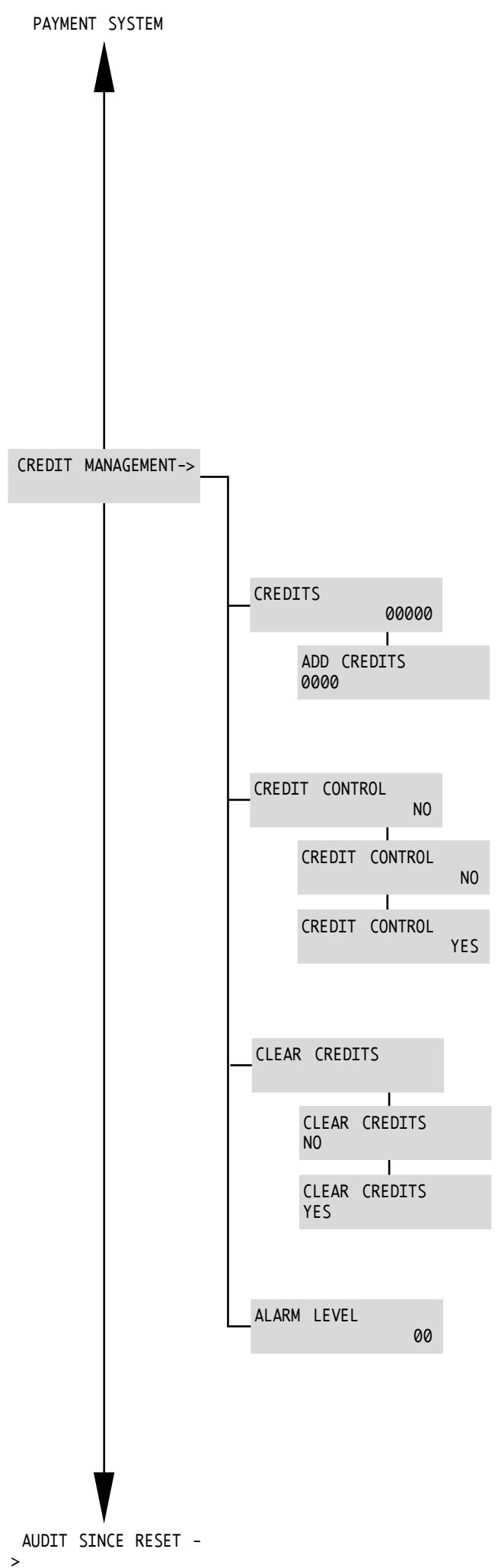
Ambra is equipped with a menu for managing coffee brewing.
This function allows you to lock coffee brewing but not hot water dispensing after a determined number of cycles and can be used, for example, to program the machine's maintenance operations.
Menu for displaying the beverages that may still be dispensed before the lock (max.65535).
Menu for adding credits: allowed values (0÷9999) up to a total of 65535.
Menu that enables/disables the dispensing control through credit management.
Menu that sets the current credits to zero. It is used if an error is committed in introducing the credits.
Menu that enables/disables displaying the "Credit Warning" and "No Credits" alarms.
The alarm is displayed when the number of coffees that can still be brewed is reached (entered value).
If the 0 value is entered, the function is deactivated.
Values: default = 20; range 0÷99.
When the credits are finished, the brewing of coffee stops and the following message appears on the display: "NO CREDITS".
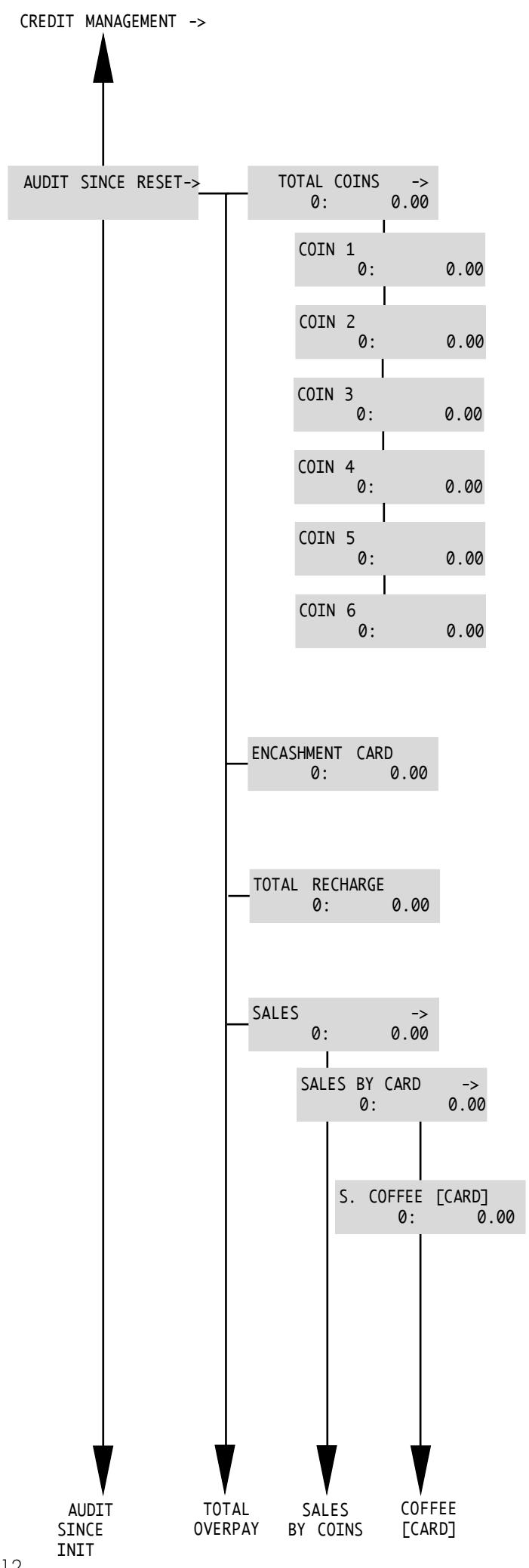
AUDIT RESET Functions
Ambra is equipped with a system that records sales and collections from the last reset that has been performed by the manager.
General menu for the total display of:
Number of coins inserted: Value of coins inserted:
Partial menu relating to coin type 1 to display:
Number of coins inserted: Value of coins inserted:
Partial menu relating to coin type 2 to display:
Number of coins inserted: Value of coins inserted:
Partial menu relating to coin type 3 to display:
Number of coins inserted: Value of coins inserted:
Partial menu relating to coin type 4 to display:
Number of coins inserted: Value of coins inserted:
Partial menu relating to coin type 5 to display:
Number of coins inserted: Value of coins inserted:
Partial menu relating to coin type 6 to display:
Number of coins inserted: Value of coins inserted:
General menu to display the beverages that have been dispensed using the key:
Number of beverages dispensed: Value of beverages dispensed:
General menu to display the recharges that have been made using the key:
Number of recharges made: Value of recharges made:
General menu to display the sales made (beverage dispensing):
Number of sales made: Value of sales made:
General menu to display the sales made (beverage dispensing) using the key:
Number of sales made: Value of sales made:
General menu to display the brewing of espresso coffee using the key:
Number of sales made: Value of sales made:
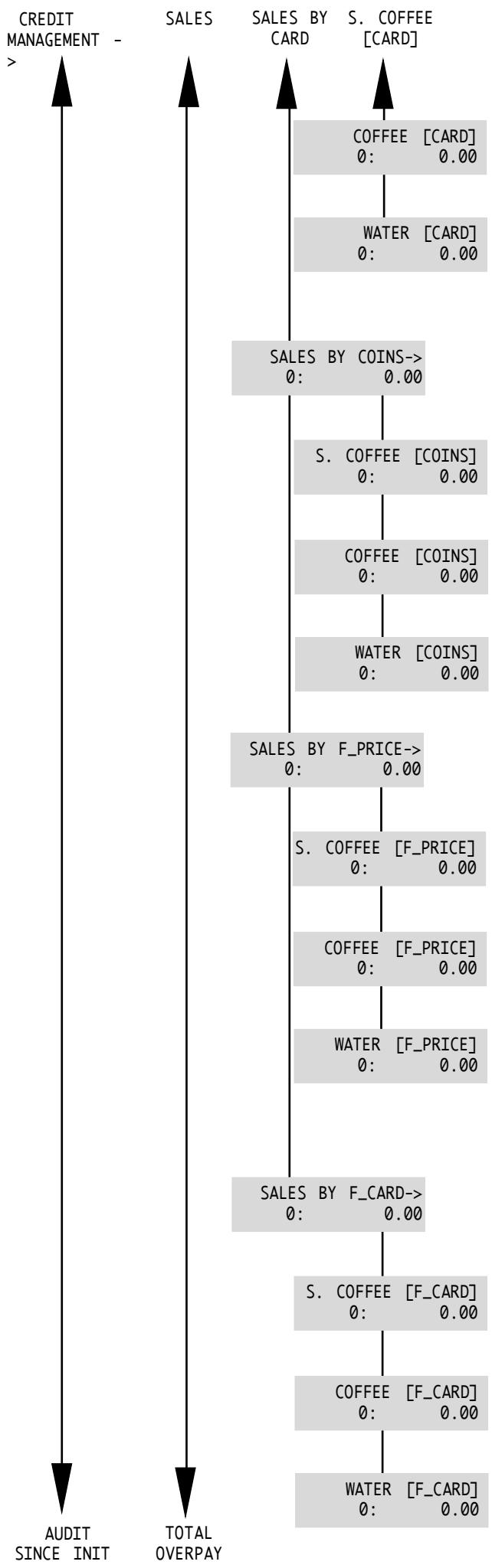
General menu to display the brewing of coffee using the key:
Number of sales made: Value of sales made:
General menu to display the dispensing of hot water using the key:
Number of sales made: Value of sales made:
General menu to display the sales made (beverage dispensing) using coins through the coiner:
Number of sales made: Value of sales made:
Menu to display the brewing of espresso coffee using coins:
Number of sales made: Value of sales made:
General menu to display the brewing of coffee using coins:
Number of sales made: Value of sales made:
General menu to display the dispensing of hot water using coins:
Number of sales made: Value of sales made:
General menu to display the sales made (beverage dispensing) free of charge:
Number of sales made: Value of sales made:
Menu to display the brewing of espresso coffee free of charge:
Number of sales made: Value of sales made:
Menu to display the brewing of coffee free of charge:
Number of sales made: Value of sales made:
Menu to display the dispensing of hot water free of charge:
Number of sales made: Value of sales made:
General menu to display the sales made (beverage dispensing) using FREE VEND cards:
Number of sales made: Value of sales made:
General menu to display the brewing of espresso coffee using FREE VEND cards:
Number of sales made: Value of sales made:
General menu to display the brewing of coffee using FREE VEND cards:
Number of sales made: Value of sales made:
General menu to display the dispensing of hot water using FREE VEND cards:
Number of sales made: Value of sales made:
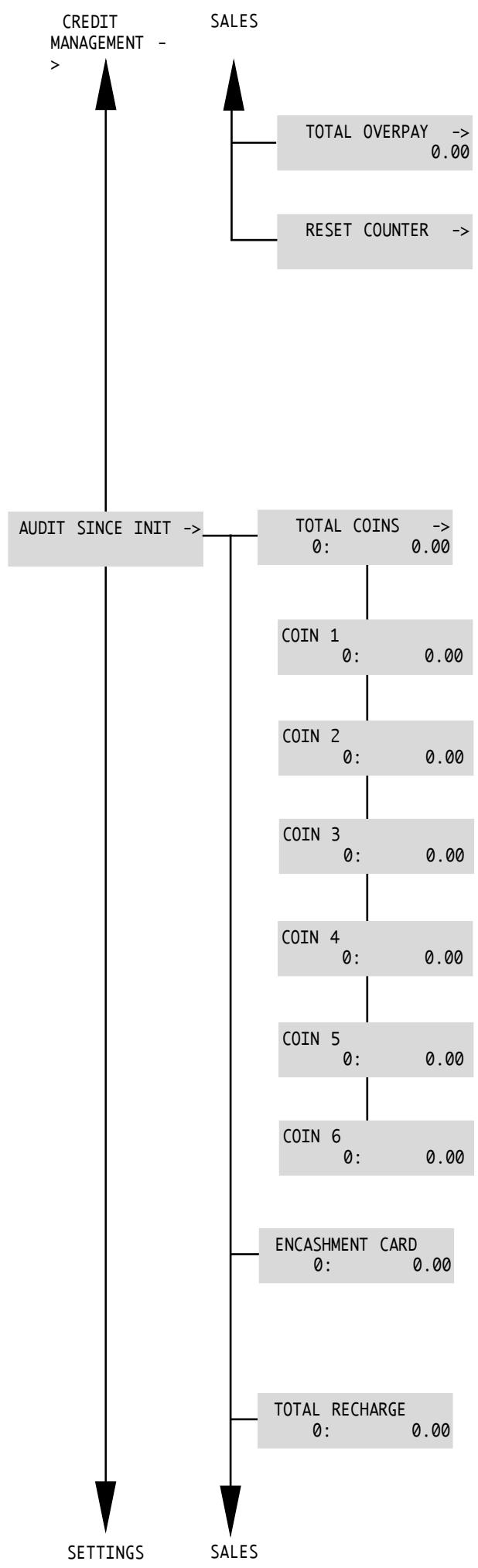
The counter indicates the excess collected "TOTAL OVERPAY" with regard to the value of the dispensed products.
Function that allows the zeroing of all partial counters.
AUDIT INIT Functions
Ambra is equipped with a system that records sales and collections from the first machine start-up.
Warning:
these values may not be zeroed or modified by the manager.
General menu for the total display of:
Number of coins inserted: Value of coins inserted:
Total menu relating to coin type 1 to display:
Number of coins inserted: Value of coins inserted:
Total menu relating to coin type 2 to display:
Number of coins inserted: Value of coins inserted:
Total menu relating to coin type 3 to display:
Number of coins inserted: Value of coins inserted:
Total menu relating to coin type 4 to display:
Number of coins inserted: Value of coins inserted:
Total menu relating to coin type 5 to display:
Number of coins inserted: Value of coins inserted:
Total menu relating to coin type 6 to display:
Number of coins inserted: Value of coins inserted:
General menu to display the beverages that have been dispensed using the key:
Number of beverages dispensed: Value of beverages dispensed:
General menu to display the recharges that have been made using the key:
Number of recharges made: Value of recharges made:
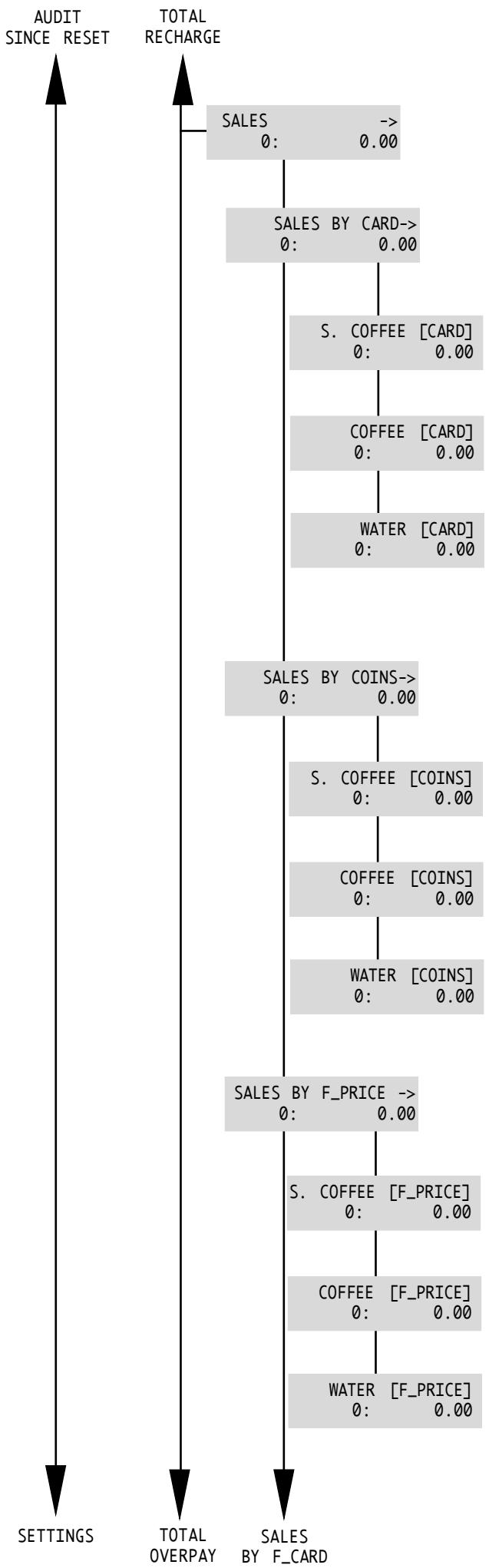
General menu to display the sales made (beverage dispensing):
Number of sales made: Value of sales made:
General menu to display the sales made (beverage dispensing) using the key:
Number of sales made: Value of sales made:
General menu to display the brewing of espresso coffee using the key:
Number of sales made: Value of sales made:
General menu to display the brewing of coffee using the key:
Number of sales made: Value of sales made:
General menu to display the dispensing of hot water using the key:
Number of sales made: Value of sales made:
General menu to display the sales made (beverage dispensing) using coins through the coiner:
Number of sales made: Value of sales made:
Menu to display the brewing of espresso coffee using coins:
Number of sales made: Value of sales made:
General menu to display the brewing of coffee using coins:
Number of sales made: Value of sales made:
General menu to display the dispensing of hot water using coins:
Number of sales made: Value of sales made:
General menu to display the sales made (beverage dispensing) free of charge:
Number of sales made: Value of sales made:
Menu to display the brewing of espresso coffee free of charge:
Number of sales made: Value of sales made:
Menu to display the brewing of coffee free of charge:
Number of sales made: Value of sales made:
Menu to display the dispensing of hot water free of charge:
Number of sales made: Value of sales made:
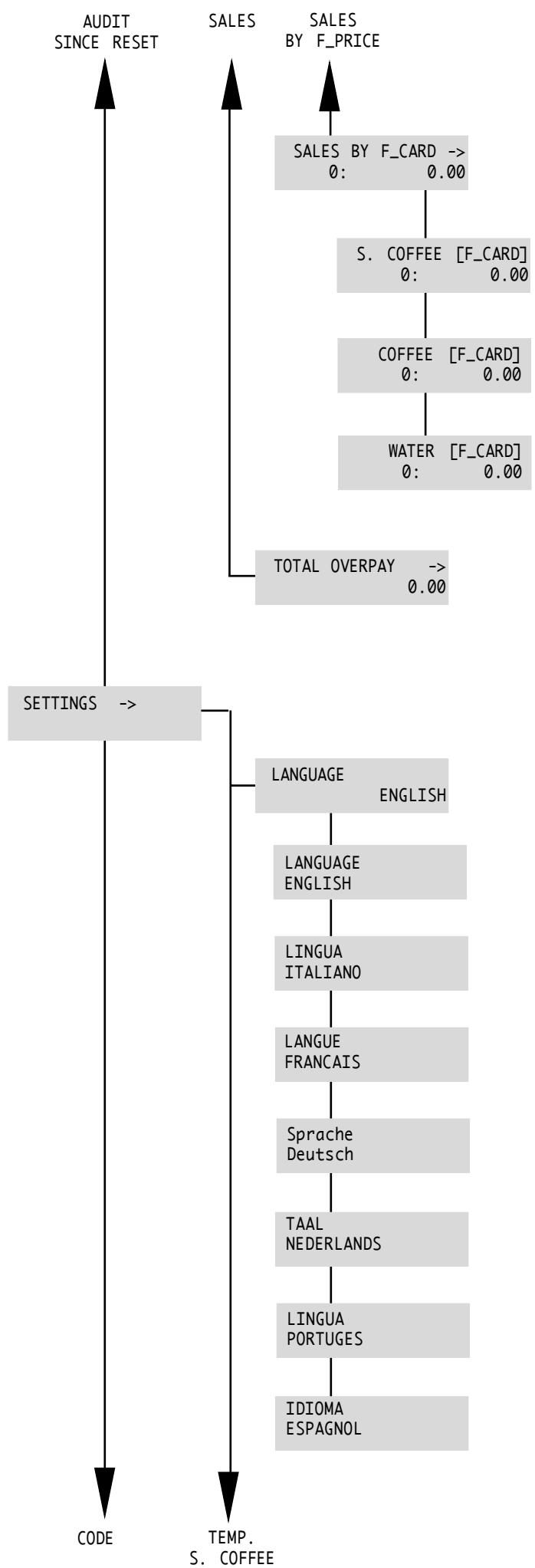
General menu to display the sales made (beverage dispensing) using FREE VEND cards:
Number of sales made: Value of sales made:
General menu to display the brewing of espresso coffee using FREE VEND cards:
Number of sales made: Value of sales made:
General menu to display the brewing of coffee using FREE VEND cards:
Number of sales made: Value of sales made:
General menu to display the dispensing of hot water using FREE VEND cards:
Number of sales made: Value of sales made:
The counter indicates the excess collected "VALUE" of the dispensed products.
Settings
This menu enables setting the machine according to the requirements requested.
Language Selection
With this function the display language may be changed. You can choose from Italian, German, Portuguese, Spanish, English, French and Dutch.
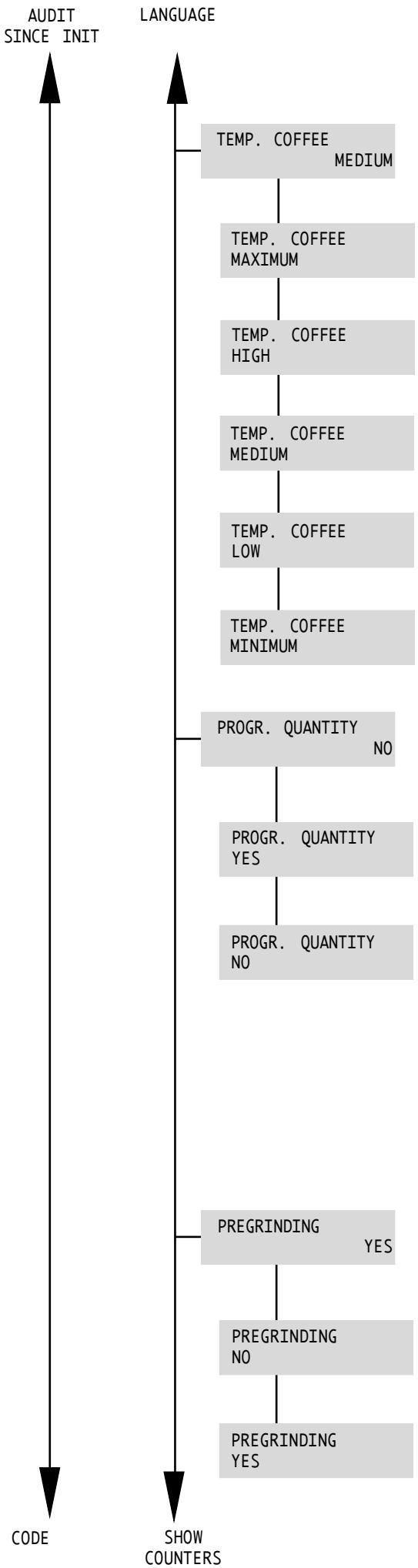
Coffee temperature setting
Ambra allows you to precisely regulate the temperature of the coffee.
This setting allows satisfying various user requirements. The standard definition is TEMP. COFFEE MEDIUM.
Dose setting
This function allows you to dose with precision the quantity of dispensed product using the three selection keys (Espresso coffee, Coffee and Hot water).
To program the cup filling level, the corresponding selection key must be pressed in order to obtain the quantity of beverage desired (maximum 250 ml approximately). When the key is released, the dose will be saved. During this operation the following message will appear on the display:
"ESPRESSO"
"PROGR. QUANTITY"
or:
"COFFEE"
"PROGR. QUANTITY"
or:
"HOT WATER"
"PROGR. QUANTITY"
Pregrinding Function
By activating this function, a grinding is performed every time the dosing unit is emptied. Therefore, a portion of ground coffee is always ready. This allows saving time in case of frequent use of the vending machine. This function is however not recommended in other cases for the advantages that derive from using coffee that has been ground outright and that is therefore fresh.
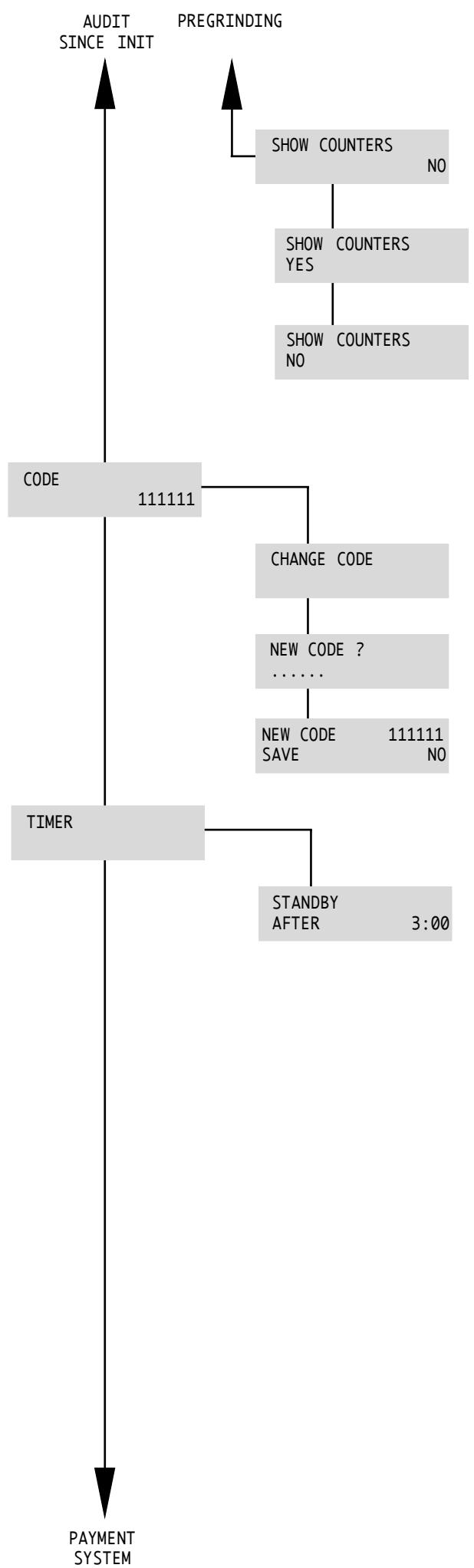
Counter display function
This function allows you to enable/disable the display of the total counter by pressing the C key (Esc) on the control panel.
This function allows you to display the total dispensing without having to enter into the programming menu.
Change Access Code
Allows the setting of a code ("111111" by default) to avoid that unauthorized people access programming menu. By confirming it, the menu item is accessed:
The code will be requested every time the programming menu is accessed.
Timer
This function, which is preset by the constructor, automatically puts the vending machine in "Standby" mode after 3 hours from the last dispensing.
The switch-off time may be regulated at intervals of 15 minutes, up to a minimum of 0 minutes.
When the value is set to 0:00 the function is deactivated.
Using the keys ν move the asterisk to the TIMER menu item.
To activate the item use the E (Ent) key.
The display shows:
"STANDBY
"AFTER 3:00
The desired times can be set using the keys
Use the E (Ent) key to save.
If the time set is already run out, the following message will appear on the display:
"STANDBY
and the vending machine will turn off. If necessary, the vending machine can be turned on again using the C (Esc) key.
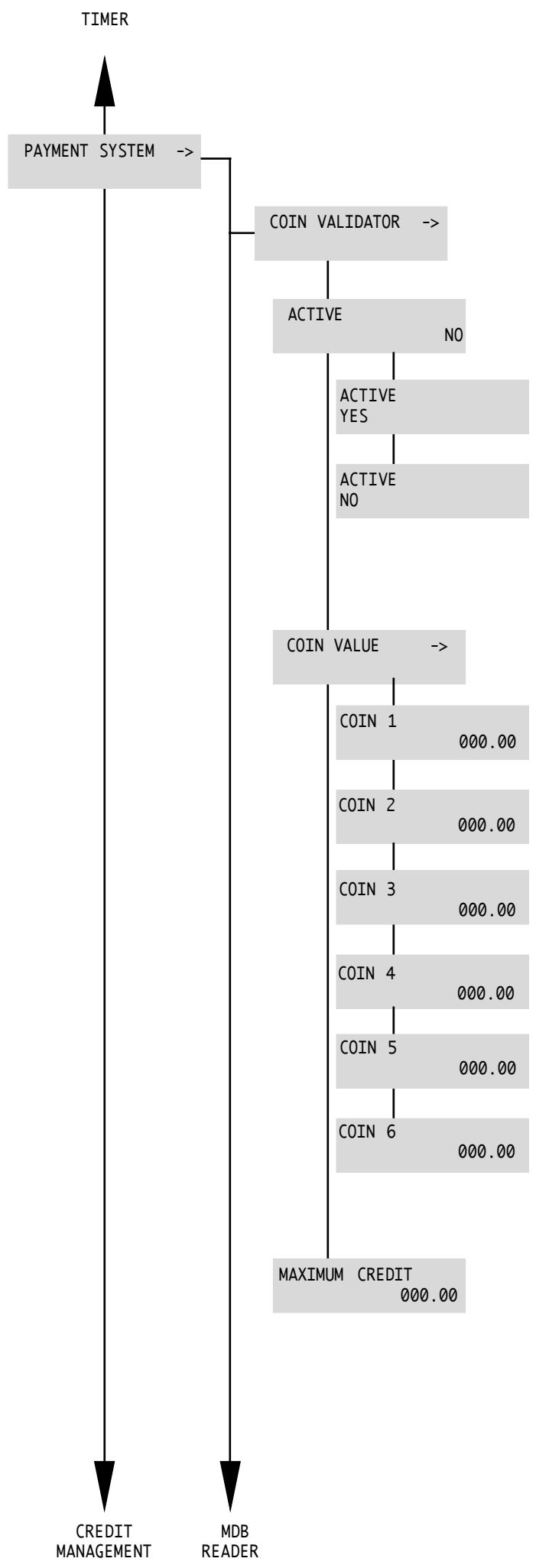
Payment Systems
The machine has software that manages the payment systems commonly available on the market. This software is active only if the Coiner Box is correctly installed.
This menu enables or disables the coin acceptance system.
If it is deactivated, it remains permanently locked and will not accept the inserted coins.
Menu for setting the values of the coins that may be used.
This menu sets the coin value of channel 1.
This menu sets the coin value of channel 2.
This menu sets the coin value of channel 3.
This menu sets the coin value of channel 4.
This menu sets the coin value of channel 5.
This menu sets the coin value of channel 6.
This menu sets the maximum allowed amount using the coiner box.
TIMER COIN VALIDATOR
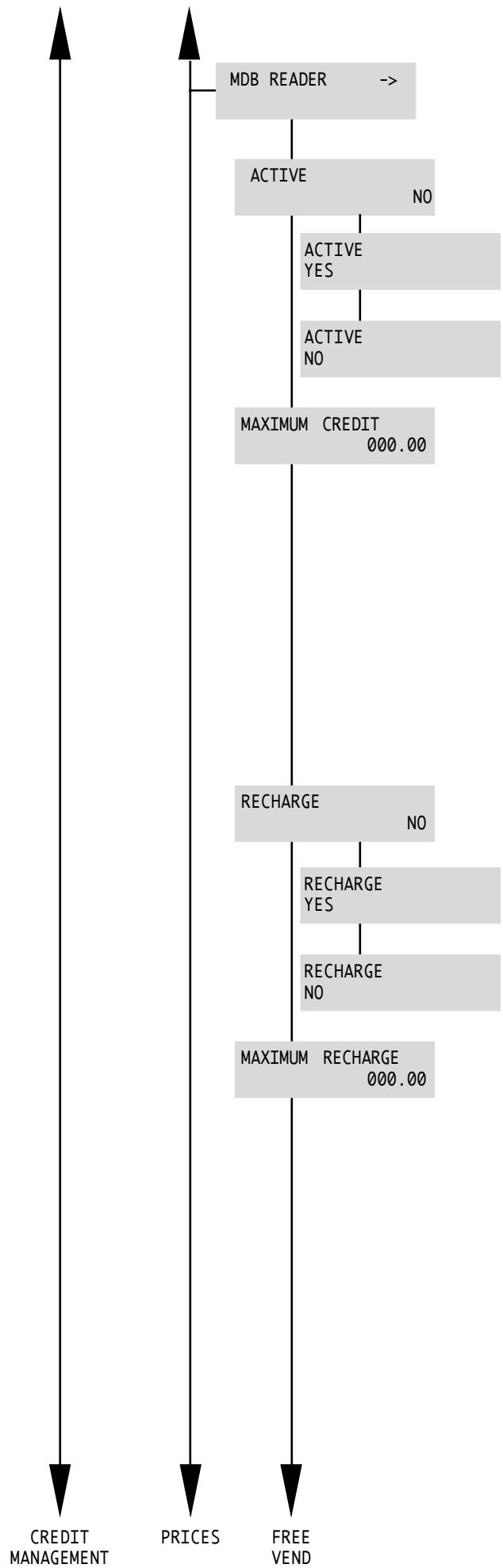
This menu sets all the operation parameters of the MDB reader.
This menu enables or disables the card acceptance system. If it is deactivated, it remains permanently locked and will not accept product payments by card.
This menu sets the maximum credit allowed by the card. If a card that contains a greater amount is used, it will not be accepted and the following message appears on the display:
"MDB READER" "CARD ERROR"
Then "Maximum Credit" = "Maximum Recharge". If at the time of setting, the chosen "Maximum Credit" value is less than the "Maximum Recharge" value, the "Maximum Recharge" will be equal to the "Maximum Credit".
This menu activates or deactivates any recharge operation.
If the function is deactivated, the card may not be recharged.
This menu sets the maximum rechargeable value of the card. If the card's credit is less than the "Maximum Recharge", the card may be recharged. Otherwise, recharging will be disabled.
E.g.: Card Credit = 40 EUR
Maximum Recharge = 50 EUR
Credit inserted in the coiner = 20 EUR
Amount reported on the card = 10 EUR
The remaining 10 EUR shall remain in the machine as credit in the coiner and at the end of the overpay time it will be lost.
If at the time of setting, the chosen "Maximum Recharge" value is greater than the "Maximum Credit" value, the setting will not be accepted.
The card reader has a recharge limit as well. If this limit is less than the one defined for "Maximum Recharge", the latter shall be equal to the one defined in the card reader.
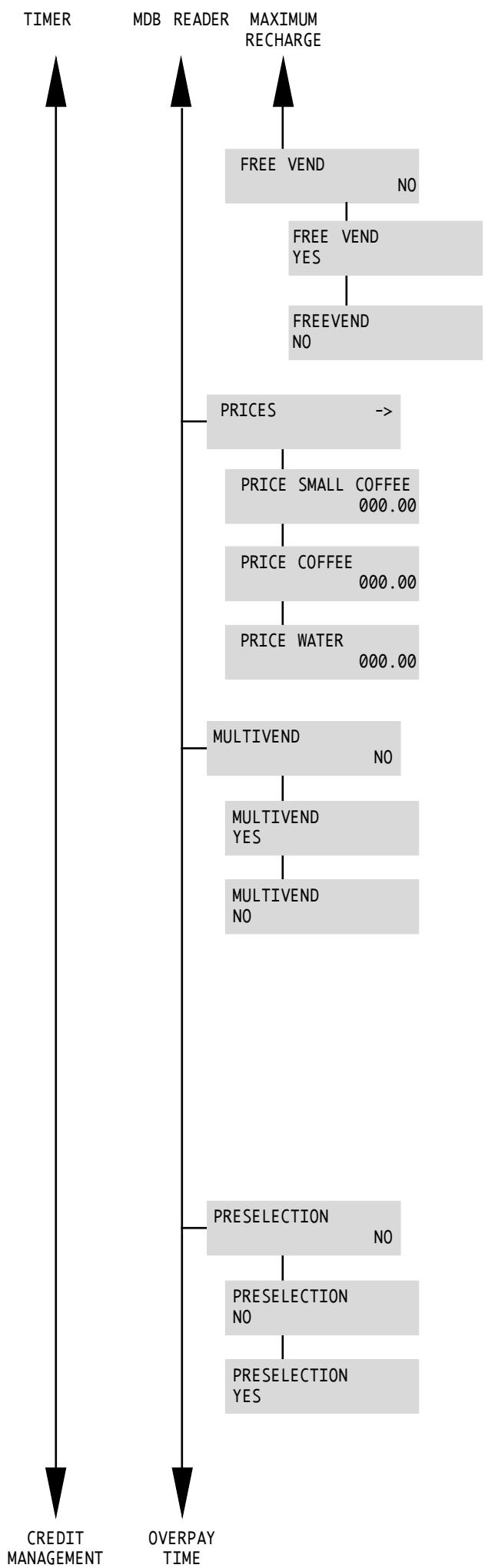
This menu activates or deactivates the possibility of dispensing with free cards (FREE CARD).
If the function is active, it will be possible to acquire products with free cards (used for services reasons).
This menu sets the vending prices of the single products.
This menu activates or deactivates multivend.
Multivend activated: if after a sale there is still credit available, it will remain available for later sales until the overpay time runs out, after which the remaining credit will be cancelled and saved in the control data as "Overpay Value".
If the overpay time is "0", the credit remains available.
Multivend deactivated: if at the end of the cycle there is still credit, it is cancelled and saved in the data as "Overpay Value".
This menu activates or deactivates the possibility of displaying the cost of the product to be selected.
Preselection activated: when one of the product keys is pressed, the necessary credit to dispense the same product will be shown for 8 seconds.
If within that time the necessary credit (coins or card) is made available, the product will be automatically dispensed.
Preselection deactivated: when pressing the keys, the product will be dispensed only if sufficient credit is present.
CREDIT MANAGEMENT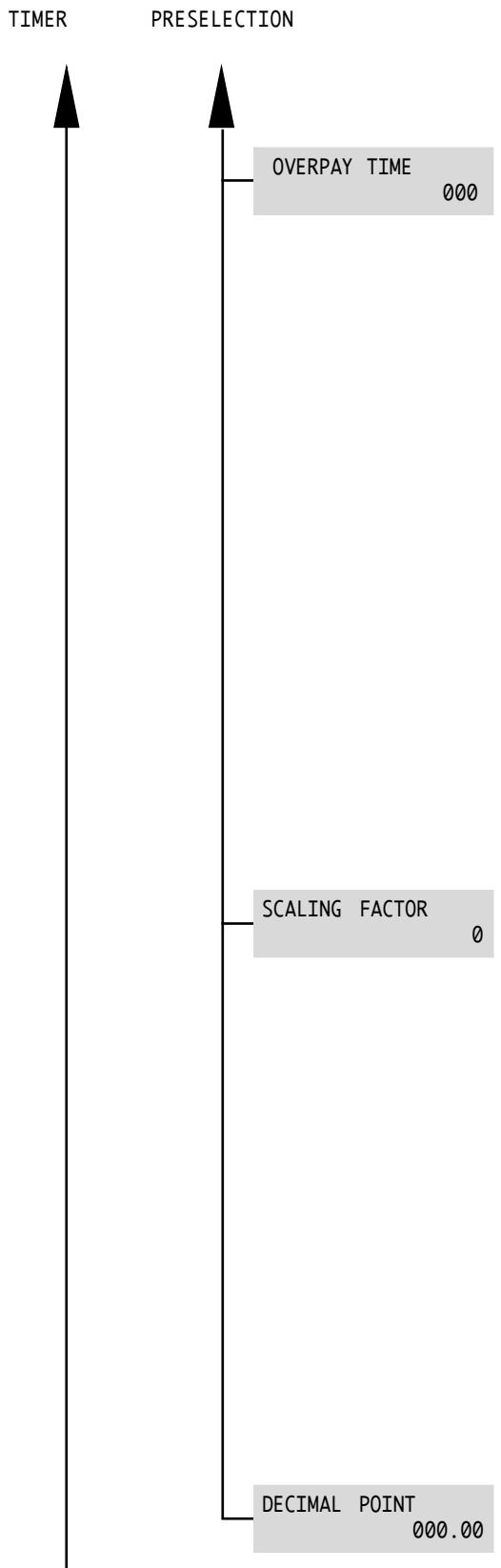
This menu sets the overpay time: time limit beyond which the amount present in the machine is cancelled and saved in the control data as "Overpay Value".
Value Range: 0 - 255 seconds (0 = Deactivated)
It may be used only when the credit is inserted by means of the coiner and behaves in the following way:
Multivend deactivated: the credit inserted and not used within the time limit is cancelled and is saved in the control data as "Overpay Value".
Multivend activated: the remaining credit is available for later sales until the overpay time runs out, after which the remaining credit will be cancelled and saved in the control data as "Overpay Value".
Every time that a coin is inserted in the coiner or a product is dispensed, the overpay time restarts the count.
This menu sets the minimum unit that the machine manages notwithstanding the decimals (range: 1, 10, 100, standard 1). E.g.: In Euro use the scale factor 1.
This menu sets the position of the decimal point: if the setting is different from the decimal point setting of the card reader, the coffee machine locks and the following error message appears on the display:
“MDB READER” “DECIMAL ERROR”
8 - USE OF THE VENDING MACHINE

Important
Read this manual in full before using the machine so as to become sufficiently familiar with its functioning.
Before using the machine after a period of inactivity it is advisable to read again paragraph 8.3 "First switching on".
8.1 Machine status
Depending on the power supply, the status of the machine can be as follows:
Off and electrically insulated
- Main switch (Fig. 5) in "0" position. Only the settings memory is on.
On
- Main switch in "I" position.
- All functions are on and the display (ref. 8 - Fig. 1) is lit.
Energy saving
It indicates the energy saving of the machine when the TIMER function is on (see SETTINGS) and automatically turns the machine on and off.
- Main switch in "I" position;
- The display shows the message: "ENERGY SAVING".
- Settings memory is on.
- The machine is not dispensing beverages.
8.2 Recommendations
Prolonged inactivity
Following a long period of inactivity, the circuit should be fully cleaned for hygienic reasons.
Place a cup under the hot water spout (ref. 7 - Fig. 1) and fill it with water by pressing the hot water key.
Temperature control
Every time the machine is started, the display reads:
"WARMING UP . . . . . .
When the necessary temperature has been reached, the display reads:
"SELECT PRODUCT " "READY FOR USE
Bean hopper empty
When the bean hopper is empty, the coffee grinder stops and the display reads:
“COF. BEANS EMPTY
"READY FOR USE
The dispensing LED inside the coffee selection key turns off. The message "READY" refers only to the availability of hot water.
Fill the coffee bean hopper and eliminate the NO COFFEE message by holding the Espresso key down for 5 seconds.
Water tank empty
When the water tank is empty, the program stops automatically and the display reads:
“FILL WATERTANK”
Fill the tank and restart the cycle.
Dump box full
When the Dump box contains 30 used coffee grounds, the display reads:
"DREGDRAWER FULL
"READY FOR USE
The machine can dispense water only; remove and empty the drawer.
The message "READY" refers to hot water dispensing only.
8.3 First Switching on
Filling the bean hopper

Pour coffee beans in the hopper (Fig. 7).
Fig. 7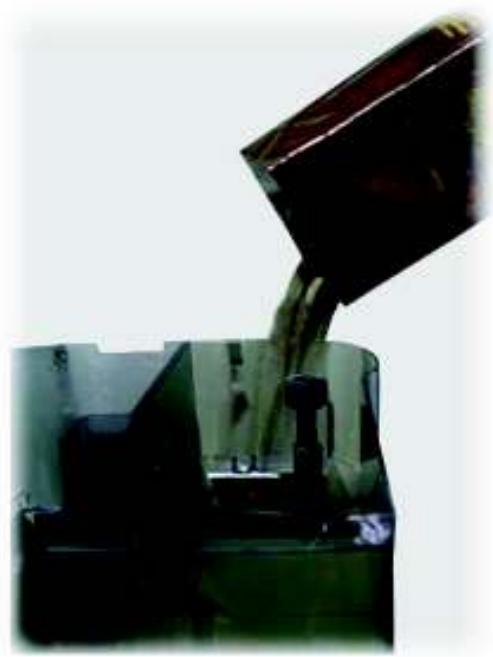
Close the hopper by placing the cover on the top (Fig. 8). Coffee beans should be fresh, non-oily and of medium grinding.
Fig. 8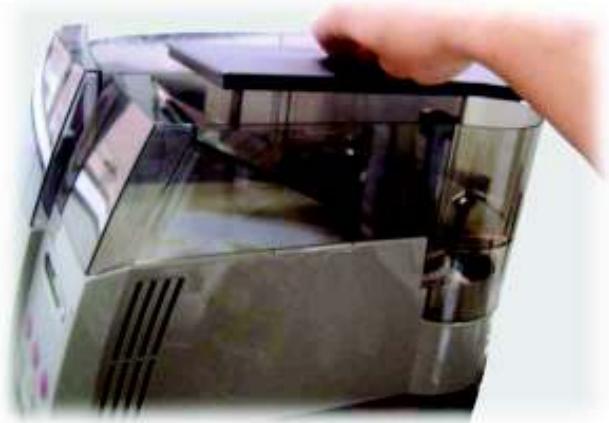
Filling the water tank

Remove the water tank and place it under a water faucet.
Fill the tank (Fig. 9) with tap water.
Put the water tank back in place.
Fig. 9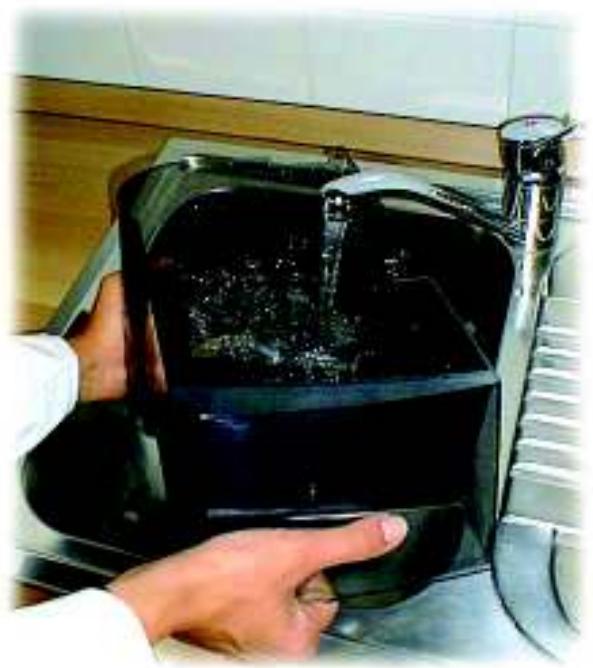
Fixing the cover lock plate

Put the plate on the cover lock and position it carefully as shown in figure 10.
Fig. 10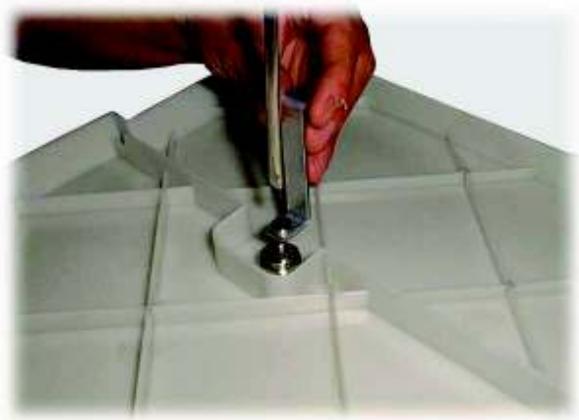
After fixing the plate the cover must be placed on the water and bean hoppers before using the machine (Fig. 11).
Fig. 11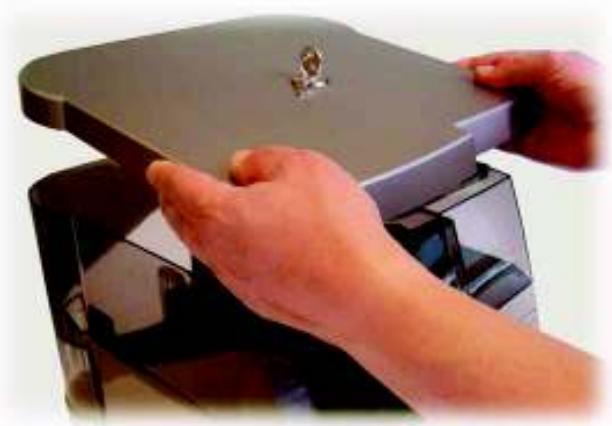
Secure the cover by turning the key in the lock (Fig. 12).
Fig. 12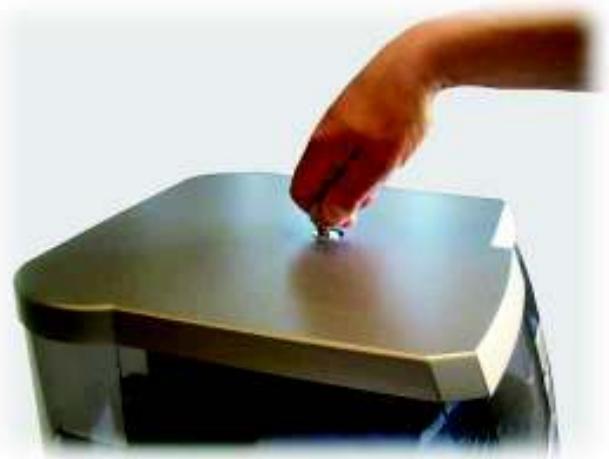
Water circuit filling

When the vending machine is turned on for the first time, the boiler is automatically filled.
This message will appear on the display:
"SELF-DIAGNOSIS"
"BOILER FILLING"
Place a cup or a suitable container under the hot water spout. Turn on the vending machine and wait for the procedure to end.

Important
Prime the circuit before starting the machine for the first time, following a long period of inactivity, if the water tank has been fully emptied or if the pump has malfunctioned.
Grinding adjustment

If the coffee is brewed too fast, as in the case of a too coarse grinding, or if it drips out, in the case of a too fine grinding, the grinding of the coffee grinder must be adjusted. Its recommended initial position is point 5 on the ring nut.
If grinding is too coarse and the coffee is dispensed too rapidly, adjust the grinder to a finer setting (e.g., from 5 to 3). If the coffee drops out, select a coarser setting (e.g., from 5 to 7) (Fig. 13) (Fig. 14).
Fig. 13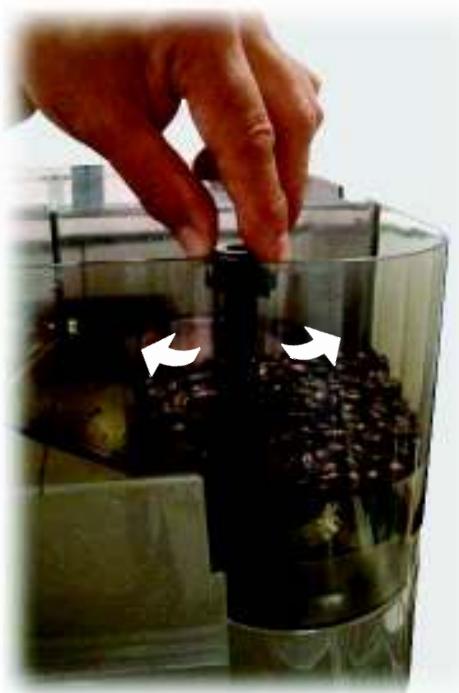
Fig. 14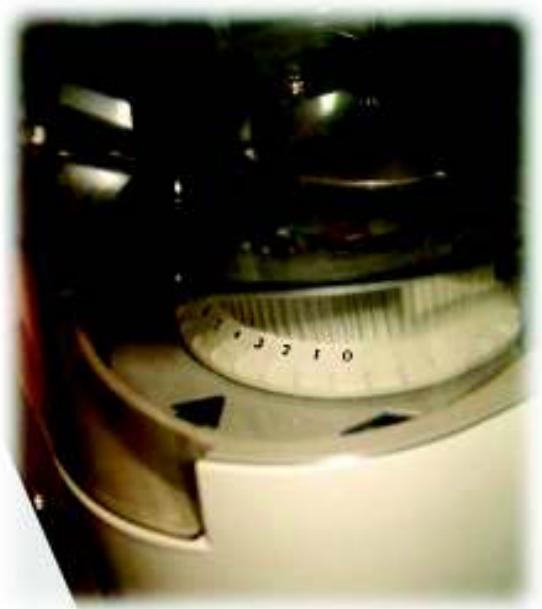
Grinding adjustments must be performed only when the grinder is on. Avoid extreme adjustments in the position below 1: this may cause damage to grinders. Use instead a different coffee blend, since not all blends produce the same results.
To adjust grinding, follow the procedure outlined below:
- Press the coffee key and verify the coffee outflow from the dispenser;
- Open the machine housing's main door, lift the lid of the coffee bean hopper and consequently adjust the grind (see fig. 13).

Warning
The new grinding selection can be appreciated only after the third coffee grinding.
Coffee blends
Coffee must be fresh and an espresso coffee blend must be used.
To obtain a strong and tasty espresso, use a specific espresso machine blend. Keep the coffee in a fresh place in an airtight sealed container.
8.4 Beverage dispensing
Adjusting the coffee dispenser
The coffee dispenser is adjustable according to the cup size. For short cups, position the dispenser as shown in figure 15.
Fig. 15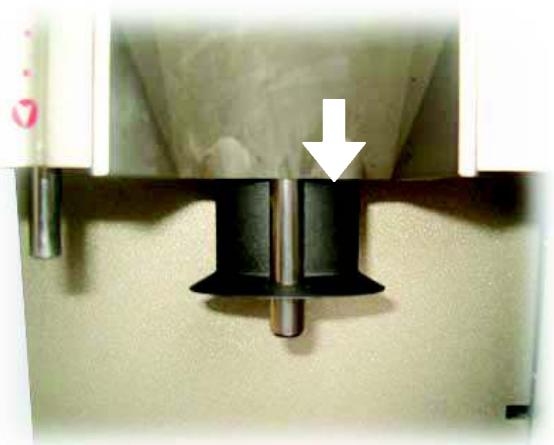
For tall cups, position the dispenser as shown in figure 16.
Fig. 16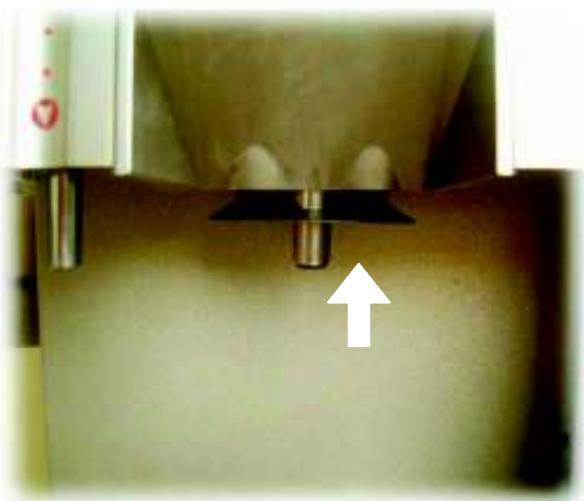
Adjusting the cup filling level
With this machine the quantity of coffee dispensed can be adjusted according to the cup used.
Select the desired quantity by pressing the two selection keys. The display will show the corresponding messages.
To set the cup filling level, press the corresponding selection key until the desired quantity has been reached (max. approx. 250 ml).
When performing this operation, the display reads:
"1 SMALL COFFEE
"PROGR. QUANTITY"
"1 COFFEE
"PROGR. QUANTITY

Important
This operation can be interrupted only after the minimum quantity has been dispensed.
Coffee dispensing
Place the cup on the grill drip tray (ref. 3 - Fig. 1) under the dispenser (ref. 6 - Fig. 1).
Press the corresponding selection key and the machine automatically dispenses the selected coffee.

Warning
Coffee can be programmed only if the corresponding setting is on (see page 17).
Preheating
When brewing the first cup of coffee, the preheating function is activated. The following message will appear on the display:
"PREHEATING"
Preheating consists of a cycle of water flowing through the brew group. It is automatically activated when the machine is turned on and if more than 300 seconds have passed between a coffee brewing cycle and the next one.
Hot water dispensing
Hot water is dispensed thanks to a circuit that guarantees that the water is tastefree and at the right temperature to prepare tea and soups.
Press the HOT WATER key (Fig. 17), the display reads:
"HOT WATER
If the hot water key is pressed (Fig. 17) after brewing coffee, the circuit rinsing cycle is activated, which consists in repeatedly opening the solenoid valve with the following message appearing on the display:
“RINSE
At the end of the rinsing cycle, the hot water dispensing will automatically start and the following message will appear:
"HOT WATER
Fig. 17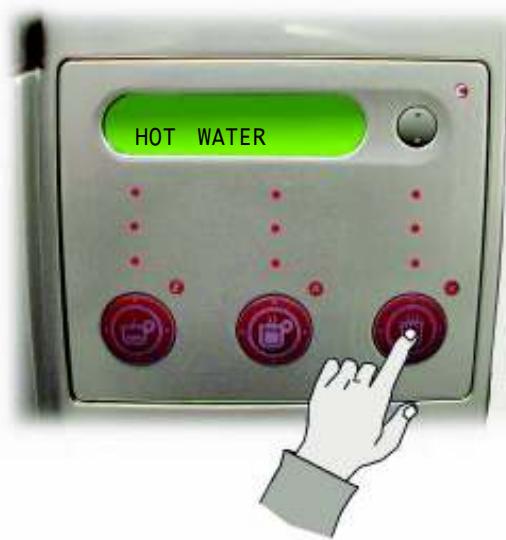
If the corresponding setting is on, only the set quantity of hot water is dispensed. Otherwise, it is necessary to stop water dispensing by pressing the key again when reaching the desired level of hot water.
To set the quantity of hot water, press the hot water selection key until the desired quantity has been reached.

Warning
The quantity of hot water dispensed can be programmed only if the corresponding setting is on (see page 17).
When setting the desired quantity, the following message appears on the display:
"HOT WATER
"PROGR. QUANTITY
Place the glass or cup under the hot water spout (ref. 7 - Fig. 1) and press the hot water selection key. Water is dispensed automatically.
Fig. 1) and press the hot water selection key. Water is dispensed automatically.
The machine shuts off automatically - partially or totally - when the bean hopper is empty or the machine is malfunctioning. The cause of the shut-off appears on the display located on the control panel.
The machine shuts off automatically - partially or totally - when the bean hopper is empty or the machine is malfunctioning. The cause of the shut-off appears on the display located on the control panel.
If the display shows a warning message, contact the SUPPLY OPERATOR.
When the bean hopper is empty, the machines stop grinding after about 20 seconds. Fill the bean hopper following instructions outlined on page 24.
When the bean hopper is empty, the machines stop grinding after about 20 seconds. Fill the bean hopper following the instructions outlined on page 24.
Even the best coffee beans may contain impurities (stones, metallic parts, etc.)
Even the best coffee beans may contain impurities (stones, metallic parts, etc.)
If a foreign body falls into the grinder, a special noise is produced: turn the machine off immediately!
Grinding stops automatically in about 15 seconds thanks to the electronic control.

Important
To avoid damaging the coffee grinder motor, do not restart the machine until the foreign body has been removed.
Follow the procedure outlined on page 31.
Water level electronic control
The machine stops automatically when the water level in the tank is below the minimum value detected by the floating indicator (ref. 10 - Fig. 1).
Fill the tank following the instructions outlined on page 24.
9 - MAINTENANCE

9.1 Foreword

Warning
Before performing maintenance and/or cleaning procedures, unplug the machine and wait until it is cold.
Follow the instructions contained in this manual to obtain maximum beverage quality and guarantee the correct functioning of the machine.
The machine and its non-removable components must be cleaned with cold or warm water using non-abrasive sponges and wet cloths unless otherwise stated (this operation must not be performed on exposed electrical components).
- Do not use detergents or solvents that could modify the shape or functionality of the machine and its components.
- Do not soak the machine in water or other fluids: the machine will be damaged.
- Do not wash component parts in the dishwasher. Always hand-dry the machine components, do not place them in the oven or microwave oven.
- Do not use direct jets of water.
- All the components that require cleaning are easily accessible and do not require the use of tools.
- Regular maintenance and cleaning keep the machine in good condition and guarantee its efficiency for a longer time while respecting standard hygienic regulations.
- The machine counters keep track of the number of beverages dispensed and allow standard maintenance interventions to be programmed by the maintenance technician.

Important
When performing maintenance operations follow the timetable outlined in section 14 in the general maintenance table.

Warning
In case of failure and/or malfunctioning contact an APPROVED ASSISTANCE CENTER.
9.2 Cleaning and maintenance
Maintenance operations must be performed at least once a year and include testing the condition of the machine and the conformity of the electric system.
Water tank/ Drip tray/ Dump box/ Brew group / Machine
To keep the dispensing outlet and brew group (ref. 18 - Fig. 1) clean, the Dump box should be emptied daily, according to needs (Fig. 18).
Fig. 18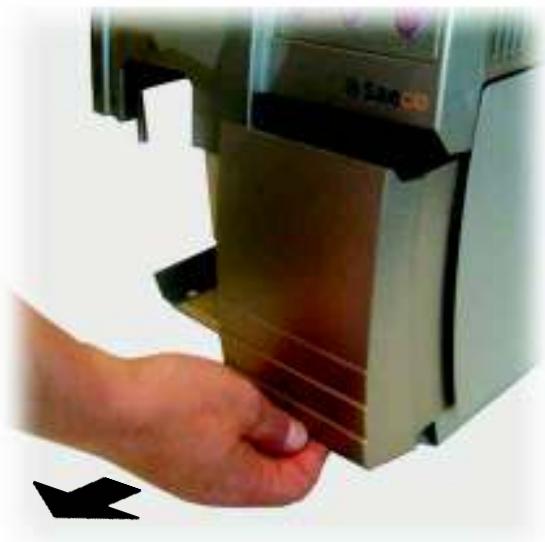
The water tank (ref. 9 - Fig. 1), the dregs drawer and the relevant conveyor (if necessary, remove the conveyor as in Fig. 19), drip tray (Fig. 20) and Grill drip tray (Fig. 20) should be washed regularly using non abrasive detergents and dried with care.
Fig. 19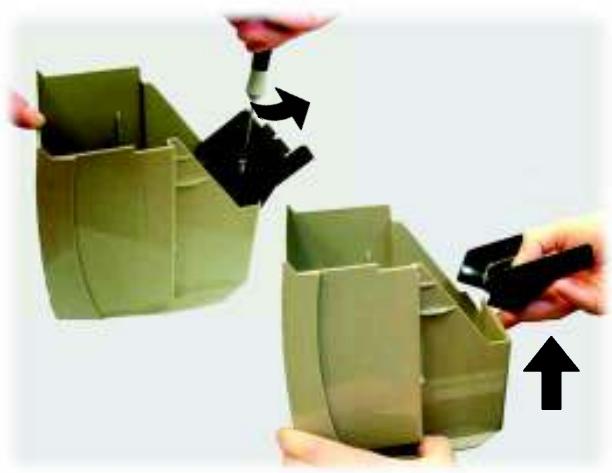
Fig. 20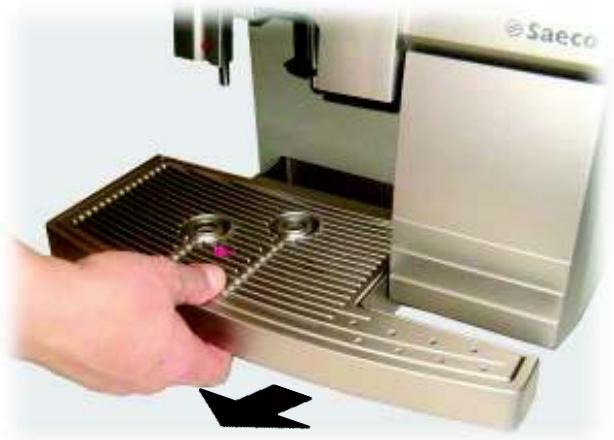
The coffee dispenser (ref. 6 - Fig. 1) can be removed for cleaning.
Remove the protection cover (Fig. 21).
Fig. 21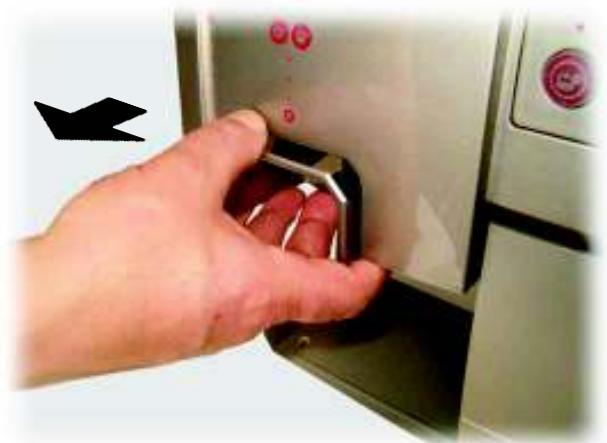
Unfasten the knurled screw under the dispenser (Fig. 22).
Fig. 22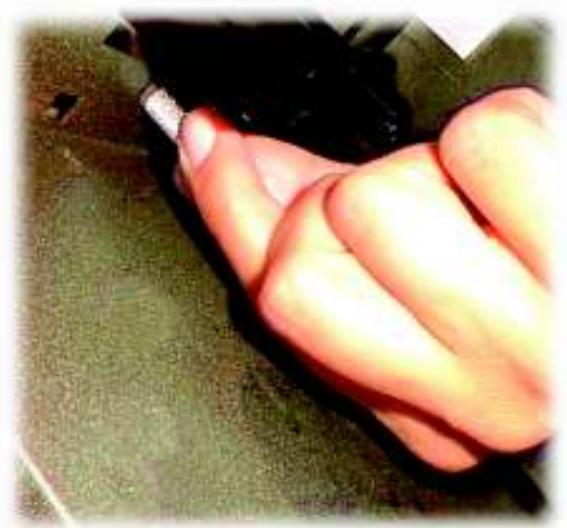
Remove the dispenser by lifting it out (Fig. 23).
Fig. 23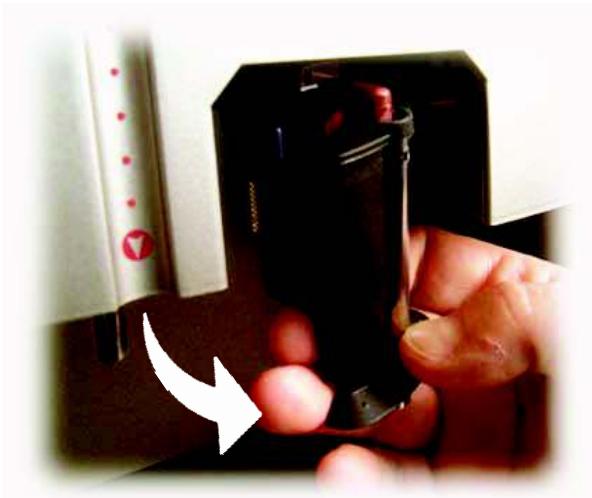
Wash the dispensing channel (Fig. 24) and rinse carefully with hot water.
Fig. 24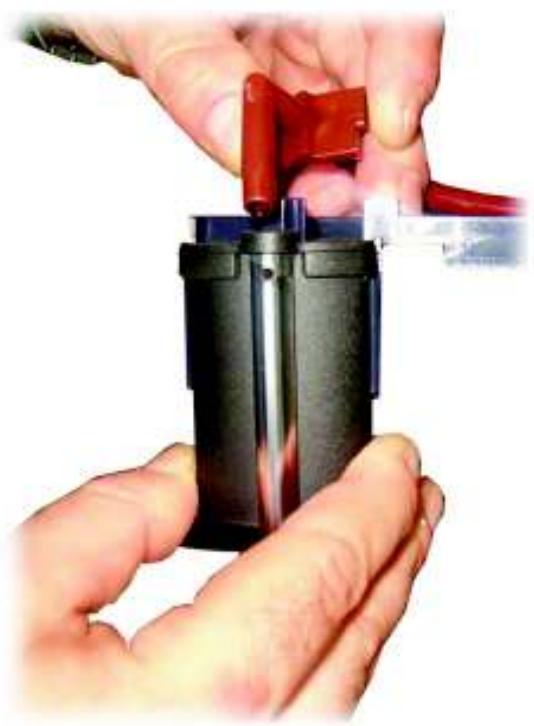
Clean the machine periodically using a wet cloth, and then dry it.
Brew group
The brew group must be cleaned every time the coffee bean hopper is refilled and at least once a week.
Turn the machine off by pressing the main switch (ref. 4 - Fig. 1) and open the service door (ref. 15 - Fig. 1).
Remove the Dump box first (Fig. 25).
Fig. 25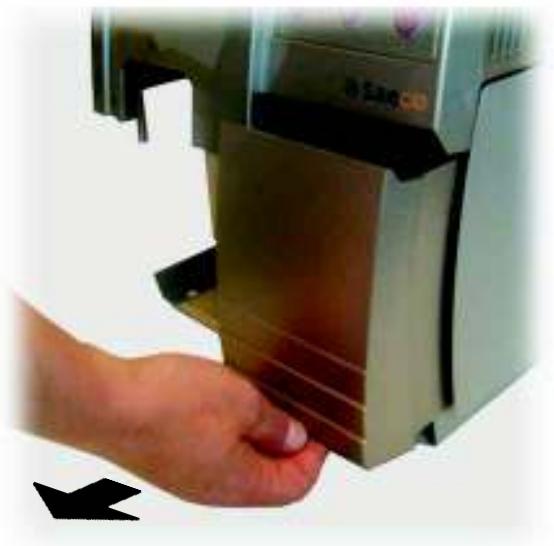
Remove the brew group by turning the lock lever to a vertical position as indicated in fig (26), then remove the group by tilting it (Fig. 26). If necessary, use the left hand to make the removal easier.
Fig. 26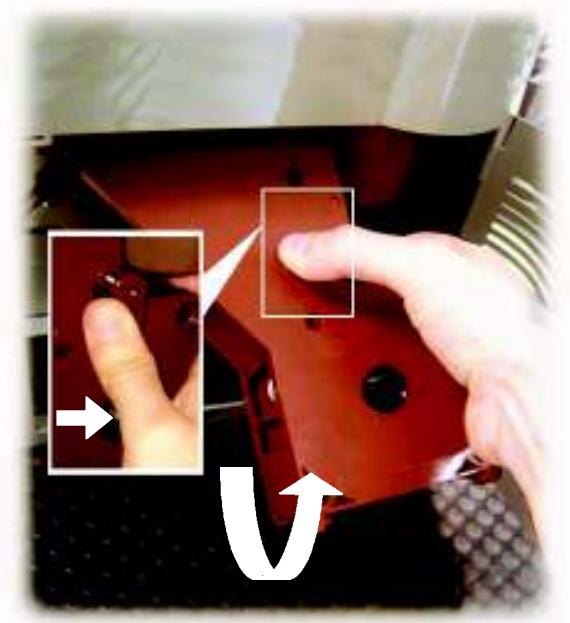
The brew group must be cleaned with hot water and no detergents.
The stainless steel filter must be free of coffee residue.
Remove the upper filter to clean it. With the provided wrench (ref. 24 - Fig. 1) unscrew the knob counterclockwise (Fig. 27). Wash and dry all the elements of the brew group, reinsert the filter, and hand-tighten the knob.
Fig. 27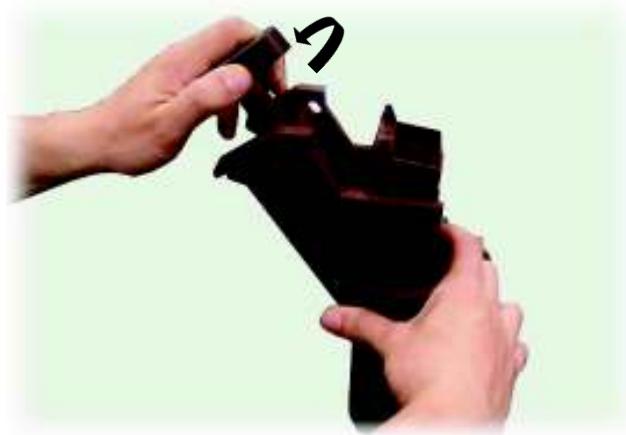
Remove the dregs drawer for cleaning (Fig. 28).
Fig. 28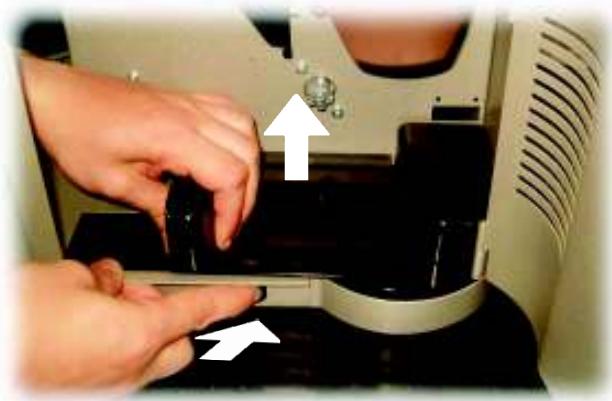
Use non-abrasive detergents only.
Carefully clean the dispensing outlet and reinsert the dregs drawer.
Reintroduce the brew group by turning down the appropriate lever. Tilt the group to insert it, then position it inside the guides of the dregs drawer (Fig. 29). Once inserted, the release lever must automatically return to its initial position and the reference pin must coincide with the arrow point (Fig. 30). Close the service door (ref. 15 - Fig. 1).
Fig. 29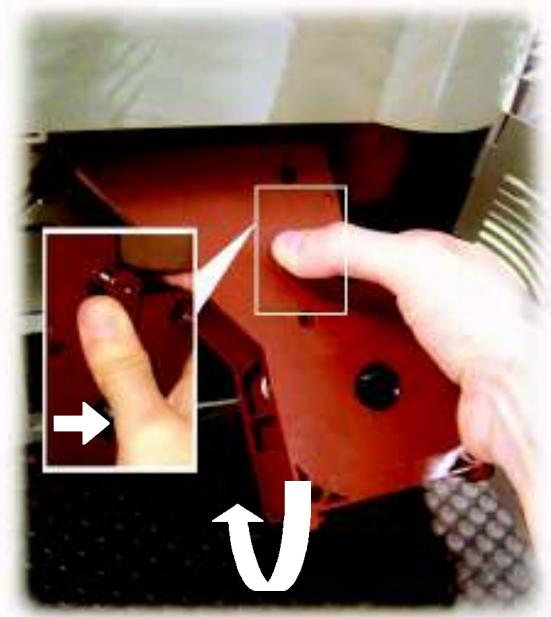
Fig. 30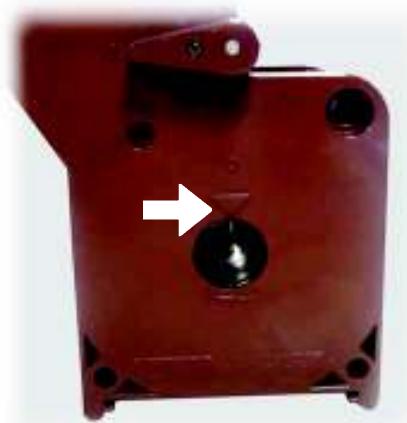

Important
If the brew group is not inserted correctly, the display reads:
“INSERT GROUP
Coffee cannot be brewed. The machine is not working.
Place the Dump box back in (ref. 1 - Fig. 1).
Coffee grinder


Warning
Never put water inside the grinder, to avoid irreparable damage to the machine!
Clean the coffee bean hopper regularly. This operation must be performed only by a specialized technician only.
Unplug the machine from the socket (ref. 5 - Fig. 1).
Remove the cover with the lock (ref. 21 - Fig. 1) and the bean hopper cover (ref. 12 - Fig. 1).
Empty the bean hopper and unfasten the two fixing screws (fig. 31).
Fig. 31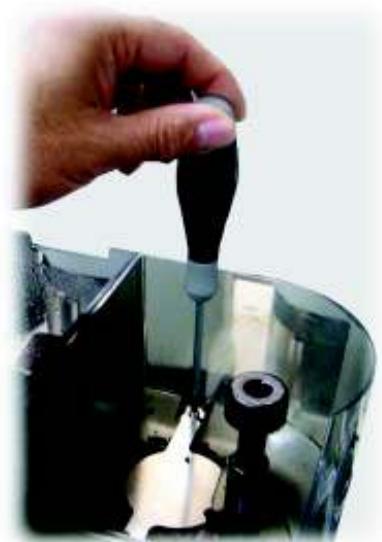
The container can then be cleaned (Fig. 32).
Fig. 32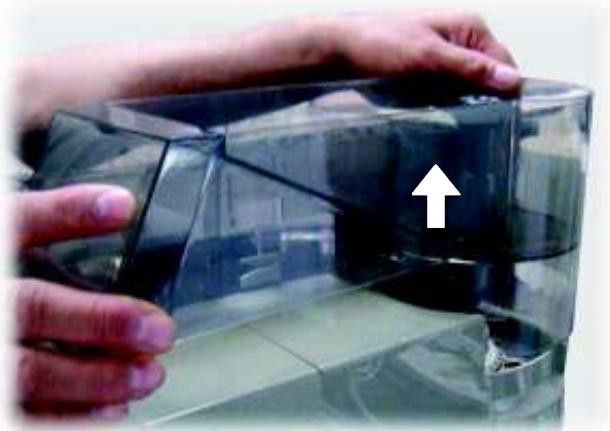
10 - INACTIVITY
When the machine is not used, it must be turned off and unplugged from the socket.
Keep the machine in a dry place away from children.
If the machine is not used for a long period of time, it must be protected from dust and dirt.
11 - INSTRUCTIONS FOR END-OF-LIFE DISPOSAL TREATMENT
This product complies with EU Directive 2002/96/EC.
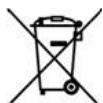
The symbol on the product or on its packaging indicates that this product may not be treated as household waste. Instead it shall be handed over to the applicable collection point for the recycling of electrical and electronic equipment.
By ensuring this product is disposed of correctly, you will help prevent potential negative consequences for the environment and human health, which could otherwise be caused by inappropriate waste handling of this product. For more detailed information about recycling of this product, please contact your local city office, your household waste disposal service or the shop where you purchased the product.

Warning
The disposal of the vending machine or of a part of it must be carried out with full respect of the environment and according to local laws in force.
12 - TROUBLESHOOTING
In case of faults or damage possibly after a fall, immediately unplug the machine.
If the problem cannot be solved by following the instructions presented in the table below, contact the nearest ASSISTANCE CENTER.

Important
Problems may arise when using the machine that can cause malfunctioning.
The possible causes are listed in par. 14.1 of this manual in the Troubleshooting table below along with the corresponding solutions.
If the problem cannot be solved, the machine must not be used until the nearest ASSISTANCE CENTER has been contacted.
13 ACCESSORIES
The Ambra machine can be equipped with the following optional components:
- Coiner box
Arrangement for housing a coiner or key system.
Cabinet
To support the machine and to store cups, stirrers, sugar and stocks.
For further information see the corresponding manuals.
14 - GENERAL MAINTENANCE
To keep the machine in good working conditions cleaning and maintenance procedures should be performed according to the instructions in the table below.
| Operations to be performed | At each supply | After 5 supplies | After10 supplies |
| Emptying and cleaning the Dump box | |||
| Emptying and cleaning the drip tray | |||
| Emptying and cleaning the water tank | |||
| Cleaning the coffee brew group | |||
| Oiling the coffee brew group | |||
| Cleaning the coffee bean hopper |
14.1 Troubleshooting
In case of failures or faults, immediately unplug the machine. Contact the maintenance technician or an Approved Assistance Centre for interventions and repairing. Incorrect repairing can present serious hazards for users. The manufacturer declines responsibility for incorrect repairing: the warranty also expires.
| PROBLEM | CAUSE | REMEDY |
| No display message. | No power supply. | Turn the main switch on, check the socket and fuse. |
| The service door is open. | Close the service door. | |
| Automatic coffee brewing does not start. | The brew group is missing. | Insert the brew group. |
| The brew group is jammed. | Clean the brew group. | |
| No water. | Fill the water tank. | |
| No coffee. | Fill the coffee hopper. In both cases, restart the brewing cycle. | |
| No drawer. | Insert the Dump box correctly. | |
| Coffee grinder jammed. | Clean the coffee grinder. | |
| Coffee comes out too fast. | Grinding too coarse. | Adjust to a finer grinding (e.g., from 5 to 3). |
| Coffee comes out too slowly. | Grinding too fine. | Adjust to a coarser grinding (e.g., from 3 to 5). |
| Coffee has no sufficientcrema. | Unsuitable coffee blend or coffee is not freshly toasted. | Change coffee blend |
| The brew group cannot be removed. | The brew group is not in the correct position. | Start the machine, close the service door, insert the Dump box. The brew group is automatically placed in the correct position (Fig 30). |
NOTE
NOTE

- INTRODUCTION TO THE MANUAL
- GENERAL INFORMATION
- HANDLING AND STORAGE
- SAFETY
- CONTROLS DESCRIPTION
- INSTALLATION
- SETTINGS
- USE OF THE VENDING MACHINE
- MAINTENANCE
- INACTIVITY
- INSTRUCTIONS FOR END-OF-LIFE DISPOSAL TREATMENT
- TROUBLESHOOTING
- ACCESSORIES
- GENERAL MAINTENANCE
- FOREWORD
- IMPORTANT
- SYMBOLS USED
- SUPPLY OPERATOR
- MAINTENANCE TECHNICIAN
- WARNING
- INTENDED USE OF THE MACHINE
- RESIDUAL RISKS
- MACHINE IDENTIFICATION
- TECHNICAL SPECIFICATIONS
- HANDLING
- STORAGE
- GENERAL SAFETY NORMS
- DANGER
- USE THE MACHINE FOR ITS INTENDED USE ONLY
- POWER SUPPLY
- POWER CORD
- LOCATION
- DANGER OF BURNS
- POSITIONING
- CLEANING
- REPAIRING AND MAINTENANCE
- OPERATORS REQUIREMENTS
- AN OPERATOR IN CHARGE OF TURNING THE MACHINE ON/OFF, SUPPLYING PRODUCTS, REMOVING COINS, AND PERFORMING INTERNAL AND EXTERNAL CLEANING OF THE MACHINE
- THE PERSON WHO USES THE MACHINE. USERS MUST NOT PERFORM ANY OF THE TASKS OF THE SUPPLY OPERATOR OR THE MAINTENANCE TECHNICIAN
- ALL THE COMPONENTS THAT CAN BE POTENTIALLY DANGEROUS ARE LOCATED INSIDE THE MACHINE
- SAFETY MICROSWITCH EFFICIENCY TEST
- MAIN CONTROLS
- MAIN SWITCH (FIG. 5)
- CONTROL PANEL (FIG. 6)
- DISPENSING MODE
- E ENT KEY - "ESPRESSO COFFEE
- C ESC KEY
- UP KEY - "COFFEE
- DOWN KEY - "HOT WATER
- DISPENSING LEDS
- DISPLAY
- LIST OF SUPPLIED ACCESSORIES
- ELECTRIC CONNECTION
- MENU SELECTION
- CHANGING NUMERIC VALUES
- STRUCTURE OF PROGRAMMING FUNCTIONS
- AUDIT RESET FUNCTIONS
- AUDIT INIT FUNCTIONS
- LANGUAGE SELECTION
- COFFEE TEMPERATURE SETTING
- DOSE SETTING
- PREGRINDING FUNCTION
- COUNTER DISPLAY FUNCTION
- CHANGE ACCESS CODE
- TIMER
- PAYMENT SYSTEMS
- MACHINE STATUS
- OFF AND ELECTRICALLY INSULATED
- ON
- ENERGY SAVING
- RECOMMENDATIONS
- PROLONGED INACTIVITY
- TEMPERATURE CONTROL
- BEAN HOPPER EMPTY
- WATER TANK EMPTY
- DUMP BOX FULL
- FIRST SWITCHING ON
- FILLING THE BEAN HOPPER
- FILLING THE WATER TANK
- FIXING THE COVER LOCK PLATE
- WATER CIRCUIT FILLING
- GRINDING ADJUSTMENT
- COFFEE BLENDS
- BEVERAGE DISPENSING
- ADJUSTING THE COFFEE DISPENSER
- ADJUSTING THE CUP FILLING LEVEL
- COFFEE DISPENSING
- PREHEATING
- HOT WATER DISPENSING
- THE MACHINE SHUTS OFF AUTOMATICALLY - PARTIALLY OR TOTALLY - WHEN THE BEAN HOPPER IS EMPTY OR THE MACHINE IS MALFUNCTIONING. THE CAUSE OF THE SHUT-OFF APPEARS ON THE DISPLAY LOCATED ON THE CONTROL PANEL
- WHEN THE BEAN HOPPER IS EMPTY, THE MACHINES STOP GRINDING AFTER ABOUT 20 SECONDS. FILL THE BEAN HOPPER FOLLOWING INSTRUCTIONS OUTLINED ON PAGE
- EVEN THE BEST COFFEE BEANS MAY CONTAIN IMPURITIES (STONES, METALLIC PARTS, ETC.)
- WATER LEVEL ELECTRONIC CONTROL
- CLEANING AND MAINTENANCE
- WATER TANK/ DRIP TRAY/ DUMP BOX/ BREW GROUP / MACHINE
- BREW GROUP
- THE STAINLESS STEEL FILTER MUST BE FREE OF COFFEE RESIDUE
- COFFEE GRINDER
- COINER BOX
- CABINET
- NOTE
Brand : SAECO
Model : AMBRA
Category : Coffee machine