BEKO BMGB25333X - Microwaves

BMGB25333X - Microwaves BEKO - Free user manual and instructions

Find the device manual for free BMGB25333X BEKO in PDF.

📄 319 pages English EN Download 💬 AI Question 10 questions ⚙️ Specs
Notice BEKO BMGB25333X - page 4
Pick your language and provide your email: we'll send you a specifically translated version.
Product type Built-in microwave
Brand BEKO
Model BMGB25333X
Dimensions (H x W x D) 388 x 595 x 400 mm
Capacity 25 L
Net weight 18,5 kg
Power supply 230 V ~ 50 Hz
Microwave power 900 W
Grill power 1000 W
Main functions Microwave, Grill, Combination, Weight and time defrost, Auto cooking (8 menus), Timer, Child lock
Control type Rotary knobs and push buttons, LED display
Turntable Glass tray with roller support
Door opening Push button
Child lock Lock by long press on Stop button
Materials Stainless steel, glass, plastic
Care and cleaning Clean with a damp cloth and mild detergent; avoid abrasives. Glass tray dishwasher safe.
Spare parts and repairability Glass tray, rotating support, interior bulb. Repairs must be carried out by an authorized service.
General information For domestic use only; do not use outdoors. Observe installation clearances: 20 cm above.

Frequently Asked Questions - BMGB25333X BEKO

How to set the time on the BEKO BMGB25333X microwave?
Press the button (Timer) twice. The hours flash: turn the Q knob to set the hours (0-23). Press to confirm, the minutes flash: turn Q to set the minutes (0-59). Press to finish.
How to activate child lock?
In standby mode, press the Stop/Cancel button (symbol Il) for 3 seconds. A beep sounds and the icon appears. To deactivate, repeat the same operation.
What to do if the oven does not heat?
Check that the door is properly closed. If the problem persists, unplug the oven, wait 10 seconds and plug it back in. If the error persists, contact an authorized service.
Can metal containers be used in the microwave?
No, metal containers are prohibited in microwave mode as they can cause sparks. Use glass, ceramic or suitable plastic dishes. In grill or combination mode, metal containers are allowed.
How to clean the inside of the oven?
Unplug the appliance and allow it to cool. Clean the walls with a damp cloth and mild detergent. Avoid abrasive products. The glass tray and support can be washed with soapy water or in the dishwasher.
What utensils are suitable for microwave cooking?
Use heat-resistant glass, ceramic, suitable plastic and porcelain. Avoid metal in microwave mode. For grill, metal and aluminum foil are allowed. Perform a compatibility test if necessary.
How to properly install the oven in a cabinet?
The oven is designed to be built into a niche 60 cm wide, 56 cm deep and 38 cm high. Attach the supplied bracket with screws, insert the oven and secure it with screws B from below. Leave a clearance of 20 cm above.
What to do if the turntable makes noise?
Clean the roller support and the oven bottom. Remove the glass tray and wash it. Make sure the support is correctly positioned. If the noise persists, contact after-sales service.
How to defrost food with this microwave?
Use the Weight Defrost function by pressing then turning the knob to select the weight (100-2000 g). Or use Time Defrost by pressing then setting the time (max 95 min). Press to start.
How to use the grill or combination function?
Press until G (grill only) or C-1/C-2 (microwave + grill) appears. Confirm with , set the time then press again. For even grilling, turn food over halfway through cooking.

User questions about BMGB25333X BEKO

0 question about this device. Answer the ones you know or ask your own.

Ask a new question about this device

The email remains private: it is only used to notify you if someone responds to your question.

No questions yet. Be the first to ask one.

Download the instructions for your Microwaves in PDF format for free! Find your manual BMGB25333X - BEKO and take your electronic device back in hand. On this page are published all the documents necessary for the use of your device. BMGB25333X by BEKO.

USER MANUAL BMGB25333X BEKO

natural_image Simple line icon of a microwave oven with a steaming bowl (no text or symbols)

BMGB25333X - BMGB25333DX

EN - DE - FR - IT - ES - NL - PL - CS - HR - RO - SQ - SR - MK - SL - SK

Please read this manual first!

Dear Customer,

Thank you for purchasing a Beko product. We hope that you get the best results from your product which has been manufactured with high quality and state-of-the-art technology. Therefore, please read this entire user manual and all other accompanying documents carefully before using the product and keep it as a reference for future use. If you handover the product to someone else, give the user manual as well. Follow all warnings and information in the user manual.

Meanings of the symbols

Following symbols are used in the various section of this user manual:

BEKO BMGB25333X - Meanings of the symbols - 1

Important information and useful hints about usage.

BEKO BMGB25333X - Meanings of the symbols - 2

Warnings for dangerous situations concerning the safety of life and property.

BEKO BMGB25333X - Meanings of the symbols - 3

Warning for hot surfaces.

BEKO BMGB25333X - Meanings of the symbols - 4

Warning for electric shock.

BEKO BMGB25333X - Meanings of the symbols - 5

This product has been manufactured in environmental friendly modern plants without giving any harm to the nature.

CONTENTS

ENGLISH04-21
DEUTSCH22-44
FRANÇAIS45-64
ITALIANO65-86
ESPAÑOL87-108
NEDERLANDS109-128
POLSKI129-150
ČESKY151-172
HRVATSKI173-191
ROMÂNĂ192-214
SHQIPTARE215-234
СРПСКИ235-254
MAKEДОНСКИ255-278
SLOVENŠČINA279-296
SLOVENSKÝ297-318

1 Important safety and environmental instructions

Important Safety Instructions Read Ca- refully And Keep For Future Reference

1.1 Safety warnings

This section contains safety instructions that will help protect from risk of fire, electric shock, exposure to leak microwave energy, personal injury or property damage. Failure to follow these instructions shall void any warranty.

  • Beko Microwave Ovens comply with the applicable safety standards; therefore, in case of any damage on the appliance or power cable, it should be repaired or replaced by the dealer, service center or a specialist and authorized service alike to avoid any danger. Faulty or unqualified repair work may be dangerous and cause risk to the user.
  • This appliance is intended to be used in household and similar applications such as:

- Staff kitchen areas in shops, offices and other working environments;

- Farm houses

- By clients in hotels, and other residential type environments; - Bed and Breakfast type environments.

  • It is not intended for industrial or laboratory use.
  • Do not attempt to start the oven when its door is open; otherwise you may be exposed to harmful microwave energy. Safety locks should not be disabled or tampered with.
  • The microwave oven is intended for heating food and beverages. Drying of food or clothing and heating of warming pads, slippers, sponges, damp cloth and similar may lead to risk of injury, ignition or fire.
  • Do not place any object between the front side and the door of the oven. Do not allow dirt or cleaning agent remnants to build up on the closure surfaces.
  • Any service works involving removal of the cover that provides protection against exposure to microwave energy must be performed by authorized persons/service. Any other approach is dangerous.

1 Important safety and environmental instructions

  • Your product is intended for cooking, heating and defrost food at home. It must not be used for commercial purposes.
  • Your oven is not designed to dry any living being.
  • Do not use your appliance to dry clothes or kitchen towels.
  • Do not use this appliance outdoors, bathrooms, humid environments or in places where the it can get wet.
  • No responsibility or warranty claim shall be assumed for damages arising from misuse or improper handling of the appliance.
  • Never attempt to dismantle the appliance. No warranty claims are accepted for damage caused by improper handling.
  • Only use the original parts or parts recommended by the manufacturer.
  • Do not leave this appliance unattended while it is in use.
  • Always use the appliance on a stable, flat, clean dry, and non-slip surface.
  • The appliance should not be operated with an external clock timer or separate remote control system.

  • Before using the appliance for the first time, clean all parts. Please see the details given in the "Cleaning and Maintenance" section.

  • Operate the appliance for its intended purpose only as described in this manual.
  • Appliance becomes very hot while it is in use. Pay attention not to touch the hot parts inside the oven.
  • Do not operate the oven empty.
  • Cooking utensil may get hot due to the heat transferred from the heated food to the utensil. You may need oven gloves to hold the utensil.
  • Utensils shall be checked to ensure that they are suitable for use in microwave ovens.
  • Do not place the oven on stoves or other heat generating appliances. Otherwise, it may be damaged and the warranty becomes void.
  • Steam may come out while opening the covers or the foil after cooking the food.
  • The appliance and its accessible surfaces may be very hot when the appliance is in use.
  • Door and outer glass may be very hot when the appliance is in use.

1 Important safety and environmental instructions

  • Make sure that your mains power supply complies with the information supplied on the rating plate of the appliance.
  • The only way to disconnect the appliance from the power supply is to remove the power plug from the power outlet.
  • Use the appliance with a grounded outlet only.
  • Never use the appliance if the power cable or the appliance itself is damaged.
  • Do not use this appliance with an extension cord.
  • Never touch the appliance or its plug with damp or wet hands.
  • Place the appliance in a way so that the plug is always accessible.
  • Prevent damage to the power cable by not squeezing, bending, or rubbing it on sharp edges. Keep the power cable away from hot surfaces and naked flame.
  • Make sure that there is no danger that the power cable could be accidentally pulled or that someone could trip over it when the appliance is in use.

  • Unplug the appliance before each cleaning and when the appliance is not in use.

  • Do not pull the power cable of the appliance to disconnect it from its power supply and never wrap its power cable around the appliance.
  • Do not immerse the appliance, power cable, or power plug in water or any other liquids. Do not hold it under running water.
  • When heating food in plastic or paper containers, keep an eye on the oven due to the possibility of ignition.
  • Remove the wire strings and/or metal handles of paper or plastic bags before placing bags to the oven.
  • If smoke is observed, switch off or unplug the appliance if safe to do so and keep the door closed in order to stifle any flames.
  • Do not use microwave oven for storage. Do not leave paper items, cooking material or food inside the oven when it is not being used.
  • The contents of feeding bottles and baby food jars should be stirred or shaken and the temperature checked before consumption, in order to avoid burns.

1 Important safety and environmental instructions

  • This appliance is a Group 2 Class B ISM equipment. Group 2 contains all ISM (Industrial, Scientific and Medical) equipment in which radio-frequency energy is intentionally generated and/or used in the form of electromagnetic radiation for the treatment of material, and spark erosion equipment.
  • Class B equipment is suitable for use in domestic establishments and establishments directly connected to a low voltage power supply network.
  • Do not use cooking oil in the oven. Hot oil may damage the components and materials of the oven, and it may even cause skin burns.
  • Pierce food with thick crust such as potatoes, courgettes, apples and chestnuts.
  • Appliance must be placed so that the rear side is facing the wall.
  • Before moving the appliance, please secure the turntable to prevent damage.
  • Eggs in their shell and whole hard-boiled eggs must not be heated in microwave ovens since they may explode, even after microwave heating has ended.

WARNING: If the door or door seals are damaged, the oven must not be operated until it has been repaired by a competent person.

WARNING: It is hazardous for anyone other than a competent person to carry out any service or repair operation which involves the removal of a cover which gives protection against exposure to microwave energy.

WARNING: Liquids and other foods must not be heated in sealed containers since they are liable to explode.

  • The oven should be cleaned regularly and any food deposits removed.
  • There should be min 20 cm free space above the top surface of the oven.
  • Do not over-cook foods; otherwise, you may cause a fire.
  • Do not use chemicals and steam assisted cleaners to clean the appliance.
  • Extreme caution is advised when being used near children and persons who are restricted in their physical, sensory or mental abilities.

1 Important safety and environmental instructions

  • This appliance can be used by the children who are at the age of 8 or over and by the people who have limited physical, sensory or mental capacity or who do not have knowledge and experience, as long as they are supervised with regard to safe use of the product or they are instructed accordingly or understand the risks of using the product. Children should not play with the appliance. Cleaning and user maintenance procedures should not be performed by children unless they are controlled by their elders.
  • Danger of choking! Keep all the packaging materials away from children.
  • Due to excessive heat that arises in grill and combination modes, children should only be allowed to use these modes under supervision of an adult.
  • Keep the product and its power cable so that they are inaccessible by children under 8 years old.
  • Do not cook food directly on the glass tray. Put the food in / on appropriate kitchen utensils before placing them in the oven.

  • Metallic containers for food and beverages are not allowed during microwave cooking. Otherwise, sparking may occur.

  • Microwave oven must not be placed in a cabinet that is not in compliance with the installation instructions.
  • Microwave oven is intended for built-in use only.
  • If built-in appliances being used equal or higher than 900 mm above the floor, care should be taken not to displace the turntable when removing containers from the appliance.
  • If the built-in product is in a cabinet with a door, the product must be operated with the cabinet door open.

1.2 Compliance with the WEEE Directive and Disposing of the Waste Product:

This product complies with EU WEEE Directive (2012/19/EU). This product bears a classification symbol for waste electrical and electronic equipment (WEEE).
BEKO BMGB25333X - Compliance with the WEEE Directive and Disposing of the Waste Product: - 1

This symbol indicates that this product shall not be disposed with other household wastes at the end of its service life. Used device must be returned to official collection point for recycling of

electrical and electronic devices.

1 Important safety and environmental instructions

To find these collection systems please contact to your local authorities or retailer where the product was purchased. Each household performs important role in recovering and recycling of old appliance. Appropriate disposal of used appliance helps prevent potential negative consequences for the environment and human health.

1.3 Compliance with RoHS Directive

The product you have purchased complies with EU RoHS Directive (2011/65/EU). It does not contain harmful and prohibited materials specified in the Directive.

1.4 Package information

BEKO BMGB25333X - Package information - 1

Packaging materials of the product are manufactured from recyclable materials in accordance with our National Environment Regulations. Do not dispose of the packaging materials together with the domestic or other wastes. Take them to the packaging material collection points designated by the local authorities.

2 Your microwave oven

2.1 Overview
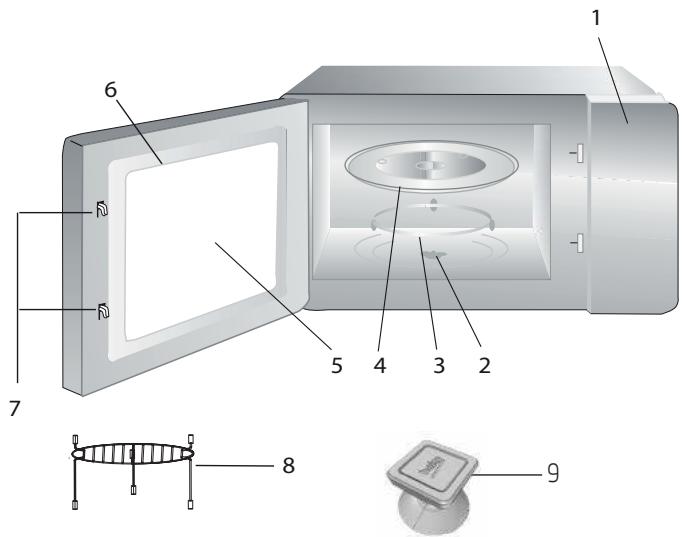
1 2 3 4 5 6 7 8 9

Controls and parts

  1. Control panel
  2. Turntable shaft
  3. Turntable support
  4. Glass tray
  5. Oven window
  6. Door group
  7. Door safety interlock system
  8. Grill rack (only to be used in grill function and placed on the glass tray)
  9. Vacuum lifter for manual door opening

2.2 Technical data

Power consumption230 V~50 Hz,1450 W (Microwave)1000 W (Grill)
Output900 W
Operating frequency2450 MHz
External dimensions (H*W*D)388*595 *400 mm
Oven capacity25 litres
Net weight18.5 kg

Technical and design modification rights are reserved.

Markings on the product or the values stated in other documents supplied with the product are values obtained under laboratory conditions as per relevant standards. These values may vary according to the usage of the appliance and ambient conditions. Power values are tested at 230V.

2 Your microwave oven

2.3 Installing the turntable

  • Never place the glass tray upside down. The glass tray should never be restricted.
  • Both glass tray and turntable support must always be used during cooking.
  • All food and containers of food must always place on the glass tray for cooking.
  • If glass tray or turntable support crack or break, contact your nearest authorized service center.
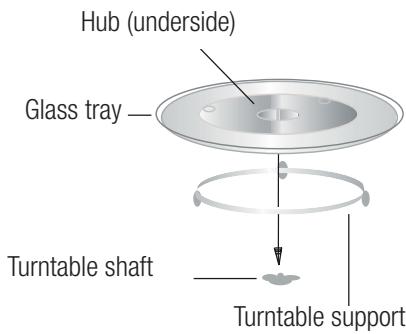
Hub (underside) Glass tray Turntable shaft Turntable support

3 Installation and connection

3.1 Installation and connection

  • Remove all packing material and accessories. Examine the oven for any damage such as dents or broken door. Do not install if oven is damaged.
  • Remove any protective film found on the microwave oven cabinet surface.
  • Do not remove the light brown Mica cover that is attached to the oven cavity to protect the magnetron.
  • This appliance has been designed for domestic use only.
  • This oven is intended for built-in use only. It is not intended for counter-top use or for use inside a cabinet.
  • Please observe the special installation instructions.
  • The appliance can be installed in a 60cm wide wall-mounted cabinet (at least 55 cm deep and 85 cm off the floor).
  • The appliance is fitted with a plug and must only be connected to a properly installed grounded socket.
  • The mains voltage must correspond to the voltage specified on the rating plate.

  • If the plug is no longer accessible after installation, an all-pole isolating switch must be present on the installation side with a contact gap of at least 3 mm.

  • Adapters, multi-way sockets and extension cords must not be used. Overloading can result with a risk of fire.

BEKO BMGB25333X - Installation and connection - 1

The accessible surface may be hot during operation.

BEKO BMGB25333X - Installation and connection - 2

Do not trap or bend the power cable.

3 Installation and connection

3.2 Built-in installation

3.2.1 Furniture dimensions for built-in installation
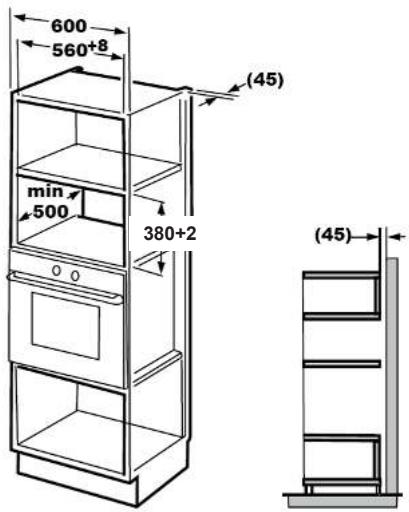
600 560+8 min 500 380+2 (45) (45)

3.2.2 Preparing the cabinet

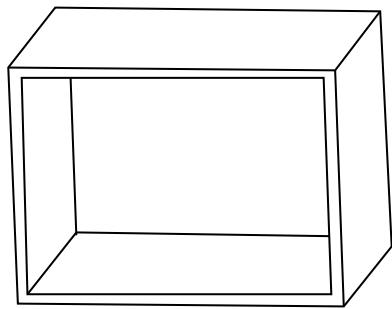
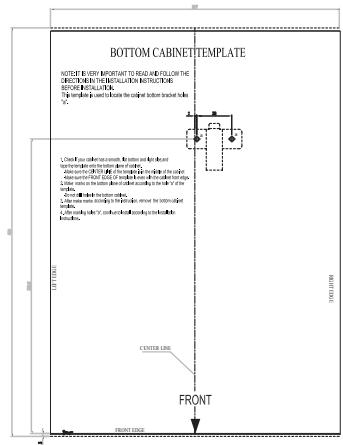
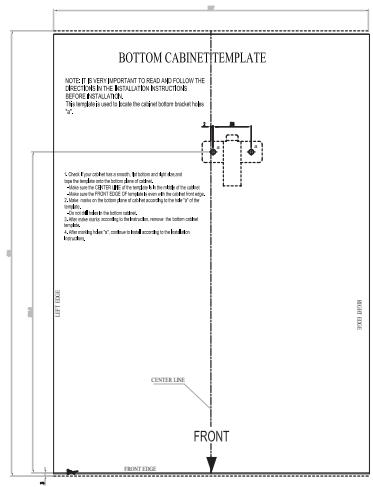
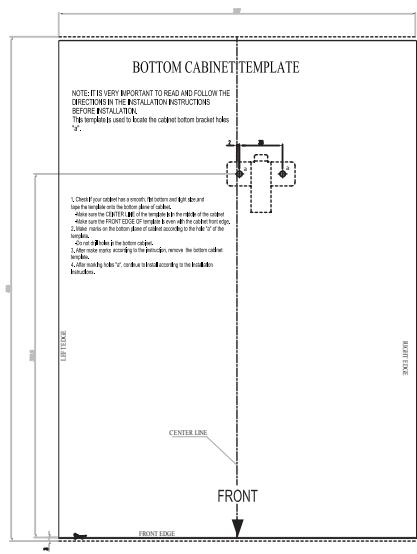
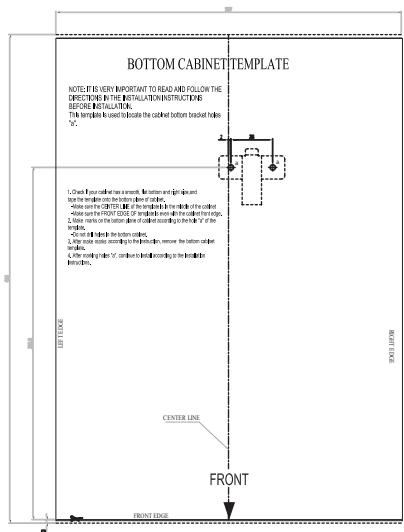
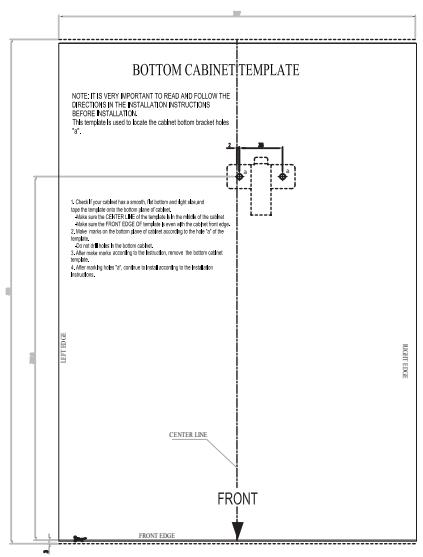
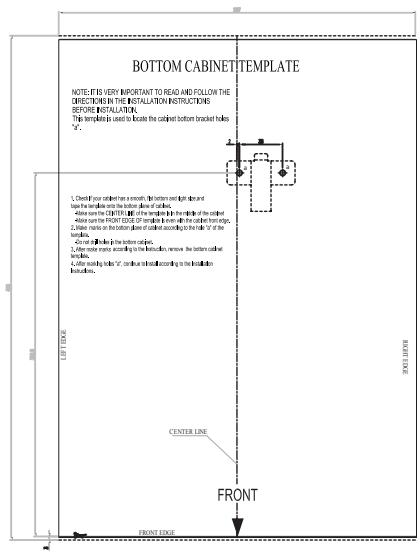
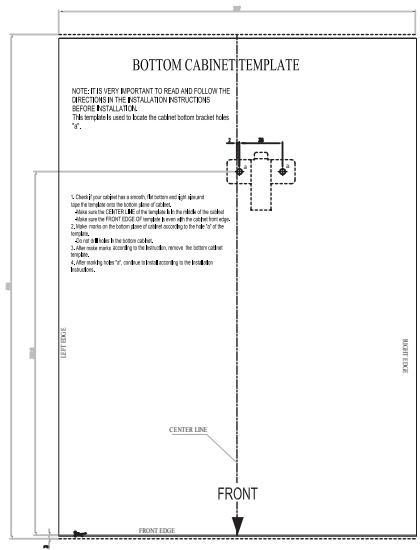
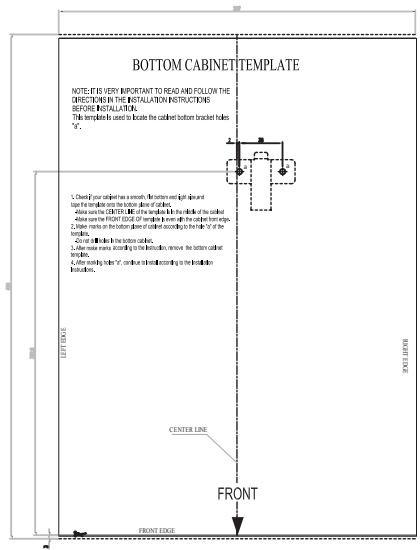
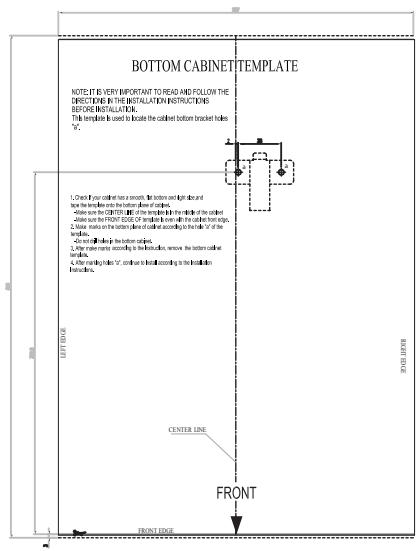
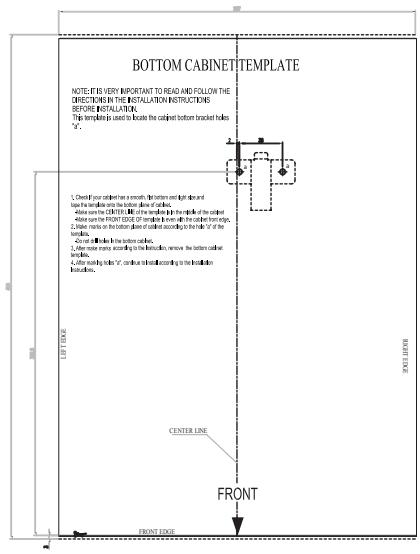
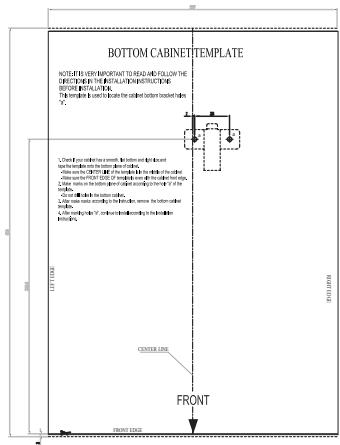
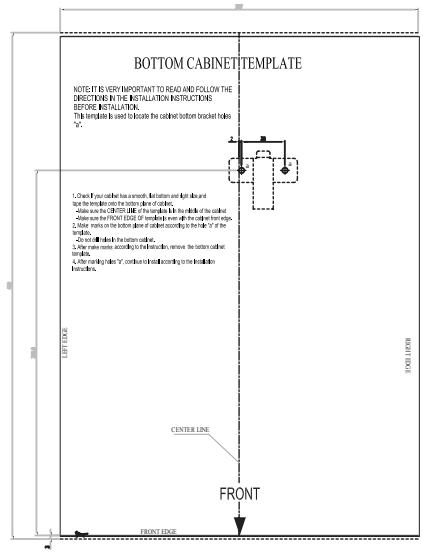
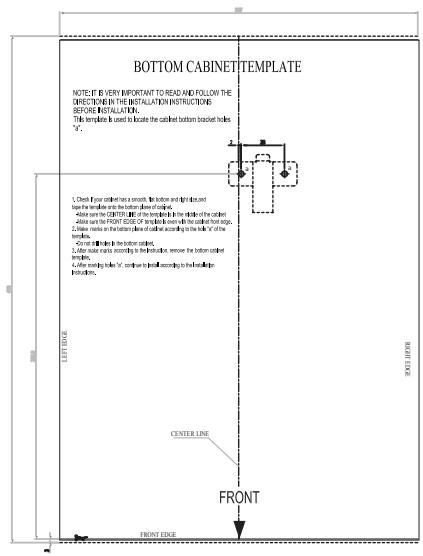
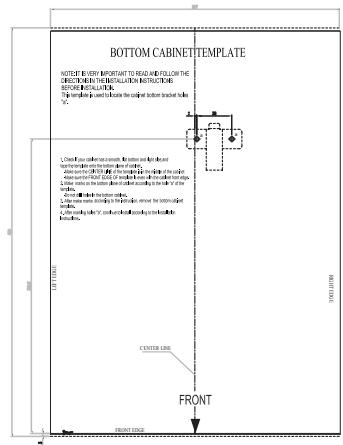
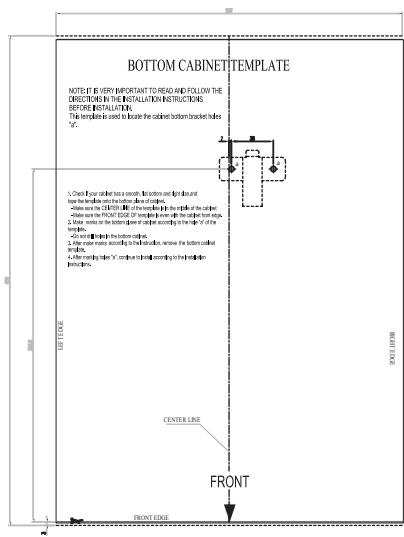
  1. Read the instruction on the bottom cabinet template and put the template on the bottom plane of cabinet.

BEKO BMGB25333X - Preparing the cabinet - 1

natural_image Simple line drawing of a 3D rectangular box with no text or symbols

BOTTOM CABINET TEMPLATE NOTE TO BE IT IS IMPORTANT TO READ AND FOLLOW THE DESCRIPTION OF THIS MEDIUM. ALL ITEMS ARE BEET-NO. 1000000. FOR EACH SHEET IS USED IN THE ORDER BY: (1) BACK SHEET, 2000000. FOR EACH SHEET IS USED IN THE ORDER BY: (2) BACK SHEET, 2000000. CORNY LINE CENTER LINE FRONT TOP TICKLE TOP CABBAGE

3 Installation and connection

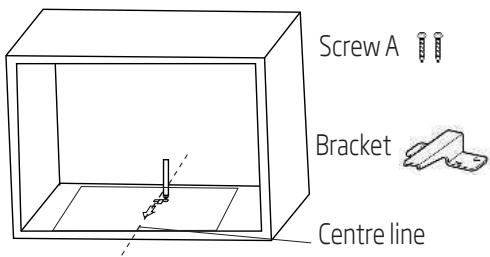
  1. Make the marks on the bottom plane of cabinet according to marks "a" of the template.

Screw A Bracket Centre line

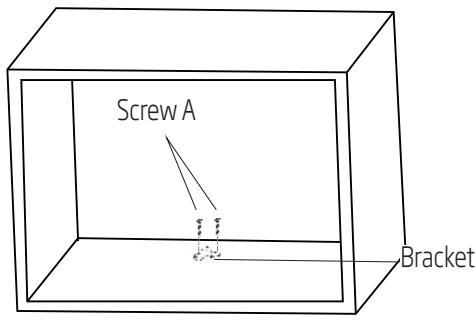
  1. Remove the bottom cabinet template and fix the bracket with screw A.
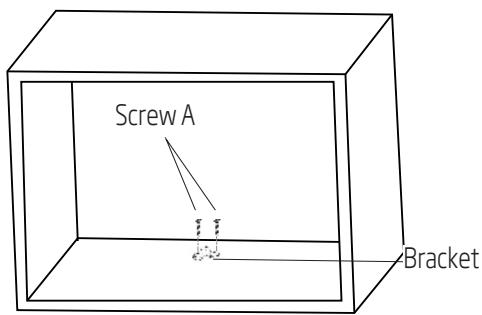
Screw A Bracket

3.2.3 Fixing the oven

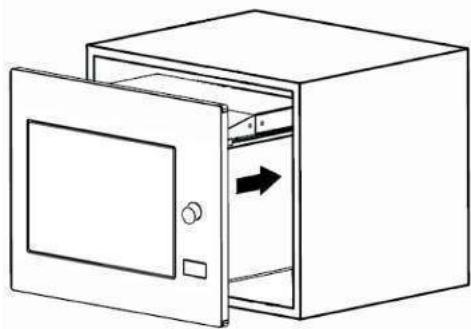
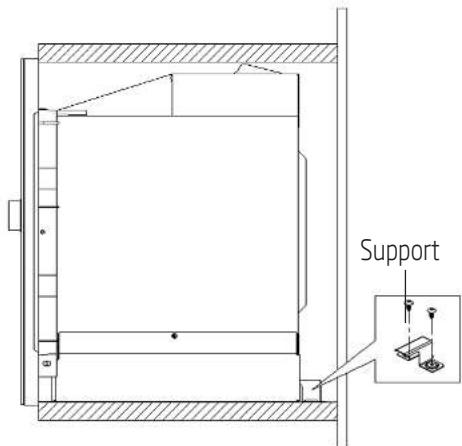
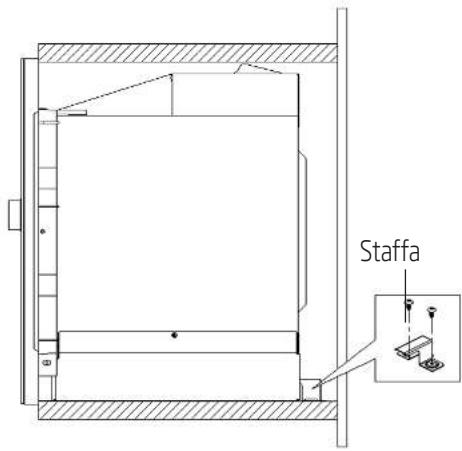
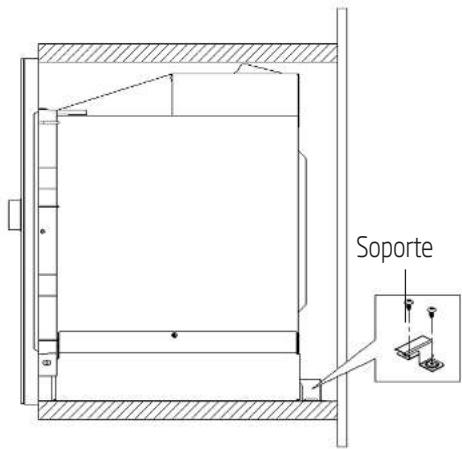
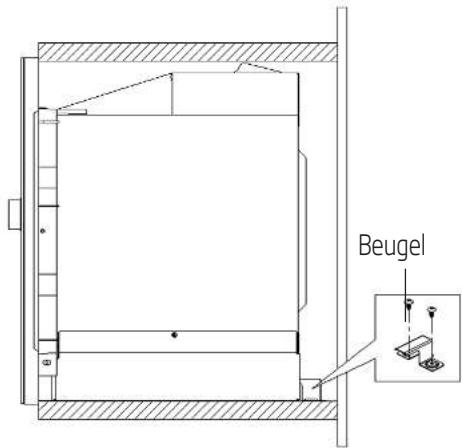
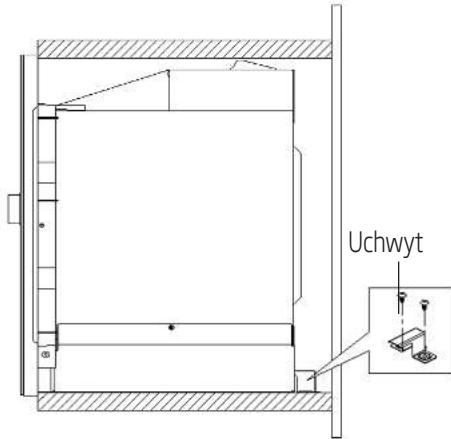
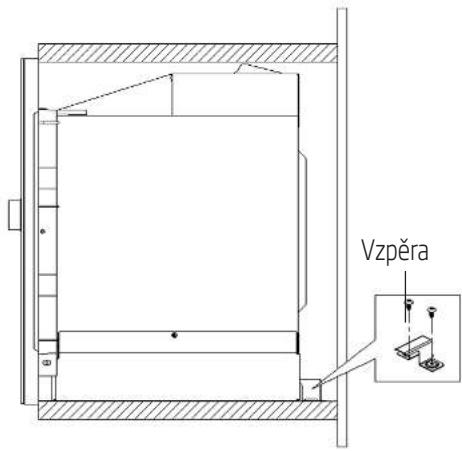
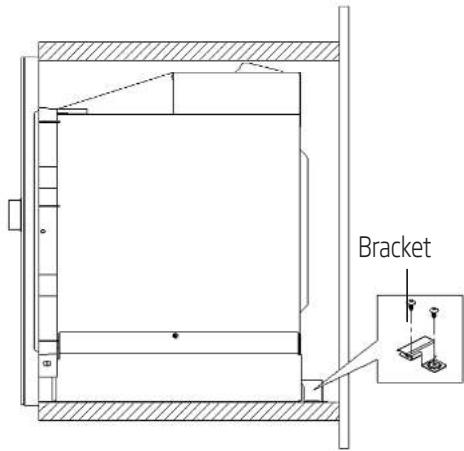
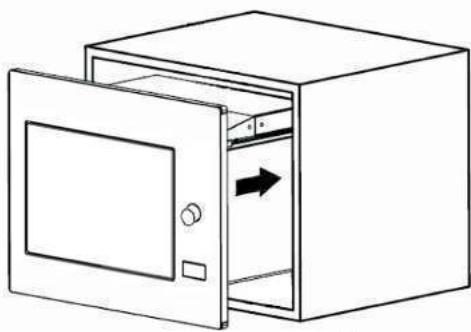
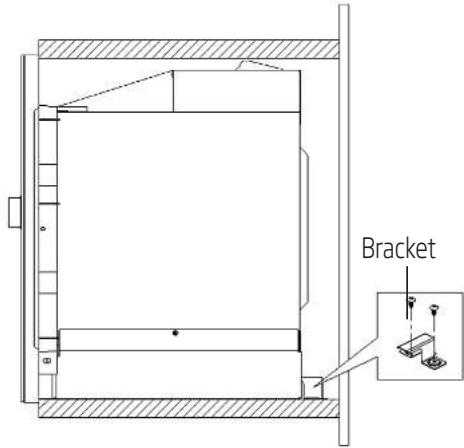
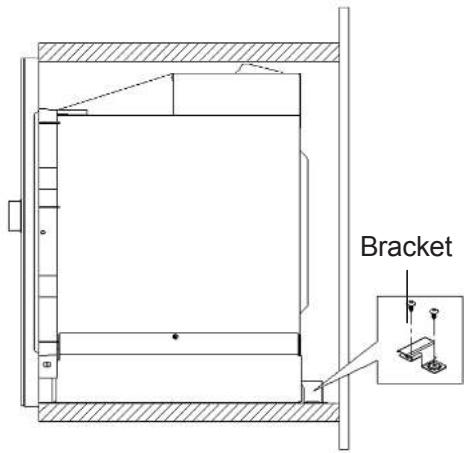
  1. Install the oven into the cabinet.

BEKO BMGB25333X - Fixing the oven - 1

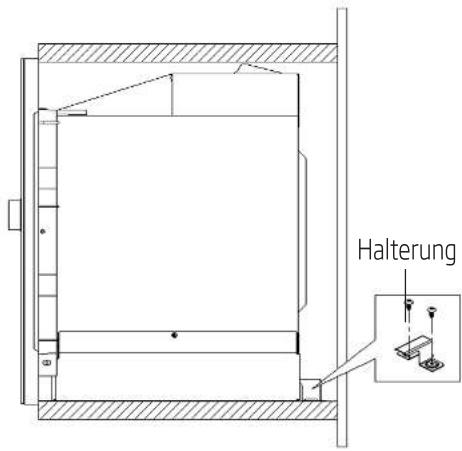
Make sure the back of the oven is locked by bracket.

BEKO BMGB25333X - Fixing the oven - 2

Do not trap or bend the power cable.
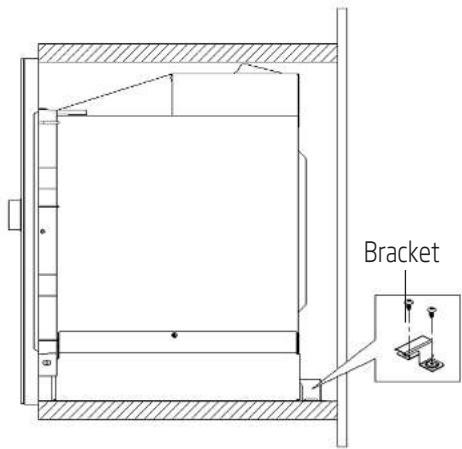
BEKO BMGB25333X - Fixing the oven - 3

natural_image Line drawing of a closed oven with an open door and directional arrow indicating airflow (no text or symbols)

Bracket

3 Installation and connection

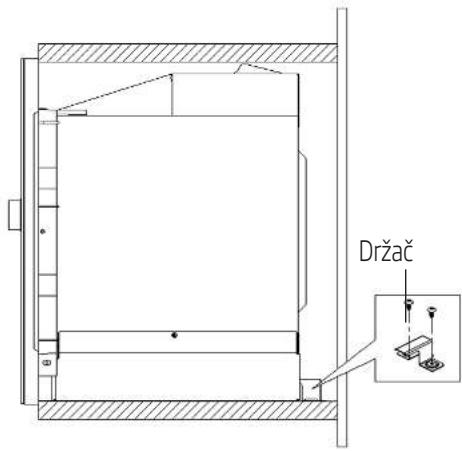
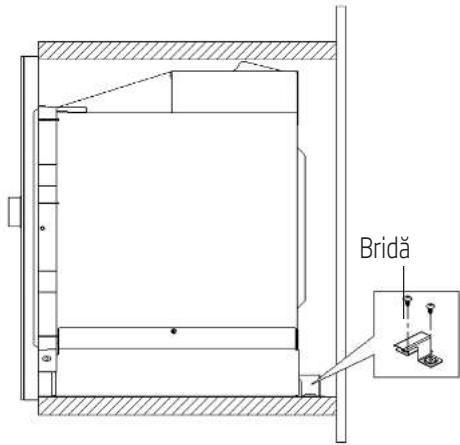
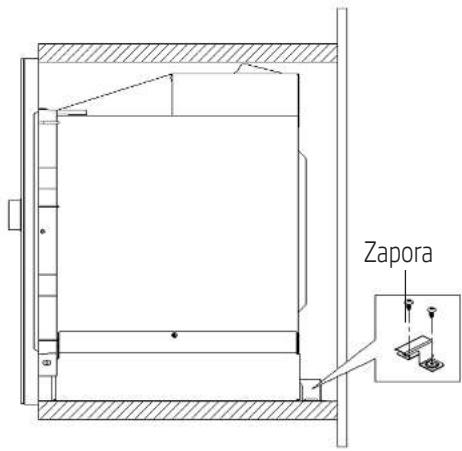
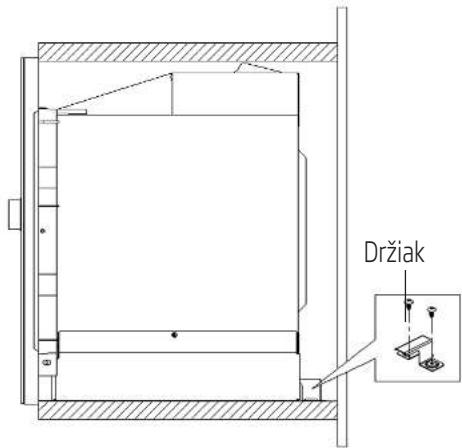
  1. Open the door, fix the oven to the cabinet with Screw B through the installation hole. Then fix the trim-kit plastic cover to the installation hole.
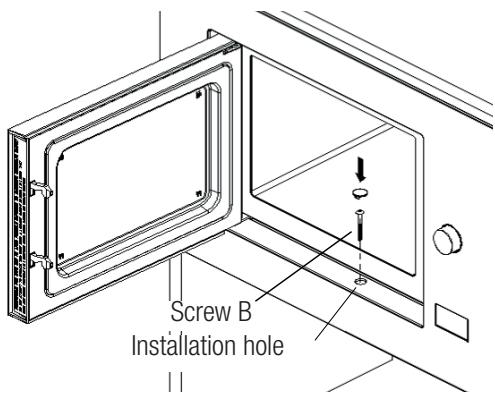
Screw B Installation hole

3.3 Radio interference

BEKO BMGB25333X - Radio interference - 1

Operation of the microwave oven may cause interference on radios, TVs and similar appliances.

  • Place the oven as far away from radios and TVs as possible. Operation of microwave oven may cause interference to your radio or TV reception. 2. Plug your oven into a standard household outlet. Be sure the voltage and the frequency is the same as the voltage and the frequency on the rating plate.
  • In case of interference, it may be reduced or eliminated by taking the precautions given below:
  • Clean the door and sealing surface of the oven.
  • Set the antenna direction of the radio or TV again.
  • Reposition the oven based on the location of the receiver.
  • Place microwave oven away from the receiver.
  • Plug the microwave oven to another outlet, thus microwave oven and receiver shall be on different lines.

3.4 Microwave cooking principles

  • Prepare the food carefully. Place the remaining parts to the outside of the dish.
  • Pay attention to the cooking time. Cook in the shortest time specified and add some more time if required. Overcooked food may cause smoke or may be burnt.
  • Cover the food while cooking. Covering the food prevents any splashing and helps to ensure that food is cooked evenly.
  • Turn over food such as poultry and hamburgers while cooking them in a microwave oven in order to accelerate cooking of this kind of food. Larger food such as roast must be turned over at least once.
  • Turn food such as meatballs upside down in the middle of the cooking and replace them with each other from the center of the dish to the outside.

3.5 Grounding instructions

This appliance must be grounded. This oven has a grounding cable with a grounded plug. Appliance must be plugged to a wall outlet installed and grounded correctly. Grounding system allows a leak wire for the electrical current in case of a short circuit and reduces the risk of electric shock. We recommend using an electrical circuit dedicated to the oven. Operating with high voltage is dangerous and may cause fire or other accidents that would cause damage to the oven.

BEKO BMGB25333X - Grounding instructions - 1

WARNING: Misuse of grounding plug may cause electric shock.

BEKO BMGB25333X - Grounding instructions - 2

If you have any questions on grounding and electrical instructions, please consult a qualified electric technician or service personnel.

3 Installation and connection

BEKO BMGB25333X - Installation and connection - 1

Manufacturer and/or dealer would not accept any responsibility for injuries or damages on the oven that may occur when electrical connection procedures are not followed.

3.6 Utensil test

Never operate the microwave oven empty. The only exception is the utensil test described in the following section. Some certain non-metal utensils may not be suitable for using in microwave. If you are not sure whether your utensil is suitable for microwave, you can perform the following test.

  1. Place the empty utensil to be tested into the microwave oven together with a microwave-compatible glass filled with 250 ml water.
  2. Operate the microwave oven at max power for 1 minute.
  3. Check carefully the temperature of the utensil being tested. If it is warmed up, it is not suitable for use in microwave.
  4. Never exceed the operating time limit of 1 minute. If you notice arcing during 1 minute of operation, stop the microwave. Utensils causing arcing are not suitable for use in microwave.

Following list is a general guide that would help you in selecting the right utensil.

Cooking utensilMicrowaveGrillCombination
Heat-resistant glassYesYesYes
Non-heat-resistant glassNoNoNo
Heat-resistant ceramicsYesYesYes
Plastic dish suitable for microwave ovenYesNoNo
Paper kitchenwareYesNoNo
Metal trayNoYesNo
Metal rackNoYesNo
Aluminum foil and foil coversNoYesNo
Foam materialsNoNoNo

4.1 Control panel

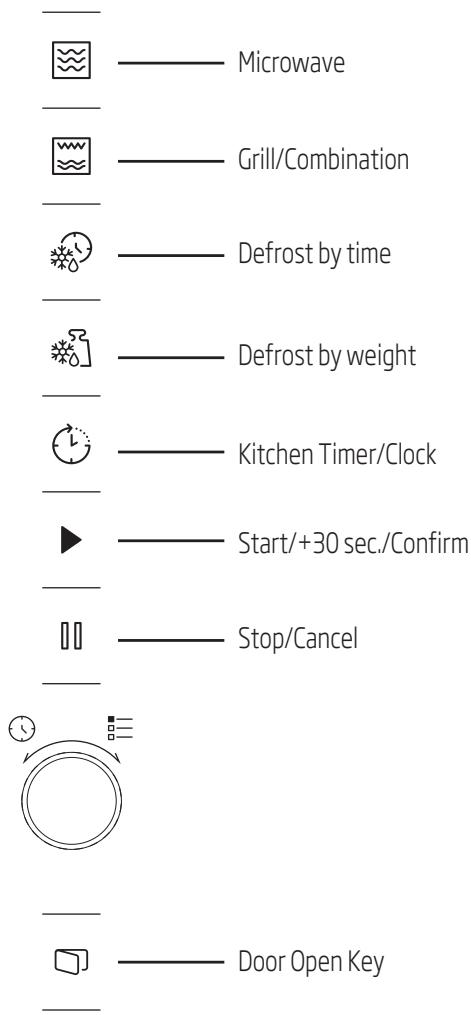
Microwave Grill/Combination Defrost by time Defrost by weight Kitchen Timer/Clock Start/+30 sec./Confirm Stop/Cancel Door Open Key

4.2 Operating instructions

4.2.1 Setting the time

When the microwave oven is energized, "0:00" will be displayed in LED screen and buzzer will ring once.

  1. Press "💡" twice and the figures for hours will start flashing.
  2. Turn "💡" to adjust the hour; the input value should be between 0 and 23.
  3. Press "💡" and the figures for minutes will start flashing.
  4. Turn "☐" to adjust the minutes; the input value should be between 0 and 59.
  5. Press "💡" to finish time setting. ":" symbol will flash, and the time will light.

BEKO BMGB25333X - Setting the time - 1

If you press "☐" during time setting, oven will automatically return back to previous mode.

4.2.2 Cooking with microwave oven

  1. Press "☐" and "P100" will be displayed in LED screen.
  2. Press "☐" again or turn "☐" to select the desired power. Each time you press the key, "P100", "P80", "P50", "P30" or "P10" will be displayed respectively.
  3. Press "▶" to confirm and turn "💡" to set the co-oking time to a value between 0:05 and 95:00.
  4. Press "▶" again to start cooking.

BEKO BMGB25333X - Cooking with microwave oven - 1

Example: If you want to use 80% microwave power to cook for 20 minutes, you can operate the oven with the following steps.

4 Operation

  1. Press "☒" once and "P100" will be displayed in the screen.
  2. Press "☐" once again or turn "☐" to set 80% microwave power.
  3. Press "▶" to confirm and "P 80" will be displayed in the screen.
  4. Turn "💡" to adjust the cooking time until the oven displays "20:00".
  5. Press "▶" to start cooking.

The steps for adjusting the time in coding button are as below:

Setting the durationIncrement amount
0-1 minute5 seconds
1-5 minutes10 seconds
5-10 minutes30 seconds
10-30 minutes1 minute
30-95 minutes5 minutes

Microwave keypad instructions

OrderScreenMicrowave Power
1P100100%
2P8080%
3P5050%
4P3030%
5P1010%

4.3 Cooking with grill or combination mode

  1. Press "☐" and "G" will be displayed in LED screen. Press "☐" repeatedly or turn "☐" to select the desired power. Each time you press the key, "G", "C-1" or "C-Z" will be displayed respectively.
  2. Press "▶" to confirm and turn "💡" to set the co-oking time to a value between 0:05 and 95:00.
  3. Press "▶" again to start cooking.

BEKO BMGB25333X - Cooking with grill or combination mode - 1

Example: If you want to use 55% microwave power and 45% grill power (C-1) to cook for 10 minutes, you can operate the oven with the following steps.

  1. Press "W" once and "G" will be displayed in the screen.
  2. Press "☐" once again or turn "☐" to select the Combination 1 mode.
  3. Press "▶" to confirm and "C-1" will be displayed in the screen.
  4. Turn "💡" to adjust the cooking time until the oven displays "10:00".
  5. Press "▶" to start cooking.

(Grill/Combination) Keypad instructions

OrderScreenMicrowave PowerGrill Power
1G0%100%
2C-155%45%
3C-236%64%

BEKO BMGB25333X - Cooking with grill or combination mode - 2

When half the grill time passes, the oven sounds twice, and this is normal. In order to have a better grilling effect, you should turn the food over, close the door, and then press "▶" to continue cooking. If no operation is performed, the oven will continue cooking.

4.4 Quick start

  1. In standby mode, press "▶" to start cooking with 100% microwave power. Each time you press the key, cooking time will increase until 95 minutes with steps of 30 seconds.

4 Operation

  1. In microwave oven cooking, grill and combination cooking or defrost by time modes, the cooking time will increase by 30 seconds each time you press "▶".
  2. In standby mode, turn "☐" counterclockwise to set the cooking time in order to start cooking with 100% microwave power and press "▶" to start cooking.

BEKO BMGB25333X - Operation - 1

In auto menu and defrost by weight modes, pressing "▶" will not increase the cooking time.

4.5 Defrost by time

  1. Press "✿" for once.
  2. Turn "💡" to select the defrost time. The maximum time is 95 minutes.
  3. Press "▶" to start defrost. Defrost power is P30 and cannot be changed.

4.6 Defrost by weight

  1. Press "✿"} for once.
  2. Turn "💡" to select the weight of food from 100 to 2000 g.
  3. Press "▶" to start defrost.

4.7 Kitchen timer (counter)

Your oven is equipped with an automatic counter which is not linked with the oven functions and can be used separately at the kitchen ( it can be set to max. 95 minutes.)

  1. Press "💡" for once and 00:00 will be displayed in LED screen.
  2. Turn "💡" to enter the correct time.
  3. Press "▶" to confirm the setting.

  4. When the countdown from the entered time reaches to 00:00, the buzzer will ring for 5 times. If the time is set (24-hour system), current time will be displayed in LED screen.

Press "☐" to abort the timer at anytime.

BEKO BMGB25333X - Kitchen timer (counter) - 1

Kitchen timer functions different than 24-hours system. Kitchen timer is just a timer.

4.8 Auto menu

  1. Turn "Q" clockwise to select the desired menu. Menus between "A-1" and "A-8", namely pizza, meat, vegetable, pasta, potato, fish, beverage and popcorn, will be displayed.
  2. Press "▶" to confirm.
  3. Turn "💡" to choose the default weight in accordance with the menu chart.
  4. Press "▶" to start cooking.

BEKO BMGB25333X - Auto menu - 1

Example: If you want to use "Auto Menu" to cook 350 g fish:

  1. Turn "Q" clockwise until "A-6" is displayed in the screen.
  2. Press "▶" to confirm.
  3. Turn "💡" to select the weight of fish until "350" is displayed in the screen.
  4. Press "▶" to start cooking.

Auto cooking menu

MenuWeightScreen
A-1 Pizza200 g200
400 g400
A-2 Meat250 g250
350 g350
450 g450
BEKO BMGB25333X - Auto menu - 2A-3 Vegetable200 g200
300 g300
400 g400
BEKO BMGB25333X - Auto menu - 3A-4 Pasta50 g (with 450 ml cold water)50
100 g (with 800 ml cold water)100
BEKO BMGB25333X - Auto menu - 4A-5 Potato200 g200
400 g400
600 g600
BEKO BMGB25333X - Auto menu - 5A-6 Fish250 g250
350 g350
450 g450
BEKO BMGB25333X - Auto menu - 6A-7 Beverage1 glass (120 ml)1
2 glasses (240 ml)2
3 glasses (360 ml)3
BEKO BMGB25333X - Auto menu - 7A-8 Popcorn50 g50
100 g100

4.9 Multi-step cooking

At most 2 steps can be set for cooking. In multi-step cooking, if one step is defrosting, then defrosting must be placed in the first step.

BEKO BMGB25333X - Multi-step cooking - 1

If you want to thaw food for 5 minutes and then cook with 80% microwave power for 7 minutes, perform the following steps:

  1. Press "✿" for once.
  2. Turn "💡" to select the defrost time until "5:00" is displayed in the screen.
  3. Press "💡" once and "P100" will be displayed in the screen.
  4. Press "💡" once again or turn "💡" to set 80% microwave power.

  5. Press "▶" to confirm and "P 80" will be displayed in the screen.

  6. Turn "💡" to adjust the cooking time until the oven displays "7:00".
  7. Press "▶" to start cooking. Buzzer will sound once for the first step and defrost time count-down will start. Buzzer will sound once again when entering the second cooking step. Buzzer will sound for 5 times at the end of cooking.

4.10 Query function

  1. In microwave, grill and combination modes, press "☐" or "☐" and the current power level will be displayed for 3 seconds. After 3 seconds, the oven will return to the previous mode.

  2. While cooking, press "💡" and the current time will be displayed for 3 seconds.

4.11 Child lock

  1. Locking: In standby mode, press "☐" for 3 seconds and a buzzer will sound indicating that the child lock is activated. If the time is already set, current time will also be displayed; otherwise "☐" will be displayed in the LED screen.

  2. Unlocking: To disable the child lock, press "¶" for 3 seconds and a long "beep" will sound indicating that the child lock is disabled.

4.12 Opening the oven door

Press "☐" and the oven door will be opened.

BEKO BMGB25333X - Opening the oven door - 1

If the door cannot be opened with "☐" key in (e.g., due to power failure), you can open the door with vacuum lifter for opening the door manually.

5 Cleaning and maintenance

5.1 Cleaning

BEKO BMGB25333X - Cleaning - 1

WARNING: Never use gasoline, solvent, abrasive cleaning agents, metal objects or hard brushes to clean the appliance.

BEKO BMGB25333X - Cleaning - 2

WARNING: Never immerse the appliance or its power cable in water or in any other liquid.

  1. Turn the appliance off and disconnect it from wall socket.
  2. Wait for the appliance to completely cool down.
  3. Keep the inside of the oven clean. Wipe with a damp cloth when splashed food or spilled liquids stick on the walls of the oven. A mild detergent may be used if the oven gets very dirty. Avoid using sprays and other harsh cleaning agents as they may cause stains, marks, and opaqueness on the door surface.
  4. Outer surfaces of the oven must be cleaned with a damp cloth. Do not allow water ingress from ventilation openings to prevent damage to the operating parts in the oven.
  5. Wipe both sides of the door and the glass, door gaskets and parts near the gaskets frequently with a damp cloth in order to remove the overflowing and splashing stains. Do not use abrasive cleaning agents.
  6. Do not allow control panel to get wet. Clean with a soft damp cloth. Leave the door of the oven open to prevent inadvertent operation while cleaning the control panel.
  7. If steam accumulates inside or around the oven door, wipe with a soft cloth. This may occur when the microwave oven is operated under high humidity conditions. It is normal.
  8. In some cases, you may need to remove the glass tray for cleaning. Wash the tray in warm soapy water or in a dishwasher.

  9. The roller ring and oven floor should be cleaned regularly to avoid excessive noise.

  10. It would be sufficient to wipe the lower surface of the oven with a mild detergent. Roller ring may be washed in warm soapy water or in a dishwasher. When you remove the roller ring from oven internal floor for cleaning, ensure that you install it in the correct position while replacing it.

  11. In order to remove bad odors in your oven, put a glass of water and juice and peel of a lemon to a deep bowl suitable for use in microwave and operate the oven for 5 minutes in microwave mode. Wipe thoroughly and dry with a soft cloth.

  12. Please contact the authorized service when the oven lamp needs to be replaced.

  13. The oven should be cleaned regularly and any food deposits should be removed. If the oven is not kept clean, this may cause surface defects that would affect the lifecycle of the appliance negatively and that would possibly cause risks.

  14. Please do not dispose this appliance with household waste; old ovens shall be disposed to special waste centers provided by the municipalities.

  15. When the microwave oven is used in grill function, a small amount of smoke and odor may occur which will disappear after a certain time of usage.

5.2 Storage

  • If you do not intend to use the appliance for a long time, please store it carefully.
  • Please make sure that the appliance is unplugged, cooled down and totally dry.
  • Store the appliance in a cool and dry place.
  • Keep the appliance out of the reach of children

5 Cleaning and maintenance

5.3 Handling and transportation

- During handling and transportation, carry the appliance in its original packaging. The packaging of the appliance protects it against physical damages.

  • Do not place heavy loads on the appliance or the packaging. The appliance may be damaged.
  • Dropping the appliance will render it non-operational or cause permanent damage..

6 Troubleshooting

Normal
Microwave oven interferes with TV receptionRadio and TV reception may be interfered when microwave oven is operating. It is similar to the interference caused by small electrical appliances, like mixer, vacuum cleaner, and electric fan. It is normal.
Oven light is dimmedIn low power microwave cooking, oven light may be dimmed. It is normal.
Steam accumulating on door, hot air coming out of ventsDuring cooking, steam may arise from the food. Most of this steam will get out from vents. But some may accumulate on a cool place like oven door. It is normal.
Oven started accidentally with no food in it.It is not allowed to run the appliance without any food inside. It is very dangerous.
ProblemPossible ReasonSolution
Oven cannot be started.1) Power cable is not plugged in properly.Unplug. Then plug again after 10 seconds.
2) Fuse is blown or circuit breaker is activated.Replace fuse or reset circuit breaker (repaired by professional personnel of our company).
3) Trouble with outlet.Test the outlet with other electrical appliances.
Oven does not heat.4) Door is not closed properly.Close the door properly.
Glass turntable makes noise when microwave oven operates5) Turntable and bottom of the oven is dirty.Refer to “Cleaning and Maintenance” section to clean dirty parts.
Oven displays E-3 error and does not function6) Oven door does not open (due to an obstruction in front of the door, low voltage and etc.)Unplug. Then plug again after 10 seconds.
natural_image Simple line drawing of a 3D rectangular box (no text or symbols)

BOTTOM CABINET TEMPLATE NOTED IT IS VERY IMPORTANT TO READ OR FOLLOW THE DESCRIPTION IN THE INSTALLATION INSTRUCTIONS BEFORE INSTALLATION. The template is used to be the cabinet and bottom bracket (in "0.1") Chest 4 parts mounted on a door, the door and the front way are the windows outside the door of the window. - All parts are part of the door, and the door is not without the FRONT (ISO) of the window and the door itself. The bottom section is the bottom section of the window and the bottom section of the bottom. - All parts are the bottom sections. - Lower base parts are along the bottom edge, reverse the bottom section below. - All parts are the bottom section of the bottom section of the bottom section. CENTER LINE FRONT FRONT EDGE

natural_image Line drawing of a closed storage cabinet with an open door and directional arrow indicating flow (no text or symbols)

Halterung

natural_image Simple line drawing of a 3D rectangular box (no text or symbols)

BOTTOM CABINET TEMPLATE NOTE: IT IS VERY IMPORTANT TO READ AND FOLLOW THE DIRECTIONS IN THE INSTALLATION INSTRUCTIONS BEFORE INSTALLATION. This template is used to locate the cabinet bottom bracket holes "F". 1. Check your cabinet has a smooth, flat button right dash and touch to handle until the bottom door of cabin. 2. Allow some CHAPTER 30 of opening to the top panel of the cabinet. 3. Allow same the FRONT CODE of opening to account for the bottom front panel. 4. Allow marks on the bottom floor of closed according to the bottom "F" of the bathroom. 5. Allow all other lines in the bottom side. 6. After window marks according to the beginning, remove the bottom side of cabin. 7. After opening holes "C", continue to install according to the bottom side from above. CENTER LINE FRONT FRONT EDGE

3 Installation et raccordement

natural_image Line drawing of a closed oven with an open door and directional arrow indicating airflow (no text or symbols)

Support

3 Installation et raccordement

natural_image Simple line drawing of a 3D rectangular box (no text or symbols)

BOTTOM CABINET TEMPLATE NOTE: IT IS VERY IMPORTANT TO READ AND FOLLOW THE DIRECTOR IN THIS INSTALLATION INSTRUCTION AND BEFORE INSTALLATION. This template is used to locate the cabinet bottom bracketing holes. "C" 1. Check front panel of the front panel, the bottom and light align and lock the window on the bottom panel of the door. 2. Check the CENTER LINE OF THE top panel of the cabinet, which is set on the FRONT LINE OF THE middle panel of the door. 3. Check the rear panel of the bottom panel of the cabinet, which is set on the front panel of the door. 4. Check the front panel of the middle panel of the cabinet, which is set on the front panel of the door. 5. Check the rear panel of the bottom panel. 6. Check the front panel of the middle panel of the cabinet, which is set on the front panel of the door. 7. Check the rear panel of the middle panel of the cabinet, which is set on the front panel of the door. 8. Check the front panel of the middle panel of the cabinet, which is set on the front panel of the door. 9. Check the rear panel of the middle panel of the cabinet, which is set on the front panel of the door. 10. Check the front panel of the middle panel of the cabinet, which is set on the front panel of the door. CENTER LINE FRONT FRONT EDGE

natural_image Line drawing of a closed storage cabinet with an open door and directional arrow indicating airflow (no text or symbols)

Staffa

natural_image Simple line drawing of a 3D rectangular box with no text or symbols

BOTTOM CABINET TEMPLATE NOTE: IT IS VERY IMPORTANT TO READ AND FOLLOW THE DIRECTION IN THE INSTALLATION INSTRUCTIONS BEFORE INSTALLATION. This template is used to locate the cabinet before bracket holes "F". 1. Check if your cabinet has a section. If the bottom section is open and left side of the window, then the bottom section is closed of all windows. 2. Allow some the CENTER, the bottom section is the middle of the cabinet. 3. Allow some the FRONT section of the cabinet is open and the interior section is closed. 4. Lower panels on the bottom panel of cabinet according to the bottom section of the cabinet. 5. For each panel in the bottom section, it is also closed. The bottom panel remains inside the cabinet's window. 6. After panel outside the bottom panel, it is also closed. The bottom panel is closed. 7. After panel being above "F", continue the interior according to the bottom panel's window. 8. Left side CENTER LINE FRONT FRONT EDGE

natural_image Line drawing of a closed oven with an open door and arrow indicating direction (no text or symbols)

Soporte

natural_image Simple line drawing of a 3D rectangular box with no text or symbols

BOTTOM CABINET TEMPLATE NOTE: IT IS VERY IMPORTANT TO READ AND FOLLOW THE DIRECTIONS IN THE INSTALLATION INSTRUCTIONS BEFORE INSTALLATION. This template is used to locate the cabinet bottom bracket blocks "F". 1. Check your cabinet has a smooth, flat button or light dash and push to handle inside the bottom edge of the cabinet. 2. Allow some CIPITER (a) off the middle line to the middle of the cabinet. 3. Allow some FRONT CODE or non-numbered as follows: the bottom side of the cabinet. 4. Use blocks on the bottom panel of slatted according to the middle of the bonds. 5. Use all blocks in the bottom panels. 6. After some rows according to the following: remove the bottom side of the bonds. 7. After sliding blocks "c", continue to remain according to the middle of the bonds. TOP LINE CENTER LINE FRONT FRONT EDGE

natural_image Line drawing of a closed storage cabinet with an open door and directional arrow indicating internal movement (no text or symbols)

Beugel

natural_image Simple line drawing of a 3D rectangular box with no text or symbols

BOTTOM CABINET TEMPLATE NOTE: IT IS VERY IMPORTANT TO READ AND FOLLOW THE DIRECTIONS IN THE INSTALLATION INSTRUCTIONS BEFORE INSTALLATION. This template is used to locate the cabinet bottom bracket holes "F". 1. Check your cabinet has a smooth, flat button using light guide and grip to be sealed onto the bottom edge of the cabinet. 2. Allow some CENTER LINE OF the bend, where the middle of the cabinet 3. Allow some FRONT EDGE OF the bend, according to the bottom side edge. 4. Lower end lines on the bottom blade of the bend according to the middle of the bonds. 5. After main sides according to the bottom side, remove the bottom side of the bonds. 6. After closing holes "F", continue to remain according to the bottom side bracket. 7. Left edge CENTER LINE FRONT FRONT EDGE

natural_image Line drawing of a closed storage cabinet with an open door and arrow indicating direction (no text or symbols)

Uchwyt

natural_image Simple line drawing of a 3D rectangular box with no text or symbols

BOTTOM CABINET TEMPLATE NOTE: IT IS VERY IMPORTANT TO READ AND FOLLOW THE DIRECTIONS IN THE INSTALLATION INSTRUCTIONS BEFORE INSTALLATION. This template is used to locate the cabinet bottom bracket handles "F". 1. Check your cabinet has a smooth, flat button using light guide and grip to handle walls on the bottom edge of the cabinet. 2. Allow some CENTER LINE OF the dashboard to allow the cabinet's side panel. 3. Allow some FRONT LINE OF the dashboard to allow the cabinet's front edge. 4. Lower buttons on the bottom panel mounted according to the side of the dashboard. 5. After main buttons according to the front side panel, allow the cabinet's side panel. 6. After main buttons according to the front side panel, allow the cabinet's front edge. 7. After main buttons according to the front side panel. 8. After main buttons according to the front side panel. 9. After main buttons according to the front side panel. 10. After main buttons according to the front side panel. 11. After main buttons according to the front side panel. 12. After main buttons according to the front side panel. 13. After main buttons according to the front side panel. 14. After main buttons according to the front side panel. 15. After main buttons according to the front side panel. 16. After main buttons according to the front side panel. 17. After main buttons according to the front side panel. 18. After main buttons according to the front side panel. 19. After main buttons according to the front side panel. 20. After main buttons according to the front side panel. 21. After main buttons according to the front side panel. 22. After main buttons according to the front side panel. 23. After main buttons according to the front side panel. 24. After main buttons according to the front side panel. 25. After main buttons according to the front side panel. 26. After main buttons according to the front side panel. 27. After main buttons according to the front side panel. 28. After main buttons according to the front side panel. 29. After main buttons according to the front side panel. 30. After main buttons according to the front side panel. 31. After main buttons according to the front side panel. 32. After main buttons according to the front side panel. 33. After main buttons according to the front side panel. 34. After main buttons according to the front side panel. 35. After main buttons according to the front side panel. 36. After main buttons according to the front side panel. 37. After main buttons according to the front side panel. 38. After main buttons according to the front side panel. 39. After main buttons according to the front side panel. 40. After main buttons according to the front side panel. 41. After main buttons according to the front side panel. 42. After main buttons according to the front side panel. 43. After main buttons according to the front side panel. 44. After main buttons according to the front side panel. 45. After main buttons according to the front side panel. 46. After main buttons according to the front side panel. 47. After main buttons according to the front side panel. 48. After main buttons according to the front side panel. 49. After main buttons according to the front side panel. 50. After main buttons according to the front side panel. 51. After main buttons according to the front side panel. 52. After main buttons according to the front side panel. 53. After main buttons according to the front side panel. 54. After main buttons according to the front side panel. 55. After main buttons according to the front side panel. 56. After main buttons according to the front side panel. 57. After main buttons according to the front side panel. 58. After main buttons according to the front side panel. 59. After main buttons according to the front side panel. 60. After main buttons according to the front side panel. 61. After main buttons according to the front side panel. 62. After main buttons according to the front side panel. 63. After main buttons according to the front side panel. 64. After main buttons according to the front side panel. 65. After main buttons according to the front side panel. 66. After main buttons according to the front side panel. 67. After main buttons according to the front side panel. 68. After main buttons according to the front side panel. 69. After main buttons according to the front side panel. 70. After main buttons according to the front side panel. 71. After main buttons according to the front side panel. 72. After main buttons according to the front side panel. 73. After main buttons according to the front side panel. 74. After main buttons according to the front side panel. 75. After main buttons according to the front side panel. 76. After main buttons according to the front side panel. 77. After main buttons according to the front side panel. 78. After main buttons according to the front side panel. 79. After main buttons according to the front side panel. 80. After main buttons according to the front side panel. 81. After main buttons according to the front side panel. 82. After main buttons according to the front side panel. 83. After main buttons according to the front side panel. 84. After main buttons according to the front side panel. 85. After main buttons according to the front side panel. 86. After main buttons according to the front side panel. 87. After main buttons according to the front side panel. 88. After main buttons according to the front side panel. 89. After main buttons according to the front side panel. 90. After main buttons according to the front side panel. 91. After main buttons according to the front side panel. 92. After main buttons according to the front side panel. 93. After main buttons according to the front side panel. 94. After main buttons according to the front side panel. 95. After main buttons according to the front side panel. 96. After main buttons according to the front side panel. 97. After main buttons according to the front side panel. 98. After main buttons according to the front side panel. 99. After main buttons according to the front side panel. 100. After main buttons according to the front side panel.

natural_image Line drawing of a closed storage cabinet with an open door and directional arrow indicating flow or movement (no text or symbols)

Vzpěra

4.2 Pokyny k obsluze

natural_image Simple line drawing of a 3D rectangular box with no text or symbols

BOTTOM CABINET TEMPLATE NOTE: IT IS VERY IMPORTANT TO READ AND FOLLOW THE DIRECTION IN THE INSTALLATION INSTRUCTIONS BEFORE INSTALLATION. This template is used to locate the cabinet bottom bracket holes "V". 1. Check if your cabinet has a smooth, flat button and light disk and the middle line into the bottom section of the window. 2. Allow any the CENTER LINE of the middle line to the bottom of the cabinet 3. Allow that the FRONT EDGE of the middle line according to the bottom section's edge. 4. Lower lines on the bottom lines of the middle line according to the middle line of the bottom. 5. All other lines are not in the bottom section. 6. After intersection according to the bottom section, please note the bottom section of the bottom line. 7. After intersection "V", please note the bottom section in the bottom section this line. CENTER LINE FRONT FRONT EDGE

natural_image Line drawing of a closed oven with an open door and directional arrow indicating airflow (no text or symbols)

Držač

natural_image Simple line drawing of a 3D rectangular box with no text or symbols

BOTTOM CABINET TEMPLATE NOTE: IT IS VERY IMPORTANT TO READ AND FOLLOW THE DIRECTIONS IN THE INSTALLATION INSTRUCTIONS BEFORE INSTALLATION. This template is used to locate the cabinet bottom bracket holes "F". 1. Check your cabinet has been removed, the button is light and dark and take it to handle any other portion of the cabinet. 4. Allow some the CIRCUIT, all of the ceiling is to be made by the cabinet. 5. Allow some the FRONT CODE of the ceiling is also carried out to the right side. 6. Use parts on the bottom panel of a section according to the side of "F" the sides. 7. Use all parts in the front side. 8. Use other parts according to the bottom side, remove the cabinet's side components. 9. Use existing body "F", cut off to the right according to the front side instructions. CENTER LINE FRONT FRONT EDGE

natural_image Line drawing of a closed storage cabinet with an open door and directional arrow indicating flow (no text or symbols)

Bridă

natural_image Simple line drawing of a 3D rectangular box with no text or symbols

BOTTOM CABINET TEMPLATE INSPECTRIT IS VERY IMPORTANT TO HEAD MEETING THE DETAIL OF THIS BOTTLE AND CONSTRUCTION OF BEFORE INSTALLATION. 1. The design is to be applied to the cabinet before boarding a door. 2. The design is to be added to the cabinet's side panel. 3. The design is to be added to the cabinet's side panel. 4. The design is to be added to the cabinet's side panel. 5. The design is to be added to the cabinet's side panel. 6. The design is to be added to the cabinet's side panel. 7. The design is to be added to the cabinet's side panel. 8. The design is to be added to the cabinet's side panel. 9. The design is to be added to the cabinet's side panel. 10. The design is to be added to the cabinet's side panel. 11. The design is to be added to the cabinet's side panel. 12. The design is to be added to the cabinet's side panel. 13. The design is to be added to the cabinet's side panel. 14. The design is to be added to the cabinet's side panel. 15. The design is to be added to the cabinet's side panel. 16. The design is to be added to the cabinet's side panel. 17. The design is to be added to the cabinet's side panel. 18. The design is to be added to the cabinet's side panel. 19. The design is to be added to the cabinet's side panel. 20. The design is to be added to the cabinet's side panel. 21. The design is to be added to the cabinet's side panel. 22. The design is to be added to the cabinet's side panel. 23. The design is to be added to the cabinet's side panel. 24. The design is to be added to the cabinet's side panel. 25. The design is to be added to the cabinet's side panel. 26. The design is to be added to the cabinet's side panel. 27. The design is to be added to the cabinet's side panel. 28. The design is to be added to the cabinet's side panel. 29. The design is to be added to the cabinet's side panel. 30. The design is to be added to the cabinet's side panel. 31. The design is to be added to the cabinet's side panel. 32. The design is to be added to the cabinet's side panel. 33. The design is to be added to the cabinet's side panel. 34. The design is to be added to the cabinet's side panel. 35. The design is to be added to the cabinet's side panel. 36. The design is to be added to the cabinet's side panel. 37. The design is to be added to the cabinet's side panel. 38. The design is to be added to the cabinet's side panel. 39. The design is to be added to the cabinet's side panel. 40. The design is to be added to the cabinet's side panel. 41. The design is to be added to the cabinet's side panel. 42. The design is to be added to the cabinet's side panel. 43. The design is to be added to the cabinet's side panel. 44. The design is to be added to the cabinet's side panel. 45. The design is to be added to the cabinet's side panel. 46. The design is to be added to the cabinet's side panel. 47. The design is to be added to the cabinet's side panel. 48. The design is to be added to the cabinet's side panel. 49. The design is to be added to the cabinet's side panel. 50. The design is to be added to the cabinet's side panel. 51. The design is to be added to the cabinet's side panel. 52. The design is to be added to the cabinet's side panel. 53. The design is to be added to the cabinet's side panel. 54. The design is to be added to the cabinet's side panel. 55. The design is to be added to the cabinet's side panel. 56. The design is to be added to the cabinet's side panel. 57. The design is to be added to the cabinet's side panel. 58. The design is to be added to the cabinet's side panel. 59. The design is to be added to the cabinet's side panel. 60. The design is to be added to the cabinet's side panel. 61. The design is to be added to the cabinet's side panel. 62. The design is to be added to the cabinet's side panel. 63. The design is to be added to the cabinet's side panel. 64. The design is to be added to the cabinet's side panel. 65. The design is to be added to the cabinet's side panel. 66. The design is to be added to the cabinet's side panel. 67. The design is to be added to the cabinet's side panel. 68. The design is to be added to the cabinet's side panel. 69. The design is to be added to the cabinet's side panel. 70. The design is to be added to the cabinet's side panel. 71. The design is to be added to the cabinet's side panel. 72. The design is to be added to the cabinet's side panel. 73. The design is to be added to the cabinet's side panel. 74. The design is to be added to the cabinet's side panel. 75. The design is to be added to the cabinet's side panel. 76. The design is to be added to the cabinet's side panel. 77. The design is to be added to the cabinet's side panel. 78. The design is to be added to the cabinet's side panel. 79. The design is to be added to the cabinet's side panel. 80. The design is to be added to the cabinet's side panel. 81. The design is to be added to the cabinet's side panel. 82. The design is to be added to the cabinet's side panel. 83. The design is to be added to the cabinet's side panel. 84. The design is to be added to the cabinet's side panel. 85. The design is to be added to the cabinet's side panel. 86. The design is to be added to the cabinet's side panel. 87. The design is to be added to the cabinet's side panel. 88. The design is to be added to the cabinet's side panel. 89. The design is to be added to the cabinet's side panel. 90. The design isto 1, 2, 3, 4, 5, 6, 7, 8, 9, 10, 11, 12, 13, 14, 15, 16, 17, 18, 19, 20, 21, 22, 23, 24, 25, 26, 27, 28, 29, 30, 31, 32, 33, 34, 35, 36, 37, 38, 39, 40, 41, 42, 43, 44, 45, 46, 47, 48, 49, 50, 51, 52, 53, 54, 55, 56, 57, 58, 59, 60, 61, 62, 63, 64, 65, 66, 67, 68, 69, 70, 71, 72, 73, 74, 75, 76, 77, 78, 79, 80, 81, 82, 83, 84, 85, 86, 87, 88, 89, 90, 91, 92, 93, 94, 95, 96, 97, 98, 99, FRONT EDGE CONTER LINE FRONT EDGE

3.2.3 Fiksimi i furrës

natural_image Line drawing of a closed storage cabinet with an open door and directional arrow indicating flow (no text or symbols)

Bracket

natural_image Simple line drawing of a 3D rectangular box with no text or symbols

BOTTOM CABINET TEMPLATE NOTE: IT IS VERY IMPORTANT TO READ AND FOLLOW THE DIRECTIONS IN THE INSTALLATION INSTRUCTIONS BEFORE INSTALLATION. This template is used to locate the cabinet bottom bracket flanks Y1. 1. Check if you should have a smooth, flat pattern and that allowed to the template on the front panel of the cabinet. 2. Allow you the ORDER BY OF the cabinet for the side of the cabinet. 3. Allow you the FRONT EDGE OF the horizontal section of the cabinet's top edge. 4. Clear, marks on the bottom panel of the vertical section of the top edge of the bottom. 5. Use all panels on the front panel side. 6. Use horizontal lines according to the horizontal section to remove the bottom panel side. 7. Use diagonal lines on the front panel according to the horizontal front line. CENTER LINE FRONT FRONT EDGE

  1. Sklonite šablon sa dna kabineta i pričvrstite pregradu (bracket) pomoću šrafa (screw) A.

Screw A Bracket

3.2.3 Fiksiranje pećnice

  1. Postavite pećnicu u kabinet.

BEKO BMGB25333X - Fiksiranje pećnice - 1

Pazite da zadnji zid pećnice bude fiksiran pregradom.

BEKO BMGB25333X - Fiksiranje pećnice - 2

Ne pritiskajte i ne savijajte strujni kabl.

BEKO BMGB25333X - Fiksiranje pećnice - 3

natural_image Line drawing of a closed oven with an open door and directional arrow indicating airflow (no text or symbols)

Bracket

natural_image Simple line drawing of a 3D rectangular box with no text or symbols

BOTTOM CABINET TEMPLATE NOTE: IT IS VERY IMPORTANT TO READ AND FOLLOW THE DESCRIPTION IN THE INSTALLATION INSTRUCTIONS BEFORE INSTALLATION. This template is used to locate the cabinet bottom bracket holes "0". 1. Check if your cabinet has a smooth, flat, or slightly flat line and frame is flat inside the bottom edge of the cylinder. 2. Allow some the CENTER LINE of the bottom side by the middle of the cabinet. 3. Allow some the FRONT EDGE of the bottom side by the middle of the top edge. 4. Remove lines on the bottom edges of a flat line according to the table "0" of the bottom. 5. Allow all lines on the bottom side. 6. Allow outlet lines according to the instructions necessary to the bottom cabinet middle. 7. Allow using the letter "0" to continue to press according to the middle line. Front TOP LINE CENTER LINE FRONT FRONT EDGE

natural_image Line drawing of a closed oven with an open door and directional arrow indicating airflow (no text or symbols)

Bracket

natural_image Simple line drawing of a 3D rectangular box with no text or symbols

BOTTOM CABINET TEMPLATE NOTE TO BEY IMPORTANT TO READ AND FOLLOW THE DESCRIPTION OF THIS MEDIUM. ALL ITEMS FOR BEET-ROLLS. By the following table is the original (before beveled to be a). 1. Check for each connection between the table and the table and then to be added on the table of this table. After the table 2000, the table is added on the table and then to be added on the table of this table. After the table 2000, the table is added on the table and then to be added on the table of this table. 3. Check for each connection between the table and the table and then to be added on the table of this table. 4. Check for each connection between the table and the table and then to be added on the table of this table. 5. Check for each connection between the table and the table and then to be added on the table of this table. 6. Check for each connection between the table and the table and then to be added on the table of this table. 7. Check for each connection between the table and the table and then to be added on the table of this table. 8. Check for each connection between the table and the table and then to be added on the table of this table. 9. Check for each connection between the table and the table and then to be added on the table of this table. 10. Check for each connection between the table and the table and then to be added on the table of this table. 11. Check for each connection between the table and the table and then to be added on the table of this table. 12. Check for each connection between the table and the table and then to be added on the table of this table. 13. Check for each connection between the table and the table and then to be added on the table of this table. 14. Check for each connection between the table and the table and then to be added on the table of this table. 15. Check for each connection between the table and the table and then to be added on the table of this table. 16. Check for each connection between the table and the table and then to be added on the table of this table. 17. Check for each connection between the table and the table and then to be added on the table of this table. 18. Check for each connection between the table and the table and then to be added on the table of this table. 19. Check for each connection between the table and the table and then to be added on the table of this table. 20. Check for each connection between the table and the table and then to be added on the table of this table. 21. Check for each connection between the table and the table and then to be added on the table of this table. 22. Check for each connection between the table and the table and then to be added on the table of this table. 23. Check for each connection between the table and the table and then to be added on the table of this table. 24. Check for each connection between the table and the table and then to be added on the table of this table. 25. Check for each connection between the table and the table and then to be added on the table of this table. 26. Check for each connection between the table and the table and then to be added on the table of this table. 27. Check for each connection between the table and the table and then to be added on the table of this table. 28. Check for each connection between the table and the table and then to be added on the table of this table. 29. Check for each connection between the table and the table and then to be added on the table of this table. 30. Check for each connection between the table and the table and then to be added on the table of this table. 31. Check for each connection between the table and the table and then to be added on the table of this table. 32. Check for each connection between the table and the table and then to be added on the table of this table. 33. Check for each connection between the table and the table and then to be added on the table of this table. 34. Check for each connection between the table and the table and then to be added on the table of this table. 35. Check for each connection between the table and the table and then to be added on the table of this table. 36. Check for each connection between the table and the table and then to be added on the table of this table. 37. Check for each connection between the table and the table and then to be added on the table of this table. 38. Check for each connection between the table and the table and then to be added on the table of this table. 39. Check for each connection between the table and the table and then to be added on the table of this table. 40. Check for each connection between the table and the table and then to be added on the table of this table. 41. Check for each connection between the table and the table and then to be added on the table of this table. 42. Check for each connection between the table and the table and then to be added on the table of this table. 43. Check for each connection between the table and the table and then to be added on the table of this table. 44. Check for each connection between the table and the table and then to be added on the table of this table. 45. Check for each connection between the table and the table and then to be added on the table of this table. 46. Check for each connection between the table and the table and then to be added on the table of this table. 47. Check for each connection between thetable and their respective tables: 1. Clearing all three sections from above, below, or below it; above, above, or below it; below, above, or below it; above, above, or below it; above, above, or below it; above, above, or below it; above, above, or below it; above, above, or below it; above, above, or below it; above, above, or below it; above, above, or below it; above, above, or below it; above, above, or below it; above, above, or below it; above, above, or below it; above, above, OR greater than 1000mm; below section line: 1. Clearing all three sections from above, below, or below it; above, below 1000mm; above section line: 1. Clearing all three sections from below, above 100mm; above section line: 1. Clearing all three sections from above 100mm; above section line: 1. Clearing all three sections from below 100mm; above section line: 1. Clearing all three sections from above 100mm; above section line: 1. Clearing all three sections from below 100mm; above section line: 1. Clearing all three sections from above 100mm; above section line: 1. Clearing all three sections from below 100mm; above section line: 1. Clearing all three sections from above 100 mm; below section line: 1. Clearing all three sections from above 100mm; below section line: 1. Clearing all three sections from below 100mm; below section line: 1. Clearing all three sections from above 100mm; below section line: 1. Clearing all three sections from below 100mm; below section line: 1. Clearing all three sections from above 100mm; below section line: 1. Clearing all three sections from above 100mm; below section line: 1. Clearing all three sections from below 100mm; below section line: 1. Clearing all three sections from above 100mm; below section line: 1. Clearing all three sections from below 100mm; below section line: 1. Clearing all three sections from above 100mm; below section line:

natural_image Line drawing of a closed storage cabinet with an open door and directional arrow indicating airflow (no text or symbols)

Zapora

5.3 Rokovanje in transport

natural_image Simple line drawing of a 3D rectangular box with no text or symbols

BOTTOM CABINET TEMPLATE NOTE: IT IS VERY IMPORTANT TO READ AND FOLLOW THE DIRECTOR IN THE INSTALLATION INSTRUCTIONS BEFORE INSTALLATION. This template is used to locate the cabinet bottom bracket flares "c". 1. Chest your cable has a seat, in bottom and top lines and bags for windows on the bottom side of the bridge. 2. Close the 1200mm x 100mm x 150mm x 150mm x 150mm x 150mm x 150mm x 150mm x 150mm x 150mm x 150mm x 150mm x 150mm x 150mm x 150mm x 150mm x 150mm x 150mm x 150mm x 3. Rear window on the bottom panel of the top line (in the bottom section) and rear window on the bottom panel of the top line (in the bottom section) are also shown to be left of the bottom edge. 4. Rear window on the bottom panel of the top line (in the bottom section) is also shown to be right of the bottom edge. 5. Rear window on the bottom panel of the top line (in the bottom section) is also shown to be left of the bottom edge. 6. Rear window on the bottom panel of the top line (in the bottom section) is also shown to be right of the bottom edge. 7. Rear window on the bottom panel of the top line (in the bottom section) is also shown to be left of the bottom edge. 8. Rear window on the bottom panel of the top line (in the bottom section) is also shown to be right of the bottom edge. 9. Rear window on the bottom panel of the top line (in the bottom section) is also shown to be left of the bottom edge. 10. Rear window on the bottom panel of the top line (in the bottom section) is also shown to be right of the bottom edge. CENTER LINE FRONT FRONT EDGE

natural_image Line drawing of a closed storage cabinet with an open door and directional arrow indicating flow (no text or symbols)

Držiak

Manual assistant
Powered by Anthropic
Waiting for your message
Product information

Brand : BEKO

Model : BMGB25333X

Category : Microwaves