OAKZ9 380 C IX - OAKZ9 380 C IX - Built-in oven WHIRLPOOL - Free user manual and instructions
Find the device manual for free OAKZ9 380 C IX - OAKZ9 380 C IX WHIRLPOOL in PDF.



User questions about OAKZ9 380 C IX - OAKZ9 380 C IX WHIRLPOOL
0 question about this device. Answer the ones you know or ask your own.
Ask a new question about this device
Download the instructions for your Built-in oven in PDF format for free! Find your manual OAKZ9 380 C IX - OAKZ9 380 C IX - WHIRLPOOL and take your electronic device back in hand. On this page are published all the documents necessary for the use of your device. OAKZ9 380 C IX - OAKZ9 380 C IX by WHIRLPOOL.
USER MANUAL OAKZ9 380 C IX - OAKZ9 380 C IX WHIRLPOOL
DAILY REFERENCE GUIDE

THANK YOU FOR PURCHASING A WHIRLPOOL PRODUCT
To receive more comprehensive help and support, please register your product at www.whirlpool.eu/register

You can download the Safety Instructions and the Use and Care Guide by visiting our website docs.whirlpool.eu and following the instructions on the back of this booklet.

Before using the appliance carefully read the Health and Safety guide.
PRODUCT DESCRIPTION
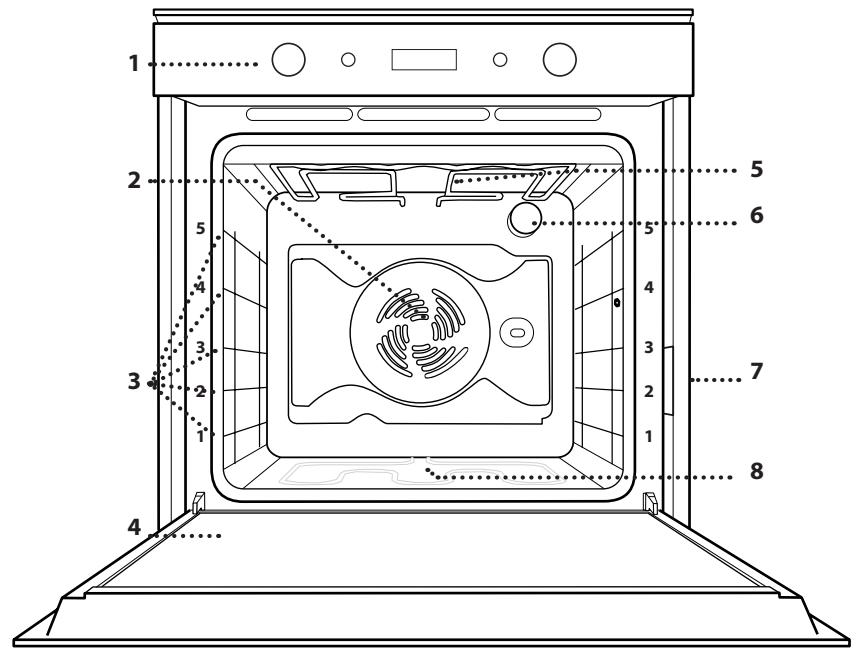
- Control panel
- Fan
- Shelf guides (the level is indicated on the front of the oven)
- Door
- Upper heating element/grill
- Lamp
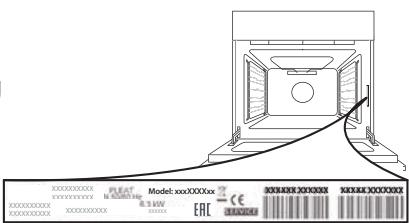
- Identification plate (do not remove)
- Lower heating element (not visible)
CONTROL PANEL DESCRIPTION

1. SELECTION KNOB
For switching the oven on by selecting a function. Turn to the "0" position to switch the oven off.
2. BACK
For returning to the previous screen. During cooking allows to change settings.
3. DISPLAY
4. CONFIRM
For confirming a selected function or a set value.
5. ADJUSTMENT KNOB
For scrolling through the menus and applying or changing settings.
Please note: The knobs are retractable. Press the knobs in the middle and they pop up.
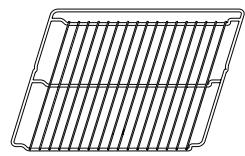
WIRE SHELF

Use to cook food or as a support for pans, cake tins and other ovenproof items of cookware
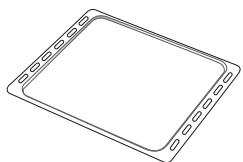
BAKING TRAY

Use for cooking all bread and pastry products, but also for roasts, ysh en papillotte, etc.
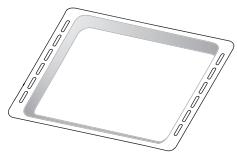
DRIP TRAY*

Use as an oven tray for cooking meat, ysh, vegetables, focaccia, etc. or position underneath the wire shelf to collect cooking juices.
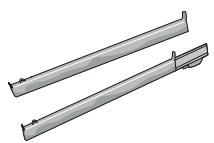
SLIDING RUNNERS*
To facilitate inserting or removing accessories.
- Available only on certain models
The number and the type of accessories may vary depending on which model is purchased.
Other accessories can be purchased separately from the After-sales Service.
INSERTING THE WIRE SHELF AND OTHER ACCESSORIES
Insert the wire shelf horizontally by sliding it across the shelf guides, making sure that the side with the raised edge is facing upwards.
Other accessories, such as the drip tray and the baking tray, are inserted horizontally in the same way as the wire shelf.
REMOVING AND REFITTING THE SHELF GUIDES
- To remove the shelf guides, lift the guides up and then gently pull the lower part out of its seating: The shelf guides can now be removed.
- To refit the shelf guides, first fit them back into their upper seating. Keeping them held up, slide them into the cooking compartment, then lower them into position in the lower seating.
FITTING THE SLIDING RUNNERS °IF PRESENT,
Remove the shelf guides from the oven and remove the protective plastic from the sliding runners.
Fasten the upper clip of the runner to the shelf guide and slide it along as far as it will go. Lower the other clip into position. To secure the guide, press the lower portion of the clip firmly against the shelf guide. Make sure that the runners can move freely. Repeat these steps on the other shelf guide on the same level.
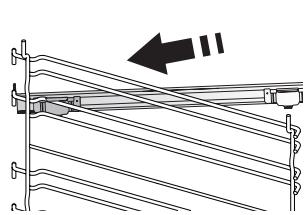
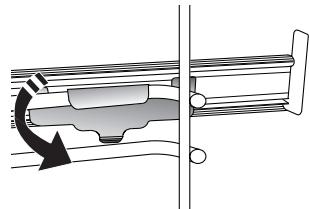
Please note: The sliding runners can be ytted on any level.
FUNCTIONS

OFF
To switch off the oven.

LIGHT
To switch the oven light on/off.

SPECIALS
DEFROST
To speed up defrosting of food. Place food on the middle shelf. Leave food in its packaging to prevent it from drying out on the outside.
WARM KEEPING
For keeping just-cooked food hot and crisp.
RISING
For optimal proving of sweet or savoury dough. To maintain the quality of proving, do not activate the function if the oven is still hot following a cooking cycle.

CONVENTIONAL
To cook any kind of dish on one shelf only. Use the 3rd level. To bake pizzas, savoury pies and cakes with liquid fillings use the 1st or 2nd level. Preheat the oven before placing food inside.

CONVECTION BAKE
For baking cakes with liquid filling (sweet or savoury) on a single shelf. This function can also be used for cooking on two shelves. Switch the position of the dishes to cook food more evenly. Use the 3rd shelf to cook on one shelf only, and the 1st and 4th to cook on two shelves. Preheat the oven before cooking.
GENTLE FAN
For cooking meat, filled pies (cheesecake, strudel, fruit pies) and stuffed vegetables on one level only. This function uses discontinuous, delicate fan assistance, which prevents excessive drying of foods.

GRILL
For grilling steaks, kebabs and sausages, cooking vegetables au gratin or toasting bread. When grilling meat, we recommend using a drip tray to collect the cooking juices: Position the tray on any of the levels below the wire shelf and add 500ml of drinking water.
TURBO GRILL
For roasting large joints of meat (legs, roast beef, chicken). We recommend using a drip tray to collect the cooking juices: Position the pan on any of the levels below the wire shelf and add 500ml of drinking water. The turnspit (if provided) can be used with this function.

SETTINGS
For adjust the oven settings.
When "ECO" mode is active the brightness of the display will be reduced to save energy and lamp switches o" a fter 1 minute. It will be reactivated automatically whenever any of the buttons are pressed.

BREAD / PIZZA
To bake different types and sizes of bread and pizza. This function has two programmes with predefined settings. Just indicate the required values (temperature and time) and the oven will automatically manage the optimum cooking cycle. Place the dough on the 2nd shelf after preheating the oven.

FAST PREHEATING
To preheat the oven rapidly
1. SELECT THE LANGUAGE
You will need to set the language and the time when you switch on the appliance for the first time: "ENGLISH" will scroll along the display.
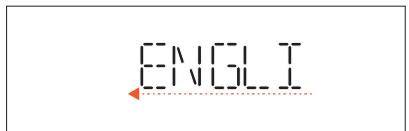
Turn the adjustment knob to scroll through the list of available languages and select the one you require.
Press to confirm your selection.
Please note: The language can subsequently be changed from the "Settings" menu.
2. SET THE TIME
After selecting the language, you will need to set the current time: The two digits for the hour will flash on the display.
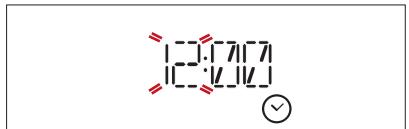
Turn the adjustment knob to set the correct hour and press : The two digits for the minutes will flash on the display.
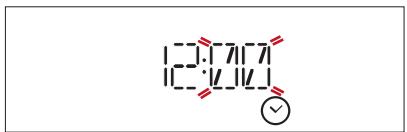
Turn the adjustment knob to set the minutes and press to confirm.
Please note: You may need to set the time again following lengthy power outages.
3. SET THE POWER CONSUMPTION
The oven is programmed to consume a level of electrical power that is compatible with a domestic network that has a rating of more than 3kW : If your household uses a lower power, you will need to decrease this value.
Turn the selection knob until " SETTINGS" is shown on the display, then press OK to confirm.
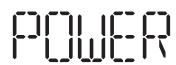
Turn the adjustment knob to select the "POWER" menu item and press OK to confirm.
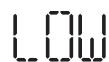
Turn the adjustment knob to select "Low" and press OK to confirm.
4. HEAT THE OVEN
A new oven may release odours that have been left behind during manufacturing: This is completely normal. Before starting to cook food, we therefore recommend heating the oven with it empty in order to remove any possible odours.
Remove any protective cardboard or transparent film from the oven and remove any accessories from inside it.
Follow the instructions for setting the function correctly.
Please note: It is advisable to air the room after using the appliance for the yrst time.
1. SELECT A FUNCTION
Turn the selection knob to switch on the oven and show the function you require on the display: The display will show the icon for the function and its basic settings.
To select an item from the menu (the display will show the first available item), turn the adjustment knob until the item you require is shown.
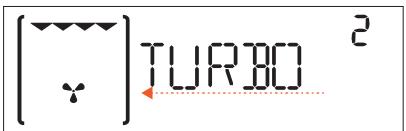
Press to confirm your selection: The display will show the basic settings.
2. SET THE FUNCTION
After having selected the function you require, you can change its settings. The display will show the settings that can be changed in sequence.
TEMPERATURE/GRILL LEVEL
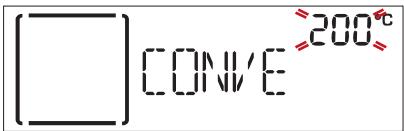
When the value flashes on the display, turn the adjustment knob to change it, then press to confirm and continue to alter the settings that follow (if possible).
Please note: Once the function has been activated, the temperature can be changed using the adjustment knob.
DURATION
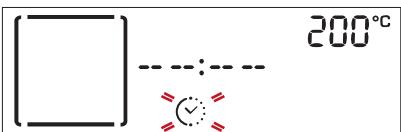
When the icon flashes on the display, use the adjustment knob to set the cooking time you require, then press to confirm. You do not have to set the cooking time if you want to manage cooking manually: Press to confirm and start the function.
In this case, you cannot set the end cooking time by programming a delayed start.
Please note: You can adjust the cooking time that has been set during cooking by pressing : use the adjustment knob to amend it and then press to conyrm.
SET THE COOKING END TIME
In many functions, once you have set a cooking time you can delay starting the function by programming its end time. The display shows the current end time that is set and the icon flashes.
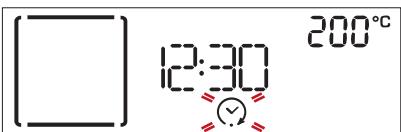
Turn the adjustment knob to set the time you want cooking to end, then press to confirm and start the function. Place the food in the oven and close the door:
The function will start automatically after the period of time that has been calculated in order for cooking to finish at the time you have set.
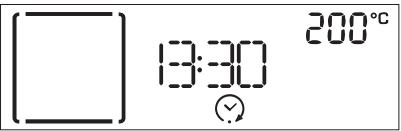
Please note: Programming a delayed cooking start time will disable the oven preheating phase: The oven will reach the temperature your require gradually, meaning that cooking times will be slightly longer than those listed in the cooking table. During the waiting time, you can use the adjustment knob to amend the programmed end time or press to change the settings.
Please note: Delay to start functionality is not available for Grill and Turbo Grill functions.
3. ACTIVATE THE FUNCTION
Once you have applied the settings you require, press to confirm the time that cooking will end and activate the function.
Please note: Once cooking has started, the display will recommend the most suitable level for each function.
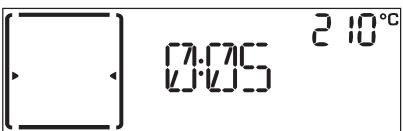
You can turn the selection knob to 0 to pause the function that has been activated at any time.
4. PREHEATING
Some functions have an oven preheating phase: Once the function has started, the display indicates that the preheating phase has been activated.
Once this phase has finished, an audible signal will sound and the display will indicate that the oven has reached the set temperature:
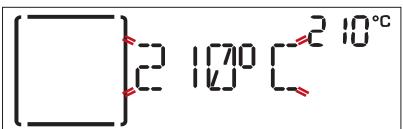
At this point, open the door, place the food in the oven, close the door and start cooking.
Please note: Placing the food in the oven before preheating has ñnished may have an adverse e" ect on the ñnal cooking result. Opening the door during the preheating phase will stop pause it. The cooking time does not include a preheating phase. You can always change the temperature you want the oven to reach using the adjustment knob.
5. END OF COOKING
An audible signal will sound and the display will indicate that cooking is complete.
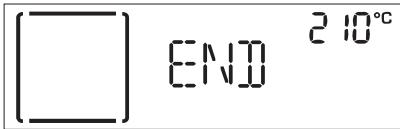
Press to continue cooking in manual mode (without a programmed cooking time) or turn the adjustment knob to extend the cooking time by setting a new duration. In both cases, the temperature or the grill level settings will be retained.
BROWNING
Some functions of the oven enable you to brown the surface of the food by activating the grill once cooking is complete.
When the display shows the relevant message, if required press to start a five-minute browning cycle.
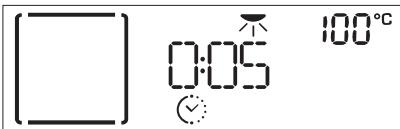
Once the browning function has been activated, you can change the time for which it will run by turning the adjustment knob. You can also stop the function at any time by turning the selection knob to select a different function or by turning it to 0 to switch the oven off.
. TIMER
When the oven is switched off, the display can be used as a timer. To activate this function, make sure that the oven is switched off and turn the adjustment knob: The icon will flash on the display.
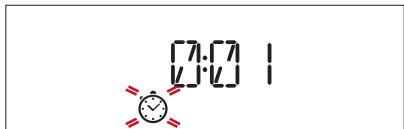
Turn the adjustment knob to set the length of time you require and then press again to activate the timer. An audible signal will sound and the display will indicate once the timer has finished counting down the selected time.
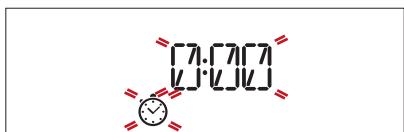
Please note: The timer does not activate any of the cooking cycles. Use the adjustment knob to change the time set on the timer; press to switch the timer o" a t any time.
. KEY LOCK
To lock the keypad, press and hold and at the same time for at least five seconds.
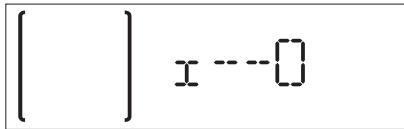
Do this again to unlock the keypad.
Please note: This function can also be activated during cooking. For safety reasons, the oven can be switched o" a t any time by turning the selection knob to 0 .
COOKING TABLE
| RECIPE | FUNCTION | PREHEAT | TEMPERATURE (°C) | DURATION (Min.) | SHELF AND ACCESSORIES |
| Leavened cakes / Sponge cakes | GENTLE | Yes | 160 - 180 | 30 - 90 | 2/3 |
| Yes | Yes | 160 - 180 | 30 - 90* | 4/5 | |
| Filled cakes(chesecake, strudel, apple pie) | Yes | 160 - 200 | 35 - 90 | 2 | |
| Yes | Yes | 160 - 200 | 35 - 90* | 4/5 | |
| Cookies | GENTLE | Yes | 170 - 180 | 15 - 45 | 3 |
| Yes | Yes | 160 - 170 | 20 - 45* | 4/5 | |
| Choux buns | GENTLE | Yes | 180 - 200 | 30 - 40 | 3 |
| Yes | Yes | 180 - 190 | 35 - 45* | 4/5 | |
| Meringues | GENTLE | Yes | 90 | 110 - 150 | 3 |
| Yes | Yes | 90 | 130 - 150* | 4/5 | |
| Pizza / Bread / Focaccia | GENTLE | Yes | 190 - 250 | 15 - 50 | 1/2 |
| Yes | Yes | 190 - 250 | 25 - 50* | 4/5 | |
| Bread | BREAD | Yes | 180 - 220 | 30 - 50 | 2 |
| Pizza | PIZZA | Yes | 220 - 250 | 15 - 30 | 2 |
| Frozen pizza | GENTLE | Yes | 250 | 10 - 15 | 3 |
| Yes | Yes | 250 | 10 - 20* | 4/5 | |
| Savoury pies(vegetable pie,quiche) | GENTLE | Yes | 180 - 190 | 40 - 55 | 3 |
| Yes | Yes | 180 - 190 | 40 - 55* | 4/5 | |
| Vols-au-vent / Puff pastry crackers | GENTLE | Yes | 190 - 200 | 20 - 30 | 3 |
| Yes | Yes | 180 - 190 | 15 - 40* | 4/5 | |
| Lasagne / Flans / Baked pasta/Cannelloni | GENTLE | Yes | 190 - 200 | 45 - 65 | 3 |
| Lamb / Veal / Beef / Pork 1 kg | GENTLE | Yes | 180 - 190 | 80 - 120 | 2 |
| Chicken / Rabbit / Duck 1 kg | GENTLE | Yes | 200 - 220 | 50 - 100 | 3 |
| Turkey / Goose 3 kg | GENTLE | Yes | 190 - 200 | 80 - 130 | 2 |
| Baked fish / en papillote (fillets, whole) | GENTLE | Yes | 180 - 200 | 40 - 60 | 3 |
| Stuffed vegetables(tomatoes, courgettes, aubergines) | GENTLE | Yes | 170 - 190 | 30 - 60 | 2 |
| Toast | GENTLE | — | 3 (High) | 3 - 6 | 5 |
| Fish fillets / Steaks | GENTLE | — | 2 (Mid) | 20 - 30** | 4/5 |
| Sausages / Kebabs / Spare ribs/Hamburgers | GENTLE | — | 2 - 3 (Mid - High) | 15 - 30** | 5/5 |
| Roast chicken 1-1.3 kg | √ | — | 2 (Mid) | 55 - 70*** | 2/5 |
| Roastbeef rare | √ | — | 2 (Mid) | 35 - 50*** | 3/5 |
| FUNCTIONS | Conventional | Convection bake | Grill | TurboGrill | Bread / Pizza |
| ACCESSORIES | Wire shelf | Oven tray or cake tin on wire shelf | Drip tray / Baking tray or oven tray on wire shelf | Drip tray / Baking tray | Drip tray with 500 ml of water |
| RECIPE | FUNCTION | PREHEAT | TEMPERATURE (℃) | DURATION (Min.) | SHELF AND ACCESSORIES |
| Leg of lamb / Shanks | [ ] | — | 2 (Mid) | 60 - 90 *** | 3 |
| Roast potatoes | [ ] | — | 2 (Mid) | 35 - 55 *** | 3 |
| Vegetable gratin | [ ] | — | 3 (High) | 10 - 25 | 3 |
| Lasagna & Meat | [ ] | Yes | 200 | 50 - 100 **** | 4 |
| Meat & Potatoes | [ ] | Yes | 200 | 45 - 100 **** | 4 |
| Fish & Vegetables | [ ] | Yes | 180 | 30 - 50 **** | 4 |
- Switch levels halfway through cooking.
Turn food halfway through cooking.
Turn food two thirds of the way through cooking (if necessary).
*** Estimated length of time: dishes can be removed from the oven at di" erent times depending on personal preference.
HOW TO READ THE COOKING TABLE
The table lists the best function, accessories and level to use to cook di" erent types of food.
Cooking times start from the moment food is placed in the oven, excluding preheating (where required).
Cooking temperatures and times are approximate and depend on the amount of food and the type of accessory used.
Use the lowest recommended settings to begin with and, if the food is not cooked enough, then switch to higher settings.
Use the accessories supplied and preferably darkcoloured metal cake tins and baking trays. You can also use Pyrex or stoneware pans and accessories, but bear in mind that cooking times will be slightly longer.
TESTED RECIPES
Compiled for the certiycation authorities in accordance with the standard IEC 60350-1
| RECIPE | FUNCTION | PREHEAT | TEMPERATURE (℃) | DURATION (Min.) | SHELF AND ACCESSORIES * | |
| Short bread | □ | Yes | 150 | 30 - 40 | 3 | |
| □ | Yes | 150 | 25 - 40 | 3 | ||
| □ | Yes | 150 | 25 - 35 ** | 4 | 1 | |
| Small cakes | □ | Yes | 170 | 20 - 30 | 3 | |
| □ | Yes | 160 | 20 - 30 | 3 | ||
| □ | Yes | 160 | 25 - 35 ** | 4 | 1 | |
| Fatless sponge cake | □ | Yes | 170 | 30 - 40 | 2 | |
| □ | Yes | 160 | 30 - 40 | 2 | ||
| □ | - | 160 | 35 - 45 ** | 4 | 1 | |
| Toast | □ | - | 3 (High) | 4 - 6 | 5 | |
| Burgers | □ | - | 3 (High) | 18 - 30 *** | 5 | 4 |
- The accessories that are not supplied with this oven are available for purchase from our After-Sales Service.
Switch levels halfway through cooking.
* Turn food halfway through cooking.
Energy e’ ciency class (in accordance with the IEC 60350-1 standard): refer to the speciyc table to conduct the test.
| FUNCTIONS | Conventional | Convection bake | Grill | TurboGrill | Bread / Pizza | GENTLE Gentle fan |
| ACCESSIONS | ...... Wire shelf | Oven tray or cake tin on wire shelf | Drip tray / Baking tray or oven tray on wire shelf | Drip tray / Baking tray | Drip tray with 500 ml of water | |
CLEANING AND MAINTENANCE
Make sure that the oven has cooled down before carrying out any maintenance or cleaning. Do not use steam cleaners.
Do not use wire wool, abrasive scourers or abrasive/corrosive cleaning agents, as these could damage the surfaces of the appliance.
Wear protective gloves. The oven must be disconnected from the mains before carrying out any kind of maintenance work.
EXTERIOR SURFACES
- Clean the surfaces with a damp microfibre cloth. If they are very dirty, add a few drops of pH-neutral detergent. Finish off with a dry cloth.
- Do not use corrosive or abrasive detergents. If any of these products inadvertently comes into contact with the surfaces of the appliance, clean immediately with a damp microfibre cloth.
INTERIOR SURFACES
-
After every use, leave the oven to cool and then clean it, preferably while it is still warm, to remove any deposits or stains caused by food residues To dry any condensation that has formed as a result of cooking foods with a high water content, let the oven to cool completely and then wipe it with a cloth or sponge.
-
Clean the glass in the door with a suitable liquid detergent.
- The oven door can be removed to facilitate cleaning.
ACCESSIONS
Soak the accessories in a washing-up liquid solution after use, handling them with oven gloves if they are still hot. Food residues can be removed using a washing-up brush or a sponge.
CLEANING THE CATALYTIC PANELS ONLY IN SOME MODELS
This oven could be equipped with special catalytic liners that facilitate cleaning of the cooking compartment thanks to their special self-cleaning coating, which is highly porous and able to absorb grease and grime. These panels are fitted to the shelf guides: When repositioning and then refitting the shelf guides, make sure that the hooks at the top are slotted into the appropriate holes in the panels.
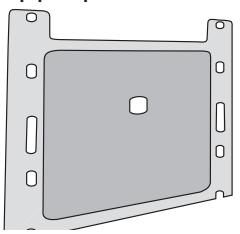
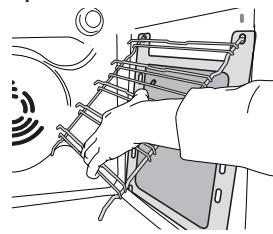
To make best use of the catalytic panels' self-cleaning properties, we recommend heating the oven to 200^ C for around one hour using the "Convection Bake" function. The oven must be empty during this time. Then leave the oven to cool down before removing any remaining food residues using a non-abrasive sponge. Please note: Using corrosive or abrasive cleaning agents, sti brushes, pan scourers or oven sprays could damage the catalytic surface and compromise its self-cleaning properties. Please contact our After-sales Service if you require replacement panels.
REMOVING AND REFITTING THE DOOR
- To remove the door, open it fully and lower the catches until they are in the unlock position.
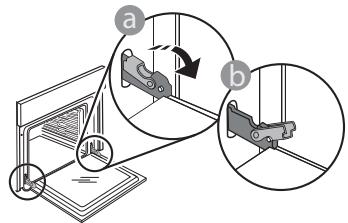
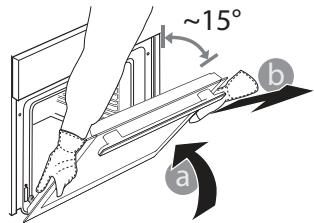
- Close the door as much as you can. Take a firm hold of the door with both hands – do not hold it by the handle. Simply remove the door by continuing to close it while pulling it upwards at the same time until it is released from its seating. Put the door to one side, resting it on a soft surface.
- Refit the door by moving it towards the oven, aligning the hooks of the hinges with their seating and securing the upper part onto its seating.
- Lower the door and then open it fully. Lower the catches into their original position: Make sure that you lower them down completely.
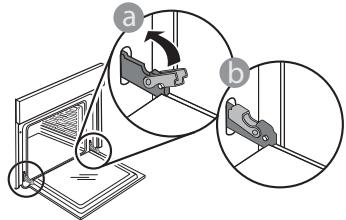
Apply gentle pressure to check that the catches are in the correct position.
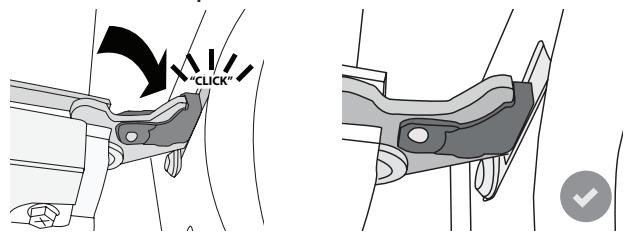
- Try closing the door and check to make sure that it lines up with the control panel. If it does not, repeat the steps above: The door could become damaged if it does not work properly.
REPLACING THE LAMP
- Disconnect the oven from the power supply.
- Unscrew the cover from the light, replace the bulb and screw the cover back on the light.
- Reconnect the oven to the power supply.
Please note: Only use 20-40 W/230 ~ V type G9, T300°C halogen bulbs. The bulb used in the product is speciçcally designed for domestic appliances and is not suitable for general room lighting within the home (EC Regulation 244/2009). Light bulbs are available from our After-sales Service.
Do not handle bulbs with your bare hands as your yingerprints could damage them. Do not use the oven until the light cover has been retted.
TROUBLESHOOTING
| Problem | Possible cause | Solution |
| The oven is not working. | Power cut. Disconnection from the mains. | Check for the presence of mains electrical power and whether the oven is connected to the electricity supply. Turn off the oven and restart it to see if the fault persists. |
| The display shows the letter “F” followed by a number or letter. | Oven failure. | Contact you nearest Client After-sales Service Centre and state the number following the letter “F”. |
PRODUCT FICHE
The product fiche with energy data of this appliance can be downloaded from Whirlpool website docs.whirlpool.eu
HOW TO OBTAIN THE USE AND CARE GUIDE
Download the Use and Care Guide from our website docs.whirlpool.eu (you can use this QR Code), specifying the product's commercial code.
Alternatively, contact our Client After-sales Service.

CONTACTING OUR AFTER-SALES SERVICE
You can find our contact details in the warranty manual. When contacting our Client After-sales Service, please state the codes provided on your product's identification plate.