
BBS71BLAG - Vacuum Cleaner BOSCH - Free user manual and instructions
Find the device manual for free BBS71BLAG BOSCH in PDF.



| Product Type | Cordless Vacuum Cleaner |
| Brand | BOSCH |
| Model | BBS71BLAG |
| Power Supply | Lithium-ion battery 18 V (Power for ALL 18 V series) |
| Charger | Original charging cable or original fast charger |
| Max Runtime | Up to 45 min (Eco mode, 4.0 Ah Power+ battery) |
| Suction Modes | Eco, Auto, Turbo |
| Filters | Crevice filter + fluff filter |
| Dust Container Capacity | Approx. 0.4 L (estimate) |
| Floor Brush | Universal brush with free-standing function |
| Included Accessories | Curved suction hose, docking station, floor brush |
| Usage | Private household, enclosed rooms, max altitude 2000 m |
| Safety | Do not vacuum people, animals, liquids, hazardous substances |
| Charging Temperature | 0 °C to 45 °C |
| Storage Temperature | -20 °C to 50 °C |
| Noise Level | Approx. 75 dB (estimate) |
| Weight | Approx. 3.5 kg (estimate) |
| Dimensions (L x W x H) | Approx. 250 x 200 x 1100 mm (estimate) |
| Warranty | See customer service or BOSCH website |
| Maintenance | Empty dust container, clean filters (do not expose to liquids) |
Frequently Asked Questions - BBS71BLAG BOSCH
User questions about BBS71BLAG BOSCH
0 question about this device. Answer the ones you know or ask your own.
Ask a new question about this device
Download the instructions for your Vacuum Cleaner in PDF format for free! Find your manual BBS71BLAG - BOSCH and take your electronic device back in hand. On this page are published all the documents necessary for the use of your device. BBS71BLAG by BOSCH.
USER MANUAL BBS71BLAG BOSCH
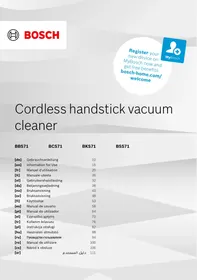
Cordless handstick vacuum cleaner
| BBS71 | BCS71 | BKS71 | BSS71 |
[de] Gebrauchsanleitung 10 [en] Information for Use 15 [fr] Manuel d'utilisation 20 [it] Manuale utente 26 [nl] Gebruikershandleiding 32 [da] Betjeningsvejledning 38 [no] Bruksanvisning 43 [sv] Bruksanvisning 48 [fi] Käyttöohje 53 [es] Manual de usuario 58 [pt] Manual do utilizador 64 [el] Εγχειρίδιο χρήστη 70 [tr] Kullanım kılavuzu 76 [pl] Instrukcja obsługi 82 [hu] Használati útmutató 88 [ru] Руководство пользователя 94 [ro] Manual de utilizare 100 [cs] Návod k obsluze 106 [ar] دليل المستخدم 111
| [de] | Scannen Sie den QR-Code oder besuchen Sie die Webseite, um die erweiterten Hinweise zur Benutzung zu öffnen. Dort finden Sie zusätzliche Informationen zu Ihrem Gerät oder Zubehör. |
| [en] | Scan the QR code or visit the website to open the Further Notices for Use. You can find additional information about your appliance or accessory here. |
| [fr] | Scanner le code QR ou visiter le site Web pour ouvrir les informations d'utilisation complémentaires. Vous y trouverez des informations supplémentaires concernant votre appareil ou accessoire. |
| [it] | Scansionare il codice QR oppure visitare il sito Web per indicazioni dettagliate sull'uso. Si trovano informazioni aggiuntive sull'apparecchio o gli accessori. |
| [nl] | Scan de QR-code of bezoek de website om de uitgebreide gebruiksinstructies te openen. Hierin vindt u meer informatie over het apparaat of toebehoren. |
| [da] | Scan QR-koden, eller besøg hjemmesiden, for at åbne de udvidede anvisninger om anvendelse. Der kan der findes yderligere oplysninger om apparatet eller tilbehøret. |
| [no] | Skann QR-koden eller besøk nettstedet for å åpne mer informasjon om bruken. Der finner du mer informasjon om apparatet eller tilbehøret. |
| [sv] | Scanna QR-koden eller gå till webbplatsen och öppna de utökade användningsanvisningarna. Där finns mer information om din apparat eller dina tillbehör. |
| [fi] | Skannaa QR-koodi tai vieraile internet-sivustollamme, jotta voit avata laajennetut käyttötiedot. Sieltä löydät laitetta tai varustetta koskevia lisätietoja. |
| [es] | Para abrir las indicaciones ampliadas sobre el uso, visite la página web o escanee el código QR. Allí encontrará más información sobre el aparato o los accesorios. |
| [pt] | Leia o código QR ou visite a página web para abrir as indicações avançadas relativas à utilização. Aí encontra informações adicionais sobre o seu aparelho ou acessório. |
| [el] | Σαρώστε τον κωδικό QR ή επισκεφτείτε την ιστοσελίδα, για να ανοίξετε τις διευρυμένες υποδείξεις για τη χρήση. Εκεί θα βρείτε πρόσθετες πληροφορίες για τη συσκευή σας ή τα εξαρτήματα. |
| [tr] | Ayrıntılı kullanım bilgilerine ulaşmak için QR kodu taratin veya web sayfasını ziyaret ediniz. Cihaz ve aksesuarlar ile ilgili ayrıntılı bilgileri bu şekilde edinebilirsiniz. |
| [pl] | Aby uzyskać rozszerzone informacje na temat zastosowań urządzenia, należy zeskanować kod QR albo wejść na stronę internetową. Można tam znaleźć dodatkowe informacje na temat posiadanego urządzenia i akcesoriów. |
| [hu] | Olvassa be a QR-kódot vagy keresse fel a weboldalt a kibővített használati utasítás megnyitásához. Ott ki-egészítő információkat talál a készülékkel vagy tartozékkal kapcsolatban. |
| [ru] | Чтобы узнать больше о пользовании, отсканируйте QR-код или зайдите на сайт. Там вы найдете более подробные сведения о приборе и принадлежностях. |
| [ro] | Scanați codul QR sau accesăți site-ul web pentru a obține mai mult recomandări privind utilizarea. Acolo veți găsi mai multe informații privind aparatul dumneavoastră sau accesoriiile. |
| [cs] | Pro další informace k používání načtěte QR kód nebo navštivte webovou stránku. Tam najdete další informace ke spotřebiči nebo příslušenství. |
2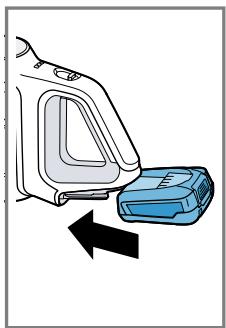
3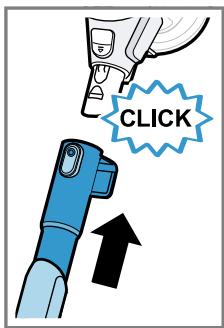
4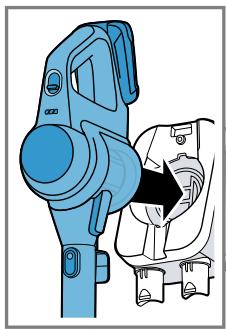
5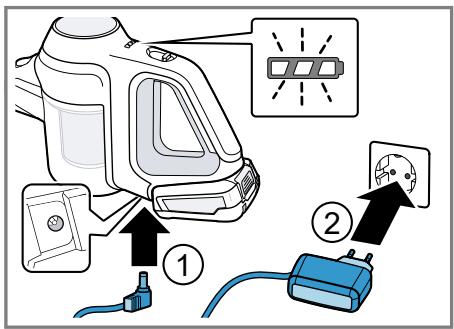
6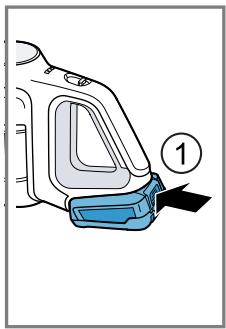
7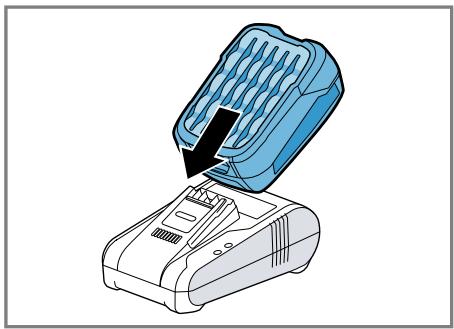
8 9
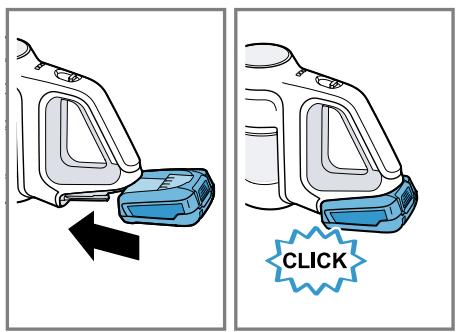
10
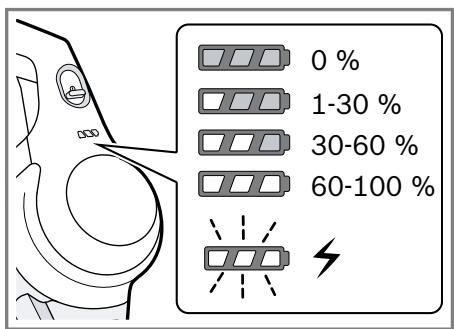
11
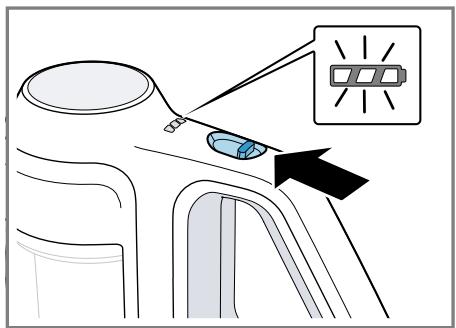
12
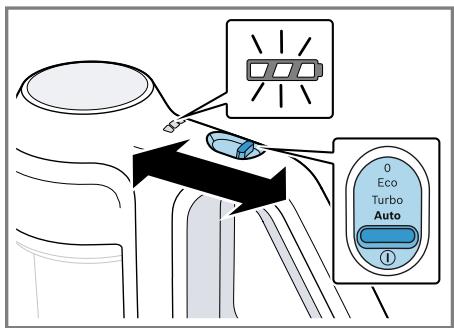
13
14
15
16
17
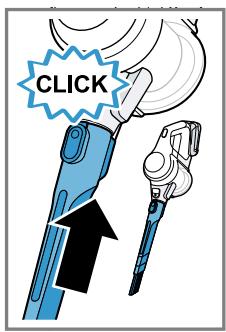
18
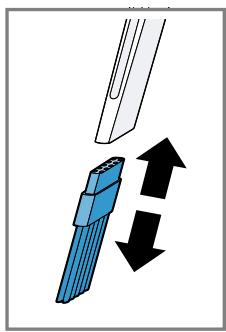
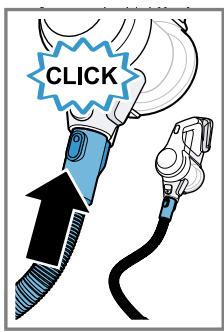
19
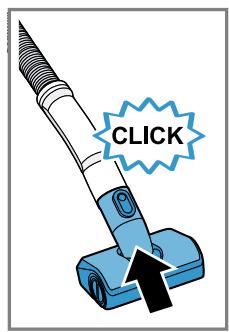
20
21
22
23
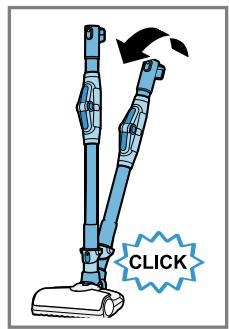
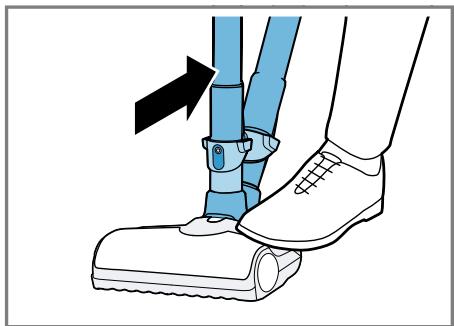
24
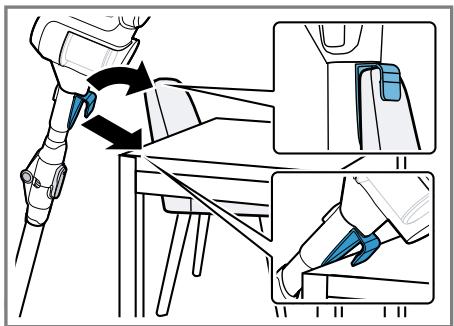
25

26
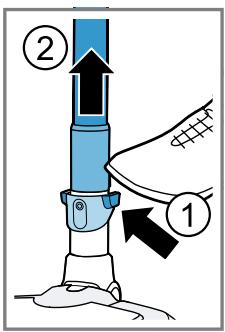
27
28
29
30
31
32
33
34
35
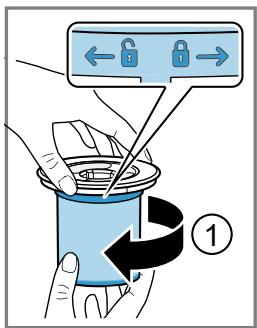
36
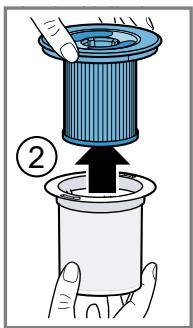
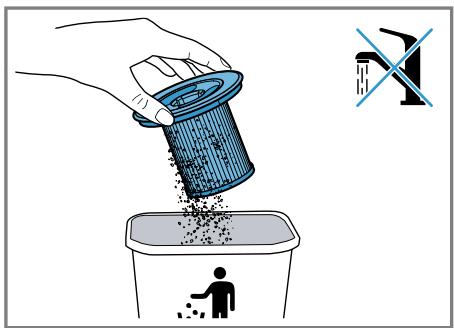
37
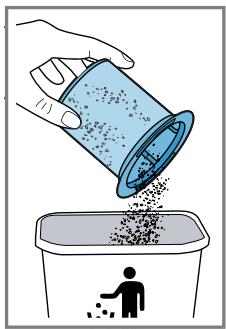
38
39
40
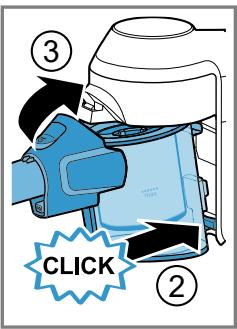
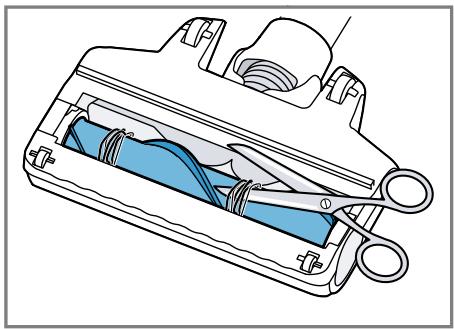
41

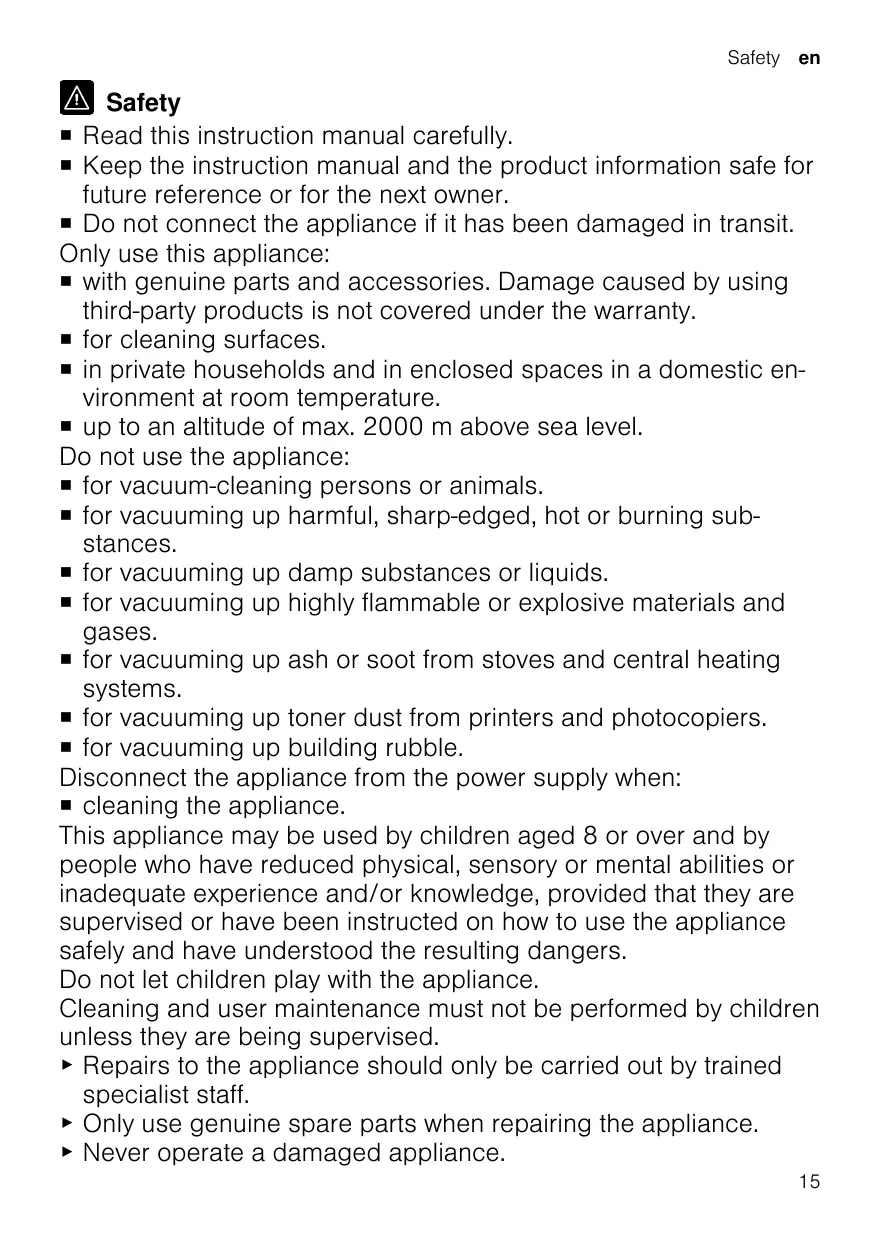
Safety
- Read this instruction manual carefully.
- Keep the instruction manual and the product information safe for future reference or for the next owner. ■ Do not connect the appliance if it has been damaged in transit. Only use this appliance: ■ with genuine parts and accessories. Damage caused by using third-party products is not covered under the warranty. ■ for cleaning surfaces. ■ in private households and in enclosed spaces in a domestic environment at room temperature. ■ up to an altitude of max. 2000 m above sea level.
Do not use the appliance:
■ for vacuum-cleaning persons or animals. ■ for vacuuming up harmful, sharp-edged, hot or burning substances. ■ for vacuuming up damp substances or liquids. ■ for vacuuming up highly flammable or explosive materials and gases. ■ for vacuuming up ash or soot from stoves and central heating systems. ■ for vacuuming up toner dust from printers and photocopiers. ■ for vacuuming up building rubble.
Disconnect the appliance from the power supply when:
■ cleaning the appliance.
This appliance may be used by children aged 8 or over and by people who have reduced physical, sensory or mental abilities or inadequate experience and/or knowledge, provided that they are supervised or have been instructed on how to use the appliance safely and have understood the resulting dangers.
Do not let children play with the appliance.
Cleaning and user maintenance must not be performed by children unless they are being supervised.
▶ Repairs to the appliance should only be carried out by trained specialist staff. ▶ Only use genuine spare parts when repairing the appliance. ▶ Never operate a damaged appliance.
en Safety
▶ Never operate an appliance with a cracked or fractured surface. ▶ Call customer services. → Page 19 ▶ Only use the appliance in enclosed spaces. ▶ Never expose the appliance to intense heat or humidity. - Do not use steam- or high-pressure cleaners to clean the appliance. ▶ Never let the power cord come into contact with hot appliance parts or heat sources. ▶ Never let the power cord come into contact with sharp points or edges. ▶ Never kink, crush or modify the power cord. - Connect and operate the charging cable and the quick charger only in accordance with the specifications on the rating plate. - Connect the charging cable and the quick charger to a power supply with alternating current only via a properly installed socket with earthing. - When cleaning the appliance, do not use flammable substances or substances that contain alcohol. - Keep clothing, hair, fingers and other body parts away from the openings on the appliance and the moving parts. ▶ Never point the pipe or the nozzles towards eyes, hair, ears or mouths. - Ensure that children do not play with the appliance, even when it is in the base station. ▶ Persons with electronic implants must stand at least 10 cm away from the appliance. - Keep packaging material away from children. ▶ Do not let children play with packaging material. ▶ Protect the battery against fire, heat and constant sunlight. ▶ Protect the battery against water and penetrating moisture. ▶ Never open the battery. - When not in use, keep the battery away from metal objects, e.g. paper clips, coins, keys, nails or screws. ▶ Supply fresh air. ▶ If there are any problems, seek medical advice from a doctor.
▶ If these come into contact with the skin, wash immediately with cold water. ▶ If these come into contact with the eyes, seek medical help.
Preventing material damage
▶ Check and clean any wet objects. ▶ Replace damaged objects. ▶ Regularly check the running surfaces of the nozzles for wear. ▶ Replace worn nozzles. ▶ Never use the nozzle without the brush roller in place. ▶ Never operate the appliance without the filter unit.
Overview
You can find an overview of the parts of your appliance here.
→ Fig. 1
| 1 | Dust container |
| 2 | Fluff filter |
| 3 | Cartridge filter |
| 4 | Power control and on/off switch |
| 5 | Status display |
| 6 | Dust container release button |
| 7 | Storage hook |
| 8 | Flexible suction pipe |
| 9 | Foot release |
| 10 | Universal floor nozzle with freestanding function |
Installing the base station
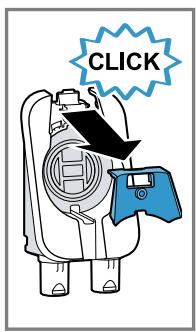
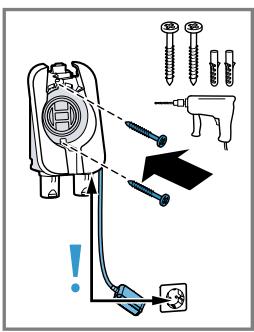
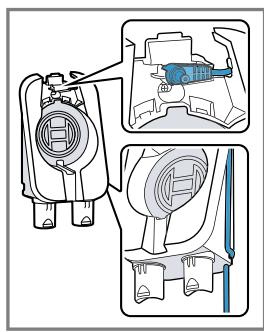
▶ Check whether any household wiring could be damaged in the installation area. - Do not install the base station horizontally or vertically above, below or next to a socket. → Fig. 2 - 3
Operation
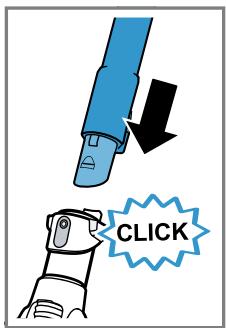
Installing the appliance
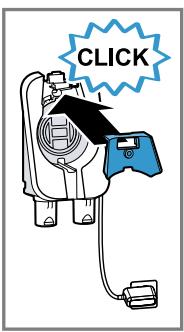
→ Fig. 4 - 5
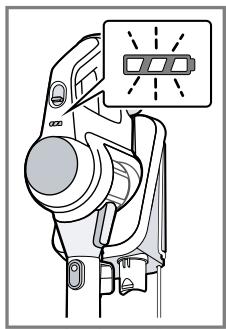
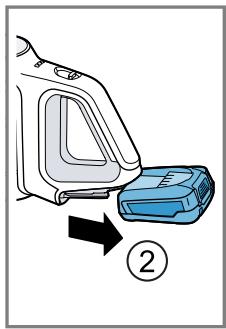
Charging the appliance
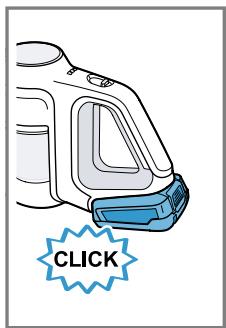
▶ Only charge the battery in chargers that are recommended by the manufacturer. ▶ Only use the battery in connection with the Bosch appliance. - Charge the battery using the original charging cable or the original quick charger. ▶ Only use batteries from the Power for ALL 18 V series. - Ensure that children do not play with the appliance, even when it is in the base station. → Fig. 6 - 10
Battery runtimes
You can find an overview of the battery runtimes, depending on the battery that is used, here.
Notes
- The appliance features intelligent battery detection. With 2.50 Ah and 3.0 Ah batteries from the Power for ALL 18 V series, the appliance is designed for everyday cleaning tasks. The 4.0 Ah Power + battery from the Power for ALL 18 V series optimises the appliance for the runtime. With the 5.0 Ah battery in the Power for ALL 18 V series, the appliance is designed for particularly difficult cleaning tasks. ■ The following modes affect the battery runtime:
- Mode 1: Eco mode with non-electrical accessory
- Mode 2: Eco mode with electrical floor nozzle
- Mode 3: Auto mode with electrical floor nozzle
- Mode 4: Turbo mode with electrical floor nozzle
| Runtime | 2,5 Ah | 3,0 Ah | 4,0 Ah Power+ | 5,0 Ah |
| Mode 1 up to min. | 35 | 40 | 45 | 35 |
| Mode 2 up to min. | 25 | 30 | 35 | 30 |
| Mode 3 up to min. | 12 | 15 | 20 | 25 |
| Mode 4 up to min. | 8 | 10 | 10 | 12 |
Notes
■ Like every Li-ion battery, the batteries from the Power for ALL 18 V series wear out over time, meaning that the battery capacity and the runtime decrease. This is a natural aging process and not the result of a material error, manufacturing error or material defect. ■ You can delay the natural wear by using the following measures:
- Only charge the battery in the temperature range between 0 °C and 45 °C.
- Only store the battery in the temperature range between -20 °C and 50 °C.
- Do not store the battery for an extended period of time if it is fully charged or fully discharged.
Operating the appliance
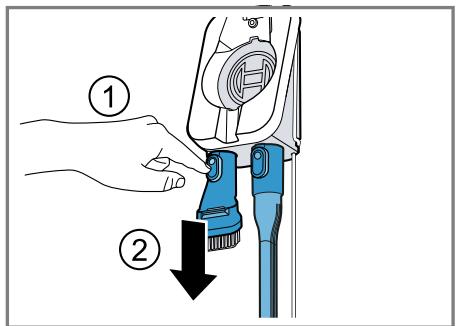
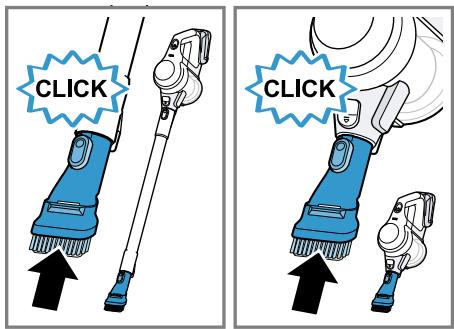
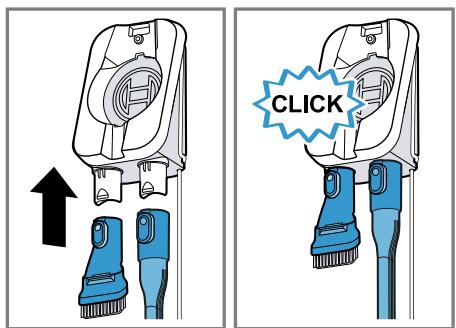
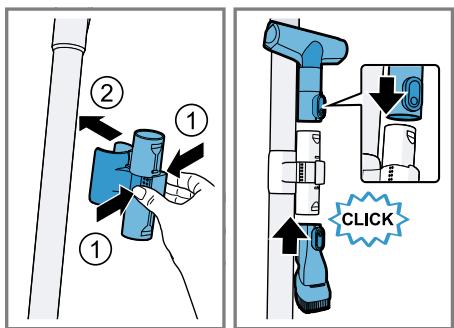
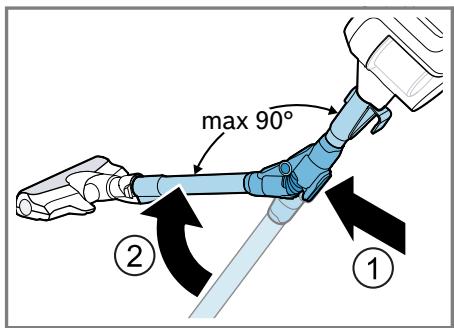
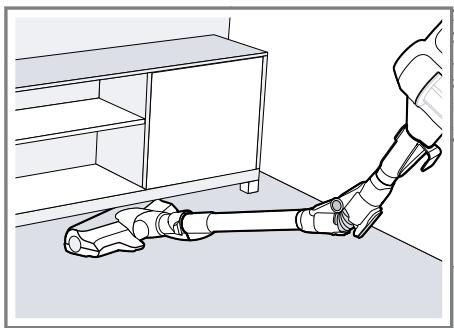
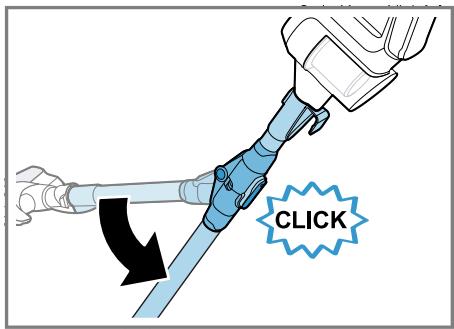
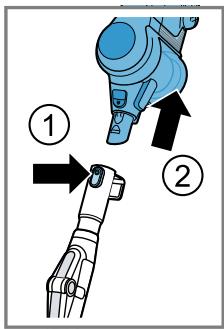
→ Fig. 11 - 25
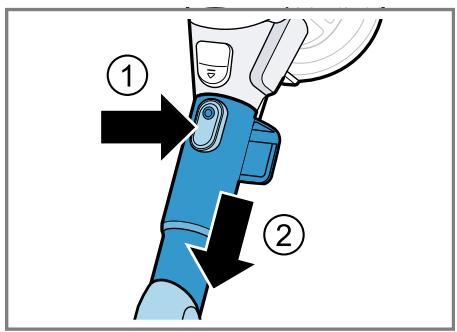
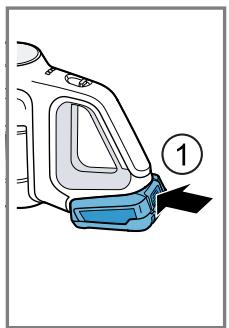
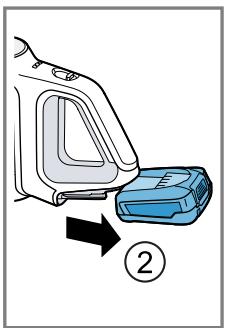
Removing the appliance
→ Fig. 26 - 28
Cleaning and servicing
To keep your appliance working efficiently for a long time, it is important to clean and maintain it carefully.
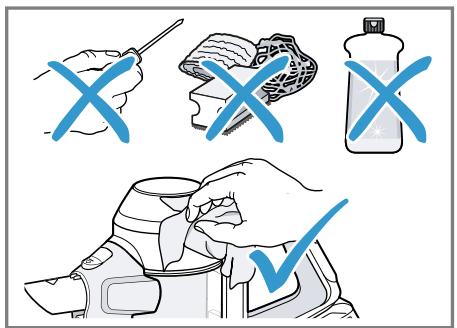
Cleaning the appliance
→ Fig. 29 - 29
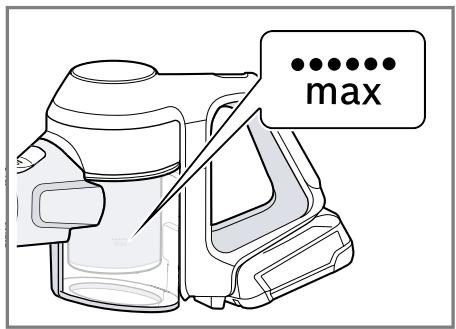
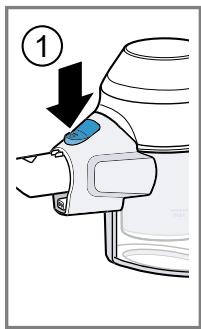
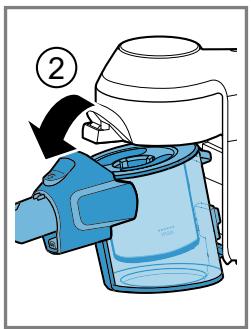
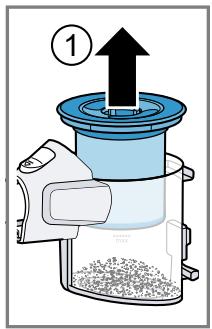
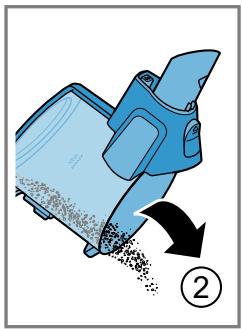
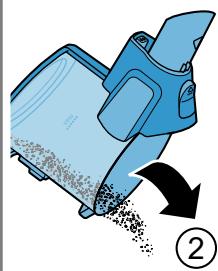
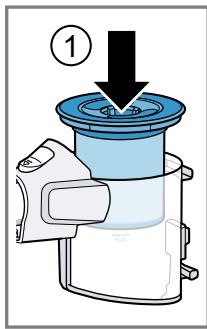
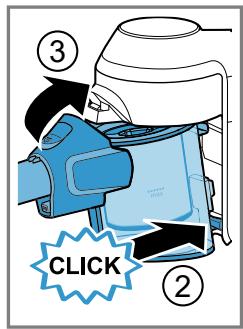
Emptying the dust container
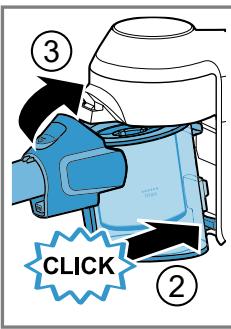
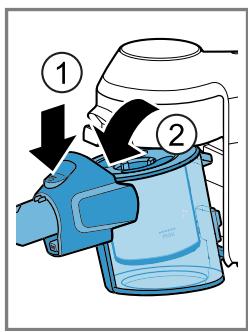
→ Fig. 30 - 33
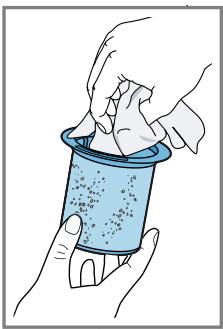
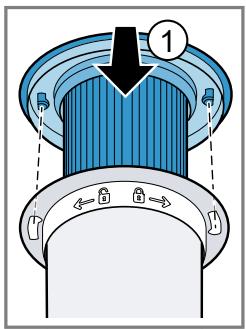
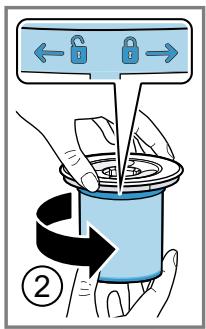
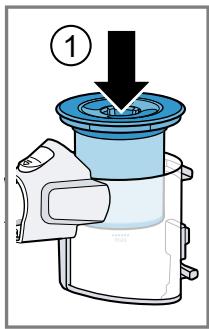
Cleaning the filter unit
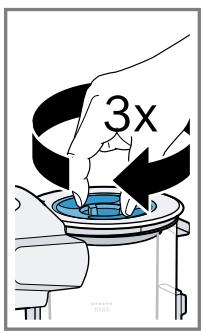
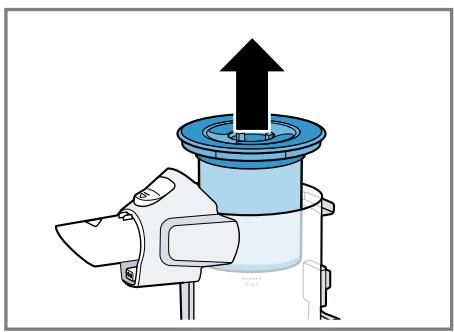
▶ Never allow the filters to come into contact with liquids. → Fig. 34 - 40
Cleaning the floor nozzle
→ Fig. 41 - 41
Troubleshooting
▶ Repairs to the appliance should only be carried out by trained specialist staff. ▶ Only use genuine spare parts when repairing the appliance.
The appliance is not working.
The battery status display does not show any status.
The battery has not been inserted correctly.
- Insert the battery correctly.
The battery has not been charged.
▶ Charge the battery.
The red fault indicator lights up for 10 seconds.
The battery has overheated or overcooled.
- Switch off the appliance and disconnect the appliance from the power supply. 2 Wait until battery has reached room temperature.
The appliance has overheated or overcooled.
- Switch off the appliance and disconnect the appliance from the power supply.
- Wait until the appliance has reached room temperature.
No charging function.
Incorrect charger was used.
▶ Only use the charger that is included.
The dust container cannot be inserted.
The filter unit is not complete.
- Check whether the filter unit is complete.
The filter unit or dust container is not positioned correctly.
- Check whether the filter unit and dust container are inserted correctly.
Suction is reduced.
The filter is blocked.
- Switch off the appliance and disconnect the appliance from the power supply.
- Clean the filter unit.
The nozzle is blocked.
- Switch off the appliance and disconnect the appliance from the power supply.
- Check whether the air channel from the nozzle to the appliance is blocked.
- Empty the dust container.
- Clean the filter unit.
- Once the appliance has cooled down, switch the appliance back on.
Disposing of old appliance
- Dispose of the appliance in an environmentally friendly manner. Information about current disposal methods are available from your specialist dealer or local authority.
This appliance is labelled in accordance with European Directive 2012/19/EU concerning used electrical and electronic appliances (waste electrical and electronic equipment - WEEE). The guideline determines the framework for the return and recycling of used appliances as applicable throughout the EU.
Disposing of batteries
Batteries should be recycled in an environmentally friendly manner. Do not dispose of the batteries in the household rubbish.
- Dispose of batteries in an environmentally friendly manner.
According to the European Guideline 2006/66/EC, defective or used battery packs/batteries, must be collected separately and disposed of in an environmentally correct manner.
Customer Service
Detailed information on the warranty period and terms of warranty in your country is available from our after-sales service, your retailer or on our website.
The contact details for Customer Service can be found in the enclosed Customer Service directory or on our website.

Safety
The battery is overheated or undercooled.
The appliance is overheated or undercooled.

Safety
Insert the battery correctly.
Thank you for buying a Bosch Home Appliance!
Register your new device on MyBosch now and profit directly from:
- Expert tips & tricks for your appliance
- Warranty extension options • Discounts for accessories & spare-parts • Digital manual and all appliance data at hand
- Easy access to Bosch Home Appliances Service
Free and easy registration – also on mobile phones:
www.bosch-home.com/welcome
BOSCH HOME APPLIANCES SERVICE
Looking for help? You'll find it here.
Expert advice for your Bosch home appliances, help with problems or a repair from Bosch experts.
Find out everything about the many ways Bosch can support you: www.bosch-home.com/service
Contact data of all countries are listed in the attached service directory.
BSH Hausgeräte GmbH
Carl-Wery-Straße 34
81739 München, GERMANY
www.bosch-home.com
A Bosch Company

8001287416 (030426)
Valid within Great Britain:
Imported to Great Britain by
BSH Home Appliances Ltd.
Grand Union House
Old Wolverton Road
Wolverton, Milton Keynes
MK12 5PT
United Kingdom
- CORDLESS HANDSTICK VACUUM CLEANER
- SAFETY
- EN SAFETY
- PREVENTING MATERIAL DAMAGE
- OVERVIEW
- INSTALLING THE BASE STATION
- OPERATION
- INSTALLING THE APPLIANCE
- CHARGING THE APPLIANCE
- BATTERY RUNTIMES
- NOTES
- OPERATING THE APPLIANCE
- REMOVING THE APPLIANCE
- CLEANING AND SERVICING
- CLEANING THE APPLIANCE
- EMPTYING THE DUST CONTAINER
- CLEANING THE FILTER UNIT
- CLEANING THE FLOOR NOZZLE
- TROUBLESHOOTING
- THE APPLIANCE IS NOT WORKING
- NO CHARGING FUNCTION
- THE DUST CONTAINER CANNOT BE INSERTED
- SUCTION IS REDUCED
- DISPOSING OF OLD APPLIANCE
- DISPOSING OF BATTERIES
- CUSTOMER SERVICE
- THANK YOU FOR BUYING A BOSCH HOME APPLIANCE
- LOOKING FOR HELP? YOU'LL FIND IT HERE
- BSH HAUSGERÄTE GMBH
Brand : BOSCH
Model : BBS71BLAG
Category : Vacuum Cleaner