USER MANUAL NE59M7630SG SAMSUNG
Electric Range installation manual
imagine the possibilities
Thank you for purchasing this Samsung product.
SAMSUNG
before you begin
ANTI-TIP DEVICE


WARNING: To reduce the risk of tipping the appliance, the appliance must be secured by properly installed anti-tip devices packed with the appliance.
a) A child or adult can tip the range and be killed.
b) Install the anti-tip device to the structure and/or the range at rear right (or rear left) of the range bottom.
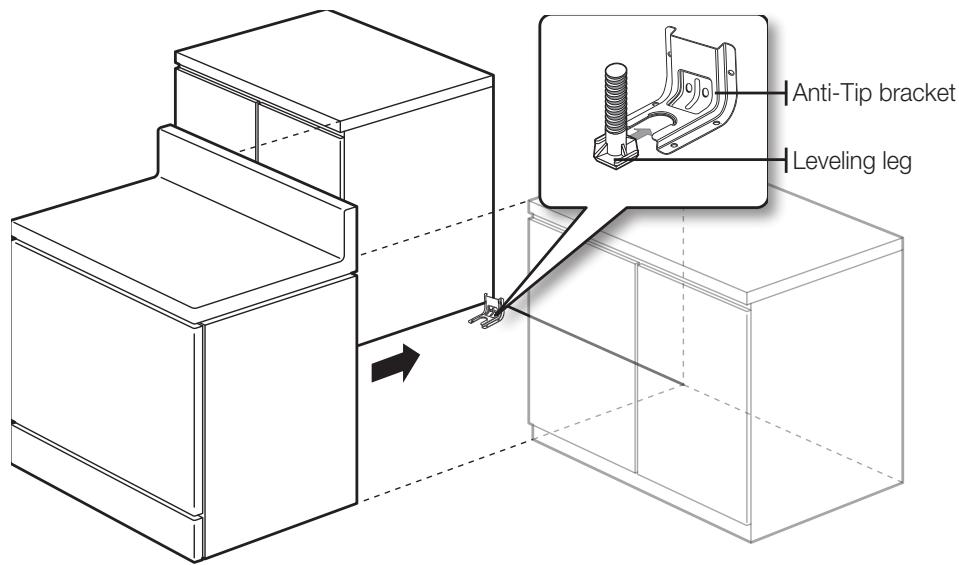
c) Engage the range to the anti-tip device by leveling leg at rear right (or rear left) of the range bottom.
d) Re-engage the anti-tip device if the range is moved.
e) See installation instructions for details.
f) Failure to do so can result in death or serious burns to children or adults.
ABOUT THIS MANUAL
READ THESE INSTRUCTIONS COMPLETELY AND CAREFULLY.
Important note to the installer
- Read all instructions contained in these installation instructions before installing range.
- Remove all packing materials from the oven compartments before connecting the electrical supply to the range.
- Observe all governing codes and ordinances.
- Be sure to leave these instructions with the consumer.
Important note to the consumer
Keep these instructions for the local electrical inspector's use.
- As when using any appliance generating heat, there are certain safety precautions you should follow.
- Be sure your range is installed and grounded properly by a qualified installer or service technician.
- Make sure the wall coverings around the range can withstand the heat generated by the range.
- To eliminate the need to reach over the surface elements, cabinet storage space above the elements should be avoided.
- The range should not be placed on a base.
FOR YOUR SAFETY

WARNING
If the information in this manual is not followed exactly, a fire or electrical property damage, personal injury or death.

WARNING
Before beginning the installation, switch power off at the service panel and acting means to prevent power from being switched on accidentally. When the means cannot be locked, securely fasten a prominent warning device, such as a

WARNING
This appliance must be properly grounded.
preparing to install the range
REMOVE PACKAGING
Remove packaging materials. Failure to remove packaging materials could result in damage to the appliance.
What tools you will need
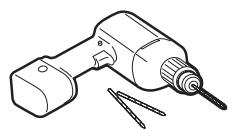
Drill
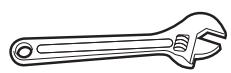
Adjustable Wrench
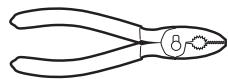
Pliers

1/4" Nut Driver

Phillips Screwdriver

Flat Screwdriver

Pencil

Level
What's included with your range
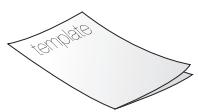
Template
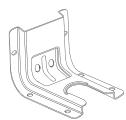
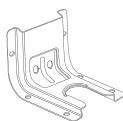
Anti-Tip Bracket
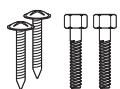
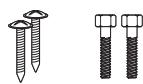
Screws (4 ea)
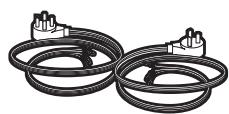
4-Wire Cord or 3-Wire Cord
(UL Approved 40 or 50 AMP)
What's not included
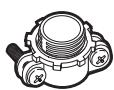
Strain Relief
(For Conduit Installation Only)
Clearances and dimensions
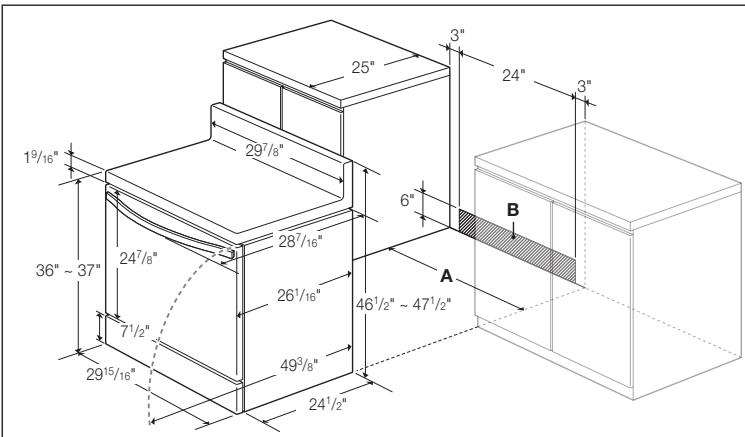
To install the range, refer to the following figure.
For installation in CANADA, a Free-standing range is not to be installed closer than 12mm from any adjacent surface.

CAUTION
This range has been designed to comply with the maximum allowable wood of 194^ . Make sure the wall covering, countertops and cabinets around the heat (up to 194^ ) generated by the range. If not, discoloration, delamination
text_image
19/16"
36" ~ 37"
247/8"
71/2"
2915/16"
297/8"
287/16"
261/16"
493/8"
241/2"
461/2" ~ 471/2"
6"
3"
24"
3"
A
B
A : Cabinet opening
30" For U.S.A,
30"\~31" For CANADA.
B : Acceptable
electrical outlet area
Minimum dimensions

IMPORTANT
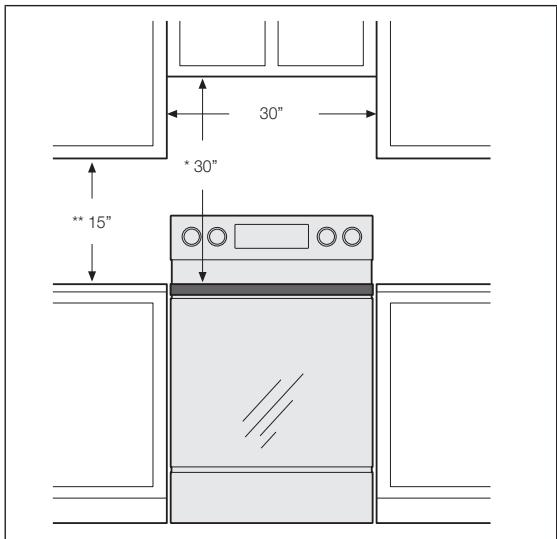
To eliminate the risk of burns or fire caused by reaching over heated surface units, cabinet storage space located above the surface units should be avoided. If cabinet storage is to be provided, the risk can be reduced by installing a range hood that projects horizontally a minimum of 5" beyond the bottom of the cabinets.
text_image
30"
* 30"
** 15"
* 30" minimum clearance between the top of the cooking surface and the bottom of an unprotected wood or metal cabinet; or 24" minimum when the bottom of the wood or metal cabinet is protected by not less than 1/4 flame retardant millboard covered with not less than no.28 MSG sheet steel, 0.015" stainless steel, 0.024" aluminum or 0.020" copper.
** 15" minimum between the countertop and the adjacent cabinet bottom.
connecting the power
STEP 1. MEETING ELECTRICAL CONNECTION REQUIREMENTS

CAUTION
For personal safety, do not use an extension cord with this appliance.
Remove house fuse or open circuit breaker before beginning installation.
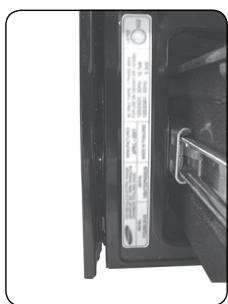
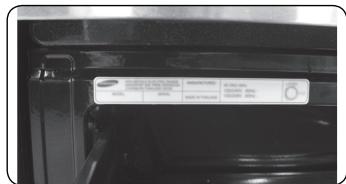
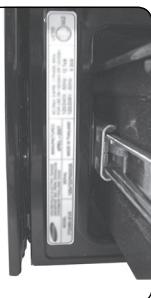
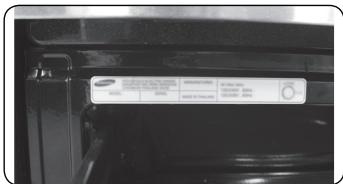
This appliance must be supplied with the proper voltage and frequency, and connected to an individual properly grounded branch circuit, protected by a circuit breaker or fuse having amperage as specified on the rating plate. The rating plate is located above the drawer on the oven frame. (Fig. 1 or Fig. 2)
We recommend you have the electrical wiring and hookup of your range connected by a qualified electrician. After installation, have the electrician show you where your main range disconnect is located.
Check with your local utilities for electrical codes which apply in your area. Failure to wire your oven according to governing codes could result in a hazardous condition. If there are no local codes, your range must be wired and fused to meet the requirements of the National Electrical Code, ANSI/NFPA No. 70–Latest Edition. You can get a copy by writing:
natural_image
Close-up of a refrigerator interior showing the door, front panel, and side door (no visible text or symbols)
(Fig. 1)
National Fire Protection Association
Batterymarch Park
Quincy, MA 02269
text_image
SAMSUNG KONK
100% 100%
Fuel: 100%
Fuel: 100%
(Fig. 2)
Effective January 1, 1996, the National Electrical Code requires that new construction (not existing) utilize a 4-conductor connection to an electric range.
When installing an electric range in new construction, follow Steps 2 and 3 for 4-wire connection.
You must use a 3-wire or 4-wire, single-phase A.C. 208Y/120 Volt or 240/120 Volt, 60 hertz electrical system.
If the electrical service provided does not meet the above specifications, have a licensed electrician install an approved outlet.
Use only a 3-conductor or a 4-conductor UL-listed range cord. These cords may be provided with ring terminals on wire and a strain relief device.
A range cord rated at 40 amps with 125/250 minimum volt range is required. A 50 amp range cord is not recommended but if used, it should be marked for use with nominal 1 ^3/8 " diameter connection openings. Care should be taken to center the cable and strain relief within the knockout hole to keep the edge from damaging the cable.
- Because range terminals are not accessible after range is in position, flexible service conduit or cord must be used.

NOTE
If conduit is being used, go to Step 4 on page 9.

ALL NEW BRANCH-CIRCUIT CONSTRUCTIONS, MOBILE HOMES, RECREATIONAL VEHICLES AND INSTALLATIONS WHERE LOCAL CODES DO NOT ALLOW GROUNDING THROUGH NEUTRAL, REQUIRE A 4-CONDUCTOR UL-LISTED RANGE CORD.
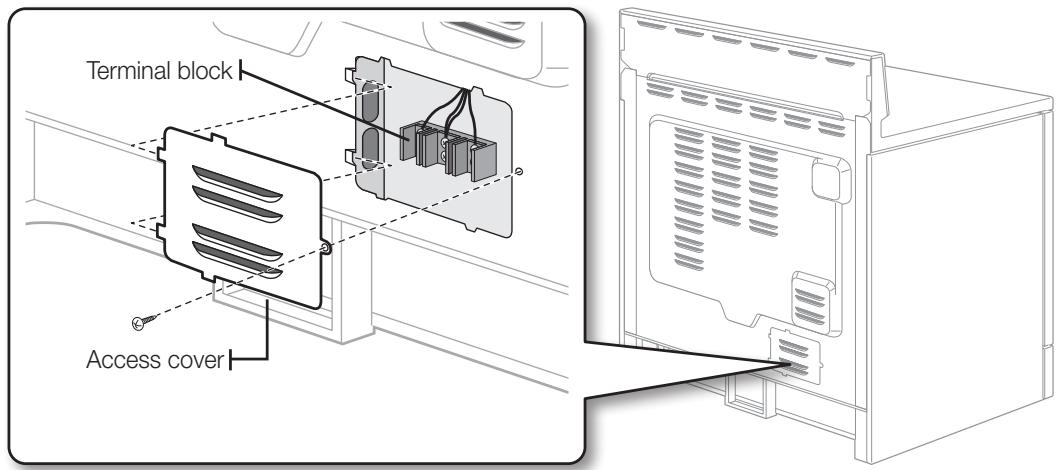
STEP 2. ACCESSING THE POWER CORD CONNECTION
Remove the rear access cover and loosen the screw with a screwdriver. The terminal block will then be accessible.
text_image
Terminal block
Access cover
Specified power-supply-cord kit rating
| Range rating, watts | Specified rating of power-supply-cord kit, amperes | Diameter (inches) of range connection opening |
| 120/240 volts 3-wire | Power cord | Conduit |
| 8,750 - 16,500 | 40 or 50A | 1^3/_8" | 1^1/_8" |
STEP 3. INSTALLING THE POWER CORD
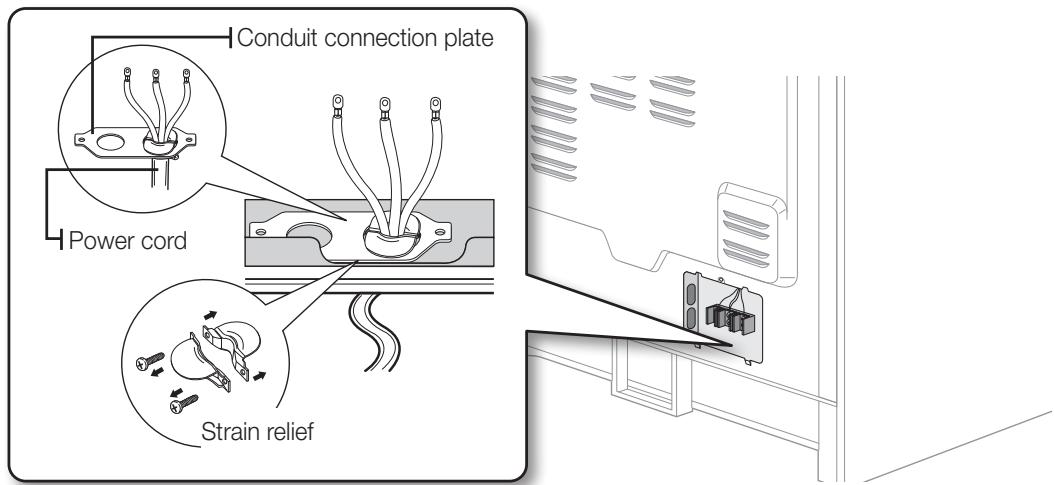
For power cord installations, hook the strain relief over the power cord hole ( 1^3/_8 ) located below the rear of the drawer body. Insert the power cord through the strain relief and tighten the device.
text_image
Conduit connection plate
Power cord
Strain relief
- You must install the power cord with a strain relief.
- Attach the strain relief to the 1^3/8 opening in conduit connection plate.

WARNING
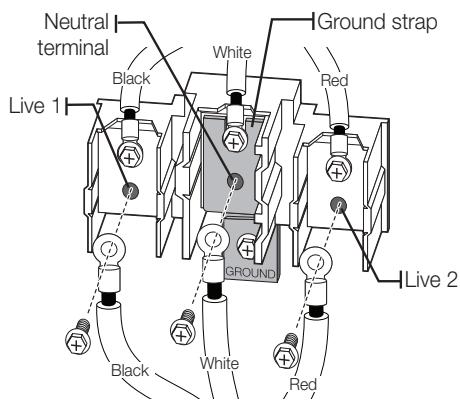
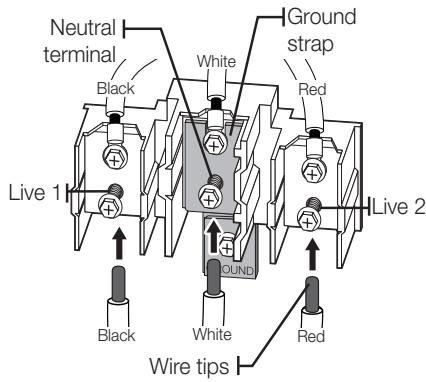
The neutral or ground wire of the power cord must be connected to the neutral terminal located in the center of the terminal block. The power leads must be connected to the lower left and the lower right terminals of the terminal block.
-
Remove the 3 lower terminal screws from the terminal block.
-
Insert the 3 terminal screws through each power cord terminal ring and into the lower terminals of the terminal block. Be certain that the center wire (white/neutral) is connected to the center lower position of the terminal block.
-
Tighten screws securely into the terminal block. DO NOT remove the ground strap connection.
-
Go to step 5 on page 10 and proceed with the installation.
text_image
Neutral
terminal
Black
White
Red
Ground strap
Live 1
GROUNDS
Live 2
Black
White
Red
Installing a 4-wire power cord

WARNING
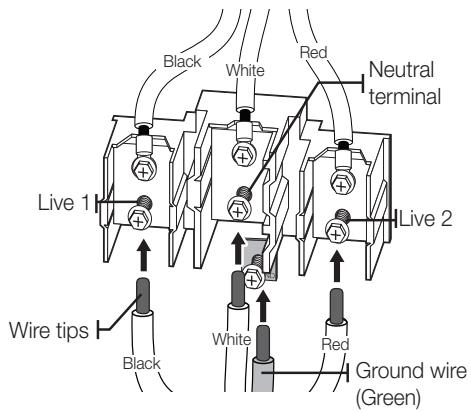
The neutral wire of the supply circuit must be connected to the neutral terminal or of the terminal block. The power leads must be connected to the lower left nals of the terminal block. The 4th grounding lead must be connected to the he ground plate and the ground screw.
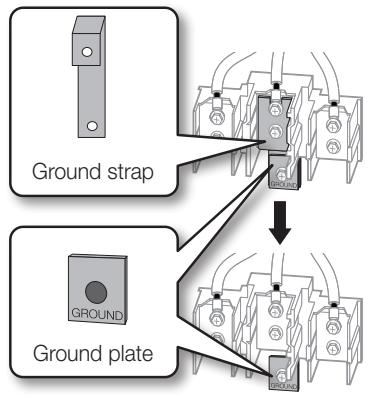
- Remove the 3 lower terminal screws from the terminal block. Remove the ground screw and ground plate and retain them.
- Cut and discard the ground strap. Do not discard any screws.
- Insert the one ground screw into the power cord ground wire terminal ring, through the ground plate, and into the frame of the range.
- Insert the 3 terminal screws (removed earlier) through each power cord terminal ring and into the lower terminals of the terminal block. Be certain that the center wire (white/neutral) is connected to the center lower position of the terminal block. Tighten screws securely into the terminal block.
- Go to step 5 on page 10 and proceed with the installation.
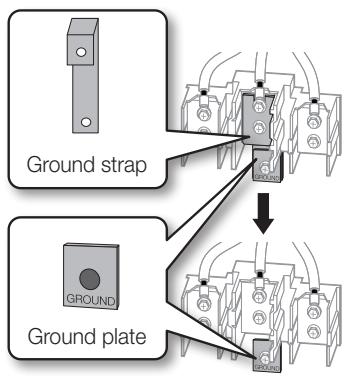
text_image
Ground strap
GROUND
Ground plate
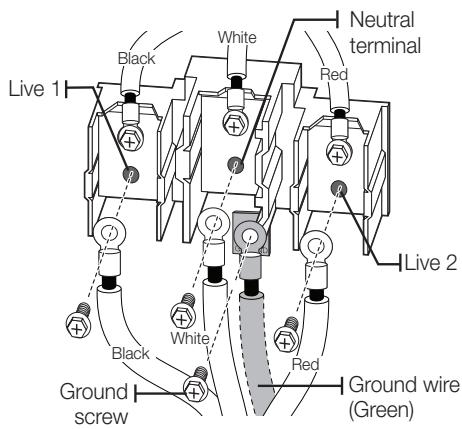
text_image
Live 1
Black
White
Neutral terminal
Red
Live 2
Black
White
Red
Ground wire (Green)
Ground screw

CAUTION
You must check voltage after connecting power cord.
| Live 1 - Neutral | 120 V |
| Live 2 - Neutral | 120 V |
| Live 1 - Live 2 | 208 V / 240 V |
STEP 4. INSTALLING THE CONDUIT
Remove the conduit connection plate from the rear of the drawer body and rotate it as shown below. The conduit hole (1 ^1/8 ) must be used.
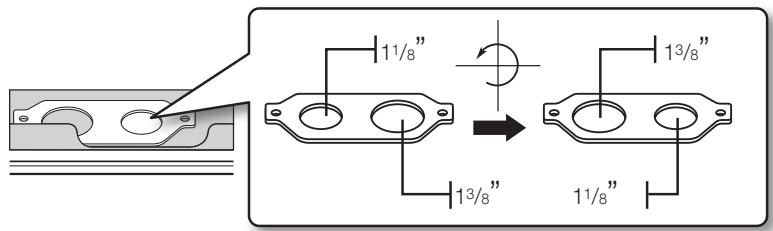
text_image
11/8"
13/8"
13/8"
11/8"
- Prepare the conduit cord shown in Figure 1.
- Install the conduit cord as shown in Figure 2.
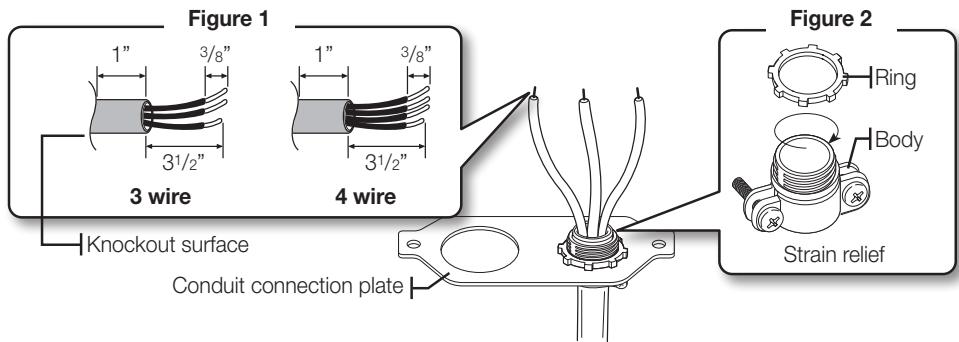
text_image
Figure 1
1" 3/8"
31/2"
3 wire
Knockout surface
4 wire
Conduit connection plate
Figure 2
Ring
Body
Strain relief
For conduit installations, insert the strain relief (not included) into the conduit hole (1^1/8) . Then thread the conduit cord through the body of the strain relief and fasten the ring. Reinstall the bracket.
Installing a 3-wire conduit
- Aluminum building wire may be used but it must be rated for the correct amperage and voltage to make the connection. Connect wires according to Step 4 depending on the number of wires.
-
Wire used, location and enclosure of splices, etc., must conform to good wiring practices and local codes.
-
Loosen the 3 lower terminal screws from the terminal block.
-
Insert the center bare wire (white/neutral) tip through the bottom center terminal block opening. On certain models, the wire will need to be inserted through the ground strap opening and then into the bottom center block opening.
-
Insert the two side bare wire tips into the lower left and the lower right terminal block openings.
-
Tighten the screws until the wire is firmly secured (35 to 50 inch-lbs.). Do not over-tighten the screws since it could damage the wires.
-
Go to step 5 on page 10 and proceed with the installation.
text_image
Neutral
terminal
Black
White
Ground
strap
Red
Live 1
Round
Live 2
Black
White
Red
Wire tips

CAUTION
CAUTION
You must check voltage after connecting power cord.
| Live 1 - Neutral | 120 V |
| Live 2 - Neutral | 120 V |
| Live 1 - Live 2 | 208 V / 240 V |
Installing a 4-wire conduit
- Aluminum building wire may be used but it must be rated for the correct amperage and voltage to make the connection. Connect wires according to this Step 4 depending on the number of wires.
-
Wire used, location and enclosure of splices, etc., must conform to good wiring practices and local codes.
-
Loosen the 3 lower terminal screws from the terminal block. Remove the ground screw and ground plate and retain them.
-
Cut and discard the ground strap. Do not discard any screws.
-
Insert the ground bare wire tip between the range frame and the ground plate (removed earlier) and secure it in place with the ground screw (removed earlier).
-
Insert the bare wire (white/neutral) tip through the bottom center of the terminal block opening.
-
Insert the two side bare wire tips into the lower left and the lower right terminal block openings.
-
Tighten the screws until the wire is firmly secured (35 to 50 inch-lbs.). Do not over-tighten the screws since it could damage the wires.
-
Go to step 5 and proceed with the installation.
text_image
Ground strap
GROUND
Ground plate
text_image
Black
White
Red
Neutral terminal
Live 1
Live 2
Wire tips
Black
White
Red
Ground wire (Green)

CAUTION You must check voltage after connecting power cord.
| Live 1 - Neutral | 120 V |
| Live 2 - Neutral | 120 V |
| Live 1 - Live 2 | 208 V / 240 V |
STEP 5. REPLACING THE ACCESS COVER
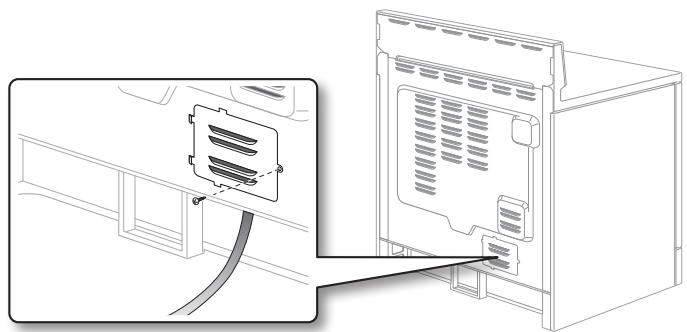
Replace the access cover on the range back. To replace the wire cover, insert double projections in the pockets located below the opening and tighten the screw.
natural_image
Line drawing of a refrigerator front panel with cable inserted, showing internal components and wiring (no text or symbols)
installing the range
INSTALLING THE ANTI-TIP DEVICE

WARNING
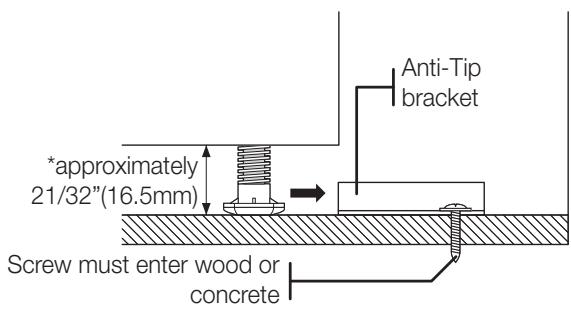
To reduce the risk of tipping, the appliance must be secured by properly
installing the Anti-Tip device packed with the appliance.
• Refer to the installation instructions supplied with the bracket.
- Unless properly installed, the range could be tipped by stepping or sitting on the door. Injury may result from spilled hot liquids or from the range itself.
text_image
anti-Tip
bracket
*approximately
21/32"(16.5mm)
Screw must enter wood or
concrete
*NOTE: To install Anti-Tip bracket, release the leveling leg. A minimum clearance of 21/32"(16.5mm) is required between the range bottom and the kitchen floor.
1. Locate the bracket using the template
The Anti-Tip bracket is packaged with a template. The instructions include information necessary to complete the installation. Read and follow the instructions on the sheet (template) for range installation.
2. Level the range
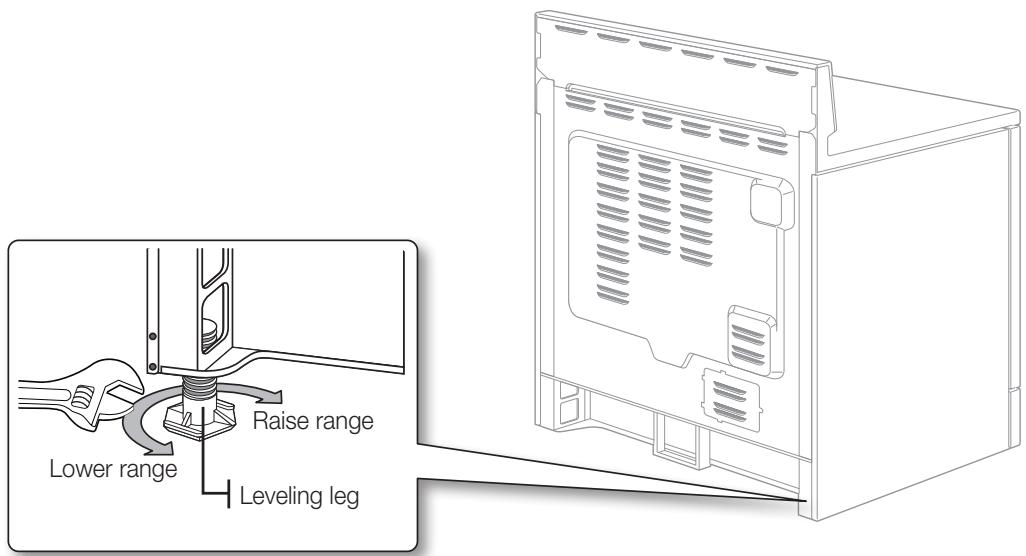
Level the range by adjusting the leveling legs with a wrench.
text_image
Lower range
Raise range
Leveling leg
3. Check your adjustments
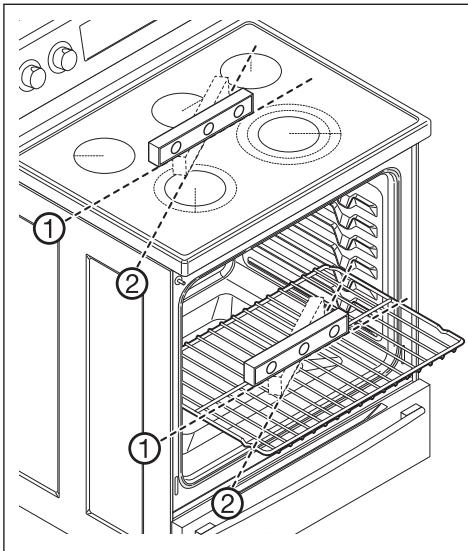
Use a spirit level to check your adjustments. Place the level diagonally on the oven rack or surface cooktop, and check each direction for level.
text_image
Technical diagram of an oven with labeled components and internal structure annotations
- Check direction 1.
- Check direction 2.
If the spirit level doesn't show level on the oven rack or surface cooktop, adjust the leveling legs with a wrench.
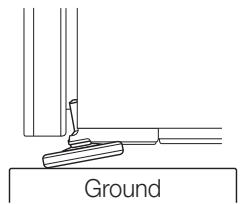
CAUTION For your safety, do not attempt to modify or straighten front legs. Front leveling legs on the range are designed to be slanted to prevent accidental tipping.
natural_image
Simple line drawing of a ground anchor with a tool, no text or symbols present
FINALIZING THE INSTALLATION
- Move range close enough to the opening to plug into the receptacle.
- Slide range into position insuring that the rear left(or rear right) leg slides under the Anti-Tip bracket. The range will sit 0" away from the back wall when properly installed.
- Carefully tip the range forward to insure that the Anti-Tip bracket engages the back brace and prevents tip-over.
- Turn on the electrical power. Check the range for proper operation as described in the user manual.
text_image
Anti-Tip bracket
Leveling leg
FOR NE59\*33\*\*, NE59\*43\*\* SERIES
- Check input power voltage. (Live 1 Live 2)
- If the input voltage is 240 V, done.
If the input voltage is 208 V, follow the step 3.
- Press Keep Warm and ∧ (Num 0) 3 sec on same time.
- Display shows 240 and Press ∧ (Num 0) to set 208.
- Press START/SET to confirm.
A PROPOS DE CE MANUEL
LISEZ ENTIÈREMENT ET ATTENTIVEMENT CES INSTRUCTIONS.
Support anti-basculement
Vis (4 ch)
National Fire Protection Association
Batterymarch Park
Quincy, MA 02269
natural_image
Interior view of a microwave oven with a door and control panel (no visible text or symbols)
(Fig. 1).
text_image
Close-up of a car door panel with a Samsung brand logo and control buttons visible
(Fig. 2).
text_image
11/8"
13/8"
13/8"
11/8"
natural_image
Diagram showing a refrigerator front panel with a cable inserted, no text or symbols present
text_image
Technical diagram of an oven with labeled components and internal structure annotations