
SMV4EVX14E - SMV4EVX00E - Dishwasher BOSCH - Free user manual and instructions
Find the device manual for free SMV4EVX14E - SMV4EVX00E BOSCH in PDF.


| Product type | Built-in dishwasher |
| Brand | Bosch |
| Model | SMV4EVX14E / SMV4EVX00E |
| Capacity | 14 standard place settings |
| Maximum weight | 60 kg |
| Supply voltage | 220-240 V, 50/60 Hz |
| Connected load | 2000-2400 W |
| Fuse protection | 10-16 A |
| Water pressure | min. 50 kPa (0.5 bar) – max. 1000 kPa (10 bar) |
| Max water temperature | 60 °C (hot water) |
| Wash programs | Intensive 70°, Auto 45-65°, Eco 50°, Silence 50, Express 65° 1h, Machine maintenance, Favorite |
| Additional functions | EfficientDry (automatic door opening), Half load, SpeedPerfect+ |
| Connectivity | Home Connect (Wi-Fi) |
| Safety | Aqua-Stop, child lock |
| Water softener | Adjustable (H00-H07) with special salt reservoir |
| Rinse aid dispenser | Adjustable (r00-r06) |
| Delay start | Up to 24 hours |
| Filtration system | Microfilter, fine filter, coarse filter (removable) |
| Spray arms | Removable for cleaning |
| Aqua-Stop warranty | Water damage covered for lifetime |
Frequently Asked Questions - SMV4EVX14E - SMV4EVX00E BOSCH
User questions about SMV4EVX14E - SMV4EVX00E BOSCH
0 question about this device. Answer the ones you know or ask your own.
Ask a new question about this device
Download the instructions for your Dishwasher in PDF format for free! Find your manual SMV4EVX14E - SMV4EVX00E - BOSCH and take your electronic device back in hand. On this page are published all the documents necessary for the use of your device. SMV4EVX14E - SMV4EVX00E by BOSCH.
USER MANUAL SMV4EVX14E - SMV4EVX00E BOSCH
Register your new device on MyBosch now and get free benefits: bosch-home.com/welcome
Lave-vaisselle
SMV4EVX00E
Google Play and the Google Play logo are trademarks of Google LLC. Apple and the Apple logo are trademarks of Apple Inc.

Scan QR code
text_image
QR code image containing encoded data, no visible human-readable textTable des matières
1 Sécurité.... 4
natural_image
Illustration of a basket filled with various food items (no text or symbols visible)natural_image
Diagram of a car chassis with wheels and structural framework, showing a blue arrow pointing to a component (no text or symbols present)natural_image
Technical line drawing of a staircase with mesh railings and a meshed panel (no text or symbols)natural_image
Line drawing of a basket filled with eggs (no text or symbols)natural_image
Isometric line drawing of a multi-wheeled cart with wheels and metal frame (no text or symbols)8.4 Tiges rabattables
natural_image
Technical line drawing of a mechanical assembly with blue rods and components (no text or symbols)text_image
Diagram illustrating a mechanical or electrical system with labeled components and directional arrows indicating flow or movement.natural_image
Interior view of a kitchen drawer with cutlery and utensils (no text or symbols)natural_image
Diagram showing a hand pouring liquid into a container with a rotating button, no text or symbols presenttext_image
Diagram showing a device with labeled parts and directional arrows, likely illustrating a process or installation.natural_image
Diagram of a printer or printer with a paper feeding into a cover, showing liquid level (no text or symbols)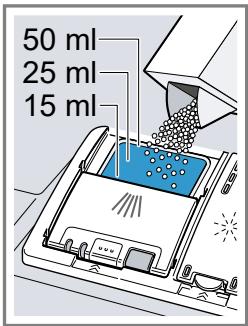
text_image
50 ml 25 ml 15 mlnatural_image
Simple line drawing of a coffee cup on a ladder and a blue 'X' symbol below (no text or labels)
natural_image
Simple line drawing of a megaphone and a checkmark (no text or symbols)natural_image
Illustration of a cleaning or cleaning process with a blue X mark (no text or symbols)
natural_image
Illustration of a food tray with a blue checkmark, no text or symbols presentConfigurer Home Connect
Conditions
text_image
QR code image containing encoded data, no visible human-readable textActiver Remote Start ☐
text_image
Diagram showing a mechanical assembly with labeled parts 1 and 2, indicating a rotating component or assembly.natural_image
Diagram of a mechanical component with a downward arrow indicating force or direction (no text or symbols present)text_image
Diagram illustrating two-step assembly steps of a mechanical component, labeled with arrows and numbered positions.natural_image
Technical line drawing of a mechanical component with no visible text or symbolstext_image
Diagram showing a mechanical component with labeled parts and directional arrows indicating motion or rotation.natural_image
Diagram of a kitchen appliance with a blue handle and upward arrow indicating direction (no text or symbols)natural_image
Mechanical assembly diagram showing a blue tool interacting with a circular component, no text or symbols presenttext_image
① ② CLICKThank you for buying a Bosch Home Appliance!
Register your new device on MyBosch now and profit directly from:
- Expert tips & tricks for your appliance
- Warranty extension options
• Discounts for accessories & spare-parts
• Digital manual and all appliance data at hand - Easy access to Bosch Home Appliances Service
Free and easy registration – also on mobile phones:
www.bosch-home.com/welcome
BOSCH HOME APPLIANCES SERVICE
Looking for help? You'll find it here.
Expert advice for your Bosch home appliances, help with problems or a repair from Bosch experts.
Find out everything about the many ways Bosch can support you:
www.bosch-home.com/service
Contact data of all countries are listed in the attached service directory.
BSH Hausgeräte GmbH
Carl-Wery-Straße 34
81739 München, GERMANY
www.bosch-home.com
A Bosch Company

9001778660 (030411) 642 V5
fr