
RH8778WO - Cordless vacuum ROWENTA - Free user manual and instructions
Find the device manual for free RH8778WO ROWENTA in PDF.



User questions about RH8778WO ROWENTA
0 question about this device. Answer the ones you know or ask your own.
Ask a new question about this device
Download the instructions for your Cordless vacuum in PDF format for free! Find your manual RH8778WO - ROWENTA and take your electronic device back in hand. On this page are published all the documents necessary for the use of your device. RH8778WO by ROWENTA.
USER MANUAL RH8778WO ROWENTA
natural_image
Technical line drawing of a mechanical component with labeled part '10a' (no other text or symbols)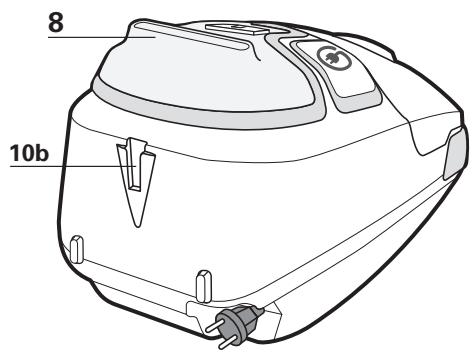
text_image
8 10b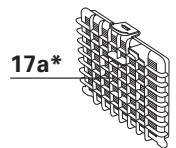
text_image
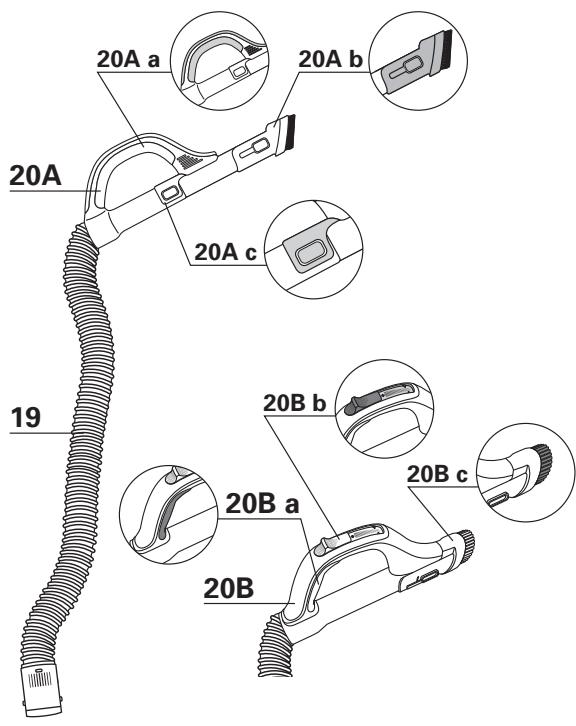
20A 20A a 20A b 20A c 19 20B a 20B b 20B c 20B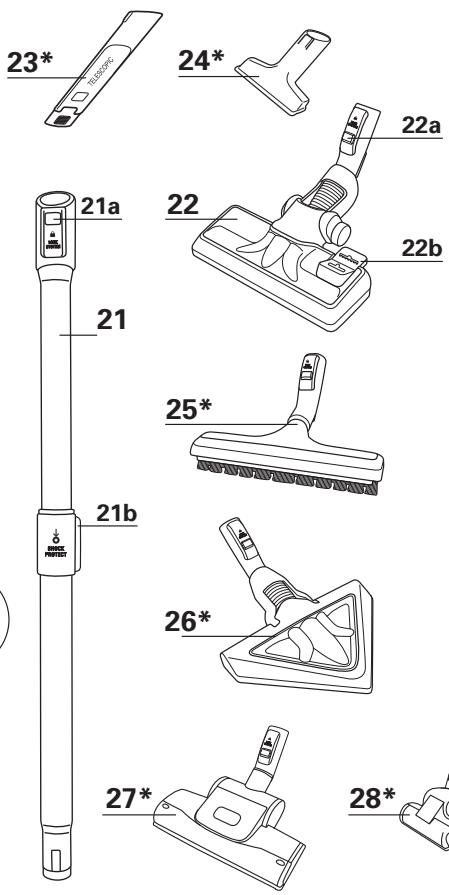
text_image
23* 24* 22a 21a 22 22b 21 25* 21b 26* 27* 28*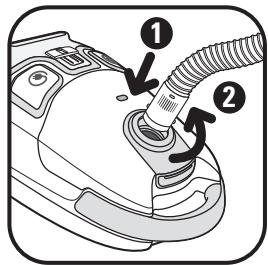
text_image
Diagram of a car engine component with numbered parts and directional arrows indicating assembly or flow.fig. 1
text_image
CLIC!fig. 2
text_image
CLIC!fig. 3
text_image
① PUSHfig. 4

natural_image
Line drawing of a person using a handheld vacuum cleaner (no text or symbols)fig. 5
natural_image
Line drawing of two hands holding a mechanical device, no text or symbols presentfig. 6
text_image
Diagram showing a device with two labeled arrows pointing to a circular component, indicating direction of connection or operation.fig. 7
flowchart
graph TD
    A["Max"] --> B["Process Unit"]
    B --> C["MIN"]
fig. 8
natural_image
Diagram of a medical device with arrows indicating movement or force (no text or symbols)fig. 9a*
natural_image
Diagram of a device handle with a knob and arrow indicating rotation (no text or symbols)fig. 9b*
text_image
Diagram showing a device with labeled parts and directional arrows indicating connection or movementfig. 10
natural_image
Diagram of a hand using a power tool to adjust or install a device (no text or symbols present)fig. 11
natural_image
Line drawing of a vacuum cleaner's internal components (no text or symbols)fig. 12
natural_image
Line drawing of a person's foot wearing a high-heeled shoe (no text or symbols)fig. 13
natural_image
Illustration of a hand pressing down on a car wheel (no text or symbols)fig. 14
natural_image
Mechanical component diagram showing a lever pressing a tray with a handle, no text or symbols presentfig. 15
natural_image
Illustration of a device with directional arrows indicating movement or orientation (no text or symbols)fig. 16
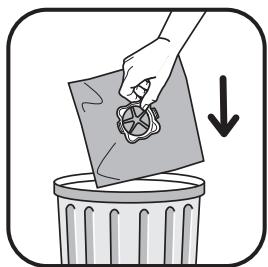
natural_image
Illustration of a hand placing a paper into a trash bin with a downward arrow (no text or symbols)fig. 17
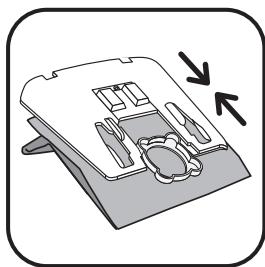
natural_image
Diagram of a device with internal components and directional arrows (no text or symbols)fig. 18
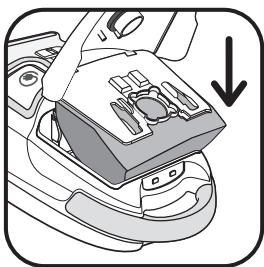
natural_image
Mechanical component diagram showing a lever pressing a tray with a downward arrow indicating motion (no text or symbols)fig. 19
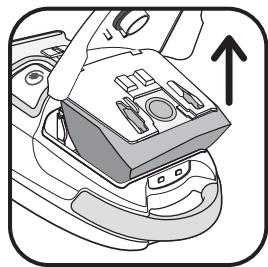
natural_image
Diagram of a car interior showing seatbelt and dashboard (no text or symbols)fig. 20
natural_image
Diagram of a device with directional arrows indicating movement or force (no text or symbols)fig. 21
natural_image
Illustration of hands holding a bag with a circular label and arrow indicating direction (no text or symbols)fig. 22
natural_image
Illustration of a hand pouring granular material into a container (no text or symbols)fig. 23
natural_image
Illustration of hands holding a bag with a label and arrow indicating direction (no text or symbols)fig. 24
natural_image
Illustration of a device with internal components and directional arrows (no text or symbols)fig. 25
natural_image
Diagram of a car interior showing a seatbelt with cutlery and a downward arrow indicating direction (no text or symbols)fig. 26
natural_image
Line drawing of a car engine compartment with a hand adjusting the interior panel (no text or symbols)fig. 27
natural_image
Illustration of a hand placing a grid-like object into a trash bin with a checkmark (no text or symbols)fig. 28
text_image
CLICK ② ①fig. 29
natural_image
Diagram of a car interior showing internal components with arrows indicating parts (no text or symbols present)fig. 30
natural_image
Illustration of a hand using a tool to generate granular material from a trash bin (no text or symbols)fig. 31
text_image
CLIC!fig. 32

natural_image
Line drawing of a hand using a tool to clean or adjust the air conditioner (no text or symbols present)fig. 33
CONSEILS DE SÉCURITÉ
For your safety, this appliance meets the applicable standards and regulations (Low Voltage Directives, Electromagnetic Compatibility, Environment,...).
This appliance is not intended to be used by persons (including children) with reduced physical, sensory or mental capacities or lack of experience and knowledge, unless they are supervised or have been given instructions beforehand concerning use of the appliance by a person responsible for their safety. Children should be supervised to ensure they do not play with the appliance.
This device can be used by children provided that they are at least 8 years old, as well as by people lacking experience and knowledge or whose physical, sensorial or mental abilities are reduced, if they have been properly trained and duly informed of the incurred risks. Children must not play with the appliance. Cleaning and maintenance of this appliance must not be carried out by children unless they are at least 8 years old and supervised by a responsible person. Keep the device and its cord away from children under 8 years old.
Do not use the appliance if: the cord is damaged. In order to avoid all danger, the cord winding system and the cord itself of your vacuum cleaner must necessarily be replaced by a Rowenta Authorized Service Centre only.
1 • Conditions of use
Your vacuum cleaner is an electrical appliance: it must only be used under normal operating conditions. Use and store the appliance out of the reach of children. Never leave the appliance unattended when it is switched on.
Keep the nozzles and tube ends well away from eyes and ears.
Do not vacuum damp surfaces, where there is water or liquids whatever their nature, hot substances, ultrafine substances (plaster, cement, ashes...), large sharp debris (glass), harmful products (solvents, paint strippers...), chemical products (acids, cleaning agents...), inflammable and explosive products (petrol or alcohol based).
Never immerse the appliance in water, splash water onto it or store it outdoors.
Do not use the appliance if it has been dropped and shows visible signs of damage or signs of not functioning properly.
In this case, do not open the appliance but send it to your nearest Approved Service Centre or contact Rowenta Customer Services (you can find their contact details on the last page).
2 • Electrical power supply
Make sure that the operating voltage (voltage) of your vacuum cleaner is the same as your supply voltage.
Unplug the appliance by removing the power plug, without pulling on the power cord:
- immediately after use,
- before each time you change the accessories,
- before cleaning, maintaining or changing the filter.
3 • Repairs
Repairs should only be carried out by specialists using original replacement parts.
Repairing an appliance oneself can be dangerous for the user, and will invalidate the guarantee.


DESCRIPTION
1 Cover
2 Cover opening
3 Carrying power nozzle
4 Power cord rewind button
5 On/Off button
6 Bag change indicator
7 Vacuum inlet
8 ROWENTA EXTREME SILENCE SYSTEM
9 Electronic power switch
10 a – Vertical parking
b – Horizontal parking
11 Bag compartment
12 Bag support for Wonderbag* bag or synthetic bag*
13 Bag in vacuum cleaner sensor
14 Bag support sensor
15 (H)EPA* filter cassette compartment
16 (H)EPA* filter cassette sensor
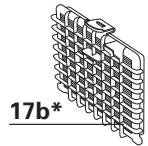
17 a - (H)EPA* filter cassette (ref. ZR002901) for Wonderbag* bags
b - (H)EPA* filter cassette (ref. ZR005201) for synthetic bags*
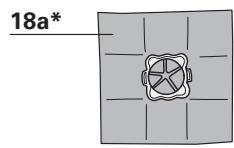
18 a - Wonderbag* UNIVERSAL bag (Classic, Freshline, Endura ref. WB4xxx)
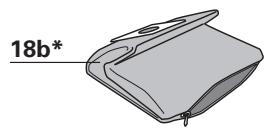
b - Textile baf* (ref. RS-RT2274)
Accessories
19 Flexible hose with power nozzle ERGO COMFORT SILENCE
20A* a - Ergonomic nozzle ERGO COMFORT SILENCE
b - In-built brush (EASY BRUSH)
c - Manual power switch (POWER CONTROL)
20B* a - Ergonomic nozzle ERGO COMFORT SILENCE
b - Manual power switch (POWER CONTROL)
c - In-built brush (EASY BRUSH)
21 Metal telescopic tube ERGO COMFORT SILENCE a - Nozzle/tube locking system (LOCK SYSTEM) b - Tube adjustment button (TELESCOPIC SYSTEM)
22 All floor type nozzle ERGO COMFORT SILENCE a - Tube/nozzle locking system (LOCK SYSTEM) b - 2 position button: brush in retracted position for rugs and carpets / brush in advanced position for parquets and smooth floors.
23 Telescopic crevice tool*
24 Upholstery nozzle*
25 Rectangular parquet nozzle*
26 Parquet nozzle DELTA*
27 Turbobrush*
28 Mini turbobrush*
BEFORE USING FOR THE FIRST TIME
Thanks to the exclusive ROWENTA EXTREME SILENCE SYSTEM we promise you'll notice just how much quieter your vacuum cleaner is.
1 • Removing packaging
Unpack your appliance and remove any unwanted stickers, Keep your guarantee form and read the instructions carefully before using your appliance for the first time.
2 • Advice and precautions
Each time before use, the power cord must be unwound completely.
Do not jam it and do not allow it to rub against sharp edges.
If you're using an electrical extension, check that it is in perfect condition and that it is suited to the power of your vacuum cleaner. Never unplug the appliance by pulling on the power cord.
Never operate the vacuum cleaner without a bag in it and without its filtration system (cassette).
For your peace of mind your vacuum cleaner is fitted with two safety check systems: for the bag (13 & 14) and for the (H)EPA filter cassette (16).
Do not move the vacuum cleaner by pulling on the power cord, the appliance must be moved using its carrying handle. Do not use the power cord for lifting the appliance. Switch off and unplug your vacuum cleaner each time you've finished using it. Always switch off and unplug your vacuum cleaner before maintaining or cleaning it.
Only use original Rowenta or Wonderbag bags and filters. Only use Rowenta original accessories. Check that all the filters are correctly in place.
If you experience difficulties getting hold of the accessories and filters for this vacuum cleaner, please contact Rowenta customer services (you can find their contact details on the last page).
USING THE APPLIANCE
1 • Assembling the elements of the appliance
Push the flexible hose into the vacuum inlet (Fig.1) and turn until it locks. To remove it, turn in the opposite direction and pull.
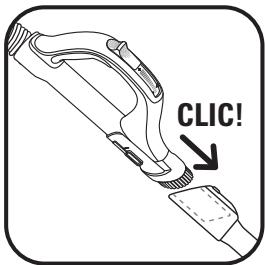
- Push the metal telescopic tube into the end of the power nozzle until you hear a locking 'click' (Fig.2) (to release it, push the locking button on the tube and remove it).
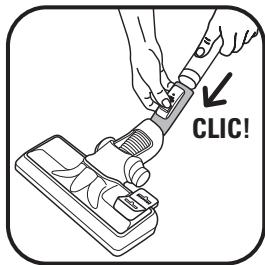
- Push the all floor type nozzle (22) into the end of the metal telescopic tube until you hear a locking 'click' (Fig.3) (to release it, push the locking button on the nozzle and remove it).
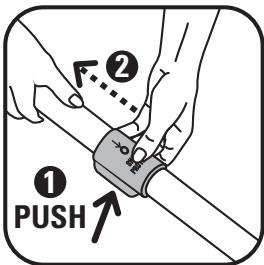
- Adjust the telescopic metal tube to the required length using the telescopic system (TELESCOPIC SYSTEM) (Fig.4)
Fit the appropriate accessory to the end of the metal telescopic tube or the power nozzle:
- For rugs and carpets: use the all floor type nozzle in the retracted brush nozzle position or the Turbobrush* (fibres and animal hairs).:
- For parquets and smooth floors: use the all floor type nozzle in the advanced position or, for a better result, use the parquet nozzle*.
- For corners and hard to reach spots: use the telescopic crevice tool*.
- For furniture and fragile surfaces: use the brush built into the power nozzle (EASY BRUSH) or the upholstery nozzle*.
IMPORTANT Never operate your vacuum cleaner without its bag and without its filtration system (cassette).
IMPORTANT Always switch off and unplug your vacuum cleaner before changing the accessories.
COMFORT TIPS
ERGO COMFORT SILENCE Chain
Comfortable to use, the ERGO COMFORT SILENCE range has been designed to make using your vacuum cleaner an easier and more enjoyable experience.
So that you can keep an upright position and avoid bending your back, make sure you:
- Adjust the length of the metal telescopic tube ERGO COMFORT SILENCE to suit your body build (Fig.5).
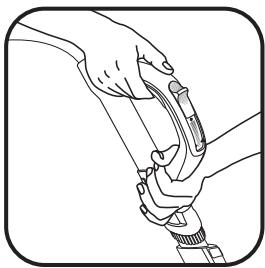
- Place your second hand in front of the power nozzle handle ERGO COMFORT SILENCE (Fig.6).
2 • Plugging in the power cord and switching on the appliance
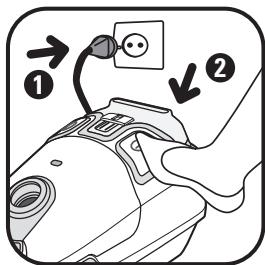
Unwind the power cord completely, plug in your vacuum cleaner and press on the On/Off button (Fig.7).
Remark: you can use your vacuum cleaner in the horizontal position (sleigh position) but also in the vertical position, notably when you are vacuuming the stairs or removing dust from the curtains.
Adjust the suction power:
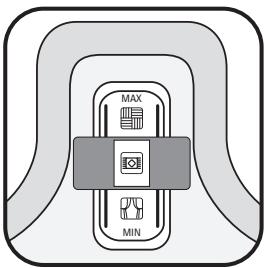
→ using the electronic power control (Fig.8):
- Position (MIN) for vacuuming delicate fabrics (net curtains, textiles)
- Position (Medium) for everyday vacuuming for all types of floors, which are only slightly dirty
- Position (MAX) for vacuuming hard floors and very dirty rugs and carpets.
→ with the manual power nozzle switch :
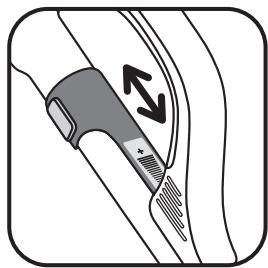
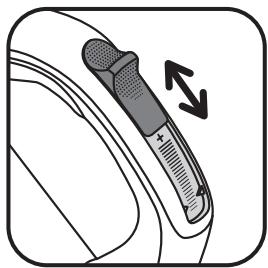
open the power control flap in order to reduce the suction power manually and avoid the nozzle "sticking" to the surface that has been vacuumed (Fig. 9a* or 9b*) e.g.: net curtains, fragile surfaces...
3 • Storing and carrying your vacuum cleaner
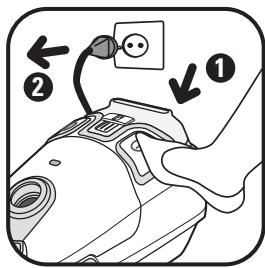
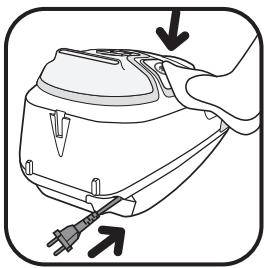
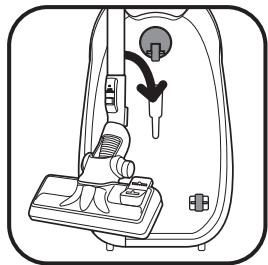
After use, switch off your vacuum cleaner by pressing the On/Off switch and unplug it (Fig.10). Rewind the power cord by pressing the power cord rewind button (Fig.11). In the vertical position place the nozzle in the parking position (Fig.12).
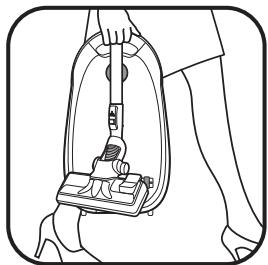
This allows you to carry and store your vacuum cleaner when it is in the parking position (Fig.13).

CLEANING AND MAINTAINING
The air we breathe contains particles that may be allergens: mite larvae and droppings, mould, pollen, smoke and animal residues (hair, skin, saliva, urine). The smallest particles penetrate deep into the respiratory system where they can cause inflammation and lung impairment.(H)EPA filters (High Efficiency Particulate Air) are used to filter out the smallest particles. With the (H)EPA filter, the air released back into the room is healthier than the air that is vacuumed.
IMPORTANT Always switch off and unplug your vacuum cleaner before servicing it.
1 • Changing the bag
The change bag light tells you that the bag is full or saturated. If you notice that your vacuum cleaner is not working as well as it should be, turn the power up to maximum and hold the lifted nozzle above the floor. If the light stays red, replace the bag.
a) If your vacuum cleaner is fitted with a Wonderbag\* (18a):
IIMPORTANT Wonderbag* UNIVERSAL (Classic, Freshline, Endura ref. WB4xxx) bags are available from retail outlets and at Approved Service Centres.
IMPORTANT Wonderbag* COMPACT bags can't be used on this appliance. Using them could damage the vacuum cleaner and may invalidate the appliance guarantee.
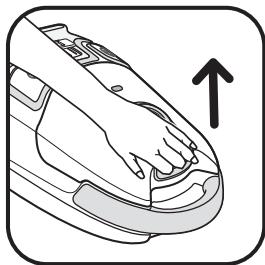
Open the cover to your vacuum cleaner (Fig.14).
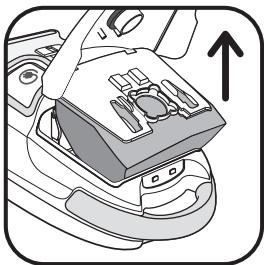
Remove the bag support from the bag compartment (Fig.15).
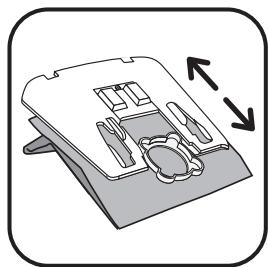
Remove the Wonderbag* bag from the bag support (Fig.16).
Throw the Wonderbag* bag away (Fig.17).
Place a new Wonderbag* bag in the bag support using its ring (Fig.18).
Place the bag support in the bag compartment and fit the bag inside the compartment (Fig.19).
Make sure that the bag is correctly positioned before closing the cover.
b) If your vacuum cleaner is fitted with a synthetic (textile) bag\* (18b):
Synthetic bags* (ref.RS-RT2274) are available from Approved Service Centres.
Open the cover to your vacuum cleaner (Fig.14).
Remove the bag support from the bag compartment (Fig.20).
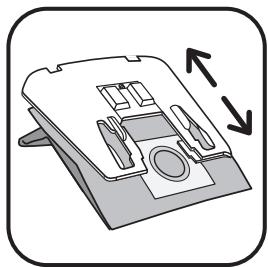
Remove the synthetic bag* from the bag support (Fig.21).
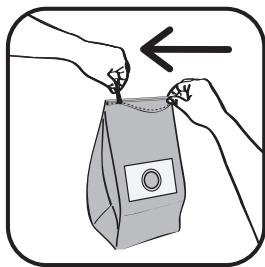
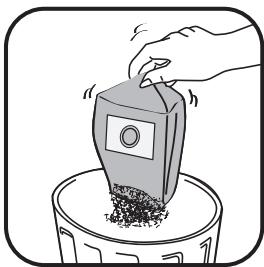
Open the synthetic bag* using the zip (Fig.22) then empty it into a dustbin (Fig.23).
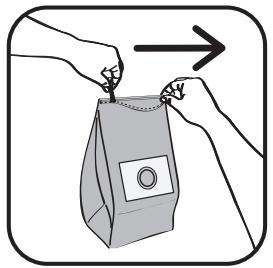
Check that the zip is properly closed once more before putting the bag back in again (Fig.24).
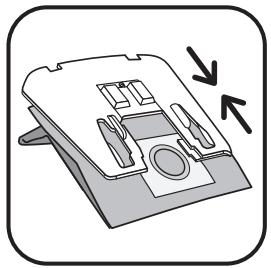
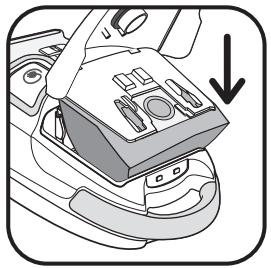
Place the synthetic bag* on the bag support using its cardboard holder (Fig.25), place the bag support in the bag compartment and fit the bag inside the compartment (Fig.26).
Make sure that the bag is correctly positioned before closing the cover.
IMPORTANT Never operate the vacuum cleaner without a bag.
For your peace of mind your vacuum cleaner is fitted with a safety system which tells you that the bag is inside (the cover won't close unless you've put the bag in).
2 • Changing the (H)EPA\* filter cassette (ref. ZR 0029 01\*) (for all appliances fitted with a Wonderbag\* bag)
IMPORTANT Replace the filtration system once a year.
The (H)EPA filter cassette ref. ZR 0029 01* is available from all retail outlets and at approved Service Centres.
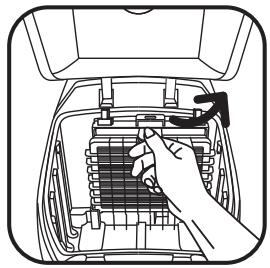
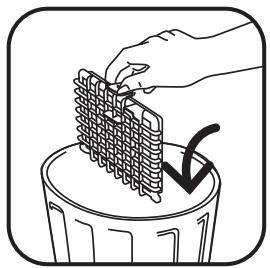
Open the cover to your vacuum cleaner (Fig.14). Remove the bag support from the bag compartment (Fig.15), then remove the (H)EPA* filter cassette (Fig.27) and throw the cassette into a bin (Fig.28).
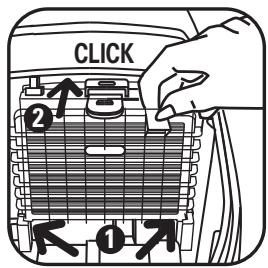
Fit the new (H)EPA* filter cassette (ref. ZR 0029 01*) into its compartment (Fig.29)
Put the bag support back into the compartment (Fig.19).
Make sure that the (H)EPA* filter cassette is correctly positioned before closing the cover.
3 • Cleaning the HEPA\* filter cassette (ref ZR0052 01\*) (for appliances which come with a synthetic bag\*)
IMPORTANT! This cleaning procedure is only for (H)EPA filter cassettes ref. ZR0052 01*
The (H)EPA* filter cassette ref.ZR0052 01* is available from all retail outlets and at approved Service Centres.
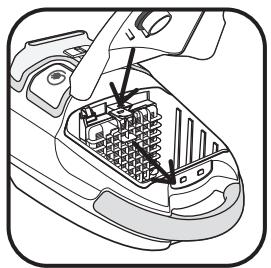
Open the cover to your vacuum cleaner (Fig.14). Remove the bag support from the bag compartment (Fig.20), then remove the (H)EPA* filter cassette (Fig.30).
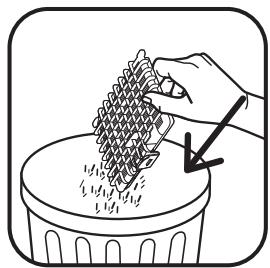
Tap the (H)EPA* filter cassette above a dustbin (Fig.31).
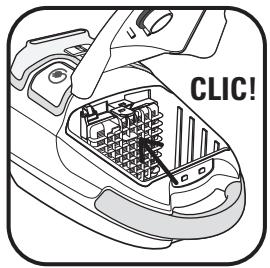
Put the (H)EPA* filter cassette (ref. ZR005201*) back in its compartment (Fig.32).
Put the bag support back with the synthetic bag* in the bag compartment.
Make sure that the (H)EPA* filter cassette is correctly positioned before closing the cover.
IMPORTANT Never use the vacuum cleaner without a (H)EPA filter cassette.
For your peace of mind your vacuum cleaner is fitted with a safety system which tells you that the (H)EPA cassette filter is in place (the cover won't close unless you've put the (H)EPA) filter cassette in.
TROUBLESHOOTING
IMPORTANT: As soon as you notice that your vacuum cleaning is not working as well as it should be and before carrying out any checks, switch it off using the On/ Off button.
If your vacuum cleaner won't start
- The appliance has not got any power: check that the appliance is correctly plugged in.
If your vacuum cleaner doesn't have any suction power
- An accessory or the flexible hose is blocked: unblock the accessory or the flexible hose.
- The cover won't close properly: check the positioning of the bag, bag support and (H)EPA filter cassette and close the cover.
If your vacuum cleaner has less suction power, makes noise, whistles
- An accessory or the flexible hose is partially blocked: unblock the accessory or the flexible hose.
- The bag is full or saturated with fine dust: replace the Wonderbag* bag (18a) or empty the synthetic bag* (18b).
- The filtration system is saturated: change the (H)EPA* filter cassette (ref ZR002901*) and put it back into its housing or clean the (H)EPA* filter cassette (ref ZR005201*) as indicated in the procedure.
- The mechanical power control switch (20c) is open: close the
GUARANTEE
- This appliance has been designed for domestic use only; the manufacturer will accept no responsibility in the event of any inappropriate use or failure to comply with the instructions and the guarantee will cease to apply.
4 • Cleaning your vacuum cleaner
Wipe the body of the appliance and the accessories with a soft cloth (Fig.33). Do not use detergents, chemical or abrasive products.
power nozzle adjustable manual power switch.
If the change bag light stays on Red
- The bag is saturated: replace the Wonderbag* bag (18a) or empty the synthetic bag* (18b).
If the cover won't close (presence sensors 13, 14, 16)
- Check that that the bag support is fitted as well as the bag and that it is positioned correctly.
- Check that the (H)EPA filter cassette is fitted or that it is correctly positioned.
If the nozzle is difficult to move
- Reduce the power by opening the power nozzle adjustable manual power switch (20c) or by moving the electronic power control (9) to the MIN position.
If the power cord does not rewind completely
- The power cord is slowed down when rewinding: pull the power cord out again and press the power cord rewind button.
If a problem persists, take your vacuum cleaner to your local Rowenta Approved Service Centre. Check the list of Rowenta Approved Service Centres or contact Rowenta Customer Services (you can find contact details on the last page).
- Read the instructions for use carefully before using your appliance for the first time: any use of the appliance which does not conform to these instructions will release Rowenta from any liability.

WHERE TO BUY ACCESSORIES
| ACCESSORIES* | USE | FITTING AN ACCESSORY | PURCHASE LOCATIONS |
Wonderbag® UNIVERSAL Bag | Universal bag. | Fit the ring on to the bag support. | Rowenta Approved Service Centres (see attached list of addresses). |
Upholstery brush | For cleaning furniture. | Fix the upholstery brush to the end of the nozzle. | Rowenta Approved Service Centres (see attached list of addresses). |
Upholstery nozzle | For cleaning furniture. | Fit the upholstery nozzle to the end of the nozzle or the tube. | Rowenta Approved Service Centres (see attached list of addresses). |
Telescopic crevice tool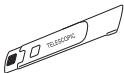 | To get into corners and places that are hard to reach. | Fit the telescopic crevice tool to the end of the nozzle or the tube. | Rowenta Approved Service Centres (see attached list of addresses). |
Rectangular parquet nozzle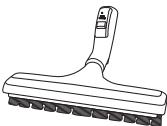 | For fragile floors. | Fit the parquet nozzle to the end of the tube. | Rowenta Approved Service Centres (see attached list of addresses). |
DELTA parquet nozzle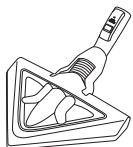 | For fragile floors. | Fit the DELTA parquet nozzle to the end of the tube. | Rowenta Approved Service Centres (see attached list of addresses). |
Mini turbobrush | For cleaning furniture fabrics thoroughly. | Fit the mini turbobrush to the end of the tube. | Rowenta Approved Service Centres (see attached list of addresses). |
Turbobrush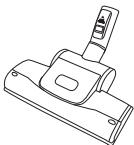 | For removing threads and animal fur embedded in rugs and carpets. | Fit the turbobrush to the end of the tube. | Rowenta Approved Service Centres (see attached list of addresses). |
ENVIRONMENT
- In accordance with current regulations, any appliance which is no longer needed must be rendered unusable once and for all: unplug and cut off the power cord before disposing of the appliance.
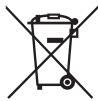
Help us take care of the environment!
① Your appliance contains many materials which can be recovered or recycled.
Leave it at a waste collection point so that it can be processed.