
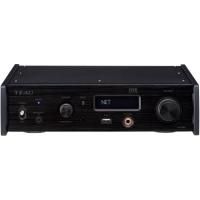
AI-301DA - Audio Amplifier TEAC - Free user manual and instructions
Find the device manual for free AI-301DA TEAC in PDF.



| Product Type | Stereo Audio Amplifier |
| Brand | TEAC |
| Model | AI-301DA |
| Dimensions (W × H × D) | 435 × 142 × 355 mm |
| Weight | 8.1 kg |
| Power Supply | AC 230 V, 50 Hz |
| Power Consumption | 200 W |
| Standby Power Consumption | 0.5 W |
| Output Power (RMS) | 90 W per channel (4 Ω, 1 kHz, 0.5%) 60 W per channel (8 Ω, 1 kHz, 0.5%) |
| Total Harmonic Distortion | 0.02% (1 kHz, 8 Ω, 45 W) |
| Signal-to-Noise Ratio (IHF-A) | PHONO: 65 dB LINE: 90 dB |
| Frequency Response | PHONO: 20 Hz - 20 kHz (±1 dB, RIAA) LINE: 5 Hz - 80 kHz (SOURCE DIRECT, 1 W) |
| Speaker Impedance | 4 - 16 Ω (one pair), 8 - 16 Ω (two pairs) |
| Inputs | PHONO (MM), CD, AUX1, AUX2, TAPE1/CD-R, TAPE2 |
| Outputs | Speakers A/B, Headphones (PHONES), TAPE (REC) |
| Tone Controls | Bass: ±10 dB (100 Hz) Treble: ±10 dB (10 kHz) Source Direct, Loudness |
| Special Functions | Mute, Tape Monitor, Balance, Microphone (MIC) with adjustable level |
| Remote Control | Yes (UR-431) with AAA batteries |
| Supplied Accessories | Remote control, warranty card, instruction manual |
| Care and Cleaning | Soft dry or slightly damp cloth; avoid solvents, benzene, alcohol |
| Safety | Do not open the cabinet; install in a ventilated area; do not expose to water |
Frequently Asked Questions - AI-301DA TEAC
User questions about AI-301DA TEAC
0 question about this device. Answer the ones you know or ask your own.
Ask a new question about this device
Download the instructions for your Audio Amplifier in PDF format for free! Find your manual AI-301DA - TEAC and take your electronic device back in hand. On this page are published all the documents necessary for the use of your device. AI-301DA by TEAC.
USER MANUAL AI-301DA TEAC
Integrated Stereo Amplifier
OWNER'S MANUAL
MANUEL DU PROPRIÉTAIRE
MANUAL DEL USUARIO
BEDIENUNGSANLEITUNG
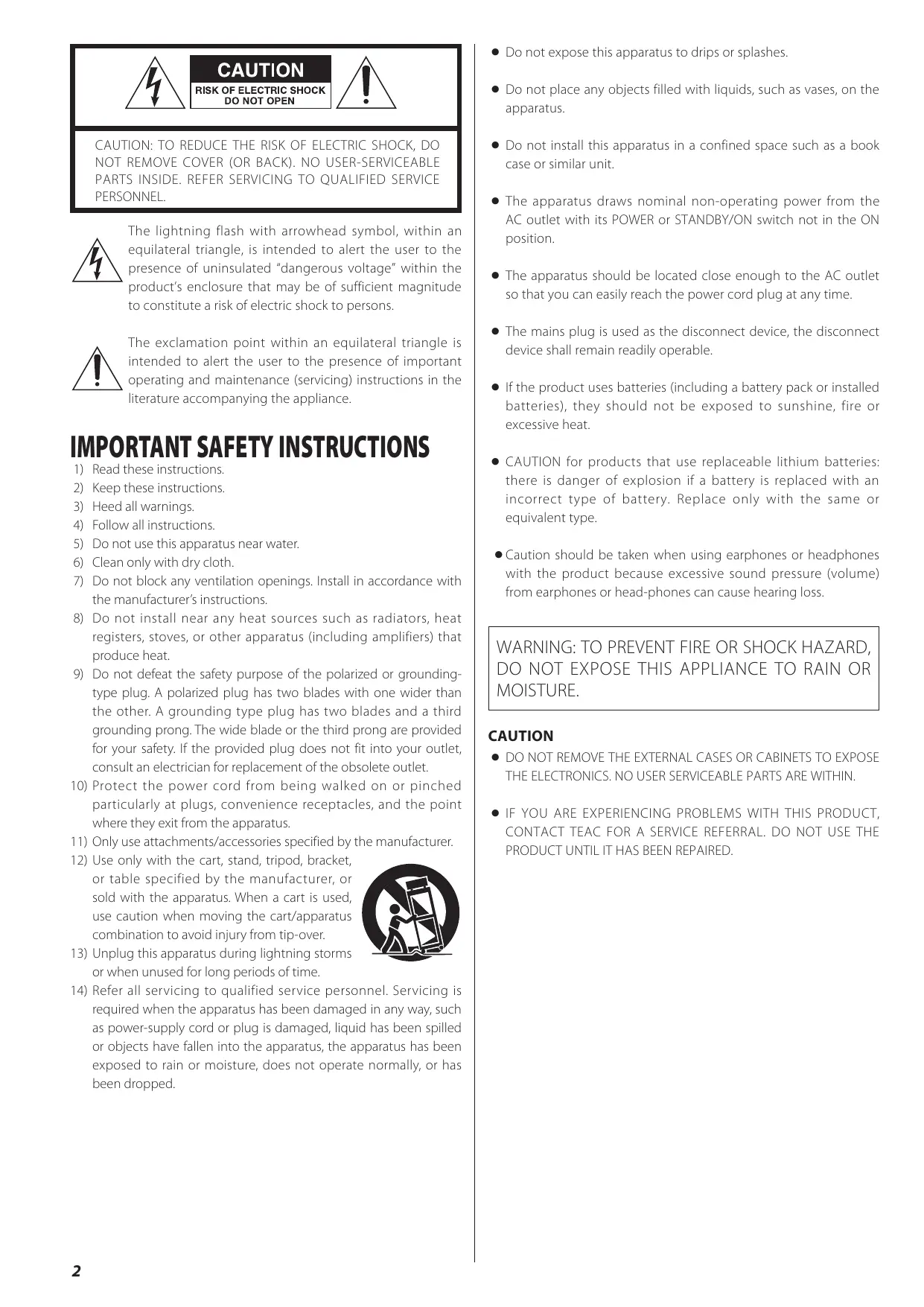
The lightning flash with arrowhead symbol, within an equilateral triangle, is intended to alert the user to the presence of uninsulated "dangerous voltage" within the product's enclosure that may be of sufficient magnitude to constitute a risk of electric shock to persons.

The exclamation point within an equilateral triangle is intended to alert the user to the presence of important operating and maintenance (servicing) instructions in the literature accompanying the appliance.
IMPORTANT SAFETY INSTRUCTIONS
1) Read these instructions.
2) Keep these instructions.
3) Heed all warnings.
4) Follow all instructions.
5) Do not use this apparatus near water.
6) Clean only with dry cloth.
7) Do not block any ventilation openings. Install in accordance with the manufacturer's instructions.
8) Do not install near any heat sources such as radiators, heat registers, stoves, or other apparatus (including amplifiers) that produce heat.
9) Do not defeat the safety purpose of the polarized or grounding-type plug. A polarized plug has two blades with one wider than the other. A grounding type plug has two blades and a third grounding prong. The wide blade or the third prong are provided for your safety. If the provided plug does not fit into your outlet, consult an electrician for replacement of the obsolete outlet.
10) Protect the power cord from being walked on or pinched particularly at plugs, convenience receptacles, and the point where they exit from the apparatus.
11) Only use attachments/accessories specified by the manufacturer.
12) Use only with the cart, stand, tripod, bracket, or table specified by the manufacturer, or sold with the apparatus. When a cart is used, use caution when moving the cart/apparatus combination to avoid injury from tip-over.
13) Unplug this apparatus during lightning storms or when unused for long periods of time.
14) Refer all servicing to qualified service personnel. Servicing is required when the apparatus has been damaged in any way, such as power-supply cord or plug is damaged, liquid has been spilled or objects have fallen into the apparatus, the apparatus has been exposed to rain or moisture, does not operate normally, or has been dropped.

- Do not expose this apparatus to drips or splashes.
- Do not place any objects filled with liquids, such as vases, on the apparatus.
- Do not install this apparatus in a confined space such as a book case or similar unit.
- The apparatus draws nominal non-operating power from the AC outlet with its POWER or STANDBY/ON switch not in the ON position.
- The apparatus should be located close enough to the AC outlet so that you can easily reach the power cord plug at any time.
- The mains plug is used as the disconnect device, the disconnect device shall remain readily operable.
- If the product uses batteries (including a battery pack or installed batteries), they should not be exposed to sunshine, fire or excessive heat.
- CAUTION for products that use replaceable lithium batteries: there is danger of explosion if a battery is replaced with an incorrect type of battery. Replace only with the same or equivalent type.
- Caution should be taken when using earphones or headphones with the product because excessive sound pressure (volume) from earphones or head-phones can cause hearing loss.
WARNING: TO PREVENT FIRE OR SHOCK HAZARD, DO NOT EXPOSE THIS APPLIANCE TO RAIN OR MOISTURE.
CAUTION
DO NOT REMOVE THE EXTERNAL CASES OR CABINETS TO EXPOSE THE ELECTRONICS. NO USER SERVICEABLE PARTS ARE WITHIN.
- IF YOU ARE EXPERIENCING PROBLEMS WITH THIS PRODUCT, CONTACT TEAC FOR A SERVICE REFERRAL. DO NOT USE THE PRODUCT UNTIL IT HAS BEEN REPAIRED.
Contents
Thank you for choosing TEAC. Read this manual carefully to get the best performance from this unit.
Before Using the Unit 3
Connection 4
Identifying the Parts. 6
Remote Control Unit 8
Basic Operation 8
TroubleShooting 11
Specifications 12
Before Using the Unit
Read this before operation
- As the unit may become warm during operation, always leaves sufficient space around the unit for ventilation.
- The voltage supplied to the unit should match the voltage as printed on the rear panel. If you are in any doubt regarding this matter, consult an electrician.
- Choose the installation location of your unit carefully. Avoid placing it in direct sunlight or close to a source of heat. Also avoid locations subject to vibrations and excessive dust, heat, cold or moisture.
- Do not place the unit on the amplifier/receiver.
- Do not open the cabinet as this might result in damage to the circuitry or electrical shock. If a foreign object should get into the set, contact your dealer or service agency.
- When removing the power plug from the wall outlet, always pull directly on the plug, never yank the cord.
- Do not attempt to clean the unit with chemical solvents as this might damage the finish. Use a clean, dry or slightly damp cloth.
- Keep this manual in a safe place for future reference.
- The operations are illustrated using the European model for example in this manual.
Maintenance
If the surface of the unit gets dirty, wipe with a soft cloth or use diluted neutral cleaning liquid. Be sure to remove any fluid completely. Do not use thinner, benzine or alcohol as they may damage the surface of the unit.
CAUTION:
- Switch off the power to all equipment before making connections.
- Read the instructions of each component you intend to use with this unit.
- Be sure to insert each plug securely. To prevent hum and noise, avoid bundling the signal interconnection cables together with the AC power cord or speaker cables.
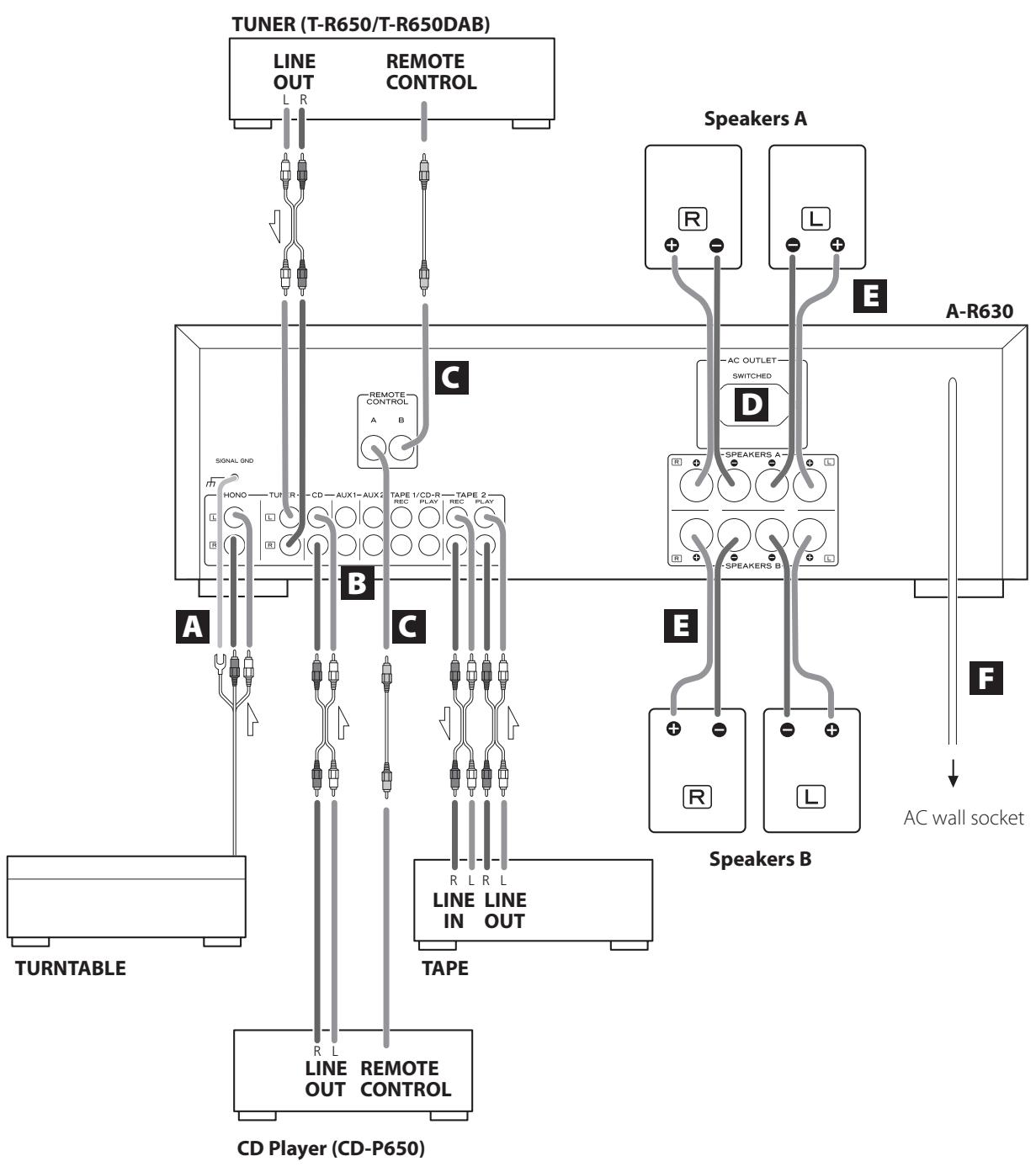
PHONO Turntable
TUNER Tuner (T-R650/T-R650DAB)
CD CD player (CD-P650)
AUX 1/AUX 2 Audio component, etc.
TAPE1/CD-R Cassette tape deck, CD recorder, etc.
TAPE2 Cassette tape deck
A PHONO jacks/SIGNAL GND terminal
Connect the turntable's RCA pin cords to PHONO jacks. Make sure to connect:
white plug white jack (L: left channel)
red plug red jack (R: right channel)
Connect the turntable's ground cord to SIGNAL GND terminal.
B AUDIO IN/OUT jacks
Analog 2-channel audio signal is input or output from these jacks. Connect the component with commercially-available RCA cables.
Make sure to connect:
white plug white jack (L: left channel)
red plug red jack (R: right channel)
White (L) White (L) Red (R) Red (R)
- Be sure to insert each plug securely. To prevent hum and noise, avoid bundling the signal connection cables together with the AC power cord or speaker cables.
REMOTE CONTROL jacks
If you have TEAC T-R650, TR-650DAB or CD-P650, connect the REMOTE CONTROL jack (A or B) of each component by the remote control cord (provided with the T-R650, T-R650DAB or CD-P650).
D AC Outlet (switched)
This outlet is active only when the unit is on.
Caution:
Make sure that the total power consumption of all equipment connected to the outlet does not exceed 500mA or 100 watts.
Speaker Connections
Caution:
To avoid damaging the speakers with a sudden high-level signal, be sure to switch the power off before connecting the speakers.
- Check the impedance of your speakers. Connect speaker with an impedance of 4 to 16 ohms when using only one pair of speakers (SPEAKERS A or SPEAKERS B). When using two pairs of speakers simultaneously, the impedance should be 8 to 16 ohms.
- The black speaker terminals are (negative).
Generally, the side of the speaker cable is marked to make it distinguishable from the side of the cable. Connect this marked side to the terminal and the unmarked side to the black terminal.
Caution:
The metal portions of the two separate wires should not touch or an electrical short can occur. Shorted wires can create a fire hazard or induce a failure in your equipment.
How to connect
Speakers A, B
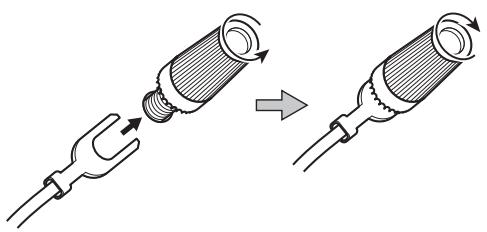
- Turn the terminal cap counterclockwise to loosen it. The speaker terminal caps cannot be fully removed from the base.
- Insert the wire into the terminal fully and turn the terminal cap clockwise to securely connect it.
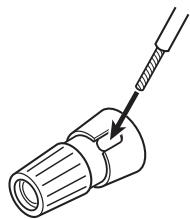
- Make sure none of the wire insulation is under the terminal, only the bare, stripped wire.
- Make sure the wire is fastened firmly by pulling the cable lightly.
AC power cord
After all other connections are complete, connect the power cord to the AC wall socket.
- Be sure to connect the power cord to an AC outlet which supplies the correct voltage.
- Hold the power plug when plugging in or unplugging the power cord.
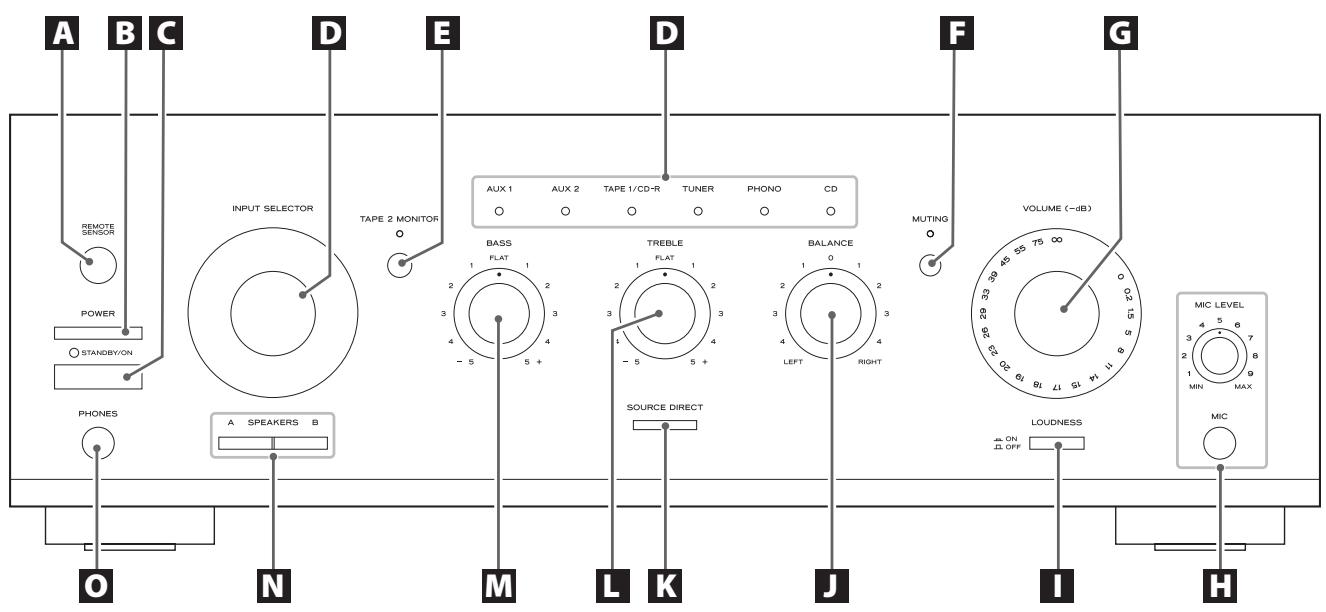
Remote Sensor
When operating the remote control unit, point it towards the REMOTE SENSOR.
B POWER
Press this switch to turn the unit standby or off.
C STANDBY/ON
When the power switch of the main unit is depressed, use this button to turn the unit on or standby.
The standby indicator lights when the unit is in the standby mode. When the unit is turned on, it goes off.
D INPUT SELECTOR
Use this knob (or buttons of the remote control unit) to select a source.
One of the indicaotrs lights to show the selected source.
TAPE 2 MONITOR
When a cassette tape deck is connected to the TAPE 2 jacks, use this button to turn on or off the tape monitor function.
The indicator lights when the tape monitor function is on.
F MUTING
Use this button to mute the sound.
This indicator blinks during the muting.
VOLUME
Turn this knob (or press the VOLUME buttons of the remote control unit) to adjust the volume.
MIC Jack and MIC LEVEL knob
With the microphone plugged into this jack, the sound picked up from the microphone will be heard together with the source sound selected by the INPUT SELECTOR.
Turn the MIC LEVEL knob to adjust the input level of the microphone.
LOUDNESS
Use this button to compensate for the loss of bass at low volumes.
J BALANCE
Use this knob to adjust the balance of the speakers.
Normally, set the knob to the center position.
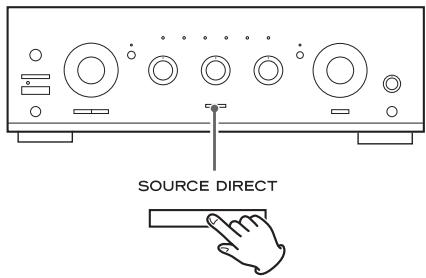
K SOURCE DIRECT
Press this button to turn on or off the source direct function. When the source direct function is set to on, the button lights and you can listen to the sound without tone effects.
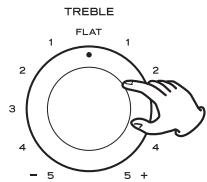
TREBLE
Use this knob to adjust the level of high frequency information.
M BASS
Use this knob to adjust the level of low frequency information.
N SPEAKERS buttons
Use these buttons to turn on or off the speakers.
on : Sound is output from the speakers.
off : No sound is output from the speakers.
0 PHONESjack
For private listening, insert the headphones plug into this jack, and adjust the volume by turning the VOLUME knob.
Remote Control Unit
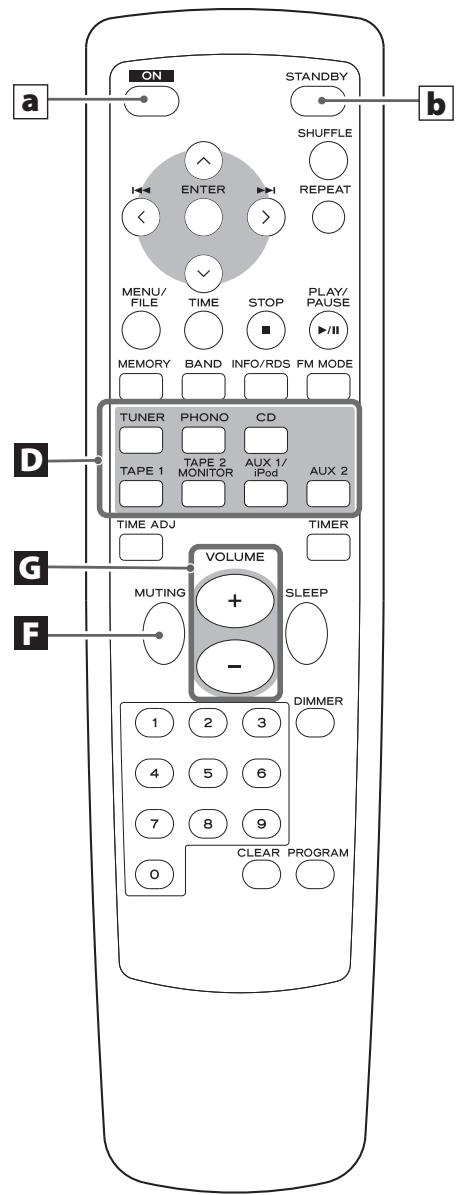
When operating the CD Player (CD-P650) or the tuner (T-R650/ T-R650DAB) using the remote control unit, select a source first using INPUT SELECTOR buttons (boxed D) on the remote control unit.
a ON
When the POWER switch of the main unit is depressed, use this button to turn the unit on.
b STANDBY
When the POWER switch of the main unit is depressed, use this button to turn the unit standby.
Other buttons are used for operation of TEAC's CD-P650, T-R650 and T-R650DAB.
Note:
- To simplify explanations, instructions in this manual refer to the names of the buttons and controls on the front panel only. Associated controls on the remote control will also operate similarly.
Remote Control Unit
The amplifier and some other TEAC components which have MR mark on the front panel can be operated by the provided "UR" remote control unit.
When operating the remote control unit, point it towards the REMOTE SENSOR on the front panel of the amplifier (or other TEAC component).
- Even if the remote control unit is operated within the effective range, remote control operation may be impossible if there are any obstacles between the unit and the remote control.
- If the remote control unit is operated near other appliances which generate infrared rays, or if other remote control devices using infrared rays are used near the unit, it may operate incorrectly. Conversely, the other appliances may operate incorrectly.
Battery Installation
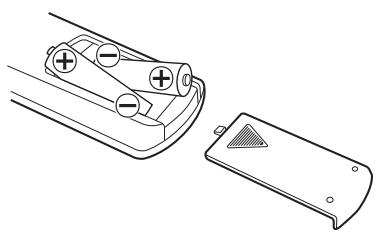
- Remove the battery compartment cover.
- Insert two "AAA" (R03, UM-4) dry batteries. Make sure that the batteries are inserted with their positive "⊕" and negative "⊗" poles positioned correctly.
- Close the cover.
Battery Replacement
If the distance required between the remote control unit and main unit decreases, the batteries are exhausted. In this case replace the batteries with new ones.
For more information about collection of batteries, please contact your local municipality, your waste disposal service or the point of sale where you purchased the items.
Precautions concerning batteries
- Be sure to insert the batteries with correct positive “⊕” and negative “ ” polarities.
- Use batteries of the same type. Never use different types of batteries together.
- Rechargeable and non-rechargeable batteries can be used. Refer to the precautions on their labels.
- When the remote control unit is not to be used for a long time (more than a month), remove the batteries from the remote control unit to prevent them from leaking.
- If the batteries leak, wipe away the liquid inside the battery compartment and replace the batteries with new ones.
- Do not use any other batteries not specified. Do not mix new batteries with old ones or use different types of batteries together.
- Do not heat or disassemble batteries and never throw them in the fire or water.
- Do not carry or store batteries with other metallic objects. The battery may short circuit, leak or explode.
- Never recharge a battery.
Basic Operation 1
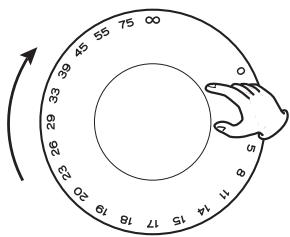
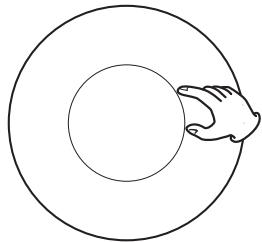
1 To protect speakers from a sudden high-level signal, turn the VOLUME knob counterclockwise to minimize the volume.
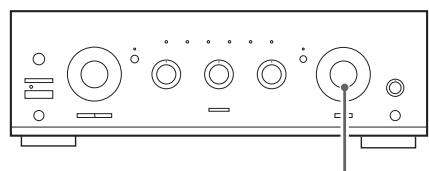
VOLUME (-dB)
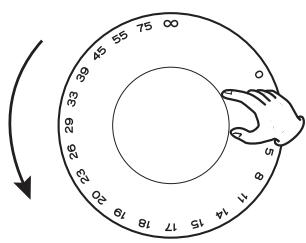
- (infinity): minimum volume
0dB: maximum volume
Press the POWER switch.
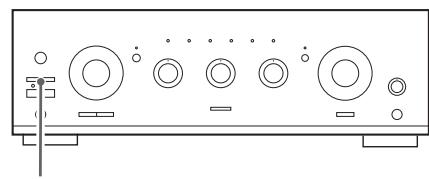
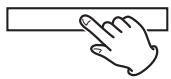
POWER
The unit enters standby mode, and the standby indicator lights.
3 Press the STANDBY/ON switch to turn the unit on.
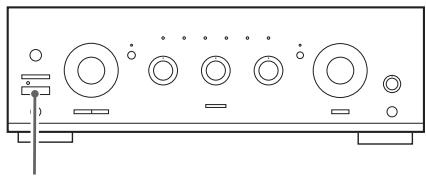
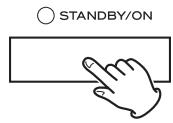
The standby indicator goes off.
4 Select a source by turning the INPUT SELECTOR (or pressing one of the input buttons of the remote control unit).
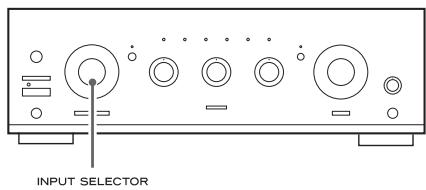
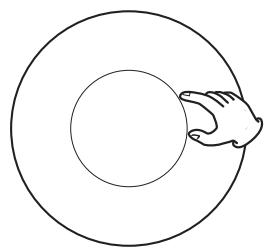
Tape Monitor Function
If you want to select the source connected to TAPE 2 jacks, press the TAPE 2 MONITOR button to turn the tape monitor function on. The TAPE 2 MONITOR indicator lights.
Press the TAPE MONITOR button again to cancel the tape monitor function.
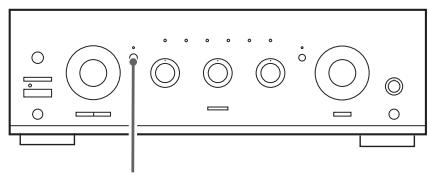
TAPE 2 MONITOR
- When the tape monitor function is on, sources other than TAPE 2 cannot be heard. Be sure to turn the function off while listening to other sources.
5 Play the source, and gradually turn up the volume to the required level by turning the VOLUME knob.
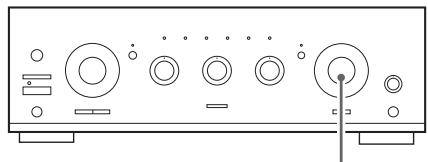
VOLUME(-dB)
Recording
- Select a source to be recorded by turning the INPUT SELECTOR.
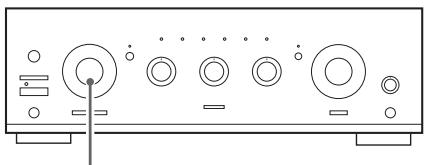
INPUT SELECTOR
2. Start recording.
- The volume and tone control have no effect on the recording signals.
- If a 3-head cassette tape deck is connected to TAPE 2 (PLAY and REC) jacks, and if the tape monitor function is set to on during recording, you can listen to not the source sound but the sound being recorded. Press the TAPE MONITOR button to turn on or off the tape monitor function.
Selecting the speakers
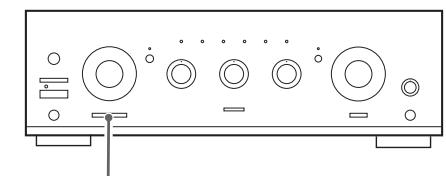
A SPEAKERS B
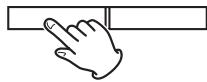
Press the SPEAKERS button (A or B) to turn the speakers on or off.
Listening through headphones
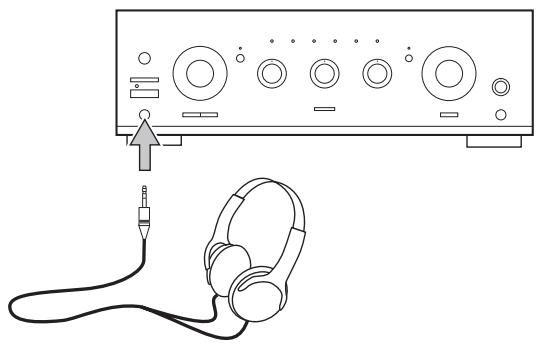
For private listening, first reduce the volume level on the receiver to minimum. Then insert the plug from your headphones into the PHONES jack, and adjust the volume by turning the VOLUME knob.
If you want to cut off the sound from speakers, press the SPEAKERS button to turn it off.
CAUTION
Always lower the volume level prior to plugging in your headphones. TO AVOID DAMAGING YOUR HEARING - Do not place your headphones on your head until after you have plugged them in.
Muting
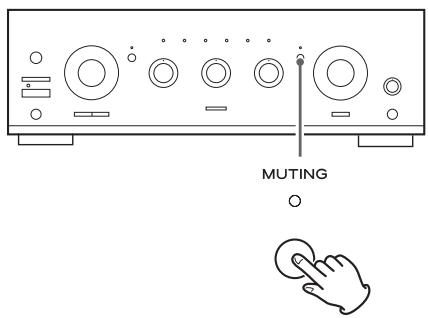
To mute the sound temporarily, press the MUTING button. Press the MUTING button again to restore the sound.
- While muting is engaged, the MUTING indicator blinks.
LOUDNESS button
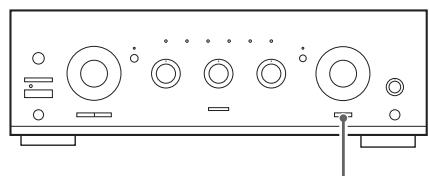
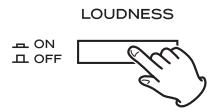
This button compensates for the loss of bass at low volumes. Set this button to the OFF position when listening at normal levels.
How to adjust the balance between the left and right speakers
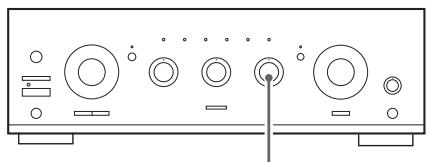
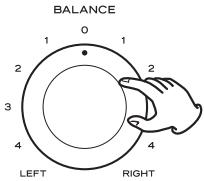
Turn the BALANCE knob to adjust the balance of the speakers. Normally, set the knob to the center position.
Tone Control
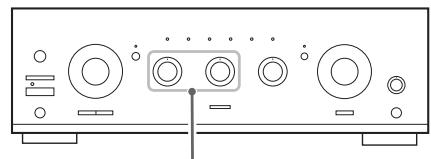

Turn the BASS knob to adjust the level of low frequency information.
Turn the TREBLE knob to adjust the level of high frequency information.
Source Direct
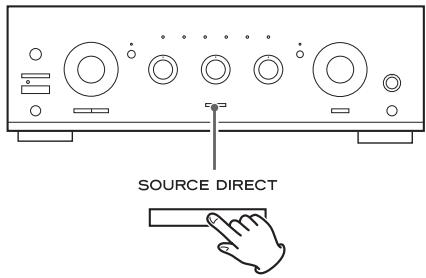
Press this button to turn on or off the source direct function. When the source direct function is set to on, the button lights and you can listen to the sound without tone effects.
TroubleShooting
If you experience problems with this unit, please take the time to look through this chart and see if you can solve the problem yourself before you call your dealer or TEAC service center.
No power
Check the connection to the AC power source. Check and make sure the AC source is not a switched outlet and if it is, the switch is turned on. Make sure there is power to the AC outlet by plugging another item such as a lamp or fan.
No sound from speakers.
Adjust the volume.
Set the BALANCE control to "0".
Check the connection to the speakers.
If your speakers are connected to the SPEAKERS A (or B) terminals, make sure the SPEAKERS A (or B) button on the front panel is depressed.
If the tape monitor function is ON, press the TAPE 2 MONITOR button to turn it off.
The volume of SPEAKERS A is different from that of B.
The volume and sound quality may differ depending on the speaker's size, etc. If you want to use SPEAKERS A and B simultaneously with the same volume, connect exactly the same type of speakers to the SPEAKERS A and B terminals.
The sound is noisy or humming.
The unit is too close to a TV set or similar appliances. Relocate the units so they no longer interfere with each other, or turn them off.
Connect the turntable's ground cord to the SIGNAL GND terminal.
Sound cuts off during listening to the music or no sound even though power is ON.
Speaker impedance is less than prescribed for this unit.
Turn the power off and reduce the volume.
Low bass response.
Speaker polarity ( / ) is reversed. Check all speakers for correct polarity.
Remote control doesn't work.
Press the POWER switch of the main unit to turn it on.
If the batteries are dead, change the batteries.
Use remote control unit within the range (5m) and point at the front panel.
Clear obstacles between the remote control unit and the main unit.
If a strong light is near the unit, turn it off.
If normal operation is not restored, unplug the power cord from the outlet and plug it again.
Amplifier Section
Continuous Power Output . . . . . . 90W RMS (1 kHz, 4 ohms, 0.5%)
60W (1 kHz, 8 ohms, 0.5%)
Total Harmonic Distortion. .02% (1 kHz, 8 ohms, 45W)
Input Sensitivity/Impedance. PHONO: 2.8 mV/47 k ohms
LINE*: 180 mV/47 k ohms
Signal-to-Noise Ratio (IHF-A). PHONO: 65 dB
LINE*: 90 dB
Output Level/Impedance. . . . . . . . . . . . . . . . . . . . . . . . . . . . . . . . . . . . . . . . . . . . . . . . . . . . . . . . . . . . . . . . . . . . . . . . . . . . . . . . . . . . . . . . . . . . . TAPE: 150 mV/3.3 k ohms
Frequency Response......PHONO: 20 to 20,000 Hz, ± 1 dB (RIAA)
LINE*: 5 to 80,000 Hz, (SOURCE DIRECT,1 W)
Tone Control. BASS: ±10 dB at 100 Hz
TREBLE: ±10 dB at 10 kHz
Muting 20 dB
General
Power Requirements. 230 V AC, 50 Hz
Power Consumption 200 W
Standby . 0.5 W
Dimensions (W x H x D) 435 x 142 x 355 mm
Weight (net) 8.1 kg
Standard Accessories
Remote Control Unit (UR-431) x 1
Battery (AAA, R03, UM-4) x 2
Owner's Manual (this document) x 1
Warranty Card x 1
*: LINE means TUNER, CD, AUX1, AUX2, TAPE1/CD-R, TAPE2.
- Design and specifications are subject to change without notice.
- Illustrations may differ slightly from production models.
For European Customers
Information for Users on Collection and Disposal of Old Equipment and used Batteries
These symbols on the products, packaging, and/or accompanying documents mean that used electrical and electronic products and batteries should not be mixed with general household waste. For proper treatment, recovery and recycling of old products and used batteries, please take them to applicable collection points, in accordance with your national legislation and the Directives 2002/96/EC and 2006/66/EC.
By disposing of these products and batteries correctly, you will help to save valuable resources and prevent any potential negative effects on human health and the environment which could otherwise arise from inappropriate waste handling.
For more information about collection and recycling of old products and batteries, please contact your local municipality, your waste disposal service or the point of sale where you purchased the items.
Information on Disposal in other Countries outside the European Union
These symbols are only valid in the European Union. If you wish to discard these items, please contact your local authorities or dealer and ask for the correct method of disposal.
Note for the battery symbol (bottom right two symbol examples):
This symbol might be used in combination with a chemical symbol. In this case it complies with the requirement set by the Directive for the chemical involved.
Pb
Sommaire
B Prises AUDIO IN/OUT
Piles (AAA, R03, UM-4) x 2
Pila (AAA, R03, UM-4) × 2
60 W (1 kHz, 8 Ohm, 0.5%)
Klirrfaktor 0,02% (1 kHz, 8 Ohm, 45 W)
AAA (R03, UM-4) Batterie x 2
Garantiekarte x 1
Batterie (AAA, R03, UM-4) x 2
Source Direct (Bron direct)
This appliance has a serial number located on the rear panel. Please record the model number and serial number and retain them for your records.

- Integrated Stereo Amplifier
- IMPORTANT SAFETY INSTRUCTIONS
- CAUTION
- Contents
- Thank you for choosing TEAC. Read this manual carefully to get the best performance from this unit.
- Before Using the Unit
- Read this before operation
- Maintenance
- CAUTION:
- A PHONO jacks/SIGNAL GND terminal
- B AUDIO IN/OUT jacks
- REMOTE CONTROL jacks
- D AC Outlet (switched)
- Speaker Connections
- How to connect
- Speakers A, B
- AC power cord
- Remote Sensor
- B POWER
- C STANDBY/ON
- D INPUT SELECTOR
- TAPE 2 MONITOR
- F MUTING
- VOLUME
- MIC Jack and MIC LEVEL knob
- LOUDNESS
- J BALANCE
- K SOURCE DIRECT
- TREBLE
- M BASS
- N SPEAKERS buttons
- PHONESjack
- Remote Control Unit
- a ON
- b STANDBY
- Note:
- Battery Installation
- Battery Replacement
- Precautions concerning batteries
- Basic Operation 1
- Tape Monitor Function
- Recording
- Start recording.
- Selecting the speakers
- Listening through headphones
- Muting
- LOUDNESS button
- How to adjust the balance between the left and right speakers
- Tone Control
- Source Direct
- TroubleShooting
- No power
- No sound from speakers.
- The volume of SPEAKERS A is different from that of B.
- The sound is noisy or humming.
- Sound cuts off during listening to the music or no sound even though power is ON.
- Low bass response.
- Remote control doesn't work.
- Amplifier Section
- General
- Standard Accessories
- For European Customers
- Information for Users on Collection and Disposal of Old Equipment and used Batteries
- Information on Disposal in other Countries outside the European Union
- Note for the battery symbol (bottom right two symbol examples):
- Sommaire
- B Prises AUDIO IN/OUT
- Source Direct (Bron direct)
Brand : TEAC
Model : AI-301DA
Category : Audio Amplifier