USER MANUAL SRR400 SAMSUNG
FONCTIONS DU PRODUIT
13
MONTAGE DE L'ASPIRATEUR
15
FONCTIONNEMENT DE L'ASPIRATEUR
20
ENTRETIEN DES OUTILS ET DES FILTRES
30
DéPANNAGE
36
CHARACTERISTIQUES TECHNIQUES DU PRODUIT
39
- Wat is plafondvormherkenning (Visionary mapping plusTM)?
Vacuum Cleaning Robot user manual
Planet First
100%
Recycled Paper
This manual is made with 100% recycled paper.
English
imagine the possibilities
Thank you for purchasing a Samsung product.
To receive a more complete service,
please register your product at
www.samsung.com/register

- Before operating the appliance, please read this manual thoroughly and retain it for your reference.

- Because these following operating instructions cover various models, the characteristics of your vacuum cleaner may differ slightly from those described in this manual.
CAUTION/WARNING SYMBOLS USED
| WARNING | Indicates that a danger of death or serious injury exists. |
| CAUTION | Indicates that a risk of personal injury or material damage exists. |
OTHER SYMBOLS USED
| NOTE | Indicates that a risk of personal injury or material damage exists. |
When using an electrical appliance, basic precautions should be observed, including the following:
READ ALL INSTRUCTIONS BEFORE USING YOUR VACUUM CLEANING ROBOT.
Unplug from outlet when not in use and before conducting maintenance.
WARNING: to reduce the risk of fire, electric shock, or injury:
GENERAL
- Use only as described in this manual.
- Do not operate the vacuum cleaning robot or charger if it has been damaged in any way.
- If the cleaner is not working as it should, has been dropped, damaged, left outdoors, or dropped in water, return it to a customer care center.
- Do not handle the charger or vacuum cleaning robot with wet hands.
- Use only on dry, indoor surfaces.
- This appliance is not intended for use by persons (including children) with reduced physical, sensory or mental capabilities, or lack of experience and knowledge, unless they have been given supervision or instruction concerning use of the appliance by a person responsible for their safety.
Children should be supervised to ensure that they do not play with the appliance.
BATTERY CHARGER
- Do not modify the polarized plug to fit a non-polarized outlet or extension cord.
- Do not use outdoors or on wet surfaces.
- Unplug the charger from the outlet when not in use and before servicing.
- Use only the charger supplied by the manufacturer to recharge.
- Do not use with a damaged cord or plug.
- Do not pull or carry by the cord, use the cord as a handle, close the door on the cord, or pull the cord around sharp edges or corners. Keep the cord away from heated surfaces.
- Do not use extension cords or outlets with inadequate current carrying capacity.
- Do not unplug by pulling on the cord. To unplug, grasp the plug, not the cord.
- Do not mutilate or incinerate batteries as they will explode at high temperatures.
- Do not attempt to open the charger. Repairs should only be carried out by a qualified customer care centre.
- Do not expose the charger to high temperatures or allow moisture or humidity of any kind to come into contact with the charger.
VACUUM CLEANING ROBOT
- Do not pick up hard or sharp objects such as glass, nails, screws, coins, and etc.
- Do not use without a filter in place. When servicing the unit, never put fingers or other objects into the fan chamber in case the unit accidentally turns on.
- Do not put any objects into openings. Do not use with any openings blocked; keep openings free of dust, lint, hair, and anything that may reduce air flow.
- Do not pick up toxic materials (chlorine bleach, ammonia, drain cleaner, etc.).
- Do not pick up anything that is burning or smoke, such as cigarettes, matches, or hot ashes.
- Do not use to pick up flammable or combustible liquids such as gasoline, nor use on areas where they may be present.
- Do not use vacuum cleaning robot in an enclosed space filled with vapours given off by oil based paint, paint thinner, moth proofing substances, flammable dust, or other explosive or toxic vapours.
- Leaks from battery cells can occur under extreme usage or temperature conditions. If the liquid gets on skin, wash quickly with water. If the liquid gets into the eyes, flush them immediately with clean water for a minimum of 10 minutes. Seek medical attention.
02
PRODUCT FEATURES
13
ASSEMBLING THE CLEANER
15
MAINTAIN TOOLS AND FILTERS
30
TROUBLESHOOTING
36
PRODUCT SPECIFICATION
39
06 Power Related
07 Before Use
10 In Use
11 Cleaning and Maintenance
15 Components
16 Name of each part
20 Installing the vacuum cleaning robot
20 Installation order
20 Turning the Power Switch on or off
21 Installing the charger
22 Charging
23 About the Battery
24 Using the vacuum cleaning robot
24 Starting/Stopping Cleaning
25 Recharging
26 Auto Cleaning
27 Spot Cleaning
28 Max Cleaning
29 Manual Cleaning (Option)
30 Cleaning the vacuum cleaning robot
30 Please keep the cleaning and maintenance methods in mind
30 Cleaning the Sensor Window and the Camera
31 Cleaning the Dust Bin and the Filters
32 Cleaning the vacuum cleaning robot
32 Cleaning the Power Brush
34 Cleaning the Edge-Cleaning Side rotating Brush
35 Cleaning the Driving Wheel
36 Checklist before SVC Calls
38 Troubleshooting for Error Codes

Do not bend the power cord forcefully or place a heavy object on it that could break it.
- This may result in fire or electric shock.

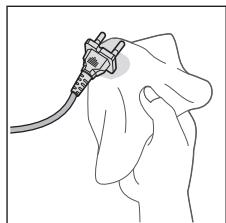
Make sure to remove any dust or water from the power plug.
- Failing to do so may result in a malfunction or electric shock.

Do not pull the power plug by the cord or touch the plug with wet hands.
- This may result in fire or electric shock.
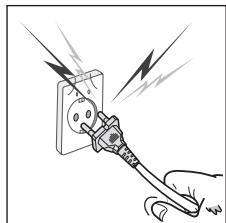

Do not use multiple plugs in a single socket. (Do not leave the cord lying exposed on the floor.)
- This may result in fire or electric shock.
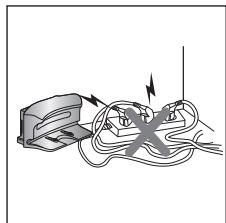

Do not use a damaged power cord, plug, or a loose power outlet.
- This may result in fire or electric shock.
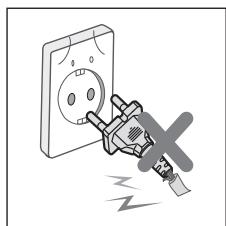

Before activating the vacuum cleaning robot, make sure that the dust bin is assembled.
- If the dust bin is not inserted, vacuum cleaning robot will not operate.
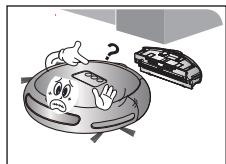

Never use vacuum cleaning robot in locations with combustible material such as.
- Locations with candles or desk lamps on the floor.
- Locations with unattended fires (fire or embers).
- Locations with gasoline, distilled alcohol, thinner, ashtrays with burning cigarettes, etc.
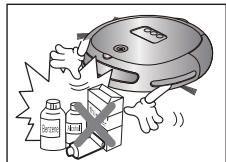

Vacuum cleaning Robot is for domestic use only. Do not use it in the following locations.
- Attics, basements, warehouses, industrial buildings, separate rooms distant from the main building, locations exposed to wet or damp conditions such as bathrooms or wash rooms, and narrow and highly situated locations such as tables or shelves. Critical damage (abnormal operation and breakage) may occur when used in these locations.

Open all doors to clean all rooms.
- When a door is closed, the vacuum cleaning robot will not be able to enter that room.
- However, make sure to close the doors to the main entrance, the veranda and the bathroom, and any other rooms where the vacuum cleaning robot may fall to a lower floor.

For carpets with long tassels, fold the tassels under the carpet.
- Unfolded tassels may result in critical damage to the carpet and the machine itself, as they get caught in the driving wheel or the power brush.
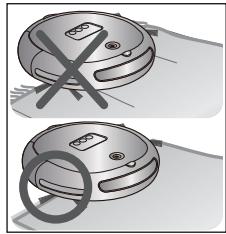

Do not use the cleaner on a black floor.
- The vacuum cleaning robot may not run normally in this case.
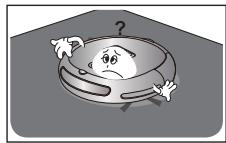
Remove small objects or brittle items from the area to be cleaned in advance.
- Make sure to clear any objects before cleaning.
- Make sure to remove fragile items such as china, glass objects, flowerpots, etc.
Vacuum cleaning robot does not recognize coins, rings or other valuable items such as jewelry.
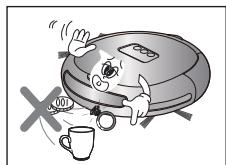

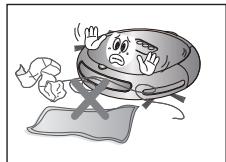
Remove objects scattered on the floor before cleaning.
- Vacuum cleaning robot is designed to detect obstacles 5cm away from it.
- Bath towels, pads in front of bathrooms and sinks, entrances, utility rooms, power cords, table cloths or belts can become entangled in the driving wheel or power brush. This can cause objects to fall from the table.

Vacuum cleaning robot may run into children, causing them to fall.
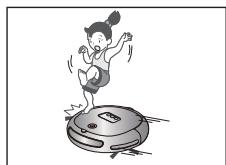

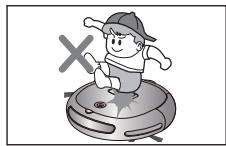
Ensure that children do not step or sit on the vacuum cleaning robot.
- Children may fall and injure themselves or critical damage may occur to the product.

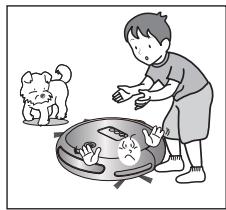
When a child or pet is left alone, make sure to turn off the Power Switch of the vacuum cleaning robot.
Vacuum cleaning robot may attract their attention.
- When the rotating wheel or brush catches fingers, feet, clothing or hair, this may result in injury.
- If a child or pet is in the way of the vacuum cleaning robot, it may be identified as an obstacle and the area may not cleaned.
- When the Power Switch is turned off, it will cut off the power supply and deactivate all functions.

When installing the charger station, do not leave the power cord exposed on the floor.
- When the vacuum cleaning robot automatically recharges or passes by the charger station, it may drag the power cord around with it.
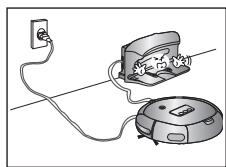

Always keep the power cord of the charger plugged into the outlet.
- Although the vacuum cleaning robot has a self-charging function, if the power cord of the charger station is unplugged, it cannot charge its battery automatically.
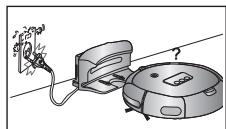

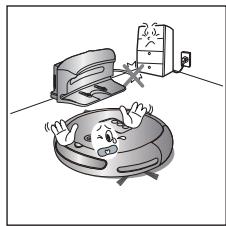
Install the charger in a location that can be easily accessed by the vacuum cleaning robot.
- If the charger is installed in a corner, this may cause extra movements and may disturb the automatic recharging process.
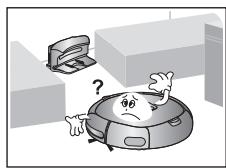

Objects in front of the charger will prevent the vacuum cleaning robot from auto-charging itself.
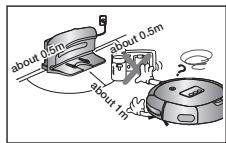

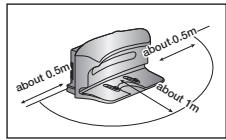
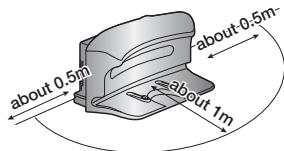
There should be no obstacles and cliffs 0.5m to the left and right and within 1m of the front.

- This will result in critical damage to the charger.
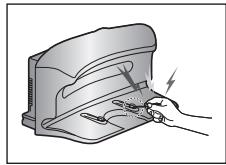

Make sure that there is no trace of liquids on the charger station.
- Failing to do so may result in fire or electric shock.
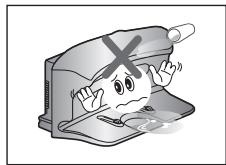

Make sure the vacuum cleaning robot does not vacuum or move over liquids such as water, oil or pet litter.
- This may result in critical damage to the product.
- Liquids may spread through the wheels resulting in contamination.
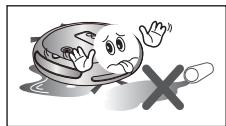

Do not use the charger for other purposes.
- This may result in critical damage to the charger or cause a fire.

Do not install the charger station on a dark floor.
- If the floor where the charger station is installed is dark, it is hard for the vacuum cleaning robot to return to it.

You cannot use the vacuum cleaning robot on thick carpets.
- This may result in problems with the vacuum cleaning robot.
- This may result in damage to carpets.
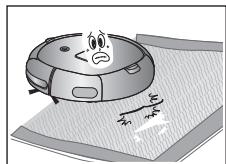

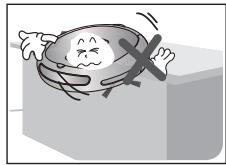
Do not use the vacuum cleaning robot on a table or other high locations.
- This may result in damage when the unit accidentally drops.

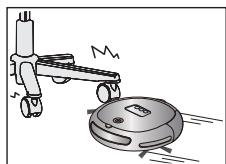
Vacuum cleaning robot may bump into furniture such as chair legs, table legs, thin and long furniture, etc. while operating.
- For a quicker and cleaner performance, place the chairs on top of the table.

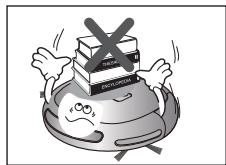
Do not place any objects on top of the vacuum cleaning robot.
- This may result in malfunction.

- Using the machine for an extended period of time with its inlet port obstructed may result in critical damage to the product.
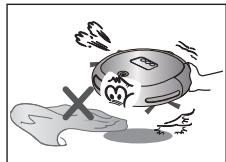

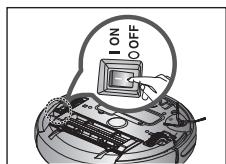

Vacuum cleaning Robot may not be able to continue its operation if it is stuck at the entrance or veranda doorsill.
- Vacuum cleaning Robot stops operating for safety reasons if it cannot move for more than 5 minutes.
- To resume operating, turn the Power Switch off and then on again after moving it to a location where it can continue cleaning.
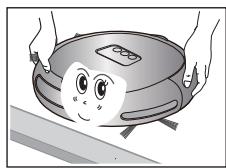

Vacuum cleaning Robot cannot completely clean locations that it cannot reach, such as corners, and spaces between sofas and walls.
- Please clean these locations occasionally.
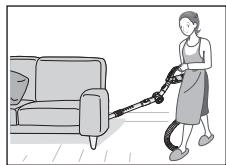

Dust clusters may remain after cleaning, when the vacuum cleaning robot fails to pick up dust clusters that were formed while cleaning.
- In this case, sweep up the dust with another cleaning tool.
CLEANING AND MAINTENANCE

When cleaning the product, do not spray water directly onto the exterior or wipe it with a volatile material such as benzene, thinner or alcohol.
- This may result in critical damage to the product.
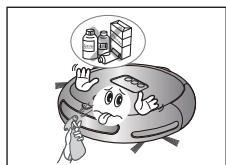

Do not forcefully press the bumper on the Vacuum cleaning Robot.
- If the bumper sensor gets damaged, the Vacuum cleaning Robot may bump into walls or furniture.
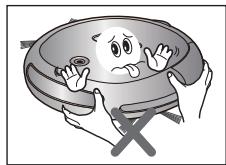

The unit must not be disassembled or reconstructed by anyone other than a qualified service engineer.
- This may result in damage to the product.
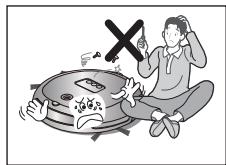

Remove any foreign substances accumulated on the Obstacle and Cliff sensors on a regular basis.
- Dirt accumulated on the sensors will result in inaccurate functioning of the sensors.
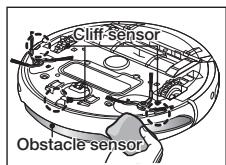

When removing foreign substances, always use the cleaning brush after turning the Power Switch off.
- Failing to do so may result in sudden operation of the unit and cause an injury or critical damage to the product.

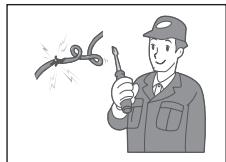
If the power cord is damaged, have it replaced by a qualified service engineer from the customer care center.
- Failing to do so may result in fire or electric shock.

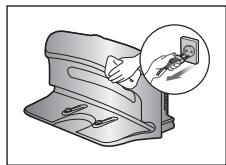
Before cleaning the charger, make sure to disconnect the power cord for safety.

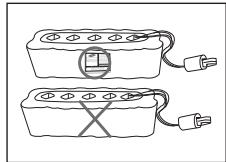
- Failing to use original batteries will result in product failure.
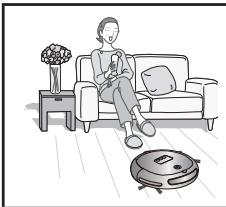
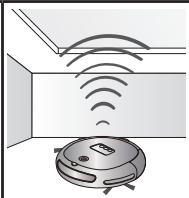
What is ceiling shape recognition (Visionary mapping plusTM)?
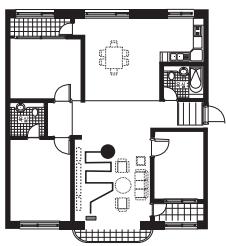
This function recognizes the shape of the ceiling using the camera on top to identify the area to be cleaned and determines the best way to pass over and clean every section of the floor.
DELICATE CLEANING OF EVERY CORNER
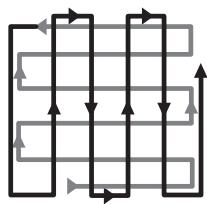
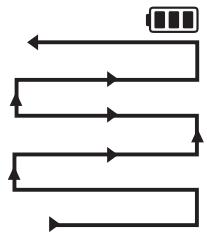
Since the vacuum cleaning robot cleans the floor in a sequential way (1) along the map determined by the ceiling shape recognition function, it cleans every corner of the floor.
VARIOUS CLEANING MODES
Various cleaning modes are provided to meet all your needs.
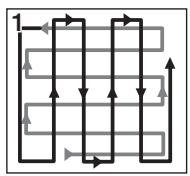
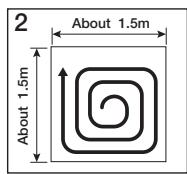
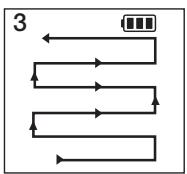
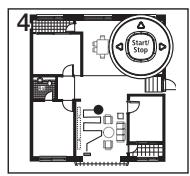
- Auto Mode : Cleans all rooms automatically.
- Spot Mode : Cleans a localized area intensely. It can be used to clean bread or cookie crumbs.
- Max Mode: Runs until the battery is nearly depleted.
- Manual Mode (Option): You can clean the floor manually by moving the cleaning robot.
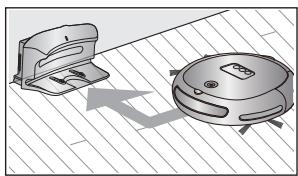
When the battery is low, the Vacuum cleaning Robot is automatically guided to the charger to enable it to perform a quick auto charge.
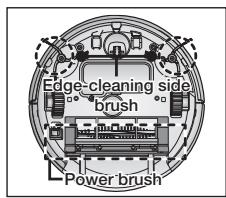
EDGE-CLEANING SIDE ROTATING BRUSH
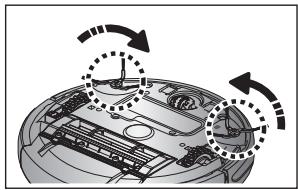
The edge-cleaning side rotating brush cleans dust from the edges.
DOORSILL CROSSING
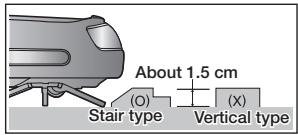
The Vacuum cleaning Robot's innovative driving system makes it possible for it to cross over doorsills with a height of about 1.5 cm and clean all rooms. The Vacuum cleaning Robot may not be able to pass a 1.5 cm doorsill depending on the shape of the doorsill.
ANTI-CRASH
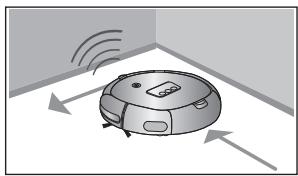
The Vacuum cleaning Robot detects and avoids obstacles in 2 stages. First, the 7 obstacle sensors detect obstacles in stage 1 and if the Vacuum cleaning Robot does crash into an obstacle, the 2 bumper sensors absorb the impact.
SAFETY DEVICE
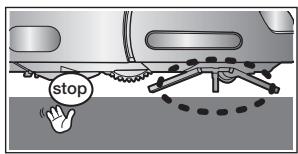
When the Vacuum cleaning Robot is lifted up while cleaning, the driving wheels, power brush, suction motor, and side rotating brush are stopped autonati(all) by sensor.
COMPONENTS
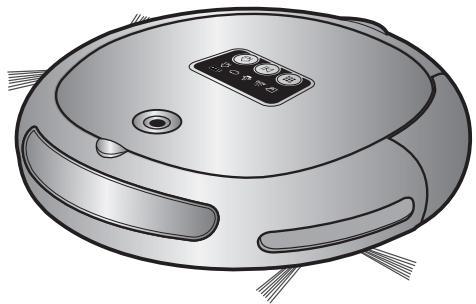
Main Body
Charger (Station)
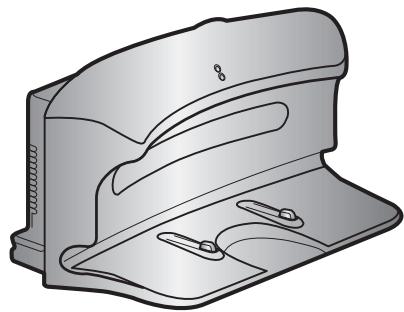
Others Components
| User Manual | Cleaning Brush | Remote Control / 2 Batteries |
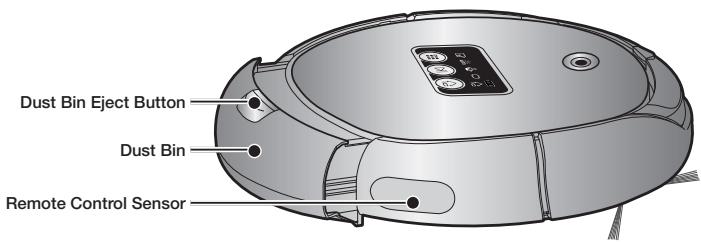
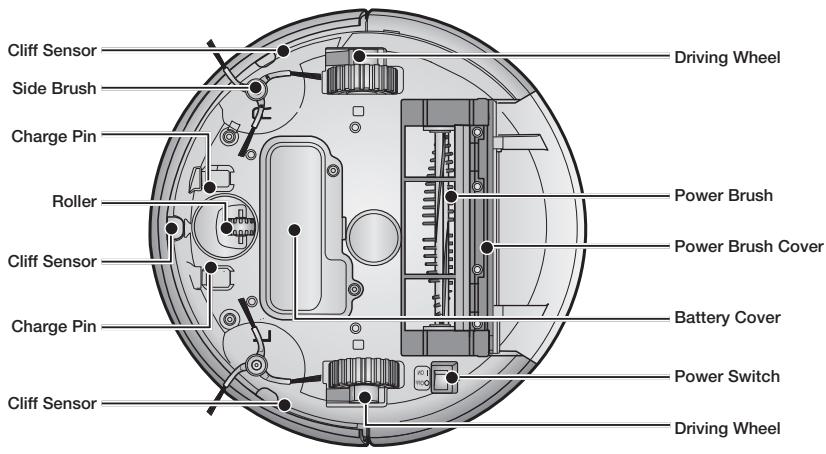
Main unit
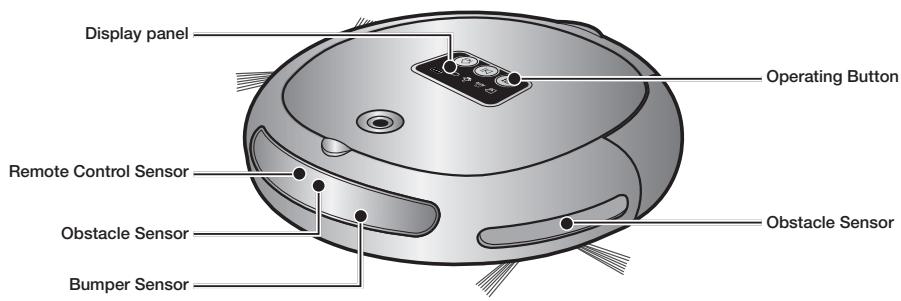
Front
Side
Bottom
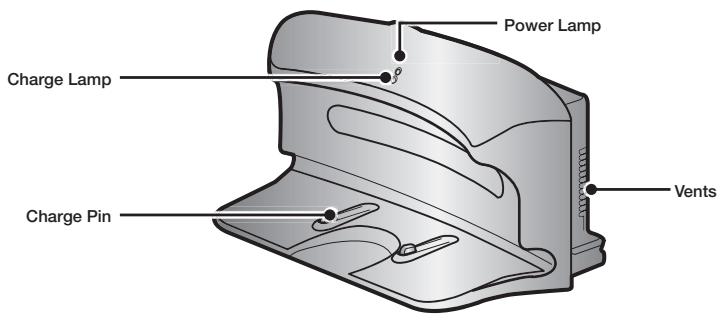
Charger (Station)
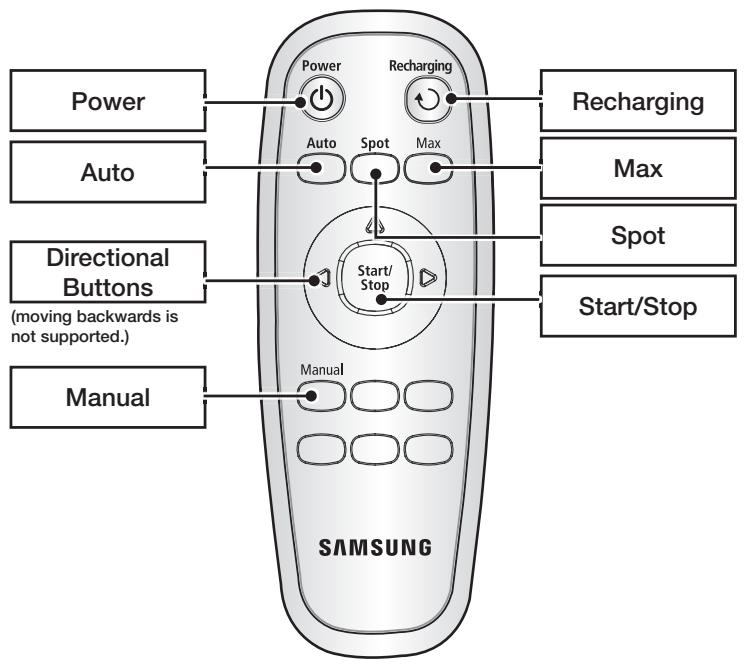
Remote Control (Option)
■ Installing the Remote Control Batterise
Batteries are not installed in the remote control when purchasing the product. Install the batteries (type AAA) before use.
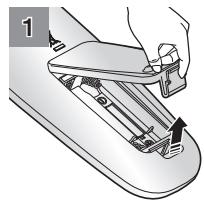
Lift the battery compartment cover at the back of the remote control, while pressing the locking tab.
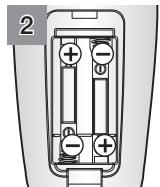
Install the batteries into the remote control as shown by the figure below. (If the batteries are installed with the wrong polarity, the remote control will not work.)
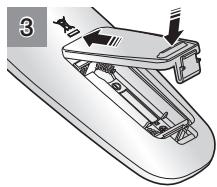
After inserting the tip of the cover into the slot, push the other end to close it until it clicks into place.
* Specification: AAA type batteries
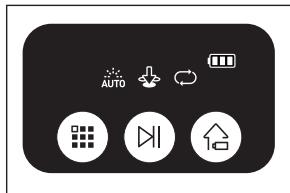
Display panel
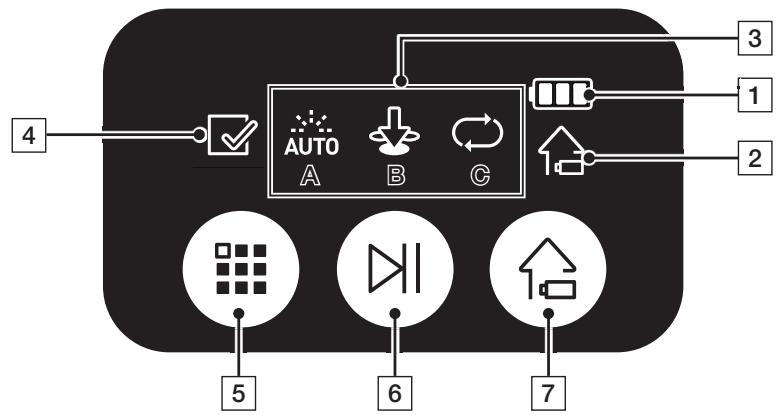
DISPLAY PART
-
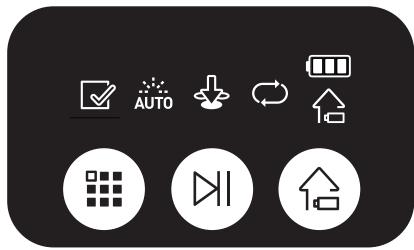
Battery Level Indicator
-
Charging: Shows the charging progress in 3 steps.
-
In Use: Shows the battery charge level. The battery charge level is reduced by each level from FULL while operating.
-
Recharging
-
This icon turns on when the Vacuum cleaning Robot returns to the charger station to charge its battery.
-
Cleaning Mode Display
Each time the cleaning mode button is pressed, the corresponding cleaning mode is displayed.
(A) Auto Mode: This icon turns on when Auto cleaning mode is selected.
(B) Spot Mode: This icon turns on when Spot cleaning mode is selected.
(C)Max Mode: This icon turns on when Max cleaning mode is selected.
-
Check Code
-
The Check Code icon will turn on if an issue arises that needs your attention
5. Cleaning Mode
- Press to select a cleaning mode. After selecting a cleaning mode, press the ( ) button to start cleaning.
6. Start/Stop
- Press to start/stop cleaning.
7. Recharging
- When this button is pressed, The cleaning robot will return to the charger station to charge its battery.
INSTALLING THE VACUUM CLEANING ROBOT
Installation order
1. Turning the Power Switch on or off
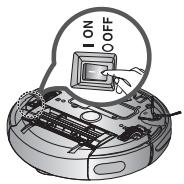
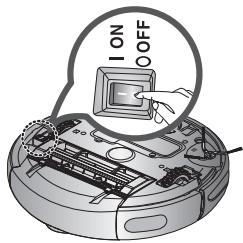
To use the vacuum cleaning robot, you must turn on the Power Switch at the bottom of the main unit.
2. Installing the Charger
To charge the vacuum cleaning robot, you must first install the charger. Since the battery is discharged when the product is purchased, you must fully charge the battery before use.
3. Charging the Battery
You should charge the battery completely before using the vacuum cleaning robot.
Turning the Power Switch on or off
To use the vacuum cleaning robot, you must turn the Power Switch on.
If you turn the Power switch off, all settings will be reset.
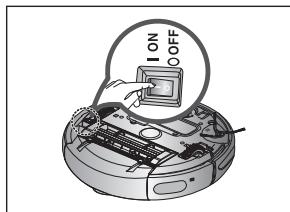
1. Turn over the main unit and turn the Power Switch on.
- If the icons are not turned on, it indicates that the battery charge is depleted. In this case, dock the Vacuum cleaning Robot to the charger station after turning the Power Switch on.
- Note that turning the Power Switch off will reset all settings.
- When no key is pressed for approximately 10 minutes when the power is on, the power is automatically turned off to save battery power. In this case, to use this Vacuum cleaning Robot again, please push the "Power" button or 24 button.

If the Power Switch is turned off, the Vacuum cleaning Robot will not be charged even if it is docked with the charger station.
- Install the charger on a flat surface.

- There should be no obstacles and cliffs 0.5m to the left and right and within 1 m of the front.
- Install the charger in a location where it can be easily accessed by the vacuum cleaning robot.
- Arrange the power cord along the wall.
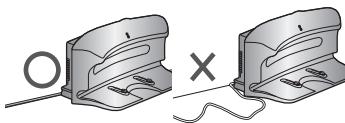
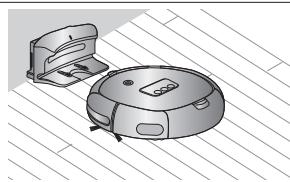
- When the floor is made of wood, install the charger in the same direction as the grain of the wood.

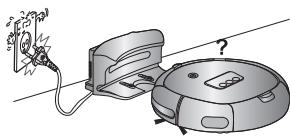
Always keep the power cord of the charger plugged into the power outlet.
- If no power is supplied to the charger, the vacuum cleaning robot will not be able to find the charger and will not be able to charge automatically.
- If the vacuum cleaning robot is separated from the charger, the battery is automatically discharged.
Charging
When the product is initially purchased, the battery is fully discharged, and you must charge the vacuum cleaning robot manually.
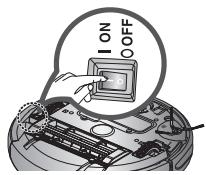
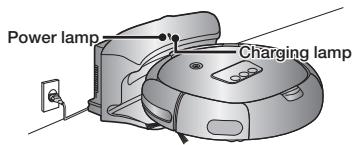
Turn on the Power Switch at the bottom of the product.
-
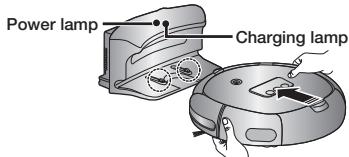
After aligning the charge pins of the main unit with the charge pin of the charger station, press the main unit until you hear a Recharging power sound from the charger.
-
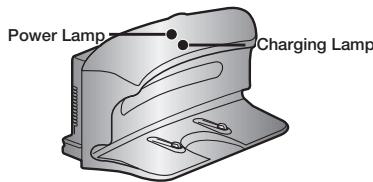
The Charging Lamp turns green.
- Check the charge status of the vacuum cleaning robot.
- When it is fully charged, all three bars of the battery level icon will Flash simultaneously.
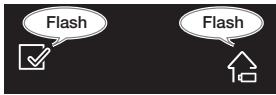
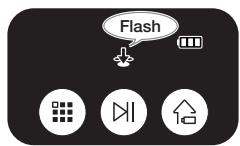
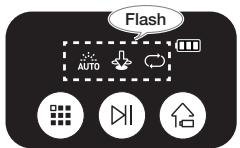
If the following appears in the display (as seen in the figure below) 10 seconds after connecting the robot cleaner to the charging station, it indicates that the power switch is turned off. In this case, please turn on the power switch at the bottom of the cleaner.
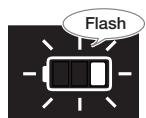
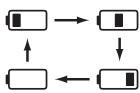
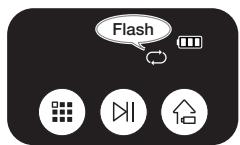
- When the battery level display flashes while cleaning, the Vacuum cleaning Robot stops vacuuming and automatically charges itself at the charger.
If the battery level icon on the display moves to the right as shown while the cleaner is operating, the cleaner can no longer be operated by either the remote control or the buttons on the main unit. In this case, use the charger station to recharge the battery. (This is when the battery is completely discharged.)

Charge Charging Required complete charging

- When the product is initially purchased, it will take about 120 minutes to fully charge the battery and will run for about 90 minutes.
- When charging the battery while the battery is over-heated, the charging time can increase.
-
Measures to take when charging is not smooth. When the Vacuum cleaning Robot cannot be automatically charged, check the following:
-
Turn the Power Switch at the bottom of the Vacuum cleaning Robot off and on (Reset).
- Re-plug the power of the charger (Reset).
- Check whether there are any foreign substances on the charge connector and wipe the charge connector on the main unit and the charger with a dry cloth.
- Check whether there are objects near the charger that are strong reflectors.
- When separating the Vacuum cleaning Robot from the charger, it will discharge naturally.
- Charge the Vacuum cleaning Robot through the charger, if possible. (When leaving your home unattended for a long period of time due to a business trip, travelling etc., turn off the Power Switch of the Vacuum cleaning Robot and unplug the power of the charger to store them.)
About the Battery
The robotic vacuum cleaner is powered by an environment-friendlyly Nickel Metal Hydride (NiMH) rechargeable battery, and an over-charge prevention function guarantees an extended life time.
The battery warranty period is 6 months from the date of purchase.
- When purchasing a battery, ask the customer care center for the genuine part symbol (samsung) and model number before purchasing it.
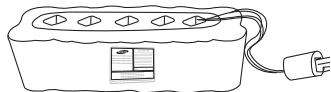
- This battery is only for Samsung vacuum cleaning robot. It is strictly prohibited to use it for other appliances or for other purposes.
- Do not disassemble or modify the battery.
- Charge it in a location with good ventilation.
- Do not expose the battery to fire and do not heat it.
- Do not connect any metallic objects to the (+) or (-) terminals of the battery.
- Keep it indoors (0^ 40^) .
- Before you discard product, dispose of batteries in an environmentally safe manner.
- Do not discard this batteries with your regular household trash.
- Follow all local regulations when disposing of old batteries.
If the battery is out of order, do not disassemble it. Contact your nearest customer care center.
* An increased charging time and a shorter battery life indicates the near end of the battery life. Please contact an authorized customer care center to replace your battery.
The rechargeable battery incorporated in this product is not user replaceable.
For information on its replacement, please contact your service provider.
Starting/Stopping Cleaning
You can run or stop all vacuum cleaning robot functions.
Each vacuum cleaning robot function only runs when the Power Switch is turned on.
- When the robotic vacuum is operating, press the (×) button to cancel the operation and select a function.
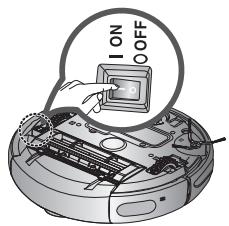
Turning the power on or off
Turning the power on
- Remote control: Press the [Power] button. (Option)
- Main unit: Press the (CH) button.
- Cleaning mode icons are turned on.
Turning the power off
Remote control: Press the [Power] button. (Option)
- Main unit: Press and hold the (B) button down for 3 seconds.
- All icons except for the battery level indicator are turned off.
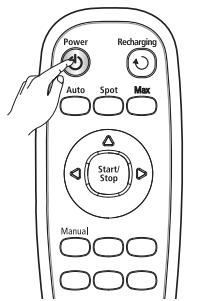
*Option
Using the remote control
Starting or stopping cleaning
Starting
- Remote control: Press the Auto, Spot, Max, Manual button. (Option)
- Main unit: Select Auto / Spot / Max mode by using the (@) button and then pressing the (▶) button.
- When cleaning begins, the Vacuum cleaning Robot starts to move.
- Pressing the (M) button without selecting cleaning mode starts to perform the Auto mode cleaning.
Stopping
- To stop, press the (河) remote control or main unit button.
- When cleaning is stopped, the Vacuum cleaning Robot stops.
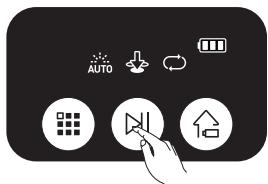
Using the main unit buttons
■ When the Vacuum cleaning Robot is operating, press the (n) button to cancel the operation and press the Recharging button.
*Option
-
Press the Recharging button.
-
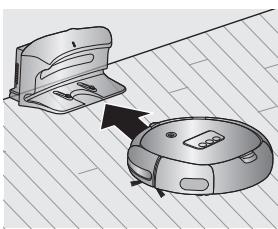
The main unit icon () is turned on and the Vacuum cleaning Robot will return to the charger.
- To stop the Vacuum cleaning Robot while it is returning to the charger, press the (回) button.
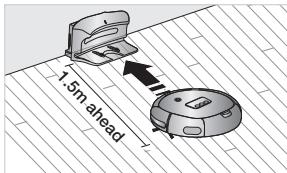
- To test the auto charge function, press the Recharging button when the Vacuum cleaning Robot is less than 1.5m from the charger.
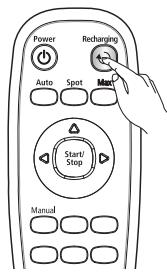
Using the remote control
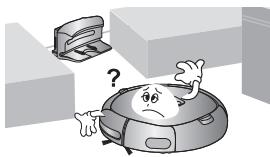
Troubleshooting when the Vacuum cleaning Robot does not return to the charger
Check the installation of the charger
- When the charger is in a location where the charger cannot guide the Vacuum cleaning Robot to the charger.
- When the charger is more than 5m away from Vacuum cleaning Robot.
: It may require a longer time for the Vacuum cleaning Robot to return to the charger.
- Manually charge the Vacuum cleaning Robot in the following cases.
- When the charger is installed in a corner.
- When the battery is fully discharged.
- When the Vacuum cleaning Robot is trapped by an obstacle (furniture etc.)
- When the Vacuum cleaning Robot cannot pass over the doorsill to the location where the charger is installed.
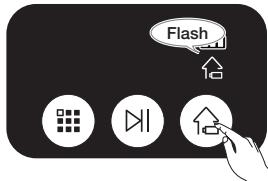
Using the main unit buttons
The Vacuum cleaning Robot will move by itself and automatically clean the house until cleaning is completed once.
If cleaning begins when the Vacuum cleaning Robot is docked with the charger station, the time to return to the charger is decreased since the Vacuum cleaning Robot remembers its original position while moving.
If the battery level becomes too low while cleaning, the Vacuum cleaning Robot will automatically return to the charger station and resume cleaning after charging its battery. (Number of cleaning operations resumed: Once)
| Main unit button | Remote control button (Option) | Configuration Sequence |
| 1time | Auto | 1. Set the mode. |
| Start/Stop | 2. Cancel the mode. |
While cleaning

About the Resume Cleaning function
- If the Vacuum cleaning Robot has evaluated that cleaning is complete, the resume cleaning function is not performed.
- If you move the Vacuum cleaning Robot when it is being charged or press a button, the Vacuum cleaning Robot judges cleaning to be complete and does not resume cleaning.
CAUTION Do not move the Vacuum cleaning Robot when it is cleaning or press a button while it is cleaning. Otherwise, the Vacuum cleaning Robot judges cleaning to be complete and starts cleaning again from the beginning.
You can conveniently clean a specific area that has a lot of cookie crumbs, dust, and etc.
- Move the Vacuum cleaning Robot to the location where you want to perform a spot clean.
| Main unit button | Remote control button (Option) | Configuration Sequence |
| 2time | Spot | 1. Set the mode. |
| Start/Stop | 2. Cancel the mode. |
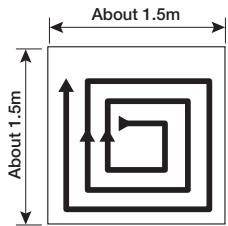
- In Spot cleaning mode, the Vacuum cleaning Robot cleans an area with a length of 1.5m and a width of 1.5m .
- When the robot cleaner finishes cleaning, it will stop and enter Standby mode.
While cleaning

When the Vacuum cleaning Robot is docked with the charger station, spot cleaning is not supported.
The Vacuum cleaning Robot automatically moves and cleans until the battery runs out and the battery level flashes only one level.
If cleaning begins when the Vacuum cleaning Robot is docked with the charger station, the time to return to the charger is decreased since the Vacuum cleaning Robot remembers its original position while moving.
If the battery level becomes low while cleaning, the Vacuum cleaning Robot automatically returns to the charger station and resumes cleaning after charging the battery. (Number of resumed cleaning operations: Once)
| Main unit button | Remote control button (Option) | Configuration Sequence |
| 3 times
when the product is not in the process of charging.)
2 times
(when the product is charging.) | Max | 1. Set the mode. |
| Start/Stop | 2. Cancel the mode. |
While cleaning

About the Resume Cleaning function
- If the Vacuum cleaning Robot judges cleaning to be complete, resume cleaning is not performed.
- If you move the Vacuum cleaning Robot while it is being charged or press a button, Vacuum cleaning Robot judges cleaning to be complete (cleaning is not resumed).
CAUTION Do not move the Vacuum cleaning Robot while it is cleaning or press a button while cleaning. Otherwise, the Vacuum cleaning Robot judges cleaning to be complete and starts cleaning again from the beginning.
You can move the Vacuum cleaning Robot to clean a particular location directly by using the remote control.
- Move the Vacuum cleaning Robot to the location where you want to perform manual cleaning.
You can manually clean using the remote control only.
| Remote control button (Option) | Configuration Sequence |
| Manual | 1. Set the mode. |
| Start/Stop | 2. Cancel the mode. |

- When the Vacuum cleaning Robot is docked with the charger station, manual cleaning is not supported.
While cleaning
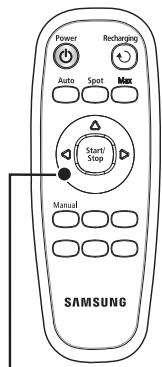
Directional Buttons (Forwards, Left, Right) A backwards function is not supported.
CLEANING THE VACUUM CLEANING ROBOT
Please keep the cleaning and maintenance methods in mind
■ When the Power Switch is damaged, please contact the service agent so that it does not cause any accidents.
- Do not use any means or mechanical devices not installed by the manufacturer that could accelerate the deformation of the Vacuum cleaning Robot.
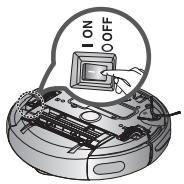
Always turn off the power switch at the bottom of the main unit before cleaning the robotic vacuum. The Vacuum cleaning Robot could operate suddenly and cause an injury.
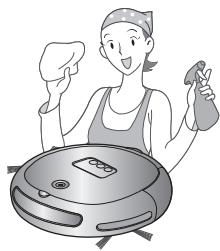
Cleaning the Sensor Window and the Camera
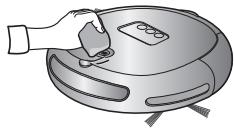
You must turn off the Power Switch at the bottom of the main unit before cleaning the robotic vacuum.
- Never spray water, thinner, benzene etc. directly onto the main unit of Vacuum cleaning Robot.
Lightly wipe the sensor window or camera using a soft cloth.
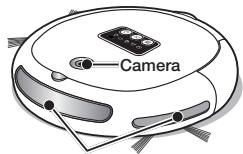
Front Sensor window
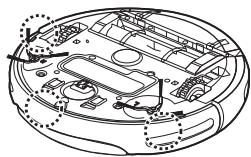
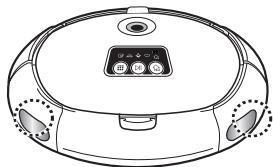
Front Sensor Window and Camera
Cliff Sensor Window
Rear Sensor Window
Cleaning the Dust Bin and the Filters
First, empty the dust bin before cleaning it.
-
When separating the dust bin, take care not to spill the dust out of the dust bin.
Empty the dust bin in the following cases.
-
When dust has accumulated inside the dust bin.
- When the suction power suddenly becomes weak.
- When the noise suddenly increases.
Filter
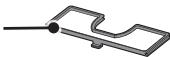
Dust Bin Cover
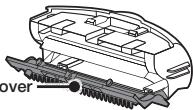
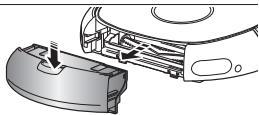
- Press the Dust Bin Eject (PUSH) button and pull the dust bin to separate the dust bin.
- Separate the dust bin cover by pulling it in the direction of the arrow in the figure.
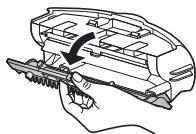
- Separate the Filter from the dust bin by pulling it in the direction of the arrow in the figure.
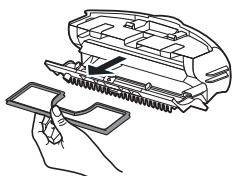
-
Wipe the dust from the Filter and the dust bin.
-
You can clean it with water.
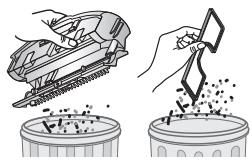
-
Install the Filter into the dust bin.
-
Make sure that the grid pattern of the Filter is facing downwards. It cannot be installed in the wrong direction.
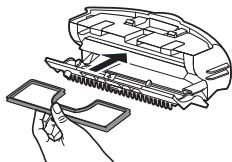
- Close the dust bin cover and install it into the main unit.
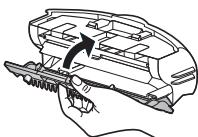
Cleaning the Power Brush
You must turn off the Power Switch at the bottom of the main unit before cleaning the robotic vacuum.

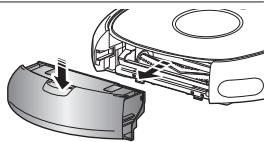
- Because the dust in the dust bin may come out, separate the dust bin first before cleaning the power brush.
- Separate the dust bin by pressing the Dust Bin Eject (PUSH) button.
- After checking whether there are any foreign substances, press the hook that is fixing the brush cover to separate it.
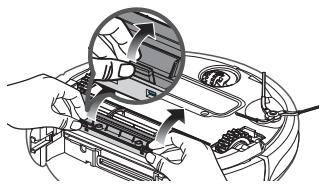
- Lift the power brush up from the main unit.
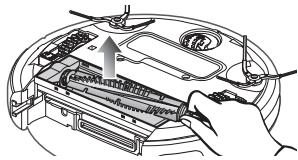
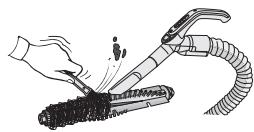
- Remove any foreign substances such as long hairs or strings wrapped around the power brush using a cleaning brush or a vacuum cleaner.
- When cleaning is complete, fix the Power Switch side of the power brush first and then fix the other side of the brush in the same way.
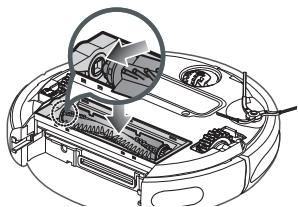
- After inserting the 3 tips at the top of the cover, push the other end in until it "clicks" into place.
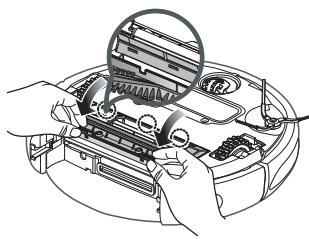

- To prevent the Vacuum cleaning Robot from becoming clogged, be careful not to vacuum tooth picks or cotton swabs.
- When removing foreign substances becomes difficult, contact a customer care center.
- Because the power brush vacuums the dust on the floor, long strings or hair can become wrapped around the brush. Check and clean the power brush regularly.
You must turn off the Power Switch at the bottom of the main unit before cleaning the robotic vacuum.
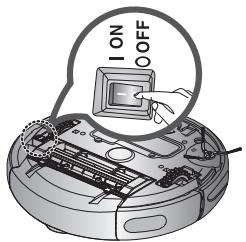
- Check whether the side rotating brush is bent or whether there are any foreign substances stuck on the brush.
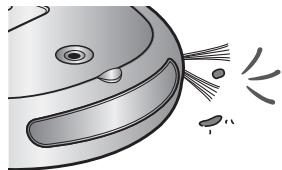
- Wearing rubber gloves, wrap the side rotating brush with a cloth using hot water for about 10 seconds and wipe it on the cloth.
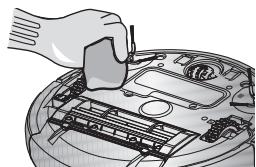
- Turning the side rotating brush, repeat the procedures in Step 2.
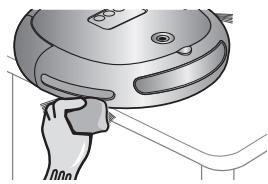
- If hair or string is wrapped between the main unit and the side rotating brush, undo the screw of the side rotating brush using a (+) driver to remove it.
When reassembling the brush, check the "L" mark on the edge-cleaning side rotating brush and the "L" mark on the main unit and then reassemble the side rotating brush.
(Letter "R" is carved at the right side rotating brush.)
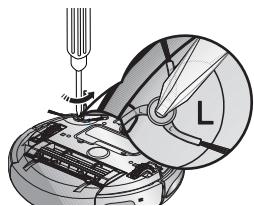

Because the side rotating brush easily attracts hair and other foreign substances, make sure to clean it frequently.
Excessive foreign substances on the side rotating brush can damage the brush.
You must turn off the Power Switch at the bottom of the main unit before cleaning the robotic.
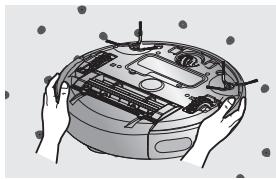
If the vacuum cleaning robot suddenly starts to zigzag, there may be foreign substances stuck on the driving wheel.
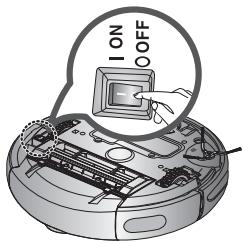
- When cleaning the driving wheel, place a soft cloth on the floor and flip the main unit, placing it down carefully.
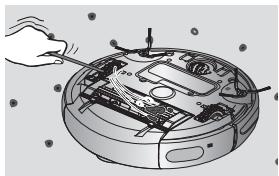
- Check for foreign substances and remove them using a stick or a pair of blunt nippers if necessary.
CHECKLIST BEFORE SVC CALLS
| Symptom | Checklist | Measure to Take |
| Vacuum cleaning Robot does not operate at all before cleaning. | • Is the dust bin assembled? | • Install the dust bin. |
| • Is the Power Switch turned on? | • Turn on the Power Switch. |
| • Is cleaning mode (△D) in the display panel turned on? | • Press the (◇) button. (To turn it off, press and hold the (◇) button down for 3 seconds or longer.) |
| • Does the battery level icon on the display move to the right as shown?
(◇→◇→◇→◇) | • Lift up the Vacuum cleaning Robot, and manually dock the robotic vacuum onto the charger to charge it. |
| • Vacuum cleaning Robot will not operate when the battery in the remote control is depleted. (Option) | • Replace the batteries in the remote control. (AAA type) |
| Vacuum cleaning Robot stopped operating while cleaning. | • Does the battery level icon on the display move to the right as shown?
(◇→◇→◇→◇→◇) | • Lift up the Vacuum cleaning Robot, manually dock the robotic onto the charger to charge it. |
| • Has the vacuum cleaning robot become hooked on wires on the floor? | • Turn off the Power Switch and remove the wires. |
| • Is the Vacuum cleaning Robot stuck to the floor where there is a height difference?
- The driving wheel is lifted. | • Turn off the Power Switch and move the cleaning robotic vacuum to another place to clean. |
| • Is there a thin towel (cloth) wrapped around the driving wheel? | • Turn off the Power Switch and remove the thin towel. |
| • Is the Vacuum cleaning Robot stuck on the doorsill? | • Turn off the Power Switch and move the Vacuum cleaning Robot to another place to clean. |
| The suction power is weak while cleaning. | • Check whether the dust bin is full of dust. | • Stop the Vacuum cleaning Robot and empty the dust bin. |
| • Check whether the suction inlet is clogged by foreign substances. | • Turn off the Power Switch and remove the foreign substances on the suction inlet. |
| • Check whether the Filter is clogged. | • Clean the Filter well. |
| Vacuum cleaning
Robot cannot find
the charger. | ·Check whether the power plug of
the charger is plugged correctly
into the outlet. | |
| ·If there are any obstacles within a
range of about 1m in front of the
charger and about 0.5m range to
the left and right of the charger,
you should remove the obstacles. | |
| ·If there are any foreign substances
on the change pin, wipe them off
with a dry towel. | |

| ERROR CODE | CAUSE | SOLUTION |
| ·Vacuum cleaning Robot is caught, stuck or trapped while navigating. | ·Turn off the Power Switch at the bottom and move the Vacuum cleaning Robot to a different location. |
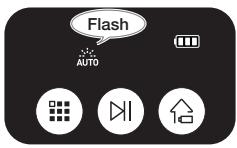
| Flash | ·A foreign substance (string, paper, toy etc.) is caught in the power brush. | ·Turn off the Power Switch at the bottom and remove the foreign substance from the power brush. |
| Flash | ·A foreign substance (string, paper, toy etc.) is caught in the left driving wheel. | ·Turn off the Power Switch at the bottom and remove the foreign substance from the left driving wheel. |
| Flash | ·A foreign substance (string, paper, toy etc.) is caught in the right driving wheel. | ·Turn off the Power Switch at the bottom and remove the foreign substance from the right driving wheel. |
| Flash Flash Auto Flash | ·Check bumper sensor. | ·Slightly pull the stuck bumper outward. |
| Flash Flash Auto Flash | ·A foreign substance (dust, stain etc.) is on the Obstacle sensor window. | ·Turn off the Power Switch at the bottom and wipe the foreign substance from the front and rear sensor windows using a soft cloth. |
| Flash Flash Auto Flash | ·A foreign substance (Dust, stain etc.) is on the Cliff sensor window. | ·Turn off the Power Switch at the bottom and wipe the foreign substance on the cliff sensor window with a soft cloth. |
| Flash Flash Auto Flash | ·Dust bin not inserted. | ·Insert the dust bin until you hear a “Click” sound. |
| Flash Flash Auto Flash | ·A foreign substance (String, cloth etc.) is caught on the edge-cleaning side rotating brush. | ·Turn off the Power Switch at the bottom and wipe the foreign substance from the edge-cleaning side rotating brush. |
- If you press the (M) button or turn off the Power Switch, the error code is cleared.
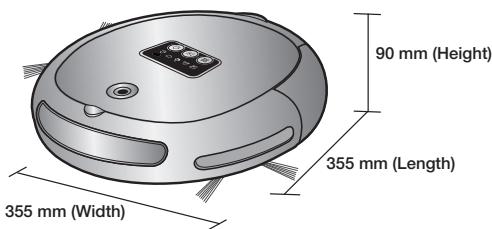
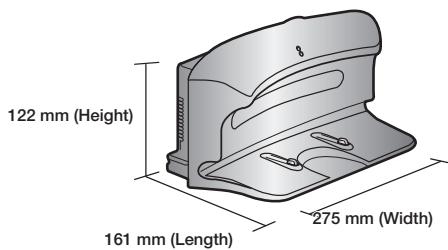
Main Body
Charger (Station)
| Classification | Item | Detail |
| Mechanical Specifications | Diameter | 355mm |
| Height | 90mm |
| Weight | 3.5kg |
| Electrical Specifications | Power voltage | AC 220-240V~, 50-60Hz |
| Charge power consumption | 50 W |
| Main unit power consumption | 40 W |
| Battery specifications | 14.4V / 2,000 mA |
| Cleaning Specifications | Dust bin capacity | About 0.6 l |
| Charging type | Auto Charging/Manual Charging |
| Cleaning mode | Auto, Spot, Max, Manual(Option) |
| Charging time | About 120 minutes |
| Cleaning time
(on the basis of hard floor) | About 90 minutes |
| Cleaning method | Ceiling shape recognition |
| Main unit button type | Button type |
This Vacuum cleaner is approved the following.
Electromagnetic Compatibility Directive : 2004/108/EEC
Low Voltage Directive: 2006/95/EC
Open Source Announcement
The software included in this product contains copyrighted software that is licensed under the GPL/LGPL.
You may obtain the complete Corresponding Source code from us for a period of three years after our last shipment of this product by sending email to: oss.request@samsung.com
If you want to obtain the complete Corresponding Source code in the physical medium such as CD-ROM, the cost of physically performing source distribution may be charged.
This offer is valid to anyone in receipt of this information.
GPL Software :
Linux kernel, BusyBox, mtd-utils, Irszs, wireless tools
LGPL Software :
uClibc
- GNU GENERAL PUBLIC LICENSE
Version 2, June 1991
Copyright (C) 1989, 1991 Free Software Foundation, Inc.
51 Franklin Street, Fifth Floor, Boston, MA 02110-1301, USA
Everyone is permitted to copy and distribute verbatim copies of this license document, but changing it is not allowed.
Preamble
The licenses for most software are designed to take away your freedom to share and change it. By contrast, the GNU General Public License is intended to guarantee your freedom to share and change free software--to make sure the software is free for all its users. This General Public License applies to most of the Free Software Foundation's software and to any other program whose authors commit to using it. (Some other Free Software Foundation software is covered by the GNU Lesser General Public License instead.) You can apply it to your programs, too.
When we speak of free software, we are referring to freedom, not price. Our General Public Licenses are designed to make sure that you have the freedom to distribute copies of free software (and charge for this service if you wish), that you receive source code or can get it if you want it, that you can change the software or use pieces of it in new free programs; and that you know you can do these things.
To protect your rights, we need to make restrictions that forbid anyone to deny you these rights or to ask you to surrender the rights. These restrictions translate to certain responsibilities for you if you distribute copies of the software, or if you modify it.
For example, if you distribute copies of such a program, whether gratis or for a fee, you must give the recipients all the rights that you have. You must make sure that they, too, receive or can get the source code. And you must show them these terms so they know their rights.
We protect your rights with two steps: (1) copyright the software, and (2) offer you this license which gives you legal permission to copy, distribute and/or modify the software.
Also, for each author's protection and ours, we want to make certain that everyone understands that there is no warranty for this free software. If the software is modified by someone else and passed on, we want its recipients to know that what they have is not the original, so that any problems introduced by others will not reflect on the original authors' reputations.
Finally, any free program is threatened constantly by software patents. We wish to avoid the danger that redistributors of a free program will individually obtain patent licenses, in effect making the program proprietary. To prevent this, we have made it clear that any patent must be licensed for everyone's free use or not licensed at all.
The precise terms and conditions for copying, distribution and modification follow.
TERMS AND CONDITIONS FOR COPYING, DISTRIBUTION AND MODIFICATION
- This License applies to any program or other work which contains a notice placed by the copyright holder saying it may be distributed under the terms of this General Public License. The "Program", below, refers to any such program or work, and a "work based on the Program" means either the Program or any derivative work under copyright law: that is to say, a work containing the Program or a portion of it, either verbatim or with modifications and/or translated into another language. (Hereinafter, translation is included without limitation in the term "modification".) Each licensee is addressed as "you".
Activities other than copying, distribution and modification are not covered by this License; they are outside its scope. The act of running the Program is not restricted, and the output from the Program is covered only if its contents constitute a work based on the Program (independent of having been made by running the Program). Whether that is true depends on what the Program does.
- You may copy and distribute verbatim copies of the Program's source code as you receive it, in any medium, provided that you conspicuously and appropriately publish on each copy an appropriate copyright notice and disclaimer of warranty; keep intact all the notices that refer to this License and to the absence of any warranty; and give any other recipients of the Program a copy of this License along with the Program.
You may charge a fee for the physical act of transferring a copy, and you may at your option offer warranty protection in exchange for a fee.
- You may modify your copy or copies of the Program or any portion of it, thus forming a work based on the Program, and copy and distribute such modifications or work under the terms of Section 1 above, provided that you also meet all of these conditions:
a) You must cause the modified files to carry prominent notices stating that you changed the files and the date of any change.
b) You must cause any work that you distribute or publish, that in whole or in part contains or is derived from the Program or any part thereof, to be licensed as a whole at no charge to all third parties under the terms of this License.
c) If the modified program normally reads commands interactively when run, you must cause it, when started running for such interactive use in the most ordinary way, to print or display an announcement including an appropriate copyright notice and a notice that there is no warranty (or else, saying that you provide a warranty) and that users may redistribute the program under these conditions, and telling the user how to view a copy of this License. (Exception: if the Program itself is interactive but does not normally print such an announcement, your work based on the Program is not required to print an announcement.)
These requirements apply to the modified work as a whole. If identifiable sections of that work are not derived from the Program, and can be reasonably considered independent and separate works in themselves, then this License, and its terms, do not apply to those sections when you distribute them as separate works. But when you distribute the same sections as part of a whole which is a work based on the Program, the distribution of the whole must be on the terms of this License, whose permissions for other licensees extend to the entire whole, and thus to each and every part regardless of who wrote it.
Thus, it is not the intent of this section to claim rights or contest your rights to work written entirely by you; rather, the intent is to exercise the right to control the distribution of derivative or collective works based on the Program.
In addition, mere aggregation of another work not based on the Program with the Program (or with a work based on the Program) on a volume of a storage or distribution medium does not bring the other work under the scope of this License.
- You may copy and distribute the Program (or a work based on it, under Section 2) in object code or executable form under the terms of Sections 1 and 2 above provided that you also do one of the following:
a) Accompany it with the complete corresponding machine-readable source code, which must be distributed under the terms of Sections 1 and 2 above on a medium customarily used for software interchange; or,
b) Accompany it with a written offer, valid for at least three years, to give any third party, for a charge no more than your cost of physically performing source distribution, a complete machine-readable copy of the corresponding source code, to be distributed under the terms of Sections 1 and 2 above on a medium customarily used for software interchange; or.
c) Accompany it with the information you received as to the offer to distribute corresponding source code. (This alternative is allowed only for noncommercial distribution and only if you received the program in object code or executable form with such an offer, in accord with Subsection b above.)
The source code for a work means the preferred form of the work for making modifications to it. For an executable work, complete source code means all the source code for all modules it contains, plus any associated interface definition files, plus the scripts used to control compilation and installation of the executable. However, as a special exception, the source code distributed need not include anything that is normally distributed (in either source or binary form) with the major components (compiler, kernel, and so on) of the operating system on which the executable runs, unless that component itself accompanies the executable.
If distribution of executable or object code is made by offering access to copy from a designated place, then offering equivalent access to copy the source code from the same place counts as distribution of the source code, even though third parties are not compelled to copy the source along with the object code.
- You may not copy, modify, sublicense, or distribute the Program except as expressly provided under this License. Any attempt otherwise to copy, modify, sublicense or distribute the Program is void, and will automatically terminate your rights under this License. However, parties who have received copies, or rights, from you under this License will not have their licenses terminated so long as such parties remain in full compliance.
- You are not required to accept this License, since you have not signed it. However, nothing else grants you permission to modify or distribute the Program or its derivative works. These actions are prohibited by law if you do not accept this License. Therefore, by modifying or distributing the Program (or any work based on the Program), you indicate your acceptance of this License to do so, and all its terms and conditions for copying, distributing or modifying the Program or works based on it.
- Each time you redistribute the Program (or any work based on the Program), the recipient automatically receives a license from the original licensor to copy, distribute or modify the Program subject to these terms and conditions. You may not impose any further restrictions on the recipients' exercise of the rights granted herein. You are not responsible for enforcing compliance by third parties to this License.
- If, as a consequence of a court judgment or allegation of patent infringement or for any other reason (not limited to patent issues), conditions are imposed on you (whether by court order, agreement or otherwise) that contradict the conditions of this License, they do not excuse you from the conditions of this License. If you cannot distribute so as to satisfy simultaneously your obligations under this License and any other pertinent obligations, then as a consequence you may not distribute the Program at all. For example, if a patent license would not permit royalty-free redistribution of the Program by all those who receive copies directly or indirectly through you, then the only way you could satisfy both it and this License would be to refrain entirely from distribution of the Program.
If any portion of this section is held invalid or unenforceable under any particular circumstance, the balance of the section is intended to apply and the section as a whole is intended to apply in other circumstances.
It is not the purpose of this section to induce you to infringe any patents or other property right claims or to contest validity of any such claims; this section has the sole purpose of protecting the integrity of the free software distribution system, which is implemented by public license practices. Many people have made generous contributions to the wide range of software distributed through that system in reliance on consistent application of that system; it is up to the author/donor to decide if he or she is willing to distribute software through any other system and a licensee cannot impose that choice.
This section is intended to make thoroughly clear what is believed to be a consequence of the rest of this License.
- If the distribution and/or use of the Program is restricted in certain countries either by patents or by copyrighted interfaces, the original copyright holder who places the Program under this License may add an explicit geographical distribution limitation excluding those countries, so that distribution is permitted only in or among countries not thus excluded. In such case, this License incorporates the limitation as if written in the body of this License.
- The Free Software Foundation may publish revised and/or new versions of the General Public License from time to time. Such new versions will be similar in spirit to the present version, but may differ in detail to address new problems or concerns.
Each version is given a distinguishing version number. If the Program specifies a version number of this License which applies to it and "any later version", you have the option of following the terms and conditions either of that version or of any later version published by the Free Software Foundation. If the Program does not specify a version number of this License, you may choose any version ever published by the Free Software Foundation.
- If you wish to incorporate parts of the Program into other free programs whose distribution conditions are different, write to the author to ask for permission. For software which is copyrighted by the Free Software Foundation, write to the Free Software Foundation; we sometimes make exceptions for this. Our decision will be guided by the two goals of preserving the free status of all derivatives of our free software and of promoting the sharing and reuse of software generally.
NO WARRANTY
- BECAUSE THE PROGRAM IS LICENSED FREE OF CHARGE, THERE IS NO WARRANTY FOR THE PROGRAM, TO THE EXTENT PERMITTED BY APPLICABLE LAW. EXCEPT WHEN OTHERWISE STATED IN WRITING THE COPYRIGHT HOLDERS AND/OR OTHER PARTIES PROVIDE THE PROGRAM "AS IS" WITHOUT WARRANTY OF ANY KIND, Either EXPRESSED OR IMPLIED, INCLUDING, BUT NOT LIMITED TO, THE IMPLIED WARRANTYES OF MERCHANTABILITY AND FITNESS FOR A PARTICULAR PURPOSE. THE ENTIRE RISK AS TO THE QUALITY AND PERFORMANCE OF THE PROGRAM IS WITH YOU. SHOULD THE PROGRAM PROVE DEFECTIVE, YOU ASSUME THE COST OF ALL NECESSARY SERVICING, REPAIR OR CORRECTION.
- IN NO EVENT UNLESS REQUIRED BY APPLICABLE LAW OR AGREED TO IN WRITING WILL ANY COPYRIGHT HOLDER, OR ANY OTHER PARTY WHO MAY MODIFY AND/OR REDISTRIBUTE THE PROGRAM AS PERMITTED ABOVE, BE LIABLE TO YOU FOR DAMAGES, INCLUDING ANY GENERAL, SPECIAL, INCIDENTAL OR CONSEQUENTIAL DAMAGES ARISING OUT OF THE USE OR INABILITY TO USE THE PROGRAM (INCLUDING BUT NOT LIMITED TO LOSS OF DATA OR DATA BEING RENDERED INACCURATE OR LOSSES SUSTAINED BY YOU OR THIRD PARTIES OR A FAILURE OF THE PROGRAM TO OPERATE WITH ANY OTHER PROGRAMS), EVEN IF SUCH HOLDER OR OTHER PARTY HAS BEEN ADVISED OF THE POSSIBILITY OF SUCH DAMAGES.
END OF TERMS AND CONDITIONS
How to Apply These Terms to Your New Programs
If you develop a new program, and you want it to be of the greatest possible use to the public, the best way to achieve this is to make it free software which everyone can redistribute and change under these terms.
To do so, attach the following notices to the program. It is safest to attach them to the start of each source file to most effectively convey the exclusion of warranty; and each file should have at least the "copyright" line and a pointer to where the full notice is found.
one line to give the program's name and an idea of what it does.
Copyright (C) yyyy name of author
This program is free software; you can redistribute it and/or modify it under the terms of the GNU General Public License as published by the Free Software Foundation; either version 2 of the License, or (at your option) any later version.
This program is distributed in the hope that it will be useful, but WITHOUT ANY WARRANTY; without even the implied warranty of MERCHANTABILITY or FITNESS FOR A PARTICULAR PURPOSE. See the GNU General Public License for more details.
You should have received a copy of the GNU General Public License along with this program; if not, write to the Free Software Foundation, Inc., 51 Franklin Street, Fifth Floor, Boston, MA 02110-1301, USA.
Also add information on how to contact you by electronic and paper mail.
If the program is interactive, make it output a short notice like this when it starts in an interactive mode:
Gnomovision version 69, Copyright (C) year name of author
Gnomovision comes with ABSOLUTELY NO WARRANTY; for details
type`show w'. This is free software, and you are welcome
to redistribute it under certain conditions; type `show c' for details.
The hypothetical commands 'show w' and 'show c' should show the appropriate parts of the General Public License. Of course, the commands you use may be called something other than 'show w' and 'show c'; they could even be mouse-clicks or menu items-whatever suits your program.
You should also get your employer (if you work as a programmer) or your school, if any, to sign a "copyright disclaimer" for the program, if necessary. Here is a sample; alter the names:
Yoyodyne, Inc., hereby disclaims all copyright
interest in the program 'Gnomovision'
(which makes passes at compilers) written
by James Hacker.
signature of Ty Coon, 1 April 1989
Ty Coon, President of Vice
This General Public License does not permit incorporating your program into proprietary programs. If your program is a subroutine library, you may consider it more useful to permit linking proprietary applications with the library. If this is what you want to do, use the GNU Lesser General Public License instead of this License.
GNU LESSER GENERAL PUBLIC LICENSE
Version 2.1, February 1999
Copyright (C) 1991, 1999 Free Software Foundation, Inc.
51 Franklin Street, Fifth Floor, Boston, MA 02110-1301 USA
Everyone is permitted to copy and distribute verbatim copies
of this license document, but changing it is not allowed.
[This is the first released version of the Lesser GPL. It also counts as the successor of the GNU Library Public License, version 2, hence the version number 2.1.]
Preamble
The licenses for most software are designed to take away your freedom to share and change it. By contrast, the GNU General Public Licenses are intended to guarantee your freedom to share and change free software--to make sure the software is free for all its users.
This license, the Lesser General Public License, applies to some specially designated software packages--typically libraries--of the Free Software Foundation and other authors who decide to use it. You can use it too, but we suggest you first think carefully about whether this license or the ordinary General Public License is the better strategy to use in any particular case, based on the explanations below.
When we speak of free software, we are referring to freedom of use, not price. Our General Public Licenses are designed to make sure that you have the freedom to distribute copies of free software (and charge for this service if you wish); that you receive source code or can get it if you want it; that you can change the software and use pieces of it in new free programs; and that you are informed that you can do these things.
To protect your rights, we need to make restrictions that forbid distributors to deny you these rights or to ask you to surrender these rights. These restrictions translate to certain responsibilities for you if you distribute copies of the library or if you modify it.
For example, if you distribute copies of the library, whether gratis or for a fee, you must give the recipients all the rights that we gave you. You must make sure that they, too, receive or can get the source code. If you link other code with the library, you must provide complete object files to the recipients, so that they can relink them with the library after making changes to the library and recompliting it. And you must show them these terms so they know their rights.
We protect your rights with a two-step method: (1) we copyright the library, and (2) we offer you this license, which gives you legal permission to copy, distribute and/or modify the library.
To protect each distributor, we want to make it very clear that there is no warranty for the free library. Also, if the library is modified by someone else and passed on, the recipients should know that what they have is not the original version, so that the original author's reputation will not be affected by problems that might be introduced by others.
Finally, software patents pose a constant threat to the existence of any free program. We wish to make sure that a company cannot effectively restrict the users of a free program by obtaining a restrictive license from a patent holder. Therefore, we insist that any patent license obtained for a version of the library must be consistent with the full freedom of use specified in this license.
Most GNU software, including some libraries, is covered by the ordinary GNU General Public License. This license, the GNU Lesser General Public License, applies to certain designated libraries, and is quite different from the ordinary General Public License. We use this license for certain libraries in order to permit linking those libraries into non-free programs.
When a program is linked with a library, whether statically or using a shared library, the combination of the two is legally speaking
a combined work, a derivative of the original library. The ordinary General Public License therefore permits such linking only if the entire combination fits its criteria of freedom. The Lesser General Public License permits more lax criteria for linking other code with the library.
We call this license the "Lesser" General Public License because it does Less to protect the user's freedom than the ordinary General Public License. It also provides other free software developers Less of an advantage over competing non-free programs. These disadvantages are the reason we use the ordinary General Public License for many libraries. However, the Lesser license provides advantages in certain special circumstances.
For example, on rare occasions, there may be a special need to encourage the widest possible use of a certain library, so that it becomes a de-facto standard. To achieve this, non-free programs must be allowed to use the library. A more frequent case is that a free library does the same job as widely used non-free libraries. In this case, there is little to gain by limiting the free library to free software only, so we use the Lesser General Public License.
In other cases, permission to use a particular library in non-free programs enables a greater number of people to use a large body of free software. For example, permission to use the GNU C Library in non-free programs enables many more people to use the whole GNU operating system, as well as its variant, the GNU/Linux operating system.
Although the Lesser General Public License is Less protective of the users' freedom, it does ensure that the user of a program that is linked with the Library has the freedom and the wherewithal to run that program using a modified version of the Library.
The precise terms and conditions for copying, distribution and modification follow. Pay close attention to the difference between a "work based on the library" and a "work that uses the library". The former contains code derived from the library, whereas the latter must be combined with the library in order to run.
TERMS AND CONDITIONS FOR COPYING, DISTRIBUTION AND MODIFICATION
- This License Agreement applies to any software library or other program which contains a notice placed by the copyright holder or other authorized party saying it may be distributed under the terms of this Lesser General Public License (also called "this License"). Each licensee is addressed as "you".
A "library" means a collection of software functions and/or data prepared so as to be conveniently linked with application programs (which use some of those functions and data) to form executables.
The "Library", below, refers to any such software library or work which has been distributed under these terms. A "work based on the Library" means either the Library or any derivative work under copyright law: that is to say, a work containing the Library or a portion of it, either verbatim or with modifications and/or translated straightforwardly into another language. (Hereinafter, translation is included without limitation in the term "modification".)
"Source code" for a work means the preferred form of the work for making modifications to it. For a library, complete source code means all the source code for all modules it contains, plus any associated interface definition files, plus the scripts used to control compilation and installation of the library.
Activities other than copying, distribution and modification are not covered by this License; they are outside its scope. The act of running a program using the Library is not restricted, and output from such a program is covered only if its contents constitute a work based on the Library (independent of the use of the Library in a tool for writing it). Whether that is true depends on what the Library does and what the program that uses the Library does.
- You may copy and distribute verbatim copies of the Library's complete source code as you receive it, in any medium, provided that you conspicuously and appropriately publish on each copy an appropriate copyright notice and disclaimer of warranty; keep intact all the notices that refer to this License and to the absence of any warranty; and distribute a copy of this License along with the Library.
You may charge a fee for the physical act of transferring a copy, and you may at your option offer warranty protection in exchange for a fee.
- You may modify your copy or copies of the Library or any portion of it, thus forming a work based on the Library, and copy and distribute such modifications or work under the terms of Section 1 above, provided that you also meet all of these conditions:
a) The modified work must itself be a software library.
- b) You must cause the files modified to carry prominent notices stating that you changed the files and the date of any change.
c) You must cause the whole of the work to be licensed at no charge to all third parties under the terms of this License.
d) If a facility in the modified Library refers to a function or a table of data to be supplied by an application program that uses the facility, other than as an argument passed when the facility is invoked, then you must make a good faith effort to ensure that, in the event an application does not supply such function or table, the facility still operates, and performs whatever part of its purpose remains meaningful.
(For example, a function in a library to compute square roots has a purpose that is entirely well-defined independent of the application. Therefore, Subsection 2d requires that any application-supplied function or table used by this function must be optional: if the application does not supply it, the square root function must still compute square roots.)
These requirements apply to the modified work as a whole. If identifiable sections of that work are not derived from the Library, and can be reasonably considered independent and separate works in themselves, then this License, and its terms, do not apply to those sections when you distribute them as separate works. But when you distribute the same sections as part of a whole
which is a work based on the Library, the distribution of the whole must be on the terms of this License, whose permissions for other licensees extend to the entire whole, and thus to each and every part regardless of who wrote it.
Thus, it is not the intent of this section to claim rights or contest your rights to work written entirely by you; rather, the intent is to exercise the right to control the distribution of derivative or collective works based on the Library.
In addition, mere aggregation of another work not based on the Library with the Library (or with a work based on the Library) on a volume of a storage or distribution medium does not bring the other work under the scope of this License.
- You may opt to apply the terms of the ordinary GNU General Public License instead of this License to a given copy of the Library. To do this, you must alter all the notices that refer to this License, so that they refer to the ordinary GNU General Public License, version 2, instead of to this License. (If a newer version than version 2 of the ordinary GNU General Public License has appeared, then you can specify that version instead if you wish.) Do not make any other change in these notices.
Once this change is made in a given copy, it is irreversible for that copy, so the ordinary GNU General Public License applies to all subsequent copies and derivative works made from that copy.
This option is useful when you wish to copy part of the code of the Library into a program that is not a library.
- You may copy and distribute the Library (or a portion or derivative of it, under Section 2) in object code or executable form under the terms of Sections 1 and 2 above provided that you accompany it with the complete corresponding machine-readable source code, which must be distributed under the terms of Sections 1 and 2 above on a medium customarily used for software interchange.
If distribution of object code is made by offering access to copy from a designated place, then offering equivalent access to copy the source code from the same place satisfies the requirement to distribute the source code, even though third parties are not compelled to copy the source along with the object code.
- A program that contains no derivative of any portion of the Library, but is designed to work with the Library by being compiled or linked with it, is called a "work that uses the Library". Such a work, in isolation, is not a derivative work of the Library, and therefore falls outside the scope of this License.
However, linking a "work that uses the Library" with the Library creates an executable that is a derivative of the Library (because it contains portions of the Library), rather than a "work that uses the library". The executable is therefore covered by this License. Section 6 states terms for distribution of such executables.
When a "work that uses the Library" uses material from a header file that is part of the Library, the object code for the work may be a derivative work of the Library even though the source code is not. Whether this is true is especially significant if the work can be linked without the Library, or if the work is itself a library. The threshold for this to be true is not precisely defined by law.
If such an object file uses only numerical parameters, data structure layouts and accessors, and small macros and small inline functions (ten lines or less in length), then the use of the object file is unrestricted, regardless of whether it is legally a derivative work. (Executables containing this object code plus portions of the Library will still fall under Section 6.)
Otherwise, if the work is a derivative of the Library, you may distribute the object code for the work under the terms of Section 6. Any executables containing that work also fall under Section 6, whether or not they are linked directly with the Library itself.
- As an exception to the Sections above, you may also combine or link a "work that uses the Library" with the Library to produce a work containing portions of the Library, and distribute that work under terms of your choice, provided that the terms permit modification of the work for the customer's own use and reverse engineering for debugging such modifications.
You must give prominent notice with each copy of the work that the Library is used in it and that the Library and its use are covered by this License. You must supply a copy of this License. If the work during execution displays copyright notices, you must include the copyright notice for the Library among them, as well as a reference directing the user to the copy of this License. Also, you must do one of these things:
a) Accompany the work with the complete corresponding machine-readable source code for the Library including whatever changes were used in the work (which must be distributed under Sections 1 and 2 above); and, if the work is an executable linked with the Library, with the complete machine-readable "work that uses the Library", as object code and/or source code, so that the user can modify the Library and then relink to produce a modified executable containing the modified Library. (It is understood that the user who changes the contents of definitions files in the Library will not necessarily be able to recompile the application to use the modified definitions.)
- b) Use a suitable shared library mechanism for linking with the Library. A suitable mechanism is one that (1) uses at run time a copy of the library already present on the user's computer system, rather than copying library functions into the executable, and (2) will operate properly with a modified version of the library, if the user installs one, as long as the modified version is interface-compatible with the version that the work was made with.
- c) Accompany the work with a written offer, valid for at least three years, to give the same user the materials specified in Subsection 6a, above, for a charge no more than the cost of performing this distribution.
- d) If distribution of the work is made by offering access to copy from a designated place, offer equivalent access to copy the above specified materials from the same place.
e) Verify that the user has already received a copy of these materials or that you have already sent this user a copy.
For an executable, the required form of the "work that uses the Library" must include any data and utility programs needed for reproducing the executable from it. However, as a special exception, the materials to be distributed need not include anything that is normally distributed (in either source or binary form) with the major components (compiler, kernel, and so on) of the operating system on which the executable runs, unless that component itself accompanies the executable.
It may happen that this requirement contradicts the license restrictions of other proprietary libraries that do not normally
accompany the operating system. Such a contradiction means you cannot use both them and the Library together in an executable that you distribute.
- You may place library facilities that are a work based on the Library side-by-side in a single library together with other library facilities not covered by this License, and distribute such a combined library, provided that the separate distribution of the work based on the Library and of the other library facilities is otherwise permitted, and provided that you do these two things:
a) Accompany the combined library with a copy of the same work based on the Library, uncombined with any other library facilities. This must be distributed under the terms of the Sections above.
b) Give prominent notice with the combined library of the fact that part of it is a work based on the Library, and explaining where to find the accompanying uncombined form of the same work.
-
You may not copy, modify, sublicense, link with, or distribute the Library except as expressly provided under this License. Any attempt otherwise to copy, modify, sublicense, link with, or distribute the Library is void, and will automatically terminate your rights under this License. However, parties who have received copies, or rights, from you under this License will not have their licenses terminated so long as such parties remain in full compliance.
-
You are not required to accept this License, since you have not signed it. However, nothing else grants you permission to modify or distribute the Library or its derivative works. These actions are prohibited by law if you do not accept this License. Therefore, by modifying or distributing the Library (or any work based on the Library), you indicate your acceptance of this License to do so, and all its terms and conditions for copying, distributing or modifying the Library or works based on it.
-
Each time you redistribute the Library (or any work based on the Library), the recipient automatically receives a license from the original licensor to copy, distribute, link with or modify the Library subject to these terms and conditions. You may not impose any further restrictions on the recipients' exercise of the rights granted herein. You are not responsible for enforcing compliance by third parties with this License.
-
If, as a consequence of a court judgment or allegation of patent infringement or for any other reason (not limited to patent issues), conditions are imposed on you (whether by court order, agreement or otherwise) that contradict the conditions of this License, they do not excuse you from the conditions of this License. If you cannot distribute so as to satisfy simultaneously your obligations under this License and any other pertinent obligations, then as a consequence you may not distribute the Library at all. For example, if a patent license would not permit royalty-free redistribution of the Library by all those who receive copies directly or indirectly through you, then the only way you could satisfy both it and this License would be to refrain entirely from distribution of the Library.
If any portion of this section is held invalid or unenforceable under any particular circumstance, the balance of the section is intended to apply, and the section as a whole is intended to apply in other circumstances.
It is not the purpose of this section to induce you to infringe any patents or other property right claims or to contest validity of any such claims; this section has the sole purpose of protecting the integrity of the free software distribution system which is implemented by public license practices. Many people have made generous contributions to the wide range of software distributed through that system in reliance on consistent application of that system; it is up to the author/donor to decide if he or she is willing to distribute software through any other system and a licensee cannot impose that choice.
This section is intended to make thoroughly clear what is believed to be a consequence of the rest of this License.
-
If the distribution and/or use of the Library is restricted in certain countries either by patents or by copyrighted interfaces, the original copyright holder who places the Library under this License may add an explicit geographical distribution limitation excluding those countries, so that distribution is permitted only in or among countries not thus excluded. In such case, this License incorporates the limitation as if written in the body of this License.
-
The Free Software Foundation may publish revised and/or new versions of the Lesser General Public License from time to time. Such new versions will be similar in spirit to the present version, but may differ in detail to address new problems or concerns.
Each version is given a distinguishing version number. If the Library specifies a version number of this License which applies to it and "any later version", you have the option of following the terms and conditions either of that version or of any later version published by the Free Software Foundation. If the Library does not specify a license version number, you may choose any version ever published by the Free Software Foundation.
- If you wish to incorporate parts of the Library into other free programs whose distribution conditions are incompatible with these, write to the author to ask for permission. For software which is copyrighted by the Free Software Foundation, write to the Free Software Foundation; we sometimes make exceptions for this. Our decision will be guided by the two goals of preserving the free status of all derivatives of our free software and of promoting the sharing and reuse of software generally.
NO WARRANTY
-
BECAUSE THE LIBRARY IS LICENSED FREE OF CHARGE, THERE IS NO WARRANTY FOR THE LIBRARY, TO THE EXTENT PERMITTED BY APPLICABLE LAW. EXCEPT WHEN OTHERWISE STATED IN WRITING THE COPYRIGHT HOLDERS AND/OR OTHER PARTIES PROVIDE THE LIBRARY "AS IS" WITHOUT WARRANTY OF ANY KIND, EITHER EXPRESSED OR IMPLIED, INCLUDING, BUT NOT LIMITED TO, THE IMPLIED WARRANTY OF MERCHANTABILITY AND FITNESS FOR A PARTICULAR PURPOSE. THE ENTIRE RISK AS TO THE QUALITY AND PERFORMANCE OF THE LIBRARY IS WITH YOU. SHOULD THE LIBRARY PROVE DEFECTIVE, YOU ASSUME THE COST OF ALL NECESSARY SERVICING, REPAIR OR CORRECTION.
-
IN NO EVENT UNLESS REQUIRED BY APPLICABLE LAW OR AGREED TO IN WRITING WILL ANY COPYRIGHT HOLDER, OR ANY OTHER PARTY WHO MAY MODIFY AND/OR REDISTRIBUTE THE LIBRARY AS PERMITTED ABOVE, BE LIABLE TO YOU FOR DAMAGES, INCLUDING ANY GENERAL, SPECIAL, INCIDENTAL OR CONSEQUENTIAL DAMAGES ARISING
OUT OF THE USE OR INABILITY TO USE THE LIBRARY (INCLUDING BUT NOT LIMITED TO LOSS OF DATA OR DATA BEING RENDERED INACCURATE OR LOSSES SUSTAINED BY YOU OR THIRD PARTIES OR A FAILURE OF THE LIBRARY TO OPERATE WITH ANY OTHER SOFTWARE), EVEN IF SUCH HOLDER OR OTHER PARTY HAS BEEN ADVISED OF THE POSSIBILITY OF SUCH DAMAGES.
END OF TERMS AND CONDITIONS
How to Apply These Terms to Your New Libraries
If you develop a new library, and you want it to be of the greatest possible use to the public, we recommend making it free software that everyone can redistribute and change. You can do so by permitting redistribution under these terms (or, alternatively, under the terms of the ordinary General Public License).
To apply these terms, attach the following notices to the library. It is safest to attach them to the start of each source file to most effectively convey the exclusion of warranty; and each file should have at least the "copyright" line and a pointer to where the full notice is found.
one line to give the library's name and an idea of what it does.
Copyright (C) year name of author
This library is free software; you can redistribute it and/or modify it under the terms of the GNU Lesser General Public License as published by the Free Software Foundation; either version 2.1 of the License, or (at your option) any later version.
This library is distributed in the hope that it will be useful, but WITHOUT ANY WARRANTY; without even the implied warranty of MERCHANTABILITY or FITNESS FOR A PARTICULAR PURPOSE. See the GNU Lesser General Public License for more details.
You should have received a copy of the GNU Lesser General Public License along with this library; if not, write to the Free Software Foundation, Inc., 51 Franklin Street, Fifth Floor, Boston, MA 02110-1301 USA
Also add information on how to contact you by electronic and paper mail.
You should also get your employer (if you work as a programmer) or your school, if any, to sign a "copyright disclaimer" for the library, if necessary. Here is a sample; alter the names:
Yoyodyne, Inc., hereby disclaims all copyright interest in the library 'Frob' (a library for tweaking knobs) written by James Random Hacker.
signature of Ty Coon, 1 April 1990
Ty Coon, President of Vice
That's all there is to it!
-JPEG
This software is based in part on the work of the Independent JPEG Group.
- OpenCV :
IMPORTANT: READ BEFORE DOWNLOADING, COPYING, INSTALLING OR USING.
By downloading, copying, installing or using the software you agree to this license.
If you do not agree to this license, do not download, install, copy or use the software.
License Agreement
For Open Source Computer Vision Library
Copyright (C) 2000-2008, Intel Corporation, all rights reserved.
Copyright (C) 2008-2010, Willow Garage Inc., all rights reserved.
Third party copyrights are property of their respective owners.
Redistribution and use in source and binary forms, with or without modification, are permitted provided that the following conditions are met:
Redistribution's of source code must retain the above copyright notice, this list of conditions and the following disclaimer.
Redistribution's in binary form must reproduce the above copyright notice, this list of conditions and the following disclaimer in the documentation and/or other materials provided with the distribution.
The name of the copyright holders may not be used to endorse or promote products derived from this software without specific prior written permission.
This software is provided by the copyright holders and contributors "as is" and any express or implied warranties, including, but not limited to, the implied warranties of merchantability and fitness for a particular purpose are disclaimed. In no event shall the Intel Corporation or contributors be liable for any direct, indirect, incidental, special, exemplary, or consequential damages (including, but not limited to, procurement of substitute goods or services; loss of use, data, or profits; or business interruption) however caused and on any theory of liability, whether in contract, strict liability, or tort (including negligence or otherwise) arising in any way out of the use of this software, even if advised of the possibility of such damage.
SAMSUNG