
EP7030 @ 7030 - Epilator REMINGTON - Free user manual and instructions
Find the device manual for free EP7030 @ 7030 REMINGTON in PDF.




| Product Type | Intense Pulsed Light (IPL) Hair Removal Device |
| Technology | Intense Pulsed Light (IPL) |
| Power Supply | 12V DC adapter, 600 mA |
| Intensity Levels | 5 (1 to 5) |
| Skin Tone Sensor | Built-in, checks compatibility |
| Contact Sensors | Two safety sensors |
| Bulb | Unlimited (warranted lifespan) |
| Included Accessories | Body accessory, Facial treatment head |
| Treatment Mode | Single flash or Multi-flash (every 3 seconds) |
| UV Protection | Flash window with built-in UV protection |
| Safety | Contact sensors, skin tone sensor, automatic shut-off in case of overheating |
| Cleaning | Lint-free cloth, surgical alcohol for stubborn stains |
| Storage Temperature | 15°C to 35°C |
| Recommended Use | Body areas below the neck (legs, underarms, bikini, arms, chest, back) |
| Not Compatible | Dark skin (types V-VI), white/gray/blond/red hair, tanned skin, tattoos, etc. |
Frequently Asked Questions - EP7030 @ 7030 REMINGTON
User questions about EP7030 @ 7030 REMINGTON
0 question about this device. Answer the ones you know or ask your own.
Ask a new question about this device
Download the instructions for your Epilator in PDF format for free! Find your manual EP7030 @ 7030 - REMINGTON and take your electronic device back in hand. On this page are published all the documents necessary for the use of your device. EP7030 @ 7030 by REMINGTON.
USER MANUAL EP7030 @ 7030 REMINGTON
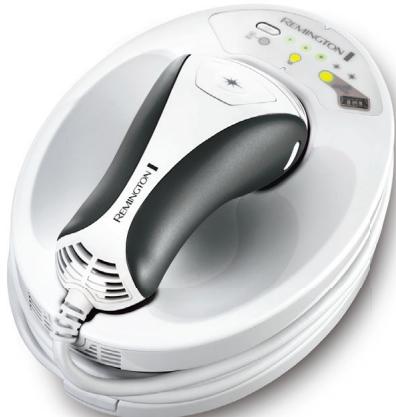
ESSENTIAL - IPL HAIR REMOVAL
natural_image
White portable soap dispenser with black handle and control panel (no visible text or symbols)
IPL6250
| Hair Colour | ||||||||
| Skin Colour | I | ✓ | ✓ | ✓ | ✓ | X | X | X |
| II | ✓ | ✓ | ✓ | ✓ | ||||
| III | ✓ | ✓ | ✓ | ✓ | ||||
| IV | ✓ | ✓ | ✓ | ✓ | ||||
| V | X | |||||||
| VI | X | |||||||
WARNING: i-LIGHT is not suitable for very dark or black skin, white/grey or very light blonde/red hair.
DO NOT use on or around the eyes, eyebrows or eyelashes. Doing so can cause serious and permanent eye injury.
Thank you for buying your new Remington ^® product.
Please read these instructions carefully and keep them safe. Remove all packaging before use.

IMPORTANT SAFETY INSTRUCTIONS
1 WARNING – TO REDUCE THE RISK OF BURNS, ELECTROCUTION, FIRE, OR INJURY TO PERSONS:
2 Use this appliance only for its intended use described in this manual.
3 Do not use if it is damaged or malfunctions.
4 Do not leave the appliance unattended while plugged in.
5 Keep the power plug and cord away from heated surfaces.
6 Do not use the product with a damaged cord. A replacement can be obtained via our International Service Centres.
7 Store the product at a temperature between 15° and 35°C.
8 Only use the parts supplied with the appliance.
9 Do not twist or kink the cable and don't wrap it around the appliance.
10 The body of this appliance is not washable or water resistant. Do not put the appliance in liquid; do not use it near water in a bath tub, basin or other vessel; and don't use it outdoors.
11 Make sure the power cable and adaptor do not get wet. Do not reach for your unit if it has fallen into water - immediately unplug it from the electrical outlet.
12 Do not plug or unplug the appliance with wet hands.
13 This appliance can be used by children aged from 8 years and above and persons with reduced physical, sensory or mental capabilities or lack of experience and knowledge if they have been supervised/instructed and understand the hazards involved. Children shall not play with the appliance. Cleaning and user maintenance shall not be made by children unless they are older than 8 and supervised.
14 Keep the appliance and cable out of reach of children under 8 years.
15 This appliance is not intended for commercial or salon use.
16 This appliance should be supplied with approved safety isolating adaptors SW-120060EU (for Europe and SW-120060BS (for United Kingdom) with the output capacity of 12 dc; 600mA (adaptor output).


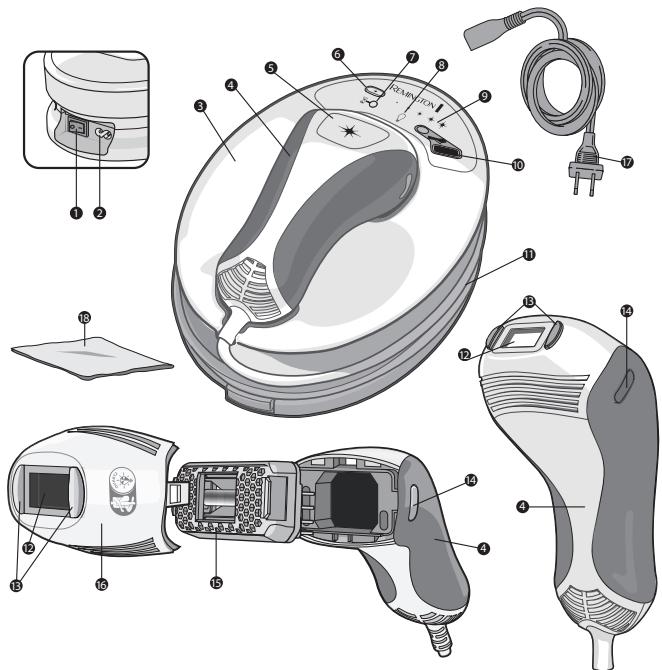
KEY FEATURES
1 Power Switch
2 Power Inlet
3 Base Unit
4 Hand Piece
5 Flash Button
6 Energy Level Selection Button
7 Cool Down Mode Indicator
8 Bulb Status Indicator Display
9 Energy Level Indicator
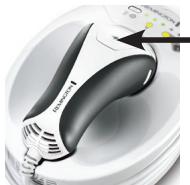
10 Skin Tone Sensor
11 Hand Piece Cord
12 Flash Window
13 Skin Contact Sensors
14 Attachment Release Buttons
15 Bulb
16 Body Attachment
17 Power Cord
18 Lint Free Cloth

GETTING STARTED
Be patient when first using your i-LIGHT, as with any new product, it may take a little while to familiarise yourself with the product. Take the time to acquaint yourself with your i-LIGHT as we are confident you will receive years of enjoyable use and complete satisfaction.

GETTING ACQUAINTED WITH i-LIGHT
What is i-LIGHT?
The i-LIGHT system is a revolutionary light-based device designed for the removal of unwanted body hair at home.
i-LIGHT utilises similar clinically-proven technology that professional dermatologists and salons use, optimised for personal treatment.
What is Intense Pulse Light (IPL) and how does i-LIGHT work?
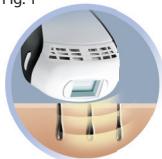
IPL - (Intense Pulsed Light) is a well-established technology used worldwide for over 15 years. i-LIGHT uses this technology to flash your skin with an intense pulse of light. The pulse works under the skin's surface to target hairs at the root, helping to stop their growth. (Fig 1)
Fig. 1
natural_image
Illustration of a medical or laboratory device with droplets and a small screen, enclosed in a circular frame (no text or symbols)The energy in the pulse of light targets dark colouring, and best results are seen on darker hair. To avoid targeting (and possibly damaging) dark skin, you should only use i-LIGHT on light to medium skin tones (I-IV).
★ What to expect from i-LIGHT
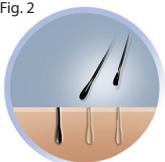
Results aren't immediate, and individual results vary. Most users will begin to notice fewer hairs within 1-2 weeks after beginning treatment. During this time it may look like the hair is still growing, but it is actually being 'pushed out' (Fig. 2).
Fig. 2
natural_image
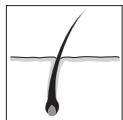
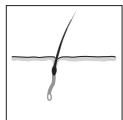
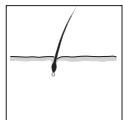
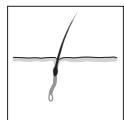
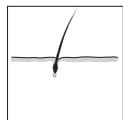
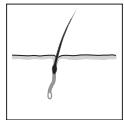
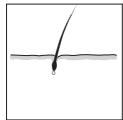
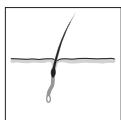
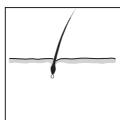
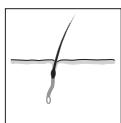
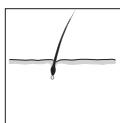
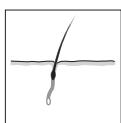
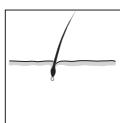
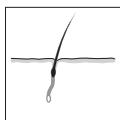
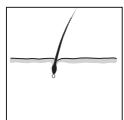
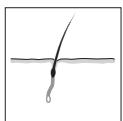
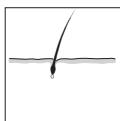
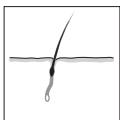
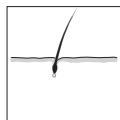
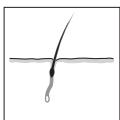
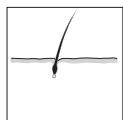
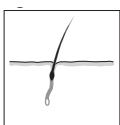
Illustration of skin with three hair follicles, labeled as Figure 2 (no text or symbols on the diagram itself)Hair grows in a cycle of 3 different phases which lasts 18-24 months (Fig. 3). Only hairs in the active growth phase are susceptible to treatment, which is why multiple treatments are required for optimal results.
Fig. 3
Active Growth
natural_image
Simple line drawing of a hair follicle with a pointed tip, no text or symbols presentAnagen Phase
natural_image
Simple line drawing of a hair follicle with a pointed tip and a small droplet at the base (no text or symbols)Catagen Phase
natural_image
Simple line drawing of a hair follicle with a pointed tip and liquid level (no text or symbols)Telogen Phase
It's important to continue with the full treatment regime and top-up treatments to ensure that every active hair is treated.
Treatment Regime
A full treatment regime is once every two weeks for three treatments.
Individual results may vary, so multiple treatments may be required for optimal results.
Some hair growth will occur that is less dense, finer and lighter in colour than the original hair. This regrowth is perfectly normal and should be expected.
After completing the initial treatment regime, top-up treatments will provide even better results.
Continuous regular weekly use will give good results within 6-12 weeks (darker skin tones may take longer).
NOTE: You should avoid treating the same area multiple times in one session, as it will not improve efficacy but increases the risk of skin irritation

WARNINGS AND SAFETY PRECAUTIONS
IMPORTANT SAFETY CAUTIONS
Before you start using i-LIGHT:
Be sure to read all Warnings and Safety Information. Before you begin, check to see if i-LIGHT is suitable for you.
Use the skin and hair chart at the front of this manual and the integrated skin sensor to determine if this device is right for you.
Consult the hair chart at the front of this manual to ensure the device is right for you.
Skin Type
• Do not use on naturally dark skin, as it may result in burns, blisters and changes in skin colour.
- Do not use on tanned skin or after recent sun exposure, as it may cause burns or skin injury.
• i-LIGHT is not effective on naturally white, grey, blonde or red body or facial hair.
Areas not to treat:
• Do not use on the scalp or ears.
• Do not use on the face or neck.
• Do not use on nipples, areola or genitals.
- Do not use if you have tattoos or permanent makeup in the area to be treated.
- Do not use on dark brown or black spots such as moles, birth marks or freckles.
- Do not use on an area of recent surgery, deep peel, laser resurfacing, scars or skin that has been damaged with burns or scalds.
When not to use/When to avoid using i-LIGHT
- DO NOT use if you have tanned skin in the intended treatment area, as your skin may be too dark and treatment in tanned areas could temporarily cause skin swelling, blisters, or could change the colour of your skin. Wait until your tan has faded before treating.
- DO NOT use on skin with cosmetics applied, as treating in those areas could temporarily cause skin swelling, blisters or could change the colour of your skin. Make sure to thoroughly clean the intended treatment area prior to use.
- DO NOT flash the same treatment spot multiple times during the same session, as this could temporarily cause skin swelling, blisters, or could change the colour of your skin.
- DO NOT treat any area more than once per week, as this will not speed up results, but could increase likelihood of skin swelling, blistering or changing the colour of your skin.
- DO NOT use on damaged skin, including open wounds, cold sores, sunburns, or areas where you have had a skin peel or other skin resurfacing procedure within the last 6-8 weeks.
- DO NOT use on irritated skin, including rashes or swollen skin. These conditions can make the skin more sensitive. Wait for the affected area to heal before use.
- DO NOT use if your skin is sensitive to light. In order to determine if you can use i-LIGHT, perform a test on a small patch of skin and wait 24 hours to determine if there are any adverse reactions before treating more broadly.
- DO NOT use if you are or may be pregnant or are breast-feeding. i-LIGHT has not been tested on pregnant women. Hormonal changes are common during pregnancy or breast-feeding and could increase skin sensitivity and the risk of skin injury.
• DO NOT flash against any material other than skin.
• DO NOT use i-LIGHT for any purpose other than hair removal. - DO NOT treat any area where you may someday want your hair to grow back. The results may be permanent and irreversible.
- If you've had professional or clinical or self-administered laser or IPL or electrolysis hair removal treatments, wait at least 6 months before using i-LIGHT. If you've waxed, plucked or epilated hair in the treatment area, wait at least 6 weeks before using i-LIGHT. The device uses the hair under your skin to disable your hair at the root, so it is not effective if the hair has been pulled out.
-
DO NOT use directly over or near Active Implantable Medical Devices such as implantable pacemaker, internal defibrillator, or insulin devices. Although no problems associated with the use of this device have been reported during clinical studies, it is recommended to observe all active implantable medical device warnings regarding the use of electronic devices to prevent any failure or interruption of an active implantable device.
-
Do not use over or near anything artificial such as silicon implants, Implanon contraceptive implants, pacemakers, subcutaneous injection ports (insulin dispenser) or piercings.
- Wireless communications equipment may affect the i-LIGHT device and should be kept at least 3.3 m away.

PREPARING FOR USE
* Familiarise yourself with the features of your new i-LIGHT device.
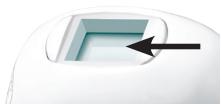
Flash Window with built-in UV skin protection
• WARNING: always inspect the Flash Window before use to ensure there is no damage to the lens.
- WARNING: always clean the Flash Window before use with the lint-free cloth provided to ensure there is no oil or debris on the lens.
natural_image
Close-up of a white plastic component with a black arrow pointing to a rectangular cutout (no text or symbols visible)Skin Contact Sensors
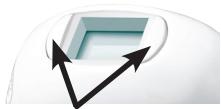
- This safety mechanism prevents accidental flashing. The device will not flash unless both Skin Contact Sensors are in full contact with the skin.
natural_image
Abstract graphic with a blue cube and two black arrows pointing upward (no text or symbols)Flash Button
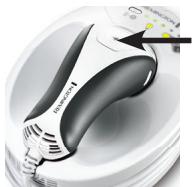
• The Flash Button is located on the hand piece. This is used to activate a flash.
natural_image
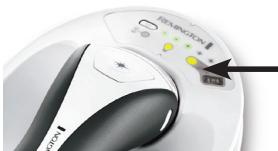
Close-up of a white and black handheld device with a black handle and orange arrow pointing to a yellow button (no visible text or symbols)Skin Tone Sensor
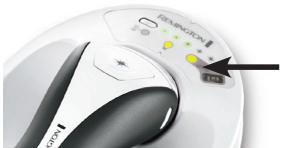
• Will only allow usage on suitable skin tones.
natural_image
Close-up of a white and black electronic device with a control knob and indicator lights (no visible text or symbols)CHECK YOUR SKIN TONE
- Consult the skin and hair chart at the front of this manual to ensure your skin is in the suitable range and your hair colour is susceptible to treatment with i-LIGHT.
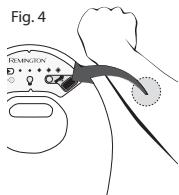
- Place the skin of your intended treatment area onto the skin sensor – ensure the skin is touching the sensor. (Fig. 4)
• If your skin is suitable, you will hear a 'beep' and the i-LIGHT will switch on.
• If your skin is unsuitable, you will hear a 'buzz' and the i-LIGHT will remain switched off.
NOTE: You must use the skin sensor on each body part you wish to treat.
PREPARE YOUR SKIN FOR TREATMENT
- Ensure the area to be treated is clean and free from oils, deodorants, perfume, make up, lotions and creams. Shave the hair from the area to be treated, and ensure the skin is clean and dry.
- Never use wax, epilation, tweezers or other methods that remove the hair from the root as IPL is not effective if the hair has been pulled out.
PREPARE THE i-LIGHT FOR USE
- Unwrap the hand piece cord from the i-LIGHT base and rest the hand piece back on the base unit.
- Ensure the power switch on the base unit is OFF.
- Connect the power cord to the i-LIGHT base unit at the power inlet.
- Connect the power cord to the wall outlet. Turn the power switch ON. (fig. 5)
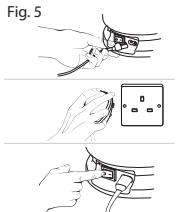
SELECTING THE ENERGY LEVEL
- The i-LIGHT is equipped with 5 energy levels. Level 1 is the lowest setting and level 5 is the highest setting.
✿ TIP: For the most effective results, always use the highest energy level that does not cause discomfort on the skin. - To determine the energy level being used, observe the number of lights illuminated on the Energy Level Display (fig. 6).
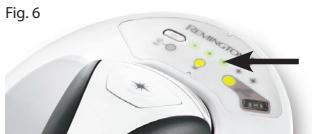
- Your i-LIGHT will automatically be set to Energy Level 1 each time the device is powered ON. To change the level, press the Energy Level Selection Button.
Before your first full treatment, test the i-LIGHT on a small patch of skin and wait 24 hours to ensure there are no adverse reactions.
• Start at energy level 1.
1 Place the i-LIGHT hand piece against your skin so the Flash Window is flush with the skin surface.
2 Ensure the Skin Contact Sensors are fully engaged and the Bulb Status Indicator Display is illuminated green (Fig. 7).
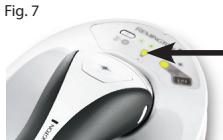
3 Press the Flash Button to deliver a flash.
- Mild to moderate discomfort is normal. If a flash delivered at Energy Level 1 feels tolerable, increase to Energy Level 2. Move the device to a different spot and flash the i-LIGHT one more time. Repeat this process until you find the setting that feels right for you.
- Wait 24 hours and then look at the test area. If the skin appears normal, proceed with your first full treatment at the energy level you determined is right for you.
NOTE: You must test the device on each area of the body you wish to treat.

TREATMENT
- Multi-Flash Mode: The i-LIGHT device will flash when the Flash Button is pressed and will continue to flash every 3 seconds when the skin contact sensors are fully engaged. The Multi-Flash mode allows you to quickly treat large areas by simply gliding the hand piece over the skin after each flash.
How to treat:
- Place the Flash Window firmly against the skin - ensure the Skin Contact Sensors are fully engaged.
NOTE: When the Skin Contact Sensors are fully engaged you will hear a 'chirp' and the Bulb Status Indicator Display will illuminate green.
2 Press the flash button to deliver a flash. You should expect to see a bright flash of light (similar to a camera flash), and you should feel a mild sensation of warmth.
3 Move to the next area and treat in a grid like pattern to ensure full coverage of the treatment area.
- For Single-Flash Mode, press the Flash Button each time you move to the next area.
- For Multi-Flash Mode, keep your finger on the Flash Button to keep it depressed and glide to the next area being sure to keep the Skin Contact Sensors fully engaged. The next flash will be delivered automatically after 3 seconds.
NOTE: During Multi-Flash Mode if you let go of the Flash Button or lose skin contact, simply resume treatment by repeating the above steps.

TREATMENT TIPS
- For best results, avoid overlapping flashes. This helps prevent exposure to more energy than is necessary to suppress hair growth. It also ensures that you get the maximum use of the Bulb.
- For the most effective results, always use the highest intensity level that does not cause discomfort on the skin. The level you use should feel warm on your skin, but should never cause discomfort.
- You may notice that bony areas, such as elbows, shins and ankles, are more sensitive during treatment.
- This is normal and should not be cause for alarm. To avoid this sensitivity, try stretching the skin away from the bony area during treatment.

POST-TREATMENT CARE
After treatment, you may experience slight redness or a warm sensation on your skin. This is normal and will disappear quickly. To avoid irritation to your skin after a treatment, take the following precautions:
- Avoid sun exposure for 24 hours after a treatment. Protect the skin with SPF 30 for 2 weeks after each treatment.
- Do not prolong sun exposure such as sunbathing, using a tanning bed, or self-tan for at least 2 weeks after the last treatment.
• After treatment, keep the area clean and dry and drink plenty of water to keep skin hydrated.
• Do not take hot baths, showers, or use steam rooms and saunas for 24 hours after treatment. - Do not take part in contact sports for 24 hours after treatment.
- Do not depilate (waxing, plucking, threading or creams) during the treatment – shaving is acceptable as long as you avoid shaving 24 hours after each treatment.
- Do not use bleaching creams or perfumed products for 24 hours after treatment.

INFINITY BULB
• The infinity bulb means no replacement parts are needed.
- The bulb in this device is guaranteed to last for the entire guarantee period as communicated on the guarantee card supplied with this product.
- In the extremely unlikely event that your bulb becomes empty, please contact your local Remington Service centre who will provide you with a replacement.

Signs that the bulb needs replacing:
- Bulb Status Indicator is illuminated yellow: 150 Flashes remain in the bulb
- Bulb status indicator is flashing yellow: Bulb is empty.


CLEANING YOUR i-LIGHT DEVICE
CAUTION: Before cleaning your i-LIGHT, make sure that the device is switched OFF and the power cord is disconnected from the device.
• Regular cleaning helps to ensure optimal results and a long life for the i-LIGHT device.
- To clean the Flash Window, use only the lint-free cloth included with your i-LIGHT device. Take care not to scratch or chip the Flash Window. Scratches and chips can reduce the effectiveness of the unit.
- For stubborn stains on the flash window, dampen a cotton swab with surgical spirit or rubbing alcohol, apply to the flash window and clean gently with the lint-free cloth provided. Use a small hand-held vacuum to remove dust and debris from the hand piece vents.
WARNING: If the Flash Window is cracked or broken, the unit must not be used. Never scratch the filter glass or the metallic surface inside the Treatment Head.
CAUTION: The i-LIGHT is a high voltage device. Never immerse in water. Never clean the unit or any of its parts under a tap or in a dishwasher.
Storage
- Switch off the unit, unplug and allow to cool for 10 minutes before storage.
• Store the unit in a dry place at a temperature between 15°C and 35°C

TROUBLESHOOTING
• Always read these instructions fully before using i-LIGHT
- Refer to this troubleshooting guide if you experience any problems with i-LIGHT, as this section addresses the most common problems you could encounter with i-LIGHT. If you have followed the instructions in this section and continue to experience problems, please contact the Remington® Service Centre for further assistance.
The power switch is ON, but the unit is not working.
• Make sure the unit is plugged into a working electrical outlet.
• Try switching to a different outlet.
The unit appears to have cracks or is broken.
- Do not use if the unit is damaged. If you have concerns about using the unit, discontinue use and contact the Remington® Service Centre for further assistance.
I have switched the unit ON, but I cannot increase or decrease the energy level.
• Try resetting the unit by turning it off and waiting several seconds before turning it back on.
The Bulb Status Indicator Light turns green but the unit does not flash when the button is pressed.
• Make sure the Skin Contact Sensor is in full contact with the skin.
• Try resetting the unit by turning it off and waiting several seconds before turning it back on.
There is a strange smell.
- Be sure the area is completely shaved before treatment.
The treated areas become red after treatment.
• This is normal and the redness should subside. If not, try using a lower energy level.
BE AWARE: If the unit is used over an extended period of time, the unit might automatically disable momentarily (estimated 40 seconds) to cool down. Once the unit has cooled down, it will be ready to use again.
| LED's | All currently selected energy level indicators flashing  | Unit is overheated and is disabled momentarily to cool down. |
All energy level indicators flashing  | Unit is malfunctioning. Turn the unit off, wait a few moments and try again. If problem persists, the unit should be returned for repair. | |
All LED's flashing with warning beep  | Treatment head is removed or loose. | |
| SOUNDS | Not full contact. | Flash button was pressed while the skin contact sensor was not fully engaged. |
| Replace bulb. | Bulb is missing or needs to be replaced. | |
| Skin contact sensors stuck. | Flash button was pressed after the skin contact sensor had been engaged since unit start up. Skin contact sensor may be stuck. |
→ FREQUENTLY ASKED QUESTIONS
• For a full list of FAQs, please visit (www.remington-ilight.com)
Q. What areas of my body can I treat with i-LIGHT?
A. i-LIGHT is designed for unisex use on areas below the neck, including the legs, underarms, bikini line, arms, chest and back.
Q. What are the risks involved with i-LIGHT. Is it safe?
A. i-LIGHT is clinically proven to be safe & effective, but like any electronic device it is important that you read and follow the operating instructions and safety warnings.
Q. Is IPL dangerous for the skin after long term use?
A. There have not been any reported side effects or skin damage from long term use of intense pulse light (IPL)
Q. Why is my hair growing despite treatments?
A. Results aren't immediate, and individual results vary. Most users will begin to notice fewer hairs within 1-2 weeks after beginning treatment. During this time it may look like the hair is still growing, but it is actually being 'pushed out'.
Hair grows in a cycle of 3 different phases which lasts 18-24 months. Only hairs in the active growth phase are susceptible to treatment, which is why multiple treatments are required for optimal result. Another reason for continued growth could be that the area was missed during a treatment. Repeat the treatment regime when you notice regrowth.
Q. Why can't I use i-LIGHT after recent sun exposure?
A. Sun exposure causes high levels of melanin to be present and exposes the skin to higher risk of burns or blisters following treatment.
Q. Do I need eye protection while using i-LIGHT?
A. No, it is not harmful to the eyes. i-LIGHT features a safety system which prevents unintentional flashing when the device is not in contact with the skin. The small amount of light emitted during treatment is similar to that of a camera flash and is not harmful to the eyes.

ENVIRONMENTAL PROTECTION
To avoid environmental and health problems due to hazardous substances in electrical and electronic goods, appliances marked with this symbol must not be disposed of with unsorted municipal waste, but recovered, reused or recycled.

natural_image
Illustration of a medical or laboratory device with no visible text or symbolsnatural_image
Illustration of skin hair follicles with three different tip structures (no text or symbols)natural_image
Simple illustration of a hair follicle with a pointed tip, no text or symbols presentAnagenphase
natural_image
Simple line drawing of a hairpin inserted into a liquid (no text or symbols)Katagenphase
natural_image
Simple line drawing of a hair follicle with a pointed tip (no text or symbols)Telogenphase
natural_image
Close-up of a white plastic component with a black arrow pointing to its side (no text or symbols visible)Hautkontakt-Sensoren
natural_image
Simple diagram showing a 3D cube with two arrows pointing outward from its face (no text or symbols)\* Impulsschalter
natural_image
Close-up of a white and black handheld device with a black arrow pointing to a component (no visible text or symbols)Hauttonsensor
natural_image
Close-up of a white electronic device with a black indicator light and a yellow display, no visible text or symbols.TEST DES HAUTTONS
natural_image
Close-up of a white disposable water dispenser with control buttons and a black arrow pointing to a yellow indicator (no text or symbols visible)natural_image
Illustration of a medical device with surgical instruments, no visible text or symbolsnatural_image
Illustration of skin with three hair follicles on a circular background (no text or symbols)natural_image
Simple illustration of a hair follicle with a pointed tip, no text or symbols presentAnagene fase
natural_image
Simple line drawing of a hair follicle with a pointed tip and a circular base (no text or symbols)Catagene fase
natural_image
Simple line drawing of a hair follicle with a pointed tip (no text or symbols)Telogene fase
WAARSCHUWINGEN EN VEILIGHEIDSMAATREGELEN
BELANGRIJKE VEILIGHEIDSINSTRUCTIES
natural_image
Close-up of a white plastic component with a black arrow pointing to a square cutout (no text or symbols visible)Huidcontactsensor
natural_image
Abstract graphic with a blue square and two black arrows pointing upward, no text or symbols present.Flitsknop
natural_image
Close-up of a white and black handheld device with a curved handle and indicator lights (no visible text or symbols)natural_image
Close-up of a white appliance with a black handle and control panel, showing no visible text or symbols.\* UW HUIDSKLEUR CONTROLEREN
natural_image
Illustration of a medical or cosmetic device with surgical forceps and a screen (no text or symbols)natural_image
Illustration of skin hair follicles with three different tip structures (no text or symbols)natural_image
Simple line drawing of a hair follicle with a pointed tip, no text or symbols presentPhase anagène
natural_image
Simple line drawing of a hair follicle with a pointed tip and a curved blade (no text or symbols)Phase catagène
natural_image
Simple line drawing of a hair follicle with a pointed tip and liquid level (no text or symbols)Phase télogène
natural_image
Close-up of a white plastic component with a black arrow pointing to its side (no text or symbols visible)natural_image
Abstract graphic with a blue square and two black arrows pointing upward (no text or symbols)★ Touche Flash
natural_image
Close-up of a white and black handheld device with a black handle and indicator light (no visible text or symbols)natural_image
Close-up of a white and black electronic device with control buttons and a yellow indicator light (no readable text or symbols)VÉRIFIEZ VOTRE TYPE DE PEAU
natural_image
Illustration of a medical or laboratory device with a magnified view showing internal components (no text or symbols visible)natural_image
Illustration of three hair follicles on skin, no text or symbols presentnatural_image
Simple line drawing of a hair follicle with a pointed tip, no text or symbols presentFase anágena
natural_image
Simple line drawing of a hair follicle with a pointed tip and a small circular mark at the base (no text or symbols)Fase catágena
natural_image
Simple line drawing of a hair follicle with a pointed tip and a small circular mark at the base (no text or symbols)Fase telógena
natural_image
Close-up of a white plastic component with a black arrow pointing to a rectangular opening (no text or symbols visible)natural_image
Abstract graphic with two black arrows pointing upward inside a light blue rectangular frame (no text or symbols)Botón de disparo
natural_image
Close-up of a white and black handheld device with a black arrow pointing to the handle (no visible text or symbols)natural_image
Close-up of a white and black surface with a control panel and indicator lights (no readable text or symbols)\* COMPRUEBE SU TONO DE PIEL
natural_image
Close-up of a white robotic vacuum cleaner with control buttons and a yellow indicator light (no readable text or symbols)natural_image
Illustration of a medical device with surgical instruments, labeled 'Fig. 1' (no text or symbols on the device itself)natural_image
Illustration of skin hair follicles with three different hair follicles, labeled as Figure 2 (no text or symbols on the diagram itself)natural_image
Simple line drawing of a hair follicle with a pointed tip, no text or symbols presentFase Anagen
natural_image
Simple line drawing of a hair follicle with a pointed tip, no text or symbols presentFase Catagen
natural_image
Simple line drawing of a hair follicle with a pointed tip and a small mouth, no text or symbols present.Fase Telogen
natural_image
Close-up of a white plastic component with a black arrow pointing to a rectangular opening (no text or symbols visible)natural_image
Abstract graphic with two black arrows pointing upward inside a light blue rectangular frame (no text or symbols)Pulsante del flash
natural_image
Close-up of a white and black handheld device with a label 'SPINION 1' on its body (no readable text beyond branding)natural_image
Close-up of a white and black electronic device with a control panel and indicator lights (no readable text or symbols)★ VERIFICARE LA VOSTRA TONALITA' DI PELLE
natural_image
Close-up of a white computer mouse with a black scroll wheel and control buttons, no visible text or symbols.natural_image
Illustration of a medical device with surgical tools, no visible text or symbolsnatural_image
Illustration of skin with three hair follicles on a circular background, labeled 'Fig. 2' (no text or symbols on the diagram itself)natural_image
Simple line drawing of a hair follicle with a pointed tip, no text or symbols presentDen Anagene fase
natural_image
Simple line drawing of a hair follicle with a pointed tip and liquid level (no text or symbols)Den Catagene fase
natural_image
Simple line drawing of a hair follicle with a pointed tip (no text or symbols)Den Telogene fase
natural_image
Close-up of a white plastic component with a black arrow pointing to its side (no text or symbols visible)Hudkontaktføler
natural_image
Abstract graphic with two black arrows pointing upward toward a light blue rectangular shape (no text or symbols)Blitz-knap
- Blitz-knappen sidder på håndstykket. Bruges til aktivere en blitz-udladning.
natural_image
Close-up of a white handheld vacuum cleaner with black handle and orange filter (no visible text or symbols)Hudtypesensor
- Sikrer, at i-LIGHT kun bruges på egnede hudtyper.
natural_image
Close-up of a white and black electronic device with control buttons and a yellow indicator light (no readable text or symbols)BESTEM DIN HUDFARVE
natural_image
Close-up of a white electronic device with a black mouse and control panel, no visible text or symbolsPLEJE EFTER BEHANDLING
→ OFTE STILLEDE SP∅RGSMÅL
natural_image
Illustration of a medical or laboratory device with electrodes and a screen, enclosed in a circular frame (no text or symbols)natural_image
Illustration of skin with three hair follicles, labeled as Figure 2 (no text or symbols on the diagram itself)natural_image
Simple line drawing of a hair follicle with a pointed tip, no text or symbols presentAnagen fas
natural_image
Simple line drawing of a hair follicle with a pointed tip, no text or symbols presentKatagen fas
natural_image
Simple line drawing of a hair follicle with a pointed tip and liquid level (no text or symbols)Telogen fas
natural_image
Close-up of a white plastic component with a black arrow pointing to its side (no text or symbols visible)Hudkontaktsensor
natural_image
Simple diagram showing a 3D cube with two arrows pointing outward, no text or symbols present.Ljusimpulsknapp
natural_image
Close-up of a white and black handheld device with a label 'HARANTIN' on its side (no readable text or symbols beyond branding)Hudkontaktsensor
natural_image
Close-up of a white and black electronic device with control buttons and a pointer labeled 'OK' (no readable text or symbols beyond basic design)KONTROLLERA DIN HUDTON
natural_image
Close-up of a white electronic device with a black scroll wheel and control buttons, no visible text or symbols.natural_image
Blue circular icon with white lightbulb and 'INFINITY' text, no additional symbols or text
RENGÖRA i-LIGHT

natural_image
Illustration of a medical device with needle-like structures and a screen, enclosed in a circular frame (no text or symbols)natural_image
Illustration of skin layers with three hair follicles, no text or symbols presentnatural_image
Simple line drawing of a hair follicle with a pointed tip, no text or symbols presentAnageenivaihe
natural_image
Simple line drawing of a hair follicle with a pointed tip, no text or symbols presentKatageenivaihe
natural_image
Simple line drawing of a hair follicle with a pointed tip and a small droplet at the base (no text or symbols)Telogeenivaihe
natural_image
Close-up of a white plastic container with a black arrow pointing to the interior (no text or symbols visible)★ Ihokosketusanturi
natural_image
Abstract graphic with two black arrows pointing upward inside a light blue rectangular frame (no text or symbols)Valoimpulssipainike
natural_image
Close-up of a white and black handheld vacuum cleaner with a label (no visible text or symbols on the device body)natural_image
Close-up of a white and black electric shaver with control buttons and a star pointer (no visible text or symbols)TARKISTA IHOSI VÄRISÄVY
natural_image
Illustration of a medical or industrial device with droplets and a central screen, enclosed in a circular frame (no text or symbols)natural_image
Illustration of hair follicles on skin, showing three different hair follicles (no text or symbols)natural_image
Simple line drawing of a hair follicle with a pointed tip, no text or symbols presentFase anagénica
natural_image
Simple line drawing of a hair follicle with a pointed tip and a small droplet at the base (no text or symbols)Fase catagénica
natural_image
Simple line drawing of a hair follicle with a pointed tip and a small circular mark at the base (no text or symbols)Fase telogénica
natural_image
Close-up of a white plastic component with a black arrow pointing to its side (no text or symbols visible)natural_image
Simple diagram of a 3D cube with two arrows pointing outward from its face (no text or symbols)Botão de disparo
natural_image
Close-up of a white handheld device with black handle and orange arrow pointing to a small screen (no visible text or symbols)Sensor de tom de pele
natural_image
Close-up of a white and black electronic device with a control panel and indicator lights (no readable text or symbols)CONSULTAR O SEU TOM DE PELE
natural_image
Close-up of a white electronic device with a black arrow pointing to a green indicator light (no readable text or symbols)natural_image
Close-up of a medical device with surgical tools, no visible text or symbolsnatural_image
Illustration of a human skin with three hair follicles, labeled 'Obr. 2' (no other text or symbols)natural_image
Simple line drawing of a hair follicle with a pointed tip, no text or symbols presentAnagénna fáza
natural_image
Simple line drawing of a hair follicle with a pointed tip, no text or symbols presentKatagénna fáza
natural_image
Simple line drawing of a hair follicle with a pointed tip emerging from a surface (no text or symbols)Telogénna fáza
natural_image
Close-up of a white plastic door with a black arrow pointing to the interior (no text or symbols)* Senzor kontaktu s pokožkou
natural_image
Simple diagram of a device with two arrows pointing outward from a rectangular box (no text or symbols)Zábleskové tlačidlo
natural_image
Close-up of a white and black handheld device with a label pointing to it, no visible text or symbols on the device itself.natural_image
Close-up of a white and black electronic device with a control panel and indicator lights (no readable text or symbols)SKONTROLUJTE SVOJ TÓN POKOŽKY
natural_image
Blue circular icon with a white lightbulb and the word 'INFINITY' radiating outward, symbolizing infinity (no additional text or symbols)
ČISTENIE PRÍSTROJA i-LIGHT
Remington ^® is a Registered Trade Mark of
Spectrum Brands, Inc., or one of its subsidiaries.
VARTA Consumer Batteries GmbH & Co. KGaA,
Alfred-Krupp-Str. 9, 73479 Ellwangen,
Germany
© 2014 SBI