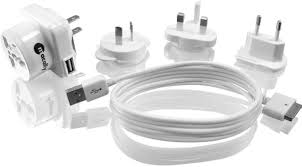
POWERPAL - Electronic accessory MACALLY - Free user manual and instructions
Find the device manual for free POWERPAL MACALLY in PDF.


| Product Type | Universal AC/USB Travel Charger |
| Brand | Macally |
| Model | PowerPal |
| Dimensions (approx.) | 7,0 × 5,0 × 3,0 cm |
| Weight (approx.) | 100 g |
| Input Power | 100-240 V AC, 50/60 Hz |
| Output Power | 5 V, 1 A (USB port) |
| Included AC Adapters | 4 adapters (North America, Europe, UK, Australia) |
| Included Cable | 30-pin Dock Connector to USB Charging Cable |
| Included Accessories | Carrying pouch, user manual |
| Main Features | Charges USB devices (iPhone, iPod) and adapts AC outlets for over 150 countries |
| Compatibility | Devices with 30-pin Dock connector and standard USB ports |
| Voltage Conversion | No (plug adapter only) |
| Care and Cleaning | Clean with a soft, dry cloth. Do not use liquids. |
| Safety | Do not expose to moisture, do not open, use only with provided plugs. |
| Available Spare Parts | 30-pin USB cable, AC adapters (sold separately) |
| Warranty | 2 years |
| Technical Support | +31 24 373 14 10 (Europe, Mon-Fri 9am-5pm CET) or techsupport@macally-europe.com |
| Product Registration | http://www.macally-europe.com/register.php |
| Environmental Standards | Compliant with WEEE directive (2002/96/EC) – do not dispose with household waste. |
Frequently Asked Questions - POWERPAL MACALLY
User questions about POWERPAL MACALLY
0 question about this device. Answer the ones you know or ask your own.
Ask a new question about this device
Download the instructions for your Electronic accessory in PDF format for free! Find your manual POWERPAL - MACALLY and take your electronic device back in hand. On this page are published all the documents necessary for the use of your device. POWERPAL by MACALLY.
USER MANUAL POWERPAL MACALLY
USB Travel AC Charger/Universal Power Adaptor for iPod®, iPhone™ and USB powered devices
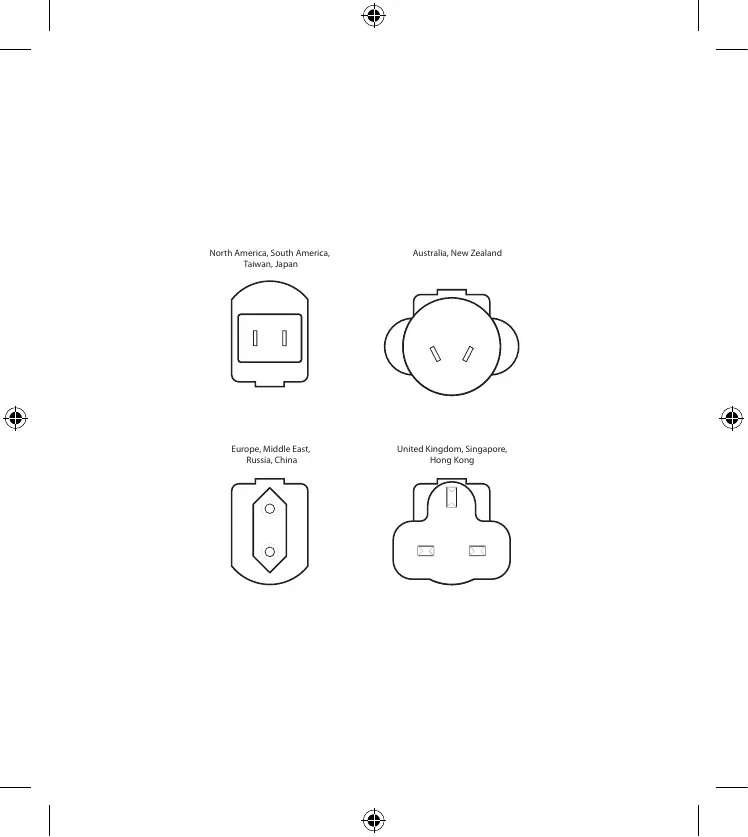
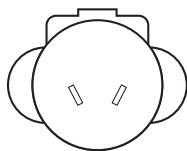
North America, South America, Taiwan, Japan
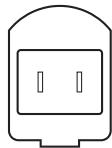
Australia, New Zealand
Europe, Middle East, Russia, China

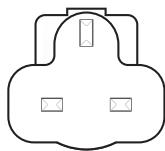
United Kingdom, Singapore, Hong Kong
EN - USER GUIDE
Thank you for purchasing the Macally POWERPAL, USB travel AC charger/Universal power adaptor. With the PowerPal you can connect your electronic devices and charge your iPhone™ or iPod® in virtually any place in the world. The POWERPAL includes an USB to 30 pin Dock Connector cable and carrying pouch to keep all accessories together. The Powerpal keeps you connected wherever you go!
About this guide
Before you start using the POWERPAL, be sure to read this manual in its entirety.
Package contents
- POWERPAL
- 4 Interchangeable plugs (North America, Europe, United Kingdom, Australia, covering over 150 countries)
- 30 pin Dock Connector to USB charging cable
- Carrying pouch
- User guide
Registration
Please register this product at http://www.macally-europe.com/register.php.
Technical support
Please call to +31 24 373 14 10 or email to tech-support@macally-europe.com. Technical support hours in Europe are from 9h00 to 17h00 (CET), from Monday to Friday.
How to use the PowerPal
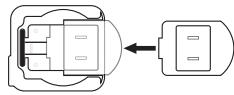
Installation of the plug
Slide the plug in the USB AC charger and push it until the plug locks into place.
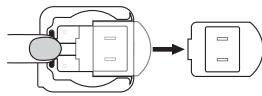
Removal of the plug
Press to release and slide the plug out.
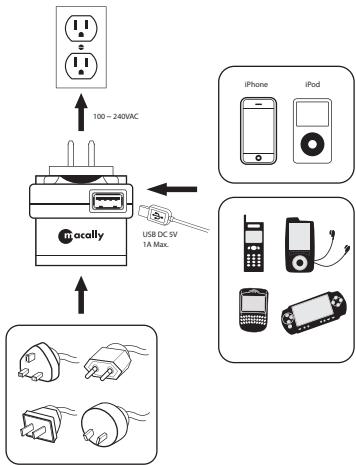
To use the PowerPal
Note:
The PowerPal's universal power plug adapter is a pass-through only as it does not provide AC voltage conversion between 110 and 220VAC. Please verify the AC input requirement of your electronic device before plugging it into the plug adaptor.
Warranty
Macally Peripherals warrants that this product will be free from defects in title, materials and manufacturing workmanship for two (2) years from the date of the purchase. If the product is found to be defective then, as your sole remedy and as the manufacturer's only obligation, Macally will repair or replace the product. This warranty is exclusive and is limited to the Macally POWERPAL. This warranty shall not apply to products that have been subjected to abuse, misuse, abnormal electrical or environmental conditions, or any condition other than what can be considered normal use.
The liability of Macally Peripherals arising from this warranty and sale shall be limited to a refund of the purchase price. In no event shall Macally Peripherals be liable for costs of procurement of substitute products or services, or for any lost profits, or for any consequential, incidental, direct or indirect damages, however caused and on any theory of liability, arising from this warranty and sale. These limitations shall apply notwithstanding any failure of essential purpose of any limited remedy.
Environmental Information for Customers in the European Union

European Directive 2002/96/EC requires that the equipment bearing this symbol on the product and/or its packaging must not be disposed of with unsorted municipal waste. The symbol indicates that this product should be disposed of separately from regular household waste streams. It is your responsibility to dispose of this and
other electric and electronic equipment via designated collection facilities appointed by the government or local authorities. Correct disposal and recycling will help prevent potential negative consequences to the environment and human health. For more detailed information about the disposal of your old equipment, please contact your local authorities, waste disposal service, or the shop where you purchased the product.
Registree dit product op http://www.macally-europe.com/register.php.
Technische ondersteuning
www.macally-europe.com
Copyright © 2008 Macally Peripherals



Brand : MACALLY
Model : POWERPAL
Category : Electronic accessory