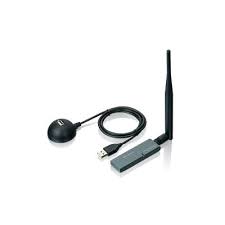
WL-1600USB - Wireless USB Adapter AIRLIVE - Free user manual and instructions
Find the device manual for free WL-1600USB AIRLIVE in PDF.



| Product Type | Wireless USB Adapter |
| Brand | AIRLIVE |
| Model | WL-1600USB |
| Supported Wireless Standards | IEEE 802.11b/g |
| Frequency Band | 2.4 GHz |
| Maximum Data Rate | 54 Mbps (802.11g standard) |
| Host Interface | USB 2.0 (backward compatible with USB 1.1) |
| Supported Operating Systems | Windows 98SE/Me/2000/XP/Vista |
| Dimensions (L x W x H) | Approximately 75 x 25 x 10 mm |
| Weight | Approximately 25 g |
| Power Supply | Via USB port (5V) |
| Power Consumption | Less than 2.5 W |
| Wireless Security | WEP 64/128-bit, WPA/WPA2 |
| Antenna | Integrated |
| LED Indicators | Power and Network Activity |
| Operating Temperature | 0 °C to 40 °C |
| Operating Humidity | 10% to 90% (non-condensing) |
| Certifications | FCC Class B, CE |
| Warranty | 2 years (EU), 1 year (other countries) |
| Care and Cleaning | Clean with a soft, dry cloth. Do not use solvents. |
| Safety | Do not expose to water. Disconnect before cleaning. Use only with compliant USB ports. |
| Spare Parts and Repairability | Not user-serviceable. No spare parts available. |
| Package Contents | USB adapter, installation CD, quick start guide |
Frequently Asked Questions - WL-1600USB AIRLIVE
User questions about WL-1600USB AIRLIVE
0 question about this device. Answer the ones you know or ask your own.
Ask a new question about this device
Download the instructions for your Wireless USB Adapter in PDF format for free! Find your manual WL-1600USB - AIRLIVE and take your electronic device back in hand. On this page are published all the documents necessary for the use of your device. WL-1600USB by AIRLIVE.
USER MANUAL WL-1600USB AIRLIVE
Powered by OvisLink Corp.
www.airlive.com
WL-1600USB
High Power Wireless 11G USB Dongle
Quick Setup Guide
Table of Contents
List of Languages
English 1 Italiano 32
Cesky . Magyar. 37
Deutsch. 12 Polski 42
Espanol 17
Eλληνικός......... 22 Pycckn......... 52
Français. Slovensky. 57
Declaration of Conformity
We, Manufacturer/Importer
OvisLink Corp.
5F., NO.6, Lane 130, Min-Chuan Rd., Hsin-Tien City, Taipei County, Taiwan
Declare that the product
High Power Wireless 11G USB Dongle
AirLive WL-1600USB
is in conformity with
In accordance with 2004/108/EC Directive and 1999/5 EC-R & TTE Directive
Clause
EN 300 328 v1.6.1 (2004-11)
EN 301 489-01 V1.6.1 (2005-09)
EN 301 489-17 V1.2.1 (2002-08)
CE marking
Description
Electromagnetic compatibility and Radio spectrum Matters (ERM); Wideband transmission equipment operating in the 2.4GHz ISM band And using spread spectrum modulation techniques; Part 1: technical Characteristics and test conditions Part2: Harmonized EN covering Essential requirements under article 3.2 of the R&TTE Directive.
Electromagnetic compatibility and Radio spectrum Matters (ERM); Electromagnetic compatibility(EMC) standard for radio equipment and
Services; Part 17 : Specific conditions for wideband data and HIPERLAN equipment

Manufacturer/Importer
Signature :
Name :
Position/Title:
Date:
Note on the FCC standard
This equipment has been tested and found to comply with the limits for a Class B digital device pursuant to Part 15 of the FCC Rules. These limits are designed to provide reasonable protection against harmful interferences when the equipment is operating in a commercial area. This equipment generates uses and may radiate radio frequency energy, and if not installed in accordance with the user guide, may cause interference in the transmission of radio communications. If operating in a residential area, it is probable this equipment will cause harmful interference, in which case the user will be required to try to correct this interference using his own means.
Note on CE Marking
This is a Class B product. In a residential area this product may cause radio interference, in which case the user can be required to take the appropriate measures. OvisLink Corp. hereby declares that AirLive WL-1600USB meets the basic requisites of directive 99/05/CE, and is therefore liable for the accuracy of these data:
OvisLink Corp.
5F, No.6 Lane 130
Min-Chuan Rd, Hsin-Tien City,
Taipei, Taiwan
TEL: +886-2-2218-6888
Warranties
This product has undergone various quality controls to ensure proper operation.
This product is covered by a two-year warranty for countries inside European Union. For other countries, the warranty period is one year only. In the event of any manufacturing fault or breakdown, it will be repaired by OvisLink Corp. Please contact your supplier for details on the procedure to follow. This warranty shall not be applicable in the event of damage caused by improper use of the product, accidents, faulty handling or manipulation nor any future incompatibility with third party products.
Important Information
The following instructions are for Windows XP system. Procedures for Windows 98SE/Me/2000/XP/Vista are similar.
Please do not insert the adapter into your computer before installing the software program from the CD.
Install the Driver and Utility
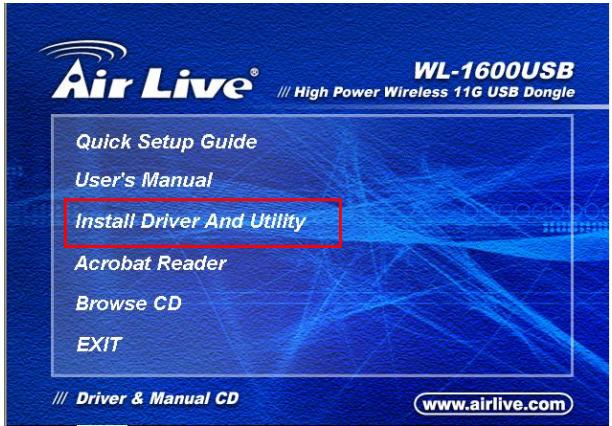
- Please insert the installation CD into your PC. When following screen pops out, click "Install Driver And Utility".
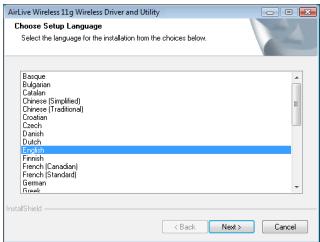
2. Choose a set up language. Click Next to Proceed.
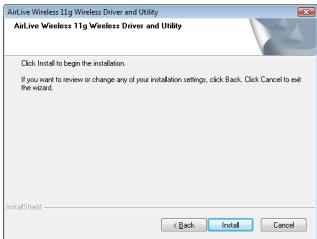
4. Click Install.
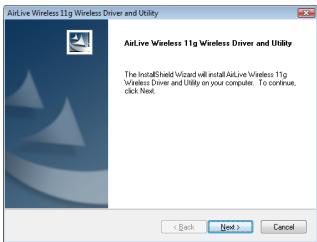
3. Click Next.
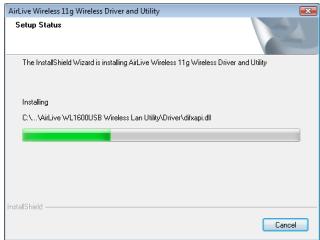
5. The system starts software installation of the WLAN USB adapter.
- Click Finish to complete the installation.
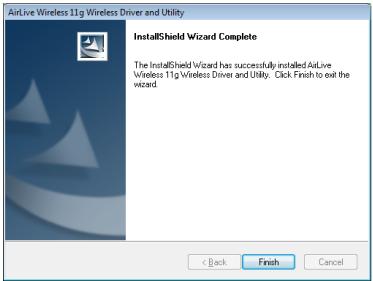
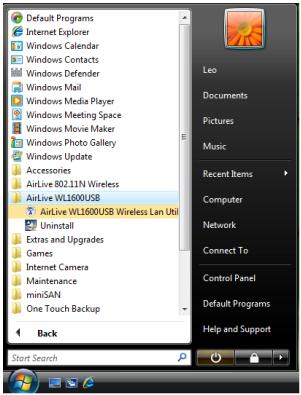
- After click Finish to complete the installation, The utility can be found under Windows-> AirLive WL-1600USB -> AirLive USB wireless LAN Utility menu
- Insert the wireless LAN USB adapter into your computer USB port, the computer will detect and active the wireless LAN USB adapter automatically.
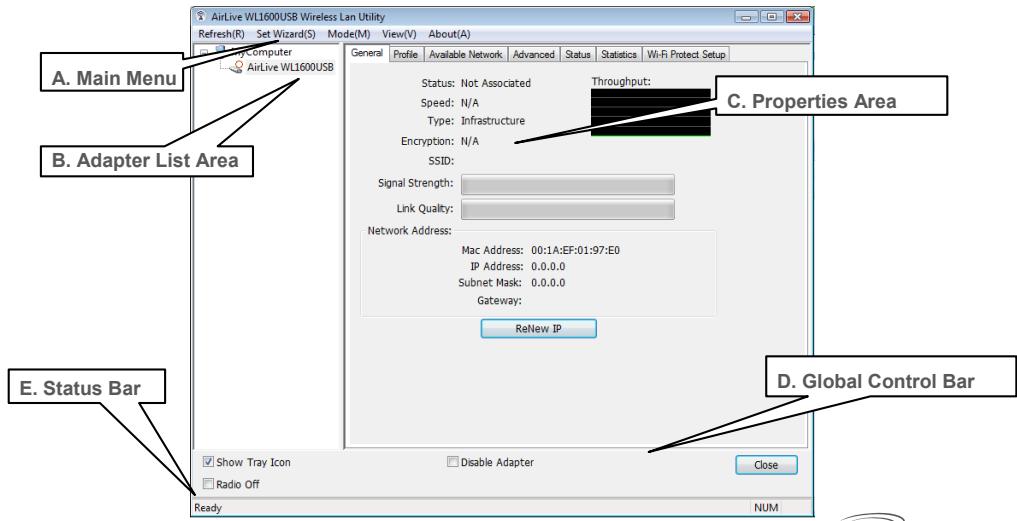
Using the AirLive High Power Wireless Configuration Utility
FCC Standard - upozornéni
Min-Chuan Rd, Hsin-Tien City,
Taipei, Taiwan
TEL: +886-2-2218-6888
Záruka
Tento produit by podrobeny Rozlichnym kontrolam kvality k zajisteni vsech funkci.
Min-Chuan Rd, Hsin-Tien City,
Taipei, Taiwan
TEL: +886-2-2218-6888
Garantiebestimmungen
Min-Chuan Rd, Hsin-Tien City,
Taipei, Taiwan
TEL: +886-2-2218-6888
Garantías
Min-Chuan Rd, Hsin-Tien City,
Taipei, Taiwan
TEL: +886-2-2218-6888
Eyyunoeis
AutoToTPOIOvEXeiUTIOBAlanOe OiaIaIopouc TIOIOTIKOUC EALeyxoucYIA TIV EEAQpAlion TNS Oawotns LEIToupyiac. AutoToTPOIOvKALUTTETAI aTO UIA (2)DIeTI NYYUNAN YIA TIG XwpeS EVTOS EUPWTAIKNCS Evwans. Ia TIC AALEs XwpeS, nTEPIODOC EyyunangEivaiEvA (1) ETOC. ZTEPIPTIWON OTIOAODHTOTE ELATTWATOS DIAKOTNT KATAOKUHS, 0aTlIOKEUAOe aiTO TNY OvisLink Corp. PApakalw EATE OE EITAPn ME TOV POpunTeut OAC YA TIG AETTMOPEIECS ATNI BIAIDKAOSIAI TOU AKOLouEitAI. H EyyuON DEV IOXUEi OE TEPITTOWAN ZMIUs TOn aTPOKAnEi aTOTN AVAPUOTN XpHnT OUIPOIOVTC, TWTAtUXMnATW, TOUT EALATTWATIKOU XEIPIAOu N TOUT XEIPIAOu OUTE OTIOUOHTOTE MELVOVIKOU AauMBIaTou ME TA TPOIOVTA TpITWv.
Σημαντικήληροφόρία
H Tnapakatw Eykatotaon avaepeteyia ta Windows XP. Oi diaikacicEivai iOe yia
Windows 98SE/Me/2000/XP/Vista. Пларakалоум e nvi Eiayet e Tny oukeun oyn thupa tou H/Y triv nvyoloknpoan tnc ykataotaoonc tou loyiaikou poypauato c an to CD.
EykataoTou odnyou kai Tns εφapoyns
Min-Chuan Rd, Hsin-Tien City,
Taipei, Taiwan
TEL: +886-2-2218-6888
Garanties
Min-Chuan Rd, Hsin-Tien City,
Taipei, Taiwan
TEL: +886-2-2218-6888
Garanzia
Min-Chuan Rd, Hsin-Tien City,
Taipei, Taiwan
TEL: +886-2-2218-6888
Jotallas
Min-Chuan Rd, Hsin-Tien City,
Taipei, Taiwan
TEL: +886-2-2218-6888
Gwarancje
Min-Chuan Rd, Hsin-Tien City,
Taipei, Taiwan
TEL: +886-2-2218-6888
Garantias
PnmeaHne K 3NaKy COOTBeTCTBnE eBponeckm CtaHapTaM
YctpoCTBO OTHOCNTC KKnaccy B. Pnp IcNoIb3OBAHm YcTPOCTBa B XJINOM paIOHe, CyueCTBvET BepoTHocTb COzDAHnK PRITNueCKHX NOMex. B DAHNOM CNYaee, NIOb3OaTeJIb DOJXeH CAMOCTOReIbHO YcTaPAnHb CoZdaAeMbIe NOxMn. OvisLink Corp. HactoIaUM 3aABnIeT, YTO AirLive WL-1600USB OTBeaet OCHOBHbIM O6ra3aTeJIbHbIM Tpe6OBAHnM DnpeKTINBb9/05/Ce, IN CneDobAteJIbHO O6ra3aH COOTBeTCTBOBaTb CJeDyUOIM DaHHbIM:
OvisLink Corp.
5F, No.6 Lane 130
Min-Chuan Rd, Hsin-Tien City,
Taipei, Taiwan
TEL: +886-2-2218-6888
TapaHTnHbIe 06a3aTeJIbCTBa
UcTpoICTBO npoIIO pa3nHbIe TceI bKaueCTBa, YTO6bI rapaHTnpOBaB HopMaIbHOe FyHKnOHIPOBAHne. Ha npOyIK TpEOCDtABmIEETcBa D0raDpaHITn IINr CTpaH-NeHOB EC. IINr CTpaHne HE BOC- rapaHTn Odnr od. B CnuYae npoN3BOdCTBeHHORO 6paka IINr NOnOMKn, OvisLink Corp npoN3BeTeP meOHNTIeJI.NoXaNyCTa, CBXKITeCb C NOCTabUckOM dONr NOnyEHNs BOOE nNOpOBoH ONHOFAPMUN o npOceIype rapaHTnHOrO 6cbNyKINBaHn.IpO3BOJnteJIb He MoKet HecTn OTBeTCTBeHHOCb 3a yUeep6 BO3NKIIb W p3eyNbTaTE HEnaIeXaIeO McNoJIb3OBAHn, HecACTHO rclyAur INr HENPABInbHO 6obApSeHn. PpO3BOJnteJIb TaKke He HecET OTBeTCTBeHHOCb 3a DaJIbHeNHy HECOBMeCTUMOCb C uCTpoIcTBAMn OT cTOpOHNx npO3BOJnteJIeN.
Baxhna HOpmaun
YcTaHOBNTe IpaIbepa N yTNIHTbl.
Min-Chuan Rd, Hsin-Tien City,
Taipei, Taiwan
TEL: +886-2-2218-6888
Záruky
OvisLink Corporation declares that this device is in compliance with the essential requirements and other relevant provisions of directive 1999/5/EC.
RU
KompanaIOvOliKnCorto 3AraJIbREt, YTO 3TO yCTOpONBO T0BcAeT OCHOBHmI TpeBOBAHIMN IPOyOHM POJCTBENHbIM yCLOBHIMN, HIOJOKEHBMIB GdEHTHE 1999/EC.
SK
OviLink Corporation potvrdzuje, ze toto zariadenie vyhovju poziadavkam a'dalsim predispom smerince 1999/5/EC.
FR
5F, NO.6, LANE 130, MIN CHUAN RD., HSIEN-TIEN CITY, TAIPEI COUNTY, TAIWAN
This equipment may be used in AT, BE, CY, CZ, DK, EE, FI, FR, DE, GR, HU, IE, IT, LV, LT, LU, MT, NL,PL,PT, SK, SI, ES, SE, GB, IS, LI, NO, CH, BG, RO, TR

OvsLink Corporation declares that this device is in use and has been used for the first time in any other relevant provisions of directive 1999/5/EC.

Tested To Comply With the Requirements FOR HOME OR OFFICE USE


- Table of Contents
- Declaration of Conformity
- Clause
- Description
- Note on the FCC standard
- Note on CE Marking
- Warranties
- Important Information
- Install the Driver and Utility
- Choose a set up language. Click Next to Proceed.
- Click Install.
- Click Next.
- The system starts software installation of the WLAN USB adapter.
- FCC Standard - upozornéni
- Záruka
- Garantiebestimmungen
- Garantías
- Eyyunoeis
- Σημαντικήληροφόρία
- EykataoTou odnyou kai Tns εφapoyns
- Garanties
- Garanzia
- Jotallas
- Gwarancje
- Garantias
- PnmeaHne K 3NaKy COOTBeTCTBnE eBponeckm CtaHapTaM
- TapaHTnHbIe 06a3aTeJIbCTBa
- Baxhna HOpmaun
- YcTaHOBNTe IpaIbepa N yTNIHTbl.
- Záruky
- RU
- SK
- FR
Brand : AIRLIVE
Model : WL-1600USB
Category : Wireless USB Adapter