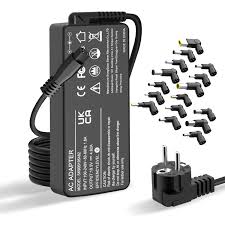
22001 - Laptop charger BLUMAX - Free user manual and instructions
Find the device manual for free 22001 BLUMAX in PDF.


User questions about 22001 BLUMAX
0 question about this device. Answer the ones you know or ask your own.
Ask a new question about this device
Download the instructions for your Laptop charger in PDF format for free! Find your manual 22001 - BLUMAX and take your electronic device back in hand. On this page are published all the documents necessary for the use of your device. 22001 by BLUMAX.
USER MANUAL 22001 BLUMAX
Before using this device for the first time, please read this guide thoroughly and use the device only in a safe surrounding. This manual not only helps you to use the device in a correct way, but it also helps to prevent you from accidents.
Content
1 x 90W Universal Notebook Adapter
8 x Plug connectors (pin)
1 x AC power adapter
1xCaradapter
1 x Bag
| D8 | 6.5*4.3 mm (with 1.4 mm inner pin) | For SONY, some FUJITSU models |
| D7 | 6.3*3.0 mm | For TOSHIBA |
| D6 | 5.5*2.5 mm | For HP, IBM/LENOVO, ACER, GATEWAY, LITEON, FUJITSU, TOSHIBA, LS |
| D4 | 5.5*1.7 mm | For ACER |
| D2 | 4.8*1.7 mm | For HP/COMPAQ, ASUS |
| D3 | 5.5*3.0 mm (with 1.0 mm inner pin) | For SAMSUNG |
| D11 | 3-pin | For DELL |
| D12 | 7.9*5.5 mm (with 0.6 mm inner pin) | For IBM |
| Model No: | L-4 Series 90W 2 in 1 |
| Input: | AC 100-240V 50/60Hz 1.5A DC 12V-15V |
| Output: | DC 15V, 16V, 18V, 19V, 20V, 22V, 24V |
| USB: | 5V 0,5A |
Instructions
- While using indoor plug with the AC Power Adapter. Choose the right output voltage (as pic. 1) as well as the suitable plug connector (as pic. 2) and connect with your laptop. Then the LED must blink red (as pic. 3).
- While using in the car plug with the car adapter. Choose the right output voltage (as pic. 1) as well as the suitable plug connector (as pic. 2) and connect with your laptop. Then the LED must blink red (as pic.3).
Note: The 90W Universal Notebook Adapter can be used with other products, which have an USB connector.
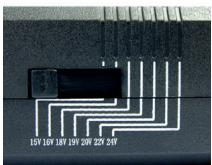
Pic. 1
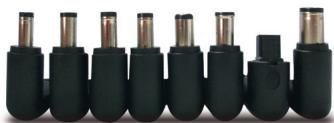
Pic. 2
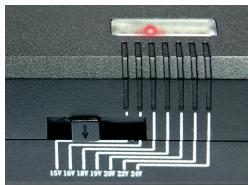
Pic. 3
90W UNIVERSAL NOTEBOOK ADAPTER
Maintenance
Store in cool and dry place.
Do not drop or shake the 90W Universal Notebook Adapter.
Clean up the 90W Universal Notebook Adapter with a soft cloth if solied.
The 90W Universal Notebook Adapter has undergone final inspection. Should you even though have a reason for complaints, please send the 90W Universal Notebook Adapter to your dealer. Do not try to repair the adapter by yourself!
Unplug AC power adapter when not in use.
Caution & Warning
- The 90W Universal Notebook Adapter does not belong into the hands of children!
- Do not expose the product to fire, water or moisture.
- The 90W Universal Notebook Adapter heats up during operation. Please ensure sufficient ventilation!
- Do not connect both car charger and the AC power adapter at the same time.
- Do not use the DC output and the USB connector at the same time!
- Choose the right output voltage and plug pin according to the charged laptop.
90W UNIVERSAL LAPTOP-NETZTEIL
Bedienungsanleitung
22001
L-4 Series, 90W 2 in1
90W UNIVERSAL NOTEBOOK ADAPTER
90W UNIVERSAL NOTEBOOK-NETZTEIL
90W UNIVERSELE NOTEBOOK-NETVOEDINGEN
90W CHARGEUR UNIVERSEL POUR NOTEBOOK
90W ALIMENTATORE UNIVERSALE PER NOTEBOOK