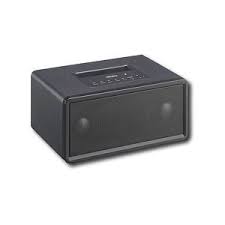
NS-BT400 - Bluetooth speaker INSIGNIA - Free user manual and instructions
Find the device manual for free NS-BT400 INSIGNIA in PDF.


| Product Type | Bluetooth Speaker 2.1 |
| Brand | INSIGNIA |
| Model | NS-BT400 |
| Dimensions (W × H × D) | 220 × 110 × 145 mm (8.66 × 4.33 × 5.71 in) |
| Power Supply | AC Adapter 120 V AC / 12 V AC, 2 A |
| Total Output Power | 18 W |
| Satellite Speakers | 2 × 1.5 in (NdFeB), 3 W per channel, pre-amplified, magnetically shielded |
| Subwoofer | 1 × 3 in, 12 W |
| Frequency Response (Satellites) | 120 Hz - 20 kHz |
| Frequency Response (Subwoofer) | 80 Hz - 500 Hz |
| Bluetooth Connectivity | Bluetooth v1.2, Class 2, 2.4 GHz ISM band |
| Bluetooth Range | Up to 10 m (33 ft) in open area |
| Supported Bluetooth Profiles | A2DP, AVRCP |
| Auxiliary Input | 3.5 mm jack (AUX IN) |
| Controls | Power On/Off, volume +/-, play/pause, next/previous track, Bluetooth pairing |
| Included Accessories | AC Adapter, 3.5 mm stereo cable |
| Maintenance | Wipe with a soft cloth; use a damp cloth with mild detergent if necessary |
| Safety | Do not expose to water, do not open, refer repairs to qualified personnel |
| Warranty | 1 year limited |
Frequently Asked Questions - NS-BT400 INSIGNIA
User questions about NS-BT400 INSIGNIA
0 question about this device. Answer the ones you know or ask your own.
Ask a new question about this device
Download the instructions for your Bluetooth speaker in PDF format for free! Find your manual NS-BT400 - INSIGNIA and take your electronic device back in hand. On this page are published all the documents necessary for the use of your device. NS-BT400 by INSIGNIA.
USER MANUAL NS-BT400 INSIGNIA
Important safeguards 2
Features 5
Setting up and using your speaker 6
Maintaining your speaker 10
Specifications 11
Legal notices. 11
One year limited warranty 13
Francais 15
Espanol. 31
Welcome
Congratulations on your purchase of a high-quality Insignia product. Your NS-BT400 Bluetooth MP3 speaker represents the state of the art in speaker design, and is designed for reliable and trouble-free performance.
Introduction
Your NS-BT400 is a 2.1 Bluetooth stereo speaker, compatible with Bluetooth version 1.2, Class 2. Your NS-BT400 supports Bluetooth A2DP (Advanced Audio Distribution Profile) and AVRCP (Audio/Video Remote Control Profile), and is capable of streaming music from mobile phones, media players, PDAs, computers, and other audio sources that utilize Bluetooth A2DP technology. The NS-BT400 remotely controls the audio source from the speaker system (within a range of 33 feet in an open area). You can also use an audio source with a 3.5mm line-in connection.
Safety information
To prevent fire or shock hazard, do not plug the power cord into an extension cord, receptacle, or other outlet unless the blades can be fully inserted to prevent blade exposure. To prevent fire or shock hazard do not expose this appliance to rain or moisture.

CAUTION
RISK OF ELECTRIC SHOCK DO NOT OPEN

CAUTION: To reduce the risk of electric shock, do not remove cover (or back). No user-serviceable parts inside. Refer servicing to qualified service personnel.

The lightning flash with arrowhead symbol within a triangle is intended to alert you to the presence of uninsulated dangerous voltage within your speaker's enclosure that may be of sufficient magnitude to constitute risk of electric shock to persons.

The exclamation point within a triangle is intended to alert you to the presence of important operating and maintenance (servicing) instructions in the literature accompanying your speaker.
Caution
Any change or modification to your speaker not expressly approved by the manufacturer or its authorized parties could void your authority to operate your speaker.
Caution:
Your speaker should not be exposed to water (dripping or splashing) and no objects filled with liquids, such as vases, should be placed on it.
Important safeguards
- Read instructions—Read all the safety and operating instructions before operating your speaker.
- Retain instructions—Retain the safety and operating instructions for future reference.
- Follow warnings—Follow all warnings on your speaker and in the operating instructions.
- Follow instructions—Follow all operating and use instructions.
-
Cleaning—Unplug your speaker from the power outlet before cleaning. Do not use liquid cleaners or aerosol cleaners. Use a damp cloth for cleaning.
-
Attachments—Do not use attachments not recommended by Insignia because they may cause hazards.
- Water and moisture—Do not use your speaker near water, for example, near a bath tub, in a wet basement, or near a swimming pool.
- Ventilation—To ensure reliable operation of your speaker and to protect it from overheating, ventilation slots and openings are provided in the cabinet back or bottom. Do not block these openings. Do not place your speaker on a bed, sofa, rug, or other similar surface. Your speaker should never be placed near or over a radiator or heat register. Do not place your speaker in a built-in installation such as a bookcase or rack unless correct ventilation is provided or the manufacturer's instructions have been adhered to.
- Power sources—Use only the type of power source indicated on the marking label. If you are not sure of the type of power supply to your home, consult your speaker dealer or local power company. For speakers intended to operate from battery power or other sources, refer to the operating instructions.
- Grounding or polarization—Your speaker is equipped with a polarized alternating-current line plug (a plug having one blade wider than the other). This plug will fit into the power outlet only one way. This is a safety feature. If you are unable to insert the plug fully into the outlet, try reversing the plug. If the plug should still fail to fit, contact your electrician to replace your obsolete outlet. Do not defeat the safety purpose of the polarized plug.
- Power cord protection—Route power supply cords so that they are not likely to be walked on or pinched by items placed upon or against them, paying particular attention to cords at plugs, convenience receptacles, and the point where they exit from your speaker.
- Lightning—For added protection for your speaker during a lightning storm, or when it is left unattended and unused for long periods of time, unplug it from the power outlet and disconnect the antenna or cable system. This will prevent damage to your speaker due to lightning and power line surges.
Overloading—Do not overload power outlets and extension cords because this can result in a risk of fire or electric shock. - Object and liquid entry—Never push objects of any kind into your speaker through openings, because they may touch dangerous voltage points or short out parts that could result in a fire or electric shock. Never spill liquid of any kind on your speaker.
Servicing—Do not attempt to service your speaker yourself, because opening or removing covers may expose you to dangerous voltage or other hazards. Refer all servicing to qualified service personnel.
- Damage requiring service—Unplug your speaker from the power outlet and refer servicing to qualified service personnel under the following conditions:
- When the power supply cord or plug is damaged or frayed.
If liquid has been spilled, or objects have fallen into your speaker.
If your speaker has been exposed to rain or water. - If your speaker does not operate normally by following the operating instructions. Adjust only those controls that are covered by the operating instructions, because incorrect adjustment of other controls may result in damage and often requires extensive work by a qualified technician to restore your speaker to its normal operation.
If your speaker has been dropped or damaged in any way. -
When your speaker exhibits a distinct change in performance.
-
Replacement parts—When replacement parts are required, make sure that the service technician uses replacement parts specified by the manufacturer that have the same characteristics as the original part. Unauthorized substitutions may result in fire, electric shock, injury to persons, or other hazards.
- Safety check—Upon completion of any service or repairs to your speaker, ask the service technician to perform routine safety checks to determine that your speaker is in correct operating condition.
- Heat—Place your speaker away from heat sources such as radiators, heat registers, stoves, or other products (including amplifiers) that produce heat.
- Environmental Protection Recommendation—At the end of your speaker's working life, it should not be disposed of with standard household waste, but rather dropped off at a collection point for the disposal of Waste Electrical and Electronic Equipment (WEEE) for recycling. This is confirmed by the symbol found on the product, user manual, or packaging.
Caution
To prevent electric shock, match the wide blade of plug to the wide slot in the power outlet and fully insert the plug.

Features
Front
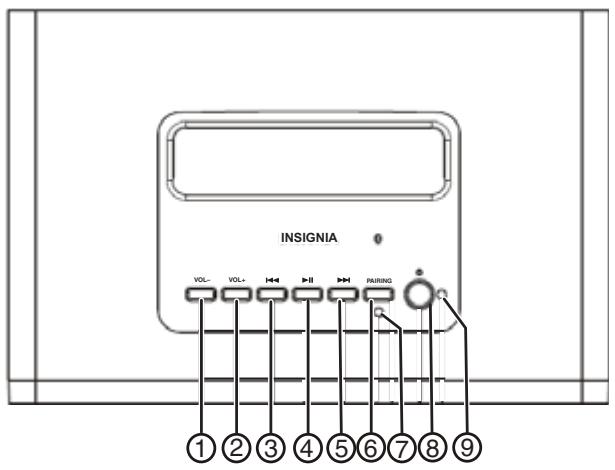
| # | Feature | Function |
| 1 | Vol- button | Press to decrease the volume. |
| 2 | Vol+ button | Press to increase the volume. |
| 3 | ↓← button | Press to play the previous selection. Press and hold to fast rewind the current selection. |
| 4 | ▶I I button | Press to play the selection, press again to pause the selection. |
| 5 | ▶I I button | Press to play the next selection. Press and hold to fast forward the current selection. |
| 6 | Pairing button | Press and hold for three seconds to initiate pairing mode. The blue LED will flash three times. Release the button and the blue and red LEDs flash alternately for 90 seconds to indicate that the speaker is in pairing mode. If the pairing process cannot be completed within 90 seconds, the blue and red LED stops flashing and the Bluetooth function is automatically terminated. To disconnect the Bluetooth audio device from the speaker system, press and hold the button for three seconds to disconnect. This lets you disconnect the Bluetooth signal. |
| 7 | Pairing LED | A blue and red LED that flashes alternately for 90 seconds to indicate that the speaker is connecting and when the speaker is in pairing mode. The blue LED will flash constantly when the speaker system is connected to an audio source through Bluetooth wireless technology. |
| 8 | Power button | Press to turn on the speaker, press again to turn off the speaker. |
| 9 | Power Green LED | Lights green to indicate that the power is on. |
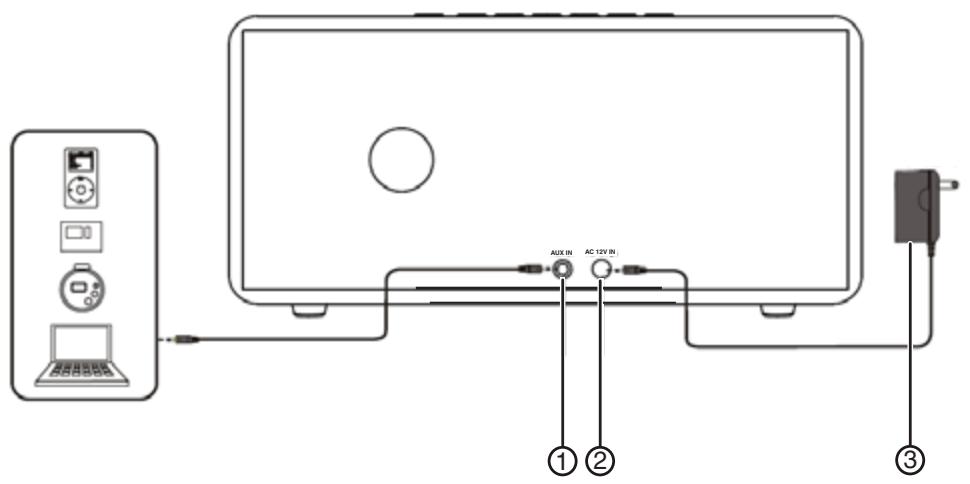
| # | Feature | Function |
| 1 | AUX IN jack | Plug a 3.5 mm input cable from an external audio device directly into the AUX IN jack. |
| 2 | AC 12V IN jack | Connect the small AC plug from the AC adapter into the AC 12V IN jack. |
| 3 | AC adapter | Plug the AC adapter into a wall outlet. |
Accessories
- AC adapter (120 V AC/12 V AC, 2 A)
- 3.5 mm stereo input cable
Setting up and using your speaker
Turning your speaker on
To provide power to your speaker:
- Plug the AC adapter into a wall outlet, then plug the AC cable from the adapter into the AC 12V IN jack on the back of the speaker.
Note
You need to pair the speaker with your Bluetooth devices before using the speaker. Make sure your speaker is on before pairing.
Pairing your speaker with Bluetooth devices
Pairing is the process of associating your speaker with Bluetooth devices. Pairing establishes a permanent security link between the devices using Bluetooth wireless technology. You will be prompted to enter a PIN (personal identification number) to establish the initial pairing. After the pairing is successful, you will not have to re-enter the PIN. The device remembers the PIN and will automatically connect to the speaker.
The following pairing instructions describe the pairing process between the speaker and a typical Bluetooth audio source. It is possible that the pairing process is different for your Bluetooth devices. If you have problems pairing, refer to the user's guide for your specific device.
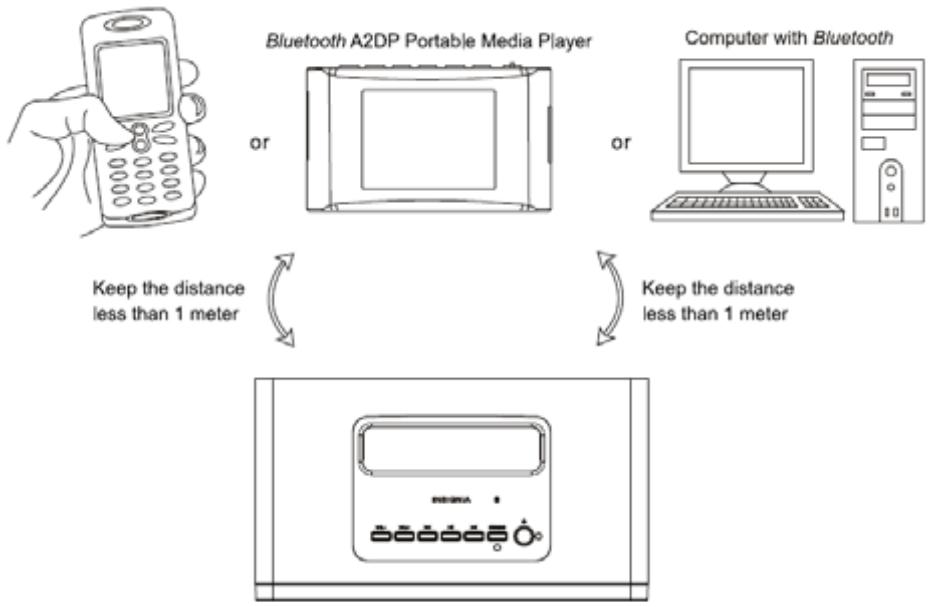
Bluetooth mobile phone
Notes
When initiating pairing, keep the device to be paired within approximately 3 feet (1 meter) of the speaker and make sure that there are no other Bluetooth-enabled devices nearby.
To pair your speaker with any Bluetooth A2DP device:
1 Turn on your speaker, then press and hold the PAIRING button for three seconds, until the Pairing LED flashes blue three times.
2 Release the button. The Pairing LED alternately flashes blue and red for 90 seconds, indicating that the speaker and the Bluetooth device are in pairing mode.
Note
If the pairing process cannot be completed within 90 seconds, the blue and red LED stops flashing and the Bluetooth function is terminated automatically. If this happens, you must initiate the pairing process again.
3 Turn on the Bluetooth settings of your Bluetooth device, then perform a search for Bluetooth devices in range. When the blue LED flashes continuously, it indicates that the pairing process has been completed successfully.
Your Bluetooth device should now display a new device named "NS-BTS21" on the Bluetooth Device List.
4 Select "NS-BTS21" from the Bluetooth Device List. You are prompted to enter a PIN.
5 Enter the default PIN of "0000." Your Bluetooth device and the speaker system are now connected through Bluetooth wireless technology.
6 Select music on your Bluetooth device to play wirelessly through your NS-BT400 speaker system.
To pair your speaker with a Bluetooth-enabled computer:
1 Start the Bluetooth application on your computer, then perform a search for Bluetooth devices in range.
2 Turn on your speaker, then press and hold the PAIRING button for three seconds, until the Pairing LED flashes blue three times.
3 Release the button. The Pairing LED alternately flashes blue and red for 90 seconds, indicating that the speaker and your computer are in pairing mode.
Note
If the pairing process cannot be completed within 90 seconds, the blue and red LED stops flashing and the Bluetooth function is terminated automatically. If this happens, you must initiate the pairing process again.
Your computer should now display a new device named "NS-BTS21" on the Bluetooth Device List.
4 Select "NS-BTS21" from the Bluetooth Device List. You are prompted to enter a PIN.
5 Enter the default PIN of "0000." Your computer and the speaker system are now connected through Bluetooth wireless technology.
6 Select music on your computer to play wirelessly through your NS-BT400 speaker system.
To pair your speaker with a computer with a Bluetooth USB adapter:
1 Plug the Bluetooth USB adapter into a USB port on your computer and install the Bluetooth software provided (if required).
2 Start the Bluetooth application on your computer, then perform a search for Bluetooth devices in range.
3 Turn on your speaker, then press and hold the PAIRING button for three seconds, until the Pairing LED flashes blue three times.
4 Release the button. The Pairing LED alternately flashes blue and red for 90 seconds, indicating that the speaker and your computer are in pairing mode.
Note
If the pairing process cannot be completed within 90 seconds, the blue and red LED stops flashing and the Bluetooth function is terminated automatically. If this happens, you must initiate the pairing process again.
Your computer should now display a new device named "NS-BTS21" on the Bluetooth Device List.
5 Select "NS-BTS21" from the Bluetooth Device List. You are prompted to enter a PIN.
6 Enter the default passkey of "0000." Your computer and speaker are now connected through Bluetooth wireless technology.
7 Select music on your computer to play wirelessly through your speaker.
To connect other audio devices directly to your speaker:
1 Disconnect the Bluetooth connection to any other audio devices.
2 Insert one end of the 3.5mm stereo input cable into the AUX IN jack on the back of the speaker, then insert the other end of the cable into the Audio Output (or equivalent) jack of the audio source.



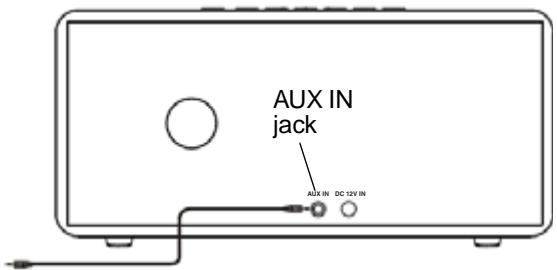

3 Turn on the audio source device and play music.
4 Press the VOL- or VOL+ button to adjust the volume to a comfortable level.
Maintaining your speaker
Wipe the case with a soft cloth. If the case is very dirty, moisten the cloth with a weak solution of non-caustic detergent and water.
Specifications
| Dimensions (WxHxD) | 8.66 × 4.33 × 5.71 inches (220 × 110 × 145 mm) |
| Power output | 18 Watts |
| Satellite speakers | Pre-amplified and magnetically shielded |
| 3 Watts per channel | |
| 2" × 1.5" full-range NdFeB drivers | |
| Frequency response - 120 Hz~20 kHz | |
| Subwoofer | 12 Watts with 3" driver |
| Frequency response - 80 Hz~500 HZ | |
| Built-in Bluetooth receiver | |
| Signal input - Bluetooth wireless and 3.5 mm jack | |
| Functions - Power On/Off, Pairing, Volume, Play/Pause, Previous, Next. | |
| Power source - AC adapter (12 V, 2 A) |
Bluetooth specifications
- Bluetooth v1.2 compliant
RF power supports Class 2
2.4 GHz~2.4835 GHz ISM bandwidth
Supports Bluetooth A2DP and AVRCP profiles - Up to 33 ft. operating range (in an open space)
Security supports Pairing, Encryption, and Authentication - No software installation required
Legal notices
FCC Part 15
This device complies with Part 15 of the FCC Rules. Operation of this product is subject to the following two conditions: (1) this device may not cause harmful interference, and (2) this device must accept any interference received, including interference that may cause undesired operation.
FCC warning
Changes or modifications not expressly approved by the party responsible for compliance with the FCC Rules could void the user's authority to operate this equipment.
DHHS and FDA safety certification
This product is made and tested to meet safety standards of the FCC, requirements and compliance with safety performance of the U.S. Department of Health and Human Services, and also with FDA Radiation Performance Standards 21 CFR Subchapter J.
Canada ICES-003 statement
This Class B digital apparatus complies with Canadian ICES-003.
Copyright
© 2007 Insignia. Insignia and the Insignia logo are trademarks of Best Buy Enterprise Services, Inc. Other brands and product names are trademarks or registered trademarks of their respective holders. Specifications and features are subject to change without notice or obligation.
For service and support call (877) 467-4289.
One year limited warranty
Insignia Products ("Insignia") warrants to you, the original purchaser of this new NS-BT400 ("Product"), that the Product shall be free of defects in the original manufacture of the material or workmanship for a period of one (1) year from the date of your purchase of the Product ("Warranty Period"). This Product must be purchased from an authorized dealer of Insignia brand products and packaged with this warranty statement. This warranty does not cover refurbished Product. If you notify Insignia during the Warranty Period of a defect covered by this warranty that requires service, terms of this warranty apply.
How long does the coverage last?
The Warranty Period lasts for 1 year (365 days) from the date you purchased the Product. The purchase date is printed on the receipt you received with the Product.
What does this warranty cover?
During the Warranty Period, if the original manufacture of the material or workmanship of the Product is determined to be defective by an authorized Insignia repair center or store personnel, Insignia will (at its sole option): (1) repair the Product with new or rebuilt parts; or (2) replace the Product at no charge with new or rebuilt comparable products or parts. Products and parts replaced under this warranty become the property of Insignia and are not returned to you. If service of Products or parts are required after the Warranty Period expires, you must pay all labor and parts charges. This warranty lasts as long as you own your Insignia Product during the Warranty Period. Warranty coverage terminates if you sell or otherwise transfer the Product.
How to obtain warranty service?
If you purchased the Product at a retail store location, take your original receipt and the Product to the store you purchased it from. Make sure that you place the Product in its original packaging or packaging that provides the same amount of protection as the original packaging. If you purchased the Product from an online web site, mail your original receipt and the Product to the address listed on the web site. Make sure that you put the Product in its original packaging or packaging that provides the same amount of protection as the original packaging.
To obtain in-home warranty service for a television with a screen 25 inches or larger, call 1-888-BESTBUY. Call agents will diagnose and correct the issue over the phone or will have an Insignia-approved repair person dispatched to your home.
Where is the warranty valid?
This warranty is valid only to the original purchaser of the product in the United States and Canada.
What does the warranty not cover?
This warranty does not cover:
- Customer instruction
Installation - Set up adjustments
- Cosmetic damage
- Damage due to acts of God, such as lightning strikes
- Accident
- Misuse
- Abuse
-
Negligence
Commercial use -
Modification of any part of the Product, including the antenna
- Plasma display panel damaged by static (non-moving) images applied for lengthy periods (burn-in).
This warranty also does not cover:
- Damage due to incorrect operation or maintenance
- Connection to an incorrect voltage supply
- Attempted repair by anyone other than a facility authorized by Insignia to service the Product
- Products sold as is or with all faults
- Consumables, such as fuses or batteries
- Products where the factory applied serial number has been altered or removed REPAIR REPLACEMENT AS PROVIDED UNDER THIS WARRANTY IS YOUR EXCLUSIVE REMEDY. INSIGNIA SHALL NOT BE LIABLE FOR ANY INCIDENTAL OR CONSEQUENTIAL DAMAGES FOR THE BREACH OF ANY EXPRESS OR IMPLIED WARRANTY ON THIS PRODUCT, INCLUDING, BUT NOT LIMITED TO, LOST DATA, LOSS OF USE OF YOUR PRODUCT, LOST BUSINESS OR LOST PROFITS. INSIGNIA PRODUCTS MAKES NO OTHER EXPRESS WARRANTYES WITH RESPECT TO THE PRODUCT, ALL EXPRESS AND IMPLIED WARRANTYES FOR THE PRODUCT, INCLUDING, BUT NOT LIMITED TO, ANY IMPLIED WARRANTYES OF AND CONDITIONS OF MERCHANTABILITY AND FITNESS FOR A PARTICULAR PURPOSE, ARE LIMITED IN DURATION TO THE WARRANTY PERIOD SET FORTH ABOVE AND NO WARRANTYES, WHETHER EXPRESS OR IMPLIED, WILL APPLY AFTER THE WARRANTY PERIOD. SOME STATES, PROVINCES AND JURISDICTIONS DO NOT ALLOW LIMITATIONS ON HOW LONG AN IMPLIED WARRANTY LASTS, SO THE ABOVE LIMITATION MAY NOT APPLY TO YOU. THIS WARRANTY GIVES YOU SPECIFIC LEGAL RIGHTS, AND YOU MAY ALSO HAVE OTHER RIGHTS, WHICH VARY FROM STATE TO STATE OR PROVINCE TO PROVINCE.
Contact Insignia:
For customer service please call 1-877-467-4289
www.insignia-products.com
INSIGNIATM is a trademark of Best Buy Enterprise Services, Inc.
Distributed by Best Buy Purchasing, LLC.
Insignia, 7601 Penn Avenue South, Richfield, Minnesota, U.S.A.
Specifications Bluetooth
Insignia, 7601 Penn Avenue South, Richfield, Minnesota, U.S.A.
Insignia NS-BT400
Insignia, 7601 Penn Avenue South, Richfield, Minnesota, U.S.A.
INSIGNIA
www.insignia-products.com (877) 467-4289
Distributed by Best Buy Purchasing, LLC
7601 Penn Avenue South, Richfield, MN USA 55423-3645
© 2007 Best Buy Enterprise Services, Inc.
All rights reserved. INSIGNIA is a registered trademark of Best Buy Enterprise Services, Inc.
All other products and brand names are trademarks of their respective owners.
7601 Penn Avenue South, Richfield, MN USA 55423-3645
© 2007 Best Buy Enterprise Services, Inc.
7601 Penn Avenue South, Richfield, MN USA 55423-3645
© 2007 Best Buy Enterprise Services, Inc.
Todlos dos dearestos reservados. INSIGNIA esuna marca registrada de Best Buy Enterprise Services, Inc.
- Welcome
- Introduction
- Safety information
- CAUTION
- RISK OF ELECTRIC SHOCK DO NOT OPEN
- Caution:
- Important safeguards
- Features
- Front
- Accessories
- Setting up and using your speaker
- Turning your speaker on
- Note
- Pairing your speaker with Bluetooth devices
- Notes
- To pair your speaker with any Bluetooth A2DP device:
- To pair your speaker with a Bluetooth-enabled computer:
- To pair your speaker with a computer with a Bluetooth USB adapter:
- To connect other audio devices directly to your speaker:
- Maintaining your speaker
- Specifications
- Bluetooth specifications
- Legal notices
- FCC Part 15
- FCC warning
- DHHS and FDA safety certification
- Canada ICES-003 statement
- Copyright
- One year limited warranty
- How long does the coverage last?
- What does this warranty cover?
- How to obtain warranty service?
- Where is the warranty valid?
- What does the warranty not cover?
- Specifications Bluetooth
- Insignia NS-BT400
- INSIGNIA
Brand : INSIGNIA
Model : NS-BT400
Category : Bluetooth speaker