
X-T3 - Digital Camera FUJIFILM - Free user manual and instructions
Find the device manual for free X-T3 FUJIFILM in PDF.


| Product type | Digital mirrorless camera |
| Brand | FUJIFILM |
| Model | X-T3 |
| Sensor | APS-C X-Trans CMOS 4, 26.1 MP |
| Processor | X-Processor 4 |
| Lens mount | Fujifilm X Mount |
| Dimensions (without lens) | 132.5 × 92.8 × 58.8 mm |
| Weight (with battery and card) | 539 g |
| Power supply | Rechargeable battery NP-W126S |
| Viewfinder | Electronic OLED 0.5-inch, 3.69 million dots |
| Screen | Touchscreen LCD 3.0-inch, 1.04 million dots |
| Storage | 2 SD/SDHC/SDXC slots (UHS-II) |
| Connectivity | USB-C, Micro HDMI, Wi-Fi, Bluetooth |
| Continuous shooting | Up to 11 fps (mechanical shutter) / 20 fps (electronic shutter) |
| Video | 4K up to 60 fps, Full HD up to 120 fps |
| Video formats | MOV (H.264/H.265) |
| Main features | F-Log/HLG recording, color temperature white balance, ISO sensitivity 160-12800 (expandable) |
| Firmware version | 2.10 (adds color temperature display, charging icon, single file recording >4 GB) |
| Maintenance | Clean with a dry soft cloth; avoid moisture and dust |
| Safety | Turn off before removing battery or memory card; use approved accessories |
| Spare parts | Battery NP-W126S, charger BC-W126, strap, lens cap |
| Repairability | Repair by Fujifilm authorized center |
Frequently Asked Questions - X-T3 FUJIFILM
User questions about X-T3 FUJIFILM
0 question about this device. Answer the ones you know or ask your own.
Ask a new question about this device
Download the instructions for your Digital Camera in PDF format for free! Find your manual X-T3 - FUJIFILM and take your electronic device back in hand. On this page are published all the documents necessary for the use of your device. X-T3 by FUJIFILM.
USER MANUAL X-T3 FUJIFILM
Features added or changed as a result of firmware updates may no longer match the descriptions in the documentation supplied with this product. Visit our website for information on the updates available for different products:
http://www.fujifilm.com/support/digital_cameras/software/fw_table.html
Contents
X-T3 firmware version 2.10 adds or updates the features listed below. For information on earlier versions, visit the following website.
http://fujifilm-dsc.com/en/manual/
| No. | Description | X-T3 | See | Ver. |
| 1 | The chosen value is now displayed when a color temperature is selected for white balance. | 10, 12 | 1, 2 | 2.00 |
| 2 | The camera now displays a “charging” icon when powered via USB or by the AC-9VS AC adapter supplied with the VG-XT3 vertical battery grip. | 10, 12 | 1, 2 | 2.00 |
| 3 | The MOVIE SETTING > F-Log RECORDING item in the shooting menu has been renamed F-Log/HLG RECORDING. | 149 | 3 | 2.00 |
| 4 | Movies over 4 GB in size are now recorded to a single file. | 176, 261, 295 | 4 | 2.10 |
Changes and Additions
Changes and additions are as follows.
X-T3 Owner's Manual: 10 The Electronic Viewfinder
Ver. 2.00

⑩ When a color temperature is selected for white balance (X-T3 Owner's Manual 108), the chosen value now appears in the display.
⑤3 The camera now displays a "charging" icon when powered via USB or by the AC-9VS AC adapter supplied with the VG-XT3 vertical battery grip.
X-T3 Owner's Manual: 12 The LCD Monitor
Ver. 2.00
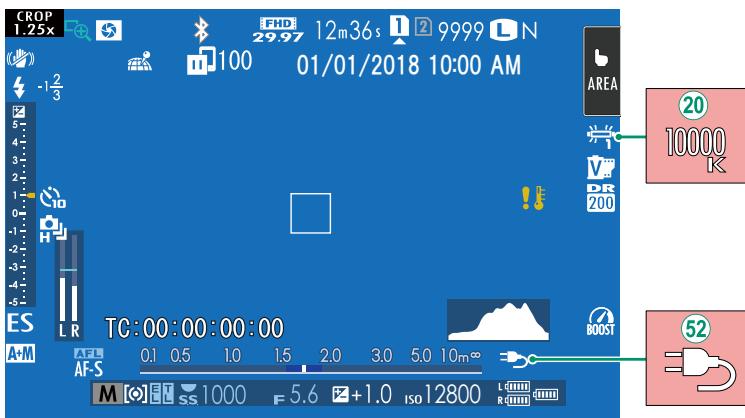
⑳ When a color temperature is selected for white balance (X-T3 Owner's Manual 108), the chosen value now appears in the display.
⑤2 The camera now displays a "charging" icon when powered via USB or by the AC-9VS AC adapter supplied with the VG-XT3 vertical battery grip.
Choose the destination for F-Log and HLG (Hybrid Log-Gamma) movies shot while the camera is connected to an HDMI device.
| Option | Description |
| The footage is processed using film simulation and both saved to the memory card and output to the HDMI device. | |
| The footage is recorded to the memory card and output to the HDMI device in F-Log format. | |
| The footage is output to the HDMI device in F-Log format but saved to the memory card with film simulation applied. | |
| The footage is recorded to the memory card in F-Log format but output to the HDMI device with film simulation applied. | |
| The footage is recorded to the memory card and output to the HDMI device in HLG format. |

- F-Log offers a gentle gamma curve with a wide gamut suitable for further processing post-production. Sensitivity is restricted to values between ISO 640 and ISO 12800.
- The HLG (Hybrid Log-Gamma) recording format conforms to the international ITU-R BT2100 standard. When viewed on HLG-compatible displays, high-quality HLG footage faithfully captures high-contrast scenes and vivid colors. Sensitivity is restricted to values between ISO 1000 and ISO 12800. HLG recording is available when H.265 (HEVC) is selected for MOVIE SETTING > H.265 (HEVC)/H.264 in the shooting menu.
- Film simulation (☐) footage is recorded using the option selected for ☐ MOVIE SETTING > ☐ FILM SIMULATION in the shooting menu.
-
Footage shot with SD 📄 HDMI F-Log or SD F-Log 📄️ cannot be recorded to the memory card and output to the HDMI at different frame sizes (4K, Full HD). In addition, the following 🧑️ MOVIE SETTING options are unavailable:
-
MOVIE MODE frame rate options of 59.94P and 50P
- FULL HD HIGH SPEED REC
- 4K INTERFRAME NR
- HDMI OUTPUT INFO DISPLAY
X-T3 Owner's Manual: 176 COPY
Ver. 2.10

- Copying ends when the destination is full.
- If you attempt to copy a file over 4 GB in size to a memory card with a capacity of 32 GB or less, copying will end and the file will not be copied.
X-T3 Owner's Manual: 261 Mac OS X/macOS
Ver. 2.10
Pictures can be copied to your computer using Image Capture (supplied with your computer) or other software.

Use a card reader to copy files over 4 GB in size.
X-T3 Owner's Manual: 295 Memory Card Capacity
Ver. 2.10

If the memory card has a capacity of over 32 GB, movies will be recorded in single files, regardless of size. If the card has a capacity of 32 GB or less, movies over 4 GB in size will be recorded uninterrupted across multiple files.
MEMO
FUJIFILM
FUJIFILM Corporation
http://www.fujifilm.com/products/digital_cameras/index.html