
GFX 50R - Medium format digital camera FUJIFILM - Free user manual and instructions
Find the device manual for free GFX 50R FUJIFILM in PDF.


| Product type | Medium format mirrorless digital camera |
| Brand | Fujifilm |
| Model | GFX 50R |
| Sensor | Medium format CMOS 43.8 x 32.9 mm, 51.4 megapixels |
| Processor | X-Processor Pro |
| Lens mount | Fujifilm G mount |
| Viewfinder | 0.5-inch OLED electronic viewfinder, 3.69 million dots |
| LCD screen | 3.2-inch tilting touchscreen, 2.36 million dots |
| ISO sensitivity | 100-12800 (expandable to 50-102400) |
| Dimensions | 147.5 x 94.2 x 64.0 mm |
| Weight | Approx. 740 g (with battery and memory card) |
| Power supply | NP-T125 Li-ion battery, charger included |
| Storage | Dual SD/SDHC/SDXC memory card slots (UHS-II) |
| Main features | Hybrid autofocus, continuous shooting up to 3 fps, 1080p 30fps video, built-in Wi-Fi |
| Maintenance and cleaning | Clean the body with a soft dry cloth; for the sensor, use a blower or manual cleaning procedure |
| Safety | Do not expose to water, avoid shocks, use only Fujifilm accessories |
| Spare parts and repairability | NP-T125 battery, BC-T125 charger, EC-GFX eyecup, lens hood, body cap; repair by Fujifilm authorized center |
| General information | User manual available for download on the Fujifilm website |
Frequently Asked Questions - GFX 50R FUJIFILM
Plan for a spare battery for long sessions.
User questions about GFX 50R FUJIFILM
0 question about this device. Answer the ones you know or ask your own.
Ask a new question about this device
Download the instructions for your Medium format digital camera in PDF format for free! Find your manual GFX 50R - FUJIFILM and take your electronic device back in hand. On this page are published all the documents necessary for the use of your device. GFX 50R by FUJIFILM.
USER MANUAL GFX 50R FUJIFILM
Features added or changed as a result of firmware updates may no longer match the descriptions in the documentation supplied with this product. Visit our website for information on the updates available for different products:
http://www.fujifilm.com/support/digital Cameras/software/fw_table.html
Contents
X-T3 firmware version 2.10 adds or updates the features listed below. For information on earlier versions, visit the following website.
http://fujifilm-dsc.com/en/manual/
| No. | Description | X-T3 图 | See 图 | Ver. |
| 1 | The chosen value is now displayed when a color temperature is selected for white balance. | 10, 12 | 1, 2 | 2.00 |
| 2 | The camera now displays a "charging" icon when powered via USB or by the AC-9VS AC adapter supplied with the VG-XT3 vertical battery grip. | 10, 12 | 1, 2 | 2.00 |
| 3 | The Movie SETTING > F-Log RECORDING item in the shooting menu has been renamed F-Log/HLG RECORDING. | 149 | 3 | 2.00 |
| 4 | Movies over 4 GB in size are now recorded to a single file. | 176, 261, 295 | 4 | 2.10 |
Changes and Additions
Changes and additions are as follows.
X-T3 Owner's Manual: 10 The Electronic Viewfinder
Ver. 2.00
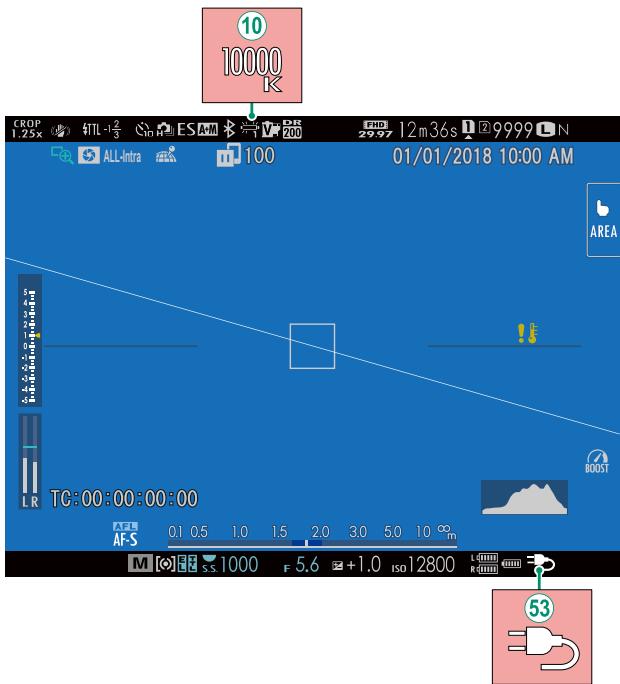
⑩ When a color temperature is selected for white balance (X-T3 Owner's Manual 108), the chosen value now appears in the display.
The camera now displays a "charging" icon when powered via USB or by the AC-9VS AC adapter supplied with the VG-XT3 vertical battery grip.
X-T3 Owner's Manual: 12 The LCD Monitor
Ver. 2.00
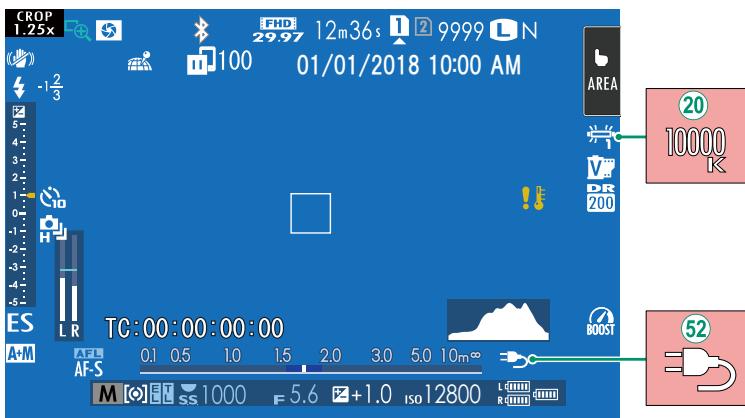
20 When a color temperature is selected for white balance (X-T3 Owner's Manual 108), the chosen value now appears in the display.
The camera now displays a "charging" icon when powered via USB or by the AC-9VS AC adapter supplied with the VG-XT3 vertical battery grip.
Choose the destination for F-Log and HLG (Hybrid Log-Gamma) movies shot while the camera is connected to an HDMI device.
| Option | Description |
| SD F-Log HDMI F-Log | The footage is processed using film simulation and both saved to the memory card and output to the HDMI device. |
| SD F-Log HDMI F-Log | The footage is recorded to the memory card and output to the HDMI device in F-Log format. |
| SD F-Log HDMI F-Log | The footage is output to the HDMI device in F-Log format but saved to the memory card with film simulation applied. |
| SD F-Log HDMI F-Log | The footage is recorded to the memory card in F-Log format but output to the HDMI device with film simulation applied. |
| SD HLG HDMI HLG | The footage is recorded to the memory card and output to the HDMI device in HLG format. |

- F-Log offers a gentle gamma curve with a wide gamut suitable for further processing post-production. Sensitivity is restricted to values between ISO 640 and ISO 12800.
- The HLG (Hybrid Log-Gamma) recording format conforms to the international ITU-R BT2100 standard. When viewed on HLG-compatible displays, high-quality HLG footage faithfully captures high-contrast scenes and vivid colors. Sensitivity is restricted to values between ISO 1000 and ISO 12800. HLG recording is available when H.265 (HEVC) is selected for Movie Setting > H.265 (HEVC)/H.264 in the shooting menu.
- Film simulation (film) footage is recorded using the option selected for MOVESION FILM SIMULATION in the shooting menu.
- Footage shot with S0 F-Log or S0 F-Log cannot be recorded to the memory card and output to the HDMI at different frame sizes (4K, Full HD). In addition, the following MOVIE SETTING options are unavailable:
MOVIE MODE frame rate options of 59.94P and 50P
FULL HD HIGH SPEED REC
- INTERFRAME NR
HDMI OUTPUT INFO DISPLAY
X-T3 Owner's Manual: 176 COPY
Ver. 2.10

- Copying ends when the destination is full.
- If you attempt to copy a file over 4 GB in size to a memory card with a capacity of 32 GB or less, copying will end and the file will not be copied.
X-T3 Owner's Manual: 261 Mac OS X/macOS
Ver. 2.10
Pictures can be copied to your computer using Image Capture (supplied with your computer) or other software.

Use a card reader to copy files over 4 GB in size.
X-T3 Owner's Manual: 295 Memory Card Capacity
Ver. 2.10

If the memory card has a capacity of over 32 GB, movies will be recorded in single files, regardless of size. If the card has a capacity of 32 GB or less, movies over 4 GB in size will be recorded uninterrupted across multiple files.
MEMO
FUJIFILM
FUJIFILM Corporation
http://www.fujifilm.com/products/digital Cameras/index.html
Brand : FUJIFILM
Model : GFX 50R
Category : Medium format digital camera