
UNIVERSELLE SYSTEMLINK 3 - Remote control RCA - Free user manual and instructions
Find the device manual for free UNIVERSELLE SYSTEMLINK 3 RCA in PDF.

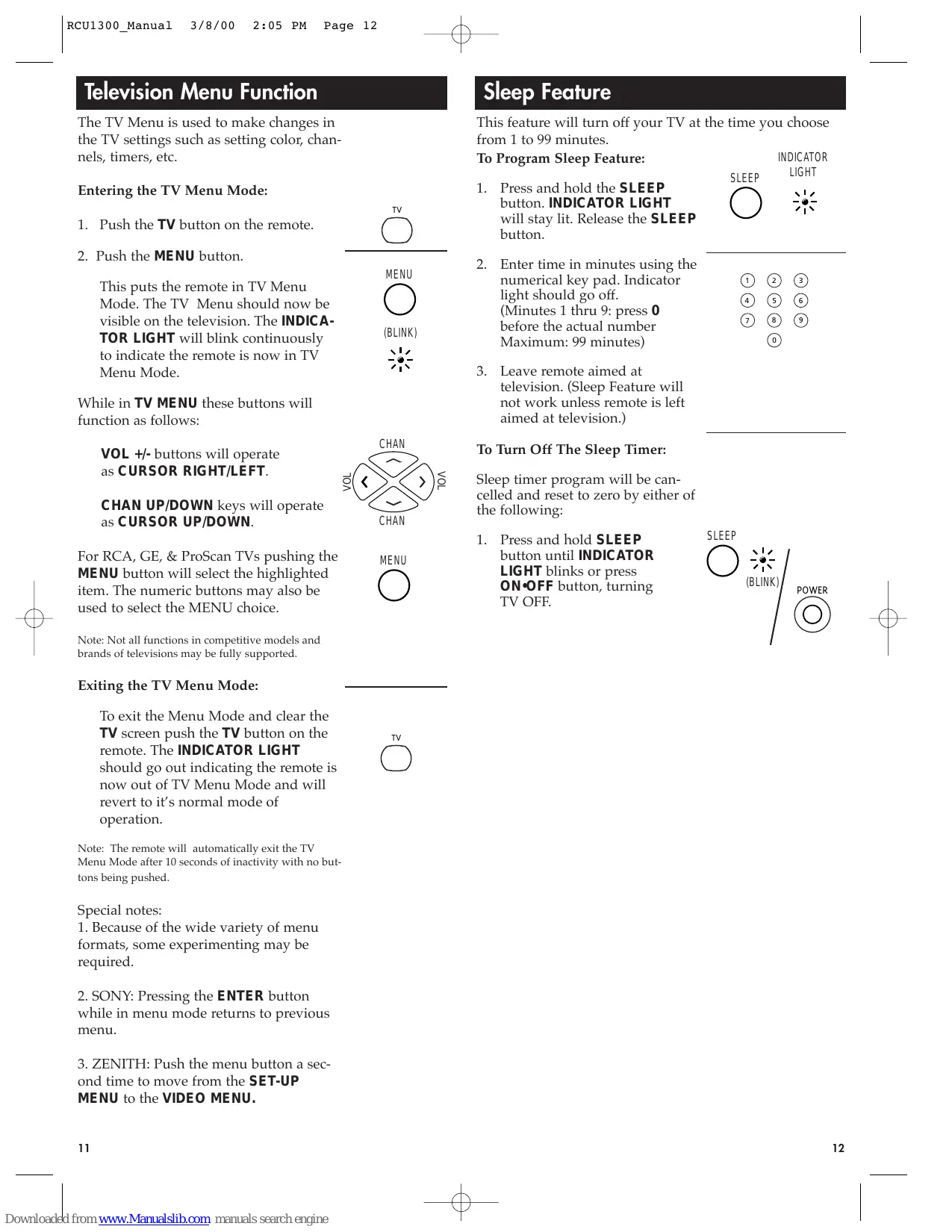

| Product type | Universal remote control |
| Brand | RCA |
| Model | UNIVERSELLE SYSTEMLINK 3 |
| Dimensions (approx.) | 20 x 5 x 2 cm |
| Weight (approx.) | 100 g |
| Power supply | 2 AAA alkaline batteries |
| Number of batteries | 2 |
| Battery type | AAA |
| Main functions | Control TV, VCR, cable; manual programming and code search; TV menu; sleep timer (1 to 99 min); TV/VCR function |
| Infrared range (approx.) | 10 meters |
| Number of buttons | 28 (includes number keys, volume, channel, mute, etc.) |
| Light indicator | Yes, blinks during use |
| Code search | Yes, allows programming without known code |
| Code retrieval | Yes, to retrieve the programmed code |
| Memory | Retains codes even after battery change (except if batteries are removed for a long time) |
| Compatibility | TV, VCR, cable box of listed brands (RCA, GE, ProScan, etc.) |
| Care and cleaning | Wipe with a soft, dry cloth. Do not use abrasive products. |
| Safety | Do not expose to moisture, extreme temperatures, or direct sunlight. |
| Spare parts and repairability | AAA batteries are commercially available. No spare parts provided. In case of failure, contact the Helpline service. |
| General information | Manual available in French and English. Limited 90-day warranty. Helpline: 1-800-420-7229 (US). |
| Country of origin | Manufactured by Thomson Consumer Electronics |
Frequently Asked Questions - UNIVERSELLE SYSTEMLINK 3 RCA
User questions about UNIVERSELLE SYSTEMLINK 3 RCA
0 question about this device. Answer the ones you know or ask your own.
Ask a new question about this device
Download the instructions for your Remote control in PDF format for free! Find your manual UNIVERSELLE SYSTEMLINK 3 - RCA and take your electronic device back in hand. On this page are published all the documents necessary for the use of your device. UNIVERSELLE SYSTEMLINK 3 by RCA.
USER MANUAL UNIVERSELLE SYSTEMLINK 3 RCA
Battery Installation 3
Programming Your Universal Remote
TV 4
TV Codes 4-5
VCR. 6
VCR Codes. 6-7
Cable Box. 8
Cable Box Codes 9
Programming With Code Search 9
Retrieval Codes 10
TV Menu. 11
Sleep Feature 12
Trouble Shooting. 13
Help Line 13

Button Description
INDICATOR LIGHT
The Indicator Light flashes to show that the remote is working.
POWER
The POWER button operates the same as your original remote Note: Some RCA, GE and ProScan models require you to press the device button to turn the device on and the POWER button to turn the device off.
CODE SEARCH
Used to program the remote or to search through codes.
TV, VCR, & CABLE
The TV, VCR, and CABLE buttons are used to select the device you want to control.
REW, PLAY, FWD, REC, STOP, & PAUSE
The REW, PLAY, FWD, REC, STOP, & PAUSE buttons operate the same as on your original VCR remote. You must press the REC button twice to begin recording.
TV·VCR
The TV VCR button operates the TV VCR function of your VCR.
ENTER
The ENTER button is used to complete channel selection for some brands of TV. It is also used to complete the code entry process.
VOL & CHAN
The VOL (Volume) and CHAN (Channel) buttons increase or decrease the channel numbers or volume.
MUTE
To MUTE the volume on the TV.
PREV CH
PREV CH allows you to go to the previous channel you selected. Operates the same as Last Channel, Go Back or Recall button on your original remote.
0-9
The number buttons operate the same as on your original remote, and are used for entering device codes or channel numbers.
MENU
The MENU button calls up the TV set up menu.
SLEEP
The SLEEP button allows you to set a time to turn off the TV automatically.
Battery Installation
Your Universal Remote requires 2 new AAA alkaline batteries.
To install the batteries:
- On the back of the remote, push and slide the cover off.
- Match the batteries to the + and - marks inside the battery case, then insert the batteries.
- Press and slide the battery cover back into place.
Note: Reprogramming may be required after batteries are removed.
Programming For TV
- Manually turn on the TV.
Find the three-digit code for your TV in the code list below.
- Press and hold the CODE
SEARCH button until the INDICATOR LIGHT lights, then release the CODE SEARCH button.
CODE SEARCH
INDICATOR LIGHT


- Press and release the TV button (The INDICATOR LIGHT will blink then remain lit).
- Enter the code using the Number Buttons.
After your code is entered, the INDICATOR LIGHT will turn off.
5. Aim the remote at your TV and press the POWER button. Your TV should turn off.
Note: If your TV does not respond, try all the codes for your brand. If the codes do not work, or your brand is not listed, try the Code Search method on page 9.
- With your TV on, press CHAN+. If the TV responds, no further programming is required.
- Enter your code here for easy reference.
| TV | (BLINK) |
| ① | ② |
| ④ | ⑤ |
| ⑦ | ⑧ |
| ⑨ | |
| ⑩ | |
| (OFF) |

TV Code List
Abex 172
Admiral .001, 173
Adventura 174
Aiko. .016
Akai. 002
Alleron. .046
Amtron .038
Anam National 003.038
AOC .006,005,004,007
Audiovox. 038
Belcor .004
Bell & Howell .001, 083, 162
Bradford .038
Brokwood .004
Candle .004, 006, 008, 174
Celebrity 002
Citizen .016, 171, 004, 006, 008
038,105,174,177
Colortyme .004,006
Concerto .004, 006
Contec / Cony....012, 013, 038
Craig .038
Crown .038, 171
Curtis Mathes 171,000,004
006,015,105,162
CXC 038
Daewoo.016, 190, 005
171,004,006,017,127
Daytron. 004, 006, 171
Dimensia. 000
Dumont. .004, 151
Dynatech. .004
Electroband. 002
Electrohome .004, 006, 002, 003
019,022
Emerson .030, 171, 191, 004
038, 046, 006, 012, 023, 024,025
026, 027, 028, 029, 031, 032, 033
034, 035, 036, 037, 039, 041, 042
043,044,047,123,124,162 177
179
Envision .004,006Fisher.042-042-051-169-189
Fisher....048,049,051,162,180 FujiTu: 016
Fujitsu 046
Funsei 038, 046
Futurec. 038,046 Futuretec.
Futuretec. 058 GE .000,054,003,004,006
022.052.055.087.164.165
166,167,168,181
Gibraltar .004, 151
TV Code List Continued
| Goldstar | .005, 156, 004, 006 |
| ...172, 012, 019, 056, 057, 058 | |
| ...155, 171 | |
| Grundy | .171, 038, 046 |
| Hallmark | .004, 006 |
| Harvard | .038 |
| Hitachi...059, 004, 148, 006 012 | |
| ...013, 060, 061, 135, 136, 137 | |
| ...138, 139, 140, 141, 142, 143 | |
| ...144, 145, 146, 150, 179 | |
| IMA | .038 |
| Infinity | .062 |
| Janeil | .174 |
| JBL | .062 |
| JCB | .002 |
| JC Penny ...000, 054, 005, 171 | |
| 004, 052, 006, 172, 008 020 058 | |
| ...063, 064, 072, 087, 105, 181 | |
| Jensen | .004, 006 |
| JVC...159, 013, 012, 182, 054 | |
| 060, 065, 066, 067, 123 157, 158 | |
| Kawasho | .002, 004, 006 |
| Kenwood | .004, 006, 019 |
| Kloss Novabeam .068, 069, 174 | |
| ...183 | |
| KTV...171, 038, 177, 070 | |
| Loewe | .062 |
| Logik | .083 |
| Luxman | .004, 006 |
| LXI...000, 062, 006, 073, 162 | |
| ...181, 049, 072 | |
| Magnavox...062, 004, 006, 130 | |
| ...134, 183, 008, 019, 068, 069 | |
| ...075, 076, 077, 088, 131, 132 | |
| ...133, 219, 235 | |
| Majestic | .083 |
| Marantz | .004, 006, 062 |
| Megatron | .006, 059 |
| Memorex | .083, 006 001 |
| ...082, 162 | |
| MGA | .005, 004, 006 |
| ...079, 082, 019, 022, 051, 080 | |
| Midland | .054, 151, 171 |
| ...172, 181 | |
| Minutz | .052 |
| Mitsubishi | .005, 004, 006 |
| ...125, 082, 081, 019, 022, 051 | |
| ...079, 080, 135 | |
| Montgomery Ward | .083 |
| Motorola | .003, 173 |
| MTC...005, 004, 105, 006 | |
| Multitech | .038 |
| NAD | .006, 185, 072 |
| NEC...005, 004, 006, 003 | |
| Nikko | .006, 016 |
| NTC | .016 |
| Onwa | .038 |
| Optimus | .185 |
| Optonica | .095, 173 |
| Orion | .191, 035 |
| Panasonic...170, 054, 062, 003 | |
| Philco...062, 005, 004, 006, 183 | |
| ...008, 012, 019, 003, 068, 069 | |
| ...075, 077 | |
| Philips...062, 004, 075, 008, 019 | |
| ...003, 012, 068, 069, 076, 086 | |
| ...087, 088 | |
| Pilot | .004, 171 |
| Pioneer | .004, 006 |
| ...090, 091, 092, 136, 179, 185 | |
| Portland | .016, 005, 171 |
| ...004, 006 | |
| Price Club | .105 |
| Prism | .054 |
| Proscan | .000, 181 |
| Proton...004, 006, 012, 093 | |
| Pulsar | .151 |
| Pulser | .004 |
| Quasar | .003, 054, 070 |
| Radio Shack / Realistic | .000 |
| ...095, 171, 004, 038, 006, 012 | |
| ...049, 162 | |
| RCA...000, 100, 005, 003, 004 | |
| ...006, 007, 019, 096, 098, 099 | |
| ...101, 102, 103, 129, 179, 181 | |
| ...188, 190, 203, 233 | |
| Runco | 151 |
| Sampo | .004, 006, 171, 172 |
| Samsung | .171, 004, 005, 105 |
| .006, 012, 015, 017, 019, 104 | .106, 172 |
| Sansui | .191 |
| Sanyo | .048, 080, 004, 180, 162 |
| ... | .066, 013, 019, 049, 051, 066 |
| Scotch | .006 |
| Scott | .004, 038, 046, 006, 012, 024, 035 |
| Sears | .000, 048, 189, 004, 046 |
| ... | .006, 013, 019, 049, 051, 066 |
| ... | .072, 109, 110, 162, 180, 181 |
| Sharp | .173, 095, 171, 004, 006 |
| ... | .012, 029, 111, 112, 113, 122 |
| Shogun | .004 |
| Signature | .001, 083 |
| Simpson | .008 |
| Sony | .002, 218 |
| Sounddesign | .004, 038, 046, 006 |
| ... | .008 |
| Squareview | .189 |
| SSS | .004, 038 |
| Starlite | .038 |
| Supre-Macy | .174 |
| Supreme | .002 |
| Sylvania | .062, 004, 006, 088 |
| ... | .076, 116, 008, 019, 068, 069 |
| ... | .075, 077, 161, 183 |
| Symphonic | .038, 189, 033 |
| Tandy | .173 |
| Tatung | .003 |
| Technics | .054 |
| Techwood | .004, 006, 054 |
| Teknika | .016, 005, 171, 004 |
| ... | .006, 008, 012, 013, 038, 046 |
| ... | .076, 082, 083, 105, 170 |
| Tera | .004, 012, 093 |
| TMK | .004, 006 |
| Toshiba | .105, 162, 160, 161 |
| ... | .049, 072, 109, 118 |
| Totevision | .171 |
| Universal | .052, 087 |
| Victor | .066, 182 |
| Vidtech | .004, 005, 006 |
| Viking | .174 |
| Wards | .000, 062, 095, 005 |
| ... | .004, 046, 052, 006, 083, 001 |
| ... | .019, 024, 033, 068, 069, 075 |
| ... | .076, 087, 088, 119, 120 |
| Yamaha | .004, 005, 006, 019 |
| Zenith | .051, 083, 004, 152 |
| ... | .151, 153, 154, 217 |
Programming For VCR
- Manually turn on the VCR.
Find the three-digit code for your VCR in the code list below.
- Press and hold the CODE SEARCH button until the INDICATOR LIGHT lights, then release the CODE SEARCH button.
CODE SEARCH
INDICATOR LIGHT


-
Press and release the VCR button (The INDICATOR LIGHT will blink then remain lit).
-
Enter the code using the Number Buttons.
After your code is entered, the INDICATOR LIGHT will turn off.
- Aim the remote at your VCR and press the POWER button. Your VCR should turn off.
Note: If your VCR does not respond, try all the codes for your brand. If the codes do not work, or your brand is not listed, try the Code Search method on page 9.
-
With your VCR on, press CHAN+. If the VCR responds, no further programming is required.
-
Enter your code here for easy reference.
| VCR | (BLINK) |
| ① | ② |
| ④ | ⑤ |
| ⑦ | ⑧ |
| ⑨ | |
| ⑩ | |
| (OFF) |


VCR Code List
| Admiral | .001 |
| Adventura | .026 |
| Aiko | .027 |
| Aiwa | .026 |
| Akai | .008, 113, 112, 003 |
| .005, 007, 111 | |
| American High | .021 |
| Asha | .013 |
| Audio Dynamics | .009, 010 |
| Audiovox | .014 |
| Bell & Howell | .011 |
| Beaumark | .013 |
| Broksonic | .031, 025, 012 |
| Calix | .014 |
| Candle | .014, 013, 015, 018 |
| .016, 017, 019 | |
| Canon | .021, 022 |
| Cahehart | .020, 110 |
| Carver | .062 |
| CCE | .027, 061 |
| Citizen | .014, 013, 027, 015 |
| .016, 017, 018, 019 | |
| Colortyme | .009 |
| Colt | .061 |
| Craig | .013, 014, 023, 061 |
| Curtis-Mathes | .022, 013, 115 |
| .024, 000, 009, 016, 018, 021 | |
| Cybernex | .013 |
| Daewoo | .027, 025, 015, 017 |
| .019, 026, 028, 110 | |
| Daytron | .110 |
| DBX | .009, 010 |
| Dimensia | .000 |
| Dynatech | .026 |
| Electrohome | .014, 029 |
| Electrophonic | .014 |
| Emerson | .014, 025, 026, 065 |
| .041, 015, 012, 021 | |
| .024, 029, 030, 031 | |
| .032, 033, 034, 036 | |
| .037, 038, 039, 040 | |
| .042, 044, 045, 046 | |
| .047, 105, 113, 116 | |
| .117, 130 | |
| Fisher | .011, 023, 052, 048 |
| .049, 050, 051, 118 | |
| Fuji | .021, 119 |
| Funai | .026 |
VCR Code List Continued
| Garrard | .026 |
| GE .000, 022, 013, 115 | |
| Goldstar .053, 021, 120 | |
| Harman Kardon .009 | |
| Harwood .061 | |
| Headquarter .011 | |
| Hitachi .055, 120, 056, 057 | |
| ..107, 111 | |
| HI-Q .023 | |
| Instant Replay .021 | |
| JCL .021 | |
| JC Penny .014, 011, 022, 013 | |
| ..009, 118, 060, 107 | |
| ..010, 021 | |
| Jensen .055, 056, 111 | |
| JVC .009, 010, 011, 018 | |
| ..111, 123 | |
| Kenwood .009, 010, 123, 111 | |
| ..011, 016, 018 | |
| KLH .061 | |
| Kodak .014, 021 | |
| Lloyd .026 | |
| Logik .061 | |
| LXI .014 | |
| Magnavox .022, 062, 104, 063 | |
| ..021, 108, 124 | |
| Magnin .013 | |
| Marantz .062, 011, 010, 016 | |
| ..009, 018, 021, 022, 064 | |
| Marta .014 | |
| Masushita .021 | |
| MEI .021 | |
| Memorex .026, 014, 104, 001 | |
| ..011, 013, 021, 022, 023 | |
| MGA .029, 065, 113 | |
| MGN Tech .013 | |
| Midland .053 | |
| Minolta .055, 056, 107 | |
| Mitsubishi .065, 055, 072, 029 | |
| ..056, 066, 067, 068 | |
| ..069, 070, 071, 073 | |
| ..074, 106, 113, 123 | |
| Montgomery Ward .001, 075 | |
| Motorola .001, 021 | |
| MTC .013, 026 | |
| Multitech .013, 016, 026 | |
| ..053, 061 | |
| NEC .064, 076, 011, 010 | |
| ..079, 009, 018, 078 | |
| ..111, 123 | |
| Nikko .014 | |
| Noblex .013 | |
| Olympus .021 | |
| Orion .031 | |
| Optimus .001, 014 | |
| Optonica .096 | |
| Panasonic .109, 021, 022, 125 | |
| ..126, 127 | |
| Pentax .016, 055, 056 | |
| ..107, 120 | |
| Pentex Research .018 | |
| Philco .022, 062, 063, 021 | |
| Philips .062, 096, 022 | |
| ..021, 124 | |
| Pilot .014 | |
| Pioneer .055, 010, 080 | |
| ..081, 123 | |
| Portland .016, 017, 019, 110 | |
| ProScan .000 | |
| Protec .061 | |
| Pulsar .104 | |
| Quarter .011 | |
| Quartz .011 | |
| Quasar .021, 022, 125 | |
| RCA .089, 000, 055, 022 | |
| ..091, 003, 013, 021 | |
| ..056, 082, 083, 084 | |
| ..085, 086, 087, 088 | |
| ..090, 107, 115, 120, 125 | |
| Radio Shack / Realistic .022 | |
| ..014, 001, 011, 013 | |
| ..023, 021, 026, 029 | |
| ..049, 050, 096 |
| Radix | .014 |
| Randex | .014 |
| Ricoh | .128 |
| Runco | .104 |
| Samsung .013, 015, 112, 053 | |
| Sanky .001, 104 | |
| Sansui .010, 092, 111, 123 | |
| Sanyo .011, 013, 023 | |
| Scott .025, 065, 015, 012 | |
| Sears .014, 055, 011, 023 | |
| Shintom .014, 055, 011, 023 | |
| Shogun .013, 021, 028, 048 | |
| Signature .049, 050, 051, 056, 107 | |
| Sharp .001, 095, 017, 029 | |
| Shintom .094, 096, 097 | |
| Shintom .056, 061, 098 | |
| Shogun .013, 021, 028, 048 | |
| Signature .001 | |
| Singer .021, 061, 128 | |
| Sony .099, 119, 098 | |
| STS .021, 107 | |
| Sylvania .022, 062, 026, 065 | |
| ... .021, 063, 065, 124 | |
| Symphonic .026 | |
| Tandy .011 | |
| Tashiko .014 | |
| Tatung .111 | |
| Teac .026, 085, 111 | |
| Technics .021, 109 | |
| Teknika .026, 022, 014, 129 | |
| ... .021, 100 | |
| TMK .013, 024, 047 | |
| Toshiba .015, 055, 049, 051 | |
| ... .065, 116 | |
| Totevision .013, 014 | |
| Unitech .013, 014 | |
| Vector Research .009, 010 | |
| ... .015, 016 | |
| Victor .010 | |
| Video Concepts .009, 010 | |
| ... .015, 016, 113 | |
| Videosonic .013 | |
| Wards .026, 022, 013, 055 | |
| ... .001, 061, 014, 015 | |
| ... .021, 023, 029, 056 | |
| ... .096, 101, 102, 103 | |
| ... .107, 116 | |
| XR-1000 .021, 026, 061 | |
| Yamaha .009, 010, 011 | |
| ... .018, 111 | |
| Zenith .104, 119, 098, 128 |
Programming For Cable Box
- Manually turn on the Cable Box. Find the three-digit code for your Cable Box in the code list below.
- Press and hold the CODE SEARCH button until the INDICATOR LIGHT lights, then release the CODE SEARCH button.
- Press and release the CABLE button (The INDICATOR LIGHT will blink then remain lit).
- Enter the code using the Number Buttons.
After your code is entered, the INDICATOR LIGHT will turn off. - Aim the remote at your Cable Box and press the POWER button. Your Cable Box should turn off.
Note: If your Cable Box does not respond, try all the codes for your brand. If the codes do not work, or your brand is not listed, try the Code Search method on page 9. - With your Cable Box on, press CHAN+. If the Cable Box responds, no further programming is required.
- Enter your code here for easy reference.




Cable Box Code List
ABC 001,003,004
005, 006, 007
Antronix 008, 009
Archer.008,009,010,011
Cabletenna 008
Cableview. 008
Century 011
Citizen. .011
Colour Voice. 012, 013
Comtronics .015
Contec .016
Eastern 017
Garrard .011
GC Electronics .009
Gemini 018,019
General Instru .049,001,003
Hamlin 035
Hitachi 003
Jasco .011
Jerrold .049, 001, 003, 005
.007,018,023,024,046
Magnavox. 025
Movie Time. 027, 028
NSC 027,028
OAK 029,016
Panasonic. 000, 048
Philips .011, 012, 013, 019
1025,030,031,032
Pioneer. 034, 033
RCA. 000, 047, 049
Realistic. 009
Regal. 022, 035
Regency. 017
Rembrandt .003
Samsung 034
Scientific Atlanta. 006, 036
037,038
Signal .018
Signature .003
Sprucer 000
Standard Component. 039
Starcom .001, 007, 018
Stargate 018
Starquest .018
Tocom. 004, 023
Tusa .018
TV86. 027
Unika .008, 009, 011
United Cable. 001
Universal 008,009,010,011
View Star .015, 016, 025, 027
Zenith .050, 051
Programming With Code Search
If your TV, VCR, or Cable Box does not respond after you have tried all the codes for your brand, or if your brand is not listed, try searching for your code by following the steps below.
- Turn on the device you wish to program.
- Press and hold CODE SEARCH until the INDICATOR LIGHT lights, then release CODE SEARCH.
- Press and release the device button for the device you are programming (TV, VCR or CABLE). The INDICATOR LIGHT will blink once then remain lit.
- Press and release POWER until your device turns off.
Important: You may have to press POWER up to 200 times.
- When your device turns off, press the ENTER button, the INDICATOR LIGHT will go off.
CODE
SEARCH
INDICATOR
LIGHT


(BLINK)

POWER

ENTER


(OFF)
Retrieving Codes
If you need to find the three-digit code for your TV, VCR or Cable Box after your device is set-up using Code Search, use this procedure.
- Press and hold CODE SEARCH until the INDICATOR LIGHT lights, then release CODE SEARCH.
- Press and release the device button for the device's code you are retrieving (TV, VCR or CABLE). The INDICATOR LIGHT will blink once then remain lit.
Note: For AUX, press AUX then the device button for the code you are retrieving.
- Press and release CODE SEARCH. The INDICATOR LIGHT will turn off.
- Starting with 0 on the keypad, press the number buttons in order (0-9) until the INDICATOR LIGHT blinks.
- The number which causes the INDICATOR LIGHT to blink is the first digit of your code.
- Repeat step 4 until you have retrieved all three numbers in the code.
CODE
SEARCH

INDICATOR
LIGHT
VCR

CABLE

(BLINK)

CODE
SEARCH


(OFF)
(BLINK)

INDICATOR
LIGHT

Television Menu Function
The TV Menu is used to make changes in the TV settings such as setting color, channels, timers, etc.
Entering the TV Menu Mode:
- Push the TV button on the remote.
- Push the MENU button.
This puts the remote in TV Menu Mode. The TV Menu should now be visible on the television. The INDICATOR LIGHT will blink continuously to indicate the remote is now in TV Menu Mode.
While in TV MENU these buttons will function as follows:
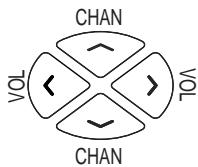
VOL +/- buttons will operate as CURSOR RIGHT/LEFT.
CHAN UP/DOWN keys will operate as CURSOR UP/DOWN.
For RCA, GE, & ProScan TVs pushing the MENU button will select the highlighted item. The numeric buttons may also be used to select the MENU choice.
Note: Not all functions in competitive models and brands of televisions may be fully supported.
Exiting the TV Menu Mode:
To exit the Menu Mode and clear the TV screen push the TV button on the remote. The INDICATOR LIGHT should go out indicating the remote is now out of TV Menu Mode and will revert to it's normal mode of operation.
Note: The remote will automatically exit the TV Menu Mode after 10 seconds of inactivity with no buttons being pushed.
Special notes:
- Because of the wide variety of menu formats, some experimenting may be required.
- SONY: Pressing the ENTER button while in menu mode returns to previous menu.
- ZENITH: Push the menu button a second time to move from the SET-UP MENU to the VIDEO MENU.


(BLINK)


Sleep Feature
This feature will turn off your TV at the time you choose from 1 to 99 minutes.
To Program Sleep Feature:
- Press and hold the SLEEP button. INDICATOR LIGHT will stay lit. Release the SLEEP button.
- Enter time in minutes using the numerical key pad. Indicator light should go off. (Minutes 1 thru 9: press 0 before the actual number Maximum: 99 minutes)
- Leave remote aimed at television.(Sleep Feature will not work unless remote is left aimed at television.)
INDICATOR
SLEEP

LIGHT

To Turn Off The Sleep Timer:
Sleep timer program will be cancelled and reset to zero by either of the following:
- Press and hold SLEEP button until INDICATOR LIGHT blinks or press ON-OFF button, turning TV OFF.


Trouble Shooting
| Problem | Solution |
| Indicator light not blinking when you press any button | A) Replace the batteries with 2 new AAA Alkaline batteries. B) Check that batteries are properly installed. |
| The Remote does not operate your device | A) Try all the codes listed for your brand. B) Try the Code Search method on page 9. |
| Not performing commands properly | Start Code Search over again to locate the proper code. |
| Problems programming a TV/VCR Combo Unit | Try the VCR code for your brand. Some combo units, however, may require both a TV and a VCR code for full operation. |
| VCR not recording | As a safety feature on your remote, you must press the REC button twice. |
| Channel up and down do not function on an RCA TV | Due to some designs, the original remote will only perform these functions. |
| Problems changing channels | If your original remote required ENTER after a channel, press ENTER after you select a channel. |
| No response after pressing a button | A) Make sure you have new batteries, and you are aiming your remote at your devices. B) Check that batteries are properly installed see page 3. |
| Sleep feature does not work | Remote must remain aimed at television after sleep is set in order for it to work. |
Note: Reprogramming may be required after batteries are removed.
Help Line
If you need additional set-up help please call the Helpline at: 1-800-420-7229
RCA Accessories
The following RCA accessories are available through your RCA dealer or by calling 1-800-338-0376.
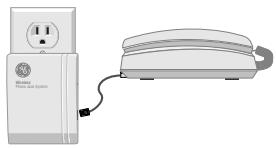
RC926 Wireless Phone Jack
Turn Just About Any Electrical Outlet Into A Phone Jack Instantly*
Exclusive technology sends phone signal through the electrical wiring in your home.
No Wiring, No Drilling, No Tools! Installs In Two Simple Steps
STEP1
Plug Base Unit into electrical outlet near an existing phone jack, and connect phone jack to Base Unit with included phone cord.
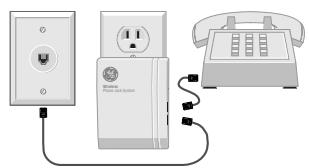
STEP 2
Plug Extension Unit into any other electrical outlet and connect phone to Extension Unit.
Works With:
Coreded Phones
Cordless Phones
Answering Machines
Fax Machines
Computer Modems
Compatible With:
Call Waiting
Call Forwarding
Three-Way Calling
Speed Dialing

Plus Shipping/Handling & Sales Tax
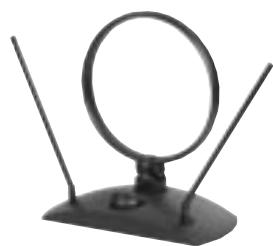
ANT200 Amplified TV Antenna
To receive UHF or VHF stations or serve as a backup for cable outages, purchase the RCA Amplified TV Antenna. Switching between your cable or satellite and your antenna is made easy with an integrated A/B switch. Hooks up to any TV and includes all necessary accessories.
Features include:
- Dipoles tilt and rotate for improved picture
- UHF Loop turn range of 345^
- Gold plated connectors for improved signal conductivity
- Manual Gain Control to Boost Signal
- Five-Year Limited Warranty
- Measures 8% H. X 8% W. X 4% D.

Plus Shipping/Handling & Sales Tax
ANT200
How To Order
To order, see your local RCA retailer. Or:
ORDER BY PHONE:
Have your Visa, MasterCard or Discover Card ready and call the toll-free number listed below. This number should only be used to place orders for the above-listed Accessories.
1-800-338-0376
ORDER BY MAIL:
Complete this order from and mail to: RCA Accessories PO Box 8419 Ronks, PA 17573
Include this completed form with your order.
| Description | Model # | Price | Qty. | Total |
| Wireless Phone Jack | RC926 | 59.95 | ||
| Amplified TV Antenna | ANT200 | 44.95 | ||
| Sales Tax | We are required by law to collect the appropriate sales tax for each individual state, county, and locality to which the merchandise is being sent. | |||
| Shipping and Handling | $5.00 | |||
| Total Amount Due | ||||
Name:
Address:
City/State:
Zip:
Daytime Phone Number:
Check Enclosed Money Order Enclosed
Visa MasterCard Discover
Card Number:
Exp: Signature:
Shipping and handling is charged for all orders.
Please allow 4-6 weeks for mail orders.
90 Day Limited Warranty
Thomson Consumer Electronics warrants that for 90 days from date of purchase this product is free from defects in material and workmanship. If the item is defective within that period, return it at your expense to the dealer from whom it was purchased together with proof of purchase for replacement. This warranty excludes defects or damage due to misuse, abuse, or neglect. The foregoing represents Thomson's sole obligation under this warranty.
This warranty gives you specific legal rights, and you may also have other rights which vary from state to state.
For purchases outside the United States, contact your dealer for warranty information
RCA
Help Line (US Only)
If you need additional set-up help, call our toll-free Help Line at 1-800-420-7229.
^ 念 1999 Thomson Consumer Electronics, Inc. Trademark(s)Registered Marca(s) Registrada(s)
First Class Postage Required
Thomson Consumer Electronics 2000 Clements Bridge Road Deptford NJ. 08096-2011
Attn: Remote Control
Purchase Registration
RCAI
Inside Card
RCU1300 Product Registration
Please complete and return this Purchase Registration Card right away. This information will help us get to know and service our customers better.
- Mr. Mrs. Ms. Name:
Address:
- Model: RCU1300
- Date of Purchase/Receipt as Gift: 4. Price: $
- Age of Purchaser/Gift Recipient:
16-25
□26-35
□36-45
46-55
56+
- What specific need did the Universal Remote help you resolve?
A. Replacing A Lost Remote
B. Replacing A Broken Remote
C. Consolidating Remotes
D. Adding an Extra Remote
- Where will this remote primarily be used? and with what brand? TV:
VCR: Cable Box:
A. Kitchen
B. Bedroom
C. Family Room/Living Room
D. Other
- How did you become aware of this remote?
A. Advertisement
B. Salesperson
C. Store Display
D. Received as a Gift
□ E. Friend or Relative
F. Other
- What other brands did you consider buying?
B.RCA
C. One For All
A. None
E. Magnavox
C. One For All
D. Zenith
E. Magnavox
□F.Sony
□G. Other
10.What factors most influenced this purchase? (Check up to 3)
□A. Brand
B. Features
C. Recommendation
D.Price
E. Received as a Gift
□F.Other
What suggestions do you have to improve this product?
Thank you for filling out this card. This information will help us better serve you and others who purchase RCA Consumer Electronics Products. We will not share your information with any other companies.