
DCT 561 FLEXO - Cordless phone SWITEL - Free user manual and instructions
Find the device manual for free DCT 561 FLEXO SWITEL in PDF.

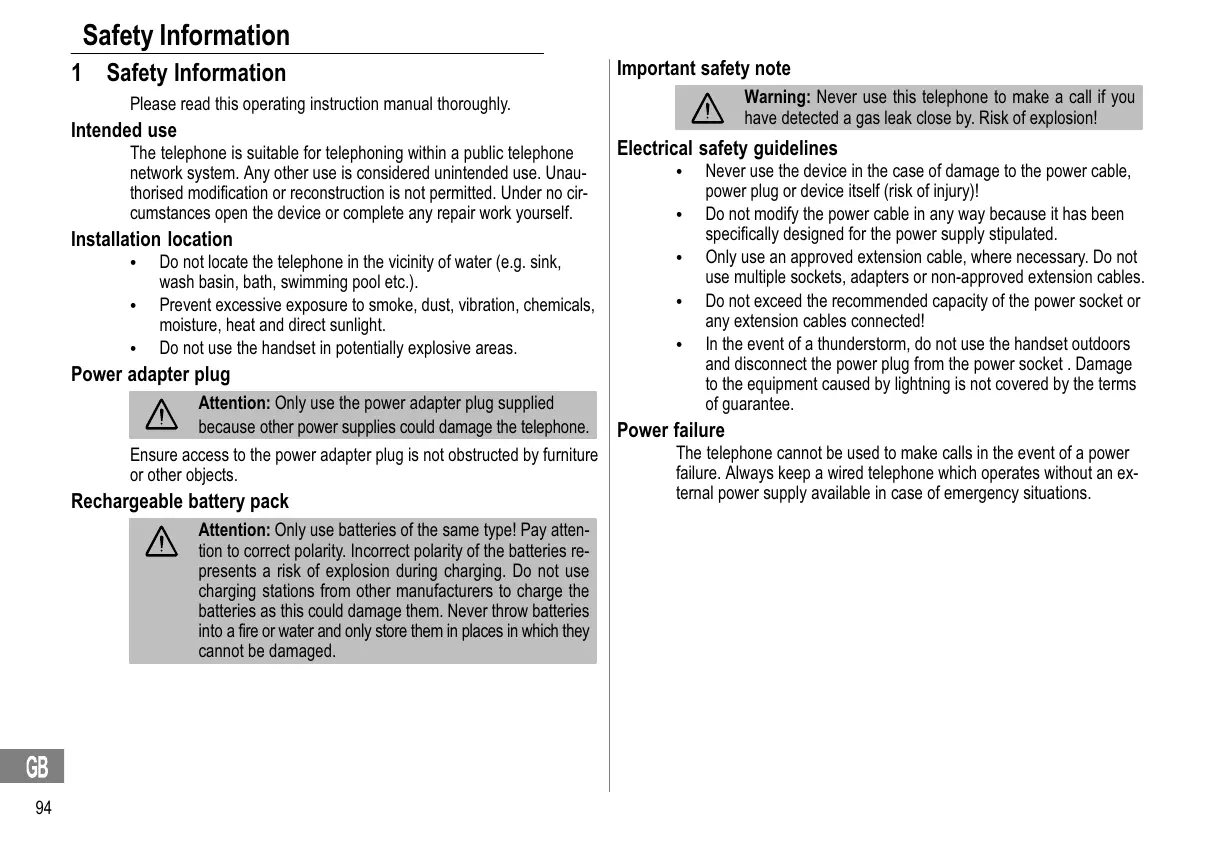


| Product type | DECT GAP cordless phone |
| Brand | SWITEL |
| Model | DCT 561 FLEXO |
| Base power supply | Input: 100-240 V ~ 50/60 Hz, output: 6 V 300 mA |
| Charger power supply | Input: 100-240 V ~ 50/60 Hz, output: 6 V 450 mA |
| Rechargeable batteries | NiMH 2.4 V 400 mAh |
| Standby time | Up to 100 hours |
| Talk time | Up to 10 hours |
| Outdoor range | Approx. 300 m |
| Indoor range | Approx. 50 m |
| Directory | Up to 50 contacts |
| Call list | Up to 20 entries |
| Last number redial list | Up to 10 entries |
| Maximum number of handsets | 5 |
| Display | LCD display with backlight |
| Main functions | Hands-free, intercom, conference, call transfer, directory, call list, alarm, eco mode |
| Eco mode | Reduced radiation in standby and communication |
| Safety | Keypad lock, gas leak lock (do not use) |
| Care and cleaning | Clean with a soft, dry cloth; do not use solvents. Disconnect before cleaning. |
| Warranty | 2 years (excluding batteries) |
| Operating temperature | 0 °C to 40 °C |
| Available spare parts | Rechargeable batteries, power adapter (via dealer or after-sales service) |
Frequently Asked Questions - DCT 561 FLEXO SWITEL
User questions about DCT 561 FLEXO SWITEL
0 question about this device. Answer the ones you know or ask your own.
Ask a new question about this device
Download the instructions for your Cordless phone in PDF format for free! Find your manual DCT 561 FLEXO - SWITEL and take your electronic device back in hand. On this page are published all the documents necessary for the use of your device. DCT 561 FLEXO by SWITEL.
USER MANUAL DCT 561 FLEXO SWITEL
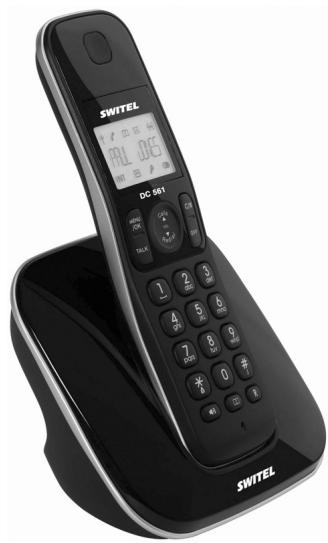
Low-radiation, cordless DECT/GAP telephone
Bedienungsanleitung
Mode d'emploi
Operating Instructions
DC 56x
SWITEL
Bedienungsanleitung 3
Mode d'emploi 33
Istruzioni per l'uso 63
Operating Instructions 93
Declaration of Conformity 124
1 CLIP: Calling Line Identification Presentation = Rufnummernan-zeige
Anruferliste öffnen
Installations PABX / Services comfort
12 Installations PABX / Services comfort
Communications internes, 44
Composer un numero, 44
Conferences telephoniques, 45
Configurations usine, 58
Intercommunication, 45
L
Langue de I'ecran, 38
Services comfort, 56
Snoopze, 54
Structure du menu, 52
Selection are a voice of the rubrica Telefonica. Infine:
Please read this operating instruction manual thoroughly.
Intended use
The telephone is suitable for telephoning within a public telephone network system. Any other use is considered unintended use. Unauthorized modification or reconstruction is not permitted. Under no circumstances open the device or complete any repair work yourself.
Installation location
- Do not locate the telephone in the vicinity of water (e.g. sink, wash basin, bath, swimming pool etc.).
- Prevent excessive exposure to smoke, dust, vibration, chemicals, moisture, heat and direct sunlight.
- Do not use the handset in potentially explosive areas.
Power adapter plug

Attention: Only use the power adapter plug supplied because other power supplies could damage the telephone.
Ensure access to the power adapter plug is not obstructed by furniture or other objects.
Rechargeable battery pack

Attention: Only use batteries of the same type! Pay attention to correct polarity. Incorrect polarity of the batteries represents a risk of explosion during charging. Do not use charging stations from other manufacturers to charge the batteries as this could damage them. Never throw batteries into a fire or water and only store them in places in which they cannot be damaged.
Important safety note

Warning: Never use this telephone to make a call if you have detected a gas leak close by. Risk of explosion!
Electrical safety guidelines
- Never use the device in the case of damage to the power cable, power plug or device itself (risk of injury)!
- Do not modify the power cable in any way because it has been specifically designed for the power supply stipulated.
- Only use an approved extension cable, where necessary. Do not use multiple sockets, adapters or non-approved extension cables.
- Do not exceed the recommended capacity of the power socket or any extension cables connected!
- In the event of a thunderstorm, do not use the handset outdoors and disconnect the power plug from the power socket. Damage to the equipment caused by lightning is not covered by the terms of guarantee.
Power failure
The telephone cannot be used to make calls in the event of a power failure. Always keep a wired telephone which operates without an external power supply available in case of emergency situations.
Medical equipment

Attention: Never use the telephone in the vicinity of medical equipment. Effects on such equipment cannot be fully ruled out.
DECT1 telephones can cause an unpleasant humming sound in hearing aids.
1 DECT: Digital Enhanced Cordless Telecommunication = Standard for cordless telephones.
Disposal
Old equipment
In order to dispose of your device, take it to a collection point provided by your local public waste authorities (e.g. recycling centre). According to laws on the disposal of electronic and electrical devices, owners are obliged to dispose of old electronic and electrical devices in a separate waste container. The adjacent symbol indicates that the device must not be disposed of in normal domestic waste!

Batteries
Risks to health and the environment from batteries!


Never open, damage or swallow batteries or allow them to pollute the environment. They could contain toxic and ecologically harmful heavy metals. You are legally obliged to dispose of power packs and batteries at the point of sale or in the corresponding containers provided at collection points by local public waste authorities. Disposal is free of charge. The above symbols indicate that the batteries must not be disposed of in domestic waste and that they must be disposed of at an authorised collection point.
Packing materials
Packing materials must be disposed of according to local regulations.
Preparing the Telephone
2 Preparing the Telephone
Safety information

Attention: It is essential to read the Safety Information in Chapter 1 before starting up.
Checking the package contents
The package contains:
| Content | DC 56X model | |||
| DC 561 | DC 5621 | DC 5631 | DC 5641 | |
| Base station with power adapter plug | 1 | 1 | 1 | 1 |
| Charging station with power adapter plug | - | 1 | 2 | 3 |
| Handset | 1 | 2 | 3 | 4 |
| Telephone connection line | 1 | 1 | 1 | 1 |
| Power pack | 1 | 2 | 3 | 4 |
| Operating instructions | 1 | 1 | 1 | 1 |
Connecting the base station

Attention: Position the base station at least 1 m away from other electronic devices, otherwise there is a risk of mutual disturbance.
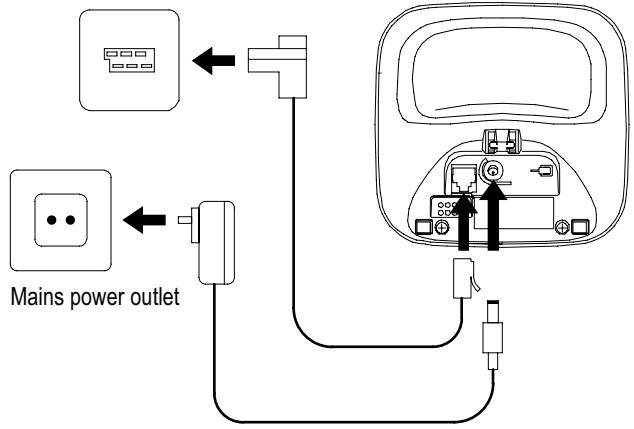
Connect the base station as illustrated in the diagram. For reasons of safety, only use the power adapter plug and telephone connection line supplied.
Telephone line socket
1 Visit www.switel.com to find out whether the telephone set is already available.
Important information
The telephone base station is equipped with an energy-efficient switching power supply (Input 100~240 VAC, Output 6 VDC, 300 mA).
The zero load is approx. 0.15 W. The average efficiency is approx.
65.9%. The base station has the following power consumption levels:
- in operation (standby/call): Approx. 0.5 W / 0.8 W
- while charging the handset: Approx. 1 W
The charging station(s) supplied with a telephone set is (are) equipped with an energy-efficient switching power supply (Input
100~240 VAC, Output 6 VDC, 450 mA).
The zero load is approx. 0.15 W.
The average efficiency is approx. 65.9% .
The charging station has the following power consumption levels:
- without a handset: Approx. 0.15 W
- while charging the handset: Approx. 0.6 W
Range
To use the telephone, the base station and handset may be maximally 300m apart outdoors and 50m apart indoors. These range values can be reduced if large, metallic objects are located between the base station and handset, e.g. refrigerators, mirrors, doors, filing cabinets, etc. Other solid objects, such as walls, also cause a reduction in the range as do sources of electrical interference.
Inserting the battery pack
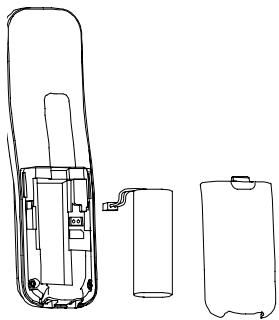
Slide the battery compartment cover downwards and then remove it. Connect the plug on the battery pack in the socket in the battery compartment. Insert the battery pack in the battery compartment. Only use the battery pack supplied. Pay attention that the cable is not jammed. Replace the cover back on the battery compartment and slide it upwards until it snaps into place.
Charging the battery pack

Before the handset is used for the first time, insert it in the base station/charging station for at least 16 hours.
When the handset is properly inserted in the base station / charging station, the charge control lamp lights up. The handset warms up during the charging process. This is normal and does not represent a risk. Do not charge the handset with charging units from other manufacturers. The current battery charge status is indicated in the display:

Full

Empty
Preparing the Telephone
Setting the display language
There are 13 languages available for selection.
Select the language required
"Menu Structure", Page 113:
In the default setting (German):
MENU OK >MT-EINSTEL.>SPRACHE>...
In another language (e.g. English):
HS SETTINGS>LANGUAGE
Setting the time and date on the handset
The time and date are set via the menu.
"Menu Structure", Page 113
Automatic answering
If this function is activated, an incoming call is taken when the handset is removed from the base station. The automatic answering function is activated and deactivated using the menu; "Menu Structure", Page 113
Private branch exchanges
The information on Page 116 explains how to install your telephone in a private branch exchange.
Low-radiation operation (ECO mode)
Both in Call mode as well as in Standby mode, the radiation is reduced considerably when ECO mode is activated as compared to standard, cordless DECT telephones.

3 Operating Elements
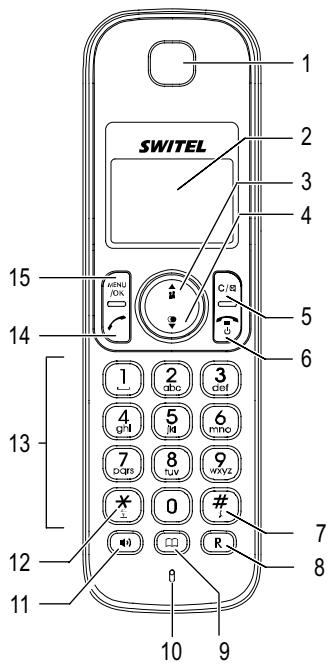
The buttons in this operating manual are subsequently depicted with a uniform contour. Therefore, slight deviations in the appearance of the symbols on the telephone buttons compared to those depicted here are possible.
Handset
1 Loudspeaker
2 Display
3 Scroll up / Increase volume / Call list
4 Scroll down / Reduce volume / Redialling
5 Right-hand softkey: Back/Delete/Muting/ Internal call C/8
6 On-hook/Back/ Switch on/off
7 Hash button #
8 R-button R
9 Phone book
10 Microphone
11 Handsfree
12 Star button
13 Digit keys
14 Call button
15 Left-hand softkey: Menu/OK button /Access to phone book, redalling list, call list and internal calls
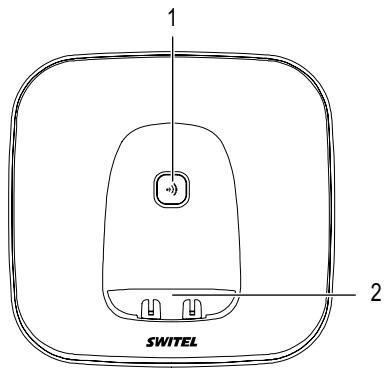
Base station
1 Locate handset (paging)
2 Charge contacts
Preliminary Information
4 Preliminary Information
This chapter provides basic information on using the operating instruction manual and the telephone.
Description of operating sequences in the manual
| Display | Description |
| Displays the contour of buttons | |
| MENDU /OK | Press the button depicted briefly |
| 3 sec. | Press the button depicted for 3 seconds |
| Hold R | Press and hold the button depicted |
| Release R | Release the button depicted |
| Enter digits or letters | |
| ((>) | Handset rings |
| ((>) | Base station rings |
| Remove the handset from the base station | |
| Place the handset in the base station | |
| REGISTER | Texts which appear in the display |
| Y | Icons which appear in the display |
| x | Denotes numbers which could differ, e.g. for the model identification of the device, numbering of the ring tones or numbering of the handsets. |
Icons and texts in the handset display Top bar of icons
The icons at the top of the display indicate function status.
| Icon | Description |
| Y | Continuously on: Handset within range of the base station. Flashing: Handset out of range of the base station. |
| = | Continuously on: An internal call is in progress. Flashing: An internal call has been received. Or: An internal handset has been dialled. |
| C | A call is in progress. |
| | | The handsfree facility is activated; |Page 105. |
| × | Continuously on: The alarm has been set. Flashing: The alarm is ringing. |
| @ | Key lock activated; @Page 106. |
| $ | The ringing tone of the handset is deactivated; $Page 106. |
| [ ] | Indicates the battery capacity (full, empty). |
Bottom bar of icons
The icons at the bottom of the display to the right and left serve to label the softkeys. The icons in the centre serve for navigation purposes and information.
| Icon | Description |
| ▲▲ ▲▲ | Further digits/characters to the left or right. |
| ◎ | Left-hand softkey: Open the main menu. |
| OK | Left-hand softkey: Confirm the selection. |
| ★ | Star icon New entry in the call list; ⊥ Page 108. Only appears when the call list is open. |
| ▲ | Further options are available by scrolling up and down. |
| → | Right-hand softkey: Move one level back in the menu structure. |
| C | Right-hand softkey: Digits/Characters are deleted, an alarm is stopped or the microphone is switched off or on during a call. |
| DD/MM | Displays the date; ⊥ Page 113. |
| hh:mm | Displays the time; ⊥ Page 113. |
Standby mode
All descriptions in this operating manual assume that the handset is in Standby mode. Press the button, several times if necessary, to activate Standby mode.
Energy-saving mode
When the handset has been in Standby mode for some time, it automatically switches to energy-saving mode. The buttons and display no longer light up.
Preliminary Information
Navigating in the menu
All the functions can be accessed via the various menus.
Refer to Menu Structure, Page 112, for information on how to access each respective function.
| MENU /OK | Open the main menu | |
| or | Select the required submenu | |
| MENU /OK | Open the submenu | |
| or | Select the required function | |
| MENU /OK | Open the function | |
| or | Select the required setting | |
| Use the digit keys to enter numbers or letters | ||
| MENU /OK | Confirm the input | |
| C/8 | Move one level back | |
| Interrupt the programming and saving processes and return to Standby mode |

Every process is automatically cancelled if there is no input within 30 seconds.
Creating phone book entries - example
The way in which to navigate through the menus and select settings is explained by means of the example Creating phone book entries. Proceed as in this example for all the settings.
| MENU /OK | Open the main menu | |
| / | PHONEBOOK, | Select Phonebook and confirm it |
| /OK | ||
| All the phone book entries are listed. | ||
| MENU /OK | Open the submenu | |
| / | ADD, | Select the submenu and confirm it |
| /MENU /OK | ||
| NAME | /MENU /OK | Enter the name (max. 12 characters) and save it |
| NUMBER | /MENU /OK | Enter the phone number (max. 20 digits) and confirm it |
| ALARM TONE x | / | Select a melody and confirm it |
| /MENU /OK | ||
5 Telephoning
Taking a call
| ( ) and/or ( ) , | Take the call |
| If the handset is in the base station and automatic answer (AUTO ANSWER) is activated, you only need to take the handset from the base station to take the call. | |
Ending a call

End the call
or Place the handset back in the base station.
Call indicator
If the caller permits the display of his phone number (CLIR ^1 ) and you have activated your caller number display (CLIP ^2 ), the number of the caller appears in the display.
The caller number display (CLIP²) is an optional service provided by your network operator. If this service is not available, the caller's number is not displayed when a call is received. Contact your network provider for further information.
If the caller's number is stored in the phone book, Page 110, the number and associated name of the caller flash alternately in the handset display. In addition, the ringing tone assigned to the respective number in the phone book rings.
If no caller number display is available or a caller has suppressed his caller number display, "CALL" appears in the display. Such calls are not recorded in the call list.
1 CLIR: Calling Line Identification Restriction = Caller number suppression
2 CLIP: Calling Line Identification Presentation = Caller number display
Making a call
| Enter the phone number (max. 20 digits) | |
| Delete the last digit if incorrect | |
| Dial the phone number | |
| It is also possible to press the Call button first to obtain the dialling tone for an outside line. The digits then entered are dialled immediately. It is not possible to correct wrong digits individually using this dialling procedure. |
Dialling numbers from the redalling list
The telephone stores the last 10 numbers dialled in a redalling list; Page 107.
| Open the redialling list | |
| Select the entry required and dial it |
Dialling numbers in the call list
The telephone stores the numbers of the last 20 calls received in a call list; Page 108.
| Open the call list | |
| Select the entry required and dial it |
Telephoning
Dialling numbers from the phone book
Phone numbers must have been stored in the phone book for this function.
Pages 102 and 110.

Open the phone book

Select the entry required and dial it

In order to move directly to the first letter of the phone book entry required, press the key to enter the corresponding letter.
Internal calls
You must have registered at least two handsets (HS1, HS2, ...) on the base station in order to make internal calls between them free of charge; "Checking the contents of the package", Page 96 and "Registering handsets", Page 115.
Making internal calls
HS1: / 8 and e.g. 2
Dial the internal call number of the handset required, e.g. HS2

If only two handsets are registered on the base station, simply press the / s button to call the other handset.

After pressing the / 8 button, all the handsets registered on the base station are listed in the display. "9" also appears in the list. If you select the "9", all the handsets registered on the base station are called.
HS2:
Take the internal call on the other handset

If the handset dialled does not take the call within 60 seconds, it stops ringing and the handset making the call switches to Standby mode.

If an internal call is in progress and you receive an external call, you will hear an information tone. The call is indicated in the display; "Call indicator". End the internal call before taking the external call.
HS1/HS2:

End the internal call
Forwarding external calls internally
When an external call is in progress:
| HS1: | / | / | SELECT the submenu and confirm it |
| HS1: | / | / | Select the submenu and confirm it |
| HS1: | / | e.g. | Dial the number of the handset required |
| HS2: | / | / | Take the internal call on the other handset |

If the handset called does not answer, take the external call back by pressing the button.

Forward the call

Alternatively to pressing the button, you can replace the handset in the base station.
Holding a call / brokering
While a call is in progress, it is possible to dial another handset in order to consult with someone. The external caller is put on hold while you converse with the second, internal person called. You can repeat this procedure as often as required.
| HS1: MENU /OK, e.g. 2/3 | Dial the internal handset number while making the external call |
| HS2: | Take the internal call on the other handset |
| HS2: | Switch between the callers |
Making conference calls
An external call can be transferred to include another internal handset for a conference call.
When an external call is in progress:
| HS1: | MENU /OK | Open the main menu |
| HS1: | / | SELECT the submenu and confirm it |
| HS1: | e.g. | Dial the number of the handset required |
| HS2: | Take the internal call on the other handset | |
| HS1: | Hold down | Start the conference |
| HS1/HS2: | End the conference |

If the conference is ended by just one handset, the other handset remains connected to the external caller.
Displaying the duration of a call
Approximately 15 seconds after a telephone conversation starts, the duration of the call appears in the display in hours, minutes and seconds. When the call is ended, the call time remains in the display for 5 seconds.
Setting the receiver volume
The volume can be adjusted to one of 5 levels during a call.
| or | Select the required volume level |
Handsfree
This function is used to listen to the caller via the loudspeaker.
| Enable handsfree talking |
| Disable handsfree talking |
| Use the arrow up and down buttons to set the handsfree volume to one of five levels; “Setting the receiver volume”. |
Muting the microphone in the handset
The microphone in the handset can be activated and deactivated during a telephone conversation. The caller can no longer hear you when you consult with someone.
| C/8 | Deactivate the microphone (muting function on) |
| C/8 | Activate the microphone |
Telephoning
Switching the loudspeaker in the handset off
The handset's ringing tone can be switched off. Activate Standby mode and proceed as follows:
Hold down #
Switch the loudspeaker off

An incoming call is then only indicated in the display; "Call indicator".
Hold down #
Switch the loudspeaker on
Searching for the handset (Paging)
If you have mislaid your handset, you can locate it again with the aid of a search (paging) tone.
()
Activate the paging tone
or
Deactivate the paging tone

The paging tone continues to ring for 60 seconds if not stopped manually beforehand.

If a call is received while paging, the paging tone is stopped and the phone rings normally.
Key lock
The key lock feature prevents functions assigned to buttons being activated accidentally.
Hold down
Activate the key lock
Hold down
Deactivate the key lock
Switching the handset off and on
You can switch the handset off to save the battery pack.
5 sec.
Switch the handset off
5 sec.
Switch the handset on
6 Redalling List
The telephone stores the last 10 numbers dialled in a redalling list.
The last number dialled appears at the top of the redalling list.

If a telephone number is stored in the phone book, the name assigned to the number appears in the redalling list. To view the phone number, press the # button.
Dialling numbers from the redalling list
| Open the redalling list | |
| Select the entry required and dial it |
Saving a number in the redalling list in the phone book
| Open the redalling list | ||
| Select the required entry | ||
| MENU /OK | ADD TO PB, MENU /OK | Open the submenu |
To continue, refer to Chapter "Creating phone book entries",
Pages 102 and 110.
Deleting numbers from the redalling list
Deleting individual numbers from the redalling list
| Open the redialling list | |||
| / | Select the required entry | ||
| Open the submenu | |||
| / | DELETE, | Select the submenu and confirm it | |
Deleting all the numbers from the redalling list
| Open the redialling list | ||
| MENU/OK | Open the submenu | |
| DELETE ALL, | Select the submenu and confirm it | |
| MENU/OK | ||
| CONFIRM? | , | Confirm the prompt |
7 Call List
The telephone stores the numbers of the last 20 calls received in a call list.
The calls are saved with the date and time of receipt. The last call received appears at the top of the list. When the call list is full and a new call is received, the oldest entry in the call list is deleted.
If a phone number received is stored in the phone book, the name assigned to the number appears in the call list.
When new entries are recorded in the call list, the number of new calls appears in the handset display when Standby mode is active (x NEW CALLS). This information remains in the display until all the new call list entries have been viewed. New entries in the call list which have not yet been viewed are indicated by a star.

The caller number display (CLIP^1) is a supplementary service offered by your telephone network provider. The caller's number appears in the display if the service is offered by your telephone network provider. Please contact your network operator for further information; "Call indicator", Page 103.

If callers suppress the display of their phone number, only "CALL" appears in the display. Such calls are not recorded in the call list.
1 CLIP: Calling Line Identification Presentation = Caller number display
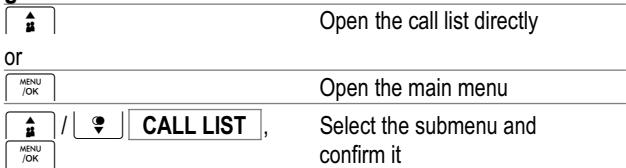
Opening the call list
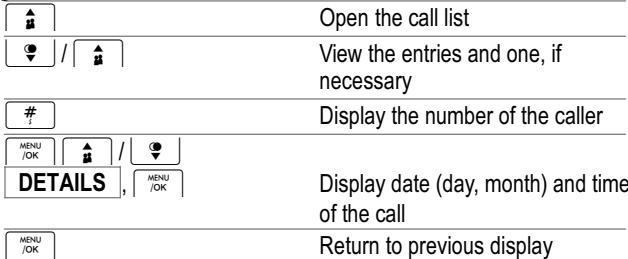
Viewing the calls list
Dialling numbers in the calls list
The telephone stores the numbers of the last 20 calls received in a call list; Page 108.

Storing numbers from calls list in the phone book
| Open the call list | |
| Select the required entry |
| MENU /OK | ADD TO PB | MENU /OK |
To continue, refer to Chapter "Creating phone book entries", Pages 102 and 110.
Deleting numbers from the call list
Deleting individual numbers from the call list
| Open the call list | |
| Select the required entry | |
| Open the submenu | |
| Select the submenu and confirm it |
Deleting all the numbers from the call list
| Open the call list | |
| / Open the submenu | |
| / DELETE ALL, Select the submenu and confirm it | |
| CONFIRM? | / Confirm the prompt |
Phone Book
8 Phone Book
You can use the phone book to store up to 50 phone numbers together with the associated names. Each phone number can be assigned a specific ringing tone.
Opening the phone book
| Open the phone book directly or | |
| MENU /OK | Open the main menu |
| /PHONEBOOK, Select Phonebook and confirm it | |
The phone book entries are arranged alphabetically.
Creating a phone book entry
| Open the phone book | |
| Menu /OK | Open the submenu |
| / ADD, | Select the submenu and confirm it |
| MENU /OK | |
| NAME MENU /OK | Enter the name (max. 12 characters) and confirm it |
| NUMBER MENU /OK | Enter the phone number (max. 20 digits) and confirm it |
| ALARM TONE x / ↓ | Select a melody and confirm it |
| Menu /OK | |
Entering names
Letters are also imprinted on the digit keys. Letters, digits and special characters are entered by pressing the relevant key the respective number of times.
| 1 | Enter a space |
| or | Move cursor to the left or right |
| C/8 | Delete the character |
| Hold down | Delete entire text |
| *2 and #1 | Enter special characters |

To enter the same letter twice, press the button to enter the letter. Wait until the cursor skips one position forwards. Enter the letter again.
Selecting a phone book entry
In order to move directly to the first letter of the phone book entry required, open the phone book and press the key to enter the corresponding letter. Then use the and buttons to navigate to the required phone book entry.
Viewing a phone book entry
Select a phone book entry. Then:
| MENU /OK | Open the phone book menu | |
| / | VIEW, | Select the submenu and confirm it |
| / | / | View the details assigned to the phone book entry (name, phone number, ringing tone) |
| The display can accommodate 12 characters. If a phone number has more than 12 digits, press the MENU /OK and C/88 buttons to view the other digits in the number. | ||
Editing a phone book entry
Select a phone book entry. Then:
| MENU /OK | Open the phone book menu | |
| / ↓ ↓ EDIT, | Select the submenu and confirm it | |
| MENU /OK | ||
| Hold down C/α ↓ ↓ ↓ MENU /OK | Delete the old name, enter a new one (max. 12 characters) and save it | |
| Hold down C/α ↓ ↓ ↓ MENU /OK | Delete the old phone number, enter a new one (max. 20 digits) and save it | |
| Press the C/8 once to delete individual letters and digits. Before doing so, use the ↑ and ↓ buttons to move the cursor to the character you want to delete. | |
| / ALARM TONE x, Change the ringing tone and confirm it |
Deleting a phone book entry
Select a phone book entry. Then:
| MENUL /OK | Open the phone book menu | ||
| / ∑ | DELETE, | Select the submenu and confirm it | |
| MENU /OK |
Deleting all phone book entries
| Open the phone book | |
| MENU /OK | Open the phone book menu |
| / DELETE ALL, | Select the submenu and confirm it |
| MENU /OK | |
| CONFIRM? | MENU /OK Confirm the prompt |
Requesting the phone book status
You can call in details as to how many phone book entries are stored in the respective handset.
| Open the phone book | |
| Menu /OK | Open the phone book menu |
| / PB STATUS, Select the submenu and confirm it | |
Example: If < 20/50> appears in the display, it indicates that 20 phone book entries are stored. A maximum of 50 phone book entries are possible.
9 Menu Structure
Main menu
Press the button to open the main menu. Navigation through the menus and how to enter data is explained on Page 102.
The current settings are indicated by a star icon in the menu structure.
| CALL LIST | ADD TO PB | NAME é | NUMBER é | ALARM TONE1 / ... / ALARM TONE10 |
| PHONEBOOK | DELETE | |||
| DELETE ALL | CONFIRM? | |||
| DETAILS | ||||
| ADD | NAME é | NUMBER é | ALARM TONE 1 / ... / ALARM TONE10 | |
| BS SETTINGS | VIEW | |||
| EDIT | NAME é | NUMBER é | ALARM TONE 1 / ... / ALARM TONE10 | |
| DELETE | ||||
| DELETE ALL | CONFIRM? | |||
| PB STATUS | xx/50 USED | |||
| BS RINGER | ALARM TONE | |||
| RING VOLUME | VOLUME 1 / ... / VOLUME 5 / VOLUME OFF | |||
| DELETE HS | PIN?1 PINE | HANDSET X | ||
| DIAL MODE | TONE/PULSE | |||
| FLASH TIME | SHORT/MEDIUM/LONG | |||
| CHANGE PIN | PIN?1 PINE | NEW PIN? PINE | CONFIRM? PINE | |
| HS SETTINGS | ALARM | ON | Wake-up time | SNOOZE | ON/OFF |
| RING SETUP | OFF | ||||
| INT. RING | ALARM TONE 1 / ... / ALARM TONE10 | ||||
| TONE SETUP | EXT. RING | ALARM TONE 1 / ... / ALARM TONE10 | |||
| RING VOLUME | VOLUME 1 / ... / VOLUME 5 / VOLUME OFF | ||||
| KEY TONE | ON/OFF | ||||
| LANGUAGE | BATTERY TONE | ON/OFF | |||
| OUT OF RANGE | ON/OFF | ||||
| 13 languages1 | |||||
| RENAME HS | Delete old HS name2 | New HS name | |||
| HS DISPLAY | HANDSET NAME | ||||
| AUTO ANSWER | TIME3 | ||||
| ON/OFF | |||||
| DATE & TIME | DATE FORMAT | DD-MM-YY/MM-DD-YY | |||
| TIME FORMAT | 12 HR/24 HR | ||||
| SET TIME | Time | ||||
| SET DATE | Date | ||||
| REGISTRATION | PIN?4 | CONFIRM? | |||
| DEFAULT | PIN?4 |
1 English, German, French, Italian, Turkish, Spanish, Greek, Swedish, Danish/Norwegian, Dutch, Finnish, Polish.
2 The number of the handset cannot be deleted, it can only be altered by addind a text to precede the number.
3 The number of the handset remains visible even when displaying the time.
4 The default PIN code is "0000".
Alarm Function
10 Alarm Function
You can set an alarm time in the telephone, e.g. to remind you of an appointment or to wake you up.
When the alarm time set is reached, the alarm icon in the handset display flashes, as does the "ALARM ON" message, and an acoustic signal is issued for 45 seconds. The volume of the acoustic alarm signal corresponds to that of the set ringing volume.

The acoustic alarm is also issued when a phone call is in progress. You hear a different acoustic signal from the handset. The alarm clock icon and "ALARM ON" message flash in the display.

The acoustic alarm clock signal is not issued when the phone is already ringing or the Paging function has been activated to locate handsets; ^一 Page 106.
Activating/Deactivating the alarm function
When the alarm function is activated, the alarm clock icon appears in the display.
| / / | Open the main menu |
| / / | Select the submenu and confirm it |
| / / | ALARM, Select the submenu and confirm it |
| / / | ON Select On or Off |
| or OFF, | / / Menu /OK and confirm |
| / / | Menu Structure, Page 113 |
Setting the alarm time
Menu Structure, Page 113

Enter the alarm time according to the 24-hour clock.
Activate/Deactivate the snooze function
If the Snooze function is activated, the acoustic alarm signal is repeated 7 minutes after it has been switched off.
F Menu Structure, Page 113
Switching off the alarm

The alarm can be switched off as described here even when an internal or external call is in progress.
Switch alarm off permanently when Snooze is not active

Press any button to switch the alarm off permanently
Switch alarm off permanently when Snooze is active
Hold down

Press the button down until the alarm clock icon disappears from the display; alarm/snooze function is deactivated
Switch alarm off briefly when Snooze is active
The acoustic alarm signal is switched off for 7 minutes after pressing any button.

Press any button to switch the alarm off briefly

The alarm can be switched off briefly in the way described here even when the key lock function is activated.
11 Extending the Telephone System
The internationally approved GAP^1 standard regulates the compatibility of handsets and base stations from different manufacturers. As a result, it is possible to integrate SWITEL devices and devices from other manufacturers together in one telephone system. It is possible, however, that some functions are not available.
Registering handsets
Up to 5 handsets can be registered on the base station. All handsets contained within the scope of delivery of this telephone set are already registered with the base station.
To complete the registration process, you need the current 4-digit PIN code2; Page 113.
Before starting to register a handset, switch the base station to Registration mode.
5 sec.
Wait for an acoustic signal: Start Registration mode
The base station is then in Registration mode for approx. 1 minute. Continue with the handset. The registration process must be completed within this one minute period:
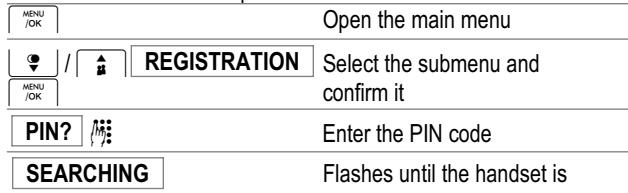
When the registration process is completed successfully, you will hear a confirmation signal, the antenna icon lights up permanently and the handset is assigned an internal call number which appears in the display in Standby mode.
1 GAP: Generic Access Profile = Standard for the interoperation of handsets and base stations from different manufacturers.
2 The 4-digit PIN code is set to 0000 by default.

Each handset can only be registered on one base station.
Deregistering handsets
To complete the deregistration process, you need the current 4-digit PIN code; Page 113.

You cannot complete the deregistration process from the handset you want to deregister!
Handsets are deregistered via the menu; Page 113.
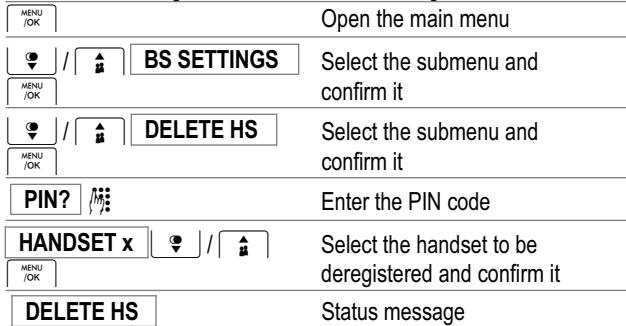
The antenna icon flashes in the display of the deregistered handset. The REGISTRATION message also appears.
12 PBX / Supplementary Services
R function in private branch exchanges
If the telephone is connected to a private branch exchange, functions such as transferring calls and automatic call back can be used via the R button. Refer to the operating manual provided with your private branch exchange as to which Flash time must be set in order to use these functions. The sales outlet where you purchased the exchange can provide information as to whether the telephone will work properly with the exchange. The Flash time is set using the menu. Refer to Page 112 for the sequence of menu option selections.
R function (Flash) and supplementary services
Your telephone supports supplementary services provided by your telephone network provider, such as brokering, call waiting and conference facilities. These supplementary services can be used by implementing the R button. Please contact your telephone network provider regarding which Flash time must be set to use the supplementary services. Also contact your telephone network provider with regard to enabling supplementary services. The Flash time is set using the menu. Refer to Page 112 for the sequence of menu option selections.
Caller number display (CLIP)

The caller number display (CLIP) is a supplementary service offered by your telephone network provider. Contact your network provider for further information.
If this function is available with your telephone line, the number of the caller appears in the display when the phone rings. If the caller has suppressed transmission of his phone number, the corresponding message appears in the display. The phone number is not displayed and, as a result, is not stored in the call list.
1 CLIP: Calling Line Identification Presentation = Displays the caller's phone number.
Dialling pause
When using private branch exchanges, it is necessary to dial an access code to obtain the dialling tone for an outside line. When using some older private branch exchanges, it takes a little time before the dialling tone becomes audible. In the case of such private branch exchanges, a dialling pause can be inserted after the number for an outside line in order to continue dialling directly without having to wait for the dialling tone.
2 sec. R
Insert a dialling pause
The actual phone number is dialled a certain time after the number for an outside line.

The dialling pause can also be entered with the phone numbers in the phone book.
13 In Case of Problems
Service Hotline
Should problems arise with the telephone, please refer to the following information first. In the case of technical problems, you can contact our hotline service, Tel. 0900 00 1675 within Switzerland (Swisscom fees at time of going to print: CHF 2.60/min). In the case of claims under the terms of guarantee, please contact your sales outlet. There is a 2 year period of guarantee.
Problems and solutions
| Problems | Corrective measures |
| No connection to base station possible | - Check that the handset has been registered on the base station with the correct PIN code; ☑ Page 112. |
| Connection is disturbed or cut off | - The handset is too far from the base station. - The base station is in an unsuitable location. |
| No display | - Charge the battery pack; ☑ Page 97. |
| The battery pack is empty in a short time | - The rechargeable battery pack is empty or defect. - Place the handset in the base station properly. Clean the contact surfaces on the handset and base station with a soft, dry cloth. - Place the handset in the base station for 16 hours. |
| No telephone calls possible | - A call is already in progress from another handset. - The handset is too far from the base station. - The rechargeable battery pack is empty or defect. - The telephone is not connected properly or is defective. Only use the telephone connection cable supplied. Check that all cables are correctly connected; disconnect the cable, if necessary, and then plug it in again. - The power adaptor plug is not plugged in or there is a complete power failure. - Test whether the telephone connection is in order by using another telephone. - The dialling mode selected is incorrect; Page 112. |
| The system no longer responds | - Disconnect the power adapter plug brie-fly from the power socket. - Return all the functions to their default status using the “DEFAULT” function; Page 113. |
| The caller number display (CLIP) does not function | - The CLIP feature is a supplementary service provided by your network operator; “Call indicator”, Page 103. Contact your network provider for further information. - The caller has suppressed the transmission of their phone number. |
Technical Properties
14 Technical Properties
Technical data
| Feature | Value |
| Standard | DECT1 |
| Standby time | Up to 100 h |
| Max. talk time | Up to 10 h |
| Range | Outdoors: Approx. 300 m Indoors: Approx. 50 m |
| Languages, handset | 13 languages; ☐ Page 113 |
| Phone book | Max. 50 entries |
| Call list | Max. 20 entries |
| Redialling list | Max. 10 entries |
| Dialling mode | Tone dialling, pulse dialling |
| Flash | 100 ms, 300 ms, 600 ms |
| Power supply (base station) | Input: 100-240 V, 50/60 Hz Output: 6 V, 450 mA |
| Power supply (charging station) | Input: 100-240 V, 50/60 Hz Output: 6 V, 300 mA |
| Rechargeable battery pack | NiMH 2.4 V 400 mAh |
| Operating temperature | 0 °C to 40 °C |
| Storage temperature | -20 °C to 60 °C |
1 DECT: Digital Enhanced Cordless Telecommunication = Standard for cordless telephones.
Default settings
The default settings are restored using the menu; ^一 Page 113, DEFAULT menu option.
Handset
| Language | German |
| Internal ringing tone | 5 |
| External ringing tone | 6 |
| Alarm signal | 1 |
| Volume, internal ringing tone | 5 |
| Volume, external ringing tone | 5 |
| Receiver volume | 3 |
| Handsfree mode volume | 4 |
| Key tone | On |
| Confirmation signal | On |
| Confirmation tone: Battery charge low | On |
| Confirmation tone: Handset at maximum range | On |
| Auto answer | Off |
Base station
| Ring melody | 3 |
| Volume, ringing tone | 4 |
| Dialling mode | Tone |
| Flash (Recall) | 100 |
| PIN | 0000 |
| ECO mode | On |
Declaration of Conformity
This device fulfils the requirements stipulated in the EU directive:
1999/5/EC directive on radio equipment and telecommunications terminal equipment and the mutual recognition of their conformity. Conformity with the above mentioned directive is confirmed by the CE mark on the device. To view the complete Declaration of Conformity, please refer to the free download available on our web site www.switel.com.

15 Maintenance / Guarantee
Maintenance

Attention: Disconnect the power plug from the power socket before starting any cleaning work.
- Clean the housing surfaces with a soft, slightly damp, fluff-free cloth.
- Do not use any cleaning agents or solvents.
Guarantee
SWITEL equipment is produced and tested according to the latest production methods. The implementation of carefully chosen materials and highly developed technologies ensure trouble-free functioning and a long service life. The terms of guarantee do not apply where the cause of equipment malfunction is the fault of the telephone network operator or any interposed private branch extension system. The terms of guarantee do not apply to the batteries or power packs used in the products. The period of guarantee is 24 months from the date of purchase.
All deficiencies related to material or manufacturing errors within the period of guarantee will be redressed free of charge. Rights to claims under the terms of guarantee are annulled following tampering by the purchaser or third parties. Damage caused as the result of improper handling or operation, normal wear and tear, incorrect positioning or storage, improper connection or installation or Acts of God and other external influences are excluded from the terms of guarantee. In the case of complaints, we reserve the right to repair defective parts, replace them or replace the entire device. Replaced parts or devices become our property. Rights to compensation in the case of damage are excluded where there is no evidence of intent or gross negligence by the manufacturer.
If your device does show signs of a defect within the period of guarantee, please contact the sales outlet where you purchased the SWITEL device, producing the purchase receipt as evidence. All claims under the terms of guarantee in accordance with this agreement can only be asserted at the sales outlet. No claims under the terms of guarantee can be asserted after a period of two years from the date of purchase and hand-over of the product.
16 Index
A
Activate/Deactivate the snooze function, 114
Activating/Deactivating the alarm function, 114
Alarm function, 114
B
Base station, 96, 99
Battery charge status, 97
Brokering, 105
C
Callindicator,103
Call list, 108
Caller number display, 116
Charging, 97
CLIP, 116
Conference calls, 105
Creating a phone book entry, 110
D
Date, 98
Declaration of Conformity, 119
Default settings, 118
Deleting a phone book entry, 111
Deleting all phone book entries, 111
Deleting numbers from the call list, 109
Deleting numbers from the redalling list, 107
Deregisteringhandsets,115
Dialling, 104
Dialling numbers from the redialling list, 103, 107
Dialling numbers in the calls list, 103, 108
Dialling pause, 116
Display, 100
Display icons, 100
Display language, 98
E
ECO mode, 98
Editing a phone book entry, 111
Ending a call, 103
Energy save mode, 101
Entering names, 110
Entering text, 110
Extending, 115
F
Forwarding calls, 104
G
Guarantee, 120
H
Handsfree, 105
Holding a call, 105
1
Icons, 100
Inserting the battery pack, 97
Internal calls, 104
K
Key lock, 106
L
Low-radiation, 98
M
Main menu, 112
Maintenance,120
Making a call, 103
Menu structure, 112
Muting, 105, 106
Muting button, 105
N
Notation, 100
0
Opening the call list, 108
Opening the phone book, 110
Operating elements, 99
Operation, 100
P
Package contents, 96
Paging, 106
PBX systems, 116
Phonebook,104,110
Phone book entries, 102
Problems, 117
R
R function, 116
Receiver volume, 105
Redialling list, 107
Registeringhandsets,115
Replace receiver, 103
s
Safety information, 94
Save, 102
Saving a number in the redialling list in the phone book, 107
Searching for the handset, 106
Selecting a phone book entry, 110
Service-Hotline, 117
Setting the alarm time, 114
Snoopze, 114
Standby mode, 101
Starting up, 96
Storing number from calls list in phone book, 109
Supplementary services, 116
Switching off, 106
Switching off the alarm, 114
Switching on, 106
Switching the loudspeaker off, 106
T
Taking a call, 98, 103
Talk time, 105
Technical data, 118
Telephoning, 103
Time, 98
Transferring calls, 104
Troubleshooting, 117
V
Viewing a phone book entry, 111
Viewing the calls list, 108
SWITEL
Declaration of Conformity
This equipment complies with the European R&TTE directive.
To view the complete Declaration of Conformity, please refer to the free download available at our web site: www.switel.com.
Service Hotline
In the event of technical problems, you can contact our hotline service, Tel. 0900 00 1675 within Switzerland (cost via Swisscom at time of going to print: CHF 2.60/min).
