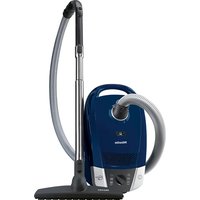
SELECT CONFORT - Vacuum without a bag MIELE - Free user manual and instructions
Find the device manual for free SELECT CONFORT MIELE in PDF.


User questions about SELECT CONFORT MIELE
0 question about this device. Answer the ones you know or ask your own.
Ask a new question about this device
Download the instructions for your Vacuum without a bag in PDF format for free! Find your manual SELECT CONFORT - MIELE and take your electronic device back in hand. On this page are published all the documents necessary for the use of your device. SELECT CONFORT by MIELE.
USER MANUAL SELECT CONFORT MIELE
Warning and Safety instructions 29
Description of the appliance 34
Caring for our environment 36
Preparing for use 37
Using the accessories supplied 39
Use 39
Setting down, transportation and storage 42
Maintenance 43
Purchasing new dustbags and filters 43
Ordering the correct dustbags and filters 43
When to change the dustbag 43
How the dustbag change indicator works. 44
How to replace the dustbag 44
When to change the dust compartment filter (for motor protection) 44
How to change the dust compartment filter 44
When to change the exhaust filter 45
How to replace the Air Clean filter 45
How to replace an ActiveAirClean 50 filter or a HEPA AirClean 50 filter. 45
Replacing one type of exhaust filter with another 46
Maintenance indicator with reset button 46
When to change the battery in the radio-operated handle 46
How to change the battery in the radio-operated handle 47
When to change the thread lifters 47
How to replace the thread lifters 47
Cleaning the roller on the floorhead 47
Cleaning and care 47
Problem solving guide 48
After sales service 48
Guarantee 48
Optional accessories 48
Electrical connection for the UK 51
Electrical connection AU, NZ 51
This vacuum cleaner complies with statutory safety requirements. Improper use can, however, lead to personal injury and damage to property.
To avoid the risk of accidents and damage to the vacuum cleaner, please read these instructions carefully before using it for the first time. They contain important information on its safety, operation and maintenance.
Keep these instructions in a safe place and ensure new users are familiar with the content. Pass them on to any future owner.
Correct application
This vacuum cleaner is not designed for commercial use. It is intended for use in domestic households and similar working and residential environments.
The vacuum cleaner is not intended for outdoor use.
The vacuum cleaner must only be used for domestic household purposes to vacuum dry floor surfaces. Do not use on people or animals. Any other usage, modification or alteration is not supported by the manufacturer and could be dangerous.
This appliance can only be used by people with reduced physical, sensory or mental capabilities, or lack of experience or knowledge, if they are supervised whilst using it, or have been shown how to use it in a safe way and recognise and understand the consequences of incorrect operation.
Safety with children
Children under 8 years of age must be kept away from the appliance unless they are constantly supervised.
Children 8 years and older may only use the vacuum cleaner unsupervised if they have been shown how to use it in a safe way and recognise and understand the consequences of incorrect operation.
Children must not be allowed to clean or maintain the appliance unsupervised.
Please supervise children in the vicinity of the vacuum cleaner and do not let them play with it.
Models with radio controls on the handle: Keep batteries out of the reach of children.
Technical safety
Before using the vacuum cleaner, check for any visible signs of damage. Do not use a damaged appliance.
Ensure that the connection data on the data plate (voltage and frequency) match the mains electricity supply exactly
The plug must be fitted with a 13 A fuse (UK).
While the vacuum cleaner is under guarantee, repairs should only be undertaken by a Miele authorised service technician. Otherwise the guarantee will be invalidated.
Do not pull or carry the appliance by the cable, and be careful not to damage the cable when withdrawing the plug from the socket.
Keep the cable away from sharp edges and do not let it be squashed, for example, under a door.
Avoid running the vacuum cleaner over the cable. This could damage the cable, plug or socket. The appliance must not be used if any of these have suffered damage. A damaged cable, plug or socket is a safety hazard.
Do not use the vacuum cleaner if the cable is damaged. If the cable is damaged it must be replaced together with a complete cable rewind. For safety reasons this work must be done by the Miele Service Department or a Miele authorised service technician.
The socket on the vacuum cleaner (depending on model) must only be used for the Miele Electrobrush specified for use with this appliance.
When vacuuming especially fine dust, e.g. sawdust, sand, plaster, flour, talcum powder etc., electrostatic charges build up naturally. Under certain conditions these charges will be released. To avoid the unpleasant effects of these discharges, a metal inlay has been incorporated into the underside of the handle. Please make sure that you keep your hand in constant contact with this metal strip during vacuuming.
Always disconnect the vacuum cleaner from the mains supply when you have finished using it, before changing over accessories, as well as for maintenance work and cleaning. Switch the vacuum cleaner off at the wall socket and unplug it.
Do not let the vacuum cleaner get wet. Clean only with a dry cloth or slightly damp cloth when disconnected from the mains supply.
Repairs should only be carried out by a Miele authorised service technician. Repairs and other work by unqualified persons can cause considerable danger to users.
Correct use
To avoid the risk of damage, do not use the vacuum cleaner without the dustbag, dust compartment filter and exhaust filter in place.
If the dustbag is not fitted correctly, the dust compartment cover does not normally close. Do not force it.
Do not vacuum up anything which has been burning or is still glowing e.g. cigarettes, ashes or coal, whether glowing or apparently extinguished.
Do not vacuum up any water, liquid or damp dirt. Wait until any freshly cleaned or shampooed carpets or floor coverings are completely dry before attempting to vacuum.
Do not vacuum toner dust. Toner, such as that used in printers and photocopiers, can conduct electricity.
- Do not vacuum up any inflammable or combustible matter or gases and do not vacuum in areas where such substances are stored.
Floor attachments, accessories and tubes must not be used at head level to avoid the risk of injury, e.g. to eyes and ears.
Important information on the handling of batteries (for models with radio controls on the handle): - Do not short circuit or recharge the battery, or throw it into a fire.
- Disposing of batteries: Remove the battery from the radio control handle and dispose of it in your recycling bin. Do not dispose of it with the normal household waste.
Accessories
To avoid the risk of injury when vacuuming with a Miele Electrobrush or Turbobrush, do not touch the rotating roller brush.
It is not advisable to vacuum directly with the handle, i.e. without an accessory attached, as the rim could get damaged and you could hurt yourself on sharp edges.
Only use genuine dustbags, filters, accessories and optional accessories with the "Original Miele" logo on them. This will ensure optimum performance of the appliance throughout its life.
Miele cannot be held liable for damage caused by incorrect use or operation or by non-compliance with these Warning and Safety instructions.
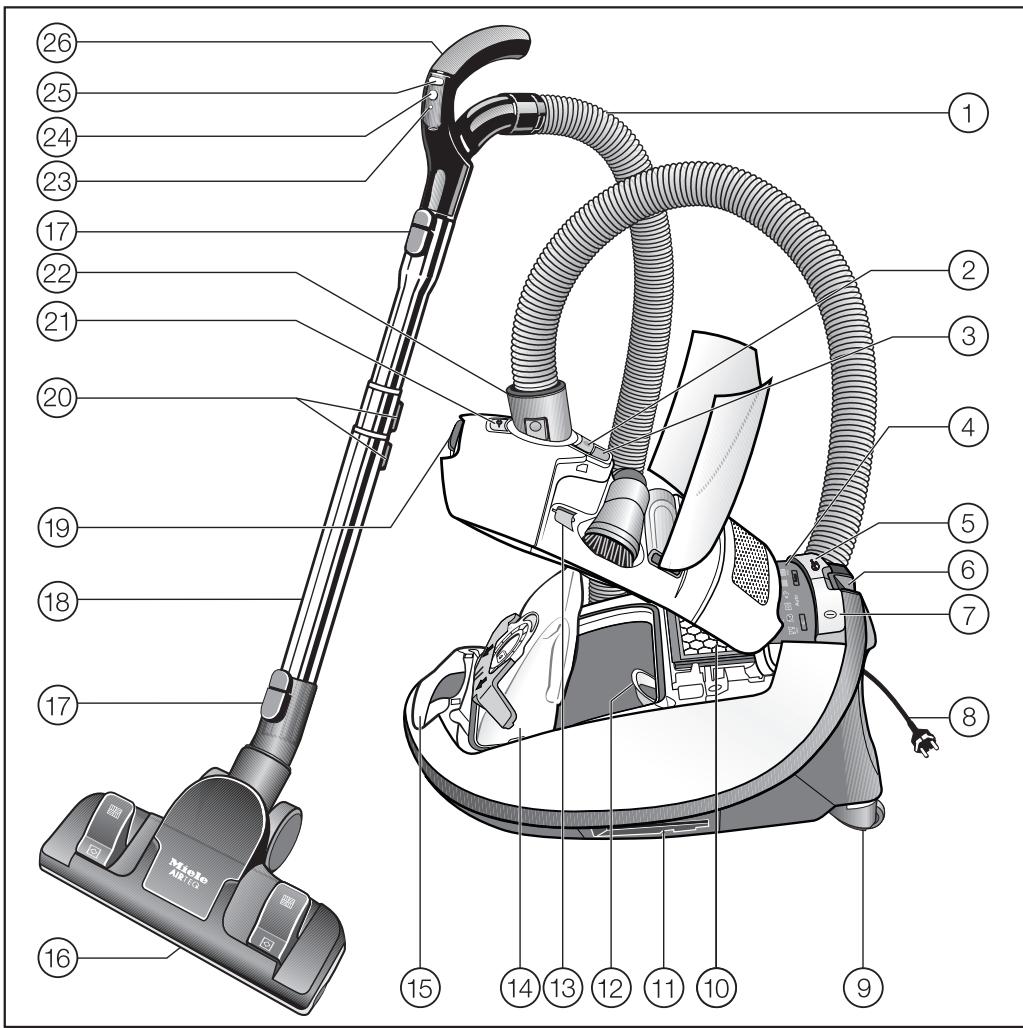

The illustration shows the maximum number of features available on these Miele vacuum cleaners.
(1) Suction hose
② Release button for accessories compartment
③ Dustbag change indicator
④ Display *
⑤ Foot control for automatic cable rewind
⑥ Parking system for pauses in vacuuming
⑦ On/Off foot control ①
⑧ Mains cable
⑨ Roller wheels *
10 Exhaust filter
① Parking attachment (on both sides of the vacuum cleaner)
Dust compartment filter (for motor protection)
13 Electrobrush socket cover holder
14 Original Miele dustbag
15 Carrying handle
⑯ Floorhead
17 Release buttons
18 Telescopic or triscopic tube *
19 Dust compartment release catch
20 Release buttons for the telescopic or triscopic tube *
② Socket for Electrobrush *
② Connection socket
② LED
24 Stand-by button for pauses in vacuuming *
25 Suction power selector + / -
26 Handle (some models have an air inlet valve in the handle) *
② Overheating warning light
②8 Restart button *
29 Stand-by indicator light *
③ 0 Maintenance indicator with reset button *
Those features marked * depend on model, and may vary or not be available on your model.
Disposal of packing material
The packaging is designed to protect the vacuum cleaner from damage during transportation. The packaging materials used are selected from materials which are environmentally friendly for disposal and should be recycled.
Recycling the packaging reduces the use of raw materials in the manufacturing process and also reduces the amount of waste in landfill sites.
Ensure that any plastic wrappings, bags, etc. are disposed of safely and kept out of the reach of babies and young children. Danger of suffocation.
Disposing of the dustbag and filters
These are made from environmentally friendly materials. The filters can be disposed of with the normal household waste. The dustbag can also be disposed of in this way if it has been used exclusively for general household dust.
Disposing of your old appliance
Before disposing of your old appliance remove the dustbag and all the filters and dispose of them with your normal household waste.
Electrical and electronic appliances often contain valuable materials. They also contain materials which, if handled or disposed of incorrectly, could be potentially hazardous to human health and to the environment. They are, however, essential for the correct functioning of your appliance. Please do not therefore dispose of it with your household waste.
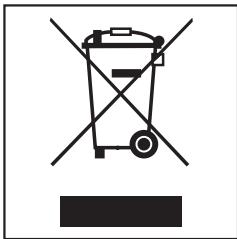
Please dispose of it at your local community waste collection/recycling centre, or contact your dealer for advice.
Ensure that it presents no danger to children while being stored for disposal.
The illustrations referred to in the text are shown on the fold-out pages at the end of these operating instructions.
Preparing for use
Attaching the suction hose (dia. 1)
- Insert the hose connector into the socket on the vacuum cleaner until it clicks into position. To do this, line up the guides on the two pieces.
Removing the suction hose (dia. 2)
Press the release buttons at the side of the hose connector and lift the hose from the socket.
Connecting the handle to the suction hose (dia. 3)
Insert the suction hose into the handle until it clicks into position.
Connecting the handle to the suction tube (dia. 4)
Insert the handle into the suction tube until it clicks into position. To do this, line up the guides on the two pieces.
To release the handle from the suction tube, press the release button and pull the handle away from the suction tube.
Your vacuum cleaner is fitted with one of the following telescopic tubes, depending on the model:
- Telescopic tube
- Triscopic tube
Adjusting the telescopic suction tube (dia. 5)
One part of the telescopic tube is packed inside the other and can be adjusted to suit your height for comfortable vacuum cleaning.
Press the release button to release the tubes and adjust to the required height.
Adjusting the triscopic suction tube (dia. 5)
The triscopic tube has three sections. Two sections are packed together inside a third outer tube.
① Press the release button to release the lower tube and pull it right out until it clicks. Press the button again when you want to retract the tube. The tube will click into place.
(2) Press the release button to release the tubes and adjust to the required height.
Fitting the floorhead (dia. 6)
Push the suction tube into the floorhead and turn it clockwise or anti-clockwise until it clicks into position.
- To release the floorhead from the suction tube, press the release button and pull the suction tube away from the floorhead.
Adjusting the floorhead (dia. 7 + 8)
The floorhead can be used for all normal cleaning of carpets and rugs. It can also be used with the brush protruding to vacuum hard flooring. For hard flooring, such as stone and parquet, we recommend using one of the special Miele floor brushes (see "Optional accessories").
It is important to observe the flooring manufacturer's cleaning and care instructions.
Vacuum carpets and rugs with the brush retracted:
Press the foot control
Clean hard flooring which is not susceptible to scratching with the brush protruding:
Press the foot control.
Clean flooring which has deep crevices or grooves with the brush protruding.
AirTeQ floorhead (dia. 8)
This floorhead has been specially developed to achieve excellent cleaning results using low energy. It has particularly low power consumption and high suction capability.
Warning: If the suction power of the AirTeQ floorhead seems too high, reduce the suction until the floorhead is easier to manoeuvre (see "Use - regulating the suction").
Activating the exhaust filter change indicator
Depending on model, your vacuum cleaner will be fitted as standard with one of the following exhaust filters (dia. 9):
a Air Clean
b ActiveAirClean 50 (black)
c HEPA AirClean 50 (white)
If your vacuum cleaner is fitted with filter b or c, the exhaust filter change indicator needs to be activated.
- Lift the release catch for the dust compartment lid and raise the lid as far as it will go (dia.10).
Remove the label (dia.11).
Press the exhaust filter change indicator (dia. 12).
After approx. 10 - 15 seconds a thin red stripe will appear in the left hand side of the strip (dia. 13). - Close the dust compartment lid securely, making sure it clicks into position. Take care not to trap the dustbag when doing so.
The exhaust filter change indicator
The exhaust filter change indicator shows the remaining functional life of the exhaust filter. After approx. 50 operating hours, or approx. one year of average use, the strip will be completely red (dia. 14).
Using the accessories supplied (dia. 15)
The following accessories are supplied:
① Crevice nozzle
For cleaning in folds, crevices or corners.
② Dusting brush with natural bristles
(only available in selected countries) For cleaning skirting boards, ornate or carved objects.
The head can be swivelled to adjust the angle.
③ Upholstery nozzle
For cleaning upholstery, mattresses, cushions, curtains, covers etc.
Certain models are supplied as standard with the following accessories which are not illustrated on this page.
- Electrobrush
-Turbobrush - Classic Allergotec floorhead
These floorheads and brushes are supplied with their own operating instructions.
Removing the accessories (dia. 16)
Press the release button to open the accessories compartment lid.
The accessories compartment will then open.
Take out the accessory you require.
Press down firmly on the lid to close it.
Floorhead (dia. 17)
For general use and also for vacuuming stairs.
For safety reasons when vacuuming stairs it is best to start at the bottom of the stairs and move upwards.
Use
Unwinding the cable (dia. 18)
Pull the mains cable out to the required length (max. approx. 7.5m
Insert the plug in the socket correctly and switch on.
If vacuuming for longer than 30 minutes, the mains cable must be pulled out to its fullest extent. Otherwise there is a danger of overheating and damage.
Rewinding the cable (dia. 19)
- Switch the vacuum cleaner off at the wall socket and unplug it.
Press the rewind foot switch briefly. The cable will rewind automatically.
Switching on and off (dia. 20)
Press the On/Off foot control ①.
Regulating the suction
The suction power can be regulated to suit the type of flooring being cleaned. Reducing the suction power reduces the amount of effort required to manoeuvre the floorhead.
Some models also have symbols on the controls. The symbols indicate the type of use the settings are suitable for.
The setting selected will light up yellow.
- curtains, lightweight fabrics
- upholstery, cushions
- thick pile carpets, rugs and runners
for energy-saving vacuuming (this setting is also very quiet) - loop-pile carpets
- heavily soiled hard flooring and for intensive cleaning of carpets
When using the AirTeQ floorhead, if the suction seems too high, reduce the suction until the floorhead is easier to manoeuvre.
Depending on the model, your vacuum cleaner will be fitted as standard with one of the following suction power selectors:
+/- foot controls (dia. 21)
The first time the vacuum cleaner is switched on, the highest power setting will be selected automatically.
After that, the vacuum cleaner will switch on at the setting which was used previously.
Press the ^+ foot control to select a higher setting.
Press the - foot control to select a lower setting.
Foot controls with Automatic (dia. 22 + 23)
The first time the vacuum cleaner is switched on, the "Auto" power setting will be selected automatically.
Auto = suction power is automatically adjusted for the type of floor being vacuumed
Do not use the "Auto" setting to vacuum lightweight materials or curtains. These could be sucked in and possibly damaged.
Press the ^+ control to change to "Turbo", the highest power setting.
Press the - foot control to change to "Min.", the lowest power setting.
After that, the vacuum cleaner will switch on at the setting which was used previously.
Radio-control handle with Automatic (dia. 24)
When the vacuum cleaner is switched on with the On/Off foot control ① , the Stand-by indicator on the vacuum cleaner will light up yellow.
Press the Stand-by button on the handle.
The Stand-by indicator on the vacuum cleaner will go out.
The first time the vacuum cleaner is switched on, the highest power setting will be selected automatically.
After that, the vacuum cleaner will switch on at the setting which was used previously.
Press the + button to select a higher suction power level.
Press the - button to select a lower suction power level.
Auto = suction power is automatically adjusted for the type of floor being vacuumed (dia. 22)
Do not use the "Auto" setting to vacuum lightweight materials or curtains. These could be sucked in and possibly damaged.
Opening the air inlet valve (dia. 25 + 26)
(not on models with radio-controls on the handle)
It is easy to reduce the suction power for a short time, e.g. to prevent rugs or other objects being sucked into the vacuum cleaner.
- Open the air inlet valve far enough to reduce the suction power.
The floorhead will be easier to manoeuvre. Close the valve when you are ready to use full power again.
During vacuuming (dia. 27 + 28)
- When vacuuming, pull the cleaner behind you on its wheels. You can stand it upright for vacuuming stairs and curtains etc.
When vacuuming especially fine dust, e.g. sawdust, sand, plaster, flour, talcum powder etc., electrostatic charges build up naturally. Under certain conditions these charges will be released. To avoid the unpleasant effects of these discharges, a metal inlay has been incorporated into the underside of the handle. Please make sure that you keep your hand in constant contact with this metal strip during vacuuming.
Pauses in use (dia. 24)
(for models with radio controls on the handle)
To pause the vacuum cleaner during operation:
Press the Stand-by button on the handle.
The Stand-by button is designed to pause the vacuum cleaner for short periods of time whilst vacuuming. After vacuuming, the vacuum cleaner must be switched off and unplugged from the mains electricity supply. Otherwise there is a danger of overheating and damage.
The LED will light up each time a button is pressed on the handle.
At the end of the pause, you can do one of the following:
Press the Stand-by button again to switch the vacuum cleaner back on at the setting you were using before pausing it.
Press the + button to switch the vacuum cleaner back on using the highest power setting.
Press the - button to switch the vacuum cleaner back on using the lowest power setting.
Setting down, transportation and storage
Parking system for pauses in vacuuming (dia. 29)
(cannot be used with the SEB 234 L Electro Premium Electrobrush)
A parking system has been designed for conveniently parking the suction tube and floorhead during pauses.
Slot the floorhead into the parking attachment at the back of the vacuum cleaner.
If the vacuum cleaner is on a sloping surface, e.g. a ramp, retract the telescopic tube fully.
Switching on and off with the parking system
Some models are fitted with an On/Off switch in the parking system.
The vacuum cleaner switches off automatically when the floor head is slotted into the parking system with the parking attachment.
When the floorhead is removed from the parking system the vacuum cleaner switches back on at the last selected power level (not on models with radio-operated handle).
Parking system for storage (dia. 30 + 31)
Always disconnect the vacuum cleaner from the electrical supply when you have finished using it. Switch the vacuum cleaner off at the wall socket and unplug it.
- Stand the vacuum cleaner upright when it is not being used and when it is being stored.
Retract the telescopic tube fully.
Slot the floorhead downwards into one of the parking attachments on either side of the vacuum cleaner (the parking attachments cannot be used with the SEB 234 L Electro Premium Electrobrush).
This makes the vacuum cleaner easier to carry or store.
If your vacuum cleaner has an XXL handle, you can detach this so that the vacuum cleaner requires less storage space.
- Detach the XXL handle from the retracted suction tube.
Wind the suction hose around the suction tube and then slot the XXL handle into the second parking attachment.
Maintenance
Always disconnect the vacuum cleaner from the electrical supply for maintenance work and for cleaning. Switch off at the wall socket and unplug it.
The Miele filtration system consists of three filters which must be replaced from time to time to ensure that your vacuum cleaner performs efficiently.
- Dustbag
- Dust compartment filter (for motor protection)
- Exhaust filter
Only use genuine dustbags, filters, accessories and optional accessories with the "Original Miele" logo on them. Only this will ensure that the suction power of the vacuum cleaner is maintained, giving the best possible cleaning results.
The use of dustbags made from paper or paper-based materials, or dustbags with a cardboard collar, or dustbags that do not carry the "Original Miele" logo, can seriously damage the vacuum cleaner and invalidate the warranty.
Purchasing new dustbags and filters
Original Miele dustbags and filters can be ordered from your Miele retailer, from Miele or online at:

Ordering the correct dustbags and filters
Only use original Miele G/N dustbags with a blue collar. Using any other dustbags will damage the vacuum cleaner. Original Miele dustbags are identified by the "Original Miele" logo on the packaging or directly on the dustbag.


An Air Clean filter and a dust compartment filter are supplied with every packet of Miele dustbags. These can also be purchased separately.
When to change the dustbag (dia. 32)
Change the dustbag when the colour marker in the dustbag change indicator fills the display, or sooner if it is no longer effective (see possible reasons for this below).
Miele dustbags are disposable and designed for single use only. Dispose of the dustbag when it is full. Do not attempt to reuse as suction would be reduced.
Checking the dustbag change indicator
- Attach the standard floorhead to the suction tube.
- Switch the vacuum cleaner on and select the maximum power setting.
Lift the floorhead off the floor a little.
How the dustbag change indicator works
The dustbag change indicator is set for normal household dust. This generally contains a mixture of: dust, hair, threads, carpet fluff, grit etc.
However, if the cleaner has been used to vacuum up fine dust, such as plaster, brick dust, cement or flour, the pores of the dustbag will become blocked very quickly. This affects the air permeability of the bag, and the marker will indicate that the bag is "full" even when it is not. If this happens you must still change the dustbag because suction power will be greatly reduced by blocked pores in the dustbag.
If, on the other hand, a large amount of hair and carpet fluff which typically contains a lot of air is vacuumed up, the indicator may fail to react even though the bag is full. You should still change it. Both these extremes can occur.
How to replace the dustbag (dia. 33 + 34)
- Lift the release catch for the dust compartment lid and raise the lid as far as it will go.
The dustbag has a closing flap which closes automatically when the dust compartment lid is raised to prevent any dust escaping.
Pull the dustbag out by the grip on the collar.
Insert the new dustbag into the blue holder as far as it will go. Leave it folded up when you take it out of the box.
It should be unfolded as far as possible in the dust compartment.
- Close the dust compartment lid securely, making sure it clicks into position. Take care not to trap the dustbag when doing so.
Warning: The lid will not close without a dustbag in place. Do not use force.
When to change the dust compartment filter (for motor protection)
Replace this filter every time you start a new packet of dustbags. A dust compartment filter is supplied with every packet of Miele dustbags.
How to change the dust compartment filter (dia. 35)
Open the dust compartment lid.
Pull the dustbag out by the grip on the collar.
- Open the blue filter frame and remove the old filter. Hold by the clean, unsoiled section to remove it.
Replace with a new dust compartment filter.
Close the filter frame.
Insert the dustbag into the holder as far as it will go. - Close the dust compartment lid securely, making sure it clicks into position. Take care not to trap the dustbag when doing so.
When to change the exhaust filter
Depending on model, your vacuum cleaner will be fitted as standard with one of the following exhaust filters (dia. 9):
a Air Clean
Replace this filter every time you start a new packet of Miele dustbags. An Air Clean exhaust filter is supplied with every packet of Miele dustbags.
b ActiveAirClean 50 (black)
c HEPA AirClean 50 (white)
Replace the exhaust filter if the exhaust change filter indicator is completely red (dia. 14).
This occurs after approx. 50 operating hours, or approx. one year of average use. The vacuum cleaner can still be used. However, the suction power will be reduced as will the effectiveness of the filter if it is not replaced in good time.
How to replace the Air Clean filter (dia. 36 + 37)
Do not use more than one exhaust filter at a time.
Open the dust compartment lid.
Press the release catch on the filter grille and open the grille until it clicks.
Hold the used Air Clean filter by one of the clean, unsoiled sections.
Replace it with a new Air Clean filter.
If you wish to replace the Air Clean filter with an ActiveAirClean 50 filter or with an HEPA AirClean 50 filter, see "Replacing one type of exhaust filter with another".
Close the filter grille.
Close the dust compartment lid.
How to replace an ActiveAirClean 50 filter or a HEPA AirClean 50 filter (dia. 38 + 39
Do not use more than one exhaust filter at a time.
Open the dust compartment lid.
Lift the filter and remove it.
- Replace with a new filter, and push it down into place.
Press the exhaust filter change indicator (dia. 12).
After approx. 10 - 15 seconds a thin red stripe will appear in the left hand side of the strip (dia. 13).
If you wish to use an Air Clean filter, see "Replacing one type of exhaust filter with another".
Close the dust compartment lid.
Replacing one type of exhaust filter with another
Depending on model, your vacuum cleaner will be fitted as standard with one of the following exhaust filters (dia. 9):
a Air Clean
b ActiveAirClean 50 (black)
c HEPA AirClean 50 (white)
Please note:
- If you wish to replace the Air Clean filter a with an ActiveAirClean 50 filter b or an HEPA AirClean 50 filter c, it is essential that you remove the filter grille before fitting the new type of filter (dia. 39). Press the reset button ▷ for the exhaust filter change indicator (dia. 12).
-
If you wish to replace the ActiveAirClean 50 filter b or the HEPA AirClean 50 filter c with an Air Clean filter a, then it is essential that you also fit the filter grille *, see dia. 37.
-
Filter grille - see "Optional accessories".
Do not use more than one exhaust filter at a time.
Maintenance indicator with reset button (dia. 40)
Some models are fitted with a maintenance indicator.
The indicator lights up after approx. 50 hours of operation, which is equivalent to about a year of average use. The level of soiling of the dust compartment filter and the exhaust filter must be checked at this point and if the filters are replaced, the indicator must be reset. To do this the vacuum cleaner must be switched on.
Press the reset button.
The maintenance indicator and reset button will go out and reset to zero.
The indicator can only be reset by pressing the reset button after the light has come on. Pressing the button at any other time will have no effect.
When to change the battery in the radio-operated handle
Approx. every 18 months. One 3V battery (CR 2032) is required.
The vacuum cleaner can still be used when the battery has run out or if there is no battery fitted.
- Switch the vacuum cleaner on using the On/Off foot control ①. The Stand-by indicator ② on the vacuum cleaner will light up yellow.
Press the restart button on the vacuum cleaner (dia. 41).
The vacuum cleaner can continue to be used, but only at maximum power.
How to change the battery in the radio-operated handle (dia. 42)
- Open the cover to the battery compartment using a screwdriver.
- Replace with a new battery, making sure the polarity is correct.
Replace the cover. - Dispose of the old battery responsibly.
When to change the thread lifters
The thread lifters on the suction inlet of the floorhead can be replaced. Check them from time to time and replace them if the pile has worn down.
How to replace the thread lifters (dia. 43 + 44)
Use a suitable screwdriver to remove the thread lifters from the slots.
Fit new thread lifters.
Upholstery nozzle SPD 10 (dia. 45)
Disengage the thread lifter unit at each side of the upholstery nozzle using a coin.
Fit a new thread lifter unit and lock into position.
Cleaning the roller on the floorhead (dia. 46)
(Not necessary for the AirTeQ floorhead)
(1) Release the bearing (with bayonet fitting) using a coin.
(2) Press the bearing out, and remove it.
③ Take out the roller.
- Remove any threads and hair, replace the roller and refit the bearing.
Replacement parts are available from your Miele retailer or from Miele (see back cover for contact details).
Cleaning and care
Always disconnect the vacuum cleaner from the electrical supply before cleaning it. Switch off at the wall socket and unplug it.
Vacuum cleaner and accessories
External surfaces of the vacuum cleaner and of the accessories can be cleaned with a proprietary cleaner suitable for plastic.
Do not use abrasive cleaning agents, glass cleaning agents, all-purpose cleaners or oil-based conditioning agents.
Dust compartment
The dust compartment can, if necessary, be cleaned using a dry duster, brush or, if available, a second vacuum cleaner to vacuum the dust out.
Do not let the vacuum cleaner get wet. If moisture gets into the appliance, there is a risk of electric shock.
Problem solving guide
The vacuum cleaner switches off automatically. On certain models, the overheating warning light also comes on .
A temperature limiter switches the vacuum cleaner off automatically if it gets too hot. Some models also have a warning light which comes on to indicate that it has overheated.
This can occur if, for instance, large articles block the suction tube or when the filter bag is full or contains particles of fine dust. A heavily soiled dust compartment or exhaust filter can also be the cause of overheating. Switch the vacuum cleaner off immediately using the On/Off foot control ①. Disconnect it from the electricity supply. Switch it off at the wall socket and unplug it.
After removing the cause, wait for approx. 20 - 30 minutes to allow the vacuum cleaner to cool down. It can then be switched on again.
After sales service
In the event of a fault that you cannot easily remedy, please contact
- your Miele Dealer
or - Miele (see back cover for contact details).
Please note that telephone calls may be monitored or recorded for training purposes (UK only).
Guarantee
For information on the appliance guarantee specific to your country please contact Miele. See back cover for contact details.
In the U.K. your appliance is guaranteed for 2 years from the date of purchase. However, you must activate your cover by calling 0845 365 6640 or registering online at www.miele.co.uk.
Optional accessories
Please observe the flooring manufacturer's cleaning and care instructions.
Miele accessories, including floorheads, filters and dustbags are available to order through your Miele retailer, Miele or online at:

Certain models are supplied as standard with one or more of the following accessories:
Electrobrushes
Electrobrushes can only be used on models fitted with an electrobrush socket.
Electrobrush Electro Comfort (SEB 216-3)
This electrobrush is particularly suitable for intensive vacuuming of carpets which are subject to hard wear. It is very effective at removing deep seated dirt and preventing areas of frequent use being trodden into a path.
Electrobrush Electro Premium (SEB 234-L)
This electrobrush is 60mm wider than the SEB 216-3, and is more powerful, making it ideal for cleaning larger floor areas.
It has the following additional features compared to the SEB 216-3:
- Adjustable height settings
- LEDs to light up the area being vacuumed
- A multi-function indicator light
Floorheads / brushes
Classic Allergotec floorhead (SBDH 285-3)
This floorhead is suitable for daily hygienic cleaning of all floor surfaces. The level of cleanliness of the floor shows in a colour "traffic light" display when vacuuming.
Turbo Comfort Turbobrush (STB 205-3)
This turbobrush is ideal for cleaning cut pile carpet.
Hard floor brush (SBB 235-3)
This brush is designed for use on hard flooring such as tiled or stone floors.
Parquet floor brush (SBB Parquet-3)
(only available in selected countries)
This brush has natural bristles and is designed for use on parquet floors and other surfaces which are susceptible to scratching such as laminate flooring.
Hard floor Twister swivel-action floor brush (SBB 300-3)
This brush is suitable for a variety of hard floor surfaces and has a swivel joint enabling it to get into awkward corners.
Parquet Twister XL swivel-action floor brush (SBB 400-3)
(only available in selected countries)
This brush is extra wide making it suitable for large areas of flooring and has a swivel joint enabling it to get into awkward corners.
Other accessories
MicroSet (SMC 20)
This set is specially designed for cleaning small objects and difficult to reach areas (such as PC keyboards, stereo equipment, intricately carved furniture and ornaments, models etc).
CarCare Set (SCC 10)
For valeting the interior of cars.
Cat&Dog Set (SCD 10)
Especially for households with pets.
HomeCare Set (SHC 10)
Accessories for cleaning the living areas of your home.
Hand Turbobrush Turbo Mini Compact (STB 20)
For cleaning upholstery, mattresses, car seats etc.
Universal brush (SUB 20)
(only available in selected countries)
For dusting books, shelves, etc.
Radiator brush (SHB 30)
For cleaning radiators, narrow shelves and crevices.
Mattress nozzle (SMD 10)
For cleaning upholstery, mattresses, cushions, curtains, covers etc.
Crevice nozzle, 300 mm (SFD 10)
Extra long crevice nozzle for cleaning in folds, crevices or corners.
Crevice nozzle, 560 mm (SFD 20)
Flexible crevice nozzle for accessing awkward to reach areas.
Upholstery nozzle, 190 mm (SPD 10)
Extra wide nozzle for cleaning upholstery, mattresses, car seats etc.
Flexible extension hose (SFS 10)
For extending the suction hose by approx. 1.5m
Hygiene seal with active charcoal
Helps prevent dust and odours escaping when the suction hose has been removed from the cleaner.
Comfort handle with lighting (SGC 20)
For lighting up the work area.
Filters
ActiveAirClean 50 exhaust filter (SF-AA 50)
This filter absorbs odours from the dirt collected in the dustbag.
HEPA AirClean 50 exhaust filter (SF-HA 50)
Excellent filtration level for very clean exhaust air. This filter is particularly suitable for allergy sufferers.
Filter grille
The filter grille is required if you wish to fit an Air Clean filter instead of an ActiveAirClean 50 filter or an HEPA AirClean 50 filter.
Electrical connection for the UK
All electrical work should be carried out by a suitably qualified and competent person in strict accordance with current national and local safety regulations (BS 7671 in the UK).
The voltage and frequency are given on the data plate located underneath the vacuum cleaner. Please ensure that these match the household mains supply. The fuse rating is quoted on the plug.
The appliance is supplied with a cable and moulded plug ready for connection to a 230-240 V/50 Hz a.c. single phase supply.
Non-rewireable plugs BS 1363
The fuse cover must be re-fitted when changing the fuse, and if the fuse cover is lost the plug must not be used until a suitable replacement is obtained. The colour of the correct replacement cover is that of the coloured insert in the base of the plug, or the colour that is embossed in words on the base of the plug, (as applicable to the design of plug fitted).
Replacement fuses should be ASTA approved to BS1362 and have the correct rating. Replacement fuses and fuse covers may be purchased from your local electrical supplier.
Electrical connection AU, NZ
All work should be carried out by a suitably qualified and competent person in strict accordance with national and local safety regulations.
The voltage and rated load are given on the data plate located underneath the vacuum cleaner. Please ensure that these match the household mains supply. The fuse rating is quoted on the plug.
The appliance is supplied with a cable and moulded plug ready for connection to a 230V/50Hz AC single phase supply.
Test Marks
Electrical safety RCM Mark
Electrically suppressed
according to
AS/NZS 1044
Brosse AirTeQ (croquis 8)
Controle of de stofcassette vol is
Valigetta accessory MicroSet (SMC 20)
Valigetta accessory Cat&Dog (SCD 10)
Fairacres, Marcham Road
Abingdon, Oxon, OX14 1TW
Tel: 0845 365 0555, Fax: 0845 365 0777
Customer Contact Centre Tel: 0845 365 6600
E-mail: info@miele.co.uk
Internet: www.miele.co.uk
Australia
Miele Australia Pty. Ltd.
ABN 96005635398
1 Gilbert Park Drive, Knoxfield, VIC 3180
Tel: 1300 464 353, Fax: (03) 9764 7149
Internet: www.miele.com.au
China
Miele (Shanghai) Trading Ltd.
1-3 Floor, No. 82 Shi Men Yi Road
Jing'an District
200040 Shanghai, PRC
Tel: +86 21 6157 3500, Fax: +86 21 6157 3511
E-mail: mieleshanghai@cn.miele.com
Miele (Hong Kong) Limited
41/F - 4101, Manhattan Place
23 Wang Tai Road
Kowloon Bay
Hong Kong
Tel: (852) 2610 1331, Fax: (852) 2610 1013
Email: mielehk@miele.com.hk
India
Miele India Pvt. Ltd.
Ground Floor, Copia Corporate Suites
Plot No. 9, Jasola
New Delhi - 110025
Tel: 011-46 900 000, Fax: 011-46 900 001
E-mail: customercare@miele.in, Internet: www.miele.in
Ireland
Miele Ireland Ltd.
2024 Bianconi Avenue
Citywest Business Campus, Dublin 24
Tel: (01) 461 07 10, Fax: (01) 461 07 97
E-Mail: info@miele.ie, Internet: www.miele.ie
Manufacturer: Miele & Cie. KG
Miele New Zealand Limited
Unit L, 10-20 Sylvia Park Road
Mt. Wellington, 1060, Auckland, NZ
Tel: 0800 264 353, Fax: 0800 463 453
Internet: www.miele.co.nz
Singapore
Miele Southeast Asia
Miele Pte. Ltd.
163 Penang Road
04 - 02/03 Winsland House II
Singapore 238463
Tel: +65 6735 1191, Fax: +65 6735 1161
E-Mail: infosea@miele.com.sg
Internet: www.miele.sg
South Africa
Miele (Pty) Ltd
63 Peter Place, Bryanston 2194
P.O. Box 69434, Bryanston 2021
Tel: (011) 875 9000, Fax: (011) 875 9035
E-mail: info@miele.co.za
Internet: www.miele.co.za
United Arab Emirates
Miele Appliances Ltd.
P.O.Box 114782
Gold & Diamond Park
Sheikh Zayed Road
Building 6 / Offices Nos. 6-214 to 6-220
Dubai
Tel: +971-4-341 84 44
Fax: +971-4-341 88 52