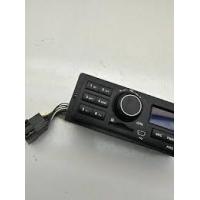
CT410 - Hi-Fi System AMS - Free user manual and instructions
Find the device manual for free CT410 AMS in PDF.



| Brand | AMS |
| Model | CT410 |
| Category | Car radio |
| Power supply | 12 V DC (11-16 V), chassis ground |
| Max. output power | 4 × 25 W or 2 × 20 W |
| Speaker impedance | 4 to 8 Ω |
| Weight | 1.0 kg |
| FM range | 87.5 – 108.0 MHz (50 kHz steps) |
| MW (AM) range | 522 – 1620 kHz (9 kHz steps) |
| LW range | 153 – 280 kHz |
| Signal-to-noise ratio | 50 dB |
| Number of presets | 36 (18 FM / 12 MW / 6 LW) |
| Supported audio formats | MP3 (via USB/SD) |
| Max. MP3 files capacity | 1,000 files / 999 folders |
| Max. USB/SD capacity | 8 GB (FAT/FAT32) |
| Connectivity | Front USB, SD card reader, radio antenna |
| Audio functions | Equalizer (Classic/Pop/Rock/Flat), Balance, Fader |
| Safety | Identical spare fuse, do not disassemble yourself |
| Maintenance and cleaning | Clean with a dry cloth, avoid solvents |
| Repairability | Contact a certified technician or customer service |
| Spare parts | Available from the manufacturer or retailer |
Frequently Asked Questions - CT410 AMS
User questions about CT410 AMS
0 question about this device. Answer the ones you know or ask your own.
Ask a new question about this device
Download the instructions for your Hi-Fi System in PDF format for free! Find your manual CT410 - AMS and take your electronic device back in hand. On this page are published all the documents necessary for the use of your device. CT410 by AMS.
USER MANUAL CT410 AMS
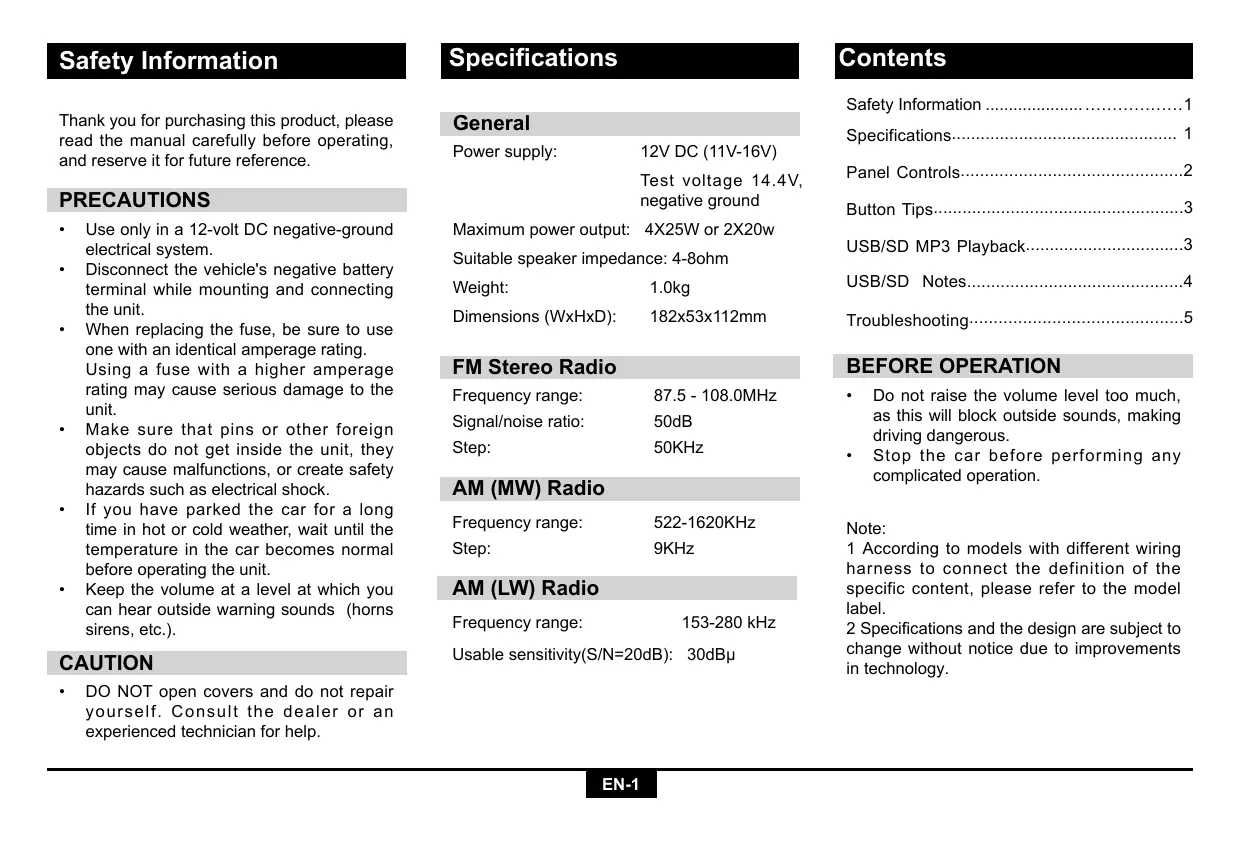
Thank you for purchasing this product, please read the manual carefully before operating, and reserve it for future reference.
PRECAUTIONS
- Use only in a 12-volt DC negative-ground electrical system.
- Disconnect the vehicle's negative battery terminal while mounting and connecting the unit.
- When replacing the fuse, be sure to use one with an identical amperage rating. Using a fuse with a higher amperage rating may cause serious damage to the unit.
- Make sure that pins or other foreign objects do not get inside the unit, they may cause malfunctions, or create safety hazards such as electrical shock.
If you have parked the car for a long time in hot or cold weather, wait until the temperature in the car becomes normal before operating the unit. - Keep the volume at a level at which you can hear outside warning sounds (horns sirens, etc.).
CAUTION
DO NOT open covers and do not repair yourself. Consult the dealer or an experienced technician for help.
Specifications
General
| Power supply: | 12V DC (11V-16V) |
| Test voltage 14.4V, negative ground | |
| Maximum power output: | 4X25W or 2X20w |
| Suitable speaker impedance: | 4-8ohm |
| Weight: | 1.0kg |
| Dimensions (WxHxD): | 182x53x112mm |
FM Stereo Radio
| Frequency range: | 87.5 - 108.0MHz |
| Signal/noise ratio: | 50dB |
| Step: | 50KHz |
AM (MW) Radio
| Frequency range: | 522-1620KHz |
| Step: | 9KHz |
AM (LW) Radio
| Frequency range: | 153-280 kHz |
| usable sensitivity(S/N=20dB): | 30dBμ |
Contents
Safety Information 1
Specifications 1
Panel Controls 2
Button Tips 3
USB/SD MP3 Playback 3
USB/SD Notes. 4
Troubleshooting 5
BEFORE OPERATION
- Do not raise the volume level too much, as this will block outside sounds, making driving dangerous.
- Stop the car before performing any complicated operation.
Note:
1 According to models with different wiring harness to connect the definition of the specific content, please refer to the model label.
2 Specifications and the design are subject to change without notice due to improvements in technology.
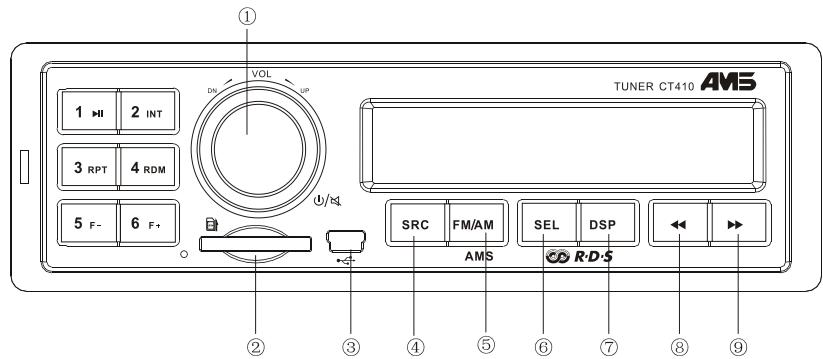
- -Power on
-Mute
- When on, hold it to power off.
- Rotate the knob to adjust the volume.
- -SD card slot
- -USB slot
-
- Source Radio
USB (when USB inserted)
Card (when SD card inserted)
-
- Band switch: FM1 -> FM2 -> FM3 -> AM1 -> AM2-LW
-
Hold it Automatically search station and store the signal strongly station to 1-6 Preset
-
- Press to select VOL/PTY/AF/TA/BAS/TRE/BAL/FAD,Rotate the VOL knob to adjust value
-
Hold it to select EQ preset mode:
EQ OFF-CLASSIC-POP-ROCK-FLAT,
Rotate the VOL knob to adjust value -
- Press to display clock,
-
Hold it to setting clock
- Radio mode:
Display FM/AM frequency
- MP3 mode:
Tum and tum about folder name/file name /ID3 TAG/Clock
-
- Radio mode
-
Auto search the station from high to low
-
MP3 mode
Select the previous track
-
- Radio mode
Auto search the station from low to high
- Radio mode
-
MP3 mode
Select the next track -
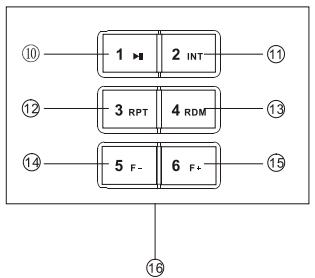
- Play/pause
-
- Program intro play(10 sec.)
-
- MP3 repeat play
-
- MP3 random play
-
- MP3 folder back
-
- MP3 folder ahead
-
- 10 15 Radio preset Press to tune in a preset station. Hold for more than 2 seconds to store current station.
Button Tips
MP3Playback
Track skip
Press the button to go to the previous or next track.

MP3 track fast search
Press the button to select MP3 folder back/ ahead
Set Clock
Radio mode:press DISP button, Tum and tum display PTY/Clock/current channel frequency MP3 playback mode:press DISP button, Tum and turn about folder name/file name/ID3 TAG/ Clock
Then press DISP more than 2 seconds, minute display blinks, rotate the VOL knob to set minute, press DISP button again, hour display blinks, rotate the VOL knob to set hour, press DISP to confirm.
Tune
Radio seek automatically
Auto serach the station from high to low or from low to high.

Radio tune by step
Hold it more than 2 second, switch to the manual mode, press the button step search the station from high to low or from low to high.
Manual Memory Store
At FM1/FM2/FM3/AM1/AM2/LW mode, press and hold button 1-6 to store current station in memory. You can store 36 stations totally. (18FM /12AM / 6LW)
RDS
Press the SEL button to set AF/TA,rotate the VOL knob to open or close AF/TA function.
Press the SEL button to PTY function,rotate the VOL Knob ,display NEWS and POP program type.
When display NEWS,press the 1-6 button to select opposite preset
1-SPORT /2-DRAMA /3-CULTURE, 4-WEATHER /5-TRAVEL /6-SOCIAL
When display POP,press the 1-6 button to select opposite preset
1-ROCK
/2-EASY
/3-LIGHT
4-CLASSICS
15-DAZZ
/6-FOLKL
USB/SD MP3 Playback
Loading/Take out SD Card
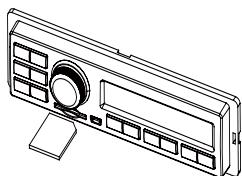
- Insert SD card into the slot, with the front side at down side.
The unit will play the music automatically and the LCD will show CARD.
- Push SRC button and switch to non CARD mode, slightly press SD card, take out the card when it was pop out
Loading/Take out USB equipment
-
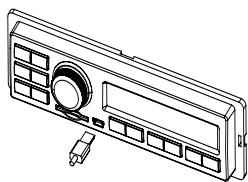
Insert USB into the connector and the unit play the music in the USB storer automatically, and the LCD will show USB.
-
Push the SRC button and switch to non USB mode, then take off the USB storer.
USB/SD Notes
USB functions (flash memory type) MP3 music play
- SD card support
- USB flash memory 2 in 1 (SD) support
- Fat 12/fat 16/fat 32 is possible
- USB 1.1 support, USB 2.0 support (it can not support USB 2.0 speed. Just, get the same speed with USB 1.1).
- WMA files not support
- Maximum number of MP3 files is 1000.
Maximum number of folders is 999. - Better use a USB/SD/MMC card which capacity is less than 8GB, and folders are less than 30.
- Not all USB devices are compatible with the unit.
Note:USB connector was not electricized.
TROUBLESHOOTING
The following checklist can help you solve some problems which you may encounter when using the unit. Before consulting it, check the connections and follow the instructions in the user manual. Do not use the unit in abnormal condition, for example without sound, or with smoke or foul smell can cause fire or electric shock, immediately stop using it and call the store where you purchased it.
| Problem | Possible cause | Solution |
| General | ||
| The unit will not switch on. | Car ignition is not on. Cable is not properly connected. Fuse is burnt. | Turn your car key in the ignition. Check cable connection. Replace fuse with a new fuse of the same capacity. |
| No sound | Volume is set at minimum or the mute function is on. | Check the volume or switch the mute function off. |
| The unit or screen does not work normally. | The unit system is unstable. | Press the RESET button. |
| Mode TUNER | ||
| Unable to receive stations. | The antenna is not connected properly. | Connect the antenna properly. |
| Poor quality reception of radio station. | The antenna is not fully extended or it is broken. | Fully extend the antenna and if broken, replace it with a new one. |
| Preset stations are lost. | The battery cable is not properly connected. | Connect the permanent live on the unit to the permanent live on the vehicle. |
| Mode USB/SD/MMC | ||
| Unable to insert USB device or SD/MMC card | The memory card or USB device has been inserted the wrong way round. | Insert it the other way around. |
| The USB device or SD/MMC card cannot be read. | NTFS format is not supported. | Check that the file system is in FAT or FAT32 format. Due to different formats, some models of storage devices or MP3 players may not be read. |
INFORMATIONS CONCERNANT LA SECURITE
SPECIFICATIONS
Dimensions (L/H/D): 182x53x112mm
Radio FM Stereo
WIEDERGABEVONUSB/SD MP3. 4
USB/SD 4
Fehlerbehebung 5