
100 - Conference phone KONFTEL - Free user manual and instructions
Find the device manual for free 100 KONFTEL in PDF.


User questions about 100 KONFTEL
0 question about this device. Answer the ones you know or ask your own.
Ask a new question about this device
Download the instructions for your Conference phone in PDF format for free! Find your manual 100 - KONFTEL and take your electronic device back in hand. On this page are published all the documents necessary for the use of your device. 100 by KONFTEL.
USER MANUAL 100 KONFTEL
Conference phones for every situation
Contents
Description 4
Connection, accessories, spare parts 5
Calling 6
Incoming calls 6
Outgoing calls 6
Redial 6
Multi-party calls 6
Programming the R key 7
Conference key 8
Volume control, mute, tuning, ring signal volume 9
Troubleshooting and maintenance 10
Technical data 11
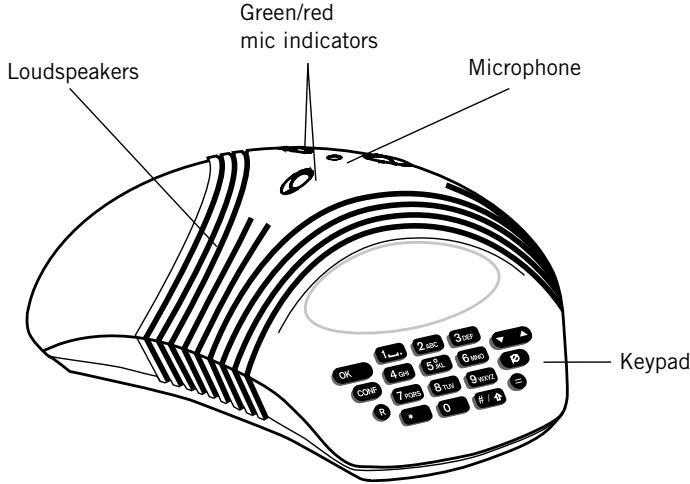
Top
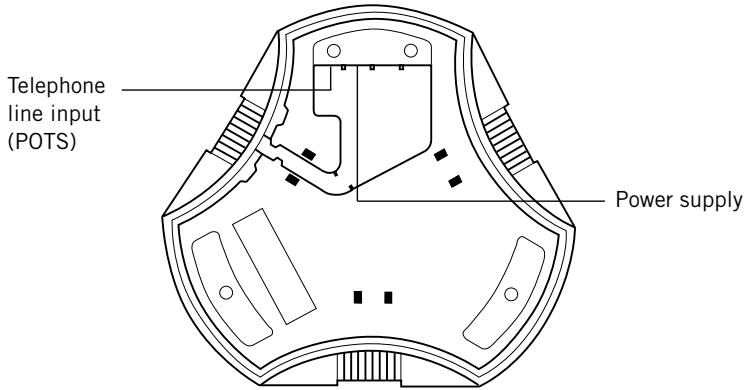
Bottom
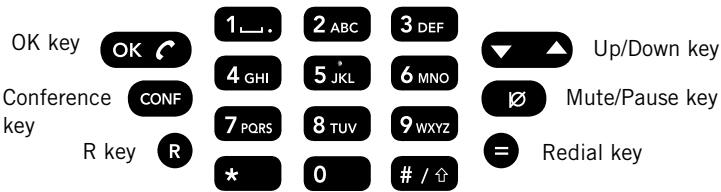
Keyset
Connection
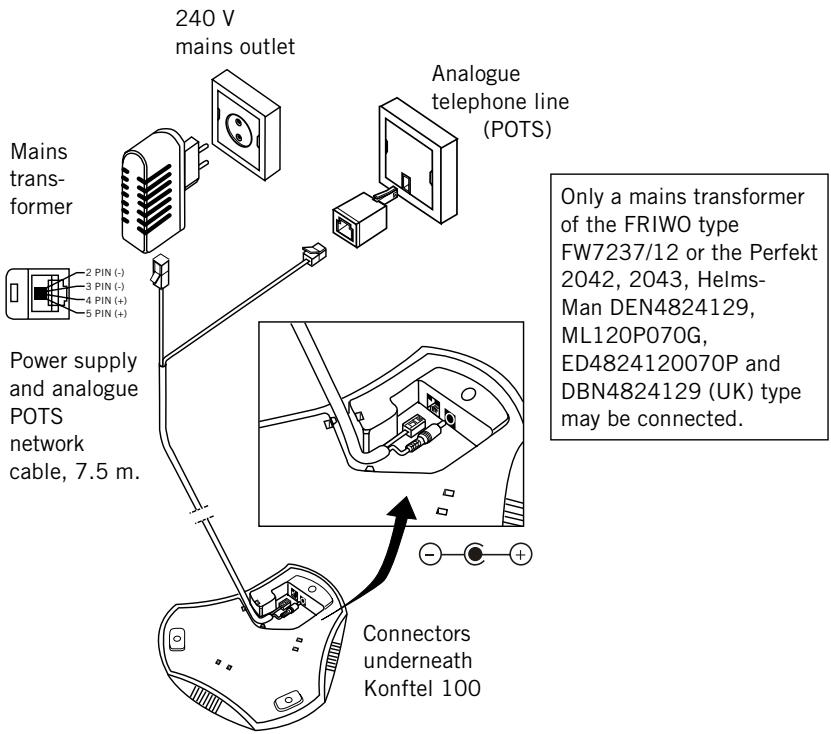
Accessories
Item No. Description
9146030
149110
900103339
900103340
900103341
Wall mounting bracket
Ceiling mount suspension with cables
Extension cable, power supply 10m
Extension cable, analogue network, 10 m
Extension cable, power and analogue network 7.5 m
Spare parts
Item No. Description
900103334
Power supply and analogue POTS network cable, 7.5 m
826102026
Mains transformer 12 V DC for UK
900102026
Mains transformer 12 V DC for Europe
Incoming calls
A ring signal is heard and the green mic indicators light to indicate the incoming call.

Press the OK key to answer.

To end the call, press OK.
Outgoing calls

Press OK.
0-9...
Dial the number.

To end the call, press OK.
Redial

Press the Redial key. The last number dialled within 3 sec.

To end the call, press OK.
Multi-party calls

Press OK.
0-9...
Enter the number of the first meeting participant.

When the first call is connected, press the R key to get a new dial tone.
0-9...
Enter the number of the second meeting participant and wait for answer.


Press the R key followed by the 3 key, and all three can now participate in the call.
If your multi-party call is not answered

Press the R key followed by the 1 key to return to the first call.
Note: The availability and function of the multi-party feature can vary from country to country but also depend on the PBX to which the Konftel 100 is connected. If you want to connect multiple participants we recommend you use a telephone meeting service. If you have questions regarding availability, please contact your dealer.
If the R key does not work
The requirements for the operation of the R key vary between PBXs and from country to country. Konftel 100 therefore lets you program the R-pulse time so that it works with most PBXs on the market.
Programming the R key (default setting = 2)

Hold down the R key for three seconds until the green LEDs flash and you hear three short beeps.
1-6...
Enter the value for the R-pulse. The default setting is 2. Check in the table below whether the setting is right for your PBX/country.
| Value: | Time: |
| 1 - R function | 65 ms |
| 2 - R function | 100 ms |
| 3 - R function | 150 ms |
| 4 - R function | 270 ms |
| 5 - R function | 600 ms |
| 6 - R function | 80 ms |

Press the OK key to save the setting and exit.
The Conference key gives you the facility to pre-programme a number or code for your phone conference.
Programming the Conference key
CONF
Keep the Conference key depressed 3 sec until the red LEDs flash and you hear a repeating tone.
0-9...
Enter your phone conference number with the keypad (max 20 digits).
#
If Konftel 100 must wait for a second dial tone, you should insert a pause with the Mute/ Pause key.
OK
Press the OK to end and save the number.
Using the Conference key
CONF
Press the conference key to connect to your phone conference.
OK
Press OK to end the call.
Delete the conference number
CONF
Keep the Conference key depressed 3 sec until the red LEDs flash and you hear a repeating tone.
OK
Press OK to delete any conference number.
Volume control, mute, tuning, ring signal volume
Volume control

Adjust the speaker volume with the Up/Down key during the call.
Mute function

Press the Mute key to switch off the microphone. The mic indicators change to red. Press again to switch on the microphone. The mic indicators change back to green.
Tuning

The sound is adjusted automatically for the room and the telephone line when Konftel 100 is switched on. Konftel 100 senses the acoustics of the room and adapts continuously during the call. For manual tuning, press the Up/Down key at the same time. A brief noise will be heard.
Adjust the ring signal volume

Adjust the volume of the ring signal with the up/down button. A ringing signal is heard after every press. It can be adjusted in six steps, of which the lowest shuts off the ring signal entirely.
10 Troubleshooting and maintenance
Troubleshooting
- Check that the microphone is on during the call. The green microphone indicators must be lit.
- Check that the Konftel 100 is connected to an analogue telephone jack.
- Bypass any extension cables and check whether the system is functioning correctly. If not, contact your dealer.
- If Konftel 100 must wait for a second dialling tone, you should enter a pause with the help of the pause/mute button when you programme the number for your phone conference.
#
Maintenance
Clean the equipment with a dry, soft cleaning cloth. Do not use any liquids!
Konftel 100
| Mains transformer (Europe): | DC transformer 240 V AC/12 V DC; 700 mA. |
| Mains transformer (UK): | DC transformer 100 - 240 V AC/12 V DC; 700 mA. |
| Network interface: | Analogue PBX or PSTN, RJ-11. |
| Power supply and network cable: | 7.5 metre, RJ-11 (line), EIAJ Class IV (power). |
| Recommended room conditions: | Reverberation time: <0.5 sec. Background noise: <45 dB(A). |
| Frequency response: | 200 – 3700 Hz. |
| Loudspeaker volume: | 85 dB SPL. |
| Room echo suppression: | 208 ms. |
| Line echo suppression: | 25 ms. |
| Automatic calibration: | <1 ms impulse (not discernible). |
| Dimensions: | Diameter 232 mm. |
| Weight: | 700 g. |
| Temperature range: | 5 – 40°C in operation. |
| Humidity: | 20 % – 80 % non-condensing. |
| EMC: | EN 50 081-1:1992. EN 55024:1998. EN 60950. |
| Electrical safety: | EN 60950. |
| Telecom approval: | EUROPEAN TBR21. |
| Keyboard: | 19 keys. |
| Compatibility: | Konftel 100 can be connected to any PBX equipped with a POTS extension, for example Ericsson: MD17 Fenix. Siemens: Hicom. Nortel: Meridan. Philips: Sopho. Alcatel: 4200, 4400. Ascom: Ascotel. |
Konftel is a leading company within speaker communication and audio technology. We develop and sell products and technology for telephone meetings based on cutting-edge expertise within acoustics and digital signal processing. Characteristic of our products is that all conference telephones contain the same high quality audio technology – Omni-Sound® – providing crystal clear sound. Read more about Konftel and our other products on www.konftel.com
Developed by Konftel AB
Box 268, SE-901 06 Umeå, Sweden
Phone: +46 90 706 489 Fax: +46 90 131 435
E-mail: info@konftel.com Web: www.konftel.com