
CASCADE FIFTEEN - Speaker INFINITY - Free user manual and instructions
Find the device manual for free CASCADE FIFTEEN INFINITY in PDF.


User questions about CASCADE FIFTEEN INFINITY
0 question about this device. Answer the ones you know or ask your own.
Ask a new question about this device
Download the instructions for your Speaker in PDF format for free! Find your manual CASCADE FIFTEEN - INFINITY and take your electronic device back in hand. On this page are published all the documents necessary for the use of your device. CASCADE FIFTEEN by INFINITY.
USER MANUAL CASCADE FIFTEEN INFINITY
Compact Powered Subwoofer
CASCADE™ MODEL FIFTEEN
Owner's Guide
(230V)
IMPORTANT SAFETY PRECAUTIONS READ FIRST!
CAUTION
RISK OF ELECTRIC SHOCK DO NOT OPEN
CAUTION: To reduce the risk of electric shock, do not remove cover (or back). No user-serviceable parts inside. Refer servicing to qualified service personnel.
CAUTION: To prevent electric shock, do not use this (polarized) plug with extension cord, receptacle or other outlet unless the blades can be fully inserted to prevent blade exposure.

enclosure that may be of sufficient magnitude to constitute a risk of electric shock to persons.

literature accompanying the appliance.
The lightning flash with arrowhead symbol, within an equilateral triangle, is intended to alert the user to the presence of uninsulated "dangerous voltage" within the product's may be of sufficient magnitude to constitute shock to persons.
The exclamation point within an equilateral triangle is intended to alert the user to the presence of important operating and maintenance (servicing) instructions in thempaying the appliance.
General:
- Unpacking. Check the product carefully. If it has been damaged in transit, report the damage immediately by calling your dealer and/or the shipping company that delivered it.
- Connections. Whenever changing, connecting or disconnecting signal or power cables etc., always turn off all equipment. This prevents transients from entering the equipment and prevents electrical energy from reaching you. Keep all connections out of the reach of children. Before moving the unit, be certain to disconnect any interconnection cords with other components, and make certain that you disconnect any powered units from the AC outlet.
- Read Instructions. All the safety and operating instructions should be read before the product is operated.
- Retain Instructions. The safety and operating instructions should be retained for future reference.
- HeedWarnings. All warnings on the product and in the operating instructions should be adhered to.
- Follow Instructions. All operating and use instructions should be followed.
- Water and Moisture. The product should not be used near water - for example, near a bathtub, washbowl, kitchen sink, laundry tub, in a wet basement, or near a swimming pool, and the like. No naked flame sources such as lighted candles should be placed on the apparatus.
- Accessories. To ensure proper operation and to avoid the potential for safety hazards, place the unit on a firm and level surface. When placing the unit on a shelf, be certain that the shelf and any mounting hardware can support the product's weight. Do not place this product on an unstable cart, stand, tripod, bracket, or table. The product may fall, causing serious injury to a child or adult, and serious damage to the product. Use only with a cart, stand, tripod, bracket, or table recommended by the manufacturer, or sold with the product. Any mounting of the product should follow the manufacturer's instructions, and should use a mounting accessory recommended by the manufacturer.
- Wall or Ceiling Mounting. The product should be mounted on a wall or ceiling only when and as recommended by the manufacturer.
- Cleaning. Unplug this product from the wall outlet before cleaning. Do not use liquid cleaners or aerosol cleaners. Use a damp cloth for cleaning.
- Attachments. Do not use attachments not recommended by the product manufacturer, as they may cause hazards.
- Replacement Parts. When replacement parts are required, be sure the service technician has used replacement parts specified by the manufacturer or that have the same characteristics as the original part. Unauthorized substitutions may result in fire, electric shock or other hazards.
Attention should be drawn to the environmental aspects of battery disposal.
-
Safety Check. Upon completion of any service or repairs to this product, ask the service technician to perform safety checks to determine that the product is in proper operating condition.
-
Feet/Spikes. When positioning, or moving this product ensure that is lifted rather than dragged across any floor/ mounting surface. This will avoid any damage to the floor/ mounting surface. Attention! Products and/or product feet constructed of rubber or plastics may, in seldom cases, react chemically and discolor treated or non-treated wooden surfaces if positioned without protection.
-
Warranty. The following conditions may result in a void product warranty:
a. the manufacturers serial number is removed or forged.
b. if repairs and/or modifications and/or other treatments/ tunings have been carried out by non-authorized personnel or accessories/supplements are attached, which are not approved by manufacturer/importer.
- Warranty. The following items are not covered by the product warranty:
a. Damage caused by inappropriate handling despite clear instructions provided in the owners manual.
b. Damage to mechanical parts (such as record-/playback heads, moving rubber and plastic parts and fuses) as well as results of normal wear and tear.
c. Damage caused by external action or influence.
d. Damage caused by missuse by user.
e. Damage caused by excessive electrical mains supply voltage or lightning strike.
f. Damage caused by fire, water or smoke.
g. Damage known to buyer prior to purchase.
h. Damage caused by professional employment of home entertainment products (e.g. for catering trade, restaurants, public address or infinite loop announcement use etc.)
- Specifications. All product specifications/features are subject to change without notification.
Passive Products:
- Amplifiers: Amplifiers used to drive these units must deliver a sufficient output power. A lack of output power may lead to amplifier-clipping, which causes damage not covered by guarantee.
Active (Powered) Products:
-
Ventilation. Slots and openings in the cabinet are provided for ventilation and to ensure reliable operation of the product and to protect it from overheating, and these openings must not be blocked or covered. The openings should never be blocked by placing the product on a bed, sofa, rug, or other similar surface. This product should not be placed in a built-in installation such as a bookcase or rack unless proper ventilation is provided or the manufacturer's instructions have been adhered to. Make certain that the proper space (more than 10cm ) is provided both above and below the unit for ventilation. If the amplifier will be installed in a cabinet or other enclosed area, make certain that there is sufficient air movement within the cabinet, with means provided for hot air to exit and for cool air to be brought in. Do not obstruct the ventilation slots on the top of the unit or place objects directly over them. Remember, power amplifiers generate heat, and the heatsink fins and ventilation slots that form part of the cabinet are specially designed to remove this heat. Placing other electronic equipment near these heat-dissipation systems may possibly affect the long term reliability of both your amplifier and the objects placed above it. Do not place CDs, record jackets, owner's manuals or other paper on top of or beneath the unit or in between products containing amplifiers in a stack. This will block the air flow, causing degraded performance and a possible fire hazard.
-
Power Sources. This product should be operated only from the type of power source indicated on the marking label. If you are not sure of the type of power supply to your home, consult your product dealer or local power company. For products intended to operate from battery power, or other sources, refer to the operating instructions.
-
Grounding or Polarization. This product may be equipped with a polarized alternating-current line plug (a plug having one blade wider than the other). This plug will fit into the power outlet only one way. This is a safety feature. If you are unable to insert the plug fully into the outlet, try reversing the plug. If the plug should still fail to fit, contact your electrician to replace your obsolete outlet. Do not defeat the safety purpose of the polarized plug.
- Power-Cord Protection. Power-supply cords should be routed so that they are not likely to be walked on or pinched by items placed upon or against them, paying particular attention to cords at plugs, convenience receptacles, and the point where they exit from the product. To avoid safety hazards, use only the power cord supplied with your unit. If a replacement cord is used, make certain that it is of a similar gauge. We do not recommend using extension cords with this product. As with all electrical devices, do not run power cords under rugs or carpets or place heavy objects on power cords. Damaged power cords should be replaced immediately, by a qualified service technician, with cords meeting factory specifications. When disconnecting the power cord from an AC outlet, always pull the plug; never pull the cord.
- Non-use Periods. The power cord of the product should be unplugged from the outlet when left unused for long periods of time.
- Lightning. For added protection for this product during a lightning storm, or when it is left unattended and unused for long periods of time, unplig it from the wall outlet and disconnect the antenna or cable system. This will prevent damage to the product due to lightning and power-line surges.
- Overloading. Do not overload wall outlets, extension cords, or integral convenience receptacles, as this can result in a risk of fire or electric shock.
-
Damage Requiring Service. Do not attempt to service this product yourself, as opening or removing covers may expose you to dangerous voltage or other hazards. Unplug this product from the wall outlet and refer servicing to qualified service personnel under the following conditions:
a. The power-supply cord or the plug has been damaged; or
b. Objects have fallen, or liquid has been spilled into, the product; or
c. The product has been exposed to rain or water; or
d. The product does not operate normally when following the operating instructions. Adjust only those controls that are covered by the operating instructions, as an improper adjustment of other controls may result in damage and will often require extensive work by a qualified technician to restore the product to its normal operation; or
e.The product has been dropped, or the enclosure damaged; or
f. The product does not appear to operate normally or exhibits a marked change in performance. -
Object and Liquid Entry. Never push objects of any kind into this product through openings, as they may touch dangerous voltage points or short-out parts that could result in a fire or electric shock. Never spill liquid of any kind on the product. The apparatus shall not be exposed to dripping or splashing and no objects filled with liquids, such as vases, shall be placed on the apparatus.
-
Heat. The product should be situated away from heat sources such as radiators, heat registers, stoves or other products (including amplifiers) that produce heat. Avoid installation in extremely hot or cold locations, the use of apparatus in moderate climates, in an area that is exposed to direct sunlight or near heating equipment. When positioning the product in its final location, make certain that it has adequate ventilation on all sides, as well as on the top and bottom.
CASCADE MODEL FIFTEEN OWNER'S GUIDE
Table of Contents
Important Safety Precautions
1 Unpacking the Subwoofer
1 Placement
2 Controls and Connections
3 Connections
4 Operation
5 Room Adaptive Bass Optimization SystemTM (R.A.B.O.S.
6 Contents of the R.A.B.O.S.Test CD
6 The R.A.B.O.S. Sound-Level Meter (RSLM)
6 RSLM Placement
7 Initial System-Level Setting
7 Setting the Subwoofer Test Level
7 Performing Low-Frequency Measurements
9 What Does a Parametric Equalizer Do?
9 Completing the Measurement Template
10 Using the Width Selector
11 Level
11 What You Measure, What to Do
14 Adjusting the R.A.B.O.S. Equalizer
15 Final System Balance
16 Maintenance and Service
17 R.A.B.O.S. Measurement Templates
19 Specifications
Infinity Cascade™ Model Fifteen
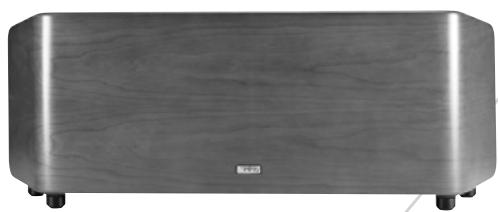
The Infinity Cascade Model Fifteen continues Infinity's longstanding commitment to accurate sound reproduction. Our advanced drivers, high-powered amplifier and proprietary Room Adaptive Bass Optimization System, along with a rigid, well-braced enclosure, combine to deliver uncompromising bass performance in any stereo or multichannel home theater. In addition, the slim profile allows for easy integration into any residential environment.
Unpacking the Subwoofer
If you suspect damage from transit, report it immediately to your dealer. Keep the shipping carton and packing materials for future use.
PLACEMENT
Since the installation of a subwoofer can be somewhat more complicated than installing full-range speakers, it is essential that you read this section very carefully prior to connecting the subwoofer to your system. Should you have questions relating to your installation, it is advisable to call either your dealer or Infinity's Customer Service Department for advice.
The performance of the subwoofer is directly related to its placement in the listening room and how you align the subwoofer with its satellite speakers. Setting the volume of the subwoofer in relation to the left and right speakers is also of critical importance because it is essential that the subwoofer integrate smoothly with the entire system. Setting the subwoofer's volume level too high will result in an overpowering, boomy bass. Setting the volume level too low will negate the benefits of the subwoofer.
Here are several additional facts on installation that may prove useful. It is generally believed by most audio authorities that low frequencies (below 125Hz ) are nondirectional and, therefore, placement of a subwoofer within any listening room is not critical. While in theory it is true that the larger wavelengths of extremely low frequencies are basically nondirectional, the fact is that, when installing a subwoofer within the limited confines of a room, reflections, standing waves and absorptions generated within the room will strongly influence the performance of any subwoofer system. As a result, the specific location of the subwoofer becomes important, and we strongly recommend that you experiment with placement before choosing a final location.
Placement will depend upon your room and the amount and quality of bass required (for example, whether or not your room permits placement of the subwoofer near either satellite).
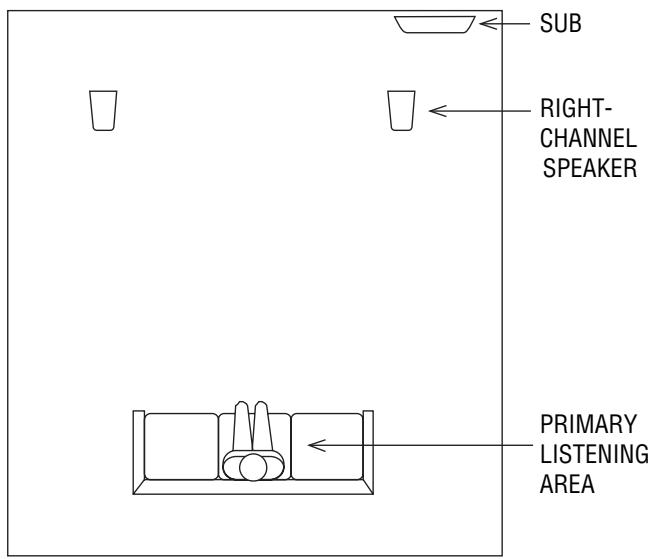
Figure 1. This example shows the subwoofer positioned behind the right-channel satellite speaker to re-create the actual location of bass instruments in an orchestra and/or add impact to movie soundtracks.
CONTROLS AND CONNECTIONS
Rear Panel
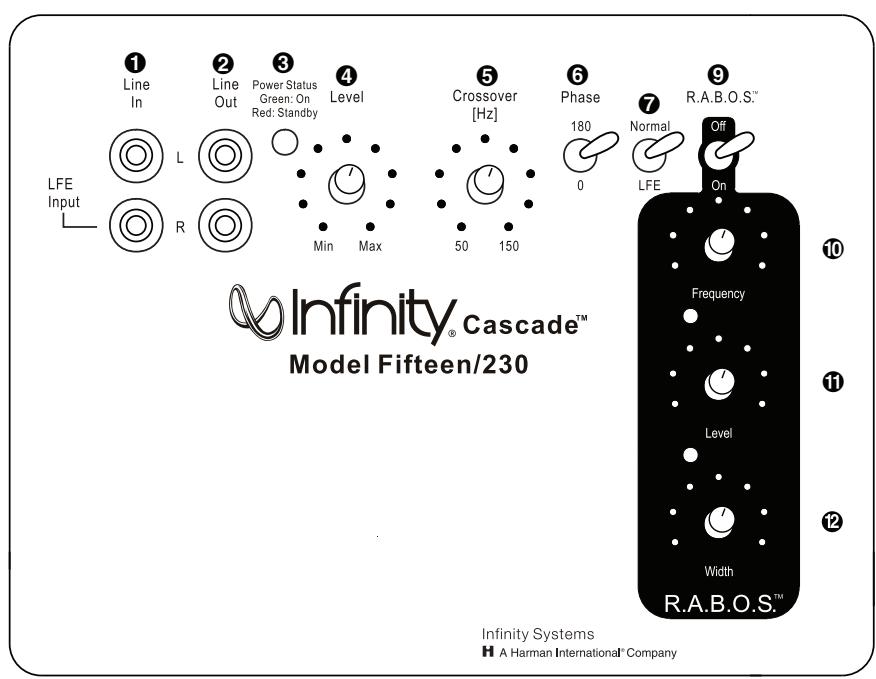
Line-Level Inputs
2 Line-Level Outputs
3 Power Indicator
4 Subwoofer Level (Volume) Control
Crossover Adjustment
6 Phase Switch
Normal/LFE Selector
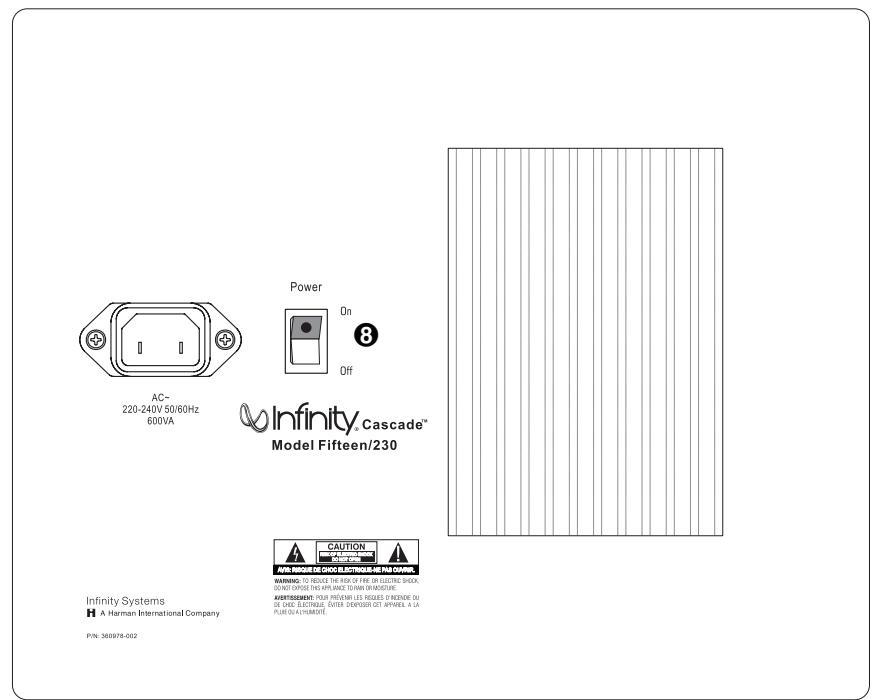
3 Power Switch
Bass Optimization Controls (see page 5)
9 R.A.B.O.S. Selector
16 Center-Frequency Adjustment
Bass Optimization System Level Adjustment
12 Bass Optimization System Bandwidth Adjustment
CONNECTIONS
If you have a Dolby* Digital or DTS receiver/processor with a low-frequency-effects (LFE) output:
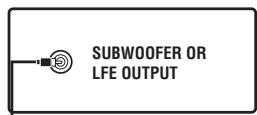
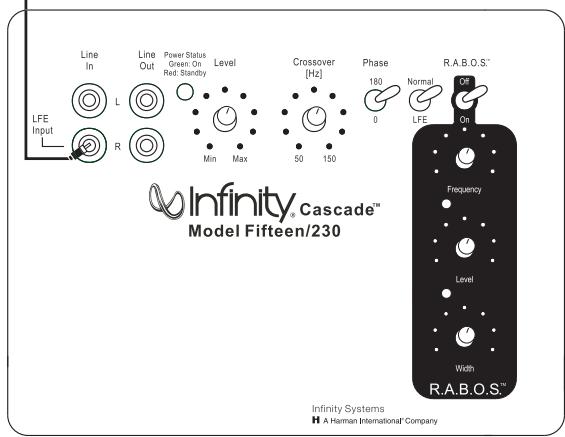
- Set Normal/LFE Switch to LFE.
NOTE: In this case, you do not need to use a Y connector. Simply connect the LFE output on your receiver/processor to either the left or right input on the subwoofer.
If your receiver/processor has subwoofer outputs for the left and right channels:
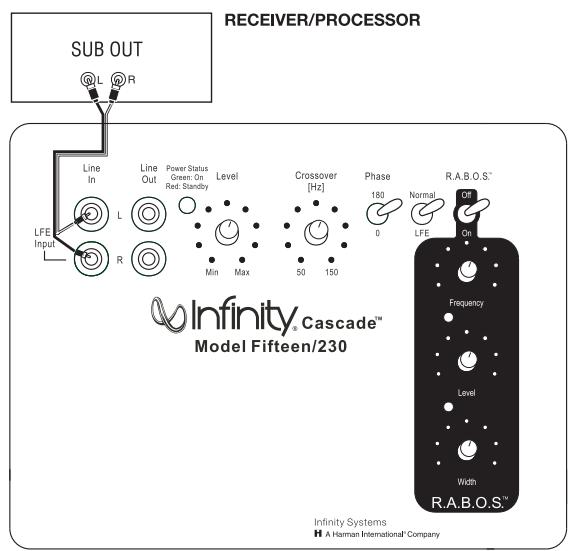
- Set Normal/LFE Switch to Normal.
NOTE: Some receivers have a single subwoofer output (do not confuse this with a single LFE output as described to the left). In that case, it is recommended that you use a Y connector (not included) to maximize performance.
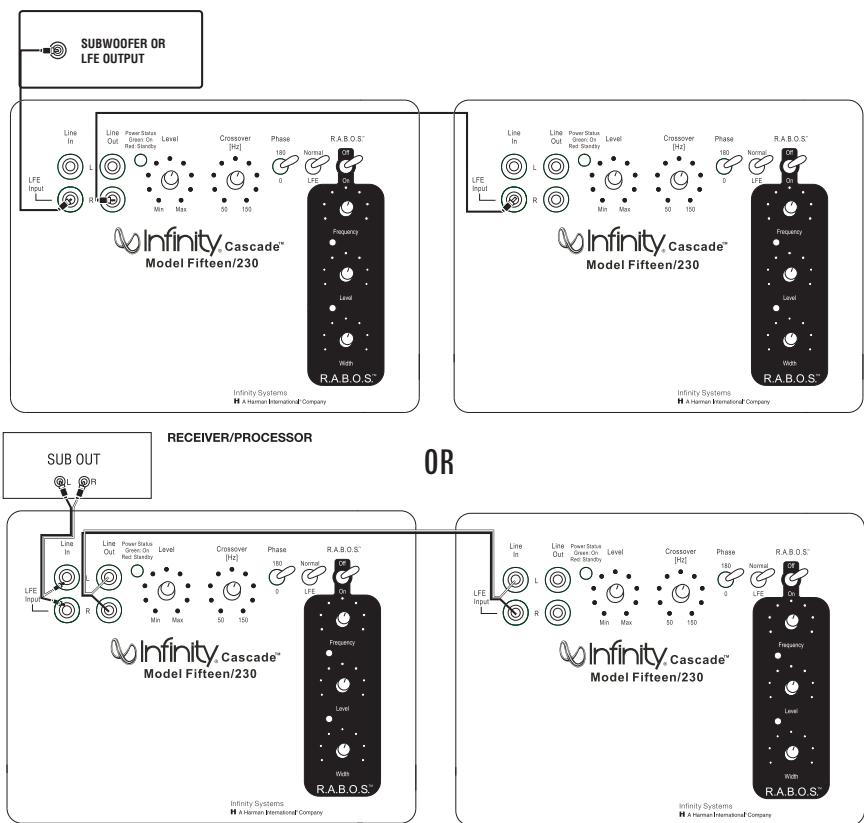
The Cascade Model Fifteen also includes a set of line outputs. These outputs allow you to "daisy-chain" one Model Fifteen to multiple Model Fifteen subwoofer. Simply connect the first subwoofer as described above and then run a subwoofer cable from the line output(s) to the line input(s) on the next sub.
NOTE: This line output is before the R.A.B.O.S. circuit. Each sub-woofer's R.A.B.O.S. controls must be individually adjusted during the R.A.B.O.S. setup.
OPERATION
Power On
Plug your subwoofer's AC cord into a wall outlet. Do not use the outlets on the back of the receiver.
Initially set the Subwoofer Level (Volume) Control 4 to the "min" position.
Turn on your sub by pressing the Power Switch 8 on the rear panel.
Auto On/Standby
With the Power Switch 8 in the ON position, the Power Indicator LED 3 will remain backlit in red or green to indicate the On/Standby mode of the subwoofer.
RED = STANDBY (No signal detected, Amp Off)
GREEN = ON (Signal detected, Amp On)
The subwoofer will automatically enter the Standby mode after approximately 10 minutes when no signal is detected from your system. The subwoofer will then power ON instantly when a signal is detected. During periods of normal use, the Power
Switch ⑧ can be left on. You may turn off the Power Switch ⑧ for extended periods of nonoperation, e.g., when you are away on vacation.
Adjust Gain
Turn on your entire audio system and start a CD or movie soundtrack at a moderate level. Turn up the Subwoofer Level (Volume) Control 4 about halfway. If no sound emanates from the subwoofer, check the AC-line cord and input cables. Are the connectors on the cables making proper contact? Is the AC plug connected to a "live" receptacle? Has the Power Switch
③ been pressed to the "On" position? Once you have confirmed that the subwoofer is active, proceed by playing a CD, record or cassette. Use a selection that has ample bass information.
Set the overall volume control of the preamplifier or stereo to a comfortable level. Adjust the Subwoofer Level (Volume) Control
4 until you obtain a pleasing blend of bass. Bass response should not overpower the room but rather should be adjusted so there is a harmonious blend across the entire musical range. Many users have a tendency to set the subwoofer volume too loud, adhering to the belief that a subwoofer is there to produce lots of bass. This is not entirely true. A subwoofer is there to enhance bass, extending the response of the entire system so the bass can be felt as well as heard. However, overall balance must be maintained or the music will not sound natural. An experienced listener will set the volume of the subwoofer so its impact on bass response is always there but never obtrusive.
Crossover Adjustments
NOTE: This control will have no effect if the Normal/LFE Selector Switch 7 is set to "LFE." If you have a Dolby Digital or DTS processor/receiver, the Crossover Frequency is set by the processor/receiver. Consult your owner's manual to learn how to view or change this setting.
The Crossover Adjustment Control ⑤ determines the highest frequency at which the subwoofer reproduces sounds. If your main speakers can comfortably reproduce some low-frequency sounds, set this control to a lower frequency setting, between 50Hz and 100Hz. This will concentrate the subwoofer's efforts on the ultradeep bass sounds required by today's films and music. If you are using smaller bookshelf speakers that do not extend to the lower bass frequencies, set the Crossover Adjustment Control to a higher setting, between 120Hz and 150Hz.
Phase Control
The Phase Switch ⑥ determines whether the subwoofer speaker's piston-like action moves in and out with the main speakers, 0^ , or opposite the main speakers, 180^ . Proper phase adjustment depends on several variables such as room size, subwoofer placement and listener position. Adjust the phase switch to maximize bass output at the listening position.
ROOM ADAPTIVE BASS OPTIMIZATION SYSTEM™ (R.A.B.O.S.™)
Infinity's R.A.B.O.S. is a simple-to-use, yet sophisticated, low-frequency calibration system. It is designed to work in conjunction with the Cascade Model Fifteen self-amplified subwoofer. The subwoofer contains a parametric equalizer that you will adjust as indicated by the R.A.B.O.S. test results. Following these instructions, you will optimize the Cascade Model Fifteen's response characteristics to complement its environment. This will dramatically improve the sound of your system. The optimization process takes less than 30 minutes.
The R.A.B.O.S. Kit Includes the Following Components:
- Specialized Sound-Level Meter
Test CD - Instructions
Measurement Templates - Width Selector
- Adjustment "Key"
What R.A.B.O.S. Does
The Test CD provides specially designed signals you will use while performing measurements. The sound-level meter provided is used to "acquire" the information needed for adjustments. You will create a response plot on the Measurement Template. Using the Width Selector, you will then determine the appropriate equalizer settings. The "Key" is used to adjust the parametric equalizer built into the Cascade Model Fifteen. After adjustment, the test sequence is repeated to confirm your settings.
The R.A.B.O.S. Goal
It is a fact of audio that what we hear at low frequencies is determined as much or more by the listening room than by the loudspeaker itself. Placement of the loudspeakers and listeners and the acoustical characteristics of the room surfaces are all important determinants of bass quantity and quality. In most practical situations, there is little that can be done about this, except for patient trial-and-error repositioning of the loudspeakers and listeners. Usually, the practical constraints of a living space and the impracticality of massive acoustical treatment mean that equalization is the only practical solution.
Professional sound engineers routinely employ sophisticated measurement systems and equalizers to optimize speakers to the installation. This has never been practical for the home audiophile. This is why R.A.B.O.S. was created. R.A.B.O.S. enables you to identify the dominant low-frequency response characteristic of your room. Once you know the problem, R.A.B.O.S. provides the tools needed to optimize the low-frequency characteristics of the speakers to the room they are in, exactly as the professional sound engineers do it.
Performing R.A.B.O.S. Tests
These instructions assume you have already installed your subwoofer according to the information provided in the Owner's Guide. It is also assumed that all equipment in your entertainment system is interconnected properly and is in good operating condition.
Preparations
Before beginning R.A.B.O.S. tests, please check the following:
- Set R.A.B.O.S. switch ⑨ to On position.
- Make sure all three R.A.B.O.S. controls, 10, 11 and 12, on the subwoofer are turned fully clockwise.
- Make sure the loudness contour (if any) on your receiver/processor/preamp is turned off.
- Set the tone controls (Bass and Treble) to their center or flat positions.
- Bypass all surround and effects features of your receiver/processor/preamp or set to Stereo Bypass.
- If you are using a multichannel surround processor or receiver, make sure all bass-management features are properly set. The Audio channels should all be set to "Small" or "High-Pass" and the subwoofer set to "On."
You must have a CD player in the system. A CD player remote control is quite convenient but not essential.
For best results, it is recommended that all major furnishings are in place and that all doors and windows in the listening area are in their normal positions. That is, if you normally listen to music with all doors closed, then this is how they should be during this procedure.
Try to minimize ambient noise while running tests. Turn off all major appliances and any air conditioning or furnace fans. These can create significant subsonic noise that may be barely perceptible but which can wreak havoc on low-frequency measurements.
Critical information is highlighted with this mark: ①
Helpful hints are marked with this symbol: 8
Contents of the R.A.B.O.S. Test CD
| Track | Title | Track | Title |
| 1 | Welcome | 32 | Quick Retest 80Hz |
| 2 | Set System Test Level | 33 | Quick Retest 77Hz |
| 3 | Set Subwoofer Test Level | 34 | Quick Retest 72Hz |
| 4 | 100Hz Test | 35 | Quick Retest 66Hz |
| 5 | 95Hz Test | 36 | Quick Retest 63Hz |
| 6 | 90Hz Test | 37 | Quick Retest 56Hz |
| 7 | 85Hz Test | 38 | Quick Retest 52Hz |
| 8 | 80Hz Test | 39 | Quick Retest 49Hz |
| 9 | 77Hz Test | 40 | Quick Retest 46Hz |
| 10 | 72Hz Test | 41 | Quick Retest 43Hz |
| 11 | 66Hz Test | 42 | Quick Retest 40Hz |
| 12 | 63Hz Test | 43 | Quick Retest 38Hz |
| 13 | 56Hz Test | 44 | Quick Retest 35Hz |
| 14 | 52Hz Test | 45 | Quick Retest 30Hz |
| 15 | 49Hz Test | 46 | Quick Retest 26Hz |
| 16 | 46Hz Test | 47 | Quick Retest 24Hz |
| 17 | 43Hz Test | 48 | Quick Retest 22Hz |
| 18 | 40Hz Test | 49 | Quick Retest 21Hz |
| 19 | 38Hz Test | 50 | Quick Retest 20Hz |
| 20 | 35Hz Test | 51 | Final System Level Adjustment |
| 21 | 30Hz Test | 52 | Final Subwoofer Level Adjustment |
| 22 | 26Hz Test | 53 | Wide Band Pink Noise, Left |
| 23 | 24Hz Test | 54 | Wide Band Pink Noise,L+R |
| 24 | 22Hz Test | 55 | Wide Band Pink Noise,Right |
| 25 | 21Hz Test | 56 | Wide Band Pink Noise,L-R |
| 26 | 20Hz Test | 57 | Wide Band Pink Noise, Uncorrelated |
| 27 | Intro to Quick Retest | 58 | 1 to 4kHz Pink Noise, Left |
| 28 | Quick Retest 100Hz | 59 | 1 to 4kHz Pink Noise,L+R |
| 29 | Quick Retest 95Hz | 60 | 1 to 4kHz Pink Noise, Right |
| 30 | Quick Retest 90Hz | 61 | 1 to 4kHz Pink Noise, Left-R |
| 31 | Quick Retest 85Hz | 62 | 1 to 4kHz Pink Noise, Uncorrelated |
Tracks 53-62 of the R.A.B.O.S. Test CD are test tones that can be used for general diagnostics of your system. They are not used for R.A.B.O.S. settings.
THE R.A.B.O.S. SOUND-LEVEL METER (RSLM)
The RSLM is a battery-operated, handheld, acoustic measurement device specifically designed for Infinity R.A.B.O.S. On the face of the instrument is a light-emitting diode (LED) bar graph that indicates relative sound level. There are also indicators for power-on, out-of-range signals and a low battery.
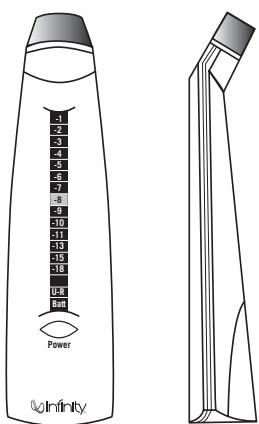
Figure 2. R.A.B.O.S. Sound-Level Meter
Power is switched on or off by pressing the button directly below the bar-graph window. When the unit is on, one or more LEDs will always be illuminated. The function of the LEDs is described in the following section.

Power/On Under-range

Measurement In-range

Over-Range

Low Battery
Figure 3. RSLM bar-graph indications
- Power-On/Low Signal: This is indicated by the illumination of any LED on the bar graph. If the sound level in the room is below the measurement range of the instrument, a green LED near the bottom of the bar graph will be illuminated.
- Measurement In-Range (Normal Measurements): When the sound level is within the range of the RSLM, the green LED will be off and one of the red LEDs in the bar graph will be illuminated, indicating the relative sound level, in decibels (dB).
Over-Range: If the sound level exceeds the range of the meter, OdB through -5 will all light simultaneously. - Low Battery: When the battery voltage is too low for accurate measurements, an LED at the bottom of the bar graph will be illuminated. Replace the battery.
D Do not attempt measurements when this light is on.
RSLM Placement
Determine where in the room you are most likely to sit when listening to music or watching a movie. This is where you will want to hold the RSLM during measurements. The RSLM should be oriented so it can be easily read and held at your seated ear level during tests.
You must use this same position for all tests.
The RSLM can be mounted on a standard camera tripod. This will ensure the best results.
Initial System-Level Setting
The following steps will set the playback level of the system to the correct level for all tests that follow.
① Turn the system volume to minimum.
Cue the R.A.B.O.S. Test CD to Track 2 and press Pause II. This track will produce band-limited pink noise in both the left and right channels.
Press Play. With the RSLM positioned as described above, increase the system volume until the RSLM display indicates -10dB . See Figure 4.

Figure 4. RSLM indicating the correct system level to begin tests (-10dB)
When you have completed this adjustment, press Pause II.
Setting the Subwoofer Test Level
Each of the following test tracks is about one minute long. This is normally much longer than required. Press Pause II or advance to the next test as soon as you are ready.
This step will set the subwoofer levels for measurement purposes. The objective is to scale the subwoofer's output to make full use of the RSLM indicator range. Scaling is optimum when a OdB reading is observed on the highest peak without triggering the over-range indication. Later, you will rebalance the subwoofer to the main speakers.
① The three R.A.B.O.S. controls, 10, 11 and 12, should be set to fully clockwise positions, and all measurements should be conducted with their level controls in this position. Confirm this setting before you begin this test. The Level control 4 should be set to the mid position.
Cue Track 3 and Pause II. Track 3 continuously steps through all subwoofer test tones for approximately 1 minute. Each tone will play just long enough for the RSLM to give a stable reading.
To get accurate measurements, it is necessary to play the Cascade Model Fifteen quite loud. The OdB indication is about 94dB. At this level, frequencies below 100Hz can cause doors, windows, furnishings and other objects in the room to vibrate. This frequently results in clearly audible buzzes and/or rattles that come and go as each test tone plays. Strong buzzes not only sound bad; they can cause measurement errors. If you hear a buzz or rattle during this test, it is highly recommended that you locate the source and eliminate its effects. This is actually a valuable room-diagnostic tool.
Press Play. As Track 3 plays, watch the RSLM carefully. Watch for peak readings. The peak reading may be no more than a brief flash. Readjust the subwoofer's Level control until the peak level observed is 0dB without triggering the overrange indication. See Figure 5.
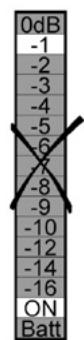
Too low

Correct level
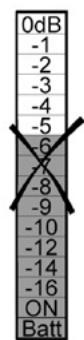
Too high
Figure 5. Adjusting the subwoofer levels for a 0dB peak
When finished, press Pause II.
Performing Low-Frequency Measurements
Read the following instructions fully before beginning tests.
For the following steps, you will need a Measurement Template and a pencil.
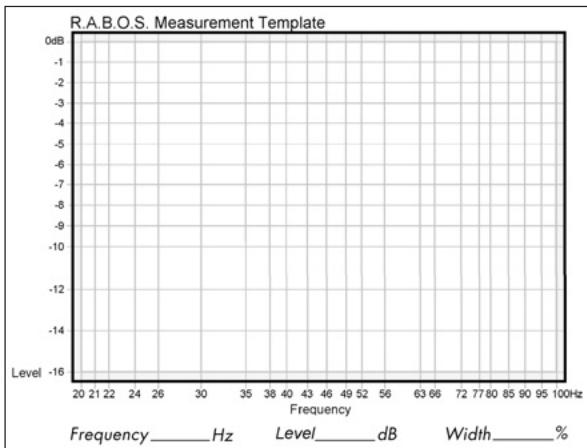
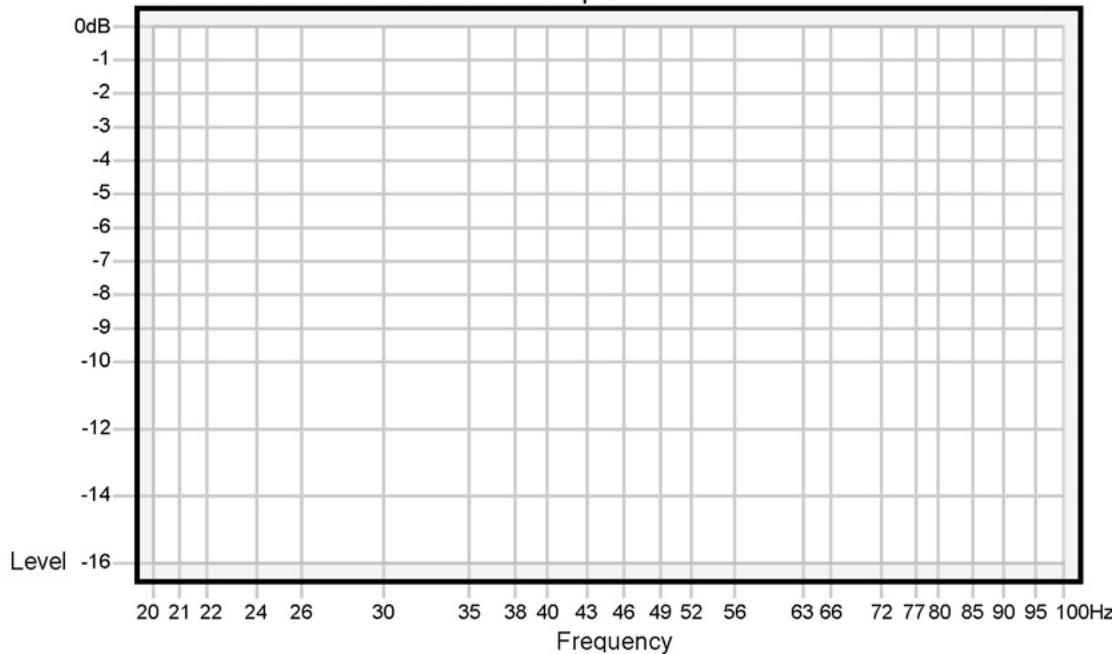
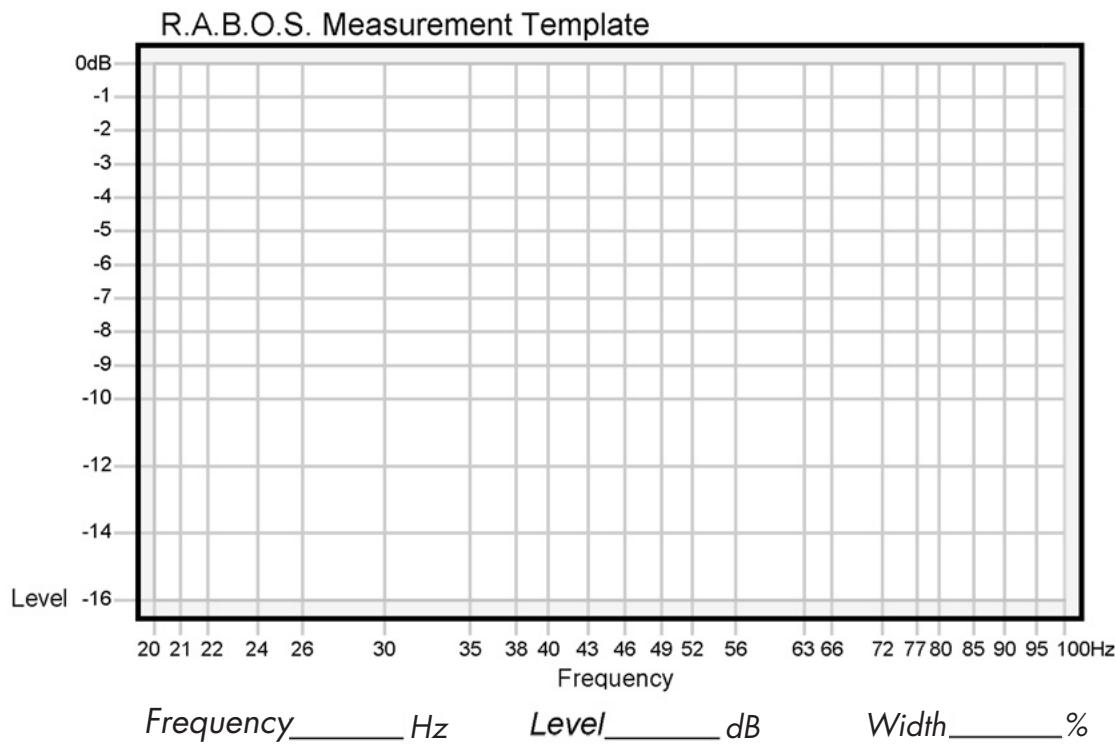
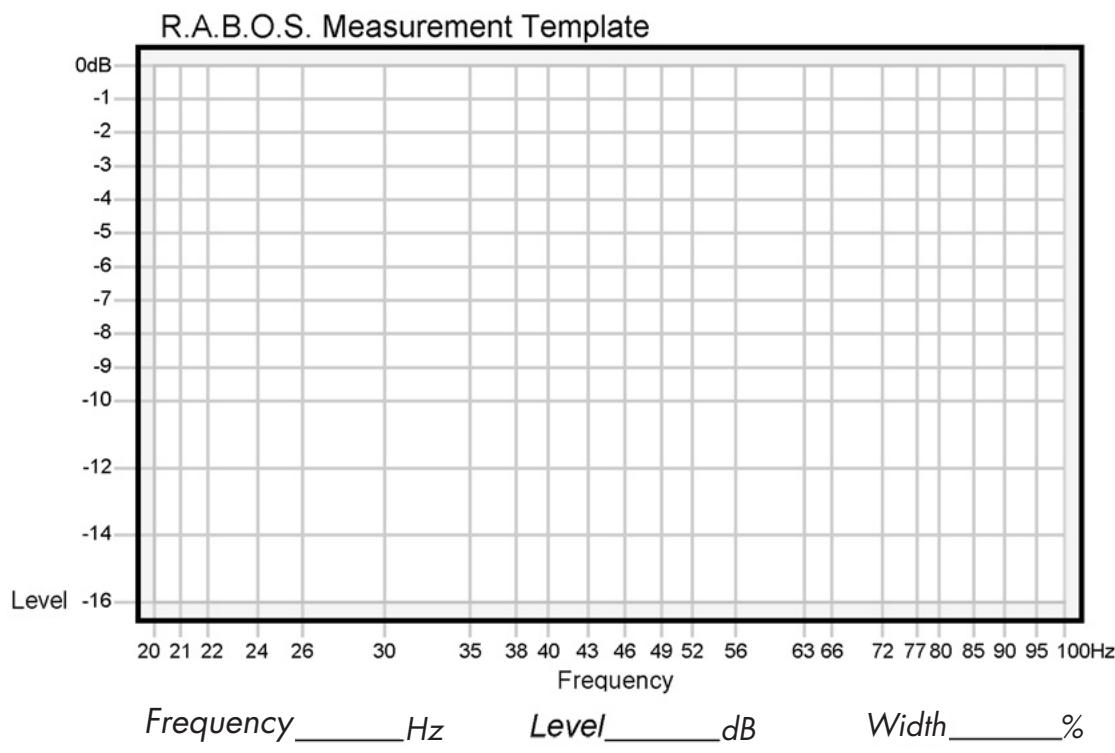
Figure 6. R.A.B.O.S. Measurement Template
Each of the following tracks produces a low-frequency test tone. The range of these tests is from 100Hz down to 20Hz . The frequency of each test is announced before it begins. The first test is the highest frequency (100Hz); therefore, you will be marking the template from right to left. Each frequency point is listed across the bottom of the Measurement Template (this is called the X-axis). See Figure 6 on the previous page. The vertical scale on the left side of the template indicates relative level, in dBs (the Y-axis). The template's vertical scale matches that of the RSLM bar graph.
Cue Track 4 and Pause II.
From now on, you will want to keep your CD player's remote control handy.
Press Play. As Track 4 plays, observe the level indicated on the RSLM.
EXAMPLE: The test frequency is 100Hz and the level indicated is -2dB . Find the intersection of 100Hz (X-axis) and -2dB (Y-axis). Place a dot at that point. See Figure 7.
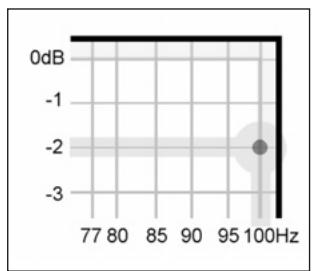
Figure 7. Locating a test point
It takes a few seconds for the RSLM reading to stabilize, especially at very low frequencies. Don't rush. Give each test adequate time for the meter to stabilize.
At the bottom of the bar graph is a green "ON" LED. This LED is illuminated whenever the sound level is below the measuring range of the RSLM. If this occurs during a test, place a dot at the intersection of the test frequency and the bottom frame of the template. See Figure 8.
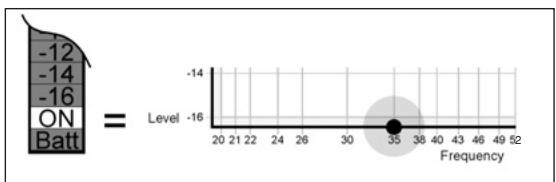
Figure 8. Indicating an under-range test
When finished, press Skip▶▶I to advance to the next test. Repeat the process described above for Tracks 5 through 26.
When you have completed the 23 measurements, you are ready to analyze the data and make corrective adjustments. The completed Measurement template will look something like the example in Figure 9.
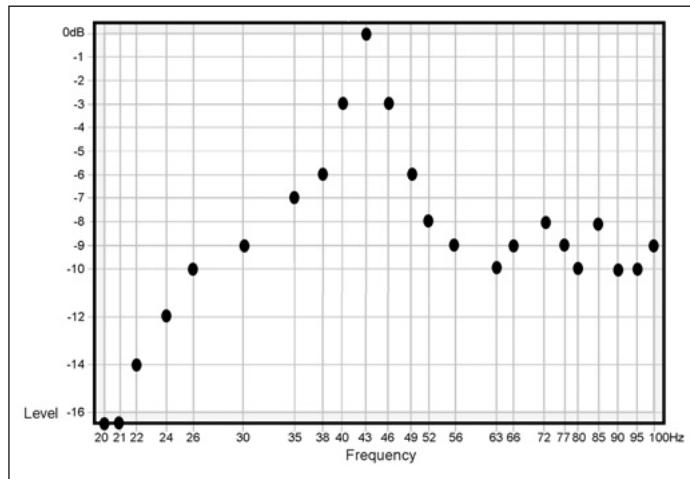
Figure 9. Completed R.A.B.O.S.template
Now connect the dots as shown in Figure 10. This will make interpretation of the data much easier.
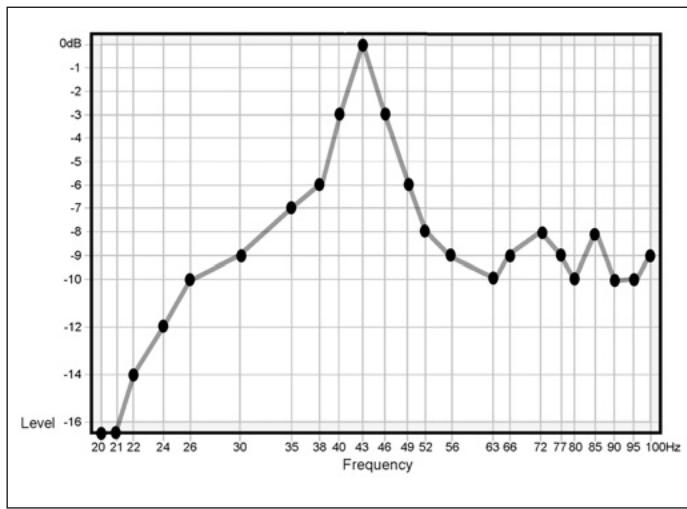
Figure 10. Test example with dots connected

At this point, you may simply enter the data you just measured into the R.A.B.O.S. calculator, found on the Infinity Web site at www.infinitysystems.com.
After entering the data, this R.A.B.O.S. wizard will return the correct settings for all three R.A.B.O.S. controls: 10, 11 and
12. Skip to page 14 and adjust these controls as described, and finish the R.A.B.O.S. setup. If you would like to manually calculate the R.A.B.O.S. settings, simply continue following the instructions from this point.
What Does a Parametric Equalizer Do?
The R.A.B.O.S. system uses one band of parametric equalization for response correction. Parametric equalizers are the most versatile class of filters. The effect an equalizer will have on the signal is dependent on three parameters.
Frequency: The equalizer will have maximum effect at one frequency, usually described as the center frequency.
Level: This refers to the amount of cut (in dBs) the equalizer is set for.
Bandwidth: Defines the range of frequencies over which the equalizer will have an effect. On the Cascade Model Fifteen, this adjustment is abbreviated as "Width."
Only parametric equalizers allow independent adjustment of all three parameters.
These will be explained more fully in the sections that follow.
Completing the Measurement Template
Along the bottom of the Measurement Template are three fields where you will enter the equalizer settings needed to complete system optimization.
These instructions are based on the example in Figure 11. Use this tutorial to become familiar with the process. Strategies for several other test results will be presented later. After you have completed these three entry fields, you will be ready to perform the adjustments, completing R.A.B.O.S. optimization.
Frequency
The frequency of the R.A.B.O.S. equalizer may be adjusted to any one of nineteen frequencies from 20Hz to 80Hz. This defines where you are going to apply equalization.
Width
The frequency range of the R.A.B.O.S. equalizer may be set from 5% to 50% of an octave in 21 steps. This setting defines how much of the Cascade Model Fifteen's output will be equalized.
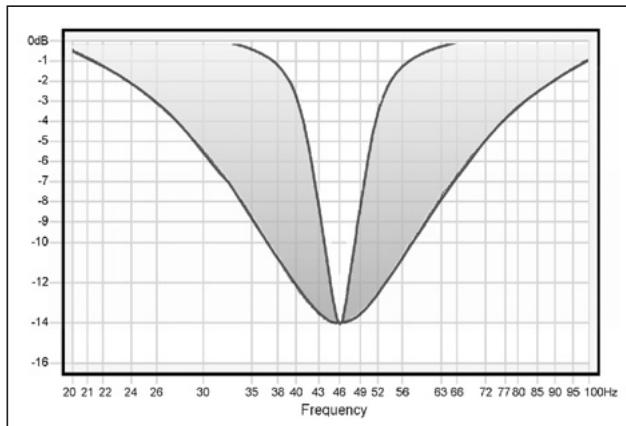
Figure 11. Effect of adjustable width
Width is expressed as a percentage of an octave. For example, a width setting of 25% means the equalizer will affect a frequency band of 1/4 of an octave; 1/8 of an octave above and 1/8 of an octave below the center frequency.
The octave is a logarithmic expression. From any point in the spectrum, one octave above or below that point is always double or half the frequency. Therefore, one octave above 100Hz would be 200Hz . One octave below 100Hz is 50Hz .
In the section that follows, we will discuss the use of the Width Selector.
Using the Width Selector
① Read the following instructions carefully. The example presented may not look like the graph you just created. Focus on the concepts and techniques presented. Specific cases will be discussed later.
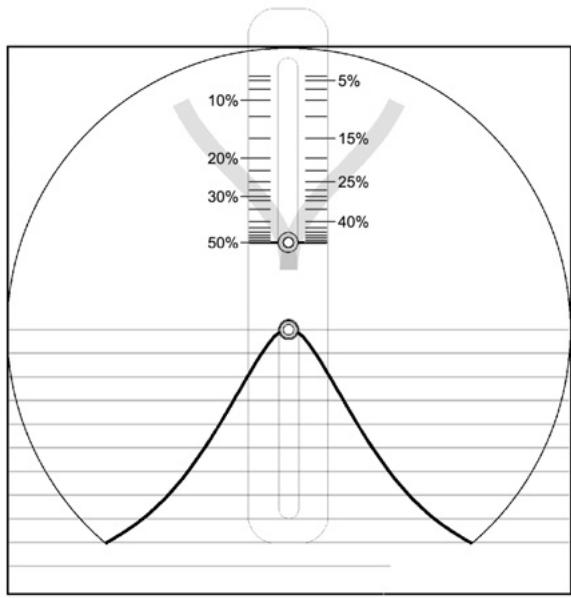
Figure 12. Width Selector
You will use the Measurement Template just completed and the Width Selector to determine the correct width setting. The Width Selector graphically depicts a single resonant peak. The peak looks similar to a slice of a pie. See Figure 12. At the top of the Selector is a pull tab. When you slide the tab up and down, the width of the pie slice becomes narrower and wider, respectively. The pointers on the sides of the button point to the bandwidth that corresponds to the width of the slice.
Place the Width Selector over the Measurement Template, positioning the center rivet of the Selector over the response peak, as shown in Figure 13. Be sure to align the horizontal lines of the Width Selector with those of the Measurement Template.

Figure 13. Placement of the Bandwidth Selector
Apply pressure to the upper and lower left corners of the Selector using the thumb and forefinger of your left hand. Now gently slide the tab up or down until the adjustable slice most closely fits the response data. See Figure 14.
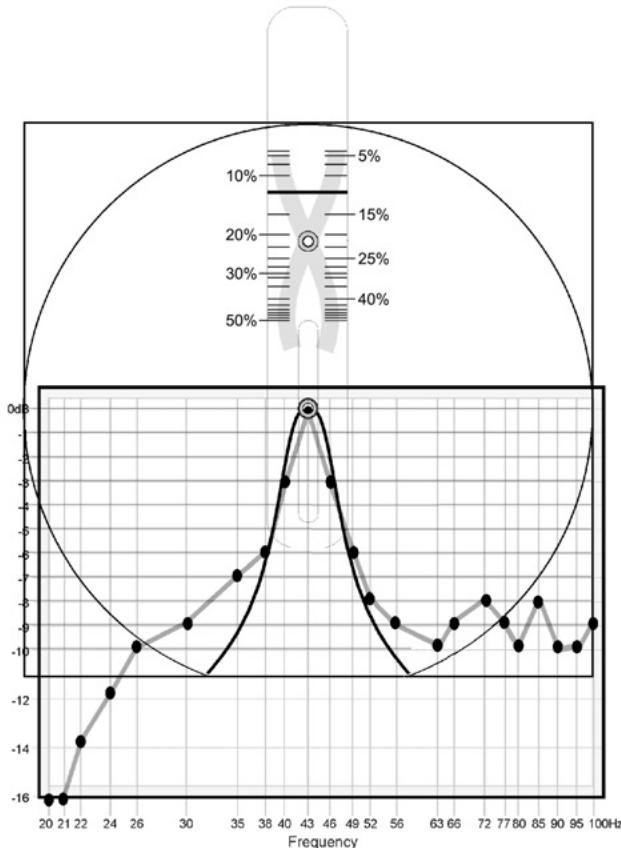
Figure 14. Selector adjusted for the "best fit"
The pointer on the slider will indicate the correct width setting. Enter this number in the Width field of the Measurement Template. In our example, the width is 12.5% .
It is not realistic to expect a perfect fit. Acoustic measurements encompass the behavior of not only the speakers but of the room and its contents as well. Reflected energy, standing waves and ambient noise all add their part. Determining the best width setting nearly always requires compromise.
Level
This setting will define the amount (level) you want to reduce the peak, in decibels.
The R.A.B.O.S. level adjustment is limited to attenuation only, and is adjustable from 0dB to -14dB . After optimization, the R.A.B.O.S. equalizer will eliminate the largest low-frequency peak; therefore, the broadband bass level can be increased without overpowering the midrange frequencies. R.A.B.O.S. applies this compensation automatically.
You will use the Width Selector as an aid in determining the correct level setting. Place the Width Selector as described above and adjust it to the correct width. Observe the first frequency point on the high-frequency side of the peak that no longer follows the slope of the Width Selector. In this example this is 56Hz . Calculate the average level of the readings from 56Hz up to 100Hz ; that is, 10 data points in this example.
$$ \begin{array}{c c c c c c c c c} 5 6 \mathrm {H z} & 6 3 \mathrm {H z} & 6 6 \mathrm {H z} & 7 2 \mathrm {H z} & 7. 7 \mathrm {H z} & 8 0 \mathrm {H z} & 8 5 \mathrm {H z} & 9 0 \mathrm {H z} & 9 5 \mathrm {H z} & 1 0 0 \mathrm {H z} \ - 9 & - 1 0 & - 8 & - 9 & - 1 0 & - 9 & - 8 & - 1 0 & - 1 0 & - 9 \end{array} - 9 2 \div 1 0 = - 9. 2 $$
Whenever your answer has a remainder, always round down (disregarding the negative [-] ) to the next whole number.
In our example, you would enter "9" in the attenuation field.
This may not be the best method in all cases. The next section contains several other examples.
What You Measure, What to Do
As stated earlier, it is not possible to anticipate the effect of every possible listening environment. However, most residential sound rooms share many characteristics, and their dimensions fall into a range that make some response irregularities far more likely than others. On the following pages are examples of what you may encounter. Following each example is a strategy for correction. Compare your measurement results with the following examples. Find the one that best fits your graph and follow the instructions presented for that scenario.
Remember, when looking for a match, look at the descriptive characteristics, not any specific frequency or level. Each of these examples can occur at any frequency, bandwidth and level. It is unlikely that your test results will be exactly as depicted in these examples.
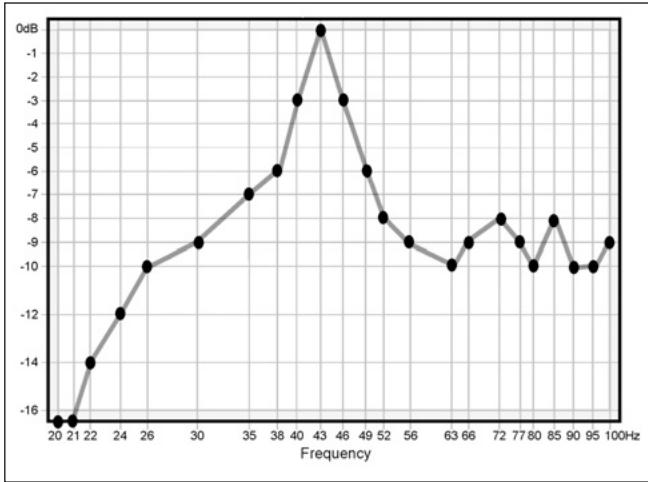
Example 1. Single Dominant Peak
Figure 15. Single dominant peak
This is the most common result of speaker/room interaction.
Apply the Width Selector as described in Figure 13. Align the center line of the Selector over the center of the peak, as shown in Figure 14. Now adjust the Selector until you have achieved the "best fit." The slider now points to the correct bandwidth setting. In this example, the frequency is 43Hz and the best-fit width is 12.5% . Fill in the Width and Frequency fields provided on the template.
Determine the appropriate level using the technique described earlier. In this example, -9dB would be best. Enter the level in the field provided.
Skip to the "Adjusting the R.A.B.O.S. Equalizer" section on page 14.
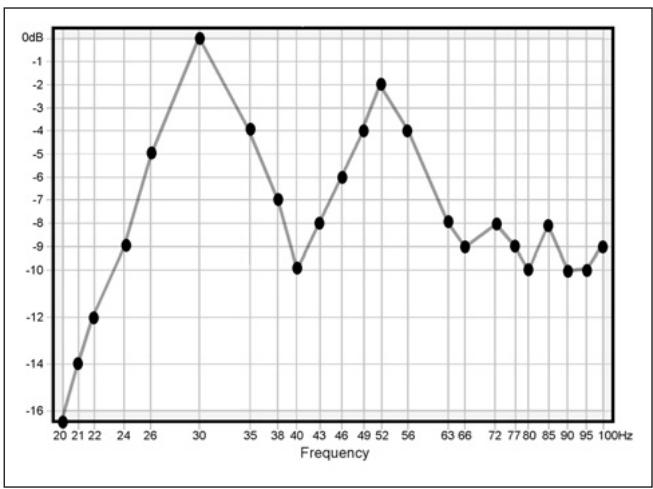
Example 2. Two Response Peaks
Figure 16. Two response peaks
Characterized by two response peaks, approximately equal in amplitude and width. This requires that you make a choice between the two peaks. In situations like this, the higher frequency peak will always be more audible and objectionable. Response peaks below 45Hz , unless extreme, can actually be beneficial toward achieving visceral impact. Perform corrections on the upper frequency peak.
Apply the Width Selector as described above. Align the centerline of the Selector over the center of the higher frequency peak. Now adjust the Selector until you have achieved the "best fit." The slider now points to the correct width setting. In this example, this is at 52Hz . The best-fit width is 28% . Fill in the Width and Frequency fields provided on the template.
Determine the appropriate level using the technique described earlier. This calculation will indicate a -8dB setting. However, this peak does not reach the 0dB level as the lower peak does. Therefore, a -8dB setting would be excessive. The 52Hz peak stops at -2dB . Subtracting 2 from 8 yields the correct setting, -6dB . Enter -6 in the Level field.
Skip to the "Adjusting the R.A.B.O.S. Equalizer" section on page 14.
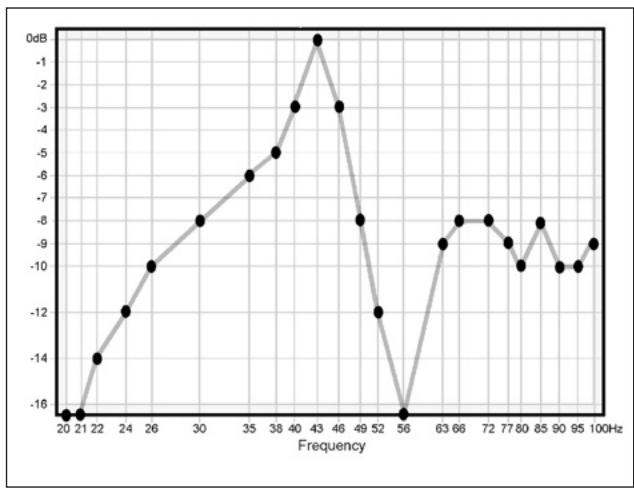
Example 3. Peak Adjacent to a Dip
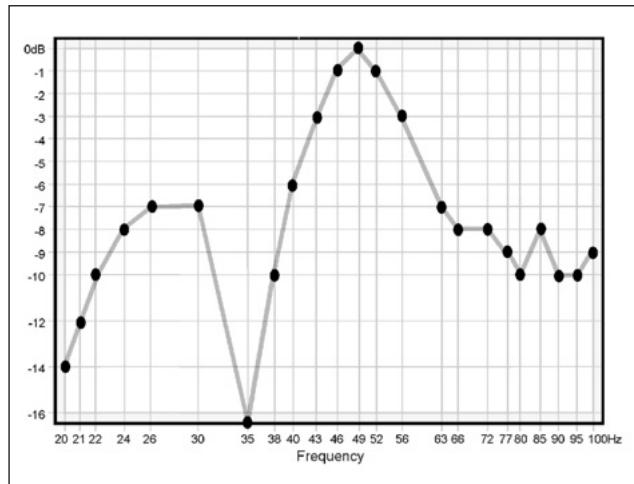
Figure 17. Dip above or below peak
Response dips can occur at any frequency, sometimes immediately adjacent to the peak you want to correct. Two examples are shown, one immediately above and one immediately below the peak. Deep response dips such as these are caused by destructive wave interference. Destructive interference dips occur only in one spot within the room. It is not uncommon to completely eliminate the effect by moving the RSLM to a different location. Note that this does not eliminate the dips. We have simply moved away from them. Sometimes only a few inches are required. Do not attempt to correct this condition with equalization. If you encounter dips like this, take the following steps:
- Select a new test position: Cue the test track corresponding to the center frequency of the dip. In the first example in Figure 18, you would play Track 13 (56Hz). Press Play . You will see a reading very close to what you had before. Now, slowly move the RSLM around the area, if possible remaining within about a foot of the original test point. As you move the RSLM, watch the bar graph. You will observe large level fluctuations. Find a position that restores the level to approximately that of the adjacent test points. You may find it helpful to move the RSLM vertically. Dips can be oriented in any axis. The position that restores the level to about that of the adjacent test points is your new test position.
- Reset the test level: Return to the section "Setting the Subwoofer Test Level" on page 7. Perform the procedure as described.
- Repeat the measurements: Now that you are familiar with the measurement process, you can go much faster by using Tracks 27-50. These tracks contain all the test tones necessary for measurement. However, each test is only about three seconds, and there is no frequency announcement. The first test is 100Hz . Just place each test mark in order until finished. Connect the dots.
Your second measurement will no longer exhibit the deep response dip. However, the peak will still be evident. Without the influence of the response dip, the amplitude and center of the peak may have changed. Compare your new data to the examples given in this section of the manual. Follow the instructions for the example that most closely matches your new measurement.
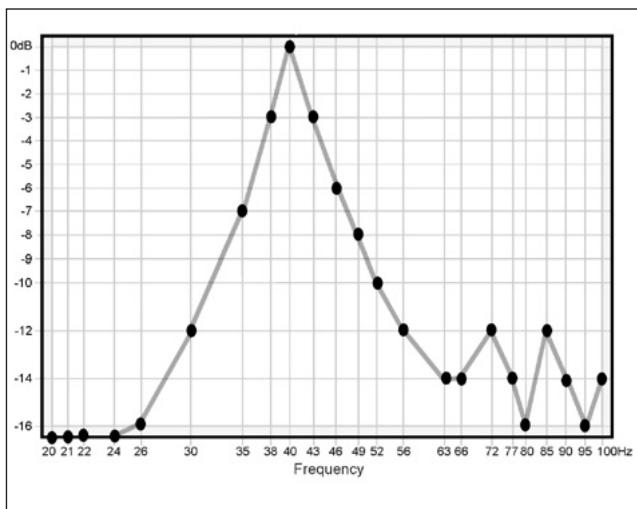
Example 4. Narrow Response
Figure 18. Narrow Response
Although it looks as though this system is quite bass-deficient, this is actually indicative of a single, very narrow peak in excess of 10dB high.
Apply the Width Selector as described earlier. Align the centerline of the Selector over the center of the peak, as shown in Figure 13. Now adjust the Selector until you have achieved the "best fit." The slider now points to the correct width setting. In this example, the frequency is 40Hz and the best-fit width is 10% . Fill in the Width and Frequency fields provided on the template.
Determine the appropriate level using the technique described earlier. In this example, -13dB is indicated. Enter "13" in the field provided.
Skip to the "Adjusting the R.A.B.O.S. Equalizer" section on page 14.
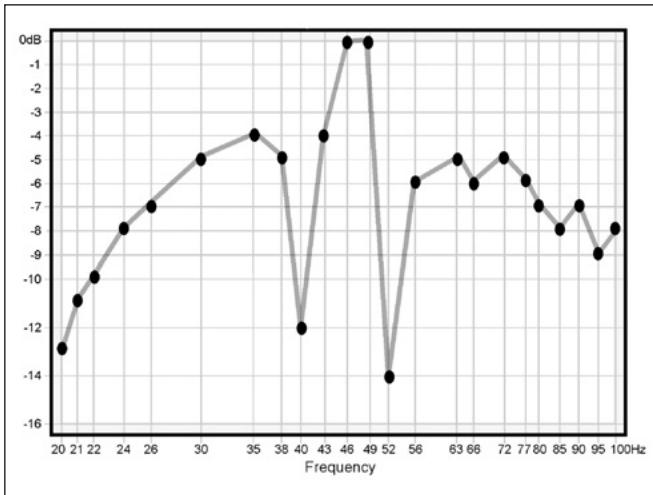
Example 5. One or More Narrow Dips
Figure 19. Example of two narrow dips
Response dips can occur at any frequency, sometimes immediately adjacent to the peak you want to correct. In this example, there are two such dips on either side of the peak. Deep response dips such as these are caused by destructive wave interference. Destructive interference dips occur only in one spot within the room. It is not uncommon to completely eliminate their effect by moving the RSLM to a different location. Note that this does not eliminate the dips. We have simply moved away from them. Sometimes only a few inches are required. Do not attempt to correct this condition with equalization. If you encounter dips like this, take the following steps:
-
Select a new test position: Cue the test track corresponding to the center frequency of the dip. In the example in Figure 19 you would play Tracks 14 (52Hz) and 18 (40Hz). Press Play. You will see a reading very close to what you had before. Now, slowly move the RSLM around the area, if possible remaining within about a foot of the original test point. As you move the RSLM, watch the bar graph. You will observe large level fluctuations. Find a location for the subwoofer or a test location that raises the response at these frequencies. You may find it helpful to move the RSLM vertically. Dips can be oriented in any axis. The position that restores the level to about that of the adjacent test points is your new test position.
-
Reset the test level: Return to the section "Setting the Subwoofer Test Level" on page 7. Perform the procedure as described.
-
Repeat the measurements: Now that you are familiar with the measurement process, you can go much faster by using Tracks 27-50. These tracks contain all the test tones necessary for measurement. However, each test is only about three seconds, and there is no frequency announcement. The first test is 100Hz . Just place each test mark in order until finished. Connect the dots.
Your second measurement will no longer exhibit the deep response dips. However, the peak will still be evident. Without the influence of the response dips, the amplitude and center of the peak may have changed.
- Interpret the new data: Compare your new data to the examples given in this section of the manual. Follow the instructions for the example that most closely matches your new measurement.
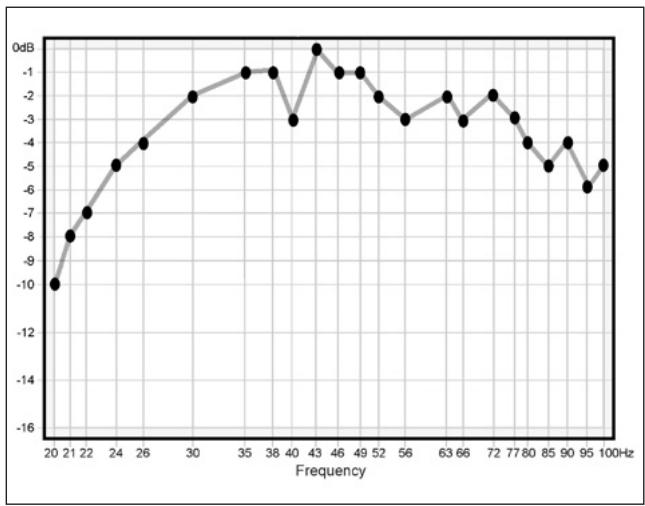
Example 6. Ideal Response
Figure 20. Ideal response, no EQ needed
If your test data looks similar to the example in Figure 20, you have a very favorable setup. Skip to the "Final System Balance" section on page 15.
Adjusting the R.A.B.O.S. Equalizer
Now that you have performed the measurements and interpreted the data, you have the information needed to adjust the subwoofer's equalizer.
There are three equalizer adjustments on the subwoofer. Left to right, they are marked Frequency, Level and Width. Each control has 21 positions. These are numbered from left to right. Therefore, Position 1 is the full counterclockwise position. The following table illustrates all switch positions.
| Position | F (Hz) | L (dB) | W |
| 1 CCW | 20 | -14.1 | 4.5% |
| 2 | 20 | -13.9 | 5% |
| 3 | 20 | -13.5 | 7.5% |
| 4 | 21 | -13.1 | 10% |
| 5 | 22 | -12.7 | 12.5% |
| 6 | 24 | -11.7 | 16.5% |
| 7 | 26 | -11.0 | 20.5% |
| 8 | 30 | -10.2 | 23% |
| 9 | 35 | -9.5 | 26% |
| 10 | 38 | -8.9 | 28% |
| 11 | 40 | -8.3 | 29.5% |
| 12 | 43 | -7.9 | 31% |
| 13 | 46 | -6.4 | 34% |
| 14 | 49 | -4.4 | 39% |
| 15 | 52 | -2.9 | 41.5% |
| 16 | 56 | -1.9 | 43.5% |
| 17 | 63 | -1.1 | 45% |
| 18 | 66 | -0.5 | 46.5% |
| 19 | 72 | 0.0 | 48% |
| 20 | 77 | 0.0 | 49% |
| 21 CW | 80 | 0.0 | 49.5% |
If using more than one subwoofer, always adjust both subwooferstogather.
Adjust the controls as indicated by the Measurement Template. Each value shown in the table is represented by detents in the R.A.B.O.S. controls. Simply count the number of detents necessary, indicated by the results of your R.A.B.O.S. Test.
Cascade Model Fifteen R.A.B.O.S. Controls
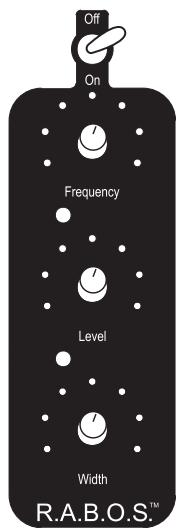
After performing these adjustments, you may skip forward to the "Final System Balance" section. It is recommended that you perform a second measurement to confirm that the settings are correct.
If you are going to retest the system after EQ adjustments, repeat the "Setting the Subwoofer Test Level" section on page 7.
8—Retesting the system will go much faster if you use Tracks 27-50. These tracks contain all the same test tones you just used. However, each tone plays for only a few seconds and there is no frequency announcement. If you are uncomfortable operating at this pace, you may, of course, perform measurements with the original test tracks.
Your first interpretation of the data and choice of settings may not be optimum. You can repeat the test-adjust-test cycle as often as needed to get the desired results. To do this, return to page 7, "Setting the Subwoofer Test Level." You may prefer to retest using the same template. Doing so makes it easy to evaluate the improvement.
When you are satisfied with the results, go to "Final System Balance."
Final System Balance
Cue Track 51 of the R.A.B.O.S. Test CD. Press Play ▷. Increase the system volume until the RSLM indicates -10dB. Now play Track 52. Adjust the subwoofer gain control until -10dB is indicated on the RSLM. Of course, you may fine-tune the subwoofer gain control to your listening preference.
This concludes the R.A.B.O.S. process. It is recommended that you remove the battery from the RSLM. Store the Test CD,Width Selector, Adjustment Key and the RSLM together.
MAINTENANCE AND SERVICE
The enclosure may be cleaned using a soft cloth to remove fingerprints or to wipe off dust.
All wiring connections should be inspected and cleaned or remade periodically. The frequency of maintenance depends on the metals involved in the connections, atmospheric conditions, and other factors, but once per year is the minimum.
If a problem occurs, make sure that all connections are properly made and clean. If a problem exists in one loudspeaker, reverse the connection wires to the left and right system. If the problem remains in the same speaker, then the fault is with the loud-speaker. If the problem appears in the opposite speaker, the cause is in another component or cable.
In the event that your subwoofer ever needs service, contact your local Infinity dealer or distributor, or visit www.infinitysystems.com to find a service center near you.
IMPORTANT: Please attach your sales receipt to this manual and store it in a safe place. In the event that your Infinity speaker requires warranty service, you will need to provide your sales receipt.
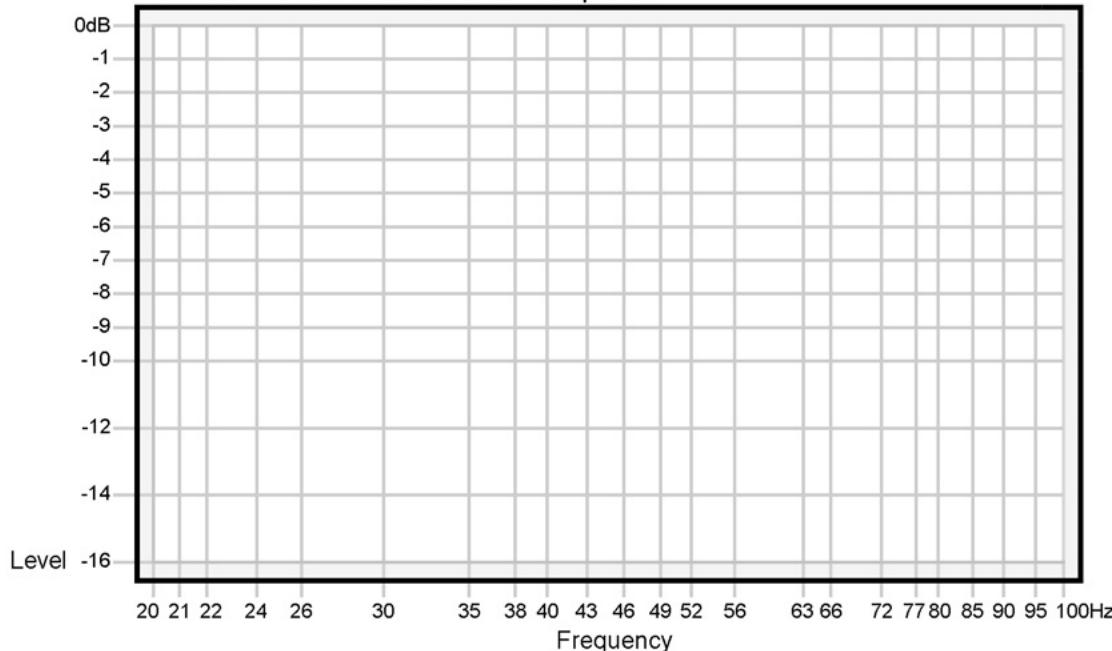
R.A.B.O.S. Measurement Template
Frequency Hz
Level dB
Width
R.A.B.O.S. Measurement Template
Frequency Hz
Level dB
Width
SPECIFICATIONS
Cascade Model Fifteen
| Frequency Response | 32Hz - 150Hz (-3dB) |
| 29Hz - 150Hz (-6dB) |
| Maximum Amplifier Output | 800 watts RMS (20Hz - 150Hz with no more than 0.1% THD) |
| Crossover Frequency | 50Hz - 150Hz, 24dB/octave, |
| continuously variable (Normal/LFE switch set to "Normal") |
| Drivers | Four 152mm x152mm (6" x 6") |
| Dimensions (H x W x D) | 330mm x 940mm x 216mm |
| (13" x 37" x 8-1/2") | |
| Weight | 44.5kg (98 lb) |
Infinity continually strives to update and improve existing products, as well as create new ones. The specifications and construction details in this and related Infinity publications are therefore subject to change without notice.
Declaration of Conformity

We, Harman Consumer Group International
2, route de Tours
declare in own responsibility that the product described in this owner's manual is in compliance with technical standards:
EN 55013:2001+A1:2003
EN 55020:2002+A1:2003
EN 61000-3-2:2000
EN 61000-3-3:1995+A1:2001
EN 60065:2002
Laurent Rault
Harman Consumer Group International
Chateau du Loir, France 1/06