
CA-M300 - Speaker CLASSE AUDIO - Free user manual and instructions
Find the device manual for free CA-M300 CLASSE AUDIO in PDF.


| Product Type | Stereo Power Amplifier |
| Brand | CLASSE AUDIO |
| Model | CA-M300 / CT-M300 |
| Output Power | 300 W RMS into 8 Ω, 600 W RMS into 4 Ω |
| Frequency Response | 1 Hz - 80 kHz (-3 dB) |
| Harmonic Distortion | < 0.002% at 1 kHz (balanced), < 0.004% (unbalanced) |
| Signal-to-Noise Ratio | -116 dB (at full power into 8 Ω, 22 kHz bandwidth) |
| Input Impedance | 50 kΩ (balanced and unbalanced) |
| Voltage Gain | 29 dB (balanced and unbalanced) |
| Inputs | XLR (balanced), RCA (unbalanced) |
| Speaker Outputs | 2 pairs of 5-way binding posts (bi-wiring possible) |
| Power Supply | 100 V, 120 V, 220 V, 230 V or 240 V AC (factory set) |
| Power Consumption | 420 W (1/8 power into 8 Ω), < 1 W standby |
| Dimensions (CA-M300) | W 444 mm × H 223 mm × D 445 mm |
| Dimensions (CT-M300) | W 483 mm (with faceplate) × H 177 mm × D 473 mm |
| Net Weight (CA-M300) | 34.0 kg |
| Net Weight (CT-M300) | 34.5 kg |
| Mains Fuse | 6.3 A / 250 V (100-120 V) or 3.15 A / 250 V (220-240 V) |
| Remote Control | IR (input/output), DC trigger (5-12 V), RS-232, USB, CAN-Bus |
| Protection Functions | Overload, DC offset, excessive temperature, abnormal mains voltage |
| Maintenance | Dusting with a soft cloth; clean air filter (vacuum cleaner or clear water) |
| Repairability | No user-serviceable parts; contact an authorized Classé dealer |
| General Information | Complies with CE, FCC Class B, RoHS standards; warranty included |
Frequently Asked Questions - CA-M300 CLASSE AUDIO
User questions about CA-M300 CLASSE AUDIO
0 question about this device. Answer the ones you know or ask your own.
Ask a new question about this device
Download the instructions for your Speaker in PDF format for free! Find your manual CA-M300 - CLASSE AUDIO and take your electronic device back in hand. On this page are published all the documents necessary for the use of your device. CA-M300 by CLASSE AUDIO.
USER MANUAL CA-M300 CLASSE AUDIO
All of us at Classé take extreme care to ensure that your purchase will remain a prized investment. We are proud to inform you that all Classé components have been officially approved for the European Community (CE) mark.
This means that your Classé product was subjected to the most rigorous manufacturing and safety tests in the world. The CE mark certifies that your purchase meets or exceeds all European Community requirements for manufacturing consistency and consumer safety.
This equipment has been tested and found to comply with the limits for a Class B digital device, pursuant to Part 15 of the FCC Rules. Operation is subject to the following two conditions: (1) This device may not cause harmful interference, and (2) This device must accept any interference received, including interference that may cause undesired operation. These limits are designed to provide reasonable protection against harmful interference in a residential installation. This equipment generates, uses and can radiate radio frequency energy and, if not installed and used in accordance with the instructions, may cause harmful interference to radio communications. However, there is no guarantee that interference will not occur in a particular installation. If this equipment does cause interference to radio or television reception, which can be determined by turning the equipment on and off, the user is encouraged to try to correct the interference by one or more of the following measures:
Reorient or relocate the receiving antenna;
- Increase the separation between the equipment and the receiver;
- Connect the equipment into an outlet on a circuit different from that to which the receiver is connected;
- Consult the dealer or an experienced radio/TV technician for help.
CAUTION: Changes or modifications to this equipment not expressly approved by the manufacturer could void the user's authority to operate the equipment.
The information contained in the manual is subject to change without notice. The most current version of this manual will be posted on our web site at http://www.classeaudio.com.

Classé marks the "CE" symbol indicating compliance of this device with the EMC (Electromagnetic Compatibility) and LVD (Low Voltage Directive) standards of the European Community.

Classé complies with the European Parliament and Council Directive 2002/96/EC concerning Waste Electrical and Electronic Equipment (WEEE). This product must be appropriately recycled or processed in accordance with these directives. Consult your local waste disposal authority for guidance.

Classé products are designed and manufactured to comply with the Restriction of Hazardous Substances (RoHS) as stated in the European Parliament and Council Directive 2002/95/EC.
Important Safety Instructions
- Read these instructions.
- Keep these instructions.
- Heed all warnings.
- Follow all instructions.
- Do not use this apparatus near water.
- Clean only with dry cloth.
- Do not block any ventilation openings. Install in accordance with the manufacturer's instructions.
- Do not install near any heat sources such as radiators, heat registers, stoves, or other apparatus that produce heat.
- Do not defeat the safety purpose of the polarized or grounding-type plug. A polarized plug has two blades with one wider than the other. A grounding type plug has two blades and a third grounding prong. The wide blade or the third prong are provided for your safety. If the provided plug does not fit into your outlet, consult an electrician for replacement of the obsolete outlet.
- Protect the power cord from being walked on or pinched particularly at plugs, convenience receptacles, and the point where they exit from the apparatus.
- Only use attachments/accessories specified by the manufacturer.
- Use only with the cart, stand, tripod, bracket, or table specified by the manufacturer, or sold with the apparatus. When a cart is used, use caution when moving the cart/apparatus combination to avoid injury from tip-over.
- Unplug this apparatus during lightning storms or when unused for long periods of time.
- Refer all servicing to qualified service personnel. Servicing is required when the apparatus has been damaged in any way, such as power-supply cord or plug is damaged, liquid has been spilled or objects have fallen into the apparatus, the apparatus has been exposed to rain or moisture, does not operate normally, or has been dropped.
- Do not expose this apparatus to dripping or splashing and ensure that no objects filled with liquids, such as vases, are placed on the apparatus.
WARNING: TO REDUCE THE RISK OF FIRE OR ELECTRIC SHOCK, DO NOT EXPOSE THIS APPLIANCE TO RAIN OR MOISTURE.


CAUTION: TO REDUCE THE RISK OF ELECTRICAL SHOCK, DO NOT REMOVE COVER. NO USER-SERVICEABLE PARTS INSIDE. REFER SERVICING TO QUALIFIED PERSONNEL.
The lightning flash with arrowhead symbol within an equilateral triangle is intended to alert the user to the presence of uninsulated "dangerous voltage" within the product's enclosure that may be of sufficient magnitude to constitute a risk of electric shock to persons.

The exclamation point within an equilateral triangle is intended to alert the user to the presence of important operating and maintenance (servicing) instructions in the literature accompanying the product.
Contents
Welcome to the Classé family. 5
a word about installation 5
Unpacking and Placement 6
unpacking your amplifier 6
placement 6
ventilation 6
custom installations 6
serial number 6
operating voltage. 7
warm up/break-in period 8
please read this manual 8
Special Design Features 9
highly refined circuit design. 9
extensive listening tests. 9
extraordinary longevity. 9
robust protection 10
Front Panel. 11
Rear Panel. 13
Installation 17
CAN-Bus. 21
features. 21
hardware setup. 21
using CAN-Bus 23
CAN-Bus shared features 24
configuration 24
operate 24
AC status 24
status 24
name 24
global brightness 24
global standby 24
CAN-Bus model-specific features 25
PlayLink 25
ampinfo. 25
event log 25
Care and Maintenance. 25
Troubleshooting 28
Specifications 30
Dimensions 31
Welcome to the Classé family
Congratulations on your purchase of a Classé amplifier. It is the result of many years of continuous refinement, and we are sure that you will enjoy it for many years to come.
We value our relationship with our customers. Please allow us to stay in touch with you by returning your warranty card now, before you pack up the shipping carton of your new product and forget all about it. Doing so will enable us to let you know about any possible future upgrades or updates that might become available for your Classé component.
You can register online at www.classaudio.com or complete and mail the registration card located in the separate warranty booklet.
Please take a few moments now to register your new Classé amplifier and record your serial number here for future reference.
Serial #:
a word about installation
Every effort has been made to make the Classé CA-M300/CT-M300 simple and straightforward to install and use.
The CT-M300 has been designed specifically for rack mount installations, although it may just as easily be placed on a shelf, in a traditional cabinet or on the floor near the speaker(s).
The size and shape of your room, its acoustics, and the associated equipment you have chosen to use with your amplifier all influence the ultimate performance of your system.
For this reason, we strongly encourage you to have your system installed and calibrated by your dealer, whose experience, training, and specialized equipment can make a profound difference in the final performance of the system.
| Unpacking your amplifier | Carefully unpack your power amplifier according to the supplied instructions, and remove all accessories from the carton. Please take care when lifting the amplifier, as it is quite heavy. |
| Important! | Keep all packing materials for future transport of your Classé amplifier. Shipping your new component in anything other than its purpose-designed packing material may result in damage that is not covered by the warranty. |
| placement | Many installations will utilize an equipment rack, although a shelf, a traditional cabinet or the floor near the speaker(s) are acceptable alternatives. In any case, take care to position it well away from source components and preamp/ processors, which may be sensitive to the amplifier's electromagnetic fields. Note that adequate clearance for the AC cord and connecting cables must be left behind the amplifier. We suggest leaving six inches (15 cm) of free space behind your power amplifier to allow all cables sufficient room to bend without crimping or undue strain. |
| ventilation | Your Classé power amplifier generates a certain amount of heat in the course of normal operation. The vents on both the bottom and the top of the amplifier must be kept free from any obstruction which would reduce the flow of air through the unit. Avoid placement on soft surfaces that would restrict airflow (such as plush carpeting). |
| custom installations | Drawings are included in this manual to facilitate special installations and custom cabinetry (see the section Dimensions). A purpose-designed rack mount kit is included with this CT-M300. Contact your Classé dealer for more information. |
| serial number | The serial number for your power amplifier is found on the rear of the unit. Please note and record this number on the page entitled Important Safety Instructions for your future reference. |
operating voltage
The amplifier is set at the factory (internally) for 100V, 120V, 220V, 230V, or 240V AC mains operation, as appropriate for the country in which it is to be sold (230V only in European Union countries, in compliance with CE regulations). The voltage setting may not be changed by the user or dealer.
Make sure that the label on the rear panel of your power amplifier indicates the correct AC operating voltage for your location. Attempting to operate your power amplifier at an incorrect voltage may damage the unit.

Warning:
The voltage setting of your power amplifier may not be changed by the user. There are no user-serviceable parts within the unit. Please refer any problems to an authorized Classé service center.
If the AC mains voltage indicated on your power amplifier is incorrect, please contact your local, authorized Classé dealer or distributor.
The amplifier can easily be powered by a normal 15 or 20-ampere AC mains line. If other devices are also powered from the same AC line, their additional power consumption should be taken into account.
The amplifier includes protection circuitry that will prevent the amplifier from operating at dangerously high or low voltages.
- At startup: the AC mains voltage must be within a range of approximately -15% to +10% of its nominal value at startup, or the amplifier will not turn on. For example, a 120V unit requires the AC mains to be between approximately 95V-135V in order to turn on.
- Over-voltage during operation: if the AC mains voltage surges by roughly 10% or more during operation, the amplifier will enter protection mode and shut down. The Standby LED will flash to indicate the protection mode has been engaged.
- Under-voltage during operation: if the AC mains voltage sags by 15% or more, the amplifier will continue to play (since this does not present a particular danger to the amplifier), but note that it may not be able to achieve its usual standard of performance under these compromised conditions. The Standby LED will flash to indicate the condition.
warm up/break-in period
Your new Classé power amplifier will deliver outstanding performance immediately. However, you should expect to hear it improve somewhat as it reaches its normal operating temperatures and its various components "break-in." It has been our experience that the greatest changes occur within the first 300 hours, as the amplifier reaches thermal equilibrium and the capacitors fully form. After this initial break-in period, the performance of your new amplifier should remain quite consistent for years to come.
please read this manual...
The only exception to this rule is if the unit is placed in standby or unplugged for an extended period of time, allowing it to cool down. Depending on the degree of cooling involved, you should expect a brief warm-up period (on the order of 10-15 minutes) before the power amplifier's sound quality is at its best. Unless your amplifier was allowed to become quite chilled, subsequent thermal re-stabilization should not take long. Fortunately, you should never have to repeat the initial 300 hour break-in period.
Please take a few minutes to review this manual, and to familiarize yourself with your new amplifier. We understand that you are anxious to plug everything in and get started. However, reading this manual and following the advice it gives will ensure that you get all the benefits you deserve from having purchased such a fine piece of equipment.
| highly refined circuit design | This Classé amplifier benefits from the use of high quality component parts, application of advanced electronics design principles and exhaustive testing. Its design uses fewer parts in the signal path than is typical, while also achieving outstanding measured performance. This unusual accomplishment showcases both the innovation of the design and the persistence of the Classé Design Team. |
| extensive listening tests | Excellent measured performance is to be expected in world-class products, and Classé products deliver that performance. However, experience has shown that technical excellence alone is insufficient to guarantee subjectively musical results. |
| For this reason, all Classé products are laboriously fine-tuned during the development process by carefully controlled listening tests. Our ears are still some of the finest laboratory test instruments available, and nicely complement more traditional engineering test equipment. We rely on careful listening tests, which we view as a necessary complement to the solid engineering you should rightly expect from Classé. | |
| extraordinary longevity | The Classé Design Team has accumulated vast experience in what works well over the long term. |
| By using only the highest quality parts to begin with, and then using them in an informed way as a result of both accelerated aging experiments and actual long-term experience, we are able to design and manufacture products which we are confident will stand the test of time. | |
| We are confident that your new Classé amplifier will give you many years of trouble-free reliability and musical enjoyment, just as previous Classé products have given their owners. |
robust protection
Finally, your new Classé amplifier incorporates a variety of protection circuits, all designed to protect both the amplifier and your loudspeakers against dangerous fault conditions. Significantly, these protection circuits do not intrude upon or limit the normal performance of the amplifier; rather, they simply put the amplifier into protection mode when confronted with abnormal conditions. These conditions include:
output overload
- DC offset
- AC mains voltage (outside of normal tolerances)
excessive operating temperatures
If any such conditions occur (any of which might harm either your amplifier or possibly your loudspeakers), the amplifier will immediately go into protection mode. In such a case, a Standby LED indicator will blink red until the fault can be righted and the amplifier is re-started by pressing and holding the standby button.
Likewise, if the AC mains voltage is out of range, the Standby LED will blink. In all cases, the unit will need to be re-started once the cause of the fault condition has been rectified.
Front Panel
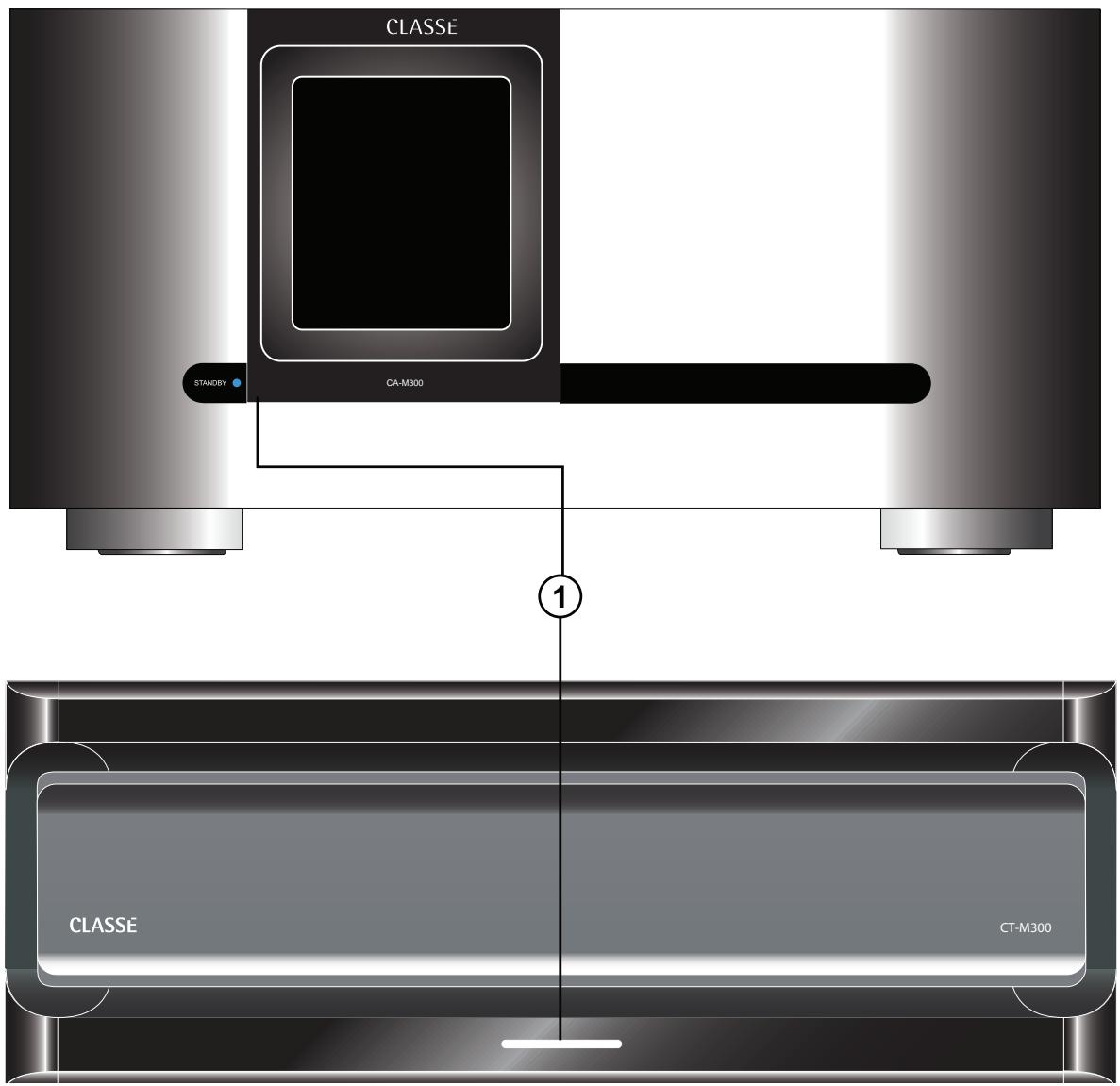
1 Standby button & LED indicator
The front panel Standby button will toggle the amplifier between operate, its fully operational state, and a standby mode that leaves the amplifier off, yet ready to respond to system commands via any of the supported control options (e.g. IR input, DC trigger, CAN-Bus, or RS-232).
The current state of the amplifier is indicated by the LED indicator in the Standby button. The state of this LED indicates the following:
on (dim red) = standby
- flashing blue (on power-up) = initialization
- on (blue) = operate
- flashing (after power-up) = AC mains voltage out of range
- flashing (alternating red/blue) = the air intake filter needs to be cleaned
- slow flashing (red) = protection circuit(s) engaged
When in standby, the amplifier's gain stages are powered down. Only a small power supply and control circuit remain on, consuming relatively little power. Fortunately, since the output stages by their nature conduct a great deal of current, they warm up and sound their best very quickly.
If you are not going to use the amplifier for an extended period of time, we suggest you disconnect it from the AC mains. Please be certain that the amplifier is in standby prior to disconnecting it from the AC mains.
Also, it is a good practice to physically disconnect any and all valuable electronics from the AC mains during electrical storms, as a lightning strike anywhere near your home can put a tremendous surge on the AC mains that can easily damage any piece of electronics, no matter how well designed and protected. The best protection in the case of severe electrical storms is to simply remove the electronics from any connection with the power grid.

Caution!
If you see the Standaby LED indicator blinking red, please disconnect the amplifier from the AC mains immediately and check that all external connections are cleanly made and secure. If no fault is immediately obvious, please call your authorized Classé dealer for assistance.
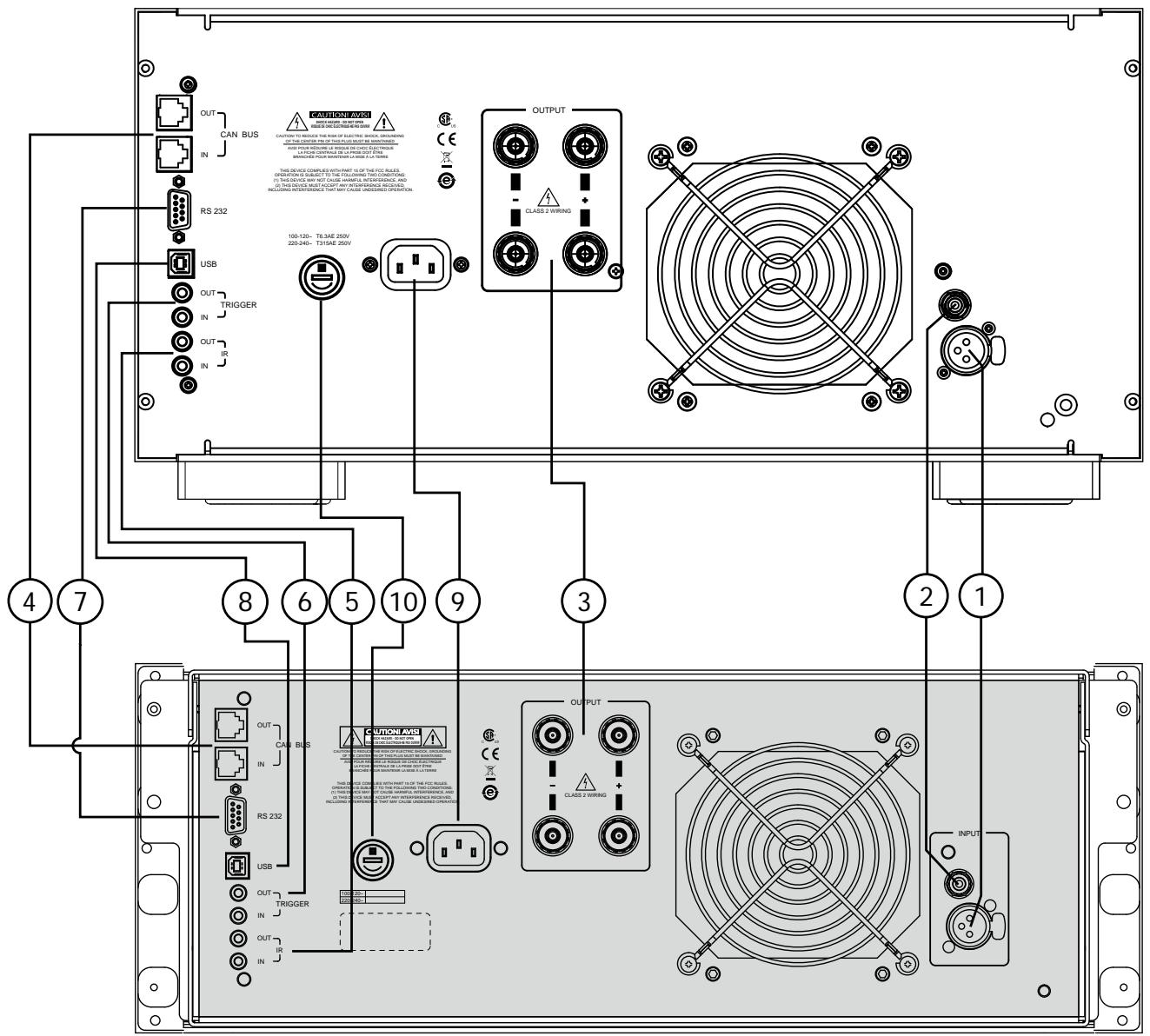
Rear Panel
The following descriptions are intended as a quick reference, should you have any questions about your new product. Please see the next section (entitled Initial Setup) for specific advice on incorporating your new amplifier into your system.
1 Balanced (XLR) Input
Balanced audio interconnections were originally developed for the telephone and more recently in the professional audio world, for preserving the delicate nuances of extremely small microphone-level signals. For many years now, they have also been used by performance-oriented companies such as Classé to preserve every nuance of the finest audio performances in your collection.
Technically, balanced audio interconnections provide two distinct benefits: they double the signal's strength as it travels from one component to the next, increasing the potential Signal-to-Noise ratio by 6 dB; they also do an excellent job of rejecting noise and interference that might otherwise be picked up between the components, due to either EMI (electromagnetic interference) or RFI (radio frequency interference). In the world of wireless telecommunications, there is more potential interference around than ever before—it makes sense to keep it out of music and movie soundtracks. For this reason, we strongly recommend using the balanced analog interconnections between your Classé components wherever possible.
The pin assignments of these XLR input connectors are:
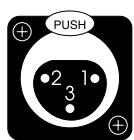
Pin 1: Signal ground
Pin 2: Signal + (non-inverting)
Pin 3: Signal - (inverting)
Connector ground lug: chassis ground
These pin assignments are consistent with the standard adopted by the Audio Engineering Society (AES14-1992).
If you are using your Classé power amplifier with a Classé preamplifier/processor, you're all set - just remove the supplied shorting pins from the amplifier's XLR connector(s), take standard balanced interconnect cables and plug them in.
If you are using another brand of preamplifier or processor, please refer to its operating manual to verify that the pin assignments of its output connectors correspond to those of your amplifier. If not, have your dealer obtain cables with the appropriate output pin connecting to the equivalent input pin.
2 Single-Ended (RCA) Input
Single-ended cables using RCA connectors are the most common form of analog connection used in consumer electronics. When implemented carefully and with use of high quality interconnecting cables, this standard can provide excellent performance. Classé has gone to extraordinary effort to ensure that the single-ended (RCA) input of your power amplifier is as good as possible. However, this connection standard cannot offer the immunity from interference that balanced interconnection does—hence our recommendation to use the balanced inputs when possible.
3 Speaker Outputs
Two pairs of high quality five-way binding posts are provided on the amplifier, in order to facilitate bi-wiring.
In practice, bi-wiring involves connecting two (preferably identical) sets of speaker cables between each amplifier channel and its corresponding loudspeaker. In many cases, the benefit is a subjectively improved level of clarity and detail from the speaker, as a result of being able to feed the two separate sections of its crossover and driver complement with identical, yet separate signals.
(Many high quality loudspeakers also offer two sets of connections on their
speakers. Generally, one set of the connections on the loudspeaker feeds the portion of the speaker's crossover network that supplies the woofer with its signal; the other set of connections connects to the portion of the crossover that supplies the rest of the speaker with the midrange and high frequencies.)
Although the binding posts on your Classé amplifier will accept bare wire connections, we strongly recommend the use of high quality spade or hook lugs, crimped and soldered onto the ends of your speaker wires. Using high quality connectors will ensure that your speaker connections do not gradually deteriorate from fraying and oxidizing bare wires. It also helps prevent accidental short-circuits from poorly-terminated connections.
4 Classé CAN-Bus Control Ports
These RJ-45 connectors are reserved for control and communication applications using Classé Audio's implementation of the Controller Area Network (CAN) Bus specification. Refer to the CAN-Bus section located later in this manual for more information.
5 IR Input and Output
Your Classé amplifier includes two 1/8^th -inch mini mono-jacks in order to support the IR remote controls that are ubiquitous today. IR commands exist for toggling the amplifier between operate and standby, as well as discrete command codes for either operate or standby. These codes may be used in "macros" for sophisticated remote control systems, facilitating the control of the amplifier in the larger context of a complete system.
Actually, this IR Input and Output description is a bit of a misnomer: the input supplied to these plugs is electrical in nature, not IR. It is obtained by using standard IR receivers, distribution amplifiers, and emitters (available from your dealer) to translate the remote's flashes of infrared light into corresponding pulses of electricity. The big advantages here include being able to easily route the signals anywhere they might need to go, and the reliability of a solid electrical connection.
Since an IR distribution system such as your dealer may design for you usually must control many products, your amplifier includes both an IR input (for the control of this product) and an IR output (so as to pass along the same signal to the next product). This allows you to "daisy chain" your control wires from one product to the next.
The amplifier is designed to respond to IR commands of 5 Volts DC, with the tip of the mini-plugs defined to be "positive" relative to the shank of the plug.
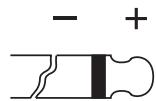
5Vdc @ less than 100mA
6 DC Trigger Input and Output
Many audio/video preamplifiers can supply a DC control voltage to associated equipment in order to induce desired behavior. Your Classé amplifier can take advantage of these capabilities in order to be switched between operate and standby automatically, perhaps in concert with the A/V preamp itself.
Two ^1/8^th -inch mini mono-jacks provide this remote-controlled turn-on (that is, toggling between operate and standby) of the amplifier. These jacks provide a simple pass-through of the control voltage from one to the other, allowing you to "daisy-chain" a series of amplifiers quite easily.
The remote trigger will be operated by the presence of 5-12 Volts DC, with tip polarity as shown below:
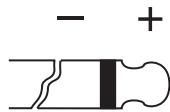
5-12 volts @ less than 100 mA
7 RS 232 Control Port
This DB-9 connector has two purposes:
- downloading new operating software into your amplifier (should new features ever be added, for example)
- for external control of your amplifier by systems such as AMX, Crestron and Control 4
For more information, please contact your dealer and ask about home automation systems.
8 USB Control Port
The USB connector provides the same functionality as the DB-9 connector described above. It is compatible with the USB ports on PCs and may obviate the need for a USB to RS-232 adaptor.
9 AC Mains Input
An IEC standard power cord (supplied) is used with the CA-M300/ CTM300. Plug the cord into the IEC receptacle on the rear panel, and the other end into a suitable wall outlet.
10 AC Mains Fuse
Your Classé power amplifier has an AC mains fuse, accessible on the rear panel. If you suspect that your AC fuse has blown, disconnect your amplifier from the AC mains, as well as from its input connections and speaker connections, and refer to the appropriate item of the section entitled Troubleshooting.

Danger!
Do not open your amplifier. There are no user-serviceable parts within this product.
Potentially dangerous voltages and current capabilities exist within your power amplifier, even when disconnected from AC mains. Do not attempt to open any portion of the amplifier's cabinet. There are no user-serviceable parts inside your power amplifier. All service of this product must be referred to a qualified Classé dealer or distributor.
Installation
Your new Classé amplifier is quite simple to set up and enjoy. Please follow the steps outlined below in order to safely set up and use your new amplifier.

Important:
The AC mains connection should be the last connection you make on your new power amplifier. In addition, it is always a good idea to power up your power amplifier(s) last, after everything else has been powered up and has stabilized.
Conversely, it is good practice to power the amplifier(s) down first when shutting down the system, as this prevents any transients from other components from getting through to your loudspeakers.
- Unpack everything according to the included instructions. Be careful when doing so, as this amplifier is quite heavy.
- Place your amplifier (be sure to read "Unpacking and Placement") and connect it to the AC mains. This includes deciding on the location, making sure you have adequate ventilation, and adequate clearance for all the wires behind the amplifier. Once accomplished, connect the amplifier directly to the AC mains. Do not use extension cords, as most are not suitable for the current sometimes required by your amplifier.
CT-M300 rack-mount installation
FOR RACK MOUNTING INSTALLATION CONTACT YOUR CLASSE PROFESSIONAL.
CT-M300 stand-alone installation instructions
NON-RACK-MOUNT INSTALLATION FOR CT-M300:
1a. Install (4) feet and secure with (4) #6 flat washers and (4) 6-32 X 9/16 philips pan head screws.
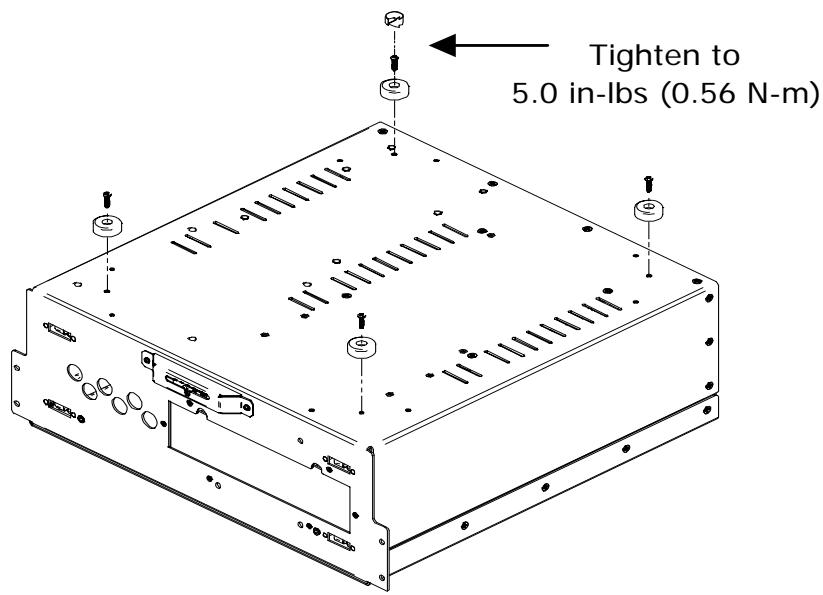
Optional accessory feet can be purchased and installed as follows.
1b. Install (4) accessory feet (FC90902) and secure with
(8) 6 - 32 × 3 / 4 screws.
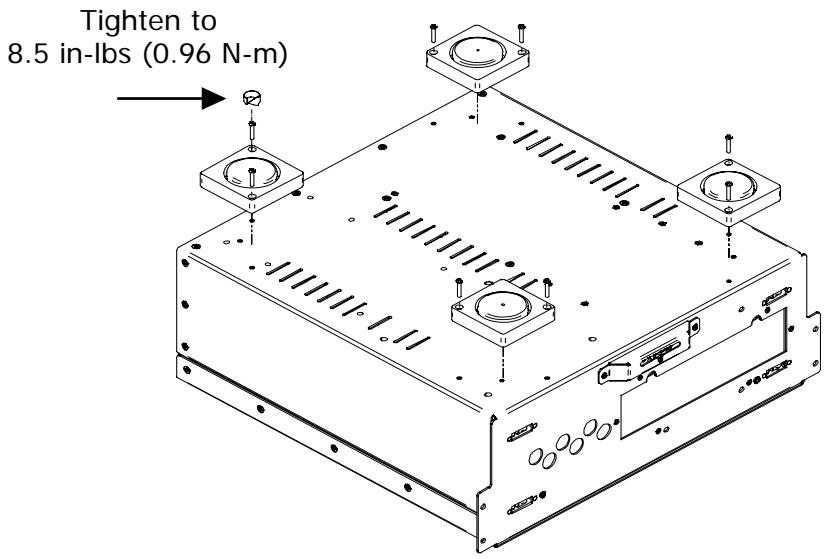

Important!
Install (2) securing brackets when using the CT-M300 in a stand-alone (non-rack-mount) installation.
- Install left and right faceplate securing brackets (L7326 for CT-SSP and CT-AMPS, and L7909 for CT-5300) secure with (4) 8-32 X 3/8 philips pan head screws.
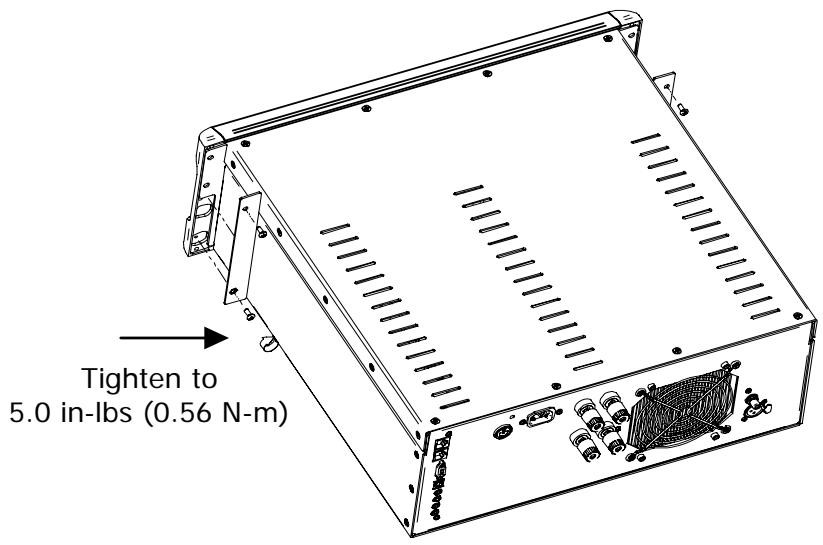
3. Configure your amplifier turn-on delay/amp no.
In a system that contains multiple Classé amplifiers, you may set the number of seconds of turn-on delay for each amplifier, allowing each to turn on in the order you have specified, rather than all at once. This number also acts as an ID when using the CAN-Bus. (Having several powerful amplifiers all turning on at the same time can sometimes stress the AC mains in your home, potentially leading to nuisance tripping of circuit breakers).
The amplifier sequence number (turn-on delay) may be programmed by your Classé dealer using a PC utility.
4. Make your preamp/processor connections.
With the amplifier in standby (or disconnected from the AC mains), using high quality interconnecting cables, make the appropriate connections with the balanced or single-ended connectors.
Make sure all the connections are snug, even if it means gently squeezing the outer shell of the RCA with pliers and reinserting it to tighten the connection.
5. Make your speaker connections.
Make the connection between the output terminals of the amplifier and your loudspeakers, using high quality speaker wires.
Connect the black (-) terminals on the amplifier to the black (-) terminals on your speaker, and the red (+) terminals on the amplifier to the red (+) terminals on your speaker. If bi-wiring, run a total of four conductors between each amplifier channel and its corresponding loudspeaker: two separate +/- leads, one for the bass and the other for the mids and treble. Make sure that no wires cross between the red (+) and black (-) terminals, at either end.
Make sure all the connections are snug and cannot be easily wiggled free, but do not overtighten them. If you can give the speaker wires a reasonable tug without movement, they are snug. Further tightening will not make a better connection, and (taken to the extreme) may damage the connectors.
6. Double-check all your connections.
We understand that this step sounds redundant, but it is worth the extra minute or two it might take just to ensure that all connections are correct and secure before plugging the power cables to the AC outlets.
7. Turn on all the other components in your system, and then turn on your amplifier.
It is always good practice to turn any power amplifier on last, and to turn it off first. Doing so prevents any turn-on/turn-off transients that might originate in other components from damaging your loudspeakers.
8. Install the front panel (CT-M300 only).
Once all connections have been made and the amplifier is verified to be working correctly, remove the front panel from its packing and firmly press it into place.
NOTE: If the CT-M300 is NOT installed in an equipment rack, the front panel should be secured to the chassis using the supplied security tabs. These will prevent the faceplate from unexpectedly popping off if someone should try to lift the amplifier by its front panel.
Classe's Controller Area Network, or CAN-Bus, opens the way to a new level of interaction between our Delta range of amplifiers, preamps, processors and source components. When the amplifier is connected with CAN-Bus, the different elements of a Delta or CT series system are in constant communication, creating a "global" network that delivers system wide status information and shared operational features, all through the touchscreen display.
CAN-Bus will allow a Delta or CT series touchscreen to:
- Display status information for every connected unit, including amplifiers which do not have a touchscreen display.
- Create a "PlayLink" that allows an SSP or Preamp to automatically switch to the correct input when a Delta series source component starts playback.
- Adjust the global system brightness.
- Configure the entire system to go in and out of standby at the touch of a button and also bring individual components in and out of standby.
- Mute any connected unit.
1 Classé Delta or CT Series Products
Two or more Classé Delta or CT series products are required, at least one of which must have a touchscreen display.
2 Category 5 Network Cables
These are ordinary network cables, commonly used for broadband Internet connections. They should be typical "straight through" cables not the "crossed over" type, and the total required will be one less than the total number of Delta and/or CT series components in your system.
3 CAN-Bus Terminator
A single CAN-Bus Terminator may be required. It is inserted into the CAN-Bus OUT connector of the last component in the CAN-Bus daisy chain. One is included in the box with your CT amplifier. They are also available free of charge from your nearest Classé Customer Support Centre http://www.Classeaudio.com/support/service.htm
4 SSP-300 & 600 CAN-Bus Interface Box
Systems that include an SSP-600 or SSP-300 will also require an SSP-300/600 CAN-Bus Interface Box. These are included with the products or available free of charge from your nearest Classé Customer Support Centre http://www.Classeaudio.com/support/service.htm
The diagrams below illustrate how to connect the CAN-Bus hardware.
Any combination of models in any order.
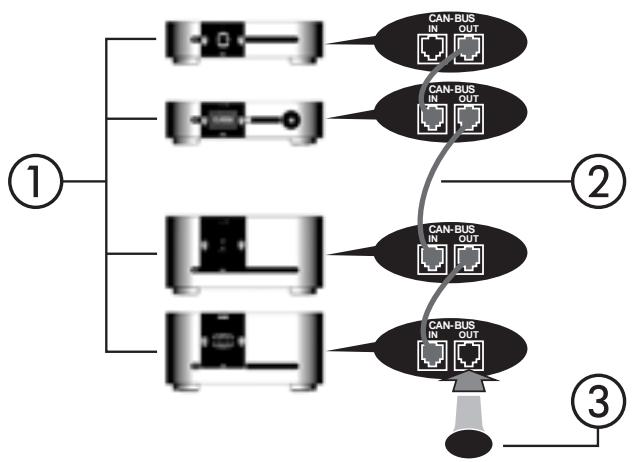
For any system with SSP-300 or SSP-600.
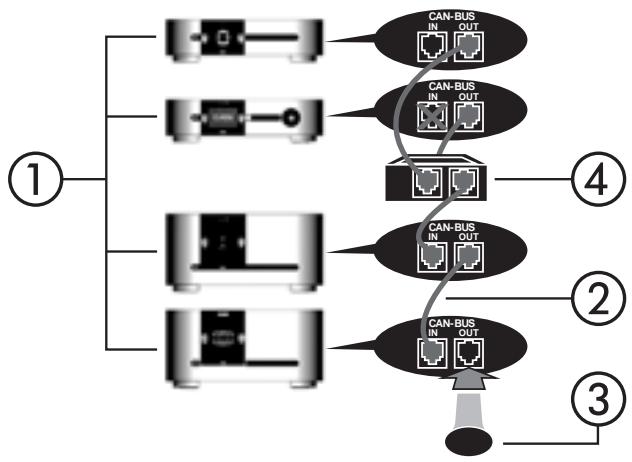
NOTE: Daisy chain may need to be terminated with CAN-Bus Terminator.
CAN-Bus is controlled via the touchscreen of any Delta or CT series component. There is no master component, so Delta/CT series systems where two or more units have a touchscreen can be controlled through any of the touchscreens. However, it is probably easiest to start using CAN-Bus through just one.
CAN-Bus is accessed by pressing the menu button on the face of the unit or remote, then the status button, followed by the more button.
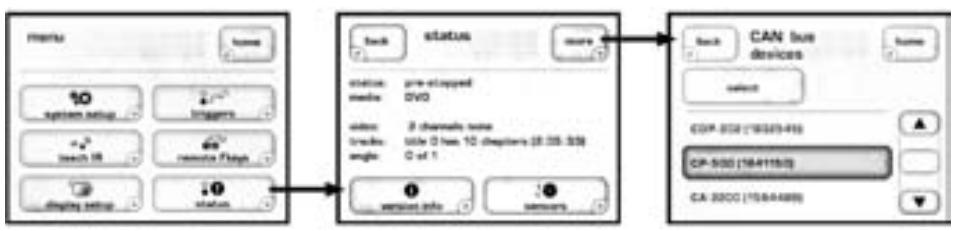
The touchscreen will then display the CAN-Bus devices screen, which lists connected Delta series components by model & serial number.
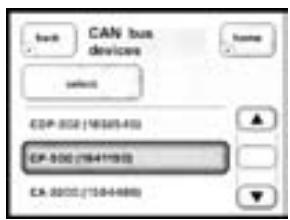
Highlighting a unit on the CAN-Bus devices screen identifies it as the target unit. The front panel LEDs of the target unit will start flashing (unless you highlight the unit that you are using to access CAN-Bus).
Once you have chosen the target unit press select. The target unit's LEDs will stop flashing and the touch screen will list the CAN-Bus features available to it. Some CAN-Bus features are shared by all models, some are specific to individual models.
CAN-Bus shared features
The following CAN-Bus features are shared by all models.
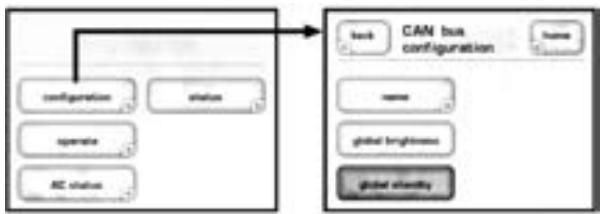
configuration
Selecting configuration will present the CAN-Bus configuration screen allowing access to name, global brightness, and global standby features.
operate
The operate settings allow you to bring the target unit in and out of standby, or mute. This key will be disabled for the unit whose touchscreen you are using to access CAN-Bus.
AC status
The AC status screen displays information from the target unit's electrical supply sensors. Two screens are available, with the second accessed by selecting more.
status
The status screen is the simplest way to access essential information about the target unit. It displays the target unit's model number, software version, operational status and serial number.
name
Allows you to set the name that this component will be listed under in the CAN-Bus devices screen. The name will appear next to the unit model and serial number, and facilitate the identification of units in large systems.
global brightness
By setting all your components to global brightness you can adjust the touchscreen and LED brightness for your entire system by changing the brightness of a single touchscreen. All CAN-Bus software updates automatically set the updated unit to Global Brightness. If you want a particular unit to be excluded from Global Brightness, deselect Global Brightness for that unit.
global standby
By setting all your components to global standby you can bring your entire system in and out of standby by pressing the standby button of any unit or remote. All CAN-Bus software updates automatically set the updated unit to global standby. If you want a particular unit to be excluded from global standby, deselect global standby for that unit.
CAN-Bus model-specific features
The following CAN-Bus features are model specific.
PlayLink
This feature is exclusive to Delta series disc players and will only function if the disc player is connected to a CAN-Bus enabled preamp or surround sound processor.
When PlayLink is active, pressing play on the disc player will also automatically switch the preamp/processor to a specified input. This means that you can listen to a CD or watch a DVD literally at the touch of a button.
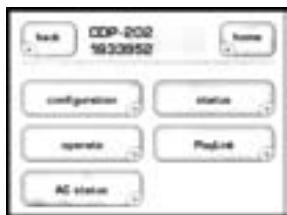
The first step in using PlayLink is to choose the input you wish to be selected when play is pressed on the disc player. Press the PlayLink icon, then select the correct input from the list.
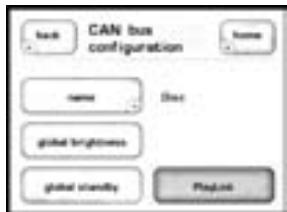
Once you have selected the input press back, then select configuration. PlayLink is activated and disabled through the PlayLink icon on the CAN-Bus configuration screen.
PlayLink is automatically active after a software update, and the PlayLink icon will only appear on the CAN-Bus configuration screen of a Delta series disc player.
PlayLink can only select a single input per disc player. It is therefore not designed for users who regularly play both CDs and DVDs through different inputs from a single disc player. When PlayLink is active the disc player will default to the same input every time play is pressed, regardless of whether it is playing CD or DVD.
amp info
Available for amplifiers only, this screen displays the data provided by the heatsink and AC Module temperature sensors.
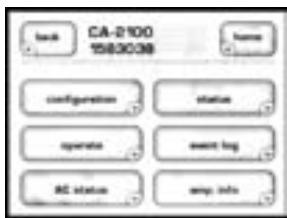
NOTE: This feature is only accessible when the target amplifier is on.
event log
Reserved for amplifiers, this feature is a protection circuitry event log which can only be accessed when the target amplifier is in standby. The protection circuit shuts down the amplifier or channel if it overheats or if its output could damage your speakers. The event log details the circumstances surrounding the amp going into protection and should be referred to in situations that require the intervention of your dealer or Classé customer support.
The log can report the following events interpreted as follows:
- +ve slow blo trip & -ve slow blo trip — The average current has reached the safe operating limit.
+ve fast blo trip & -ve fast blo trip — The peak current has reached the safe operating limit. - over temperature trip — The unit temperature has reached the safe operating limit.
- DC protection trip — The DC output level has reached the safe operating limit.
- Communication failure — There has been a loss of communication between the amp's system monitoring sensors.
- AC line trip — The power supply has reached the limits of the amp's safe operating range.
- Air intake filter — The intake filter is constricting airflow and should be cleaned. This “event” is also triggered after every 2,000 hours of operation, even if the sensors do not yet detect constricted airflow. The unit will continue to operate with its standby LED flashing until the filter is checked and the unit reset by pressing and holding the standby button for 3 seconds.
Events are rare and generally occur due to issues that are external to the amp. They should be interpreted positively. The amp is doing what it's designed to do.
Care and Maintenance
To remove dust from the cabinet of your amplifier, use a feather duster or a lint-free soft cloth. To remove dirt and fingerprints, we recommend isopropyl alcohol and a soft cloth. dampen the cloth with alcohol first and then lightly clean the surface of the amplifier with the cloth. Do not use excessive amounts of alcohol that might drip off the cloth and into the amplifier.

Caution!
At no time should liquid cleaners be applied directly to the amplifier, as direct application of liquids may result in damage to electronic components within the unit.
From time to time, the air intake filter behind the front panel will need to be vacuum cleaned or removed and rinsed with clean fresh water. A pressure sensor measures the airflow to determine when it is necessary to clean the filter. When cleaning is required, the Standby LED button will flash red/blue and a message will be sent to connected touchscreen controlled devices via the connected CAN-Bus system. Since this is a maintenance and not a protection feature, the amplifier will continue to operate while the LED is flashing, so as not to interrupt a listening session.
Troubleshooting
In general, you should refer any service problems to your Classé dealer. Before contacting your dealer, however, check to see if the problem is listed here.
1. No sound, and Standby LED is not lit.
- The amplifier is not plugged into the AC mains, or the AC mains are down (circuit breaker, fuse).
- A brown-out or short-term loss of power might require the internal microprocessor to be reset. Unplug the unit for at least 30 seconds and then plug it in again and try powering it up.
- The AC mains fuse is blown. See Troubleshooting #4, below (or contact your Classé dealer).
- The AC mains is out of range. Check the voltage specified on the rear panel.
2. No sound, and Standby LED is blinking red.
-
Your protection circuitry has been engaged. Disconnect the amplifier from the AC mains, and disconnect all inputs and outputs.
-
Then try to power up the amplifier again, connecting it only to AC power. If the LED continues to blink, there is a fault condition in the amplifier itself, and it should be disconnected and taken to your Classé dealer for service.
-
If it powers up without any difficulty, power it back down and reconnect only the inputs. Then restart the amplifier. If it goes into its blinking protection mode, something is wrong with a component "upstream" of the amplifier—probably a DC offset or similar problem. Your amplifier is trying to protect your loudspeakers (even small amounts of DC can increase distortion and damage speakers in relatively little time). Try different source components to discover whether the problem is limited to a single source, or exists all the time (which would indicate a problem with the preamplifier/processor). Contact your dealer for help with the appropriate component.
3. The amplifier keeps shutting off.
- Make sure you are providing adequate ventilation to the amplifier, and that the ambient room temperature is below 105^ (40^) .
- Run through the troubleshooting sequence outlined above (assuming the amplifier is going into its protection mode).
- The amplifier logs all protection circuit events. These are viewable on the touchscreen of a CAN-Bus connected Classé component or by your dealer on a PC using a special diagnostic program. Contact your dealer to assess the likely cause of the trouble.
4. The AC mains fuse is blown.
There is a specific troubleshooting procedure for a blown AC mains fuse, since this rare occurrence sometimes indicates a significant problem. Please use the following steps, in order:
a. Disconnect your amplifier from the AC mains, as well as from its input connections and speaker connections, and remove the fuse cover on the rear of the unit.
b. If the fuse appears to be blown, replace it only with a fuse of the same type and rating (specified below). Using any other type of fuse, particularly a larger-value fuse, can result in permanent damage to your amplifier. If you are not comfortable replacing the fuse yourself, contact your Classé dealer for assistance.
Mains voltage: 100/120VAC
Fuse type: IEC time lag, high breaking capacity
Rating: 6.3A 250V
Mains voltage: 220/230/240VAC
Fuse type: IEC time lag, enhanced breaking capacity
Rating: 3.15A 250V
c. After replacing the fuse and fuse cover, reconnect the amplifier to the AC mains only and turn it on without reconnecting either the inputs or the speaker wires. If the fuse blows again, disconnect it from the AC mains and contact your Classé dealer for assistance.
d. If everything seems fine, place the amplifier back into standby and carefully reconnect the input cable and power the amplifier up. If the fuse then blows (or the amplifier goes into protection), you may have a serious fault with your preamplifier/processor. Contact your Classé dealer.
e. Finally, if everything is still fine, place the amplifier in standby and carefully reconnect the speaker wires. Check both ends of the speaker wires for possible short circuits. Then power up the amplifier again. If the amplifier remains functional (the fuse does not blow), then the original fuse probably blew in order to protect the amplifier from a large AC mains surge. If it blows again, contact your Classé dealer for assistance.
5. The Standby LED is flashing quickly.
- Try resetting the unit by disconnecting it from the AC mains power, waiting a few seconds, and reconnecting the amplifier to power. If this does not solve the problem, contact your Classé dealer for assistance.
Specifications
All tests un-weighted and 500kHz measurement bandwidth (except SNR).
■ Frequency response 1Hz - 80kHz, -3dB
Output power 300W rms into 8 (24.8 dBW)
600W rms into 4 (27.8 dBW)
Harmonic Distortion <0.002% @ 1kHz balanced
<0.004% @ 1 kHz single ended
Peak Output Voltage 150V peak to peak, 53V rms no load
136V peak to peak, 48V rms into 8
■ Input Impedance 50kΩ balanced / single ended
■ Voltage gain 29 dB balanced / single ended
■ Input level at clipping 1.88V rms balanced / single ended
■ Intermodulation Distortion >90dB below fundamental into
8Ω balanced / single ended
90dB below fundamental into
4 balanced / single ended
■ Signal-to-noise ratio -116dB at peak output into 8
Measurement Bandwidth: 22kHz
■ Output Impedance 0.015Ω @ 1kHz
Standby power consumption <1W @ 230V
Rated power consumption 420W @ 1/8th power into 8
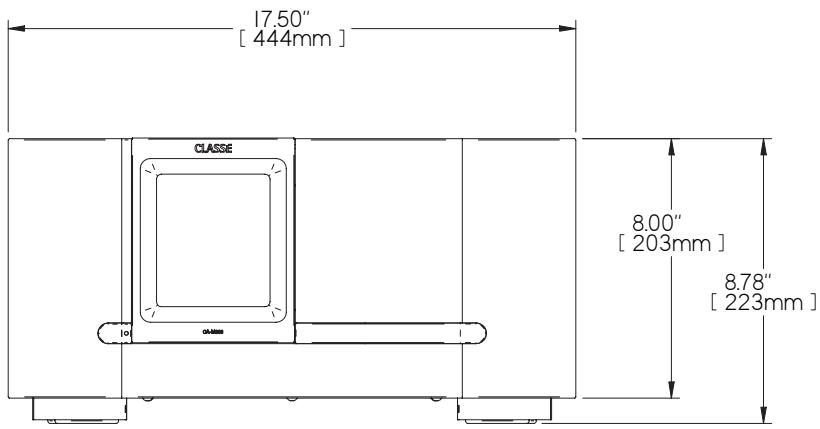
Overall Dimensions CA-M300 Width: 17.50" (444mm)
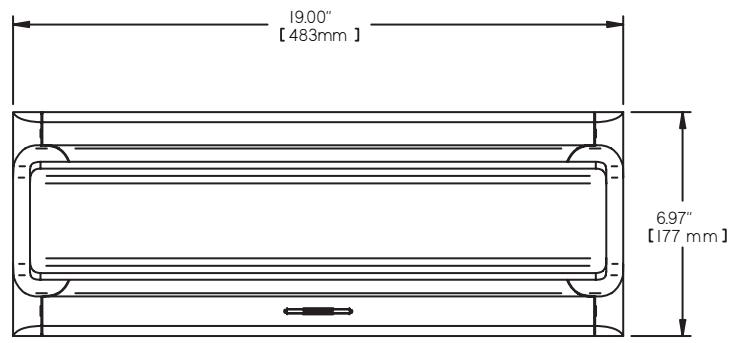
CT-M300 Width (including faceplate): 19" (483mm)
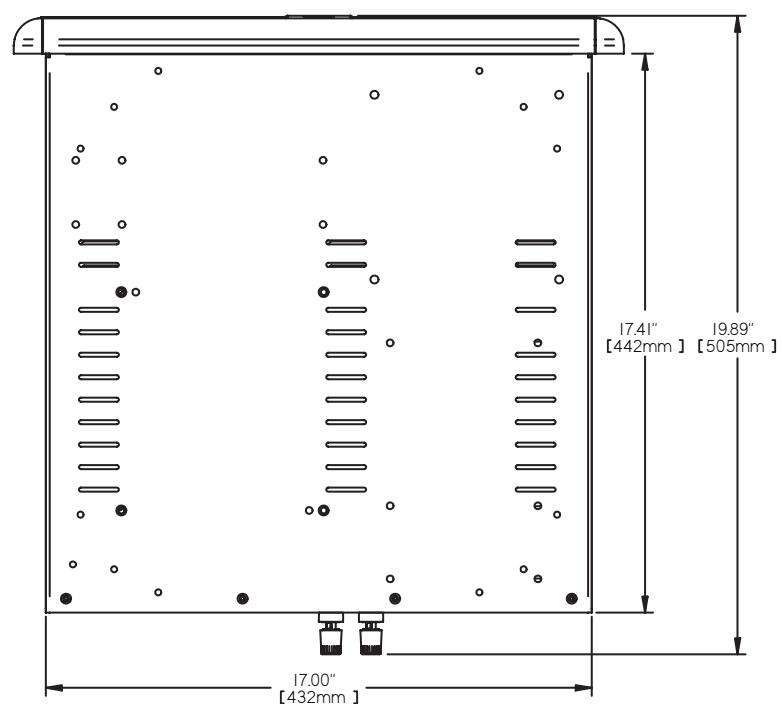
CT-M300 Width (excluding faceplate): 17" (432mm)
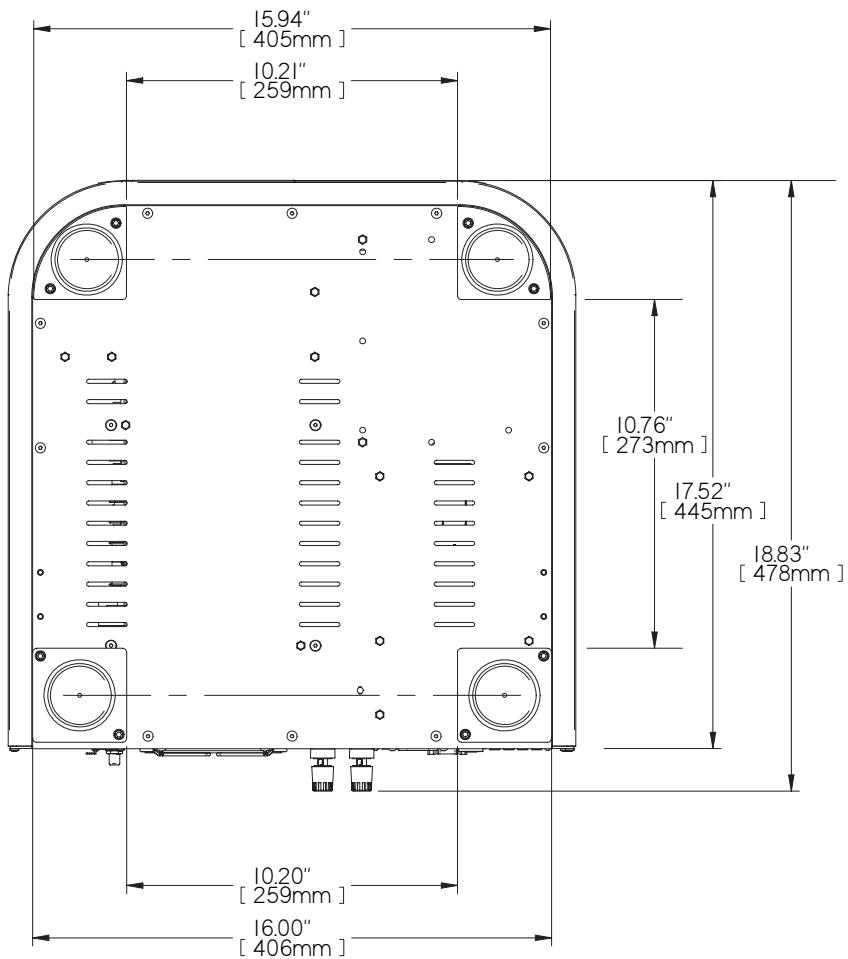
CA-M300 Depth (excluding connectors): 17.52" (445mm)
CT-M300 Depth (excluding connectors): 18.625" (473mm)
CA-M300 Height: 8.78" (223mm)
CT-M300 Height: 6.97" (177mm)
Gross weight CA-M300: 87lbs (39.46 kg)
CT-M300: 96lbs (43.50kg)
Net weight CA-M300: 75 lbs (34.0 kg)
CT-M300: 76lbs (34.5kg)
Net weight CA-M300: 75 lbs (34.0 kg)
Specified on rear panel
For more information, see your Classé dealer, or contact:
Classé Audio
5070 François Cusson
Lachine, Quebec
Canada H8T 1B3
Telephone +1 (514) 636-6384
FAX +1 (514)636-1428
Internet: http://www.classeaudio.com
email: cservice@classeaudio.com
Dimensions
CA-M300
CT-M300
CLASSE
Classé Audio
5070 François Cusson
Lachine, Quebec
Canada H8T 1B3
+1 (514) 636-6384
+1 (514) 636-1428 (fax)
http://www.classeaudio.com
email: cservice@classeaudio.com
North America: 18003703740
email: classe@bwgroupusa.com
Europe: 44 (0) 1903 221 700
email: classe@bwgroup.com
Asia: (852) 2790 8903
email: classe@bwgroup.hk
All Others: +1 514 636 6394
email: cservice@classeaudio.com