
SPL-800R - Subwoofer VELODYNE - Free user manual and instructions
Find the device manual for free SPL-800R VELODYNE in PDF.


| Product Type | Active subwoofer, DSP controlled |
| Brand | VELODYNE |
| Model | SPL-800R |
| Dimensions (H x W x D) | 27 x 26 x 33 cm (10.125 x 10.375 x 12.813 inches) |
| Weight (net) | 33 lbs (14 kg) |
| Amplifier power | 2000 Watts dynamic / 1000 Watts RMS (Class D) |
| Speaker driver | 8 inches (piston diameter 6.5 inches), voice coil 2.5 inches, magnet 204 oz |
| Frequency response | 28 - 120 Hz (±3 dB) |
| Adjustable low-pass filter | 40 - 120 Hz (12 dB/octave initial, 48 dB/octave ultimate), defeatable (Subwoofer Direct up to 200 Hz) |
| Built-in high-pass filter | 80 Hz (6 dB/octave) on line outputs |
| Phase adjustment | 0°, 90°, 180° and 270° (via remote control) |
| Inputs | Line level (RCA) and speaker level (screw terminals) |
| Outputs | Line level (RCA) with 80 Hz high-pass |
| Auto standby mode | Yes, with signal detection (defeatable) |
| Remote control included | Yes, with controls: volume, muting, auto EQ, phase, night mode, presets, backlight |
| Sound presets | 4 modes: Movies, R&B-Rock, Jazz-Classical, Games |
| Auto equalizer | 6 bands, with supplied microphone (mini-jack socket) |
| Night mode | Yes, reduces maximum level for late-night listening |
| Magnetic shielding | No (SPL-800R), but yes for higher models |
| 12V trigger input | Yes, mini-jack |
| Infrared (IR) input | Yes, mini-jack for IR repeater |
| Power consumption | Not specified in the manual, refer to rear label |
| Maintenance and cleaning | Clean with a damp cloth, do not use abrasive products |
| Safety | Do not expose to water, do not open the chassis, unplug during storms |
Frequently Asked Questions - SPL-800R VELODYNE
User questions about SPL-800R VELODYNE
0 question about this device. Answer the ones you know or ask your own.
Ask a new question about this device
Download the instructions for your Subwoofer in PDF format for free! Find your manual SPL-800R - VELODYNE and take your electronic device back in hand. On this page are published all the documents necessary for the use of your device. SPL-800R by VELODYNE.
USER MANUAL SPL-800R VELODYNE
IMPORTANT SAFETY INSTRUCTIONS




Caution
To reduce the risk of electric shock, do not remove cover (or back). No user-serviceable parts inside. Refer servicing to qualified service personnel.
The lightning flash with arrowhead symbol is intended to alert the user to the presence of uninsulated "dangerous voltage" within the product's enclosure that may be of sufficient magnitude to constitute a risk of electric shock to persons.
The exclamation point symbol is intended to alert the user to the presence of important operating and maintenance (servicing) instructions in the literature accompanying the subwoofer.
- Read Instructions — All safety and operating instructions should be read before the product is operated.
- Retain Instructions — The safety and operating instructions should be retained for future reference.
- HeedWarnings — All warnings on the product and in the operating instructions should be adhered to.
- Follow Instructions — All operating and use instructions should be followed.
- Water and Moisture — The product should not be used near water — for example, near a bathtub, washbowl, kitchen sink, laundry tub, in a wet basement, near a swimming pool or the like.
- Carts and Stands — The product should be used only with a cart or stand recommended by the manufacturer.
- Wall or Ceiling Mounting — The product should be mounted to a wall or ceiling only as recommended by the manufacturer.
- Ventilation — The product should be situated so that its location or position does not interfere with its proper ventilation. For example, the product should not be situated on a bed, sofa, rug, or similar surface that may block the ventilation openings; or placed in a built-in installation such as a bookcase or cabinet that may impede the flow of air through the ventilation openings.
- Heat — The product should be situated away from heat sources such as radiators, heat registers, stoves, or other products that produce heat.
- Power Sources — The product should be connected to a power supply only of the type described in the operating instructions or as marked on the product.
- Grounding or Polarization — This product may be equipped with a polarized alternating-current line plug (a plug having one blade wider than the other). This plug will fit into the power outlet only one way. This is a safety feature. If you are unable to insert the plug fully into the outlet, try reversing the plug. If the plug should still fail to fit, contact your electrician to replace your obsolete outlet. Do not defeat the safety purpose of the polarized plug.
- Power-Cord Protection — Power-supply cords should be routed so that they are not likely to be walked on or pinched by items placed upon or against them, paying particular attention to cords at plugs, convenience receptacles, and the point at which they exit from the product.
- Cleaning — The product should be cleaned only as recommended by the manufacturer.
- Nonuse Periods — The power cord of the product should be unplugged from the outlet when left unused for a long period of time.
- Object and Liquid Entry — Care should be taken so that objects do not fall and liquids are not spilled onto the enclosure.
- Damage Requiring Service — The product should be serviced by qualified service personnel when:
a. The power-supply cord or plug has been damaged.
b. Objects have fallen or liquid has been spilled into the product.
c. The product has been exposed to rain.
d. The product does not appear to operate normally or exhibits a marked change in performance.
e. The product has been dropped or damaged.
- Servicing — The user should not attempt to service the product beyond what is described in the operating instructions. All other servicing should be referred to qualified service personnel.
- Lightning — For added protection for the product during a lightning storm or when it is left unattended and unused for long periods of time, unplug it from the wall outlet.
- Overloading — Do not overload wall outlets, extension cords or integral convenience receptacles as this can result in a risk of fire or electric shock.
CAUTION: To prevent electrical shock, match wide blade of plug to wide slot, fully inserted.
TABLE OF CONTENTS
Congratulations 1
Installation 2
Rear Panel Connections 3
Rear Panel Connections - Detailed Explanation 4
Interconnect Cables 5
Usage 6
Care of Your Subwoofer 10
Troubleshooting and Service 10
Specifications 11
Velodyne Products 13
CONGRATULATIONS
Congratulations on your purchase of a Velodyne Small Plays Loud-Remote (SPL-R) subwoofer. This system represents the state-of-the-art in low frequency reproduction. Read and follow the instructions below to insure safe and proper system operation.
Warning!
To prevent fire or shock hazard, do not expose this equipment to rain or moisture. To avoid electrical shock, do not open speaker enclosure or amp chassis cover. Please observe all warnings on the equipment itself. There are no user serviceable parts inside. Please refer all service questions to your authorized Velodyne dealer.
Prior to Installation
Please unpack the system carefully. Please save the carton and all packaging materials for future use. Record the serial number in the space provided on the warranty card for future reference.
PRODUCT FEATURES
- DSP-Controlled
- 4 selectable preset modes for customized listening
Automatic 6-band room equalizer with microphone included
Night-mode setting - Mute control
-
Woofer
-
8" [6.5" piston diameter] subwoofer with 2.5" high-temp voice coil and 107 ounce magnet/204 ounce motor structure (SPL-800R)
- 10" (8" piston diameter) subwoofer with 3" voice coil and 162 ounce magnet/346 ounce motor structure (SPL-1000R)
- 12" (9.7" piston diameter) subwoofer with 3" voice coil and 162 ounce magnet/346 ounce motor structure (SPL-1200R)
-
15" (12.7" piston diameter) subwoofer with 3" voice coil and 162 ounce magnet/346 ounce motor structure (SPL-1500R)
-
Built-in 2000 watts Dynamic/1000 watts RMS high efficiency Class D amplifier
- Adjustable (40 to 120 Hz) low-pass crossover (defeatable)
- Line-level (RCA) inputs and outputs
- Speaker-level inputs with five way binding post connections
- Signal sensing auto turn on/off (defeatable)
Variable volume control - Selectable phase control (0, 90, 180 or 270 degrees)
- Frequency response of 28-120 Hz (SPL-800R), 24-120Hz (SPL-1000R), 22-120Hz (SPL-1200R), 20-120Hz (SPL-1500R),
- Magnetically shielded for video use (SPL-1000R, SPL-1200R and SPL-1500R)
- Multiple staggered low-pass crossovers; 12 dB/octave initial, 48 dB/octave ultimate
- Driver Displacement Control circuit to prevent over excursion and amp clipping
- Blue power indicator LED
- High-excursion EPDM rubber surround
- Oversized spider for linearity at high excursion
INSTALLATION
Your new Velodyne subwoofer provides for a number of installation options. Read all the installation information below in order to determine which installation option is best for your system. Remember to perform all installation procedures with system power turned off.
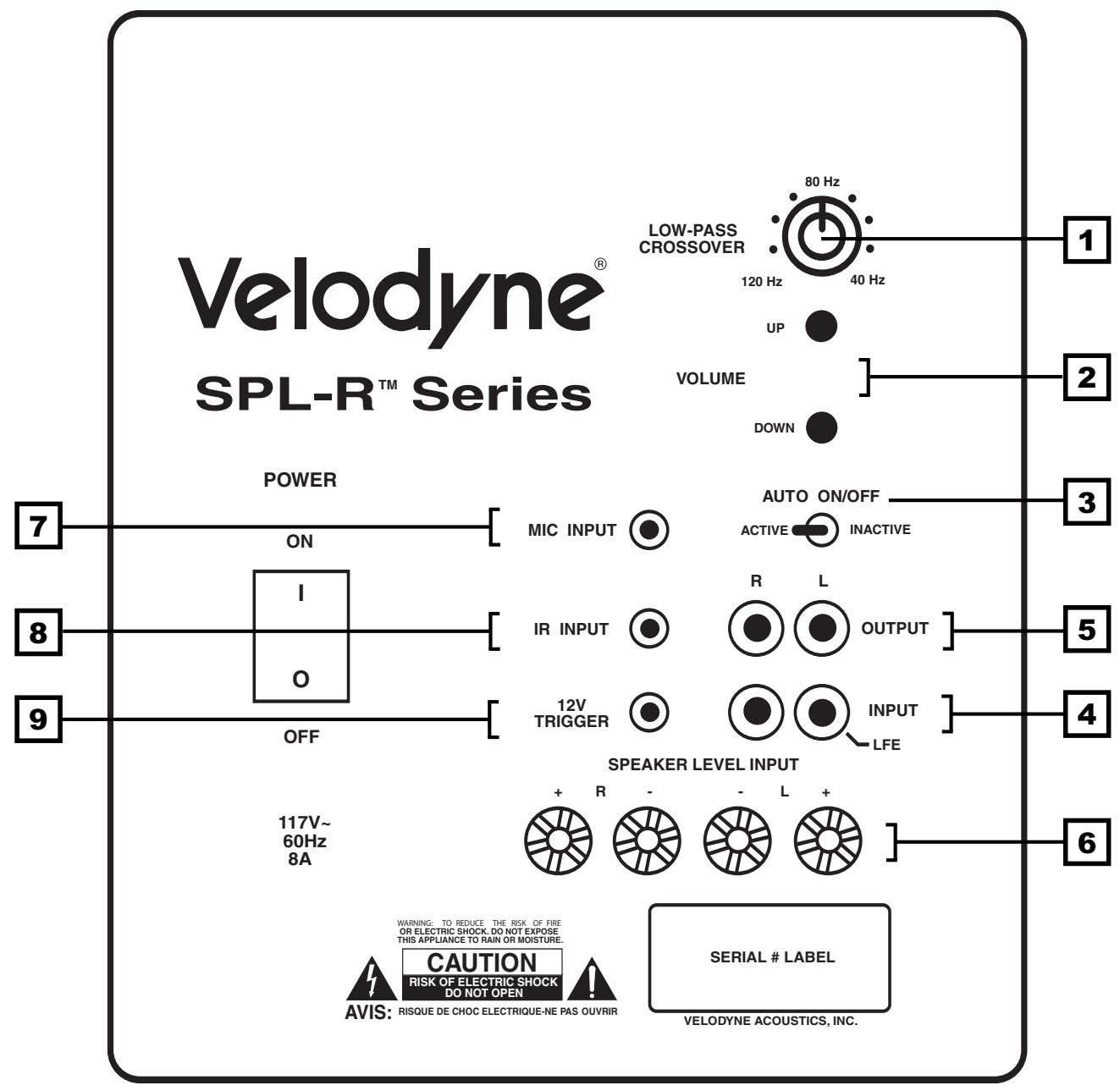
Figure 1. SPL-R Rear Panel Connections
REAR PANEL CONNECTIONS
Figure 1 shows the connections on the rear panel of the SPL-R.
Following are brief descriptions of the connections described in Figure 1. More detail on these connections can be found in the next section.
(1) LOW-PASS CROSSOVER
Use this knob to select the high-frequency range at which you wish to cut off the signal to the subwoofer. When the knob is turned all the way to the left, the Subwoofer Direct feature is invoked and the subwoofer plays all frequencies up to 200 Hz.
(2)VOLUME Control
This control allows you to balance the output from the subwoofer to the main speakers in your system. This control should be set to achieve similar volume level from between both the main speakers and subwoofer. When pressing volume up or down, the speed at which the power light blinks indicates subwoofer volume - the faster the blinking, the louder the unit plays. After the volume blinking stops, the unit will blink out the actual volume number. Slower blinks represent tens, and faster blinks represent ones. So, for example, if the volume were set at 34, after the rapid blinking stopped you would observe three slow blinks followed by four faster blinks, indicating a volume of 34.
Note: Volume is also controllable by using the supplied remote, when defaults are restored. The default is 30 out of 100.
(3) AUTO ON/OFF Switch
Use this switch to select between auto-on and constant on [auto-on bypass] operation.
(4)LINE INPUT/LFE Input
Connect these jacks to the LINE OUT preamp output, LFE output or subwoofer output jacks of your receiver/processor. If using the LFE output from your receiver or processor, plug the single cable into the "L" - LFE input or for more signal, use a "Y" connector and feed the signal into both "R" and "L" inputs.
(5)LINE OUTPUT
Connect these jacks to the LINE IN amp input to use the SPL-R's internal high pass crossover. See below for a more detailed explanation of this crossover.
(6) SPEAKER LEVEL INPUT Terminals
Connect these input terminals to the speaker output terminals of your amplifier or receiver. If you use this method of connection, when you go to the receiver speaker set up menu, make sure you select the large speaker option.
(7) Mic Input
Connect the supplied microphone for the Auto EQ feature to this mini-jack.
(8) IR Input
Connect an IR repeater to this jack for use with universal remote systems.
(9) 12v Trigger
When this mini jack is connected, the unit remains in power-off mode until 12 volts is supplied across the two leads. Polarity is irrelevant.
REAR PANEL CONNECTIONS - DETAILED EXPLANATION
Your new subwoofer is equipped with both speaker-level and line-level inputs. Use the RCA/Phono type "INPUT" jacks when connecting your subwoofer to a pre-amp, signal processor, or line-level crossover. The "SPEAKER LEVEL INPUT" jacks connect directly to the speaker outputs of an integrated amplifier or receiver. Your amplifier section will notice no additional loading effects when you use these inputs because of their high impedance.
Note: Do not use both the RCA/Phono "INPUT" connections and "SPEAKER LEVEL INPUT" connections simultaneously.
Low-Pass Crossover
Both sets of inputs sum the left and right channels together and the resulting signal is passed through an adjustable low-pass crossover before being amplified. The crossover control allows you to adjust the upper limit of the subwoofer's frequency response from 40 to 120Hz . The subwoofer's response will begin rolling off above the frequency you set this control to.
You should set the crossover frequency to obtain a smooth and seamless transition from the subwoofer to the main speakers in your system. If your main speakers are smaller units with limited low frequency output, you may wish to choose a higher frequency (such as 100-120 Hz) than you would with larger speakers which have greater low frequency output. With larger speakers, you might start with this control set lower, such as 80 Hz.
Subwoofer Direct
Subwoofer Direct is the leftmost setting on the low-pass crossover knob and will allow frequencies up to 200Hz into the subwoofer. If you are not using an external crossover, we recommend that you use the one provided within the unit for optimum performance.
Caution!!!
To avoid damage to your main amplifier, be sure to maintain correct polarity when making all connections. Red (positive) to red, and black (negative) to black. Be sure that all connections are tight, and that there are no loose strands or frayed wires.
Power Switch
The master power switch is located on the lower right half of the unit. This rocker style switch is the main on/off for the unit. This switch should be set to position 1 for on [up], 0 for off [down].
A Word About Your Receiver's Crossover and the SPL-R Crossover
Your Velodyne SPL-R subwoofer is designed to operate using the full range audio signal for input when using the built-in crossover (controlled by the dial on the back panel). Many home theater processors/receivers (Dolby Digital®, DTS®, THX®) have a "subwoofer out" jack that performs this same function and are designed to be used with a powered subwoofer.
In these installations, you may want to bypass the crossover in either the processor or the Velodyne subwoofer. In some cases, you may want to use BOTH crossovers. To do this, you can use both your processor's crossover and the one internal to the Velodyne sub. You should stagger the frequencies, (i.e., 120 Hz subwoofer, 80 Hz processor) for best results.
To bypass the subwoofer's internal crossover when the unit is being fed a low pass signal from another crossover, simply locate the switch marked "LOW-PASS CROSSOVER" on the rear panel of the subwoofer and turn it counterclockwise to the leftmost position. This will eliminate the internal crossover from the signal path.
Note: If you are not using an external crossover, you should use the built-in crossover for optimal performance. When using a single RCA sub out from the processor, connect to the "L" - LFE input on the subwoofer.
INTERCONNECT CABLES
When installing your new Velodyne subwoofer using the line-level connections, you should always use shielded phono cables. There are many decent cables available today, most any of which will work perfectly well. We do recommend that you keep the length of cable as short as possible to avoid any potential noise problems.
When using speaker level connections, use a quality speaker cable that mates well with the connectors (at least 14-gauge). Be very careful to avoid any loose or frayed strands that could result in a short, causing a dangerous condition and possible damage to your unit. Cables of extremely large size are typically not required. Extremely large gauge wire may not properly fit in the binding posts, resulting in a poor connection and possible short circuits.
Placement
True subwoofer operators operate at extremely low frequencies which are primarily omni-directional. While it is recommended that the subwoofer be placed on the same plane as the satellite speakers, room and system conditions often dictate otherwise. Keep in mind that frequency response and output level can be drastically influenced by placement, depending on the acoustic properties of the listening room. Typically, the optimum location for a subwoofer is in a front corner of your listening room. This location will usually offer the greatest output levels and optimum low frequency extension. The worst location for a subwoofer is typically far away from any walls, close to the center of your room and near an opening or doorway. Avoid these locations when possible. When using a pair of Velodyne subwoofer in stereo, it is preferable to place each subwoofer by the satellite of the same channel. Typically, a minimum distance of one to two feet from your TV to the subwoofer will be adequate to avoid any magnetic interference.
Caution!
This subwoofer has electronics built into the cabinet. Do not place the cabinet next to sources of heat such as furnace registers, radiators, etc. Do not place the unit near sources of excessive moisture, such as evaporative coolers, humidifiers, etc. The power cord should be routed in such a way that it will not be walked on, pinched or compressed in any way that could result in damaging the insulation or wire.
USAGE
This section addresses day-to-day usage of your SPL-R subwoofer.
Remote Control
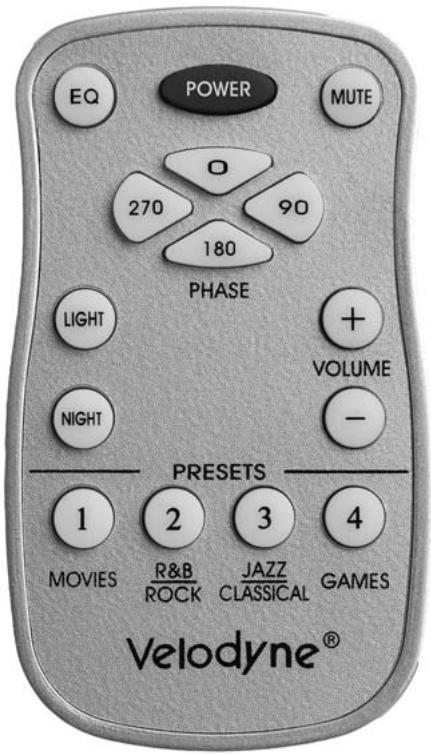
Figure 2 shows the remote control, enabling you to easily choose whatever listening mode you desire.
Figure 2. Remote Control
POWER
This button forces your SPL-R unit into standby mode. The woofer will not play and the LED will turn off. The unit will remain in this mode until the POWER button is pressed again. To fully deactivate (i.e. power down) the unit, turn off the power switch on the back panel.
MUTE
This button mutes the subwoofer. The light on the subwoofer will blink slowly if the unit is muted. To unmute the subwoofer, press the MUTE button again.
EQ
This button automatically EQs the subwoofer using a 6-band internal graphic equalizer. To use this feature, first plug in the supplied microphone into the Mic Input jack on the back panel of the subwoofer and place the mic in your preferred listening position. Then, by pressing EQ on the remote, the subwoofer emits 12 "sweep tones" that cover the frequencies between 20 and 150Hz . After the sweeps are complete, the unit saves its EQ settings and returns to normal operation. In order to avoid accidentally activating the EQ feature, you will need to hold down the EQ button for 1 to 2 seconds before the EQ sweep tones activate.
NOTE: Each time the EQ feature is utilized, the EQ settings for the SPL-R are reset. If the microphone is not plugged in, the SPL-R will emit a single sweep tone then cease the EQ operation. In this case, the previous EQ settings will be preserved.
PHASE
These buttons allow you to optimize the subwoofer performance for the location and your listening position. Select the switch position at which you hear the most bass. The light will blink according to the following schedule:
0 degrees 1 blink
90 degrees 2 blinks
180 degrees 3 blinks
270 degrees 4 blinks
LIGHT
If you wish, you can deactivate the blue front panel light on your SPL-R unit. To do this, press the LIGHT button on your remote. The light will turn off. To reactivate the light, press the LIGHT button again.
NIGHT
Night mode limits the maximum output of the subwoofer for later night listening or to be more considerate of close neighbors. Press the night button to turn the night mode feature on or off. Night mode, when active, is indicated by the reduced intensity of the light.
VOLUME CONTROL
This control allows you to balance the output from the subwoofer to the main speakers in your system. This control should be set to achieve similar volume level from both the main speakers and subwoofer. When pressing the volume up or down, the speed at which the power light blinks indicates subwoofer volume - the faster the blinking, the louder the unit plays. After the volume blinking stops, the unit will blink out the actual volume number. Slower blinks represent tens, and faster blinks represent ones. So, for example, if the volume were set at 34, after the rapid blinking stopped you would observe three slow blinks followed by four faster blinks, indicating a volume of 34.
NOTE: The volume can also be adjusted via the buttons on the back panel of the subwoofer. These buttons have the same effect as pressing the up and down volume buttons on your remote. The unit comes preset from the factory with the volume set at 30% of maximum setting.
PRESETS
There are four presets, consisting of Movies, R&B - Rock, Jazz - Classical, and Games. As a preset is chosen, the light flashes the corresponding number of times. The presets provide the following characteristics for bass reproduction:
Movies: Maximum output and impact for explosions and other action adventure movie content.
R&B - Rock: Provides the driving bass found in today's rock music.
Jazz - Classical: The tightest, cleanest, lowest distortion bass.
Games: Maximum loudness available for the impact of video games.
The following table indicates musical style and which preset is recommended for it.
| MUSICAL STYLE | SUGGESTED PRESET |
| Action Adventure Movies | Movies |
| Country - Rock | R&B - Rock |
| Country - Soft | Jazz - Classical |
| Folk | Jazz - Classical |
| Indie Music | R&B - Rock |
| Pop | R&B - Rock |
| Rock | R&B - Rock |
| Alternative Rock | Jazz - Classical |
| Blues | Jazz - Classical |
| Broadway and Vocalists | Jazz - Classical |
| Children's Music | Jazz - Classical |
| Christian and Gospel | Jazz - Classical |
| Classic Rock | R&B - Rock |
| Classical | Jazz - Classical |
| Dance and DJ | R&B - Rock |
| Hard Rock and Metal | R&B - Rock |
| Latin Music | R&B - Rock |
| Miscellaneous | Jazz - Classical |
| Movies - Non-Action Adventure | Jazz - Classical |
| New Age | Jazz - Classical |
| Opera and Vocal | Jazz - Classical |
| R&B | R&B - Rock |
| Rap and Hip-Hop | R&B - Rock |
| Soundtracks | R&B - Rock, Jazz - Classical |
| Video Games | Games |
Each preset has its own characteristics with respect to subsonic filter, volume differential and a single equalizer (EQ) in order to optimize the listening mode for the preset.
The following table shows the settings for the various presets:
| Preset | Subsonic Filter Frequency | EQ Frequency | EQ Level | Volume Differential |
| Movies | 25 Hz | 35 Hz | +5 dB | +5 dB |
| R&B - Rock | 28 Hz | 55 Hz | +1 dB | +1 dB |
| Jazz - Classical (Reference) | 15 Hz | N/A | N/A | N/A |
| Games | 34 Hz | 62 | +4 dB | +4 dB |
Restore Defaults
There is a feature that allows you to restore default settings for your SPL-R subwoofer. By pressing presets in EXACTLY the following order on the remote, the unit's power light will blink indicating that you have restored defaults.
- Movies
- R&B - Rock
- Jazz - Classical
- Games
- Games
- Jazz - Classical
- R&B - Rock
- Movies
When you press the presets in the above order, the power light will blink three times indicating that you have restored defaults. The unit's volume is reset to level 30 out of 100. Be sure to check the status of the Auto On/Off function after restoring defaults.
CARE OF YOUR SUBWOOFER
Do not use any harsh detergents or chemicals to clean the cabinet. Abrasives, detergents, or cleaning solutions will damage the finish on the cabinet. We recommend using a damp cloth to clean the front, back and sides.
During normal conditions, the subwoofer may be left on continuously without any problems. If you plan to leave the unit unused for an extended period of time, we recommend that you turn off the unit by the master power switch on the rear panel.
TROUBLESHOOTING AND SERVICE
Before seeking service for your amplifier or subwoofer, please re-check all systems. Following is a simple troubleshooting guide to assist you.
- Verify that the unit is plugged in and power outlet used is active.
- Is the power switch on?
- Is the unit receiving an input signal from your source?
- Have all controls on the amplifier (volume, crossover, phase, etc.) been properly set?
- If the unit has been running at high levels, one of the protection circuits may be engaged. Has the amplifier overheated?
- Has the power button been depressed on the remote?
- Make sure binding posts are tightened.
If the protection circuitry is active, the unit may cycle on and off until operating parameters return to normal. Under more serious conditions, the unit may shut off completely. Normal operation should return upon cooling, but you may be required to turn the power off and then on again to reset the unit.
The following conditions require service by a qualified technician:
- The power cord has become damaged
- The unit does not appear to operate normally or exhibits a marked change in performance
- The unit has been exposed to water
- Some part of the chassis or circuitry is physically damaged
Thank You for Purchasing an SPL-R Subwoofer!
SPECIFICATIONS
| Specifications | SPL-800R | SPL-1000R | SPL-1200R | SPL-1500R |
| Woofer: | 8" forward firing(6.5" piston diameter) | 10" forward firing(8" piston diameter) | 12" forward firing(9.7" piston diameter) | 15" forward firing(12.7" piston diameter) |
| Amplifier:(Class D) | 2000 watts Dynamic1000 watts RMS Power | 2000 watts Dynamic1000 watts RMS Power | 2000 watts Dynamic1000 watts RMS Power | 2000 watts Dynamic1000 watts RMS Power |
| High Pass Crossover: | 80Hz (6 dB/octave) | 80Hz (6 dB/octave) | 80Hz (6 dB/octave) | 80Hz (6 dB/octave) |
| Low Pass Crossover*: | 40Hz-120Hz | 40Hz-120Hz | 40Hz-120Hz | 40Hz-120Hz |
| *12 dB octave initial, 24 dB octave ultimate | ||||
| Frequency Response:(+/-3 dB) | 28-120Hz | 24-120Hz | 22-120Hz | 20-120Hz |
| Harmonic Distortion: | <5% (typical) | <5% (typical) | <5% (typical) | <5% (typical) |
| Magnet Structure: | 204 oz.(12.7 lbs.) | 346 oz.(21.6 lbs.) | 346 oz.(21.6 lbs.) | 346 oz(21.6 lbs.) |
| Voice Coil: | 2.5" Dual Layerinner/outer wind | 3" Dual Layerinner/outer wind | 3" Dual Layerinner/outer wind | 3" Dual Layerinner/outer wind |
| Inputs: | Line and Speaker Level | Line and Speaker Level | Line and Speaker Level | Line and Speaker Level |
| Outputs: | Line-level, 80Hz up | Line-level, 80Hz up | Line-level, 80Hz up | Line-level, 80Hz up |
| Phase: | 0°, 90°, 180°, 270° degrees | 0°, 90°, 180°, 270° degrees | 0°, 90°, 180°, 270° degrees | 0°, 90°, 180°, 270° degrees |
| Video Shielded: | No | Yes | Yes | Yes |
| Dimensions (H/W/D):(inc. feet, grill and knobs) | 10.125" x 10.375" x 12.813"(27 x 26 x 33 cm) | 12.313" x 12.375" x 13.875"(32 x 31 x 36 cm) | 14.25" x 14.375" x 16.5"(37 x 36 x 41 cm) | 18.375" x 18" x 17.375"(47 x 46 x 44 cm) |
| Cabinet: | Sealed enclosure | Sealed enclosure | Sealed enclosure | Sealed enclosure |
| Warranty:(parts/labor) | Two years | Two years | Two years | Two years |
| Shipping Weight (approx.): | 33 lbs. (14 Kg) | 46 lbs. (20 Kg) | 53 lbs. (24 Kg) | 65 lbs. (29 Kg) |
*NOTE: Please complete and return your warranty card within ten (10) days or
Register . . . ON LINE . . . It's faster . . . and easierwww. velodyne.com
LIMITED WARRANTY
VELOODYNE ACoustics, Inc. ("VELOODYNE") warrants all electronics for a period of three years, drivers for a period of five years, and full range speakers for a period of five years. All VELOODYNE products have a warranty from the date of purchase against defects in materials and workmanship subject to the following conditions:
- VELODYNE is not responsible for defects which result from the use of an amplifier or controller other than the one originally supplied with the unit (subwoofer) or defects which result from modifications or repairs made by any component of the system by anyone other than a VELODYNE factory authorized service representative.
- This warranty is void if any repairs or service covered by the terms of this warranty are made to any component of the system by anyone other than a VELODYNE factory authorized service representative.
- VELODYNE is not responsible for damage caused by accidents, abuse, misuse, natural or personal disaster or unauthorized modification. The VELODYNE products are not intended for professional or commercial use and VELODYNE is not responsible for damage resulting from such use.
- The VELODYNE product warranty is limited to units that are purchased from authorized VELODYNE dealers and finalized within authorized dealer locations.
- This warranty is nontransferable under any condition.
TO OBTAIN SERVICE
Information regarding service may be obtained from the dealer from whom you purchased the unit, or by contacting VELODYNE customer service. Warranty service must be performed by a VELODYNE factory authorized service representative within the warranty period set forth above. If VELODYNE determines the unit is defective, VELODYNE will, at VELODYNE's option, repair or replace the product at no charge if the product is forwarded prepaid to a factory authorized service representative. Products forwarded to the factory authorized service representative should be shipped securely and properly packaged, insured and freight prepaid.
110V
DD® Series
DD-10
DD-12
DD-15
DD-18
SPL™R Series
SPL-800R
SPL-1000R
SPL-1200R
SPL-1500R
Digital Drive 1812
Signature Edition
SubContrator™ Series
SC-1250
SC-8
SC-10
SC-12
SC-15
SC-IW
SC-IF/SC-IC
DLS™-R Series
DLS-3500R
DLS-3750R
DLS-4000R
DLS-5000R
DPS™ Series
DPS-10
DPS-12
MiniVee™
SMSTM-1
VRP Series
VRP-1000
VRP-1200
VXTM Series
VX-10
230V
DD® Series
DD-10
DD-12
DD-15
DD-18
Digital Drive 1812
Signature Edition
CHT-R Series
CHT-8R
CHT-10R
CHT-12R
CHT-15R
SMSTM-1
SPL-800i
SPL™-R Series
SPL-800R
SPL-1000R
SPL-1200R
SPL-1500R
SubContractor™ Series
SC-1250
SC-8
SC-10
SC-12
SC-15
SC-IW
SC-IF/SC-IC
Velodyne Acoustics, Inc.
345 Digital Drive
Morgan Hill, CA 95037
408.465.2800 voice
408.779.9227 fax
408.779.9208 service fax
www. velodyne.com
Service E-mail: service@velodyne.com
Product E-mail: help@velodyne.com
Technical E-Mail: techhelp@velodyne.com