PHOTO DISPLAY 15 ZOLL - Digital Display JOBO - Free user manual and instructions
Find the device manual for free PHOTO DISPLAY 15 ZOLL JOBO in PDF.


| Product Type | Digital display (digital photo frame) |
| Brand | JOBO |
| Model | PHOTO DISPLAY 15 ZOLL (PDJ151) |
| Screen Size | 15 inches (4:3) |
| Screen Resolution | 1024 x 768 pixels |
| Brightness | 350 cd/m² |
| Viewing Angle | 140° (vertical) / 110° (horizontal) |
| Contrast Ratio | 400:1 |
| Supported Card Formats | SD, MMC, Memory Stick, Memory Stick Pro, CompactFlash, xD |
| USB Support | Yes (USB 2.0 Host and OTG) |
| Internal Memory | 1 GB flash memory |
| Max Photo Resolution | 16 megapixels (JPEG) |
| Functions | Slideshow, clock, calendar, alarm |
| Control | Buttons on device and infrared remote control |
| Power Supply | AC power adapter 100-240V, 12V 3A |
| Connections | AV socket, stereo speaker, 2 USB ports |
| Operating Temperature | 10 to 50°C |
| Operating Humidity | 0 to 85% |
| Screen Maintenance | Soft non-abrasive cloth, no direct liquid |
| Safety | Indoor use, do not expose to moisture |
| Repairability | No user-serviceable parts |
| Warranty | Legal warranty against manufacturing defects |
Frequently Asked Questions - PHOTO DISPLAY 15 ZOLL JOBO
User questions about PHOTO DISPLAY 15 ZOLL JOBO
0 question about this device. Answer the ones you know or ask your own.
Ask a new question about this device
Download the instructions for your Digital Display in PDF format for free! Find your manual PHOTO DISPLAY 15 ZOLL - JOBO and take your electronic device back in hand. On this page are published all the documents necessary for the use of your device. PHOTO DISPLAY 15 ZOLL by JOBO.
USER MANUAL PHOTO DISPLAY 15 ZOLL JOBO
Congratulations on your purchase of the JOBO Photo Display PDJ 151!
Before operating the unit, please read this manual thoroughly and retain it for future reference. This manual will help you to learn many of the exciting and useful features of your new Photo Display PDJ 151 and make viewing more enjoyable.
The Photo Display PDJ 151 lets you view digital pictures directly from your camera's memory cards. You will be able to create a slideshow using multiple transition effects or display one picture at a time. No computer required.
The Photo Display PDJ 151 is compatible with the following popular memory card formats: SD™, MultiMediaCard™, CompactFlash, Microdrive™, Memory Stick, Memory Stick PRO, and xD.
1.1. Main Features
- Displays digital pictures (JPEG) without a computer.
Simply insert a compatible memory card into the digital frame to show photos, - Compatible memory cards include Secure Digital Card (SD), MultiMedia Card (MMC), Memory Stick, Memory Stick Pro, Compact Flash (CF) & xD, USB Disk.
- Displays digital camera's stored JPEG images.
- RESCALING" function: Image automatically rescaled to the resolution of the display.
Supports up to 16 Mega Pixels image files (JPEG format).
Full screen display for clock&calendar and Alarm function. - Two way to control: main function buttons on body; infrared remote control.
Bright TFT active matrix LCD screen @ 1024x768 Pixels.
USB2.0 high speed connection to connect to your PC. - USB1.1(Host) for connecting to your digital camera, GIGA One, Spectator or any other USB disk.
Memory Flash (1GB).
1.2. Precautions & Maintenance
- This Photo Display PDJ 151 is for indoor use only.
- To reduce the risk of fire or electric shock, do not expose this appliance to rain or moisture.
- Do not block the ventilation holes on the back of the Photo Display PDJ 151 at any time.
- Keep your JOBO Photo Display PDJ 151 out of sunlight. Direct sunlight may cause damage.
Always use the eject buttons on the memory storage cards slots to remove the memory storage cards.
- Do not open the case of the JOBO Photo Display PDJ 151. There is a risk of electric shock and there are no user serviceable parts inside. Opening the case will void your warranty.
- Do not use the Photo Display PDJ 151 if conditions could allow condensation to occur, or damage may result.
1.3. Cleaning the LCD Screen
Treat the screen gently. The screen on the JOBO Photo Display PDJ 151 is made of glass and can be scratched or broken. If fingerprints or dust make the LCD screen dirty, we recommend using a soft, non-abrasive cloth such as the camera lens cloth to clean the LCD screen. If you use the LCD Cleaning Kit sold on the market, do not apply the cleaning liquid directly to the LCD screen. Clean the LCD screen with cleaning cloth moistened with the liquid.

- THE UNIT IS LCD BY-PRODUCT,
- DO NOT STRIKE BY ANY HARD OBJECT.
- TO AVOID THE RISK OF FIRE OR ELECTRIC SHOCK,DO NOT EXPOSE THIS PRODUCT TO RAIN OR MOISTURE.
1.4. Scope of delivery
- JOBO PDJ151; 15inch Photo Display incl. stand
-User Manual
Remote Control
USB Cable - Power Adapter
Audio/Video cable
2. Getting Started
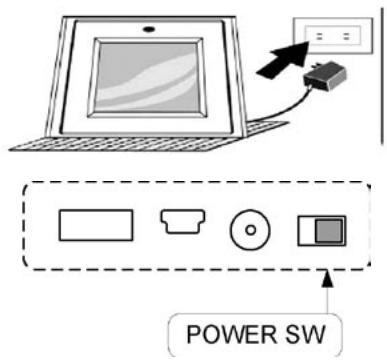
- Assemble the Photo Display PDJ 151 stand on the back for propping stability, then plug the power adapter into an electrical outlet.
- Push the power switch at the end of Photo Display PDJ 151 to "ON".
2.1. Inserting Memory Cards
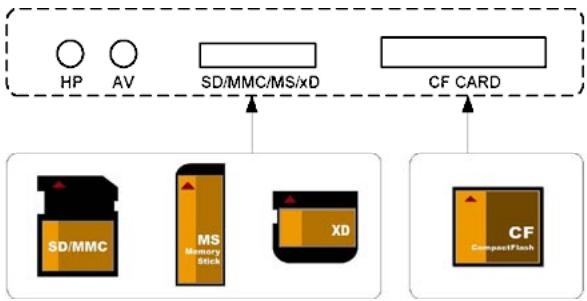
The Photo Display PDJ 151 is compatible with the following memory cards or USB Disk: Secure Digital™ Card (SD) MultiMedia™ Card (MMC) Memory Stick™ & Memory Stick Pro™ CompactFlash™ (CF) Card xD™ Card Insert the memory card with the front label facing away from you. Do not force the memory card into the memory slot. If you are not able to easily insert the memory card completely, you may have inserted it in the wrong way.
Right Side
Bottom Side
Note:The Photo Display PDJ 151 will ONLY recognize digital pictures stored in JPEG format. Digital pictures stored in other formats will be ignored by the device.
You will see the following screen if you insert the memory card correctly. Make sure you have at least one picture stored on the memory card. The frame will not function properly without a stored picture.
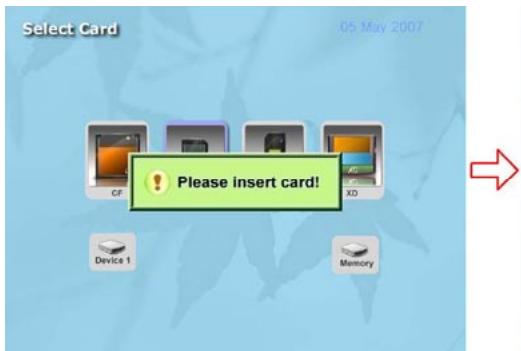
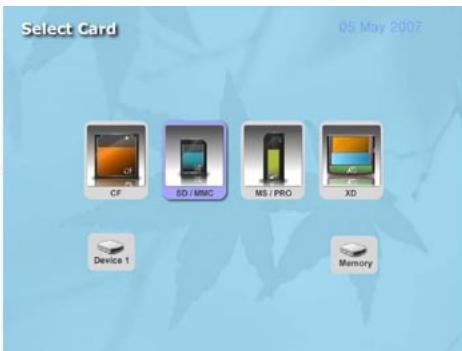
Please select the memory card, press the button from the unit or remote control to enter the following screen.
2.2. Viewing Picture
- You can use either the remote control or the on-board buttons to control the Photo Display PDJ 151.
- Remove the plastic battery insulator (if any) on the bottom of the remote control and make sure the remote control has a battery installed. See "Installing and replacing battery" section if you need a new battery.
- Use the remote control to highlight and select the Photo folder (Use the direction keys Right, Left on the remote control to navigate and press Enter to select).
- Highlight a picture and press Enter to view the picture.
- Press "PLAY" button to view the picture sequential.
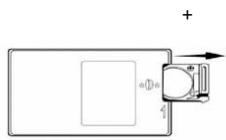
2.3. Installing and Replacing the Remote Control Battery
- Place the Remote Control with the control buttons facing downward.
- While pressing down on the ridged area of the battery cover pull the tray out.
- Place a "CR2025" lithium battery on the tray with the positive "+" end facing toward you.
- Close the tray.
2.4. Display CLOCK&CALENDAR
- Press [CLOCK] key on remote control into COLCK&CALENDAR interface, see following screen cut picture:
- Press [CLOCK] key again return to main menu.
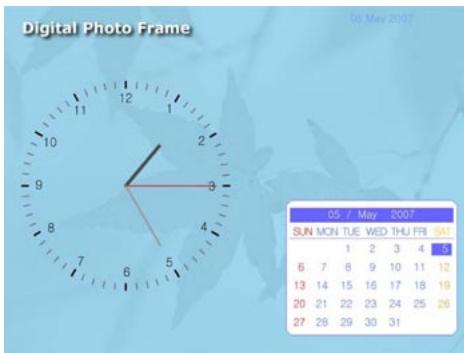
Note: Clock and Alarm settings are in the setup menu!
3. Question & Answers
This chapter will introduce some solutions to deal with the potential problems you may experience. Please consult this section first to correct the problem. If you also cannot solve the problem, please contact the local dealer to ask for help. Please don't try to take apart the machine by yourself at any time.
Question
Answer
What memory cards are compatible with the Photo Display PDJ 151?
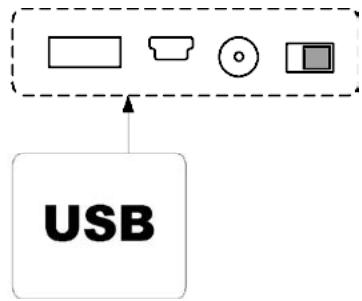
Secure Digital Card (SD) MultiMedia Card (MMC) Memory Stick & Memory Stick Pro CompactFlash (CF) Card xD Card, You can also use photostorage devices such as GIGA ONE and attach them via the USB-OTG port.
My memory card is not compatible with the JOBO Photo Display PDJ 151. What can I do?
You should be able to buy a memory card adapter that is compatible with one of the supported memory cards.
What is the maximum picture size the digital frame can display?
The digital frame is able to display pictures up to 16 Mega Pixels.
What is the best picture resolution displayed on the screen?
The Picture's best resolution is 1024 × 768 pixels.
3.1. Specifications
Display
15 inch (4:3) Diagonal TFT LCD Resolution: 1024x768 @ 16M Colors [24Bits] Active Area: 304.2(H) x 228.1(V) mm Brightness: 350 cd/m2 View Angle: 140^(V) , 110^(H) Contrast: 400:1
Response time
3 seconds
Memory
16MBx16Bits DDR SDRAM. 1MBx16bits NOR FLASH
External I/0
AV JACK. SPEAKER(ST.). 2 USB PORT BY TWO USB CABLE.
Control
6 keys on DPF & 23keys Remote control
Power Supply
Switch AC Adapter: Input AC100-240V. Output 12V 3A
Environmental
Operation: Temperature: 10 50 , Humidity: 0 85% Storage: Temperature: -20 60 , Humidity 10 90%
3.2. Included Accessories
- AC Power Adapter
- Stand
Remote control
USB Cable - Manual
4. Warranty and Service
4.1. Warranty conditions
This product is subject to the legal warranty periods relating to manufacturing faults and defects.
Substance of the warranty:
- In the event of malfunctioning caused by manufacturing defects JOBO AG will repair or replace the defective product at its own discretion.
- JOBO AG and its suppliers do not assume any liability for data losses occurring during operation of the device or consequential damage resulting from this. Under no circumstances will JOBO AG assume liability for any direct, concrete or special damage or consequential damage like for example damage to or loss of property or devices, loss of profits or sales, costs for spare parts, expenditure or inconvenience caused by the interruption of service or any other damage. The user will be exclusively responsible for the loss, damage or destruction of data during the operation of a JOBO product. Under no circumstances will JOBO AG be liable for the recreation of such data. Under no circumstances can claims be lodged that exceed the purchase price of the product.
-
The following repairs are not covered by the warranty and must be paid for separately:
-
Malfunctions after the end of the legal warranty periods
- Change of battery after the end of the warranty period
- Change of hard disk after the end of the warranty period
- Malfunctions due to incorrect operation by the user (if device is not used as described in the manual)
- Malfunctions caused by other devices
Changes or damage to the device not caused by the manufacturer; especially, warranty claims will lapse if the device has been opened by anyone other than by a J0B0 AG repair workshop - Damage caused by natural disasters (acts of God)
- A hard disk change during the warranty period must only be performed by J0B0. Such a change by any other party will entail the loss of all warranty claims.
If you want to make any claims under the warranty you are asked to contact the Technical Service of JOBO AG. You will be expected to quote the serial number of the JOBO product and may also have to submit proof of purchase to show that the warranty period has not yet elapsed.
4.2. Contact/Service
If you have any questions on or need help with our products please do not hesitate to get in touch with our Technical Service. You can reach our service people by phone under the telephone number indicated below from Monday through Thursday from 9:00 am to 4:00 pm and on Friday from 9:00 am to 1:00 pm. Independently of these service times you can also get in touch by e-mail, fax or mail:
JOBO AG
Kolner Straße 58
D-51645 Gummersbach
Tel. 0049 2261 545-72
Fax: 0049 2261 545-42
E-mail: support@jobo.com
www.jobo.com