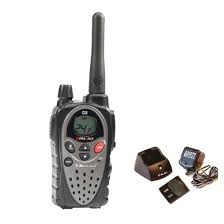
MIDLAND G8 - Ham Radio MIDLAND - Free user manual and instructions
Find the device manual for free MIDLAND G8 MIDLAND in PDF.



| Product Type | Portable dual-band PMR446/LPD amateur radio |
| Brand and Model | MIDLAND G8 |
| Dimensions (L x W x H) | 59 x 98 x 32 mm |
| Weight (without batteries) | 112 g |
| Power Supply | NiMH battery pack 4.8V 800mAh or 4 rechargeable/non-rechargeable AAA batteries |
| Battery life (800mAh pack, PMR446) | More than 12 hours |
| Charging time | Approximately 8 hours |
| RF Power | 500 mW (PMR446), 10 mW (LPD) |
| Frequency Bands | PMR446 (24 channels) and LPD (69 channels) |
| Operating Temperature | -20°C to +55°C |
| Protection Rating | IPX5 (splash resistant) |
| Main Functions | Emergency call, adjustable VOX (3 levels + TalkBack), vibrator, key lock, power saving, low battery indicator, dual standby, SCAN, monitor, roger beep, 5 call melodies, high/low power, backlit LCD display |
| Tone Codes | 38 CTCSS tones and 104 DCS codes |
| Included Accessories | 1 radio, 1 desktop charger, 1 mains adapter, 1 NiMH battery pack, 1 belt clip |
| Accessory Jack | 2-pin type (for microphone, earpiece, charger) |
| Maintenance and Cleaning | Use a soft, clean cloth; possibly water and mild soap. Do not use detergent, alcohol, solvent or abrasive. |
| Safety | Do not open the radio (voids warranty). Recharge only with the supplied adapter and rechargeable NiMH batteries. Do not dispose of in fire. |
| Repairability | Repair by a professional only; any unauthorized opening voids the warranty. |
Frequently Asked Questions - MIDLAND G8 MIDLAND
User questions about MIDLAND G8 MIDLAND
0 question about this device. Answer the ones you know or ask your own.
Ask a new question about this device
Download the instructions for your Ham Radio in PDF format for free! Find your manual MIDLAND G8 - MIDLAND and take your electronic device back in hand. On this page are published all the documents necessary for the use of your device. MIDLAND G8 by MIDLAND.
USER MANUAL MIDLAND G8 MIDLAND
G8 Dual band (PMR446/LPD)
24 canali PMR446 (8+16 pre-registered)/69 canali LPD
G8E (solo PMR446)
24 canali PMR446 (8+16 pre-registered)
Thanks for choosing Midland! The Midland G8 is a portable transceiver that is free use in almost all European countries. For further information, we suggest you look at the "Restrictions on the use" chart.
Combing the latest technology in radio communication along with a sturdy mechanical frame, the Midland G8 makes the ideal and effective solution for the professionals who need to stay in touch with colleagues (construction sites, buildings, hotels, trade fairs, shows) or with leisure users that just want to keep up with friends and family. Its robust frame, ease of use and simple design mean that it is ideal for use in any activity.
Midland G8 is available in two versions:
Dual Band (PMR446/LPD)
E version (PMR446 only)
This manual is referred to both models and you will find highlighted the differences between the two versions.
Content
N°1 Midland G8
N°1 Single desktop charger
N°1 Wall adaptor
N°1 Battery pack
N°1 Belt clip
Coverage/range
The maximum range depends on terrain condition and is obtained during use in an open space.
The only limitation to maximum possible range are environmental factors such as blockage caused by trees, buildings, or other obstructions. Inside a car or a metallic constructions, the range can be reduced. Normally the coverage in the city, with buildings or other obstructions is about 1 or 2Km . In open space but with obstructions like trees, leaves or houses the maximum possible range is about 4 - 6Km . In open space, without obstructions and in sight, like for example in mountain, the coverage can be more than 12Km .
Batteries and battery compartment
The transceiver accepts the supplied rechargeable battery pack or 4AAA alkaline/ rechargeable batteries. To open the battery compartment: with the back of the radio facing you, unhook the battery holder in the lower part of the radio and gently slide the cover. Insert the battery observing the polarity and place the cover again.
Attention: the supplied battery pack must be recharged before the first use.
Warnings
BATTERIES - Strictly follow all the warnings on the batteries stated at chapter "Battery recharge".
DO NOT OPEN THE RADIO FOR ANY REASON! The radio's precision mechanics and electronics require experience and specialized equipment; for the same reason, the radio should under no circumstances be realigned as it has already been calibrated for maximum performance. Unauthorized opening of the transceiver will void the warranty.
Do not use detergents, alcohol, solvents, or abrasives to clean the equipment. Just use a soft, clean cloth. If the radio is very dirty, slightly dampen the cloth with a mixture of water and a neutral soap.
FEATURES
New feature "Emergency CALL"
Midland G8 introduces an innovative and important feature: the channel dedicated to the emergencies. Radio communications usually happen between two or more users which are tuned on the same channel: it's not possible to transmit or receive to/from different channels. But thanks to the "Emergency" function, you can also keep a check on the Emergency channel: all users having a Midland G8 can communicate on the tuned channel and at the same time can receive/transmit Emergency messages on the dedicated channel. Simply keep pressed the EMG button for 3 seconds and an emergency CALL will be sent to all the G8 within the range: they will be automatically tuned on the "EC" channel (Emergency Channel).
New feature "Manual Out of range": just press twice the EMG button and you will verify whether there are some radios within the range of your equipment.
New feature "Vox TalkBack": if one radio is continuously transmitting in VOX, the Vox TB will automatically stop the transmission after 20" to allow the transmission to the other users as well.
Power: 500mW (PMR446); 10mW (LPD)
Operating temperature: from -20^ to +55^ C
38 CTCSS tones/104 DCS codes
Waterproof: IPX5
Emergency CALL
Out of range control
VOX adjustable in 3 levels and with "TalkBack"
INTERCOM
VibraCALL
Keypad lock
Auto power save: automatic current economy circuit
Low battery indicator
Dual Watch
CALL with 5 selectable melodies
SCAN
Monitor
Out of Range
Roger beep
High/Low power
LCD Display with backlight
Power supply: NiMH battery pack 800mAh 4,8V or 4 AAA batteries
2pin accessory plug
Weight: 112gr (w/o batteries)
Dimensions:59x98x32mm
Battery life (in PMR446 band): more than 12 hours with 800mAh battery pack
Versions:
G8 Dual band (PMR446/LPD)
24 PMR446 channels (8+16 pre-set)/69 LPD channels
G8E (PMR446 only)
24 PMR446 channels (8+16 pre-set)
DESCRIPTION OF THE CONTROLS AND FUNCTIONS
Display
Your Midland G8 keeps you constantly updated about its operational status through a Liquid Crystal Display (LCD). The symbols and their corresponding parameters that may appear, according to the operational status of the device, are described as follows:

- CHANNEL These two large digits indicate the selected channel
- VOX VOX function activated
- This symbol appears when the keypad lock is activated
- EMG Emergency function activated
- DW Dual Watch activated
- Indicates the battery status
- Vibra-CALL function activated
- OUT Indicates if the Automatic Out of Range function looses contact with the other radios.
- RX Reception mode
- TX Indicates the transmission(PTT pressed);
- H(High) / L(Low) High or low power selection.
- CTCSS/DCS Indicate the type of sub audio tone selected.
- CTCSS/DCS These three small digits indicate the code of the CTCSS/DCS tones selected (1-38 / 1-104)
- ROGER Roger Beep activated.
Radio
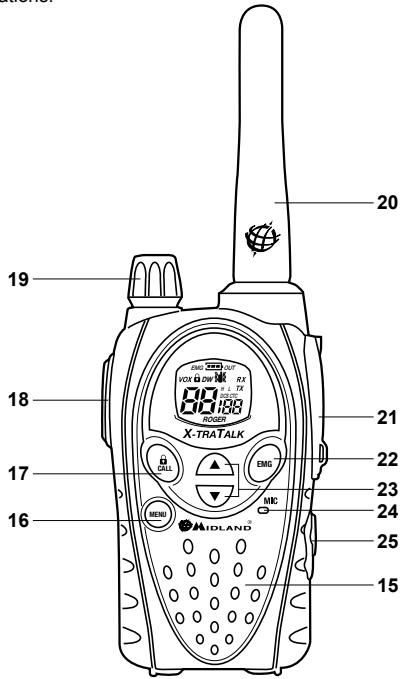
Refer to this picture to identify the various parts of the device:
- Built-in speaker Here is where the speaker is housed.
- MENU button Press this button to enter the radio's MENU.
- CALL button To send a CALL on the selected channel. If you keep it pressed for about 5 seconds, the keypad lock is activated.
- PTT (push to talk) Push this button to transmit.
- VOLUME knob On/off switch for the device and adjusts VOLUME of reception.
20.ANTENNA Receives and transmits radio signals. - Accessory socket (under protective cover) To connect to external audio devices such as microphones, chargers, etc. (2pin type)
- EMG button To activate the Emergency and the Manual Out of range functions.
- ▲▼ buttons To change the setting within the MENU
- Built-in microphone Here is where sound is picked up by the microphone.
- Intercom plug To connect to headset/mike accessories suitable for intercom communications.
Turning on/off
To turn on the transceiver, turn the VOLUME knob clockwise until you hear it clicks.
To turn off the transceiver, turn the knob counter-clockwise.
Selecting the PMR466 or LDP band (only for the dual band version) Midland G8 (Dual band) is pre-set at factory on the PMR446 band.
To switch to the LPD band, keep pressed the MENU button until the LPD shows channel '1'.
To return to the PMR446 band, keep pressed the MENU button again, until the LCD shows 'P1'.
! This procedure disables the "EMG" function; therefore if you change the frequency band, remember to activate the Emergency function again (see paragraph "Emergency function").
Channel selection
Press the MENU button. The number of the channel will start flashing on the display. Press the scroll buttons till you select the desired channel. Press the PTT button to confirm, or wait for 5 seconds.
According to the version you bought, you can choose amongst the following channels:
Dual band version: PMR446 from P1 to P8 and from 9p to 24p (pre-set) / LPD from 1 to 69.
E version (PMR446 only): from P1 to P8 and from 9p to 24p (pre-set)
! Channel P8 has been set at factory for the "Emergency" function; we suggest that you do not use it for general communications!
Displaying the channel/sub audio tone
To momentarily display the PMR446 channel and the subaudio tone used in the pre-set channels, go to the desired channel (from 9p to 24p) and keep pressed the for 3 seconds.
Transmission and reception
To transmit keep the PTT button firmly pressed. Wait for a fraction of a second then speak normally in the direction of the microphone and hold the device at a distance of about 5cm ; TX will appear on the display.
When you have finished, release the PTT.
When the radio is in reception mode (PTT released) you will automatically receive any communication. RX will be displayed.
VOLUME adjustment
Rotate the VOLUME knob till you reach the desired level.
"CALL"
Push the CALL button and you will send an audio signal to the users tuned on the same channel; you can choose amongst different CALL tones.
"Emergency"
When the Emergency function is enabled (EMG blinks on the display) keep pressed EMG for 3 seconds and you send an emergency CALL to the other G8 within your range.
The Emergency function is activated by default.
Keypad lock
Keep pressed CALL/ for about 5 seconds. and ±b will be displayed as confirmation.
Only PTT, EMG and CALL/ Q remain active. To disable this function, keep pressed again CALL/ Q for 5 seconds approx.
MON (Monitor) function / Squelch
The Monitor button is for temporarily excluding (opening) the squelch, in order to listen to signals that are too weak to keep the squelch permanently opened.
To activate the monitor function, keep pressed for about 2 seconds both at the same time. Follow the same procedure to deactivate the function, or switch off and on the radio.
! When MON is active, you will probably hear a constant background noise.
! You can activate the Monitor feature only if the "Emergency" function is disabled.
Scanning all the channels
Midland G8 can automatically search for signals throughout the bands by scanning the channels in rapid sequence. This function is useful to find out any active channel.
When a signal is detected, the scanning pauses on that channel for 5 seconds.
Press for 2 seconds: the scanning will start. To stop it, push PTT: the Midland G8 will go back to the channel from which the scanning originally started.
! You can activate the scanning feature only if the "Emergency" function is disabled.
"MENU" key
The following features can be selected by using the "MENU" button:
Channel selection
CTCSS tone setting
DCS tone setting
High/low power selection (only in the PMR446 band)
VOX
VibraCALL function
CALLmelodies
Roger Beep
Keypad Beep
Emergency channel
Dual Watch function
Out of Range
Channel selection
Press the MENU button. The number of the channel will start flashing on the display. Press the scroll buttons till you select the desired channel. Press the PTT button to confirm, or wait for 5 seconds.
According to the version you bought, you can choose amongst the following channels:
Dual band version: PMR446 from P1 to P8 and from 9p to 24p (pre-set) / LPD from 1 to 69.
E version (PMR446 only): from P1 to P8 and from 9p to 24p (pre-set)
! Channel P8 has been set at factory for the "Emergency" function; we suggest that you do not use it for general communications!
CTCSS/DCS tone setting
CTCSS and DCS tones are similar to access codes and enable the radio to communicate only with the users that are tuned on the same channel and have set the same code. For each channel, you can set up to 38 CTCSS and 104 DCS tones.
These tones can be set on the following channels:
Dual band version: only on the 8 main PMR446 channels (from P1 to P8) and on the 69 LPD channels.
E version (PMR446 only): only on the 8 main PMR446 channels (from P1 to P8)
For both, the pre-set channels from 9p to 24p cannot be modified.
Activating the CTCSS tones:
Turn on the unit.
Select the desired channel by pushing the MENU button and the channels.
Press the MENU button till the display shows CTC and the CTCSS tone blinks on the right ("of" = no code - default condition).
Select the desired CTCSS tone by pushing ▲▼.
To confirm the setting, push PTT or wait for 5 seconds.
Deactivating the CTCSS tones:
If you don't want to use the CTCSS tones, follow these steps:
Select the desired channel
Press the MENU key till the display shows the CTCSS tone blinking on the left;
Select "of" by means of .
Activating the DCS codes:
Turn on the unit.
Select the desired channel by pressing MENU and keys.
Push the MENU button again till the display shows DCS and the tone code blinks on the right ("of" = no code - default condition).
Select the desired DCS code by pushing ▲▼.
To confirm the setting, press the PTT or wait for 5 seconds.
! Channel P8 with DCS tone 50 (P850) has been set at factory for the "Emergency" function; do not use it for general communications!!
Deactivating the DCS codes:
Select the desired channel.
Press the MENU key till the display shows the channel in use and the DCS code blinks on the right.
Select "of" by pushing .
Hi/low power selection (only in PMR446 band)
To select the power level, press the MENU button till the display shows Pr . Use to select L (low power) or H (high power). To confirm your selection, push PTT or wait for 5 seconds.
When the batteries are fully charged, the high power is 500mW (ERP), while the low is 10mW (ERP).
If your radio has to operate within a short range, you can select the low power and therefore extend the battery life.
VOX function
Midland G8 enables hands free conversations through the VOX function: just speak in the direction of the microphone and the communication will be automatically activated.
The VOX sensitivity can be adjusted in 3 different levels. You can enable the VOX function with or without accessories.
The fourth level activated is the Vox TalkBack: if one radio is continuously transmitting in VOX, the VOX TB will automatically stop the transmission after 20 seconds to allow the transmission to the other users as well.
To activate the VOX function press the MENU button till VOX appears on the display. Use to select the sensitivity levels:
Of: Off;
1: High
2: Middle
3:Low
4: Talk Back (with high sensitivity)
To confirm your selection, press PTT or wait for 5 seconds.
To disable the VOX function, follow the procedure here above indicated and select oF.
Vibra-CALL function
Midland G8 is equipped with the "Vibra-CALL" feature, which provides a silent alert for incoming CALLs.
To activate this feature, press the MENU button until the display shows; use the buttons to disable or enable this feature (on: enables, oF:disables);
Push PTT [11] to confirm or wait for 5 seconds.
CALL feature
Midland G8 can send 5 different CALL tones. To send this audio signal to other users, press the CALL/ key.
To select the CALL tones:
Press MENU, until the display shows "CA" and the active tone code.
By pushing you will hear the 5 pre-set melodies.
Confirm by pressing PTT or wait for 5 seconds.
ROGER BEEP (End transmission tone)
When the PTT button is released, the radio will beep to confirm to other users that your transmission has finished.
In the Midland G8 this function is factory disabled.
To activate it:
Press the MENU button until the display shows "rb of"; using the scroll buttons select "on" and "rb on" will be displayed; to confirm the roger beep activation, press PTT or wait for 5 seconds.
Keypad Beep
Everytime a button is pressed, you will hear a beep.
To disable the beeps, follow this procedure:
Press MENU, till the display shows "bP on".
Push till "bPof" is displayed.
Confirm your selection by pushing PTT or wait for 5 seconds.
In this way, all beeps and tones are disabled.
To enable the keypad beep, repeat this procedure and select "bP on"
Emergency CALL function
The Midland G8 dedicates a channel to the Emergency CALLs: all the G8 operating within your range, even if tuned on different channels, can receive/transmit Emergency messages on that channel.
If you keep pressed the EMG button, the communications automaticALLY switch to the emergency channel ("EC" on the display). An audio signal will be sent and all the G8 operating within the range will automatically go to the Emergency channel ("EC").
If you have disabled this function, you won't receive/transmit any Emergency CALL.
! When the radio is operating on the Emergency channel (EC displayed), all the buttons except PTT and CALL are disabled.
The G8 will return to the channel in use after one minute from the last transmission.
To return immediately, push EMG. Now you can use all the MENU functions.
Activating / Deactiving the Emergency feature
When you switch on the unit, the Emergency function is activated, but you can disable and enable it again:
Press MENU till the display shows EC on.
Select EC of by using . Confirm your selection by pushing PTT or wait for 5 seconds.
! When the Emergency function is activated (EMG blinking on the display) the following functions cannot be used: Scan, Monitor, Dual Watch, Out of
Range.
Changing the emergency channel
The emergency channel originally preset is P8 DCS 50; but you can change it according to your needs.
! Important: be sure that the Emergency function is active! (EMG blinking). If you decide to change the channel dedicated to the Emergency function, do not forget to make the same change to all the radios!
Press the MENU button until the display shows EC on.
Push MENU again (of displayed) and select the desired channel by means of . To confirm press PTT or wait for 5 seconds.
Important: be sure that the Emergency function is active! (EMG blinking). If you decide to change the channel dedicated to the Emergency function, do not forget to make the same change to all the radios!
To set again the original Emergency channel (P8 DCS 50)
Press the MENU button until the display shows EC on.
Push MENU again and select of
To confirm press PTT or wait for 5 seconds.
If you dedicate any of the standard channels to the Emergency function, remember to use it only for this purpose, otherwise you will cause interferences.
Manual Out of range function
This function allows you to know if there are any radios within your range.
By pushing EMG twice, you will send a request of acknowledge to the other G8 operating within your range and tuned on the same channel.
If any radio replies, it means that it's within your range and you will receive an audio tone for confirmation.
This function can be used only if the "Automatic Out of Range" feature is not active.
DUAL WATCH
The Dual Watch allows you to monitor constantly two channels of your choice at the same time.
Enabling - Disabling
Press the MENU button until the display shows DW of.
Select the second channel to monitor by pushing
To confirm your selection, press PTT or wait for 5 seconds. The display will alternately show the channel in use and the second channel to monitor.
To stop the function, simply press MENU.
When the transceiver detects a transmission on one of the two channels, the Dual Watch temporarily pauses, remains tuned for 5 seconds on the corresponding channel, giving the user a chance to respond to a CALL. After this pause, the Dual Watch starts
again.
! This function can be activated only if the "Emergency" feature is disabled.
Automatic Out-of-Range
By setting this mode a pair of G8 is transmitting every 30 seconds a data control code. As soon as the contact between both units is getting lost and one radio doesn't receive this data control code twice consecutively, the icon OUT starts flashing in the display and you will hear a beep tone.
! This function can be activated only if the "Emergency" feature is disabled. Activating - Deactivating
Press MENU till the display shows "OUT" and "Or of", select "Or on" (activated) with the buttons.
Switch off both radios.
Turn them on at the same time.
To disable this function, push MENU till "OUT" and "Or on" are displayed; select "Or of" (disabled) with the buttons.
Confirm your selection by pushing PTT or wait for 5 seconds.
Display illumination
If there is insufficient light to read the display, press briefly EMG and the display illumination will activate for about 5 seconds. Every time the MENU is pressed, the display will automatically light up.
Power save
The battery power saving feature enables a reduction in the consumption of up to 50% ; power saving comes on automatically when the transceiver does not receive any signal for more than 7 seconds. When the batteries are discharged, the icon appears on the display: replace the batteries or recharge the battery pack.
! The power save is active only if the Emergency function is disabled.
Battery recharge
The supplied battery pack is NiMH type 4.8V 800mAh and must be recharged only when it's inserted in the radio; it takes 8 hours to fully recharge.
To recharge the battery pack:
Connect the socket of the wall adaptor to a mains power socket and insert the jack of the wall adaptor into the desktop charger plug.
Place your transceiver into the cradle of the desktop charger. The red led of the charger will light up.
When charging is complete take the transceiver out of the cradle and detach the socket of the wall adaptor from the mains.
! Do not overcharge the batteries! When these are fully charged the charging process does not stop automatically. Do not forget therefore, to remove the transceiver from the charger as soon as the batteries are charged, otherwise the radio and batteries may be damaged.
! Do not try to charge alkaline batteries or non rechargeable batteries. Make sure that when you charge the radio, only rechargeable Ni-MH batteries or the supplied battery pack should be contained in the battery compartment! Alkaline batteries are not rechargeable! Batteries which are not suitable to be recharged may leak, explode or even burn and cause damage!
! Using a different battery charger other than the one specified can cause damage to your device or may even cause explosions and personal injuries.
! Do not throw batteries into fire or place them near heat as this may cause explosions or personal injuries. Dispose of the batteries according to the procedures set out by local regulations.
! Do not mix old and new batteries or batteries of different types or batteries which have been used in different manners.
Midland G8 BENUTZERHANDBUCH
Batteries and battery compartment
Émission and reception
Fonction "Emergency"
This function allows you to know if there are any radios within your range.
By pushing EMG twice, you will send a request of acknowledge to the other G8 operating within your range and tuned on the same channel.
If any radio replies, it means that it's within your range and you will receive an audio tone for confirmation.
Activer - Désactiver
Recarregar as pilhas
Evepyotoinon/ aTevepytoinon (on/off)
Tia va eVeyoTOIOEETe Tov TIOBekTN TEPiOTpeyTe TO KOUPTI VOLUME 86jOToP0a μexpi va
akouoet eva kik. Ia va atevepyotoinoetov TIOIIOEKT, TEPIOTpe apiotepoofoa to iio koumuoiottou va akouoie kik kai va ohei n obov.
Aetoupyia MON (Monitor) / Squelch
Pntwrtac to PAnkto Monitor μTpoite va Tnapakayete πpoooviva souelch kai Etoi va λaβeTe akouka kai ta TIO aOeVn Oμata.
PpokeiEvou va evpyoTIOHOETe Tn aeitoupyia Monitor, kpatnoTE pntmuEva kai ta duo TTktpa ▲V ia 2 6eutepeoAETTTA TEPiTou.
Etnavaaβe Tya va atevepyotoinoTe n λεitoupyia, n atevepyotoinote tov troμtobektn.
! Otav leioupyia MON eivai evepy, 0a akouTE nIeavwεevav oTaepo opufo aro napaaira.
I Mtopeire va evpyoioiəte t n leioupyia monitor mvo eav n leioupyia "EKTAKTNS avayknS" eivai anevpyoiojEvn.
Zapomegaolawtwvdiauwov
Me tov Midland G8 I I I I I I I I I I I I I I I I I I I I I aopwote Tt mTavc PMR/LPD avzntwta. Oma. Otav avixveutei kantoio anu, n opwn otapata ppoospiva oto kavai
auto yia 5 uetepoAeTTa.
TIEATE TO TIAKTOPO VIA 2 DEUTEPOAETTA: n aopwAn Oa apxiei. Ia va oataatnai, TIEATE TO PTT: o Midland G8 OeTIATPpeyE iOTo KAVAl iAto To OTIOI apxie n apoxen
! Mtpoite va evpyoioane Te n aeoupyia opawos mov eav n aeioupyia «ektaqtns avaykns » evai aTVEpyoioiEvn.
To TlAnKtpo "MENU"
Ta akolouθa xapaktnpiotiká μtnpovv va επiεyovv μe tn xρησn tou πλκtpou "MENU":
Eπλoyn kαvαλiou
Puro CTCSS UToVwV
Püθμiαn DCS uπotóvov
Eπλογήνηλή / χαμηλήσιοχς αὐτίστοιχα (μόνο στη μπάντα PMR446)
VOX
Λειουργία δόνησς VibraCALL
MLeawOiesKlnons
Roger Beep
Tovoi TAnKtpw
Kavai Eeivouos avayknS
Λειτουργία Dual Watch
Eπλογή καναλιό
PntnoTe to TnKtpo MENU. O apiooc tou kavaloiou ta apxioe va avaobaobrivei OTNV obovni. Pte To TnKtpa kuianos ▲ expic otou eTNIeEETO ettiBuNTO kavai. PteTo TnKtpo PTT ia va eTIbeBaiwaote TIV eTNIoy, n TEPIeVE5 6deutepoAeTTIA.
Xpoiopoiotouv: Sapow, Monitor, Dual Watch,Out of range.
Aaayn Tou kavaiou EktaKtns avayknS
To Tpoka0piogevo kavai EktaKns avaykn apxika eivai to P8 DCS 50 aaaa tpoite va to aaaleste oumuovuaeTc avaykeosac.

- Midland G8 is available in two versions:
- Content
- Coverage/range
- Batteries and battery compartment
- Warnings
- FEATURES
- Versions:
- DESCRIPTION OF THE CONTROLS AND FUNCTIONS
- Display
- Radio
- Turning on/off
- Selecting the PMR466 or LDP band (only for the dual band version) Midland G8 (Dual band) is pre-set at factory on the PMR446 band.
- Channel selection
- Displaying the channel/sub audio tone
- Transmission and reception
- VOLUME adjustment
- "CALL"
- "Emergency"
- Keypad lock
- MON (Monitor) function / Squelch
- Scanning all the channels
- "MENU" key
- CTCSS/DCS tone setting
- Activating the CTCSS tones:
- Deactivating the CTCSS tones:
- Activating the DCS codes:
- Deactivating the DCS codes:
- Hi/low power selection (only in PMR446 band)
- VOX function
- Vibra-CALL function
- CALL feature
- ROGER BEEP (End transmission tone)
- Keypad Beep
- Emergency CALL function
- Activating / Deactiving the Emergency feature
- Range.
- Changing the emergency channel
- Manual Out of range function
- DUAL WATCH
- Automatic Out-of-Range
- Display illumination
- Power save
- Battery recharge
- Midland G8 BENUTZERHANDBUCH
- Émission and reception
- Fonction "Emergency"
- Activer - Désactiver
- Recarregar as pilhas
- Evepyotoinon/ aTevepytoinon (on/off)
- Aetoupyia MON (Monitor) / Squelch
- Zapomegaolawtwvdiauwov
- To TlAnKtpo "MENU"
- Eπλογή καναλιό
- Aaayn Tou kavaiou EktaKtns avayknS
Brand : MIDLAND
Model : MIDLAND G8
Category : Ham Radio