17000 - Air purifier KAZ - Free user manual and instructions
Find the device manual for free 17000 KAZ in PDF.


| Product type | Portable air purifier |
| Brand | KAZ (Honeywell) |
| Model | 17000 (also 17005) |
| Main filter | Permanent LifeTime HEPA filter (vacuum-cleanable) |
| Pre-filter | Replaceable activated carbon pre-filter (every 3 months) |
| Fan speeds | High, Medium, Low |
| Filter status indicator | Intelli-Check (model 17000) or control bars (model 17005) |
| Programming | Model 17005: customizable 24-hour on/off cycles |
| Remote control | Included for model 17005 |
| Power supply | Mains, polarized plug |
| Power consumption | Not specified (estimated approx. 50 W) |
| Dimensions | Not specified (height approx. 60 cm, diameter approx. 30 cm) |
| Weight | Not specified (approx. 5 kg) |
| HEPA filter cleaning | Vacuum only, do not wash |
| Pre-filter replacement | Every 3 months, or more often if heavy pollution |
| Warranty | 5 years limited |
| Safety | Avoid use near water, do not block openings |
| Recommended use | 24/7, doors and windows closed |
| External maintenance | Dry cloth, no chemicals |
| Spare parts | Universal carbon pre-filter (38002) available |
Frequently Asked Questions - 17000 KAZ
User questions about 17000 KAZ
0 question about this device. Answer the ones you know or ask your own.
Ask a new question about this device
Download the instructions for your Air purifier in PDF format for free! Find your manual 17000 - KAZ and take your electronic device back in hand. On this page are published all the documents necessary for the use of your device. 17000 by KAZ.
USER MANUAL 17000 KAZ
The Science of Clean Air®
IMPORTANT SAFETY
INSTRUCTIONS
READ AND SAVE THESE SAFETY INSTRUCTIONS BEFORE USING THIS AIR PURIFIER
When using electrical appliances, basic precautions should always be followed to reduce the risk of fire, electric shock, and injury to persons, including the following:
- Read all instructions before operating the air purifier.
- Place air purifier where it is not easily knocked over by persons in the household.
- Always turn the air purifier to the OFF position and unplug from the wall outlet when not in use.
- To disconnect the air purifier, first turn control to the OFF position, grip the plug and pull it from the wall outlet. Never pull by the cord.
- Do not use any product with a damaged cord or plug or if product malfunctions, is dropped or damaged in any manner. Keep the cord away from heated surfaces.
- Do not use air purifier outdoors.
- Never use air purifier unless it is fully assembled.
- Do not run power cord under carpets, and do not cover with throw rugs. Arrange cord such that it will not be tripped over.
- Do not use air purifier where combustible gases or vapors are present.
- Do not expose the air purifier to rain, or use near water, in a bathroom, laundry area or other damp location.
- The air purifier must be used in its upright position.
- Do not allow foreign objects to enter ventilation or exhaust opening as this may cause electric shock or damage to the air purifier. Do not block air outlets or intakes.
- Locate air purifier near the outlet and avoid using an extension cord.
- This appliance has a polarized plug (one blade is wider than the other). To reduce the risk of shock, this plug is intended to fit only one way in a polarized outlet. If the plug does not fit fully in the outlet, reverse the plug. If it still does not fit, contact a qualified electrician. DO NOT attempt to defeat this safety feature.
- A loose fit between the AC outlet (receptacle) and plug may cause overheating and a distortion of the plug. Contact a qualified electrician to replace loose or worn outlet.
- Do not sit, stand or place heavy objects on the air purifier.
- Disconnect power supply before servicing.
WARNING: To Reduce The Risk of Fire or Electric Shock, Do Not Use This Air Purifier With Any Solid-State Speed Control Device.
For Best Performance
We recommend that you operate your Honeywell air purifier 24 hours a day because indoor air can be quickly contaminated by activity in a room, infiltration of outside air, and from other sources of contamination. While all the air in a room will not be processed by the air purifier, the more air circulated through the filter, the more filtered air is returned to the room. Portable air purifiers will be much more effective in rooms where all doors and windows are closed.
Set-up
- Select a firm, level and flat location. For proper air flow, locate the unit at least 3 feet (1 meter) from any wall or furniture.
- Due to the large volume of air drawn towards the air purifier, surrounding areas should be cleaned and/or vacuumed frequently to prevent dust buildup. If the unit is placed on light colored carpeting, a small mat or rug should be used to ease cleaning and prevent any permanent staining of carpeting. This is particularly important in homes with heavier contamination from smoking or fireplaces.
- Installing Rubber Feet:
Your air purifier should have a plastic bag attached to it that includes 4 rubber feet with an adhesive backing (Fig A). To limit product vibration attach the rubber feet to the bottom of the air purifier as indicated (Fig B).
- Locate pre-filter in the box and install before initial operation. Refer to "Removing/Changing the Filters" section for proper installation.
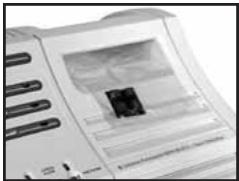
Fig A
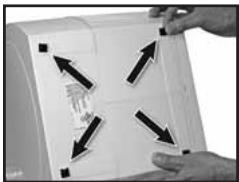
Fig B
Construction
Your Honeywell air purifier has five basic components: the locking mechanism, the endcap, the HEPA filter, the activated carbon pre-filter, and the base assembly (with controls and motor).
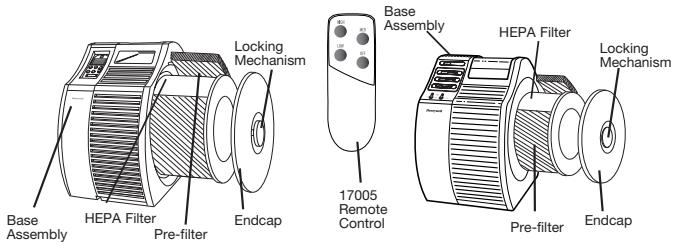
Operation: Model 17000
LOCATE PRE-FILTER IN THE BOX AND INSTALL BEFORE INITIAL OPERATION.
Refer to "Removing/Changing the Filters" section for proper installation.
- Ensure the air purifier is plugged into a working electrical outlet.
- Allow the unit to operate for a few seconds at HIGH speed, then set the unit to HIGH or MEDIUM for faster, more powerful room cleaning, or press the LOW button for quieter operation.
It is recommended you run your air purifier 24 hours a day to ensure continuous cleaning. Portable air purifiers are more effective in rooms where all doors and windows are closed.
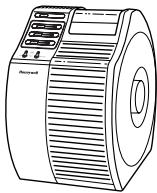
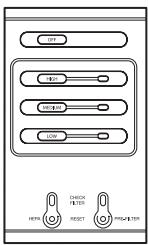
Intelli-Check™ Filter Indicator: Model 17000
The Intelli-Check™ Filter Indicators serve as a convenient guideline for when to clean the LifeTime HEPA™ Permanent Filter and when to replace the carbon pre-filter. Depending upon your individual usage (environment and hours used), you may need to clean/replace the filters more or less frequently.
When the HEPA Filter Indicator Light turns on, it's time to clean your HEPA filter. The Intelli-Check™ reminder for when to clean the HEPA filter is intended as a guideline only as the performance of the filter media is dependent on the concentration of the contaminants to which the system is exposed. If there are sources of large amounts of contaminant generation (such as dust from woodworking or heavy smoking) the HEPA filter in your air purifier may need to be cleaned more often. For instructions on how to clean your HEPA filter, refer to section "Cleaning the LifeTime HEPA™ Permanent Filter" in this manual.
When your Pre-filter Indicator Light turns on, it's time to replace your pre-filter. It should be replaced at least every 3 months. If there are heavy concentrations of odors, smoke, or large particles in the home, you may need to change the carbon pre-filter more often. For instructions on how to replace your pre-filter, refer to section "Removing/Changing the Filters" in this manual.
Note: We do not recommend operating the air purifier without the carbon pre-filter.
Reset Filter Indicator/Turn Light Off: Model 17000
To Reset Filter Indicator
- Once the filter has been checked and cleaned or replaced as needed, the filter indicator will need to be reset.
- With the unit powered on, press and hold the appropriate filter indicator button down for approximately 10 seconds until the light turns off (Fig. 1).
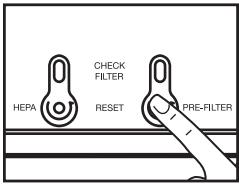
Fig 1
Set-Up: Model 17005
- CONNECT THE BATTERY. The programmable controls and real time clock are battery backed. Upon initial set-up, pull the protective film from the battery door so the battery will make contact and function (Fig. 2). This battery allows you to temporarily unplug your air cleaner without losing program settings.
- INSTALL PRE-FILTER BEFORE USE. Locate the pre-filter in the packaging. Refer to the "How to Install and Replace the Filters" section for proper installation.
- SET CURRENT TIME. Plug unit in outlet.
NOTE: The air cleaner cannot be programmed unless it is plugged into the outlet. Hold SET button down for approximately 3 seconds. The clock icon and word TIME will appear. You may adjust the hours using the up button and adjust the minutes using the down button. After the current time is set, repeatedly press SET button until (L) disappears.
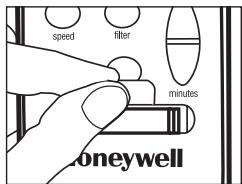
Fig. 2
Manual Operation: Model 17005
The default program setting upon initial start-up is Manual Operation.
- To go from Automatic Operation to Manual Operation press the PROGRAM button until both PG1 and PG2 disappear.
- To change the speeds in Manual Operation mode press the SPEED button to select the desired setting.
- The SPEED button will move through HIGH, MED, LOW, and OFF as noted on the display, and will function independent of programmed settings.
Pre-set Program Cycle: Model 17005
To run one pre-set program cycle in a 24 hour period (PG1).
PG1 Pre-Setting to run Program One
To activate pre-set PG1, Press the program button once. PG1 will be displayed. Your machine is now programmed to run from 4pm to 8am on HIGH (Fig. 3a, 3b).
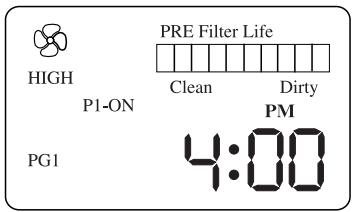
Fig. 3a
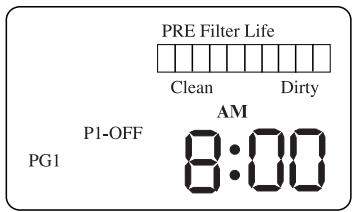
Fig. 3b
Customize Program Cycles: Model 17005
NOTE: The air purifier cannot be programmed unless it is plugged into the outlet.
To SET program points:
Press the SET button and hold for 3 seconds to activate time function. The SET button will move through these programming functions:
Set(current)TIME.
Set PG1 cycle times P1-ON and P1-OFF.
Set PG2 cycle times P1-ON and P1-OFF, and P2-ON and P2-OFF.
Set EXIT mode and Run the clock.
To Customize the PG1 Program Settings to run ONE ON/OFF Cycle in a 24 hour period:
NOTE: You are unable to set the OFF time to be the same as the ON time.
- Press the SET button and hold for 3 seconds to activate time function. Move through programming functions by repeatedly pressing SET button until PG1 and P1-ON appear. The clock and program speed icons will appear (Fig. 4a).
- Adjust the time using the hours and minutes button (up for hours, down for minutes). This is the time that the machine will turn ON.
- Adjust the desired speed setting using the SPEED button.
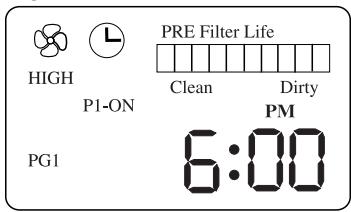
Fig. 4a
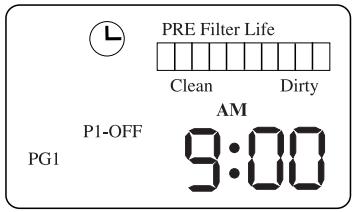
Fig. 4b
- Press the SET button until PG1 and P1-OFF appear. The speed icon will disappear (Fig. 4b).
- Adjust the time using the hours and minutes button. This is the time that the machine will turn OFF.
- Repeatedly press SET button until (6) disappears.
- Press the PROGRAM button until PG1 appears. Unit will automatically operate per your settings.
To run TWO customized ON/OFF cycles in a 24 hour period (PG2):
NOTE: You are unable to set the OFF time to be the same as the ON time.
The P2-ON time must be set for after the P1-OFF time.
Customize Program Cycles: Model 17005 (continued)
- Press the SET Button and hold for 3 seconds to activate the time function. Move through programming functions until PG2 and P1-ON appear. The clock and program speed icons will appear (Fig. 5a).
- Adjust the time using the hours and minutes button (up for hours, down for minutes). This is the time that the machine will turn ON for the first ON/OFF cycle.
- Adjust the desired speed setting using the SPEED button.
- Press the SET button until PG2 and P1-OFF appear. The speed icon will disappear (Fig. 5b).
- Adjust the time using the hours and minutes button. This is the time that the machine will turn OFF for the first ON/OFF cycle.
- Press the SET button until PG2 and P2-ON appear. The speed icon will appear. (Fig. 5c).
- Adjust the time using the hours and minutes button. This is the time that the machine will turn ON for the second ON/OFF cycle.
- Adjust the desired speed setting using the SPEED button.
- Press the SET button until PG2 and P2-OFF appear. The speed icon will disappear. (Fig. 5d).
- Adjust the time using the hours and minutes button. This is the time that the machine will turn OFF for the second ON/OFF cycle.
- Continuously press SET button until you exit set time mode.
- Press the PROGRAM button until PG2 appears. Unit will automatically operate per your settings.
NOTE: When a program function is running (pre-set or customized program cycles), you may override the speed setting; the unit will continue with its programmed function once it reaches the next programmed time.
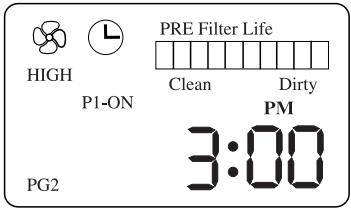
Fig. 5a
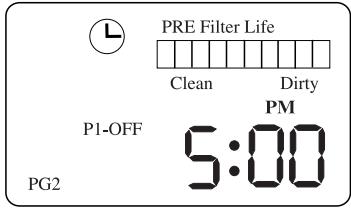
Fig. 5b
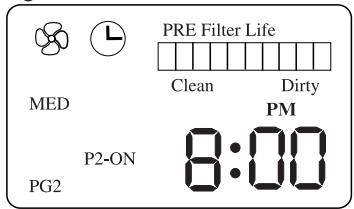
Fig. 5c
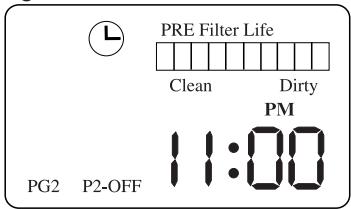
Fig. 5d
Remote Control: Model 17005
This air purifier features a remote control handset for additional convenience. The remote control allows you to turn the air cleaner OFF and to change the running speed (LOW, MED, HIGH). NOTE: When a program function is running (pre-set or customized program cycles), you may override the speed setting; the unit will continue with its programmed function once it reaches the next programmed time.
Intelli-Check™ Filter Monitors: Model 17005
The model 17005 series air purifier is equipped with Intelli-Check™ Filter Monitors to serve as a convenient reminder for when to clean the LifeTime HEPA™ Filter and when to replace the carbon pre-filter based on the air cleaner's hours of use and operating speed. This is
beneficial because a filter's life depends on the amount of air and contaminants drawn through it. Each filter bar will fill up from clean to dirty as its expected filter life is used up. Once the bar is completely full, it is time to check and clean/replace the appropriate filter.
- To move between the PRE-FILTER bar and the HEPA FILTER bar, quickly press the FILTER button (Fig. 6a).
- To RESET a filter bar that appears on the display, press and hold the FILTER button for 5 seconds, or until the filter bar clears to CLEAN status (Fig. 6b).
The Intelli-Check™ Filter Monitors calculate the expected pre-filter life based on an assumed average operating time of 12 hours a day on medium speed. Therefore, it will indicate replacement of the Pre-filter in about 3 months. Depending upon your individual usage (environment, hours and speed of operation), you may need to check and replace the pre-filters more or less frequently.
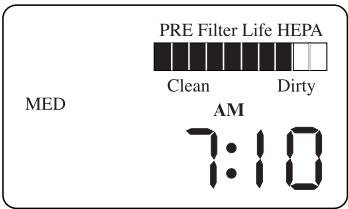
Fig. 6a
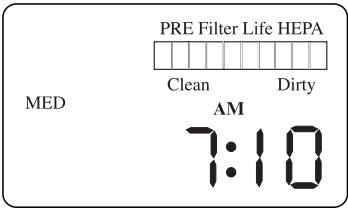
Fig. 6b
Battery Replacement: Model 17005 Series
Remote control handset: Two 1.5V AAA size batteries. Replace as needed.
Control Panel Battery backup: Replace battery with Panasonic CR 2032, 3V only. Use of another battery may present a risk of fire or explosion. Replace when Battery Low icon
appears on viewing screen (☑). Keep unit plugged in while replacing battery
to prevent loss of customized programs. To replace battery, locate battery door on control panel. Use a flat head screwdriver to gently pry up both ends of the battery door (Fig. 7). Carefully remove battery holder from unit. Make sure that the (+) sign on the battery is facing up in the battery holder before returning the new battery to the unit. Dispose of used battery promptly. Keep away from children. Do not disassemble and do not dispose of in fire.
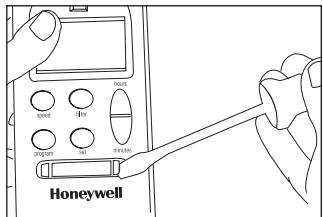
Fig. 7
Removing/Changing the Filters
CAUTION: DISCONNECT FROM POWER SUPPLY BEFORE SERVICING
Do not attempt to wash either the carbon pre-filter or the HEPA filter. They are not washable and washing will damage the filters.
The only two parts requiring any service are the carbon pre-filter and the HEPA filter. No tools are needed. To remove or change either filter, disassemble the unit as described below:
- Turn off the air purifier and disconnect from power supply.
- Loosen the locking mechanism by turning it counterclockwise and remove the endcap from the unit (Fig. 8).
- Remove the HEPA filter and activated carbon pre-filter from the base assembly (Fig. 9).
- Remove the fasteners from the activated carbon pre-filter and remove it from the HEPA filter cartridge (Fig. 10).
- Replace the pre-filter as needed. Clean the HEPA filter as necessary.
- Wrap the activated carbon pre-filter around the HEPA filter cartridge and secure it with the fasteners provided.
Reassemble your Honeywell air purifier as described below:
- Place the whole filter assembly into the internal chamber.
- Replace the endcap onto the unit.
- Reattach the locking mechanism and turn it clockwise until securely tightened.
- Plug into a wall outlet.
- Turn unit ON and RESET filter monitor(s) for filter(s) replaced by pressing the appropriate filter reset button(s) for a 10 second delay (Fig. 11).
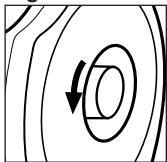
Fig. 8
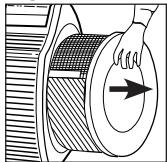
Fig. 9
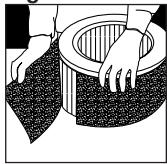
Fig. 10
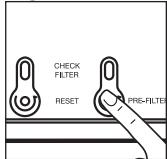
Fig. 11
Cleaning the LifeTime HEPATM Permanent Filter: Model 17000 and 17005
The Honeywell models 17000 and 17005 are equipped with the LifeTime HEPA™ Filter which will last for the life of your air purifier when operated under normal conditions. Your LifeTime HEPA™ Filter is vacuum-able and should be cleaned regularly for optimum performance.
To Clean Your HEPA Filter:
DO NOT USE WATER OR OTHER LIQUIDS TO CLEAN THE HEPA FILTER.
- Turn the air purifier off and unplug from the wall outlet.
- After removing the filter assembly from the air purifier (refer to section "Removing/Changing the Filters" in this manual), separate and remove the carbon pre-filter from the HEPA filter and place aside (or discard if pre-filter needs replacement).
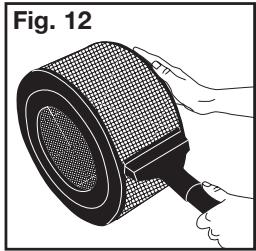
- To vacuum-clean the filter, hold the filter and run a vacuum cleaner with a nozzle or brush attachment along the filter to pick-up the dirt and particles (Fig. 12). Repeat along the entire surface of the HEPA filter.
- Do not penetrate the HEPA paper pleats with the vacuum attachment since tearing or puncturing can occur.
- Note that the filter may still be discolored even after cleaning it. This is acceptable and will not affect performance. Also, do not be concerned if you still see particles attached to the HEPA filter. The filter performance is still optimal.
- After vacuuming the filter, wrap the pre-filter around the HEPA filter and place the whole assembly back into the internal chamber of the air purifier (see "Removing/ Changing the Filters").
- You now need to reset the Intelli-Check™ Filter Indicator. With the air purifier powered on, press and hold the appropriate filter indicator button for approximately 10 seconds until the light turns off (see Fig. 1).
If the HEPA filter clogs or if you have difficulty cleaning the filter, please visit us at www.kaz.com or call us at 1 800 477-0457.
*Permanent filter life based on ordinary use and care.
Cleaning and Storage
We recommend that you clean the air purifier at least once a month and before extended storage. Use only a dry cloth to wipe the external surfaces of the air purifier. DO NOT USE WATER, WAX POLISH, OR ANY CHEMICAL SOLUTION.
If you store your Air Purifier for more than 30 days, we recommend:
- Removing both the primary HEPA filter and the carbon pre-filter from the unit.
- Discarding the pre-filter.
- Wrapping the HEPA filter in an air-tight plastic bag or plastic wrap. Be sure that the filter is totally sealed.
- To restore the air purifier to service, unwrap the HEPA filter, install a new carbon prefilter, and reinstall both filters in the air purifier. See "Removing/Changing the Filters" section for proper installation.
Frequently Asked Questions
My Air Purifier is starting to make noise and the air output is less. What's wrong?
The filters may be dirty. High amounts of contaminants can block the pores in the filter and stop the air from moving through it. Clean the HEPA Filter.
How long should I run my Air Purifier?
For best results, you should operate your Air Purifier 24 hours a day. This unit will be more effective when doors and windows are closed.
Can I wash the filters with water and or detergent?
No. Washing the filters will destroy them.
Accessories and Replacement Filters
To order replacement pre-filters, visit our website at: www.kaz.com or call us at 1-800-477-0457.
Universal Carbon Pre-filter (38002)
Consumer Relations
Mail questions or comments to:
Kaz, Incorporated
Consumer Relations Dept.
250 Turnpike Road
Southborough, MA 01772
Call us toll-free at: 1-800-477-0457
E-mail: consumerrelations@kaz.com
Or visit our website at: www.kaz.com
Please be sure to specify a model number.
NOTE: IF YOU EXPERIENCE A PROBLEM, PLEASE CONTACT CONSUMER RELATIONS FIRST OR SEE YOUR WARRANTY. DO NOT RETURN TO THE ORIGINAL PLACE OF PURCHASE. DO NOT ATTEMPT TO OPEN THE MOTOR HOUSING YOURSELF, DOING SO MAY VOID YOUR WARRANTY AND CAUSE DAMAGE TO THE AIR PURIFIER OR PERSONAL INJURY.
5 Year Limited Warranty
You should first read all instructions before attempting to use this product.
A. This 5 year limited warranty applies to repair or replacement of product found to be defective in material or workmanship. This warranty does not apply to damage resulting from commercial, abusive, unreasonable use or supplemental damage. Defects that are the result of normal wear and tear will not be considered manufacturing defects under this warranty.
KAZ IS NOT LIABLE FOR
INCIDENTAL OR CONSEQUENTIAL
DAMAGES OF ANY NATURE.
ANY IMPLIED WARRANTY OF
MERCHANTABILITY OR FITNESS
FOR A PARTICULAR PURPOSE
ON THIS PRODUCT IS LIMITED IN
DURATION TO THE DURATION OF
THIS WARRANTY. Some jurisdictions
do not allow the exclusion or limitation
of incidental or consequential damages
or limitations on how long an implied
warranty lasts, so the above limitations
or exclusions may not apply to you.
This warranty gives you specific legal
rights, and you also may have other
rights which vary from jurisdiction to
jurisdiction. This warranty applies only
to the original purchaser of this product
from the original date of purchase.
B. At its option, Kaz will repair or replace this product if it is found to be defective in material or workmanship.
C. This warranty does not cover damage resulting from any unauthorized attempts to repair or from any use not in accordance with the instruction manual.
D. Return defective product to Kaz, Incorporated with a brief description of the problem. Include proof of purchase and a 10 US/ 15.50 CAN check or money order for handling, return packing and shipping charges. Please include your name, address and a daytime phone number.
You must prepay shipping charges.
We suggest having tracking or delivery confirmation. Send to:
In U.S.A.:
Kaz, Incorporated
Attn: Returns Department
4755 Southpoint Drive
Memphis, TN 38118
USA
In Canada:
Kaz Canda, Inc.
Attn: Returns Department
510 Bronte Street South
Milton, ON L9T 2X6
Canada
Please go to www.kaz.com and register your product under the Customer Care Center and receive product information updates and new promotional offers.
enviracaire
Pour obtaining an rendition optimal
Consumer Relations Dept.
250 Turnpike Road
Southborough, MA 01772
Composez sans frais le 1 800 477-0457
Courriel: consumerrelations@kaz.com
Attn: Returns Department
4755 Southpoint Drive
Memphis, TN 38118
USA
Au Canada:
Kaz Canada, Inc.
Attn: Returns Department
510 Bronte Street South
Milton, ON L9T 2X6
CANADA
Customize Program Cycles: Model 17005
Consumer Relations Dept.
250 Turnpike Road
Southborough, MA 01772
Llamedos libre de cargo altelefono 1800477-0457
Attn: Returns Department
4755 Southpoint Drive
Memphis, TN 38118
USA
En Canadá:
Kaz Canada, Inc.
Attn: Returns Department
510 Bronte Street South
Milton, ON L9T 2X6
CANADA