
HW-400 - Fan KAZ - Free user manual and instructions
Find the device manual for free HW-400 KAZ in PDF.


| Product Type | Window Fan |
| Compatible Models | HW-400, HW-500, HW-400C, HW-500C |
| Power Supply | 120 V AC, 60 Hz, polarized plug |
| Speeds | High, medium, low (red indicator light) |
| Airflow Modes | Intake, Exhaust |
| Thermostat | LED display, temperature adjustment via up/down buttons, on/off cycling |
| Timer | 1 to 9 hours, auto shut-off |
| Rotating Louvers | Rotating function activated by a quarter turn of the hub |
| Remote Control | Compatible with HW-500 only, range up to 7.9 m (26 ft) |
| Cleaning and Maintenance | Wipe with a soft damp cloth; do not immerse |
| Safety | Polarized plug, do not use with dimmer, avoid water and flames |
| Warranty | 5-year limited (material or workmanship defects) |
| Replacement Parts | Side panels (HW-300-S), Remote control (HW-500-Remote) |
| Customer Service | 1-800-332-1110, service@honeywell.com |
Frequently Asked Questions - HW-400 KAZ
User questions about HW-400 KAZ
0 question about this device. Answer the ones you know or ask your own.
Ask a new question about this device
Download the instructions for your Fan in PDF format for free! Find your manual HW-400 - KAZ and take your electronic device back in hand. On this page are published all the documents necessary for the use of your device. HW-400 by KAZ.
USER MANUAL HW-400 KAZ
Model HW-400 Series and HW-500 Series
Model HW-400C Series and HW-500C Series
IMPORTANT SAFETY
INSTRUCTIONS
READ AND SAVE THESE SAFETY INSTRUCTIONS BEFORE USING THIS FAN
When using electrical appliances, basic precautions should always be followed to reduce the risk of fire, electric shock, and injury to persons, including the following:
- Use this fan only as described in this manual. Other use not recommended may cause fire, electric shock or injury to persons.
- This product is intended for household use ONLY and not for commercial, industrial or outdoors use.
- To protect against electric shock, DO NOT immerse unit, plug or cord in water or spray with liquids.
- This appliance has a polarized plug (one blade is wider than the other). To reduce the risk of shock, this plug is intended to fit only one way in a polarized outlet. If the plug does not fit fully in the outlet, reverse the plug. If it still does not fit, contact a qualified electrician. DO NOT attempt to defeat this safety feature.
- Close supervision is necessary when any appliance is used by or near children.
- Turn the fan to the OFF position and unplug the fan from the outlet when not in use, when moving the fan from one location to another and before cleaning
- To disconnect the fan, first turn control to the OFF position, grip the plug and pull it from the wall outlet. Never pull by the cord.
- Do not operate the fan in the presence of explosive and/or flammable fumes.
- Do not place the fan or any parts near an open flame, cooking or other heating appliance.
10 Do not operate the fan with a damaged cord or plug or if the product malfunctions, is dropped or damaged in any manner (see warranty). - Avoid contact with moving fan parts.
- The use of attachments not recommended by the manufacturer may be hazardous.
- Place the fan on a dry level surface.
- Do not hang or mount fan on a wall or ceiling.
- Do not operate if the fan housing is removed or damaged.
-
A loose fit between the AC outlet (receptacle) and plug may cause overheating and a distortion of the plug. Contact a qualified electrician to replace loose or worn outlet.
-
This fan is rated for use as a window fan, however, we recommend that during rain, the fan be removed from the window.
WARNING: To Reduce The Risk of Fire or Electric Shock, Do Not Use This Fan With Any Solid-State Speed Control Device.
INSTALLATION INSTRUCTIONS
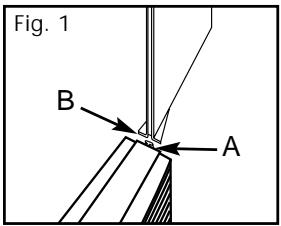
To attach side panels: line up the top "notch" portion on the side of the fan (A) with the bottom of the "groove" portion of the side panel (B) (Fig. 1). Slide the panel down until firmly in place. If panel does not attach easily, try placing it on the other side of the fan.
For Double Hung Windows:
- Position the bottom of the fan in the window sill. Make sure the power cord is hanging inside the room.
- Hold the fan in place and lower the window to the top of the fan. Be sure that contact is made with the window guides (Fig. 2) on the top of the fan.
- Push in or pull out the adjustable side panel as needed to properly fit your window width.
For Casement Windows:
- Open your window at least 12'' wide.
- Position your fan vertically in the window. Make sure the power cord is hanging inside the room.
- Hold the fan in place and slide the window shut so contact is made with the window guide.
Note: If desired, you may use the side panels to fit the height of the window. Be sure the non-adjustable panel supports the fan.
OPERATION
- Plug the power cord into a 120 Volt AC wall outlet.
- To turn fan on, press the ON/SPEED/OFF button one time. You will see either an "F" or "C" flash quickly indicating Fahrenheit or Celsius.
- When fan is on, it will start in High speed.
Press button again while on High speed and
fan will switch to Medium. While on Medium, press "SPEED" button and fan will switch to Low speed.
- You will see a red light illuminated on the control panel of the fan showing you what speed your fan is on.
- Select either Intake ( ) for fresh air or Exhaust ( ) to remove stale air from the room. A red light will illuminate on the mode selected.
- To turn the fan off, press the ON/SPEED/OFF through the speed cycles.
NOTE: Once your fan is "OFF", the next time you turn it on, it will automatically default to HIGH speed. You can then adjust the speed as desired.
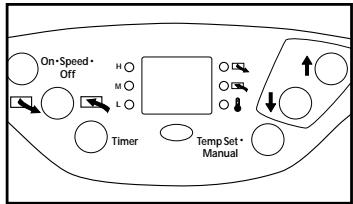
This fan has an LED display indicating the desired room temperature setting.
Pressing the arrow key up () will set the fan to have a warmer room temperature setting. Pressing the down arrow button () will change the desired room temperature setting to a cooler level.
When the fan is in operation, it will cycle on or off to maintain the desired comfort setting.
ROTATING GRILLE FEATURE
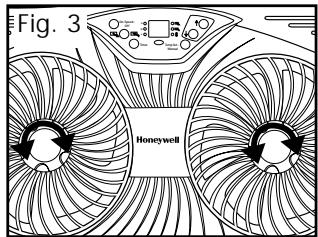
The Rotating Grille feature allows the grilles on the fan to rotate, providing wider air distribution to help cool your room.
- To activate, turn the hub in the center of each grille1/4 turn to the right (Fig. 3). Now when you use your fan in any speed the grilles will rotate, expanding air circulation.
- To stop grille rotation, turn the center hub 1/4 turn counter-clockwise to the left.
TEMP SET/MANUAL BUTTON
For manual operation touch the TEMP SET/MANUAL button once. The fan will now run continuously and will not cycle on or off. The LED display will indicate (-).
To return to the Thermostat Operation mode, press the TEMP SET/MANUAL button again. The LED display will indicate the desired room temperature setting and the LED light will be illuminated.
FEATURES - HW-500 ONLY
Timer: You can set your fan to conveniently turn itself off within one to nine hours.
To use this feature, press the "TIMER" button, "1H" will be displayed indicating one hour. Press the "TIMER" button again for "2H", repeat for up to 9 hours. The time you have set will be displayed on the illuminated indicator screen. At the end of the preset time, the fan will automatically turn itself off.
REMOTE CONTROL - HW-500 ONLY
The remote control can be used up to 26 feet (7.9m) away from the fan. Be sure to point remote directly at the front of the fan to ensure a proper response.
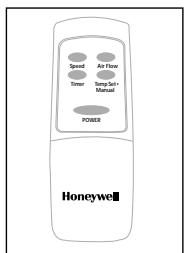
POWER: Press this button to turn fan on and off.
SPEED: Press the SPEED button to regulate speed settings as described in the operation section.
AIRFLOW: Press this button to select either intake or exhaust as described in the operation section.
TIMER: To use the TIMER function, press the TIMER button to
automatically turn fan off after 1 to 9 hours. See Timer section above for further detail.
TEMP SET/MANUAL: To have fan run in continuous operation mode, touch button once. To return to temperature mode, touch the TEMP SET/MANUAL button again.
NOTE: The remote control will work with the HW-500 only.
CLEANING AND STORAGE
- Turn fan to the OFF position and unplug the fan before cleaning.
- This fan does not disassemble.
- Use only a soft, damp cloth to gently wipe the surface of the fan clean.
- DO NOT immerse the fan in water and never allow water to enter the motor housing.
- DO NOT use gasoline, paint thinner or other chemicals to clean the fan.
- For storage, clean the fan as instructed and store it in its original box or cover with plastic to protect it from dust. Store your fan in a clean, dry place.
CONSUMER RELATIONS/REPLACEMENT PARTS
To speak with a customer service representative, or to place an order, please call our Consumer Relations Center, toll-free at 1-800-332-1110. Orders may be placed 24 hours a day, seven days a week with MasterCard, Visa or Discover.
Item
Side Panels (1 pair)
Remote Control
Part Number
HW-300-S
HW-500-Remote
US Price
\$14.99
$29.99
CAN Price
$22.49
$44.99
To order by mail, please include 4.50 US/ 6.75 CAN for shipping and handling and make check or money order payable to Honeywell Consumer Products. Massachusetts residents please add 5 % sales tax. Canadian residents please add 7 % GST plus applicable provincial sales tax.
Mail to:
Consumer Relations
Honeywell
Consumer Products
250 Turnpike Road
Southborough, MA 01772
Note: Honeywell Consumer Products cannot ship to P.O. Box numbers.
NOTE: IF YOU EXPERIENCE A PROBLEM, PLEASE RETURN THE FAN TO THE PLACE OF THE ORIGINAL PURCHASE OR SEE YOUR WARRANTY. DO NOT ATTEMPT TO OPEN THE MOTOR HOUSING YOURSELF. DOING SO MAY Void YOUR WARRANTY AND CAUSE DAMAGE TO THE FAN OR PERSONAL INJURY. IF YOU HAVE ANY QUESTIONS REGARDING THIS FAN, PLEASE CALL OR WRITE:
HONEYWELL
CONSUMER RELATIONS DEPARTMENT
TOLL FREE: 1-800-332-1110
Email us at: service@honeywell.com
Mail questions or comments to: Honeywell Consumer Products
Consumer Relations Department
250 Turnpike Road
Southborough, MA 01772
Please be sure to specify model number.
Thank you for purchasing a Honeywell fan.
For more information, please visit us at: www.honeywell.com/yourhome
5 YEAR LIMITED WARRANTY
You should first read all instructions before attempting to use this product. The enclosed Customer Response card should be filled out and returned within 7 days of purchase.
A. This 5 year limited warranty applies to repair or replacement of product found to be defective in material or workmanship. This warranty does not apply to damage resulting from commercial, abusive, unreasonable use or supplemental damage. Defects that are the result of normal wear and tear will not be considered manufacturing defects under this warranty. HONEYWELL IS NOT LIABLE FOR INCIDENTAL OR CONSEQUENTIAL DAMAGES OF ANY NATURE. ANY IMPLIED WARRANTY OF MERCHANTABILITY OR FITNESS FOR A PARTICULAR PURPOSE ON THIS PRODUCT IS LIMITED IN DURATION TO THE DURATION OF THIS WARRANTY.
Some jurisdictions do not allow the exclusion or limitation of incidental or consequential damages or limitations on how long an implied warranty lasts, so the above limitations or exclusions may not apply to you. This warranty gives you specific legal rights, and you also may have other rights which vary from jurisdiction to jurisdiction. This warranty applies only to the original purchaser of this product from the original date of purchase.
B. At its option, Honeywell will repair or replace this product if it is found to be defective in material or workmanship. Defective product should be returned to the place of purchase in accordance with store policy. Thereafter, while within the warranty period defective product may be returned to Honeywell.
C. This warranty does not cover damage resulting from any unauthorized attempts to repair or from any use not in accordance with the instruction manual.
D. Return defective product to Honeywell Consumer Products with a brief description of the problem. Include proof of purchase and a 10 US/14.70 CAN check or money order for handling, return packing and shipping charges. Please include your name, address and a daytime phone number. You must prepay shipping charges. Send to:
Honeywell
Attn: Returns Department
4755 Southpoint Drive
Memphis, TN 38118
USA
©2001 All rights reserved. Honeywell
P/N: 035-00428-000 R0
A/W:043-50186-000R1
F1007.00
01/01
GUIDE D'UTILISATION
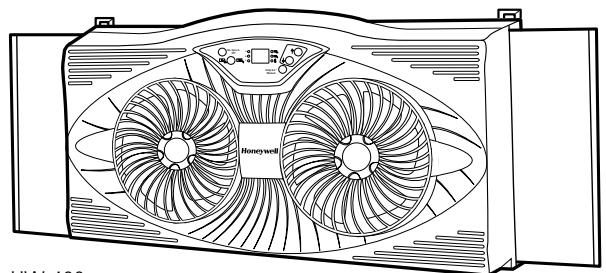
HW-400
Southborough, MA 01772 USA
Honeywell Consumer Products
Consumer Relations Department
250 Turnpike Road
Southborough, MA 01772 USA
www.honeywell.com/yourhome
GARANTIE LIMITEE DE 5 ANS
P/N: 035-00428-000 R0
A/W:043-50186-000 R1
F1007.00
01/01
MANUAL DE PROPIETARIO
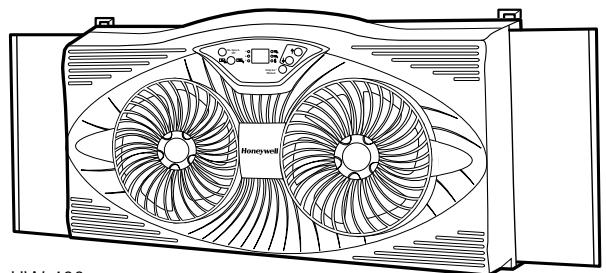
HW-400
BOTON "TEMP SET/MANUAL"
Southborough, MA 01772 USA
Note: Honeywell Consumer Products no sue depachar pedidos a numero de caja postal.
NOTA: SI TIENE ALGUN PROBLEMA, POR FAVOR DEVUELVA EL VENTILADOR AL LUGAR ORIGINAL DE COMPRA O CONSULTE SU GARANTIA. NO INTENTE ABRIR LA CAJA DEL MOTOR PUES PUEDE INVALIDAR LA GARANTIA Y DANAR EL VENTILADOR O CAUSAR UNA LESION PERSONAL. SI TIENE ALGUNA PREGUNTA REFERENTE A Este VENTILADOR, POR FAVOR LLAME O ESCRIBA A:
HONEYWELL
CONSUMER RELATIONS DEPARTMENT
LLAMADA Gratis DE LARGA DISTANCIA: 1-800-332-1110
Honeywell Consumer Products
Consumer Relations Department
250 Turnpike Road
Southborough, MA 01772 USA
www.honeywell.com/yourhome
GARANTÍA LIMITADA DE 5 ANOS
Attn: Returns Department
4755 Southpoint Drive
Memphis, TN 38118
USA
P/N: 035-00428-000 R0
A/W: 043-50186-000 R1
F1007.00
01/01