
P35 - Power amplifier ARCAM - Free user manual and instructions
Find the device manual for free P35 ARCAM in PDF.



| Product Type | Stereo Power Amplifier |
| Brand | ARCAM |
| Model | P35 |
| Dimensions (W x D x H) | 430 x 350 x 110 mm (with feet) |
| Net Weight | 9.5 kg (10.5 kg for 3-channel version) |
| Packaged Weight | 12.5 kg (13.5 kg for 3-channel version) |
| Mains Power Supply | 115 V or 230 V, 50/60 Hz |
| Maximum Power Consumption | 800 VA (950 VA for P35/3) |
| Standby Power Consumption | Less than 2 W |
| Output Power (2 channels, 8 Ω) | 100 W per channel (20 Hz – 20 kHz, 0.5% THD) |
| Output Power (2 channels, 4 Ω) | 140 W per channel (20 Hz – 20 kHz) |
| Output Power (1 channel, 8 Ω) | 150 W (20 Hz – 20 kHz) |
| Output Power (3 channels, 8 Ω, option) | 90 W per channel (20 Hz – 20 kHz) |
| Harmonic Distortion (80% power, 8 Ω, 1 kHz) | 0.005% |
| Audio Inputs | 2 pairs RCA (Audio In, Audio Out for daisy-chain) |
| Speaker Outputs | 2 pairs (SP1 and SP2) with screw terminals |
| 12 V Trigger Input | Yes (Remote In) for remote power on |
| Three-Channel Option | Optional module (P35/3) adding a third channel |
| Built-in Protections | Thermal, short circuit, DC offset |
| Accessories Included | Mains cable |
| Warranty | 2 years international |
| Maintenance and Cleaning | Disconnect before cleaning; use a soft, damp cloth |
| Safety | Do not open; avoid moisture; allow 5 cm ventilation space |
Frequently Asked Questions - P35 ARCAM
User questions about P35 ARCAM
0 question about this device. Answer the ones you know or ask your own.
Ask a new question about this device
Download the instructions for your Power amplifier in PDF format for free! Find your manual P35 - ARCAM and take your electronic device back in hand. On this page are published all the documents necessary for the use of your device. P35 by ARCAM.
USER MANUAL P35 ARCAM
CAUTION: To reduce the risk of electric shock, do not remove cover (or back). No user serviceable parts inside. Refer servicing to qualified service personnel.
WARNING: To reduce the risk of fire or electric shock, do not expose this apparatus to rain or moisture.

The lightning flash with an arrowhead symbol within an equilateral triangle, is intended to alert the user to the presence of uninsulated 'dangerous voltage' within the product's enclosure that may be of sufficient magnitude to constitute a risk of electric shock to persons.

The exclamation point within an equilateral triangle is intended to alert the user to the presence of important operating and maintenance (servicing) instructions in the literature accompanying the product.
CAUTION: In Canada and the USA, to prevent electric shock, match the wide blade of the plug to the wide slot in the socket and insert the plug fully into the socket.
IMPORTANT SAFETY INSTRUCTIONS
This product is designed and manufactured to meet strict quality and safety standards. However, you should be aware of the following installation and operation precautions:
I. Take heed of warnings and instructions
You should read all the safety and operating instructions before operating this appliance. Retain this handbook for future reference and adhere to all warnings in the handbook or on the appliance.
2. Water and moisture
The presence of electricity near water can be dangerous. Do not use the appliance near water – for example next to a bathtub, washbowl, kitchen sink, in a wet basement or near a swimming pool, etc.
3. Object or liquid entry
Take care that objects do not fall and liquids are not spilled into the enclosure through any openings. Liquid filled objects such as vases should not be placed on the equipment.
4. Ventilation
Do not place the equipment on a bed, sofa, rug or similar soft surface, or in an enclosed bookcase or cabinet, since ventilation may be impeded. We recommend a minimum distance of 50mm (2 inches) around the sides and top of the appliance to provide adequate ventilation.
5. Heat
Locate the appliance away from naked flames or heat producing equipment such as radiators, stoves or other appliances (including other amplifiers) that produce heat.
6. Climate
The appliance has been designed for use in moderate climates.
7. Racks and stands
Only use a rack or stand that is recommended for use with audio equipment. If the equipment is on a portable rack it should be moved with great care, to avoid overturning the combination.
8. Cleaning
Unplug the unit from the mains supply before cleaning.
The case should normally only require a wipe with a soft, damp, lint-free cloth. Do not use paint thinners or other chemical solvents for cleaning.
We do not advise the use of furniture cleaning sprays or polishes as they can cause indelible white marks if the unit is subsequently wiped with a damp cloth.
9. Power sources
Only connect the appliance to a power supply of the type described in the operating instructions or as marked on the appliance.
10. Power-cord protection
Power supply cords should be routed so that they are not likely to be walked on or pinched by items placed upon or against them, paying particular attention to cords and plugs, and the point where they exit from the appliance.
11. Grounding
Ensure that the grounding means of the appliance is not defeated.
12. Power lines
Locate any outdoor antenna/aerial away from power lines.
13. Non-use periods
If the unit has a standby function, a small amount of current will continue to flow into the equipment in this mode. Unplug the power cord of the appliance from the outlet if left unused for a long period of time.
14. Abnormal smell
If an abnormal smell or smoke is detected from the appliance, turn the power off immediately and unplug the unit from the wall outlet. Contact your dealer immediately.
15. Servicing
You should not attempt to service the appliance beyond that described in this handbook. All other servicing should be referred to qualified service personnel.
16. Damage requiring service
The appliance should be serviced by qualified service personnel when:
A. the power-supply cord or the plug has been damaged, or
B. objects have fallen, or liquid has spilled into the appliance, or
C. the appliance has been exposed to rain, or
D. the appliance does not appear to operate normally or exhibits a marked change in performance, or
E. the appliance has been dropped or the enclosure damaged.
SAFETY COMPLIANCE
This product has been designed to meet the IEC 60065 international electrical safety standard.
Using this handbook
Thank you for buying this quality Arcam product.
This handbook is for the following items:
C30 pre-amplifier
P35 power amplifier
PI power amplifier.
The handbook is designed to give you all the information you need to install and use these products. The C30 is described first, followed by the P35 and the P1. Use of the CD-389 remote control supplied with the C30 is also described.
If your amplifier(s) have been installed and set-up by an authorised Arcam dealer, you may wish to go directly to the sections on how to use this equipment. Otherwise we recommend reading the installment instructions carefully for your product before proceeding.
SAFETY
Safety guidelines are set out on the page 4 of this handbook.
Many of these items are common sense precautions, but for your own safety, and to ensure that you do not damage the unit, we strongly recommend that you read them.
OTHER LANGUAGES
If you would like this handbook in another language, either visit our web-site (www.arcam.co.uk), or ask your dealer. Most of our handbooks are available in a number of different languages.
CONTENTS
Safety guidelines 2
Important safety instructions. 2
Safety compliance. 2
Using this handbook. 3
Installation: C30 pre-amplifier 4
Positioning the unit 4
Connecting to a power supply 4
Power amplifier connection 4
Connecting to other equipment. 5
Front panel controls. 6
Using your C30 pre-amplifier 6
Recording. 7
Setting up your C30 pre-amplifier 8
Using the remote control. 9
Installation: P35 and PI power amplifiers. 10
Positioning the unit. 10
Connecting to a power supply 10
Connecting to other equipment. 11
Connecting loudspeakers. 11
Remote switching. 1
Three channel option (P35 only)
Using your power amplifier. 12
Bi-wiring and bi-amping loudspeakers. 13
Before you start 13
Bi-wiring your loudspeakers 13
Bi-amping your system. 13
Technical specifications. 14
Remote-control codes 15
Guarantee. 16
Service information. 16
On-line registration 16
Installation: C30 pre-amplifier
POSITIONING THE UNIT
Place your amplifier on a level, firm surface.
Avoid placing the unit in direct sunlight or near sources of heat or damp.
Ensure adequate ventilation. Do not place the unit in an enclosed space such as a bookcase or cabinet as both of these will impede air flow through the unit.
CONNECTING TO A POWER SUPPLY
MAINS LEAD
The appliance is normally supplied with a moulded mains plug already fitted to the lead. If for any reason the plug needs to be removed, it must be disposed of immediately and securely, as it is a potential shock hazard when inserted into the mains socket. Contact your Arcam dealer if you need a new mains lead.
WRONG PLUG?
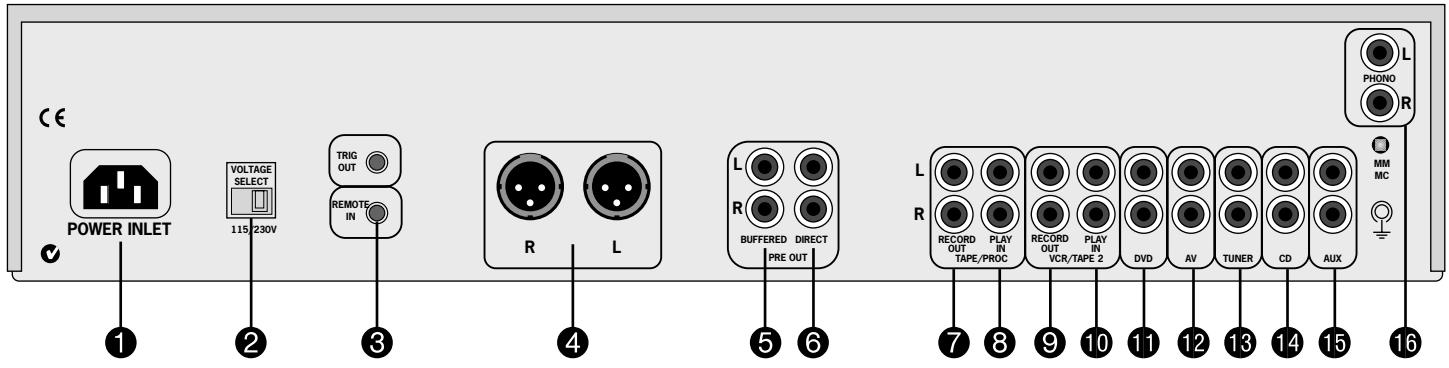
Before plugging in, check that the plug supplied with the unit fits your supply and that your mains supply voltage agrees with the voltage setting (115V or 230V) indicated on the rear panel of the unit ②.
If your mains supply voltage or mains plug is different, consult your Arcam dealer.
This product must be earthed.
PLUGGING IN
Push the plug (IEC line socket) of the power cable supplied with the unit into the socket (POWER INLET) 1 in the back of the unit. Make sure it is pushed in firmly.
Put the plug on the other end of the cable into your power supply socket and switch the socket on.
STAND-BY POWER
For remote stand-by operation, the amplifier's control power supply is kept powered up all the time the unit is connected to the mains supply. The front panel power switch powers down all other circuitry. Power consumption in this mode is less than 2W.
This means that even though the power switch is off, it may be possible to hear a slight residual hum coming from the mains transformer inside
the amplifier. This is perfectly normal. If the unit is to be left unused for an extended period, we recommend that it is disconnected from the mains supply by switching it off at the wall socket.
POWERAMPLIFIER CONNECTION
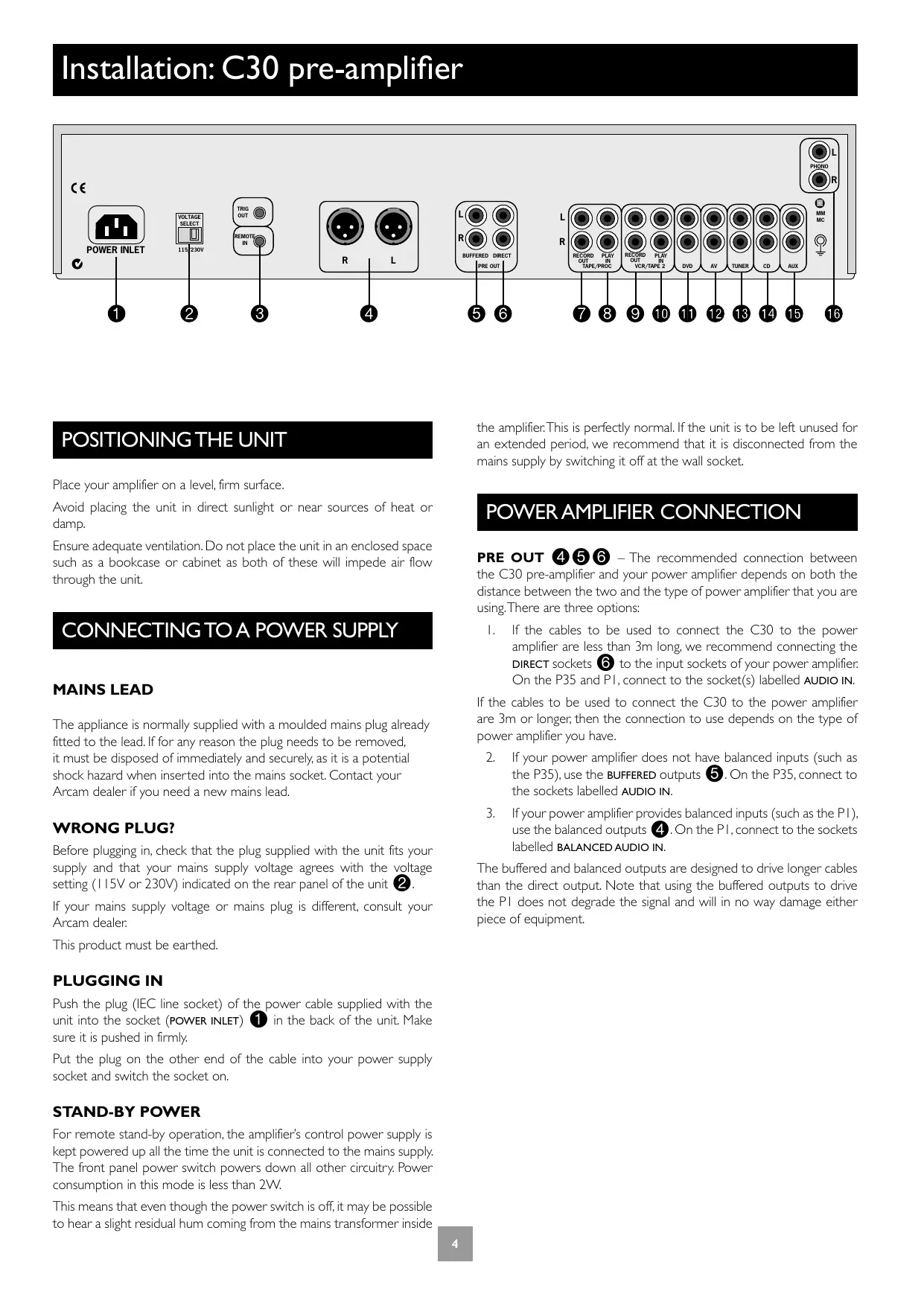
PRE OUT 4 5 6 - The recommended connection between the C30 pre-amplifier and your power amplifier depends on both the distance between the two and the type of power amplifier that you are using. There are three options:
- If the cables to be used to connect the C30 to the power amplifier are less than 3m long, we recommend connecting the DIRECT sockets to the input sockets of your power amplifier. On the P35 and P1, connect to the socket(s) labelled AUDIO IN.
If the cables to be used to connect the C30 to the power amplifier are 3m or longer, then the connection to use depends on the type of power amplifier you have.
- If your power amplifier does not have balanced inputs (such as the P35), use the BUFFERED outputs ⑤ . On the P35, connect to the sockets labelled AUDIO IN.
- If your power amplifier provides balanced inputs (such as the PI), use the balanced outputs 4 . On the PI , connect to the sockets labelled BALANCED AUDIO IN.
The buffered and balanced outputs are designed to drive longer cables than the direct output. Note that using the buffered outputs to drive the PI does not degrade the signal and will in no way damage either piece of equipment.
CONNECTING TO OTHER EQUIPMENT
When connecting to other pieces of equipment, please note the following:
The use of high quality interconnect cables to and from your amplifier is recommended to ensure the best sound quality. Your dealer will be able to recommend interconnect cables that are suitable for your system.
All the line inputs (except for the PHONO input) have the same sensitivity and may be used with equipment other than that labelled, if needed.
The C30 provides the following connections:
TAPE/PROC RECORD OUT ⑦ - Connect these output sockets to the input sockets of your cassette deck (usually labelled RECORD on the cassette deck).
TAPE/PROC PLAY IN ⑧ - Connect these input sockets to the output sockets of your cassette deck (usually labelled PLAY on the cassette deck). If you do not have a cassette deck you can use this input for other (line level) equipment, such as a CD player, tuner, VCR, etc., (but not for a turntable).
VCR/TAPE2 RECORD OUT 9 - These output sockets can be connected to the input sockets of VCR (usually labelled RECORD on the VCR). Alternatively, these outputs can be connected to a second recording device (such as a second cassette deck).
VCR/TAPE2 PLAY IN 10 - Connect these input sockets to the output sockets of your VCR/second recorder (the output sockets are usually labelled PLAY). Alternatively, you can use this input for other (line level) equipment such as a CD player, tuner, etc., (but not a turntable).
DVD 11 - Connect this input to the stereo audio outputs of a DVD player.
AV 12 - Connect this input to the stereo audio outputs of audio visual equipment such as a laserdisc player, satellite or Nicam tuner.
TUNER 13 - Connect this input to the audio outputs of your radio tuner.
CD 14 - Connect this input to the audio outputs of your CD player or DAC (digital to analogue converter).
AUX 15 - As the C30 has the phono board fitted as standard, the AUX connection is a line level output carrying an equalised phono signal. If desired, this output can be connected to a recording device.
Should you wish to remove the phono board, then the AUX connections can be used as a line input. Please see your dealer for further information about this option, as removing the phono board yourself may invalidate the warranty.
PHONO 16 - Connect this input to the audio outputs of your turntable. The phono module supplied with the C30 is compatible with most moving magnet and moving coil cartridges. Set the blue switch immediately below these connections to the correct setting, as follows:
MM - is used for high output moving coil and all moving magnet cartridges. The blue switch is flush with the rear panel of the C30.
MC - is used for low output moving coil cartridges. The blue switch is depressed inside the rear panel of the C30.
Phono earth terminal – For connecting your turntable earth lead (if fitted). Note that this terminal must not be used as a safety earth.
TRIG OUT and REMOTE IN (12V in and out) - These connections are intended for use in multi-room installations.
TRIG OUT - This output provides a 12V signal whenever the unit is switched on (i.e., not off or in standby). This signal can be used to switch on automatically power amplifiers (or other equipment) connected to the C30, as they will come on when the C30 is activated. This is useful if the power amplifier is remote from the C30, or otherwise difficult to access. This feature can be used with both the P35 and the P1. If you are bi-amping with a power amplifier and wish to power both units on or off simultaneously, see page 11.
REMOTE IN – This allows remote control signals to be received by the C30 if the remote sensor is covered (or otherwise not 'visible' to the remote control). An external sensor is used to receive the signals from the remote control, which are then fed to the C30 (into this input) using a suitable cable. Remote control signals acceptable to the C30 must be in modulated RC5 format, with a voltage level of between 5V and 15V.
Note that in normal use there is no need to make any connections to these sockets. If you would like to make use of these features, please contact your dealer for more advice on how to make the connections and on what type of cable to use.
Using your C30 pre-amplifier
FRONT PANEL CONTROLS
This section describes how to operate your amplifier.
If your amplifier has not been installed for you, you should first read the section 'Installation: C30 pre-amplifier' on page 5.
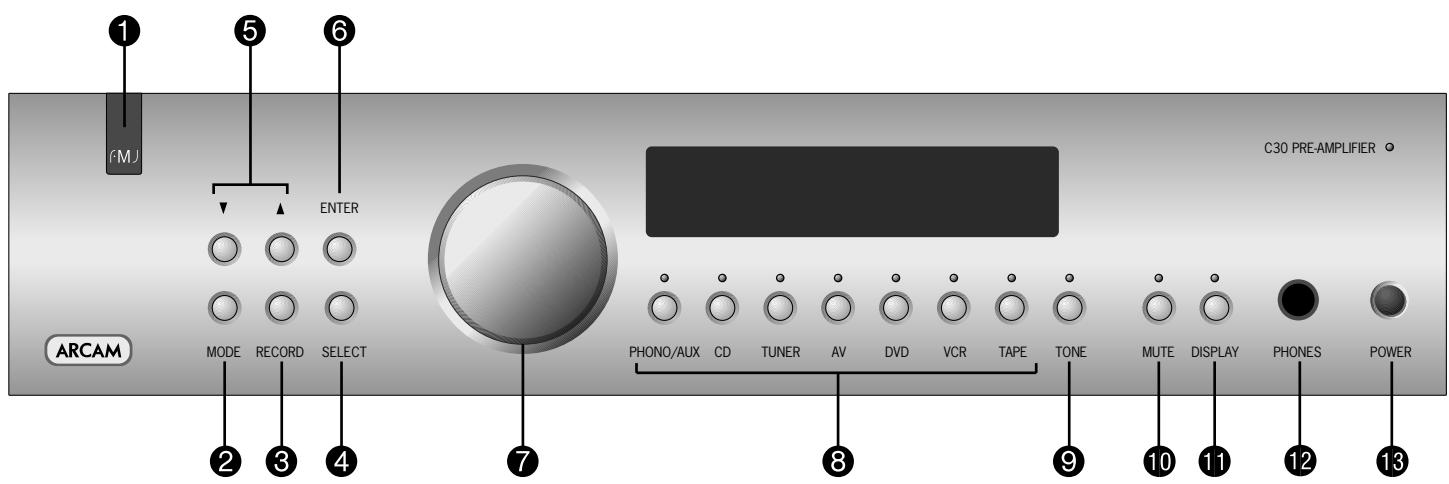
POWER 13
Switches the unit on and off.
The power indicator light (directly above the switch) shows the status of the amplifier. A red light means the amplifier is in stand-by mode (press the POWER/STANDBY button on the remote control, or the POWER button on the front panel, to switch between stand-by and powered-up modes).
Remote control receiver 1
The remote control's infrared receiver is positioned behind the 'FMI' badge. Ensure the receiver is in a clear line of sight from the remote control to allow signals to be received.
MODE 2,UP and DOWN 5
These buttons are intended for use with any future optional modules that may become available for the C30. The UP and DOWN buttons, however, are used with the existing C30 pre-amplifier to move the cursor when customising the 'Welcome message' (see page 9).
Control knob 7, SELECT 4 and ENTER 6
The control knob has two functions:
as a volume control, to adjust the output of the headphones and of the pre-amp output (PRE OUT).
when used in conjunction with the SELECT and ENTER buttons, to customise amplifier settings (see page 9).
VOLUME CONTROL SETTINGS
It is important to realise that volume level shown on the display is not an accurate indication of the power delivered to your loudspeakers. The amplifier often delivers its full power long before the volume control reaches its maximum position, particularly when listening to heavily recorded compact discs. However the amplifier also has to be capable of giving full power output from much lower level sources, such as tuners and cassette decks. Using these sources, the volume control setting may be much higher before distortion (audible overload) sets in.
It is possible to compensate for these input level differences by using the 'Input trims' menu item. See page 9 for further details on how to do this. Adjusting the input levels of each source individually will help to avoid accidental overload.
Source selectors 8
These buttons select the source connected to the corresponding input. A light above the relevant button indicates which input is currently selected and it will also usually be shown on the display. See page 6 for more information on connecting audio sources to the C30.
TONE ⑨
Switches the tone circuits on and off, including settings for individual sources. Note that the tone LED does not light unless a tone setting has been made. See page 9 for further information on the tone controls.
MUTE 10 Silences all main analogue outputs when selected.
DISPLAY This switches the display brightness between Off/Dim/Bright. This is provided to set the display brightness to a level that is comfortable for you. Switching the display off may give a small improvement in sound quality.
PHONES 12
This 1/4-inch stereo jack plug socket accepts headphones with an impedance rating between 32 and 600 .
The headphone socket is always active. To avoid possible damage, always disconnect headphones prior to switching the amplifier on or off.
RECORDING
With the C30 it is possible to listen to and record from one source, or to listen to one source while recording another.
Both sets of tape sockets are identical in sensitivity and suitable for use with almost any type of recorder (cassette, CDR, MD, VCR, reel-to-reel, etc.). The record signal is sent to both the TAPE and VCR output sockets.
RECORD ③
To record the currently selected source, press RECORD until the display shows 'RECORD SOURCE'. After a few seconds the display reverts to showing the volume level and you are ready to record.
To listen to one source while recording another, press RECORD again until the display shows 'RECORD' followed by the name of an input (e.g. 'RUX', 'CD', 'TUNER', etc.). Now press the source selector button on the front panel for the source you wish to record. Your selection is shown on the display for a few seconds, after which it reverts to showing the volume level and you are ready to record.
The RECORD button can also be used as a second zone selector, sending a source signal at line level to a second amplifier operating in another room. If you need help with this, contact your Arcam dealer or Arcam customer support.
TAPE-TO-TAPE COPYING (DUBBING)
You can perform tape dubbing from VCR to TAPE, but not from TAPE to VCR.
For example, to copy from a cassette recorder connected to the VCR/ TAPE2 socket to a cassette recorder connected to the TAPE socket, first use the RECORD button as explained above and select 'RECORD VCR'. This routes the VCR signal to the TAPE output.
Set the cassette recorder connected to the TAPE socket into its record mode and the other to playback mode to start dubbing.
TAPE 8
To play back the recording from a cassette deck attached to the TAPE input, press TAPE. 'TAPE' is shown on the display. Selecting this input overrides the other source selectors.
It is also possible to monitor a recording while it is being made, provided your cassette deck is a 3-head type. To do this, press TAPE. Pressing this button on/off allows an A/B comparison between the source signal and the recorded signal.
Setting up your C30 pre-amplifier
INTRODUCTION
The C30 allows you to adjust listening settings to suit your taste, and to customize various features of the amplifier to fit your system. Use this diagram to help you navigate through the settings available.
The ENTER and SELECT buttons from the front panel are represented in the diagram by the symbols and S respectively.
The Control knob is shown as C
ADJUSTING LISTENING SETTINGS
The default display mode is VOLUME, where the Control knob is used to adjust the sound level.
Press SELECT once to enter edit mode, then repeatedly to cycle through the other sound settings: BALANCE, BASS and TREBLE. When a setting is selected (shown on the display), it can be adjusted by using the control knob. Press ENTER to store the change you have made and return to default (volume) mode, or press SELECT again to move to the next setting.
CUSTOMISING AMPLIFIER SETTINGS
It is possible to customise (change to your preference) many of the features of the C30.To do this, proceed as follows:
I. Press SELECT repeatedly until the display shows 'CUSTOMISE->';
2. Rotate the Control knob to choose which setting you wish to alter;
3. Press SELECT to adjust the chosen setting with the Control knob;
4. Press ENTER to confirm the adjustment, or press SELECT to confirm the adjustment and move on to the next item.
Press ENTER twice to leave the Customise menu.
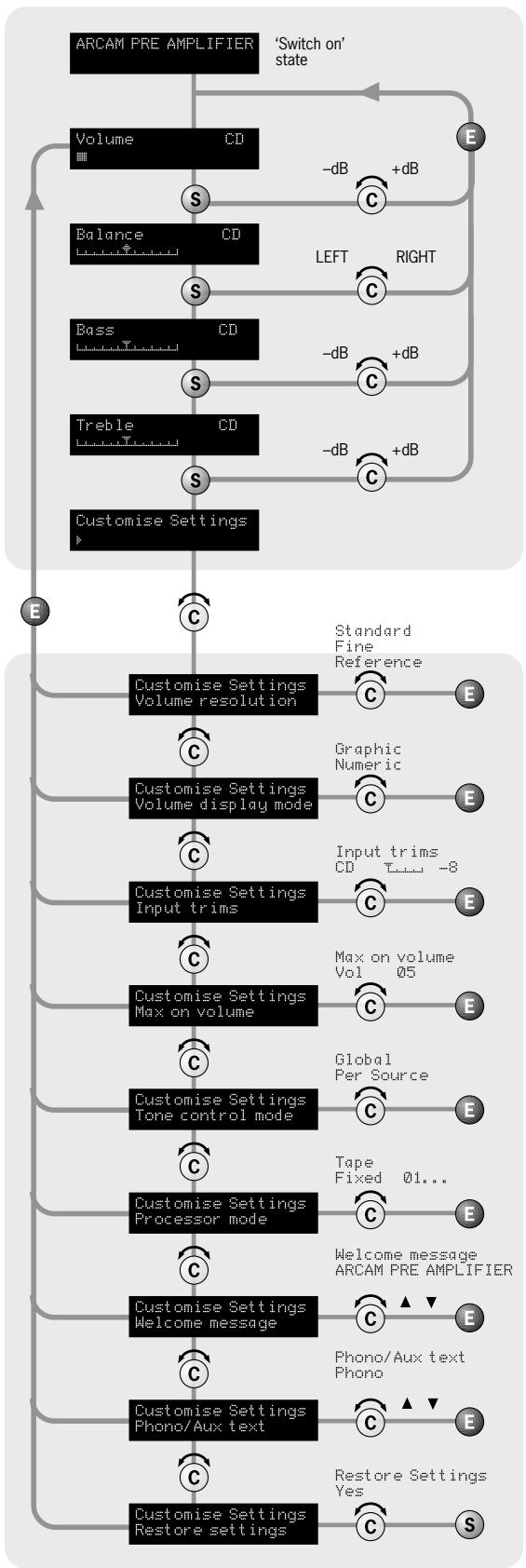
Volume Resolution - STANDARD, FINE or REFERENCE. 'Standard' and 'Fine' represent different levels of volume control sensitivity. The 'Reference' setting gives absolute increments in 0.5dB steps.
Volume display mode - GRAPHIC or NUMERIC shows the volume either as a bar graph or as a number. If Volume resolution is set to 'Reference' a numeric volume display shows the actual decibel figure.
Input Trims - use the source select buttons and Control knob to set input trims for each source. Input trims are used to compensate for variations in output levels of different source equipment.
Max. 'On' Volume - This can be used to limit the maximum volume the amplifier operates at when it is first switched on. The system comes on at this volume if the last used volume exceeds this value. If this is set to 'Disabled', the amplifier comes on at the last used volume.
Tone Control - GLOBAL or PER SOURCE. This specifies the scope of changes for 'Bass' and 'Treble' tone settings. The default setting is 'Global' which affects all inputs equally. 'Per source' allows you to set tone controls for individual inputs: once set, the amplifier remembers tone settings for each input.
Processor Mode - This mode enables you to adjust the gain of the amplifier. The amplifier can then be used to drive the front left and right speakers in a surround sound system when fed from a separate processor. The volume of the entire system can then be controlled using the processor. Feed the sound from the processor into the TAPE input. Set the gain to match the amplifiers that drive your other loudspeakers.
Welcome message - You can change the power on 'Welcome message' from 'ARCAmAmP' to display your name, postcode, etc. When customising the message, use the UP and DOWN buttons to select the cursor position and the Control knob to change the letter.
Phono/Aux Text - The C30 is fitted with a phono module, so when the phono input is selected as the source, 'PHONO' is displayed. Should you wish to remove the phono board, then the AUX connections can be used as a line input. In this case, change the text displayed to 'RUX', using this menu option.
Restore Settings - this restores all amplifier settings, including input trims and the welcome message, to their factory defaults.
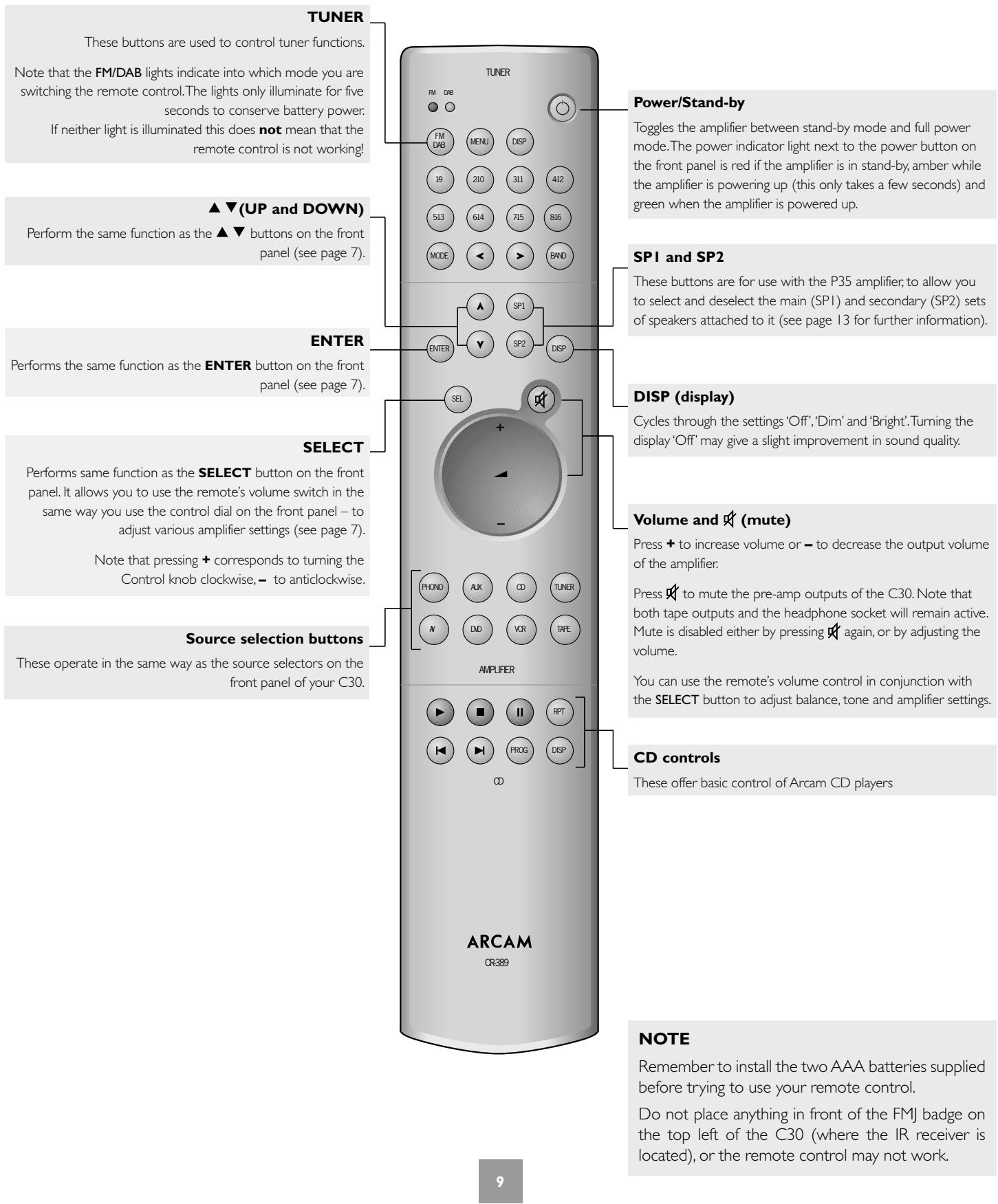
Using the remote control
CR-389 Remote Control
The CR-389 remote control gives access to all functions available on the front panel of the C30. It also has controls to operate Arcam CD players, AM/FM tuners and DAB tuners. The remote control transmits Philips RC-5 type codes.
Installation: P35 and PI power amplifiers
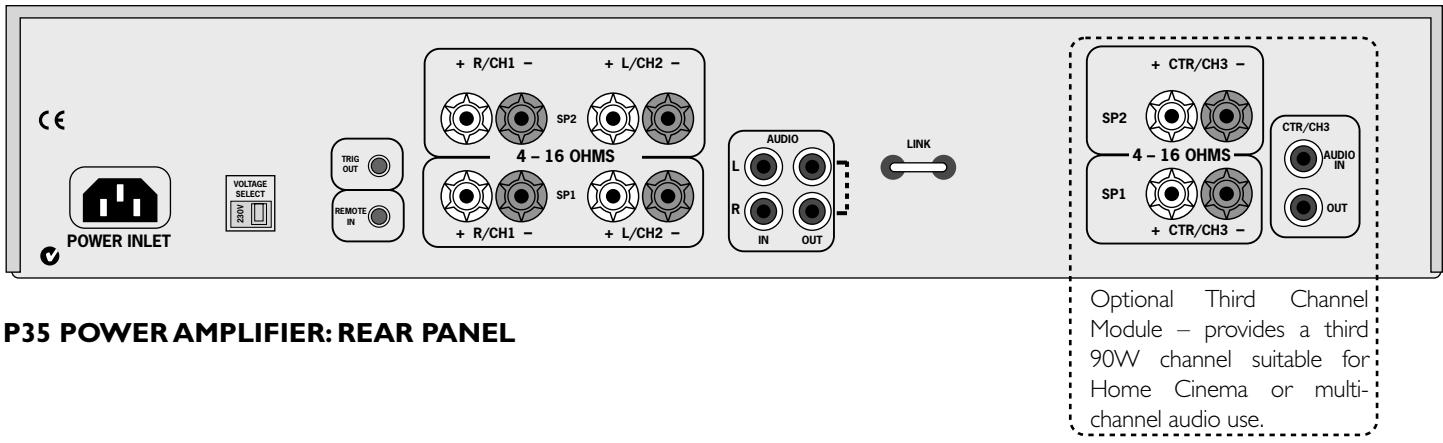

PI POWER AMPLIFIER: REAR PANEL
POSITIONING THE UNIT
Place your amplifier on a level, firm surface.
Avoid placing the unit in direct sunlight or near sources of heat or damp.
Ensure adequate ventilation. Do not place the unit in an enclosed space such as a bookcase or cabinet as both of these will impede air flow through the unit, which is necessary for cooling.
CONNECTING TO A POWER SUPPLY
MAINS LEAD
The appliance is normally supplied with a moulded mains plug already fitted to the lead. If for any reason the plug needs to be removed, it must be disposed of immediately and securely, as it is a potential shock hazard when inserted into the mains socket. Should you require a new mains lead, contact your Arcam dealer.
WRONG PLUG?
Check that the plug supplied with the unit fits your supply and that your mains supply voltage agrees with the voltage setting (115V or 230V) indicated on the rear panel of the unit before plugging in.
If your mains supply voltage or mains plug is different, consult your Arcam dealer.
This product must be earthed.
PLUGGING IN
Push the plug (IEC line socket) of the power cable supplied with the unit into the socket (POWER INLET) in the back of the unit. Make sure it is pushed in firmly.
Put the plug on the other end of the cable into your power supply socket and switch the socket on.
STAND-BY POWER
For remote stand-by operation, the amplifier's control power supply is kept powered up all the time the unit is connected to the mains supply. The front panel power switch powers down all other circuitry. Power consumption in this mode is less than 2W.
This means that even though the power switch is off, it may be possible to hear a slight residual hum coming from the mains transformer inside the amplifier. This is perfectly normal. If the unit is to be left unused for an extended period, we recommend that it is disconnected from the mains supply by switching it off at the wall socket
IMPORTANT:
Ensure that the amplifier is switched off before attempting to connect the speakers, and check carefully any connections made before turning the unit back on.
CONNECTING TO OTHER EQUIPMENT
The P35 and PI amplifiers provide the following connections:
AUDIO IN (P35)
AUDIO IN and BALANCED AUDIO IN (PI)
Connect one of these inputs to the output sockets of your pre-amplifier or the PRE OUT sockets of an integrated amplifier. Please read the notes on page 5, which give information on the type of connection that should be used to connect your pre-amplifier and power amplifier together.
MONO LINK (P35) – The P35 power amplifier can be adapted to provide two mono loudspeaker outputs from a single input. Pull out the link supplied and use it to connect the L and R AUDIO OUT sockets together. Using one power amplifier per loudspeaker will enable you to bi-amplify bi-wireable loudspeakers. This is particularly beneficial for top quality stereo installations with a separate pre-amplifier, or where amplifiers are provided for the left, centre and right channel loudspeakers in a five speaker Dolby Pro Logic or Dolby Digital system.
If you wish to take advantage of this feature, please contact your Arcam dealer for more information.
INPUT SELECTOR SWITCH (P1) – This switch allows either unbalanced signals (through the phono connector) or balanced signals (through the XLR connector) to be selected. The switch should be pressed in to select the phono inputs and out to select the XLR connector. Note that only one type of input connector will be switched to the input of the amplifier; if you select (for example) the XLR connector, then you will not be able to hear signals connected to the phono inputs.
AMPLIFIER GAIN SWITCH (PI) – This switch is to allow the gain of the PI amplifier to be changed to suit your system requirements. Two settings are available: with the switch in the IN position the gain is set to standard ARCAM gain of 31.5dB. This allows the PI to be used in systems where there are other ARCAM power amplifiers. When the switch is set to OUT then the gain is set to 'THX standard gain'. In this mode it can be used in systems containing amplifiers with THX gain (for example, the P7).
DAISY CHAINING
Both the P35 and the P1 can also be connected to further power amplifiers to drive more speakers (e.g., those in other rooms or tri-amplified speakers, etc). This technique is called 'Daisy chaining'.
To daisy chain power amplifiers, connect the AUDIO OUT sockets on the power amplifier to the input of the extra power amplifier - left to left and right to right.
CONNECTING LOUDSPEAKERS
The red and black terminals on the back of the amplifiers are used to make the connections to the loudspeakers. It is possible to connect two pairs of speakers; the pair designated "speaker 1" (SP1) are connected to the lower set of terminals, while the pair designated "speaker 2" (SP2) are connected to the upper set of terminals.
When connecting the speaker terminals of the amplifier with the terminals on the speakers make sure that like polarities are matched (i.e., match “+” with “+” (usually red) and “-” with “-” (usually black)). Mismatching of polarities will result in a weak central sound, unclear orientation of the instruments and the sense of direction of the stereo being impaired.
There are two options for connecting the speaker cable to the amplifier:
USING BARE WIRE ENDED LEADS:
- Strip back the insulation on the wire to reveal about 2cm of conductor (the metal inside the cable).
- If the conductor is stranded, twist the strands together tightly to avoid loose strands making contact with the adjacent terminals or the back panel.
- Loosen the terminal by turning it anti-clockwise
- Insert the twisted wire through the hole in the terminal.
- Tighten by turning clockwise.
When making connections with stranded bare ended wires, take great care that no individual strands of wire come into contact with the adjacent terminals or with the back panel. If this should happen, it will cause a short circuit on the output of the amplifier and could damage the amplifier.
USING SPADETERMINALS:
- Loosen the terminal by turning it anti-clockwise
- Insert the spade connector under the terminal.
- Tighten by turning clockwise.
REMOTE SWITCHING
By making a connection from the TRIG OUT socket of the C30 pre-amplifier to the REMOTE IN socket of the P35/P1 power amplifier, you can use the C30 to switch the power amplifier on and off. If configured in this way, the front panel POWER button of the C30 (or the POWER/STANDBY button on the remote control) switches both amplifiers on and off together: This facility allows you to conceal the power amplifier yet still control it.
The connecting cable required is a 3.5mm to 3.5mm jack lead (stereo or mono) and it is possible to connect several power amplifiers to C30 by 'daisy chaining' from TRIG OUT of one P35/P1 into the REMOTE IN of the next.
THREE CHANNEL OPTION (P35 ONLY)
The P35 power amplifier can be upgraded from stereo to three channels by adding a "third channel module". (If this is performed, the model is called the P35/3.)
The module offers extra loudspeaker terminals together with a third set of AUDIO IN and OUT phono sockets and converts the P35 into a 3 × 90W (RMS per channel into 8 ) amplifier suitable for Home Cinema or multi-channel audio use (such a unit may be used to amplify left, right and centre channels in a multi-channel system, for example).
If you wish to take advantage of this feature, please contact your Arcam dealer for more information.
Using your power amplifier
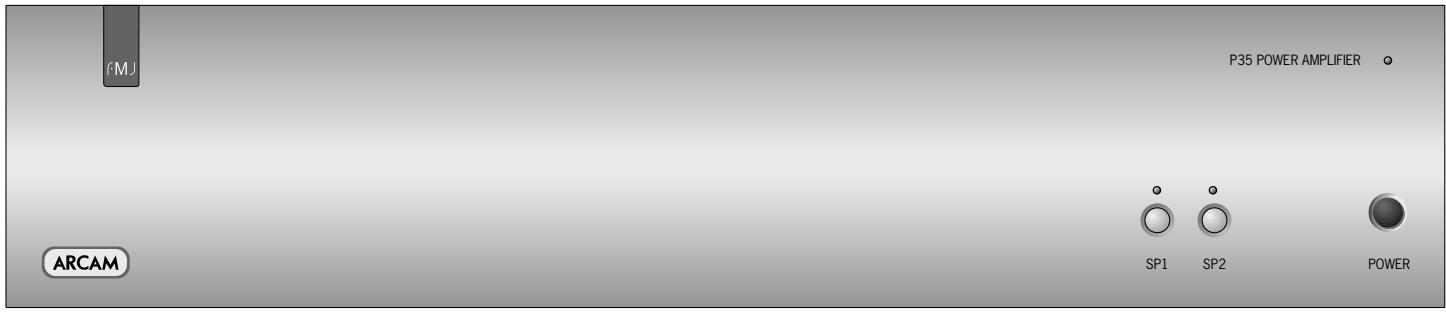
P35 POWER AMPLIFIER: FRONT PANEL
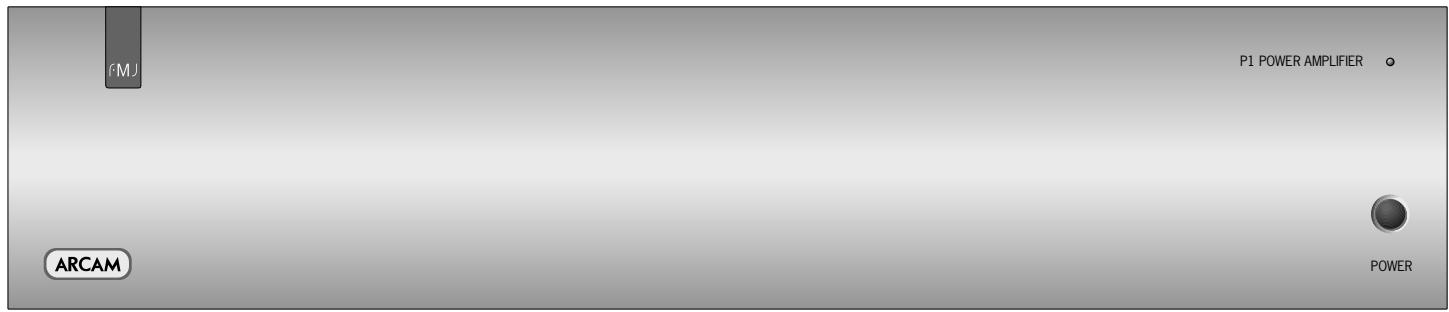
PI POWERAMPLIFIER:FRONT PANEL
POWER (AND POWER INDICATOR LIGHT)
This button switches the unit on and off. The light indicates the status of the amplifier.
When you switch your amplifier on, the light glows amber for a few seconds, during which time the speakers are disconnected. The light changes to green when the amplifier is ready for use. A red light means the amplifier is in standby mode.
FAULT INDICATIONS
The power light may flash if a fault has occurred, with the colour of the flashing light indicating the nature of the fault:
green - a D.C. offset fault has occured
amber - a thermal fault has occured (the P35/PI is too hot)
red - a short circuit fault has occurred (this can happen if the speaker cables are not connected correctly and are making contact with each other or with the chassis)
red and amber - more than one fault has occured.
Except for a thermal fault, if one of the above faults is detected by your amplifier the unit waits for six seconds before checking to see if the fault has cleared. If the fault clears within six seconds, then the unit continues operation; otherwise the unit shuts itself down. In the case of a thermal fault, the unit waits until its sensor temperature lowers before resuming operation.
If the amplifier has shut itself down, you should unplug the amplifier and leave it for a few minutes before reconnecting. If the fault cannot be cleared, unplug your amplifier and contact your Arcam dealer.
SPI AND SP2 (P35 ONLY)
These buttons allow you to switch on and off the main (SP1) and secondary (SP2) sets of speakers attached to your amplifier. If the indicator light (the light above the switch) is on, it shows that the output for the speaker is switched on. If no secondary set of speakers is connected, we recommend that this output be switched off.
NOTE: If both lights are out the amplifier will appear not to work, as all speakers are switched off.
Bi-wiring and bi-amping loudspeakers
BEFOREYOU START
WARNING: Do not make any connections to your amplifier while it is switched on or connected to the mains supply.
Before switching on please check all connections thoroughly, making sure bare wires or cables are not touching the amplifier in the wrong places (which could cause short circuits) and you have connected positive (+) to positive and negative (-) to negative.
Always ensure that the volume control on your amplifier is set to minimum before starting these procedures.
BI-WIRING YOUR LOUDSPEAKERS
Bi-wiring improves the sound of your system because it divides the high and low frequency signal currents into separate speaker cables. This avoids signal distortions arising from the high and low frequency currents interacting with one another within a single cable, as in conventionally wired systems.
You will need:
Speakers - with four input terminals each: these will be marked HF (High Frequency) and LF (Low Frequency).
Loudspeaker cables - two pairs of cables per loudspeaker (which may be joined at the amplifier end if your amplifier has only one pair of output terminals per channel). Or, a suitably terminated cable set (a loom, probably prepared by your dealer and capable of being used for bi-wiring in one length).
How to bi-wire loudspeakers
I. Remove the terminal links on the rear of your loudspeakers
WARNING: This step is essential or damage to your amplifier may result which is not covered under warranty.
- Connect the cables as shown in the diagram below, ensuring correct polarity at all times.
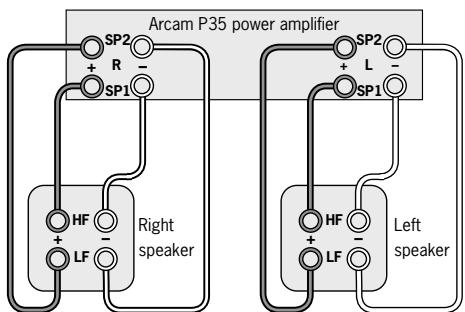
Recommended bi-wiring configuration
BI-AMPING YOUR SYSTEM
The performance of your system can be further enhanced over that achieved with bi-wiring, by extending the principle one stage further to include separate amplification for the low and high frequency drive units in each loudspeaker enclosure.
Connect the integrated amplifier to the high frequency (HF) terminals and connect the power amplifier to the low frequency (LF) terminals.
You will need:
Speakers - with four input terminals each (as with bi-wiring): these will be marked HF (High Frequency) and LF (Low Frequency).
Four channels of amplification – for example two P35 stereo amplifiers or four PI monoblock amplifiers.
Loudspeaker cables - two pairs of cables per loudspeaker or a suitably terminated cable set (a loom, probably prepared by your dealer and capable of being used for bi-amping in one length).
Interconnect cables - one pair of high quality interconnect cables.
How to set up a bi-amped system
I. Remove the terminal links on the rear of your loudspeakers.
WARNING: This step is essential or damage to your amplifier may result which is not covered under warranty.
- Connect the cables as shown in the diagram below, ensuring correct polarity at all times.
- Use the interconnect cables to connect the PRE OUT sockets of the C30 to the corresponding AUDIO IN sockets of the power amplifier. If using the PI amplifier, it may be necessary to "daisy-chain" the interconnect cables. See page 11 for more details on doing this.
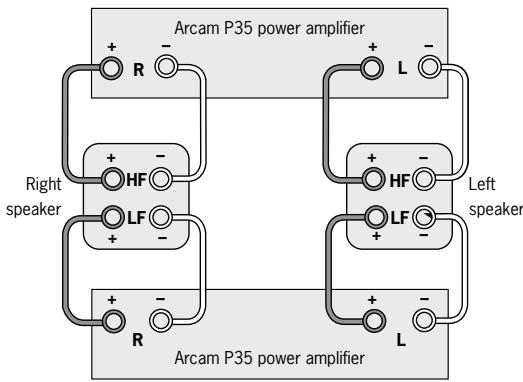
Recommended bi-amping configuration
Technical specifications
| C30 | P35 | PI | |
| Continuous power output (20Hz-20kHz at 0.5% THD), per channel | |||
| Both channels, 8Ω, 20Hz-20kHz | 100W | ||
| Single channel, 8Ω, 20Hz-20kHz | 150W | 170W | |
| Both channels, 4Ω, 20Hz-20kHz | 140W | ||
| Single channel, 4Ω, at 1kHz | 200W | 250W | |
| Three channels, 8Ω, 20Hz-20kHz | 90W | ||
| Harmonic distortion, 80% power, 8Ω at 1kHz | 0.005% | 0.003% | |
| Inputs | |||
| Phono cartridge: | |||
| Input sensitivity | 2.7mV (MM); 270μV (MC) | ||
| Input impedance | 47kΩ (MM); 300Ω (MC) | ||
| Signal/noise ratio (CCIR) | -79dB (MM); -73dB (MC) | ||
| Overload margin | 35dB | ||
| Line and tape inputs: | |||
| Nominal sensitivity | 250mV-2V | 800mV | |
| Input impedance | 22kΩ | 22kΩ | |
| Signal/noise ratio (CCIR) | -103dB | -110dB | |
| Tone controls, max. boost/cut | ±12dB @ 80Hz and 12kHz | ||
| Power amplifier input | |||
| Nominal sensitivity | 800mV | 906mV (Arcam gain) | |
| Input impedance | 22kΩ | 22kΩ | |
| Gain | 31.5dB | 31.5dB (Arcam gain) | |
| Preamplifier output | |||
| Nominal output level | 700mV | ||
| Maximum output level | 8V RMS | ||
| Output impedance | <50Ω | ||
| Headphone output | |||
| Maximum output level into 600Ω | 5V | ||
| Output impedance | 4.7Ω | ||
| General | |||
| Mains voltage | 115V or 230V | 115V or 230V | 115V or 230V |
| Power consumption (maximum) | 30VA | 800VA (950VA for P35/3) | 800VA |
| Power consumption (standby) | 2VA | 2VA | 2VA |
| Dimensions W × D × H (including feet) | 430 × 370 × 110mm | 430 × 350 × 110mm | 430 × 350 × 110mm |
| Weight (net) | 9.3kg | 9.5kg (10.5kg for P35/3) | 12.5kg |
| Weight (packed) | 11.5kg | 12.5kg (13.5kg for P35/3) | 15.5kg |
| Supplied accessories | mains leadCR-389 remote control2 x AAA batteries | mains lead | mains lead |
| E&OE | |||
CONTINUAL IMPROVEMENT POLICY
Arcam has a policy of continual improvement for its products. This means that designs and specifications are subject to change without notice.
NOTE: All specification values are typical unless otherwise stated.
The following table gives the IR-commandst accepted by the C30.
Power commands
| Command | Decimal Code |
| Power toggle | 16–12 |
| Power-on | 16–123 |
| Power-off | 16–124 |
Source selection commands
| Command | Decimal Code |
| PHONO select | 16–1 |
| AV select | 16–2 |
| TUNER select | 16–3 |
| DVD select | 16–4 |
| TAPE select | 16–5 |
| VCR select | 16–6 |
| CD select | 16–7 |
| AUX select | 16–8 |
Volume control commands
| Command | Decimal Code |
| Mute | 16–13 |
| Volume up | 16–16 |
| Volume down | 16–17 |
Menu navigation commands
| Command | Decimal Code |
| UP | 16–32 |
| DOWN | 16–33 |
| SELECT | 16–37 |
| ENTER | 16–87 |
Speaker control commands
| Command | Decimal Code |
| Speaker 1 toggle | 16–35 |
| Speaker 2 toggle | 16–39 |
| Speaker 1 on | 16–43 |
| Speaker 1 off | 16–44 |
| Speaker 2 on | 16–45 |
| Speaker 2 off | 16–46 |
Display control commands
| Command | Decimal Code |
| Display | 16–59 |
Note that the C30 also responds to code 20-53 (the PLAY command for an Arcam CD player). The C30 switches automatically to CD input on receiving this command.
Before returning your amplifier for service, please check the following:
SOUND CUTS OUT FOR NO REASON
If the temperature of the internal heatsink rises above a safe level, then a thermal cutout inside the amplifier will operate.
The power indicator on the front panel flashes and the protection system temporarily removes the power to the speakers. The system resets itself as the heatsink cools down.
Note that because of the high output voltage from a CD player, it is possible to drive the P35/P1 at full power even though the C30 volume is not set at maximum.
AMPLIFIER DOES NOT SWITCH BACK ON
The C30, P35 and PI amplifiers have a protection mechanism which is activated if you switch the unit on immediately after turning it off. If this mechanism activates, wait 30 seconds then try again.
Guarantee
WORLDWIDE GUARANTEE
This entitles you to have the unit repaired free of charge, during the first two years after purchase, at any authorised Arcam distributor provided that it was originally purchased from an authorised Arcam dealer or distributor. The manufacturer can take no responsibility for defects arising from accident, misuse, abuse, wear and tear, neglect or through unauthorised adjustment and/or repair, neither can they accept responsibility for damage or loss occurring during transit to or from the person claiming under the guarantee.
The warranty covers:
Parts and labour costs for two years from the purchase date. After two years you must pay for both parts and labour costs. The warranty does not cover transportation costs at any time.
CLAIMS UNDER GUARANTEE
This equipment should be packed in the original packing and returned to the dealer from whom it was purchased, or failing this, directly to the Arcam distributor in the country of residence. It should be sent carriage prepaid by a reputable carrier — NOT by post. No responsibility can be accepted for the unit whilst in transit to the dealer or distributor and customers are therefore advised to insure the unit against loss or damage whilst in transit.
For further details contact Arcam at:
Arcam Customer Support Department,
Pembroke Avenue, Waterbeach, CAMBRIDGE, CB5 9QR, England
Telephone: +44 (0)1223 203200
Fax: +44 (0)1223 863384
Email: support@arcam.co.uk
PROBLEMS?
Always contact your dealer in the first instance.
If your dealer is unable to answer any query regarding this or any other Arcam product please contact Arcam Customer Support on +44 (0) 1223 203200 or write to us at the above address and we will do our best to help you.
ON-LINE REGISTRATION
You can register your Arcam product on-line at:
www.arcam.co.uk
POLITIQUE D'AMÉLIORATION CONTINUE
Source selection commands
Arcam Customer Support Department,
Pembroke Avenue, Waterbeach, CAMBRIDGE, CB5 9QR, Angleterre
Telephone: +44 (0)1223 203200
Fax: +44 (0)1223 863384
Email: support@arcam.co.uk
DES PROBLEMS?
Arcam Customer Support Department, Pembroke Avenue, Waterbeach, CAMBRIDGE CB5 9QR, England
Telefon: +44 (0)1223 203200
Fax:+44 (0)1223 863384
E-Mail: support@arcam.co.uk
PROBLEM?
PEMBROKE AVENUE, WATERBEACH, CAMBRIDGE CB5 9QR, ENGLAND
telephone +44 (0)1223 203200 fax +44 (0)1223 863384 email support@arcam.co.uk website www.arcam.co.uk