
CL20 - Digital piano KAWAI - Free user manual and instructions
Find the device manual for free CL20 KAWAI in PDF.


User questions about CL20 KAWAI
0 question about this device. Answer the ones you know or ask your own.
Ask a new question about this device
Download the instructions for your Digital piano in PDF format for free! Find your manual CL20 - KAWAI and take your electronic device back in hand. On this page are published all the documents necessary for the use of your device. CL20 by KAWAI.
USER MANUAL CL20 KAWAI
Thank you for choosing this Kawai CL20 Digital Piano.
Your new CL20 is a high-quality instrument offering the very latest in leading-edge music technology. This manual contains valuable information that will help you make full use of your CL20 piano's many capabilities. Please read it carefully and keep it handy for further reference.
TABLE OF CONTENTS
Page
Important Safety Instructions 3
Assembling The Stand 6
Part Names 8
Getting Started 10
- Basic Operations 10
- Dual 11
3.Metronome 11 - Concert Magic 12
5.Demonstration Song 16
Function Mode 17
- Selecting A Touch Type 18
- Transpose 19
3.Tuning. 19
4.Reverb. 20 - Concert Magic Mode 20
6.MIDI Channel Select 21
7.MIDI Local Control 21 - Turning Multi-Timbral Mode On/Off 22
- Transmit MIDI Program Change 23
MIDI 24
Concert Magic Song List 25
Specifications 26
MIDI Implementation Chart 27
Important Safety Instructions
SAVE THESE INSTRUCTIONS
INSTRUCTIONS PERTAINING TO A RISK OF FIRE, ELECTRIC SHOCK, OR INJURY TO PERSONS

CAUTION
RISK OF ELECTRIC SHOCK DO NOT OPEN

WARNING
TO REDUCE THE RISK OF FIRE OR ELECTRIC SHOCK,DO NOT EXPOSE THIS PRODUCT TO RAIN OR MOISTURE.
AVIS: RISQUE DE CHOC ELECTRIQUE -NE PAS OUVRIR.
TO REDUCE THE RISK OF ELECTRIC SHOCK, DO NOT REMOVE COVER (OR BACK). NO USER-SERVICEABLE PARTS INSIDE. REFER SERVICING TO QUALIFIED SERVICE PERSONNEL.

The lighting flash with arrowhead symbol, within an equilateral triangle, is intended to alert the user to the presence of uninsulated "dangerous voltage" within the product's enclosure that may be of sufficient magnitude to constitute a risk of electric shock to persons.

The exclamation point within an equilateral triangle is intended to alert the user to the presence of important operating and maintenance (servicing) instructions in the literature accompanying the product.
Examples of Picture Symbols
| denotes that care should be taken. The example instructs the user to take care not to allow fingers to be trapped. | |
| denotes a prohibited operation. The example instructs that disassembly of the product is prohibited. | |
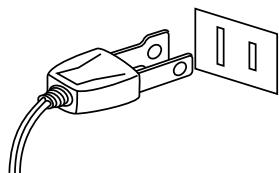
| denotes an operation that should be carried out. The example instructs the user to remove the power cord plug from the AC outlet. |
Read all the instructions before using the product.
WARNING - When using electric products, basic precautions should always be followed, including the following.

WARNING
Indicates a potential hazard that could result in death or serious injury if the product is handled incorrectly.
The product should be connected to an AC outlet of the specified voltage.


- Use the AC adapter supplied with the product or one recommended by Kawai.
- If you are going to use an AC power cord, make sure that its has the correct plug shape and conforms to the specified power voltage.
- Failure to do so may result in fire.
Do not insert or disconnect the power cord plug with wet hands.
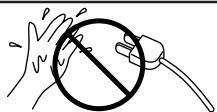
Doing so may cause electric shock.
When using the headphones, do not listen for long periods of time at high volume levels.
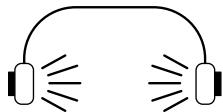
Doing so may result in hearing problems.
Do not disassemble, repair or modify the product.

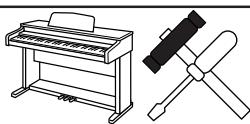
Doing so may result in product breakdown, electric shock or short-circuit.
When disconnecting the AC power cord's plug, always hold the plug and pull it to remove it.

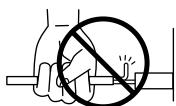
Pulling the AC power cord itself may damage the cord, causing a fire, electric shock or short-circuit.
The product is not completely disconnected from the power supply even when the power switch is turned off. If the product will not be used for a long time, unplug the AC power cord from the AC outlet.
-
Failure to do so may cause fire in case of lightning.
-
Failure to do so may over-heat the product, resulting in fire.
This product may be equipped with a polarized line plug (one blade wider than the other). This is a safety feature. If you are unable to insert the plug into the outlet, contact an electrician to replace your obsolete outlet. Do not defeat the safety purpose of the plug.

CAUTION
Indicates a potential hazard that could result in injury or damage to the product or other
Do not use the product in the following areas.
- Areas, such as those near windows, where the product is exposed to direct sunlight
- Extremely hot areas, such as near a heater
- Extremely cold areas, such as outside
- Extremely humid areas
- Areas where a large amount of sand or dust is present
- Areas where the product is exposed to excessive vibrations
Using the product in such areas may result in product breakdown.
Use the product only in moderate climates (not in tropical climates).
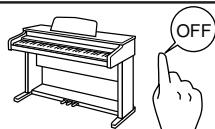
Before connecting cords, make sure that the power to this product and other devices is turned OFF.
Take care not to allow any foreign matter to enter the product.

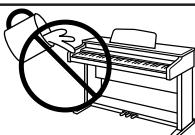
Entry of water, needles or hair pins may result in breakdown or short-circuit.
The product shall not be exposed to dripping or splashing. No objects filled with liquids, such as vases, shall be placed on the product.
Do not drag the product on the floor. Take care not to drop the product.
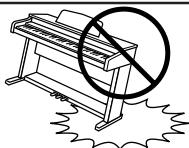
Please lift up the product when moving it. Please note that the product is heavy and must be carried by more than two persons.
Dropping the product may result in breakdown.
Do not place the product near electrical appliances such as TVs and radios.
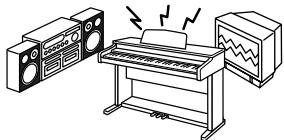
-
Doing so may cause the product to generate noise.
-
If the product generates noise, move the product sufficiently away from the electrical appliance or connect it to another AC outlet.
When connecting the AC power cord and other cords, take care not to get them tangled.

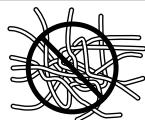
Failure to do so may damage them, resulting in fire, electric shock or short-circuit.
Do not wipe the product with benzene or thinner.

- Doing so may result in discoloration or deformation of the product.
- When cleaning the product, put a soft cloth in lukewarm water, squeeze it well, then wipe the product.
The product should be located so that its location or position does not interfere with its proper ventilation. Ensure a minimum distance of 5cm around the product for sufficient ventilation. Ensure that the ventilation is not impeded by covering the ventilation openings with items, such as newspaper, table-cloths, curtains, etc.
Do not place naked flame sources, such as lighted candles on the product.
The product should be serviced by qualified service personnel when:
- The power supply cord or the plug has been damaged.
- Objects have fallen, or liquid has been spilled into the product.
The product has been exposed to rain. - The product does not appear to operate normally or exhibits a marked change in performance.
- The product has been dropped, or the enclosure damaged.
Notes on Repair
Should an abnormality occur in the product, immediately turn the power OFF, disconnect the power cord plug, and then contact the shop from which the product was purchased.
CAUTION:
To prevent electric shock, match wide blade of plug to wide slot, fully insert.
ATTENTION:
Instruction for AC power cord (U.K.)
Do not plug either terminal of the power cord to the ground of the AC outlet on the wall.
FCC Information
This equipment has been tested and found to comply with the limits for a Class B digital device, pursuant to Part 15 of the FCC Rules. These limits are designed to provide reasonable protection against harmful interference in a residential installation. This equipment generates, uses and can radiate radio frequency energy and, if not installed and used in accordance with the instructions, may cause harmful interference to radio communications.
If this equipment does cause harmful interference to radio or television reception, which can be determined by turning the equipment off and on, the user is encouraged to try to correct the interference by one or more of the following measures:
¥ Reorient or relocate the receiving antenna.
¥ Increase the separation between the equipment and receiver.
¥ Connect the equipment into an outlet on a different electrical circuit from the receiver.
¥ Consult the dealer or an experienced radio/TV technician for help.
Canadian Radio Interference Regulations
This instrument complies with the limits for a class B digital apparatus, pursuant to the Radio Interference Regulations, C.R.C., c. 1374.
Be sure that all parts are included before starting to assemble your unit.
PARTS PROVIDED
Main Unit
1pc.
Side Board
2pcs.
Back Board
1pc.
Music Rack
Screw (Long)
Screw (Short)
1pc.
4pcs.
4pcs.
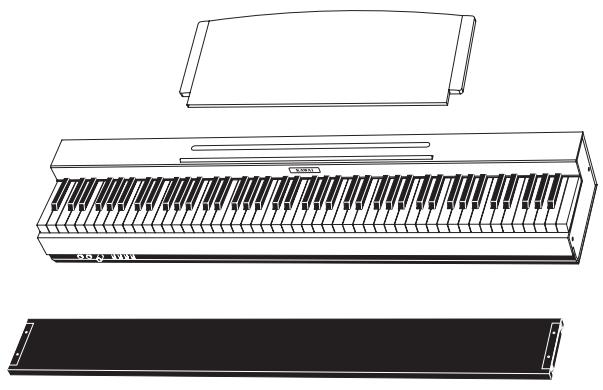


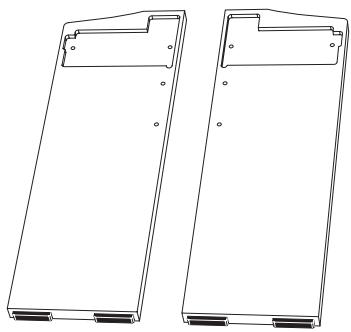
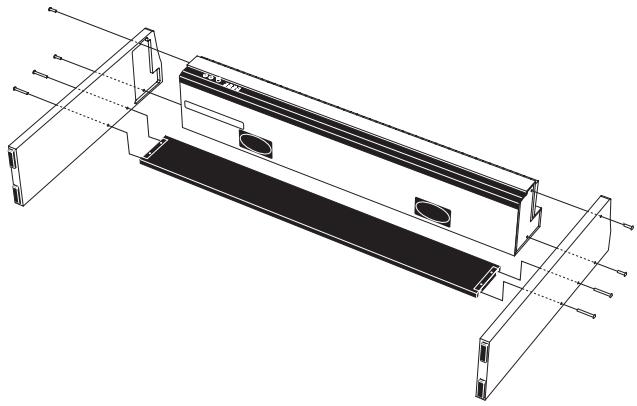
- Place the Main Unit on the floor with its back side facing down.
- Put the Side Boards beside the Main Unit as shown in the illustration on the left.
- Put together the Main Unit and Side Boards and fasten with four screws (short).
- Fasten the Back Board with four screws (long) tightly. Make sure that all screws are fastened securely.
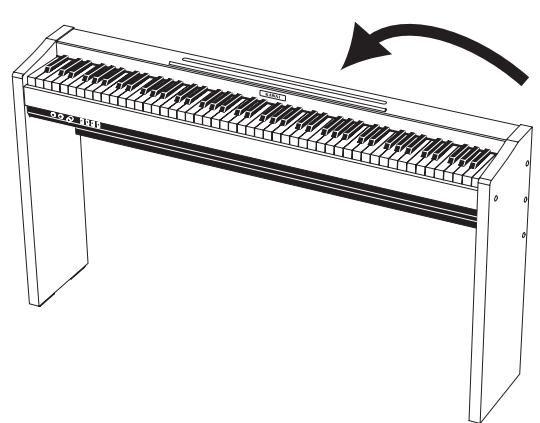
- Raise the stand up and make sure the screws are tight enough.
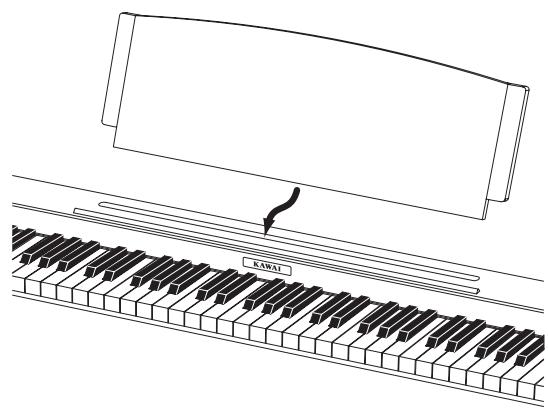
- Insert the Music Rack in the slit on the top of the piano.
HEADPHONES JACKS (A)
Used to connect up to two headphones to this digital piano.
POWER/VOLUME KNOB (B)
Turn the knob to the right and turn the power on. Continue turning the volume knob to the right to increase the instrument's volume. Turn the knob to the left to decrease the volume.
SOUND SELECT BUTTON (C)
Select the desired instrument by pressing this button repeatedly. You can also select a specific instrument directly by pressing one of the lowest eight white keys while holding down this button. For more details, see page 10.
METRONOME BUTTON (D)
Use this button to turn on/off the metronome.
CONCERT MAGIC BUTTON (E)
Absolutely anyone can play a real music with Concert Magic... even if you've never taken a piano lesson in your life. All you have to do is to select a favorite song and tap any of the 88 keys. For more details, see page 12.
DEMO BUTTON (F)
To listen to all the demos, simply press this button. The CL20 piano will start the demo. Eight musical pieces will be played back until the DEMO button is pressed again to stop. To select a specific demo, see page 16. To stop the demo, press this button again.
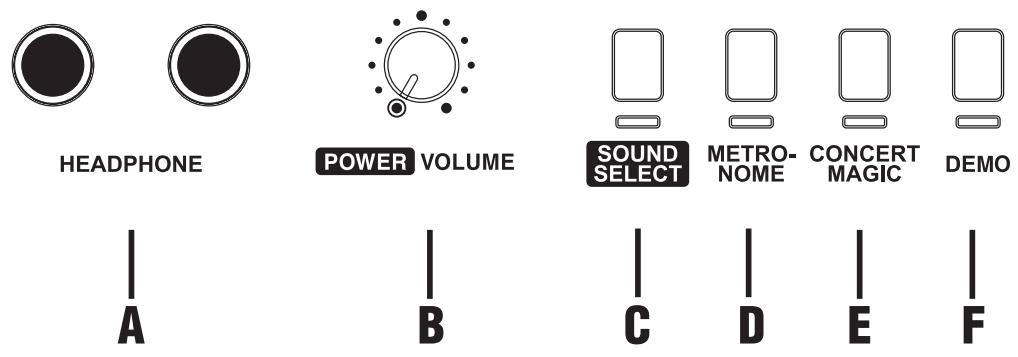
FRONT PANEL
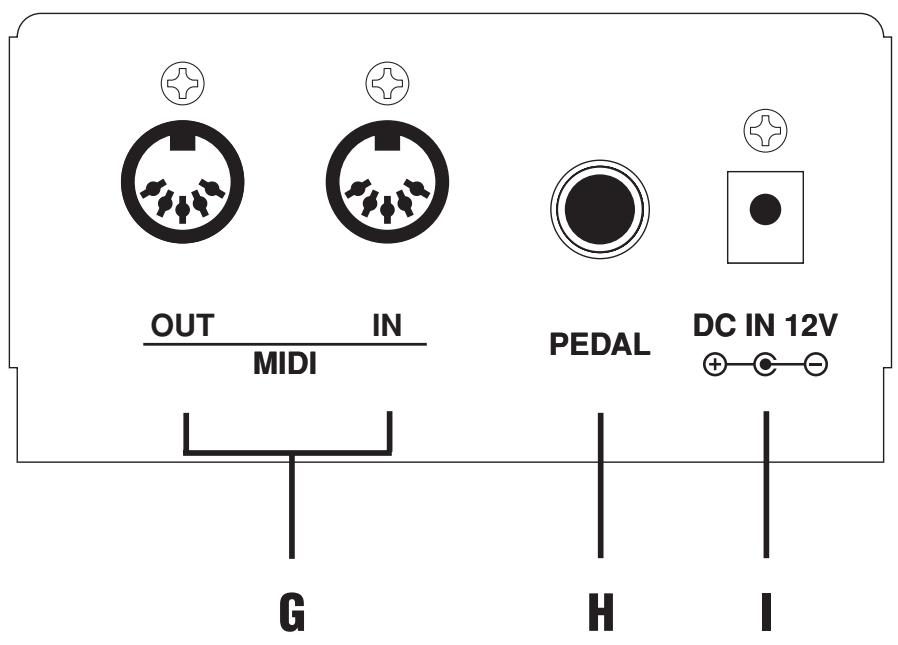
MIDI JACKS (G)
Use these jacks to connect the CL20 piano with external MIDI devices.
PEDAL JACK (H)
Connect the enclosed foot pedal. You can also connect an optional F-2r foot pedal which has a soft pedal as well.
DC IN JACK (I)
Connect the enclosed AC adaptor.
BACK PANEL
1. BASIC OPERATIONS

POWER VOLUME
(1) Turn the volume knob to the right and turn the power on.
(2) Adjust the volume.
Play a note on the keyboard and adjust the volume. (Turning the knob to the right raises the volume while turning to the left lowers it.)
(3) Choose a sound.
Method 1
Pressing the SOUND SELECT button once will change the sound to the next. Press it repeatedly until the desired sound is selected.
SOUND SELECT
Method 2
While holding down the SOUND SELECT button, press one of the lowest 8 white keys to select a specific sound directly.
Method 3
Press and hold the SOUND SELECT button more than one second to go back to Concert Grand.
Note:
When a sound other than Concert Grand is selected, the LED indicator under the SOUND SELECT button will start flashing.
(4) Play.
Experiment by playing the different sounds.
SOUND LIST
1 Concert Grand
2 Modern Piano
3 Electric Piano
4 Church Organ
5 Harpsichord
6 Vibraphone
7 Strings
8 Choi
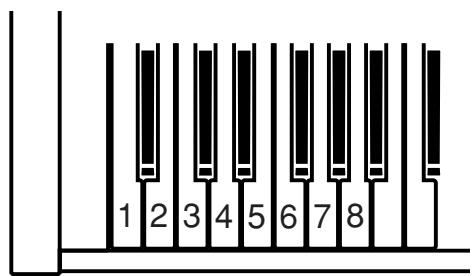
2. DUAL
With DUAL mode, you can layer two sounds together. To layer two sounds, while holding down the SOUND SELECT button, press the desired two keys together at the lowest 8 white keys and the assigned two sounds will be layered.
3. METRONOME
The CL20 piano's metronome function can help you practice the piano by providing a steady beat for you to play along with.
(1) To start the metronome, press the METRONOME button.
(2) To turn off the metronome, press the METRONOME button again.
Changing the Beat (Time Signature)
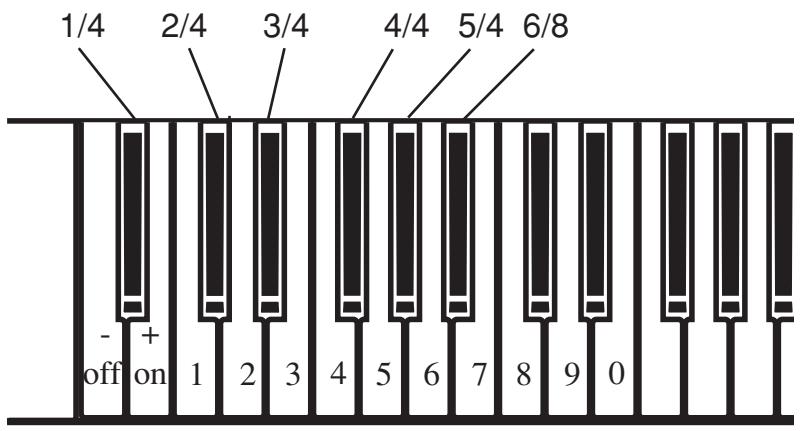
You can change the beat (time signature) of the metronome. The CL20 piano has six beats (time signatures) to choose from, 1/4, 2/4, 3/4, 4/4, 5/4 and 6/8. While holding down the METRONOME button, select the desired beat (time signature) of the metronome by pressing the black keys assigned to that beat (time signature).
Adjusting the Tempo
To adjust the tempo, use the lower white keys while holding down the METRONOME button. You can directly enter the desired tempo in "Beats Per Minute" (BPM) or use the - or + keys to make it slower or faster. The tempo range is 30-300 beats per minute. Use the enclosed function label for your convenience.
4. CONCERT MAGIC
The great German composer Johann Sebastian Bach once said, "Playing the keyboard is simple. Just strike right keys at the right time." Many people wish it were that simple. The reality is very different of course. However, there is a way to make playing the keyboard very simple. You don't even have to strike right keys thanks to Concert Magic.
With Concert Magic, absolutely anyone can sit at the CL20 piano and make real music... even if you've never taken a piano lesson in your life.
To enjoy performing by yourself, you have only to select your favorite piece from 40 preprogrammed songs and tap any of the 88 keys with a steady rhythm and tempo. Concert Magic will provide the correct melody and accompaniment notes, regardless of which keys you press. Anybody, young or old, can enjoy Concert Magic from the moment they sit down at the CL20 piano.
Now let's see how Concert Magic works.
Selecting a Song
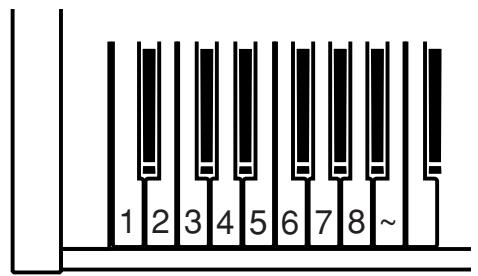
The 40 Concert Magic songs are assigned to each of the 40 white keys, classified in five groups by song category such as Children's Songs, American Classics, Christmas Songs.
All of the song titles are listed on page 25.
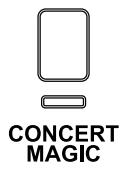
To select a song, press the key to which your desired song is assigned while holding down the CONCERT MAGIC button.
Listening to the Song
If you have selected a song you are familiar with, you may want to play by yourself right away. However you may want to listen to the song first before playing it.
To listen, press the DEMO button. The CL20 piano will start playing back the selected song.
If you want to listen to a different song, repeat the same procedure to select a song and press the DEMO button.
When you are finished listening to the song, press either CONCERT MAGIC button or DEMO button to stop.
Performing a song
Now you're ready to play yourself.
Tap out the rhythm of the selected song on any one of the 88 black or white keys on your piano keyboard. As you tap harder, the notes will get louder; as you tap softer, the notes will get quieter. As you tap faster, the notes speed up; as you tap slower, they will slow down correspondingly, just like regular piano playing.
Isn't it fun? You can sound like you've been playing for years just by pressing one key with one finger.
Concert Magic is a perfect method for small children to learn music, especially to develop a sense of rhythm. For older people who may think it is too late to learn the keyboard, Concert Magic is a good first step for them to begin with. With Concert Magic, your CL20 piano can be enjoyed by anyone in the family, even those who have never touched a musical instrument in their life.
Concert Magic Song Arrangement Types
After playing for a while with Concert Magic you may think that it's too easy and there is very little to learn.
While it is true that some of the songs are very easy to play, even for beginners, there are also some which will challenge you and require some practice to play beautifully. Each of the 40 Concert Magic songs falls into one of three different categories depending on the skill level required to perform them.
Easy Beat
These are the easiest songs to play. To perform them, simply tap out a constant steady beat on any key on your piano keyboard.
Look at the following example, "Für Elise". Press the key with a steady sixteenth note rhythm.
Melody Play
These songs are also quite easy to play, especially if they are familiar to you. To perform them, tap out the rhythm of the melody on any one of the keys on your piano keyboard. Singing along as you tap the rhythm can be helpful.
Play "Twinkle, Twinkle, Little Star" for example. Follow the melody's rhythm as shown.
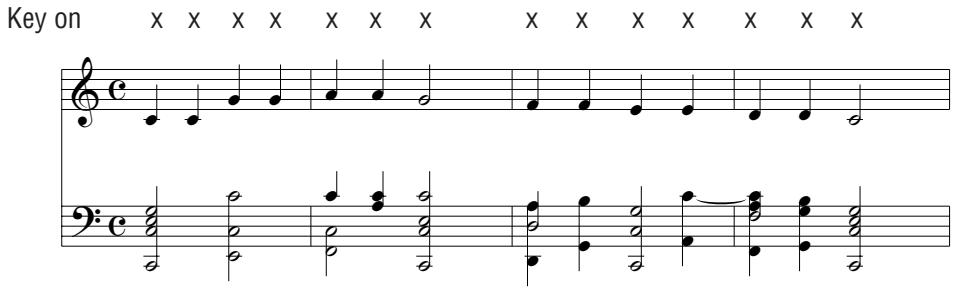
When performing fast songs with Concert Magic, it is sometimes easier to tap two different keys with two fingers alternating. This allows you to play twice as fast as you can using only one finger on one key.
Skillful
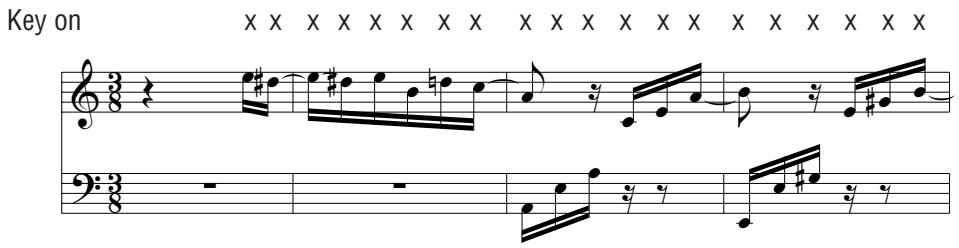
These songs range in difficulty from moderately difficult to difficult. To perform them, tap out the rhythm of both the melody and the accompaniment notes on any of the keys on your piano keyboard, like "Waltz of The Flowers" shown below.
Key on
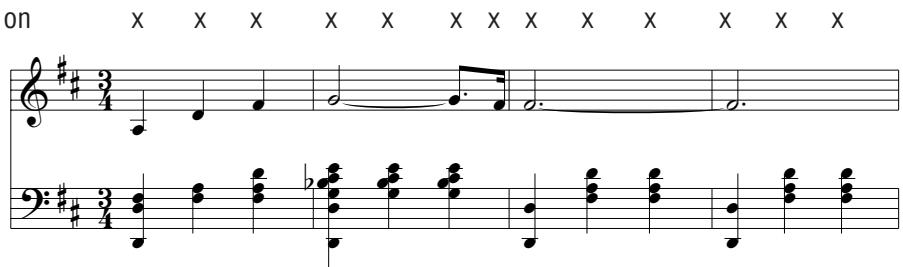
It may take some practice to get them just right. A good way to learn these songs is to listen to them first, and then try to tap out the rhythms that you hear.
In the song list on page 25, the arrangement type is marked next to each song title as "EB" for Easy Beat, "MP" for Melody Play and "SK" for Skillful.
Concert Magic Song Demo
There are three ways to listen to the Concert Magic songs in the DEMO mode.
1. All Play
Press the CONCERT MAGIC button and then press the DEMO button without selecting a song. The CL20 piano will play back all the preset songs from one to another.
2. Category Play
Press the piano key to which the desired song is assigned while holding down the CONCERT MAGIC button. While still holding down the CONCERT MAGIC button, press the DEMO button. The CL20 piano will play back the selected song and, then play the rest of songs in the same song category one after another.
3. One Song Play
Press the piano key to which the desired song is assigned while holding down the CONCERT MAGIC button. Release the CONCERT MAGIC button and then press the DEMO button. The CL20 will playback the selected song repeatedly until you press the DEMO button again.
The CL20 piano has 8 built-in demonstration songs for your listening enjoyment.
(1) Press the DEMO button and the song for Concert Grand will start. When the Concert Grand demo song is finished, the CL20 piano will play all the other demo songs one at a time in random order.
(2) Press the SOUND SELECT button to skip to the next demo song.
(3) If you would like to listen to the demo for a particular sound, just press the desired key at the lowest 8 white keys while holding down the SOUND SELECT button.
(4) To stop the demo, press the DEMO button again.
DEMO SONG LIST
- Concert Grand Rhapsodie No.2 / Brahms
- Modern Piano KAWAI original
- Electric Piano KAWAI original
- Church Organ Toccata / Eugene Gigout
- Harpsichord French Suite No.6/Bach
- Vibraphone KAWAI original
- Strings Le quattoro stagioni "La Primavera" / Vivaldi
- Choi KAWAI original
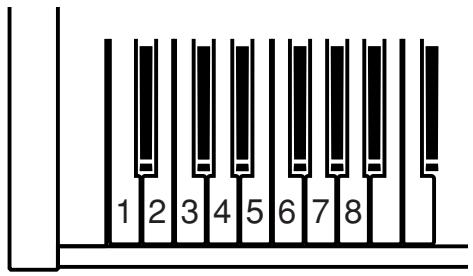
The Function Mode gives you access to many other useful features on your CL20 piano.
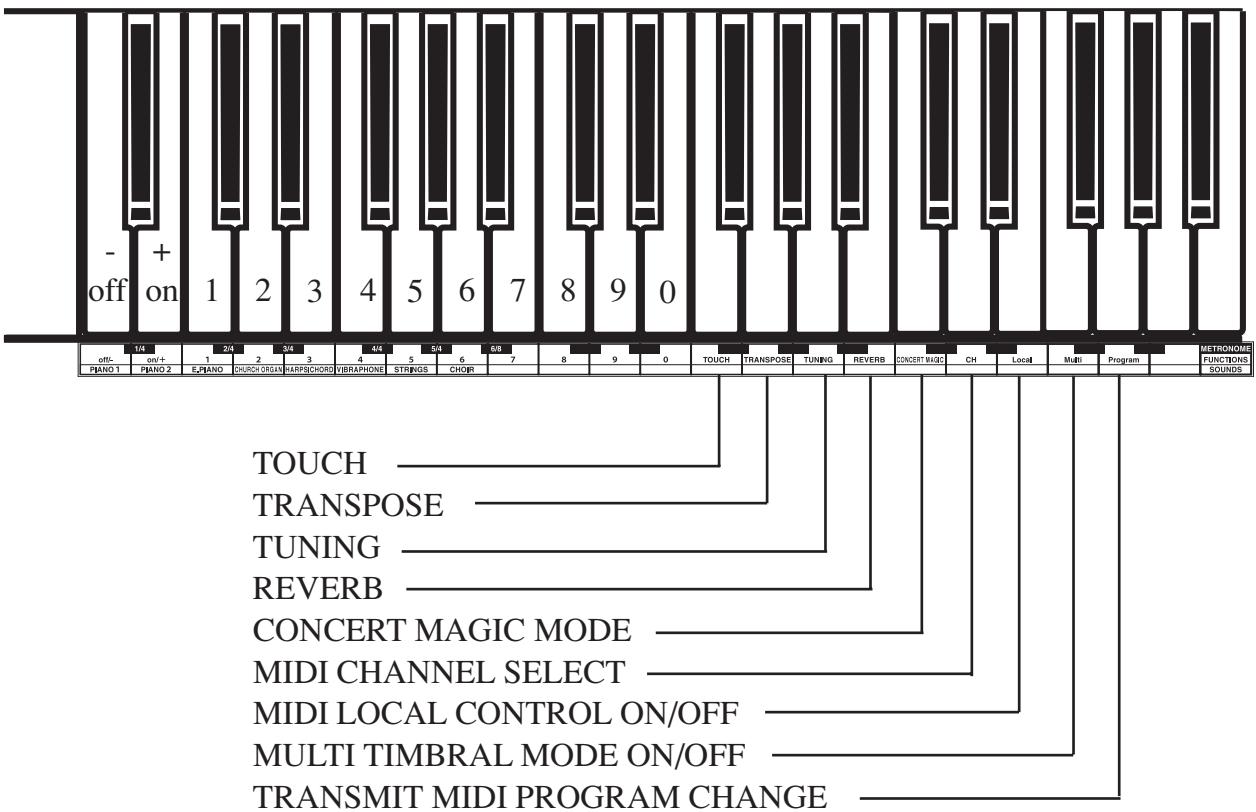
The following functions can be selected in the Function Mode by pressing the appropriate key:
| Function | Default |
| TOUCH | Normal |
| TRANSPose | 0 |
| TUNING | A4=440.0Hz |
| REVERB | On |
| CONCERT MAGIC MODE | Mode 1 |
| MIDI CHANNEL SELECT | 1 ch |
| MIDI LOCAL CONTROL ON/OFF | On |
| MULTI TIMBRAL MODE ON/OFF | Off |
| TRANSMIT MIDI PROGRAM CHANGE | On |
When the power is turned on, these functions are always set to the default settings.
OPERATION
METRO-NOME
CONCERT MAGIC
(1) Press the key assigned for the function you want to edit while holding down the METRONOME and CONCERT MAGIC buttons simultaneously.
(2) While still holding down the METRONOME and CONCERT MAGIC buttons, use the number keys or - (off) / + (on) keys to change the value for the selected function.
(3) You can also select other functions and change the values successively.
(4) Release both the METRONOME and CONCERT MAGIC buttons to exit.
Note:
Attach the enclosed Function Stickers as shown in the illustration on the next page for your convenience.
1. SELECTING A TOUCH TYPE
When playing a piano, the volume of the sound produced increases in direct relation to how hard a key is struck. Your CL20 piano lets you select from four different "Touch" types as follows:
NORMAL
The standard setting which produces volume in direct proportion to your force on the keys. This setting is the most similar to an acoustic piano. The CL20 piano automatically selects this Touch Type when the power is turned on.
LIGHT
For those still developing finger strength, such as a child, a louder sound is produced even when the piano is played with a soft touch.
HEAVY
Perfect for those with strong fingers or for practicing with a hard touch.
CONSTANT
For tone colors like organ or harpsichord, and for playing some contemporary music with the piano sound, a constant loud sound is produced regardless of your force on the keys.
(1) Press the "TOUCH" key while holding down the METRONOME and CONCERT MAGIC buttons.
(2) While still holding down the METRONOME and CONCERT MAGIC buttons, press one of the following keys on the keyboard.
Key 1: Selects the “LIGHT” Touch Type
Key 2: Selects the “NORMAL” Touch Type
Key 3: Selects the "HEAVY" Touch Type
Key 4: Selects the "CONSTANT" Touch Type
2. TRANSPOSE
The transpose function lets you raise or lower the piano's key in half steps. This is especially useful when you have learned a song in one key and have to play it in another key. The transpose feature allows you to play the song in the original key, but hear it in another key.
(1) Press the "TRANSPOSE" key while holding down the METRONOME and CONCERT MAGIC buttons.
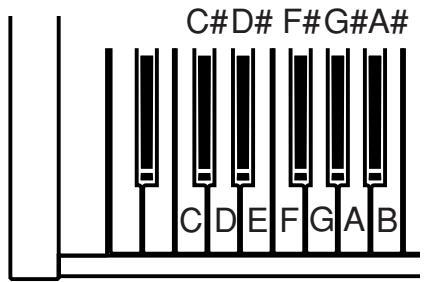
(2) While still holding down the METRONOME and CONCERT MAGIC buttons, press the desired key on the keyboard to select a new transposed key. (When power is first turned "on", the key is set to C.) The piano can be transposed up to 5 half steps higher (F) or 6 half steps
lower (F#).
3. TUNING
This function allows you to adjust the piano's pitch to match recordings or other instruments in an ensemble.
(1) Press the "TUNING" key while holding down the METRONOME and CONCERT MAGIC buttons. A tuning tone can be heard.
(2) While still holding down the METRONOME and CONCERT MAGIC buttons, use the -/+ keys to lower/raise the pitch by 0.5Hz . Or you can directly enter the center A pitch as a three digit number by using the number keys. (EX: 440)
4. REVERB
Reverb adds reverberation to the sound simulating the acoustic enviroment of a recital room, stage, or concert hall.
There are three types of Reverb in the CL20. They are Room, Stage and Hall.
(1) Press the "REVERB" key while holding down the METRONOME and CONCERT MAGIC buttons.
(2) While still hodling the METRONOME and CONCERT MAGIC buttons, press one of the following keys to select the Reverb type.
Key 1: ROOM
Key 2: STAGE
Key 3: HALL
When the power is turned on, the REVERB function is automatically activated.
To turn on/off the reverb, while holding down the METRONOME and CONCERT MAGIC buttons, press REVERB key and then press "on" or "off" key.
5. CONCERT MAGIC MODE
The CL20 piano offers two ways to enjoy Concert Magic.
Mode 1
Each of the 40 Concert Magic songs falls into one of three different categories depending on the skill level required to perform them. They are Easy Beat, Melody Play and Skillful. See page 14 for details.
Mode 2
Regardless of which arrangement type a Concert Magic song is, with Mode 2 you can play any Concert Magic song by simply tapping any key with a constant steady beat.
(1) Press the "CONCERT MAGIC" key while holding down the METRONOME and CONCERT MAGIC buttons.
(2) While still holding down the METRONOME and CONCERT MAGIC buttons, pressing the “+” key sets the Concert Magic mode to
Mode 2. If you press the “-” key, the Concert Magic mode returns to Mode 1.
6. MIDI CHANNEL SELECT
In order to exchange MIDI information with another MIDI instrument, you must first set the two connected instruments to the same channel.
(1) Press the "MIDI CH" key while holding down the METRONOME and CONCERT MAGIC buttons.
(2) While still holding down the METRONOME and CONCERT MAGIC buttons, press the 10 keys to select the channel. When selecting a channel, the channel must be entered by two digit numbers.
EX: For CH 1 press the 0 key then the 1 key. For CH 16 press the 1 key then the 6 key.
This function is used to control whether or not the sound from the piano will be heard when you play the keyboard. When MIDI LOCAL CONTROL is set to "on" you will hear the CL20 piano when you play. When MIDI LOCAL CONTROL is set to "off" you will not hear any sound from the CL20 piano when you play but the CL20 piano's keyboard data will be transmitted through the MIDI jacks to an external MIDI device.
(1) Press the “LOCAL” key while holding down the METRONOME and CONCERT MAGIC buttons.
(2) While still holding down the METRONOME and CONCERT MAGIC buttons, pressing the "off" key sets the Local Control to "off". If you press the "on" key, this function returns to "on".
8. TURNING MULTI-TIMBRAL MODE ON/OFF
Normally, the procedure described in the MIDI CHANNEL SELECT section is used to transmit or receive data on only one MIDI channel (any one of 1 through 16). But by turning the Multi-Timbral function "on", you can receive data on more than one MIDI channel and simultaneously play a different sound on each channel. With this feature, you can connect the CL20 piano to an external MIDI recorder
or personal computer to create performances with a variety of timbres. The term "Multi-Timbral" is derived from the ability to play multiple timbres simultaneously.
NOTE:
You can assign any sound of the CL20 piano to any channel in the way you like by sending the correct Program Change Number to the CL20 piano from an external MIDI device. Please refer to the list below for assignment of sound and program number.
(1) Press the "MULTI" key while holding down the METRONOME and CONCERT MAGIC buttons.
(2) While still holding down the METRONOME and CONCERT MAGIC buttons, pressing the "off" key sets the Multi-Timbral mode to "off". If you press the "on" key, this function returns to "on".
| Sound | Program Number | |
| Multi-Timbre “on” | Multi-Timbre “off” | |
| Concert Grand | 1 | 1 |
| Modern Piano | 2 | 2 |
| Electric Piano | 5 | 3 |
| Church Organ | 20 | 4 |
| Harpsichord | 7 | 5 |
| Vibraphone | 12 | 6 |
| Strings | 49 | 7 |
| Choir | 53 | 8 |
9. TRANSMIT MIDI PROGRAM CHANGE
You can set the CL20 piano if it should transmit Program Change Numbers via MIDI when the sound is changed on the control panel.
(1) Press the “PROGRAM” key while holding down the METRONOME and CONCERT MAGIC buttons.
(2) While still holding down the METRONOME and CONCERT MAGIC buttons, pressing the "off" key sets the CL20 piano not to transmit the program change data corresponding to the sound selected on the panel. If you press the "on" key, this function returns to "on" and selecting a sound will transmit the data.
(3) You can also transmit the desired program change number directly by entering the number as a three digit number by using the number
keys while holding down the METRONOME and CONCERT MAGIC buttons.
The term MIDI is an acronym for Musical Instrument Digital Interface, an international standard for connecting synthesizers, sequencers (MIDI recorders) and other electronic instruments so that they can exchange performance data.
The CL20 is equipped with two MIDI jacks for exchanging data: MIDI IN and MIDI OUT. Each uses a special cable with a DIN connector.
MIDI IN : For receiving note, program change and other data.
MIDI OUT: For sending note, program change and other data.
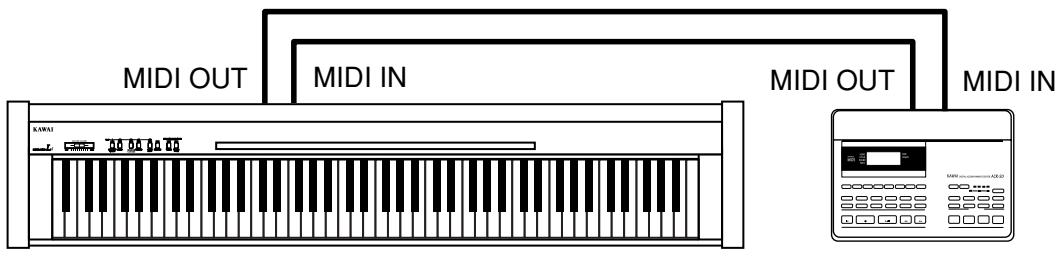
MIDI EXAMPLES
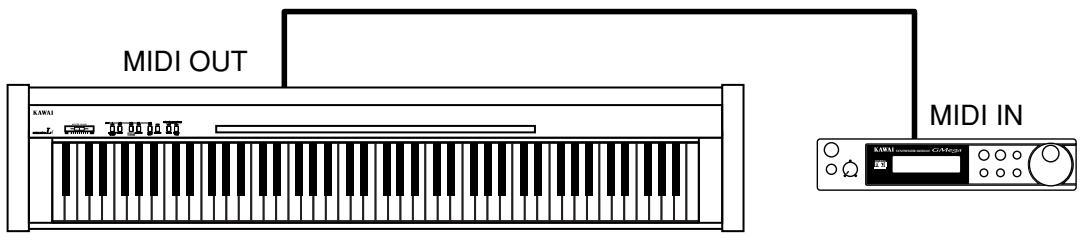
(1) Connection to another MIDI compatible keyboard or sound generator module
When connected as shown in the illustration, data on how the digital piano is played (which keys are struck) can be sent to another MIDI instrument. Plus, the sound from the CL20 can be layered over the sound of the other instrument.
(2) Connection to an external sequencer
When connected as shown in the illustration, you can record songs played on the CL20 with a MIDI recorder, and use the CL20's tones (such as piano, harpsichord and vibraphone, etc.) controlled by the CL20's MULTI-TIMBRAL MODE function to create a multi-layer MIDI recording.
| Category | # | Song Title | Arrangement Type |
| Children's Songs | 1 | Twinkle, Twinkle, Little Star | MP |
| 2 | I'm A Little Teapot | MP | |
| 3 | Mary Had A Little Lamb | MP | |
| 4 | London Bridge | MP | |
| 5 | Row, Row, Row Your Boat | MP | |
| 6 | Frère Jaques | MP | |
| 7 | Old MacDonald Had A Farm | MP | |
| Christmas Songs | 8 | Hark The Herald Angels Sing | MP |
| 9 | Jingle Bells | MP | |
| 10 | Deck The Halls | MP | |
| 11 | O Come All Ye Faithful | MP | |
| 12 | Joy To The World | MP | |
| 13 | Silent Night | MP | |
| 14 | We Wish You A Merry Christmas | MP | |
| American Classics | 15 | Battle Hymn Of The Republic | MP |
| 16 | Yankee Doodle | MP | |
| 17 | Danny Boy | EB | |
| 18 | Clementine | MP | |
| 19 | Auld Lang Syne | MP | |
| 20 | Oh Susanna | SK | |
| 21 | Camptown Races | MP | |
| 22 | When The Saints Go Marching In | EB | |
| 23 | The Entertainer | SK | |
| Classical Selections | 24 | William Tell Overture | SK |
| 25 | Andante (Haydn) | MP | |
| 26 | Für Elise | EB | |
| 27 | Clair De Lune | SK | |
| 28 | Skater's Waltz | SK | |
| 29 | Blue Danube Waltz | SK | |
| 30 | Gavotte (Gossec) | SK | |
| 31 | Waltz Of The Flowers | SK | |
| Special Occasions | 32 | Bridal Chorus | MP |
| 33 | Wedding March | SK | |
| 34 | Pomp And Circumstance | SK | |
| International Songs | 35 | When Irish Eyes Are Smiling | EB |
| 36 | Hava Nagilah | EB | |
| 37 | Ich Bin Ein Musikant | SK | |
| 38 | Funicli Funicla | SK | |
| 39 | La Marseillaise | MP | |
| 40 | La Bamba | SK |
| Keyboard | 88 Weighted Keys with Advanced Hammer Action III |
| Touch Type | 4 Types (Normal, Light, Heavy, Constant) |
| Max Polyphony | 32 Notes |
| Tones | 8 Tones (Concert Grand, Modern Piano, Electric Piano, Church Organ, Harpsichord, Vibraphone, Strings, Choir) |
| Reverb | Room, Stage, Hall |
| Metronome | Beat: 1/4, 2/4, 3/4, 4/4, 5/4, 6/8 Tempo: 30-300 BPM |
| Other Functions | Dual, Transpose, Tuning, Concert Magic (40 Songs), MIDI Functions, 8 Demo Songs |
| Pedals | Foot Switch (Damper Pedal) |
| Jacks | Headphones x 2, Pedal, MIDI IN/OUT, DC IN |
| Speakers | (12 x 8) cm (4 3/4” x 3 1/4”) x 2 |
| Output Power | 7 W x 2 |
| ver Consumption | 25W (AC Adaptor PS-125) |
| Dimensions | 129.1 x 26.8 x 77.2 (cm), 50 7/8” x 10 1/2” x 30 2/5” |
| Weight | 27 kg (60 lbs.) |
Specifications are subject to change without notice.
MIDI IMPLEMENTATION CHART
KAWAI DIGITAL PIANO
MODEL: CL20
Date: June 2004
Version: 1.0
| FUNCTION | TRANSMITTED | RECEIVED | REMARKS |
| Basic Channel (Default) (Changed) | 1 1-16 | 1 1-16 | |
| Mode (Default) (Message) (Altered) | 3 X ********** | 1 1, 3* | *Omni Off by setting MIDI channel |
| Note Number (True Voice) | 15-113* ********** | 0-127 15-113 | *with Transpose |
| Velocity (Note ON) (Note OFF) | O: 9nH v=1-127 X: 8nH v=0 | O X | |
| After Touch Key's Channel's | X X | X X | |
| Pitch Bend | X | X | |
| Control Change 7 64 67 | X O O (w/optional F-2r) | O O O | Volume Damper pedal Soft pedal |
| Program Change True | O ********** | O | |
| System Exclusive | O | O | |
| Common (Song Position) (Song Select) (Tune) | X X X | X X X | |
| System: Real Time (Clock) (Commands) | X X | X X | |
| Others (Local ON/OFF) (All Notes OFF) (Avive Sense) (Reset) | X X O X | O O* O* X | *When Multi-Timbral mode is On |
| Mode 1: OMNI ON, POLY Mode 2: OMNI ON, MONO O: Yes Mode 3: OMNI OFF, POLY Mode 4: OMNI OFF, MONO X: No | |||
KAWAI
CL20 Owner's Manual
OW976E-C0405
Printed in Indonesia
814558