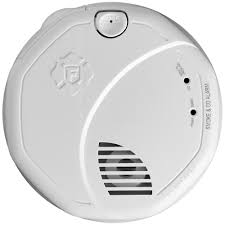
FA1620 - Smoke detector FIRST ALERT - Free user manual and instructions
Find the device manual for free FA1620 FIRST ALERT in PDF.


| Brand | FIRST ALERT |
| Model | FA1620 |
| Product Type | Smoke Detector |
| Power Supply | 9V Battery (included) |
| Sensor Type | Photoelectric |
| Dimensions | Approximately 12 cm diameter |
| Weight | Approximately 200 g (with battery) |
| Main Function | Smoke detection and audible alarm |
| Test/Silence Button | Yes, to test and temporarily disable the alarm |
| LED Indicator | Flashes every 30 to 45 seconds in normal operation |
| Audible Alarm | 85 dB at 3 meters |
| Maintenance and Cleaning | Dust with a vacuum or soft cloth |
| Safety | Compliant with UL 217 standards |
| Lifespan | Approximately 10 years |
| Warranty | Limited 5-year warranty |
| Repairability | Spare parts not available, device not repairable |
| General Information | Ceiling installation recommended |
Frequently Asked Questions - FA1620 FIRST ALERT
User questions about FA1620 FIRST ALERT
0 question about this device. Answer the ones you know or ask your own.
Ask a new question about this device
Download the instructions for your Smoke detector in PDF format for free! Find your manual FA1620 - FIRST ALERT and take your electronic device back in hand. On this page are published all the documents necessary for the use of your device. FA1620 by FIRST ALERT.
USER MANUAL FA1620 FIRST ALERT
FA162C Security System
First
Alert
PROFESSIONAL
SECURITY SYSTEMS
TABLE OF CONTENTS
SYSTEM OVERVIEW 4
General 4
A Partitioned System 4
Zones 4
Burglary Protection 5
Security Codes 5
Fire Protection 6
Alarms 6
Memory of Alarm 6
Phone Access & Voice Response 6
ENTRY/EXIT DELAYS 7
General Information 7
Exit Alarms 8
2-Partition Away Arming 17
ARMING ALL PROTECTION (MAXIMUM) 19
DISARMING AND SILENCING ALARMS 20
Memory of Alarm 20
BYPASSING PROTECTION ZONES 21
Quick Bypass 22
Displaying Bypassed Zones 22
CHIME MODE 23
PANIC KEYS 24
USING DEVICE COMMANDS 25
PAGING FEATURE 27
SECURITY CODES 27
General 27
Babysitter Code 27
Duress Code 27
Quick Arming 27
To Add or Change A User 28
To Delete A User 28
TROUBLE CONDITIONS 31
FIRE ALARM SYSTEM 33
NFPA RECOMMENDATIONS 34
EMERGENCY EVACUATION 35
MAINTAINING YOUR SYSTEM 36
QUICKGUIDETO SYSTEMFUNCTIONS 38
SUMMARY OF AUDIBLE NOTIFICATIONS 40
GLOSSARY 41
INSURANCE CREDIT REQUEST FORM 47
SYSTEM OVERVIEW
General
Congratulations on your ownership of a First Alert Professional Partitioned Security System. You've made a wise decision in choosing it, for it represents the latest in security protection technology today.
This system offers you three forms of protection: burglary, fire and emergency. Your system consists of at least one keypad which provides control of system operation, and includes various sensors which provide perimeter and interior burglary protection, plus smoke or combustion detectors designed to provide early warning in case of fire.
The system uses microcomputer technology to monitor all protection zones and system status and provides appropriate information for display on the keypad(s) used with the system, and initiates appropriate alarms. Your system may also have been programmed to automatically transmit alarm or status messages over the phone lines to a central alarm monitoring station.
A Partitioned System
Simply stated, a partitioned system is a single physical alarm system that provides two independent areas of protection intended for use by separate users. For the most part, you need not know about other users and their structure in the system. However, when the system is set up for 2-partition operation, you may see display messages from time to time which indicate that the system is in use by another user; this is normal. A partitioned system may also have a "common zone" area, which is an area shared by users of both partitions. Refer to the COMMON ZONE OPERATION section for details on using this feature.
Zones
Your system's sensing devices have been assigned to various "zones." For example, the sensing device on your Entry/Exit door may have been assigned to zone 01, sensing devices on windows in the master bedroom to zone 02, and so on. These numbers will appear on the display, along with a description for that zone (on Alpha display keypads only, if programmed) when an alarm or trouble condition occurs.
SYSTEM OVERVIEW
Burglary Protection
Your system provides four modes of burglary protection: STAY, AWAY, INSTANT and MAXIMUM, and allows you to BYPASS selected zones while leaving the rest of the system armed. You must turn on or "arm" the burglary protection portion of your system before it will sense burglary alarms. The system also provides a CHIME mode, for alerting users to the opening of protected doors and windows while the system is disarmed. Refer to the other sections of this manual for procedures for using these features.
The following table lists the four different arming modes and the results of each.
| Arming Mode | Features For Each Arming Mode | |||
| Exit Delay | Entry Delay | Perimeter Armed | Interior Armed | |
| AWAY | Yes | Yes | Yes | Yes |
| STAY | Yes | Yes | Yes | No |
| INSTANT | Yes | No | Yes | No |
| MAXIMUM | Yes | No | Yes | Yes |
Security Codes
At the time of installation, you were assigned a personal four-digit security code, known only to you. You must enter the security code when arming and disarming the system, and when performing other system functions. As an additional safety feature, other users who do not have a need to know your code can be assigned different security codes. Refer to the SECURITY CODES section for procedures on adding security codes to the system.
Fire Protection
The fire protection portion of your security system (if used) is always active and will sound an alarm if a fire condition is detected. Refer to the FIRE ALARM SYSTEM section for important information concerning fire protection, smoke detectors and planning emergency exit routes from the premises.
SYSTEM OVERVIEW
| Alarms | When an alarm occurs, both the keypad and external sounders sound, and the keypad displays the zone(s) causing the alarm. If your system is connected to a central monitoring station, an alarm message is also sent. To stop the alarm sounding, simply disarm the system. |
| Memory of Alarm | When an alarm condition occurs, the keypad displays the number(s) of the zone(s) that caused the problem, and displays the type of alarm (ex. FIRE, ALARM). It remains displayed until it is cleared by disarming the system (see DISARMING THE SYSTEM section). |
| Phone Access & Voice Response Capability | Your system may include a voice module that will permit you to access the system via a Touch-tone phone, either on-premises or by call-in when away. The phone access feature will enable you to do the following:Receive synthesized voice messages over the telephone regarding the status of the security system.Arm and disarm the system and perform most function commands via the telephone, with voice confirmation provided after each command entry.Complete information regarding the use of this feature is provided in a separate manual entitled PHONE ACCESS USER'S GUIDE, which accompanies the voice module. |
| Paging Feature | If the paging feature has been programmed for your system, your pager will respond to certain conditions as they occur in your system, and display code numbers indicating the type of condition that has occurred.For detailed information, refer to PAGING FEATURE section later in this manual. |
ENTRY/EXIT DELAYS
General Information
Exit Delay Restart
Active:

Your system has preset time delays, known as exit delay and entry delay. Whenever you arm your system, exit delay gives you time to leave through the designated exit door without setting off an alarm. Exit delay begins immediately after entering any arming command, and applies to all modes of arming protection. Slow "beeps" will sound throughout the exit delay period, if programmed.
Restarting Exit Delay While Armed: Your system may have been programmed to allow you to restart the exit delay after the system has been armed in STAY mode. This is useful if you wish to open the entry/exit door to let someone in after arming the system and avoids having to disarm the system and then re-arm it again. If programmed, you can restart the exit delay by pressing the [] key. Ask your installer if this feature is active for your system.
Entry Delays give you time to disarm the system when you re-enter through the designated entrance door. But you must disarm the system before the entry delay period ends, or an alarm will occur. The keypad beeps during the entry delay period, reminding you to disarm the system. There are two entry delays (if programmed). The first is for your primary entrance and the second may be used for a secondary entrance, where a longer delay is required to walk to the keypad to disarm the system.
You can also arm the system with no entry delay at all by using either INSTANT or MAXIMUM arming modes. These modes provide greater security while on the premises or while away for extended periods of time.
See your installer for your delay times.
Partition 1
Exit Delay:

seconds
Entry Delay 1:
seconds
Partition 2
Exit Delay:

seconds
Entry Delay 1:
seconds
Entry Delay 2:
seconds
ENTRY/EXIT DELAYS
Exit Alarms
To minimize false alarms sent to the alarm monitoring company, your system may have been programmed for this feature. Ask your installer if "Exit Alarm" is active for your system.

Exit Alarm Active

Ask your
installer if a common zone was assigned.
Whenever you arm the system, the exit delay begins. If an entry/exit door or interior zone is faulted when the exit delay ends (e.g., exit door left open), the system sounds an alarm and starts the entry delay timer. If you disarm the system before the entry delay ends, the alarm sound stops and the message "CANCEL ALARM" or "CA" is displayed on the keypad, along with a zone number indicating the faulted zone. No message is sent to the alarm monitoring company. To clear the exit alarm condition, the open zone must be made intact; to clear the display, enter your code plus OFF.
If you do not disarm the system before the entry delay ends, and an entry/exit door or interior zone is still open, the alarm sound continues and an "exit alarm" message is sent to the alarm monitoring company. The message ""EXIT ALARM" or "EA" is displayed on the keypad, along with a zone number indicating the faulted zone. To stop the alarm, the system must be disarmed (your code plus OFF); to clear the display, enter your code plus OFF a second time.
An "exit alarm" also results if an entry/exit door or interior zone is faulted within two minutes after the end of the exit delay.
Your system may have been set up to use a common zone, which is an area shared by users of both partitions, such as a foyer or lobby. If so, please note the following:
- The common zone will sound and report alarms only when both partitions are armed. If only one partition is armed, the system ignores faults on the common zone.
- Either partition may arm its system if the common zone is faulted, but once armed, the other partition will not be able to arm unless the common zone is first bypassed or the fault is corrected.
- If either partition is armed and the other is in chime mode, the common zone will not chime. The common zone will chime if both partitions are disarmed and either is in chime mode.
- Faults on the common zone are displayed on keyboards in both partitions.
Either partition can clear and restore the common zone after an alarm.
ABOUT THE KEYPADS
General Your keypads allow you to control all system functions. The keypads feature a telephone style (digital) keypad and a Liquid Crystal Display (LCD) which shows the nature and location of all occurrences.
The keypads also feature a built-in sounder which will sound during alarms and troubles. The keypads also "beep" during certain system functions, such as during entry/exit delay times, in CHIME mode, and when depressing any of the keys (to acknowledge the key press).
There are two basic types of keypads - a Fixed-Word keypad and an Alpha key-pad (both described below). Fixed-Word and Alpha keypads are functionally the same, even though they have different types of displays.
2-Line Alpha Keypad 2-line Alpha keystads feature a 2-line, 32-character alphanumeric LCD which can display system messages in friendly English. These keystads can also be programmed with custom zone descriptors. The screen displays depicted throughout this manual are examples of displays that would typically appear on a 2-line Alpha keypad.
1-Line Alpha Keypad 1-line Alpha keystads feature a 16-character alphanumeric LCD which can display system messages in friendly English. Messages are the same as those for 2-line Alpha keystads, but are displayed one line at a time. To view the second line of the message, simply press the # key. To return to the first line, press the # again, or wait 3 seconds.
After pressing the # key, wait at least 3 seconds before entering a command.
Fixed-Word Keypad Fixed-Word keystads are functionally identical to Alpha keystads, but the LCD display uses pre-designated words to identify the nature and location of occurrences.
Fixed-Word keypads are available with two styles of displays, "A" or "B" (see page 11), depending on keypad used.
ABOUT THE KEYPADS
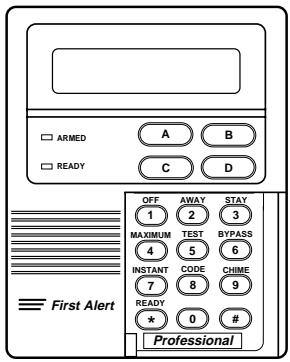
FA450KP/FA550KP Alpha Keypads (single line/2-line)
FA210KP Fixed-Word Keypad
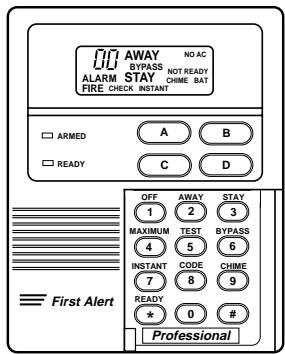
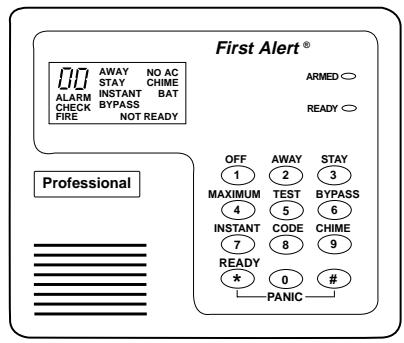
FA250KP Fixed-Word Keypad
ABOUT THE KEYPADS
Fixed-Word Keypad Displays
AWAY All burglary zones, interior & perimeter, are armed.
STAY Perimeter burglary zones, such as windows and doors are armed.
INSTANT Perimeter burglary zones armed and entry delay is turned off.
BYPASS One or more burglary protection zones have been bypassed.
NOT READY Appears when burglary portion of the system is not ready for arming (due to one or more open protection zones).
READY The burglary portion of the system is ready to be armed.
NO AC Appears when AC power has been cut off. System is operating on backup battery power.
AC Appears when AC power is present.
CHIME Appears when the CHIME feature is ON.
BAT Low battery condition in a wireless sensor (if zone number displayed) or low system battery (if no zone number displayed).
ALARM Appears when an intrusion has been detected and the system is armed (also appears during a fire alarm or audible emergency alarm). Accompanied by the protection zone in alarm.
CHECK Appears when a malfunction is discovered in the system at any time or if an open is detected in a FIRE zone at any time or a fault in a DAY/NIGHT burglary zone during a disarmed period. Accompanied by a display of zone number in trouble.
FIRE Appears when a fire alarm is present. Accompanied by a display of the zone in alarm.

AWA)
NO AC
L
CHIME
ALARM
BAT
CHECK
FIRE
NOT READY
STYLE A KEYPAD DISPLAY

AWAY
BYPASS
NO AC
ALARM
STAY
CHIME BAT
FIRE
CHECK INSTANT
STYLE B KEYPAD DISPLAY
FUNCTIONS OF THE KEYPAD
SEE TYPICAL ALPHA KEYPAD ON NEXT PAGE
- DISPLAY WINDOW. Alpha Keypad: A 2-line, 32-character Liquid Crystal Display (LCD). Displays protection zone identification, system status, and messages.
Fixed-Word Keypad: Displays protection zone ID and system status messages using pre-designated words. - OFF KEY: Disarms burglary portion of the system, silences alarms and audible trouble indicators, and clears visual display after problem's correction.
- AWAY KEY: Arms the entire burglary system, perimeter and interior.
- STAY KEY: Arms perimeter portion of burglary system only. Interior protection is not armed, which allows movement within premises without causing alarm.
- MAXIMUM KEY: Arms in manner similar to AWAY mode, but without the entry delay feature, thus providing maximum protection. An alarm will occur immediately upon opening any protection point, including the main door.
- TEST KEY: Tests the system and alarm sounder if disarmed. Refer to TESTING THE SYSTEM section for test procedures.
- BYPASS KEY: Removes individual protection zones from being monitored by the system.
- INSTANT KEY: Arms in manner similar to STAY mode, but without the entry delay feature. Entering via the entry/exit door will cause an instant alarm.
-
CODE KEY: Used to assign additional user codes for other users of the system.
-
CHIME KEY: Turns CHIME mode on and off. When on, the opening of windows or doors while the system is disarmed will sound 3 beeps at the keypad(s).
- READY KEY: Displays all open protection zones.
-
KEY: "Quick Arm" key permits ARMING of the system without the use of a security code (if so programmed).
- KEYS 0-9: Used to enter your security code(s). See Note on next page.
- READY INDICATOR: (GREEN) Lit when the system is ready to be armed (no faults present). While the system is disarmed, this indicator will go on and off as protection zones are closed and opened.
- ARMED INDICATOR: (RED) Lit when the system has been armed (STAY, AWAY, INSTANT or MAXIMUM).
-
INTERNAL SOUNDER: The built-in keypad sounder mimics the alarm sounder during alarms, and will also "beep" during certain system functions (see SUMMARY OF AUDIBLE/ VISUAL NOTIFICATION).
-
EMERGENCY (PANIC) KEYS:
Individual keys A, B, and C (key D not used).
On some keyboards, these keys are not present and certain key pairs may be available for emergency functions.
For further information, refer to the PANIC KEYS section.
FUNCTIONS OF THE KEYPAD
IMPORTANT:
When entering codes and commands, sequential key depressions must be made within 2 seconds of one another. If 2 seconds elapses without a key depression, the entry is aborted and must be repeated from its beginning.
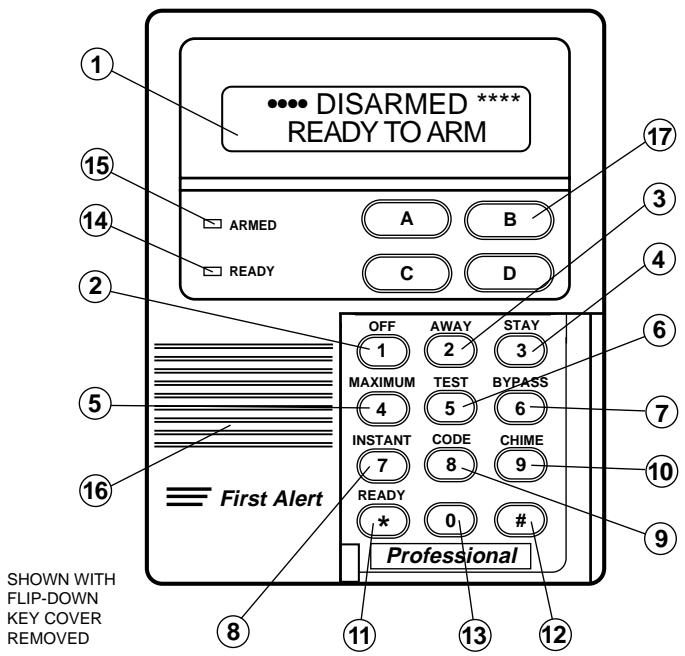
TYPICAL ALPHA KEYPAD
Fixed-Word Keypads are functionally similar, except for screen displays (see page 10).
CHECKING FOR OPEN ZONES
Before arming your system, all protected doors, windows and other protection zones must be closed or bypassed (see BYPASSING section). Otherwise the keypad will display a "Not Ready" message. Using the READY key will display all zones that are faulted, making it easier for you to secure any open zones.
To show faulted zones:
DIS ARMED- PRESS TO SHOW FAULTS
Note: Keypads light a green READY indicator when system is ready. If not lit, the system is not ready to be armed.
READY
1.
2.
FAULT OS FRONTUPSTAIRS BEDROOM
3.
DISARMED READY TO ARM
PRESS THE READY KEY
Do not enter the security code, but simply press the READY key.
SECURE FAULTED ZONES
Typical fault display shows open zones. Secure or bypass the zones displayed before arming the system.
SYSTEM CAN BE ARMED
The "Ready" message will be displayed when all protection zones have been either closed or bypassed. You may now arm the system as usual.
ARMING PERIMETER ONLY
(With Entry Delay ON)
Using the 3 STAY key
Use this key when you are staying home, but might expect someone to use the entrance door later.
When armed in STAY mode, the system will sound an alarm if a protected door or window is opened, but you may otherwise move freely throughout the premises. Late arrivals can enter through the entrance door without causing an alarm, but they must disarm the system within the entry delay period or an alarm will occur.
Close all protected perimeter windows and doors before arming (see CHECKING FOR OPEN ZONES section). The green READY indicator on the keypad should be lit if the system is ready to be armed.
STAY 1. (Security Code)
2.
ENTER SECURITY CODE THEN PRESS STAY
Example: 7 2 9 6 then press the STAY key.
LISTEN FOR 3 BEEPS
The keypad will beep three times and will display the armed STAY message. The red ARMED indicator also lights.
NOTE: If you wish to open the entry/exit door to let someone in after arming STAY, you can re-start the exit delay at any time (if programmed) - simply press the [] key, and then let that person in. This will avoid having to disarm the system and then re-arm it again.
ARMING PERIMETER ONLY
(With Entry Delay OFF)
Using the 7 INSTANT Key
Use this key when you are staying home and do not expect anyone to use the entrance door.
When armed in INSTANT mode, the system will sound an alarm if a protected door or window is opened, but you may otherwise move freely throughout the premises. The alarm will also sound immediately if anyone opens the entrance door.
Close all protected perimeter windows and doors before arming (see CHECKING FOR OPEN ZONES section). The green READY indicator on the keypad should be lit if the system is ready to be armed.
INSTANT
- + 7
(Security Code)
ENTER SECURITY CODE THEN PRESS INSTANT
Example: 7 2 9 6 then press the INSTANT key.
- ARNED·INSTANT·
LISTEN FOR 3 BEEPS
The keypad will beep three times and will display the armed INSTANT message. The red ARMED indicator also lights.
NOTE: If you wish to open the entry/exit door to let someone in after arming STAY, you can re-start the exit delay at any time (if programmed) - simply press the [] key, and then let that person in. This will avoid having to disarm the system and then re-arm it again.
ARMING ALL PROTECTION
(With Entry Delay ON)
Use this key when no one will be staying on the premises.
When armed in AWAY mode, the system will sound an alarm if a protected door or window is opened, or if any movement is detected inside the premises. You may leave through the entrance door during the exit delay period without causing an alarm. You may also re-enter through the entrance door, but must disarm the system within the entry delay period or an alarm will occur.
Close all protected perimeter windows and doors before arming (see CHECKING FOR OPEN ZONES section). The green READY indicator on the keypad should be lit if the system is ready to be armed.
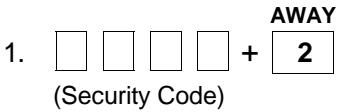
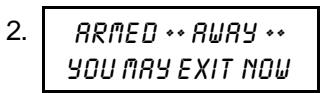
The "You May Exit Now" portion of the message disappears when the exit delay expires.
ENTER SECURITY CODE THEN PRESS AWAY
Example: 7 2 9 6 then press the AWAY key.
LISTEN
The keypad will beep twice, or beep continuously if an exit warning has been programmed for your system, and displays the armed AWAY message. The red ARMED indicator also lights.
2-Partition AWAY Arming
In a two-partition system, you can arm both partitions in the AWAY mode at the same time if the same master code is assigned to both partitions. You can do this from either partition's keypad. This procedure is not applicable to disarming or any other system function.
(Continued)
ARMING ALL PROTECTION
(With Entry Delay ON)
2-Partition AWAY Arming (Continued)
To arm both partitions, first make sure both partitions are READY TO ARM.
-
(Master Code) + AWAY + AWAY ENTER MASTER CODE THEN PRESS AWAY TWICE
-
ARNED **AWAY** YOU MAY EXIT NOW
The "You May Exit Now" portion of the message disappears when the exit delay expires.
Example: 7 2 9 6 and press the AWAY key, then press the AWAY key again.
The first press of AWAY arms the local partition, the second press of AWAY arms the other (remote) partition. The "Armed Away" display should appear, and remain displayed (with exit warning beeps, if programmed) throughout the exit delay period if both partitions were successfully armed AWAY. The red ARMED indicator should also light.
If the "READY TO ARM" message re-appears when the second AWAY key press is made, both partitions have failed to arm due to an open zone in the remote partition.
If the remote partition is not ready to arm, neither partition will arm when using this particular procedure.
ARMING ALL PROTECTION
(With Entry Delay OFF)
Using the 4 MAXIMUM Key
Use this key when the premises will be vacant for extended periods of time such as vacations, etc., or when no one will be moving through protected interior areas.
When armed in MAXIMUM mode, the system will sound an alarm if a protected door or window is opened, or if any movement is detected inside the premises. You may leave through the entrance door during the exit delay period without causing an alarm, but an alarm will be sounded as soon as someone re-enters.
Close all protected perimeter windows and doors before arming (see CHECKING FOR OPEN ZONES section). The green READY indicator on the keypad should be lit if the system is ready to be armed.
MAXIMUM
- + 4
(Security Code)
The "You May Exit Now" portion of the message disappears when the exit delay expires.
ENTER SECURITY CODE THEN PRESS MAXIMUM
Example: 7 2 9 6 then press the MAXIMUM key.
LISTEN
The keypad will beep twice, or beep continuously if exit warning has been programmed for your system, and will display the armed MAXIMUM message (AWAY/INSTANT on fixed-word keystads). The red ARMED indicator also lights.
DISARMING AND SILENCING ALARMS
Using the
1 OFF Key
Use the OFF key to disarm the system and to silence alarm and trouble sounds. See "SUMMARY OF AUDIBLE NOTIFICATIONS" section for information which will help you to distinguish between FIRE and BURGLARY alarm sounds.
IMPORTANT: If you return and the main burglary sounder is on, DO NOT enter the premises, but call the police from a nearby safe location. If you return after an alarm has occurred and the main sounder has shut itself off, the keypad will beep rapidly upon entering, indicating that an alarm has occurred during your absence and an intruder may still be on the premises. LEAVE IMMEDIATELY and CONTACT THE POLICE from a nearby safe location.
To disarm the system and silence burglary alarms:
OFF
- + 1
(Security Code)
- *** DISARMED ***
READY TO ARM
ENTER SECURITY CODE, THEN PRESS OFF
Example: 7 2 9 6 then press the OFF key.
LISTEN FOR 1 BEEP
The "Ready" message will be displayed (if no alarms have occurred while armed) and the keypad will beep once to confirm that the system is disarmed.
Memory of Alarm
If an alarm occurs, the keypad displays the zone number (s) that caused the alarm and the type of alarm. These messages remain displayed until cleared by a user. To clear the display, note the zone number displayed and repeat step 1 above. If the "Ready" message will not display, go to the displayed zone and correct the fault (close windows, etc.). If the fault cannot be corrected, notify your alarm company.
BYPASSING PROTECTION ZONES
Using the BYPASS Key
This key is used when you want to arm your system with one or more zones intentionally unprotected. Bypassed zones are unprotected and will not cause an alarm when violated while your system is armed. All bypasses are removed when an OFF sequence (security code plus OFF) is performed. Bypasses are also removed if the arming procedure that follows the bypass command is not successful.
The system will not allow fire zones to be bypassed.
To bypass zones, the system must be disarmed first.
BYPASS
- + 6
(Security Code)
2.
(Zone Numbers)
- BYPASS 07FRONTUPSTAIRS BEDROOM
Typical bypass message
- DISARMED BYPASS READY TO ARN
ENTER SECURITY CODE THEN PRESS BYPASS
Example: 7 2 9 6 then press the BYPASS key.
ENTER ZONE NUMBERS
Enter the zone number(s) for the zones to be bypassed (e.g., 01, 02, 03, etc.).
Important! All single-digit numbers must be preceded by a zero (for example, enter 01 for zone 1).
WAIT
The keypad will display the word BYPASS along with each bypassed zone number. Wait for these zones to be displayed, to be sure that intended zones are bypassed.
ARM AS USUAL
Arm the system as usual when the keypad displays the "Ready" message.
(Continued)
BYPASSING PROTECTION ZONES (Continued)
Quick Bypass
Your system may allow you to easily bypass all open (faulted) zones without having to enter zone numbers individually. Ask your installer if this feature is active.

All open (faulted) zones

All open zones, plus these zones as checked: 17 30 31
BYPASS
- + 6
(Security Code)
- BYPASS 07FRONTUPSTAIRS BEDROOM
Typical bypass message - DISARMED BYPASS READY TO ARM
ENTER SECURITY CODE THEN PRESS BYPASS
Example: 7 2 9 6 then press the BYPASS key.
WAIT. In a few moments, all open zones will be displayed along with the word BYPASS. Wait for these zones to be displayed before arming. Arming the system before zones are displayed eliminates all bypasses.
ARM AS UsUAL. Arm the system as usual when the keypad displays the "Ready" message.
Displaying Bypassed Zones
Previously bypassed zones can be displayed only when the system is disarmed, and when the "Bypass" message shown in step 3 above is displayed.
BYPASS
- 6
(Security Code)
- BYPASS 07FRONTUPSTAIRS BEDROOM
Typical bypass message
ENTER SECURITY CODE THEN PRESS BYPASS
Example: 7 2 9 6 then press the BYPASS key.
WAIT
In a few moments, all open zones will be sequentially displayed along with the word BYPASS.
CHIME MODE
Using the 9 Key
T or selected doors or windows if chime-by-zone feature is active. Ask installer if this feature applies to your system.
Your system can be set to alert you to the opening of any door or window† while it is disarmed by using CHIME mode. When activated, three beeps will sound at the keypad whenever a protected perimeter door or window is opened. Pressing the READY key will display the open protection points.
Note that the Chime mode can be activated only when the system is disarmed.
To turn Chime Mode on:
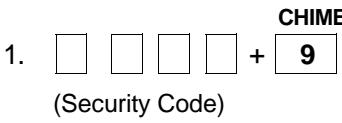
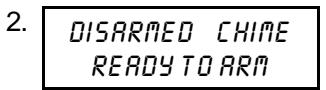
To turn Chime Mode off:
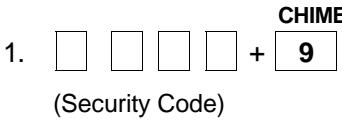
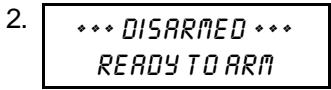
ENTER SECURITY CODE THEN PRESS CHIME
Example: 7 2 9 6 then press the CHIME key.
VIEW
The "Chime" message displays while chime mode is on.
ENTER SECURITY CODE THEN PRESS CHIME
Example: 7 2 9 6 then press the CHIME key.
VIEW
The "Chime" message disappears from the display.
Using Panic Keys
Your installer should note the functions that are active in your system.
Types of Panic Alarms
- If your system is connected to an alarm monitoring company.
PANIC KEYS
(FOR MANUALLY ACTIVATING SILENT AND/OR AUDIBLE ALARMS)
Your system may have been programmed to use special keys to manually activate panic functions. The functions that might be programmed are listed below. See your installer for the function(s) that may have been programmed for your system.
| Keys | Zone | Active Panic Function |
| A* or 1 and * | 95 | |
| B* or * and # | 99 | |
| C* or 3 and # | 96 |
- Not present on certain Fixed-word keypads, which use paired keys to activate panic alarms (e.g., 1 and , etc.).
If your keypad has lettered keys for panic functions, press the designated key and hold down for at least 2 seconds to activate the panic function. To use a panic function initiated by paired keys, simply press both keys of the assigned pair at the same time.
A silent emergency sends an alarm signal to the alarm monitoring company, but there will be no audible alarms or visual displays.
An audible emergency sends an emergency message to the alarm monitoring company* and sounds a loud, steady alarm at your keypad and at any external sounders that may be connected (ALARM plus a zone number is also displayed).
A personal emergency alarm sends an emergency message to the alarm monitoring company* and sounds at keypads, but not at external sounders (ALARM plus a zone number is also displayed).
A fire alarm sends a fire alarm message to the alarm monitoring company* and uniquely activates the keypad and any external sounders (FIRE plus a zone number is also displayed).
USING DEVICE COMMANDS
General Information
Your system may be set up so that certain lights or other devices can be turned on or off by using the device command from the keypad. Ask your installer if this has been done in your system. If programmed for your system, some devices may activate automatically upon certain system conditions. In this case, the following commands can be used to override the device activation. See your installer for a full explanation of this feature.
To activate devices
ENTER SECURITY CODE THEN PRESS # + 7 + DEVICE NUMBER
□ □ □ + # + 7 +
(Security Code) (Device Number)
Example: 7 2 9 6 then press [#], then press [7], then enter the number representing the device you wish to activate. See your installer for device numbers assigned for your system.
To de-activate devices
ENTER SECURITY CODE THEN PRESS # + 8 + DEVICE NUMBER
□ □ □ + # + 8 +
(Security Code) (Device Number)
Example: 7 2 9 6 then press [#], then press [8], then enter the number representing the device you wish to de-activate. See your installer for device numbers assigned for your system.
| Device | Description | Device | Description |
| 1 | 5 | ||
| 2 | 6 | ||
| 3 | 7 | ||
| 4 | 8 |
PAGING FEATURE
If the paging feature has been programmed for your system, a pager will respond to certain conditions as they occur in your system by displaying a 10-digit code that will indicate the type of condition that has occurred. The 10-digit code will use the following format:
SSSS-EEE-NNN
SSSS will be your particular 4-digit subscriber No. (this same number will always appear at the beginning of the display on your pager).
EEE will be a 3-digit number that describes the event that has occurred in your system (see explanation below).
NNN will be a 3-digit User or a zone number, depending on the type of event that has occurred.
The 3-digit Event Codes (EEE) that can be displayed are:
911 = Alarm (NNN that follows this code will be the zone number that has caused the alarm)
001 = Open, System disarmed (NNN that follows this code will be the User number)
002 = Close, System armed (NNN that follows this code will be the User number)
811 = Trouble (NNN that follows this code will be the zone number that has caused the trouble)
Example 1. Pager displays: 1234 - 911 - 004
This indicates that your system (Subscriber No. 1234) is reporting an Alarm (911), due to zone 4 (004) being faulted.
Example 2. Pager displays: 1234 - 001 - 005
This indicates that your system (Subscriber No. 1234) is reporting an open/disarming (001) by User 5 (005).
SECURITY CODES
| General Information | As an additional safety feature, other users who do not have a need to know your code can be assigned different security codes. These secondary users are identified by "user numbers," which are selected when assigning a user's security code. You can assign up to 14 additional user codes (user numbers 03-16), including the babysitter and duress codes. Note that the master (primary) user of the system is the only one who can assign codes to secondary (or temporary) users, and is user number 02; user number 01 is reserved for the installer of the system. All codes can be used interchangeably when performing system functions (a system armed with one user's code can be disarmed by another user's code), with the exception of the babysitter code described below. |
| Babysitter Code | This code can be used to arm the system in assigned partitions, but cannot disarm the system unless the system was armed with this code. This code is typically assigned to someone (such as a babysitter) who has a need to arm/disarm the system only at certain times. The babysitter code is assigned to user 15. The user of this code should not use the "Quick Arming" feature described below. |
| Duress Code | This feature is intended for use when you are forced to disarm or arm the system under threat. When used, the system will act normally, but can silently notify the alarm monitoring company of your situation, if that service has been provided. Duress code is assigned to user 16. Important: This code is useful only when the system is connected to a alarm monitoring company. |
| Quick Arming | Note that if "Quick Arming" was programmed by the installer, the # key can be pressed in place of the security code when arming the system. The security code must always be used to disarm the system, however. |
SECURITY CODES
To Add a User or Change a User's Code
Important: Temporary users of the system (e.g., babysitters, cleaning staff, etc.) should not be shown how to use any system function they do not need to know, such as bypassing protection zones for example.
Sequential key depressions for all steps in a procedure must be made within 2 seconds of one another, or else the entire entry is aborted and must be repeated from its beginning (e.g., perform steps 1, 2, and 3 below with no delay between steps).
(Master Code) CODE 1.
2. (User Number) Enter 2-digit user number. Enter the 2-digit User Number (03-16) for the user you are adding or changing.
3. (User's Code) Enter 4-digit user's code. Enter the new 4-digit security code for that user.
To Delete a User (Master Code) CODE 8
- (User Number) Enter 2-digit user number to be deleted. Enter the 2-digit User Number (03-16) for the user whose code you are deleting. Wait (about 3 seconds) until the keypad beeps once before pressing any other key. The code is automatically deleted.
To Change Your Master Code Original Master Code CODE



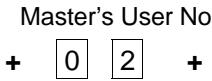
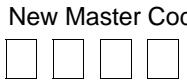
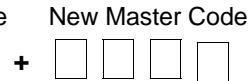
Note that the new Master Code must be entered twice.
TESTING THE SYSTEM
The TEST key puts your system into the Test mode, which allows each protection point to be checked for proper operation. The keypad sounds a single beep every 40 seconds as a reminder that the system is in the Test mode.
Note: An alarm message will not be sent to your alarm monitoring company during the following tests.
- *** DISARMED ***
READY TO ARM
TEST 2. (Security Code) - 4.
DISARM THE SYSTEM
Disarm the system and close all protected windows, doors, etc. The "Ready" message should be displayed and the green READY indicator lit.
ENTER THE SECURITY CODE THEN PRESS TEST
Example: 7 2 9 6 then press the TEST key.
LISTEN
The external sounder should sound for 2 seconds and then turn off. If the sounder does not sound, CALL FOR SERVICE IMMEDIATELY.
FAULT ZONES
Open each protected door and window in turn and listen for three beeps from the keypad. Identification of each faulted protection point should appear on the display. The display will clear when the door or window is closed.
(Continued)
TESTING THE SYSTEM
Walk in front of any interior motion detectors (if used) and listen for three beeps. The identification of the detector should appear on the display when it is activated. The display will clear when no motion is detected. Note that if wireless motion detectors are used, there is a 3-minute delay between activations. This is to conserve battery life.
To test all smoke detectors, follow the manufacturer's instructions. The identification of each detector should appear on the display when each is activated.
If a problem is experienced with any protection point (no confirming sounds, no display), CALL FOR SERVICE IMMEDIATELY.
When all protection points have been checked and are intact (closed), there should be no zone identification numbers displayed on the keypad
When testing is completed, exit the TEST mode by continuing with step 5.
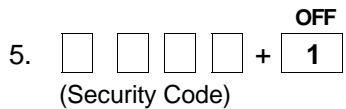
EXIT TEST MODE
Enter your security code and press the OFF key. If the test mode is inadvertently left active, it automatically turns off after 4 hours.
TROUBLE CONDITIONS
Typical "Check" Displays
The word CHECK on the Keypad's display, accompanied by a rapid "beeping" at the Keypad, indicates that there is a trouble condition in the system. The displays in parenthesis may appear on non-alpha keypads when the associated trouble condition is present. To silence the beeping sound for "check" conditions, press any key.
-
Note that zone number 9 represents a problem with wireless receivers or other system devices, which are not user serviceable. CALL FOR SERVICE IMMEDIATELY.
-
CHECK + Indicates that a problem exists with those zone(s)*. First, determine Zone No. if the zone(s) displayed are intact and make them so if they are not. and/or If the zone uses a wireless detector, check that changes in the room (moving furniture, televisions, etc.) are not blocking wireless signals from the detector. If the problem has been corrected, the zone descriptor(s) and CHECK should disappear. If not, key an OFF sequence (security code plus OFF) to clear the display. A CHECK condition can also indicate a wiring problem. If the "check" display persists, CALL FOR SERVICE IMMEDIATELY.
Note that the system will not allow arming if a CHECK condition exists. To arm the system with a CHECK condition present, you must first bypass the zone(s) having the CHECK condition.
- Telco Fault (or CHECK and zone 94) If the telephone line monitor feature has been programmed for your system, this display indicates that the telephone line has been disconnected or cut. In some systems, this display will be accompanied by a trouble sound from the keypad and the external sounder may be activated. CONTACT YOUR SERVICE COMPANY IMMEDIATELY. To silence the trouble sound, enter your security code plus OFF.
- COMM. Indicates that a failure has occurred in the telephone communication failure portion of your system. CALL FOR SERVICE IMMEDIATELY. (or FC) (or FC)
TROUBLE CONDITIONS (Continued)
- The beeping that accompanies a low battery display (items 4 & 5) can be stopped by entering an OFF sequence (code + OFF).
** Not all systems use wireless transmitters.
- SYSTEM LO BAT (or BAT with no zone No.)
- LO BAT + zone descriptor (or BAT with zone No.)
- MODEM COMM (or CC)
- POWER indicator (if present) is off. AC LOSS is displayed (or NO AC)
- Busy-Standby (or dl)
- OPEN CIRCUIT (or OC)
- Long Rng Trbl (or bF)
Indicates that a low system battery condition exists; this is accompanied by a trouble sound* at the Keypad. CALL FOR SERVICE AT ONCE.
Indicates that a low battery condition exists in the wireless transmitter** displayed; accompanied by by a once-per-minute "beeping"* at the Keypad. Replace the battery in the affected wireless transmitter as soon as possible (see page 00), or CALL FOR SERVICE.
Indicates that the control is on-line with the central station's remote computer. The control will not operate while on-line. Wait a few minutes. The display should disappear.
The system is operating on battery power only. If only some lights are out on the premises, check circuit breakers and fuses and reset or replace as necessary. CALL FOR SERVICE IMMEDIATELY if AC power cannot be restored to the system.
If this remains displayed for more than 1 minute, the system is disabled. CALL FOR SERVICE IMMEDIATELY.
The keypad is not receiving signals from the control. CALL FOR SERVICE IMMEDIATELY.
If programmed, your back-up Long Range Radio communication has failed. CALL FOR SERVICE IMMEDIATELY.
FIRE ALARM SYSTEM (IF INSTALLED)
General
Your fire alarm system (if installed) is active 24 hours a day, providing continuous protection. In the event of an emergency, the installed smoke and heat detectors will automatically activate you security system, triggering a loud, interrupted sound from the Keypad. An interrupted sound will also be produced by optional exterior sounders. A FIRE message will appear at your Keypad and remain on until you silence and clear the alarm display.
In Case Of Fire
- Should you become aware of a fire emergency before your detectors sense the problem, go to your nearest Keypad and press the single panic key (or panic key pair) assigned as FIRE emergency (if programmed by the installer) and hold down for at least 2 seconds. The alarm will sound.
- Evacuate all occupants from the premises.
- If flames and/or smoke are present, leave the premises and notify your local Fire Department immediately.
- If no flames or smoke are apparent, investigate the cause of the alarm. The zone descriptor of the zone(s) in an alarm condition will appear at the Keypad.
Silencing A Fire Alarm
- Silence the alarm by pressing the OFF key. To clear the alarm display, enter your code and press the OFF key again.
- If the Keypad indicates a trouble condition after the second OFF sequence, check that smoke detectors are not responding to smoke or heat producing objects in their vicinity. Should this be the case, eliminate the source of heat or smoke.
- If this does not remedy the problem, there may still be smoke in the detector. Clear it by fanning the detector for about 30 seconds.
- When the problem has been corrected, clear the display by entering your code and pressing the OFF key.
NATIONAL FIRE PROTECTION ASSN. RECOMMENDATIONS ON SMOKE DETECTORS
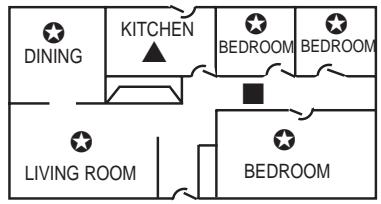
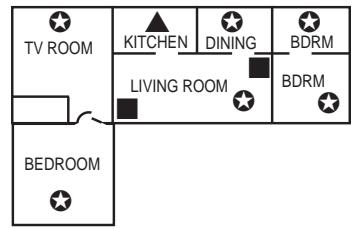
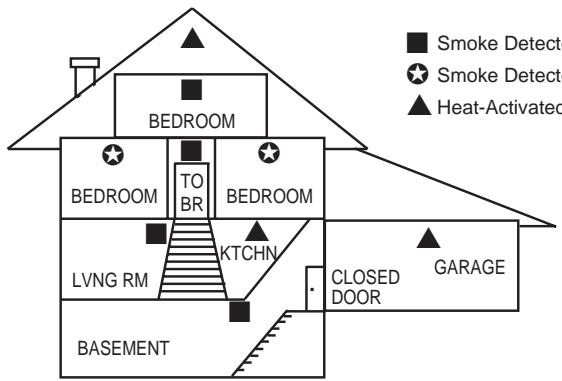
Smoke Detectors for Minimum Protection
Smoke Detectors for Additional Protection
Heat-Activated Detectors
With regard to the number and placement of smoke/heat detectors, we subscribe to the recommendations contained in the National Fire Protection Association's (NFPA) Standard #74 noted below.
Early warning fire detection is best achieved by the installation of fire detection equipment in all rooms and areas of the household as follows: A smoke detector installed outside of each separate sleeping area, in the immediate vicinity of the bedrooms and on each additional story of the family living unit, including basements and excluding crawl spaces and unfinished attics.
In addition, the NFPA recommends that you install heat or smoke detectors in the living room, dining room, bedroom(s), kitchen, hallway(s), attic, furnace room, utility and storage rooms, basements and attached garages.
Steps to Safety
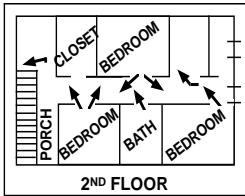
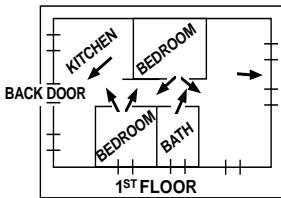
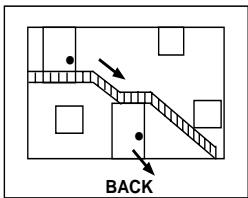
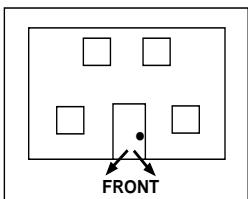
EMERGENCY EVACUATION
Establish and regularly practice a plan of escape in the event of fire. The following steps are recommended by the National Fire Protection Association:
- Plan on your detector or your interior and/or exterior sounders warning all occupants.
- Determine two means of escape from each room. One path of escape should lead to the door that permits normal exit from the building. The other may be a window, should your path be unpassable. Station an escape ladder at such windows if there is a long drop to the ground.
- Sketch a floor plan of the building. Show windows, doors, stairs and rooftops that can be used to escape. Indicate escape routes for each room. Keep these routes free from obstruction and post copies of the escape routes in every room.
- Make sure that all bedroom doors are shut while you are asleep. This will prevent deadly smoke from entering while you escape.
- Try the door. If the door is hot, check your alternate escape route. If the door is cool, open it cautiously. Be prepared to slam the door if smoke or heat rushes in.
- In smoky areas, crawl close to floor, hold your breath, and/or cover mouth and nose with a wet cloth.
- Escape quickly; don't panic.
- Establish a common meeting place outdoors, away from your premises, where everyone can meet and then take steps to contact the authorities and account for those missing. Choose someone to assure that nobody returns to the premises — many die going back.
See "How to Prepare a Fire Escape Plan", published by First Alert Professional, for more details.
MAINTAINING YOUR SYSTEM
Taking Care of Your System
The components of your security system are designed to be as maintenance-free as possible. However, to make sure that your system is in reliable working condition.
- Test your system weekly.
- Test your system after any alarm occurs (see TESTING THE SYSTEM).
Replacing Batteries in Wireless Sensors
Wireless sensors may not have been used in your security system
Each wireless sensor in your system has a 9-volt or 3-volt battery. The system detects a low battery in any wireless sensor, including smoke detectors, the optional personal emergency transmitter, and the optional portable wireless keypad. (A low battery in a portable wireless keypad is detected as soon as one of its keys is pressed, and the wired keypad will display "00".)
Alkaline batteries provide a minimum of 1 year of operation, and in most units and applications, provide 2-4 years of service. 3-volt lithium batteries provide up to 4 or more years of operation. Actual battery life will depend on the environment in which the sensor is used, the number of signals that the transmitter in the sensor has had to send, and the specific type of sensor. Factors such as humidity, high or low temperatures or large swings in temperature, may all lead to the reduction of actual battery life in an installation.
If you have a low battery in a wireless sensor, a low battery message is displayed on the keypad.
In addition, a battery-operated smoke detector with a low battery also emits a single "chirp" sound approximately once every 20-30 seconds, identifying itself as the smoke detector with the weak battery.
Note: The low battery message comes on as a warning that battery replacement in indicated sensor(s) is due within 30 days. In the meantime, a sensor causing a low battery indication is still fully operational.
Important: Use only batteries recommended by your installer as replacement.
MAINTAINING YOUR SYSTEM
Silencing Low Battery Warning Tones at the Keypad
You can silence the keypad's warning tones by pressing the OFF key, but the keypad's low battery message display will remain on as a reminder that you have a low battery condition in one or more of your sensors. When you replace the weak battery with a fresh one, the sensor will send a "good battery" signal to the control as soon as the sensor is activated (opening/closing of door, window, etc.), causing the low battery display to turn off. If the sensor is not activated, the display will automatically clear within approximately 1 hour.
Routine Care
- Treat the components of your security system as you would any other electrical equipment. Do not slam sensor-protected doors or windows.
- Keep dust from accumulating on the keypad and all protective sensors, particularly on motion sensors and smoke detectors.
- The keypad and sensors should be cleaned carefully with a dry soft cloth. Do not spray water or any other fluid on the units.
QUICK GUIDE TO SYSTEM FUNCTIONS
| FUNCTION | PROCEDURE | COMMENTS |
| Check Zones | Press [★] | Do this to view faulted zones when system not ready. |
| Arm System | Enter code Press arming key desired (AWAY, STAY, INSTANT, MAXIMUM) | Do this to arm the system in the mode selected. |
| Disarm System | Enter code Press OFF [1] | Do this to disarm the system and silences alarms. |
| Bypass zones | Enter code Press BYPASS [6] Enter zone numbers to be bypassed (use 2-digit entries) | Do this to bypass protection zones. Bypassed zones are un-protected and will not cause an alarm if violated. |
| Quick Bypass | Enter code Press BYPASS [6] and stop | Do this to bypass all faulted zones automatically, if programmed. Zones 17, 30 and 31 will also be bypassed, even if not faulted (depending on programming, and if used in your particular system). |
| Chime Mode ON | Enter code Press CHIME [9] | Do this to turn on chime mode. Keypad will sound if doors or windows are violated while system disarmed. |
| Chime Mode OFF | Enter code Press CHIME [9] | Do this to turn chime mode off. |
QUICK GUIDE TO SYSTEM FUNCTIONS
(Continued)
| FUNCTION | PROCEDURE | COMMENTS |
| Test Mode ON | Enter code | Do this to enter test mode. Sounds alarm sounder and allows sensors to be tested. |
| Test Mode OFF | Press TEST [5] | Do this to turn test mode off. System returns to normal mode. |
| Enter code | ||
| Press OFF [1] | ||
| Add or Change a User | Enter master code | Do this to add or change a user code. |
| Press CODE [8] | ||
| Enter user's 2-digit user No. | ||
| Enter code for that user | ||
| Delete a User | Enter master code | Do this to delete a user code from the system. |
| Press CODE [8] | ||
| Enter user number. to be deleted | ||
| Change a Master Code | Enter master code | Do this to change the existing master code. |
| Press CODE [8] | ||
| Press [0] + [2] (master user no.) | ||
| Enter new 4-digit master code | ||
| Enter new master code again |
SUMMARY OF AUDIBLE NOTIFICATIONS
(ALPHA DISPLAY KEYPADS)
| SOUND | CAUSE | DISPLAY |
| LOUD, INTERRUPTED* Keypad & External | FIRE ALARM | FIRE is displayed; descriptor of zone in alarm is displayed. |
| LOUD, CONTINUOUS* Keypad & External | BURGLARY/AUDIBLE EMERGENCY ALARM | ALARM is displayed; descriptor of zone in alarm is also displayed. |
| ONE SHORT BEEP (not repeated) Keypad only | a. SYSTEM DISARM b. SYSTEM ARMING ATTEMPT WITH AN OPEN ZONE. c. BYPASS VERIFY | a. DISARMED/READY TO ARM is displayed. b. The number and descriptor of the open protection zone is displayed. c. Numbers and descriptors of the bypassed protection zones are displayed (One beep is heard for each zone displayed). Subsequently, the following is displayed: DISARMED BYPASS ...Ready to Arm |
| ONE SHORT BEEP (once every 40 seconds) Keypad only | SYSTEM IS IN TEST MODE | Opened Zone identifications will appear. |
| ONE BEEP every 40 sec. Keypad only | LOW BATTERY AT A TRANSMITTER | LO BAT displayed with description of transmitter. |
| TWO SHORT BEEPS Keypad only | ARM AWAY OR MAXIMUM | ARMED AWAY or ARMED MAXIMUM is displayed. Red ARMED indicator is lit. |
| THREE SHORT BEEPS Keypad only | a. ARM STAY OR INSTANT b. ZONE OPENED WHILE SYSTEM IS IN CHIME MODE. | a. ARMED STAY or ARMED INSTANT is displayed. Red ARMED indicator is lit. b. CHIME displayed, descriptor of open protection zone will be displayed if the [×] key is pressed. |
| RAPID BEeping Keypad only | a. TROUBLE b. MEMORY OF ALARM | a. CHECK displayed. Descriptor of troubled protection zone is displayed. b. FIRE or ALARM is displayed; descriptor of zone in alarm is displayed. |
| SLOW BEeping Keypad only | a. EXIT DELAY WARNING (if programmed) b. ENTRY DELAY WARNING | a. ARMED AWAY or ARMED MAXIMUM is displayed along with You May Exit Now b. DISARM SYSTEM OR ALARM WILL OCCUR is displayed. Exceeding the delay time without disarming causes alarm. |
- If a bell is used as external sounder, fire alarm is pulsed ring; burglary/audible emergency is steady ring.
GLOSSARY
The following terms are used throughout the manual.
ARM/DISARM: "Armed" simply means that the burglary portion of your system is turned ON and is in a state of readiness. "Disarmed" means that the burglary system is turned OFF, and must be rearmed to become operational. However, even in a "disarmed" state, "emergency" and "fire" portions of your system are still operational.
KEYPAD: This is the area on your Keypad containing numbered pushbuttons similar to those on telephones or calculators. These keys control the arming or disarming of the system, and perform other functions which were previously described in this manual.
ZONE: A specific area of protection.
PARTITION: An independent group of zones that can be armed and disarmed without affecting other zones or users.
BYPASS: To disarm a specific area of burglary protection while leaving other areas operational.
DELAY ZONE: An area of protection containing doors most frequently used to enter or exit (typically, a front door, back door, or door from the garage into the building). The delay zone allows sufficient time for authorized entry or exit without causing an alarm. Consult your installer for the entry and exit delay times that have been set for your system during installation and record them in the space provided in this manual on page 7.
DAY/NIGHT ZONE: An area of protection whose violation causes a trouble indication during the disarmed (DAY) mode and an alarm during the armed (NIGHT) mode.
CANADIAN DEPARTMENT OF COMMUNICATIONS (DOC) STATEMENT
NOTICE
The Canadian Department of Communications label identifies certified equipment. This certification means that the equipment meets certain telecommunications network protective, operational and safety requirements. The Department does not guarantee the equipment will operate to the user's satisfaction.
Before installing this equipment, users should ensure that it is permissible to be connected to the facilities of the local telecommunications company. The equipment must also be installed using an acceptable method of connection. In some cases, the company's inside wiring associated with a single line individual service may be extended by means of certified connector assembly (telephone extension cord). The customer should be aware that compliance with the above conditions may not prevent degradation of service in some situations.
Repairs to certified equipment should be made by an authorized Canadian maintenance facility designated by the supplier. Any repairs or alterations made by the user to this equipment, or equipment malfunctions, may give the telecommunications company cause to request the user to disconnect the equipment.
Users should ensure for their own protection that the electrical ground connections of the power utility, telephone lines and internal metallic water pipe system, if present, are connected together. This precaution may be particularly important in rural areas.
Caution: User should not attempt to make such connections themselves, but should contact the appropriate electric inspection authority, or electrician, as appropriate.
The Load Number (LN) assigned to each terminal device denotes the percentage of the total load to be connected to a telephone loop which is used by the device, to prevent overloading. The termination on a loop may consist of any combination of devices subject only to the requirement that the total of the Load Numbers of all the devices does not exceed 100.
AVIS
This form should be completed and forwarded to your homeowner's insurance carrier for possible premium credit.
A. GENERAL INFORMATION:
Insured's Name and Address:
Insurance Company: Policy No.
First Alert Professional FA162C Other
Type of Alarm: Burglary Fire Both
Installed by: Serviced by:
Name
Name
Address
Address
B. NOTIFIES (Insert B = Burglary, F = Fire)
Local Sounding Device _ Police Dept. _ Fire Dept. __
Alarm Monitoring Company □ Name:
Address:
Phone:
C. POWERED BY: A.C. With Rechargeable Power Supply
D. TESTING: Quarterly Monthly Weekly Other
(continued on other side)
OWNER'S INSURANCE PREMIUM CREDIT REQUEST (cont.)
E. SMOKE DETECTOR LOCATIONS
Furnace Room
Kitchen
Bedrooms
Attic
Basement
Living Room
Dining Room
Hall
F. BURGLARY DETECTING DEVICE LOCATIONS:
Front Door
Basement Door
Rear Door
All Exterior Doors
1st Floor Windows
All windows
Interior locations
All Accessible Openings, Including Skylights, Air Conditioners and Vents
G. ADDITIONAL PERTINENT INFORMATION:
Signature:
Date:
FEDERAL COMMUNICATIONS COMMISSION (FCC) Part 15 STATEMENT
This equipment has been tested to FCC requirements and has been found acceptable for use. The FCC requires the following statement for your information:
This equipment generates and uses radio frequency energy and if not installed and used properly, that is, in strict accordance with the manufacturer's instructions, may cause interference to radio and television reception. It has been type tested and found to comply with the limits for a Class B computing device in accordance with the specifications in Part 15 of FCC Rules, which are designed to provide reasonable protection against such interference in a residential installation. However, there is no guarantee that interference will not occur in a particular installation. If this equipment does cause interference to radio or television reception, which can be determined by turning the equipment off and on, the user is encouraged to try to correct the interference by one or more of the following measures:
- If using an indoor antenna, have a quality outdoor antenna installed.
- Reorient the receiving antenna until interference is reduced or eliminated.
- Move the receiver away from the control/communicator.
- Move the antenna leads away from any wire runs to the control/communicator.
- Plug the control/communicator into a different outlet so that it and the receiver are on different branch circuits.
If necessary, the user should consult the dealer or an experienced radio/television technician for additional suggestions.
The user or installer may find the following booklet prepared by the Federal Communications Commission helpful: "Interference Handbook". This booklet is available from the U.S. Government Printing Office, Washington, DC 20402.
The user shall not make any changes or modifications to the equipment unless authorized by the Installation Instructions or User's Manual. Unauthorized changes or modifications could void the user's authority to operate the equipment.
IN THE EVENT OF TELEPHONE OPERATIONAL PROBLEMS
In the event of telephone operational problems, disconnect the control by removing the plug from the RJ31X (CA38A in Canada) telephone wall jack. We recommend that your certified installer demonstrate disconnecting the phones on installation of the system. Do not disconnect the phone connection inside the control/communicator. Doing so will result in the loss of your phone lines. If the regular phone works correctly after the control/communicator has been disconnected from the phone lines, the control/communicator has a problem and should be returned for repair. If upon disconnection of the control/communicator, there is still a problem on the line, notify the telephone company that they have a problem and request prompt repair service. The user may not under any circumstances (in or out of warranty) attempt any service or repairs to the system. It must be returned to the factory or an authorized service agency for all repairs.
FEDERAL COMMUNICATIONS COMMISSION (FCC) Part 68 NOTICE
This equipment complies with Part 68 of the FCC rules. On the front cover of this equipment is a label that contains, among other information, the FCC registration number and ringer equivalence number (REN) for this equipment. If requested, this information must be provided to the telephone company.
This equipment uses the following jacks:
An RJ31X is used to connect this equipment to the telephone network.
The REN is used to determine the quantity of devices which may be connected to the telephone line. Excessive RENs on the telephone line may result in the devices not ringing in response to an incoming call. In most, but not all areas, the sum of the RENs should not exceed five (5.0). To be certain of the number of devices that may be connected to the line, as determined by the total RENs, contact the telephone company to determine the maximum REN for the calling area.
If this equipment causes harm to the telephone network, the telephone company will notify you in advance that temporary discontinuance of service may be required. If advance notice is not practical, the telephone company will notify the customer as soon as possible. Also, you will be advised of your right to file a complaint with the FCC if you believe necessary.
The telephone company may make changes in its facilities, equipment, operations, or procedures that could affect the operation of the equipment. If this happens, the telephone company will provide advance notice in order for you to make the necessary modifications in order to maintain uninterrupted service.
If trouble is experienced with this equipment, please contact the manufacturer for repair and warranty information. If the trouble is causing harm to the telephone network, the telephone company may request you remove the equipment from the network until the problem is resolved.
There are no user serviceable components in this product, and all necessary repairs must be made by the manufacturer. Other repair methods may invalidate the FCC registration on this product.
This equipment cannot be used on telephone company-provided coin service. Connection to Party Line Service is subject to state tariffs.
This equipment is hearing-aid compatible.
When programming or making test calls to an emergency number, briefly explain to the dispatcher the reason for the call. Perform such activities in the off-peak hours; such as early morning or late evening.
WARNING! THE LIMITATIONS OF THIS ALARM SYSTEM
While this system is an advanced design security system, it does not offer guaranteed protection against burglary or fire or other emergency. Any alarm system, whether commercial or residential, is subject to compromise or failure to warn for a variety of reasons. For example:
- Intruders may gain access through unprotected openings or have the technical sophistication to bypass an alarm sensor or disconnect an alarm warning device.
- Intrusion detectors (e.g. passive infrared detectors), smoke detectors, and many other sensing devices will not work without power. Battery operated devices will not work without batteries, with dead batteries, or if the batteries are not put in properly. Devices powered solely by AC will not work if their AC power supply is cut off for any reason, however briefly.
- Signals sent by wireless transmitters may be blocked or reflected by metal before they reach the alarm receiver. Even if the signal path has been recently checked during a weekly test, blockage can occur if a metal object is moved into the path.
- A user may not be able to reach a panic or emergency button quickly enough.
- While smoke detectors have played a key role in reducing residential fire deaths in the United States, they may not activate or provide early warning for a variety of reasons in as many as 35% of all fires, according to data published by the Federal Emergency Management Agency. Some of the reasons smoke detectors used in conjunction with this System may not work are as follows. Smoke detectors may have been improperly installed and positioned. Smoke detectors may not sense fires that start where smoke cannot reach the detectors, such as in chimneys, in walls, or roofs, or on the other side of closed doors. Smoke detectors also may not sense a fire on another level of a residence or building. A second floor detector, for example, may not sense a first floor or basement fire. Moreover, smoke detectors have sensing limitations. No smoke detector can sense every kind of fire every time. In general, detectors may not always warn about fires caused by carelessness and safety hazards like smoking in bed, violent explosions, escaping gas, improper storage of flammable materials, overloaded electrical circuits, children playing with matches, or arson. Depending upon the nature of the fire and/or the locations of the smoke detectors, the detector, even if it operates as anticipated, may not provide sufficient warning to allow all occupants to escape in time to prevent injury or death.
WARNING! THE LIMITATIONS OF THIS ALARM SYSTEM (continued)
- Passive Infrared Motion Detectors can only detect intrusion within the designed ranges as diagrammed in their installation manual. Passive Infrared Detectors do not provide volumetric area protection. They do create multiple beams of protection, and intrusion can only be detected in unobstructed areas covered by those beams. They cannot detect motion or intrusion that takes place behind walls, ceilings, floors, closed doors, glass partitions, glass doors, or windows. Mechanical tampering, masking, painting or spraying of any material on the mirrors, windows or any part of the optical system can reduce their detection ability. Passive Infrared Detectors sense changes in temperature; however, as the ambient temperature of protected area approaches the temperature range of 90^ to 105^ F, the detection performance can decrease.
- Alarm warning devices such as sirens, bells or horns may not alert people or wake up sleepers if they are located on the other side of closed or partly open doors. If warning devices sound on a different level of the residence from the bedrooms, then they are less likely to waken or alert people inside the bedrooms. Even persons who are awake may not hear the warning if the alarm is muffled from a stereo, radio, air conditioner or other appliance, or by passing traffic. Finally, alarm warning devices, however loud, may not warn hearing-impaired people or waken deep sleepers.
- Telephone lines needed to transmit alarm signals from a premises to a central monitoring station may be out of service or temporarily out of service. Telephone lines are also subject to compromise by sophisticated intruders.
- Even if the system responds to the emergency as intended, however, occupants may have insufficient time to protect themselves from the emergency situation. In the case of a monitored alarm system, authorities may not respond appropriately.
- This equipment, like other electrical devices, is subject to component failure. Even though this equipment is designed to last as long as 10 years, the electronic components could fail at any time.
The most common cause of an alarm system not functioning when an intrusion or fire occurs is inadequate maintenance. This alarm system should be tested weekly to make sure all sensors and transmitters are working properly.
Installing an alarm system may make one eligible for lower insurance rates, but an alarm system is not a substitute for insurance. Homeowners, property owners and renters should continue to act prudently in protecting themselves and continue to insure their lives and property.
We continue to develop new and improved protection devices. Users of alarm systems owe it to themselves and their loved ones to learn about these developments.
SERVICING INFORMATION
Your local First Alert dealer is the person best qualified to service your alarm system.
Arranging some kind of regular service program with him is advisable.
Your local First Alert dealer is:
Name:
Address:
Phone:
- INDEX -
1-Line Alpha Keypads 9
2-Line Alpha keypads 9
2-Partition AWAY Arming. 17
AC Loss 32
Add A User 28,39
Alpha Keypad 9,13
Arming 13, 15, 16, 17, 18, 19, 38
Audible Emergency 11, 24, 40
Audible Notifications 40
Away 5,11,12,17,26,38,40
Away Mode 12, 17, 26, 38
Babysitter Code 27
Burglary Protection 4,5,41
Bypass 12, 14, 21, 38, 41
Check 11,31
Chime 5,7,23,38
Chime Mode 5,9,11,23,38,40
Comm. Failure 32
Common Zone 8
Delete A User 28,39
Disarming 20, 26, 38, 41
Displaying Bypassed Zones 22
Duress Code 13,27
Emergency Evacuation 35
Entry Delay 5,7,11
Exit Delay ...5, 7, 8, 17, 18, 19, 40, 41
Exit Alarm 8
Fire 4,6,11,20,21,33,35,41
Fire Alarm 24,33,40
Fire Protection 6, 34, 35
Fire Emergency 33
Fire Escape 35
Fixed-Word Keypads 9, 11
Instant 5, 11, 12, 16, 38, 40
Instant Mode 16,38
Keypads 9,10,11,12,13
Keyswitch 26
Lo Bat 32,40
Low Battery 11,32,36,37,40
Maximum 5, 7, 12, 19, 38, 40
Maximum Mode 19,38
Memory Of Alarm 6, 20, 26, 40
Modem Comm 32
National Fire Protect Assn. 34, 35
Not Ready 11, 14, 18, 26, 38
Off Key 20
Panic Functions 24
Panic Keys 13, 33, 24
Partitioned System 4
Personal Emergency 24
Quick Arming 27
QuickBypass. 22,38
Quick Guide to System Functions .. 38
Replacing Batteries in Wireless Sensors 36
Ready Key 14,33
Security Codes 5, 27, 28
Servicing Information 49
Silencing Alarms 20,33
Silencing Low Battery Warning .... 37
Silent Emergency 24
Sounder 76,9,12,20,24,29,40
Special AWAY Arming 17
Stay 5,11,12,15,26,38,40
Stay Mode 12, 15, 26, 38
System Lo Battery 32
Summary of Audible Notifications .. 40
Telephone Problems 42
Temporary Users 28
Test Key 29
Test Mode 29,30,39,40
Trouble Conditions 31, 32
User Codes 12, 27
User Number 27,38,39
Voice Module 6
Wireless Sensor 11,36
Zones 4
ONE YEAR LIMITED WARRANTY
Pittway Corporation, and its divisions, subsidiaries and affiliates ("Seller"), 165 Eileen Way, Syosset, New York 11791, warrants its First Alert Professional security equipment (the "product") to be free from defects in materials and workmanship for one year from date of original purchase, under normal use and service. Seller's obligation is limited to repairing or replacing, at its option, free of charge for parts, labor, or transportation, any product proven to be defective in materials or workmanship under normal use and service. Seller shall have no obligation under this warranty or otherwise if the product is altered or improperly repaired or serviced by anyone other than the Seller. In case of defect, contact the security professional who installed and maintains your security equipment or the Seller for product repair.
This one year Limited Warranty is in lieu of all other express warranties, obligations or liabilities. THERE ARE NO EXPRESS WARRANTYES, WHICH EXTEND BEYOND THE FACE HEREOF. ANY IMPLIED WARRANTYES, OBLIGATIONS OR LIABILITIES MADE BY SELLER IN CONNECTION WITH THIS PRODUCT, INCLUDING ANY IMPLIED WARRANTY OF MERCHANTABILITY, OR FITNESS FOR A PARTICULAR PURPOSE OR OTHERWISE, ARE LIMITED IN DURATION TO A PERIOD OF ONE YEAR FROM THE DATE OF ORIGINAL PURCHASE. ANY ACTION FOR BREACH OF ANY WARRANTY, INCLUDING BUT NOT LIMITED TO ANY IMPLIED WARRANTY OF MERCHANTABILITY, MUST BE BROUGHT WITHIN 12 MONTHS FROM DATE OF ORIGINAL PURCHASE. IN NO CASE SHALL SELLER BE LIABLE TO ANYONE FOR ANY CONSEQUENTIAL OR INCIDENTAL DAMAGES FOR BREACH OF THIS OR ANY OTHER WARRANTY, EXPRESS OR IMPLIED, OR UPON ANY OTHER BASIS OF LIABILITY WHATSOEVER, EVEN IF THE LOSS OR DAMAGE IS CAUSED BY THE SELLER'S OWN NEGLIGENCE OR FAULT. Some states do not allow limitation on how long an implied warranty lasts or the exclusion or limitation of incidental or consequential damages, so the above limitation or exclusion may not apply to you.
Seller does not represent that the product may not be compromised or circumvented; that the product will prevent any personal injury or property loss by burglary, robbery, fire or otherwise; or that the product will in all cases provide adequate warning or protection. Buyer understands that a properly installed and maintained alarm may only reduce the risk of a burglary, robbery, fire or other events occurring without providing an alarm, but it is not insurance or a guarantee that such will not occur or that there will be no personal injury or property loss as a result. CONSEQUENTLY, SELLER SHALL HAVE NO LIABILITY FOR ANY PERSONAL INJURY, PROPERTY DAMAGE OR OTHER LOSS BASED ON A CLAIM THE PRODUCT Failed TO GIVE WARNING. HOWEVER, IF SELLER IS HELD LIABLE, WHETHER DIRECTLY OR INDIRECTLY, FOR ANY LOSS OR DAMAGE ARISING UNDER THIS LIMITED WARRANTY OR OTHERWISE, REGARDLESS OF CAUSE OR ORIGIN, SELLER'S MAXIMUM LIABILITY SHALL NOT IN ANY CASE EXCEED THE PURCHASE PRICE OF THE PRODUCT, WHICH SHALL BE THE COMPLETE AND EXCLUSIVE REMEDY AGAINST SELLER. This warranty gives you specific legal rights, and you may also have other rights which vary from state to state. No increase or alteration, written or verbal, to this warranty is authorized.

175 Eileen Way Syosset, New York 11791 Copyright © 1997 PITTWAY CORPORATION