DIGITAL TENS - Physiotherapy device IBP - Free user manual and instructions
Find the device manual for free DIGITAL TENS IBP in PDF.


User questions about DIGITAL TENS IBP
0 question about this device. Answer the ones you know or ask your own.
Ask a new question about this device
Download the instructions for your Physiotherapy device in PDF format for free! Find your manual DIGITAL TENS - IBP and take your electronic device back in hand. On this page are published all the documents necessary for the use of your device. DIGITAL TENS by IBP.
USER MANUAL DIGITAL TENS IBP
Electrical nerve and muscle stimulator
Instructions for use
- How will these instructions help you? 31
- Background information 31
2.1 What is pain? 31
2.2 What is TENS? 31
2.3 What is EMS? 31 - The Digital TENS 32
- Your safety is important to us 32
4.1 For what range of use is the Digital TENS suitable? 32
4.2 For what range of use is the Digital TENS unsuitable? 33
4.3 For what areas of application is the Digital TENS suitable? 33
4.4 For what areas of application is the Digital TENS unsuitable? 33
4.5 Other points to consider 34 - How to protect the Digital TENS 35
- Unpacking and checking the goods as supplied....36
- Inserting the battery 37
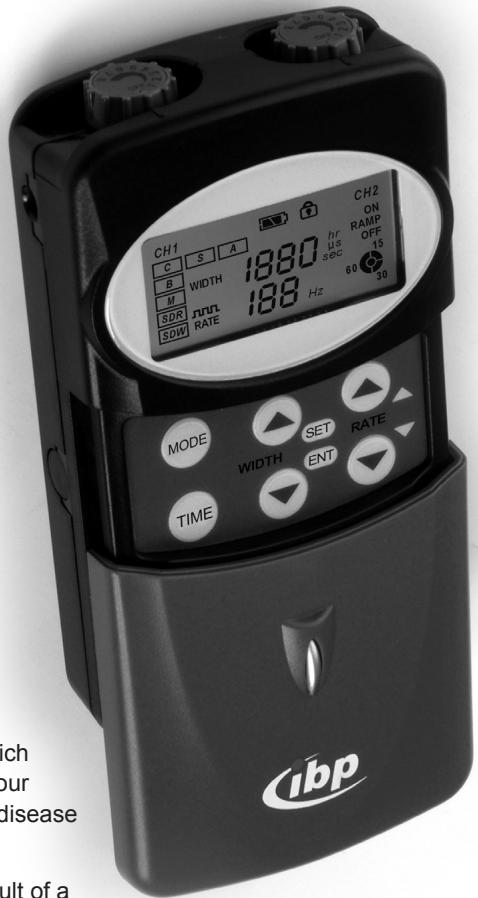
- The controls and displays on the Digital TENS 38
8.1 Controls 38
8.2 Displays 40 - Carrying out treatment 41
9.1 What you need to take into account when carrying out treatment. 41
9.2 Where should you not attach the self-adhesive electrodes? 41
9.3 Where can you attach the self-adhesive electrodes? 41
9.4 How to carry out treatment 42 - Setting up the Digital TENS 45
10.1 Setting the TENS parameters 45
10.2 Setting the EMS parameters 45
10.3 Selecting the operating mode 46
10.4 Pre-setting the duration of treatment 48
10.5 Switching the programme lock on and off 48
11. Calling up and re-setting the usage monitoring facility 49
12. Cleaning and caring for your Digital TENS 50
12.1 Cleaning 50
12.2 Changing the self-adhesive electrodes 50
12.3 Changing the battery 50
12.4 Storing your Digital TENS 50
13. What to do if there's a problem 51
14. Re-ordering accessories 51
15. Service and Warranty 52
15.1 Service address 52
15.2 Warranty and indemnity 52
16. Waste disposal and care of the environment 52
17. Technical data 53
18. What do the labels on the Digital TENS mean? 54
19. Examples of treatment using TENS 55
19.1 Neck, shoulder and arm pain, headaches caused by a problem in the cervical spine 55
19.2 Neck and shoulder pain 55
19.3 Pain in the elbow 55
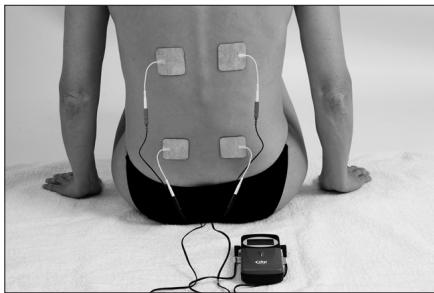
19.4 Pain in the region of the lumbar spine 55
19.5 Pain in the knee 55
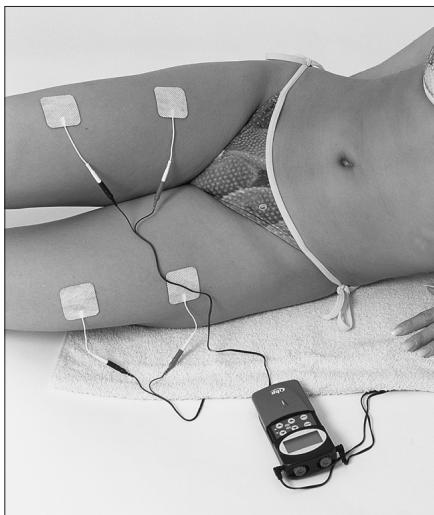
19.6 Pain in the hip 56
19.7 Pain in the ankle 56
20. Examples of treatment using EMS 56
20.1 Biceps (upper arm) 56
20.2 Triceps (upper arm) 56
20.3 Firm abdominal muscles 56
20.4 Firm back muscles 57
20.5 Quadiceps (upper thigh) 57
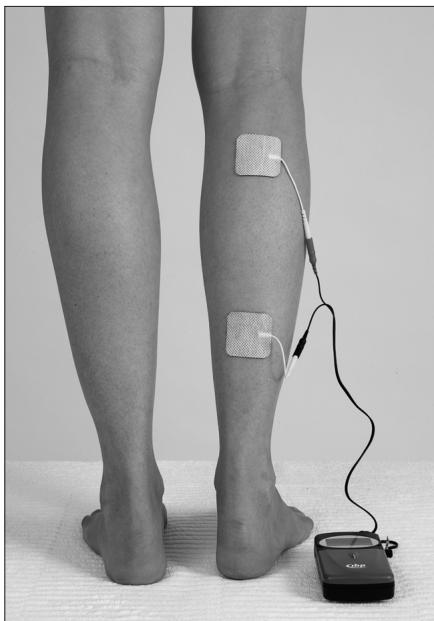
20.6 Calf muscles 57
1. How will these instructions help you?
Warning!
This symbol warns you about possible damage to your health.
NB!
This symbol draws your attention to possible damage to your appliance.
① Note
This symbol draws your attention to particularly useful information about using your appliance.
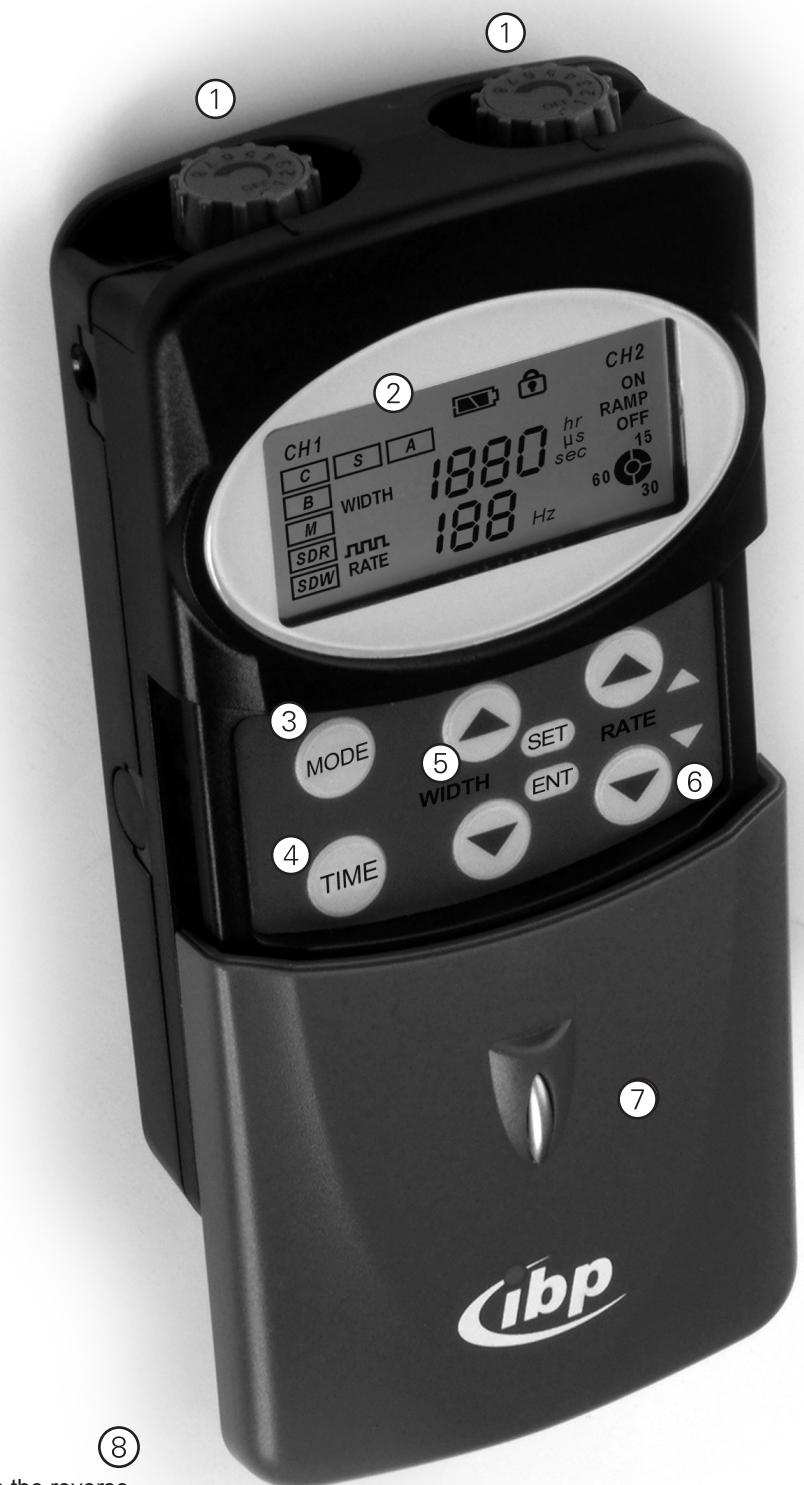
The important parts of your appliance are marked with numbers.
Using these part numbers, you can safely identify the displays and controls whose significance and use we explain in this manual. You will therefore find that we have put the part numbers in brackets at the appropriate points in these instructions.
2. Background information
2.1 What is pain?
Acute pain (protective pain) is a natural warning system which draws our attention to the fact that something is wrong with our bodies. Acute pain helps us to recognise the early onset of disease and to treat it.
Chronic pain is not a natural condition. It occurs as the result of a fault in the affected nerve cells and no longer functions as a warning.
Chronic pain is persistent, recurrent pain that lasts for longer than 3 - 6 months. Chronic pain occurs irrespective of its original cause: the original cause either no longer exists or can no longer be remedied.
2.2 What is TENS?
TENS, Transcutaneous (delivered via the skin) Electrical Nerve Stimulation, is a valuable method in the treatment of pain. TENS blocks the transmission of pain signals to the brain. The patient is no longer aware of the pain or is less aware of it.
2.3 What is EMS?
EMS, Electrical Muscle Stimulation, is a method of physiotherapy that has been used for many years in preventive medicine and rehabilitation.
Normally an electrical signal from the brain causes a muscle to contract.
EMS produces this electrical signal artificially: low frequency pulses stimulate the nerves that lie beneath the skin, and these in turn stimulate the underlying muscles.
EMS at a low frequency of 1 - 10 Hz results in an intense contraction of the muscle and thus leads to the build-up of the muscle.
EMS at a medium frequency of 20 - 50 Hz improves the blood supply to the muscle by producing quick, consecutive muscle contractions.
3. The Digital TENS
The Digital TENS produces electrical pulses: you can adjust the intensity, rate (frequency) and amplitude of these pulses to suit your own particular treatment requirements.
Self-adhesive electrodes are stuck onto the skin and conduct the electrical pulses into the nervous system in the area being treated. These stimulations are not painful. You will only feel a gentle prickling or vibration on the skin.
The Digital TENS has two independently controllable output channels and offers you a choice of five modes of TENS operation and two modes of EMS operation.
Particular advantages of the Digital TENS:
Easy to use at home or away
Freedom to move whilst using the appliance
Always available
No known side effects when used as intended.
4. Your safety is important to us
Please read these instructions carefully before using your Digital TENS for the first time. They cover all you need to know in order to operate your Digital TENS safely and avoid damage.
This instruction manual is an important part of your purchase. Keep it safe – until you either pass on your Digital TENS with these instructions to a new owner or finally dispose of the appliance.
4.1 For what range of use is the Digital TENS suitable?

We recommend that you consult your doctor or physiotherapist before using the Digital TENS.
- Your doctor or therapist will help you decide on your course of treatment and to monitor its progress.
The Digital TENS is only intended for external use on human beings.
The Digital TENS may only be used as described in this instruction manual.
4.2 For what range of use is the Digital TENS unsuitable?

Danger of sparking and explosion!
The Digital TENS does not have AP/APG protection. Do not place the Digital TENS near highly inflammable materials, highly inflammable gases or explosives.

Electromagnetic radiation!
The Digital TENS can interfere with electronic monitoring equipment such as ECG monitors and ECG alarms. Do not place the Digital TENS near machines of this type.
4.3 For what areas of application is the Digital TENS suitable?

In TENS operating mode:
- The TENS operating mode is only suitable for the treatment of chronic pain which has been diagnosed as such without doubt.
- Treatment with the Digital TENS has no effect on non-specific pain such as non-specific headaches.

In EMS operating mode:
The EMS operating mode is only suitable for the following areas of application:
- The treatment of muscular atrophy (muscular dystrophy) caused by inactiveness, enforced rest, illness or degeneration
Muscular re-education (building up the muscles) - The prevention of post-operative venous thrombosis
The treatment of muscular cramps - Muscular training by sportsmen and -women.
4.4 For what areas of application is the Digital TENS unsuitable?

Treatments with the Digital TENS are of a purely symptomatic nature. They cannot bring about any healing.
In TENS or EMS operating mode: Do not use the Digital TENS
- if the patient suffers from allergic skin reactions. Self-adhesive electrodes may lead to irritation of the skin.
-
if the patient suffers from heart problems, in particular cardiac dysrhythmia. The stimulation current may lead to ventricular fibrillation and in the worst case scenario to cardiac arrest.
-
if the patient has a heart pacemaker, other electronic implants or metallic implants. The stimulation current may interfere with the function of the implant.
- if the patient suffers from convulsive disorders. In the worst case scenario the stimulation current may cause convulsive seizures.
- if the patient is pregnant. In the worst case scenario the stimulation current may cause premature contractions.
- during menstruation. In the worst case scenario the stimulation current may increase the amount of bleeding and cause or aggravate cramps.
- on areas of the skin in which the patient no longer has any sensation of pain. Self-adhesive electrodes may lead to irritation of the skin and burns.
- if the patient suffers from systemic diseases (i.e. those affecting the whole body)
In EMS operating mode: Do not use the Digital TENS
- if the patient has a tendency to bleeding, e.g. after an acute injury or an acute fracture.
The stimulation current may cause or increase bleeding. - if the patient has recently undergone an operation and strong muscular contractions could adversely affect the healing process.
- on swollen or inflamed areas of the patient's body, e.g. over varicose veins or where there is phlebitis.
- over areas of the body which are affected by cancer.
4.5 Other points to consider

Do not use the Digital TENS or its accessories if they are damaged. The stimulation current can cause pain and burning.
Do not leave the Digital TENS within reach of children. Children may swallow small parts and choke on them.
Do not use the Digital TENS when driving or operating machinery. The operation of the Digital TENS could distract you from your work and lead to an accident.
Any inadvertent change in the set-up of the Digital TENS could frighten you by causing unpleasant skin reactions or sudden muscular contractions. Do not use the Digital TENS if a sudden fright could cause you to injure yourself in any way.
Only use the Digital TENS with accessories that are recommended by ibp. See the section on Ordering accessories.

Fire hazard!
Do not short-circuit the battery.
Explosion hazard, fire hazard!
Do not attempt to recharge a non-rechargeable battery.
The battery may leak or explode and cause a fire.
Danger of poisoning and choking!
Children can swallow batteries.
Keep the batteries away from children.
5. How to protect the Digital TENS

The electronics of the Digital TENS are affected by humidity and moisture.
Do not hold the Digital TENS under running water, do not dip it into water or other liquids and do not carry it when swimming or in a sauna.
The Digital TENS is sensitive to heat.
Do not expose the Digital TENS to direct sunlight and do not place the Digital TENS on a hot surface.
⑦
6. Unpacking and checking the goods as supplied
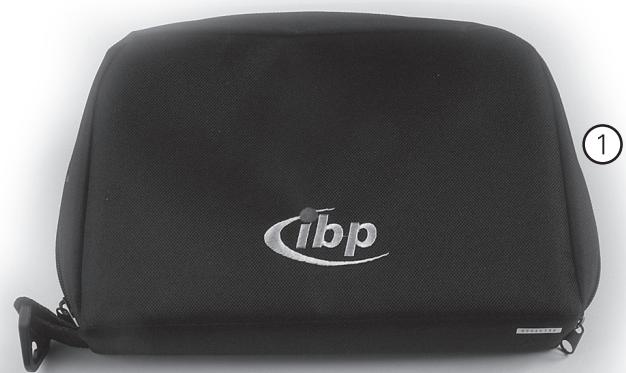
① Storage case
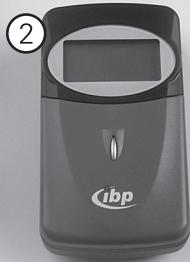
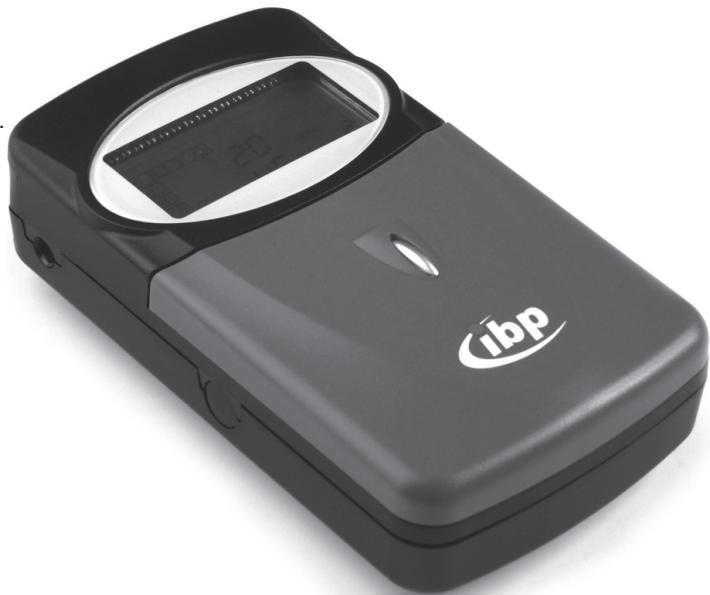
② Digital TENS appliance
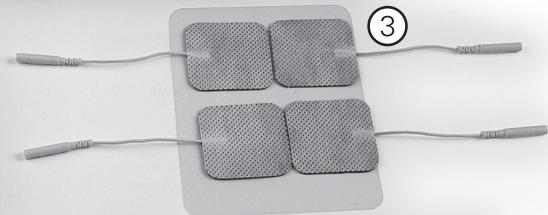
(3) 4 self-adhesive electrodes on protective film
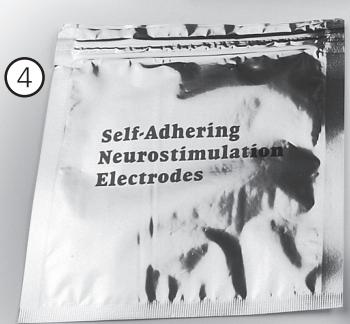
(4) 1 re-sealable bag for storing the self-adhesive electrodes
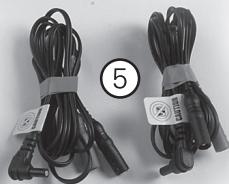
⑤ 2 electrical cables
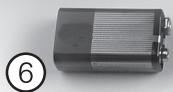
⑥ 9Vbattery
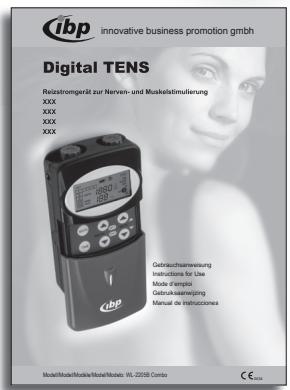
⑦ Instruction manual
- Open the storage case.
① Keep the storage case so that you can put the Digital TENS away safely in it after each treatment.
2. Check that all the parts have been supplied.
3. Check the delivered goods for any possible damage during shipment.
If any part of the delivered goods is damaged, please contact our Service Department (see Service and Warranty).
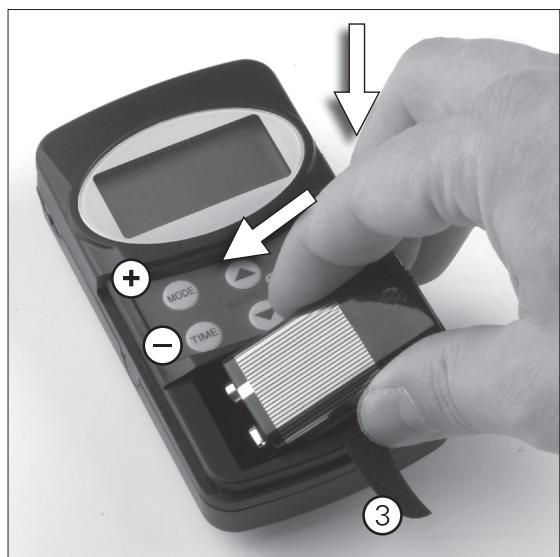
7. Inserting the battery
① Faceplate
② Battery compartment
③ Ribbon pull to aid removal of battery
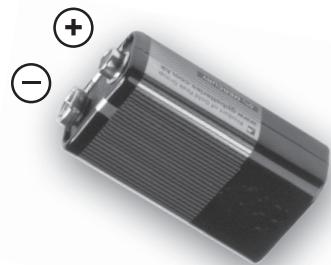
Positive pole
Negative pole
- Unpack the battery.
-
Open the battery compartment: Using your thumb, push the faceplate down as far as it will go and remove it.
-
Insert the battery:
The ribbon pull must lie under the battery.
- Insert the face of the battery with the connections into the left side of the battery compartment.
- Then carefully press the battery down on the right side until it snaps into place.
Make sure that the positive and negative poles are inserted the right way round.
- Close the battery compartment: Replace the faceplate and push it up with your thumb until it snaps into place.
8. The controls and displays on the Digital TENS
8.1 Controls
| Item | Control | Function |
| ① | On/off knob, impulse strength control | Use the left knob to switch Channel 1 of the Digital TENS on and off. Use the right knob to switch Channel 2 of the Digital TENS on and off. You can increase and decrease the strength of the pulses for Channel 1 and Channel 2 independently of one another by rotating the appropriate knob clockwise or anticlockwise. |
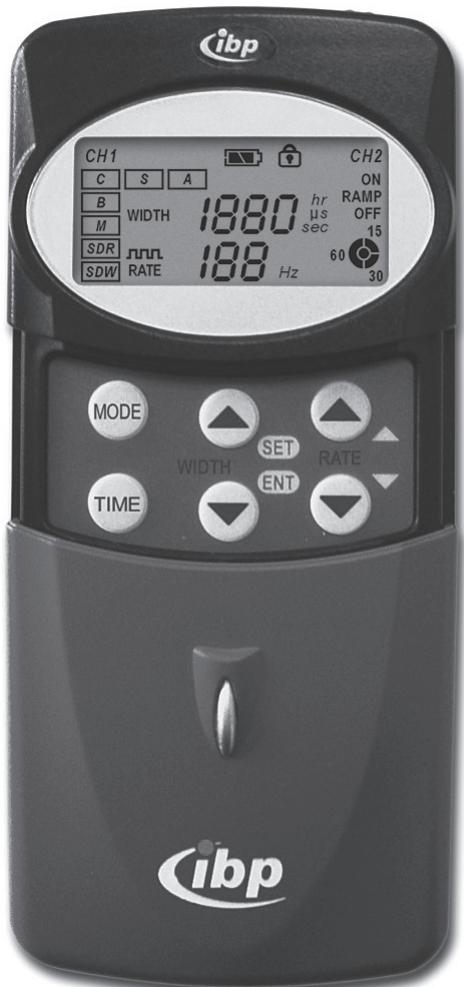
| ② | Display | The display shows all the current settings when the Digital TENS is switched on. |
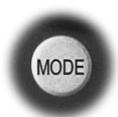
| ③ | MODE | Use this button to select the mode for your treatment. You can choose between five TENS operating modes and two EMS operating modes. The operating mode which is currently selected will flash. |
| ④ | TIME | Use this button to set the length of the treatment. You can choose between a treatment lasting 15, 30 or 60 minutes. The setting applies to both channels. |
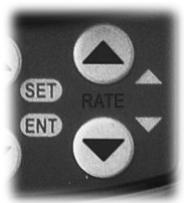
| ⑤ | Width ▲ (Set)* Width ▼ (ENT) (Pulse width) | Use these buttons to increase (▲) or decrease (▼) the width of the pulse. Each time you press on the button you increase or decrease the width of the pulse by 10 μs. If you hold the button down, the increase or decrease in the pulse width is accelerated. The setting applies to both channels. |
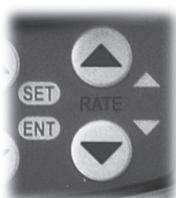
| ⑥ | RATE ▲* RATE ▼ (Pulse frequency) | Use these buttons to raise (▲) or lower (▼) the frequency of the pulse. Each time you press on the button you raise or lower the frequency of the pulse by 5 Hz. If you hold the button down, the rise or fall in the pulse frequency is accelerated. The setting applies to both channels. |
| ⑦ | Faceplate | Covers all the buttons so that you do not inadvertently alter your settings. |
| ⑧ | Belt clip | You can use the belt clip to fix your Digital TENS to your clothing. |
*In EMS modes S (synchronous) and A (alternating) the WIDTH and RATE buttons each have a dual function.
On the reverse, not visible
8.2 Displays
| Item | Display | Meaning |
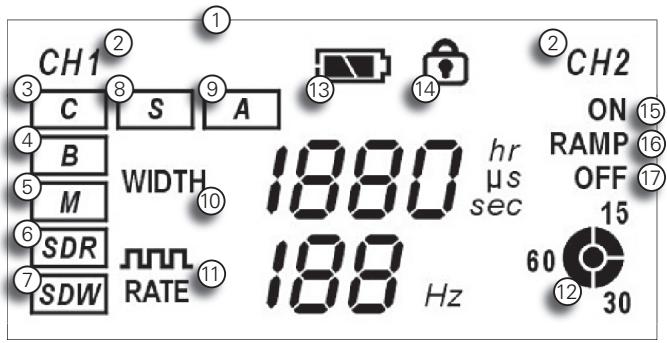
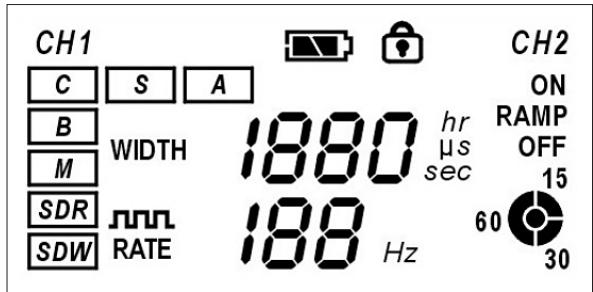
| ① | Display | Displays all the current settings |
| ② | CH1, CH2 | Channel 1, Channel 2 |
| ③ | C | Continuous operation with constant pulse sequence (TENS operating mode) |
| ④ | B | Cyclical operation (TENS operating mode) |
| ⑤ | M | Modulating operation (TENS operating mode) |
| ⑥ | SDR | Strength/Duration/Rate modulation operation (TENS operating mode) |
| ⑦ | SDW | Strength/Duration/Width modulation operation (TENS operating mode) |
| ⑧ | S | Synchronous operation (EMS mode) |
| ⑨ | A | Alternating operation (EMS mode) |
| ⑩ | WIDTH | Displays the pulse width in μs (only in TENS operating modes) |
| ⑪ | RATE | Displays the pulse frequency in Hz |
| ⑫ | 156030 | Displays the setting for the duration of the treatment in minutes |
| ⑬ | Shows that the battery needs changing | |
| ⑭ | Shows that the current settings are locked | |
| ⑮ | ON | Cycle switch-on time in seconds (only in EMS operating modes) |
| ⑯ | RAMP | Build-up period (ramp) in seconds (only in EMS operating modes) |
| ⑰ | OFF | Cycle switch-off time in seconds (only in EMS operating modes) |
9. Carrying out treatment
9.1 What you need to take into account when carrying out treatment

- Keep to the treatment plan as agreed with your doctor or therapist.
Stop the treatment immediately if it starts to become unpleasant and consult your doctor or therapist. - Stop the treatment immediately if it has had no effect following a treatment session of the length agreed with your doctor or therapist, and consult your doctor or therapist.
- Stop the treatment if after long-term usage the skin becomes irritated at the points where the self-adhesive electrodes are applied. Only continue with the treatment once you have checked the cause of the skin irritation with your doctor or therapist.
9.2 Where should you not attach the self-adhesive electrodes?

Do not attach the self-adhesive electrodes to the eyelids. The stimulation current may damage the eye.
- Do not attach the self-adhesive electrodes to the mouth, larynx or throat area. The stimulation current can lead to muscle cramps and thus to suffocation.
- Do not attach the self-adhesive electrodes to the area of the carotid sinus (the area at the front of the neck over the carotid sinus nerve). In patients with a sensitive carotid sinus reflex the stimulation current may result in cardiac arrest.
- Do not attach the self-adhesive electrodes to the inside of the mouth or in the immediate vicinity of the heart. The stimulation current could flow directly via the heart and result in ventricular fibrillation or even cardiac arrest.
- Do not attach the self-adhesive electrodes in such a way that the current passes directly through the brain, e.g. on both temples. The stimulation current may set off convulsive seizures.
9.3 Where can you attach the self-adhesive electrodes?

The correct positioning of the self-adhesive electrodes is an important factor for successful treatment.
Follow the instructions of your doctor or therapist precisely.
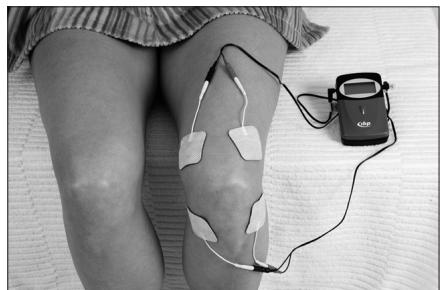
As a rule, the self-adhesive electrodes are positioned directly over the painful area or in its immediate vicinity. It is also possible to encircle the painful area with four self-adhesive electrodes.
Self-adhesive electrodes for EMS treatment are positioned at the origin and point of attachment of a muscle.
Please refer to the examples of use in sections 20 and 21 of this instruction manual.
9.4 How to carry out treatment
During treatment you should keep a minimum of 1 m away from microwave and short wave appliances. Electromagnetic interaction may affect the functioning of the Digital TENS.
1. Use scissors to cut off any lush growth of hair at the points where you want to apply the self-adhesive electrodes as recommended by your doctor or therapist.
① Do not shave the areas concerned.
2. Use a mild soap solution to clean the skin at the points where you want to apply the self-adhesive electrodes. Rinse off the soap solution well and dab the skin with a towel until it is thoroughly dry.
3. Connect the two-way adaptor of the self-adhesive electrodes with the two-way adaptor at the end of the supply cable.
① According to what your doctor or therapist recommends, you may also carry out treatment using just one pair of electrodes. In this case make the connections for this one pair of electrodes only.
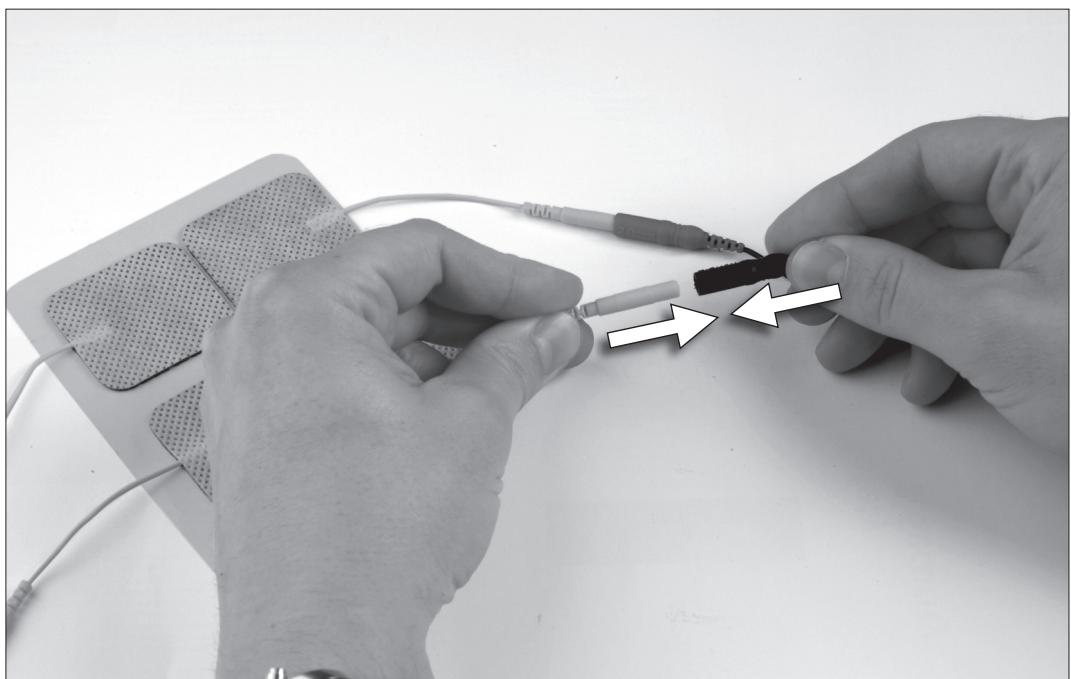

Do not touch the self-adhesive electrodes unless both channels of the Digital TENS are switched off. The strong current may cause an unpleasant sensation on the small area of the finger.
- Remove the self-adhesive electrodes from the protective film.

Always pull the self-adhesive electrodes by the plaster and never by the wires. The wires may break if subjected to too much mechanical stress.
- Stick the self-adhesive electrodes onto the contact points recommended by your doctor or therapist.
Do not overstretch the skin when you stick on the electrodes. Lay the self-adhesive electrode lightly onto the skin and then press the electrode gently from the centre to the outside.
The self-adhesive electrodes must adhere firmly to the skin. Replace with new self-adhesive electrodes when the adhesive has become weak.
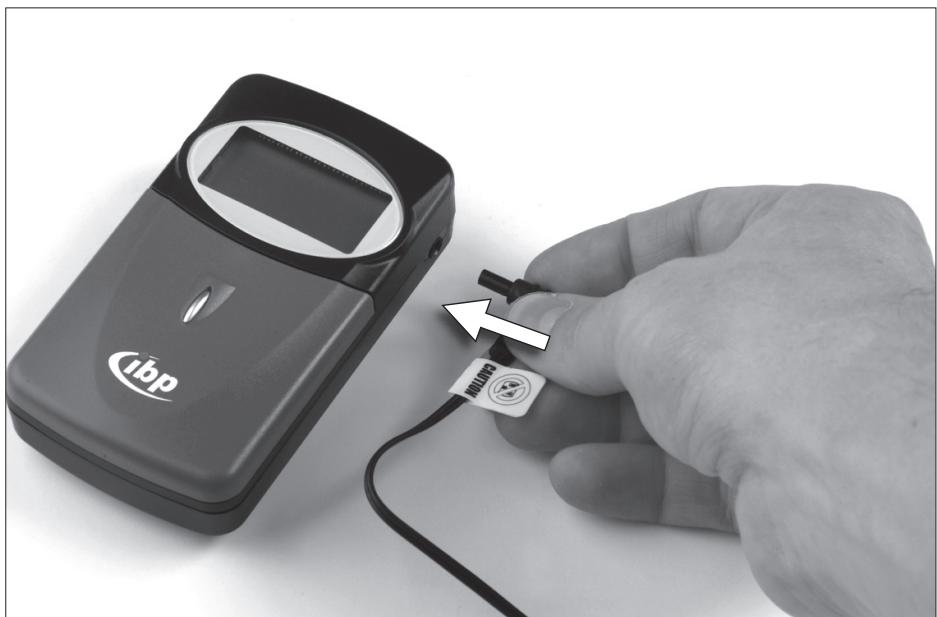
- Connect the supply cable to the output jack on the Digital TENS appliance.

Insert the plug into the output jack as far as it will go.
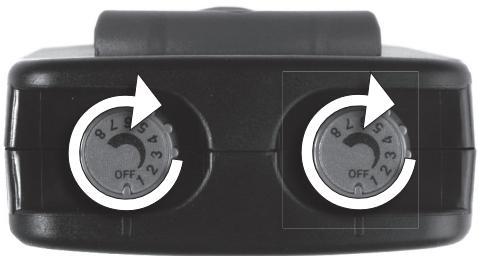
- Switch on Channel 1 and Channel 2 of the Digital TENS by rotating the left and right knobs clockwise until you hear a click. The display will be activated and will show the current settings.
NB: Make sure that the current settings are as specified by your doctor or therapist.
- Set the pulse intensity for Channel 1 and Channel 2 by turning the left and right on/off knobs slowly clockwise until the stimulation reaches a pleasant level of intensity.
- Reduce the pulse intensity or switch off the Digital TENS if you begin to find the stimulation unpleasant.
- Ending the treatment:
When the treatment duration as set has expired, the stimulation will cease automatically and the display on the Digital TENS will go out. Switch off Channel 1 and Channel 2 of the Digital TENS by turning the left and right on/off knobs anticlockwise until you hear a click. - Remove the self-adhesive electrodes from the skin by pushing a fingertip under each electrode and lifting it off in the direction of the hair growth.
Always pull the self-adhesive electrodes by the plaster and never by the wires. The wires may break if subjected to too much mechanical stress.
- Stick the self-adhesive electrodes back onto the protective film and store them in the re-sealable bag until the next treatment session.
- Rub a little body lotion onto each point on the skin where the self-adhesive electrodes were fixed, if needed.
- Put the Digital TENS and the accessories back into the storage case.
- Store the Digital TENS in a safe place out of the reach of children and away from direct sunlight and damp until the next treatment session.
10. Setting up the Digital TENS
10.1 Setting the TENS parameters
- Switch on the Digital TENS.
- Open the faceplate.
- Set the mode:
Press the MODE button until the symbol for one of the five TENS operating modes flashes in the display.
You can choose between C (constant), B (cyclical), M (modulating), SDR (Strength/ Duration/Rate modulation) and SDW (Strength/ Duration/Width modulation) TENS operating modes. Each time the button is pressed, the display jumps to the next operating mode symbol.
① All the following settings apply automatically to all five TENS operating modes.
4. Setting the pulse width:
Press the WIDTH button or until the display shows the required pulse width.
Each time the button is pressed, the display jumps in 10~ s intervals to the next possible higher or lower adjustment.
- Setting the pulse frequency:
Press the RATE button or until the display shows the required pulse frequency.
Each time the button is pressed, the display jumps in 5Hz intervals to the next possible higher or lower adjustment. - Close the faceplate.
10.2 Setting the EMS parameters
- Switch the Digital TENS on.
- Press the MODE button until the symbol for one of the two EMS operating modes flashes in the display.
You can choose between S (synchronous) and A (alternating) EMS operating modes.
Each time the button is pressed, the display jumps to the next operating mode symbol.
MODE

① All the following settings apply automatically to both EMS operating modes.
- Setting the pulse frequency:
Press the RATE button or until the display shows the required pulse frequency.
Each time the button is pressed, the display jumps in 5Hz intervals to the next possible higher or lower adjustment.
4. Setting the times:
Setting the cycle switch-on time:
Press the SET button until the ON display for the cycle switch-on time lights up and flashes.
- Press the RATE button or until the display shows the required cycle switch-on time.
You can set the cycle switch-on time for anything from 1 to 30 seconds.
Each time the button is pressed, the display jumps in 1 sec intervals to the next possible higher or lower adjustment.
- Setting the build-up period (ramp):
Press the SET button until the RAMP display for the build-up period lights up and flashes.
- Press the RATE button or until the display shows the required build-up time
You can set the build-up time for anything from 1 to 8 seconds.
Each time the button is pressed, the display jumps in 1 sec intervals to the next possible higher or lower adjustment.
Setting the cycle switch-off time:
Press the SET button until the OFF display for the cycle switch-on time lights up and flashes.
- Press the RATE button or until the display shows the required cycle switch-off time.
You can set the cycle switch-off time for anything from 1 to 30 seconds. Each time the button is pressed, the display jumps in 1 sec intervals to the next possible higher or lower adjustment.
- Saving all the time settings:
Press the ENT button briefly. This saves your settings.
10.3 Selecting the operating mode
We recommend that all your treatment parameters, including pulse frequency, pulse width and pulse strength, are individually checked and set by a doctor or therapist.
For the treatment to work successfully it is necessary for the patient to experience a noticeable tingling feeling or vibration on the skin. If the success of the treatment begins to wane after a time because the body accustoms itself to the current settings, a doctor or therapist can re-check and re-set the treatment parameters. In such a case it may be sensible also to change the operating mode, i.e. select a modulated operating mode.
If a doctor or therapist is giving the treatment, s/he can monitor the treatment continually and if necessary reset the parameters.
-
Switch on the Digital TENS.
-
Press the MODE button until the symbol for the required operating mode flashes on the display.
You can select from five TENS and two EMS operating modes.
Each time you press the button the display will jump to the symbol for the next operating mode.
| Symbol in the display | Description of the operating mode |
| TENS operating mode | |
| C | Continuous operation with constant pulse sequence.Pulse frequency, width and strength are adjustable. |
| B | Cyclical operation (Burst)Cyclical pulse sequences with 2 bursts per second and 9 pulses per burst.The pulse frequency is fixed at 100 Hz.The pulse width and strength are adjustable. |
| M | ModulationThe pulse width drops from the default setting to 35% of the default setting and then returns to the default setting.One cycle lasts 6 seconds.The pulse frequency, width and strength are adjustable. |
| SDR | Strength/Duration/Rate modulationAlternating modulated pulse strength and modulated pulse frequency.When the modulated pulse strength increases, the modulated pulse frequency reduces accordingly and vice versa.The modulated pulse strength drops from the default setting to 20% of the default setting and then returns to the default setting.The modulated pulse frequency drops from the default setting to 45% of the default setting and then returns to the default setting.One complete cycle lasts 6 seconds.The pulse frequency, width and strength are adjustable. |
| SDW | Strength/Duration/Width modulationAlternating modulated pulse strength and modulated pulse width.When the modulated pulse strength increases, the modulated pulse width reduces accordingly and vice versa.The modulated pulse strength drops from the default setting to 20% of the default setting and then returns to the default setting.The modulated pulse width drops from the default setting to 54% of the default setting and then returns to the default setting.One complete cycle lasts 6 seconds.The pulse frequency, width and strength are adjustable. |
| EMS operating mode | |
| S | Synchronous operation Stimulation takes place simultaneously via Channel 1 and Channel 2. During the build-up time (ramp) the pulse width increases to 250 μs. |
| A | Alternating operation Stimulation takes place alternately via Channel 1 and Channel 2. During the input build-up time (ramp) the pulse width increases to 250 μs. The following parameters are adjustable: • Pulse frequency • Build-up time (ramp, adjustable in one-second steps from 1 – 8 sec) • Cycle switch-on time (adjustable in one-second steps from 1 – 30 sec) • Cycle switch-off time (adjustable in one-second steps from 1 – 30 sec) • Pulse strength |

10.4 Pre-setting the duration of treatment
- Switch on at least one channel of the Digital TENS.
- Press the TIME button until the symbol in the display shows the required duration of treatment.
You can choose between a treatment lasting 15, 30 or 60 minutes.
Each time the button is pressed the display jumps to the next pre-set option.
When the pre-set duration of treatment has elapsed the stimulation stops automatically and the display on the Digital TENS goes out.
10.5 Switching the programme lock on and off
The programme lock enables the doctor or therapist to protect a programme that s/he has set up for the patient from being changed intentionally or unintentionally.
When the programme lock is switched on, the patient can only control the pulse intensity. All the other TENS and EMS parameters are inaccessible to the patient.

- Switch both channels of the Digital TENS off.
- Press the TIME button and at the same time switch on at least one channel of the Digital TENS.
You are now in set-up mode.
- To switch on the programme lock:
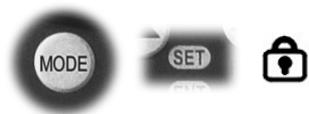
Press first the MODE button and then the SET button briefly.
The display shows the symbol for the programme lock.
- To switch off the programme lock:
Press first the MODE button and then the SET button briefly.
The display no longer shows the symbol for the programme lock.
- Returning to operating mode:
Switch off both channels of the Digital TENS and then switch at least one of the channels on again.
You are now back in operating mode.
11. Calling up and re-setting the usage monitoring facility
The usage monitoring facility enables the doctor or therapist to check for how long the patient has used the Digital TENS.
- Switch both channels of the Digital TENS off.
- Press the TIME button and at the same time switch on at least one channel of the Digital TENS.
You are now in set-up mode.
The display shows the total duration of usage of the Digital TENS in hours.
The duration of usage displayed includes the time from the last re-setting of the usage monitoring facility until the present call-up of the usage monitoring facility.
3. Re-setting the usage monitoring facility:
Press the MODE and RATE buttons at the same time.
The display shows 0 hr .
- Returning to operating mode:
Switch off both channels of the Digital TENS and then switch at least one of the channels on again.
You are now back in operating mode.

12. Cleaning and caring for your Digital TENS
12.1 Cleaning
- Switch the Digital TENS off.
- Clean the case carefully with a damp cloth and mild soap

Do not clean the case with caustic or scouring cleaners.
Do not sterilise the appliance in a steam steriliser or cold steriliser bath.
- Clean the cables with a damp cloth and mild soap.

The self-adhesive electrodes must not be cleaned or sterilised.
12.2 Changing the self-adhesive electrodes
Change the self-adhesive electrodes if they are dirty or if they are no longer sticky.
- Switch off the Digital TENS.
- Unplug the used electrode from the supply cable.
- Connect the new self-adhesive electrode to the supply cable.
12.3 Changing the battery
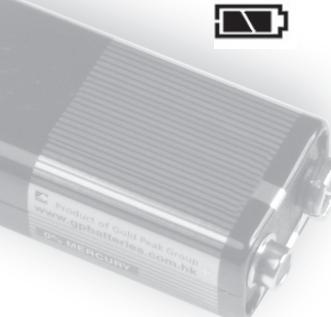
Change the battery if the Change battery warning appears in the display (see the section on Displays) or if no display appears after you have switched on the Digital TENS.

Change the battery as described in the section on Inserting the battery.

Only use a battery in the Digital TENS if it conforms to the specification in the section on Technical data.

Explosion hazard! Do not throw the old battery into the fire!
12.4 Storing your Digital TENS
If you are not going to use your Digital TENS for more than four weeks:
- Switch off the Digital TENS.
- Remove the battery from the battery compartment (see the section on Changing the battery)
- Place the Digital TENS and the accessories in the storage bag.
- Store the Digital TENS in a cool, dry place.
13. What to do if there's a problem
| Problem | Possible cause | Remedy |
| The Digital TENS is switched on but no display is visible and no stimulation can be felt. | The battery has not been inserted. | Insert the battery |
| The battery has been inserted incorrectly. | Insert the battery correctly. | |
| The battery is dead. | Change the battery. | |
| The Digital TENS is faulty. | Send the Digital TENS to our Service Department – see Service and Warranty. | |
| The Digital TENS is switched on and a display is visible but no stimulation can be felt. | The pulse strength is set too low. | Increase the pulse strength. |
| The cables are not properly connected. | Check all the cable connections and insert the cables firmly. | |
| A supply cable or an electrode is faulty. | Change the supply cable or electrode. | |
| The Digital TENS is faulty. | Send the Digital TENS to our Service Department – see Service and Warranty. | |
| The self-adhesive electrode does not stick. | The adhesive on the electrode has dried up. | Change the self-adhesive electrode. |
14. Re-ordering accessories
Self-adhesive electrodes are available from specialist shops or can be ordered by post from ibp GmbH quoting the following code number:
Elektropads, 40 × 40 ~mm , set of 4, ibp code 20301.
(For the address see the section of this manual on Service and Warranty.)
15. Service and Warranty
15.1 Service address
England :
International Business Products Limited
6 Newfield Court
West Houghton
Bolton BL5 3SA
England
Phone:+44(0)19 42-8196 95
India :
sano health care products pvt.Ltd.-Group
Corporate Office:
28 Landsdown Terrace
1st Floor
Kolkata 700026
Phone: +91 (0)33 2465 0383 & 85
15.2 Warranty and compensation
We will carry out repairs free of charge for 24 months from the date of purchase (i.e. the date on the sales slip or receipt) if your appliance is defective because of faults in the manufacture or materials.
The warranty excludes damage resulting from the fact that these instructions have not been followed or have not been followed in full.
Any further claims or compensation are likewise excluded.
Send your rejected appliance together with the sales slip or receipt and a description of your complaint to our Service Department. Please also enclose the Warranty certificate if you wish to make a claim under the Warranty.
Batteries and self-adhesive electrodes are excluded from the Warranty.
16. Waste disposal and care of the environment
- Do not throw away the used battery with your household rubbish but put it with the hazardous waste or in a battery collection box at a specialist shop.
- Do not throw the Digital TENS in the household rubbish but hand it in at a collection point for the recycling of electrical and electronic equipment.
If you have any questions on disposal, our Service Department or your dealer will be pleased to help you.
17. Technical data
Manufactured by:
Well-Life Healthcare Limited
1FL, No. 16, Lane 454, Jungjeng Rd.
Yunghe City, Taipei County,
Taiwan, R.O.C.
Type of appliance:
Transcutaneous electrical nerve stimulator (TENS)
Classification as per 93/42/EC:
Class Ila
Model number:
WL-2205B
Maximum permissible ambient air temperature:
10^ - 45^
Maximum permissible relative
humidity:
30% - 75%
Maximum permissible air pressure:
700 hPa - 1060 hPa
Power supply:
9V battery, alkaline, non-rechargeable
Channels:
2 channels, insulated between the channels
Pulse rate (frequency):
1-160 Hz (adjustable)
1 Hz/interval (1-20 Hz)
5 Hz/interval (20-160 Hz)
Pulse width (duration)
TENS: 50-260 μs (adjustable), 10 μs/interval
EMS: 250~ s (fixed)
Pulse strength (amplitude):
Adjustable from 0 - 80mA per channel
Maximum 500 DC
Supply voltage:
0 - 110 V (no-load operation)
Electrical fluctuations:
± 10% at a load of 500
Type of signal:
Asymmetric two-phase
square pulse
Maximum charge per pulse:
21 C
Maximum correlation:
5%
Weight:
142 g (including battery)
Dimensions (mm)
W:62xD:27xH:110
18. What do the labels on the Digital TENS mean?
The rating plate can be found on the underside of the Digital TENS.

innovative business promotion GmbH, Germany
Transcutane elektrische Nervenstimulation / Transcutaneous Electrical Nerve Stimulation (TENS)
elektrische Muskelstimulation / Electrical Muscle Stimulation (EMS)
Hersteller/Manufacturer: Well-Life Healthcare Limited, Taiwan
S/N:

S/N
Serial number

At the end of its life cycle, this product must not be disposed of in regular domestic waste, but must be taken to a collection site for recycling electrical and electronic devices (disposal of used appliances).

Type BF applied part
The applied part provides protection against electric shock by maintaining the leakage current at a level that conforms to standards (Type B). The applied part is insulated (Type F).

Follow the instructions
CE0434
The product meets the safety requirements of EU Directive 93/42/EC
19. Examples of treatment using TENS

The examples of treatment shown on the following pages only represent a small selection of the treatment methods that are possible. Do not always use the treatment methods shown and do not use them on all patients.
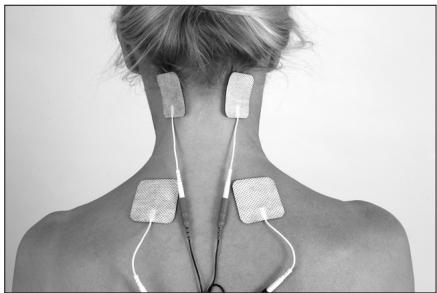
19.1 Neck, shoulder and arm pain, headaches caused by a pain in the cervical spine
Indication: Pain in the neck, shoulders and arms, headaches caused by a problem in the cervical spine
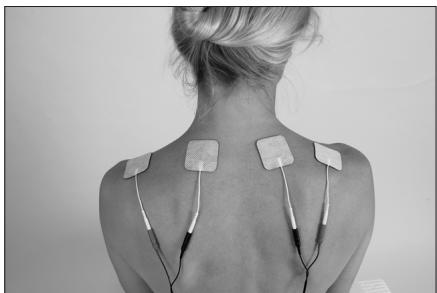
19.2 Neck and shoulder pain
Indication: muscular tension, degenerative changes, whiplash injury, pain in the neck and head

NB: Do not apply the electrode plaster to the points where there is most pain.
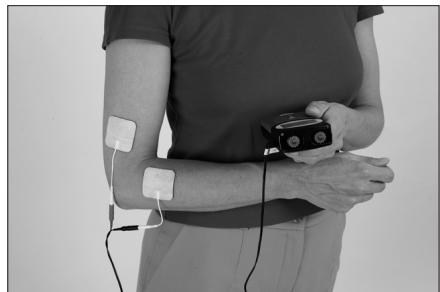
19.3 Pain in the elbow
Use for "tennis elbow!"

NB: Apply the electrode plasters above and below the point where there is pain.
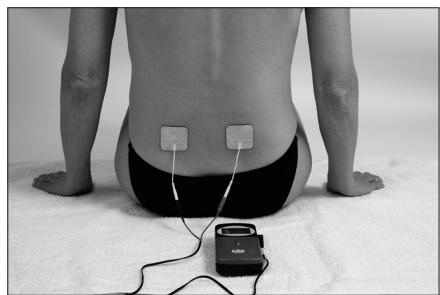
19.4 Pain in the region of the lumbar spine
Indication: muscular tension, degenerative changes
19.5 Pain in the knee
Indication: arthritis of the knee, pain in the knee following an operation or accident, e.g. following a sports injury
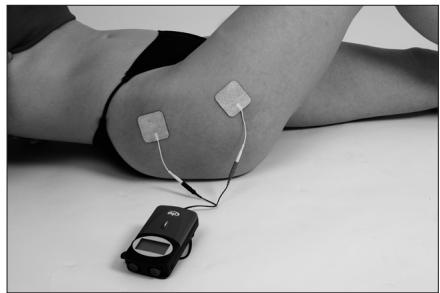
19.6 Pain in the hip
Indication: arthritis of the hip
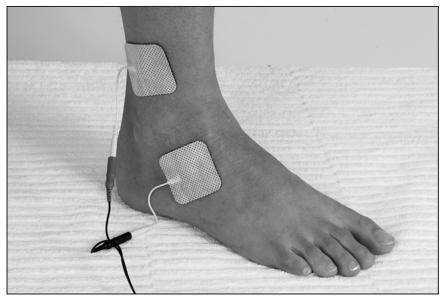
19.7 Pain in the ankle
Indication: pain following a sports injury of the ankle

20. Examples of treatment using EMS
Some of the examples shown here should be understood to be only suggestions and should not be used on all patients in every case.
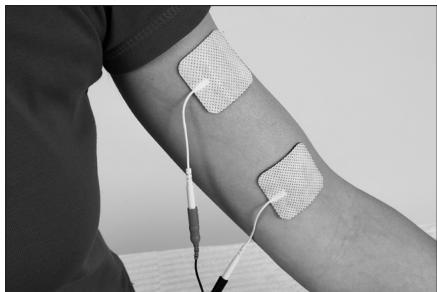
20.1 Biceps (upper arm)
Indication: muscle stimulation
20.2 Triceps (upper arm)
Indication: muscle stimulation
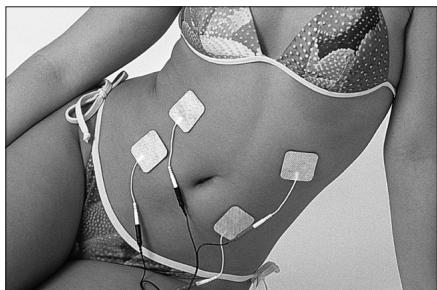
20.3 Firm abdominal muscles
Indication: muscle stimulation
20.4 Firm back muscles
Indication: muscle stimulation
20.5 Quadriceps (upper thigh)
Indication: muscle stimulation
20.6 Calf muscles
Indication: muscle stimulation