USER MANUAL DUO CLOCK RADIO TANGENT
Congratulations on your new clock radio. Please read this manual carefully to avoid malfunction and damage to the clock radio and to ensure that the radio will be a source of great pleasure to you for a very long time.
- Do not expose the clock radio to direct sunlight, high humidity, dirt, heavy vibration or extreme temperatures.
- Place the unit on a solid and plane surface.
- Make sure that there is sufficient ventilation around the clock radio. Do not place the unit on a soft surface such as a carpet. Make sure that there is a clearance of 20 cm behind the unit.
- Do not open the cabinet. Only qualified technicians are allowed clean the internal parts.
- Make sure that liquid and foreign matter cannot penetrate the unit.
- If service or repair is required, this must be carried out by qualified technicians.
- Unplug the unit in the following cases:
A. The mains plug or the mains cable is defective.
B. Foreign matter or liquid has penetrated the radio.
C. The unit cannot be operated properly.
D. The unit has fallen down or the cabinet has been damaged.
- Store this instruction manual carefully for future reference.
- Use a duster or a slightly damp, soft and non-fluffy rag to clean the radio.
- Do not use corrosive or strong cleaning agents. Make sure that no moisture penetrates the radio during cleaning. Unplug the unit before cleaning.
- Check that the mains voltage indicated on the back of the clock radio corresponds to the mains voltage that the unit is connected to.
- Unplug the unit if the clock radio is not to be used for a long time.
Disclaimer
Despite extensive efforts we cannot guarantee that the technical data indicated are correct, complete and updated. We reserve the right to make technical changes without notice.
UK
FRONT PANEL

FRONT PANEL
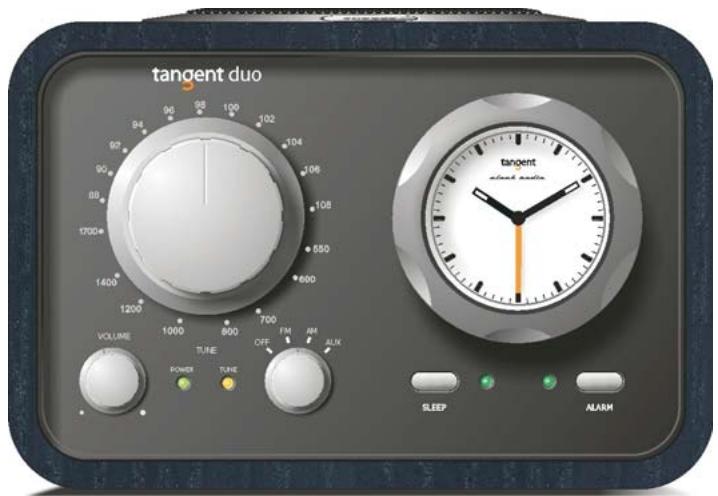
- TUNING: Turn the tuning knob to the right or to the left to change the frequency range.
- FREQUENCY SCALE: Shows both the AM and the FM frequency of the tuned channel.
- VOLUME: Turn the volume knob to the right to increase the volume or to the left to decrease the volume of the speakers. This knob will also control the volume of headphones when connected.
- POWER LIGHT: Glows green when the unit is active.
- TUNING INDICATOR: The tuning indicator will appear brightest when best tuning has been achieved. Some weak, but listenable AM stations will not light the tuning indicator and should be tuned for loudest and clearest signal.
- OFF/FM/AM/AUX: Turn the knob 1 click to the right to select the FM band, 2 clicks to the right to select the AM band and 3 clicks to the right to activate the AUX input. Turn the knob all the way to the left to turn off the radio.
- SLEEP FUNCTION: Press this button when the alarm has been set to listen to FM or AM for approximately 20 minutes. After 20 minutes the radio will turn off by itself. The sleep indicator will glow green when the function is activated.
NOTE: the green sleep indicator will keep on glowing after the sleep function has been performed. To turn the sleep indicator off, you must push the sleep button once again.
- SLEEP FUNCTION INDICATOR: Glows green when the sleep function is activated.
- ALARM ON/OFF INDICATOR: Glows green when the alarm is activated. NOTE: The light is weak in the sleep and alarm indicators, in order not to lighten up a dark sleeping-room
- ALARM SWITCH: Sets the alarm on or off. Set the wakeup time to the preferred time using the alarm thumbwheel. Select FM or AM and push the alarm switch. The alarm indicator will start to glow green. When the selected time is reached, the radio will start to play the selected station. If the alarm switch is activated in OFF or AUX mode, the alarm will beep when the selected time is reached.
NOTE: If the electricity goes out, the radio won't play, but you will hear the alarm beaps.
- CLOCK: Remember to check the battery annually so the clock stays accurate.
- CLOCK THUMBWHEEL: Rotate the thumbwheel counter clockwise until the alarm hand points at the time you wish the alarm to start. Do NOT turn the thumbwheel clockwise. This will damage the clock mechanism.
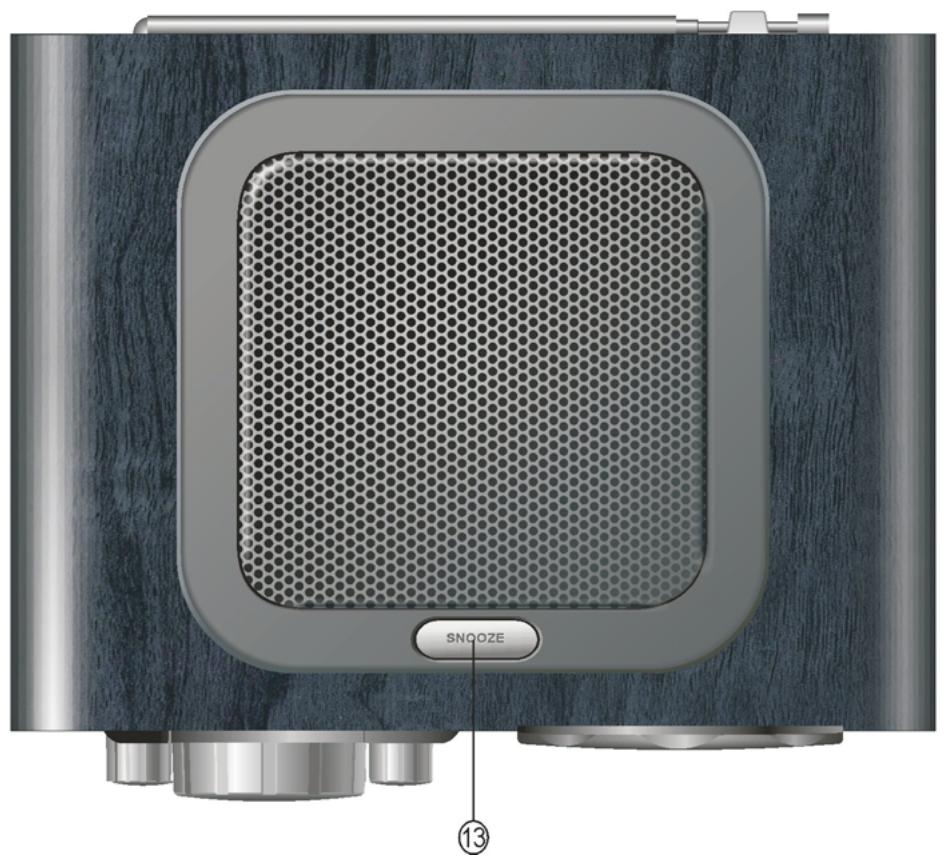
- SNOOZE: (On top of the clock radio) Press this button during an alarm to delay the alarm for 5 minutes.
NOTE: this can only be done 6 times. After that the alarm will not go on again.
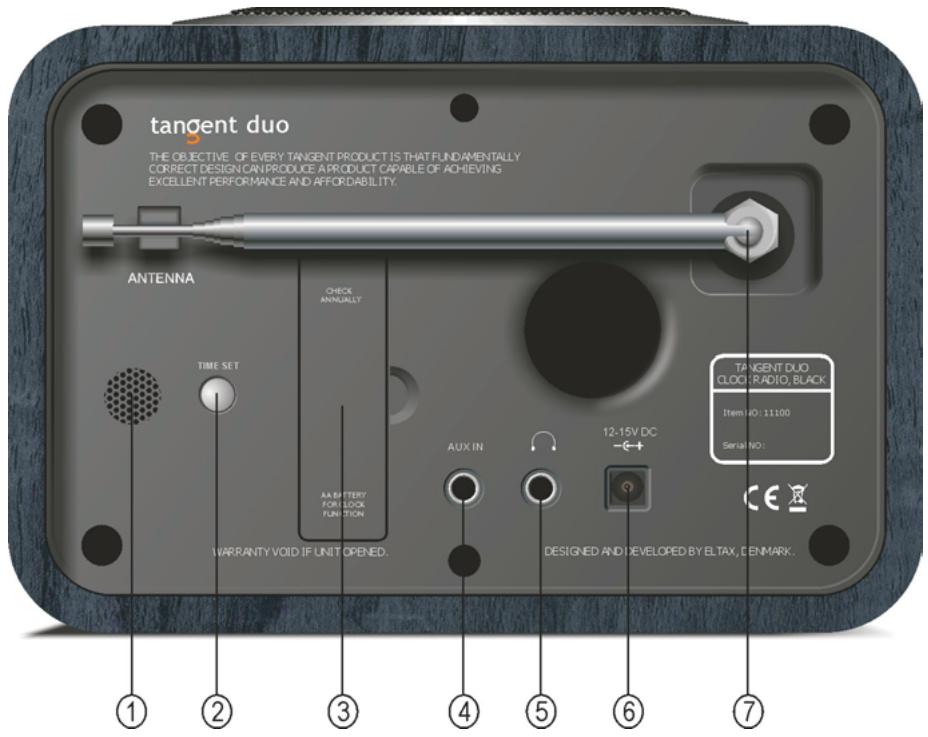
- BEEPER: When the alarm goes of in OFF or AUX mode, the sound will comes from this speaker. It is therefore important to keep the area behind this speaker clear, so the sound can be heard clearly,
- TIME SET: Press this button to set the time. Each press sets the time one minute forward. Hold in the button to set the several minutes forward.
- BATTERY COMPARTMENT: Battery compartment for one AA battery. Remember to check this battery frequently to ensure the clock will keep running accurately.
NOTE:The clock only receives power from the battery.
- AUX IN: Connect a stereo or mono audio source (like a CD player or a TV) to this stereo input.
- HEADPHONE: Connect a separate headset to this connector to listen to the Tangent Duo with a headset. Inserting headset will turn off main speaker.
- 12-15VDC: Use this input to connect the Tangent Duo DC power supply.
- EXTERNAL ANTENNA: The Tangent Duo comes with a telescopic antenna. To improve FM reception, adjust the antenna for best reception. The telescopic antenna can be detached so a 75-ohm coaxial cable or outdoor antenna can be connected to this connector.
| Band: | FM/AM |
| Frequency Range: | AM 520 Khz ~ 1620 KHz |
| Controls: | FM 87,5 MHz ~ 108,0 Mhz |
| OFF / FM / AM / AUX switch |
| Volume knob |
| Tuning knob |
| Alarm On/Off |
| Sleep On/Off |
| Time set |
| Alarm set thumbwheel |
| Speaker: | Full range dynamic speaker (3") |
| System Output: | 4 Watt RMS / CH |
| Connections: | 3,5mm jack for stereo analog audio headphone output |
| 3,5mm jack for stereo analog audio AUX input |
| 12 ~ 15V DC input |
| Antenna: | Internal antenna for AM |
| F-connector for FM antenna input |
| FM telescope antenna included |
| Power: | DC 12 ~ 15V |
| Dimensions: | 190 x 130 x 140mm (W x H x D) |
| Weight: | 2,40Kg (Power supply and radio) |
DESIGN AND ENGINEERING
THE OBJECTIVE OF EVERY TANGENT PRODUCT IS THAT FUNDAMENTALLY CORRECT DESIGN CAN PRODUCE A PRODUCT CAPABLE OF ACHIEVING EXCELLENT PERFORMANCE AND AFFORDABILITY.
www.tangent-audio.com