
F52 - Wristwatch CITIZEN WATCH - Free user manual and instructions
Find the device manual for free F52 CITIZEN WATCH in PDF.


| Product type | Wristwatch |
| Brand | CITIZEN WATCH |
| Model | F52 |
| Case dimensions | Approximately 40 mm diameter |
| Thickness | Approximately 10 mm |
| Weight | Approximately 80 g (with bracelet) |
| Case material | Stainless steel |
| Glass | Mineral |
| Strap | Leather or steel depending on version |
| Movement | Quartz (battery) |
| Power source | Button cell battery (type SR626SW or similar) |
| Battery life | Approximately 2 to 3 years |
| Water resistance | 50 meters (5 ATM) – resistant to splashes and swimming |
| Display | Analog |
| Functions | Hours, minutes, seconds, date |
| Adjustment | Three-position crown |
| Care | Clean with a soft, dry cloth; avoid chemicals |
| Safety | Avoid strong impacts and magnetic fields |
| Spare parts | Available from authorized CITIZEN dealers |
| Repairability | Entrust to an authorized watchmaker |
| Warranty | International 2-year warranty (subject to conditions) |
Frequently Asked Questions - F52 CITIZEN WATCH
User questions about F52 CITIZEN WATCH
0 question about this device. Answer the ones you know or ask your own.
Ask a new question about this device
Download the instructions for your Wristwatch in PDF format for free! Find your manual F52 - CITIZEN WATCH and take your electronic device back in hand. On this page are published all the documents necessary for the use of your device. F52 by CITIZEN WATCH.
USER MANUAL F52 CITIZEN WATCH
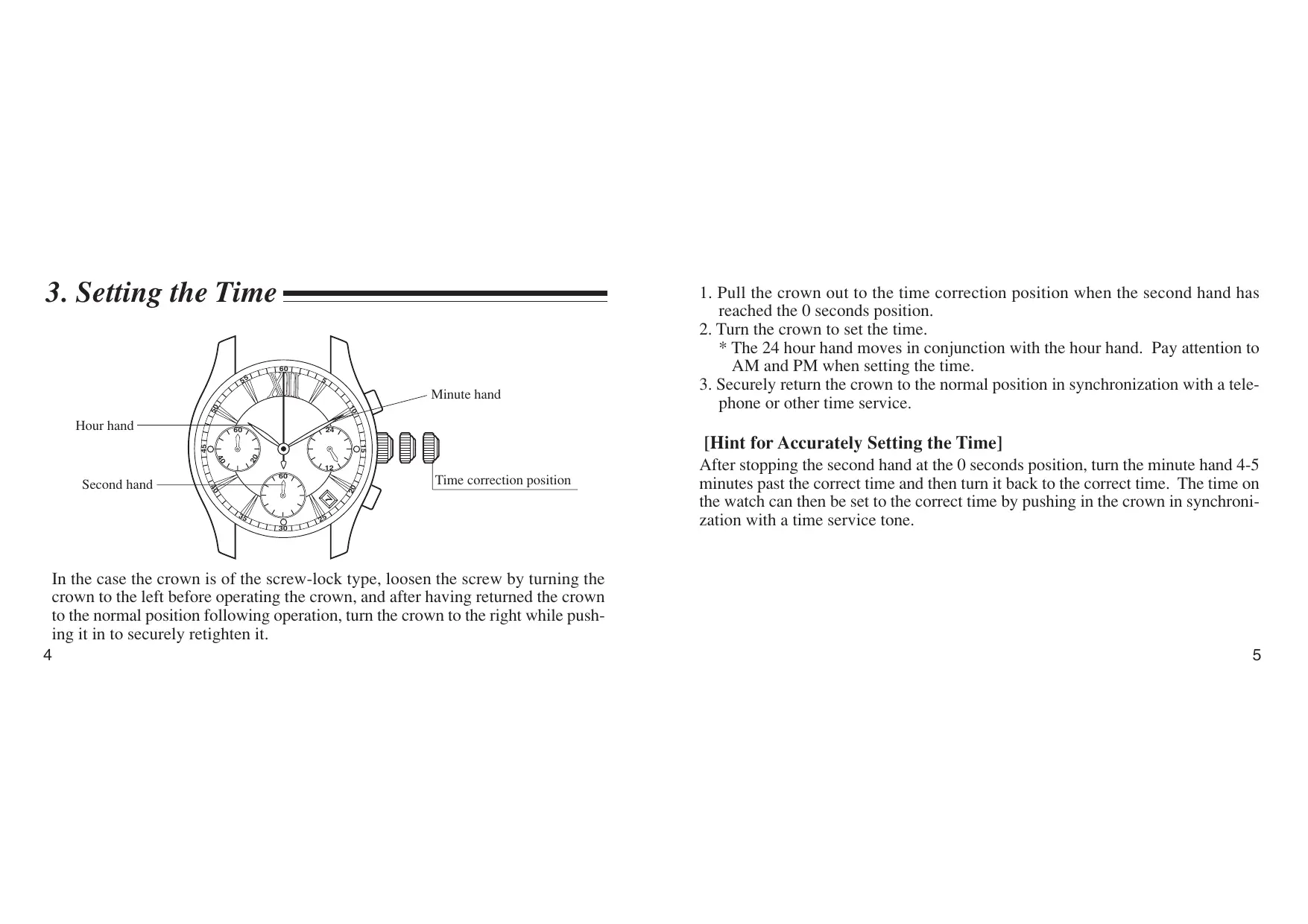
Thank you for purchasing a CITIZEN watch. To ensure correct use, please read these instructions carefully. Please confirm that the CITIZEN International Guarantee Card is included for your possible claim.
- Features 3
- Displays and Buttons 3
- Setting the Time 4
- Setting the Date 6
- Using the Chronograph 8
- Zero Positioning of Chronograph Hands (After Replacing the Battery) 10
- Precautions 12
- Specifications 19
1. Features
This watch is an analog quartz watch equipped with features including a 24 hour display and chronograph function.
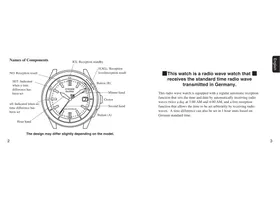
2. Displays and Buttons
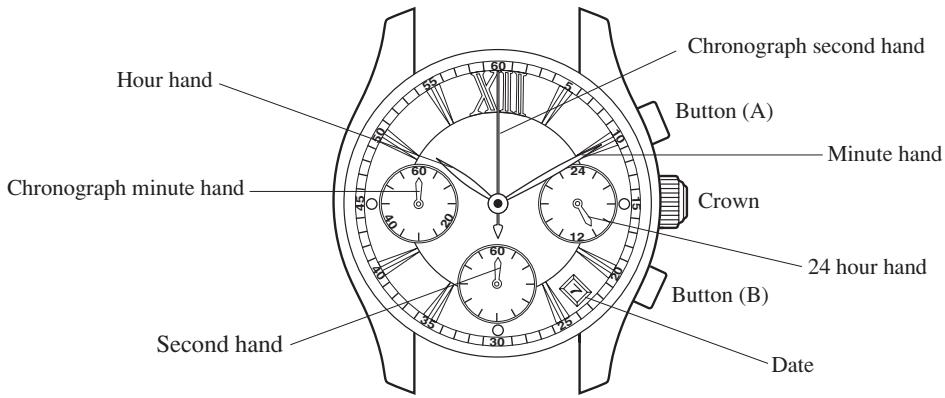
- The illustrations shown in this manual may differ from the actual watch you have purchased.
3. Setting the Time
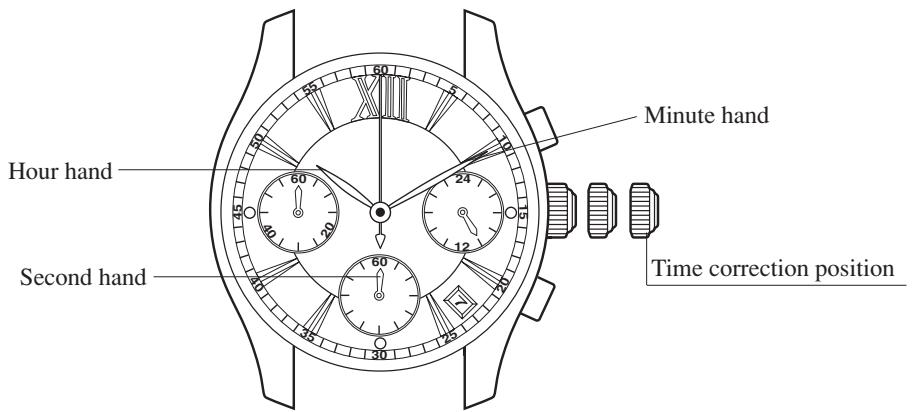
In the case the crown is of the screw-lock type, loosen the screw by turning the crown to the left before operating the crown, and after having returned the crown to the normal position following operation, turn the crown to the right while pushing it in to securely retighten it.
- Pull the crown out to the time correction position when the second hand has reached the 0 seconds position.
- Turn the crown to set the time.
- The 24 hour hand moves in conjunction with the hour hand. Pay attention to AM and PM when setting the time.
- Securely return the crown to the normal position in synchronization with a telephone or other time service.
[Hint for Accurately Setting the Time]
After stopping the second hand at the 0 seconds position, turn the minute hand 4-5 minutes past the correct time and then turn it back to the correct time. The time on the watch can then be set to the correct time by pushing in the crown in synchronization with a time service tone.
4. Setting the Date
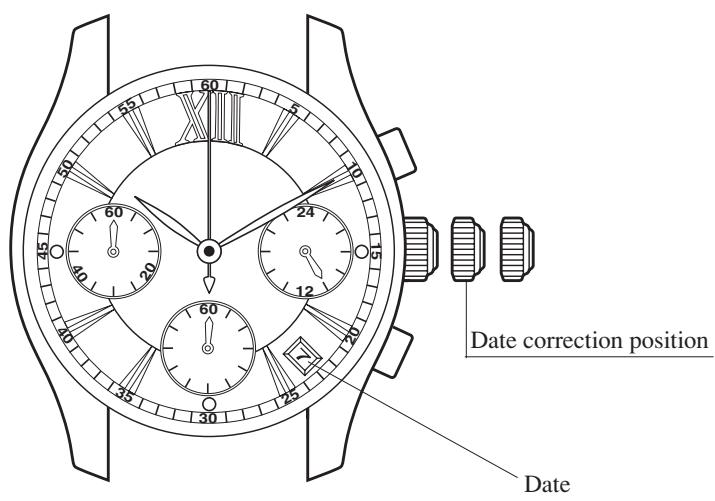
- Pull the crown out to the date correction position.
- Turn the crown to the right to set the date.
- The crown turns freely and the date does not change if the crown is turned to the left.
- If the date is set while the time on the watch is between the hours of about 9:00 PM and 1:00 AM, the date may not change on the following day. If this happens, set the date after temporarily moving the hands to a time other than between the above times.
- The date is based on a 31-day calendar. The date must be changed from the last day of the month to the first day of the following month for those months not having 31 days (months having 30 days and February).
- Once the date has finished being set, return the crown to the normal position.
5. Using the Chronograph
The chronograph function of this watch is able to measure and display elapsed time up to 59 minutes 59 seconds in 1 second units. After the chronograph displays elapsed time for 59 minutes 59 seconds, it resumes timing from 0 seconds. The chronograph minute hand continues to move until the chronograph is stopped by pressing button (A) even after 59 minutes 59 seconds have elapsed.
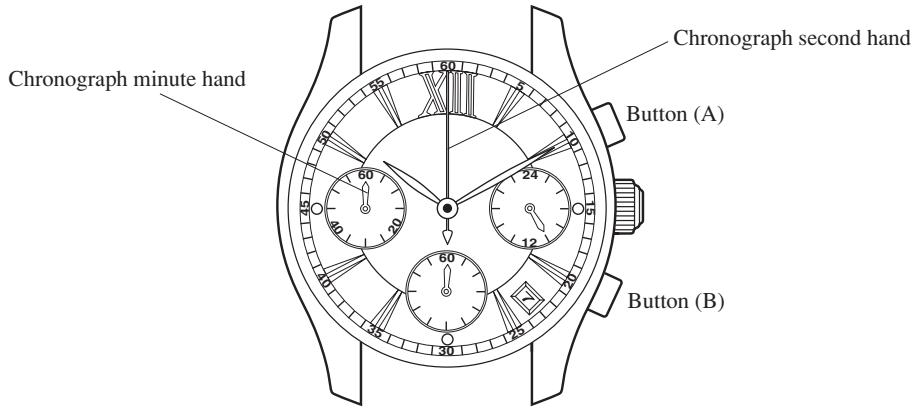
[Chronograph Timing]
- Start timing by pressing button (A).
- The chronograph is repeatedly started and stopped by pressing button (A).
- Pressing button (B) resets the chronograph to 0 seconds.
![CITIZEN WATCH F52 - [Chronograph Timing] - 1](/content/2025/01/176747/images/94273429c91677233f872c3c808ca808dbee57d6b7d9a6876b2ce76b5840be8c.jpg)
[Note]
The chronograph continues to keep time with the chronograph hands until it is stopped even after 60 minutes have elapsed. Once timing is finished, promptly press button (A) to stop the chronograph, and then press button (B) to reset it to 0 seconds. If timing is allowed to continue, the battery will continue to wear down and eventually be depleted causing the watch to stop before the end of the indicated battery life.
6. Zero Positioning of Chronograph Hands (After Replacing the Battery)
When resetting the chronograph after replacing the battery, if the chronograph second hand does not return to the 0 seconds position or if the chronograph second hand has shifted out of position due to a strong impact, perform zero positioning of the chronograph hands according to the procedure described below.
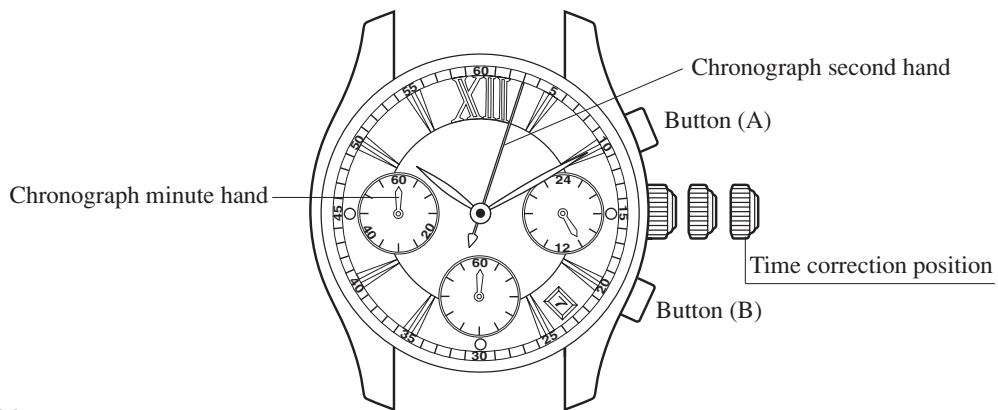
[Chronograph Hand Zero Positioning]
- Pull the crown out to the time correction position.
- Press button (A) to position the chronograph second at the 0 position.
- The chronograph second hand can be advanced rapidly by depressing button (A) continuously.
- Once the chronograph second hand has been positioned at the 0 position, reset the time and return the crown to the normal position.
- Press button (B) to check that each of the chronograph hands has been reset to the 0 position.
7. Precautions
WARNING: Water-resistance performance
There are several types of water-resistant watches, as shown in the following table.
The unit "bar" is roughly equal to 1 atmosphere. * WATER RESIST(ANT) xx bar may also be indicated as W.R. xx bar.
| Indication | Specification | |
| Dial | Case (Case back) | |
| WATER RESIST or no indication | WATER RESIST(ANT) | Water-resistant to 3 atmospheres |
| WR 50 or WATER RESIST 50 | WATER RESIST(ANT) 5 bar or WATER RESIST(ANT) | Water-resistant to 5 atmospheres |
| WR 100/200 or WATER RESIST 100/200 | WATER RESIST(ANT) 10bar/20 bar or WATER RESIST(ANT) | Water-resistant to 10 / 20 atmospheres |
For correct use within the design limits of the watch, confirm the level of water-resistance of your watch, as indicated on the dial and case, and consult the table.
| Examples of use | ||||
| Minor exposure to water (washing face, rain, etc.) | Moderate exposure to water (washing, kitchen work, swimming, etc.) | Marine sports (skin diving) | Scuba diving (with air tank) | Operation of the crown or button with moisture visible |
| OK | NO | NO | NO | NO |
| OK | OK | NO | NO | NO |
| OK | OK | OK | NO | NO |
- Water-resistance for daily use (to 3 atmospheres): This type of watch is water-resistant to minor exposure to water. For example, you may wear the watch while washing your face; however, it is not designed for use underwater.
- Upgraded water-resistance for daily use (to 5 atmospheres): This type of watch is water-resistant to moderate exposure to water. You may wear the watch while swimming; however, it is not designed for use while skin diving.
- Upgraded water-resistance for daily use (to 10/20 atmospheres): This type of watch may be used for skin diving; however, it is not designed for scuba or saturated diving using helium gas.
CAUTION
- Be sure to use the watch with the crown pressed in (normal position). If your watch has a screw-type crown, be sure to tighten the crown completely.
- Do NOT operate the crown or button with wet fingers or when the watch is wet. Water may enter the watch and compromise water-resistance.
- If the watch is used in seawater, rinse with fresh water afterward and wipe with a dry cloth.
- If moisture has entered the watch, or if the inside of the crystal is fogged up and does not become clear within a day, immediately take the watch to your dealer or Citizen Service Center for repair. Leaving the watch in such a state will allow corrosion to form inside.
- If seawater enters the watch, place the watch in a box or plastic bag and immediately take it in for repair. Otherwise, pressure inside the watch will increase, and parts (crystal, crown, buttons, etc.) may come off.
CAUTION: Keep your watch clean.
- Leaving dust and dirt deposited between the case and crown may result in difficulty in pulling the crown out. Rotate the crown while in its normal position, from time to time, to loosen dust and dirt and then brush it off.
- Dust and dirt tend to be deposited in gaps in the back of the case or band. Deposited dust and dirt may cause corrosion and soil your clothing. Clean the watch occasionally.
Cleaning the Watch
- Use a soft cloth to wipe off dirt, perspiration and water from the case and crystal.
- Use a soft, dry cloth to wipe off perspiration and dirt from the leather band.
- To clean a metal, plastic, or rubber watchband, wash away dirt with mild soap and water. Use a soft brush to remove dust and dirt jammed in the gaps in the metal band. If your watch is not water-resistant, take it to your dealer.
NOTE: Avoid using solvents (thinner, benzine, etc.), as they may damage the finish.
WARNING: Handling of the battery
- Keep the battery out of the reach of small children. If a child swallows the battery, contact a physician immediately.
CAUTION: Replacing the battery
- For replacement of the battery, take your watch to your dealer or Citizen Service Center.
- Replace the battery as soon as possible if the service life of the battery has expired. Leaving a depleted battery in the watch may result in leakage, which can damage the watch severely.
CAUTION: Operating environment
- Use the watch within the operating-temperature range specified in the instruction manual.
Using the watch where temperatures are outside the specified range may result in deterioration of functions or even stoppage of the watch.
- Do NOT use the watch in places where it is exposed to high temperature, such as in a sauna. Doing so may result in a skin burn.
- Do NOT leave the watch in a place where it is exposed to high temperature, such as the glove compartment or dashboard of a car. Doing so may result in deterioration of the watch, such as deformation of plastic parts.
- Do NOT place the watch close to a magnet. Timekeeping will become inaccurate if you place the watch close to magnetic health equipment such as a magnetic necklace or a magnetic latch of a refrigerator door or handbag clasp or the earphone of a mobile phone. If this has occurred, move the watch away from the magnet and reset the time.
- Do NOT place the watch close to household appliances that generate static electricity. Timekeeping may become inaccurate if the watch is exposed to strong static electricity, such as is emitted from a TV screen.
- Do NOT subject the watch to a strong shock such as dropping it onto a hard floor.
- Avoid using the watch in an environment where it may be exposed to chemicals or corrosive gases.
If solvents, such as thinner and benzine, or substances containing such solvents come in contact with the watch, discoloration, melting, cracking, etc. may result. If the watch comes in contact with mercury used in thermometers, the case, band or other parts may become discolored.
Periodical inspections
Your watch needs inspection once in every two or three years for safety and long use.
To keep your watch water-resistant, the packing needs to be replaced regularly.
Other parts need to be inspected and replaced if necessary.
Ask for Citizen genuine parts upon replacement.
8. Specifications
- Caliber No.: F52※
- Type: Analog quartz watch
- Timekeeping accuracy: Within ±20 seconds per month on average (when worn at normal temperatures of +5°C to +35°C / 41°F to 95°F)
- Crystal oscillator: 32,768 Hz
- Operating temperature range: -10°C to +60°C / 14°F to 140°F
- Display functions:
- Time: 24 hours, hours, minutes, seconds
- Calendar: Date
- Chronograph: Measurement and display up to 59 minutes 59 seconds in 1 second units
- Battery: Miniature silver battery, 1
Battery part no.: 280-39 (SR626SW)
Battery life: Approx. 2 years (when using the chronograph for 1 hour/day)
- Specifications are subject to change without notice.


- FEATURES
- DISPLAYS AND BUTTONS
- SETTING THE TIME
- [HINT FOR ACCURATELY SETTING THE TIME]
- SETTING THE DATE
- USING THE CHRONOGRAPH
- [CHRONOGRAPH TIMING]
- [NOTE]
- ZERO POSITIONING OF CHRONOGRAPH HANDS (AFTER REPLACING THE BATTERY)
- [CHRONOGRAPH HAND ZERO POSITIONING]
- PRECAUTIONS
- WARNING: WATER-RESISTANCE PERFORMANCE
- CAUTION
- CAUTION: KEEP YOUR WATCH CLEAN
- CLEANING THE WATCH
- WARNING: HANDLING OF THE BATTERY
- CAUTION: REPLACING THE BATTERY
- CAUTION: OPERATING ENVIRONMENT
- PERIODICAL INSPECTIONS
- SPECIFICATIONS
Brand : CITIZEN WATCH
Model : F52
Category : Wristwatch