
D70 - Smartwatch CITIZEN WATCH - Free user manual and instructions
Find the device manual for free D70 CITIZEN WATCH in PDF.


| Product type | Smartwatch (dive computer) |
| Brand | Citizen Watch |
| Model | D70 (CYBER AQUALAND) |
| Water resistance | 200 meters (suitable for compressed air scuba diving) |
| Power supply | Rechargeable secondary battery, charged via communication unit with 4 AA batteries |
| Battery life | Approximately 1 month in normal use (after full charge) |
| Display | Digital liquid crystal display, EL backlight |
| Main functions | Time, date, alarm, chronograph (99h59min59s), timer, time zones, dive computer (depth, time, decompression), dive log (100 dives), data transfer to PC (USB/infrared) |
| Accuracy | ±20 seconds per month on average (at normal temperature) |
| Sensors | Depth (accuracy ±3% of displayed value +0.3 m), water temperature (±3°C), water sensor |
| Operating temperature | 0°C to +50°C; depth accuracy guaranteed from +10°C to +40°C |
| Communication | Infrared (IrWW) and USB (via communication unit) |
| Maintenance and cleaning | Clean with a soft cloth; rinse with fresh water after use in the sea; do not use solvents |
| Safety | Do not use for decompression diving, altitude diving, or nitrox; always respect safety stops |
| Spare parts and repairability | Repairs exclusively at an authorized Citizen center; batteries not user-replaceable |
| Weight (approx.) | Approximately 100 g (watch only, without strap) |
| Case dimensions (approx.) | Approximately 45 mm diameter, 15 mm thickness |
Frequently Asked Questions - D70 CITIZEN WATCH
User questions about D70 CITIZEN WATCH
0 question about this device. Answer the ones you know or ask your own.
Ask a new question about this device
Download the instructions for your Smartwatch in PDF format for free! Find your manual D70 - CITIZEN WATCH and take your electronic device back in hand. On this page are published all the documents necessary for the use of your device. D70 by CITIZEN WATCH.
USER MANUAL D70 CITIZEN WATCH
Unauthorized reproduction of any or all of this manual is strictly prohibited.
The contents of this manual are subject to change without notice.
The manufacturer is not responsible for any or all damages, lost profits or demands from a third party resulting from use of this manual or products described therein.
- Windows 98, Windows Me, Windows 2000 and Windows XP are the registered trademarks of the Microsoft Corporation, USA.
- The algorithm of this dive computer is licensed from the Defence and Civil Institute of Environmental Medicine (DCIEM) of Canada.
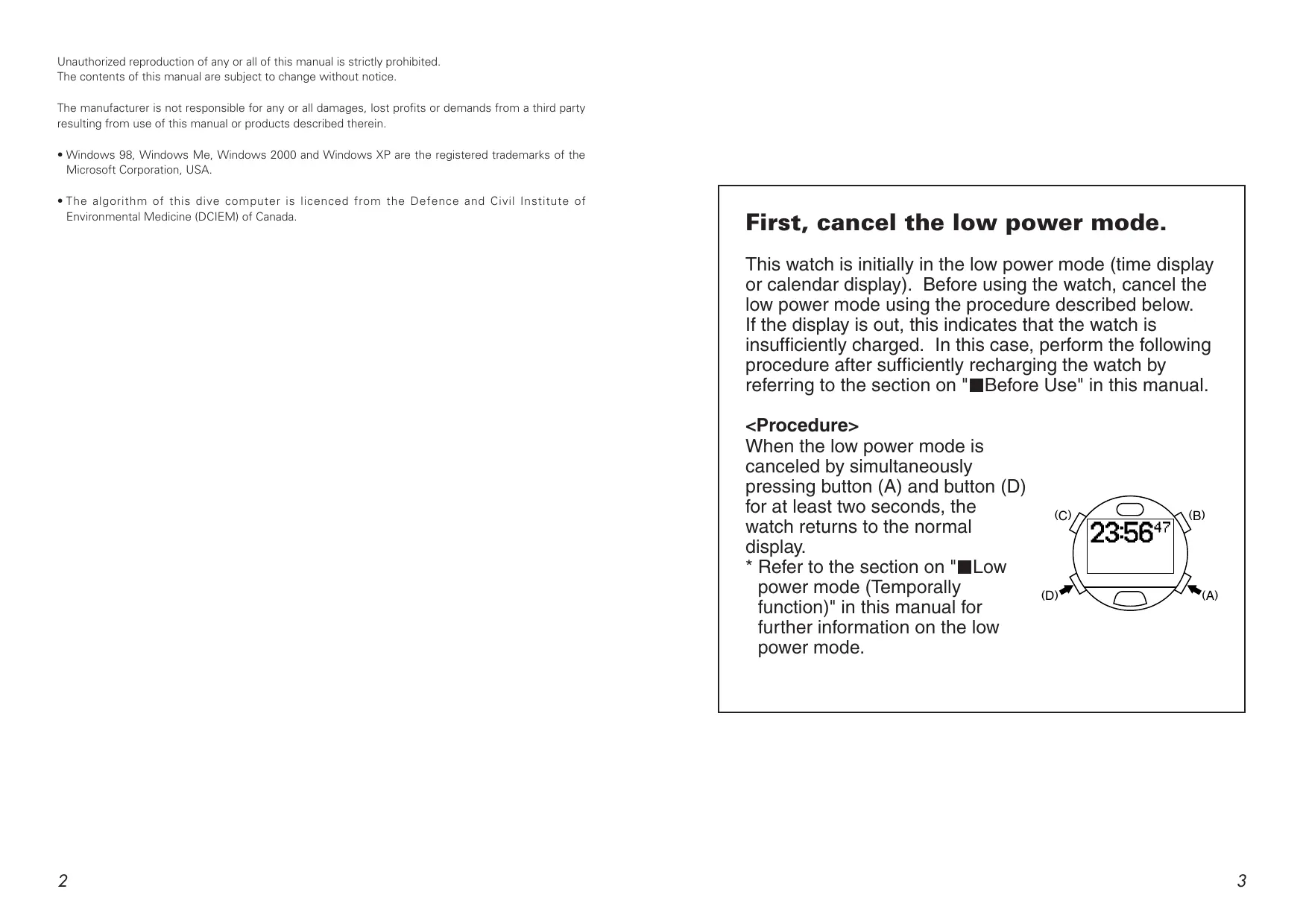
First, cancel the low power mode.
This watch is initially in the low power mode (time display or calendar display). Before using the watch, cancel the low power mode using the procedure described below. If the display is out, this indicates that the watch is insufficiently charged. In this case, perform the following procedure after sufficiently recharging the watch by referring to the section on "■Before Use" in this manual.
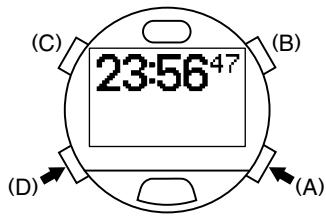
When the low power mode is canceled by simultaneously pressing button (A) and button (D) for at least two seconds, the watch returns to the normal display.
- Refer to the section on "■Low power mode (Temporally function)" in this manual for further information on the low power mode.
Introduction
Thank you for your purchase of the Citizen CYBER AQUALAND. Please read this manual carefully before using your watch to ensure that it is used properly. Furthermore, make sure to store this manual in a safe place for future reference as necessary.
CYBER AQUALAND is a diver's watch containing a built-in dive computer and provided with its own depth gauge. The watch is able to automatically store various data (maximum depth, dive time, etc.) generated during diving as well as diving profile data, and display that data in the form of log data.
By installing AQUALAND GRAPH 2001 in your personal computer from the CD-ROM provided with the watch, you can incorporate data stored in the watch in your PC using the communication unit and infrared communication interface provided. You can enter text into diving data that has been incorporated into your PC, generate graphs of diving data or attach still pictures or animated image data all with a simple procedure, and then manage this data collectively in the form of diving logs. Since these logs can be printed out or converted into HTML documents, storage of diving records is both simple and convenient. In addition, the use of CAPgm, which is installed simultaneous to installation of AQUALAND GRAPH 2001, makes it possible to make various watch settings (including travel time, alarm and timer settings) while also allowing different graphics to be displayed on the watch for different days.
We hope that the use of CYBER AQUALAND will allow you to get even more enjoyment out of your recreational diving activities.
- To users using a previous HYPER AQUALAND product (Model No. D20*):
- If you are using the DOS version or Windows Ver. 1/Ver. 2 of AQUALAND GRAPH (HYPER AQUALAND dedicated software), you can use existing diving data managed with each version of AQUALAND GRAPH by importing that data to AQUALAND GRAPH 2001.
- HYPER AQUALAND data can also be received using AQUALAND GRAPH 2001 software. Please note, however, that the type of communication unit and connection cable differ between CYBER AQUALAND and HYPER AQUALAND.
(Please refer to the AQUALAND GRAPH 2001 instruction manual contained on the CD-ROM provided for further information regarding the procedures for importing and receiving data.)
Safety Precautions: Observe at All Times
The following provides an explanation of those matters that should be observed at all times to prevent injury to the wearer or other persons as well as damage to property before they occur.
■The degree of injury or damage resulting from incorrect use while ignoring the indicated matters is classified and explained using the following markings.
| WARNING | This marking indicates matters for which there is the risk of death or serious injury. |
| CAUTION | This marking indicates matters for which there is the risk of injury or property damage only. |
■The types of matters to be observed are classified and explained using the following mark (the following indicates two examples of icons).
| This mark indicates that caution or attention is required. |
| This mark indicates prohibited matters. |
WARNING
Read this manual carefully and pay attention to all warnings. Make sure you fully understand the use, displays and limitations of the watch. Neglecting to understand and follow the instruction manual may cause errors to be made during diving that may lead to serious injury or death.

WARNING
- Diving is a potentially dangerous sport. When using this watch for diving, make sure to have a correct understanding of this watch as described in this manual and strictly adhere to the procedures for its operation. The watch may not function properly if handled in a manner not described in this manual.
- This watch should not be used as a primary instrument for diving.
- Diving while using this watch is limited to recreational diving (no decompression diving) in salt water at a water temperature of +10°C to +40°C (50°F to 104°F). This watch cannot be used for decompression diving, saturation diving using helium gas, diving at high altitudes (300m (1000 ft) or more above sea level) or diving outside the above temperature range. In addition, this watch cannot be used for nitrox diving (diving using a mixed gas of oxygen and nitrogen in which the oxygen concentration is richer than air tanks used for ordinary diving).
- Although this watch provides data for decompression diving in cases of emergency, never attempt to use this watch for decompression diving since this is potentially dangerous. In addition, the watch does not display depth correctly when used in water other than salt water (specific gravity: 1.025).
- Even recreational diving can be dangerous. Users are requested to obtain the proper scuba diving training from a qualified instructor, acquire the necessary experience and skills for safe diving and completely master the handling and operation of this watch before using this watch as an auxiliary instrument for diving. Insufficient or improper training may cause errors to be made during diving that may lead to serious injury or death.
- Sudden atmospheric fluctuations and changes in water temperature may have an effect on the display and performance of the watch. Since this watch is not intended to be used as a specialized instrument, and is only intended to display information to serve as a reference for minimizing decompression sickness and other dangers, it is not designed to guarantee the safety of the user. Always make sure to use this watch in combination with other instruments (such as a diving table, residual pressure gauge and water depth gauge). Never use it as a primary instrument for diving.
- This watch is designed on the premise of being used only by one person. Never lend to or share this watch with another person while resting on the surface (while the surface mode is activated). In addition, do not use the data displayed by the watch as diver data for persons other than the user.

WARNING
In order to ensure safe diving, dive while allowing an adequate margin of safety relative to the displayed no-decompression limit time.

WARNING
Never dive in a manner that requires a decompression stop (decompression diving). If decompression diving should happen to occur, immediately start to ascend while observing an ascent rate of no more than 18 m (60 ft)/min. Make a decompression stop while ascending in accordance with decompression stop instructions. When making a decompression stop, never ascend to a depth less than the instructed depth. In addition, since it is difficult to maintain a constant depth when there are high waves and so forth, make decompression stops at depths a little deeper than the instructed depth to prevent decompression sickness.
- A permanent error (ERROR) occurs when continuing to dive while ignoring decompression stop instructions during the course of decompression diving, and the watch will not switch to the dive mode for 24 hours after that time.

WARNING
Avoid traveling in an aircraft while the surface mode is activated. Traveling in an aircraft without allowing sufficient time to rest after diving results in the risk of decompression sickness. It is recommended to avoid traveling in an aircraft for at least 24 hours after diving whenever possible even if the surface mode is no longer displayed. There are no rules for completely preventing decompression sickness caused by flying in an aircraft after diving.

CAUTION
Skin diving after scuba diving is not recommended. It is recommended to avoid skin diving for at least two hours after scuba diving and not to exceed a depth of 5 m (15 ft).

Data Storage
- The various data recorded in the watch may be lost when subjected to incorrect use or the effects of strong electricity and electrical noise as well as during a malfunction and repair. Always make sure to keep a separate record of important data recorded in the watch. Diving data in particular should be transferred to your PC or recorded in a log book as quickly as possible.
CONTENTS
Introduction 4 ■Checking Accessories 10 ■Before Use 11 1. Installing Batteries in Communication Unit 12 2. Charging the Watch 12 ■Cautions Regarding Use During Diving 14 ■Features 16 ■Names of Components 17 ■Display Mode (Functions) 18 ■ Battery Charge Indicator and Continuous Usage Time 20 1. How to Read the Battery Charge Indicator 20 2. Continuous Usage Time 20 Switching the Mode 21 ■Using the EL Light 22 ■Using the Standard Mode 23 1.Time Mode 23 A. Switching the Display 23 B. Setting the Time and Date 23 C.Daily Graphic 24 2. Travel Time Mode 25 A. Switching the Display 25 B. Setting the Travel Time 25 C. Interchanging Locations Between Travel Time Mode and Time Mode 26 3. Destination Timer Mode 26 A. Setting the Destination Timer 27 B. Destination Timer Measuring Procedure 28 4. Alarm Mode 29 A. Alarm ON/OFF and Alarm Monitor 29 B. Setting the Alarm 29 5. Chronograph Mode 30 A. Reading the Display 30 B. Chronograph Timing Procedure 30 6. Timer Mode 31 A. Setting the Timer 31 B. Timer Measuring Procedure 32 7. System Monitor Mode 33 A. Switching the Display 33 B. Battery Charge Indicator 33 C. Flash Memory Status Display 34 D. Garbage Collection Operating Procedure 34 ■Locations Displayed by this Watch 35 ■Warning Functions 36 Diving Terms Used by this Watch 39
Using the Dive Plan Mode 41
- Switching the Display 41
- Calling Up No-Decompression Limit Time 41 3. Dive Alarm 42
- Setting the Dive Alarm 42 5. Dive Alarm Monitor 42
■Using the Scuba Log Mode and Skin Log Mode 43
- Calling Up Scuba Diving Log Data 43
- Calling Up Skin Diving Log Data 44
- Deleting Log Data 44
Using the Dive Mode 45
- Reading the Display during Depth Measurement 45
- Depth Measurement 47 3. Dive Time Measurement 47
- Water Temperature Measurement 47
- No. of Dives Per Day and Recording Log Data 47
- Ending the Dive Mode 48
Using the Surface Mode 48
■ Low power mode (Temporary function) 49
- Switching the Display 49
- Setting the Time and Date 50
Data Communication Functions 51
- Communication Unit 51
- Infrared Communication 52
A. Communication Range 52 B. Infrared Communication Mode Operating Procedure 53 3. Data Communication with PC 54 A. Preparations for Communication 54 B. Sending and Receiving Data 55 4. Data Communication between Watches 56
■ Accessory Software 57
- Operating Environment 57
- Installation 58
A. Installing the USB Driver 58 B. Installing AQUALAND GRAPH 2001 (accessory software) 63 C. Startup and Ending AQUALAND GRAPH 2001 and CAPgm 64
■All Reset 64
■ Formatting Flash Memory 65 Troubleshooting 66 ■ Handling Precautions (For the watch) 68 ■ Specifications 70
■Checking Accessories
After opening the package, first check that all of the following products and accessories are present.
Watch body - 1
Communication unit - 1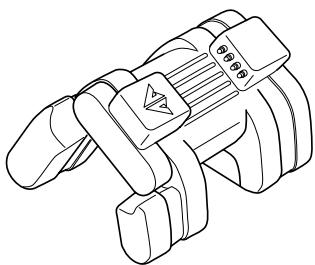
CD-ROM - 1
USB cable (1.5 m) - 1 (with ferrite core - 1)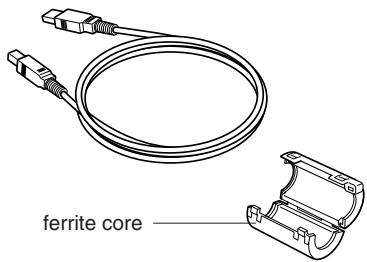
Size AA alkaline batteries - 4 * Please make sure to attach the enclosed ferrite core to the USB cable before use.
User's Manual (this manual)
Carrying case (For the communication unit)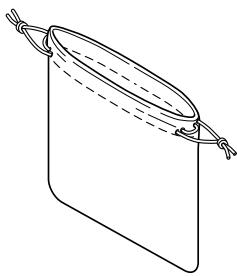
Attachment of Ferrite Core
Attach the ferrite core to the USB cable provided by referring to the illustration below.
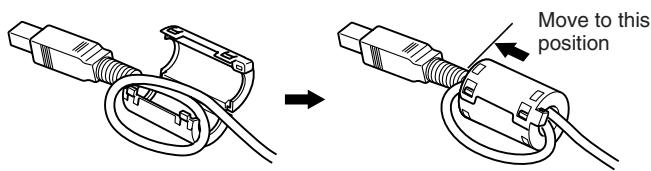
Loop the USB cable once at the base of the B type connector (side that is connected to the communication unit), insert the overlapping portion of the cable into the groove inside the ferrite core and securely close the ferrite core.

CAUTION
Always make sure to attach the enclosed ferrite core to the USB cable prior to use. Failure to properly attach the ferrite core may cause electromagnetic interference to affect other equipment.
■Before Use
Always make sure to fully charge the watch prior to use using the communication unit provided.
The battery (secondary battery) used by the watch is of the rechargeable type. Charging is performed using the communication unit after installing four size AA alkaline batteries (battery no. LR-6).
- It is not necessary to connect the watch to a PC during charging. Charging is performed using only the batteries in the communication unit.

CAUTION
- The communication unit is not waterproof. Do not allow it to come in contact with water or become wet. In addition, sand or dust inside the communication unit can cause a malfunction. Use caution when using the communication unit outdoors.
- Since improper use of the batteries can result in the risk of leakage of battery fluid or rupture, use particular caution with respect to the following items.
- Install the batteries with the polarity (+, -) correctly aligned.
- Do not mix different types of batteries installed in the communication unit.
- Do not use fresh batteries with old ones. When replacing the batteries, replace all of the batteries with four fresh batteries of the same type.
1. Installing Batteries in Communication Unit
(1) Remove the battery cover on the bottom of the communication unit. The battery cover is removed by lifting up the tab while pushing in the direction of the arrow (OPEN). (2) Install two size AA alkaline batteries each (total of four batteries) in the communication unit and battery cover while properly aligning their polarity. (3) Attach the battery cover.
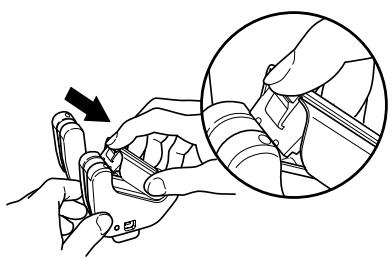
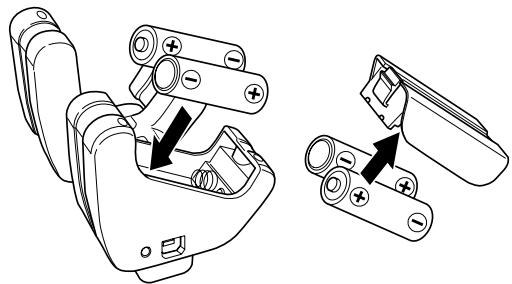
- Securely attach the battery cover. If not attached securely, there may be defective contact with the batteries.
- When removing the battery cover, be careful not to damage your nail.
- When charging the watch using the communication unit for the first time, the USB driver Installation Wizard is displayed on the PC if the communication unit is connected to a PC. Refer to the section on "■Accessory Software" for information regarding installation of the USB driver.
- The batteries in the communication unit will gradually become worn down even when not charging. It is recommended to remove the batteries from the communication unit when not charging the watch for a long period of time.
2. Charging the Watch
(1) Sufficiently open up the locking tab on the left side of the communication unit. (2) Attach the watch to the communication unit so that the two center connection pins of the four connection pins on the communication unit make contact with the two terminals (gold) at the 3:00 position on the watch.
- In cases when a watch having a metal band cannot be connected to the communication unit due to the band being too short, remove the leg of the communication unit (removable). Slide the watch through the location where the leg was removed to attach to the communication unit.

WARNING
When removing the leg from the communication unit, keep the removed leg out of the reach of children to prevent accidental swallowing.
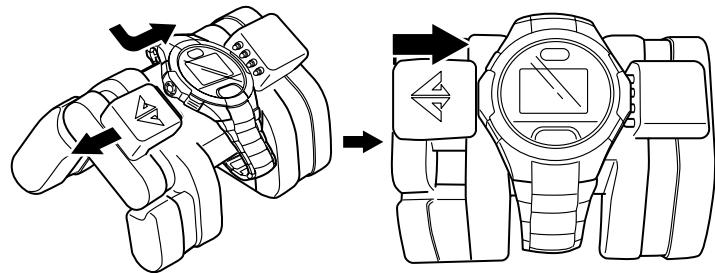
- If the watch display is not showing before charging, simultaneously press buttons (A), (B), (C) and (D) with the watch attached to the communication unit to perform the all reset procedure. (Refer to the section on "■All Reset" for information on the all reset procedure.)
(3) Charging will begin if the watch is properly connected to the communication unit. The LED on the right side of the communication unit lights when charging begins, and goes out when charging is completed (when the watch is fully charged). (4) Sufficiently open the locking tab of the communication unit and remove the watch from the communication unit.
- Approximately 5-6 hours is required for charging when the secondary battery is completely drained.
- Try to recharge the watch before the secondary battery becomes completely drained. There is no risk of overcharging no matter how long the watch is connected to the communication unit.
- When the LED does not light and the battery charge indicator of the watch does not indicate that the watch is fully charged even if the watch has been attached to the communication unit, the batteries of the communication unit are worn out. Replace all four of the batteries with fresh batteries and repeat charging.
- Attempting to attach or remove the watch without opening the locking tab sufficiently may cause the connection pins to become worn or damaged resulting in malfunction of the communication unit.
Watch Display During Charging
Once charging begins, the watch automatically switches to the system monitor mode (battery charge indicator) after the diver mark in the lower left section of the watch display flashes. ("CHRG" is displayed in the lower left section of the display.)
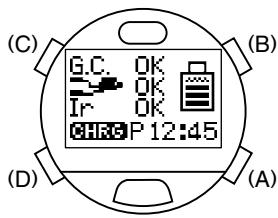
- When the communication unit is connected to a PC with the USB cable, the watch displays the USB communication display (data transfer standby display). Charging is performed while the LED on the communication unit is lit even during data transfer with the PC using the USB communication interface.
- When the watch has been charged to a certain extent (when all the sections of the battery charge indicator are lit), although the diver mark remains flashing without the watch switching to the system monitor mode, charging is still performed correctly even in this state.
- Although "CHK" may flash in the lower left section of the display during charging, charging is performed correctly in this case as well. "CHK" is no longer displayed and the display returns to normal when the watch is removed from the communication unit after charging is completed.
Cautions Regarding Use During Diving

WARNING
This watch cannot be used as a primary instrument for diving.
When using the watch during diving, always make sure to receive the proper diving instruction and training and use the watch while obeying all rules.
- Inspect the watch to make sure that all functions operate properly before diving.
- It is recommended to only use this watch for recreational diving down to a depth of about 18 m (60 ft). Do not attempt to dive below the limit depth of 40 m (131 ft) during recreational diving.
- Always make sure to allow an ample margin for no-decompression time.
- Perform adequate safety stops and decompression stops. Even in the case of no-decompression diving, always make a safety stop at 5 m (15 ft) to ensure safety. In addition, in the case the decompression stop display appears, try to stop for a period longer than that indicated on the display.
- Allow for a sufficient rest period after diving in accordance with safety rules. Boarding an airplane or moving to a high altitude without allowing for a sufficient rest period after diving results in the risk of decompression sickness.

PROHIBITED Prohibited Use During Diving
Never attempt to use this watch for diving under the following circumstances.
- When diving is prohibited in the system monitor mode:
The watch will not switch to the dive mode when [ ] has changed to NG.
- When the watch has stopped running or an error has occurred (be careful not to bump the watch against hard objects such as equipment or rocks when diving).
- When measuring depth outside the guaranteed water temperature range or at high altitudes:
... The temperature range in which the water depth measurement accuracy of this watch is guaranteed is +10 to +40°C (50°F to 104°F).
... This watch is not compatible with diving at high altitudes. Never use this watch when diving at high altitudes (300 m (1000 ft) or more above sea level).
- When engaged in dangerous behavior or when a situation is judged to be dangerous:
... This watch is not built to function as a preventive or emergency instrument such as for use during marine accidents.
- When using in a helium gas atmosphere (saturation diving, etc.):
... Use under these conditions can cause a malfunction or damage to the watch.
- Use for nitrox diving: ... This watch cannot be used for diving using a mixed gas other than that of air tanks for ordinary air diving.

WARNING Cautions Regarding Use During Diving
- Sufficiently charge the watch and confirm that the watch is reliably charged and that the watch can be used for diving by referring to the system monitor mode. If the watch is not sufficiently charged, the watch will not switch to the dive mode even if diving is started. In addition, try to start a dive after first sufficiently charging the watch before diving to avoid having the watch become insufficiently charged while diving.
- Confirm that "ERR" (error) or "CHK" (check) is not displayed on the display.
- Confirm that the band is securely attached to the watch body.
- Confirm that the band and glass are free of cracks, scratches, chips and other abnormalities.
- Confirm that the time and date are set correctly.
- Confirm that the depth alarm and dive time alarm are set correctly.
- If there is a considerable difference between the watch temperature and the water temperature (such as in cases of entering water after having the left the watch in bright sunlight), water depth cannot be measured accurately. In such cases, immerse the watch in the water for at least 5 minutes and then dive after the watch temperature has become acclimated to the water temperature.
- Avoid ascending too rapidly. Rapid ascending can cause decompression sickness and have other detrimental effects on the body. Observe the safe ascent rate at all times.
- Please note that when underwater, it may be difficult to hear the sound of the dive alarm or other alarms depending on surrounding conditions (such as breathing noise and air bubble noise) and the manner in which the watch is worn.
- Be careful not to run out of air. This watch does not manage the amount of air remaining in the air tank. The diver is responsible for managing the amount of air remaining.
- In the event the watch should happen not to operate properly while underwater, either ascend immediately while following the instructions of the instructor or begin ascending immediately at an ascent rate of no more than 18 m (60 ft) per minute and make a safety stop at 5 m (15 ft) as long as your air lasts.
- Make sure to rest sufficiently after diving by checking the surface mode (which measures the amount of time elapsed after diving and no fly time).
- After removing any moisture, mud, sand or other foreign matter adhered to the watch by thoroughly rinsing with fresh water, completely wipe off the watch with a dry cloth.
- Do not attempt to remove the sensor cover or poke at it with a sharp object to remove any dirt or debris trapped in the pressure sensor. In addition, do not spray the pressure sensor with high-pressure air, such as from an air gun. If debris becomes trapped in the pressure sensor, rinse it out with fresh water. If it still cannot be removed, consult your nearest Citizen Service Center.

CAUTION: Fresh Water Diving
- This watch is designed for diving in salt water. It will not display water depth accurately in water other than salt water.
- Only use the watch after receiving special safety training when using it for diving in fresh water.
- Since this watch displays water depth based on salt water (specific gravity: 1.025), the true water depth in fresh water is actually 2.5% deeper than the displayed water depth.
- Example: Water depth displayed as 20 m × 1.025 = 20.5 m (actual water depth)
(40 ft × 1.025 = 41 ft)
Features
This watch is provided with numerous convenient functions used during diving.
- Various information is displayed to serve as a reference for safe diving by calculating residual body nitrogen based on depth during diving, dive time, and previous dive history, etc. (Dive Computer Function).
- Decompression Calculation Algorithm: This watch employs the calculation formula of the Canadian Defense and Civil Institute of Environmental Medicine (DCIEM).
- Measurement of water depth begins automatically simply by placing the watch on your wrist and entering the water, and various data (depth, elapsed time, etc.) are measured automatically while diving.
- This watch distinguishes between skin diving and scuba diving according to diving conditions (depth and dive time), and a maximum of 100 sets of log data are automatically recorded for both types of diving.
- This watch is also provided with various warning functions necessary for safe diving.
- Log data and profile data (up to 2 hours) automatically recorded in the watch can be transferred to a PC by using the communication unit and infrared communication function provided, making it possible to easily manage and generate graphic representations of transferred data on your PC.
Various watch functions can be set on your PC.
- The following watch settings can be transferred to and edited on your PC using the communication unit and infrared communication function provided.
- Addition, deletion and alteration of locations displayed in each mode by the watch
- Various travel time, alarm and destination timer settings
- Setting of dive alarm used during diving and entry of the number of previous dives.
- Setting of daily graphics and graphics displayed on anniversaries (graphic display)
This watch is also equipped with an infrared communication function.
- The wrist watch infrared communication standard (IrWW) is used for infrared communication. This enables the time and alarm time to be set between watches using this standard.
- If a friend or acquaintance has the same watch, data can be transferred between those watches (including time, date, alarm and dive alarm settings). In addition, communication with a PC can also be performed using infrared communication.
No need to change the battery.
- The secondary battery used for the power source is completely free of mercury and other hazardous substances making it environmentally friendly. The secondary battery of the watch is charged using the communication unit provided (four size AA batteries). Once fully charged, the watch can be used continuously for about one month under standard operating conditions. (Continuous usage time varies according to the use of additional functions and other conditions of use. For further details, refer to the section on "■Battery Charge Indicator and Continuous Usage Time".)
- This watch is also equipped with a battery charge indicator that provides a general indication of the charge level of the secondary battery, as well as an insufficient charge warning function that informs the wearer that the secondary battery is insufficiently charged on the display.
Other Convenient Functions
- This watch is also equipped with a travel time function that enables you to easily display local time when traveling or on business overseas, as well as a destination timer function that displays the amount of time remaining until you reach your destination.
- You can select from 15 types of preset sounds that are heard in each of the alarm, destination timer and timer modes.
- An EL illumination function is provided that makes it possible to confirm display contents even in dark locations.
- Other convenient functions offered by this watch include a 24 hour format alarm, chronograph capable of timing up to 99 hours 59 minutes 59.99 seconds in 1/100 second increments, and a timer function that can be set up to 99 minutes.
Since this product requires special techniques and equipment for final adjustment and confirmation following completion of repairs, all repairs (excluding the watch band) must be performed at a Citizen Service Center. Please contact your nearest Citizen Service Center when requesting repairs or inspections.
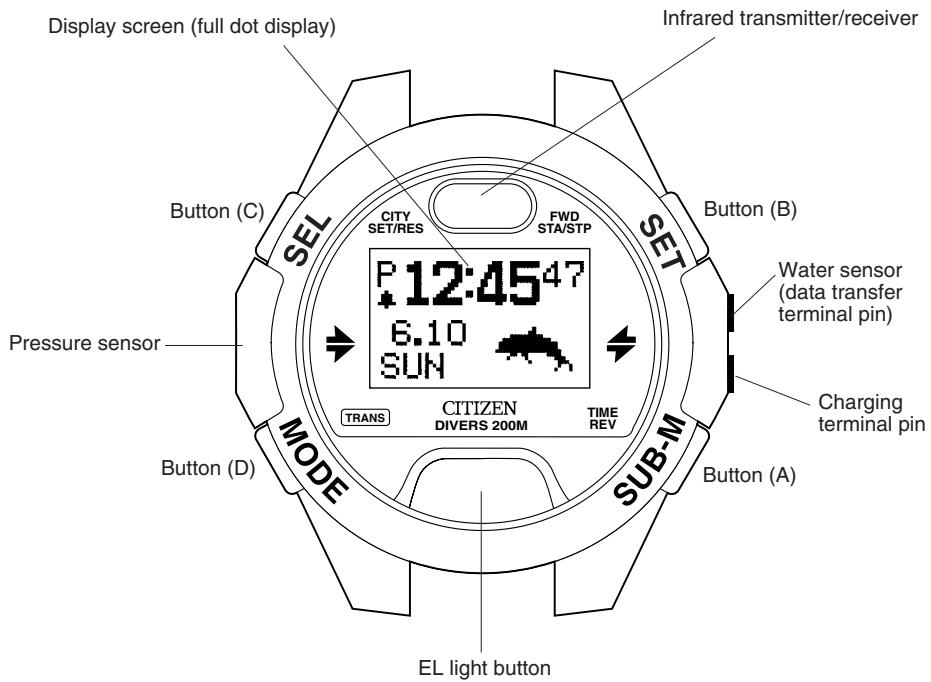
■Names of Components
■Display Mode (Functions)
Standard Mode
The watch is usually used in this mode. The standard mode consists of the following seven sub-modes.
1. Time Mode
In this mode, the watch is used to display and correct the time and date (main time) that are the basic parameters of this watch. This mode is normally displayed when wearing the watch.
2. Travel Time Mode TEV
In this mode, the watch displays the time and date for a different location from the time mode.
3. Destination Timer Mode DET
In this mode, the watch displays the time remaining until a preset arrival time in 1 second units after a destination and arrival time have been preset. This convenient function can be used when traveling or on business overseas.
- Maximum measuring range: 99 hours 59 minutes 59 seconds
4. Alarm Mode ALM
In this mode, the watch can be used to switch the alarm on and off and correct the alarm time.
5. Chronograph Mode CHR
In this mode, the watch measures time with a chronograph up to 99 hours, 59 minutes, 59.99 seconds.
6. Timer Mode THF
In this mode, the watch measures time with a countdown timer in 1-second units (and can be set up to 99 minutes in 1-minute units).
7. System Monitor Mode BATT / FILE
In this mode, the watch displays the charge level of the secondary battery along with a general indication of the usage status of flash memory.
Dive Plan Mode DFL
This mode is used to prepare a plan for the next dive. In this mode, the watch displays the no-decompression limit time during the next dive and is used to set the dive alarms to be used during the next dive.
Scuba Log Mode - SCUBA (LoE)
This mode is used to confirm the logs of previous scuba diving. In this mode, the watch displays various data (logs) for scuba diving automatically recorded while diving.
Skin Log Mode - SKIN Log
This mode is used to confirm the logs of previous skin diving. In this mode, the watch displays various data (logs) for skin diving automatically recorded while diving.
Dive Mode
This mode is used for diving. The watch automatically switches to the dive mode when a dive is started, and displays current water depth, dive time and other data required while diving during the course of a dive.
Surface Mode SUR
In this mode, the watch displays the elapsed time since completion of the most recent scuba dive and the amount of time flying in an aircraft is prohibited (maximum 24 hours) (no fly time). The surface mode is no longer displayed once the no fly time has elapsed.
Infrared Communication Mode
This mode is for communicating with a PC or communicating between watches using the infrared communication function.
Low power mode (Temporally function)
The low power mode is a temporally function for powering the watch with the minimum amount of current consumption. The watch automatically switches to the low power mode when it has become insufficiently charged.
Do not wear the watch in the low power mode under normal circumstances. Although the watch can be manually switched to this mode by operating the buttons, all functions except for time and date display and correction do not operate. In addition, the watch cannot be switched from the low power mode to the dive mode.
■Battery Charge Indicator and Continuous Usage Time
An approximate indication of the amount of charge remaining in the secondary battery can be confirmed on the display. The battery charge indicator can be displayed in either the time mode of the standard mode (location display) or the system monitor mode.
1. How to Read the Battery Charge Indicator
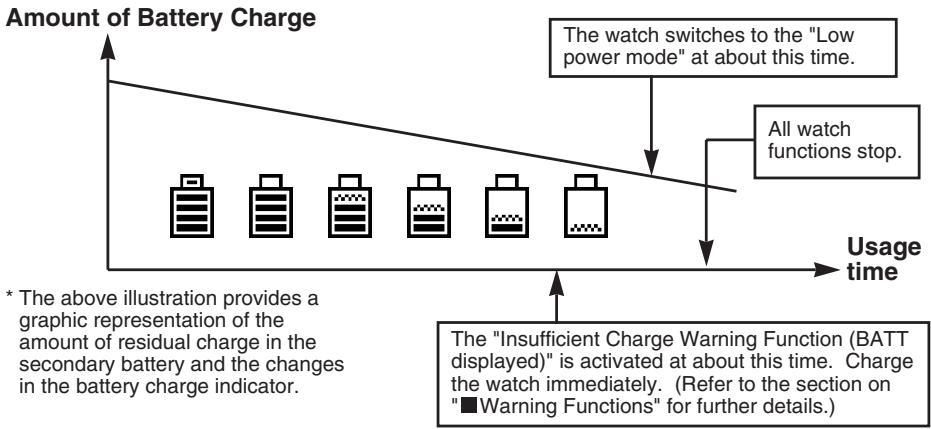
The battery charge indicator changes in the manner shown below according to the amount of elapsed time the watch has been used.

About 60% charged to fully charged

About 10-20% charged

Nearly insufficiently charged. Charge the watch promptly. Since the watch may become insufficiently charged during diving, charge the watch sufficiently before diving.

Insufficiently charged. The watch cannot be used for diving. Charge the watch immediately.
2. Continuous Usage Time
This watch will continue to run for about 1 month (until the insufficient charge warning function is activated) once it has been fully charged.
This is roughly based on the conditions of use indicated below.
- Diving (water depth measurement): Twice/week (30 min./dive) Alarm: 30 seconds/day Chronograph measurement: 1 hour/week EL light: 4 seconds/day
- The continuous usage time of the watch becomes shorter the more often the alarm, chronograph and other functions are used. In addition, the continuous usage time is further reduced by infrared communication.
- Since the water sensor is activated when the watch gets wet even when not diving, the continuous usage time becomes correspondingly shorter.
Switching the Mode
- The mode changes in the order of standard mode, dive plan mode, scuba log mode, skin log mode and surface mode each time button (D) is pressed.
- The sub-mode of the standard mode changes in the order of time, travel time, destination timer, alarm, chronograph, timer and system monitor each time button (A) is pressed in the standard mode.
- The watch automatically switches to the dive mode (preliminary dive display) when the water sensor gets wet in any mode (excluding the infrared communication mode and low power mode).
- The watch switches to the infrared communication mode (initial display) when button (D) is pressed for at least 2 seconds in any mode (excluding the dive mode and low power mode).
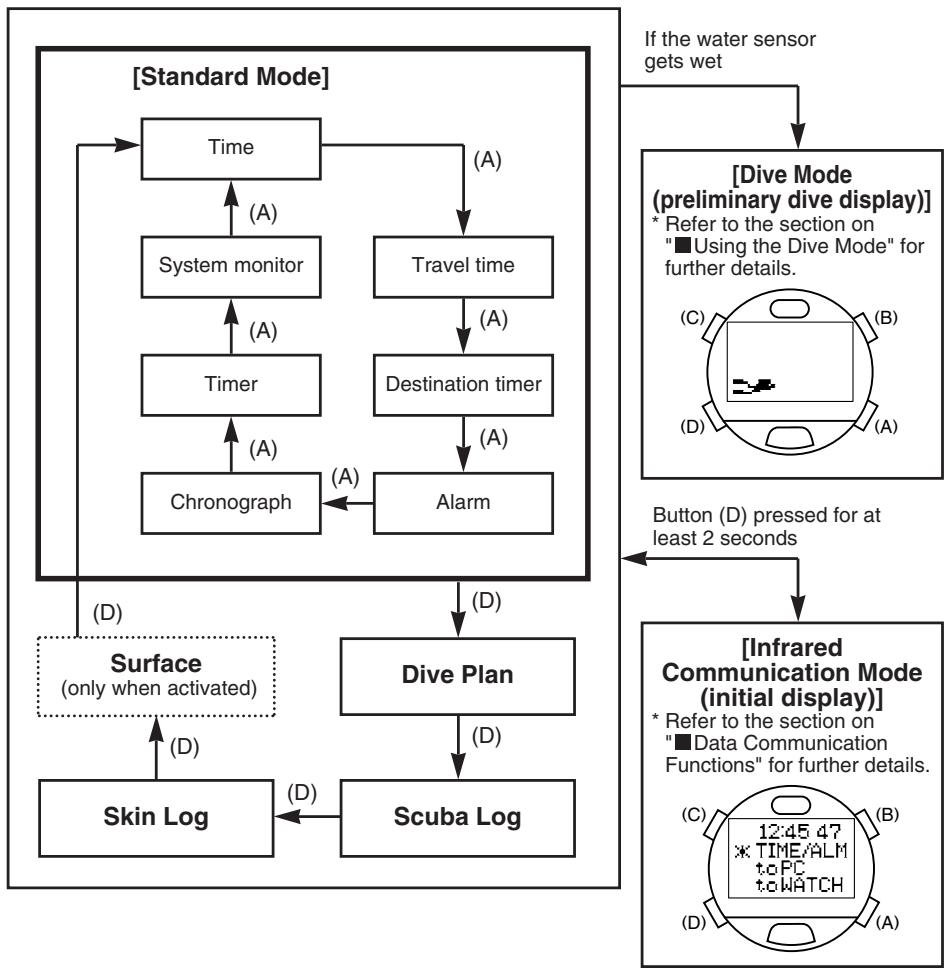
- The surface mode is no longer displayed once measurement of no fly time (timer) is completed after scuba diving. The watch switches to the time mode of the standard mode when button (D) is pressed in the skin log mode when the surface mode is not activated.
- When none of the buttons are pressed for about 3 minutes in any of the modes of the standard mode, dive plan mode, scuba log mode or skin log mode, the watch automatically returns to the time mode of the standard mode (except that it returns to the surface mode when the surface mode has been activated).
- The watch switches to the low power mode when buttons (A) and (D) are pressed for at least 2 seconds in the time mode of the standard mode.
- If "BATT", "ERR" or "CHK" is flashing in the lower left section of the display in any of the modes (indicating that a warning function has been activated), and during correction in any mode, the watch does not switch to the dive mode even if the water sensor gets wet.
- The hourglass mark and "LOADING" are displayed when switching to the dive mode, infrared communication mode or low power mode. The water sensor along with all button operations do not function while these are displayed.
Using the EL Light
The EL light is illuminated for about 1 second when the EL light button on the front of the watch is pressed in any of the modes except for the infrared communication mode. The EL light is illuminated for about 5 seconds when the EL light button is pressed continuously.
EL light button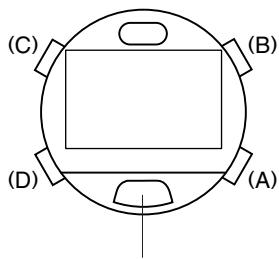

CAUTION
Since the display may be difficult to see when confirming the display during night diving, confirm the contents of the display with external lighting such as an underwater light.
Using the Standard Mode
1. Time Mode
This mode is the basic mode of this watch and is used to correct and display the time and date.
A. Switching the Display
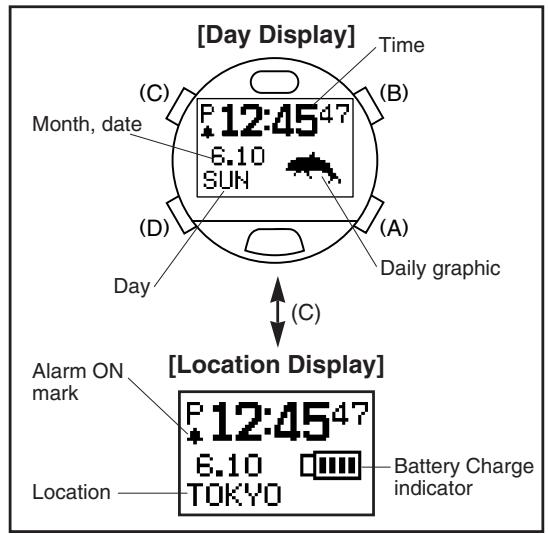
- The display switches between the Day Display and Location Display each time button (C) is pressed.
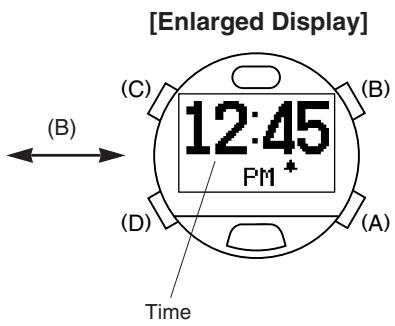
- When button (B) is pressed when either the Day Display or Location Display is displayed, the display changes to the Enlarged Display. Pressing button (B) again returns it to the original display.
B. Setting the Time and Date
(1) The watch enters the correction state (display is flashing) when button (C) is pressed for at least 2 seconds during any display of the time mode. (2) The location on the display that is flashing changes in the order shown below each time button (C) is pressed.
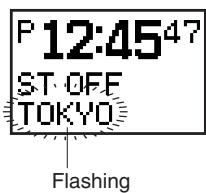
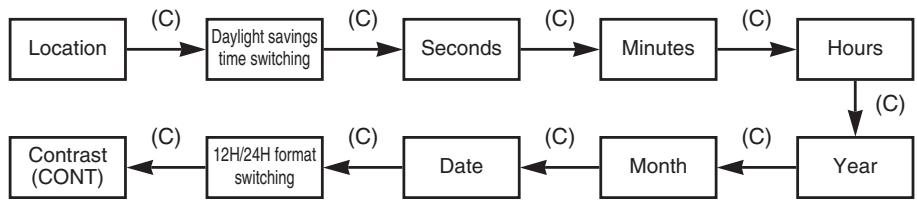
(3) Correct the flashing item by pressing either button (B) or button (A).
- Pressing button (B) advances the display by one step at a time, while pressing button (A) moves the display back by one step at a time. (Pressing either button continuously causes the display to change rapidly.)
- Refer to the section on "■Locations Displayed by this Watch" for information on displayed locations.
- The watch returns to 00 seconds simultaneous to pressing button (B) or button (A) when correcting seconds. (If the seconds are between 30 and 59 seconds at that time the minutes advance by 1.)
- When the display is set to switching daylight savings time (ON or OFF is flashing) or switching the 12H/24H format, the display switches back and forth between the settings each time button (A) or button (B) is pressed.
(4) Pressing button (D) returns the watch to the normal display.
- The year can be set from 2000 to 2099. However, January 1, 2000 is designated as a special date for use by the hardware system of this watch. If the watch is attempted to be used for infrared or USB communication or is switched to the low power mode while set to this date, all the display elements on the watch are displayed and the watch returns to the initial setting. Please do not set your watch to January 1, 2000.
- Once the date has been set, it is not necessary to correct for leap years or the end of the month. (Dates such as February 30 that do not actually exist are not displayed even during correction.)
- Pay attention to AM (A) and PM (P) when using the 12 hour format.
- When daylight savings time has been set (ON), the time advances by 1 hour from the current time and "ST" appears on the display. Daylight savings time cannot be set for Coordinated Universal Time (UTC).
- The day is corrected automatically by correcting the year, month and date.
- The watch automatically returns to the normal display when none of the buttons are pressed for about 3 minutes in the correction state (display flashing).
- The watch can be immediately returned to the normal display by pressing button (D) in the correction state (display flashing).
C. Daily Graphic
The daily graph is set with the "CAPgm" PC software. The graphic registered for daily graphic is displayed each day in the lower right section of the Day Display. In addition, daily graphics registered for anniversaries are preferentially displayed on days on which anniversaries have been set. Refer to the "CAPgm" user's manual provided with the accessory software contained on the CD-ROM for further details on setting and displaying daily graphics.
2. Travel Time Mode
The travel time mode is used to display the date and time of another location separate from the Main Time of the time mode (Main time). Simply select a location desired to be displayed in the travel time mode from the pre-registered locations to automatically display the time and date for that location as determined by converting the time difference. In addition, the location displayed in the travel time mode and the location displayed in the time mode can be easily interchanged.
A. Switching the Display
The time difference from the Coordinated Universal Time (UTC) along with the time difference from the time in the time mode are displayed for as long as button (B) is pressed in the travel time mode.
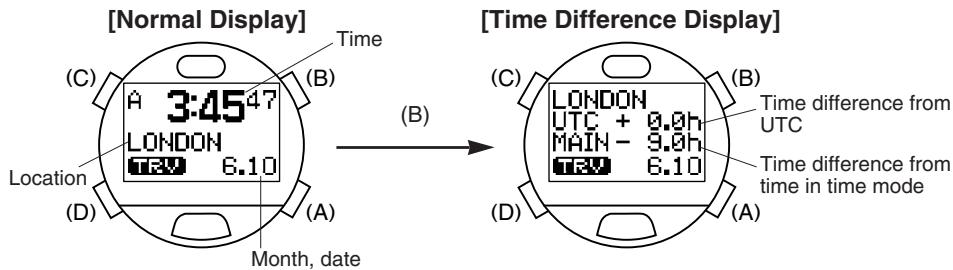
B. Setting the Travel Time
(1) The location flashes when button (C) is pressed for at least 2 seconds in the travel time mode. (2) The location is changed by pressing button (B) or button (A).
- Pressing button (B) calls up the next location each time it is pressed, while pressing button (A) calls up the next location in the reverse order each time it is pressed. (Pressing either button continuously enables the location to be changed rapidly.)
- Refer to the section on "■Locations Displayed by this Watch" for information on displayed locations.
(3) The setting for daylight savings time (ON (set) or OFF (canceled)) flashes when button (C) is pressed. (4) Daylight savings time is corrected by pressing button (B) or button (A).
- The display switches back and forth between the settings each time button (A) or button (B) is pressed.
(5) Pressing button (D) returns the watch to the normal display.
- The 12 hour or 24 hour format is used in accordance with the setting in the time mode.
- Daylight savings time cannot be set for Coordinated Universal Time (UTC).
- In the case the setting for daylight savings time is changed when the location in the travel time mode is the same as the location in the time mode, the setting for daylight savings time is applied to the time mode as well.
- The watch automatically returns to the normal display of the travel time mode when none of the buttons are pressed for about 3 minutes in the correction state (display flashing).
- The watch can be immediately returned to the normal display of the travel location mode by pressing button (D) in the correction state (display flashing).
- The watch automatically returns to the time mode when none of the buttons are pressed for about 3 minutes in the travel time mode.
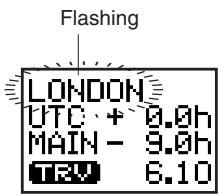
C. Interchanging Locations Between Travel Time Mode and Time Mode
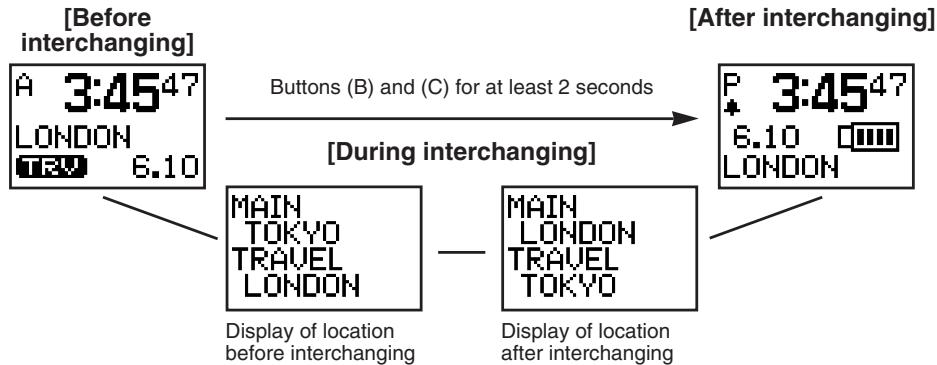
When a location in a time zone that is frequently used is set in the travel time mode, and this interchanging procedure is performed after having arrived at that location, the time and date of the location displayed in the travel time mode can be displayed in the time mode. As a result, the time and date of the location that had been displayed in the time mode is now displayed in the travel time mode.
Press buttons (B) and (C) simultaneously for at least 2 seconds in the travel time mode. The location in the time mode and location in the travel time mode are interchanged and the watch displays the time mode.
Example: Location set in time mode (main time): TOKYO
Location set in travel time mode: LONDON
3. Destination Timer Mode
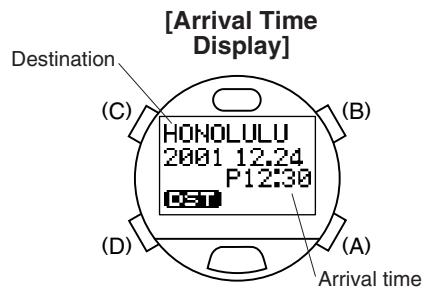
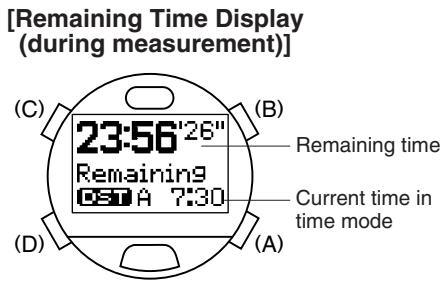
The destination timer measures and displays the amount of time remaining until arriving at a destination up to a maximum of 99 hours, 59 minutes and 59 seconds after having set the destination and arrival time when traveling or on business overseas. Once the arrival time is reached, an alarm informing you of arrival sounds for about 30 seconds and "Dest" is displayed on the display. After arrival, elapsed time from the time of arrival is measured for up to 99 hours, 59 minutes and 59 seconds.
In addition, the alarm informing you of arrival at your destination can be selected from 15 types of alarm sounds.
A. Setting the Destination Timer
(1) The watch switches to the correction state (display flashes) when button (C) is pressed for at least 2 seconds in the destination timer mode. (2) The flashing item changes in the order shown below each time button (C) is pressed.
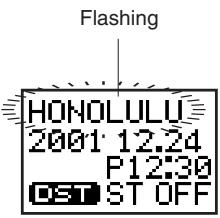
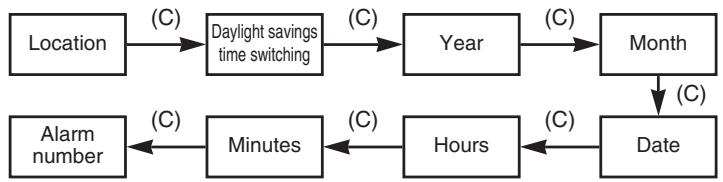
(3) The flashing item can be corrected by pressing either button (B) or button (A).
- Pressing button (B) advances the display by one step at a time, while pressing button (A) moves the display back by one step at a time. (Pressing either button continuously causes the display to change rapidly.)
- Refer to the section on "■Locations Displayed by this Watch" for information on displayed locations.
- When switching daylight savings time (ON or OFF is flashing), the display switches back and forth between the settings each time button (A) or button (B) is pressed.
- When button (B) is pressed while in the alarm number selection state (an alarm number is flashing), the next alarm number is called up each time it is pressed. When button (A) is pressed in the alarm number selection state, the next alarm number is called up in the reverse order each time it is pressed. Select "Silent" when you do not want the alarm to sound.
- You can monitor the alarm corresponding to the flashing alarm number by pressing button (B) or button (A) in the alarm number selection state for as long as the button is pressed. (The next or previous alarm number is momentarily displayed the instant the button is pressed, while pressing either button continuously causes the set alarm to sound.)
(4) Pressing button (D) finalizes the setting after which the destination timer starts to run and the remaining time until the arrival time is displayed.
- The 12 hour or 24 hour format setting is in accordance with the setting in the time mode.
- In the case the remaining time until the set arrival time exceeds 100 hours, the destination timer stops at the arrival time display and then starts running automatically when the remaining time until the arrival time is within 99 hours, 59 minutes and 59 seconds.
- When the arrival time has been set going back more than 100 hours, the destination timer stops at the arrival time display.
- In the case of correcting the arrival time while the destination timer is running, the destination timer starts running according to the newly set arrival time.
- The remaining time is recalculated in the case the time or daylight savings time setting is corrected for the location set with the destination timer in the time mode or travel time mode while the destination timer is running.
- The watch automatically returns to the arrival time display or remaining time display when none of the buttons are pressed for about 3 minutes in the correction state (display flashing).
- The watch can be immediately returned to the arrival time display or remaining time display by pressing button (D) in the correction state (display flashing).
B. Destination Timer Measuring Procedure
Once the destination timer has been set, measurement begins automatically. Once the timer reaches the arrival time, an alarm sounds for about 30 seconds informing you that the time is up. After the time on the destination timer is up, elapsed time from the arrival time flashes on the display for up to 99 hours, 59 minutes and 59 seconds. After this time has elapsed, the watch returns to the arrival time display.
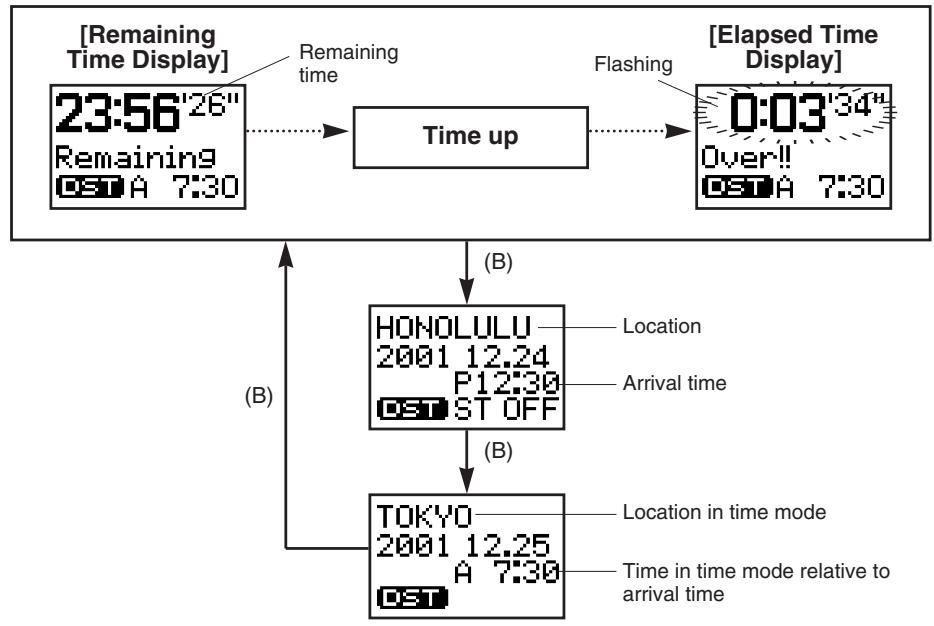
- The alarm that sounds when the arrival time is reached can be turned off by pressing any button.
- If the alarm to inform of arrival is set to "Silent", arrival time is notified only with the "Dest" display on the display.
(1) When button (B) is pressed while the destination timer is running, the set arrival time (destination location and time) is displayed. (2) When button (B) is pressed again while the arrival time is displayed, the time and location of the time mode relative to the set arrival time are displayed. (3) Pressing button (B) again returns the watch to the remaining time display.
- The watch automatically returns to the remaining time display when none of the buttons are pressed for about 3 minutes during the arrival time confirmation displays described in steps (1) and (2) above.
- The watch automatically returns to the time mode when none of the buttons are pressed for about 3 minutes in the destination timer mode (including when the destination timer is running).
4. Alarm Mode
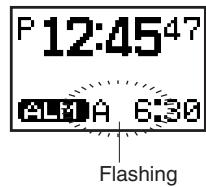
Once this alarm is set (ON), the alarm sounds for approximately 30 seconds at the same time every day and "Alarm" is displayed on the display. The alarm can be turned off by pressing any button when it is sounding. In addition, the alarm tone can be selected from 15 types of alarm sounds when setting the alarm.
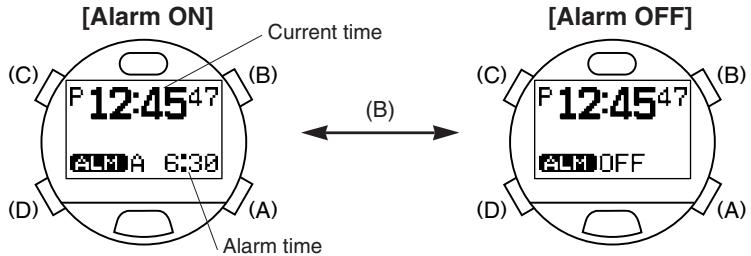
A. Alarm ON/OFF and Alarm Monitor
The alarm is switched between ON (set) and OFF (canceled) each time button (B) is pressed in the alarm mode. Once the alarm has been set, the alarm ON mark is displayed in the time mode. When button (B) is pressed continuously in the alarm mode, you can monitor the selected alarm tone for as long as button (B) is pressed.
B. Setting the Alarm
(1) The watch switches to the correction state (display flashes) when button (C) is pressed for at least 2 seconds during then the normal display in the alarm mode. The flashing item can be corrected. (2) The flashing item changes in the order shown below each time button (C) is pressed.

(3) The flashing item can be corrected by pressing either button (B) or button (A).
- Pressing button (B) advances the display by one step at a time, while pressing button (A) moves the display back by one step at a time. (Pressing either button continuously causes the display to change rapidly.)
- When button (B) is pressed while in the alarm number selection state (an alarm number is flashing), the next alarm number is called up each time it is pressed. When button (A) is pressed in the alarm number selection state, the next alarm number is called up in the reverse order each time it is pressed. Select "Silent" when you do not want the alarm to sound. In this case, the alarm time is notified only with "Alarm" on the display.
- You can monitor the alarm corresponding to the flashing alarm number by pressing button (B) or button (A) in the alarm number selection state for as long as the button is pressed. (The next or previous alarm number is momentarily displayed the instant the button is pressed, while pressing either button continuously causes the set alarm to sound.)
(4) Pressing button (D) finalizes the alarm setting.
- The 12-hour or 24-hour format setting is in accordance with the setting in the time mode.
- The watch automatically returns to the normal alarm display when none of the buttons are pressed for about 3 minutes in the correction state (display flashing).
- The watch can be immediately returned to the normal alarm display by pressing button (D) in the correction state (display flashing).
- The watch automatically returns to the time mode when none of the buttons are pressed for about 3 minutes during the normal alarm display.
5. Chronograph Mode
The chronograph function of this watch is able to measure time in 1/100 units for up to 99 hours, 59 minutes and 59.99 seconds. The chronograph returns to the reset display (0:00'00"00) and stops after 100 hours have elapsed.
A. Reading the Display
[Chronograph Reset Display]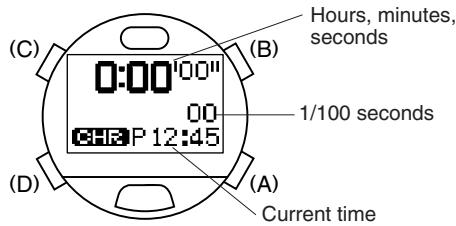
<1/100 Second Display>
The digits for 1/100 seconds of the chronograph are only displayed for 1 minute when the chronograph is started and after returning to the measurement display from the split time display, after which they are no longer displayed. However, the 1/100 second digits are also displayed when the chronograph is stopped and during the split time display.
B. Chronograph Timing Procedure
(1) The chronograph is repeatedly started and stopped each time button (B) is pressed. (2) The split time is displayed for about 10 seconds when button (C) is pressed during measurement. The most recent split time is measured and displayed each time button (C) is pressed. ("SPL" flashes while split time is displayed.) (3) Pressing button (C) while the chronograph is stopped returns the watch to the reset display.
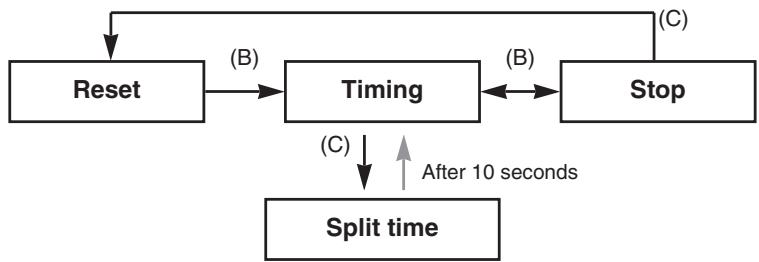
- Split time refers to the amount of time that has elapsed from the starting line to some intermediate point.
- The watch automatically returns to the time mode when none of the buttons are pressed for about 3 minutes during the chronograph reset display.
- The watch automatically returns to the surface mode when none of the buttons are pressed for about 3 minutes in the chronograph mode (including during timing) when the surface mode has been activated (while resting on the surface).
- If the mode is switched to the low power mode during chronograph timing, chronograph timing is interrupted and the watch returns to the reset display.
6. Timer Mode
The timer of this watch can be set up to 99 minutes in 1 minute units. An alarm sound indicating that the time is up sounds for about 30 seconds and "Timer" is displayed on the display when the time on the timer is up. The timer then returns to the initial set time and stops.
In addition, the alarm sound indicating that time is up following completion of timing can be selected from 15 types of alarm sounds.
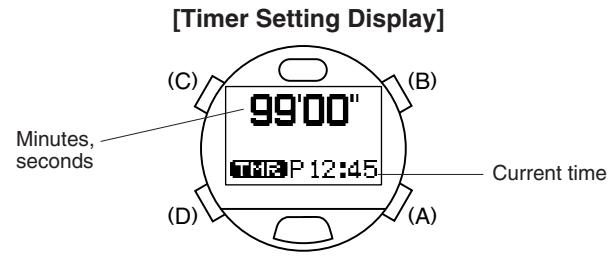
A. Setting the Timer
(1) The minutes flash when button (C) is pressed for at least 2 seconds in the timer mode. (2) Set the minutes by pressing button (B) or button (A).
- Pressing button (B) advances the display by one minute at a time while pressing button (A) moves back the display by one minute at a time. (Pressing either button continuously causes the display to change rapidly.)
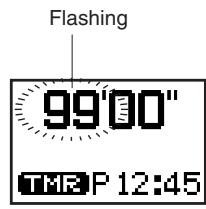
(3) The time up alarm number flashes when button (C) is pressed. (4) Set the time up alarm number by pressing button (B) or button (A).
- Pressing button (B) calls up the next time up alarm number each time it is pressed, while pressing button (A) calls up the next time up alarm number in the reverse order each time it is pressed. Select "Silent" when you do not want the time up alarm to sound.
- You can monitor the time up alarm of the number that is flashing by pressing button (B) or button (A) for as long as the button is pressed. (The next or previous time up alarm number is momentarily displayed the instant the button is pressed, while pressing either button continuously causes the set time up alarm to sound.)
(5) Pressing button (D) returns the watch to the timer setting display.
- The watch automatically returns to the timer setting display when none of the buttons are pressed for about 3 minutes in the correction state (display flashing).
- The watch can be immediately returned to the timer setting display by pressing button (D) in the correction state (display flashing).
B. Timer Measuring Procedure
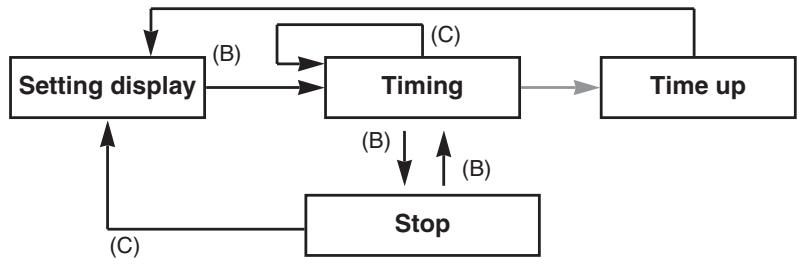
(1) The timer is repeatedly started and stopped each time button (B) is pressed. (2) The watch returns to the setting display when button (C) is pressed while the timer is stopped.
- The alarm that sounds when the time is up can be turned off by pressing any button.
- Only "Timer" appears on the display to indicate that the time is up when the time up alarm has been set to "Silent".
- The watch automatically returns to the time mode after about 3 minutes have passed during the timer setting display.
- The watch returns to the surface mode when none of the buttons have been pressed for about 3 minutes in the timer mode (including during timing) when the surface mode has been activated (while resting on the surface).
- If the mode is switched to the dive mode, infrared communication mode or low power mode during timing, timing is interrupted and the watch returns to the setting display.
The timer is instantly returned to the setting display and resumes timing when button (C) is pressed during timer measurement.
7. System Monitor Mode
This mode provides a general indication of the amount of charge remaining in the secondary battery along with the usage status of flash memory.
A. Switching the Display
- The display switches back and forth each time button (B) is pressed in the system monitor mode.
- The watch's identification number is displayed when button (C) is pressed during the flash memory status display.
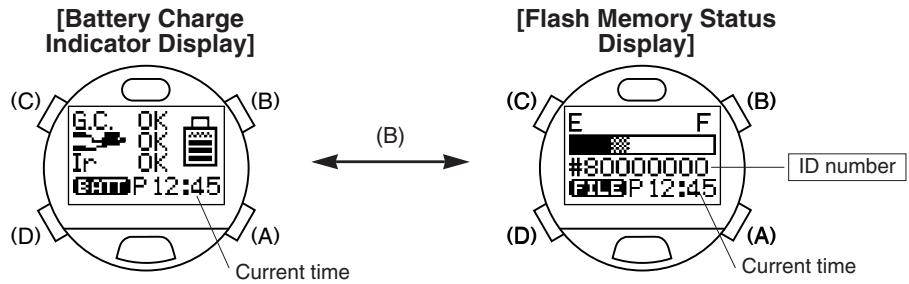
- The watch automatically returns to the time mode when none of the buttons are pressed for about 3 minutes in the system monitor mode.
B. Battery Charge Indicator
The battery charge indicator provides a general reference for determining the amount of charge remaining in the secondary battery. In addition, it also indicates whether or not each function can be operated ("OK" or "NG") at the current battery charge level. When the watch is sufficiently charged in the case "NG" is indicated for each function, the display changes to "OK" and each of the functions can be operated.
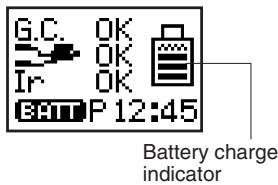
G.C.: Garbage Collection
This indicates whether or not the garbage collection operation can be performed.
- This watch uses flash memory to store the various setting and diving data of the watch edited with a personal computer. Whenever new data is recorded in flash memory, areas of memory that are no longer used as well as areas of memory in the gaps between files are generated in the flash memory. Garbage collection refers to an operation that creates continuous areas of available memory so that these areas can be reused automatically.

: Diving Function
This indicates whether or not the watch can be used for diving.
- When "NG" is displayed, the watch will not switch to the dive mode. The watch can therefore not be used for diving in this state.
Ir: Infrared Communication Function
This indicates whether or not the infrared communication function can be used for data transfer with a personal computer or between watches.
C. Flash Memory Status Display
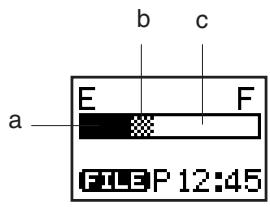
This display provides a general indication of the amount of flash memory available. In addition, garbage collection can also be performed during this display by pressing one of the buttons.
a: Black segment: Area in which data has been written and then deleted.
→The area corresponding to this segment is transformed into available memory by performing garbage collection.
b: Gray segment: Area currently used by files.
→This segment becomes larger the greater the amount of diving data, daily graphic data and so forth.
c: White segment: Area of available memory.
D. Garbage Collection Operating Procedure
Garbage collection begins when button (C) is pressed for at least 2 seconds during the flash memory status display.
- During the garbage collection operation, an alarm sounds and "G.C." is displayed on the display. When garbage collection is completed, "Done" is displayed on the display.
- Garbage collection cannot be performed when "G.C." has changed to "NG" on the battery charge indicator or when the water sensor has been activated. "Fail" is displayed on the display at this time.
Try to perform garbage collection when the black segment on the flash memory status display is larger than the white segment (available memory). Garbage collection consumes considerable power. For this reason as well, in order to ensure that flash memory is used efficiently, it is recommended to perform garbage collection whenever the watch is charged (fully charged).
- In the case "Error" is displayed during the garbage collection operation, there may be an error in the flash memory. After formatting flash memory by referring to the section on "■ Formatting Flash Memory", try repeating the garbage collection operation. If "Error" is still displayed, this indicates that the watch has malfunctioned. Please contact a Citizen Service Center to request repairs.
- Garbage collection is only performed to organize the contents of flash memory. There is no risk of deleting watch settings or diving logs as a result of performing garbage collection.
■Locations Displayed by this Watch
The locations displayed in the time, travel time and destination timer sub-modes of the standard mode can be edited with a personal computer (including changing, adding and deleting locations as well as changing the order in which they are called up).
- Refer to the section on "■ Data Communication Functions" in this manual along with the "CAPgm" instruction manual contained on the CD-ROM provided for further details.
Locations Pre-registered in this Watch
The following locations are registered in the watch when using the watch for the first time (default status) or after having formatted flash memory. The following locations are displayed in alphabetical order (except for UTC which is the first location shown) in the correction state of each mode.
| No. | Watch display | Location | Time difference | No. | Watch display | Location | Time difference |
| - | UTC | Coordinated Universal Time | ±0 | 16 | KUWAIT | Kuwait | +3 |
| 1 | ANCHORAGE | Anchorage | -9 | 17 | LONDON | London | ±0 |
| 2 | AUCKLAND | Auckland | +12 | 18 | LA | Los Angeles | -8 |
| 3 | BANGKOK | Bangkok | +7 | 19 | MEXICO | Mexico City | -6 |
| 4 | BEIJING | Beijing | +8 | 20 | MONTREAL | Montreal | -5 |
| 5 | BUENOS | Buenos Aires | -3 | 21 | MOSCOW | Moscow | +3 |
| 6 | CAIRO | Cairo | +2 | 22 | NEW DELHI | New Delhi | +5.5 |
| 7 | CARACAS | Caracas | -4 | 23 | NEW YORK | New York | -5 |
| 8 | CHICAGO | Chicago | -6 | 24 | NOUMEA | Noumea | +11 |
| 9 | DENVER | Denver | -7 | 25 | PARIS | Paris | +1 |
| 10 | DHAKA | Dhaka | +6 | 26 | RIO | Rio de Janeiro | -3 |
| 11 | DUBAI | Dubai | +4 | 27 | ROME | Rome | +1 |
| 12 | HONG KONG | Hong Kong | +8 | 28 | SINGAPORE | Singapore | +8 |
| 13 | HONOLULU | Honolulu | -10 | 29 | SYDNEY | Sydney | +10 |
| 14 | ISTANBUL | Istanbul | +2 | 30 | TOKYO | Tokyo | +9 |
| 15 | KARACHI | Karachi | +5 |
Location "IrWW"
In the case the time difference (time difference from UTC) of a location of the time mode of the transmitting watch is not present in the receiving watch during transfer of time setting data between watches using the infrared communication function, "IrWW" is temporarily displayed in the location display of the receiving watch.
- Refer to section "4. Data Communication Between Watches" of "■Data Communication Functions" in this manual.
■Warning Functions
This watch is equipped with various warning functions for the purpose of avoiding risks and problems when diving as much as possible.

WARNING
- Do not dive in a manner that activates any of the warning functions. Since the degree of risk varies according to experience, physical condition and diving conditions, do not assume that diving is completely safe just because none of the warning functions are activated. Please use the warning functions as a general indicator of diving safety.
Insufficient Charge Warning
When the watch becomes insufficiently charged, "BATT" flashes in the lower left corner of the display in all of the sub-modes of the standard mode. Operation of the following functions is limited while this warning function is activated.
- The watch does not switch to the dive mode even if the water sensor gets wet. (The watch automatically switches to the battery charge indicator display of the system monitor mode when the water sensor gets wet.)
- None of the alarms sound.
- Data cannot be transferred by infrared communication. (However, data can be transmitted to a personal computer by USB communication.)
- The EL light is not illuminated.
When this warning function is activated, charge the watch by attaching to the communication unit as soon as possible. The display will return to normal once the watch is sufficiently charged.
- None of the dive alarms sound when the insufficient charge warning function is activated during diving. Although the dive computer will function normally for about 30 minutes after "BATT" starts to flash, the log data for that dive is not recorded. Promptly begin to ascend if this warning function is activated during diving.
- If the watch remains insufficiently charged after the insufficient charge warning function has been activated, it switches to the low power mode after about 2 days. Please note that if the watch continues to be left uncharged in the low power mode, all functions stop and all watch settings return to the initial (default) settings.
File Error Warning
When the amount of available memory in flash memory becomes low, "FILE" flashes in the lower left corner of the display in all of the submodes of the standard mode as well as in the dive mode. The watch automatically switches to the flash memory status display of the system monitor mode when the water sensor gets wet while this warning function is activated. Please note that although it is possible to use the watch for diving in this state, log data may not be recorded in flash memory during diving.
The file error warning function is also activated and additional log data is not recorded if the duration of a single dive exceeds 2 hours or if more than 15 dives are made in a single day. The file error warning function may also be activated when the water temperature during diving is low. It may not be possible to receive watch settings by data communication while the file error warning function is activated.
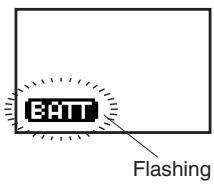
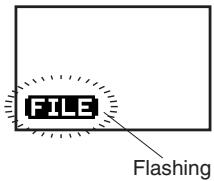
When the watch has switched to the file error warning display, perform the garbage collection procedure in the system monitor mode of the standard mode. The display returns to normal following completion of garbage collection.
Abnormal Pressure Detection Error Warning
When abnormal atmosphere pressure is detected during use on land, or when ascending to high locations more than 4000 m (13000 ft) above sea level, "ERR" (Error) flashes in the lower left corner of the display. The watch does not switch to the dive mode even if the water sensor gets wet while this warning function is activated.
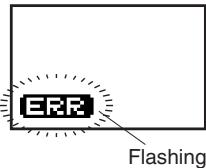
If "ERR" does not disappear from the display even after a long period of time, there may be a problem with the pressure sensor. When this happens, discontinue using the watch and consult a Citizen Service Center.
Water Sensor Check Warning
If the preliminary dive display continues to be displayed for more than 1 hour after the water sensor has gotten wet and the watch has switched to the preliminary dive display in the dive mode, "CHK" (Check) flashes in the lower left corner of the display to inform the wearer that the water sensor should be checked.
- "CHK" also flashes when the watch returns to the normal display from any of the correction states, when the watch is returned to the time mode of the standard mode from the infrared communication mode, and when the water sensor is operating during the all reset procedure.
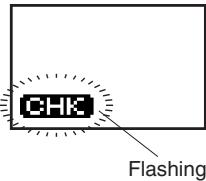
The watch does not switch to the dive mode (water depth measurement display) when "CHK" is flashing.
To check the sensor, remove any debris or moisture from the water sensor with a dry cloth. The display returns to normal when the water sensor is canceled.
Ascent Rate Warning
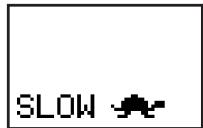
When the ascent rate during scuba diving exceeds 18 m (60 ft)/min, the ascent rate warning alarm sounds for 5 seconds and "SLOW" and an illustration of a turtle are displayed at the bottom of the display.
The ascent rate warning alarm stops sounding when a proper ascent rate is resumed.
- The ascent rate warning alarm does not sound during skin diving (continuous diving for less than 3 minutes at a depth of 1 m or more).
Abnormal Depth Warning
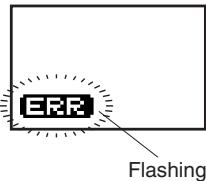
When a sudden change in depth of more than 4 m (13 ft)/sec is detected during diving, the watch assumes that the watch has reached an abnormal depth. At this time, "ERR" and the diver mark are alternately displayed in the lower left corner of the display.
Once "ERR" has been displayed during diving, it continues to be displayed until the dive mode is terminated.

CAUTION
Avoid using the watch in environments where sea bottom drilling equipment or similar machinery is in use. The vibrations from such equipment may cause a change in water pressure of 4 m (13 ft) or more per second to be locally and momentarily applied to the pressure sensor of the watch, causing "ERR" to be displayed and preventing water depth from being displayed correctly.
Decompression Diving Warning
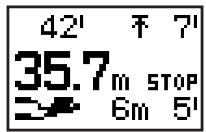
This alarm sounds for 3 seconds and the decompression stop indicator (STOP) is displayed on the display when the no-decompression limit time has been exceeded resulting in decompression diving during the course of diving.
The display returns to the no-decompression diving display when decompression stop is performed in accordance with the decompression stop instructions.
Exceed Maximum Depth Warning
When the limit depth of 40 m (131 ft) for recreational diving is surpassed during the course of diving, an exceed maximum depth error occurs, the current depth flashes and the alarm sounds for 15 seconds. During diving at a depth greater than 40 m (131 ft), the warning alarm sounds for 15 seconds every minute.
This warning function is canceled when the depth returns to 40 m (131 ft) or less.
Permanent Error Warning
The instructed depth flashes and an alarm sounds continuously when either of conditions 1 or 2 below are met. If hazardous diving or ascending is continued while ignoring this warning, a permanent error (ERROR) occurs:
- When not ascending to the instructed depth and continuing to dive at an excessively low depth (diving at which the instructed decompression stop depth exceeds 9 m (30 ft).) even though having been instructed to make a decompression stop (Permanent Error Warning 1).
The warning stops when the diver begins to ascend immediately and the decompression stop instructed depth reaches 9 m or less.
- When having ascended to a depth 1 m (4 ft) or more less than the instructed depth after having been instructed to make a decompression stop (Permanent Error Warning 2). In this case, the warning is canceled when the diver returns to the instructed depth.
If hazardous diving or ascending is continued even after the permanent error warning function has been activated, a permanent error results, "ERROR" appears on the display and the entire display flashes.
When a permanent error has occurred, the next dive cannot be made for 24 hours. (The water depth measurement function does not operate for 24 hours. In addition, "ERROR" is displayed when the watch is switched to the dive plan mode, and the no-decompression limit time is not displayed.)
Flashing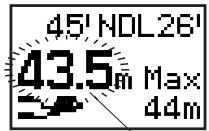
Flashing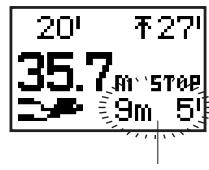
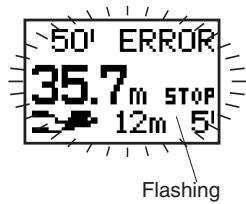
Diving Terms Used by this Watch
The following provides an explanation of the diving terms displayed by this watch along with their basic meanings.
This watch employs the calculation formula of the Canadian Defense and Civil Institute of Environmental Medicine (DCIEM).
This watch automatically distinguishes between skin diving and scuba diving according to the following conditions, and records log data separately for each type of diving.
- Scuba diving: Continuously diving for 3 minutes or more to a depth of 1 m (4 ft) or more
- Skin diving: Continuously diving for less than 3 minutes to a depth of 1 m (4 ft) or more
In this watch, one dive constitutes the time from initially diving to a depth of 1 m (4 ft) (start of dive) from the preliminary dive mode state to the time the dive mode is terminated (end of dive).
No-decompression diving refers to diving that allows the diver to ascend to the surface without stopping for decompression during the course of ascending following completion of a dive. The limit time during which this no-decompression diving is allowed is referred to as the no-decompression limit time. No-decompression limit time varies according to the diving depth and diving time of the previous dives.
Safety stop refers to a temporary stop made during ascending for safety reasons in order to promote expulsion of nitrogen in the body, and is performed even if the no-decompression limit time has not been exceeded. In the case of having dove to a depth of 18 m (60 ft) or more, a safety stop should always be made at 5 m (15 ft) of depth to ensure safety.
This refers to diving beyond the no-decompression limit time. Decompression diving is extremely dangerous since nitrogen accumulates in the body beyond allowable levels. Never dive in this manner.
This refers to a stop that must be made to ensure the necessary decompression in the case of having performed decompression diving. It is necessary to make a decompression stop at a predetermined depth (decompression stop instructed depth) and predetermined time (decompression stop instructed time) when ascending.
This refers to the minimum time required to ascend to the surface from the current depth in the case of ascending at the rate of 18 m (60 ft)/min or less while making a decompression stop in accordance with the decompression stop instructions during decompression diving.
This refers to the amount of nitrogen dissolved in the body as a result of diving. This watch displays a general indicator of the amount of nitrogen dissolved in the body in the form of a bar graph. The higher the level of the black portion of the graph, the greater the body nitrogen level.
This indicates the total number of dives for scuba diving.
- Arbitrarily resetting the number of past dives with the "CAPgm" software provided before using the watch for diving enables this to display the total number of scuba dives made throughout your life.
This is the date (year, month and date) on which a dive was made.
This is the number of dives made in one day. A maximum of 15 dives are counted per day for skin diving and scuba diving, respectively.
- This indicates the number of a dive for a particular dive date.
The counter is reset to 1 when the day changes.
This refers to the elapsed time following completion of scuba diving (surface interval time (S.I. Time)). This watch measures surface interval time up to a maximum of 24 hours.
- S.I. Time as referred to in the scuba log mode represents the elapsed time from completion of the dive of the previous log until the start of the dive of the current log.
This is the total time at a depth of 1 m (4 ft) or more during a single dive.
- Measurement of dive time starts when first going below a depth of 1 m (4 ft), and stops when depth reaches less than 1 m (4 ft). However, if a dive is resumed to a depth of more than 1 m (4 ft) within 10 minutes from the time measurement of dive time stopped, dive time is continued to be measured from the time measurement stopped.
This is the time when the depth exceeds 1 m (4 ft) for the first time during the dive.
This is the minimum water temperature encountered during the course of a single dive.
This is the depth when having dove the deepest during the course of a single dive.
This is the average depth during the course of a single dive.
- This refers to the average value of depth measured for every 5 seconds of dive time.
The watch displays a simple graph of the changes in depth during a dive.
- Data relating to depths measured every 5 seconds and water temperature measured every 5 minutes can be confirmed on a personal computer.
Using the Dive Plan Mode
This mode is used to plan the next dive. In this mode, the no-decompression limit time according to the first dive and repetitive dives can be displayed, and dive alarms can be set.
1. Switching the Display
The display switches between the "Dive Plan Display" and "Dive Alarm Display" each time button (A) is pressed in the dive plan mode.
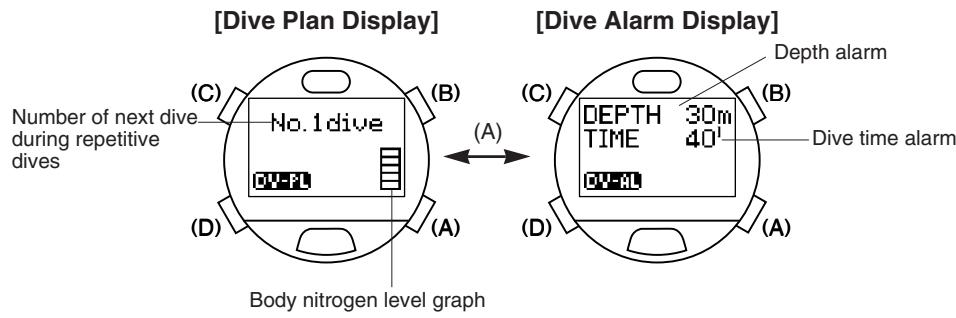
- The watch automatically returns to the time mode of the standard mode when none of the buttons are pressed for about 3 minutes in the dive plan mode.
2. Calling Up No-Decompression Limit Time
(1) The no-decompression limit time corresponding to a depth of 12 m (40 ft) is displayed when button (B) is pressed during the dive plan display. (2) No-decompression limit times can be called up in order for every 3 m (10 ft) of depth each time button (B) is pressed. Repeatedly press button (B) until the depth corresponding to the depth you plan on diving at is displayed.
- No-decompression limit time varies according to the dive depth, dive time of the previous dive and surface interval time from previous dives.
No-decompression limit time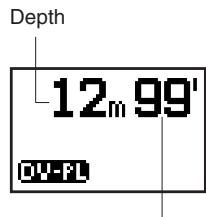
Indicated Depth
This watch displays no-decompression limit time for the following 12 depths:
In order to ensure safe diving, dive while allowing an adequate margin of safety relative to the displayed no-decompression limit time.
3. Dive Alarm
The depth display flashes and an alarm sounds for 15 seconds at 1 minute intervals (for the set number of times) to warn the diver when the diver remains at a depth deeper than the set depth while diving. The alarm stops sounding when the diver ascends to a depth less than the set depth, and sounds again if the diver descends deeper than the set depth.
- Setting range: 10 m (30 ft) to 39 m (130 ft) (1 m (5 ft) units), OFF
- No. of times alarm sounds: 1 to 5 times, ON (no limit)
The dive time display flashes and an alarm sounds for 15 seconds when the set time elapses from the start of the dive. This alarm sounds only once. - Setting range: 5 min to 90 min (5 min intervals), OFF
4. Setting the Dive Alarm
(1) The watch enters the correction state (display is flashing) when button (C) is pressed for at least 2 seconds during the dive alarm display. The flashing item on the display can be corrected. (2) The flashing item changes in the order shown below each time button (C) is pressed.
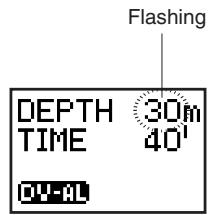

(3) Correct the flashing item by pressing either button (B) or button (A).
- Pressing button (B) advances the display by one step at a time, while pressing button (A) moves the display back by one step at a time. (Pressing either button continuously causes the display to change rapidly.)
- Correction of the number of times the alarm sounds is skipped when the depth alarm is set to OFF.
(4) Pressing button (D) finalizes the settings.
- Set each parameter to OFF when you do not want the depth alarm and dive time alarm to sound.
- The watch automatically returns to the normal dive alarm display when none of the buttons are pressed for about 3 minutes in the correction state (display flashing).
- The watch can be immediately returned to the normal dive alarm display by pressing button (D) in the correction state (display flashing).
5. Dive Alarm Monitor
Each alarm sound repeatedly sounds for 4 seconds each in the order of the depth alarm, dive time alarm and ascent rate alarm for as long as button (B) is pressed during the dive alarm display.
- Refer to the section on "■Warning Functions" for information on the ascent rate warning alarm.
■Using the Scuba Log Mode and Skin Log Mode
The scuba log mode is used to display the scuba diving log automatically recorded by the watch during scuba diving. The skin log mode is used to display the skin diving log automatically recorded by the watch during skin diving. A maximum of 100 sets of log data can be recorded for both scuba diving and skin diving (provided that the dive time of a single dive is within 2 hours and no more than 15 dives each are made in a single day). The contents of log data for a single dive are displayed using three displays for both the scuba log and skin log modes.
1. Calling Up Scuba Diving Log Data
(1) The most recent scuba diving log data is displayed when the watch is switched to the scuba log mode by pressing button (D). (2) The log data that you want to view can be selected by pressing either button (A) or button (B). Logs are identified according to the number of the dive (No.) among the total number of dives.
- Old log data is called up each time button (A) is pressed, while new log data is called up each time button (B) is pressed. (Pressing either button continuously causes the log data to change rapidly.)
(3) The display of the selected log data changes each time button (C) is pressed.
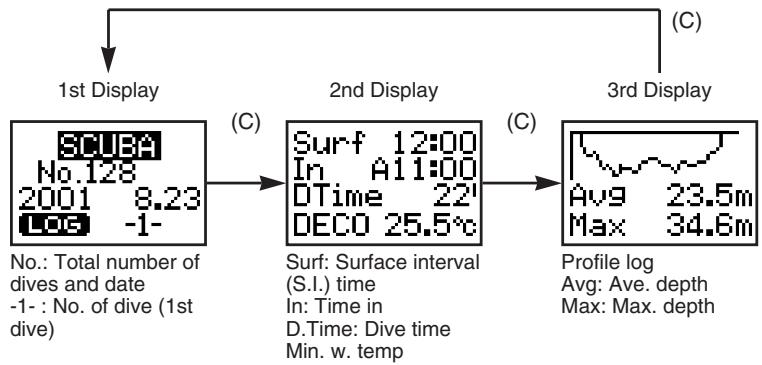
- "DECO" is displayed on the 2nd display when decompression diving has resulted during the course of scuba diving.
- "NO LOG" is displayed when there is no scuba diving log data recorded.
- Maximum depth (max. depth) is displayed as "---- m" when the maximum depth has exceeded 80.0 m (266 ft) while diving.
- The average depth (ave. depth) flashes if an abnormality has occurred in water depth measurement while diving.
- The minimum water temperature (min.w. temp) flashes when the water temperature while diving has exceeded the water temperature measuring range.
- Calling up log data may take some time when there is a large amount of log data recorded. In such cases, "WAIT" is displayed while log data is being called up. The water sensor and none of the button operations function while "WAIT" is displayed.
2. Calling Up Skin Diving Log Data
(1) The most recent skin diving log data is displayed when the watch is switched to the skin log mode by pressing button (D). (2) The log data that you want to view can be selected by pressing either button (A) or button (B). Logs are identified according to the date and dive number. - Old log data is called up each time button (A) is pressed, while new log data is called up each time button (B) is pressed. (Pressing either button continuously causes the log data to change rapidly.) (3) The display of the selected log data changes each time button (C) is pressed.
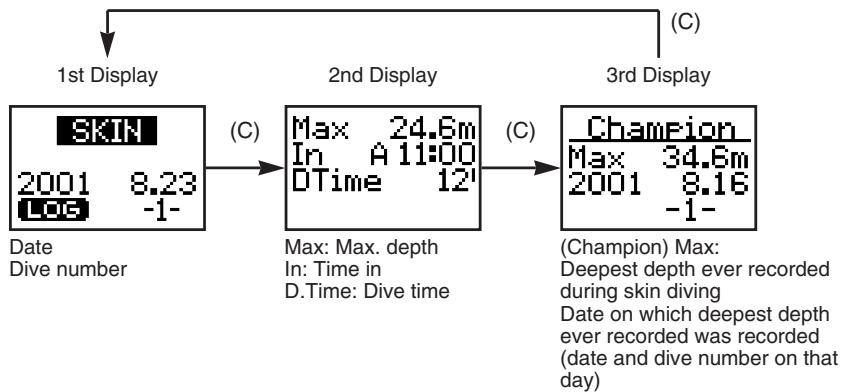
- "NO LOG" is displayed when there is no skin diving log data recorded.
- Maximum depth (max. depth) is displayed as "-- m" when the maximum depth has exceeded 80.0 m (266 ft) while diving.
- Calling up log data may take some time when there is a large amount of log data recorded. In such cases, "WAIT" is displayed while log data is being called up. The water sensor and none of the button operations function while "WAIT" is displayed.
3. Deleting Log Data
Individual sets of log data cannot be deleted. When a new dive is made when there are already 100 sets of dive data recorded for the total dive data of scuba diving log data and skin diving log data, the oldest log data is automatically deleted.

CAUTION
It is strongly recommended to promptly record important log data in another storage medium. When a new dive is made and there are already 100 sets of dive data recorded for the total dive data of scuba diving log data and skin diving log data, the oldest log data is automatically deleted. In addition, since there is also the possibility of data being lost due to a malfunction in the watch or during repairs or inspections, it is recommended to promptly transfer data to a personal computer following completion of diving. Please note that the manufacturer cannot be responsible for data that is lost due to a malfunction.
Using the Dive Mode
This mode is used to measure depth underwater. When the water sensor detects water in any mode other than the transfer mode and low power mode, the watch automatically switches to the dive mode. When the depth exceeds 1 m (4 ft) during the preliminary dive display, measurement of depth begins enabling the watch to display necessary information including current depth, dive time and max. depth for the diver.
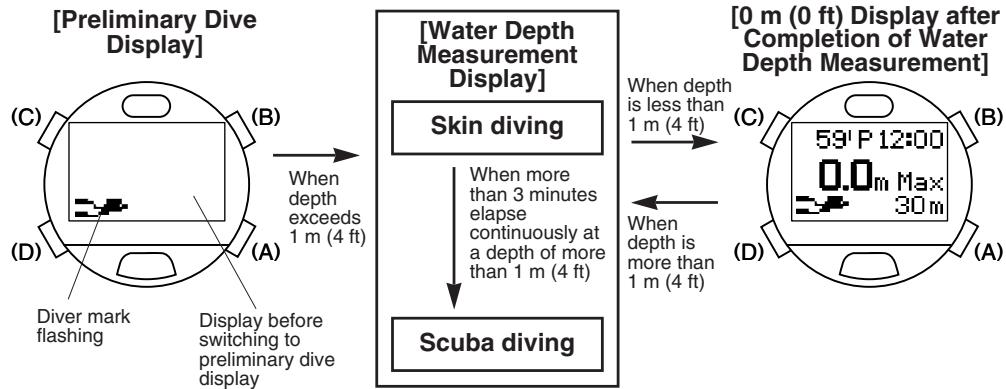
- During the preliminary dive display, the diver mark flashes in the lower left corner of the display, and the display of each mode prior to switching to the preliminary dive display is maintained.
- Once measurement of water depth begins, if diving continues for more than 3 minutes at a depth of more than 1 m (4 ft), the watch switches to the scuba diving display and displays no-decompression limit time.
- The diver mark flashes in the lower left corner of the display while diving.

WARNING
Always make sure to confirm that the "diver mark" is flashing in the lower left corner of the display during the preliminary dive display before beginning a dive. The water depth measurement function does not operate if "BATT", "ERR", "CHK" or other error messages (indicating that a warning function has been activated) are flashing in the lower left corner of the preliminary dive display. In addition, it is recommended to sufficiently charge the watch prior to starting a dive to avoid the watch becoming insufficiently charged while diving even if the insufficient charge warning function ("BATT" display) has not been activated.
- For further details, refer to the section on "■Warning Functions".
1. Reading the Display during Depth Measurement
During skin diving:
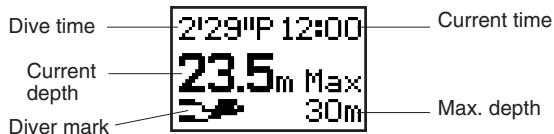
During scuba diving:
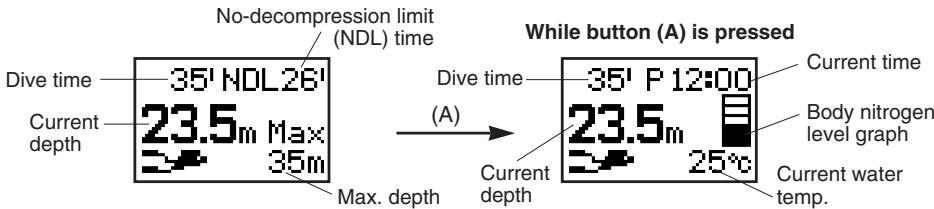
- The current time, water temperature and current body nitrogen level graph are displayed during the time button (A) is pressed during no-decompression diving (except while the safety stop graph is displayed).
A graph serving as a general reference for changes in depth during safety stop and the elapsed time during a safety stop are displayed after having descended to a depth of more than 5 m (15 ft) and then ascended to a depth of 5 m (15 ft) during scuba diving (no-decompression diving).
Reading the Safety Stop Graph
The horizontal axis of the graph represents elapsed time, while the vertical axis represents changes in depth over a range of 3 m (10 ft) to 7 m (23 ft) centering around a depth of 5 m (15 ft).
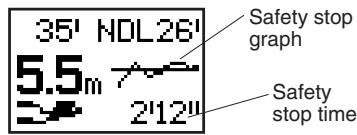
While button (A) is pressed
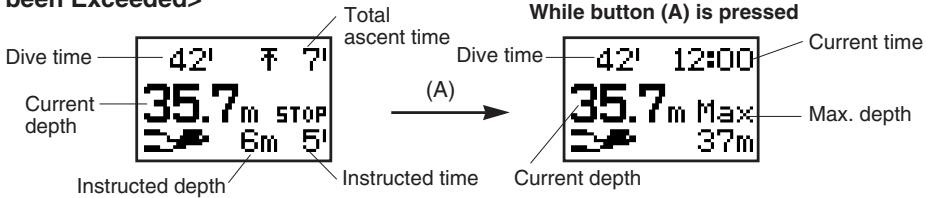
- When diving beyond the no-decompression limit time, an alarm sounds and an instruction to make a decompression stop (STOP) is displayed on the display, indicating that decompression diving has resulted.
- The current time and maximum depth are displayed while the time button (A) is pressed during the decompression dive display (except during the display of the decompression stop graph).
- The watch returns to the no-decompression dive display when the instruction to make a decompression stop is followed.
A graph serving as a general reference for changes in depth is displayed during a decompression stop at a depth of ±1 m (4 ft) of the decompression stop instructed depth.
Reading the Decompression Stop Graph
The horizontal axis of the graph represents elapsed time, while the vertical axis represents changes in depth over a range of ±1 m (4 ft) from the decompression stop instructed depth.
Decompression stop graph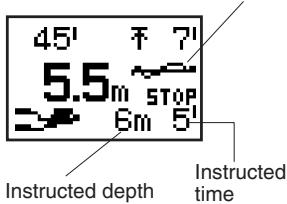

WARNING
Never dive in a manner that requires a decompression stop (decompression diving). If decompression diving should happen to occur, immediately start to ascend while observing an ascent rate of no more than 18 m (60 ft)/min. Make a decompression stop while ascending in accordance with decompression stop instructions.
When making a decompression stop, never ascend to a depth less than the instructed depth. In addition, since it is difficult to maintain a constant depth when there are high waves and so forth, make decompression stops at depths a little deeper than the instructed depth to prevent decompression sickness.
- A permanent error (ERROR) occurs when continuing to dive while ignoring decompression stop instructions during the course of decompression diving, and the watch will not switch to the dive mode for 24 hours after that time.
2. Depth Measurement
This watch measures depth every second, and continuously displays the current depth in 0.1 m (1 ft) units during the course of diving.
- Measuring range: 1 m to 80 m (4 ft to 266 ft)
- 0 m (0 ft) is displayed at depths of less than 1 m (4 ft), while - - - m is displayed at depths greater than 80 m (266 ft).
- When an error has occurred in depth measurement during the course of diving, "ERR" and the diver mark are alternately displayed until that dive is completed.
3. Dive Time Measurement
The elapsed time of dives made to a depth of more than 1 m (4 ft) is displayed. Measurement of dive time starts automatically when the depth exceeds 1 m (4 ft) for the first time, and stops when the depth again is less than 1 m (4 ft). However, if a dive is resumed to a depth of more than 1 m (4 ft) within 10 minutes from the time measurement of dive time stopped, dive time is continued to be measured from the time measurement stopped. Dive time is displayed for up to 9 minutes 59 seconds from the start of measurement in 1 second units. Beyond that time, dive time is displayed in 1 minute units. - Measuring range: 0 minutes 00 seconds to 999 minutes 59 seconds
4. Water Temperature Measurement
The watch starts to measure water temperature beginning 1 minute after the depth exceeds 1.0 m and measures at 1 minute intervals during the course of diving. The most recently measured water temperature is displayed in 1°C (1°F) units during the time button (A) is pressed during the scuba diving display. (The water temperature measured in 0.1°C (0.18°F) units is displayed after rounding to the nearest 1°C (1°F) unit.) - Measuring range: -9.4°C to +40.0°C (15°F to 104°F)
5. No. of Dives Per Day and Recording Log Data
A maximum of 15 sets of log data can be recorded in a single day for both skin diving and scuba diving. When the number of sets of log data exceeds 15, log data is no longer recorded during diving. Even though log data is not recorded, the watch will continue to measure depth and perform its various other functions during diving.
When the number of dives in one day is such that the number of skin dives is 15 or more and the number of scuba dives is 14 or less, although the watch displays "FILE" when the dive is started based on the judgment of the watch being used for skin diving, it judges that the watch is being used for scuba diving 3 minutes later at which time "FILE" disappears from the display and the dive is recorded as log data.
6. Ending the Dive Mode
- The watch returns to the surface mode or the time mode of the standard mode when button (D) is pressed for at least 2 seconds when 0 m (0 ft) is displayed after completion of water depth measurement.
- The watch automatically returns to the surface mode or time mode of the standard mode after roughly 10 minutes have elapsed since 0 m (0 ft) is displayed following water depth measurement.
0 m (0 ft) display after completion of water depth measurement
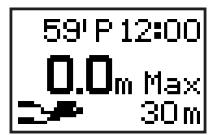
Using the Surface Mode
The surface mode is used to display elapsed time from the end of the most recent scuba dive (S.I. time) and the amount of time remaining until boarding an aircraft is permitted (no fly time).

WARNING
Avoid traveling in an aircraft while the surface mode is activated. Traveling in an aircraft without allowing sufficient time to rest after diving results in the risk of decompression sickness. It is recommended to avoid traveling in an aircraft for at least 24 hours after diving whenever possible even if the surface mode is no longer displayed. There are no rules for completely preventing decompression sickness caused by flying in an aircraft after diving.
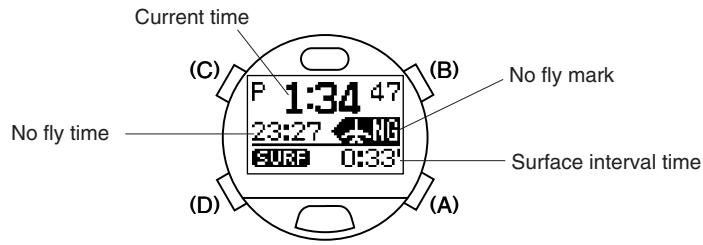
- This mode is preferentially displayed at all times after scuba diving.
- When the no fly time reaches 0 hours 00 minutes, the watch returns to the time mode of the standard mode from the surface mode. The surface mode is not displayed after that time until completion of the next scuba dive.
Low power mode (Temporally function)
The low power mode is a special mode for allowing the watch to run while using the minimum amount of current consumption. When the watch becomes insufficiently charged, it automatically switches to this mode to conserve current consumption by the watch. In addition, the watch can be manually switched to the low power mode by pressing buttons (A) and (D) simultaneously for at least 2 seconds in the time mode of the standard mode.
- Since all functions except for the time/date display and correction functions do not operate in the low power mode, do not use this mode when using (wearing) the watch under normal circumstances.
1. Switching the Display
- The time and date displays switch back and forth each time button (A) is pressed.
- The entire display goes out (no display) when button (D) is pressed for at least 2 seconds during the time display or date display. Pressing button (D) again for at least 2 seconds returns the watch to the time display.
- The watch returns to the time mode of the standard mode (or to the surface mode when the surface mode has been activated) when buttons (A) and (D) are pressed simultaneously for at least 2 seconds during the time display or date display.
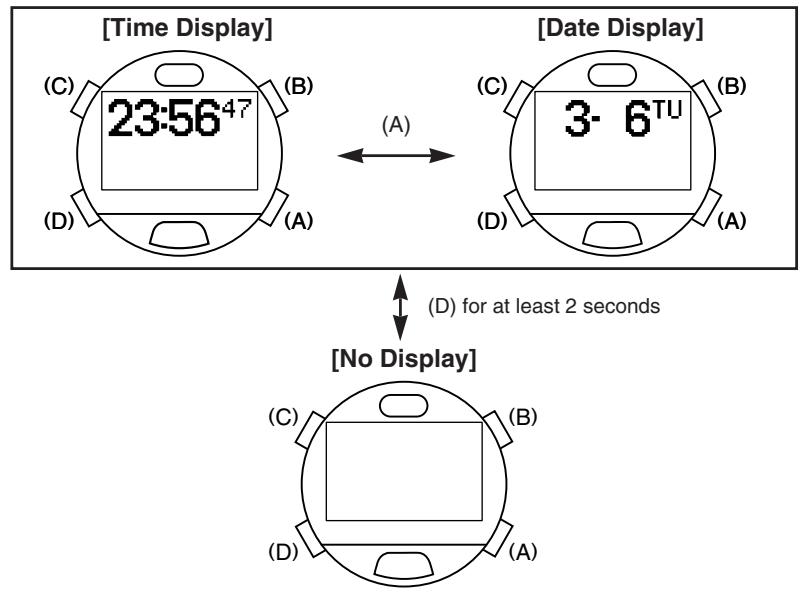
- When the watch has switched to the low power mode as a result of being insufficiently charged, the watch does not return to the time mode of the standard mode even if buttons (A) and (D) are pressed simultaneously for at least 2 seconds. In this case, the watch will only return to the time mode of the standard mode when the watch has been sufficiently charged and buttons (A) and (D) are again pressed simultaneously for at least 2 seconds. If the watch has been left not recharged in the low power mode, it will become completely discharged and all the functions will stop.
- When there is no display, the amount of current consumed is even less than during the time display or date display.
2. Setting the Time and Date
(1) The watch enters the correction state (display is flashing) when button (C) is pressed for at least 2 seconds during the time display or date display. (2) The flashing item changes in the order shown below each time button (C) is pressed.
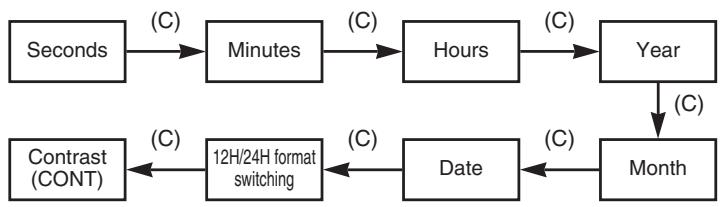
(3) Correct the flashing item by pressing button (B).
- Pressing button (B) advances the display by one step at a time. (Pressing and holding button (B) causes the display to change rapidly.)
- The watch returns to 00 seconds when button (B) is pressed while correcting seconds. (The minutes advance by 1 minute if the seconds are between 30 and 59 at that time.)
- When switching between the 12H and 24H formats, the display toggles between the 12-hour and 24-hour format each time button (B) is pressed.
(4) Pressing button (D) returns the watch to the normal display.
- The time and date of the main location in the time mode of the standard mode can be displayed and corrected in the low power mode. Changes made to the time and date in the low power mode are retained even after returning to the time mode of the standard mode.
- The year can be set from 2000 to 2099.
- Dates such as February 30 that do not actually exist are not displayed even during correction.
- Pay attention to AM (A) and PM (P) when using the 12-hour format.
- The day is corrected automatically by correcting the year, month, and date.
- The watch automatically returns to the normal display (time display or date display) when none of the buttons are pressed for about 3 minutes in the correction state (display flashing).
- The watch can be immediately returned to the normal display by pressing button (D) in the correction state (display flashing).
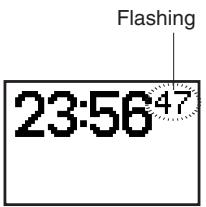
Data Communication Functions
Data is transferred between watches or between the watch and a personal computer using the data communication functions. There are two ways for transferring data: the first involves using the communication unit and USB cable provided with the watch, and the second involves using the infrared communication function.
1. Communication Unit
The communication unit is used when transferring data between the watch and a personal computer and when charging the watch.
- When transferring data between the watch and a personal computer using the communication unit, the USB driver software must be installed in the personal computer. (Refer to the section on "■Accessory Software" for information on the procedure for installing the software.)
CAUTION
The communication unit is composed of precision electronic components. Handle with care. - Store and use the communication unit at a temperature of +10°C to +40°C (50°F to 104°F) and humidity of 20% to 80% (with no condensation of moisture). In addition, avoid storing and using the communication unit in environments subjected to sudden changes in temperature. - Avoid storing and using the communication unit in locations subjected to direct sunlight and high levels of dust. Do not store or use inside an automobile in particular. - Do not attempt to disassemble or modify the communication unit. This can cause a malfunction. - The communication unit does not employ waterproof construction. Do not allow water to splash on it or allow it to become wet. Make sure the watch is not wet when attaching to the communication unit. - Do not use the communication unit in close proximity to a television set or radio. These can cause problems during data transfer. - The communication unit is to be used exclusively with CYBER AQUALAND (Movement No. D700 / D706). Do not connect it to the watches of other manufacturers or other models of Citizen watches. - Only use the USB cable provided. The use of other cables can result in the occurrence of electromagnetic interference or other detrimental effects. - Do not drop the communication unit or subject it to strong impacts. This can cause it to crack and malfunction. - Please be aware that the manufacturer is in no way responsible for damages, lost profit or any other demands from a third party incurred as a result of use of this unit. - Also be aware that the manufacturer is in no way responsible for damages, lost profit or any other demands from a third party incurred as a result of repairs or malfunction of this unit.
Names and Functions of Components
LED (Light Emitting Diode)
This indicates that the communication unit is in the charging state. When the watch is attached to the communication unit, the LED lights and charging begins. The LED remains lit during charging and goes out when charging is completed.
USB Cable Connector
This connector is for connecting the communication unit and a personal computer with the USB cable.
Connection Pins
These pins are for connecting with the charging or data transfer pins of the watch. There are four connections pins. The two center pins are connected to the charging or data transfer pins of the watch, while the two outside pins are connected to the watch case.
Locking Tab
This tab is for holding and locking the watch to the connection pins.
Battery Cover
Open the battery cover to install the batteries. Two batteries are installed in the communication unit body, and two batteries are installed inside the battery cover.
Leg (Removable)
The leg can be removed when attaching watch models with a metal band to the communication unit.
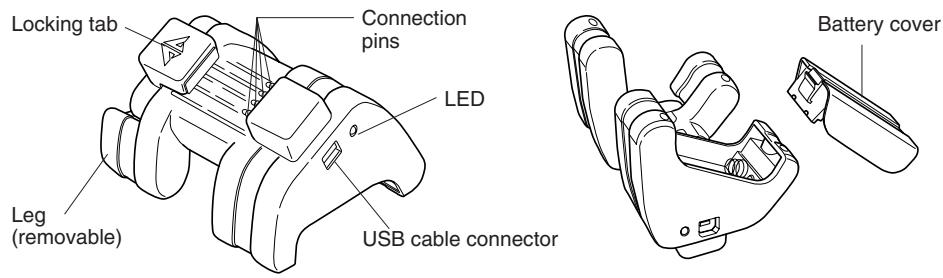
2. Infrared Communication
The infrared communication function of this watch uses an infrared (Ir) beam for communication in the same manner as the remote controllers of television sets and VCRs. Communication is performed between watches or between the watch and a personal computer by transmission and reception of this infrared beam by their respective infrared transmission/reception units.
- The infrared communication function of this watch complies with the international standard IrWW (IrDA for Wrist Watches).
A. Communication Range
The maximum distance for infrared communication with this watch is 15 cm (5.9 inches) in the vertical direction to the infrared transmission/reception unit. Although directivity has a margin of about ±15°, the communication distance becomes shorter as the angle becomes wider.
- Remove any obstacles between the watches or between the watch and the personal computer during infrared communication.
- Data may not be able to be transferred or an error may occur if other infrared communication devices are nearby during infrared communication.
- Avoid moving the watch as much as possible during infrared communication.
- Perform infrared communication within a temperature range of +10°C to +35°C (50°F to 95°F). Data may not be able to be transferred if outside this range.
- Data may not be able to be transferred or an error may occur if infrared communication is performed directly beneath a fluorescent lamp or in direct sunlight.
- When transferring data between the watch and a personal computer using infrared communication, the personal computer also must be set to be able to use infrared communication. Refer to the instruction manual of the personal computer for information on setting the personal computer for infrared communication.
B. Infrared Communication Mode Operating Procedure
The procedure for data transfer by infrared communication is performed with the watch.
(1) The watch enters the infrared communication mode initial display when button (D) is pressed for at least 2 seconds in any mode. (2) The menu changes each time button (C) is pressed, and the sub-menu of the selected menu is displayed when either button (B) or the EL light button is pressed. (The menu indicated with the ♣ mark is the selected menu.) (3) The selected communication menu is activated when button (B) or the EL light button is pressed when the lowermost sub-menu is displayed.
EL light button
- Pressing button (A) when any menu is displayed returns the display to the previous menu.
- The watch returns to the time mode of the standard mode when button (A) is pressed during the initial infrared communication display.
- The watch can be immediately returned to the time mode of the standard mode by pressing button (D) for at least 2 seconds when any menu is displayed.
- The display automatically returns to the previous menu when none of the buttons are pressed for about 1 minute during the display of any menu (or for about 3 minutes during transfer of time data).
- The watch automatically returns to the time mode of the standard mode when none of the buttons are pressed for about 1 minute during the initial infrared communication display.
Infrared Communication Menus

toPC (data transfer between the watch and a PC) Data transfer standby display
toWATCH (transfer of dive alarm settings and anniversary data between watches)
DiveALM (transmission of dive alarms) Transmission display Annivers (transmission of anniversary data) Transmission display WaitDATA (data reception from watch) Data reception standby display
3. Data Communication with PC
There are two ways for transferring data between the watch and a personal computer. The first involves using the communication unit and USB cable provided with the watch, and the second involves using the infrared communication function. Data can be edited on the PC using the software provided (contained on the accessory CD-ROM) after transferring data to the PC. The following indicates data that can be transferred to the PC.
a. Diving Log and Profile Data
Diving data that has been transferred to the PC can be edited and managed using the provided AQUALAND GRAPH 2001 software. For further details, refer to the section on
"Accessory Software" in this manual and the "AQUALAND GRAPH 2001" manual contained in the accessory CD-ROM.
b. Watch Settings
Watch settings that can be transferred to the PC include location information (name and time difference from UTC), alarm, timer, travel time, daily graphic, and dive alarm settings. Setting data incorporated using the provided "CAPgm" software can be edited on the PC, and edited settings can be sent back to the watch. For further details, refer to the section on
"Accessory Software" in this manual and the "CAPgm" manual contained in the accessory CD-ROM.
- The accessory software contained in the accessory CD-ROM must be installed prior to transferring data between the watch and PC.
- Perform communication using the USB interface as well as infrared communication within a temperature range of +10°C to +35°C (50°F to 95°F). Data may not be able to be transferred if outside this range.
A. Preparations for Communication
USB Communication
(1) Connect the personal computer and communication unit with the USB cable by referring to the illustration below.
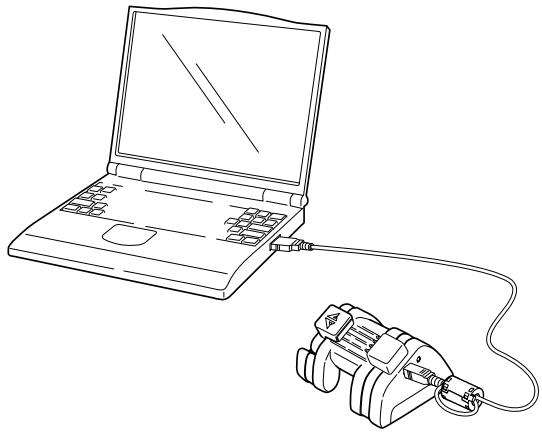
- Always make sure to attach the enclosed ferrite core to the USB cable before use.
- Connect the USB cable directly to the PC and communication unit. Operation is not guaranteed when connecting through a USB hub.
(2) Attach the watch to the communication unit.
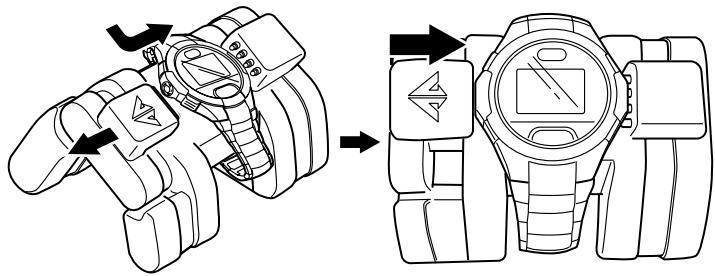
Sufficiently open up the locking tab on the left side of the communication unit, and connect the watch to the communication unit so that the two center connection pins on the communication unit make contact with the two terminals (gold) at the 3:00 position on the watch.
(3) The watch will enter the communication mode (USB communication state) if the watch body is properly connected to the communication unit.
USB Communication Display (Transfer Standby Display)
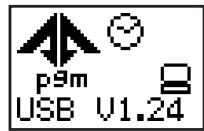
Infrared Communication
The watch is switched to the data transfer standby display of the infrared communication mode.
(1) The watch enters the infrared communication mode (initial display) when button (D) is pressed for at least 2 seconds in any mode. (2) Select "toPC" by pressing button (C) once. (The "*" mark moves to the left of "toPC".) (3) The watch is switched to the data transfer standby display by pressing button (B).
Infrared Communication Mode (Transfer Standby Display)
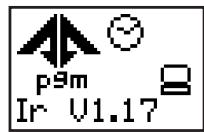
- Refer to part "B. Infrared Communication Mode Operating Procedure" of the previous section "2. Infrared Communication" for a detailed explanation of the procedure for using the infrared communication mode.
B. Sending and Receiving Data
The operations for sending and receiving data are performed with the software provided using a personal computer (AQUALAND GRAPH 2001 or CAPgm). Refer to the AQUALAND GRAPH 2001 or CAPgm manual contained on the CD-ROM provided for further details.
4. Data Communication Between Watches
If your friend or acquaintance has the same type of watch, data can be transferred between watches by using the infrared communication function. Data that can be transferred between watches is indicated below.
- Time settings (time, date, time difference from UTC, daylight savings time) Alarm settings
- Dive alarm (depth alarm, dive time alarm) settings Anniversary data (graphic)
Following data transfer, the watch settings of the receiving watch change according to the watch settings of the sending watch.
- Time and alarm settings can also be transferred between other watches equipped with an infrared communication function that complies with IrWW standards.
Procedure
Refer to part "B. Infrared Communication Mode Operating Procedure" of the previous section "2. Infrared Communication" for an explanation of the procedure for calling up each display.
(1) Switch the watch that is to receive data to the reception standby display of the data you want to receive.
- In the case of time or alarm data, select the "TIME/ALM → Receive" menu, and in the case of dive alarm or anniversary data, select the "toWATCH → WaitDATA" menu.
(2) Switch the watch that is to send data to the transmission display of the data you want to send (last display of the menu). (3) Press button (B) or the EL light button of the sending watch after aligning the respective infrared transmission/reception units of the sending and receiving watches. A
sound is made by both the sending and receiving watches once data transfer begins. There is no sound made by the receiving watch if data transfer has failed (in the case of transferring data between two CYBER AQUALAND watches).
(4) Pressing button (D) for at least 2 seconds on both the sending and receiving watches returns the watches to the time mode of the standard mode.
- One set of anniversary data (graphic) is sent per transmission. The anniversary graphic that will be sent changes each time button (C) is pressed during the Annivers (Anniversary Data Transmission) display.
- When sending time setting data, if the time difference zone (time difference from UTC) of the sending watch is not present in the receiving watch, a temporary location named "IrWW" is created in the receiving watch, and that location is corrected to the same time as the time of the sending watch.
The location "IrWW" cannot be displayed with the "CAPgm" software. After setting the various watch settings on "CAPgm" and sending those settings to the watch, the location "IrWW" is deleted automatically.
■Accessory Software
The CD-ROM provided with the watch contains two application software programs entitled, "AQUALAND GRAPH 2001" and "CAPgm".
AQUALAND GRAPH 2001
This application software is used for editing and managing diving log and profile data.
CAPgm
This application is for making various watch settings on a personal computer.
- Refer to the respective manuals contained on the CD-ROM for further details on how to use AQUALAND GRAPH 2001 and CAPgm.
- Acrobat Reader is required to view the above two manuals and other information. If Acrobat Reader is not installed in the PC you are using, install Acrobat Reader from the CD-ROM provided.
1. Operating Environment
The PC operating environment described below is required for using AQUALAND GRAPH 2001 and CAPgm.
1) PC
PC capable of operating with Windows98, Windows Me, Windows2000 or Windows XP (Pentium 200 MHz and above recommended)
2) Operating System (compatible OS)
Windows98, Windows Me, Windows2000 or Windows XP.
3) Minimum available memory
32 MB (64 MB or more recommended)
4) Hard disk
Available hard disk space of a minimum of 15 MB in the Windows directory and a minimum of 10 MB in the install directory are required during installation
5) Display
Color SVGA display having a minimum resolution of 800 x 600 (256 colors) compatible with Windows98, Windows Me, Windows2000 or Windows XP.
6) Disk Drive
CD-ROM drive (required during installation)
7) USB port or infrared communication port
8) Printer
A printer that can be printed with your PC and a printer driver for the OS compatible with that printer are required to print out graphs and other data.
9) Web Browser
A web browser is required in the case of sending HTML documents of logs and other data.
- The web browser must be correlated with "HTML" files by file correlation.
CAUTION
Please be aware that the manufacturer is in no way responsible for loss or damage of program data, lost profit or any other demands from a third party incurred as a result of using the accessory software.
2. Installation
A. Installing the USB Driver
Install the USB driver from the CD-ROM provided by following the procedure described below. The procedure differs slightly depending on the compatible OS.
- The displays used in the explanation differ depending on the OS language and version.
The explanation here uses the example of an English language OS.
Windows98 or Windows98 SE:
(1) Turn on the power of the PC and confirm that Windows98 or Windows98 Second Edition has started up. (2) End any applications that are currently running on the PC. (3) Place the CD-ROM provided in the CD-ROM drive of the PC. If the AQUALAND GRAPH 2001 installation menu is displayed at this time, click on the "EXIT" button to close this menu. (4) If the communication unit is connected to the USB port of the PC, a message is displayed on the PC indicating that new hardware has been detected and that the PC is searching for the required application software. Once this check of new hardware is completed, the "Add New Hardware Wizard" is displayed.
(5) After confirming the contents, click on "NEXT" to display the screen shown at right. (6) Check that "Search for the best driver for your device" has been selected and then click on "NEXT". The display changes to the screen shown at right.
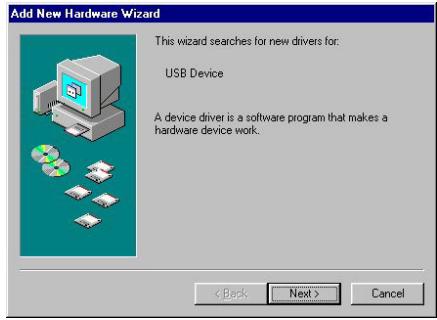
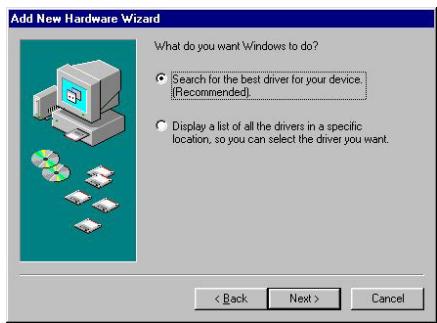
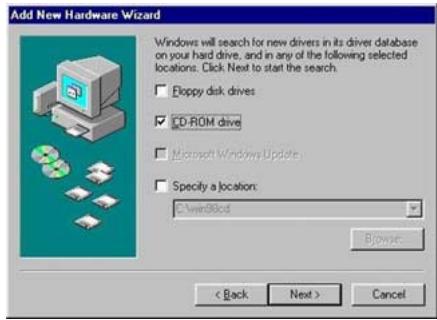
(7) Select "CD-ROM drive" and click on "NEXT". The display changes to the screen shown at right.
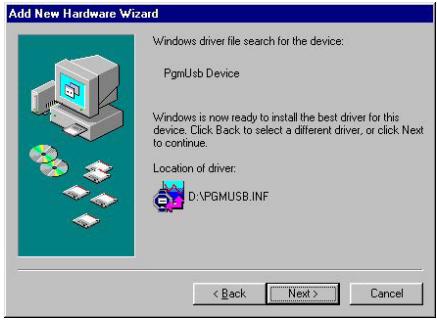
(8) Click on "NEXT" to begin installing the driver. When installation is completed, the display changes to the screen shown at right.
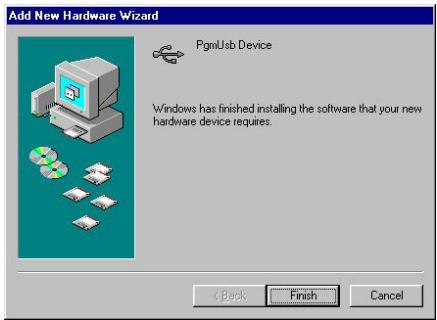
(9) Click on "Finish" to display the screen shown at right.
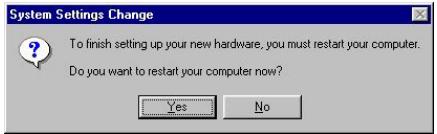
(10) Click on "YES". Windows is restarted and data can now be transferred using the USB interface.
Windows Me:
(1) Turn on the power of the PC and confirm that Windows Me has started up. (2) End any applications that are currently running on the PC. (3) Place the CD-ROM provided in the CD-ROM drive of the PC. If the AQUALAND GRAPH 2001 installation menu is displayed at this time, click on the "EXIT" button to close this menu. (4) If the communication unit is connected to the USB port of the PC, a message is displayed on the PC indicating that new hardware has been detected and that the PC is searching for the required application software. Once this check of new hardware is completed, the "Add New Hardware Wizard" is displayed.
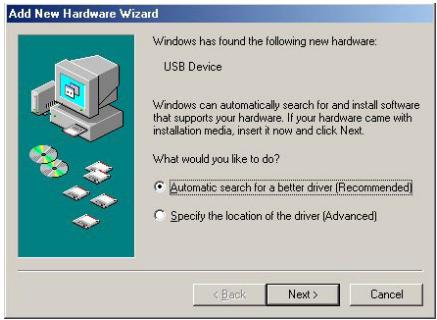
(5) After confirming the contents, click on "NEXT" to install the suitable driver from the CD-ROM and display the screen shown at right.
(6) Click on "Finish". Data can now be transferred using the USB interface.
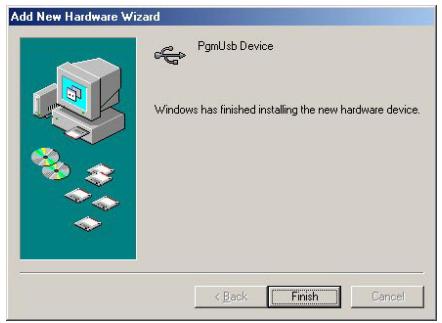
Windows2000:
(1) Turn on the power of the PC and confirm that Windows2000 has started up. (2) End any applications that are currently running on the PC. (3) Place the CD-ROM provided in the CD-ROM drive of the PC. If the AQUALAND GRAPH 2001 installation menu is displayed at this time, click on the "EXIT" button to close this menu. (4) If the communication unit is connected to the USB port of the PC, the screen at right is displayed.
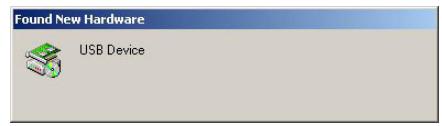
Once the check for detecting new hardware has been completed, the "Found New Hardware Wizard" is displayed.
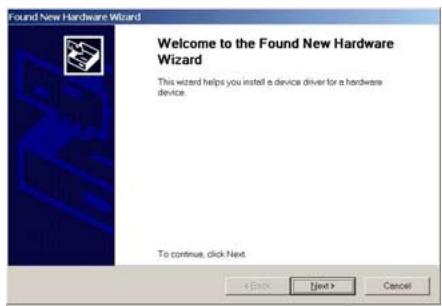
(5) After confirming the contents, click on "NEXT" to display the screen shown at right.
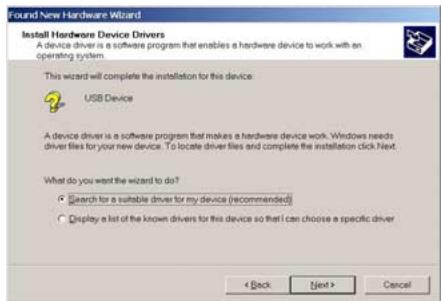
(6) Check that "Search for a suitable driver for my device" has been selected and then click on "NEXT". The display changes to the screen shown at right.
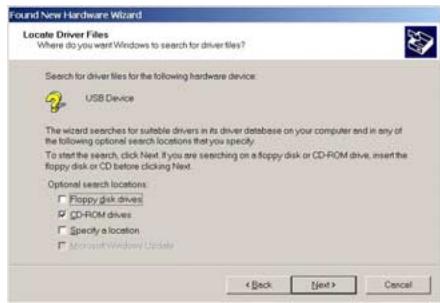
(7) Confirm that "CD-ROM drives" is selected and then click on "NEXT". The display changes to the screen shown at right.
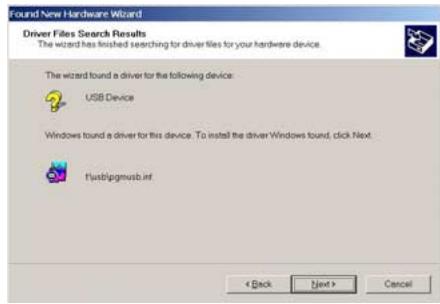
(8) Confirm the contents and then click on "NEXT". The display changes to the screen shown at right.
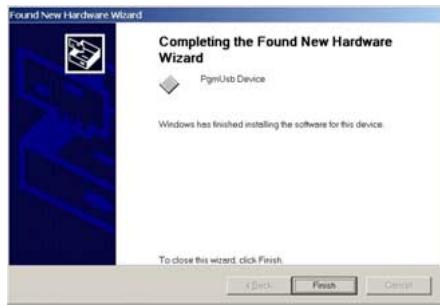
(9) Click on "Finish". Data can now be transferred using the USB interface.
Windows XP:
(1) Turn on the power of the PC and confirm that Windows XP has started up. (2) End any applications that are currently running on the PC. (3) Place the provided CD-ROM into the PC's CD-ROM drive. If the AQUALAND GRAPH 2001 installation menu is displayed at this time, click on the "EXIT" button to close this menu.
(4) If the communication unit is connected to the USB port of the PC, the screen shown at right is displayed.
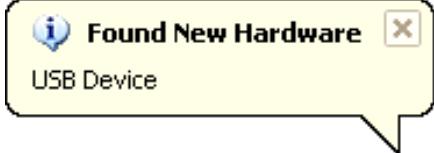
Once the check for detecting new hardware has been completed, the "Found New Hardware Wizard" is displayed.
(5) Confirm that [Install the software automatically {Recommended}] is selected and then click on "Next". The software is automatically detected and will start installing it. Notice: It may take some time to detect the software.
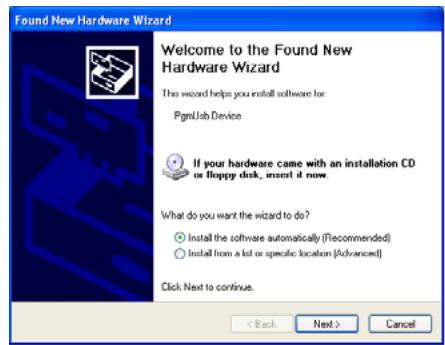
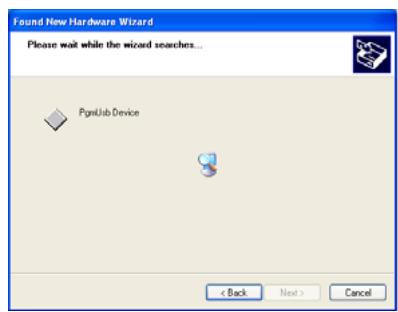
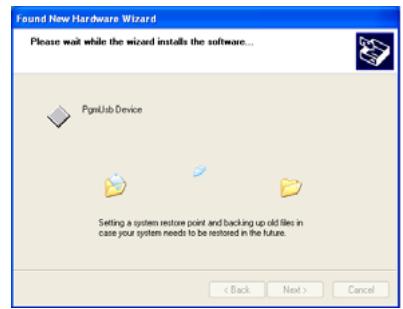
(6) After installation is completed, the screen shown at right is displayed. (7) Click on "Finish". Data can now be transferred using the USB interface.
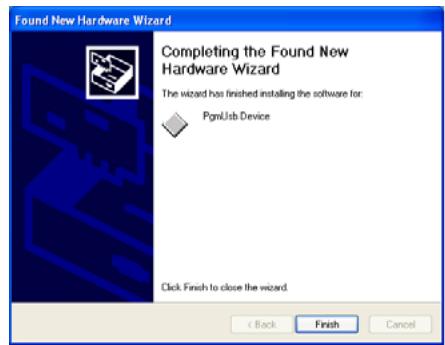
- After installing the USB driver, remove the CD-ROM from the CD-ROM drive and keep it in a safe place.
- Installation of the USB driver is only performed once before transferring data using the communication unit for the first time. It is no longer required to be installed prior to subsequent data transfer. However, when transferring data using the communication unit for the first time with a different PC, the driver must again be installed in that PC.
B. Installing AQUALAND GRAPH 2001 (accessory software)
When AQUALAND GRAPH 2001 is installed from the provided CD-ROM by following the procedure described below, both AQUALAND GRAPH 2001 and CAPgm are installed simultaneously.
(1) Turn on the power of the PC and confirm that the operating system (OS) has started up. (2) Place the provided CD-ROM into the PC's CD-ROM drive. The AQUALAND GRAPH 2001 installation menu is displayed automatically. If the installation menu is not displayed, double-click on "install.exe" contained on the CD-ROM inserted into the CD-ROM drive to display the installation menu.
(3) Click on "Install AQUALAND GRAPH 2001". Installation begins and the screen shown at right is displayed.
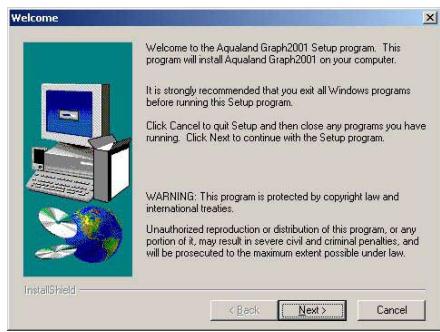
(4) Confirm the contents and then click on "NEXT" to display the screen shown at right.
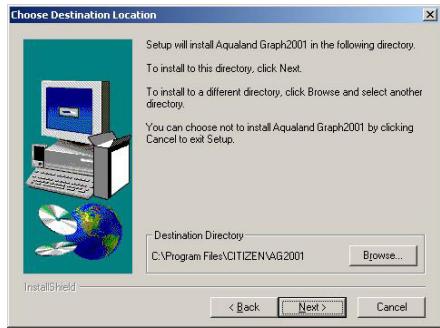
(5) If you want to change the directory where the applications are installed, click on "Browse" and change to the desired directory. Confirm the contents and click on "NEXT" to install the applications. The screen shown at right is then displayed.
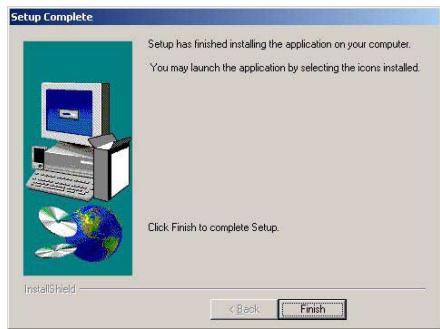
(6) Click on "Finish" to complete the installation procedure.
C. Startup and Ending AQUALAND GRAPH 2001 and CAPgm
1. Startup of AQUALAND GRAPH 2001 and CAPgm
Click on the Start button in the task bar and then select Program, Aqualand Graph 2001 and then Aqualand Graph 2001 or CAPgm in that order to start up the respective application.
2. Ending AQUALAND GRAPH 2001 and CAPgm
Either click on the [X] button in the upper right corner of the main window or select [EXIT (X)] from the pull-down menu after selecting the [File (F)] menu (or the [CAPgm (C)] menu in the case of CAPgm), to end the respective application.
All Reset
The time, date and all other watch settings are returned to their initial (default) settings when the all reset procedure is performed. Perform this all reset procedure in the following cases.
- There is an error in the watch display
- When charging the watch after it has stopped completely as a result of being insufficiently charged
Even if the all reset procedure is performed, location settings (displayed locations, names of locations), diving logs, daily graphics and anniversary graphics that have been set by the user in the PC remain without being deleted. However, it should be noted that only diving data acquired prior to performing the all reset procedure on the day the all reset procedure is performed may be deleted.
Procedure
(1) Simultaneously press and then simultaneously release buttons (A), (B), (C) and (D). - All of the display elements on the watch are displayed after an alarm sounds and "INITIALIZE" is displayed. (2) Press any of the buttons while all the display elements are displayed. - The watch displays the time mode of the standard mode after "LOADING" is displayed.
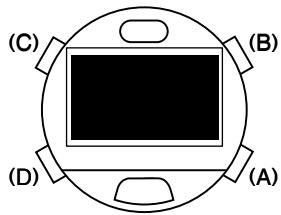
This completes the all reset procedure. Correctly reset the time and date as well as other modes after performing the all reset procedure.
- When the All-Reset procedure is performed, is reset to zero. If you want to continue counting from the previous log number, re-enter the previous log number for with the CAPgm software provided.
- Although an alarm sounds every second while all of the display elements of the watch are displayed, this is not a malfunction.
- If all of the display elements are not displayed after performing step (1) of the procedure (such as when the alarm continues to sound without the display changing), repeat step (1) of the procedure.
- The watch automatically returns to the time mode of the standard mode if none of the buttons are pressed for about 2 minutes while all of the display elements are displayed after performing step (1) of the procedure. The all reset procedure is completed in this case as well.
■ Formatting Flash Memory
The following data recorded in the watch's flash memory is deleted when the flash memory is formatted.
- Location settings made on the PC (displayed locations, names of locations)
- Scuba diving and skin diving logs
- Daily and anniversary graphics

CAUTION
Formatting flash memory is performed when the flash memory has happened to become damaged. Please note that incorrect use of this function can cause important diving and other data to be lost. Formatting flash memory is not required during the course of normal use of this watch. Please be aware that the manufacturer is not responsible for log data or other data having been lost as a result of a malfunction or other reasons.
Procedure
(1) Press button (B) in the system monitor mode of the standard mode to switch the watch to the Flash Memory Status Display. (2) Formatting of flash memory begins when button (B) is pressed while pressing button (C) simultaneously for at least 2 seconds.
- "Format" is displayed while formatting is in progress, after which "Done" is displayed when formatting is completed.
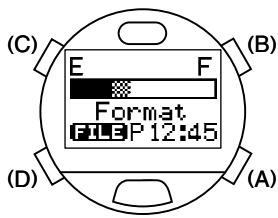
- Although location settings made on the PC and daily graphic data may be displayed immediately after formatting flash memory, this is only the result of the watch displaying data it has temporarily stored in memory. In actuality, data is deleted from flash memory. Temporarily displayed location settings and graphic data are not displayed after switching to the communication mode or dive mode (after additional data has been reincorporated into flash memory).
Troubleshooting
| Problem | Possible Cause | Solution |
| Entire display is blank | The watch is in the low power mode with the display off. | The display will return when button (D) is pressed for at least 2 seconds. |
| The watch has stopped due to being insufficiently charged. | Sufficiently charge the watch using the communication unit. | |
| Watch does not switch to dive mode | The insufficient charge warning function ("BATT" display) has been activated as a result of the watch being insufficiently charged. (The watch cannot be switched to the dive mode if it is insufficiently charged.) | Attach the watch to the communication unit and sufficiently charge. |
| A permanent error occurred during the previous dive (decompression diving). * If a permanent error occurs during diving, the watch cannot be switched to the dive mode for 24 hours after completion of that dive. | The permanent error will be reset after 24 hours have elapsed. | |
| The water sensor check warning ("CHK" display) has been activated. | After rinsing off any debris around the water sensor with water, completely wipe off the water with a dry cloth. | |
| Unable to end dive mode | If the water sensor remains activated by perspiration or other moisture in a high altitude environment subject to rapid changes in air pressure in a short period of time (such as when traveling in an aircraft), when there is a change in air pressure of 1000 hpa or more, the depth display may not return to 0 m (0 ft) preventing the dive mode from being canceled even after returning to a low altitude (on the ground). | The watch returns to the time mode of the standard mode when button (D) is pressed for at least 10 seconds. * However, the diving data for that dive is not recorded when the dive mode is ended with this procedure. |
| Alarm does not sound EL light is not illuminated | The insufficient charge warning function ("BATT" display) has been activated as a result of the watch having become insufficiently charged (watch functions are limited when the watch has become insufficiently charged). * The alarm also does not sound if the alarm sound has been set to "Silent". | Attach the watch to the communication unit and sufficiently charge. |
| Problem | Possible Cause | Solution |
| Low display contrast | The ambient temperature may be too low. The display contrast may decrease in low-temperature environments. | The display returns to normal when the watch is returned to a normal temperature. When desiring to temporarily increase the contrast in low-temperature environments, you can correct the contrast in the correction state of the time mode of the standard mode. |
| Excessive time required for switching modes | If the amount of flash memory being used becomes excessively large, the amount of time required to switch modes and call up log data may become slightly longer. | Perform the garbage collection procedure in the system monitor mode of the standard mode. If a large amount of diving log data is recorded, however, slightly more time may still be required to call up the display as compared with the initial state. This is not a malfunction. |
| The "CHK" (Check) display remains displayed for a long time. | The water sensor continues to remain activated due to the presence of sand, debris or perspiration and so forth adhering to the water sensor. | After rinsing off any debris around the water sensor with water, completely wipe off the water with a dry cloth. |
| The "ERR" (Error) display remains displayed for a long time. · "ERR" is displayed during use on land (except for at high altitudes of 4000 m (13000 ft) or more above sea level) · "ERR" remains displayed for a long time after completion of diving | This indicates a problem with the pressure sensor ("ERR" may be displayed at high altitudes of 4000 m (13000 ft) or more above sea level). | Discontinue using the watch and consult with a Citizen Service Center. (Refer to the section on "■Warning Functions" for further details.) |
| Abnormal display or operation (such as the digital display being incorrect or the alarm sounding continuously) | If the watch is inadvertently subjected to a strong impact or intense static electricity, the display or operation of the watch may rarely become abnormal. | Perform the all reset procedure. If the problem is not solved, try formatting flash memory after performing the all reset procedure. If the problem is still not solved, consult with a Citizen Service Center. |
■Handling Precautions (for the watch)

WARNING Water Resistance Performance
This watch is water resistant to 200 meters. Although it can be used for air diving using an air tank (scuba diving), it cannot be used for saturation diving involving the use of helium gas.
| Examples of Use | |||||
| Indication | Minor exposure to water (washing face, rain, etc.) | Moderate exposure to water (washing, kitchen work, swimming, etc.) | Skin diving, marine sports | Scuba diving using an air tank | Saturation diving using helium gas |
| Case (case back) | |||||
| AIR DIVER'S 200m | OK | OK | OK | OK | NO |

CAUTION
- In order to maintain water resistance performance, have your watch inspected at a Citizen Service Center once every one to two years, and have the gaskets, crystal or other components replaced as necessary.
- If moisture has entered the watch, or if the inside of the glass is fogged up and does not become clear for an extended period of time, do not leave the watch in that state, but rather immediately take the watch to a Citizen Service Center for inspection and repair.
- If sea water enters the watch, place the watch in a box or plastic bag, and immediately take it in for repair. Otherwise, pressure inside the watch will increase and parts (such as the glass and buttons) may come off.

WARNING Handling of Secondary Battery
- Do not attempt to remove the secondary battery from the watch. If the secondary battery must be unavoidably removed, place it in a location out of the reach of children to prevent accidental swallowing.
- If the secondary battery is accidentally swallowed, contact a physician immediately and seek medical attention.

WARNING Only Use Specified Secondary Battery
- Never attempt to use a secondary battery other than the secondary battery used by this watch. Although the structure of the watch prevents the watch from operating if another battery is installed, if a silver battery or other type of battery is forcibly installed in the watch and the watch is attempted to be charged with that battery installed, the battery may rupture resulting in possible damage to the watch and physical injury. Always make sure to use the specified secondary battery when replacing.

CAUTION Repairs
All parts of this watch, excluding the band, are to be repaired only at a Citizen Service Center. Please have all inspections and repairs performed at a Citizen Service Center.

CAUTION Keep your watch clean
- The case and band of the watch come in direct contact with the skin in the same manner as clothing. Metal corrosion as well as perspiration, dirt, dust and other unnoticed debris may soil the cuffs and other parts of your clothing. Try to keep the watch clean at all times.
- Wearing of this watch may cause a rash or itching of the skin in people with sensitive skin or depending on the wearer's physical condition. If you notice that you skin is affected by the watch, immediately stop wearing it and consult a physician.
- Use a soft cloth to wipe off dirt, perspiration and moisture from the case and crystal.
- Rinse off dirt from metal bands, plastic bands or rubber bands with water. Use a soft brush to remove any dirt or debris stuck between the gaps in metal bands.
- Avoid the use of solvents (such as thinner or benzine) as they may damage the finish.

CAUTION Precautions When Wearing the Watch
- Be careful while wearing the watch while holding an infant or child, by taking the watch off beforehand, to prevent injury or other accident.
- Be careful when engaged in vigorous exercise or work to prevent injury and accidents to yourself and others.
- Never wear the watch in a sauna or other locations where the watch can reach high temperatures since this can cause burns.

CAUTION Handling of the Band (Cautions when Putting on and Taking Off the Watch)
Depending on the structure of the band buckle, be careful not to injure your fingernails when putting on and taking off the watch.
The watch may not function or stop running if exposed to temperatures outside the range of 0°C to 50°C (32°F to 122°F). In addition, although the liquid crystal display may also become illegible outside this temperature range, it will return to normal when the watch is returned to normal temperatures.
- Correct water depth measurement values are not displayed at temperatures outside the range of +10°C to +40°C (50°F to 104°F). Data cannot be transferred outside the range of +10°C to +35°C (50°F to 95°F).
Since the IC used in quartz watches is susceptible to static electricity, the display may become incorrect if the watch is subjected to intense static electricity like that generated by a television screen.
Do not subject the watch to violent shocks such as that resulting from being dropped on the floor.
Avoid using the watch in environments containing chemical agents and gases. If solvents such as thinner or benzine, as well as articles containing such substances (including gasoline, fingernail polish, cresol, bathroom cleaners and adhesives) become adhered to the watch, they can cause discoloration, deterioration and cracking. Use ample caution when handling chemicals. In addition, contact with mercury used in thermometers and so forth can cause the case and band to become discolored.
- When not using the watch for an extended period of time, carefully wipe off any perspiration, dirt or moisture from the watch and store in a location preferably free of high and low temperatures, high humidity.
■Specifications
- Movement No.: D700 (meter) / D706 (feet)
- Crystal oscillation frequency: 32,768 Hz (Hz = number of oscillations per second)
- Operating temperature range: 0°C to +50°C (32°F to 122°F)
- Accuracy: ±20 seconds per month on average (when worn at a normal temperature of +5°C to +35°C (41°F to 95°F))
- Water depth gauge accuracy: Within ±(3% of displayed value +0.3 m (1 ft)) (when using at a constant temperature)
- Guaranteed accuracy temperature range: +10°C to +40°C (50°F to 104°F) (accuracy of water depth measurement is subjected to the effects of changes in the temperature at which the watch is worn)
- Water temperature measurement accuracy: Displayed value ±3°C (6°F)
- Modes and Main Functions
- Time: Hours, minutes, seconds, location, Battery charge indicator, daily graphic (must be set with PC)
- Date: Month, date, day, year (during correction only)
- Travel Time: Month, date, hours, minutes, seconds, location, time difference from UTC and time of time mode
- Destination Timer: Time remaining until arrival at destination, arrival time (location, month, date, day, hours, minutes)
- Alarm: Alarm time (hours, minutes)
- Chronograph: Hours, minutes, seconds, 1/100 seconds, split time (time measured for 100 hours)
- Timer: Minutes, seconds (can be set up to 99 minutes in 1 minute units)
- System Monitor: Battery charge indicator, flash memory status display
- Dive Plan: Dive number, body nitrogen level graph, no-decompression limit time, depth alarm (setting of depth and number of times alarm sounds), dive time alarm (setting of dive time)
- Scuba Diving Log: Total number of dives, dive date, dive number, S.I. time, time in, dive time, min. water temperature, record of decompression diving, max. depth, average depth, profile log
- Skin Diving Log: Dove date, dive number, max. depth, time in, dive time, deepest depth ever recorded and date recorded
- Dive: Current time, current depth, dive time, max. depth, no-decompression limit time, water temperature, body nitrogen level graph, safety stop graph, safety stop time, decompression stop indicator, decompression stop graph
- Surface mode: Elapsed time after diving (max. 24 hours), no fly time Infrared communication mode
- Low power mode: Time display, date display, no display
- Other Additional Functions
EL light Water sensor - Various warning functions (insufficient charge warning, file error warning, abnormal pressure detection error warning, water sensor check warning, ascent rate warning, abnormal depth warning, decompression diving warning, limit depth warning, permanent error warning) - Data communication functions: Data communication using infrared and USB interfaces (for data transfer between watch and a personal computer or between two watches) * Data communication operating temperature range: +10°C to +35°C (50°F to 95°F)
- Battery: Secondary battery, 1 pc. (charged by communication unit)
- Continuous Usage Times:
From fully charged to insufficient charge warning: Approx. 1 month - From insufficient charge warning to low power mode: Approx. 2 days - From low power mode to watch stopping: Approx. 3 days * Refer to the section on "■ Battery charge Indicator and Continuous Usage Time" for information on the operating conditions for continuous usage times.
- Model: CMUT-02 (used exclusively with watch movement no. D700 / D706)
- Applications: Charging and data communication using USB cable
- Operating and storage conditions: temperature +10°C to +40°C (50°F to 104°F), humidity 20% to 80% (no condensation of moisture)
- Power Source:
- During data communication: Uses power supplied by USB cable
- During charging: 4 size AA alkaline batteries
- Current Consumption:
- During data communication: Max. 30 mA. During charging: 20 mA
- Dimensions: 10.2 (W) x 9.1 (D) x 6.9 (H) cm (4.0 (W) x 3.6 (D) x 2.7 (H) inch)
- Weight: 125 g (excluding batteries)
- Specifications are subject to change without notice.


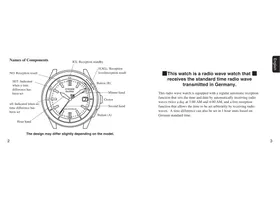
- FIRST, CANCEL THE LOW POWER MODE
- INTRODUCTION
- SAFETY PRECAUTIONS: OBSERVE AT ALL TIMES
- WARNING
- CAUTION
- DATA STORAGE
- CONTENTS
- CHECKING ACCESSORIES
- ATTACHMENT OF FERRITE CORE
- BEFORE USE
- INSTALLING BATTERIES IN COMMUNICATION UNIT
- CHARGING THE WATCH
- WATCH DISPLAY DURING CHARGING
- CAUTIONS REGARDING USE DURING DIVING
- PROHIBITED PROHIBITED USE DURING DIVING
- WARNING CAUTIONS REGARDING USE DURING DIVING
- CAUTION: FRESH WATER DIVING
- FEATURES
- THIS WATCH IS PROVIDED WITH NUMEROUS CONVENIENT FUNCTIONS USED DURING DIVING
- VARIOUS WATCH FUNCTIONS CAN BE SET ON YOUR PC
- THIS WATCH IS ALSO EQUIPPED WITH AN INFRARED COMMUNICATION FUNCTION
- NO NEED TO CHANGE THE BATTERY
- OTHER CONVENIENT FUNCTIONS
- NAMES OF COMPONENTS
- DISPLAY MODE (FUNCTIONS)
- STANDARD MODE
- TIME MODE
- TRAVEL TIME MODE TEV
- DESTINATION TIMER MODE DET
- ALARM MODE ALM
- CHRONOGRAPH MODE CHR
- TIMER MODE THF
- SYSTEM MONITOR MODE BATT / FILE
- DIVE PLAN MODE DFL
- SCUBA LOG MODE - SCUBA (LOE)
- SKIN LOG MODE - SKIN LOG
- DIVE MODE
- SURFACE MODE SUR
- INFRARED COMMUNICATION MODE
- LOW POWER MODE (TEMPORALLY FUNCTION)
- BATTERY CHARGE INDICATOR AND CONTINUOUS USAGE TIME
- HOW TO READ THE BATTERY CHARGE INDICATOR
- CONTINUOUS USAGE TIME
- THIS IS ROUGHLY BASED ON THE CONDITIONS OF USE INDICATED BELOW
- SWITCHING THE MODE
- USING THE EL LIGHT
- USING THE STANDARD MODE
- SWITCHING THE DISPLAY
- SETTING THE TIME AND DATE
- DAILY GRAPHIC
- TRAVEL TIME MODE
- SETTING THE TRAVEL TIME
- INTERCHANGING LOCATIONS BETWEEN TRAVEL TIME MODE AND TIME MODE
- DESTINATION TIMER MODE
- SETTING THE DESTINATION TIMER
- DESTINATION TIMER MEASURING PROCEDURE
- ALARM MODE
- ALARM ON/OFF AND ALARM MONITOR
- SETTING THE ALARM
- CHRONOGRAPH MODE
- READING THE DISPLAY
- CHRONOGRAPH TIMING PROCEDURE
- TIMER MODE
- SETTING THE TIMER
- TIMER MEASURING PROCEDURE
- SYSTEM MONITOR MODE
- BATTERY CHARGE INDICATOR
- G.C.: GARBAGE COLLECTION
- DIVING FUNCTION
- IR: INFRARED COMMUNICATION FUNCTION
- FLASH MEMORY STATUS DISPLAY
- GARBAGE COLLECTION OPERATING PROCEDURE
- LOCATIONS DISPLAYED BY THIS WATCH
- LOCATIONS PRE-REGISTERED IN THIS WATCH
- LOCATION "IRWW
- WARNING FUNCTIONS
- INSUFFICIENT CHARGE WARNING
- FILE ERROR WARNING
- ABNORMAL PRESSURE DETECTION ERROR WARNING
- WATER SENSOR CHECK WARNING
- ASCENT RATE WARNING
- ABNORMAL DEPTH WARNING
- DECOMPRESSION DIVING WARNING
- EXCEED MAXIMUM DEPTH WARNING
- PERMANENT ERROR WARNING
- DIVING TERMS USED BY THIS WATCH
- USING THE DIVE PLAN MODE
- CALLING UP NO-DECOMPRESSION LIMIT TIME
- INDICATED DEPTH
- DIVE ALARM
- SETTING THE DIVE ALARM
- DIVE ALARM MONITOR
- USING THE SCUBA LOG MODE AND SKIN LOG MODE
- CALLING UP SCUBA DIVING LOG DATA
- CALLING UP SKIN DIVING LOG DATA
- DELETING LOG DATA
- USING THE DIVE MODE
- READING THE DISPLAY DURING DEPTH MEASUREMENT
- DURING SCUBA DIVING
- READING THE SAFETY STOP GRAPH
- WHILE BUTTON (A) IS PRESSED
- READING THE DECOMPRESSION STOP GRAPH
- DEPTH MEASUREMENT
- DIVE TIME MEASUREMENT
- WATER TEMPERATURE MEASUREMENT
- NO. OF DIVES PER DAY AND RECORDING LOG DATA
- ENDING THE DIVE MODE
- USING THE SURFACE MODE
- DATA COMMUNICATION FUNCTIONS
- COMMUNICATION UNIT
- NAMES AND FUNCTIONS OF COMPONENTS
- LED (LIGHT EMITTING DIODE)
- USB CABLE CONNECTOR
- CONNECTION PINS
- LOCKING TAB
- BATTERY COVER
- LEG (REMOVABLE)
- INFRARED COMMUNICATION
- COMMUNICATION RANGE
- INFRARED COMMUNICATION MODE OPERATING PROCEDURE
- INFRARED COMMUNICATION MENUS
- DATA COMMUNICATION WITH PC
- DIVING LOG AND PROFILE DATA
- WATCH SETTINGS
- PREPARATIONS FOR COMMUNICATION
- USB COMMUNICATION
- SENDING AND RECEIVING DATA
- DATA COMMUNICATION BETWEEN WATCHES
- PROCEDURE
- ACCESSORY SOFTWARE
- AQUALAND GRAPH
- CAPGM
- OPERATING ENVIRONMENT
- INSTALLATION
- INSTALLING THE USB DRIVER
- WINDOWS98 OR WINDOWS98 SE
- WINDOWS ME
- WINDOWS
- WINDOWS XP
- INSTALLING AQUALAND GRAPH 2001 (ACCESSORY SOFTWARE)
- STARTUP AND ENDING AQUALAND GRAPH 2001 AND CAPGM
- STARTUP OF AQUALAND GRAPH 2001 AND CAPGM
- ENDING AQUALAND GRAPH 2001 AND CAPGM
- ALL RESET
- FORMATTING FLASH MEMORY
- TROUBLESHOOTING
- HANDLING PRECAUTIONS (FOR THE WATCH)
- WARNING WATER RESISTANCE PERFORMANCE
- WARNING HANDLING OF SECONDARY BATTERY
- WARNING ONLY USE SPECIFIED SECONDARY BATTERY
- CAUTION REPAIRS
- CAUTION KEEP YOUR WATCH CLEAN
- CAUTION PRECAUTIONS WHEN WEARING THE WATCH
- CAUTION HANDLING OF THE BAND (CAUTIONS WHEN PUTTING ON AND TAKING OFF THE WATCH)
- SPECIFICATIONS
Brand : CITIZEN WATCH
Model : D70
Category : Smartwatch